Amazon FSx Family Decision Guide - Choosing Between Lustre, NetApp ONTAP, OpenZFS, and Windows File Server
First Published:
Last Updated:
Amazon FSx is where those requirements go. It is not one file system. It is four separate managed file systems — FSx for Lustre, FSx for NetApp ONTAP, FSx for OpenZFS, and FSx for Windows File Server — that share an API surface, a backup model, and a console, and share very little else. They speak different protocols, use different identity models, offer different deployment topologies, and expose different storage classes under different conditions. Choosing between them is a real design decision, and it is one that is expensive to revisit, because the two most consequential properties — deployment type and storage class — are fixed when the file system is created.
This guide is a decision hub for that choice. It does not re-teach each file system end to end. It gives you an ordered set of input conditions, shows which engine each combination points to, and then goes deep enough on each engine that you can tell whether the pointer was right. For the internals of object storage, which this guide deliberately treats as a different problem, see How Amazon S3 Achieves Strong Consistency and Durability.
This article answers three questions:
- What am I actually choosing between? What does each engine implement, and what does each one refuse to do?
- How do I choose from my own inputs? Given an existing storage estate, a protocol requirement, an identity model, a performance shape, and an availability target, which engine survives?
- What is fixed at creation, and what can I change later? Which decisions are one-way doors, and how do people get trapped behind them?
Scope note. This is a technical selection guide, not a cost guide. Storage class selection in particular is usually discussed in terms of price; here it is discussed in terms of what each class does — whether capacity is provisioned or elastic, what latency it provides for which portion of the dataset, and which deployment types can use it. Pricing is out of scope throughout. Block storage design belongs to Amazon EBS and is not covered. The mechanics of moving bytes into a file system — which transfer service to use, how to stage a multi-terabyte cutover — are a separate selection problem and are only touched on where they constrain the engine choice. Access from container orchestrators through a CSI driver is supported for these file systems but is not explored here.
Verification note. Every specification, quota, protocol, deployment type, and constraint below was verified against AWS official documentation on 2026-08-04. Where a number is a performance figure that AWS publishes, it is presented as AWS's published figure and attributed, not as a measurement. Quotas and Regional availability change; confirm current values in the Service Quotas console and in the per-engine documentation for your Region before committing to a design. The companion reference for limits across services is the AWS Service Quotas - A Practical Cheat Sheet for Major AWS Services.
Table of Contents
- Introduction: Why the Engine Choice Is Not Interchangeable
- Decision Inputs Before Engine Names
- The Four Engines at a Glance
- FSx for Lustre
- FSx for NetApp ONTAP
- FSx for OpenZFS
- FSx for Windows File Server
- Deployment Types and Storage Classes
- Availability, Backup, and Data Protection
- Access, Networking, and Identity
- Choosing in Practice
- Migration and Cutover Considerations
- Failure Modes and Anti-Patterns
- Frequently Asked Questions
- Summary
- References
1. Introduction: Why the Engine Choice Is Not Interchangeable
The four FSx engines were not built to compete with each other on a single axis. Each one exists because a large population of workloads already runs on that file system somewhere else, and moving those workloads to AWS is easier when the file system comes along.AWS states this directly. Its own selection page maps current storage technology to a recommended engine: Lustre or other parallel file systems to FSx for Lustre, NetApp ONTAP or other NAS appliances to FSx for NetApp ONTAP, ZFS or other Linux-based file servers to FSx for OpenZFS, and Microsoft Windows Server to FSx for Windows File Server, according to Choosing an Amazon FSx File System. That mapping is the single most reliable first cut, and this guide starts from it rather than from a feature matrix, because it is the input a real project actually has.
The mapping is a first cut, not an answer, for three reasons. First, plenty of workloads have no incumbent file system — a new training pipeline, a new rendering farm — and for those the mapping says nothing. Second, the incumbent may not be the constraint that matters; an organization running Windows Server today may care far more about a Multi-AZ requirement than about SMB, and that pushes the design toward specific deployment types. Third, the mapping hides the conditions: it will tell you that FSx for OpenZFS is the ZFS-shaped answer, but not that the Intelligent-Tiering storage class on FSx for OpenZFS is only available with the Multi-AZ deployment type, which is a decision you cannot revise later.
So the ordering used here is: establish the input conditions first, use them to narrow to one or two engines, then check the deployment-type and storage-class conditions before anything is created.
2. Decision Inputs Before Engine Names
Before any engine name is useful, six inputs need answers. They are ordered by how much of the field each one eliminates.Input 1 — What are you moving from? An existing NetApp estate, an existing Windows file server, an existing ZFS box, an existing parallel file system, or nothing. This determines how much of your operational tooling, permission model, and application configuration survives the move. It is the strongest single signal, and it is the axis AWS itself leads with in Choosing an Amazon FSx File System.
Input 2 — What protocol do the clients speak, and can you change them? SMB, NFS, a block protocol such as iSCSI or NVMe over TCP, or a POSIX mount through a parallel file system client. This is a hard constraint whenever the client is a commercial application you do not control. It is the input most often discovered late, because "the app just uses a network drive" is not a protocol specification.
Input 3 — What is the identity and permission model? Active Directory with NTFS ACLs, UNIX users with mode bits or NFSv4 ACLs, or both at once on the same data. Multi-protocol access to the same dataset — concurrent NFS and SMB against identical files — is a genuine differentiator and narrows the field sharply.
Input 4 — What shape is the performance requirement? These are different requirements and they select differently:
- Consistent low latency across the entire dataset.
- Aggregate throughput to many clients at once, where per-file latency matters less than the total.
- Metadata operation rate — creating, listing, and deleting large numbers of small files.
- Low latency for a hot subset, with a much larger cold remainder that is read occasionally.
Input 5 — What is the availability requirement? Specifically: must the file system survive the loss of an Availability Zone with clients still connected, or is it acceptable to recover from a backup or a replica? This maps directly onto deployment types, and deployment type cannot be changed after creation on any of the four engines.
Input 6 — Who operates it? Some teams want only AWS APIs, the AWS Management Console, and CloudWatch. Others already run NetApp tooling and want the ONTAP CLI and REST API. FSx for NetApp ONTAP is the only engine that presents a full third-party management plane alongside the AWS one, and for a team with existing ONTAP expertise that is often the deciding factor rather than any protocol or performance property.
Two of these inputs produce one-way doors. The deployment type and the storage class are chosen at creation and cannot be modified afterwards on any engine; changing either means creating a new file system and moving the data. That is why they belong in the selection conversation rather than in an implementation ticket.
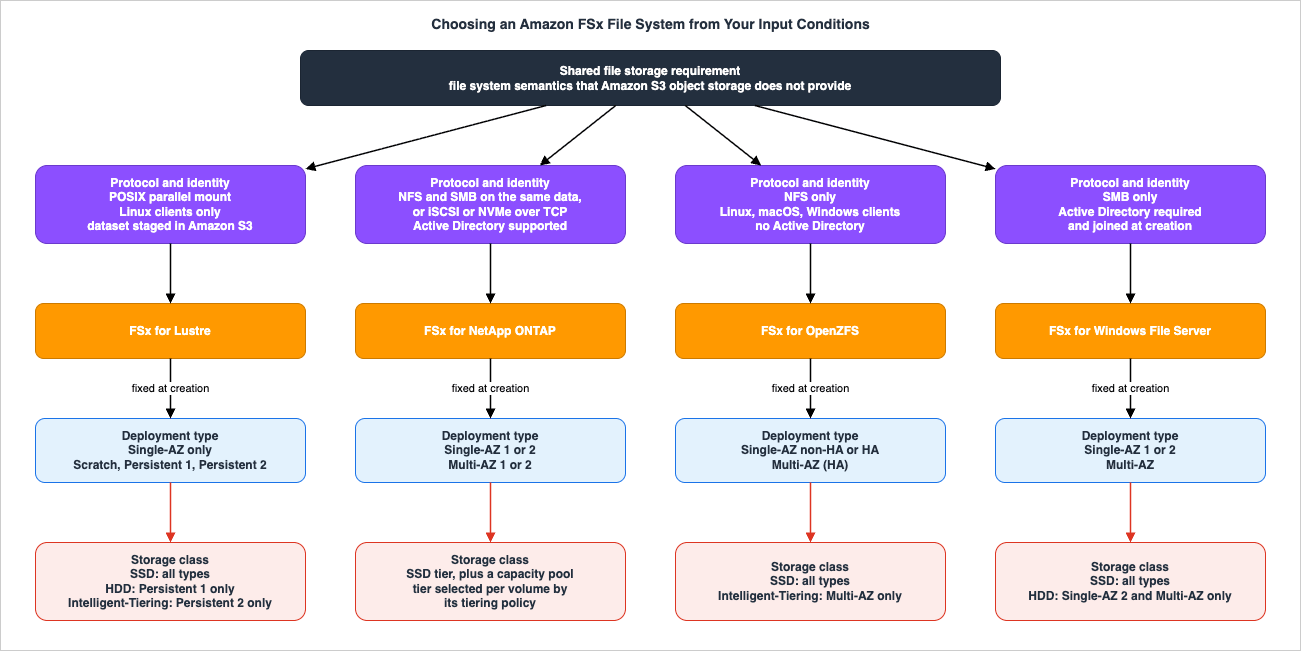
3. The Four Engines at a Glance
The table below is the reference view. Each column corresponds to one of the inputs in Section 2, so it can be read as a lookup rather than a spec sheet.* You can sort the table by clicking on the column name.
| Engine | Typical source system | File protocols | Block protocols | Client platforms | Deployment options | Documented maximum file system size |
|---|---|---|---|---|---|---|
| FSx for Lustre | Lustre or another parallel file system | POSIX-compliant protocol optimized for performance | None | Linux | Single-AZ, as scratch or persistent | Multiple PB |
| FSx for NetApp ONTAP | NetApp ONTAP or another NAS appliance | NFS v3, v4.0, v4.1, v4.2 and SMB, including concurrent multi-protocol access | iSCSI and NVMe over TCP | Windows, Linux, macOS | Single-AZ and Multi-AZ, first and second generation | Virtually unlimited, tens of PB |
| FSx for OpenZFS | ZFS or another Linux file server | NFS v3, v4.0, v4.1, v4.2 | None | Windows, Linux, macOS | Multi-AZ (HA), Single-AZ (HA), Single-AZ (non-HA) | 512 TiB |
| FSx for Windows File Server | Microsoft Windows Server | SMB 2.0, 2.1, 3.0, 3.1.1 | None | Windows, Linux, macOS | Single-AZ 1, Single-AZ 2, Multi-AZ | 64 TiB |
Sources for the cells above: source-system mapping, client platforms, protocol lists, and maximum sizes are from Choosing an Amazon FSx File System; Lustre deployment options from Deployment and storage class options for FSx for Lustre file systems; ONTAP deployment options and protocols from Availability, durability, and deployment options and Accessing your FSx for ONTAP data; OpenZFS deployment options from Availability and durability for Amazon FSx for OpenZFS and its NFS versions from Setting up an Amazon FSx for OpenZFS file system; Windows deployment options and SMB versions from Availability and durability: Single-AZ and Multi-AZ file systems and Accessing your data; the Windows and OpenZFS size limits are also stated in CreateFileSystem.
Three attributes in that table decide most cases on their own:
- Protocol exclusivity. FSx for OpenZFS serves NFS only. FSx for Windows File Server serves SMB only. If both protocols must reach the same data, only FSx for NetApp ONTAP does it, and it is the only engine offering block protocols at all. If the client is a Lustre client on Linux, only FSx for Lustre applies, and no other client platform does.
- Availability Zone topology. FSx for Lustre is a Single-AZ service; AWS documents its deployment options as Single-AZ persistent or scratch. The other three all offer a Multi-AZ deployment type. If surviving an AZ event with clients connected is a requirement, Lustre is out regardless of everything else — which is exactly why Lustre designs treat the linked S3 bucket, not the file system, as the durable copy.
- Identity integration. Active Directory integration for file system access authentication and access control is documented for FSx for NetApp ONTAP and FSx for Windows File Server, and not for the other two, per Choosing an Amazon FSx File System. An FSx for Windows File Server file system is joined to a directory at creation — it is not an optional add-on.
4. FSx for Lustre
FSx for Lustre is a parallel file system. Data is spread across multiple network file servers, each with multiple disks, so that many clients read and write in parallel; larger file systems have more file servers and more disks, as described in Deployment and storage class options for FSx for Lustre file systems. It is accessed from Linux clients through the Lustre client, and AWS documents client compatibility for Lustre as Linux only. That single fact removes it from consideration for most general-purpose file share workloads and keeps it firmly in the HPC, simulation, and model-training space.4.1 Scratch and persistent, and what "not replicated" means
FSx for Lustre offers two deployment options.Scratch file systems are designed for temporary storage and shorter-term processing. Data is not replicated and does not persist if a file server fails. If a file server or a storage disk becomes unavailable, files stored on other servers remain accessible, but a client that requests data on the unavailable server gets an immediate I/O error. AWS publishes a table of the availability and durability that scratch file systems of various sizes are designed for, and it makes the trade-off concrete: a 1.2 TiB scratch file system with two file servers is designed for 99.9% over one day and 99.4% over one week, while a 50.4 TiB file system with 22 file servers is designed for 99.1% over one day and 93.9% over one week. Larger scratch file systems have more components and therefore higher aggregate failure probability. These are AWS's published design figures, from the page cited above.
Persistent file systems replicate data and automatically replace a failed file server, typically within minutes; during the replacement, client requests transparently retry and eventually succeed. Failed disks are replaced transparently as well.
The practical rule that follows is blunt: scratch is for data you can recreate. If losing the file system means losing work that cannot be regenerated from an upstream source, it is not a scratch workload. This matters more than it appears because a scratch file system cannot be converted to a persistent one — the documented path is to export to Amazon S3 and create a new file system.
4.2 Persistent 1 and Persistent 2
There are two persistent deployment types. Persistent 2 is the current generation, suited to workloads requiring the highest levels of IOPS and throughput, and it supports the SSD and Intelligent-Tiering storage classes. It is also the type that supports a metadata configuration and Elastic Fabric Adapter (EFA). Persistent 1 supports the SSD and HDD storage classes.One operational detail is easy to miss and appears in the same page: Persistent 1 file systems can be created only through the AWS CLI and the Amazon FSx API — not the console. If a runbook says "create a Persistent 1 file system in the console," the runbook is wrong.
4.3 Storage classes and how throughput is provisioned
FSx for Lustre offers three storage classes, described in Deployment and storage class options for FSx for Lustre file systems:- SSD provides sub-millisecond access to the full dataset. Capacity is provisioned: you specify a file system size. Throughput is expressed per unit of storage — 250, 500, or 1000 MBps per TiB for Persistent 2 with SSD, 50, 100, or 200 MBps per TiB for Persistent 1 with SSD, and 200 MBps per TiB for scratch with SSD.
- Intelligent-Tiering is elastic: you do not specify a file system size, and throughput capacity is provisioned in increments of 4000 MBps. Data is placed in one of three access tiers by last access time — Frequent Access, then Infrequent Access after 30 consecutive days without access, then Archive Instant Access after 90. Access to data in either colder tier moves it back to Frequent Access. AWS documents that all access to non-cached data has the same performance characteristics regardless of tier. An optional provisioned SSD read cache serves frequently accessed data with sub-millisecond latency.
- HDD is for workloads that need consistent single-digit millisecond latency across the whole dataset, with throughput of 12 or 40 MBps per TiB on Persistent 1, and an optional SSD read cache sized at 20% of the HDD capacity.
Note the structural difference: SSD and HDD are provisioned capacity models where you size the file system, and Intelligent-Tiering is an elastic model where you do not. That changes capacity planning, not just performance.
4.4 Metadata performance is provisioned separately
On Persistent 2 file systems, metadata IOPS are provisioned independently of storage capacity. Amazon FSx for Lustre performance publishes the conversion between provisioned metadata IOPS and operation rates: per provisioned metadata IOPS, 2 file create/open/close operations per second, 1 file delete, 0.1 directory create or rename, and 0.2 directory delete. Valid values on SSD file systems are 1500, 3000, 6000, 12000, and multiples of 12000 up to 192000; on Intelligent-Tiering file systems the valid values are 6000 and 12000.Automatic mode, in which Amazon FSx provisions metadata IOPS from the storage capacity, is supported only on SSD file systems. Intelligent-Tiering file systems must use user-provisioned mode and cannot switch modes, per Managing metadata performance. For a workload dominated by small files, this is the parameter that determines whether the file system is usable, and it is not implied by the throughput figure.
4.5 The S3 data repository association, and the constraint it carries
A link between a directory on the file system and an S3 bucket or prefix is a data repository association (DRA). Up to 8 DRAs can be configured on one file system, each with a unique file system directory and a unique bucket or prefix, and a maximum of 8 DRA requests can be queued while only one is worked on at a time. A DRA can be configured for automatic import, automatic export, or both; with both, changes propagate in both directions. AWS is explicit that FSx for Lustre does not prevent conflicting writes when the same file is modified in both places, so application-level coordination is required. DRAs, automatic export, and multiple data repositories are not available on Lustre 2.10 file systems or Scratch 1 file systems. All of this is documented in Linking your file system to an Amazon S3 bucket.The constraint that surprises people is in Protecting your data with backups: backups are supported only on persistent file systems that are not linked to an S3 data repository. AWS's reasoning is that the S3 bucket is the primary data repository and the file system does not necessarily hold the full dataset at any moment. The creation procedure states the operational form of the same rule — data repositories cannot be linked to file systems that have backups enabled, so backups must be disabled first, per Creating a link to an S3 bucket.
The design consequence is that an FSx for Lustre deployment has exactly one durability story, and you must pick it: either the file system is standalone and backed up, or it is linked to S3 and S3 is the durable copy. There is no configuration in which both apply.
5. FSx for NetApp ONTAP
FSx for NetApp ONTAP is the widest engine in the family, and the only one that is simultaneously a NAS and a SAN. Its structure is also the most layered: a file system contains one or more storage virtual machines (SVMs), and an SVM contains volumes. Each SVM exposes separate endpoints —Nfs, Smb, Iscsi, Nvme, and Management — as documented in Accessing your FSx for ONTAP data and SvmEndpoint. The Management endpoint is what makes the ONTAP CLI, REST API, and NetApp Console usable against the file system, which is the property that matters to teams with existing NetApp operations. The same continuity argument runs one layer down when the hypervisor is carried over instead of rebuilt, because an Amazon EVS environment leaves the choice of external storage open as long as the product supports VMware Cloud Foundation. Running VMware Workloads on AWS with Amazon EVS covers what that environment fixes and what it leaves to you.5.1 Protocols, including the block protocols
Clients access volumes over NFS v3, v4, v4.1, and v4.2 and over SMB, simultaneously against the same data, per How Amazon FSx for NetApp ONTAP works. Block access is available over iSCSI and NVMe over TCP. Two availability conditions apply and are documented in Accessing your FSx for ONTAP data: iSCSI is available on file systems with 6 or fewer high-availability (HA) pairs, and NVMe/TCP is available on second-generation file systems with 6 or fewer HA pairs. Both protocols use the SVM's iSCSI endpoint. For NVMe/TCP you provision namespaces and subsystems through the ONTAP CLI, mapping namespaces to subsystems in the same way LUNs are mapped to initiator groups for iSCSI, per Provisioning NVMe/TCP for Linux.If a scale-out design pushes past 6 HA pairs, the block protocols drop off the table. That is a genuine interaction between a capacity decision and a protocol decision, and it is the kind of coupling that a feature matrix does not show.
5.2 Generations, HA pairs, and what scales
FSx for ONTAP has four deployment types across two generations, and Availability, durability, and deployment options publishes the differences:| Dimension | First generation (SINGLE_AZ_1, MULTI_AZ_1) | Second generation, single HA pair (SINGLE_AZ_2, MULTI_AZ_2) | Second generation, multi-pair (SINGLE_AZ_2) |
|---|---|---|---|
| HA pairs | 1 | 1 | 1 to 12 |
| SSD storage | 1 TiB to 192 TiB | 1 TiB to 512 TiB | 1 TiB per HA pair, up to 1 PiB total |
| SSD IOPS | 3 IOPS per GiB minimum, 160,000 maximum | 3 IOPS per GiB minimum, 200,000 maximum | 3 IOPS per GiB minimum, 2,400,000 maximum (200,000 per HA pair) |
| Throughput capacity | 128, 256, 512, 1024, 2048, 4096 MBps | 384, 768, 1536, 3072, 6144 MBps | 1536, 3072, or 6144 MBps per HA pair |
All values above are from that page. The scale-out configuration — more than one HA pair — is available only with
SINGLE_AZ_2. That is the central trade-off in ONTAP sizing: the largest configurations and the Multi-AZ topology are mutually exclusive, so a design that needs both cross-AZ failover and multi-petabyte SSD capacity has to be split across file systems.Regardless of deployment type, every FSx for ONTAP file system is an active-standby HA pair (or several). Failover occurs when the active file server becomes unavailable, when throughput capacity is changed, during planned maintenance, and — for Multi-AZ — during an AZ outage. A failover typically completes in less than 60 seconds, and because the endpoint IP address that clients use does not change, failovers are transparent to Linux, Windows, and macOS applications. On second-generation multi-pair file systems, each HA pair fails over independently.
5.3 The two storage tiers and the tiering policy trap
An FSx for ONTAP file system has a provisioned SSD tier and an elastic capacity pool tier. Which data lives where is set per volume by a tiering policy, documented in Volume storage capacity:- Auto moves all cold data — user data and snapshots — to the capacity pool, with a cooling period that defaults to 31 days and is configurable from 2 to 183 days. Cold blocks read randomly become hot and are written back to the primary tier; cold blocks read sequentially, such as by an antivirus scan, stay cold.
- Snapshot Only moves only snapshot data, with a cooling period defaulting to 2 days.
- All marks all user and snapshot data cold. Data is still written to SSD first and tiered by a background process.
- None keeps the volume's data on the primary tier.
File metadata always remains on the SSD tier regardless of policy.
Here is the trap, stated plainly in that page: Auto is the default when creating a volume in the Amazon FSx console, and Snapshot Only is the default when creating a volume using the AWS CLI, the Amazon FSx API, or the NetApp ONTAP CLI. A team that prototypes in the console and then codifies the same design in infrastructure as code will silently get a different data placement policy in production than the one they validated. If tiering behavior matters to the workload, set the policy explicitly in every path rather than relying on a default that is not the same everywhere.
5.4 Security styles and multi-protocol access
Because ONTAP volumes can be reached over both NFS and SMB, they need a rule for whose permission model governs. That rule is the volume's security style, described in Managing FSx for ONTAP volumes:- Unix — permissions are mode bits or NFSv4.x ACLs, and only Linux clients can modify them. Choose it when the file system is administered by a UNIX administrator, most users are NFS clients, and applications use a UNIX service account.
- NTFS — permissions are NTFS ACLs, and only Windows clients can modify them. AWS recommends NTFS if any Windows access to the volume is required.
AWS is careful about a distinction that is routinely misread: security style does not determine which client types can access the data. It determines which permission model controls access and which client type can change permissions. A volume with UNIX security style is still reachable over SMB. When created through the console, CLI, or API, a volume's security style is inherited from the root volume's style, and it can be modified afterwards through the CLI or API.
5.5 The ONTAP-native data management features
Several capabilities exist on this engine and nowhere else in the family, and Choosing an Amazon FSx File System attributes them explicitly: cross-Region replication using NetApp SnapMirror, on-premises caching of FSx data using NetApp Global File Cache and FlexCache, backup and disaster recovery from on premises to AWS using SnapMirror, and compute burst to the cloud with FlexCache serving as an in-AWS cache of on-premises data. The same page documents data deduplication and anti-virus integration for this engine, and lists Active Directory support, file access auditing, and ACL support for both NFS v4.x and NTFS.For an organization whose existing DR process is built on SnapMirror, that list is often the entire decision, and the protocol and performance discussion is a formality.
6. FSx for OpenZFS
FSx for OpenZFS is the NFS-native engine. AWS documents full support for NFS v3, v4.0, v4.1, and v4.2, and clients running Linux, macOS, and Windows can mount volumes — Windows through an NFS client, which in practice means NFS v3 when Linux and Windows clients share the same volume. There is no SMB support and no Active Directory integration, which is the cleanest possible dividing line between this engine and the two Windows-capable ones.6.1 Three deployment types, and one that recovers in 30 minutes
Availability and durability for Amazon FSx for OpenZFS defines three deployment types:- Multi-AZ (HA) — an HA pair of file servers across two Availability Zones, each with its own set of storage volumes, replicating synchronously both within each AZ and between them. Failover to the standby AZ happens during planned maintenance and unplanned disruption, typically within 60 seconds. AWS recommends this for business-critical production and database workloads that need availability and durability across AZs in the same Region.
- Single-AZ (HA) — two file servers connected to a single set of storage volumes within one AZ, failing over typically within 60 seconds. Recommended for workloads that need high availability but not storage redundancy across AZs, with analytics and EDA cited as examples.
- Single-AZ (non-HA) — a single file server instance and a set of storage volumes in one AZ. AWS documents that these file systems usually experience about 30 minutes of downtime during failure recovery events and during the configured maintenance window.
That 30-minute figure is the one to carry into a design review. It is not a failure mode; it is documented normal behavior for the non-HA type, and it recurs at every planned maintenance window. Any workload for which a half-hour pause is unacceptable is not a Single-AZ (non-HA) workload, however attractive the simplicity is. AWS also notes that for all Single-AZ file systems, in rare cases such as storage component failures the file system may be unrecoverable and must be restored from the most recent backup.
Both Single-AZ families additionally come in generation 1 and generation 2. The CreateFileSystemOpenZFSConfiguration reference enumerates the API values and the throughput ranges attached to each:
SINGLE_AZ_1 supports 64 to 4,096 MBps; SINGLE_AZ_2 supports 160 to 10,240 MBps using an NVMe L2ARC cache; SINGLE_AZ_HA_1 and SINGLE_AZ_HA_2 are the HA equivalents of those two; and MULTI_AZ_1 supports the same 160 to 10,240 MBps range as SINGLE_AZ_2. Valid throughput values for MULTI_AZ_1 and SINGLE_AZ_2 are 160, 320, 640, 1280, 2560, 3840, 5120, 7680, or 10240 MBps; for SINGLE_AZ_1 they are 64, 128, 256, 512, 1024, 2048, 3072, or 4096 MBps.6.2 Snapshots, clones, and replication
The ZFS data management features are exposed through the FSx API rather than requiring a separate management plane. Protecting your Amazon FSx for OpenZFS data lists four mechanisms: built-in Amazon FSx backups, snapshots for restoring files to previous versions, on-demand data replication, and AWS Backup.Cloning deserves a specific note because the API makes the trade-off explicit. When creating a volume from a snapshot, OpenZFSOriginSnapshotConfiguration offers
CLONE, which references the data in the origin snapshot and is faster than copying while consuming no disk throughput, and FULL_COPY, which copies all the data. The catch with CLONE is stated there too: the origin snapshot cannot be deleted while a volume is using its copied data. That turns snapshot lifecycle management into a dependency-graph problem, which is a real operational cost in an environment that clones aggressively for test environments.On-demand replication transfers snapshots of data between file systems within and across AWS Regions and accounts. Amazon FSx establishes and maintains the network connectivity between file systems, handles interruptions, resumes transfers, encrypts data in transit and at rest, and integrates with AWS RAM for cross-account authorization. It is available for all deployment types in Regions where FSx for OpenZFS is available, per Protecting your data with on-demand replication. AWS states that by scheduling regular incremental replication to a second file system you can implement an active-passive disaster recovery solution with an RTO as low as 5 minutes and an RPO as low as 15 minutes for workloads driving up to 2 GB/s of data churn; those are AWS's published figures, from the FSx for OpenZFS features page.
6.3 The Intelligent-Tiering storage class
How FSx for OpenZFS file systems work with Intelligent-Tiering describes an architecture that differs from the SSD class rather than merely repricing it. Instead of a set of volumes attached to each file server, an Intelligent-Tiering file system uses fully elastic, intelligently tiered regional block storage that grows and shrinks with the workload. It adds an optional provisioned SSD read cache and a built-in SSD-backed write log for low-latency durable writes.The latency characteristics are the part that belongs in a design decision: AWS documents that data access from Intelligent-Tiering storage has time-to-first-byte latencies of roughly tens of milliseconds, while accesses served from the SSD read cache return with sub-millisecond latency. The SSD read cache has three sizing modes — Automatic, in which Amazon FSx selects a size based on provisioned throughput, Custom, in which you set and later change the size, and None. Sizing it means estimating the size of the frequently accessed working set and the workload's tolerance for slower reads of everything else.
The condition attached to this storage class is covered in Section 8, and it is significant: it is tied to a specific deployment type.
7. FSx for Windows File Server
FSx for Windows File Server is built on Windows Server and serves SMB 2.0 through 3.1.1. Its client list is broad — EC2 instances running Windows, Amazon Linux, and macOS, ECS containers, WorkSpaces, AppStream 2.0, VMware Cloud on AWS, plus Windows Server 2008 through 2022, Windows Vista through Windows 11, Linux usingcifs-utils, and macOS — per Accessing your data.7.1 Active Directory is part of the file system, not an add-on
The file system is joined to a Microsoft Active Directory domain at creation, using either AWS Managed Microsoft AD or a self-managed Active Directory. For a self-managed directory, Using a self-managed Microsoft Active Directory requires the domain's fully qualified name, the DNS server IP addresses, and service account credentials — which can be supplied as plaintext or, preferably, as an AWS Secrets Manager secret ARN. You can optionally specify the organizational unit and the domain group that receives delegated file system administration; if you do not specify one, Amazon FSx delegates that authority to the Domain Admins group.Two constraints in that documentation regularly derail a deployment. Single Label Domains are not supported. And Amazon FSx registers DNS records only if the Active Directory domain uses Microsoft DNS as the default DNS — with third-party DNS, the DNS entries for the file system must be created manually, per Joining an Amazon FSx file system to a self-managed Microsoft Active Directory domain.
The network path to the directory is equally concrete. Using Amazon FSx with AWS Directory Service for Microsoft Active Directory enumerates the required ports — DNS on 53, Kerberos on 88, password change on 464, LDAP on 389, NTP on 123, endpoint mapper on 135, SMB on 445, LDAPS on 636, global catalog on 3268 and 3269, WinRM on 5985, AD DS web services on 9389, and ephemeral RPC ports 49152 to 65535 — and notes that outbound traffic on TCP 9389 is required for Single-AZ 2 and all Multi-AZ deployments. Security group and network ACL rules that omit any of these produce a file system that creates successfully and then fails to serve clients. The servers on the other side of those ports have to reach the same directory, and the way they join it is a separate decision with its own prerequisites. Running Windows Server Workloads on AWS covers the paths into an Active Directory domain and what each one requires.
7.2 Deployment types differ in features, not only in availability
This is the engine where the deployment type changes what the file system can do. Availability and durability: Single-AZ and Multi-AZ file systems publishes the matrix:| Deployment type | SSD storage | HDD storage | DFS namespaces | DFS replication | Custom DNS names | Continuously available shares |
|---|---|---|---|---|---|---|
| Single-AZ 1 | Yes | No | Yes | Yes | Yes | No |
| Single-AZ 2 | Yes | Yes | Yes | No | Yes | Yes |
| Multi-AZ | Yes | Yes | Yes | No | Yes | Yes |
AWS notes that although continuously available shares can be created on Single-AZ 2, they should be used on Multi-AZ file systems for SQL Server HA deployments.
Read that table as a set of exclusions. DFS Replication is available only on the oldest deployment type, and that type is the only one that cannot use HDD storage or continuously available shares. There is no configuration that gives you DFS Replication and Multi-AZ on the same file system.
Multi-AZ uses Windows Server Failover Clustering across two AZs with synchronous replication both within and between them. Failover typically completes in less than 30 seconds, and failback also completes in less than 30 seconds once the preferred subnet's file server is fully recovered. Because the file system's DNS name does not change, failovers are transparent to Windows applications.
Linux clients do not support automatic DNS-based failover, per the same page. They do not connect to the standby file server during a failover; they resume operations after the file system fails back to the preferred subnet. A Multi-AZ file system serving Linux clients over SMB therefore does not deliver the availability behavior the deployment type implies, and that is a documented property rather than a defect.
One more timing detail from that page belongs in a runbook: file read and write activity that occurs during failover and failback must be synchronized between the primary and secondary file servers, and this can take up to multiple hours for HDD file systems and for write-heavy, IOPS-heavy workloads. AWS recommends testing failover impact under a lighter load.
7.3 Shadow copies, and the capacity ceiling
Windows shadow copies let users restore previous versions of files themselves. Protecting your data with shadow copies explains the storage model: a shadow copy is a block-level copy of the changes since the last one, the default limit is 10% of the file system, and setting the limit too small results in the oldest shadow copies being deleted more often than users expect. An unbounded configuration is possible but can consume enough of the file system that workloads run out of capacity, so it requires scaling storage as the limits are reached.Quotas sets the outer bounds for this engine: minimum 32 GiB for SSD and 2,000 GiB for HDD, maximum 64 TiB for both, SSD IOPS from 96 to 400,000, throughput capacity from 8 to 12,288 MBps, up to 100,000 file shares, and a maximum automated backup retention of 90 days. The 64 TiB ceiling is the one that shapes architectures: exceeding it means multiple file systems presented behind a DFS Namespace rather than a single larger file system.
8. Deployment Types and Storage Classes
This is the section that AWS's own selection page does not cover, and it is where most avoidable design errors originate. Storage class availability is not an independent choice — it is conditional on the engine and the deployment type, and both are fixed at creation.The authoritative statement is in the
StorageType parameter of CreateFileSystem: valid values are SSD, HDD, and INTELLIGENT_TIERING; SSD is supported on all Windows, Lustre, ONTAP, and OpenZFS deployment types; HDD is supported on the SINGLE_AZ_2 and MULTI_AZ_1 Windows deployment types and on PERSISTENT_1 Lustre file systems; and Intelligent-Tiering is available for OpenZFS file systems with the Multi-AZ deployment type and for Lustre file systems with the Persistent 2 deployment type. The default is SSD.* You can sort the table by clicking on the column name.
| Engine | Deployment type (API value) | Subnets required | SSD | HDD | Intelligent-Tiering |
|---|---|---|---|---|---|
| Lustre | SCRATCH_1, SCRATCH_2 | 1 | Yes | No | No |
| Lustre | PERSISTENT_1 | 1 | Yes | Yes | No |
| Lustre | PERSISTENT_2 | 1 | Yes | No | Yes |
| ONTAP | SINGLE_AZ_1, SINGLE_AZ_2 | 1 | Yes | No | No |
| ONTAP | MULTI_AZ_1, MULTI_AZ_2 | 2 | Yes | No | No |
| OpenZFS | SINGLE_AZ_1, SINGLE_AZ_2 | 1 | Yes | No | No |
| OpenZFS | SINGLE_AZ_HA_1, SINGLE_AZ_HA_2 | 1 | Yes | No | No |
| OpenZFS | MULTI_AZ_1 | 2 | Yes | No | Yes |
| Windows | SINGLE_AZ_1 | 1 | Yes | No | No |
| Windows | SINGLE_AZ_2 | 1 | Yes | Yes | No |
| Windows | MULTI_AZ_1 | 2 | Yes | Yes | No |
Inclusion criterion and confirmation date. The storage class columns reproduce the
StorageType constraints published in the CreateFileSystem API Reference, and the deployment type names are the API values from that same reference and from CreateFileSystemOpenZFSConfiguration. Subnet counts are from the per-engine availability pages: FSx for ONTAP, FSx for OpenZFS, and FSx for Windows File Server. All entries were confirmed on 2026-08-04. This table records storage class availability by deployment type only; it is not a complete feature matrix, and it does not record Regional availability, which is published separately for each engine and differs by deployment type and storage class. ONTAP is shown with SSD only because its capacity pool tier is not a StorageType value — it is a per-volume tiering policy within the file system, covered in Section 5.3.Three implications are worth stating outright:
- On FSx for OpenZFS, the elastic storage class costs you the option of a Single-AZ topology, and vice versa. Intelligent-Tiering requires Multi-AZ. A team that wants elastic, automatically tiered NAS storage and a Single-AZ deployment cannot have both today.
- On FSx for Lustre, HDD and Intelligent-Tiering live on different generations. HDD is a Persistent 1 capability; Intelligent-Tiering is a Persistent 2 capability. There is no deployment type that offers both.
- On FSx for Windows File Server, HDD requires leaving Single-AZ 1. Combined with the feature table in Section 7.2, this means the DFS Replication capability and HDD storage are mutually exclusive.
The AZ story on FSx for Lustre needs one precise sentence, because it is easy to state wrongly in either direction. A Lustre file system is created in a single subnet, and AWS documents Lustre's deployment options as Single-AZ. However, the same Deployment and storage class options page states that for SSD and HDD-based persistent file systems, data is automatically replicated within the same Availability Zone, while for Intelligent-Tiering file systems, data is replicated across multiple Availability Zones. That is a property of where the data is stored, not a Multi-AZ deployment type with a standby file server: the servers and the mount target still live in one AZ. Read it as improved data durability, not as AZ-level service continuity.
Finally, none of these choices can be revised in place. The ONTAP guide says it explicitly — you cannot change a file system's deployment type after creation, and moving from, for example, Single-AZ 1 to Single-AZ 2 requires backing up and restoring to a new file system, or migrating with NetApp SnapMirror, AWS DataSync, or a third-party copy tool. The OpenZFS performance guide says the same for both deployment type and storage class. Plan the target state before the first
CreateFileSystem call.9. Availability, Backup, and Data Protection
Availability behavior and data protection are separate questions, and both differ by engine.* You can sort the table by clicking on the column name.
| Capability | FSx for Lustre | FSx for NetApp ONTAP | FSx for OpenZFS | FSx for Windows File Server |
|---|---|---|---|---|
| Cross-AZ deployment | Not offered | Multi-AZ 1 and Multi-AZ 2 | Multi-AZ (HA) | Multi-AZ |
| Typical failover time | Not applicable; persistent file servers are replaced within minutes | Under 60 seconds | Under 60 seconds for HA types; about 30 minutes recovery for non-HA | Under 30 seconds |
| Native backups | Persistent file systems only, and only when not linked to S3 | Yes | Yes, automatic daily plus user-initiated | Yes |
| AWS Backup unit | File system | Volume | File system | File system |
| Point-in-time snapshots in the file system | Not offered | Yes | Yes | Yes, as shadow copies |
| Instant cloning | Not offered | Yes | Yes | Not offered |
| Cross-Region replication | Through S3 cross-Region replication of the linked bucket | NetApp SnapMirror | On-demand replication | Not offered; cross-Region backup copy instead |
| Cross-Region or cross-account backup copy | Yes | Documented per engine | Yes, cross-Region | Yes |
Sources: failover and deployment behavior from the per-engine availability pages cited in Section 8; Lustre backup restrictions from Protecting your data with backups; OpenZFS protection mechanisms from Protecting your Amazon FSx for OpenZFS data and Protecting your data with on-demand replication; Windows shadow copies from Protecting your data with shadow copies; the snapshot, cloning, and cross-Region rows from Choosing an Amazon FSx File System; and the AWS Backup unit from Backup, which defines a backup as a backup of an FSx for Windows File Server file system, an FSx for Lustre file system, an FSx for NetApp ONTAP volume, or an FSx for OpenZFS file system.
That last distinction is not a technicality. On three engines, a backup is the file system. On FSx for NetApp ONTAP, the unit of backup is the volume, so a backup plan that selects file systems by tag protects a different set of things than an operator expects, and restoring "the file system" is not a single operation. Build ONTAP backup selection around volumes deliberately. The mechanics of backup plans, vaults, retention, and cross-account copy belong to AWS Backup Data Protection and Governance, and the question of which recovery strategy a workload warrants belongs to the AWS Disaster Recovery Strategies Guide; this guide only establishes what each engine makes possible.
A few engine-specific notes that change designs:
- Backups are stored across multiple Availability Zones. For FSx for ONTAP Single-AZ file systems, AWS states that automatic daily backups are stored across multiple AZs to provide multi-AZ resiliency for all backup data. A Single-AZ file system is therefore not the same thing as a single-AZ-resilient data estate, provided backups are enabled.
- Testing failover is a supported, non-destructive operation. On FSx for ONTAP, FSx for OpenZFS, and FSx for Windows File Server, modifying throughput capacity causes Amazon FSx to replace the file servers serially, which exercises a failover and a failback. All three user guides describe this as the way to test failover. It is still a production-affecting operation — I/O may pause briefly and CloudWatch metrics may be temporarily unavailable — so treat it as a scheduled game day, not a routine check.
- Lustre has no in-file-system snapshot mechanism. AWS's comparison table shows inline instantaneous snapshots and end-user file restore for the other three engines and not for Lustre. A Lustre design that needs point-in-time recovery gets it from the linked S3 bucket's versioning and replication, not from the file system.
For workloads whose availability requirement spans Regions rather than AZs, the routing and failover layer above the storage is covered in the AWS Multi-Region Active-Active Architecture Guide.
10. Access, Networking, and Identity
Every FSx file system is reached through elastic network interfaces in your VPC, and the number of subnets and ENIs follows from the deployment type.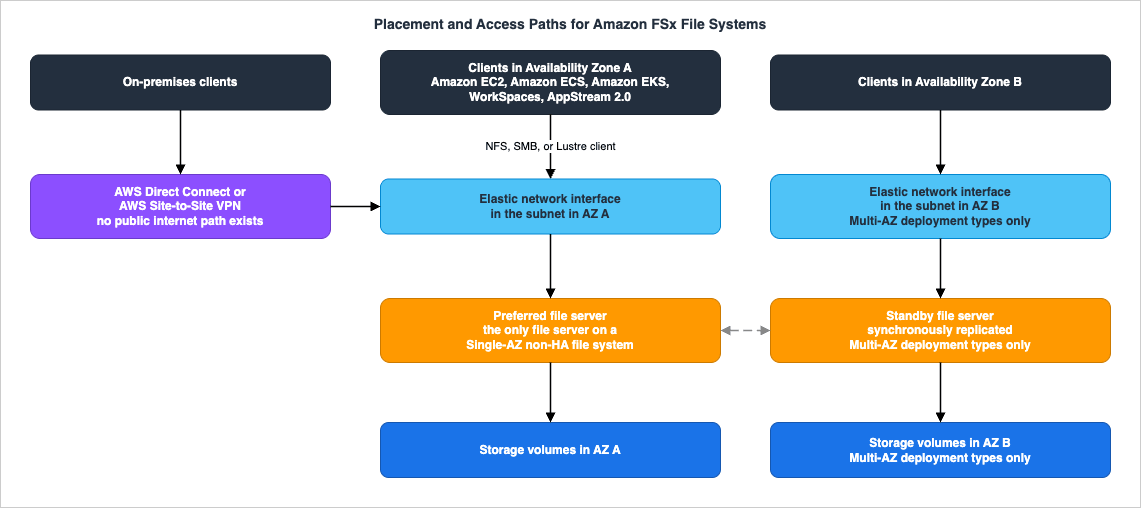
| Property | FSx for Lustre | FSx for NetApp ONTAP | FSx for OpenZFS | FSx for Windows File Server |
|---|---|---|---|---|
| Endpoints exposed | Lustre mount target | Nfs, Smb, Iscsi, Nvme, Management per SVM | NFS mount per volume | SMB share |
| ENIs, Multi-AZ | Not applicable | 2, one per subnet | 2, one per subnet | 2, one per subnet |
| ENIs, Single-AZ | Provisioned in the file system subnet | 2 (2 per HA pair on second-generation) | 2 for Single-AZ (HA), 1 for Single-AZ (non-HA) | 1 |
| Client transparency on failover | Not applicable | Endpoint IP is unchanged; failover transparent to Linux, Windows, macOS | Floating IP address | DNS name unchanged; transparent to Windows clients, not to Linux clients |
| Directory integration | Not offered | Active Directory per SVM | Not offered | Required at creation |
| Access from another VPC | VPC peering or transit gateway | Yes, with route configuration for Multi-AZ | Transit Gateway or VPC peering | Yes |
| Access from on premises | Direct Connect or Site-to-Site VPN | Direct Connect or Site-to-Site VPN | Direct Connect or Site-to-Site VPN | Direct Connect or Site-to-Site VPN |
| Encryption in transit to on-premises clients | Not natively offered | Per protocol configuration | Per protocol configuration | SMB 3.x encryption |
| Amazon S3 access points attachable | No | Yes | Yes | No |
Sources: Lustre access paths from Accessing file systems and Mounting Amazon FSx file systems from on-premises or a peered Amazon VPC; the Lustre in-transit encryption statement from Internetwork traffic privacy; ONTAP endpoints, ENIs, and routing from Accessing your FSx for ONTAP data and Availability, durability, and deployment options; OpenZFS resources from Availability and durability for Amazon FSx for OpenZFS and access paths from Accessing your data; Windows resources and failover behavior from Availability and durability: Single-AZ and Multi-AZ file systems; S3 access point support from the FSx for NetApp ONTAP and FSx for OpenZFS features pages.
Several points in that table drive design decisions rather than merely describing behavior.
Multi-AZ file systems use floating IP addresses, and that has a routing consequence. For FSx for ONTAP Multi-AZ, AWS provisions routes into your default VPC and subnet route tables and warns that modifying or deleting those routes may cause temporary or permanent loss of connectivity for clients. The ONTAP documentation has dedicated procedures for configuring routing to reach Multi-AZ file systems from outside the VPC and from on premises, precisely because the floating address is not inside a subnet CIDR in the usual way. Treat Multi-AZ ONTAP as a routing-visible resource, not just a mount point. For the surrounding network design — peering, transit gateway, and the choice between connecting networks and exposing services — see the AWS VPC Connectivity Decision Guide, and for the on-premises leg, the AWS Hybrid Connectivity Decision Guide.
None of these file systems are reachable from the public internet. All four user guides state that Amazon FSx does not support accessing file systems from, or exposing them to, the public internet, and that an Elastic IP address attached to a file system's ENI is automatically detached. Any design that assumes an internet-facing file share is not going to work.
FSx for Lustre does not natively offer encryption in transit between on-premises clients and file systems. In-transit encryption for Lustre is enabled from supported EC2 instances within the AWS Cloud. If an on-premises client must mount a Lustre file system and the data is subject to an in-transit encryption requirement, the encryption has to come from the network layer — a VPN, or Direct Connect with MACsec — rather than from the file system. This asymmetry is documented in Internetwork traffic privacy and it is a compliance-relevant difference between Lustre and the other three engines.
S3 access points turn two of the engines into data sources for S3-shaped tooling. AWS documents that attaching Amazon S3 access points directly to FSx for NetApp ONTAP and FSx for OpenZFS file systems lets services and applications built for S3 — including analytics and AI services — read data that continues to live on the file system and remains natively accessible over NFS. For an organization whose data lands on a NAS but whose analytics stack expects object storage, this removes a copy step. Where that data then goes is a lakehouse question, covered in the AWS Data Lakehouse Architecture Guide, and the naming conventions that make an S3-facing dataset perform are in Amazon S3 Object Key Design Best Practices.
Finally, tag the file systems as deliberately as any other resource — backup selection, cost allocation, and access control all key off tags, and file systems are long-lived, high-blast-radius resources. The conventions are in the AWS Tagging Strategy: Complete Guide for Operations, Automation, and Security.
11. Choosing in Practice
Four scenarios, each walked through the inputs from Section 2. In each, the interesting part is the exclusion, not the selection.11.1 A departmental Windows file share moving out of a data center
Inputs. Incumbent: Windows Server file cluster. Protocol: SMB, from unmodified Windows desktops and a handful of Windows applications. Identity: existing on-premises Active Directory. Performance: modest and latency-sensitive for interactive users. Availability: the share is business-hours critical; an unplanned half-hour outage is a serious incident. Operators: a Windows administration team.Selection. FSx for Windows File Server, Multi-AZ, joined to the existing self-managed Active Directory — or to an AWS Managed Microsoft AD with a one-way forest trust if directory isolation is wanted, which the self-managed AD documentation describes as a supported pattern.
Exclusions. FSx for OpenZFS is out on protocol — no SMB. FSx for Lustre is out on both protocol and client platform. FSx for NetApp ONTAP would work, and is the right answer if the same project also needs NFS or block access, but it introduces a second management plane for a team that does not need one.
What to get right. Multi-AZ rather than Single-AZ, because of the documented 30-second failover versus the Single-AZ recovery behavior. HDD storage is available on Multi-AZ if the working set does not justify SSD, but note from Section 7.2 that choosing Multi-AZ also means giving up DFS Replication. And confirm the directory ports listed in Section 7.1 before the first user complains.
11.2 A NetApp estate with mixed NFS and SMB access and an existing DR process
Inputs. Incumbent: NetApp ONTAP appliances. Protocol: NFS and SMB against the same volumes, plus a few iSCSI LUNs for a database. Identity: Active Directory for Windows users, UNIX accounts for the application servers, with existing identity mapping. Performance: sub-millisecond for the hot volumes, with a large archive. Availability: cross-AZ, plus cross-Region DR that is currently built on SnapMirror. Operators: a storage team fluent in ONTAP.Selection. FSx for NetApp ONTAP. Nothing else in the family serves NFS and SMB concurrently against the same data or offers block protocols, and SnapMirror-based cross-Region replication exists only here.
Exclusions. Every other engine fails on the multi-protocol requirement alone.
What to get right. The generation and topology interact: Multi-AZ means a single HA pair, and scale-out to multiple HA pairs is available only on
SINGLE_AZ_2 (Section 5.2). Because the block protocols require 6 or fewer HA pairs (Section 5.1), a very large scale-out design and iSCSI can conflict. Set volume security styles deliberately — NTFS wherever Windows access is required — and set the tiering policy explicitly in the infrastructure code rather than inheriting a default that differs between the console and the API.11.3 A Linux analytics platform with a large mostly-cold dataset
Inputs. Incumbent: a ZFS file server. Protocol: NFS from Linux compute. Identity: UNIX accounts; no Active Directory. Performance: a hot working set that needs low latency and a much larger remainder that is read occasionally. Availability: the platform should survive an AZ event. Operators: a Linux platform team using AWS APIs.Selection. FSx for OpenZFS, Multi-AZ (HA), Intelligent-Tiering storage class with a provisioned SSD read cache sized to the working set.
Exclusions. FSx for Windows File Server is out on protocol. FSx for Lustre is out on the AZ requirement and because the workload is not a parallel-file-system workload. FSx for NetApp ONTAP would also serve this well and offers a comparable tiering model, so the tiebreaker is operational: OpenZFS is managed entirely through AWS APIs, ONTAP brings a second management plane that this team has no use for.
What to get right. The Multi-AZ requirement and the Intelligent-Tiering requirement happen to agree here, but they are the same decision — Intelligent-Tiering requires Multi-AZ on this engine (Section 8). Size the SSD read cache against the actual working set, because reads that miss it come from Intelligent-Tiering storage with time-to-first-byte latencies of roughly tens of milliseconds rather than sub-millisecond (Section 6.3). And if the team clones volumes for test environments, plan the snapshot lifecycle before the first
CLONE pins an origin snapshot in place.11.4 A model-training cluster reading from a data lake
Inputs. Incumbent: none; the data lives in S3. Protocol: POSIX mount from Linux GPU instances. Identity: not a factor. Performance: very high aggregate throughput to many nodes, with substantial small-file metadata pressure from the data loader. Availability: the file system is a working surface; the durable copy is the S3 bucket. Operators: an ML platform team.Selection. FSx for Lustre, Persistent 2, with a data repository association to the S3 prefix and metadata IOPS provisioned for the loader's file-open rate.
Exclusions. The other three engines have no S3 data repository integration; AWS's comparison table shows automatic import and export of S3 datasets for Lustre only. FSx for OpenZFS and FSx for NetApp ONTAP can present data to S3-shaped consumers through S3 access points, which is the opposite direction and does not solve this problem.
What to get right. Persistent 2 rather than scratch, unless the file system genuinely lives for the duration of one job and the failure of a file server merely costs a rerun — and note that scratch cannot later be converted (Section 4.1). Because the file system is linked to S3, backups are unavailable on it (Section 4.5); the durability argument has to rest on the bucket. Provision metadata IOPS explicitly, since automatic mode is unavailable on Intelligent-Tiering and, on SSD, scales only with capacity (Section 4.4). And write the conflict rule into the pipeline: if the same object can be modified both in the bucket and on the file system, FSx for Lustre will not arbitrate.
12. Migration and Cutover Considerations
Two questions decide the shape of a migration: what is immutable on the target, and what carries over from the source.Start from the immutable properties. Deployment type and storage class are set at creation on all four engines and cannot be changed. FSx for ONTAP documents that changing deployment type requires backing up and restoring to a new file system, or migrating with NetApp SnapMirror, AWS DataSync, or a third-party copy tool. FSx for OpenZFS documents the same and adds a specific restriction worth knowing before you plan a phased migration: restoring from a backup can create a Single-AZ 2 file system from a Single-AZ 1 backup and a Single-AZ (HA) from a Single-AZ (non-HA), but you cannot create a Multi-AZ file system from a Single-AZ backup, and you cannot migrate between storage classes by restoring from a backup — for those, on-demand replication is the documented path, per Performance for Amazon FSx for OpenZFS. A migration plan that assumed "restore the backup into the new topology" needs to be rewritten around replication instead.
Then look at what the source can hand over. The engines differ in how much comes with the data:
- FSx for NetApp ONTAP can receive a SnapMirror relationship from an existing ONTAP system, which carries snapshots and the replication relationship rather than only the current file contents. AWS also documents migration using AWS DataSync.
- FSx for OpenZFS documents migration with AWS DataSync,
rsync, and Robocopy, and requires that source and destination be network-connected — the source may be on premises or in another VPC, account, or Region, provided it is peered through VPC peering, Transit Gateway, Direct Connect, or Site-to-Site VPN, per Migrating your existing file storage to Amazon FSx for OpenZFS. - FSx for Windows File Server inherits the permission model wholesale when the file system is joined to the same Active Directory as the source, which is why joining the existing directory — rather than creating a parallel one — is usually the right call for a lift-and-shift.
- FSx for Lustre is normally populated through its S3 data repository rather than by copying into the file system, which inverts the usual order: the data lands in the bucket first, and the file system is created against it.
Cutover. The mechanics differ by protocol, but three items recur. Clients address these file systems by DNS name, so the cutover is usually a DNS or mount-configuration change rather than a data change; plan how clients are reconfigured and how you roll back. Permissions are the most common source of post-cutover incidents — verify ACL fidelity on a representative subtree before the full copy, not after. And schedule at least one failover exercise on the new file system before it carries production, using the throughput-capacity method described in Section 9, while there is still nothing to lose.
Choosing the transfer service itself — and sizing an initial copy that has to complete inside a maintenance window — is a separate selection problem with its own trade-offs, and it is not covered here. For the surrounding practice of migrating servers and their attached storage into AWS, see Summary of AWS Application Migration Service (AWS MGN) Architecture and Lifecycle Relationships, Usage Notes.
13. Failure Modes and Anti-Patterns
Each of these is a design error rather than a bug, and each traces back to a documented property covered above.Using a scratch file system for data that cannot be regenerated. Scratch file systems do not replicate data and do not persist it if a file server fails, and they cannot be backed up or converted to persistent. The failure is silent until it is not: everything works until one file server is lost, and then a subset of the data is simply gone. Use scratch only where the upstream source can rebuild the contents.
Expecting backups on a Lustre file system that is linked to S3. The two are mutually exclusive by design. Teams discover this when they attach a DRA to an existing backed-up file system and the operation is refused, or — worse — when they assume a backup exists because backups are on by default elsewhere in the family. Decide which mechanism provides durability and write it down.
Assuming console defaults match API defaults on FSx for ONTAP volume tiering. Auto in the console, Snapshot Only through the CLI, API, and ONTAP CLI. The result is a production data placement that does not match what was validated, discovered later as an unexplained difference in SSD tier utilization. Always set the tiering policy explicitly.
Deploying a Windows Multi-AZ file system for Linux SMB clients and calling it highly available. Linux clients do not support automatic DNS-based failover; they resume only after failback to the preferred subnet. The deployment type is doing much less for those clients than the architecture diagram suggests. If Linux clients need transparent failover on a shared file system, that points to FSx for NetApp ONTAP, whose failovers are documented as transparent to Linux, Windows, and macOS applications.
Discovering the protocol requirement after the engine is chosen. "The application uses a network share" is not a protocol specification. Committing to FSx for OpenZFS and then finding an SMB client, or committing to FSx for Windows File Server and then finding an NFS client, is a rebuild — the engines do not add protocols. Enumerate every client and its protocol before creating anything.
Under-provisioning metadata IOPS on a small-file Lustre workload. Throughput per TiB says nothing about how many files per second can be created or deleted. AWS publishes the conversion — 2 file creates per second per provisioned metadata IOPS, 1 delete, 0.1 directory create — and a data loader that opens millions of small files will saturate metadata long before it saturates throughput. Provision metadata IOPS from the operation rate, not from the capacity.
Treating deployment type as an implementation detail. It is fixed at creation on every engine, it gates storage class availability, and on FSx for Windows File Server it gates features such as DFS Replication and continuously available shares. Choosing it in a provisioning ticket rather than in the design review is how organizations end up migrating a file system six months after building it.
Sizing the OpenZFS SSD read cache from throughput rather than from the working set. With Intelligent-Tiering, reads that miss the cache come back with time-to-first-byte latencies of roughly tens of milliseconds. Automatic sizing keys off provisioned throughput, which is not the same variable as the size of the frequently accessed dataset. If the working set is known, size the cache to it.
Leaving shadow copy storage at the default and treating it as backup. Shadow copies live inside the file system and default to a 10% cap; when the cap is reached, the oldest copies are deleted. They are an end-user self-service restore mechanism, not a retention mechanism, and they consume the same capacity the workload needs.
Building an ONTAP backup plan around file systems. The unit of backup is the volume. A tag-based selection written for the other three engines will not protect what the operator thinks it protects.
14. Frequently Asked Questions
Q. Can I change the deployment type or storage class after creating an Amazon FSx file system?A. No. Both are set at creation on all four engines. FSx for ONTAP documents that you must back up and restore to a new file system, or migrate with NetApp SnapMirror, AWS DataSync, or a third-party tool. FSx for OpenZFS documents that restoring from a backup can change some deployment types but cannot create a Multi-AZ file system from a Single-AZ backup and cannot migrate between storage classes at all; on-demand replication is the path for those.
Q. Which engine should I choose if the same data must be reachable over both NFS and SMB?
A. FSx for NetApp ONTAP. It is the only engine in the family that supports concurrent multi-protocol access to the same data. Set the volume's security style deliberately — AWS recommends NTFS if any Windows access is required — and remember that security style determines which permission model governs and which clients can change permissions, not which clients can access the data.
Q. Is FSx for Lustre available in a Multi-AZ configuration?
A. No. AWS documents Lustre's deployment options as Single-AZ, persistent or scratch, and a Lustre file system is created in a single subnet. Persistent SSD and HDD file systems replicate data within the same Availability Zone; Intelligent-Tiering file systems replicate data across multiple Availability Zones, which improves data durability but does not make the file system a Multi-AZ service with a standby. Lustre designs that need AZ-level resilience place the durable copy in the linked S3 bucket.
Q. Why can I not enable Intelligent-Tiering on my Single-AZ FSx for OpenZFS file system?
A. Because the storage class is conditional on the deployment type. The CreateFileSystem API reference states that Intelligent-Tiering is available for OpenZFS file systems with the Multi-AZ deployment type and for Lustre file systems with the Persistent 2 deployment type. Since deployment type cannot be changed after creation, this has to be decided up front.
Q. Can I back up an FSx for Lustre file system that is linked to an S3 bucket?
A. No. Backups are supported only on persistent file systems that are not linked to an S3 data repository, and a data repository cannot be linked to a file system that has backups enabled. AWS's stated reason is that the S3 bucket is the primary repository and the file system does not necessarily hold the complete dataset at any moment.
Q. Do the block protocols on FSx for NetApp ONTAP work on any file system?
A. Not on any. iSCSI is available on file systems with 6 or fewer HA pairs, and NVMe over TCP is available on second-generation file systems with 6 or fewer HA pairs. Both use the SVM's iSCSI endpoint. A scale-out design beyond 6 HA pairs gives up block access.
Q. How do I test failover without breaking anything?
A. On FSx for ONTAP, FSx for OpenZFS, and FSx for Windows File Server, modifying the file system's throughput capacity causes Amazon FSx to replace the file servers serially, which performs a failover and a failback. All three user guides describe this as the way to test failover. I/O may pause briefly and CloudWatch metrics may be temporarily unavailable, so schedule it. On FSx for Windows File Server, AWS additionally warns that synchronization after failover can take up to multiple hours for HDD file systems and write-heavy workloads, and recommends testing under a lighter load.
Q. Can any of these file systems be exposed to the internet?
A. No. All four user guides state that Amazon FSx does not support accessing file systems from, or exposing them to, the public internet, and that an Elastic IP address attached to a file system's network interface is automatically detached. Access is from within the VPC, from a peered VPC or transit gateway, or from on premises over Direct Connect or Site-to-Site VPN.
15. Summary
The Amazon FSx family is four different file systems behind one API, and the selection between them is decided by inputs that exist before any AWS service is named:- What you are moving from gives the strongest first cut, and it is the axis AWS's own selection page leads with.
- The protocol the clients speak eliminates most of the field immediately: SMB only on Windows File Server, NFS only on OpenZFS, both plus block on NetApp ONTAP, a Linux parallel file system client on Lustre.
- The identity model narrows further: Active Directory integration exists on Windows File Server and NetApp ONTAP and not on the other two.
- The shape of the performance requirement separates consistent low latency across the whole dataset from aggregate throughput, from metadata operation rate, from a hot subset with a large cold remainder — and each of those points at a different storage class.
- The availability requirement removes Lustre whenever an AZ event must be survived with clients connected, and selects the deployment type everywhere else.
- Who operates it is the tiebreaker that decides between two technically viable engines more often than anyone expects.
Then check the conditions before creating anything. Storage class availability is conditional on the engine and deployment type — Intelligent-Tiering only on OpenZFS Multi-AZ and Lustre Persistent 2, HDD only on Windows Single-AZ 2 and Multi-AZ and on Lustre Persistent 1 — and neither deployment type nor storage class can be changed afterwards. On FSx for Windows File Server the deployment type also decides whether DFS Replication and continuously available shares are available at all. These are the one-way doors, and they are why the FSx decision belongs in a design review rather than in a provisioning ticket.
Everything downstream of the choice has a home elsewhere: backup plans and retention in the AWS Backup Data Protection and Governance guide, recovery objectives in the AWS Disaster Recovery Strategies Guide, the network path in the AWS VPC Connectivity Decision Guide and the AWS Hybrid Connectivity Decision Guide, and the object-storage side of the same estate in How Amazon S3 Achieves Strong Consistency and Durability.
16. References
- Choosing an Amazon FSx File System
- Deployment and storage class options for FSx for Lustre file systems - Amazon FSx for Lustre
- What is Amazon FSx for Lustre? - Amazon FSx for Lustre
- Amazon FSx for Lustre performance - Amazon FSx for Lustre
- Managing metadata performance - Amazon FSx for Lustre
- Linking your file system to an Amazon S3 bucket - Amazon FSx for Lustre
- Creating a link to an S3 bucket - Amazon FSx for Lustre
- Protecting your data with backups - Amazon FSx for Lustre
- Accessing file systems - Amazon FSx for Lustre
- Mounting Amazon FSx file systems from on-premises or a peered Amazon VPC - Amazon FSx for Lustre
- Internetwork traffic privacy - Amazon FSx for Lustre
- Service quotas for Amazon FSx for Lustre
- Availability, durability, and deployment options - Amazon FSx for NetApp ONTAP
- How Amazon FSx for NetApp ONTAP works
- Accessing your FSx for ONTAP data - Amazon FSx for NetApp ONTAP
- Provisioning NVMe/TCP for Linux - Amazon FSx for NetApp ONTAP
- Managing FSx for ONTAP volumes - Amazon FSx for NetApp ONTAP
- Volume storage capacity - Amazon FSx for NetApp ONTAP
- Quotas - Amazon FSx for NetApp ONTAP
- Availability and durability for Amazon FSx for OpenZFS
- Performance for Amazon FSx for OpenZFS
- How FSx for OpenZFS file systems work with Intelligent-Tiering
- Protecting your Amazon FSx for OpenZFS data
- Protecting your data with on-demand replication - Amazon FSx for OpenZFS
- Accessing your data - Amazon FSx for OpenZFS
- Migrating your existing file storage to Amazon FSx for OpenZFS
- Setting up an Amazon FSx for OpenZFS file system
- Service quotas on Amazon FSx for OpenZFS resources
- Availability and durability: Single-AZ and Multi-AZ file systems - Amazon FSx for Windows File Server
- Accessing your data - Amazon FSx for Windows File Server
- Using a self-managed Microsoft Active Directory - Amazon FSx for Windows File Server
- Joining an Amazon FSx file system to a self-managed Microsoft Active Directory domain
- Using Amazon FSx with AWS Directory Service for Microsoft Active Directory
- Protecting your data with shadow copies - Amazon FSx for Windows File Server
- Quotas - Amazon FSx for Windows File Server
- CreateFileSystem - Amazon FSx API Reference
- CreateFileSystemOpenZFSConfiguration - Amazon FSx API Reference
- OpenZFSOriginSnapshotConfiguration - Amazon FSx API Reference
- SvmEndpoint - Amazon FSx API Reference
- Backup - Amazon FSx API Reference
- Amazon FSx for NetApp ONTAP Features
- Amazon FSx for OpenZFS Features
Related Articles
- AWS History and Timeline regarding Amazon FSx - Overview, File Systems, Features, Summary of Updates, and Introduction
The dates behind the same four file systems — when each one became generally available, and which family-wide updates reached every file system and which stopped at one or two. - How Amazon S3 Achieves Strong Consistency and Durability - The Architecture Behind the Guarantees
The object-storage side of the same estate, and the delegation target for everything this guide treats as "not a file system problem." - AWS Backup Data Protection and Governance - Backup Plans, Vault Lock, and Cross-Account Copy Design
Backup plans, vaults, retention, and cross-account copy — the layer above the per-engine backup capabilities in Section 9. - AWS Disaster Recovery Strategies Guide - Backup and Restore, Pilot Light, Warm Standby, and Multi-Site Active-Active
Which recovery objective a workload warrants, and how the replication features described here fit into it. - AWS VPC Connectivity Decision Guide - VPC Peering, Transit Gateway, PrivateLink, VPC Lattice, and Cloud WAN
The network path from clients in other VPCs and accounts to the file system. - AWS Hybrid Connectivity Decision Guide - Direct Connect, Site-to-Site VPN, and Resilient On-Premises Integration
The on-premises leg of every access path in Section 10. - AWS Service Quotas - A Practical Cheat Sheet for Major AWS Services
Where the account-level and per-file-system limits sit relative to the rest of AWS. - AWS Data Lakehouse Architecture Guide - Building a Governed Lakehouse with S3, Lake Formation, Glue, Athena, and Apache Iceberg
Where data exposed through S3 access points on FSx goes next. - Amazon S3 Object Key Design Best Practices - Performance and Partitioning
Key naming for the S3 side of a Lustre data repository association. - AWS Multi-Region Active-Active Architecture Guide - Global Data Replication, Routing, and Failover with Route 53, DynamoDB Global Tables, and Aurora Global Database
The routing and failover layer for availability requirements that span Regions rather than Availability Zones. - Summary of AWS Application Migration Service (AWS MGN) Architecture and Lifecycle Relationships, Usage Notes
Migrating the servers that mount these file systems. - AWS Tagging Strategy: Complete Guide for Operations, Automation, and Security
Tag conventions that backup selection, cost allocation, and access control all depend on. - Amazon EFS Performance Engineering - Throughput Modes, IOPS Ceilings, Per-Client Limits, and Burst Credits
The shared file system this guide does not cover. Amazon EFS is a separate service with its own throughput modes, per-file-system and per-client ceilings, and burst credits, and that article takes up the performance design that follows once EFS is the answer.
References:
Tech Blog with curated related content
Written by Hidekazu Konishi