AWS History and Timeline regarding Amazon FSx - Overview, File Systems, Features, Summary of Updates, and Introduction
First Published:
Last Updated:
This article provides a timeline detailing when each of Amazon FSx's four file systems was introduced. The focus is solely on dates and order of introduction. It does not address which file system to choose, which is fastest, or which deployment type to use. Those topics belong to the published Amazon FSx Family Decision Guide.
When presented in a timeline, a different picture emerges. Amazon FSx began with two file systems, and within less than three years, two more were added, bringing the total to four. This is not speculation; it is based on information from AWS itself. Articles announcing the third file system referred to the first two as
the first two members of the Amazon FSx family, while the announcement for the fourth file system described it as the newest addition to the Amazon FSx family.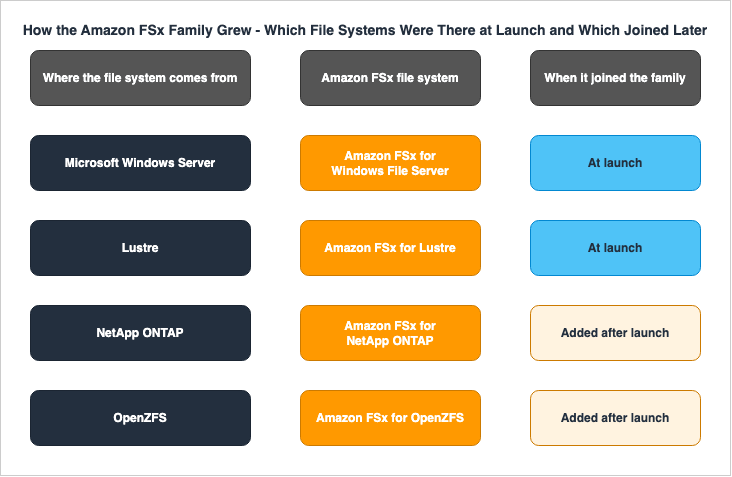
This article does not include pricing information. Changes to what is offered go into the timeline, but amounts and price-performance figures do not. Much of the primary source material carries price-performance wording, so quotations here are limited to dates, feature names, and scope of support.
The information in this article was verified as of 2026-09-17.
Related articles on hidekazu-konishi.com:
- Amazon FSx Family Decision Guide - Choosing Between Lustre, NetApp ONTAP, OpenZFS, and Windows File Server
- AWS History and Timeline - Almost All AWS Services List, Announcements, General Availability(GA)
- AWS Retired Services History and Timeline - Discontinued, Sunset, and Closed-to-New-Customer Services
- AWS Data Movement Decision Guide - DataSync, Transfer Family, Storage Gateway, and Data Transfer Terminal
- AWS History and Timeline regarding Amazon EBS - Overview, Volume Types, Features, Summary of Updates, and Introduction
- Batch and HPC Job Scheduling on AWS - Job Queues, Fair-Share Policies, Multi-Node Parallel Constraints, and the Slurm Route
- Amazon EFS Performance Engineering - Throughput Modes, IOPS Ceilings, Per-Client Limits, and Burst Credits
- AWS Acquisitions History and Timeline - Which Companies Became Which Services, and What Remains Today
Background and Method of Creating Amazon FSx Historical Timeline
How This Article Counts the File Systems
This article takes the number four as given. That number is not one this article counted; it is a number AWS states in two independent places.The first location is the product page. On the page explaining how to choose a file system, there is the following text:
Amazon FSx lets you choose between four widely-used file systems: Lustre, NetApp ONTAP, OpenZFS, and Windows File Server.The second location is the CloudFormation template reference. The description for
FileSystemType within AWS::FSx::FileSystem lists the possible values as follows:The type of Amazon FSx file system, which can be LUSTRE, WINDOWS, ONTAP, or OPENZFS.⇒ The count of file systems listed on the feature description page matches the enumerated values in the API. Furthermore, the beginning of the resource page also lists four file system types that can be created:
Amazon FSx for Lustre, Amazon FSx for NetApp ONTAP, FSx for OpenZFS, and Amazon FSx for Windows File Server.⚠ However, the order in which they are listed varies between the documents. The page explaining how to choose a file system lists Lustre first, while the product's top page lists NetApp ONTAP first. This article is a timeline, so it lists them in the order they arrived rather than in either published order.
Why This Timeline Carries a Single Date Column
AWS service timelines often list separate dates for initial announcement and general availability. For the four Amazon FSx file systems, these two dates are not differentiated.Each of the four user guides has a document history page, and the oldest entry on each page records the date of general availability. The titles of those four entries are as follows:
Amazon FSx is now generally available
Amazon FSx for Lustre is now generally available
Amazon FSx for NetApp ONTAP is now generally available
FSx for OpenZFS is now generally available
The dates associated with these four entries, from top to bottom, are 2018-11-28, 2018-11-28, 2021-09-02, and 2021-11-30. The dates of the announcement articles on the AWS News Blog are the same for all four. ⇒ The timeline in this article does not use separate columns for the announcement date and the general availability date. The lack of separate columns is not due to missing information; rather, all four file systems were generally available on their respective announcement dates.
⚠ Note the title of that first entry. The oldest entry in the Windows File Server guide does not list the file system's name; instead, it reads
Amazon FSx is now generally available. At that time, the scope of what "Amazon FSx" referred to was different from what it represents today.The Primary Sources This Article Used
Every entry carries the URL of a primary source. The kinds of material used are these:- Document history from four user guides — This served as the definitive source for the dates mentioned in this article. It is a table that carries a date for each feature, and it reaches back to the start of general availability.
- What's New — Used to verify family updates and the addition of Regions.
- AWS News Blog — Each of the four file systems has a corresponding announcement post. How AWS itself described the growth of the family is taken from those four posts.
- CloudFormation template reference — Used to confirm enumerations and storage class values.
- Document history from the Amazon FSx File Gateway user guide — This guide is part of the AWS Storage Gateway documentation, not the Amazon FSx documentation.
⚠ The date precision is the same on every entry. Because the document histories include dates, there are no entries in this article's timeline that only list years or months. ⚠ However, the dates in the document history entries represent the date the guide itself was updated. Where both sources were available, the date was cross-checked against the What's New post, and the two matched on every entry used here. ⇒ Every entry names the document its date came from.
⚠ One note on how the quotations are formatted. Curved apostrophes in the original have been replaced with straight ones. Nothing else in the quoted text has been changed.
Three Names That Mean Something Else Elsewhere
The Amazon FSx timeline uses the same strings for different things. If you read it without careful attention, the timeline might appear to have more or fewer entries than it actually does.The first is
Intelligent-Tiering. The term covers at least three different things: Amazon S3 storage classes, Amazon FSx storage classes, and the tiering policies for volumes in FSx for NetApp ONTAP. As the API reference states:Describes the data tiering policy for an ONTAP volume. When enabled, Amazon FSx for ONTAP's intelligent tiering automatically transitions a volume's data between the file system's primary storage and capacity pool storage based on your access patterns.⇒ When this article uses the term
FSx Intelligent-Tiering, it is referring to the second option, namely, Amazon FSx storage classes. The tiering policy on an ONTAP volume moves data between the SSD tier and the capacity pool tier, volume by volume. It is not a storage class. Miss that distinction, and the discussion of reach later in this article reads backwards.The second term is
Amazon FSx File Gateway. Although it includes "Amazon FSx" in its name, this refers to a gateway type in AWS Storage Gateway. As stated in its document history:In addition to the original File Gateway (now known as Amazon S3 File Gateway), Storage Gateway provides Amazon FSx File Gateway (FSx File Gateway).The third term is "generation." Three of the four have a dated entry recording the arrival of a second generation, and AWS does not use one word for it. ONTAP refers to it as "second-generation," Lustre calls it "Persistent 2," and OpenZFS calls it "Single-AZ 2." A later section covers this in more detail.
What This Article Leaves to Other Articles
This article covers dates and order only. The following topics live elsewhere:- Choosing file systems, their performance, deployment types, and storage class configuration requirements — found in Amazon FSx Family Decision Guide. This article does not include a comparison table of file systems. That article holds the detail of which file system speaks which protocol and how far each one scales, with the date on which it was verified.
- Selecting methods for migrating data from on-premises to AWS — found in AWS Data Movement Decision Guide. This article does not compare migration methods.
- Details regarding the end-of-life dates for discontinued services and their alternatives — found in AWS Retired Services History and Timeline. This article records the closing of Amazon FSx File Gateway to new customers in a single entry.
- Specific quota values — found in AWS Service Quotas - A Practical Cheat Sheet for Major AWS Services. This article does not list any quota limits.
- Designing HPC jobs and configuring queues — found in Batch and HPC Job Scheduling on AWS.
- Designing performance for Amazon EFS — found in Amazon EFS Performance Engineering. This article does not compare Amazon EFS and Amazon FSx.
- Announcement dates and general availability dates for every service — found in AWS History and Timeline.
- The dates for the other elastic file system — found in AWS History and Timeline regarding Amazon EFS.
⛔ This article does not include pricing information. While it will include a timeline for adding storage classes and Regions, it will not list any specific costs or price-performance metrics.
Amazon FSx Historical Timeline (Updates from November 28, 2018)
The Amazon FSx updates below run oldest first. The four file systems are not mixed into one table. Updates that apply across the family are separated from updates that belong to a single file system. If only one file system matters to you, read only its table.Use the following table of contents to navigate:
- Updates That Apply Across the Family - Updates announced for the family as a whole, and how far each one reached.
- Amazon FSx for Windows File Server - One of the initial file systems.
- Amazon FSx for Lustre - Another of the initial file systems.
- Amazon FSx for NetApp ONTAP - The third file system added.
- Amazon FSx for OpenZFS - The fourth file system added.
* You can sort the table by clicking on the column name.
In other words, please note that the items on this timeline are not all updates to Amazon FSx features, but are representative milestones that I have picked out.
Updates That Apply Across the Family
TheReach column in this table indicates which of the current four file systems a given entry applies to. Even if the function name is the same, there may be entries that apply to different file systems.⚠ This table does not hold every entry. Updates announced separately for each file system are located in tables specific to those file systems, rather than in this overall table.
| Date | Update | Reach | Summary |
|---|---|---|---|
| 2018-11-28 | Amazon FSx launches | Some file systems | Amazon FSx launched with two file systems. FSx for Windows File Server and FSx for Lustre became generally available on the same day. ⚠ The oldest entry in the Windows File Server guide states Amazon FSx is now generally available without mentioning the file system name. See: New - Amazon FSx for Windows File Server - Fast, Fully Managed, and Secure / New - Amazon FSx for Lustre |
| 2020-11-09 | AWS Backup integration | Some file systems | Amazon FSx file systems became eligible for backup through AWS Backup. At this point, only two file systems existed, so the update applied to FSx for Windows File Server and FSx for Lustre. The remaining two file systems would receive the same integration a year and a half later. See: Document history for FSx for Windows File Server |
| 2021-04-27 | Amazon FSx File Gateway | Outside the family | A gateway with the name "Amazon FSx" appeared, but it was provided by AWS Storage Gateway. The date refers to the creation of its user guide, which states, In addition to the original File Gateway (now known as Amazon S3 File Gateway), Storage Gateway provides Amazon FSx File Gateway (FSx File Gateway). ⇒ This is not a fifth file system. See: Document history for the Amazon FSx File Gateway User Guide |
| 2021-09-02 | Third file system added | One file system | FSx for NetApp ONTAP was added. A release article reflects on the previous two launches, stating, Back in 2018 I wrote about the first two members of the Amazon FSx family of fully-managed, highly-reliable, and highly-performant file systems, Amazon FSx for Lustre and Amazon FSx for Windows File Server. ⇒ This is a line stating that the launch began with two file systems, according to AWS itself. See: New - Amazon FSx for NetApp ONTAP |
| 2021-11-30 | Fourth file system added | One file system | FSx for OpenZFS was added, bringing the total number of file systems to four. A release article states, Today I am happy to announce Amazon FSx for OpenZFS, the newest addition to the Amazon FSx family. It further states, I'd question Bill's definition of slow, given that his team has launched Amazon FSx for Lustre, Amazon FSx for Windows File Server, and Amazon FSx for NetApp ONTAP in less than three years. ⇒ AWS itself states that it took less than three years to reach four file systems. See: New - Amazon FSx for OpenZFS |
| 2022-04-05 | Interface VPC endpoints for the Amazon FSx API | Every file system | You can now call the Amazon FSx API without using the public internet. The Document history of four user guides contains the same line on the same date, representing an update that applied to the entire family. See: Document history for FSx for OpenZFS |
| 2022-05-18 | AWS Backup integration | Some file systems | AWS Backup integration was extended to the two file systems that were added later. This applies to FSx for NetApp ONTAP and FSx for OpenZFS. ⇒ Functionality that is described as being for the entire family is being rolled out in two phases. See: Document history for FSx for NetApp ONTAP |
| 2024-07-09 | Second-generation file systems | One file system | A "generation" axis for file systems emerged. This update applied only to FSx for NetApp ONTAP. ⚠ The "What's New" section at the time of the release was titled Announcing the next generation of Amazon FSx for NetApp ONTAP file systems, which uses a different term (second-generation) than the user guide. See: Announcing the next generation of Amazon FSx for NetApp ONTAP file systems |
| 2024-10-28 | FSx File Gateway closed to new customers | Outside the family | The gateway with the name "Amazon FSx" stopped accepting new customers. Existing users can continue to use it. ⛔ This article does not cover the reasons for the discontinuation or alternative solutions. Details can be found in AWS Retired Services History and Timeline. See: Document history for the Amazon FSx File Gateway User Guide |
| 2024-12-01 | FSx Intelligent-Tiering storage class | One file system | The FSx Intelligent-Tiering storage class was introduced, initially supporting only FSx for OpenZFS. Data automatically moves between three tiers, and optional SSD read caching is available. ⚠ Although the storage class is named after the family, at this point only one file system could use it. See: Announcing Amazon FSx Intelligent-Tiering, a new storage class for FSx for OpenZFS |
| 2025-02-07 | Dual-stack API endpoints for the Amazon FSx API | Every file system | Endpoints that support both IPv4 and IPv6 were added to the API used to create and manage file systems. The guide states, The Amazon FSx service API for creating and managing file systems have new dual-stack endpoints. This is an update to the entire service API. See: Document history for FSx for Windows File Server |
| 2025-05-29 | FSx Intelligent-Tiering storage class | One file system | The same storage class was made available for FSx for Lustre, approximately six months after the initial release. ⇒ The addition of the storage class is also being rolled out in two phases within the family. See: Amazon FSx for Lustre adds new storage class |
| 2025-11-05 | Active Directory credentials in AWS Secrets Manager | Some file systems | You can now manage Active Directory credentials in AWS Secrets Manager. It reached FSx for Windows File Server and FSx for NetApp ONTAP. ⇒ This is a type of update that only applies to those that participate in Active Directory. See: Document history for FSx for NetApp ONTAP |
| 2025-11-21 | AWS Backup support for FSx Intelligent-Tiering | Some file systems | AWS Backup gained support for FSx Intelligent-Tiering. The announcement says The FSx Intelligent-Tiering storage class is available for FSx for Lustre and Amazon FSx for OpenZFS file systems, listing the supported file systems by name. See: AWS Backup now supports Amazon FSx Intelligent-Tiering |
| 2026-04-13 | Copying backups across opt-in Regions | Some file systems | You can now copy backups across opt-in Regions, which was previously disabled by default. The announcement lists for Amazon FSx for Windows File Server, Amazon FSx for Lustre, and Amazon FSx for OpenZFS as supported. ⚠ FSx for NetApp ONTAP is not listed. See: Amazon FSx now supports copying file system backups across AWS opt-in Regions |
Amazon FSx for Windows File Server
One of the two file systems that were there at the start. It is file storage built on Windows Server, and it speaks SMB.| Date | Update | Summary |
|---|---|---|
| 2018-11-28 | Generally available | Generally available. The oldest entry in the guide is titled Amazon FSx is now generally available, describing this file system under the name Amazon FSx. See: New - Amazon FSx for Windows File Server - Fast, Fully Managed, and Secure |
| 2019-02-22 | Access from outside the VPC | Access is now available via AWS Direct Connect, VPN, and inter-Region VPC peering. This update opened up usage from on-premises environments and from separate accounts. See: Document history |
| 2019-06-24 | Self-managed Active Directory | You can now join your own, self-managed Microsoft Active Directory domains. The following day, support was added for joining AWS Managed Microsoft AD domains in different VPCs or accounts. See: Document history |
| 2019-07-31 | Shadow copies | You can now configure Windows shadow copies. This update allows users to restore files to previous versions. See: Document history |
| 2019-11-20 | Native Multi-AZ | You can now create file systems that span multiple Availability Zones. On the same day, support was added for managing shares via PowerShell, including deduplication, quotas, and encryption in transit. See: Document history |
| 2020-03-26 | HDD storage | You can now choose hard disk (HDD) storage. ⚠ While this update increased storage options, this article does not cover the choice between different storage types. See: Document history |
| 2020-06-01 | Storage and throughput capacity scaling | You can now modify storage capacity and throughput capacity after creation. This update eliminates the need to recreate the file system when requirements change. See: Document history |
| 2020-11-09 | DNS aliases, Amazon ECS, and AWS Backup | Support was added on the same day for associating DNS aliases, using the service with Amazon ECS, and integrating with AWS Backup. This is the first of the two AWS Backup entries in the family-level table. See: Document history |
| 2021-06-08 | File access auditing | You can now audit access to files, folders, and shares. You can choose between Amazon CloudWatch Logs and Amazon Data Firehose as destinations for audit events. See: Document history |
| 2022-03-26 | Amazon Kendra data source | The file system can now be used as a data source for Amazon Kendra. This allows stored documents to be included in search results. See: Document history |
| 2023-08-09 | SSD IOPS provisioning and storage type change | SSD IOPS can now be provisioned independently of storage capacity, and the ceiling on throughput capacity also went up. On the same day, support was added for changing the storage type from HDD to SSD. See: Document history |
| 2025-09-30 | IPv6 support | You can now choose between IPv4-only and dual-stack network types. This setting can also be modified after creation. See: Document history |
| 2025-11-19 | File Server Resource Manager | Support has been added for Windows Server's File Server Resource Manager (FSRM). You can now utilize file classification, file screening, folder-level quotas, and storage reports. FSRM events can be sent to Amazon CloudWatch Logs. See: Amazon FSx for Windows File Server now supports File Server Resource Manager |
Amazon FSx for Lustre
The other file system that was there at the start. It is a parallel file system built on Lustre, used from Linux clients.| Date | Update | Summary |
|---|---|---|
| 2018-11-28 | Generally available | Generally available. The announcement stated, Today we are launching Amazon FSx for Lustre. ⇒ This means the announcement and general availability occurred on the same day. See: New - Amazon FSx for Lustre |
| 2019-12-23 | Data repository tasks and POSIX metadata | The system now allows changes to be written back to Amazon S3, and POSIX metadata is preserved. This is the entry where moving data to and from S3 became an operational routine. See: Document history |
| 2020-02-12 | Scratch and persistent deployment types | Two new deployment types are now available: one for temporary processing and one for long-term storage and processing. ⇒ This was the first instance where options were introduced within Lustre. See: Document history |
| 2020-06-23 | Backups | You can now create daily automated backups and manual backups, even for file systems that do not have an S3 integration. See: Document history |
| 2020-08-12 | HDD storage option | In addition to SSDs, users can now choose hard disk storage. This provides an option for workloads that involve extensive, continuous file operations. See: Document history |
| 2020-11-24 | Storage and throughput capacity scaling | You can now increase storage capacity and throughput capacity after creation. See: Document history |
| 2021-05-27 | Data compression | Data compression can now be enabled. This feature can be toggled not only during creation but also on running file systems. See: Document history |
| 2021-11-30 | Next-generation persistent SSD file systems | A next-generation version of Persistent is now available. The documentation refers to this as Next-generation Persistent SSD and it will be referred to as "Persistent 2" going forward. On the same day, automatic exporting to integration destinations and logging to Amazon CloudWatch Logs were added. ⇒ This represents a generational update within Lustre. See: Document history |
| 2023-08-29 | Lustre 2.15 and project quotas | File systems created from the console are now built on Lustre 2.15. On the same day, project-level quotas were added. See: Document history |
| 2024-06-06 | Metadata performance configuration | You can now create file systems with configured metadata performance. This applies to Persistent 2. ⇒ This represents a change where different types of file systems can be created depending on the generation. See: Document history |
| 2024-11-27 | Elastic Fabric Adapter support | You can now create Persistent 2 file systems that support Elastic Fabric Adapter. Enabling this feature also allows the use of GPUDirect Storage and ENA Express. See: Document history |
| 2025-02-12 | Lustre version upgrade | You can now upgrade the Lustre version of running file systems. This allows users to advance the version without needing to recreate the file system. See: Document history |
| 2025-05-29 | Intelligent-Tiering storage class | You can now create Lustre file systems using the FSx Intelligent-Tiering storage class. You can create file systems without specifying a size, and can optionally add SSD read caching. ⇒ This is the second file system in the family to support it. See: Amazon FSx for Lustre adds new storage class |
| 2026-06-15 | Intelligent-Tiering in additional Regions | Intelligent-Tiering is now available in 13 additional Regions. Note that the list of supported Regions may change, so this article only records the number mentioned in the announcement and refers to the official Region list for an up-to-date listing (as verified on 2026-09-17). See: Amazon FSx for Lustre Intelligent-Tiering storage class is now available in 13 additional AWS Regions |
Amazon FSx for NetApp ONTAP
The third file system to join. It is built on NetApp ONTAP, and it speaks NFS, SMB, and block protocols.| Date | Update | Summary |
|---|---|---|
| 2021-09-02 | Generally available | General availability began. This is the day the family went from two file systems to three. The announcement refers to the first two as the first two members of the Amazon FSx family. See: New - Amazon FSx for NetApp ONTAP |
| 2021-11-30 | Additional throughput options | Additional throughput options are now available. This entry comes less than three months after general availability. See: Document history |
| 2022-04-13 | Single-AZ deployment | You can now create file systems deployed in a single Availability Zone. ⇒ Initially, these file systems were configured across multiple zones, and single-zone configurations were introduced later. See: Document history |
| 2022-08-30 | External datastore for VMware Cloud on AWS | You can now use Amazon FSx for NetApp ONTAP as an external datastore for VMware Cloud on AWS Software-Defined Data Centers. This allows you to independently scale storage, separate from compute resources. See: Document history |
| 2022-11-28 | DP volumes, snapshot policies, and Nitro-based encryption | You can now create data protection volumes and select built-in snapshot policies. Additionally, in some Regions, data in transit is automatically encrypted using Nitro-based encryption when accessed from supported instances. See: Document history |
| 2023-07-13 | SnapLock, IPsec, and larger volumes | Support has been added for SnapLock volumes, which prevent data modification and deletion for a specified period. IPsec encryption for data in transit is also now available. Furthermore, the maximum volume size has been increased. See: Document history |
| 2023-11-26 | FlexGroup volumes and scale-out file systems | Support has been added for FlexGroup volumes and scale-out file systems, which span multiple high-availability pairs. Additionally, you can now create multi-zone file systems within a shared VPC. ⇒ This is the first entry that leads into the generation story. See: Document history |
| 2024-07-09 | Second-generation file systems and NVMe/TCP | Second-generation file systems are now available. Simultaneously, NVMe/TCP has been added as a protocol for data transfer. ⚠ The announcement refers to this as "next generation," while the user guide uses the term "second-generation." See: Announcing the next generation of Amazon FSx for NetApp ONTAP file systems |
| 2025-04-07 | Autonomous Ransomware Protection | Support has been added for ONTAP's ransomware protection features. This allows NetApp functionality to be leveraged within Amazon FSx. See: Document history |
| 2025-06-09 | External datastore for Amazon EVS | You can now use Amazon FSx for NetApp ONTAP as an external datastore for Amazon Elastic VMware Service. This mirrors the functionality introduced earlier for VMware Cloud on AWS, but now for a different service. See: Document history |
| 2025-08-14 | Decreasing SSD storage capacity | You can now decrease SSD storage capacity in place. Previously, only increases were supported. ⚠ This feature is only applicable to second-generation file systems, indicating a generational requirement. See: Amazon FSx for NetApp ONTAP now supports decreasing your SSD storage capacity |
| 2025-12-02 | Amazon S3 access points | You can now attach Amazon S3 access points to your file systems. This allows you to interact with file data using the S3 API. ⚠ This functionality was previously introduced for FSx for OpenZFS approximately five months prior. See: Amazon FSx for NetApp ONTAP now supports Amazon S3 access |
| 2026-04-10 | Second generation in additional Regions | Second-generation file systems are now available in four additional Regions. The announcement states a total of 14 Regions (confirmed as of 2026-09-17). ⚠ Different Regions support first-generation and second-generation file systems. Refer to the official Region table for the latest information. See: Second-generation Amazon FSx for NetApp ONTAP is now available in four additional AWS commercial and AWS GovCloud (US) Regions |
| 2026-09-03 | Generally available as an AWS Transform target | Amazon FSx for NetApp ONTAP is now generally available as an AWS Transform target. This provides an additional option for block storage migration, alongside Amazon EBS. ⛔ What the migration tool can and cannot do is not the subject of this article. See: AWS Transform announces general availability of Amazon FSx for NetApp ONTAP support |
Amazon FSx for OpenZFS
The fourth file system to join. It is built on OpenZFS, and it speaks NFS.| Date | Update | Summary |
|---|---|---|
| 2021-11-30 | Generally available | General availability began, and the number of file systems reached four. The announcement states it is the newest addition to the Amazon FSx family. See: New - Amazon FSx for OpenZFS |
| 2022-02-28 | LZ4 compression and per-volume record size | You can now select LZ4 compression, and the ZFS record size can be configured on a per-volume basis. During the same month, a feature was added that allows creating writable volumes independent of snapshots. See: Document history |
| 2022-05-31 | SSD capacity and provisioned IOPS scaling | You can now increase the SSD storage capacity and provisioned IOPS after the file system is created. See: Document history |
| 2022-11-28 | New generation Single-AZ 2 deployment type | A new generation deployment type was introduced. The guide states, Support added for a new generation Single-AZ 2 deployment type. ⇒ This refers to a generation within OpenZFS, specifically a deployment type, not a file system generation. See: Document history |
| 2023-06-30 | Amazon EKS CSI driver | Support was added for a CSI driver that allows managing file system and volume lifecycles from Amazon EKS clusters. See: Document history |
| 2023-08-09 | Multi-AZ deployment type | You can now create file systems that span multiple Availability Zones. This occurred one year and eight months after general availability. ⇒ This order differs from the launch of ONTAP, which began with support for multiple zones. See: Document history |
| 2023-11-26 | On-demand data replication | You can now replicate data on demand within the same account and Region. See: Document history |
| 2023-12-20 | Cross-Region and cross-account replication | Replication scope has expanded to include cross-Region and cross-account capabilities. This occurred less than a month after the previous update. See: Document history |
| 2024-07-09 | Single-AZ (HA) deployment type | A new deployment type offering high availability within a single Availability Zone was introduced. ⚠ This same day also marked the release of the second generation for FSx for NetApp ONTAP. A separate update with a different name was released for another file system on the same day. See: Document history |
| 2024-12-01 | Intelligent-Tiering storage class | Initial support for the FSx Intelligent-Tiering storage class was introduced. You no longer have to specify the file system size at creation, and optional SSD read caching can now be configured. See: Announcing Amazon FSx Intelligent-Tiering, a new storage class for FSx for OpenZFS |
| 2025-06-25 | Amazon S3 access points | You can now attach Amazon S3 access points to volumes, allowing them to work with file data using the S3 object API. ⇒ This file system was the first to support this feature within the family. See: Amazon FSx for OpenZFS now supports Amazon S3 access |
| 2025-08-13 | IPv6 support | You can now select between IPv4-only and dual-stack network types. ⚠ The same capability reached FSx for Windows File Server about a month and a half later. See: Document history |
| 2026-04-27 | Single-AZ (HA) in additional Regions | Single-AZ (HA) file systems became available in 17 additional Regions. Note that the list of supported Regions may change; refer to the official Region list for the most up-to-date information (verified on 2026-09-17). See: Amazon FSx for OpenZFS Single-AZ (HA) file systems are now available in 17 additional AWS commercial and AWS GovCloud (US) Regions |
| 2026-05-13 | Multi-AZ file systems in shared VPCs | You can now create multi-AZ file systems within shared VPCs, expanding the capabilities for accounts that can create them. See: Amazon FSx for OpenZFS now supports creating Multi-AZ file systems in shared VPCs |
| 2026-06-09 | Intelligent-Tiering in additional Regions | Intelligent-Tiering is now available in 8 additional Regions. ⚠ This article records only the number of Regions the announcement gives (verified on 2026-09-17). See: Amazon FSx for OpenZFS Intelligent-Tiering storage class is now available in 8 additional AWS Regions |
Current Overview, File Systems, Features of Amazon FSx
The Two That Started It
When Amazon FSx became generally available on 2018-11-28, the family held two file systems. One was a file share running on Windows Server, the other a Lustre parallel file system.⚠ Although both were released on the same day, they were not built to solve the same problem. One was a file share meant to run Windows applications as they were, while the other was a file system built to keep up with compute. ⇒ The two at the start were not alternatives to each other.
AWS itself wrote about that two-file-system start roughly three years afterward. It sits in the first paragraph of the article announcing FSx for NetApp ONTAP.
Back in 2018 I wrote about the first two members of the Amazon FSx family of fully-managed, highly-reliable, and highly-performant file systems, Amazon FSx for Lustre and Amazon FSx for Windows File Server.⚠ The title of the oldest entry in the Windows File Server user guide also shows how the name was used then. That title reads
Amazon FSx is now generally available. The use of the name "Amazon FSx" to encompass multiple options came later.The Two That Joined Later
The third file system arrived on 2021-09-02, and the fourth on 2021-11-30. There was a gap of two years and nine months between the second and third, while the interval between the third and fourth was less than three months.An article announcing the fourth states:
Today I am happy to announce Amazon FSx for OpenZFS, the newest addition to the Amazon FSx family.The same article also discusses the time it took for all four to be available.
I'd question Bill's definition of slow, given that his team has launched Amazon FSx for Lustre, Amazon FSx for Windows File Server, and Amazon FSx for NetApp ONTAP in less than three years.⇒ This is the core of this article. The four were not supplied all at once as a row of four choices. The family started with two, and two more were added later.
The order in which they were introduced reflects differences in maturity. For example, for Windows File Server the multi-zone configuration arrived about a year after general availability (2019-11-20), while ONTAP offered it from the day it became generally available and gained the single-zone configuration later (2022-04-13). For OpenZFS, the multi-zone configuration arrived one year and eight months after general availability (2023-08-09). For a feature with the same name, both the order in which it arrived and the state that preceded it differ.
Where the Word Generation Shows Up, and What Each File System Calls It
Three of the four file systems have an entry in the document history that records the date a second generation arrived. AWS does not use a single word for it.- FSx for NetApp ONTAP — The user guide refers to
second-generation file systems. This refers to the generation of the file system itself. ⚠ At the time of its announcement, the What's New post was titledAnnouncing the next generation of Amazon FSx for NetApp ONTAP file systems, using the term "next generation." - FSx for Lustre — It was introduced as
Next-generation Persistent SSDand is subsequently referred to as "Persistent 2." The generation is included in the name of the deployment type. - FSx for OpenZFS — The documentation states,
Support added for a new generation Single-AZ 2 deployment type.Again, this refers to the name of the deployment type. - FSx for Windows File Server — ⚠ There is no entry in the document history that mentions a generation. The current guide describes the deployment types as Single-AZ and Multi-AZ, while CloudFormation uses three values:
SINGLE_AZ_1,SINGLE_AZ_2, andMULTI_AZ_1. ⇒ The generational split exists as a value in the API, but no dated entry records it.
⚠ The generation can be a prerequisite for certain features. For example, the 2025-08-14 update, which lets you decrease SSD storage capacity in place on FSx for NetApp ONTAP, only applies to second-generation file systems. ⇒ Even when using the same file system, the capabilities available may differ depending on when it was created. You can find information on what features are available for each generation in the Amazon FSx Family Decision Guide.
What Was Added Across the Family, and What Did Not Reach Every File System
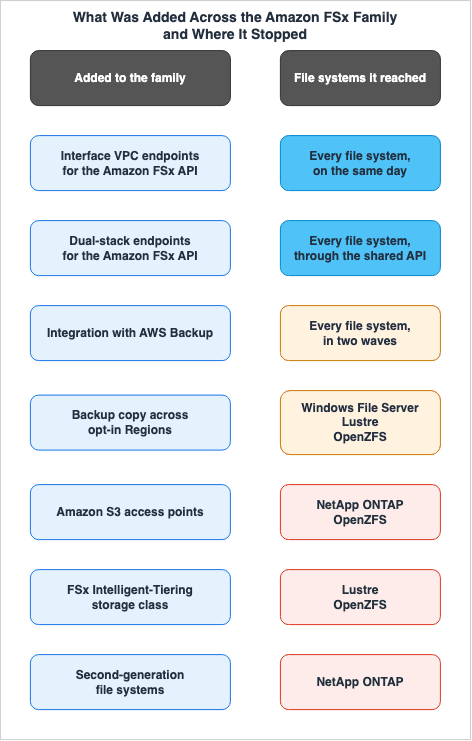
Reach column in the timeline is where that difference shows.The clearest example is FSx Intelligent-Tiering. It carries the family name, and it supports two of the four file systems. The product page states:
Purpose-built for Amazon FSx for Lustre and Amazon FSx for OpenZFS file systemsCloudFormation's
StorageType also takes three values: SSD, HDD, and INTELLIGENT_TIERING. However, it limits the file systems that can utilize INTELLIGENT_TIERING to OpenZFS and Lustre. The announcement of AWS Backup support names the same two. ⇒ Three independent documents name the same pair.⚠ This is where the name collision comes back. FSx for NetApp ONTAP has a tiering policy that moves data between the SSD tier and the capacity pool tier, volume by volume. The API reference calls that intelligent tiering. This is not the same as the FSx Intelligent-Tiering storage class. Reading the two as the same thing makes the statement that only two file systems are supported look wrong.
Differences in reach are evident in other entries as well.
- AWS Backup integration was rolled out in two phases. Initially, it was available to the two existing file systems on 2020-11-09, and then to the remaining two on 2022-05-18.
- Two file systems support Amazon S3 access points, and about five months separate them. OpenZFS gained them on 2025-06-25, and ONTAP on 2025-12-02.
- The update that puts Active Directory credentials in AWS Secrets Manager applies only to the two file systems that join Active Directory.
- The announcement for copying backups across opt-in Regions names three file systems. FSx for NetApp ONTAP is not among them.
- Updates on the API side, by contrast, reach all four. All four user guides record the interface VPC endpoints on the same day (2022-04-05), and the dual-stack endpoints (2025-02-07) are an update to the service API itself, which all four share.
⇒ Within the range of entries this article covers, the updates that reached all four on the same day sat outside the file system itself. Updates that touch what is inside a file system have an order of arrival, and some have not arrived everywhere.
The One That Carried the Amazon FSx Name but Was Not a File System
One offering that carries the Amazon FSx name has been closed to new customers. That offering is Amazon FSx File Gateway.⚠ It was not a fifth file system. It is a gateway type in AWS Storage Gateway, and its user guide sits in the Storage Gateway documentation, not the Amazon FSx documentation. The first entry in its document history places it:
In addition to the original File Gateway (now known as Amazon S3 File Gateway), Storage Gateway provides Amazon FSx File Gateway (FSx File Gateway).The closing to new customers was announced on the Storage Gateway side as well.
AWS Storage Gateway's FSx File Gateway will no longer be available to new customers starting 10/28/24.⇒ None of the four file systems was ever removed. What was closed to new customers was a path that gave on-premises clients low-latency access to shares on FSx for Windows File Server. ⛔ What that lifecycle stage takes away, and what to use instead, is not the subject of this article. Details can be found in AWS Retired Services History and Timeline and AWS Data Movement Decision Guide.
⚠ Be mindful of how the name persists. As of 2026-09-17, the section on hybrid use on the product's main page still lists Amazon FSx File Gateway. The name of an offering that has closed to new customers does not necessarily disappear from the product page right away.
Frequently Asked Questions about Amazon FSx History
When did Amazon FSx launch, and which file systems did it launch with?
Amazon FSx launched on 2018-11-28, initially offering two file systems: FSx for Windows File Server and FSx for Lustre. NetApp ONTAP was added on 2021-09-02, and OpenZFS on 2021-11-30. ⇒ The four available today were not supplied all at once.Which Amazon FSx file system is the newest?
FSx for OpenZFS. General availability began on 2021-11-30. The announcement describes it asthe newest addition to the Amazon FSx family, and no fifth file system has been added as of the verification date of this article.Were the Amazon FSx file systems generally available on the day they were announced?
All four were. The document history in each of the four user guides carries the start of general availability as its oldest entry, and that date matches the date of the announcement post on the AWS News Blog. ⇒ That is why the timeline in this article does not split the announcement date and the general availability date into separate columns.Does every Amazon FSx file system support the FSx Intelligent-Tiering storage class?
No. FSx for Lustre and FSx for OpenZFS are the only file systems that support the FSx Intelligent-Tiering storage class. This is mentioned in three places: the product page, the description ofStorageType in CloudFormation, and the announcement of AWS Backup support. The initial support for OpenZFS was introduced on 2024-12-01, while Lustre support became available on 2025-05-29. The deployment types that support this feature are detailed in the Amazon FSx Family Decision Guide.Is FSx Intelligent-Tiering the same thing as the tiering policy on an FSx for NetApp ONTAP volume?
No. They are different things. FSx Intelligent-Tiering is a storage class of the file system itself, and Lustre and OpenZFS support it. The tiering policy for FSx for NetApp ONTAP, on the other hand, is configured at the volume level and moves data between the file system's primary storage and capacity pools. ⚠ The API reference calls the latter intelligent tiering, so reading by name alone makes the two look identical.Was Amazon FSx File Gateway one of the Amazon FSx file systems?
No. It is a gateway type in AWS Storage Gateway. The user guide sits in the Storage Gateway documentation, which states thatStorage Gateway provides Amazon FSx File Gateway (FSx File Gateway). It closed to new customers on 2024-10-28, and that did not change the number of Amazon FSx file systems.Which Amazon FSx file systems have a second generation?
The answer changes with how you count, because the wording is not consistent. Only FSx for NetApp ONTAP uses the term "second generation" to refer to a generation of the file system itself (2024-07-09). FSx for Lustre and FSx for OpenZFS each have a second version, referred to as "Persistent 2" and "Single-AZ 2," respectively, in their deployment type names. Regarding FSx for Windows File Server, the user guide's document history does not mention any specific generation.Why does this timeline not list every Amazon FSx update?
Amazon FSx updates encompass a wide range of additions, including new Regions, support for additional client operating systems, and management policy updates. This article does not try to cover them all. It selects the entries that show how the family grew and how far each feature reached. Each entry includes a link to the original source, so the quickest way to get the full details is to directly consult the document history in the user guide.Summary
The four Amazon FSx file systems were not supplied all at once as a row of four choices. The family started with two on 2018-11-28, and one more arrived on 2021-09-02 and another on 2021-11-30, which is how it reached four. AWS itself refers to the first two asthe first two members and the fourth as the newest addition.All four file systems became generally available on their respective announcement dates. Unlike many AWS services, where the announcement and general availability dates differ, these four all launched on the same day. That is why the timeline in this article carries a single date column.
The order in which they were introduced still influences their current feature sets. Differences are apparent in their multi-zone configurations, the generational aspects of the file systems, and the range of storage classes available. ⚠ FSx Intelligent-Tiering carries the family name, and it supports two of the file systems.
Within the range of entries this article covers, the updates that reached all four on the same day sat outside the file system itself. All four user guides record the interface VPC endpoints on the same day. Updates related to the core functionality of the file systems were rolled out sequentially. ⇒ Saying "the entire family" can obscure whether a particular feature is available for the file system you are currently using.
The overlapping names are the biggest challenge when dealing with this topic.
Intelligent-Tiering can refer to Amazon S3 storage classes, Amazon FSx storage classes, and ONTAP volume tiering policies. Amazon FSx File Gateway, despite the name, is an offering on the AWS Storage Gateway side. ⇒ Reading the timeline by name alone makes entries appear that are not there, and hides entries that are.This article does not focus on which file system to choose. The practical aspects of selection and configuration are detailed in the Amazon FSx Family Decision Guide. Instead, this article examines the order in which these options were introduced.
This timeline will be updated as Amazon FSx continues to evolve.
Additional articles cover related topics.
References:
Tech Blog with curated related content
Written by Hidekazu Konishi