Agent Toolkit for AWS and the AWS MCP Server - How IAM, SCPs, and CloudTrail Tell an Agent's Calls Apart, and Where They Cannot
First Published:
Last Updated:
aws:ViaAWSMCPService and aws:CalledViaAWSMCP. CloudTrail logs may include the MCP server identifier in fields such as invokedBy.Those responsible for controlling access through IAM, SCP, and CloudTrail likely want to know three things: Can adding a single statement to an SCP prevent an agent from deleting resources? Do the Deny statements for
aws-mcp:* written during the preview still apply? And can CloudTrail be used to identify agent calls retroactively?The answers to these questions can all be found in AWS documentation, although they are scattered across various sources. These include the IAM User Guide, the Agent Toolkit for AWS User Guide, two posts on the AWS Security Blog, What's New, and the AWS News Blog. There are also inconsistencies in how these sources describe the information. Based on these documents, this article sets out what the signals that AWS adds can tell apart and the paths on which these signals are absent. Only calls that pass through AWS-managed MCP servers can be differentiated and stopped using the two MCP condition keys that AWS adds. Methods for blocking the agent itself are outside the scope of this article.
Related articles on this site:
- MCP Server Implementation Reference - Anthropic, OpenAI, Google, Cloudflare, and AWS
- Where the Logs Come From on AWS - Identity and the Control Plane, What Is On by Default, and What Is Not Recorded at All
- AWS Organization Guardrails - Service Control Policies, Resource Control Policies, and Data Perimeter Design
- IAM Policy Evaluation Logic Step-by-Step - Explicit Deny, RCP, SCP, Resource Policy, Identity Policy, Permission Boundary, and Session Policy
- Agent Sandboxing and Blast-Radius Isolation on AWS - Choosing the Unit of Each Containment Boundary and What Each One Does Not Stop
- Hardening and Governance Guide for Claude Code and Claude Desktop - Containerized Containment and Why Code and Desktop Govern Differently
- The Boundaries of the AWS Global Network - Autonomous Systems, Partitions, and What a Private Path Does Not Guarantee
Table of Contents
- 1. The Scope of This Article and the Date It Was Verified
- 2. What the AWS MCP Server Calls, and Whose Credentials It Uses
- 3. The Signal Table — Who Sets Each Signal, Where a Policy Can Test It, and When It Is Absent
- 4. The Three Global Condition Keys for MCP
- 5. AWS Policy Examples and SCPs
- 6. Moving Away from the Preview-Era aws-mcp Actions
- 7. What CloudTrail Records
- 8. Where the Distinction Disappears
- 9. Mismatches That Show Up After Configuration
- 10. Frequently Asked Questions about the AWS MCP Server Condition Keys
- 11. Summary
- 12. References
1. The Scope of This Article and the Date It Was Verified
This section confirms the order in which the AWS MCP Server and the condition keys appeared. It then lists what this article does not cover.1.1 AWS MCP Server and Condition Keys: History
AWS MCP Server was announced in preview on November 30, 2025, and became generally available on May 6, 2026. On the same day, Agent Toolkit for AWS, which includes the AWS MCP Server as a component, was also announced. The dates in the following table are the publication dates of What's New posts and AWS blog posts. However, the July 15, 2026, and August 31, 2026, rows give dates that the archived user guide states.| Date | Source | Relevant Information |
|---|---|---|
| November 30, 2025 | What's New | Announcement of AWS MCP Server preview, available in the US East (N. Virginia) Region. During this period, service-specific IAM actions were required for AWS MCP Server (Agent Toolkit User Guide). |
| March 2, 2026 | AWS Security Blog | Introduced two condition keys: aws:ViaAWSMCPService and aws:CalledViaAWSMCP, and announced that the need for MCP-specific IAM actions would soon be eliminated. |
| May 6, 2026 | What's New, AWS News Blog | General availability of AWS MCP Server and announcement of Agent Toolkit for AWS. The AWS News Blog noted that with general availability, the condition keys were supported, and a separate IAM permission was no longer required to use the server. |
| June 5, 2026 | What's New | Introduced the ability to switch between multiple accounts and roles within a single session, as well as installation from the AWS CLI. |
| July 9, 2026 | What's New | Added support for OAuth via AWS Sign-In. |
| July 15, 2026 | Agent Toolkit User Guide (Archive) | Tool aws___call_aws deprecated (section 2.2). |
| August 31, 2026 | Agent Toolkit User Guide (Archive) | Scheduled removal date for aws___call_aws (section 2.2). |
| September 4, 2026 | What's New | Introduced the serverless capability to inspect AWS Lambda functions. |
Regarding Agent Toolkit for AWS, the What's New post of May 6, 2026, states:
The Agent Toolkit for AWS is the successor to the MCP servers, plugins, and skills available on AWS Labs.The announcement also states that AWS Labs' MCP servers, skills, and plugins will continue to be provided. This article does not cover AWS Labs' MCP servers, although they are mentioned as an example in section 8.2 when discussing the self-managed MCP server.
1.2 Verification Date and Available Regions
The information presented in this article was verified using primary sources on September 29, 2026. Review the primary sources before relying on these facts, as the lists of condition key values and tools, as well as the available Regions, change over time. Regarding the available Regions, the What's New post of September 4, 2026, states:The AWS MCP Server can access services in all commercial AWS Regions, while the AWS MCP Server itself runs in the US East (N. Virginia) and Europe (Frankfurt) Regions.On September 29, 2026, the "Setting up the AWS MCP Server" page in the Agent Toolkit User Guide also listed endpoints for the same two Regions. A What's New post of October 2, 2026 (The AWS MCP Server is now available in six additional AWS Regions) added six Regions, and on October 16, 2026, the same page lists endpoints for eight Regions.
1.3 Topics Not Covered
This article focuses solely on what is visible from the AWS perspective. Existing articles, or a separate article on the same subject matter, cover the following topics.- MCP Server Implementation Reference covers the MCP protocol and the implementation of the MCP server. Section 6.4 of that article briefly introduces the Agent Toolkit for AWS.
- Hardening and Governance Guide for Claude Code and Claude Desktop covers control on the client side of the agent (determining which MCP servers to use and which tools to allow).
- Agent Sandboxing and Blast-Radius Isolation on AWS covers agent execution isolation and tracking using
SourceIdentity. - IAM Policy Evaluation Logic Step-by-Step covers the order in which policies are evaluated, and AWS Organization Guardrails covers the design of SCPs.
- Where the Logs Come From on AWS covers general concepts related to CloudTrail data events.
- What Fills an AWS STS Session Token covers the contents of session tags and their size within an AWS STS session token.
- Where AWS Publishes Which Features Exist in Which Region covers the sources AWS publishes on which features are available in which Region. The AWS Knowledge MCP Server's
get_regional_availabilityis one of them. - This article does not list the skills and plugins available for the Agent Toolkit for AWS. This is due to the dynamic nature of their numbers. The What's New post of June 5, 2026, lists over 40 skills and three plugins.
2. What the AWS MCP Server Calls, and Whose Credentials It Uses
Before discussing condition keys, this section confirms what the AWS MCP Server calls and with whose credentials it initiates those calls. These two factors determine what the condition keys will identify.2.1 Agent Toolkit for AWS: Four Components
The Agent Toolkit User Guide describes the Agent Toolkit for AWS as consisting of four components: the AWS MCP Server, agent skills, plugins, and rules files. The AWS MCP Server is a managed MCP server operated by AWS, to which agents connect. Agent skills provide a collection of procedures and reference materials for specific AWS tasks, which agents load when needed. Plugins install the AWS MCP Server configuration and skills in a single operation; the user guide describes them as packages for Claude Code and Codex. Rules files are configuration files placed in each project, providing guidance for the agent's behavior. This article will focus on the AWS MCP Server.2.2 Tools — Authenticated and Unauthenticated
The "Understanding the MCP Server tools" page of the Agent Toolkit User Guide, as of September 29, 2026, categorizes tools into two groups.| Group on the Page | Tool | Function |
|---|---|---|
| AWS Knowledge Tools | aws___search_documentation, aws___read_documentation, aws___retrieve_skill, aws___list_regions, aws___get_regional_availability | Search and retrieve AWS documentation, retrieve skills, list regions, and check regional availability. |
| AWS API Tools | aws___run_script | Executes Python code in a sandbox that can access AWS APIs. |
| AWS API Tools | aws___get_presigned_url | Creates pre-signed URLs for Amazon S3. |
| AWS API Tools | aws___get_tasks | Retrieves the status of long-running tasks initiated by aws___run_script. |
Regarding the scope of tools that can be used without authentication, the "Quotas for AWS MCP Server" page states:
Unauthenticated access is limited to the read-only AWS knowledge tools, such as documentation search, documentation retrieval, and regional availability. Tools that run AWS API calls or execute scripts require authentication.The way skills are described varies across documentation. The What's New post of May 6, 2026, states that AWS credentials are no longer required for searching documentation and discovering skills. The "What is the Agent Toolkit for AWS?" page states that agents are authenticated using IAM credentials when following skills. As this is outside the scope of this article, both descriptions are shown here without choosing between them.
As of September 29, 2026, the path for calling AWS APIs is
aws___run_script. Previously, there was a tool called aws___call_aws that could call any AWS API. The AWS News Blog described the call_aws tool on May 6, 2026, and the AWS Security Blog also highlighted aws___call_aws on March 2, 2026. However, the archived version of the "Understanding the MCP Server tools" page (as saved by the Internet Archive on August 8, 2026) contains the following note:We deprecated aws___call_aws as of July 15, 2026 and will remove it on August 31, 2026. We recommend aws___run_script for running AWS operations; it provides the same access to AWS APIs, so no functionality is lost.As of September 29, 2026, the same page lists tools, but
aws___call_aws is no longer included, and this note has also been removed. This article found no What's New post announcing this change. Be aware that when reviewing older articles or blog posts that specifically mention aws___call_aws, the tool name differs from the current list. The same note in the archive advises against specifying particular tool names in prompts, skills, or configurations.2.3 Calls Made with the Developer's Own Credentials
AWS MCP Server does not possess its own IAM actions. The "How AWS MCP Server works with IAM" page of the Agent Toolkit User Guide states:The server does not define its own IAM actions, resources, or service-specific condition keys. Instead, it authenticates your request using SigV4, adds standardized condition context keys, and forwards the request to the downstream AWS service. The downstream service performs the authorization check using your existing IAM policies.The same page illustrates the authorization flow when connecting via SigV4 in four steps. The agent's request is signed using the developer's AWS credentials. AWS MCP Server authenticates the request and appends the two condition keys. AWS MCP Server then forwards the request to downstream AWS services. The downstream AWS services authorize the request using the developer's existing IAM policies.
Therefore, operations called via the agent through AWS MCP Server are authorized using the permissions associated with the developer's credentials. The "Troubleshooting AWS MCP Server identity and access" page lists verification steps when access is denied, stating:
AWS MCP Server uses your credentials, so you need the same permissions as you would for a direct API call.The same applies when using temporary credentials. The "How AWS MCP Server works with IAM" page states that downstream AWS services apply the same restrictions as a direct API call, specifically Session Policy and Permission Boundaries, to requests forwarded by AWS MCP Server.
There are two ways to connect to AWS MCP Server. One is to run MCP Proxy for AWS on the developer's machine and sign requests using SigV4. The other, added on July 9, 2026, is to use OAuth 2.1, where AWS Sign-In acts as the OAuth authorization server. Even when connecting via OAuth, the available permissions do not increase. The "OAuth 2.1 authentication for AWS MCP Server" page states:
OAuth authorization does not grant additional AWS permissions to the MCP client. The MCP client can only act within the permissions already granted to you.The calls are made using the same principal and the same permissions. The difference in the request lies in the condition keys that AWS MCP Server appends. The following sections examine those condition keys.
3. The Signal Table — Who Sets Each Signal, Where a Policy Can Test It, and When It Is Absent
This article calls the clues that tell an agent's calls apart from a person's calls signals. This section presents a table of the signals related to the AWS MCP Server path.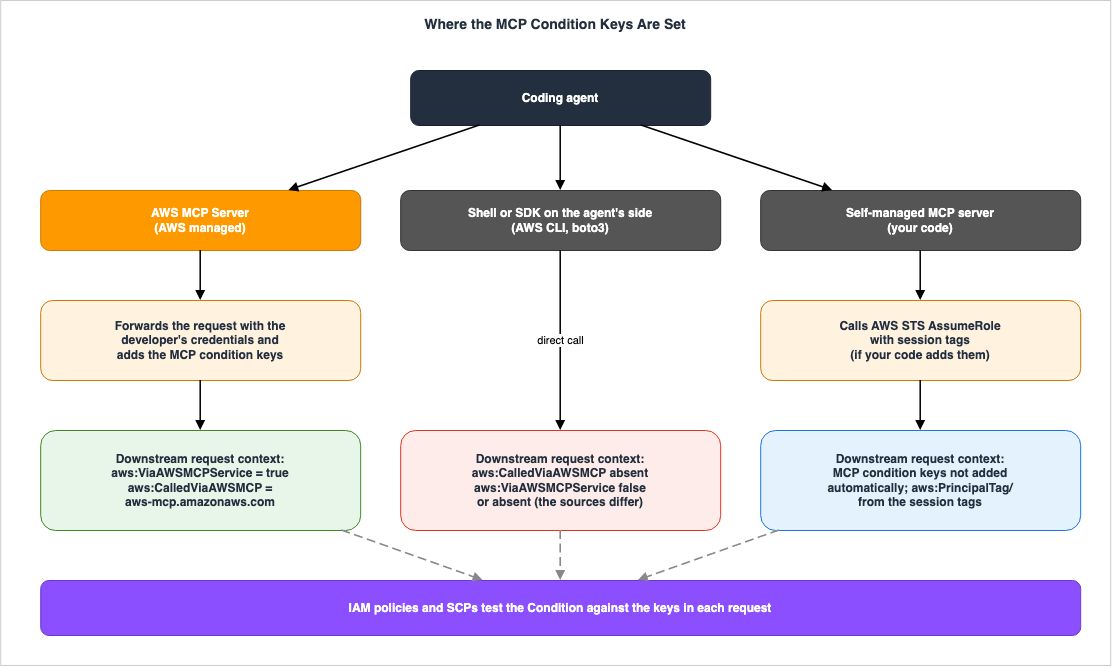
3.1 Reading the Table
The table has five columns.Signal: This represents either a condition key for a policy, or a field in a CloudTrail record.Who sets it: This indicates who sets the signal, whether it's AWS or the caller.Where a policy can test it: This specifies where the signal can be checked within an IAM policy or SCP. If it's a record field that cannot be checked in a policy, the cell says so.When it is absent: This describes situations where the signal is not present. It only includes cases that AWS documentation mentions.Where AWS says so: This indicates the source documentation that supports the information in that row.
For cells where AWS documentation does not provide information, the entry will state
The source does not say. Before writing it, this article searched the full text of the source that the row cites, and the pages that source links to, for the terms not present, absent, only when, directly, self-managed, no longer, and except. This site uses the same five-column table in other articles that discuss what a call carries to AWS.3.2 Signals Related to the AWS MCP Server Path
| Signal | Who sets it | Where a policy can test it | When it is absent | Where AWS says so |
|---|---|---|---|---|
aws:ViaAWSMCPService | AWS. When an AWS-managed MCP server makes requests to downstream AWS services on behalf of a developer. | IAM policies and SCPs, within the Condition (Bool). | Direct calls. The phrasing varies depending on the documentation. The IAM User Guide states it returns false, while the AWS Security Blog states it is not included in the request context (section 4.3). | IAM User Guide, Agent Toolkit User Guide, AWS Security Blog (April 14, 2026) |
aws:CalledViaAWSMCP | AWS. The value is the service principal of the MCP server that sent the request (e.g., aws-mcp.amazonaws.com). | IAM policies and SCPs, within the Condition (StringEquals, etc.). | Direct calls. The IAM User Guide states that this key is not included when the principal makes a direct call. | IAM User Guide, Agent Toolkit User Guide |
aws:IsMcpServiceAction | AWS. When the MCP service authorizes an action within its own service. | IAM policies, within the Condition (Boolean). | When the MCP service sends requests to other AWS services. The IAM User Guide states that this key does not refer to such requests. | IAM User Guide |
CloudTrail userIdentity.invokedBy, sourceIPAddress, userAgent (for the AWS MCP Server, the value is aws-mcp.amazonaws.com) | AWS. Records downstream calls originating from an AWS-managed MCP server. | Not a policy condition key. It is a field used when searching logs. | Direct calls. The CloudTrail User Guide states that invokedBy only appears when an AWS service makes the request. Also, when data event logging is not enabled. The AWS Security Blog states that downstream calls originating from MCP are classified as data events (section 7.2). | AWS Security Blog (April 14, 2026), CloudTrail User Guide |
CloudTrail events where eventSource is aws-mcp.amazonaws.com | AWS. Records actions performed by the AWS MCP Server itself. | Not a policy condition key. | The source does not say. | Agent Toolkit User Guide |
aws:SignInSessionArn | AWS Sign-In. Included in credentials during OAuth flows and passed to subsequent requests. | IAM policies, within the Condition (ARN operator). | Requests that do not originate from an AWS Sign-In OAuth session, and console sessions. The IAM User Guide states that this key is included in the request context when the request originates from an OAuth session, and that it cannot be used in console sessions. | IAM User Guide, Agent Toolkit User Guide |
signin:OAuthClientId, signin:OAuthRedirectUri, signin:OAuthGrantType, signin:OAuthClientAuthentication | AWS Sign-In | Within the Condition for actions against AWS Sign-In. The Agent Toolkit User Guide lists signin:AuthorizeOAuth2Access and signin:CreateOAuth2Token. | Requests to downstream AWS services. The signin: keys are service-specific keys for AWS Sign-In; the IAM User Guide describes service-specific keys as working only within requests to that service. | Agent Toolkit User Guide, IAM User Guide |
Session tags (aws:PrincipalTag/<key>) | The caller. The code on the self-managed MCP server attaches the tag when calling AssumeRole. | IAM policies, within the Condition (aws:PrincipalTag). | When the server code does not attach a tag. Self-managed MCP servers do not add the condition keys automatically. | AWS Security Blog (April 14, 2026) |
The fifth row's fourth column says
The source does not say. because the CloudTrail page of the Agent Toolkit User Guide states that actions performed by tools requiring authentication are logged, but it does not specify how calls to tools used without authentication are recorded.3.3 What Can Be Gleaned from the Table
With the exception of the final row, all rows are set by AWS (including AWS Sign-In). Only the final row is set by the caller. The AWS Security Blog explains the differences between the condition keys of AWS-managed MCP servers and session tags as follows:Additionally, with AWS-managed MCP servers, AWS injects context keys at the service layer, so callers cannot spoof them. With self-managed servers, the entity calling AssumeRole sets the session tags, so you must trust that your MCP server code hasn't been modified.Only condition keys can be tested in a policy; CloudTrail fields are for post-hoc investigation. The same call is told apart using condition keys from a preventative perspective and using CloudTrail fields from a detection perspective. Sections 4 and 5 discuss preventative measures, and section 7 covers detection.
Every row except the fifth names a case where its signal is absent. The most significant instance is when an agent calls AWS without passing through an MCP server. In such cases, neither the condition keys applied by AWS-managed MCP servers nor the MCP fields in CloudTrail are present (see section 4.3 for how
aws:ViaAWSMCPService is documented). This is addressed in section 8.4. The Three Global Condition Keys for MCP
The AWS global condition context keys page in the IAM User Guide defines three global condition keys related to MCP:aws:ViaAWSMCPService, aws:CalledViaAWSMCP, and aws:IsMcpServiceAction. The AWS MCP Server applies the first two of these to downstream requests.4.1 aws:ViaAWSMCPService — Did It Pass Through an AWS-Managed MCP Server?
Theaws:ViaAWSMCPService key is a single-valued Boolean key. According to the IAM User Guide, this key is defined as follows:Use this key to check whether an AWS MCP service makes a request to another AWS service on your behalf using forward access sessions (FAS). The request context key returns true when an AWS MCP service forwards a request to an AWS service on behalf of the original IAM principal. The request context key also returns false when the principal makes the call directly.The Agent Toolkit User Guide describes the usage of this key as follows:
Use this key to allow or deny all actions initiated through any AWS managed MCP server.This key does not distinguish which MCP server the request passed through. Whether it passed through the AWS MCP Server or the Amazon EKS MCP Server, the value is the same
true.4.2 aws:CalledViaAWSMCP — Which MCP Server Did It Pass Through?
aws:CalledViaAWSMCP is a single-valued string key. The value contains the service principal of the MCP server that initiated the request. The IAM User Guide describes the conditions under which this key is included in a request as follows:This key is present in the request when an AWS MCP service uses the credentials of an IAM principal to make a request to an AWS service. This key is also not present when the principal makes the call directly.The Agent Toolkit User Guide provides three examples of possible values:
| Value | MCP Server |
|---|---|
aws-mcp.amazonaws.com | AWS MCP Server |
eks-mcp.amazonaws.com | Amazon EKS MCP Server |
ecs-mcp.amazonaws.com | Amazon ECS MCP Server |
These three examples are illustrative and not an exhaustive list. The AWS Security Blog post of March 2, 2026, states:
This context key value will include more MCP servers when new MCP servers are available4.3 How the Key Appears in a Direct Call — Discrepancies in Documentation
Regardingaws:CalledViaAWSMCP, the IAM User Guide explicitly states that the key is not included in the request when the principal calls directly. The sources this article checked contain nothing that contradicts this.Concerning
aws:ViaAWSMCPService, the documentation varies. As mentioned in section 4.1, the IAM User Guide defines this as returning false in a direct call. However, the Availability field of the same section states:This key is included in the request context when an AWS MCP server makes a request to a downstream AWS service on behalf of an IAM principal.The AWS Security Blog post of April 14, 2026, states that the key is not included.
When a request doesn't come through an AWS-managed MCP server, the aws:ViaAWSMCPService condition key isn't present in the request context.Therefore, whether this key is included as
false or not in a direct call is inconsistent across the documentation. This article will not attempt to resolve this discrepancy.One way of writing the condition makes this inconsistency irrelevant: deny when
Bool matches true. Whether the key is false or not included, the condition is not met. The examples in the AWS user guides and blog posts that this article read all use aws:ViaAWSMCPService in this manner. However, conditions that match the value with false or use negation operators may produce different results depending on which documentation is considered correct. Section 5.4 discusses negation operators.4.4 Differences Between Similar Key Names — aws:ViaAWSService and aws:CalledVia
The IAM User Guide contains two similar key names that are distinct. These keys,aws:ViaAWSService and aws:CalledVia, are related to forward access sessions (FAS) where an AWS service calls another service on behalf of a developer.| Key | Type | Availability in the IAM User Guide |
|---|---|---|
aws:ViaAWSService | Boolean | Always present in the request context. true for requests forwarded via FAS, false for direct calls. |
aws:CalledVia | List of strings | Included when an AWS service that supports it calls another service with the developer's credentials. Not included in direct calls. |
aws:ViaAWSMCPService | Boolean | Included when an AWS-managed MCP server sends a request to a downstream AWS service. |
aws:CalledViaAWSMCP | String (single value) | Included when an AWS MCP service makes a request to an AWS service with the developer's credentials. Not included in direct calls. |
The MCP keys are distinct from the FAS keys. The value for
aws:CalledViaAWSMCP contains the service principal of the MCP server, while the value for aws:CalledVia is an ordered list of the AWS services that made requests on the developer's behalf.There is one point here that this article could not verify. The IAM User Guide uses the term "FAS" in the definition of
aws:ViaAWSMCPService. The "Forward access sessions" page in the IAM User Guide states:The aws:ViaAWSService condition key value is set to true whenever a FAS request is made.Comparing these two, it appears that requests forwarded by AWS-managed MCP servers will also show
aws:ViaAWSService as true. However, the IAM User Guide sections and the IAM chapter in the Agent Toolkit User Guide that this article read do not explicitly state how aws:ViaAWSService or aws:CalledVia behave when an MCP server forwards a request (unresolved). If you are using SCPs within your data perimeter to exclude calls from AWS services using aws:ViaAWSService, this point matters. The Boundaries of the AWS Global Network discusses how FAS and aws:ViaAWSService behave in the data perimeter, and AWS Organization Guardrails lists aws:ViaAWSService as one of the condition keys for SCPs in the data perimeter.4.5 Third Key: aws:IsMcpServiceAction
The IAM User Guide defines this third key as follows:Use this key to verify that the action being authorized is an MCP Service action. This key does not refer to actions taken by the MCP service to other AWS services.The "Availability" field indicates that this key returns
True only when the MCP service is authorizing an action related to the MCP service itself. This key is not used to identify requests to downstream AWS services; rather, it is used when the MCP service's own actions are authorized.As noted in section 2.3, the AWS MCP Server does not have its own IAM actions. However, some other AWS-managed MCP servers do have their own IAM actions (see section 6.3). The IAM User Guide does not provide example policies for this key. On the other hand, the AWS managed policy
AWSMcpServiceActionsFullAccess allows all actions under the condition that this key matches true with Bool. The AWS Managed Policy Reference explains that this policy provides full access to the MCP service actions themselves, but does not grant access to the actions that the MCP service performs.5. AWS Policy Examples and SCPs
This section directly quotes examples of policies provided by AWS, without any modifications to their content. IAM Policy Evaluation Logic Step-by-Step outlines the order of evaluation, and AWS Organization Guardrails details the design of Service Control Policies (SCPs).5.1 Three Examples in the Agent Toolkit User Guide
The "Identity-based policy examples for AWS MCP Server" page in the Agent Toolkit User Guide provides three examples. These examples consist of individual statements that can be included in policy documents; they do not represent complete policy documents. The page's opening paragraph includes the following sentence:Each example shows the policy statement to include within your IAM policy document.The first example demonstrates how to deny all actions performed through an AWS-managed MCP server. The user guide indicates that this can be used as an SCP or IAM policy to completely block access from AWS-managed MCP servers across an organization or for specific principals.
{
    "Sid": "DenyAllActionsViaMCP",
    "Effect": "Deny",
    "Action": "*",
    "Resource": "*",
    "Condition": {
        "Bool": {
            "aws:ViaAWSMCPService": "true"
        }
    }
}
The second example permits read access while denying only the two Amazon S3 delete actions when they come through the AWS MCP Server. The user guide explains that this creates a scenario where agents can inspect resources but are unable to delete them.
[
    {
        "Sid": "AllowS3ReadOperations",
        "Effect": "Allow",
        "Action": [
            "s3:GetObject",
            "s3:ListBucket"
        ],
        "Resource": "*"
    },
    {
        "Sid": "DenyDeleteWhenAccessedViaMCP",
        "Effect": "Deny",
        "Action": [
            "s3:DeleteObject",
            "s3:DeleteBucket"
        ],
        "Resource": "*",
        "Condition": {
            "StringEquals": {
                "aws:CalledViaAWSMCP": "aws-mcp.amazonaws.com"
            }
        }
    }
]
The third example demonstrates how to deny every action that passes through the AWS MCP Server specifically. The user guide notes that requests from other AWS-managed MCP servers and direct API calls are permitted.
{
    "Sid": "DenyActionsViaAWSMCPServer",
    "Effect": "Deny",
    "Action": "*",
    "Resource": "*",
    "Condition": {
        "StringEquals": {
            "aws:CalledViaAWSMCP": "aws-mcp.amazonaws.com"
        }
    }
}
5.2 Examples from the IAM User Guide
The IAM User Guide provides one example in the section for each of the two keys. These examples are entire policy documents, including theVersion, and deny the two Amazon S3 delete actions as well as dynamodb:DeleteTable. The example for the aws:ViaAWSMCPService section is as follows:{
"Version": "2012-10-17",
"Statement": [
{
"Sid": "DenySensitiveActionsViaMCP",
"Effect": "Deny",
"Action": [
"s3:DeleteBucket",
"s3:DeleteObject",
"dynamodb:DeleteTable"
],
"Resource": "*",
"Condition": {
"Bool": {
"aws:ViaAWSMCPService": "true"
}
}
}
]
}The example for the
aws:CalledViaAWSMCP section has a Sid of DenySensitiveActionsViaSpecificMCP and a Condition that matches aws:CalledViaAWSMCP with aws-mcp.amazonaws.com using StringEquals. The actions being denied are the same three actions.Both the second example in section 5.1 and the two examples in the IAM User Guide explicitly list the actions to be denied in the
Action element. The two condition keys only indicate whether the request passed through an AWS-managed MCP server and, if so, which server it passed through. They do not differentiate between read and write operations. If you only want to deny write operations, you will need to explicitly list the actions you want to deny.5.3 When Used as an SCP
The Agent Toolkit User Guide says its first example can be used as either an SCP or an IAM policy. The AWS Security Blog post of March 2, 2026, also mentions that SCPs can be used to stop access from MCP servers across an organization or within specific organizational units, providing an SCP example with the same condition and aVersion specified.Regarding Resource Control Policies (RCPs), the AWS Security Blog post of April 14, 2026, states:
Verify that the AWS services you use support MCP context keys in RCP evaluation.In essence, whether an RCP evaluates the MCP condition keys has to be checked for each service. This article could not find a list of the services that support it.
5.4 When Using Negation Operators — Also Matches Calls Without a Key
The IAM User Guide's condition operators page describes how requests are handled when a key is not present in the context.If the key that you specify in a policy condition is not present in the request context, the values do not match and the condition is false. If the policy condition requires that the key is not matched, such as StringNotLike or ArnNotLike, and the right key is not present, the condition is true.This rule also applies to the MCP condition keys.
aws:CalledViaAWSMCP is not included in direct calls. Therefore, a Deny condition written solely with StringNotEquals will also match direct calls.Two AWS Security Blog posts show, in different forms, an example that limits Amazon EKS operations to calls through the EKS MCP Server. The post of March 2, 2026, provides an example where the Deny condition is written using only
StringNotEquals.{
"Version": "2012-10-17",
"Statement": [
{
"Sid": "AllowEKSOperationsViaEKSMCP",
"Effect": "Allow",
"Action": "eks:*",
"Resource": "*",
"Condition": {
"StringEquals": {
"aws:CalledViaAWSMCP": "eks-mcp.amazonaws.com"
}
}
},
{
"Sid": "DenyEKSOperationsViaOtherMCP",
"Effect": "Deny",
"Action": "eks:*",
"Resource": "*",
"Condition": {
"StringNotEquals": {
"aws:CalledViaAWSMCP": "eks-mcp.amazonaws.com"
}
}
}
]
}The post of April 14, 2026, adds a
Bool match on aws:ViaAWSMCPService to the Deny condition.{
"Version": "2012-10-17",
"Statement": [{
"Sid": "AllowEKSOperationsViaEKSMCP",
"Effect": "Allow",
"Action": "eks:*",
"Resource": "*",
"Condition": {
"StringEquals": {
"aws:CalledViaAWSMCP": "eks-mcp.amazonaws.com"
}
}
}, {
"Sid": "DenyEKSOperationsViaOtherMCP",
"Effect": "Deny",
"Action": "eks:*",
"Resource": "*",
"Condition": {
"Bool": {
"aws:ViaAWSMCPService": "true"
},
"StringNotEquals": {
"aws:CalledViaAWSMCP": "eks-mcp.amazonaws.com"
}
}
}]
}Applying the above rule, the Deny condition in the March example will also match direct calls. This is because direct calls do not include
aws:CalledViaAWSMCP, and the StringNotEquals condition evaluates to true. Conversely, the Deny condition in the April example only matches requests where aws:ViaAWSMCPService is true, so it does not match direct calls. According to the IAM User Guide's "Conditions with multiple context keys or values" page, when a statement contains multiple condition operators, they are evaluated using a logical AND operation. Neither post explains the difference in their example formats. Both posts describe their example as limiting EKS operations to calls through the EKS MCP Server, but the two examples behave differently for direct calls. This distinction is derived from the rules outlined in the IAM User Guide. Whether direct calls should be explicitly denied or left to other policies determines which format is appropriate.6. Moving Away from the Preview-Era aws-mcp Actions
If, during the preview period, you restricted access to the AWS MCP Server using theaws-mcp:* actions, that policy is no longer in effect. This section will help you determine what is no longer valid and what you need to replace it with.6.1 What Stopped Working
The page "How AWS MCP Server works with IAM" states, under the heading "Deprecated MCP-specific IAM actions":During the preview period, AWS MCP Server required the following service-specific IAM actions:The listed actions are three:
aws-mcp:InvokeMcp, aws-mcp:CallReadOnlyTool, and aws-mcp:CallReadWriteTool. The same section continues:These actions are no longer required and have no effect. If you previously configured IAM permissions using these actions, we recommend that you remove them from your policies. If you used these actions in Deny statements to block access to AWS MCP Server, you must update your policies to use the aws:ViaAWSMCPService or aws:CalledViaAWSMCP condition context keys instead.Statements that use these actions have no effect, whether Allow or Deny. The page "Troubleshooting AWS MCP Server identity and access" describes two scenarios. In the first, if the Allow statement includes
aws-mcp:InvokeMcp, that permission is no longer effective, and only permissions for downstream AWS services remain valid. In the second, if the Deny statement includes the three actions, the following applies:If you previously used Deny statements with aws-mcp:InvokeMcp, aws-mcp:CallReadOnlyTool, or aws-mcp:CallReadWriteTool to block access to AWS MCP Server, these actions no longer have any effect.The risk lies in situations where these actions were previously used to prevent AWS MCP Server from being used. Whether the usage was blocked by withholding an Allow for
aws-mcp:InvokeMcp or by a Deny statement, it is no longer enforced. The page "How AWS MCP Server works with IAM" states that, aside from permissions for direct API calls, no additional IAM configuration is required to use AWS MCP Server (permissions for AWS Sign-In via OAuth are separate and addressed in Q3). Principals with permissions for downstream AWS services can now, without modification, use AWS MCP Server to perform the same operations. The statements that no longer have any effect remain in the policies.Regarding when this change occurred, the Document history in the Agent Toolkit User Guide does not explicitly mention this change. However, the AWS Security Blog post of March 2, 2026, announced that MCP-specific IAM actions would soon no longer be needed. The AWS News Blog post of May 6, 2026, described a new feature in general availability:
The AWS MCP Server now supports IAM context keys, so you no longer need a separate IAM permission to use the server and can express fine-grained access in a standard IAM policy.6.2 What to Replace It With
The "Troubleshooting AWS MCP Server identity and access" page provides the following example as a replacement.{
"Effect": "Deny",
"Action": "*",
"Resource": "*",
"Condition": {
"Bool": {
"aws:ViaAWSMCPService": "true"
}
}
}This example blocks all operations that pass through any AWS-managed MCP server. If, during the preview, you only blocked
aws-mcp:CallReadWriteTool to stop only the write tools, replacing it with this example will broaden the scope. As seen in section 5.2, condition keys do not differentiate between read and write operations. If you want to block a similar range of actions, you will need to list the write actions you want to deny in the Action element, and use the condition key mentioned above. The AWS News Blog notes that, using IAM policies or SCPs, it is possible to grant certain developers the ability to make changes, while only allowing read operations through the MCP server.6.3 Other AWS-Managed MCP Servers Retain Their Specific Actions
The MCP-specific IAM actions that stopped having any effect are the AWS MCP Server's. Other AWS-managed MCP servers still have their own specific actions as of September 29, 2026. The following table provides examples verified on the Service Authorization Reference for each service:| Service Prefix | Action |
|---|---|
eks-mcp (Amazon EKS MCP Server) | CallPrivilegedTool, CallReadOnlyTool, InvokeMcp |
ecs-mcp (Amazon ECS MCP Service) | InvokeReadOnlyTools, UseMcp |
application-signals-mcp (Amazon CloudWatch Application Signals MCP Server) | CallReadOnlyTool, InvokeMcp |
The Service Authorization Reference, as of the same date, also lists prefixes for Amazon WorkSpaces AgentAccess MCP Server (
agentaccess-mcp) and Amazon SageMaker Unified Studio MCP (sagemaker-unified-studio-mcp), both of which have their own specific actions. The Amazon EKS User Guide, specifically the Amazon EKS MCP Server Configuration Reference page, states that roles connecting to the EKS MCP Server require permission for eks-mcp:InvokeMcp. The Amazon EKS User Guide also describes the Amazon EKS MCP Server as a preview release. The list of services in the Service Authorization Reference on the same day did not include the aws-mcp prefix. The AWS Security Blog post of March 2, 2026, advises checking the documentation for each AWS-managed MCP server you use to confirm whether it supports the new authorization model.Do not extrapolate the issue of
aws-mcp:* not working to the specific actions of other MCP servers. Because the EKS configuration reference requires permission for eks-mcp:InvokeMcp, removing the specific action permissions for the Amazon EKS MCP Server will render that server unusable.6.4 Relationship with CallReadWriteTool in CloudTrail — Unresolved
The "Logging AWS MCP Server API calls using AWS CloudTrail" page of the Agent Toolkit User Guide states:All AWS MCP Server actions for authenticated tools are logged by CloudTrail and are documented in the Agent Toolkit for AWS API Reference. For example, calls to the CallReadWriteTool action generate entries in the CloudTrail log files.In the example on that same page, the
eventSource is aws-mcp.amazonaws.com and the eventName is CallReadWriteTool. In other words, as of September 29, 2026, the page still documents CallReadWriteTool as a CloudTrail event name.AWS does not explicitly state the relationship between this name and the now-inactive IAM action
aws-mcp:CallReadWriteTool. This article could not find the Agent Toolkit for AWS API Reference that the quoted sentence links to. The two statements are therefore placed side by side here (unresolved): first, the IAM action aws-mcp:CallReadWriteTool is no longer effective. Second, the CloudTrail logging page still documents CallReadWriteTool as a CloudTrail event name. According to the "How AWS MCP Server works with IAM" page, AWS MCP Server does not define its own IAM actions; therefore, this event name cannot be interpreted as an IAM permission.7. What CloudTrail Records
When agents call AWS through the AWS MCP Server, multiple records are left in CloudTrail. The type of records created varies depending on how the connection is established and what logging is configured.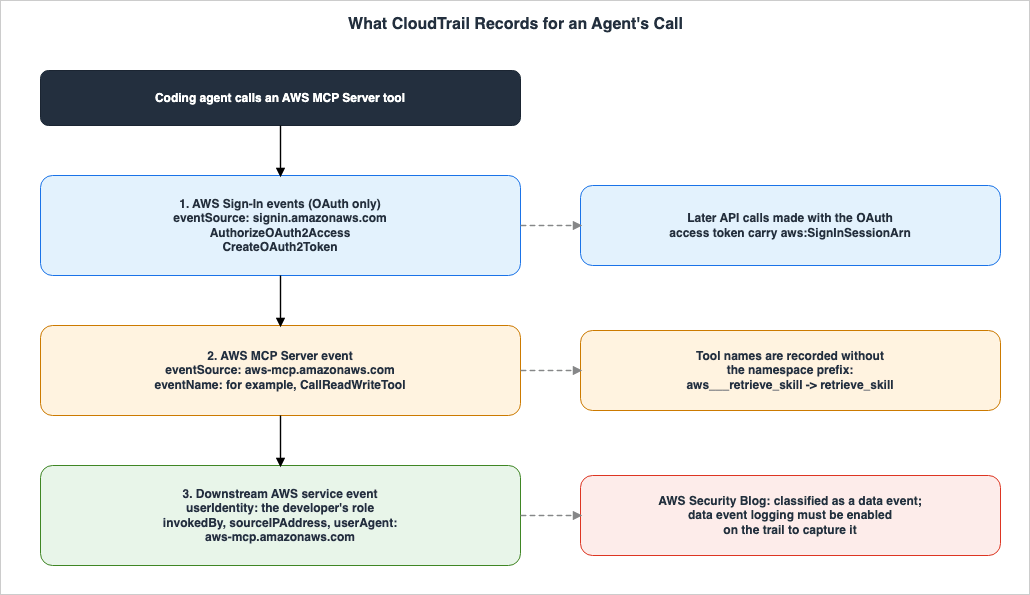
7.1 Records of the AWS MCP Server Itself
The AWS MCP Server's own operations are recorded as events witheventSource set to aws-mcp.amazonaws.com. As shown in the example on the "Logging AWS MCP Server API calls using AWS CloudTrail" page, the eventCategory is Data, the eventType is AwsMcpEvent, and the requestParameters include the MCP request's method (e.g., tools/call) and its arguments. The same page states that AWS MCP Server activity is recorded in CloudTrail Event history. However, the CloudTrail User Guide states that the Event history page shows only management events and does not show data events. This article does not resolve where the server's own events, shown as Data in the example, can be viewed (unresolved).That same page also notes a specific consideration regarding the recording of tool names.
Tool names in CloudTrail logs may not match exactly the tools shown in your MCP client.For example, a tool displayed as
aws___retrieve_skill on the MCP client is recorded in CloudTrail as retrieve_skill. This is because CloudTrail records the tool name without the namespace prefix used by MCP clients. Therefore, searching the logs for the tool name as displayed on the MCP client may not find a match.7.2 Records of Downstream Calls
When the AWS MCP Server calls downstream AWS services on behalf of developers, those calls are also recorded. The AWS Security Blog post of April 14, 2026, states:For AWS-managed MCP servers, downstream AWS API calls include the MCP service identifier in the invokedBy, sourceIPAddress, and userAgent fields. You can filter on these fields to isolate agent activity. MCP-originated downstream calls are classified as data events, so you must enable data event logging on your CloudTrail trail to capture them.An example of the recorded data from the same article is as follows:
{
  "eventVersion": "1.11",
  "userIdentity": {
    "type": "AssumedRole",
    "principalId": "AROAEXAMPLE:developer-session",
    "arn": "arn:aws:sts::111122223333:assumed-role/DeveloperRole/developer-session",
    "accountId": "111122223333",
    "sessionContext": {
      "sessionIssuer": {
        "type": "Role",
        "principalId": "AROAEXAMPLE",
        "arn": "arn:aws:iam::111122223333:role/DeveloperRole",
        "accountId": "111122223333",
        "userName": "DeveloperRole"
      }
    },
    "invokedBy": "aws-mcp.amazonaws.com"
  },
  "eventSource": "s3.amazonaws.com",
  "eventName": "GetObject",
  "sourceIPAddress": "aws-mcp.amazonaws.com",
  "userAgent": "aws-mcp.amazonaws.com",
  "eventType": "AwsApiCall",
  "managementEvent": false,
  "eventCategory": "Data"
}
The principal within
userIdentity represents the developer's role (in this example, DeveloperRole). As seen in section 2.3, the AWS MCP Server calls downstream services using the developer's credentials. The values of invokedBy, sourceIPAddress, and userAgent distinguish calls made through an AWS-managed MCP server from other calls.Based on the materials examined for this article, only the AWS Security Blog states that downstream calls are recorded as data events. The CloudTrail page in the Agent Toolkit User Guide does not specify what type of event downstream calls are recorded as. This article could not find any AWS documentation that describes the configuration required to record data events in order to capture downstream calls (unresolved). In addition, the AWS Security Blog's example is
GetObject on Amazon S3, which CloudTrail records as a data event even without MCP. The sources this article checked do not show whether management operations called through MCP are also recorded as data events (unresolved). The "Logging data events" page in the CloudTrail User Guide states that trails and event data stores do not, by default, record data events. A general discussion of data events can be found in section 3.1 of Where the Logs Come From on AWS.7.3 Records When Connected via OAuth
When connected via OAuth, AWS Sign-In events are also recorded. The "Logging AWS MCP Server API calls using AWS CloudTrail" page lists two such events.| Event | Recorded When |
|---|---|
AuthorizeOAuth2Access | When a user authorizes the MCP client's OAuth flow. |
CreateOAuth2Token | When AWS Sign-In issues or refreshes an OAuth token. |
According to that same page, these events include the OAuth client ID, the target AWS MCP Server, the redirect URI, and the ARN of the sign-in session. The example on the "OAuth 2.1 authentication for AWS MCP Server" page shows that both events have
eventSource set to signin.amazonaws.com and managementEvent set to true. The CreateOAuth2Token example includes signInSessionArn in the additionalEventData. That same page also lists token revocation and token introspection, in addition to authorization requests and token issuance, as OAuth activities that CloudTrail records.API calls made using an OAuth access token carry
aws:SignInSessionArn. The Agent Toolkit User Guide recommends using this to associate API calls with the original OAuth sign-in session. The IAM User Guide also provides an example of a policy that uses this key to deny operations for a specific sign-in session. The same guide states that in non-interactive OAuth flows, each new access token carries a new sign-in session ARN (in interactive flows, an access token issued during a refresh keeps the same ARN). The AWS Sign-In User Guide states that refresh tokens are issued only for interactive authorization, that revoking one leaves access tokens already issued valid until they expire (up to one hour), and recommends a Deny on aws:SignInSessionArn for immediate containment.However,
aws:SignInSessionArn is not a signal indicating that the request passed through an MCP server. The IAM User Guide describes this key as follows:When you use an OAuth-based flow such as AWS CLI login (aws login) or AWS MCP Server, AWS Sign-In includes a sign-in session ARN in the issued credentials.In other words, the IAM User Guide also lists AWS CLI's
aws login as an example of an OAuth flow that produces this key. Whether the request passed through an AWS-managed MCP server can be determined using the condition keys described in section 4 (the IAM User Guide's definitions of the keys do not mention SigV4 or OAuth connections).7.4 When Switching Profiles
It is possible to switch profiles within a single session for each individual call (What's New, June 5, 2026). According to the "Multi-profile support" page, this requires a SigV4 connection, and MCP Proxy for AWS signs requests with the credentials of the selected profile for each call, choosing from the profiles specified at startup. The proxy removes theaws_profile argument, which the agent uses to select the profile, from the request.The aws_profile parameter is stripped before forwarding to the backend — the AWS MCP Server never sees it.The same page also states that each call carries its own identity.
Stateless routing: Each call carries its own identity.The same page does not describe CloudTrail records. Combined with section 7.2, it appears that records of calls made after switching profiles include the principal associated with the profile used for that call. If the profiles represent different roles, the records will include a different principal for each role. This switching functionality is not available when using OAuth. The same page notes that with OAuth, a single session is tied to a single IAM role. AWS Multi-Account Operational Patterns - Control Tower, Organizations, SCPs discusses general principles for managing multiple accounts.
8. Where the Distinction Disappears
The MCP condition keys and the MCP fields in CloudTrail handled in sections 4 through 7 are associated with calls that pass through AWS-managed MCP servers. This section addresses the paths where these signals are not applied.8.1 Direct Calls
Agents can also call AWS without going through an MCP server. The AWS Security Blog post of April 14, 2026, addresses this path under the heading "When agents bypass MCP servers."When an agent uses a bash tool to run an AWS CLI command like aws s3 rm s3://my-bucket/my-object or executes a Python script that calls boto3 directly, the request goes straight to AWS using the developer's existing credentials. The request bypasses MCP servers entirely.In this case, the condition keys of AWS-managed MCP servers are not included (see section 4.3 for details on how
aws:ViaAWSMCPService is documented). The same article continues, stating:The agent has two paths to the same AWS API, and differentiation controls govern one path.Of the two paths, only the one that goes through an MCP server can be differentiated and denied using condition keys. Regarding the other path, the article notes that minimizing the principal's permissions and using organizational guardrails such as Permission Boundaries and SCPs are effective regardless of which path the agent uses to reach AWS. The article treats limiting the tools available to the agent as an out-of-IAM control. The Hardening and Governance Guide for Claude Code and Claude Desktop discusses client-side controls, and Agent Sandboxing and Blast-Radius Isolation on AWS covers execution isolation.
8.2 Self-Managed MCP Servers
Self-managed MCP servers do not add the condition keys automatically. The AWS Security Blog counts as self-managed MCP servers both AWS-provided servers, obtained from the AWS MCP GitHub repository (awslabs/mcp) and run yourself, and servers that users build themselves. As a method for distinguishing calls made through a self-managed MCP server, the same article describes having the server's code attach session tags when it calls AssumeRole, and testing aws:PrincipalTag in IAM policies.{
"Version": "2012-10-17",
"Statement": [{
"Sid": "AllowS3ReadOperations",
"Effect": "Allow",
"Action": [
"s3:GetObject",
"s3:ListBucket"
],
"Resource": "*"
}, {
"Sid": "DenyDeleteWhenAccessedViaAI",
"Effect": "Deny",
"Action": [
"s3:DeleteObject",
"s3:DeleteBucket"
],
"Resource": "*",
"Condition": {
"StringEquals": {
"aws:PrincipalTag/AccessType": "AI"
}
}
}]
}It is the server's code that applies this tag, not AWS. As noted in section 3.3, the AWS Security Blog states that it is necessary to trust that the server's code has not been tampered with. From the logging perspective, the tag is included in the
requestParameters.principalTags of the AssumeRole event. The same article also suggests using the session name from the AssumeRole event as a means of linking it to downstream calls.Session tags are carried in the STS session token, and the token has a size limit. What Fills an AWS STS Session Token covers what the tags are carried in and how much space they take.
8.3 VPC Endpoints
The AWS Security Blog post of March 2, 2026, mentioned VPC endpoint support for AWS-managed MCP servers as a future plan.AWS will also add VPC endpoint support for AWS-managed MCP servers in the future.A search of the 28 pages of the Agent Toolkit User Guide on September 29, 2026, found no mention of VPC endpoints. This article will not further discuss the availability of VPC endpoints for AWS MCP Server.
8.4 Tracing the Origin of Actions
The records of the AWS MCP Server's downstream calls include the developer's principal (see section 7.2). When you need to trace an action taken under an assumed role back to the original user, you can use thests:SourceIdentity mechanism (the sources this article checked do not say how it applies to calls forwarded by an MCP server). Agent Sandboxing and Blast-Radius Isolation on AWS discusses this method and its associated conditions.9. Mismatches That Show Up After Configuration
After policies and logging are configured, what sections 4 through 8 describe shows up as results that differ from what was intended. The following table maps each result to its cause.| Observed Issue | Root Cause | Section |
|---|---|---|
| Deletion requests passed through the MCP server were denied by SCP, but agents were able to delete. | Agents were directly calling AWS through the AWS CLI or an SDK from the shell. Direct calls do not carry aws:CalledViaAWSMCP, and aws:ViaAWSMCPService is not true. | 8.1 |
A Deny statement for aws-mcp:CallReadWriteTool written during the preview phase no longer stops the write tools. | IAM actions for aws-mcp:* are ineffective. | 6.1 |
| A Deny statement intended to only allow specific MCP servers was also denying direct calls by users. | The Deny statement's condition was written using only StringNotEquals. For requests without a key, the negation condition evaluates to true. | 5.4 |
After replacing the aws-mcp:CallReadWriteTool Deny statement with the example from section 6.2, read operations passing through the MCP server were also being denied. | Condition keys do not differentiate between read and write operations. The example denies all operations. | 6.2 |
Principals that previously did not have aws-mcp:InvokeMcp permissions can now access AWS through the AWS MCP Server. | Allow statements for aws-mcp:InvokeMcp are also ineffective. If the principal has permissions for the downstream AWS service, it can make the call. | 6.1 |
When attempting to remove permissions for aws-mcp:*, permissions for MCP-specific actions were inadvertently removed, causing the Amazon EKS MCP Server to stop working. | The Amazon EKS MCP Server uses MCP-specific actions (e.g., eks-mcp:InvokeMcp). | 6.3 |
No records with invokedBy as aws-mcp.amazonaws.com are found in CloudTrail. | According to the AWS Security Blog, downstream calls are categorized as data events. Data events are not being logged. | 7.2 |
| Searching CloudTrail by the tool name displayed to the MCP client does not yield results. | CloudTrail records tool names without a namespace prefix. | 7.1 |
It is not possible to deny calls made through a self-managed MCP server using the aws:ViaAWSMCPService condition key. | Self-managed MCP servers do not add the condition keys automatically. | 8.2 |
| Clients connected via OAuth are unable to switch to a different account's profile. | Profile switching on a per-call basis is only supported when using SigV4 authentication. | 7.4 |
Following an example from an older blog post, aws___call_aws was specified, but it is not found in the tool list. | aws___call_aws was deprecated on July 15, 2026, and the archived user guide announced its removal on August 31, 2026. It is not present in the tool list as of September 29, 2026. | 2.2 |
10. Frequently Asked Questions about the AWS MCP Server Condition Keys
This article addresses common questions that may arise when deciding whether to implement AWS MCP Server within your organization.Q1. Does adding one statement to an SCP stop an agent from deleting resources?
No. A statement that denies whenaws:ViaAWSMCPService is true only prevents deletions processed through AWS-managed MCP servers. If an agent invokes the AWS CLI from a shell or uses the SDK directly, aws:ViaAWSMCPService is not true in those requests, and the added Deny statement does not match them. The AWS Security Blog recommends minimizing the principal's permissions and using Permission Boundaries and SCPs to address this (section 8.1).Q2. Is a Deny on the aws-mcp actions written during the preview still in effect?
No. The Agent Toolkit User Guide states that theaws-mcp:InvokeMcp, aws-mcp:CallReadOnlyTool, and aws-mcp:CallReadWriteTool actions are no longer effective. Deny statements need to be rewritten using the condition keys aws:ViaAWSMCPService or aws:CalledViaAWSMCP (see sections 6.1 and 6.2).Q3. Does using the AWS MCP Server require any additional IAM permissions?
If connecting via SigV4, no, you do not. You only need permissions for the downstream AWS services. If connecting via OAuth, the Agent Toolkit User Guide lists permissions for two AWS Sign-In actions,signin:AuthorizeOAuth2Access and signin:CreateOAuth2Token, as prerequisites, and names the AWS managed policy AWSMCPSignInOAuthAccessPolicy, which allows these two actions. However, the AWS Sign-In User Guide states that only the signin:CreateOAuth2Token permission is required for the non-interactive (client credentials) flow (see sections 2.3 and 3.2).Q4. Can you find agent calls in CloudTrail after the fact?
Yes, under certain conditions. Downstream calls that pass through AWS-managed MCP servers will include the MCP server's identifier in theinvokedBy, sourceIPAddress, and userAgent fields. However, according to the AWS Security Blog, these calls are categorized as data events, and enabling data event logging is required to capture them. Direct calls will not include the MCP server's identifier in these fields (see sections 7.2 and 8.1).Q5. Can the caller forge the values of the condition keys?
Regarding condition keys for AWS-managed MCP servers, the answer is no. The AWS Security Blog states that AWS assigns keys at the service layer, so the caller cannot forge them. For session tags on a self-managed MCP server, the entity callingAssumeRole sets the value, so the server's code must be trusted (see sections 3.3 and 8.2).Q6. Do the same condition keys also apply to calls that pass through the Amazon EKS MCP Server?
Yes. The Agent Toolkit User Guide listseks-mcp.amazonaws.com as an example of a value for the aws:CalledViaAWSMCP condition key. The AWS Security Blog post of April 14, 2026, also states that AWS MCP Server, Amazon EKS MCP Server, and Amazon ECS MCP Server automatically apply condition keys to downstream calls. However, unlike AWS MCP Server, Amazon EKS MCP Server has its own specific IAM actions that also require permission (see sections 4.2 and 6.3).Q7. When using OAuth, can you differentiate MCP calls based on aws:SignInSessionArn?
No. Theaws:SignInSessionArn key indicates a sign-in session that began through the OAuth flow. The IAM User Guide gives AWS CLI's aws login, alongside the AWS MCP Server, as examples of OAuth flows that generate this key. Whether the call passed through an AWS-managed MCP server can be determined using aws:ViaAWSMCPService and aws:CalledViaAWSMCP (see section 7.3).Q8. Do API calls from an aws___run_script script also carry the condition keys?
The documentation does not explicitly address this scenario. The Agent Toolkit User Guide states that the AWS MCP Server adds two condition keys to all requests it forwards to downstream AWS services, and it does not listaws___run_script as an exception. However, the sources this article checked contain no statement that names calls from a script and says the condition keys are added (unresolved). The same applies to Amazon S3 requests that the client sends with a URL from aws___get_presigned_url: the sources this article checked do not say whether those requests carry the condition keys (unresolved).11. Summary
When an agent calls AWS through the AWS MCP Server, that call appears to AWS as originating from the same principal and with the same permissions as the developer. The difference from a person's call lies in the signals that AWS adds. This article outlines what signals can be used to differentiate these calls, and where such differentiation is not possible, based on AWS documentation.AWS-managed MCP servers attach two condition keys to downstream requests.
aws:ViaAWSMCPService indicates whether the call passed through an AWS-managed MCP server, and aws:CalledViaAWSMCP identifies which server was used. Because AWS adds these keys at the service layer, the caller cannot forge them. However, they do not indicate whether the action is a read or write operation, so any actions you want to block must be explicitly defined.Only calls that passed through an AWS-managed MCP server can be differentiated and blocked using the condition keys. If an agent calls AWS directly using the AWS CLI or SDK, these keys do not indicate an MCP server (see section 4.3). Self-managed MCP servers do not add the keys automatically either. Direct calls rely on minimizing the principal's permissions and implementing organizational guardrails. Calls through a self-managed MCP server can be told apart if the server's code attaches session tags, although that code must be trusted (sections 3.3 and 8.2).
The preview-era
aws-mcp:* actions have no effect in either Allow or Deny statements. Deny statements that no longer have any effect will remain in the policy. When rewriting these statements, it is best to include a condition such as a Bool condition that matches true, rather than relying on negation operators alone. Conditions written only with negation operators also match direct calls, which do not carry aws:CalledViaAWSMCP.In CloudTrail, the
invokedBy, sourceIPAddress, and userAgent fields for downstream calls indicate the use of an AWS-managed MCP server. According to the AWS Security Blog, these are data events, so data event logging must be enabled. In the AWS MCP Server's own records, the tool name appears without a prefix. OAuth sessions can be tracked using aws:SignInSessionArn (section 7.3).Finally, here are four things to verify after configuring controls. First, check whether any path remains that allows the agent to call AWS without passing through an AWS-managed MCP server. Second, check for any outdated Deny statements using
aws-mcp:*. Third, confirm that Deny statements written using only negation operators are not inadvertently blocking direct calls. Fourth, verify that data event logging is enabled to capture downstream calls. If you can answer these four, you avoid believing you have stopped the agent when you have stopped only the MCP server path.12. References
- AWS global condition context keys - AWS Identity and Access Management User Guide
- IAM JSON policy elements: Condition operators - AWS Identity and Access Management User Guide
- Conditions with multiple context keys or values - AWS Identity and Access Management User Guide
- Logging data events - AWS CloudTrail User Guide
- Working with CloudTrail event history - AWS CloudTrail User Guide
- Forward access sessions - AWS Identity and Access Management User Guide
- What is the Agent Toolkit for AWS? - Agent Toolkit for AWS User Guide
- AWS MCP Server - Agent Toolkit for AWS User Guide
- Setting up the AWS MCP Server - Agent Toolkit for AWS User Guide
- Understanding the MCP Server tools - Agent Toolkit for AWS User Guide
- Understanding the MCP Server tools - Agent Toolkit for AWS User Guide (Internet Archive, captured August 8, 2026)
- Multi-profile support - Agent Toolkit for AWS User Guide
- How AWS MCP Server works with IAM - Agent Toolkit for AWS User Guide
- Identity-based policy examples for AWS MCP Server - Agent Toolkit for AWS User Guide
- Troubleshooting AWS MCP Server identity and access - Agent Toolkit for AWS User Guide
- OAuth 2.1 authentication for AWS MCP Server - Agent Toolkit for AWS User Guide
- Logging AWS MCP Server API calls using AWS CloudTrail - Agent Toolkit for AWS User Guide
- Quotas for AWS MCP Server - Agent Toolkit for AWS User Guide
- Document history for the Agent Toolkit for AWS User Guide
- AWSMCPSignInOAuthAccessPolicy - AWS Managed Policy Reference
- AWSMcpServiceActionsFullAccess - AWS Managed Policy Reference
- Configure OAuth access to AWS MCP Server - AWS Sign-In User Guide
- CloudTrail userIdentity element - AWS CloudTrail User Guide
- Actions, resources, and condition keys for Amazon EKS MCP Server - Service Authorization Reference
- Actions, resources, and condition keys for AWS services - Service Authorization Reference
- Amazon EKS MCP Server Configuration Reference - Amazon EKS User Guide
- Understanding IAM for Managed AWS MCP Servers - AWS Security Blog
- Secure AI agent access patterns to AWS resources using Model Context Protocol - AWS Security Blog
- The AWS MCP Server is now generally available - AWS News Blog
- AWS announces a preview of the AWS MCP Server - What's New with AWS
- Announcing Agent Toolkit for AWS — help AI coding agents build effectively on AWS - What's New with AWS
- The AWS MCP Server is now generally available - What's New with AWS
- The AWS MCP Server now supports cross-account and cross-role access - What's New with AWS
- The AWS Command Line Interface (CLI) now supports the Agent Toolkit for AWS - What's New with AWS
- OAuth support for the AWS MCP Server - What's New with AWS
- AWS MCP Server adds a serverless capability for AWS Lambda functions - What's New with AWS
References:
Tech Blog with curated related content
Written by Hidekazu Konishi