Hardening and Governance Guide for Claude Code and Claude Desktop - Containerized Containment and Why Code and Desktop Govern Differently
First Published:
Last Updated:
The thesis, in one line: Claude Code can be contained at the OS level; Claude Desktop cannot. That is why the center of gravity of governance is different for each. This guide is aimed at the evaluators, platform / IT / security teams, and decision-makers who want to deploy Claude Code and Claude Desktop at organizational scale while preventing the accidental ingestion and leakage of confidential or personal data through technical, layered defense.
The specifics below are current as of 2026; Claude Code and Claude Desktop features, management specs, and plan structures change frequently, so confirm the details against the official documentation (linked throughout and in the References) before you implement or contract.
📌 This is the governance and hardening installment of a three-part series on rolling out Claude across an organization. The companions cover the other two axes:
- Plan selection and cost optimization (usage vs. flat-rate, break-even, delivery models) → Cost-Optimization Guide to Rolling Out Claude Code and Claude Desktop Across Your Organization
- Connecting through a corporate proxy (domains, MSIX, NTLM / Kerberos, VPN coexistence) → Practical Guide to Deploying Claude Code and Claude Desktop Behind a Corporate Proxy
1. The Problems This Guide Solves
- "It's easy for one person, but once I have to roll it out to everyone and govern it, I don't know what to lock down or how."
- "I'm afraid the agent will read local
.envfiles or customer data on its own." - "I don't want people adding sketchy MCP servers — only the ones we've approved."
- "Even if I
denyBash(curl ...), won't a home-grown script that opens a file directly slip right through?" - "I hardened Claude Code nicely — and the same controls just don't apply to Claude Desktop."
- "So what does 'contain it in a container' actually mean, concretely — what do I ship?"
💡 Scope, set up front: what this guide protects against is primarily the accidental ingestion and leakage of confidential or personal data. A malicious insider with local admin rights cannot be fully stopped by technology alone — you backstop that with device management and human controls. The goal here is accident prevention, and the controls are designed for that threat model.
2. The Big Picture - Code and Desktop Govern in Fundamentally Different Ways
The single biggest mistake is trying to govern Claude Code (CLI) and Claude Desktop (GUI app) the same way. Their execution models differ, so the levers that work are entirely different.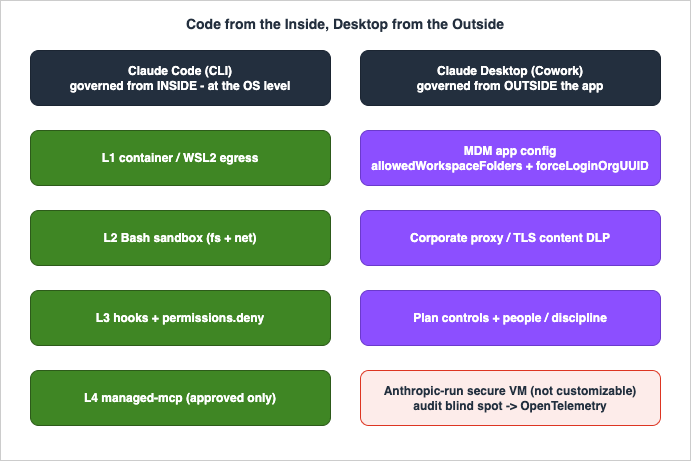
| Governance lever | Claude Code (CLI) | Claude Desktop (Cowork) |
|---|---|---|
| OS isolation (containment in a container / WSL2) | ◯ Yes (the official recommended path) | ✕ No (desktop GUI app) |
| Native sandbox (OS-isolate Bash fs / net) | ◯ Yes (macOS / Linux / WSL2) | ✕ No |
| Hooks (real-time block before send / before execution) | ◯ Yes (UserPromptSubmit / PreToolUse) | ✕ No |
| managed-mcp.json (exclusive lock to approved MCP only) | ◯ Yes (users can't add MCP) | ✕ No (on / off toggles only) |
| permissions.deny (deny reading secret paths, etc.) | ◯ Yes | ✕ No |
| MDM app config (pin destinations / allowed folders) | △ Supplementary | ◯ The main act (allowedWorkspaceFolders etc.) |
| Corporate proxy / TLS inspection / Tenant Restrictions | ◯ Yes | ◯ Yes (the lead role for Desktop) |
| Plan controls (Team / Enterprise: training opt-out, audit, retention) | ◯ Yes | ◯ Yes (same umbrella) |
The takeaways:
- Claude Code can contain "the inside of the app" down to the OS level. Sandbox, hooks, managed-mcp, and container egress are all Claude Code-specific features — they give you a last line of defense that stops things in the act.
- Claude Desktop structurally cannot. As a desktop GUI app (it ships as an Electron-based application — its installed bundle carries the Electron runtime, the bundled Chromium and Node.js stack that is the inspectable hallmark of an Electron app, rather than this being stated in Anthropic's docs — and is distributed as an MSIX package on Windows), its center of gravity shifts outside the app — to MDM, the network, the plan, and people.
3. Why Containment - The Risk Structure of Agentic AI
For chat-style tools, the only leak path is "text a human typed." Agentic tools (Claude Code / Cowork) ingest data even when no one types anything. This is the same risk surface the AI Agent Defense in Depth Model frames as the agent's autonomous access to files, commands, and destinations — that article is the conceptual parent for the containment layers below.| Aspect | Chat-style | Agentic (Claude Code / Cowork) |
|---|---|---|
| Main ingestion path | The prompt a human types | The prompt + autonomous file reads, command execution, MCP / API connections |
| Leakage without human input | Unlikely | Possible (autonomously reads .env, customer data, logs in the working folder) |
| Effectiveness of "don't type it" training | High | Necessary but insufficient on its own |
| Controls required | Input discipline + DLP | Containment of the access surface + input discipline + DLP + detection |
→ What you must protect isn't just "the input box" — it's the entire surface of files, commands, and destinations the agent can touch. Hence the mantra: keep it from touching (access containment), stop it (DLP), keep it from getting out (egress control).
4. Governing Claude Code - Five Layers of Defense in Depth
Claude Code supports this containment head-on, as product features. The well-trodden path stacks these five layers.🔑 A note on the word "layers." The L1–L5 below are security / containment layers for a single product (Claude Code), enforced at the OS level — a different axis from the request-lifecycle layers in the AI Agent Defense in Depth Model (which is about where in a request you place a control), and different again from the extension layers (CLAUDE.md / skills / subagents / hooks / MCP / plugins, classified by load timing). Hooks and MCP appear in more than one of these vocabularies, but their role differs in each. Read the L-numbers here as "concentric rings of containment around one CLI," not as the lifecycle model's L1–L4.
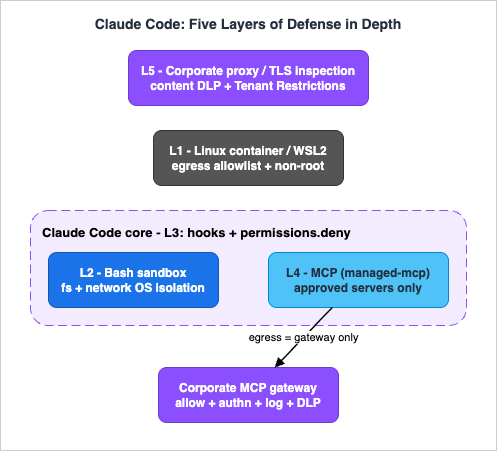
| Layer | Owner | Protects | Primary purpose |
|---|---|---|---|
| L1 Container | devcontainer / WSL2 + egress firewall | The whole process / outbound traffic | OS isolation; restrict destinations to an allowlist |
| L2 Sandbox | Native Bash sandbox | Bash commands and child processes | Block home-grown reads / unsanctioned traffic at the OS |
| L3 Hook / perms | hooks + permissions.deny | Per tool invocation | DLP before send / exec; deny secret paths |
| L4 MCP gateway | managed-mcp + allowlist + the gateway itself | MCP connections | Approved MCP only; pin destination to the corporate GW |
| L5 Proxy / TLS | Corporate proxy + TLS inspection | All traffic content | Content DLP; tenant restrictions (reuse existing assets) |
4-1. L1 Container / WSL2 - OS Isolation + Egress Control
- Claude Code ships an official reference devcontainer (
.devcontainer/devcontainer.json+Dockerfile+init-firewall.sh). You can also install via the Dev Container Feature (ghcr.io/anthropics/devcontainer-features/claude-code, pinned to a version tag such as:1.0). init-firewall.shis a default-deny + allowlist iptables firewall that narrows outbound traffic to only the required domains (inference, auth, and your corporate MCP gateway). Applying it inside the container needs both theNET_ADMINandNET_RAWcapabilities, added throughrunArgs.- Non-root execution. The reference container runs Claude Code as a non-root user, and the CLI rejects the permission-skip flag when launched as root.
4-2. L2 Sandbox (Bash) - Stop Home-Grown Reads and Unsanctioned Traffic at the OS
The native sandbox forcibly isolates the filesystem and network of the Bash command and its children using OS primitives. It applies to Bash commands and their child processes; the built-inRead / Edit / Write tools go through the permission system directly, not the sandbox.| OS | Implementation | Supported |
|---|---|---|
| macOS | Seatbelt (built in) | ◯ |
| Linux | bubblewrap (fs isolation) + socat (network relay) | ◯ |
| WSL2 | Same as Linux (bubblewrap + socat) | ◯ |
| Native Windows | — | ✕ Not supported → run inside WSL2 / container |
This even stops "home-grown reads" like
cat ~/.ssh/id_rsa (closing, at the OS level, a hole that permission rules alone can't). Key settings (the sandbox block in settings.json):failIfUnavailable: true— do not run in environments where the sandbox can't start. The default isfalse(a warning is shown and commands run unsandboxed), so setting this totrueis what turns sandboxing into a hard gate.allowUnsandboxedCommands: false— strict mode that disables the model-side sandbox-disable escape hatch (the default istrue). Withfalse, every command must run sandboxed or be listed inexcludedCommands.filesystem.denyRead— ⚠️ the sandbox's default read scope is the entire machine. This default still allows reading credential files, so unless you also list~/.aws/credentials,~/.ssh/,secrets/,.env, etc. here, an in-Bashcatcan read them (the docs explicitly recommend adding~/.aws/credentialsand~/.ssh/).network.allowedDomains/network.httpProxyPort— allowlist Bash's destinations or force it through your own proxy. In managed mode,network.allowManagedDomainsOnly: truetightens it to "block anything not on the allowlist, without prompting."
filesystem.allowRead / allowWrite / denyWrite, network.deniedDomains, autoAllowBashIfSandboxed, and the managed-only filesystem.allowManagedReadPathsOnly. For the implementation details and a tested baseline, see the Claude Code Harness and Environment Engineering Guide and the settings reference.⚠️ The sandbox covers Bash only.
Read / Edit / Write, WebFetch, and MCP are outside it → those are protected by L1 (container egress), L3 (perms / hooks), and L4 (MCP GW). On WSL2, sandboxed Bash can't launch Windows binaries (powershell.exe, cmd.exe, anything under /mnt/c/) — add them to excludedCommands if a command genuinely needs to run outside the sandbox.4-3. L3 Hook / Permissions - Per-Tool DLP and Blocking (the "Last Line of Defense")
- hooks:
UserPromptSubmit(DLP before send) andPreToolUse(block / DLP / audit before a command or tool runs). They can block with exit code 2, which makes Claude Code ignore stdout and feed the hook's stderr back to the user and the model as the reason. APreToolUsedenyis evaluated before any permission-mode check, so it holds even underbypassPermissions. This is the "stop it in the act" last line that Desktop lacks — for the event model and matcher rules, see the Claude Code Hooks Complete Guide. - permissions.deny: deny reading secret paths (
Read(.env),Read(~/.ssh/**), etc.) and block exfil commands (Bash(curl *),Bash(wget *),Bash(scp *),Bash(rsync *),Bash(nc *)). UsedisableBypassPermissionsMode: "disable"(apermissions-block key) to forbid permission-skip itself.
Bash(curl *) (space) and Bash(curl:*) (colon) as equivalent trailing-wildcard forms, and the permission dialog itself writes the space form; the :* form is only recognized at the very end of a pattern, so this guide uses the space form to stay consistent and avoid surprises.💡 Don't over-trust Bash argument patterns. An argument-level constraint such as allowing only
Bash(curl https://example.com/*) can be bypassed by reordering options, changing protocol, redirection, or extra whitespace. It's more robust to deny the whole command for exfiltration tools and validate allowed traffic via WebFetch domain allowlists or a PreToolUse hook.💡 Skills and plugins are another "bring your own instructions + code" channel. If you lock down MCP but leave skills and plugins open, a gap remains — close it with
disableSkillShellExecution and a Skill deny where appropriate. See the Agent Skills Security Vetting Guide.4-4. L4 MCP Gateway - "Approved MCP Only, Pinned to the Corporate GW"
MCP is the main route by which the agent reaches external systems. Tighten it in two stages. The exclusive-control and allowlist mechanics here are the same ones dissected in depth in the MCP Tool Poisoning Defense Guide — this section delegates the deep dive (rug pulls, tool poisoning, server-vs-tool granularity) to that article rather than re-deriving it.(a) Constrain the Claude Code side (product features)
managed-mcp.json(delivered via MDM / GPO) = exclusive control. Only the MCP servers listed there can be used, and users cannot add their own —claude mcp addis rejected withCannot add MCP server: enterprise MCP configuration is active and has exclusive control over MCP servers. An empty map{"mcpServers":{}}disables MCP entirely.allowedMcpServers/deniedMcpServers+allowManagedMcpServersOnly: truepin the allowlist with admin authority (the denylist always wins). ⚠️ Specify entries byserverUrl/serverCommand, not server name — names are user-assigned and provide no control (an allowlist that names onlyserverNameis not a security control: a user can register any server under that name).- Per-call blocking / audit via a
PreToolUsehook. Mind the matcher rules — a hook matcher made only of letters, digits, and underscores is treated as an exact string, so to match tools you must force a regex:mcp__github__search_repositories— exact match (one tool)mcp__github— matches nothing as a hook matcher (a common mistake): it is read as an exact string, but no tool is literally namedmcp__githubmcp__github__.*— all tools of that server (regex)mcp__.*__write.*— write-type tools across any server (regex)
- An MCP gateway that "sits between the client and MCP servers and performs allow / authn / logging / DLP" is not a built-in Claude Code feature — it's a component you stand up yourself or buy (the MCP Tool Poisoning Defense Guide treats the gateway as a build target, not an undocumented product feature). Claude Code supports remote MCP over HTTP (the
streamable-httptransport; the older SSE transport is deprecated), so point every MCP destination at your corporate gateway URL. A reference implementation of the server side lives in the MCP Server on AWS Lambda Complete Guide. - Guaranteeing "the gateway is the only way out": remote MCP traffic is emitted by the core process, so it's outside the Bash sandbox. Therefore set the L1 container egress to "allow only the gateway host" and combine it with
managed-mcp.json(destination = gateway) so that "MCP can only reach the corporate GW" holds.
headersHelper to inject a short-lived token obtained from SSO / OIDC; ③ the inference backend is also short-lived via awsAuthRefresh (a script that refreshes .aws credentials, e.g. SSO → STS); and ④ CLAUDE_CODE_SUBPROCESS_ENV_SCRUB=1 scrubs Anthropic and cloud-provider credentials from the environment of the Bash subprocess.On the AWS side, calls that an agent makes through the AWS MCP Server, which AWS manages, carry condition keys that AWS adds and that IAM policies and SCPs can test, while in calls it makes directly with the AWS CLI or an SDK those keys do not indicate an MCP server. Agent Toolkit for AWS and the AWS MCP Server covers which calls those keys tell apart and where they are absent.
4-5. L5 Corporate Proxy / TLS Inspection - Content DLP
- Claude Code honors standard proxies (
HTTPS_PROXY/HTTP_PROXY/NO_PROXY). It does not support SOCKS proxies; for NTLM / Kerberos use a local relay proxy — the mechanics, and the full canonical list of destination domains to allowlist, are in the companion Corporate Proxy Deployment Guide (treat the short domain lists in this article as illustrative, not complete). - For TLS inspection, point the CA at
NODE_EXTRA_CA_CERTS(Zscaler and similar work if the CA is also in the OS trust store). Apply your existing corporate proxy + TLS-inspection assets together with Tenant Restrictions (inject theanthropic-allowed-org-idsheader to block personal accounts) here.
github.com) can become a domain-fronting escape route. If you need content inspection, you need a TLS-terminating corporate proxy (install the CA into the sandbox; on macOS — where Seatbelt would otherwise block it — set network.enableWeakerNetworkIsolation: true alongside a network.httpProxyPort MITM proxy and your custom CA, so Go-based CLIs such as gh / gcloud / terraform can verify TLS through the inspection proxy).5. Containerization, Step by Step - Ship a "Fully Hardened Environment"
This is the heart of the guide. Because the native sandbox doesn't run on Windows, instead of configuring each machine individually, you ship a hardened Linux environment as a whole unit. WSL2 is the practical foundation on Windows fleets.
5-1. Design Principle - Separate "What You Bake In" from "What You Don't"
The distributable (the golden image) should bake in the runtime, controls, and policy — and never bake in secrets, credentials, or user data (resolve those at runtime). This is the key to making updates and redistribution non-destructive.| Contents | Location | |
|---|---|---|
| ◯ Bake in | Minimal Linux (non-root default), Node.js + Claude Code (version-pinned), DLP hooks, managed-settings.json, managed-mcp.json, init-firewall.sh, /etc/wsl.conf, corporate CA | Fixed paths in the distro |
| ✕ Don't bake in | API keys / credentials (→ fetch at runtime via SSO / OAuth), customer data / secrets, user work files (→ mount or Git), personal settings | Resolved at runtime |
5-2. The Config Files That Lock Down Governance (admin-placed = user-immutable)
Place these at the managed paths inside the distro: Linux / WSL:/etc/claude-code/, macOS: /Library/Application Support/ClaudeCode/, Windows host: C:\Program Files\ClaudeCode\.⚠️ On Windows the managed path is
C:\Program Files\ClaudeCode\. The older C:\ProgramData\ClaudeCode is no longer supported (it was dropped in v2.1.75), so migrate any settings deployed there. Inside the container / WSL2 you use /etc/claude-code/, so this mostly affects host-side settings.managed-settings.json (sandbox + permissions + MCP lockdown + hook registration — illustrative):{
"sandbox": {
"enabled": true,
"failIfUnavailable": true, // don't run if sandbox unavailable (hard gate; default false)
"allowUnsandboxedCommands": false, // strict mode (default true)
"enableWeakerNestedSandbox": true, // when running inside an unprivileged container
"filesystem": {
"denyRead": ["~/.ssh/**", "~/.aws/**", "./secrets/**", "**/.env*"]
},
"network": {
"allowedDomains": ["gateway.internal", "api.anthropic.com", "claude.ai", "platform.claude.com"],
"httpProxyPort": 8080,
"allowManagedDomainsOnly": true
}
},
"permissions": {
"deny": [
"Read(.env)", "Read(**/.env.*)", "Read(~/.ssh/**)", "Read(~/.aws/**)",
"Bash(curl *)", "Bash(wget *)", "Bash(scp *)", "Bash(rsync *)", "Bash(nc *)"
],
"disableBypassPermissionsMode": "disable" // forbid permission-skip itself
},
"allowManagedMcpServersOnly": true,
"enableAllProjectMcpServers": false,
"env": { "CLAUDE_CODE_SUBPROCESS_ENV_SCRUB": "1" },
"hooks": {
"UserPromptSubmit": [
{ "hooks": [ { "type": "command", "command": "/etc/claude-code/hooks/dlp-prompt.sh", "timeout": 30 } ] }
],
"PreToolUse": [
{ "matcher": "Bash", "hooks": [ { "type": "command", "command": "/etc/claude-code/hooks/dlp-bash.sh", "timeout": 30 } ] },
{ "matcher": "mcp__.*", "hooks": [ { "type": "command", "command": "/etc/claude-code/hooks/mcp-guard.sh", "timeout": 30 } ] }
]
}
}managed-mcp.json (exclusive control; pin destination to the gateway; inject short-lived token):{ "mcpServers": {
"corp-gateway": {
"type": "http",
"url": "https://gateway.internal/mcp",
"headersHelper": "/etc/claude-code/hooks/headers-helper.sh"
} } }5-3. The Egress Firewall (init-firewall.sh)
Default-deny outbound and allow only the corporate MCP gateway and inference / auth destinations (essentials, illustrative — see the proxy guide for the canonical domain set):#!/usr/bin/env bash
set -euo pipefail
ALLOWED_DOMAINS=( gateway.internal api.anthropic.com claude.ai platform.claude.com downloads.claude.ai )
iptables -F OUTPUT
iptables -P OUTPUT DROP # default deny
iptables -A OUTPUT -o lo -j ACCEPT # loopback
iptables -A OUTPUT -m state --state ESTABLISHED,RELATED -j ACCEPT
iptables -A OUTPUT -p udp --dport 53 -j ACCEPT # DNS
iptables -A OUTPUT -p tcp --dport 53 -j ACCEPT
for d in "${ALLOWED_DOMAINS[@]}"; do # resolve allowed domains, allow by IP
for ip in $(getent ahosts "$d" | awk '{print $1}' | sort -u); do
iptables -A OUTPUT -d "$ip" -j ACCEPT
done
done5-4. WSL Containment (/etc/wsl.conf) - Seal the Escape Routes to Windows
In the dedicated distro's/etc/wsl.conf, disable Windows-binary launching and drive auto-mounting. Because wsl.conf is a per-distro setting, it doesn't affect existing distros.[boot]
command = /usr/local/sbin/init-firewall.sh # apply egress at boot (needs NET_ADMIN; Windows 11 / Server 2022)
[user]
default = claude # non-root default user
[interop]
enabled = false # disable launching Windows binaries (seal escape route)
appendWindowsPath = false
[automount]
enabled = false # disable /mnt/c auto-mount (prevent reaching customer data)5-5. Build → Distribute (Turn It into a WSL2 Distro)
Build reproducibly in CI, stamp a version, and sign. Exporting a Docker-built rootfs viadocker export to .tar makes it directly importable into WSL2.# Build (from Dockerfile) -> rootfs in WSL2 import format
docker build --build-arg CLAUDE_CODE_VERSION=2.x.y -t claude-hardened:v1.0 .
CID="$(docker create claude-hardened:v1.0)"
docker export "$CID" -o claude-hardened-v1.0.tar
docker rm "$CID"
sha256sum claude-hardened-v1.0.tar > claude-hardened-v1.0.tar.sha256 # sign / verify integritywsl --update # update first (old WSL may not support import)
wsl --import claude-hardened C:\wsl\claude-hardened claude-hardened-v1.0.tar
wsl -d claude-hardened # launch explicitly with -d (don't steal the default).tar + script, a .wsl file (double-click install), or an Intune / MDM package. A Docker-based golden-image + container-registry approach (pull via VS Code Dev Containers) is also strong.⚠️ Watch the runtime license. Docker Desktop requires a paid subscription at larger companies — the free tier is limited to organizations with fewer than 250 employees and less than US$10 million in annual revenue, so a paid subscription is required once you reach 250 or more employees or US$10 million or more in annual revenue (and always for government entities). Avoid the dependency with Docker Engine (the OSS
dockerd daemon, Apache-2.0) / Podman / Rancher Desktop / plain WSL2 distros. A distro-only distribution needs no Docker at all. Confirm the current threshold in Docker's subscription terms before you rely on it.5-6. Coexisting with Existing WSL2 Users (How to Avoid Conflicts)
WSL2 registers distros separately with separate filesystems, so a new, dedicated distro basically won't conflict. The only caution is the "scope shared across all of WSL2."| Shared element | Impact | Mitigation |
|---|---|---|
Global .wslconfig (%UserProfile%) | Memory / CPU / network mode apply to all WSL2 distros | Don't bundle it (bundling overwrites existing settings); merge only if needed |
| Single VM, shared kernel | All distros live on one VM | Estimate resources as "shared" |
| Default distro | May hijack the default of a bare wsl invocation | Don't change the default; launch explicitly with -d |
⚠️ Don't install "into" an existing distro — arbitrary tooling and
/mnt/c mounts mean you can't guarantee the containment baseline. Always split out a fresh, dedicated distro.5-7. Post-Distribution Self-Check (Mandatory)
Right after distribution and after each update, verify the hardening is in effect with a check script. If even one item FAILs, halt the rollout.== Claude Code hardening self-check ==
[PASS] managed-mcp.json valid (MCP destination pinned to the gateway)
[PASS] sandbox.failIfUnavailable=true (hard gate: don't run if sandbox unavailable)
[PASS] disableBypassPermissionsMode=disable (permission-skip forbidden)
[PASS] DLP hooks executable
[PASS] egress firewall active (OUTPUT default DROP)
[PASS] wsl.conf disables interop/automount (escape routes to Windows sealed)
[PASS] Claude Code CLI installed5-8. Update Flow - Separate "Fast-Moving Policy" from "Slow-Moving Base"
Claude Code updates quickly, so re-baking the image every time is wasteful. Separate policy updates from base updates.| Update mode | What | Cadence |
|---|---|---|
| A. Policy / config only | Ship managed-settings.json / managed-mcp.json / hooks directly into /etc/claude-code/ via Intune | Most frequent · instant |
| B. CLI only | Update Claude Code (npm) inside the distro | Medium |
| C. Whole base | Re-import a new distro version (replace the old) | Infrequent · OS refresh |
→ Recommended: policy fast via A, base via C infrequently. If you insist that user work lives outside the distro root — on mounts / Git, re-importing for C becomes non-destructive.
6. Governing Claude Desktop (Cowork) - Why the Code Approach Doesn't Apply, and What to Do Instead
Everything in L1–L4 above (container, sandbox, hooks, managed-mcp) is Claude Code-specific and does not apply to the Claude Desktop GUI app. Desktop is governed through a different system.6-1. Why the Code Approach Doesn't Work
Claude Desktop (Cowork) is a desktop GUI app on macOS / Windows (Electron-based, as noted above; shipped as an MSIX package on Windows). The sandbox that OS-isolates Bash execution, the hooks that stop things before send, the exclusive control ofmanaged-mcp.json — their hook-execution substrate and config-file mechanisms are all Claude Code-specific and simply don't exist in Desktop. You also can't containerize and ship it.→ Desktop has no way to "contain tool execution at the OS level inside the app and stop it in the act." So the center of gravity shifts outside the app — to MDM, the network, the plan, and people.
6-2. But It Isn't "Defenseless" - Cowork Has an Anthropic-Controlled Secure VM
An important nuance: Cowork's shell / code execution runs inside a dedicated, isolated Linux VM, separated from the host operating system by the platform's hypervisor (Apple Virtualization.framework on macOS and Hyper-V on Windows). The VM enforces its own network egress filtering, syscall restrictions, and per-session user isolation.But this VM is controlled by Anthropic, not by you. It runs locally on the device (via the host hypervisor above), but its image and egress / syscall policy are defined by Anthropic: the official documentation exposes only disable-style MDM controls (for example,
isLocalDevMcpEnabled to turn off locally configured MCP servers), and there is no documented mechanism to inject your own hooks, managed-mcp, or egress rules into the VM the way you can with Code. In other words: execution isolation is assured by the vendor, but you have far less room than with Code to customize the controls inside it.Note too that the agent loop itself runs natively on the host (outside the VM) — conversation handling, file reads and writes in connected folders, web fetches, and local plugin MCP servers. And, as the proxy guide covers, Cowork should be assumed not to inherit the host's proxy settings for its in-VM execution — plan network controls accordingly (see the Corporate Proxy Deployment Guide).
6-3. The Governance Layers That Work for Desktop
| # | Layer | How |
|---|---|---|
| A | Pin app config via MDM | macOS: configuration profiles (domain com.anthropic.claudefordesktop); Windows: GPO / Intune (registry under HKLM / HKCU; machine-level wins over user-level). Key settings: allowedWorkspaceFolders (limit the folders Cowork may touch = the "substitute" for access containment), forceLoginOrgUUID (forbid login unless the account belongs to one of the listed org UUIDs — it accepts a single UUID or an array = the device-side lever for blocking personal accounts), secureVmFeaturesEnabled / isClaudeCodeForDesktopEnabled (master switches for Cowork and in-Desktop Claude Code access), disableAutoUpdates / autoUpdaterEnforcementHours (update control; the enforcement window is 1–72 hours, default 72), isDesktopExtensionEnabled / isDesktopExtensionDirectoryEnabled / isLocalDevMcpEnabled (on / off toggles for extensions / MCP) |
| B | Corporate proxy / TLS content DLP | The "detect & block" that a hook does in Code is taken over by the network layer. Terminate TLS and detect / block patterns (national IDs, card numbers, customer IDs) — you can lean on existing DLP infrastructure. ⚠️ But there's no "warn and stop before send" UX; the proxy merely cuts the connection. |
| C | Block personal accounts | Inject anthropic-allowed-org-ids: <your-org-UUID> at the proxy (identical to Code; comma-separated UUIDs, no spaces, TLS inspection required). You can double it up with device-side forceLoginOrgUUID (A). |
| D | Plan controls (Team / Enterprise) | Training opt-out (default), zero / custom data retention, SSO / RBAC. Desktop sits under the same plan umbrella. Note the tiering: SSO is available on Team too, but SCIM, IP allowlists, and the Compliance API are Enterprise-only (see the Cost-Optimization Guide). |
| E | User discipline (classification & training) | Desktop users hand folders to the app manually, so make "don't open folders containing customer data" an explicit rule. With thinner technical containment, discipline carries more weight. |
⚠️ Desktop's MCP / connector control is coarse-grained. You can't do Code-style "exclusive lock to approved MCP only" — the basics are on / off toggles like
isDesktopExtensionEnabled plus narrowing connector destinations via egress. That you can constrain the access surface with allowedWorkspaceFolders is important as Desktop's "substitute for containment."💡 On TLS for Desktop, treat the OS trust store as primary:
NODE_EXTRA_CA_CERTS is not reliably propagated to the Code subprocess behind Desktop's Code pane, so import the corporate CA into the OS trusted-roots store and use the env var only as a supplement (details in the proxy guide).💡 Watch the delivery format. Array-valued keys (including
allowedWorkspaceFolders and forceLoginOrgUUID when you pass more than one org) are delivered through MDM as JSON-encoded strings, not native arrays — encode them accordingly in your configuration profile / registry payload, and validate the values land as intended on a test device.6-4. Mind the Audit Blind Spot - Cowork Doesn't Appear in Audit Logs
An easily missed but important point: Cowork activity is not currently captured in audit logs, the Compliance API, or data exports — and because the architecture is the same across all plans, this holds including on Enterprise. Anthropic directs you to monitor Cowork via OpenTelemetry, which you can export into your SIEM. Because Desktop lacks not only "real-time blocking before send" but also "ready inclusion in standard after-the-fact auditing," designing OTel-based observability separately becomes a hidden linchpin of Desktop governance.💡 This is an area the documentation flags as subject to change ("not currently"), so confirm the present state of Cowork audit coverage before you finalize a control design.
7. Code vs. Desktop Governance Levers (Quick Reference)
| Requirement | How Code does it | How Desktop does it | vs. Code |
|---|---|---|---|
| Access containment | permissions.deny + sandbox + container egress | allowedWorkspaceFolders + don't-hand-it-over discipline + EDR / MDM | ⚠️ Weaker (no OS enforcement) |
| DLP (detect & block) | hook blocks in real time before send / exec | L5 proxy TLS content DLP (block) + after-the-fact detection | ⚠️ Weaker (no before-send UX) |
| MCP / connector control | managed-mcp: exclusive lock to approved MCP only | on / off toggles + narrow destinations via egress | ⚠️ Coarse-grained |
| Execution isolation | Your org designs the container / sandbox | Anthropic-controlled secure VM (runs locally; not customizable) | △ Vendor-dependent |
| Block personal accounts | Tenant Restrictions | Tenant Restrictions + forceLoginOrgUUID | = Equivalent |
| Contract / training opt-out / retention | Team / Enterprise | Same (same umbrella) | = Equivalent |
| Audit | Audit logs / Compliance API / OTel | OTel → SIEM (hard to put under standard audit) | ⚠️ Blind spot |
→ What "hits hard" for Desktop is MDM app config, L5 proxy / TLS, and plan controls. The technical containment equivalent to Code's L1–L4 is thin for Desktop.
8. Honest Limits - Drawing the Threat-Model Line
To prevent overconfidence, here are the limits of technical containment.- The sandbox's built-in proxy doesn't decrypt TLS → broad allows are a domain-fronting escape route. If you need content inspection, pair it with a TLS-terminating corporate proxy.
- The sandbox's default read scope is the whole machine → unless you separately list secret paths in
filesystem.denyRead, an in-Bashcatcan read them. Read/Editdeny can't stop a home-grown script from opening a file directly → to stop it at the OS level you need the sandbox (i.e. WSL2 / container).- Permission-skip (
--dangerously-skip-permissions) can exfiltrate whatever reaches it, even in a container → restrict to trusted repos, don't mount~/.sshor cloud credentials, and as a rule forbid it withdisableBypassPermissionsMode: "disable". This is the same boundary the CI/CD and Headless Automation guide draws for headless runs: the flag is refused as root and belongs only inside a disposable sandbox that mounts no secrets. - A local admin can
wsl --export/ modify the WSL distro → a malicious insider can't be stopped by technology alone. The goal here is accident prevention; backstop deliberate exfiltration with device management and human controls. - Desktop has no real-time blocking before send → it relies on the L5 proxy (cutting the connection) + after-the-fact detection (OTel / SIEM).
9. Summary - "Code from the Inside, Desktop from the Outside"
- Agentic risk isn't just "input" — contain autonomous reads, command execution, and MCP connections too (keep it from touching, stop it, keep it from getting out).
- Claude Code can be contained at the OS level — defense in depth: container egress (L1) + Bash sandbox (L2) + hook / perms (L3) + managed-mcp / GW (L4) + proxy TLS (L5).
- Containerization means "ship the whole thing" — distribute a hardened WSL2 distro (or a Dev Containers golden image), version-pinned and signed. Push policy fast via Intune; update the base infrequently.
- Claude Desktop governs differently — no sandbox / hooks / managed-mcp. The center of gravity shifts to MDM app config (
allowedWorkspaceFolders/forceLoginOrgUUID), proxy TLS, and plan controls. Design audit separately as OTel → SIEM. - Finish with a split — steer high-sensitivity work to Code; keep Desktop mainly within "OK to input."
Frequently Asked Questions
Q1. Why can't I govern Claude Code and Claude Desktop the same way?Because their execution models differ. Claude Code is a CLI you can run inside a container / WSL2 and wrap with a sandbox, hooks,
permissions.deny, and managed-mcp.json — OS-level controls that stop actions in the act. Claude Desktop is a desktop GUI app with none of those substrates, so its controls live outside the app: MDM app config, the network, the plan, and user discipline.Q2. If I deny
Read / Edit on secret paths, can a home-grown script still read them?Yes —
permissions.deny governs Claude Code's own tools, but a script the agent runs in Bash can open a file directly. To close that at the OS level you need the native sandbox (so the Bash process itself can't read the path), which in turn means running on macOS / Linux / WSL2 — not native Windows.Q3. How do I make sure only approved MCP servers can be used?
Deploy
managed-mcp.json via MDM / GPO. It is exclusive: only the listed servers work, users can't add their own (claude mcp add is rejected), and an empty map disables MCP entirely. Specify servers by serverUrl / serverCommand (not by name), and combine it with container egress so MCP can only reach your corporate gateway.Q4. How do I audit what Cowork did?
Cowork activity is not currently in audit logs, the Compliance API, or data exports (on any plan, including Enterprise). The documented path is OpenTelemetry monitoring, which you export into your SIEM — design that observability separately rather than assuming Cowork shows up in standard audits, and re-confirm the current state since the docs flag it as subject to change.
Q5. Is
--dangerously-skip-permissions safe inside a container?A container limits the blast radius, but the flag still lets the agent exfiltrate anything that reaches it. Restrict it to trusted repos, mount no
~/.ssh or cloud credentials, and as a rule forbid it entirely with disableBypassPermissionsMode: "disable". It is also refused when running as root.Q6. Does the native sandbox run on native Windows?
No. The sandbox is macOS (Seatbelt) / Linux (bubblewrap + socat) / WSL2 (same as Linux). On native Windows it is not supported, which is exactly why the recommended hardening path on Windows fleets is to ship Claude Code inside a WSL2 distro or a Linux container.
References
Related Articles on This Site
- Cost-Optimization Guide to Rolling Out Claude Code and Claude Desktop Across Your Organization
The plan-selection and cost companion: usage vs. flat-rate, break-even, delivery models, and which compliance features are Enterprise-only. - Practical Guide to Deploying Claude Code and Claude Desktop Behind a Corporate Proxy
The proxy companion: destination domains, MSIX, NTLM / Kerberos, SSL inspection, and VPN coexistence. - AI Agent Defense in Depth Model
The conceptual parent: a request-lifecycle model of where to place agent controls (a different axis from this guide's L1–L5 containment layers). - MCP Tool Poisoning Defense Guide
The L4 deep dive: managed-mcp exclusive control, server-vs-tool granularity, rug pulls, and building the corporate MCP gateway. - Claude Code Hooks Complete Guide
The L3 reference:UserPromptSubmit/PreToolUse, exit code 2, and matcher rules. - Claude Code Harness and Environment Engineering Guide
settings.json, environment variables, the sandbox key set, and managed paths in practice. - Claude Code CI/CD and Headless Automation
The headless safety boundary for--dangerously-skip-permissions.
References:
Tech Blog with curated related content
Written by Hidekazu Konishi