AWS Service Quotas History and Timeline - From Service Limits to Quotas, the Defaults That Moved, and Where Each Change Was Recorded
First Published:
Last Updated:
This article presents a timeline that traces how the numbers representing AWS service limits have been determined over time. It's not about tracking the current limits or the process for requesting increases. Instead, it focuses on the dates when the names of these limit categories were changed, when default values were modified, and where those changes are documented in AWS's own primary sources.
This article does not provide a list of the actual limit values. It will not include a table showing the current values for each service, nor will it detail the process for submitting increase requests. Both are held, as their subject, by previously published articles. This article focuses solely on a chronological listing of dates. Furthermore, it avoids framing limit increases as progress or limit encounters as design failures.
This article verified everything it presents on September 12, 2026. ⚠ Quota default values will keep moving after this article is published. The figures here are the default values AWS published on that date. They are not the values applied to your account. That distinction is set out, with the wording of the primary sources, in the section on default and applied values.
Related articles on hidekazu-konishi.com:
- AWS Service Quotas - A Practical Cheat Sheet for Major AWS Services
- AWS Service Lifecycle States - Maintenance, Sunset, Full Shutdown, and What Each One Takes Away
- Amazon Bedrock Errors and Exceptions Reference - Runtime Exceptions, Causes, and Official Solutions
- Surviving Forced Maintenance on AWS - Retirements, Grace Periods, and Health-Driven Operations
- Cell-Based Architecture and Shuffle Sharding on AWS - Blast Radius Reduction Patterns for Large-Scale Workloads
- AWS History and Timeline - Almost All AWS Services List, Announcements, General Availability(GA)
- Computer Time and Leap Seconds History and Timeline - UT1, TAI, UTC, Leap Smearing, and Who Decides When a Second Is Added
- LLM Benchmark History and Timeline - Who Built Each Yardstick, Who Declared It Saturated, and What Replaced It
How This Timeline Was Built and What It Covers
Before diving into the timeline, this section sets out what this article answers and what it hands to other articles, where the scope was cut, and which sources the facts were established from. This section serves as a guide to understanding the timeline, and each row in the timeline is categorized according to the distinctions outlined here.What This Article Answers, and What It Delegates
This article answers three questions:- When and by whose decision was the term "limit" replaced?
- On what document, and in what wording, is the date a default value moved recorded?
- When attempting to verify these dates retrospectively, what information can be confirmed, and what cannot?
This article does not address four questions. A previously published article holds each of them as its subject, so this article delegates each one.
- What are the current limits for each service? The previously published AWS Service Quotas - A Practical Cheat Sheet for Major AWS Services provides a table of current values for each service. This article will not include any such table.
- How do you request an increase to these limits? The same article outlines the request process, including the required time and a list of limits that cannot be increased.
- How should the classification of adjustability be structured? The same article includes a classification system based on five criteria, including adjustability. This article will not redesign this classification system.
- What mechanisms should be implemented to track announcements? The previously published AWS Service Lifecycle States - Maintenance, Sunset, Full Shutdown, and What Each One Takes Away details where announcements originate and outlines the design of a tracking system. This article will observe the nature of these announcements but will not design a tracking system.
⇒ If this article begins to address any of these four points, it will become a degraded version of the previously published articles. The sole purpose of this article is to add a temporal dimension to the information those previously published articles already hold.
Scope of the First Version
This article does not represent a complete history of changes for all quotas across all services. AWS defines quotas service by service, and no single article can carry the whole history of those changes.The criteria for inclusion are as follows:
- Rows related to the underlying mechanisms were drawn from the Document history section of the Service Quotas user guide. This table, as of the verification date, contains 9 rows. ⚠ Of these, 3 rows are not carried as rows of their own. Two of them document only revisions to the documentation itself (
Updated contentandIAM best practices update). The third,Updated managed policy, is a change to functionality, but the Automatic Management row already carries that same change of October 3, 2025. This article includes the remaining 6 rows, along with 2 rows from the What's New section that do not have corresponding rows in the Document history, resulting in a total of 8 rows. ⇒ The Document history reflects the history of the documentation, not the history of the features themselves. The section on how a change is recorded returns to this. - Rows related to default values include only representative examples. The selection criteria were that the changes applied to widely used services, and that the primary source material could be reached as of the verification date.
- No rows with uncertain dates have been included. Information that could not be verified will be noted in the section on how information is recorded.
⛔ Therefore, the absence of a change in this timeline does not necessarily mean that the change did not occur. This article can only state that the change was not documented in the sources consulted for this article.
The Three Kinds of Primary Source
This article uses three kinds of primary source, and a column in each table names the kind each row came from.- The
Quotassection of the service user guide. This section describes the current default values and the conditions associated with them. ⚠ It does not include historical values. Therefore, it only provides information about the present. - The Document history section of each user guide. This section lists changes made to the documents, along with their corresponding dates. This is where the past is written. However, what is recorded is a change to the document, not a change to the value itself.
- The What's New archive. This archive includes the dates of announcements and their content. ⚠ Announcements are not always available, and even when they are, the titles of those announcements do not necessarily reflect the specific changes made. The section on how a change is recorded gives an example of each.
⇒ None of these three sources alone can create a complete timeline. The pages listing current values do not include historical data, the Document history only records changes to the documents, and the What's New archive has gaps. This article built each row by cross-referencing the three.
⚠ In addition to these three sources, there are rows that utilize two other records. One is a table that records only updates to the AWS managed policies, kept separately from the Document history. The other is the official blog, which is published on the same day as What's New and can say something different. Both are named in the Recorded in column.
The Type Column
Each row in the timeline includes a term indicating the type of date it represents. This is to ensure that the date an announcement was released, the date a feature became available, and the date a change took effect are clearly distinguished. This article uses the following four terms:Launched— Indicates the date a feature became available.Announced— Indicates the date AWS released an announcement. Most rows related to default value increases fall under this category.Published— Indicates the date a record was added to the documentation. In this article, this term applies to rows related to the addition of managed policies.Effective— Indicates the date a change took effect. This type of row appears only once in this article.
⚠ This terminology is shared with two other articles being released concurrently. The article on leap seconds uses seven terms to differentiate between the adoption of a resolution, the date it takes effect, and the insertion of a leap second, while the benchmark article uses five of those terms. This article uses four terms, and does not use
Adopted, Inserted, or Scheduled.From Limits to Quotas - The Day the Word Was Replaced
AWS chose to replace the term it used to describe limits. The change was implemented on June 24, 2019, and documentation outlining this change remains. This section will discuss that documentation and what the change signified.The Sentence That Made the Change
On June 24, 2019, Service Quotas was launched, and on the same day, the AWS Cloud Operations Blog published an introductory article. That article contained a statement announcing a change in terminology.Going forward, we will be referring to service quotas (instead of service limits) to better represent our
philosophy of providing you with better control of your AWS resources. Please note that you may encounter
both terms being used interchangeably.These two sentences state three things. First, from now on, the term "service quotas" will be used. Second, the reason for this change is that it better reflects customer control. Third, users may encounter situations where both terms are used. The third is a forecast, and it still holds as of the verification date.
The Same Fact, Worded Differently on Two Pages
The same information is written in two different sentences on two separate pages of the AWS documentation as of the verification date. Reading only one of them, you never learn that the other exists.The introduction to the Service Quotas user guide uses current terminology as the main clause, with the previous name in a subordinate clause.
Quotas, also referred to as limits in AWS services, are the maximum values for the resources, actions, and
items in your AWS account. Each AWS service defines its quotas and establishes default values for those
quotas.
The AWS General Reference page on the same subject uses an adverb that states outright that the name is a previous one.
Your AWS account has default quotas, formerly referred to as limits, for each AWS service.⇒ The two sentences treat the previous name differently. The user guide's
also referred to as admits that both terms are still in use. The General Reference's formerly referred to as states that the previous name belongs to the past. ⚠ This is not a matter of one being correct and the other incorrect. It is an observation that AWS itself uses two different ways of writing about the same name change.⚠ The URL of the page also retains the previous name. The path of the General Reference page is
aws_service_limits.html. ⇒ The heading has been updated to AWS service quotas, but the URL still carries the previous name. Even if articles or internal documents reference this URL, the content it links to uses the current terminology.Why the Rename Was Not Only a Rename
AWS cited reasons for the name change that weren't simply about the sound of the name. The quoted announcement states the purpose of the change wasto better represent our philosophy of providing you with better control of your AWS resources. The claim is that the word was changed in order to show where control sits.On the same day, an introductory article listed five benefits of this change.
- Centralized Management: It allows management from a single location, eliminating the need to consult multiple documents or maintain your own lists.
- Improved Visibility: It allows you to view both default and account-specific settings. At launch, it supported 90 services.
- Simplified Requests: It allows you to search for quotas, enter your desired values, and submit requests, while also tracking their status.
- Proactive Management: It integrates with CloudWatch, allowing you to receive notifications when thresholds are reached.
- Simplified New Account Setup: It integrates with AWS Organizations, allowing you to apply pre-defined request templates to new accounts.
⇒ The rename did not change the value of any limit. What it changed is whether the value is visible to the user, and whether the user can move it. ⛔ This article does not judge whether the change was a good one. It documents only that AWS stated these reasons for the name change.
⚠ The number of services supported at launch differs between two documents published on the same day. The blog post states the following.
At launch, you can view default quotas for 90 AWS services, with more coming soon.The same What's New release from June 24, 2019, states
over 90 AWS services. ⇒ For the same launch on the same day, the official documents give both 90 and over 90. The difference is small, but for anyone pulling numbers into a timeline, it means that the figure cannot be rechecked unless the source document is named. This article provides citations for each statement.References: Introducing Service Quotas: View and manage your quotas for AWS services from one central location / What is Service Quotas? / AWS service quotas - AWS General Reference
Three Numbers Behind One Quota
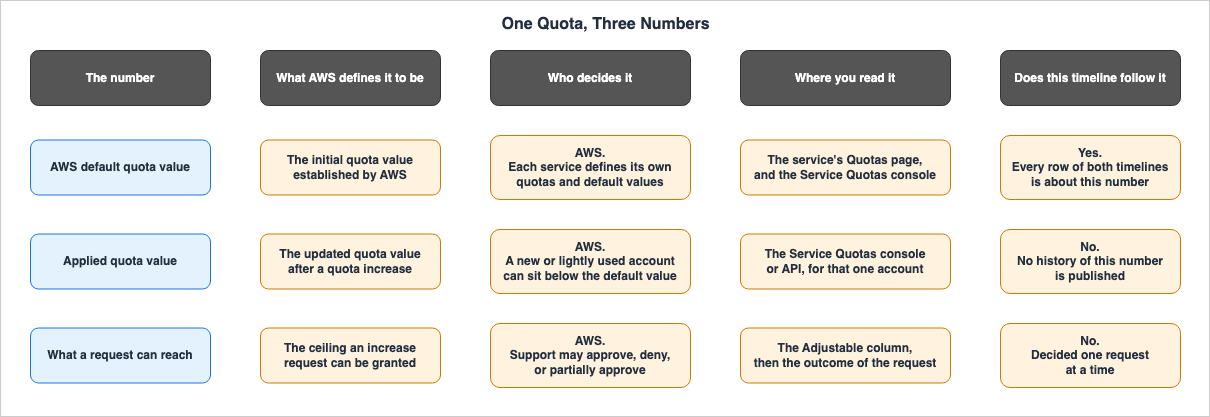
At least three numbers sit behind each quota. These are the default values published by AWS, the values actually applied to the user's account, and the limits that can be obtained through application. Reading these three as one number distorts both the timeline and the design. This section clarifies these three distinctions based on AWS's own definitions. Each row in the timeline deals with only the first of these three values.What AWS Defines Each Term to Mean
The AWS Service Quotas user guide includes a section defining terminology. The following three terms are relevant to this article:adjustable value
A quota value that can be increased.
applied quota
The updated quota value after a quota increase.
default value
The initial quota value established by AWS.⇒ All of these definitions are concise, and the subject is consistently AWS. A default value is the initial value set by AWS, an applied quota value is the value after an increase, and whether a value is adjustable is an attribute of that value. Regarding any of these three terms, there is nothing the user can determine. The user can only apply, and AWS decides whether to approve the request.
The same user guide also describes the relationship between default values and applied quota values as part of a functional explanation.
The Service Quotas console provides quick access to the AWS default quota values for your account, across
all AWS Regions. When you select a service in the Service Quotas console, you see the service's quotas and
if that quota is adjustable at the AWS account level. Applied quotas are overrides, or increases for a
specific quota, over the AWS default value.
⇒ An applied quota value is an override of the default value, and it is defined in the direction of an increase. That definition becomes a problem two sections below.
The Default Value Is Not Your Value
⛔⛔ This is the point most easily misread in this article. The publicly documented default values do not represent the values available in a user's account. AWS repeats this information across three separate documents, each using different wording. And a fourth document describes an even broader scope.- The first is the AWS General Reference. It outlines general rules applicable to all services.
Your account's actual quota value may be less than the AWS default quota value if the account was recently
created or if you use the account minimally.- The second is the AWS Lambda user guide. This document specifically addresses quotas from the service's perspective.
New AWS accounts have reduced concurrency and memory quotas for Lambda Functions and Lambda MicroVMs.
AWS raises these quotas automatically based on your usage.
The same page calls what is assigned to a new account a
quota profile.By default, all new accounts are assigned a quota profile that allows exploration of AWS services.- The third is the AWS Step Functions user guide. Similar in structure to the Lambda guide, it describes different quotas.
New AWS accounts have reduced state transition quotas. AWS raises these quotas automatically based on your
usage.- The fourth is the Amazon Bedrock user guide. This document alone carries conditions that reach beyond usage history. The next section takes it up.
⇒ The first three documents essentially state the same thing: that the publicly documented default values may differ from the actual values in a user's account. One document presents these as general rules, while the other two describe them from the service's perspective. ⚠ Only the fourth document, concerning Bedrock, describes a broader scope. It states that the assigned default values themselves are dynamic. ⚠ Reading any one of these documents in isolation can lead to the impression that the information pertains specifically to that service. It is only by examining them together that you realize this reflects AWS's overall design.
⇒ Therefore, the timeline of default values presented in this article does not predict the values in a user's account. The timeline simply indicates when AWS publicly updated its default values. You can only determine the values for your own account through the Service Quotas console or API.
References: AWS service quotas - AWS General Reference / Lambda quotas / Step Functions service quotas / Quotas for Amazon Bedrock
The Official Definition of Applied Quota Does Not Cover That Case
⚠ There is a gap in the terminology. The three documents referenced in the previous section state that the value of a new account can be lower than the default value. However, the official definition of the terms has no word for that lower value.To reiterate, the definition of "applied quota" is
The updated quota value after a quota increase. It says, in so many words, that this is the value after an increase. The announcement of 2020-12-23 also describes the applied quota as an override value previously assigned.Applied quotas, or account-specific quotas, are overrides that are specific to your account and that have
been granted to you in the past.⇒ According to the definition, an applied quota is a value higher than the default value. However, the General Reference states that the actual value can be lower than the default value. The two are not called by the same name.
⛔ This article does not state that this discrepancy is an error on the part of AWS. Only two observations can be made:
- The official glossary lacks a term to describe account-specific values that are lower than the default value.
- The same API and console return that value as the applied quota.
The practical implication is this: ⇒ When a value lower than the default is returned, do not interpret it as a value after a quota increase. According to the official definition, an applied quota is a value after a quota increase. ⚠ The size of the value alone does not tell you which path produced it. That can be told only by looking at the request history in Service Quotas.
The Conditions Under Which a Default Itself Moves
The Amazon Bedrock user guide states most explicitly that a default value is not fixed.To maintain the performance of the service and to ensure appropriate usage of Amazon Bedrock, the default
quotas assigned to an account might be updated depending on regional factors, payment history, fraudulent
usage, and/or approval of a quota increase request.This single sentence lists four conditions. These are regional factors, payment history, fraudulent usage, and the approval of a quota increase request. ⇒ Three of the four have nothing to do with whether the user filed a request.
⚠ This sentence does not say
applied quotas. It says the default quotas assigned to an account. In other words, it states that the default values themselves can change. The gaps in terminology previously mentioned are evident in this sentence structure.⇒ Two things follow from this.
- The publicly documented default values may not be the same as the default values currently in effect for a particular account.
- The default values for an account can change over time. Of the four conditions listed, the only one the user can act on is the approval of a quota increase request.
⛔ This article does not assess the merits of this design. It establishes only that AWS documents these conditions in public. ⚠ Furthermore, this article was unable to determine a method for users to identify which of these conditions apply to their account. Service Quotas returns the current value, but not the reason that value was assigned.
References: Quotas for Amazon Bedrock
The Third Number - Whether the Value Can Be Raised at All
This third number represents the maximum limit that can be applied through a request. A quota that can be adjusted leaves room for a request. One that cannot does not.The Service Quotas user guide instructs users to verify adjustability through a column in the console.
To see if a quota is adjustable, go into the console, navigate to AWS services, and select the service from
the list. From the service's details page, view the Adjustable column.
The same user guide also describes the application process.
For adjustable quotas, you can request a quota increase at the account-level or the resource-level. Smaller
increases are usually automatically approved while larger requests are submitted to Support. Larger increase
requests take time to review, process, approve, and deploy.
⇒ Being adjustable and having a request approved are two different things. The same page clearly states that Support may approve, deny, or partially approve requests.
⚠ Here again, two different pages refer to the same concept using different names. The user guide, as quoted earlier, uses
Adjustable column, while the page on how to request an increase writes based on the value listed in the Adjustability column. ⇒ The name of the column to look for in the console varies depending on the reference material.This article will not reclassify the categories regarding adjustability. The previously published article already maintains a full classification of what can be adjusted and what is structurally fixed: AWS Service Quotas - A Practical Cheat Sheet for Major AWS Services, using five different axes. ⇒ Therefore, this article only needs to state that the third number exists and that it is not subject to historical tracking.
The timeline only tracks the first number, which represents the default values published by AWS. The second value, which is applied, does not have a publicly available history, and the third number, the ceiling a request can reach, is decided one request at a time. ⇒ Of the three, only the default value can be tracked over time from an external perspective.
References: What is Service Quotas? / Requesting a quota increase
Timeline A - When the Mechanism Changed (Updates from 2019)
Below is a timeline of dates marking changes to the underlying mechanisms for handling limits within AWS. The rows run in ascending order of date, and each carries a link to its primary source. The Recorded in column shows which document held the record of that change. What appears in this column is one of four: What's New, the Document history of the Service Quotas user guide, the AWS managed policy update table, and the official blog. The nature of the record locations themselves is handled in the section on how a change is recorded.⚠ The Date column gives the earliest date among the records this article reached. If the same change was documented in multiple documents on different dates, all dates are listed in the "Summary." ⚠ There is one exception. For the 2019 EC2 row, this article used the date of the What's New announcement that opened the switch, not the blog published 12 days earlier. The reason is given in that row. Discrepancies in dates themselves are handled in the section on how a change is recorded.
Here is an index by year:
- 2019 - A mechanism for viewing limits from one place, and a mechanism for handling them at a level finer than the account, arrive.
- 2024 - The roles of monitoring and requesting are shifted from users to AWS.
2019 to 2023
Over these five years, a mechanism for viewing limits from one place, and a mechanism for handling them at a level finer than the account, both arrived. ⚠ All four rows contain discrepancies in the recording destination or missing records. Specifically, one row shows different values for two documents from the same day, another shows a publication date that is two days apart, a third lacks a row in the Document history, and a fourth has headings whose scope does not align.| Date | Who | Type | Recorded in | Summary |
|---|---|---|---|---|
| 2019-06-24 | Service Quotas | Launched | What's New + Doc history + Blog | Service Quotas was launched. The first row in the Document history is Initial release with a date of June 24, 2019. The API version identifier matches too, at 2019-06-24. On the same day, the What's New announcement gave the range of services whose default values can be viewed as over 90 AWS services, and the official blog wrote At launch, you can view default quotas for 90 AWS services, with more coming soon. ⚠ For the same launch, the official documents give both 90 and over 90. At launch it already carried usage monitoring through CloudWatch alarms, and the AWS Organizations request template that is applied to new accounts. It was available in 16 Regions. ⇒ A central list, requests, monitoring, and advance application to new accounts were all in one service from day one. References: What is Service Quotas? / Service Quotas Document history / Introducing Service Quotas (What's New) / Introducing Service Quotas (Blog) |
| 2020-12-21 | Service Quotas | Launched | Doc history + What's New (2020-12-23) | Users can now tag applied quotas. The Document history row reads Tagging Service Quotas resources with a date of December 21, 2020. The What's New section was released two days later, on Dec 23, 2020, and its headline also names attribute-based access control. The same announcement describes the applied quota value as follows. Applied quotas, or account-specific quotas, are overrides that are specific to your account and that have been granted to you in the past. ⇒ One change carries two publication dates, two days apart. References: Service Quotas Document history / Service Quotas now supports tagging and Attribute-Based Access Control (ABAC) |
| 2023-03-31 | Service Quotas | Announced | What's New | Service Quotas has been expanded to four additional regions. These include Europe (Spain), Europe (Zurich), Asia Pacific (Melbourne), and Asia Pacific (Hyderabad). ⚠ This change has no row in the Document history table. ⇒ A change to where Service Quotas itself is offered does not appear in the change history of Service Quotas' own documentation. Based on the available information, the What's New section is the only primary source for this change. References: Service Quotas is now available in additional Regions |
| 2023-08-30 | Service Quotas | Launched | Doc history + What's New | Users can now manage quotas at the resource level, rather than just at the account level. The Document history row reads Adding support for context based quota management with a description stating, View applied values, monitor usage, and programmatically request increases for quotas that not only apply at the AWS account level, but at the resource level. ⚠ The headline of the What's New announcement on the same day does not name this general capability. It reads Service Quotas adds support to increase the instances per domain quota for Amazon OpenSearch Service, written as a matter of one quota on one service. ⇒ The dates match; the scope of what is written does not. Using this requires AWS CLI version 2.13.20 or higher. References: Service Quotas Document history / Service Quotas adds support to increase the instances per domain quota for Amazon OpenSearch Service |
2024 to 2026
Over the next three years (2024-2026), the responsibility for monitoring and requesting limit increases shifted from the users to AWS. Two of the four rows are Automatic Management itself; the remaining two add permissions and visibility.| Date | Who | Type | Recorded in | Summary |
|---|---|---|---|---|
| 2024-05-30 | Service Quotas | Published | Doc history + Managed policy log | Three new AWS managed policies were added, and tracking of managed policy changes began. The newly added policies are ServiceQuotasFullAccess, ServiceQuotasReadOnlyAccess, and ServiceQuotasServiceRolePolicy. ⚠ The last row in the same table records the start date for tracking itself. That row reads Service Quotas started tracking changes and is dated May 30, 2024. ⇒ The history of managed policy changes therefore begins nearly five years after the service launched. Changes to policies prior to this date cannot be tracked using this record. In the sources this article consulted, no corresponding What's New announcement was found. References: AWS managed policies for Service Quotas / Service Quotas Document history |
| 2025-10-03 | Service Quotas | Launched | Doc history + What's New (2025-10-07) | Service Quotas Automatic Management was launched. At this initial stage, its functionality was limited to providing notifications. The row in the Document history reads: Service Quotas Automatic Management allows AWS to monitors your service quotas usage and notifies you before you run out of your allocated quotas. and is dated October 3, 2025. On the same date, a row was also added to the managed policy update table, modifying the ServiceQuotasReadOnlyAccess permission to include notification-related actions. ⚠ The corresponding What's New announcement was released four days later, on Oct 7, 2025. That announcement declared general availability and listed email, SMS, Slack, AWS Health, and CloudTrail event notifications as potential delivery methods. References: Service Quotas Automatic Management / Automatic quota management is now generally available for AWS Service Quotas |
| 2025-11-21 | Service Quotas | Launched | Doc history + What's New (2025-11-25) | An additional mode was added to the same feature, allowing AWS to request quota increases on behalf of users. The row in the Document history reads: Notify and Auto-Adjust allows AWS to monitors your service quotas usage and request a service quotas increase on your behalf. and is dated November 21, 2025. ⚠ The corresponding What's New announcement was released four days later, on Nov 25, 2025, and, like the previous announcement, it declared general availability. ⇒ Both What's New announcements pertain to the general availability of Automatic Quota Management, and the titles alone do not clearly indicate the differences between the October and November releases. The differences are described in the two rows in the Document history. References: Service Quotas Document history / AWS Service Quotas adds now support for automatic quota management |
| 2026-08-03 | AWS Organizations | Announced | What's New | The maximum number of accounts that can be created within an AWS Organization is now visible in Service Quotas. The announcement notes that previously, obtaining this information required contacting AWS Support or an account team. ⚠ Availability is currently limited to the US East (N. Virginia) region. The announcement reads This quota visibility is available now available in US East (N. Virginia). ⇒ Even seven years after the initial launch, some values remain invisible within Service Quotas, and are gradually being made visible. References: AWS Organizations now provides maximum account quota visibility in Service Quotas |
Services Are Still Being Onboarded
A service is not onboarded to Service Quotas at the moment that service launches. Announcements of new onboarding were still being published in 2026, more than six years after Service Quotas itself launched. The following five rows are the announcements whose subject is the addition of support, among those this article confirmed by the verification date. ⛔ This is not an exhaustive list.| Date | Who | Type | Recorded in | Summary |
|---|---|---|---|---|
| 2025-01-15 | Amazon ElastiCache | Announced | What's New | ElastiCache quotas are now visible in Service Quotas. The announcement highlights that eligible requests are automatically approved and that usage can be monitored through CloudWatch metrics. References: Amazon ElastiCache now supports Service Quotas |
| 2025-02-24 | AWS WAF | Announced | What's New | AWS WAF integration has been expanded. This applies to account-level quotas for web ACLs, rule groups, and IP sets. The announcement states that smaller quota increases are automatically approved, while larger requests are routed to AWS Support. References: AWS WAF enhances integration with Service Quotas |
| 2025-06-23 | AWS End User Messaging | Announced | What's New | Quotas for SMS, voice, and WhatsApp are now available in Service Quotas. This service is available across all commercial regions and AWS GovCloud (US). References: AWS End User Messaging now supports Service Quotas |
| 2025-09-30 | AWS Step Functions | Announced | What's New | Account-level quotas for Step Functions are now visible in Service Quotas. The announcement indicates that eligible requests are reflected without manual intervention. References: AWS Step Functions now supports Service Quotas |
| 2026-02-18 | Amazon Connect Cases | Announced | What's New | Amazon Connect Cases now supports Service Quotas. This is the most recent announcement of support among those this article confirmed. ⇒ It has been 6 years and 7 months since the initial launch of Service Quotas. References: Amazon Connect Cases now supports AWS Service Quotas |
⇒ The central list did not cover all services on the first day. The initial number of services included was around 90, and more services have continued to be added as they became available. ⚠ This article does not put a number on how many services are supported as of the verification date. The definitive source for supported services is the
ListServices response, as any static numbers included in this article would quickly become outdated.Timeline B - When a Default Value Moved (Updates from 2018)
The rows below give the dates on which AWS moved a default value. ⛔ This is a representative sample and is not exhaustive. As the opening section states, the criteria were that the change touches a widely used service, and that the primary source could be reached on the verification date.⚠ All figures in this table represent default values, not values applied to individual user accounts. The distinction between the default value and the applied quota value applies to every row in this table.
Here is an index by year:
- 2018 - Values are raised, and with them the way they are counted and the designs that are recommended.
- 2022 - Some announcements say what happens to an account when a default moves, and some do not.
2018 to 2021
Over these four years (2018-2021), there have been instances not only of increasing values, but also changes in how those values are counted, and adjustments to recommended designs as a result of those value changes.| Date | Who | Type | Recorded in | Summary |
|---|---|---|---|---|
| 2018-07-17 | Amazon S3 | Announced | What's New | Amazon S3 now supports a rate of at least 3,500 write requests and 5,500 read requests per second, per prefix. The announcement reads Amazon S3 now provides increased performance to support at least 3,500 requests per second to add data and 5,500 requests per second to retrieve data, and continues Each S3 prefix can support these request rates. ⛔ This change did not only change a number. The same announcement revokes the guidance that preceded it. This S3 request rate performance increase removes any previous guidance to randomize object prefixes to achieve faster performance. ⇒ Because the limit moved, a design decision about object naming changed. References: Amazon S3 Announces Increased Request Rate Performance |
| 2019-09-24 | Amazon EC2 | Announced | What's New + Blog (2019-09-12) | On-Demand instance limits are now calculated based on the number of virtual CPUs (vCPUs) rather than the number of instances. ⚠ This change has two dates. The AWS Compute Blog came out 12 days earlier, on 2019-09-12, and the What's New announcement itself states We recently announced Amazon EC2's vCPU-based On-Demand Instance limits indicating a prior announcement. This row uses the What's New date rather than the earlier blog post date. The blog post announces a transition period from September 24, 2019, through October 24, 2019 and the day users could actually opt-in corresponds to the What's New date. The announcement reads On-Demand Instance usage toward the vCPU-based limit is measured in terms of the number of virtual central processing units (vCPUs) attached to your running instances. The number of limits also fell, to five in total: one that covers the standard instance families, plus one each for FPGA, graphics-intensive, general purpose GPU, and special memory optimized instances. ⇒ The number did not go up. The unit being counted was replaced. References: vCPU-based On-Demand Instance Limits are Now Available in Amazon EC2 / Using new vCPU-based On-Demand Instance limits with Amazon EC2 |
| 2019-10-24 | Amazon EC2 | Effective | What's New (2019-09-24) | The transition announced previously is now being enforced for all accounts. The same announcement specifies a deadline. From now until October 24, 2019, you can opt in to vCPU-based limits at a time of your choosing and familiarize yourself with the new On-Demand Instance limits experience. Starting October 24, 2019, all accounts will switch to vCPU-based limits regardless of the account's opt-in status. ⇒ The date of the announcement and the date it takes effect are different. The period during which users could choose to transition lasted 30 days. References: vCPU-based On-Demand Instance Limits are Now Available in Amazon EC2 |
| 2020-10-22 | AWS CloudFormation | Announced | What's New | The default limits for several elements within templates have been increased across the board, with five quotas being raised. The resource limit increased from 200 to 500, the parameter limit from 60 to 200, the mapping limit from 100 to 200, and the output limit from 60 to 200. The maximum size for templates being passed as S3 objects also increased from 450KB to 1MB. ⇒ One announcement moves five quotas. The title of the announcement gives the count as five, but which five quotas they are appears only in the body. References: AWS CloudFormation now supports increased limits on five service quotas |
| 2021-07-15 | AWS CloudFormation | Announced | What's New | The default limit for the number of stacks per account has been increased from 200 to 2000. The announcement reads The number of stacks that can be created in an account is now 2000 (previously 200). ⚠ The year and month in this announcement's URL are 2021/06, but the posted date shown on the page is Jul 15, 2021. ⇒ This means the date derived from the What's New URL is one month off. The change applies to 23 regions, but not all regions. References: AWS CloudFormation now supports more stacks per AWS account |
2022 to 2026
These five years have four rows. ⚠ Only two of them have the announcement itself say what happens to an account when the default moves. The other two say only that the value changed.| Date | Who | Type | Recorded in | Summary |
|---|---|---|---|---|
| 2022-03-31 | Amazon ECS | Announced | What's New | The default number of container instances per cluster has increased from 2,000 to 5,000. ⛔ This announcement is one of the few that states the relationship between the default value and the applied quota value outright. The higher limit is reflected in your account automatically and you do not have to take any action. If your account has an approved limit that is higher than the new limit, you will continue to have the higher limit. ⇒ For this increase, the announcement itself says that an already approved higher value is not lowered. References: Amazon ECS announces increased service quota for container instances per cluster |
| 2023-02-15 | AWS RAM | Announced | What's New | The default values for AWS Resource Access Manager have been increased. You can now create up to 25,000 resources, 25,000 principals, and 25,000 resource shares per region and account. For individual resource shares, the limit is 5,000 resources and 5,000 principals. ⇒ The announcement includes numbers both per account and per resource. Both values represent default limits. References: Announcing increased AWS Resource Access Manager default quota values |
| 2024-11-14 | Amazon S3 | Announced | What's New + S3 User Guide | The default quota for general-purpose buckets has increased from 100 to 10,000, and can be increased to 1,000,000 with a request. The announcement also details how this change is applied. Amazon S3's new default bucket quota of 10,000 buckets is now applied to all AWS accounts and requires no action by customers. ⛔ This change also changed how the API has to be called. The S3 user guide states: All unpaginated ListBuckets requests will be rejected for AWS accounts with a general purpose bucket quota greater than 10,000. ⇒ While you don't need to take any action to receive the increased default value, increasing it further may cause existing code to stop working. References: Amazon S3 now supports up to 1 million buckets per AWS account / General purpose bucket quotas, limitations, and restrictions |
| 2026-09-09 | AWS Lambda | Announced | What's New + Lambda User Guide | The maximum function timeout has been increased to 90 minutes, subject to certain conditions. This applies to asynchronous invocations and event source mapping invocations on Lambda Managed Instances. ⚠ The maximum timeout for synchronous invocations remains at 15 minutes. The announcement states: Synchronous invocations retain the existing 15-minute maximum timeout. The Quotas section of the Lambda user guide also includes the same condition in parentheses. ⇒ A single quota now has two different values, depending on the type of invocation and the execution environment. References: AWS Lambda now supports 90-minute function timeout on Lambda Managed Instances / Lambda quotas |
When the Unit Changed Instead of the Number
The 2019 row for EC2 is fundamentally different from the other rows in this timeline. While the other rows reflect changes in numerical values, this row reflects a change in what those numbers mean.Prior to the change, the limit was based on the number of instances per instance type. After the change, the limit became the total number of vCPUs allocated to running instances. ⇒ Under the same word "limit," the thing being counted was replaced.
This replacement has three unique characteristics that are not present in any other row in this article.
- The number of limits decreased. The limits, previously divided by instance family, were consolidated into five. ⇒ The number of things to manage changed.
- A deadline was introduced for the transition. For 30 days from the announcement, accounts could choose to opt in; after that, the change occurred automatically, without any choice. This is the only row in this article's timeline that carries the
Effectivetype. - At least the same number of instances could be launched before and after the change. The AWS Compute Blog writes:
When you opt in, EC2 automatically computes your new limits, giving you access to launch at least the same number of instances (if not more) than you do currently.⇒ The party changing the unit states that it built into the design a guarantee that the change would not reduce what the user can use. References: Using new vCPU-based On-Demand Instance limits with Amazon EC2
⛔ This article does not evaluate this design. It records only that a single entity changed the unit, and that the change reached every account 30 days after the announcement. ⇒ This is the row where the consequence of a single party deciding the unit shows most clearly.
Where a Quota Change Is Recorded, and Where It Is Not
When attempting to create a timeline, the recording of events often becomes more critical than the values themselves. This section lists, in observable form, the specific instances this article encountered while creating the previous two timelines. ⛔ This is not an assertion that AWS is failing to record information. Rather, it is an observation that the locations and granularity of records are not consistent.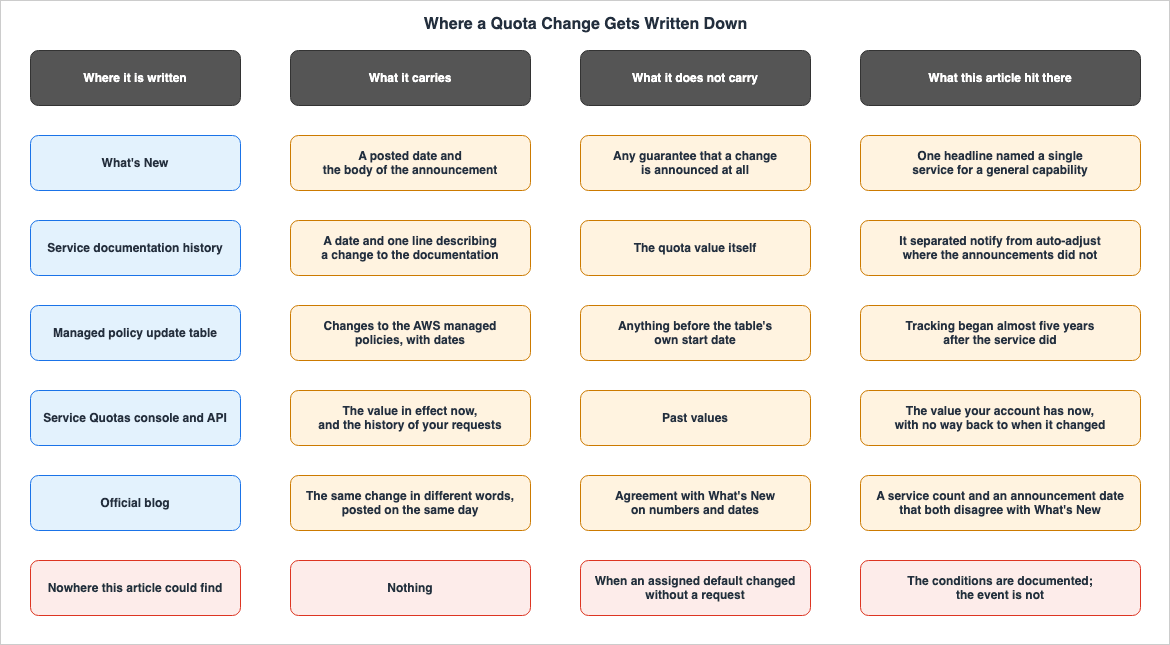
Where a Change Can Be Written Down
This article utilized three primary sources of records, each containing different information.- What's New. This section includes announcement dates and corresponding text. ⚠ Changes may not always be reported here. For the 2024-05-30 row of the previous table, no corresponding announcement was confirmed in the sources this article consulted.
- Document history. This section lists changes made to documents, along with their dates. ⚠ This record only tracks changes to the documents themselves. Whether a change in a specific value is reflected as a document change varies depending on the service.
- The Quotas section of the service's user guide and the Service Quotas console. These provide the current values. ⚠ Historical values are not available.
⇒ Only the third source provides current information, while the first and second sources have gaps. Building a timeline requires cross-referencing all three.
⚠ There can be a fourth record location. In the case of Service Quotas, a separate table records updates to AWS managed policies. This table includes a row indicating its start date. The last row reads
Service Quotas started tracking changes with a date of May 30, 2024. ⇒ This record indicates a start date for tracking changes, which is not the service's launch date. Service Quotas began on 2019-06-24, while the tracking of managed policy changes began on 2024-05-30. That difference is nearly five years. Changes to policies during that period cannot be tracked using this table.⚠ A fifth record location is the official blog. Both the launch on 2019-06-24 and the EC2 switch on 2019-09-12 are written up on the blog in different words from What's New. ⚠ And the numbers and dates can disagree with What's New. The split between
90 and over 90 for the number of services at launch, and the two dates twelve days apart on the EC2 announcement, both came from this route.One Change, Two Records, Two Different Framings
Sometimes the same change on the same day is framed in two different documents at two different scopes.The resource-level quota change of 2023-08-30 is an example.
- How the Document history writes it —
Adding support for context based quota management. The description states that the update allows for the ability to view applied quota values, monitor usage, and request increases, not just at the account level, but also for the resource level, describing it as a general capability. - How What's New writes it —
Service Quotas adds support to increase the instances per domain quota for Amazon OpenSearch Service. The text focuses on a single quota: the number of instances per domain for Amazon OpenSearch Service.
⇒ The dates are the same, but the scope of what is described differs. Searching only the What's New headings never tells you that a resource-level quota mechanism went in. ⚠ Conversely, reading only the Document history does not tell you which service this first became usable on.
One Change, Two Records, Two Different Dates
The same change sometimes carries more than one date. In three out of the five instances examined in this article, the Document history record precedes the What's New record.| Change | Document history | What's New | Difference |
|---|---|---|---|
| Service Quotas introduced | June 24, 2019 | Jun 24, 2019 | 0 days |
| Tagging applied quotas | December 21, 2020 | Dec 23, 2020 | 2 days |
| Resource-level quotas | August 30, 2023 | Aug 30, 2023 | 0 days |
| Automatic Management (notifications only) | October 3, 2025 | Oct 7, 2025 | 4 days |
| Automatic Management (requests on your behalf) | November 21, 2025 | Nov 25, 2025 | 4 days |
⇒ When they agree, they agree exactly; when they diverge, the Document history comes first. In the sources this article consulted, no instance was found where What's New came first. ⛔ However, five instances is a small sample size and insufficient to establish a definitive rule. The only conclusion that can be drawn is that when creating a timeline, each row must clearly indicate which date was selected.
⚠ The headings are also finer in the Document history. Both What's New announcements for Automatic Management announce the general availability of automatic quota management. Reading the headings alone, it looks as though the same thing was announced twice. However, reading the two rows in Document history reveals that what arrived in October was notification only, and that requesting an increase on your behalf was added in November.
The Month in the URL Is Not Always the Posted Date
A What's New URL carries a year and a month, and that month does not always match the posted date.For example, increasing the number of CloudFormation stacks results in a URL path like
/about-aws/whats-new/2021/06/, which indicates June. However, the page displays a publication date of Jul 15, 2021. ⇒ Extracting the date mechanically from the URL results in a one-month discrepancy.⚠ This article does not investigate the cause of this discrepancy. All that was confirmed is that opening the page in a browser shows
Posted on: Jul 15, 2021. ⇒ The dates in the timeline are taken from the posted date on the page, not from the URL.Two Announcements This Article Could Not Reach
This article was unable to reach the primary source for two announcements intended for inclusion in the timeline.- October 2018: Lambda function timeout increase. This involved a change from 300 seconds to 900 seconds.
- December 2018: DynamoDB global secondary index increase. This involved a change from 5 to 20 per table.
Both URLs redirect to
https://aws.amazon.com/about-aws/. While the final response is an HTTP 200 status, it does not display the announcement itself, but instead leads to the beginning of the "About AWS" section.⚠ This must not be read as meaning that the 2018 announcements are gone. A comparison reveals that this is not the case.
| URL Tested | Result |
|---|---|
| The two announcements mentioned above | 200. However, it redirects to https://aws.amazon.com/about-aws/ and the announcement content is not displayed. |
| Announcement regarding S3 request rate changes (July 2018) | 200. The announcement content is displayed. |
| Announcement regarding AWS Transit Gateway (November 2018) | 200. The announcement content is displayed. |
Non-existent path (a fictitious slug created under 2019/06/) | 404 |
Non-existent path (a fictitious slug created under 2026/01/) | 404 |
⇒ The non-existent paths return a 404 status, indicating that the redirection does not necessarily mean the resource was not found. Furthermore, other announcements from the same year are accessible, so the year itself is not the reason. ⛔ Therefore, this article does not state that these two announcements were not published or have been deleted. All it can state is that on the verification date, the original text could not be reached through these two URLs.
The inability to reach these two announcements is affecting the timeline. The previously published cheat sheet lists seven examples of frequently changing quotas, and three of them give the value as it stood before the change. These are the number of CloudFormation resources, the number of DynamoDB indexes, and the number of S3 buckets. Of those three, the one this article could not reach in its original form is the DynamoDB index count. The other two were reachable and appear in this article's timeline with their dates. ⇒ A value being widely known before it changed does not mean its date survived in the same way.
What Is Not Recorded Anywhere
There is one record this article looked for and did not find: the history of the value applied to an account.Service Quotas displays the currently applied quota value. The request history is also visible through the console's
Request history and via the API. However, in the sources this article consulted, no record was found of a value changing without a request. The Amazon Bedrock user guide, referenced earlier, states that region-specific factors, payment history, and potential fraudulent activity can lead to updates to allocated values. ⇒ This article could not confirm any means of establishing, after the fact, when such an update happened.⚠ This is not turned into a negative claim either. It does not say that no such means exists. It says that no such means was confirmed in the sources this article consulted.
Designing Against a Quota
This section takes the observations above back to designing against a quota. This article does not give one answer to the question of whether a limit can be assumed. ⛔ It also does not say that limits rise, so the question can be ignored. Instead, it states four things the timeline actually shows.A Higher Default Does Not Always Reach Your Account
When a default value rises, the announcement sometimes says how the change reaches your account and sometimes does not.Two rows say it.
- The Amazon ECS row of 2022-03-31. It reads
The higher limit is reflected in your account automatically and you do not have to take any action., and goes on to say that an already approved higher value is kept. ⇒ For this increase, the announcement itself says that an already approved higher value is not lowered. - The Amazon S3 row of 2024-11-14. It reads
Amazon S3's new default bucket quota of 10,000 buckets is now applied to all AWS accounts and requires no action by customers.
⇒ Of the nine rows in the default-value timeline, the What's New announcement says how the change reaches an account in only these two. Where it does not say, the only way to know is to check the account in the console or through the API.
⚠ And as already seen, a newly created account, or an account with little usage, can be assigned a value below the published default. Simply reading the announcement about the default limit increase does not determine what limits are available for your account.
A Higher Default Can Change More Than the Number
When a limit moves, something other than the limit can move with it. Two rows of the timeline are examples.- The S3 request rate, 2018-07-17. When the limit was raised, the previous recommendations were rescinded. The design practice of randomizing object prefixes became unnecessary. ⇒ Raising the limit resulted in a change to a design decision regarding naming conventions.
- The S3 bucket count, 2024-11-14. While nothing changes up to the default of 10,000, exceeding that limit requires a different way of calling
ListBuckets. The user guide states that for accounts with quotas exceeding the default, unpaginatedListBucketsrequests will all be rejected. ⇒ Increasing the limit may cause existing code to stop working.
⇒ Before submitting a request to raise a limit, check the user guide for what that increase brings with it. Sometimes, the information provided in the announcement alone is not sufficient.
AWS Now Moves Your Value For You
In 2025, the act of moving the value itself moved to the AWS side. Service Quotas Automatic Management offers two modes:- Notify Only: Sends notifications when usage reaches 80% and 95%.
- Notify and Auto-Adjust: At the same thresholds, AWS automatically submits requests to increase your limits.
⚠ Having a request filed on your behalf and having it approved are two different things. The user guide states:
Auto-adjustable status does not guarantee approval. If an auto-adjust request is not approved, you should
submit a manual quota increase request through the Service Quotas console or API.
The same page also indicates that requests submitted through this system follow a different process than manual requests. These automated requests are processed without creating a support case, and are limited to quotas that support automatic approval. The approval criteria may be stricter, and details regarding denials will not be provided. ⇒ What was automated is the request. The decision was not.
⇒ The entity responsible for making these decisions has not changed. In 2019, users were provided with the tools to view and request adjustments. In 2025, AWS took over the process of submitting those requests. At both points in time, the party deciding the value is AWS.
What You Can Actually Build On
There are four things the timeline lets you carry back into design.- What a design rests on is the applied quota value measured in your own account, not the default value in the documentation. Just because something works in a development account doesn't guarantee it will work in production. ⛔ However,
list-service-quotasalone is not sufficient. The API reference states:Lists the applied quota values for the specified AWS service. For some quotas, only the default values are available. If the applied quota value is not available for a quota, the quota is not retrieved.⇒ A quota that has no applied quota value does not appear in the response. To count those still using the default values, you need to run ListAWSDefaultServiceQuotas in conjunction with ListServiceQuotas and compare the two responses.
- Whether a value will move cannot be told from where that value is documented. While the console indicates whether a value is adjustable, this article found no indication, in either the console or the documentation, that a default value itself might move in the future. Of the eight changes in the default-value timeline, only the EC2 one had a transition period, and that period was 30 days.
- Values that cannot be modified become part of the design constraints. For a quota that structurally cannot be raised, the answer is not a plan to raise the value. It is a structure that stays under it. The classification of what is structurally unchangeable sits in the previously published AWS Service Quotas - A Practical Cheat Sheet for Major AWS Services.
- It's necessary to have a mechanism to detect when a limit is being reached, separate from the actual limit value itself. Automatic Management uses two thresholds, 80% and 95%. ⚠ AWS sets those thresholds too. According to the official documentation, the notification at the 80% threshold goes out only in Notify Only mode. In Notify and Auto-Adjust mode, a request to raise the quota is created instead. If you require different thresholds for your workload, you should configure your own CloudWatch alarms. ⇒ The design of a mechanism for watching the announcements themselves sits in the previously published AWS Service Lifecycle States - Maintenance, Sunset, Full Shutdown, and What Each One Takes Away.
Frequently Asked Questions about AWS Service Quotas History
This timeline and each section aim to answer the initial questions that operators who have hit a limit, and architects planning capacity, come to first. Every answer stays inside the primary sources each section above has cited.When did AWS stop calling them service limits?
The date was June 24, 2019. On the same day that Service Quotas was launched, the AWS Cloud Operations Blog announced that they would henceforth refer to them as "service quotas." ⚠ The announcement also stated that both terms might be used interchangeably. As of the verification date, the Service Quotas user guide still writesalso referred to as limits, while the AWS General Reference writes formerly referred to as limits, treating the previous name in two different ways. The URL of that General Reference page is still aws_service_limits.html.Is my account's quota the same as the AWS default quota?
No. The AWS General Reference writesYour account's actual quota value may be less than the AWS default quota value if the account was recently created or if you use the account minimally. Similar statements are made in the user guides for Lambda and Step Functions from the service's perspective, and the Amazon Bedrock user guide lists even broader conditions. ⇒ The default values in the documentation do not necessarily reflect your account's actual values. You can only determine your account's specific quota limits through the Service Quotas console or API.Why is my quota lower than the documented default?
The allocation is based on your account status. The Lambda user guide writesNew AWS accounts have reduced concurrency and memory quotas, and goes on to say that AWS raises them automatically based on usage. The same page calls what is assigned to a new account a quota profile. ⚠ The official glossary has no term for that lower value. It defines the applied quota as The updated quota value after a quota increase, which points at the value after an increase.Where can I find the date a default quota changed?
Three sources have to be cross-checked: the What's New archive, the Document history of that service's user guide, and the current value in the Service Quotas console. ⚠ The page carrying the current value holds no past values. This article's timeline names the source for each row in the Recorded in column.Does every quota change get a What's New post?
No. In the sources this article consulted, there is one row where it did not. The addition of the AWS managed policies on 2024-05-30 appears in both the Document history and the AWS managed policy update table, but no corresponding What's New post was found. ⛔ This is not to suggest that the change was not announced. This article can only state that it was not located in the sources it consulted. Conversely, the addition of regions on 2023-03-31 does have a What's New announcement, but there is no corresponding row in the Document history table.If AWS raises a default, does my account get the higher value?
Sometimes the announcement says so, and sometimes it does not. The Amazon ECS announcement of 2022-03-31 states outright that the higher limit is applied automatically, and that an already approved higher value is kept. The Amazon S3 announcement of 2024-11-14 also states that it is applied to all accounts and needs no action. ⚠ Of the nine rows in the default-value timeline, the What's New announcement says how the change reaches an account in only these two. Where the announcement does not say, the only way to know is to check the account.Can I see the history of my own applied quota values?
Only for requests. The Service Quotas console shows them underRequest history, and the API returns them. ⚠ No record was found of changes to quota values that were not the result of a submitted request. The Amazon Bedrock user guide notes that region-specific factors, payment history, and potential misuse may result in quota updates, but it does not specify where to view records of those updates.What is the difference between the two automatic quota management announcements?
Whether it only notifies, or also files a request on your behalf. Two rows in the Document history carry the distinction. The row datedOctober 3, 2025 states that it monitors usage and sends notifications. The row dated November 21, 2025 uses the words request a service quotas increase on your behalf. ⚠ The two corresponding What's New announcements both announce the general availability of automatic quota management, and the differences are not clear just from the titles.Does automatic quota management guarantee my increase?
No. The Service Quotas user guide states thatAuto-adjustable status does not guarantee approval. and recommends manually submitting requests through the console or API if they are not approved. The same page also notes that a request filed on your behalf can face stricter criteria, and that detailed reasons for a rejection are not returned.Should I design assuming a quota will be raised?
No. The default-value timeline carries eight changes, and only one of them, the EC2 row, had a transition period. ⇒ This article did not confirm any means of learning about potential quota increases from external sources. On the other hand, a value that does not move is known not to move, and that becomes an input to the design. ⛔ This article does not determine whether individual quotas can be increased. The necessary classification information is already contained in the previously published cheat sheet.Summary
This article set out who has decided the AWS limit numbers, and how, as dated rows running from 2018-07-17 to 2026-09-09. There are 22 rows in all. Eight are changes to the mechanism, five record a service being onboarded to Service Quotas, and nine are changes to a default value. ⚠ The nine rows related to default values specifically refer to eight distinct changes. Only the EC2 unit conversion is split into two rows: one for the announcement and one for when the change took effect.Four key observations can be drawn from this:
- AWS itself replaced the name of the category, and both the date and the reason survive in its own documents. The declaration of 2019-06-24 gave the purpose of the replacement as better representing the customer's control. ⚠ This same announcement also predicted that both terms might be used concurrently, and this remains true as of the verification date.
- Each quota has three associated values. These are the default value published by AWS, the value currently applied to the account, and the maximum limit that can be requested. ⇒ Only the first of these (the default value) can be tracked historically from external sources. The second value has no publicly available history, and the third is determined on a per-request basis.
- The default value does not represent the value applied to a user's account. AWS explicitly states this in three separate documents, and a fourth document further clarifies that the default value itself can change. ⚠ Furthermore, the official terminology does not include a term to refer to account-specific values that are lower than the default.
- Records of changes are not consistently located in a single place. The same change may have two different dates associated with it. What's New and the Document history can differ in the scope of what they describe. The month in a URL can disagree with the posted date. And some announcements cannot be reached in their original form. ⇒ When citing a date, name the document and the display it came from.
⇒ All four observations follow from one thing: a single entity decides every part of the limit. It named the category, set the initial value, moved the value, and chose where the change would be recorded. So the question is not who decided. It is where what they decided was written down.
⇒ When encountering a limit, the first step is to determine what value is being referenced. Is it the default value documented in the AWS documentation, the value currently applied to your account, or the maximum value you can request? The next steps depend on this distinction. ⛔ Each of the 22 rows in this article, when cross-referenced with the primary source documents, accurately reflects the state of the information as of the verification date.
This article verified everything it presents on September 12, 2026. ⚠ Default values move, announcements accumulate, and the place where records are kept changes. When referring to this article, check the verification date, and check the value shown for your own account in the Service Quotas console.
References:
Tech Blog with curated related content
Written by Hidekazu Konishi