Encryption Controls by Service on AWS Storage - What Is On by Default, Which Key You Can Choose, and What Turning It On Does Not Re-encrypt
First Published:
Last Updated:
The estate in question holds dozens of Amazon S3 buckets, hundreds of Amazon EBS volumes, one Amazon EFS file system used as shared storage, and one Amazon FSx file system serving a Windows application.
Opening each console in turn, every screen says that encryption is enabled. One line goes back in the answer field: it is encrypted.
This response makes four separate claims about four different services. And at least one of those claims is not what the questioner likely understood.
The differences aren't subtle nuances in expression; the underlying mechanisms are fundamentally different for each configuration. Amazon S3 buckets automatically encrypt new objects, even if the user does not configure anything. With Amazon EBS volumes, you must explicitly choose whether to encrypt data each time a new volume is created unless encryption is enabled at the account and Region level. Amazon EFS file systems start in a different state depending on whether they were created through the console or the AWS CLI. Amazon FSx file systems are encrypted from the moment they are created, and there is no option to turn encryption off at all. Four states this different sit under the same one-line answer.
And then comes an even more complex question: what about the data that was not encrypted initially? What if there is a request to encrypt it now? Here, the four services diverge significantly. Two of them allow you to change the settings, and the change will apply to new data moving forward, but it will not affect any data that already exists. The remaining two cannot have the setting changed after creation at all; the only way through is to build a new one and move the data across.
This article serves as a catalog of these distinctions. It is not a detailed explanation of encryption algorithms. It takes up three questions and no others. What is in place when nothing has been configured? Which key can be chosen? And when encryption is turned on later, what is left behind without being re-encrypted? The scope is four AWS storage services: Amazon S3, Amazon EBS, Amazon EFS, and Amazon FSx. The intended audience is the designers and auditors who have to describe several of these services together in a single line.
Two limits on scope come first. This article only addresses encryption at rest. Encryption in transit has separate auditing and enforcement mechanisms, which are documented in VPC Encryption Controls - Auditing and Enforcing Encryption in Transit. Furthermore, this article does not delve into the historical changes to default settings. That information is available in AWS Security Defaults History; this article only addresses the current default settings.
Three further boundaries with previously published articles are worth stating up front. This article does not focus on the encryption of Amazon S3 itself. The options and how they differ are held by Chapter 6 of the Amazon S3 Security and Access Control Guide, so the S3-related content in this article will be limited to its rows in the tables and brief notes. This article does not go into the internals of envelope encryption either. The creation of data keys and the function of S3 Bucket Keys are explained in AWS KMS Envelope Encryption and Data Key Caching Patterns. It also does not restate the definitions of the key categories themselves. While Cryptography Glossary for Engineers clarifies the meaning of terms like AWS owned key, AWS managed key, and customer managed key, this article will only present the distinctions necessary to understand the table.
All specifications presented in this article have been verified against official AWS documentation. The verification date is September 23, 2026. Each row in the table includes a citation indicating the relevant section of the user guide that served as the basis for that row. Specific page references are provided for any statements taken directly from a particular page. This article does not claim to be comprehensive. Chapter 8 sets out what falls outside that scope.
Table of Contents
- One Sentence, Four Different Meanings
- The Three Key Categories, and What They Actually Separate
- The Table - What Is On, Which Key, and Where the Setting Lives
- What Turning It On Later Does Not Re-encrypt
- Is the Metadata Under the Same Key as the File Contents
- What Happens When the Key Is Disabled or Revoked
- Where the Enforcement Is Written
- What This Table Does Not Cover
- Failure Modes
- Frequently Asked Questions
- Summary
- References
1. One Sentence, Four Different Meanings
The sentence "It is encrypted" has four different meanings because four different services have incorporated encryption at different times and with different designs. This chapter first splits those differences along three axes, so that the rest of the article can take them one at a time.1.1 The Three Axes
Three axes account for the differences between the four services. The chapters that follow take them in order.| Axis | The Question | Why the Answers Differ |
|---|---|---|
| Default State | What is in place when nothing has been configured? | Three answers occur: always on and impossible to turn off, on from the moment of creation, or a state in which it is not on at all. |
| Unit of Enablement | Where is this setting located? | The location varies depending on whether it is bucket-level, account and Region-level, or defined during file system creation. |
| Impact of Changes | What happens to existing data when a change is made? | The change either only applies to new data, or it is not possible to modify the setting at all. |
The third axis carries the most weight in practice. The first two are visible on the configuration screen; the third is not written there at all. The configuration interface only displays the state after a change is made; it does not indicate whether existing data is included in that state.
The first two also hide something from the screen. A display that reads encrypted says only that much; it does not say which category of key is doing the work. As Chapter 2 shows, the key category determines the scope of what can be answered during an audit.
1.2 The Word Default Is Used in Two Different Senses
There is one more word to pull apart first. AWS documentation uses the word default in two different senses.First, it refers to a state that is applied when a user has not configured anything. For example, Amazon S3's default encryption falls into this category; a configuration is automatically applied when a bucket is created, even if the user does not explicitly set anything.
Second, it refers to the key that is used when a key is not explicitly specified. In the case of Amazon FSx's default key, the decision to encrypt is predetermined, and the "default" refers to the key itself.
When these two meanings are combined, the statement "encryption is enabled by default" can become ambiguous — it is unclear whether it is referring to whether encryption is enabled or which key is being used. This article calls the first the default state and the second the default key.
This distinction is helpful when reading documentation. If you encounter the same term "default" on two different pages, and one refers to a state while the other refers to a key, you might mistakenly believe that some services offer a choice of whether to encrypt, while others do not.
1.3 Questions Answered and Not Answered by This Table
The tables in Chapters 3 through 7 answer five questions. A definite set of other questions they do not answer. Both sides appear below.| Questions Answered | Questions Not Answered |
|---|---|
| What is in place when nothing has been configured? | Which method is the safest? |
| Which category of keys can be selected? | Which service should be chosen? |
| Where are the settings located? | What are the steps to change the settings? |
| What happens to existing data when changes are made later? | What happens to the recovery copy? |
| Which layer can enforcement be written into? | How far should the organization go in enforcing it? |
The right-hand column is not a gap in this article; it is deliberately out of scope. The first of them, which method is safest, depends on the regulation in force and the threat being assumed, so no comparison table can answer it. The second, which service should be chosen, is held for the FSx family by the Amazon FSx Family Decision Guide. Chapter 8 takes up the fourth.
2. The Three Key Categories, and What They Actually Separate
AWS KMS keys have three categories. These categories do not relate to the key's strength or the encryption algorithm used. Instead, they define what users are permitted to do with the key. This chapter will only cover the information necessary to understand the table. Formal definitions are available in existing terminology resources.2.1 Three Categories and Practical Differences
The AWS KMS Developer Guide defines AWS owned keys as follows:AWS owned keys are a collection of KMS keys that an AWS service owns and manages for use in
multiple AWS accounts. Although AWS owned keys are not in your AWS account, an AWS service
can use an AWS owned key to protect the resources in your account.The core characteristic of this category is that the key resides outside of your account. All other distinctions stem from this fundamental difference.
| Category | Can Key Policies Be Written? | Usage Logged in CloudTrail? | Can Be Disabled/Deleted? | Meaning in this Article |
|---|---|---|---|---|
| AWS owned key | No | No | No | Encryption is performed, but there is nothing you can do regarding the key itself. |
| AWS managed key | No | Yes | No | You can track who used the key and when, but you cannot stop its use. |
| customer managed key | Yes | Yes | Yes | This is the only category where users have control over key policies and revocation. |
The answers to the questions in Chapter 6 are largely determined by the "Can Be Disabled/Deleted?" column in this table. The question of what happens when a key is disabled only applies to configurations that utilize customer managed keys. In other configurations, users do not have the means to disable the key, so the question itself is not applicable.
The "Usage Logged in CloudTrail?" column in the same table defines the scope of what can be audited. It is important to distinguish between the question of whether something is encrypted and the question of who decrypted it and when. You can only answer the latter if you've selected a category where key usage is recorded in CloudTrail. In configurations using AWS owned keys, while encryption may occur, there is no record of key usage available to the user.
2.2 The Shape of the Alias Can Be a Clue to the Category
While it can be difficult to distinguish the three categories based on the on-screen display, the AWS KMS Developer Guide states the following regarding alias formats:The aliases for AWS managed keys always have the format: aws/<service-name>.aws/s3, aws/ebs, and aws/elasticfilesystem all follow this format. This point becomes relevant in Chapters 3 and 5. This is because the primary documentation for Amazon EFS classifies the same alias under a different category.A more reliable clue can be found not in the documentation, but within your own account. The AWS KMS console displays two separate lists: one for AWS managed keys and another for keys created by users. You can verify the category of an alias simply by checking whether it appears on either of these lists, without needing to consult the documentation.
However, this method does have one condition. AWS managed keys are created when they are first needed within an account. Therefore, if an account has never performed encryption using a particular key, the fact that the alias does not appear on the list cannot be considered definitive proof of its category. The absence of the alias could indicate that it is an AWS owned key, or simply that it hasn't been created yet. To use this as a reliable indicator, you need to observe it within an account that already has a configuration utilizing that key.
2.3 Different Handling of Key Rotation by Category
The handling of key rotation also varies depending on the category. The AWS KMS Developer Guide states the following regarding AWS owned keys:The rotation of AWS owned keys varies across services. For information about the rotation of
a particular AWS owned key, see the Encryption at Rest topic in the user guide or developer
guide for the serviceIn other words, there is no single, universal approach to key rotation for AWS owned keys within KMS. To understand the specifics, you will need to consult the documentation for each service that utilizes storage encryption.
Regarding customer managed keys, separate guides for Amazon EFS and Amazon FSx all state the same thing: When automatic key rotation is enabled, AWS KMS rotates the key once per year. Furthermore, you can disable, re-enable, delete, or revoke access to the key at any time. If you need to define your own rotation period, or if your audit requirements necessitate specifying a rotation period, customer managed keys are the only option.
2.4 Terminology Used in This Article
The user guides for individual AWS services do not consistently use the same terminology. For example, when comparing the four guides for Amazon FSx, the terminology varies as follows:| Guide | Term Used for the AWS Managed Key | Term Used for the Customer Managed Key |
|---|---|---|
| FSx for Windows File Server | AWS managed key | Customer managed key |
| FSx for Lustre | AWS managed key for Amazon FSx | Customer managed key |
| FSx for OpenZFS | AWS managed key for Amazon FSx | Customer managed key |
| FSx for NetApp ONTAP | AWS-managed KMS key | Customer-managed KMS key |
All of these terms refer to the same concept. The variations in terminology are not due to differences in functionality, but rather inconsistencies in the documentation. This article uses the terminology of the AWS KMS Developer Guide, and keeps the original wording only inside quotations.
This inconsistency can create problems when searching for information. If an organization standardizes on the term "customer managed key," a search will miss the pages that use the hyphenated form. When researching across these different FSx types, it is important to be aware of potential variations in terminology.
3. The Table - What Is On, Which Key, and Where the Setting Lives
This chapter is the body of the article. When listing the four services, there are instances where a single row does not provide a definitive answer. Amazon S3 is differentiated by bucket type, Amazon FSx by its four file system types, and within those, FSx for Lustre splits again into two deployment types. Therefore, the rows are organized by configuration, rather than by service. The table will list nine different configurations across the four services.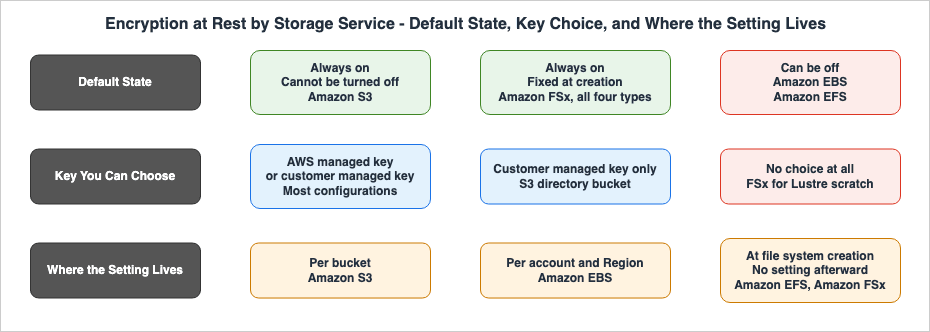
3.1 The Nine Configurations
| Configuration | What Is in Place With No Action Taken | Which Key Can Be Chosen | Where the Setting Lives | Source |
|---|---|---|---|---|
| Amazon S3 general purpose bucket | New objects are encrypted using SSE-S3. Encryption is enabled by default when the bucket is created. | SSE-S3 / SSE-KMS (either aws/s3 or a customer managed key) / DSSE-KMS | Bucket's default encryption. Can be modified using PutBucketEncryption. | Protecting data with server-side encryption |
| Amazon S3 directory bucket | New objects are encrypted using SSE-S3. | SSE-S3 / SSE-KMS. When using SSE-KMS, only customer managed keys are supported; aws/s3 is not an option. | Bucket's default encryption. The key is fixed for the entire lifecycle of the bucket and cannot be replaced. | Specifying SSE-KMS for new object uploads in directory buckets |
| Amazon EBS volumes and snapshots | If enabled at the account and Region level, new volumes and snapshots will be encrypted. | AWS managed key aws/ebs (default key) or a customer managed symmetric key. | Account and Region level settings. Must be enabled separately for each Region. | Enable Amazon EBS encryption by default |
| Amazon EFS file systems | Varies depending on the method used for creation. When created through the console, encryption at rest is enabled by default. When creating through the AWS CLI, API, or SDK, it must be explicitly enabled. | The default key provided by AWS, aws/elasticfilesystem, or a customer managed key. Terminology varies across documentation (see Section 3.4). | File system creation. Uses Encrypted and KmsKeyId within the CreateFileSystem action. | Encrypting data at rest |
| Amazon FSx for Windows File Server | Encryption is automatically enabled when the file system is created. There is no option to disable encryption. | AWS managed key (default key) or a customer managed key. | File system creation. If KmsKeyId is not specified, the default key is used. | Data protection in FSx for Windows File Server |
| Amazon FSx for Lustre scratch | Always encrypted. The key is unique to each file system and is destroyed when the file system is deleted. | Not selectable. SCRATCH_1 and SCRATCH_2 do not accept a KmsKeyId. | No choice available. | Encrypting data at rest |
| Amazon FSx for Lustre persistent | Always encrypted. | AWS managed key (default key) or a customer managed key. | File system creation. Only PERSISTENT_1 and PERSISTENT_2 accept a KmsKeyId. | Same |
| Amazon FSx for NetApp ONTAP | Both file systems and backups are always encrypted. | AWS managed key (default key) or a customer managed key. | File system creation. | Encryption of data at rest |
| Amazon FSx for OpenZFS | Always encrypted. The key is unique to each file system and is destroyed when the file system is deleted. | AWS managed key (default key) or a customer managed key. | File system creation. | Encryption at rest |
The confirmation date is September 23, 2026.
3.2 Three Things This Table Shows
Reading the table vertically, three key points become apparent.First, the default state has three answers. With Amazon S3 the setting cannot be removed at all. The documentation states plainly that encryption of new objects cannot be turned off. While Amazon FSx also lacks an option to disable encryption, it differs from S3 in that the decision is made during creation. Amazon EBS and Amazon EFS, on the other hand, can exist in a state where encryption is not applied. These three answers mean that an inventory looks for a different thing in each case. With S3, the focus will be on the type of encryption used, with FSx, the focus will be on the key category, and with EBS and EFS, the focus will be on finding resources that are not encrypted.
Second, the unit of enablement falls into three places. S3 uses buckets, EBS uses a combination of account and Region, while EFS and FSx are activated during the file system creation process itself. This difference directly impacts the workload required for inventory. If you have a thousand buckets, you will have a thousand settings to check. However, EBS settings are limited to the number of Regions. Conversely, EFS and FSx do not have settings; only records of the creation process exist. If a setting does not exist, it cannot be monitored. For services where the state cannot be modified after creation, the inspection process will need to be moved to before the creation stage. Chapter 7 takes that up.
Third, there are two configurations where key selection is restricted. With Amazon S3's directory buckets, once
SSE-KMS is selected, only customer managed keys can be used, effectively blocking the use of AWS managed keys like aws/s3. Conversely, an Amazon FSx for Lustre scratch file system gives no opportunity to specify a key at all. The direction of this restriction is completely opposite. The former requires the user to manage the key, while the latter removes key management from the user.With directory buckets, there is one more limitation. The Amazon S3 user guide states that when using
SSE-KMS with a directory bucket, S3 Bucket Keys are always enabled for GET and PUT operations and cannot be disabled. S3 Bucket Keys are a mechanism to reduce the number of calls to AWS KMS. In general purpose buckets, users can choose their settings, but with directory buckets, that option is no longer available.3.3 Amazon S3 Has a Fourth Option, and Its Default Has Moved
While the table lists three methods for S3, Amazon S3 also has a method calledSSE-C. This method requires the user to provide the key with each request, and Amazon S3 does not store the key. The reason this option was not included in the table is that, with the current default setting, it cannot be used with new buckets except in two Regions.The Amazon S3 user guide states the following regarding this default setting:
In April 2026, Amazon S3 deployed an update so all new general purpose buckets have SSE-C
encryption disabled for all new write requests. For existing buckets in AWS accounts with no
SSE-C encrypted objects, Amazon S3 also disabled SSE-C for all new write requests.
Once blocked, Amazon S3 rejects a write request that specifies
SSE-C with an HTTP 403. Objects that already exist are unaffected, and still read with the required request headers. If it is needed, the block can be lifted through the BlockedEncryptionTypes parameter on PutBucketEncryption.The second sentence of the quote includes a condition related to existing buckets. It is only disabled for existing buckets if the account contains no objects encrypted with
SSE-C. The nature of this condition, and the appearance of similar conditions in previous default changes, are outside the scope of this article. Chapter 6 of AWS Security Defaults History holds it, as a shape in which the history of the account decides how far a change reaches. This article states only the current position, which is that SSE-C is disabled by default on a new general purpose bucket. However, the FAQ for this same change excludes new buckets created in the Middle East (Bahrain) and Middle East (UAE) Regions from this default setting.3.4 Two Amazon EFS Primary Sources Disagree
The note on the EFS row of the table is there for a reason. Two pages of the primary Amazon EFS documentation place the same alias in different categories.The section on encryption at rest refers to
aws/elasticfilesystem as an AWS owned key, stating that it is the default option. However, the AWS KMS section refers to the same alias as an AWS managed key, further specifying that it is a default customer managed key. As the table in Chapter 2 shows, AWS owned keys, AWS managed keys, and customer managed keys are distinct categories, and these two pages assign the same subject to different categories.This article does not attempt to determine which is correct. The table uses the term "default key provided by AWS" rather than the specific category names. A method for deciding which primary source to prefer when they disagree is held by Where the AWS Primary Sources Disagree About Launch Dates.
The practical impact for readers is limited. Regardless of which interpretation you choose, the conclusion remains the same: specifying a customer managed key will provide you with key policies and revocation. The only potential impact concerns whether or not the use of that key will be logged in CloudTrail if you don't specify one. According to the table in Chapter 2, an AWS owned key will not be logged, while an AWS managed key will.
If you need to verify this, it is faster to check your own account rather than reading the documentation. As Chapter 2 noted, the AWS KMS console has a screen that lists AWS managed keys, and AWS owned keys do not appear there. The same condition applies here. For accounts that have not yet created an encrypted file system using the default key, the fact that it does not appear is not proof of the category.
3.5 One Constraint Common to All Four Services
Reading the table horizontally, most columns differ for each service. However, there is one constraint common to all four services: only symmetric keys are supported.Amazon FSx documentation for all four service types includes the same sentence regarding this limitation.
Amazon FSx accepts only symmetric encryption KMS keys. You can't use asymmetric KMS keys with
Amazon FSx.
Amazon S3 also has this same constraint. The documentation defining the default encryption settings includes this sentence as a note.
Amazon S3 only supports symmetric encryption KMS keys.Amazon EBS is the same: whether the key is named in the account and Region setting or on an individual volume, it has to be a symmetric customer managed key. Amazon EFS also accepts only symmetric customer managed keys.
This constraint can create problems when designing keys. If you structure your key hierarchy based on the assumption of using asymmetric keys, you will find that the storage service does not accept them. The key category can be chosen. The kind of key cannot.
4. What Turning It On Later Does Not Re-encrypt
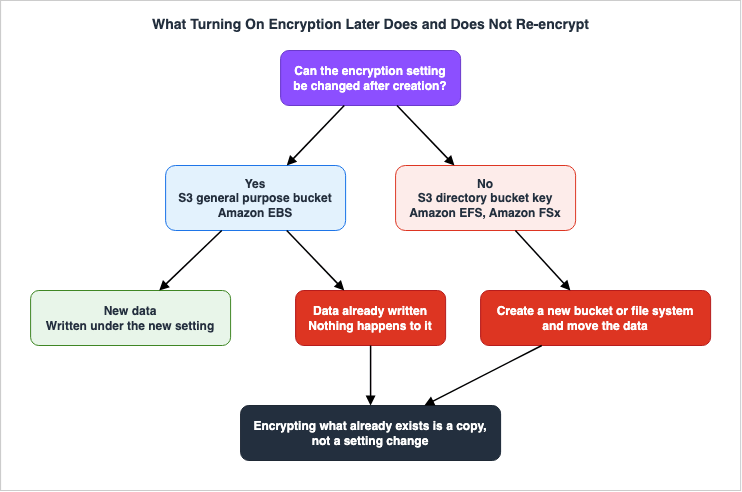
While Chapter 3 addresses the current state, this chapter deals with changes. To put the conclusion first, not one of the nine configurations re-encrypts data that already exists when the setting is changed. Furthermore, six of them cannot have their settings modified after initial setup.The changes discussed in this chapter refer to situations where a user modifies their own settings. The question of how far those changes extend to existing resources when AWS itself makes a default change is a separate matter, and the answer to that question can be found in Chapter 6 of AWS Security Defaults History. One sentence of the same primary source can answer both questions, so an overlap in citations does not mean the claims are the same.
4.1 How a Change Takes Effect
| Configuration | New Data | Data Already Written | Can the Setting Be Changed Later | Source |
|---|---|---|---|---|
| Amazon S3 general purpose bucket | Encrypted according to the updated settings. | No change. To re-encrypt, create an encrypted copy using S3 Batch Operations. | Yes, settings can be changed. | Default encryption FAQ |
| Amazon S3 directory bucket | Encrypted according to the updated settings. | No change. | The key cannot be changed. To use a different key, you must copy the data to a new directory bucket. | Specifying SSE-KMS for new object uploads in directory buckets |
| Amazon EBS volumes and snapshots | New volumes and snapshots will be encrypted according to the updated settings. | No change. To encrypt existing volumes, take a snapshot and create a new, encrypted volume. | Settings can be changed, but the key for existing volumes and snapshots cannot be changed. | Enable encryption by default and Amazon EBS encryption |
| Amazon EFS file system | Not applicable | No change | Not changeable. Migrate data to a new, encrypted file system using replication. | Encrypting data at rest |
| Amazon FSx, all four types | Not applicable | Not applicable | Not changeable. Determined at the time of creation. | Encryption at rest pages for Windows File Server, Lustre, ONTAP, and OpenZFS |
The confirmation date is September 23, 2026.
4.2 How the Primary Sources State It
The sentences that support each row of the table are set out below. All but one of them are written in a negative form. Because these descriptions are in a negative form, they will not appear in the configuration interface, and you can only obtain this information by reading the documentation.The Amazon EBS user guide states, regarding how settings take effect:
Encryption by default has no effect on existing EBS volumes or snapshots.And it explicitly states that existing resources cannot be encrypted directly.
You can't directly encrypt existing unencrypted volumes or snapshots.Furthermore, it also denies the possibility of changing keys for resources that are already encrypted.
You cannot change the KMS key that is associated with an existing snapshot or volume.
However, you can associate a different KMS key during a snapshot copy operation so that
the resulting copied snapshot is encrypted by the new KMS key.
The third excerpt describes a workaround. If you want to change the key, you can specify a new key by copying the resource using a snapshot. In other words, changing the key is not a configuration change, but rather a copying.
The Amazon S3 default encryption FAQ states the same thing regarding existing objects.
Objects that are already in an existing unencrypted bucket won't be automatically encrypted.Regarding Amazon S3 directory buckets, the documentation describes the methods available if you want to change the key.
To use a new customer managed key for your data, we recommend copying your existing objects
to a new directory bucket with a new customer managed key.
The Amazon EFS user guide states that the configuration itself cannot be modified.
After you create an EFS file system, you cannot change its encryption setting. This means
that you cannot modify an unencrypted file system to make it encrypted.
4.3 What the Six Quotes Have in Common
Although the six quotes refer to different services, they share a common structure. Encryption is an operation performed during the writing process, not an action applied to data that is already stored. Therefore, even if you change settings, nothing will happen to data that has already been written.This structure settles what the work of encrypting later actually is. It is copying the data, not changing a setting. For S3, this is achieved through Batch Operations, which creates an encrypted copy. For EBS, it involves creating a new volume via snapshots. For EFS, it involves replicating data to a new file system. In all cases, it is a process of creating a new container and moving the data into it, and the time required is proportional to the amount of data.
The fact that this is a copying also defines the nature of the work involved. The new container will have a new identifier. The bucket name will change, the volume ID will change, and the file system ID will change. Anything elsewhere that refers to those identifiers has to be corrected as well. Work that began as encryption ends up changing places that have nothing to do with encryption.
4.4 The Report Splits Into Two Dates
Where this shows up in an audit is the estimate of when the work finishes. A setting change takes minutes; copying takes as long as the volume and the bandwidth dictate. There will be separate reporting dates for the confirmation that encryption has been enabled, and the confirmation that all stored data has been encrypted.During the period between these two dates, encrypted and unencrypted data may coexist in the same location. The settings do not tell you how long that period runs. The configuration screen only displays the state after the changes have been applied, so the coexistence itself will not be visible on the screen.
Therefore, when planning to encrypt data retroactively, three records are required. These are the date the setting was changed, the date copying began, and the date it was verified that all non-encrypted data had been removed. The method for verifying the third date varies depending on the configuration; for S3, it is the encryption column in the S3 Inventory, and for EBS, it is the encryption status of the volumes and snapshots. If only the first date is reported, it will incorrectly indicate an earlier completion than the actual state.
5. Is the Metadata Under the Same Key as the File Contents
Even when the contents of a file are encrypted, the file name and the directory name are not necessarily protected by the same key. This point is relevant to two of the four services, specifically those involving file sharing, and only one of those uses a distinct key.5.1 Metadata, Service by Service
| Configuration | Is the Metadata Encrypted | Under the Same Key as the Contents | Source |
|---|---|---|---|
| Amazon EFS | Yes | Uses a different key. However, the primary documentation provides conflicting information regarding which key is used. | Encrypting data at rest and Using AWS KMS keys for Amazon EFS |
| Amazon FSx for Windows File Server | Yes | Yes. The documentation explicitly states that the selected key covers both the data and the metadata. | Encryption at rest |
| Amazon FSx for NetApp ONTAP | Yes | Yes. The documentation explicitly states that the selected key covers both the data and the metadata. | Encryption of data at rest |
| Amazon FSx for Lustre | Yes | The documentation does not specify. While it states that metadata is encrypted, the section on AWS KMS only describes the key selection process for the data. | Encrypting data at rest |
| Amazon FSx for OpenZFS | Yes | The documentation does not specify. The structure is the same as above. | Encryption at rest |
Amazon S3 and Amazon EBS are left out of this table for a reason. Object storage and block storage have no metadata in the sense a file system has. While S3 object keys are similar to filenames, they are not the subject of encryption; they are identifiers returned during listing operations. Due to the different nature of the question, they are not included in the same table.
The confirmation date is September 23, 2026.
5.2 Only Amazon EFS Uses a Different Key
The section on Amazon EFS encryption at rest clearly distinguishes between file data and metadata. The description regarding metadata reads:Metadata encryption - File names, directory names, and directory contents are encrypted
using a key that Amazon EFS manages internally.In contrast, the AWS KMS section describes something different regarding the same metadata.
Encrypting metadata at rest - Amazon EFS uses the AWS managed key for Amazon EFS,
aws/elasticfilesystem, to encrypt and decrypt file system metadata (that is, file names,
directory names, and directory contents).
Both descriptions agree on one point: a key separate from the one over the file contents protects the metadata. The discrepancy lies in whether that key is managed internally by Amazon EFS or is a key with the alias
aws/elasticfilesystem. As with the note in Chapter 3, this article does not determine which reading is correct.Regardless of how it is interpreted, the practical implications are the same. Even if a customer managed key is specified, that key only protects the contents of the files. File names and directory names sit outside the key whose policy the customer is able to write. If regulations require protection of file names using a customer managed key, Amazon EFS will not meet that requirement.
This outcome also affects behavior when a key is disabled. As seen in Chapter 6, disabling a customer managed key will prevent access to the file system. However, the key that protects the metadata is separate and therefore not subject to the disabling action. So the access denial does not come from the metadata key.
5.3 Writing Down That the Documentation Does Not Say
The rows for Amazon FSx for Lustre and Amazon FSx for OpenZFS indicate that the documentation does not state whether they use the same key. This isn't due to a lack of research; it is the result of the research.Both guides state that in encrypted file systems, both data and metadata are automatically encrypted. However, when you proceed to the AWS KMS section on the same page, the description of the key selection only pertains to data, and it does not specify whether metadata is included in the same key. This contrasts with the guides for Windows File Server and NetApp ONTAP, which explicitly state that both are covered. This leaves open the possibility that there is a distinction, or simply that it hasn't been documented.
You could fill in the information, assuming they are the same since they are both FSx. But that is a guess the documentation does not support, and it leaves nothing to point at if the answer is used in an audit response. It is better to only include information that you've verified in the table, and leave blank any fields that remain unknown.
The requirement decides what to do with a blank field. If the requirement does not specify that metadata must be protected with a customer managed key, leaving the field blank will not be an issue. However, if it is a requirement, you will need to confirm with AWS rather than relying on the documentation. Either way, leaving the field blank is better than reporting that the requirement is met without knowing that it was blank.
6. What Happens When the Key Is Disabled or Revoked
When considering the implementation of encryption, one consideration is what happens if a key is lost. This question only applies to configurations that utilize customer managed keys. In the remaining two categories the user has no way to disable the key, so the question does not arise.6.1 Where the Question Applies
| Key Category | Can be disabled? | Can access be revoked? | Subject of this chapter? |
|---|---|---|---|
| AWS owned key | No | No | Not applicable |
| AWS managed key | No | No | Not applicable |
| customer managed key | Yes | Yes. You can revoke the grant you provided. | Applicable |
This distinction should be considered when choosing a key category. Selecting a customer managed key means accepting responsibility for the key's availability in exchange for access to key policies and audit trails.
Conversely, configurations that utilize AWS managed keys do not have a path where data becomes inaccessible due to the user disabling the key. The lack of a disabling option provides a form of protection.
6.2 Key State and File System in Amazon EFS
The Amazon EFS user guide organizes the impact of key status on the file system into four stages. Of the four services discussed in this article, only Amazon EFS provides this information in a table format.| Key State | Effect on the File System |
|---|---|
| Enabled | Reads and writes work as normal. |
| Disabled | The file system becomes inaccessible after a brief period. Re-enabling the key restores it. |
| Pending deletion | The file system becomes inaccessible. The deletion can be canceled during the waiting period. |
| Deleted | Permanently inaccessible. This cannot be reversed. |
The phrase after a brief period deserves attention. It is not guaranteed that read/write operations will fail immediately after the key is disabled. Therefore, observing ongoing operations after disabling the key does not necessarily indicate that disabling it was unsuccessful.
The same page also includes the following warning:
If you disable or delete the KMS key used for your file system, or revoke Amazon EFS access
to the key, your file system will become inaccessible. This can result in data loss if you
don't have backups.
What matters is that the warning sets three operations side by side. Disabling the key, deleting the key, and revoking the grant held by Amazon EFS. The third one never touches the key, so watching the list of keys will not show it.
6.3 A Grant Sits in a Different Layer From the Key Policy
The Amazon EFS encryption at rest chapter says when this grant appears. On creating a file system, or on replicating one within the same account, Amazon EFS calls AWS KMS through a Forward Access Session. Consequently, thekms:CreateGrant calls recorded in CloudTrail appear to originate from the identity that created the file system.There are clues to differentiate this behavior. If the
invokedBy field in CloudTrail shows elasticfilesystem.amazonaws.com, it indicates a call originating from the service. Without examining this field, it can appear as though the user manually created the grant.When using customer managed keys, the key's resource policy must permit the
kms:CreateGrant action. Furthermore, the documentation specifies that the Amazon EFS service principal must be granted permission, and that this permission should be restricted to the service's endpoint using the kms:ViaService condition.A practical conflict arises here. The process of restricting the key policy and maintaining the ability to create file systems both occur within the same key policy. The documentation states that the creation calls will fail unless
kms:CreateGrant is permitted. Therefore, removing this permission from the key policy will prevent the creation of new file systems. The documentation does not specify what existing file systems will return in such a scenario. What is certain is that the breakage shows up on the creation path. Reading and writing an existing file system right after changing the key policy does not exercise that path at all.6.4 Amazon FSx Has the Same Structure
The guides for the four different types of Amazon FSx all state that you can disable, re-enable, delete, or revoke access to customer managed keys at any time. In other words, it has the same structure as Amazon EFS. The only difference is that it does not present the state and its impact in a tabular format.Therefore, when you disable a key, it is practical to estimate the outcome using the four-stage process for Amazon EFS as a common model. However, this is an interpretation made here, and AWS does not explicitly state this for FSx. It should be used on that understanding.
6.5 What to Check Before Stopping a Key
Three checks follow from all of this, to make before stopping a customer managed key.| # | Check | Reason |
|---|---|---|
| 1 | List all resources using the key. | The key itself does not provide a list of which resources depend on it. |
| 2 | Verify that recovery copies do not rely on the same key. | When the key is disabled, any recovery copies encrypted with that key will become inaccessible. |
| 3 | Confirm that no new resources need to be created after disabling the key. | As described in Section 6.3, the process for creating new resources can fail independently of read/write operations on existing resources. |
The second check is the most likely to be overlooked. It is possible that your recovery procedures, designed to address failures, rely on the same key. If that's the case, the only way to recover is to re-enable the key. If the key has already been deleted, that recovery option will no longer be available.
7. Where the Enforcement Is Written
Being encrypted and being unable to create an unencrypted state are two different things. This chapter addresses the latter — specifically, which layers offer the means to enforce compliance within an organization. As Chapter 3 showed, the unit of enablement falls into three places, so the places where enforcement can be written do not line up either.7.1 Where Enforcement Can Be Written
| Configuration | Layer Where Enforcement Can Be Written | Concrete Means | Source |
|---|---|---|---|
| Amazon S3 general purpose bucket | Bucket policy | Condition to reject unencrypted PutObject requests. See s3:x-amz-server-side-encryption. | Using SSE-S3 |
| Amazon S3 directory bucket | Bucket policy. Additionally, the default encryption setting effectively enforces encryption (as keys cannot be changed later). | In addition to the above condition, define the default encryption at bucket creation. | Specifying SSE-KMS for new object uploads in directory buckets |
| Amazon EBS | Account and Region settings, in conjunction with IAM policies or SCP. | ec2:Encrypted condition key. Apply to ec2:CreateVolume and ec2:RunInstances. | Example IAM policies for Amazon EBS |
| Amazon EFS | Only before creation. There are no settings that enforce encryption after creation. | Control creation permissions and review the templates used for creation. | Encrypting data at rest |
| Amazon FSx, all four types | No enforcement targets exist. Encryption is not an optional choice. | Not applicable. Instead, ensure that the key to be used is specified at creation time. | Encryption at rest pages for Windows File Server, Lustre, ONTAP, and OpenZFS |
The confirmation date is September 23, 2026.
7.2 The Amazon EBS Setting Is Not Enforcement
The Amazon EBS account and Region settings, as the name "default" suggests, apply to newly created resources; they are not a mechanism for rejecting specific configurations. The user guide states that once it is enabled for a Region, encryption cannot be disabled for individual volumes or snapshots in that Region. In that direction it comes close to enforcement.However, since the setting is applied at the Region level, adding a new Region will start with it unconfigured. To ensure comprehensive security, rather than relying solely on the setting itself, it is necessary to implement a layer that prevents the creation of unencrypted volumes in Regions where the setting is not configured. This is achieved using the
ec2:Encrypted condition key.The AWS Managed Services documentation carries an example of an SCP that uses this condition key. The account and Region setting sits on the enablement side, while the condition key sits on the side that denies the request outright. The two are not alternatives; they are meant to be layered.
Confuse the two and the gap is invisible. In a Region where the setting is on, only encrypted volumes get created whether or not the condition key is there, so there is no occasion to notice that it is missing. The gap appears the first time a volume is created in a new Region that has no setting.
7.3 What the Declarative Policies Cover
AWS Organizations' declarative policies provide a mechanism for declaring and maintaining service configurations across an organization. The user guide lists the attributes that the Amazon EC2 declarative policies support.| Supported Attributes |
|---|
| VPC Block Public Access |
| Serial Console Access |
| Image Block Public Access |
| Allowed Images Settings |
| Instance Metadata |
| Snapshot Block Public Access |
| VPC Encryption Controls |
This list does not include Amazon EBS encryption by default. While "VPC Encryption Controls" appears at the end of the list, it handles encryption in transit, not encryption at rest. Be careful not to assume functionality based solely on the name. VPC Encryption Controls holds the in-transit side.
What this article can state is only that, as of September 23, 2026, Amazon EBS encryption by default is not on that list. The fact that an attribute is not included on this list is distinct from the possibility of achieving the same result through other means. In fact, the
ec2:Encrypted condition key of the previous section serves the same purpose from a different layer.The list is also the kind that grows. Declarative policies exist so that a configuration holds even as a service adds features and APIs. The list of supported attributes is therefore the list as it stood when this article copied it.
7.4 What to Do Where There Is No Layer to Enforce In
Amazon EFS and Amazon FSx have no layer to write enforcement into. There are two reasons, and they point in opposite directions.Amazon FSx has nothing to enforce. No option turns encryption off, so the state worth enforcing already holds. What needs checking is the key category, not whether encryption is on. In the case of FSx, the design focuses on ensuring the correct key is selected during creation, rather than implementing enforcement mechanisms.
Amazon EFS, on the other hand, allows you to create an unencrypted configuration, but there is no way to inspect or correct this after it has been created. Therefore, with EFS, the focus must be on the pre-creation stage — specifically, the review of templates and the control of creation permissions. As described in Chapter 4, if an issue is discovered after creation, it requires recreating the file system using replication.
The property described in Chapter 3 — that the initial state can vary depending on the creation path — becomes relevant here. When only considering creation through the console, encryption may appear to be the default. Unencrypted EFS file systems come from the automated paths.
8. What This Table Does Not Cover
This table is only useful when a specific scope is defined. This chapter sets out what the table does not measure. When citing this table in your audit responses, you will need to include the information presented in this section.8.1 Items Not Measured
| Out of Scope | Reason |
|---|---|
| Recovery copies and backups | This article measures the configuration of the original storage location. The configuration for the copy destination is determined separately. |
| Cross-Region copies and replicas | The documentation cited here requires the key to come from the same Region as the bucket or file system. The configuration at the destination decides which key the copy carries. |
| Paths where encryption is performed on the client-side before delivery | These are independent of the storage location configuration. |
| Database services | The unit of storage and the location of the configuration settings are different. |
| Encryption in transit | The auditing and enforcement mechanisms are separate. |
The first item is the most relevant to practical applications, and its direction is not consistent. There are paths that directly inherit the state of the original resource, similar to Amazon EBS snapshots. However, there are also paths where the storage destination uses its own keys, independent of the original state. This article does not provide a way to determine which path is being used. This is because the table in this article only measures the configuration of the original storage location. Therefore, even if you verify that the original storage location is encrypted, you cannot draw any conclusions about copies created from it. Information regarding which key is used by the backup and what happens when the original is not encrypted can be found in AWS Backup Data Protection and Governance.
The second item follows the same pattern. The Amazon EBS description referenced in Chapter 4 stated that a different key can be specified during the snapshot copy operation. Conversely, the key used for the copy does not necessarily have to be the same as the original key. If the original key is used to define the scope of auditing, the copy destination may fall outside that scope.
8.2 What Encryption at Rest Does Not Answer
There is another category that lies outside the established scope: questions that encryption at rest simply cannot answer.Encryption at rest protects against the data being read straight off the medium it is stored on. It does not prevent access when a legitimate request is made through the proper channels, with the necessary permissions. The question of who can read the data is a matter of access control, not encryption.
This distinction applies to the question of whether something is publicly accessible as well. If an encrypted object is configured for public access, anyone who retrieves it will receive the decrypted version. Being encrypted does not make an object private. What Can Be Made Public on AWS holds the question of what can be made public.
8.3 When This Was Measured
The data in this table is current as of September 23, 2026. The sources listed alongside each row refer to the specific pages opened on that date.Defaults can change. The handling of
SSE-C, as mentioned in Chapter 3, is a prime example. And immediately after a change, you may find that the same service contains both older, pre-existing resources and newly configured resources. This table reflects the results when creating new resources; it does not represent the state of existing resources.So use this table in two ways. Refer to the table when creating new resources, and check your own account for existing resources. Report the two on the same basis and the answer will not match what is actually there.
9. Failure Modes
Seven ways the material above fails in practice follow. All of these failures occur while the configuration screens appear to be displaying correctly.| # | Failure | Cause | Mitigation |
|---|---|---|---|
| 1 | Reporting the date encryption was turned on as the date the data became encrypted. | Configuration changes are applied immediately, and the screen only displays the updated state. | As described in Chapter 4, record a separate date for when existing data encryption is complete. |
| 2 | Reporting all four services together as encrypted. | Trying to answer a one-line question with one line. | The unit of enablement falls into three places, so use a different inventory method for each. |
| 3 | Assuming that specifying a customer managed key puts the file names under that key too. | The key selection screen does not clearly indicate what the key actually protects. | With Amazon EFS a different key protects the metadata. Refer to the table in Chapter 5. |
| 4 | Assuming that monitoring the list of keys will reveal any revocations. | Revoking a grant does not change the key itself. | Include grant revocations, in addition to key status, in your monitoring efforts. |
| 5 | Assuming that Amazon EBS settings are inherited when a new Region is opened. | It is difficult to determine from the screen that settings are Region-specific. | Check the setting Region by Region, or catch it at the condition key layer. |
| 6 | Assuming that because the original storage location is encrypted, any copies taken from it are also encrypted. | Copy settings are determined independently of the original settings. | As described in Chapter 8, copies fall outside the scope of this table. Verify separately. |
| 7 | Assuming that because existing resources still read and write after the key policy was tightened, nothing is wrong. | The failure point is the creation process, and existing resource read/write operations do not use that process. | If you remove kms:CreateGrant, new creations will fail. Instead of reading and writing, try creating a new resource. |
Failures three through seven are difficult to detect without reviewing the documentation. They all stem from either missing or ambiguous descriptions, and will not be apparent when the system appears to be functioning correctly.
10. Frequently Asked Questions
This section answers common questions that may arise when using the content presented in this article.When does a one-line answer about encryption become accurate?
When it carries the configuration, the key category, and the date it was checked. Without the configuration the unit of enablement does not come across. Without the key category it is not clear who is able to stop the key. And without a date, it is impossible to know if the confirmation includes resources created afterward.Are there any methods to re-encrypt existing data?
Yes, although this involves creating a copy rather than modifying the existing data. With Amazon S3, you can create an encrypted copy using S3 Batch Operations. With Amazon EBS, you can create a new volume via a snapshot. And with Amazon EFS, you can migrate data to a new file system using replication. The time required is proportional to the amount of data.With Amazon FSx, is there nothing to check?
No. Encryption itself does not need checking, but the key category does. Leave the default key in place and there is no key policy to write and nothing to revoke. This is the table in Chapter 2.Does Amazon EFS encrypt data when you create it through the console?
Yes. The documentation states that creating a file system through the console enables encryption at rest by default. Creating one through the AWS CLI, the API, or an SDK requires enabling it explicitly. If your organization has multiple creation paths, the initial state may vary depending on the path used.Will the data be erased if the key is disabled?
No, the data will remain, but it will become unreadable. According to the Amazon EFS documentation, the data can be recovered if you re-enable the key. However, if the process has progressed to a state of deletion, it cannot be recovered.Can you disable encryption in Amazon S3?
No. Amazon S3 clearly states that it is not possible to disable encryption for new objects. You can choose the type of encryption and the key used, but not whether to enable encryption at all.Are asymmetric KMS keys supported?
No. All four services discussed in this article only accept symmetric KMS keys. Amazon FSx, across all four service guides, explicitly states this. Amazon S3 also includes the same disclaimer in its default encryption documentation. Similarly, Amazon EBS and Amazon EFS are limited to symmetric keys only.Can the key category be changed later?
It depends on the configuration. An Amazon S3 general purpose bucket lets you change the default encryption, and with it the key category. However, with Amazon EBS, it is not possible to change the keys for existing volumes or snapshots; instead, you will need to create new ones by copying and specifying a new key. For Amazon S3 directory buckets, Amazon EFS, and Amazon FSx, the key cannot be changed after creation.How should a field that the table leaves blank be handled?
A field that says the documentation does not state it means exactly that: it could not be confirmed. If it does not bear on the requirement, leaving it blank causes no trouble. If it does, the answer has to come from AWS rather than from a guess.Is data safe if it is encrypted but made public?
No. Encryption at rest does not stop a request that comes through the proper channel with the right permissions. Objects with a "public" setting are retrieved with their decrypted content. Whether or not something can be publicly accessed is a question of access control.11. Summary
This article outlines the implications of the statement "encrypted" for four different storage services, broken down into three questions.On the first question. With nothing configured, the state falls into three answers. With Amazon S3 it is always on and cannot be turned off. With Amazon FSx it is on from the moment of creation. Amazon EBS and Amazon EFS can sit in a state where it is not on at all. For Amazon EFS, the initial state can vary depending on the path used during creation.
On the second question. The available keys differ for each configuration, and there are two configurations where choices are restricted. For Amazon S3 directory buckets, only customer managed keys can be used when selecting
SSE-KMS. An Amazon FSx for Lustre scratch file system allows no key to be specified at all. The two restrictions point in opposite directions. And the key category decides the range of what an audit can answer.On the third question. None of the nine configurations re-encrypt existing data when settings are changed. Moreover, Amazon EFS and Amazon FSx cannot have their settings modified after initial configuration. Encrypting what already exists is not a setting change. It is copying the data.
In addition to these three questions, there are three supplementary points. For Amazon EFS a separate key protects the file names and directory names, and the user does not get to choose it. One way of stopping a key does not touch the key at all, which is revoking the grant. And the layer that enforcement can be written into differs by service, and two services have no such layer.
The information presented in this article is accurate as of September 23, 2026. Chapter 8 lists what the table does not cover: recovery copies, cross-Region replicas, and database services among them. Whether the sources cited on each row still say the same thing is worth checking at the time of reading. Defaults change. When it is the history of the change that is needed, AWS Security Defaults History holds it.
12. References
- Protecting data with server-side encryption - Amazon S3 User Guide
- Default encryption FAQ - Amazon S3 User Guide
- Using server-side encryption with Amazon S3 managed keys (SSE-S3) - Amazon S3 User Guide
- Specifying server-side encryption with AWS KMS (SSE-KMS) for new object uploads in directory buckets - Amazon S3 User Guide
- Using server-side encryption with AWS KMS keys (SSE-KMS) in directory buckets - Amazon S3 User Guide
- AWS::S3::Bucket ServerSideEncryptionByDefault - AWS CloudFormation Template Reference
- Default SSE-C setting for new buckets FAQ - Amazon S3 User Guide
- Blocking or unblocking SSE-C for a general purpose bucket - Amazon S3 User Guide
- Amazon EBS encryption - Amazon EBS User Guide
- Enable Amazon EBS encryption by default - Amazon EBS User Guide
- Example IAM policies for Amazon EBS - Amazon EBS User Guide
- Encrypting data at rest - Amazon EFS User Guide
- Using AWS KMS keys for Amazon EFS - Amazon EFS User Guide
- CreateFileSystem - Amazon EFS API Reference
- Data protection in Amazon FSx for Windows File Server - Amazon FSx for Windows File Server User Guide
- Encryption at rest - Amazon FSx for Windows File Server User Guide
- Encrypting data at rest - Amazon FSx for Lustre User Guide
- Encryption of data at rest - Amazon FSx for NetApp ONTAP User Guide
- Encryption at rest - Amazon FSx for OpenZFS User Guide
- AWS::FSx::FileSystem - AWS CloudFormation Template Reference
- AWS KMS keys - AWS Key Management Service Developer Guide
- Find the alias name and alias ARN for a KMS key - AWS Key Management Service Developer Guide
- EC2 policy syntax and examples - AWS Organizations User Guide
- Declarative policies in AWS Organizations - AWS Organizations User Guide
- Curated SCPs and Config Rules - AWS Managed Services User Guide
- AWS Security Defaults History - Block Public Access, Default Encryption, IMDSv2, and How Far Each Changed Default Reached
- Amazon S3 Security and Access Control Guide - Bucket Policies, IAM, Access Points, Block Public Access, and Encryption
- AWS KMS Envelope Encryption and Data Key Caching Patterns - Design Decisions for the AWS Encryption SDK and Multi-Region Keys
- VPC Encryption Controls - Auditing and Enforcing Encryption in Transit
- Where the AWS Primary Sources Disagree About Launch Dates - Which Document Systems Carry a Date, What Shapes the Disagreements Take, and Which Date to Record
- Cryptography Glossary for Engineers - AES, RSA, ECDSA, HKDF, Envelope Encryption, and TLS Explained
- Amazon FSx Family Decision Guide - Choosing Between Lustre, NetApp ONTAP, OpenZFS, and Windows File Server
- AWS Backup Data Protection and Governance - Backup Plans, Vault Lock, and Cross-Account Copy Design
- What Can Be Made Public on AWS - Storage and Data, the Block Public Access Family, and What Each Switch Does Not Promise
References:
Tech Blog with curated related content
Written by Hidekazu Konishi