SSH Algorithms on AWS Endpoints - What Transfer Family, EC2, IAM, and Amazon Linux Accept, and What Breaks When the Other Side Drops the ssh-rsa Signature
First Published:
Last Updated:
The lists on the other side are changing. In its changelog of September 22, 2026, GitHub announced that it will remove the
ssh-rsa signature (SHA-1) and the diffie-hellman-group-exchange-sha256 key exchange on January 13, 2027. A new length requirement starts on October 14, 2026, and RSA keys registered after that date must be at least 3072 bits. On the same date, the post-quantum hybrid key exchange mlkem768x25519-sha256 will be added on github.com and GitHub Enterprise Cloud with data residency, except for the U.S. region. OpenSSH removed finite field Diffie-Hellman from the default list in sshd(8) in OpenSSH 10.0, and in OpenSSH 10.1, ssh(1) began warning about key exchanges that are not post-quantum. AWS also has points to verify. According to the Transfer Family security policies page, the default server policy depends on the creation route, and neither default policy includes post-quantum key exchange. The sources also disagree on the default policy. Amazon Linux 2023 (AL2023) was updated to OpenSSH 9.9 in a release on August 3, 2026, according to its release notes. The same release notes say that crypto-policies enables the ML-KEM key exchange for OpenSSH in its PQ subpolicy.For each SSH endpoint on AWS, this article lines up three things in a Contract Table: the algorithms and keys the documentation says it accepts, the scope within which that holds, and the conditions under which the documentation says it breaks. The table format follows that used in What Breaks Ordering, Service by Service on AWS. Furthermore, it shows, from the text of GitHub's announcement, that when the other side drops the
ssh-rsa signature, what breaks is the negotiation, not the key. The historical background of the algorithms, and the versions in which they became defaults, are covered in SSH and OpenSSH Algorithm History and Timeline. This article's information is based solely on AWS, GitHub, and OpenSSH documentation and RFCs; none of it was checked by actually connecting. Pricing is not discussed.Related articles on this site:
- SSH and OpenSSH Algorithm History and Timeline - From SSH-1 to Post-Quantum Key Exchange, and How Algorithms Enter and Leave the Defaults
- What Breaks Ordering, Service by Service on AWS - SQS FIFO, SNS FIFO, Kinesis, Amazon MSK, DynamoDB Streams, and the EventBridge Custom Event Bus
- Post-Quantum Cryptography Standardization Timeline and Migration on AWS - From Algorithm Selection to Service Support
- AWS Data Movement Decision Guide - DataSync, Transfer Family, Storage Gateway, and Data Transfer Terminal
- AWS Systems Manager Fleet Operations at Scale - Patch Manager, State Manager, Automation Runbooks, and Session Manager
- Amazon Linux History and Timeline - Amazon Linux AMI, Amazon Linux 2, AL2023, AL2027, and the Clocks That Do Not Move Your Instances
- Cryptography Glossary for Engineers - AES, RSA, ECDSA, HKDF, Envelope Encryption, and TLS Explained
Table of Contents
- 1. The Scope of This Article and the Date It Was Verified
- 2. How to Read the Contract Table
- 3. Transfer Family SFTP Servers — Where AWS Receives SSH
- 4. Transfer Family SFTP Connectors — Where AWS Dials Out
- 5. Keys AWS Holds — EC2 Key Pairs, EC2 Instance Connect, and IAM SSH Public Keys
- 6. Amazon Linux, and the Paths That Do Not Negotiate
- 7. What Breaks and What Does Not When the Other Side Changes
- 8. Where the Sources Disagree, and Where No Explicit Statement Is Found
- 9. Frequently Asked Questions about SSH Endpoints on AWS
- 10. Summary
- 11. References
1. The Scope of This Article and the Date It Was Verified
This section first defines the three questions that will be addressed throughout the article. Subsequently, it specifies the topics that will be covered, those that will not, the verification date, the consulted materials, and the terminology used in this article.1.1 Three Questions for Each Endpoint
For every endpoint, this article checks the following three questions:- Which sentence in the documentation states the algorithms and keys that are accepted? This article will quote those passages directly in English.
- Within what scope does that description apply? This scope may include security policies, the creation route (console, API, CLI, or AWS CloudFormation), the operating system (Linux or Windows), and crypto policies.
- What does the documentation state as conditions under which that specification no longer holds true?
These three questions represent a verification process focused on a single side of the connection. Whether a connection can be established depends on the overlap between the lists provided by both sides. Section 7.1 of RFC 4253, which defines the SSH transport layer, specifies how to choose encryption algorithms as follows:
The chosen encryption algorithm to each direction MUST be the first algorithm on the client's name-list that
is also on the server's name-list. If there is no such algorithm, both sides MUST disconnect.
The same rule applies to selecting MAC algorithms. Key exchange and host key algorithms are also selected from the server's list, in the order presented on the client's list. Key exchange includes additional conditions related to the host key. If there is no overlap, the connection will be terminated. Furthermore, for user authentication, the client must sign with the user's key, and the server must accept the signing algorithm. RFC 8332 is a document that defines methods for using SHA-256 and SHA-512 with RSA keys for signing, stating in its abstract, "define new public key algorithms for use of RSA keys with SHA-256 and SHA-512 for server and client authentication in SSH connections." Section 7 of this article addresses how this overlap changes when the other side's list is modified.
1.2 Endpoints Covered and Not Covered
The endpoints this article covers fall into three groups: where AWS receives SSH, where AWS dials out, and the keys AWS holds. On the side where AWS receives SSH, this article covers these three:- AWS Transfer Family SFTP servers. This includes handling security policies, host keys, and user keys.
- The sshd service on Amazon EC2 instances. This covers the default configuration and crypto-policies for AL2023. It also includes connections via EC2 Instance Connect, EC2 Instance Connect Endpoints, and AWS Systems Manager Session Manager.
- AWS CodeCommit. This covers handling SSH public keys for IAM users.
On the side where AWS dials out, this article covers these two:
- Transfer Family SFTP connectors.
- SSH clients running on EC2 instances. An example is connecting to GitHub using Git.
For the keys AWS holds, this article covers EC2 key pairs, keys sent via EC2 Instance Connect, and SSH public keys within IAM.
The following topics will not be covered in this article and are addressed in other publications on this site.
- The History of SSH and OpenSSH Algorithms, and the Defaults Added, Disabled, and Removed in Each Version. These are delegated to SSH and OpenSSH Algorithm History and Timeline. This article will reference the terminology used to describe algorithm stages (e.g.,
BrownoutandRemoved), as well as the corresponding versions and dates.
- Choosing Transfer Family, Protocols, and Identity Providers. These are delegated to Section 5 of AWS Data Movement Decision Guide. The feature that preserves the source IP address with PROXY protocol v2 for SFTP servers behind a Network Load Balancer is also outside the scope of this article. (What's New announced it on September 17, 2026, and the user guide's document history lists it under September 15, 2026.)
- AWS Post-Quantum Cryptography Overview. The overall landscape of post-quantum cryptography on AWS is covered in Post-Quantum Cryptography Standardization Timeline and Migration on AWS. This article holds only the rows for SSH endpoints.
- Session Manager Operations. Details regarding Session Manager operations, including scenarios where logging is unavailable, are delegated to Section 8 (the logging gap is in Section 8.3) of AWS Systems Manager Fleet Operations at Scale.
- Amazon Linux 2 (Lifetime). The history and timeline for Amazon Linux 2 are covered in Amazon Linux History and Timeline. As Amazon Linux 2 reached its end-of-support on June 30, 2026, it will not be used as an example in this article.
- Definitions of Terms: Ed25519, Curve25519, etc. Definitions for terms such as Ed25519 and Curve25519 are covered in Cryptography Glossary for Engineers.
- Hardening GitHub Actions Workflows. Hardening the GitHub Actions workflows that deploy to AWS is covered in Hardening GitHub Actions for AWS Deployments.
- TLS Security Policies. TLS security policies, such as those used with Elastic Load Balancing, are distinct from the SSH security policies of Transfer Family. Details are delegated to AWS Elastic Load Balancing Decision Guide.
- Attack procedures. Pricing.
The following figure lines up the endpoints this article covers, split into where AWS receives SSH and where AWS dials out. In six of the boxes, the line that begins with
List set by shows what sets the list used for the negotiation at that endpoint (a security policy, a crypto policy, the OpenSSH version, or the partner's software). As the documentation calls them a tunnel and a TCP proxy, Session Manager and EC2 Instance Connect Endpoint can be read as only carrying the SSH connection and not taking part in the negotiation (Section 6.3).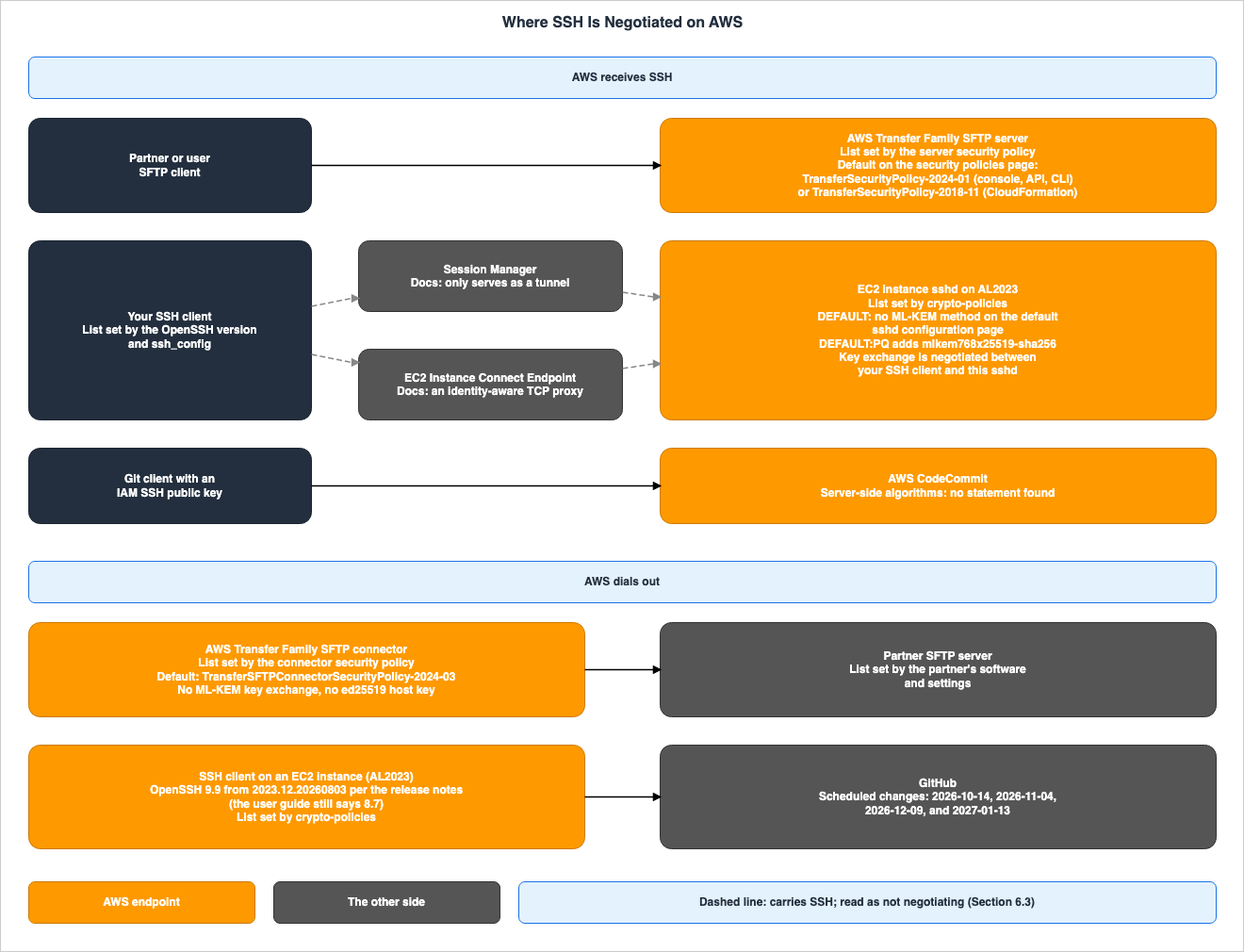
1.3 The Verification Date and the Sources Read
This article's information was verified and reviewed on October 4, 2026. Since the docs.aws.amazon.com pages do not display update dates, this date is considered the verification date. The materials reviewed included the user guides for Transfer Family, Amazon EC2 (including EC2 Instance Connect), IAM, CodeCommit, and Systems Manager; the API references for Transfer Family, Amazon EC2, EC2 Instance Connect, and IAM; the AWS CloudFormation reference; the AWS CLI reference; the Transfer Family FAQ; What's New; the AWS Security Blog; the AWS re:Post Knowledge Center; the user guides for AL2023 and AL2027; the release notes for AL2023; and the Amazon Linux 2 FAQ. Outside of AWS documentation, the following were also reviewed: the GitHub changelog, the OpenSSH release notes and man pages, RFC 4253, RFC 8332, and RFC 10042.Where this article says the documentation does not state something, it did not stop at reading one page. The entire text of all 154 pages in the Transfer Family user guide's table of contents was searched for the terms
ssh-rsa, rsa-sha2, ed25519, ecdsa, dsa, mlkem, diffie-hellman, FIPS, default, and no matching. The tables listing security policies, along with the corresponding JSON data for each policy, were cross-referenced to verify all entries related to SSH key exchange, encryption, and MAC algorithms. All 18 sets of AL2023 release notes, from 2023.12.20260608 to 2023.12.20260930, were reviewed. However, the results presented in this article reflect only the information that was found during this review. This article distinguishes between cases where the documentation explicitly states that something is not accepted and cases where it is simply not in the list.The GitHub changelog was initially published on September 22, 2026, and on September 28, 2026, the year of the final date was corrected to 2027. This history is addressed in SSH and OpenSSH Algorithm History and Timeline. The dates used in this article are based on the corrected version of the changelog.
1.4 Distinguishing Terms with the Same Spelling and Terminology Used in This Article
When discussing SSH, terms with the same spelling can refer to different things.First,
ssh-rsa refers to two things: the name of a key type and the name of a signature algorithm. GitHub's changelog clarifies this distinction as follows:Note the distinction between the key type ssh-rsa, which applies generically to all RSA keys regardless of
signature algorithm, and the confusingly named signature type ssh-rsa, which indicates an RSA key using SHA-1
(as opposed to rsa-sha2-256 and rsa-sha2-512, which refer to RSA keys using SHA-256 and SHA-512,
respectively).The Transfer Family user guide also states, "It is important to understand the distinction between the RSA key type—which is always ssh-rsa—and the RSA host key algorithm, which can be any of the supported algorithms." In this article, the key-type meaning is written as RSA key (key type
ssh-rsa), and the signature-algorithm meaning as ssh-rsa signature (SHA-1). The "ssh-rsa format" for IAM SSH public keys, and the ssh-rsa key type for SFTP connector authentication keys, represent the key type. Conversely, the ssh-rsa supported in the host key section of Transfer Family servers and connectors, and the "ssh-rsa host key algorithm" that AL2023 disables, refer to the signature.For the other terms, this article uses the following terminology to avoid confusion:
- Defaults: When this article uses the term "default," it will always specify whose default is being referenced. This includes the defaults for Transfer Family consoles, APIs, and CLIs, AWS CloudFormation defaults, SFTP connector defaults, the
DEFAULTsetting in AL2023's crypto-policies, the default settings for OpenSSH'sssh(1)(client), and the default settings forsshd(8)(server)—all of which are distinct.
- Host Keys and User Keys: A host key is a key that the server uses to identify itself. A user key is a key that the client uses for authentication. EC2 key pairs represent user keys. The EC2 user guide states, "the public key that you specified at launch is placed on your Linux instance in an entry within ~/.ssh/authorized_keys."
- Not Listed and Not Accepted: When documentation lists only X and Y, this article will state that the documentation lists X and Y. It will not state that Z is not accepted. Only when the documentation explicitly states that something is not accepted (such as EC2's DSA keys, SFTP connector's ED25519 host keys, ED25519 keys for Windows instances, or ED25519 user keys in AL2023's FIPS mode) does this article say that it is not accepted.
- Policies: Transfer Family security policies are sets of algorithms that can be applied to servers and connectors. AL2023's crypto-policies (such as
DEFAULTandLEGACY) represent system-wide cryptographic settings.PQis a subpolicy layered on a crypto policy. This article will differentiate between these two concepts, calling the former security policies and the latter crypto policies.
- Post-Quantum Key Exchange: In this article, this means a hybrid method that combines ML-KEM with a classical elliptic curve key exchange (such as
mlkem768x25519-sha256).
2. How to Read the Contract Table
This article lines up, for each endpoint, what the documentation says it accepts in a Contract Table. The format of the table is the same as the Contract Table in What Breaks Ordering, Service by Service on AWS. This section will define the table columns, the labels that open the breaking conditions, and the rules for the cells.2.1 Columns
The columns in the table represent the following five elements:Service or Endpoint: This indicates the endpoint that the row addresses: a service, its policy, or an OS setting.What the Source Promises: This is the sentence in which the source states the algorithms or keys that are accepted. The sentence is quoted in English, as written, in double quotation marks. For long sentences, the full sentence is quoted in the text after the table. If the source explicitly states that it does not accept something, that sentence is quoted.Within What: This specifies the scope within which the statement holds true, such as a policy, a creation route, an OS, or a crypto policy. The scope is given as the source states it.What Breaks It: This describes the conditions, as stated in the source material, under which a connection or a key registration no longer succeeds because of the algorithms or keys, or the accepted set changes. Each condition begins with one of the labels defined in Section 2.2.Where the Source Says So: This indicates the page in the source material from which the information was taken. The formal title and URL of the page should be included in the References section.
2.2 The Labels That Open What Breaks It
In the What Breaks It column, each condition begins with one of the following labels. This lets readers compare, across rows, where the promise breaks.Default:Failures occur based on which default setting is applied. This includes cases where the default differs by creation route, and cases where the documentation says the default may change.Policy:Failures occur based on the selected policy. This includes cases where the policy does not include the required algorithm, or when the policy's contents change.Key type:Failures occur based on the key type. This occurs when the documentation says the endpoint does not accept that key type. This label is also used for key types that the documentation does not list.Key length:Failures occur based on the key length. This occurs when the key length is not one listed in the documentation.FIPS:Failures occur when FIPS endpoints or FIPS policies restrict the available options.Client:Failures occur when the connecting client does not support the algorithm or key. This includes cases where the client issues a warning because the server's host key appears to have changed.Peer change:Failures occur because of the set on the other side of the endpoint. The other side may be GitHub, a partner's server, or the defaults of OpenSSH'sssh(1)andsshd(8). This includes cases where the other side drops or adds algorithms, and cases where its set does not overlap with the endpoint's.OS policy:Failures occur when an AL2023 crypto policy changes the set that can be used.
2.3 Cell Rules
- For cells where the source material does not provide information, write
The source does not say.Before writing this, search the full text of the source that the row cites, the pages that the source links to, and other pages for the same service (API reference, troubleshooting, FAQ), using the following words:ssh-rsa,rsa-sha2,ed25519,ecdsa,dsa,mlkem,diffie-hellman,FIPS,default,not,only,except, and the words for the subject of the row. - Do not write
The source does not say.if the source material only describes a general rule and does not name the subject of the row. Instead, write the general rule and state that the source does not name the subject of the row. - For rows where the source material provides no description, write in the
What Breaks Itcolumn what else the source material says about the row. If there is nothing the source material says, writeNot applicable. - Do not leave the
Within Whatcolumn blank. For rows without a specified scope, write "None." - In the
What Breaks Itcolumn, only include conditions explicitly stated in the source material. Anything that can be inferred from the source's sentences goes in the text outside the table, kept apart from the source's sentences. - Do not mix algorithms used in negotiations with the key types that can be registered in the same cell. Separate rows describing host key algorithms from rows describing host key types.
The table is divided into four parts. Table Part 1 covers Transfer Family SFTP servers (Section 3), Table Part 2 covers SFTP connectors (Section 4), Table Part 3 covers the user keys AWS holds (Section 5), and Table Part 4 covers Amazon Linux and the paths that only carry SSH (Section 6). In addition to the main table, Section 3 has an at-a-glance table of security policies, Section 5 has an at-a-glance table of key types and lengths, and Section 7 has a table of what GitHub's changes break.
3. Transfer Family SFTP Servers — Where AWS Receives SSH
This section discusses AWS Transfer Family's SFTP servers. The security policy assigned to the server determines the algorithms it uses in the negotiation. The user guide states that SFTP servers "only use algorithms in the SshCiphers, SshKexs, and SshMacs sections." The algorithms for the host key are not included in the policy's JSON configuration; they are documented separately in the host key section. Table Part 1 lists nine rows first, followed by the defaults, the contents of the policies, the keys, and how to check.3.1 Contract Table, Part 1 — Transfer Family SFTP Servers
| Service or Endpoint | What the Source Promises | Within What | What Breaks It | Where the Source Says So |
|---|---|---|---|---|
SFTP server (TransferSecurityPolicy-2024-01) | "TransferSecurityPolicy-2024-01 is the default security policy attached to your server when creating a server using the console, API, or CLI." The SshKexs in this policy's JSON has eight methods and does not include the ML-KEM methods. | When creating a server using the console, API, or CLI and not specifying a policy. | Default: The documentation states that the default policy is "subject to change." If you are concerned about client compatibility, it advises stating the policy explicitly when creating or updating a server. Many of the console creation procedure pages and the document history state that the latest policy is the default (Section 3.2). Policy: This policy is not among the five policies that the documentation lists as allowing the ssh-rsa host key signature (SHA-1). | Security policies for AWS Transfer Family servers, Create an SFTP-enabled server, Document history for AWS Transfer Family |
SFTP server (TransferSecurityPolicy-2018-11) | "If you create a Transfer Family server using CloudFormation and accept the default security policy, the server is assigned TransferSecurityPolicy-2018-11." The JSON for this policy includes diffie-hellman-group14-sha1 for key exchange (SHA-1), and hmac-sha1 and hmac-sha1-etm@openssh.com for MAC algorithms. | When creating a server using AWS CloudFormation and accepting the default policy. | Default: As in row 1, the documentation states that the default policy is "subject to change." | Security policies for AWS Transfer Family servers |
SFTP server (TransferSecurityPolicy-2025-03) | "The SSH policy names that support post-quantum key exchange are TransferSecurityPolicy-2025-03 and TransferSecurityPolicy-FIPS-2025-03." The supported methods are mlkem768nistp256-sha256, mlkem1024nistp384-sha384, and mlkem768x25519-sha256. | When explicitly assigning this policy to a server. The Transfer Family post-quantum page states that hybrid methods are available in "most AWS Regions" (Section 8.1). | Client: The documentation advises verifying that the client supports at least one of the listed ML-KEM methods. Policy: The documentation states that the method names may change as the draft is standardized ("might change as the draft evolves towards standardization"). | Using hybrid post-quantum key exchange with AWS Transfer Family |
SFTP server (TransferSecurityPolicy-FIPS-2025-03) | The same sentence as row 3. The documentation states that the hybrid methods in this policy are "FIPS approved according to NIST's SP 800-56Cr2 (section 2)." The SshKexs in its JSON does not include curve25519-sha256. | When explicitly assigning this policy to a server. For CloudFormation, a page states that specifying a FIPS policy in the template creates a FIPS-enabled server ("You can create a FIPS-enabled AWS Transfer Family server through CloudFormation by specifying a FIPS-enabled security policy in your template."). | FIPS: The documentation states that if an endpoint is enabled for FIPS, it cannot be switched from a FIPS policy to a non-FIPS policy. | Using hybrid post-quantum key exchange with AWS Transfer Family, Using AWS Lambda to integrate your identity provider, Edit server details |
SFTP server (TransferSecurityPolicy-SshAuditCompliant-2025-02) | The sources disagree. The security policies page states "Starting in 2025, all new AWS Transfer Family security policies include post-quantum cryptographic support using hybrid key exchange algorithms." However, the SshKexs in this policy's JSON has five methods and does not include the ML-KEM methods (Section 8.1). The documentation states that this policy is aligned with the recommendations of the ssh-audit tool. | When explicitly assigning this policy to a server. | Policy: The FAQ states that, as a general rule, "only the algorithms specified in the policy can be used to negotiate the connection". It does not name this policy. | Security policies for AWS Transfer Family servers, AWS Transfer Family FAQs |
| SFTP server host key algorithms | Under "For host keys, we support the following algorithms:", lists rsa-sha2-256, rsa-sha2-512, ecdsa-sha2-nistp256, ecdsa-sha2-nistp384, ecdsa-sha2-nistp521, and ssh-ed25519. It continues, "Additionally, the following security policies allow ssh-rsa:" and lists five policies. | Server host keys. The ssh-rsa signature (SHA-1) applies within the five policies that the documentation lists: 2018-11, 2020-06, FIPS-2020-06, FIPS-2023-05, and FIPS-2024-01. | Policy: The documentation states that the only difference between FIPS-2024-05 and FIPS-2024-01 is that the former does not allow ssh-rsa. For the two Restricted policies (Restricted-2018-11 and Restricted-2020-06), the documentation states they are the same as the original policies except for chacha20-poly1305@openssh.com, but it does not name them in the list of five policies that allow ssh-rsa. | Security policies for AWS Transfer Family servers |
| SFTP server host key types | "AWS Transfer Family accepts RSA, ECDSA, and ED25519 keys." (HostKeyBody of ImportHostKey) | Server host keys. The page on adding a host key states that, for each type, the oldest key is the active key for that type ("The oldest key for each key type (RSA, ECDSA, or ED25519) is the active key for the server for that type."). The page on rotating host keys states that all keys "can be active, subject to the behavior described previously in How the client chooses a server host key" (Section 8.1). | Client: The documentation states that adding ECDSA or ED25519 keys to a server that previously only had RSA keys may cause new clients to select those keys, potentially triggering security warnings for the clients, as they perceive a change in the key. | ImportHostKey, Add an additional server host key, Manage host keys for your SFTP-enabled server, Rotate the server host keys |
| SFTP server user keys | "AWS Transfer Family accepts RSA, ECDSA, and ED25519 keys." (SshPublicKeyBody of ImportSshPublicKey). | Service-managed user keys. | FIPS: The table on the key management page indicates that ED25519 is not FIPS compliant ("ED25519: No"). It does not name how ED25519 keys are handled on endpoints with FIPS enabled. Policy: The documentation states, "We support ssh-rsa with SHA1 for older security policies." | ImportSshPublicKey, Managing SSH and PGP keys in Transfer Family |
Older post-quantum policies (TransferSecurityPolicy-PQ-SSH-Experimental-2023-04 and TransferSecurityPolicy-PQ-SSH-FIPS-Experimental-2023-04) | The documentation indicates that these two policies are "deprecated" and recommends using newer policies. | Two policies added in June 2023. | Policy: The What's New post from May 21, 2025, states that older methods, including those using Kyber (a pre-standardized version of ML-KEM), will be removed from existing policies ("will be removed from existing policies"). In an update dated September 5, 2025, the 2023 Security Blog post advises moving endpoints that use these two policies to the newer policies, with an exception for clients that still use Kyber (Section 8.1). | Security policies for AWS Transfer Family servers, What's New (May 21, 2025), Post-quantum hybrid SFTP file transfers using AWS Transfer Family |
This table does not contain any cells that say
The source does not say. Row 5 gives the general rule in the FAQ and states that the documentation does not name this policy. Row 6 (the two Restricted policies) and row 8 (ED25519 keys on FIPS-enabled endpoints) also state, apart from the general rule, that the documentation does not name them.3.2 The Default Policy — Creation Routes, and Where the Sources Disagree
As rows 1 and 2 of Table Part 1 show, the security policies page gives the default policy separately for each creation route. Servers created through the console, API, or CLI getTransferSecurityPolicy-2024-01. Servers created with AWS CloudFormation that accept the default policy get TransferSecurityPolicy-2018-11. While the API reference for CreateServer, the AWS CLI command create-server, and the CloudFormation resource AWS::Transfer::Server all list SecurityPolicyName as an optional parameter, none of them specify a default value.The two default policies differ significantly in their contents.
TransferSecurityPolicy-2018-11 includes the SHA-1 key exchange method diffie-hellman-group14-sha1, as well as MAC algorithms hmac-sha1 and hmac-sha1-etm@openssh.com, and also permits the ssh-rsa host key signature (SHA-1). TransferSecurityPolicy-2024-01 does not include any of these. Neither policy includes the ML-KEM methods. If you create a server without specifying a SecurityPolicyName in the template, it will be assigned an older policy than the one applied to servers created through the console.On the default policy, the sources split into two broad positions, and separately there is a forecast from January 2024.
- Sources that give
2024-01as the default. As above, the security policies page gives2024-01and2018-11by route. The page on creating a server in a VPC also states, "By default, the TransferSecurityPolicy-2024-01 security policy is attached to your server unless you choose a different one." The security policies page then states, "If you are concerned about client compatibility, please affirmatively state which security policy you wish to use when creating or updating a server rather than using the default policy, which is subject to change." - Sources that give the latest policy as the default. The creation procedure pages for SFTP servers, getting started, and FTPS servers state, for the console's cryptographic algorithm options, "Our latest security policy is the default". The FTP server creation procedure page states, "Transfer Family assigns the latest security policy to your FTP server." The user guide's document history includes a line dated February 5, 2024, stating, "Also, the default security policy assigned to servers is always the latest security policy." As of the verification date, five policies have a name date later than
2024-01:FIPS-2024-05,2025-03,FIPS-2025-03,SshAuditCompliant-2025-02, andAS2Restricted-2025-07. An AWS Security Blog post from September 24, 2024 ("Six tips to improve the security of your AWS Transfer Family server") also states, "By default, newly created Transfer Family servers use our strongest security policy". - The January 2024 forecast. An AWS Security Blog post from January 3, 2024 ("How Transfer Family can help you build a secure, compliant managed file transfer solution") stated that, regarding a strong set of ciphers that includes post-quantum ciphers, "Transfer Family will offer this capability by default for newly created servers after January 31, 2024." The same article also stated that, after January 31, 2024, Transfer Family will increase the default host key length for newly created servers to 4,096 bits.
Even among the console creation procedure pages, some give
2024-01 and others give the latest policy. If the latest policy is the default, the 2025 policies with the newest name dates have the ML-KEM methods (except SshAuditCompliant-2025-02), so the answer to whether a server with the default policy can use post-quantum key exchange also depends on which source you follow. This article did not check which of these applies to a real server by actually creating one. What readers can do is what the documentation itself recommends: state the policy name explicitly each time a server is created or updated. After creation, you can verify the applied policy by checking the SecurityPolicyName in the output of the AWS CLI command aws transfer describe-server. The Edit server details page in the Transfer Family user guide also outlines this procedure.# Show the security policy attached to a server
aws transfer describe-server --server-id s-1234567890abcdef0 \
--query 'Server.SecurityPolicyName' --output text
# Show the SSH algorithms in a security policy
aws transfer describe-security-policy \
--security-policy-name TransferSecurityPolicy-2024-01 \
--query 'SecurityPolicy.[SshKexs,SshCiphers,SshMacs]'
# Change the security policy explicitly
aws transfer update-server --server-id s-1234567890abcdef0 \
--security-policy-name TransferSecurityPolicy-2025-03When you change the policy, clients that have only algorithms missing from the new policy can no longer negotiate with the server. Before making a change, verify the connected clients by examining the
client and kex entries in the logs, as described in Section 3.5. If issues arise, revert to the original policy by specifying its name using the update-server command. However, on a FIPS-enabled endpoint, you cannot change from a FIPS policy to a non-FIPS policy (row 4 of Table Part 1).3.3 Security Policies at a Glance — Six Axes for Decisions
The following table shows, for each server security policy, the value on each of the six axes this article uses for decisions. The values are taken from the JSON data for each policy in the user guide. Thessh-rsa Host Key Signature column, however, is not present in the policy JSON data, so the information was extracted from the section listing host keys. For the complete list of algorithms, see the JSON in the user guide. This article does not reproduce that complete list.| Security Policy | ML-KEM Hybrid KEX | curve25519-sha256 | diffie-hellman-group-exchange-sha256 | SHA-1 KEX or MAC | ssh-rsa Host Key Signature | FIPS |
|---|---|---|---|---|---|---|
TransferSecurityPolicy-2025-03 | Yes | Yes | Yes | No | No | No |
TransferSecurityPolicy-FIPS-2025-03 | Yes | No | Yes | No | No | Yes |
TransferSecurityPolicy-AS2Restricted-2025-07 | Yes | Yes | Yes | No | No | No |
TransferSecurityPolicy-SshAuditCompliant-2025-02 | No | Yes | Yes | No | No | No |
TransferSecurityPolicy-2024-01 | No | Yes | Yes | No | No | No |
TransferSecurityPolicy-FIPS-2024-01 | No | No | Sources disagree | No | Yes | Yes |
TransferSecurityPolicy-FIPS-2024-05 | No | No | Sources disagree | No | No | Yes |
TransferSecurityPolicy-2023-05 | No | Yes | Yes | No | No | No |
TransferSecurityPolicy-FIPS-2023-05 | No | No | Yes | No | Yes | Yes |
TransferSecurityPolicy-2022-03 | No | Yes | Yes | No | No | No |
TransferSecurityPolicy-2020-06 | No | No | Yes | No | Yes | No |
TransferSecurityPolicy-Restricted-2020-06 | No | No | Yes | No | Not named | No |
TransferSecurityPolicy-FIPS-2020-06 | No | No | Yes | No | Yes | Yes |
TransferSecurityPolicy-2018-11 | No | Yes | Yes | Yes | Yes | No |
TransferSecurityPolicy-Restricted-2018-11 | No | Yes | Yes | Yes | Not named | No |
The values in the table are interpreted as follows:
ML-KEM Hybrid KEXindicates whether theSshKexslist includesmlkem768x25519-sha256,mlkem768nistp256-sha256, andmlkem1024nistp384-sha384. All three policies marked Yes have all three methods.SHA-1 KEX or MACindicates whether theSshKexslist includesdiffie-hellman-group14-sha1, or whether theSshMacslist includeshmac-sha1orhmac-sha1-etm@openssh.com.Sources disagreeindicates that theSshKexsin theTransferSecurityPolicy-FIPS-2024-01JSON includesdiffie-hellman-group-exchange-sha256, while the combinedFIPS-2024-01/FIPS-2024-05column in the table on the security policies page is empty (see Section 8.1). The user guide listsFIPS-2024-05andFIPS-2024-01under a common heading, and only the nameFIPS-2024-01is used in the JSON. The documentation saysFIPS-2024-05differs fromFIPS-2024-01only inssh-rsa.Not namedindicates that the documentation says the two Restricted policies are the same as the original policies except forchacha20-poly1305@openssh.com, but does not name them in the list of five policies that allowssh-rsa.- Like
FIPS-2024-05, the two Restricted policies are shown under headings shared with the original policies, and theSecurityPolicyNamein the JSON is the original policy's name. For the two Restricted policies, the difference is given in a note under each heading and in a comment within the JSON. Their rows in the table were written from the documentation's statement that they are the same as the original policies, and from these notes and comments.
Three things can be read from this table. First, only three of the four policies with 2025 names have the ML-KEM methods.
TransferSecurityPolicy-SshAuditCompliant-2025-02 does not. Second, none of the FIPS policies include curve25519-sha256. However, FIPS-2025-03 includes mlkem768x25519-sha256, which combines ML-KEM and X25519. Third, diffie-hellman-group-exchange-sha256 is in every policy, apart from the disagreement over FIPS-2024-01 and FIPS-2024-05. GitHub will remove this key exchange on January 13, 2027. On the Transfer Family server side, it remains whichever policy you choose, except for FIPS-2024-01 and FIPS-2024-05, where the sources disagree. Even if it remains on the server side, this key exchange is selected only when it is the first method on the client's list that the server also supports.3.4 Host Keys, User Keys, and FIPS
Transfer Family servers can hold multiple host keys. The supported key types are RSA, ECDSA, and ED25519. The page on adding a host key states that the oldest key of each type is the active key (Section 8.1 covers the disagreement with the page on rotating host keys). The user guide explains the relationship between key types and host key algorithms as follows:Different key types enable specific algorithms: RSA keys enable rsa-* algorithms, ECDSA keys enable ecdsa-*
algorithms, and ED25519 keys enable ed25519 algorithms.Combining this information with the table in Section 3.1, it can be read that the list of algorithms for the host keys a server provides to clients is determined by the key types the server holds and the
ssh-rsa signatures (SHA-1) permitted by the server's policy. If a server only holds RSA host keys and its policy does not allow ssh-rsa, then the signatures for that server's host keys will be limited to rsa-sha2-256 and rsa-sha2-512.The user guide also discusses the implications of adding new key types without regenerating existing keys. Adding a new type of host key may cause newer clients to select it, which may appear to the client as if the key has changed. The user guide recommends, "Plan your key types at server creation time," advising users to determine the key types during server creation. The
CreateServer API reference states that for RSA host keys, the ssh-keygen -b option should use a value of 2048 or greater, allowing for the creation of stronger keys with values such as 3072 or 4096. A Security Blog post from January 3, 2024, recommends using "at least a 4,096-bit RSA, ED25519, or ECDSA host key."User keys can also be RSA, ECDSA, or ED25519. Regarding FIPS compliance, the quick reference table on the key management page lists FIPS compliance for SSH and SFTP authentication as "RSA: Yes, ECDSA: Yes, ED25519: No", and the text also notes that
ssh-ed25519 is "Fast and secure, but not FIPS-compliant". The documentation only specifies whether or not a key is FIPS compliant. None of the Transfer Family pages this article read states that FIPS-enabled Transfer Family endpoints do not accept ED25519 keys (Section 8.2). In contrast, the AL2023 user guide explicitly states that AL2023 instances in FIPS mode cannot use ED25519 user keys (Section 6.1). The glossary, Cryptography Glossary for Engineers, recommends Ed25519 for new SSH host keys and user keys. For environments requiring FIPS compliance, the Transfer Family key management page recommends using RSA or ECDSA algorithms ("For FIPS compliance: Use RSA or ECDSA algorithms").3.5 Verifying the Result of the Negotiation
On the server side, the negotiated key exchange and cipher can be found in the Transfer Family JSON structured logs in CloudWatch. The documentation page describing the log structure notes that thekex field "Specifies the negotiated SSH key exchange (KEX) for the connection", and the ciphers field "Specifies the SSH cipher negotiated for the connection". The client field indicates the client's software name and version (e.g., SSH-2.0-OpenSSH_7.4). Before making changes to the policy, collecting this information will provide an indication of which clients are connecting.Regarding failed connection attempts, the example logs page includes two log entries in the ERRORS log stream of the structured logs, both with an
activity-type of KEX_FAILURE. One message reads "message": "no matching host key type found", and the other reads "message": "no matching key exchange method found". The former indicates that the client and server did not agree on a host key algorithm, while the latter indicates a disagreement on the key exchange method. In both of these examples, the kex field contains a list of algorithms, rather than a single negotiated algorithm. The example logs page does not say which side's list is shown. Furthermore, neither the log structure page nor the notes on the example logs page include KEX_FAILURE in the list of possible activity-type values (see Section 8.1).4. Transfer Family SFTP Connectors — Where AWS Dials Out
The SFTP connector functions as an SFTP client, enabling connection to an SFTP server operated by a partner. Here, AWS is the client, and the partner's server is the other side. The security policy applied to the connector determines the algorithms used in the negotiation. Unlike the server's policies, the connector's policy also includes a list of supported host key algorithms. For theSshHostKeyAlgorithms field, the API reference for DescribedSecurityPolicy states, "This parameter only applies to security policies for connectors."4.1 Contract Table, Part 2 — Transfer Family SFTP Connectors
| Service or Endpoint | What the Source Promises | Within What | What Breaks It | Where the Source Says So |
|---|---|---|---|---|
SFTP connector (TransferSFTPConnectorSecurityPolicy-2024-03) | "TransferSFTPConnectorSecurityPolicy-2024-03 is the default security policy that is applied to SFTP connectors." The policy table on that page lists five key exchange methods: curve25519-sha256, curve25519-sha256@libssh.org, diffie-hellman-group16-sha512, diffie-hellman-group18-sha512, and diffie-hellman-group-exchange-sha256. It does not include any ML-KEM methods. | When no policy is specified for the connector. | Peer change: The troubleshooting page states that key exchange negotiation fails when there is no overlap between the host key algorithms of the remote server and those of the connector. The example is a remote server that offers only the ssh-rsa host key algorithm. | Security policies for AWS Transfer Family SFTP connectors, Troubleshoot SFTP connector issues |
SFTP connector (TransferSFTPConnectorSecurityPolicy-FIPS-2024-10) | The policy table on that page lists three key exchange methods: ecdh-sha2-nistp256, ecdh-sha2-nistp384, and ecdh-sha2-nistp521. It also lists three host key algorithms: rsa-sha2-256, rsa-sha2-512, and ecdsa-sha2-nistp256. | When the connector is explicitly assigned this policy. | Policy: In the policy table on that page, this policy's key exchanges do not include curve25519-sha256 or any finite field Diffie-Hellman method. | Security policies for AWS Transfer Family SFTP connectors |
SFTP connector (TransferSFTPConnectorSecurityPolicy-2023-07) | "Additionally, for host keys, we support ssh-rsa, but only for TransferSFTPConnectorSecurityPolicy-2023-07." The policy table on that page shows that this policy alone supports the key exchange method diffie-hellman-group14-sha1 and the MAC methods hmac-sha1 and hmac-sha1-96. | When the connector is explicitly assigned this policy. | Policy: The FAQ states, as a general rule, that "only the algorithms specified in the policy attached to your connector will be used to negotiate the connection". It does not name this policy. | Security policies for AWS Transfer Family SFTP connectors, AWS Transfer Family FAQs |
| SFTP connector host key algorithms | "For host keys, SFTP connectors support all the algorithms that are supported for Transfer Family servers, except for ed25519:" The list includes: rsa-sha2-256, rsa-sha2-512, ecdsa-sha2-nistp256, ecdsa-sha2-nistp384, and ecdsa-sha2-nistp521. | The remote server's host key, whose algorithm is negotiated under the connector's security policy. | Key type: The documentation explicitly excludes ed25519 from the connector's host key. Peer change: As in row 1, which host key types the remote server has is covered only by the general rule of overlap. A server that has only ED25519 host keys is not named. | Security policies for AWS Transfer Family SFTP connectors, AWS Transfer Family FAQs |
| SFTP connector trusted host key types | "For the trusted host key, AWS Transfer Family accepts RSA and ECDSA keys." (TrustedHostKeys of SftpConnectorConfig) | The remote server's host keys registered with the connector. | Key type: The API reference lists RSA and ECDSA. For host key algorithms, the security policies page for connectors excludes ed25519 (row 4). | SftpConnectorConfig, Security policies for AWS Transfer Family SFTP connectors |
| SFTP connector authentication keys | "For authentication, SFTP connectors support the following key types:" The list includes ssh-rsa and ecdsa. | The user's private key, which the connector reads from an AWS Secrets Manager secret. | Key type: The documentation lists only ssh-rsa and ecdsa. It does not state that ed25519 keys are not accepted. The documentation states that a passphrase-protected private key cannot be used for connector authentication ("It is not possible to use a passphrase-protected private key for authentication with an AWS Transfer Family SFTP connector."). | Security policies for AWS Transfer Family SFTP connectors, Store authentication credentials for SFTP connectors in Secrets Manager |
The table does not contain any cells labeled
The source does not say. Row 3 gives the general rule in the FAQ and states that the documentation does not name this policy. Row 4 details servers that only possess ED25519 host keys, while row 6 describes ED25519 authentication keys, and both rows separately state that the documentation does not name these cases, apart from the general rule and the list.None of the three connector policies has the ML-KEM methods. This means that post-quantum key exchange is not used when a connector negotiates with a remote server. While some server-side policies include post-quantum options, the connector-side policies do not, as of the verification date. The FAQ also states that the connector supports "RSA and ECDSA host key algorithms."
4.2 The Server offered: [ssh-rsa] Case
The troubleshooting page for the SFTP connector lists the following error as an example of a failed key exchange negotiation:Key exchange negotiation failed due to incompatible host key algorithms.
Client offered: [ecdsa-sha2-nistp256, ecdsa-sha2-nistp384,
ecdsa-sha2-nistp521, rsa-sha2-512, rsa-sha2-256] Server offered: [ssh-rsa]The
Client offered list is the same five host key algorithms as the connector's default policy, TransferSFTPConnectorSecurityPolicy-2024-03. However, the remote server is only offering an RSA host key with the ssh-rsa signature (SHA-1). The page states the cause as "This error is because there's no overlap between the host key algorithms supported by the server and those supported by the connector", and suggests the solution: "Ensure that the remote server supports at least one of the Client host key algorithms listed in the error message."According to the documentation, the solution is for the remote server to support one of the algorithms listed in the connector's policy. Another option can be read from another section of the documentation. For connector host keys, only
TransferSFTPConnectorSecurityPolicy-2023-07 allows ssh-rsa. By changing the connector's policy to this one, it will be compatible with servers that offer only the ssh-rsa host key algorithm, creating an overlap in host key algorithms. However, this policy also has a key exchange and MACs that use SHA-1. The troubleshooting page does not recommend this option.There is also a combination in the other direction. If the remote server only offers ED25519 host keys, none of the connector's policies include
ssh-ed25519, resulting in no overlap in supported host key algorithms. This can be read by combining the general rule with the documentation's statement that connector host keys exclude ed25519; the documentation does not name this combination.5. Keys AWS Holds — EC2 Key Pairs, EC2 Instance Connect, and IAM SSH Public Keys
This section covers the user keys registered with AWS: EC2 key pairs, the keys sent temporarily with EC2 Instance Connect, and IAM SSH public keys for CodeCommit. This is not about the negotiation algorithms but about which key types and lengths are accepted. The instance's sshd performs the negotiation for EC2, and the CodeCommit server performs it for CodeCommit.5.1 Contract Table, Part 3 — User Keys AWS Holds
| Service or Endpoint | What the Source Promises | Within What | What Breaks It | Where the Source Says So |
|---|---|---|---|---|
EC2 key pair created by EC2 (CreateKeyPair) | "Creates an ED25519 or 2048-bit RSA key pair with the specified name and in the specified format." The default KeyType is rsa, and the Valid Values are rsa and ed25519. | Key pairs generated by EC2. | Key type: The documentation states, "Note that ED25519 keys are not supported for Windows instances." Key length: The only RSA length the documentation gives is 2048 bits. | CreateKeyPair, Create a key pair for your Amazon EC2 instance |
EC2 key pair imported to EC2 (ImportKeyPair) | "Supported types:" lists "(Linux and Windows) RSA" and "(Linux only) ED25519". "Supported lengths: 1024, 2048, and 4096." | Key pairs created using third-party tools and imported into EC2 using only the public key. | Key type: The documentation states, "Amazon EC2 does not accept DSA keys." It also states that ED25519 keys cannot be used on Windows instances. ECDSA is not listed among the supported types (although it does not explicitly state that it is not accepted). Key length: The documentation lists the supported lengths as 1024, 2048, and 4096. | Create a key pair for your Amazon EC2 instance, ImportKeyPair |
Key sent with EC2 Instance Connect (SendSSHPublicKey) | "Supported types: RSA (OpenSSH and SSH2) and ED25519" "Supported lengths: 2048 and 4096" | When using the EC2 Instance Connect API to connect to an EC2 instance using your own key and an SSH client. The documentation states that the sent public key remains on the instance for 60 seconds ("The key remains for 60 seconds."). | Key length: The documentation lists the supported lengths as 2048 and 4096. The API's SSHPublicKey has a length constraint (minimum 80, maximum 4096), which refers to the number of characters, not the number of bits in the key. | Connect to a Linux instance using EC2 Instance Connect, SendSSHPublicKey |
| IAM SSH public key (CodeCommit) | "The public key must be encoded in ssh-rsa format or PEM format. The minimum bit-length of the public key is 2048 bits, and the maximum length is 16384 bits." | SSH public key for an IAM user. The documentation states that this public key can only be used for authenticating to a CodeCommit repository. | Key type: The documentation states, "If you provide your public key in another format or size, you will see an error message stating that the key format is not valid." It does not name ED25519 or ECDSA. Key length: The user guide states that the key must be greater than or equal to 2048 bits and less than or equal to 16384 bits. The API reference only mentions a minimum of 2048 bits, and the maximum of 16384 refers to the character limit for the SSHPublicKeyBody. | IAM credentials for CodeCommit: Git credentials, SSH keys, and AWS access keys, UploadSSHPublicKey |
| CodeCommit server side | No sentence was found, in the material this article read, that lists the key exchange and host key algorithms accepted by the CodeCommit server. | None. | Client: The CodeCommit SSH troubleshooting page mentions that on some Linux distributions, the ~/.ssh/config file requires a line specifying the accepted public key types, referencing PubkeyAcceptedKeyTypes. It does not specify which values to use. | Troubleshooting SSH connections to AWS CodeCommit |
This table does not contain any cells labeled
The source does not say. For ED25519 and ECDSA in row 4, the general rule (formats other than ssh-rsa or PEM give an error) and the fact that the documentation does not name them are written separately. Row 5 is a row for which no statement is found, so it gives what the documentation says further about the row (one troubleshooting item).5.2 Key Types and Lengths at a Glance
This table adds Transfer Family keys and GitHub's conditions for keys newly registered after October 14, 2026, to the endpoints in Table Part 3, and lines up key types and lengths. The values in each cell indicate the following:Listed means the key type is explicitly mentioned as acceptable in the documentation; Not listed means the key type is not listed (but does not necessarily mean it is not accepted); Not accepted means the documentation explicitly states that the key type is not accepted; Not named means the documentation gives only a general rule and does not name that key type; and Not in Valid Values indicates that the key type is not included in the API's Valid Values. The values within parentheses represent a concise description of the length or conditions specified in the documentation. For the GitHub row only, the descriptions are shortened versions of terms used in GitHub's changelog.| Endpoint | RSA | ED25519 | ECDSA | DSA |
|---|---|---|---|---|
| EC2 key pair created by EC2 | Listed (2048 bits) | Listed (Linux only) | Not in Valid Values | Not in Valid Values |
| EC2 key pair imported to EC2 | Listed (1024, 2048, or 4096 bits) | Listed (Linux only) | Not listed | Not accepted |
| EC2 Instance Connect | Listed (2048 or 4096 bits) | Listed | Not listed | Not listed |
| IAM SSH public key for CodeCommit | Listed (ssh-rsa format or PEM format, 2048 to 16384 bits) | Not named | Not named | Not named |
| Transfer Family user key | Listed | Listed (not FIPS-compliant) | Listed | Not listed |
| Transfer Family server host key | Listed (2048 bits or more for -b) | Listed (not FIPS-compliant) | Listed | Not listed |
| SFTP connector authentication key | Listed (ssh-rsa) | Not listed | Listed (ecdsa) | Not listed |
| SFTP connector trusted host key | Listed | Not accepted | Listed | Not listed |
| GitHub, keys added after 2026-10-14 | 3072 bits or more | Recommended | Continue to work | Removed (2022-03-15) |
The GitHub row reflects information from the changelog dated September 22, 2026, and from the changelog dated March 15, 2022. The changelog dated March 15, 2022, states "Removed all support for DSA keys".
Two things can be inferred from this table and the source sentences. First, if you wish to share RSA keys with both GitHub and AWS, there's a compatibility consideration. GitHub requires RSA keys with 3072 bits or greater for keys registered after October 14, 2026. However, RSA key pairs generated by EC2 are only 2048 bits. The documentation listing supported RSA key lengths for importing into EC2 does not include 3072 bits. Similarly, EC2 Instance Connect only lists 2048 and 4096 bit lengths. Therefore, the only RSA key length that satisfies both GitHub's requirement and the supported lengths for EC2 import and EC2 Instance Connect is 4096 bits. Consequently, RSA keys of this length should be generated locally and then imported into EC2, rather than being created directly within EC2.
Second, concerning ED25519 keys, GitHub recommends using them whenever possible ("For generating new keys, we recommend using an Ed25519 key whenever possible."). On the AWS side, EC2 (Linux), EC2 Instance Connect, and Transfer Family servers list ED25519. However, the documentation for IAM SSH public keys and the authentication keys for SFTP connectors does not list ED25519 as a supported option. With FIPS mode on an AL2023 instance, ED25519 user keys cannot be used (Section 6.1).
One more caution applies when using the documentation's example commands as they are. The EC2 Instance Connect page lists lengths of 2048 and 4096, and provides
ssh-keygen -t rsa -f my_key as an example for creating a key, without specifying the -b option. The release notes for OpenSSH 8.0 state that the default RSA key size of ssh-keygen was increased to 3072 bits ("Increase the default RSA key size to 3072 bits"). Therefore, if you create a key as in the example with ssh-keygen from OpenSSH 8.0 or later, you might generate a 3072-bit key, which is not listed in the documentation. Similarly, the CodeCommit setup instructions page also provides an example of ssh-keygen without any arguments, stating, "By default, ssh-keygen generates a 2048 bit key." The release notes for OpenSSH 9.5 indicate that ssh-keygen now generates Ed25519 keys by default ("generate Ed25519 keys by default"). IAM lists supported formats as "ssh-rsa format or PEM format." For endpoints that list key types and lengths, it's safest to explicitly specify the -t and -b options with ssh-keygen. It's also worth noting that the default settings may vary depending on the OS package. This article did not check the default key type of ssh-keygen on AL2023. None of this was checked by actually creating and registering keys.5.3 CodeCommit — What the Documentation Says and What It Does Not
CodeCommit stopped accepting new customers on July 25, 2024, and became available to new customers again in November 2025. The document history of the CodeCommit user guide includes the line "AWS CodeCommit is no longer available to new customers", dated July 25, 2024, and the line "AWS CodeCommit is now available to new customers", dated November 25, 2025. The background is covered in AWS Retired Services History and Timeline.The IAM user guide lists three methods for connecting to CodeCommit, and marks the method using Git credentials and HTTPS as "(recommended)." For the SSH method, IAM users must register an SSH public key. As row 4 of Table Part 3 shows, the public keys that can be registered must be in "ssh-rsa format or PEM format" and must be at least 2048 bits in length. The troubleshooting page for CodeCommit states that IAM requires "ssh-rsa format or PEM format", but also adds, "It accepts public keys in the OpenSSH format only". The PEM format in the IAM user guide and this OpenSSH-only sentence do not match (Section 8.1).
No statement was found, in the material this article read, about which key exchange and host key algorithms the CodeCommit server accepts. This article ran three searches of the AWS documentation with different words and reviewed the CodeCommit user guide's configuration and troubleshooting pages. Not finding this information in the documentation does not necessarily mean there are no restrictions on the server side. Use
ssh -v on the client side to check the result of the negotiation. The CodeCommit configuration instructions also demonstrate running ssh -v git-codecommit.us-east-2.amazonaws.com as a troubleshooting step.6. Amazon Linux, and the Paths That Do Not Negotiate
This section covers the sshd on EC2 instances: the AL2023 default configuration and crypto-policies, AL2027 in preview, and two paths that, as Section 6.3 reads the documentation, only carry SSH connections without participating in negotiations: Session Manager and the EC2 Instance Connect Endpoint.6.1 Contract Table, Part 4 — Amazon Linux and the Paths That Only Carry SSH
| Service or Endpoint | What the Source Promises | Within What | What Breaks It | Where the Source Says So |
|---|---|---|---|---|
AL2023 sshd (crypto policy DEFAULT) | "AL2023 includes a default configuration that disables the legacy ssh-rsa host key algorithm and generates a reduced set of host keys. Clients must support the ssh-ed25519 or the ecdsa-sha2-nistp256 host key algorithm." The default configuration accepts nine key exchange methods, and does not include ML-KEM methods. | AL2023's default configuration. The host keys generated by default in AL2023 are ed25519 and ECDSA. | Client: The documentation states that if clients use RSA key pairs for user authentication, they must support either the rsa-sha2-256 or rsa-sha2-512 signature algorithms. It also notes that older SSH clients may encounter a "no matching host key type found" error. OS policy: The documentation describes how to re-enable the ssh-rsa signature (SHA-1) by using update-crypto-policies --set LEGACY if incompatible clients cannot be updated. | Default SSH server configuration (AL2023) |
AL2023 (crypto policy DEFAULT:PQ) | The release notes for version 2023.12.20260803 state, "crypto-policies enables mlkem768x25519-sha256 for OpenSSH in the PQ sub-policy." The AL2023 PQ page states, "After applying the PQ subpolicy, hybrid post-quantum key exchange using the Module-Lattice-Based Key-Encapsulation Mechanism (ML-KEM) and post-quantum digital signatures using the Module-Lattice-Based Digital Signature Standard (ML-DSA) will be enabled in the LEGACY, DEFAULT, FUTURE, or FIPS cryptographic policies." | When applying the PQ subpolicy using update-crypto-policies --set DEFAULT:PQ or similar, on AL2023.12 or later, with OpenSSH 9.9 (from version 2023.12.20260803). | OS policy: The documentation states that ML-KEM is enabled after applying the PQ subpolicy. The Default SSH server configuration page lists no ML-KEM methods. | Enable Post-Quantum Cryptography (PQC) on AL2023, Amazon Linux 2023 version 2023.12.20260803 release notes |
| AL2023 (FIPS mode) | "ED25519 SSH user keys aren't supported in FIPS mode. If you launched your Amazon EC2 instance using an ED25519 SSH key pair, you must generate new keys using another algorithm (such as RSA) or you may lose access to your instance after enabling FIPS mode." | When FIPS mode is enabled on an AL2023 instance. | Key type: The documentation states that if an instance was launched using an ED25519 key pair, you must create keys using a different algorithm before enabling FIPS mode, or you may lose access to the instance. The FIPS mode page for AL2027 also states this, providing examples like RSA and ECDSA as alternative algorithms. | Enable FIPS Mode on AL2023, Enable FIPS Mode on AL2027 |
| AL2027 sshd (preview) | "AL2027 includes OpenSSH 9.9 (up from 8.7 in AL2023)." The default configuration now includes three ML-KEM methods at the top of the list of accepted key exchanges ("AL2027 adds these post-quantum key exchange methods and prefers them ahead of the classical algorithms."). | Preview version. The documentation states, "It is intended for evaluation and testing only and is not recommended for production workloads." | Key type: "DSA keys are disabled by default." Key length: "AL2027 also requires RSA keys to be at least 2048 bits." OS policy: The crypto policy DEFAULT:NO-PQ disables post-quantum cryptography. | Default SSH server configuration (AL2027), Post-Quantum Cryptography (PQC) on AL2027 |
SSH through Session Manager (AWS-StartSSHSession) | "Session Manager only serves as a tunnel for SSH connections." | When connecting via ProxyCommand using aws ssm start-session --document-name AWS-StartSSHSession. | The source does not say. | Start a session, Step 8: (Optional) Allow and control permissions for SSH connections through Session Manager |
| SSH through EC2 Instance Connect Endpoint | "EC2 Instance Connect Endpoint is an identity-aware TCP proxy." | When connecting to an instance within a VPC using its private IP address. | The source does not say. | Connect to your instances using a private IP address and EC2 Instance Connect Endpoint |
The table contains two cells marked
The source does not say. These are located in rows 5 and 6, under the What Breaks It column. The documentation does not say under what conditions these paths break the algorithm negotiation. As Section 6.3 reads the documentation, these two paths do not choose the algorithms.6.2 OpenSSH 9.9 and the PQ Subpolicy on AL2023
The default SSH configuration for AL2023 is described on the Default SSH server configuration page in the user guide. AL2023's default configuration disables thessh-rsa host key signature (SHA-1) and generates ed25519 and ECDSA host keys. The accepted key exchange algorithms include nine options: curve25519-sha256, curve25519-sha256@libssh.org, ecdh-sha2-nistp256, ecdh-sha2-nistp384, ecdh-sha2-nistp521, diffie-hellman-group-exchange-sha256, diffie-hellman-group14-sha256, diffie-hellman-group16-sha512, and diffie-hellman-group18-sha512.Post-quantum key exchange was introduced over two releases.
- The release notes for 2023.12.20260608 state that crypto-policies now allows enabling post-quantum cryptography with the LEGACY, DEFAULT, FUTURE, and FIPS policies, providing the example
sudo update-crypto-policies --set DEFAULT:PQ. This release documented post-quantum support for NSS and GnuTLS. - The release notes for 2023.12.20260803 state, "OpenSSH has been rebased to version 9.9", and "crypto-policies enables mlkem768x25519-sha256 for OpenSSH in the PQ sub-policy." The package version is
openssh-9.9p1-10.amzn2023.0.1.
Subsequently, the package was updated to
openssh-9.9p1-10.amzn2023.0.2 in the release of 2023.12.20260817. From 2023.12.20260831 through 2023.12.20260930, there were seven releases with no updates to OpenSSH or crypto-policies. As of the verification date, the release notes give AL2023's OpenSSH as version 9.9, and say that crypto-policies enables ML-KEM key exchange for OpenSSH in the PQ subpolicy.The steps to apply the PQ subpolicy are given on the PQ page. The prerequisite is an instance running AL2023.12 or later.
# Install or update the crypto-policies packages
sudo dnf -y install crypto-policies-scripts
sudo dnf -y update crypto-policies crypto-policies-scripts

# Apply the PQ subpolicy on top of DEFAULT
sudo update-crypto-policies --set DEFAULT:PQ

# Check the current policy (expected output: DEFAULT:PQ)
update-crypto-policies --show
A crypto policy is a setting for the cryptography of the whole operating system. This isn't limited to sshd; it also affects the configuration of other software that utilizes OpenSSL, GnuTLS, and NSS within that instance. Before applying it, it's advisable to save the output of
update-crypto-policies --show. If problems arise, you can go back by running update-crypto-policies --set with the saved policy.The AL2023 PQ page lists OpenSSL, GnuTLS, and NSS as libraries, but does not name OpenSSH. OpenSSH is named in the 2023.12.20260803 release notes. The Security updates and features page of the AL2023 user guide still states, as of the verification date, "AL2023 includes OpenSSH 8.7." The preview page for AL2027 also states, "up from 8.7 in AL2023". There is a discrepancy between the version number listed in the release notes (9.9) and the version number on these two pages (8.7) – see Section 8.1. It is necessary to verify the actual version on the specific instance.
Amazon Linux 2 reached its end of support on June 30, 2026. The Amazon Linux 2 FAQ states, "Amazon Linux 2 reached its end of support on 2026-06-30." The history and timeline leading up to this end-of-support is detailed in Amazon Linux History and Timeline.
6.3 Session Manager and EC2 Instance Connect Endpoint Carry SSH but Do Not Negotiate It
The Session Manager user guide describes SSH connections as follows:Logging isn't available for Session Manager sessions that connect through port forwarding or SSH. This is
because SSH encrypts all session data within the secure TLS connection established between the AWS CLI and
Session Manager endpoints, and Session Manager only serves as a tunnel for SSH connections.The EC2 Instance Connect Endpoint page describes the endpoint as "an identity-aware TCP proxy." Both documents describe the two paths as carrying the SSH connection. What can be read from this is that key exchange, host keys, encryption, and MAC negotiation all take place between the user's SSH client and the instance's sshd. Even through Session Manager or EC2 Instance Connect Endpoint with your own SSH client, the AL2023 default configuration and crypto policy determine the list on the instance side, while the user's OpenSSH version and configuration determine the list on the client side.
The Session Manager documentation provides an example of SSH configuration using
~/.ssh/config.# SSH over Session Manager
Host i-* mi-*
ProxyCommand sh -c "aws ssm start-session --target %h --document-name AWS-StartSSHSession --parameters 'portNumber=%p'"
User ec2-userThe operation of Session Manager (including limitations regarding logging) is covered in Section 8 (the logging gap is in Section 8.3) of AWS Systems Manager Fleet Operations at Scale.
7. What Breaks and What Does Not When the Other Side Changes
This section covers what breaks and what does not when the other side of an endpoint changes its list. The other side here is GitHub and the defaults of OpenSSH'sssh(1) and sshd(8). The stage terms (such as Brownout and Removed) and the Scheduled. marker follow the terminology of SSH and OpenSSH Algorithm History and Timeline.7.1 GitHub's Schedule
GitHub's changelog for September 22, 2026 (Security improvements for SSH) lists four dates. As of the verification date, October 4, 2026, all four are scheduled (Scheduled.).- October 14, 2026 — The length requirement for newly registered RSA keys takes effect. The changelog states, "All new RSA SSH keys uploaded after October 14, 2026 must be at least 3072 bits in size, both for signing and authentication." On the same date,
mlkem768x25519-sha256will be enabled on github.com and GitHub Enterprise Cloud with data residency. The changelog adds "except for the U.S. region" to this scope. - November 4, 2026 — A brownout of the removal of the
ssh-rsasignature (SHA-1) anddiffie-hellman-group-exchange-sha256takes place. The scheduled stage isBrownout. - December 9, 2026 — A second brownout for the same two items takes place.
- January 13, 2027 — The
ssh-rsasignature (SHA-1) anddiffie-hellman-group-exchange-sha256are removed. The scheduled stage isRemoved.
For GitHub Enterprise Server, the addition of
mlkem768x25519-sha256 will be included in version 3.24, while the other changes will be included in version 3.25. The changelog notes that only users connecting to Git via SSH and users utilizing the unauthenticated Git protocol on GitHub Enterprise Server will be affected, and adds, "If your Git remotes start with https://, nothing here will affect you."7.2 What GitHub's Changes Break and What They Do Not
What GitHub removes is thessh-rsa signature (SHA-1), not RSA keys. The changelog states the following regarding users who are currently using RSA keys:If you're using an existing RSA key, make sure you're using RSA with SHA-2 (i.e., the rsa-sha2-256 and
rsa-sha2-512 signature types). You do not need to generate a new key, since all RSA keys are capable of
signing with all hash algorithms.What breaks is not the key but the negotiation. If the client supports the
rsa-sha2-256 or rsa-sha2-512 signature, the negotiation keeps working with the same RSA key (key type ssh-rsa). The following table lists what the changelog indicates based on the client and key status.| Client or Key State | Result Under the Changelog | What the Changelog Says |
|---|---|---|
Existing RSA keys (key type ssh-rsa) used with clients that support rsa-sha2-256 or rsa-sha2-512 signatures | You can continue to use the same key after January 13, 2027. | "As long as the SSH program or library you're using supports RSA with SHA-2, you can continue to use the same key without a problem and most SSH implementations supporting RSA with SHA-2 will choose it automatically." |
Existing RSA keys used with clients that only support ssh-rsa (SHA-1) signatures | During the brownouts on November 4, 2026 and December 9, 2026, and after January 13, 2027, the ssh-rsa (SHA-1) signature cannot be used. RSA keys registered after November 2, 2021 already require SHA-2 signatures, as outlined in the changelog dated March 15, 2022. | "We're removing the ability to use RSA keys using SHA-1 in SSH (i.e., the ssh-rsa signature type, including ssh-rsa-cert-v01@openssh.com certificates using SHA-1)." |
| Using Ed25519 or ECDSA keys | The keys continue to work. | "All Ed25519 and ECDSA keys we support are strong, secure, and will continue to work for the indefinite future." |
Clients that only offer diffie-hellman-group-exchange-sha256 for key exchange | During the brownouts and after January 13, 2027, this key exchange cannot be used. | "If you're using one of the SSH implementations above that supports RSA with SHA-2, it should also support a strong key exchange mechanism." |
| Newly registering RSA keys after October 14, 2026 that are less than 3072 bits in size | Will not meet the registration requirements. | "All new RSA SSH keys uploaded after October 14, 2026 must be at least 3072 bits in size, both for signing and authentication." |
Older clients that do not support mlkem768x25519-sha256 | The changelog indicates that these clients should automatically fall back to an older key exchange algorithm. | "Users who use an older SSH client should automatically fall back to an older key exchange algorithm." |
Git remotes that begin with https:// | Not affected. | "If your Git remotes start with https://, nothing here will affect you." |
The November 2, 2021 date in row 2 is a cutoff that GitHub had already set, as its changelog of March 15, 2022, shows. This changelog states, "Required SHA-2 signatures on all RSA keys uploaded after November 2, 2021 (RSA keys uploaded prior to the cutoff may still use SHA-1 signatures)". When considering both changelogs together, the removal on January 13, 2027, newly affects clients that use RSA keys registered on or before November 2, 2021, with the
ssh-rsa signature (SHA-1).The changelog lists the minimum versions of software that reliably support SHA-2 signatures for RSA keys with default settings. These versions are: OpenSSH 7.2p1, JSch 0.1.66 (from the fork the changelog links), TeamCity 2021.2.3, Go SSH 0.16.0, libssh2 1.11.0, and PuTTY 0.82. For those unable to update older software, the changelog suggests, "you may be able to use an Ed25519 or ECDSA key instead."
The following diagram illustrates six rows from the table, differentiating between scenarios where negotiation and key registration are successful, or where the changelog says they should be (green), and those where they are not (red). Existing RSA keys do not need to be regenerated in any of these rows. The dividing line is whether the client supports
rsa-sha2-256 or rsa-sha2-512 signatures, whether it supports key exchange methods other than diffie-hellman-group-exchange-sha256, and, for newly registered RSA keys, whether the key is at least 3072 bits.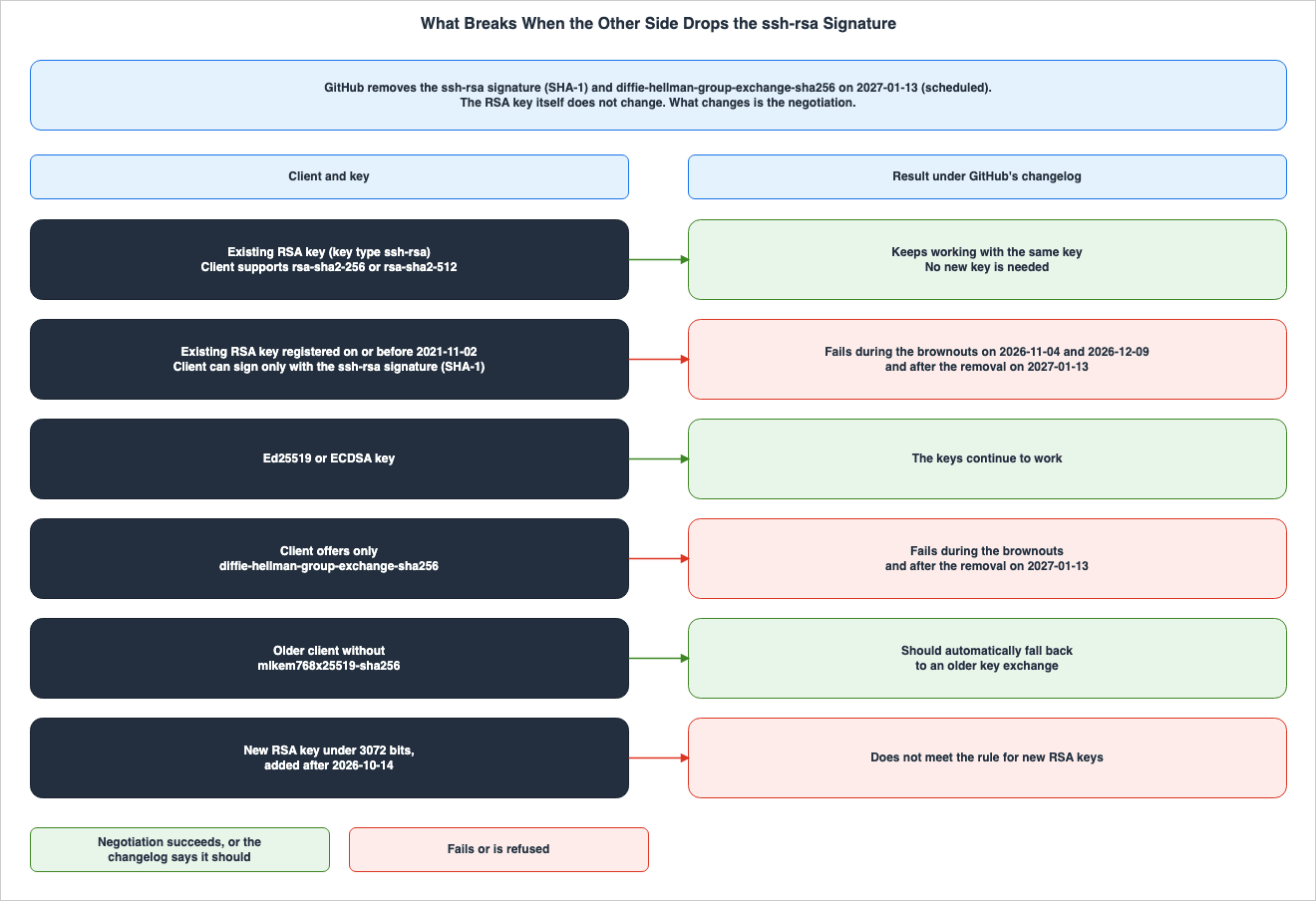
7.3 The Other Side's Changes, Seen from AWS Endpoints
This subsection applies the other side's changes in Sections 7.1 and 7.2 to AWS endpoints. All of it is what can be read by combining the sources; none of it was checked by actually connecting.From EC2 instances to GitHub. On AL2023 updated to 2023.12.20260803 or later, OpenSSH is 9.9 (instances that have not been updated may still have 8.7), which is newer than the minimum version of OpenSSH (7.2p1) mentioned in the changelog. The removal of
ssh-rsa signatures (SHA-1) and diffie-hellman-group-exchange-sha256 does not affect clients that use AL2023's OpenSSH as it is, judging from the changelog's text. Applications using older SSH implementations other than OpenSSH on the instance may be affected. For example, the libssh2 package mentioned in the AL2023 release notes was libssh2-1.10.0-1.amzn2023.0.6 as of 2023.12.20260817, which is older, by version number, than the minimum version of libssh2 (1.11.0) listed in the changelog. Whether this version incorporates any fixes is not stated in the release notes. The AL2023 user guide lists key exchange algorithms for the server (sshd) default configuration, but does not list the algorithms that clients actually present. It can be read from the release notes that, on AL2023 with the DEFAULT crypto policy, mlkem768x25519-sha256 is not enabled for OpenSSH. If that is the case, as stated in the changelog, the client should connect with an older key exchange. The actual list of algorithms presented can be verified using ssh -G as described in Section 7.4.Registering RSA keys created by EC2 on GitHub. The RSA keys created by EC2's
CreateKeyPair function are 2048 bits in size. After October 14, 2026, any new RSA keys registered on GitHub must be 3072 bits or larger. The 2048-bit RSA keys created by EC2 do not meet the conditions outlined in the changelog for keys registered on GitHub after that date.From new OpenSSH clients to Transfer Family servers. The release notes for OpenSSH 10.1 (October 6, 2025) state regarding
ssh(1): "add a warning when the connection negotiates a non-post quantum key agreement algorithm." The release notes add that this warning can be controlled via the WarnWeakCrypto setting, "defaulting to on". The two policies that the security policies page gives as defaults, TransferSecurityPolicy-2024-01 and TransferSecurityPolicy-2018-11, do not include the ML-KEM methods. When an OpenSSH 10.1 or later client connects to a server with one of those policies, it can be read that the negotiation succeeds but this warning appears. To avoid the warning and negotiate using post-quantum key exchange, the server must be configured with a post-quantum policy (such as TransferSecurityPolicy-2025-03 or TransferSecurityPolicy-FIPS-2025-03), and the client must support the ML-KEM method. The warning itself, as noted in the release notes, can be controlled through the client's WarnWeakCrypto setting.From SFTP connectors to servers running OpenSSH 10.0 or later. The release notes for OpenSSH 10.0 (April 9, 2025) state the following about
sshd(8):this release disables finite field (a.k.a modp) Diffie-Hellman key exchange in sshd by default. Specifically,
this removes the "diffie-hellman-group*" and "diffie-hellman-group-exchange-*" methods from the default
KEXAlgorithms list. The client is unchanged and continues to support these methods by default.The default SFTP connector policy,
TransferSFTPConnectorSecurityPolicy-2024-03, includes three finite field Diffie-Hellman methods, as well as curve25519-sha256 and curve25519-sha256@libssh.org. The FIPS policy, TransferSFTPConnectorSecurityPolicy-FIPS-2024-10, includes ecdh-sha2-nistp256, ecdh-sha2-nistp384, and ecdh-sha2-nistp521. The OpenBSD manual page for sshd_config(5) (the development version as of September 17, 2026) lists curve25519-sha256 and ecdh-sha2-nistp256 among the default KexAlgorithms for sshd(8). If the remote server uses OpenSSH's default list, both connector policies will have overlapping key exchange methods. However, the remote server's list can also vary depending on the server's operating system and distribution. On the host key side, if the remote server has only ED25519 host keys (Section 4.2), or only offers host keys with the ssh-rsa signature (SHA-1) (for policies other than 2023-07), there will be no overlap with the connector. The FIPS policy, TransferSFTPConnectorSecurityPolicy-FIPS-2024-10, only supports rsa-sha2-256, rsa-sha2-512, and ecdsa-sha2-nistp256 for host key algorithms. Therefore, if the remote server only supports ECDSA P-384 or P-521 keys, there will also be no overlap.7.4 Checking Before the Dates
On the client side, the following OpenSSH commands let you check the version, the supported lists, the lists actually offered, and the result of the negotiation. The manual page forssh(1) describes the -Q option as "Queries for the algorithms supported by one of the following features" and the -G option as "Causes ssh to print its configuration after evaluating Host and Match blocks and exit." The -Q option indicates the algorithms supported by that particular OpenSSH installation, not the list enabled in the configuration. To verify the actual list used, check the output of the -G option.# Version of the local OpenSSH client
ssh -V
# Algorithms this OpenSSH build supports (not the configured list)
ssh -Q kex
ssh -Q sig
# Algorithm lists the client will actually offer to this host
ssh -G github.com | grep -iE '^(kexalgorithms|hostkeyalgorithms|pubkeyaccepted(algorithms|keytypes)) '
# Negotiated algorithms for one connection
ssh -vT git@github.com 2>&1 | grep -E 'kex: (algorithm|host key algorithm)'The Transfer Family documentation provides an example of the output when connecting with
sftp -v -o KexAlgorithms=mlkem768x25519-sha256 on an OpenSSH 9.9 client. The line debug1: kex: algorithm: mlkem768x25519-sha256 in the output shows the negotiated key exchange algorithm. Similarly, the line debug1: kex: host key algorithm: ssh-ed25519 indicates the negotiated host key algorithm.On the server side, you can verify this information by examining the
kex and client entries in the Transfer Family CloudWatch logs, as well as any KEX_FAILURE logs (see Section 3.5). For AL2023 instances, you can use the update-crypto-policies --show command to view the crypto policy in use.The AWS re:Post Knowledge Center article (Resolve matching key error on EC2 Linux instances) covers two errors that occur when the lists do not overlap: "no matching host key type found" and "no matching key exchange method found." The article first suggests updating client software such as
openssh-clients, and then recommends running ssh -Q key and ssh -Q kex on both the server and the client to check the overlap; as noted above, -Q shows the supported lists, not the configured ones. Subsequently, it provides an example of adding lines to the client's ~/.ssh/config file, such as HostkeyAlgorithms +ssh-ed25519 and KexAlgorithms +diffie-hellman-group16-sha512. The specific algorithms to add should be selected from those offered by the remote server. Even adding algorithms that GitHub will remove, such as the ssh-rsa signature (SHA-1) or diffie-hellman-group-exchange-sha256, will not overlap once GitHub has removed them.8. Where the Sources Disagree, and Where No Explicit Statement Is Found
This section collects the places where the sources this article read say different things about the same point, and the places where no explicit statement is found. In none of them does this article decide which is correct. It sets the sources' sentences side by side.8.1 Where the Sources Disagree
- Default Security Policies for Transfer Family Servers. The security policies page gives
TransferSecurityPolicy-2024-01as the default for the console, API, and CLI, andTransferSecurityPolicy-2018-11for CloudFormation. The page on creating a server in a VPC also givesTransferSecurityPolicy-2024-01. The creation procedure pages for SFTP servers, getting started, and FTPS servers state "Our latest security policy is the default". The FTP server creation procedure page and the document history (February 5, 2024) also state that the latest policy is the default. A Security Blog post from September 24, 2024, states "use our strongest security policy". A Security Blog post from January 3, 2024, stated that the set of ciphers including post-quantum cryptography would become the Transfer Family default for servers created after January 31, 2024 (Section 3.2). - Number of Post-Quantum Policies. The Transfer Family post-quantum page lists two SSH policies that support post-quantum key exchange:
TransferSecurityPolicy-2025-03andTransferSecurityPolicy-FIPS-2025-03. In the JSON for the security policies page,TransferSecurityPolicy-AS2Restricted-2025-07also includes three ML-KEM methods. The page's notes state, "It includes all algorithms from 2025-03, including post-quantum cryptographic algorithms (mlkem* KEXs)." - Regions Where Post-Quantum Key Exchange Is Available. The post-quantum page states that hybrid methods are "available for use on your production workloads in most AWS Regions." A What's New post from May 21, 2025, states that ML-KEM key exchange is "supported in all AWS Regions where AWS Transfer Family is available".
- Policies Starting in 2025. The security policies page states, "Starting in 2025, all new AWS Transfer Family security policies include post-quantum cryptographic support using hybrid key exchange algorithms." However, the JSON for
TransferSecurityPolicy-SshAuditCompliant-2025-02does not include any ML-KEM methods. TransferSecurityPolicy-FIPS-2024-01anddiffie-hellman-group-exchange-sha256. Whilediffie-hellman-group-exchange-sha256is listed in theSshKexssection of the policy's JSON, the corresponding table on the same page leaves theFIPS-2024-01/FIPS-2024-05column empty.- Handling of Older Post-Quantum Policies. A What's New post from May 21, 2025, states that older methods, including Kyber, will be removed from existing policies. An update from September 5, 2025, on a 2023 Security Blog post, regarding endpoints using
TransferSecurityPolicy-PQ-SSH-Experimental-2023-04andTransferSecurityPolicy-PQ-SSH-FIPS-Experimental-2023-04, advises migrating to newer policies, but includes an exception: "unless their corresponding SFTP clients have not been upgraded to use ML-KEM yet and still use Kyber", which can be read as Kyber still being usable. - Origin of Post-Quantum Method Names. The post-quantum page states that the names of the three methods are taken from "the post-quantum hybrid SSH key exchange draft", adding that "might change as the draft evolves towards standardization." RFC 10042, which defines these three names, was published as an Informational document in August 2026. This article does not judge the AWS documentation to be outdated. It only places the documentation's sentence next to the RFC's month.
- Which Host Key Is Active? The page on adding a host key and the FAQ state that the oldest key of each type is the active key. The page on rotating host keys states, "All keys are visible, and can be active, subject to the behavior described previously in How the client chooses a server host key". It adds that a client with only the new key in its
known_hostsuses the new key. - Regions Where FIPS Endpoints Are Available. The page on creating an SFTP-enabled server states that "FIPS-enabled endpoints are only available in North American AWS Regions." The security policies page's note on FIPS policies states that they are "only available in some AWS Regions."
- OpenSSH Version in AL2023. The release notes for 2023.12.20260803 state, "OpenSSH has been rebased to version 9.9." The Security updates and features page in the user guide states, "AL2023 includes OpenSSH 8.7." The preview page for AL2027 states, "AL2027 includes OpenSSH 9.9 (up from 8.7 in AL2023)."
- Client Requirements of AL2023's Default sshd Configuration. The Default SSH server configuration page states, "Clients must support the ssh-ed25519 or the ecdsa-sha2-nistp256 host key algorithm." The SSH server default configuration changes page states, "Clients must support the rsa-sha2-256 and rsa-sha2-512 protocols or ssh-ed25519 with use of an ed25519 key."
KEX_FAILUREin Transfer Family Logs. The page with log examples includes a log entry withactivity-typeset toKEX_FAILURE. However, neither the list ofactivity-typevalues on the page detailing log structure, nor the notes on the log examples page itself, includeKEX_FAILURE.- SSH Public Key Format in IAM. The IAM user guide states, "ssh-rsa format or PEM format." The CodeCommit troubleshooting page, while stating the same requirement, adds, "It accepts public keys in the OpenSSH format only".
- Default Behavior of
ssh-keygen. The CodeCommit setup page states, "By default, ssh-keygen generates a 2048 bit key." The release notes for OpenSSH 8.0 state that the default RSA key length was increased to 3072 bits. The release notes for OpenSSH 9.5 state that the default is now to generate an Ed25519 key (Section 5.2). - Example of Creating an SFTP Connector via VPC. In one example on the creation page, the AWS CLI example specifies
--security-policy-name TransferSecurityPolicy-2024-01(the name of the server policy) for the connector. The API reference forCreateConnectorlists the pattern forSecurityPolicyNameasTransferSFTPConnectorSecurityPolicy-[A-Za-z0-9-]+.
8.2 Where No Explicit Statement Is Found
- ED25519 keys on Transfer Family endpoints with FIPS enabled. While the Transfer Family documentation states that ED25519 is not FIPS compliant, it does not state that endpoints with FIPS enabled will reject ED25519 keys. This article did not find such a sentence in a scan of all 154 pages of the Transfer Family user guide or in two searches of the AWS documentation. For FIPS mode on AL2023 instances, the AL2023 user guide explicitly states that ED25519 user keys cannot be used (Section 6.1).
- The
ssh-rsahost key signature in the two Restricted policies. The documentation indicates thatTransferSecurityPolicy-Restricted-2018-11andTransferSecurityPolicy-Restricted-2020-06are identical to the original policy, excludingchacha20-poly1305@openssh.com. However, the list of five policies that allow thessh-rsahost key signature (SHA-1) does not name them. - Server-side algorithms for CodeCommit. No description of the key exchange and host key algorithms accepted by the CodeCommit server was found.
- ED25519 and ECDSA for IAM SSH public keys. The documentation states "ssh-rsa format or PEM format" and says other formats give an error. It does not name ED25519 or ECDSA.
- ECDSA and 3072-bit RSA key pairs for EC2. The list of key types for importing into EC2 does not include ECDSA, and the list of supported key lengths does not include 3072. The documentation explicitly states that DSA keys and ED25519 keys for Windows instances are not accepted.
- ED25519 keys for SFTP connector authentication. The documentation lists only
ssh-rsaandecdsaas accepted authentication keys, but it does not state that ED25519 is not accepted. The page that the Secrets Manager storage page links to for creating keys states, "AWS Transfer Family accepts RSA-, ECDSA-, and ED25519-formatted keys", but that page is about keys for Transfer Family servers. For host keys, the documentation explicitly excludes ed25519. - List of key exchange algorithms for AL2023 (client-side). The AL2023 user guide lists key exchange algorithms in the context of the server's (sshd) default configuration. It does not give the list that the client (
ssh(1)) offers withDEFAULT.
9. Frequently Asked Questions about SSH Endpoints on AWS
This section sums up the body of this article as eight frequently asked questions. The answers are based on the information provided in each section.Q1. Does a Transfer Family SFTP server use post-quantum key exchange by default?
According to the security policies page, no. The two policies that page gives as defaults (theTransferSecurityPolicy-2024-01 for the console, API, and CLI, and the TransferSecurityPolicy-2018-11 for CloudFormation) do not include the ML-KEM methods. However, many of the creation procedure pages and the document history state that the latest policy is the default. The newer 2025 policies, with the exception of SshAuditCompliant-2025-02, do include the ML-KEM methods. To use post-quantum key exchange, assign TransferSecurityPolicy-2025-03 or TransferSecurityPolicy-FIPS-2025-03 to the server explicitly; the client must also support the ML-KEM methods. In the JSON listing of policies, TransferSecurityPolicy-AS2Restricted-2025-07 also includes the ML-KEM methods; however, the documentation describes this policy as "designed for AS2 file transfers". Because the sources disagree on the default policy, state the policy name explicitly each time you create or update a server.Q2. If GitHub drops the ssh-rsa signature, do RSA keys need to be regenerated?
No. What GitHub removes on January 13, 2027, is the ssh-rsa signature (SHA-1), not RSA keys (key type ssh-rsa). The changelog states, "You do not need to generate a new key, since all RSA keys are capable of signing with all hash algorithms." If your client supports rsa-sha2-256 or rsa-sha2-512 signatures, you can continue to connect using the same key. RSA keys newly registered after October 14, 2026, must be at least 3072 bits.Q3. Which policy does a Transfer Family server created with CloudFormation get?
The security policies page states that servers created with CloudFormation and accepting the default policy will haveTransferSecurityPolicy-2018-11 applied. This policy includes key exchange using SHA-1 (diffie-hellman-group14-sha1) and MAC algorithms (hmac-sha1 and hmac-sha1-etm@openssh.com), and also permits the ssh-rsa host key signature (SHA-1). State the SecurityPolicyName explicitly in the template, and check it after creation with aws transfer describe-server.Q4. Which AWS endpoints accept ED25519 keys?
The documentation lists ED25519 as accepted for EC2 key pairs (for Linux instances only), EC2 Instance Connect, and the user keys and host keys of Transfer Family servers. It explicitly states that ED25519 is not accepted for the host keys used by the SFTP connector, EC2 key pairs for Windows instances, or user keys when using AL2023 in FIPS mode. The documentation for IAM SSH public keys (CodeCommit) and the authentication keys for the SFTP connector does not list ED25519. The Transfer Family documentation states that ED25519 is not FIPS compliant. The AL2023 user guide indicates that ED25519 cannot be used for user keys when operating in FIPS mode, and that instances launched with an ED25519 key pair may become inaccessible after FIPS mode is enabled unless you switch to keys such as RSA before enabling it.Q5. What does it take to use ML-KEM key exchange on AL2023?
On an AL2023.12 or later instance, use OpenSSH 9.9 (from the 2023.12.20260803 release) and apply the PQ subpolicy withsudo update-crypto-policies --set DEFAULT:PQ. The release notes state, "crypto-policies enables mlkem768x25519-sha256 for OpenSSH in the PQ sub-policy." The key exchange list on the Default SSH server configuration page for AL2023's sshd has no ML-KEM methods. The other side must also support the ML-KEM methods.Q6. With SSH through Session Manager, where are the algorithms decided?
What can be read from the documentation is that the algorithms are decided between the SSH client on your local machine and the sshd process on the instance. The Session Manager user guide states, "Session Manager only serves as a tunnel for SSH connections." The documentation describes EC2 Instance Connect Endpoint as "an identity-aware TCP proxy". On the instance side, the AL2023 default configuration and crypto policies determine the algorithm list.Q7. What should you do when an SFTP connector reports Server offered: [ssh-rsa]?
The troubleshooting page says to make the remote server support one of the algorithms in the error's Client offered list. Among connector policies, only TransferSFTPConnectorSecurityPolicy-2023-07 allows the ssh-rsa host key signature (SHA-1). This policy also has a key exchange and MACs that use SHA-1. The troubleshooting page does not recommend this option.Q8. Can an RSA key pair created by EC2 also be registered with GitHub?
Not as a key newly registered after October 14, 2026; it does not meet the changelog's requirement. The RSA keys generated by EC2'sCreateKeyPair function are 2048 bits, while GitHub requires RSA keys registered after that date to be 3072 bits or greater. GitHub also recommends using Ed25519 for new keys.10. Summary
The SSH endpoints on AWS document what they accept in different places. For Transfer Family SFTP servers, it is the security policies and the host key section; for SFTP connectors, the connector policies; for EC2 and EC2 Instance Connect, the key pair requirements; for IAM, the SSH public key format; and for AL2023, the sshd default configuration and the crypto policies. For every endpoint, whether a connection succeeds depends on the overlap with the other side's lists.What is default depends on whose default it is. According to the security policies page, the default policy for Transfer Family servers is
TransferSecurityPolicy-2024-01 when using the console, API, or CLI, and TransferSecurityPolicy-2018-11 when using CloudFormation. Neither policy includes the ML-KEM methods. Many of the creation procedure pages and the document history state that the latest policy is the default. The sources disagree on the default policy, and the security policies page recommends stating the policy name explicitly. The default for SFTP connectors is TransferSFTPConnectorSecurityPolicy-2024-03, and none of the connector policies includes the ML-KEM methods. The AL2023 release notes give OpenSSH 9.9 from 2023.12.20260803, and say that crypto-policies enables ML-KEM key exchange for OpenSSH in the PQ subpolicy.Even when the other side drops the
ssh-rsa signature (SHA-1) and diffie-hellman-group-exchange-sha256, what breaks is not the key but the negotiation. Clients that support rsa-sha2-256 or rsa-sha2-512 signatures can still connect using the same RSA key. Problems arise with older clients that only support ssh-rsa signatures (SHA-1), clients that only offer diffie-hellman-group-exchange-sha256 for key exchange, and newly registered short RSA keys. On the AWS endpoints, it's important to verify, alongside the other side's changes, that EC2 creates RSA keys that are 2048 bits long, that SFTP connectors do not accept ED25519 host keys, that connecting with OpenSSH 10.1 or later to a server with a policy the security policies page gives as a default can be read to show a warning about non-post-quantum key exchange, and that ED25519 user keys cannot be used in AL2023's FIPS mode.When you check your own endpoints, apply the three questions in Section 1.1: which sentence in the source states what is accepted, within what scope, and what breaks it. Then confirm the actual lists and the result of the negotiation with
ssh -G and ssh -v on the client side and with the kex field in the logs on the Transfer Family side. The information presented in this article is based on documentation current as of October 4, 2026.11. References
- Security policies for AWS Transfer Family servers - AWS Transfer Family User Guide
- Using hybrid post-quantum key exchange with AWS Transfer Family - AWS Transfer Family User Guide
- Security policies for AWS Transfer Family SFTP connectors - AWS Transfer Family User Guide
- Managing SSH and PGP keys in Transfer Family - AWS Transfer Family User Guide
- Manage host keys for your SFTP-enabled server - AWS Transfer Family User Guide
- Add an additional server host key - AWS Transfer Family User Guide
- Create an SFTP-enabled server - AWS Transfer Family User Guide
- Create a server in a virtual private cloud - AWS Transfer Family User Guide
- Getting started with AWS Transfer Family server endpoints - AWS Transfer Family User Guide
- Create an FTPS-enabled server - AWS Transfer Family User Guide
- Create an FTP-enabled server - AWS Transfer Family User Guide
- Document history for AWS Transfer Family - AWS Transfer Family User Guide
- Rotate the server host keys - AWS Transfer Family User Guide
- Creating SSH keys on macOS, Linux, or Unix - AWS Transfer Family User Guide
- Using AWS Lambda to integrate your identity provider - AWS Transfer Family User Guide
- Edit server details - AWS Transfer Family User Guide
- Troubleshoot SFTP connector issues - AWS Transfer Family User Guide
- Store authentication credentials for SFTP connectors in Secrets Manager - AWS Transfer Family User Guide
- Create an SFTP connector with VPC-based egress - AWS Transfer Family User Guide
- Example CloudWatch log entries - AWS Transfer Family User Guide
- CloudWatch log structure for Transfer Family - AWS Transfer Family User Guide
- CreateServer - AWS Transfer Family API Reference
- ImportHostKey - AWS Transfer Family API Reference
- ImportSshPublicKey - AWS Transfer Family API Reference
- DescribedSecurityPolicy - AWS Transfer Family API Reference
- SftpConnectorConfig - AWS Transfer Family API Reference
- CreateConnector - AWS Transfer Family API Reference
- describe-server - AWS CLI Command Reference
- create-server - AWS CLI Command Reference
- describe-security-policy - AWS CLI Command Reference
- AWS::Transfer::Server - AWS CloudFormation
- AWS Transfer Family FAQs
- AWS Transfer Family announces quantum-safe key exchange for SFTP - What's New with AWS
- AWS Transfer Family announces ML-KEM quantum-resistant key exchange for SFTP - What's New with AWS
- AWS Transfer Family now supports source IP preservation for SFTP servers behind a Network Load Balancer (NLB) - What's New with AWS
- Post-quantum hybrid SFTP file transfers using AWS Transfer Family - AWS Security Blog
- How Transfer Family can help you build a secure, compliant managed file transfer solution - AWS Security Blog
- Six tips to improve the security of your AWS Transfer Family server - AWS Security Blog
- Amazon EC2 key pairs and Amazon EC2 instances - Amazon EC2 User Guide
- Create a key pair for your Amazon EC2 instance - Amazon EC2 User Guide
- Connect to a Linux instance using EC2 Instance Connect - Amazon EC2 User Guide
- Connect to your instances using a private IP address and EC2 Instance Connect Endpoint - Amazon EC2 User Guide
- CreateKeyPair - Amazon EC2 API Reference
- ImportKeyPair - Amazon EC2 API Reference
- SendSSHPublicKey - Amazon EC2 Instance Connect API Reference
- IAM credentials for CodeCommit: Git credentials, SSH keys, and AWS access keys - AWS Identity and Access Management User Guide
- UploadSSHPublicKey - AWS Identity and Access Management API Reference
- Troubleshooting SSH connections to AWS CodeCommit - AWS CodeCommit User Guide
- Setup steps for SSH connections to AWS CodeCommit repositories on Linux, macOS, or Unix - AWS CodeCommit User Guide
- AWS CodeCommit User Guide document history - AWS CodeCommit User Guide
- Default SSH server configuration - Amazon Linux 2023 User Guide
- SSH server default configuration changes - Amazon Linux 2023 User Guide
- Enable FIPS Mode on AL2023 - Amazon Linux 2023 User Guide
- Enable Post-Quantum Cryptography (PQC) on AL2023 - Amazon Linux 2023 User Guide
- Security updates and features - Amazon Linux 2023 User Guide
- Amazon Linux 2023 version 2023.12.20260803 release notes - Amazon Linux 2023 Release Notes
- Amazon Linux 2023 version 2023.12.20260608 release notes - Amazon Linux 2023 Release Notes
- Amazon Linux 2023 version 2023.12.20260817 release notes - Amazon Linux 2023 Release Notes
- Amazon Linux 2 FAQs
- Default SSH server configuration - Amazon Linux 2027 User Guide
- Post-Quantum Cryptography (PQC) on AL2027 - Amazon Linux 2027 User Guide
- Enable FIPS Mode on AL2027 - Amazon Linux 2027 User Guide
- Start a session - AWS Systems Manager User Guide
- Step 8: (Optional) Allow and control permissions for SSH connections through Session Manager - AWS Systems Manager User Guide
- Resolve matching key error on EC2 Linux instances - AWS re:Post
- Security improvements for SSH - GitHub Changelog
- Removed unencrypted Git protocol and certain SSH keys - GitHub Changelog
- OpenSSH 8.0 release notes
- OpenSSH 9.5 release notes
- OpenSSH 10.0 release notes
- OpenSSH 10.1 release notes
- ssh(1) - OpenBSD manual pages
- sshd_config(5) - OpenBSD manual pages
- RFC 4253: The Secure Shell (SSH) Transport Layer Protocol
- RFC 8332: Use of RSA Keys with SHA-256 and SHA-512 in the Secure Shell (SSH) Protocol
- RFC 10042: Post-Quantum/Traditional Hybrid Key Exchange with the Module-Lattice-Based Key-Encapsulation Mechanism for Use in SSH
References:
Tech Blog with curated related content
Written by Hidekazu Konishi