Sakura Cloud for AWS Users - Service Mapping, Terminology, and Design Differences
First Published:
Last Updated:
This is the second article in a series introducing Sakura Cloud to engineers outside Japan. The first article, "Sakura Cloud Overview for Global Engineers," is the hub that describes the company, the zones, and the service portfolio; this article assumes you know AWS and want the mapping. If you are evaluating Sakura Cloud because you have a data-residency requirement in Japan, want a Japanese data-center footprint, or are looking for a cloud to run alongside AWS, a mapping is the shortest path in.
A note on how to use this guide. A service mapping is a translation aid, not a claim that two services are identical. Some AWS services have a clean one-to-one Sakura Cloud analog; others map to a combination of Sakura Cloud building blocks, or to a service with a deliberately narrower scope, or to nothing at all. The value is in the notes column: it tells you where a familiar AWS concept lands, and where your mental model needs adjusting. This article is a mapping and terminology guide, not a comparison of price or performance — it quotes no pricing and ranks nothing. Hands-on implementation of individual services (object storage, DNS, IAM, the AI inference API) is deferred to later articles in the series.
Fact-check date. Service names, availability status, and dates in this article were verified against official Sakura Cloud documentation (manual.sakura.ad.jp, cloud.sakura.ad.jp, and SAKURA internet news releases) and, on the AWS side, against official AWS documentation, as of 2026-07-18. Sakura Cloud has renamed and promoted several services recently — for example, the VPC Router became the VPN Router in September 2025 — so this guide uses current official names and notes the former name where it helps an AWS reader. This series is an independent publication by the author, not affiliated with or reviewed by SAKURA internet Inc. (or AWS); the official documentation on both sides remains the authoritative source. Cloud services change; treat the mapping as a snapshot and confirm the current state in the official documentation linked throughout.
1. Who This Guide Is For
This guide is written for the engineer or architect who is fluent in AWS and is meeting Sakura Cloud for the first time. You do not need any prior Japanese-cloud knowledge; you do need to know what a VPC, a subnet, a security group, an AMI, and an S3 bucket are, because those are the anchors the mapping hangs on.Three situations bring AWS users to Sakura Cloud, and all three are served by a mapping:
- Data residency in Japan. You have a requirement that certain data stay on infrastructure located in Japan, and you want to know which Sakura Cloud service plays the role that a given AWS service plays in your current design.
- A Japanese footprint for a Japanese business. You are expanding into Japan and want a local cloud option whose console, billing, and support operate in the local market, without rebuilding your mental model from scratch.
- A complement to AWS. You are not replacing AWS; you are adding a second provider for a specific workload, and you need to understand the seams — where the two clouds line up and where they do not.
Throughout, the framing is complement, not replacement. Sakura Cloud is treated as an option you can add to an architecture, and the AWS services you already run are treated as the reference points, not as something being displaced. Where a Sakura Cloud service has no direct AWS-style equivalent, this guide says so plainly and suggests a constructive design response rather than treating the gap as a verdict.
One practical reality worth stating up front: most of Sakura Cloud's authoritative documentation is in Japanese. A dedicated English manual existed until October 2023 but has since been retired, so the official English surface today is mainly the company's English news releases. That is precisely the gap this series is written to fill — an English-language, AWS-anchored guide to a cloud whose primary documentation is Japanese. Every fact below links to its Japanese-language official source so you can verify it directly.
2. How to Read This Mapping
Before the per-category detail, it helps to see the whole correspondence on one page and to internalize the single biggest conceptual difference.The most important adjustment for an AWS user is in networking, so it is worth stating early. AWS asks you to define a logical boundary first — a VPC with a CIDR block — and then to place subnets, route tables, gateways, and security groups inside it. Sakura Cloud builds the other way around: you start from a Layer 2 Switch (スイッチ), optionally give that switch a router function for global connectivity, and add a VPN Router (VPNルータ) appliance when you need NAT, a firewall, DHCP, or VPN. There is no single object called a "VPC" that owns everything else. Section 4 develops this contrast in full; keep it in mind as you read the table, because it is why several networking rows say "no clean one-to-one."
A second reading note is about names. Sakura Cloud publishes an official English name for only a few things (the company "SAKURA internet Inc.," the brand — commonly styled "SAKURA Cloud" in English releases, though the styling varies — and "KMS," which appears with an English label). For every other service this guide uses a plain-English descriptor and shows the official Japanese name in parentheses on first mention — for example, the Enhanced Load Balancer (エンハンスドロードバランサ). These are descriptive renderings for readability, not invented brand names.
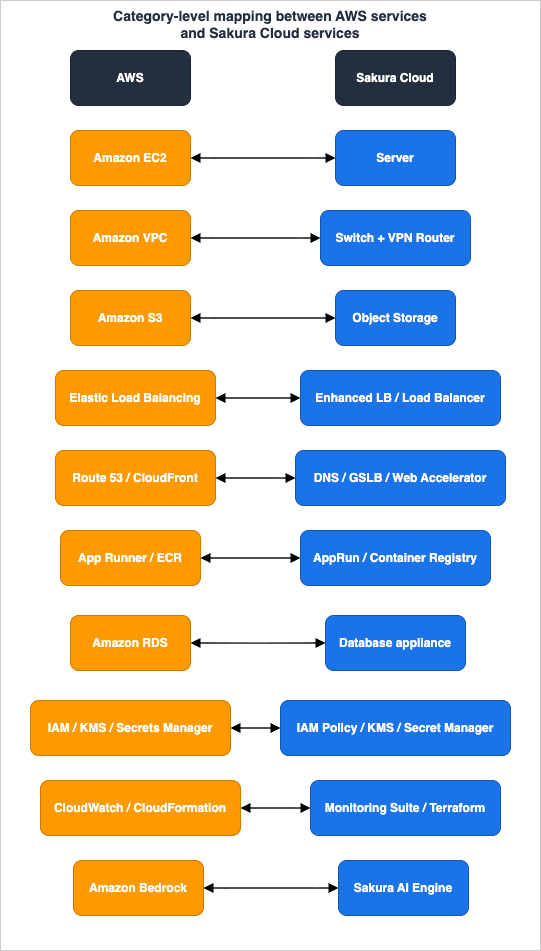
* You can sort the table by clicking on the column name.
| AWS service | Sakura Cloud service | Correspondence notes |
|---|---|---|
| Amazon EC2 | Server (サーバ) | Both are virtual servers / IaaS compute. Close one-to-one. |
| Amazon Machine Image (AMI) | Archive (アーカイブ) | Disk image used as a template for creating servers. Public/private variants on both sides. |
| Amazon EBS | Disk (ディスク) | Block storage attached to a server (SSD / standard plans). |
| Amazon VPC + subnets + route tables | Switch (スイッチ) + router function + VPN Router (VPNルータ) | No clean one-to-one. Switch-first model vs. VPC-first model — see Section 4. |
| Security Group / Network ACL | VPN Router firewall / server-side firewall | Different placement of the packet-filtering function. |
| Amazon S3 | Object Storage (オブジェクトストレージ) | Officially adopts the Amazon S3 protocol; compatibility scope is bounded (see Section 5). |
| Amazon EFS / Amazon FSx | NFS Appliance (NFSアプライアンス) | Managed NFS (v3/v4) file storage on a local switch segment. |
| Elastic Load Balancing (ALB, Layer 7) | Enhanced Load Balancer (エンハンスドロードバランサ) | HTTP/HTTPS Layer 7 proxy on the global network; works across zones. |
| Elastic Load Balancing (NLB, Layer 4) | Load Balancer (ロードバランサ, DSR) | Direct Server Return, TCP, single zone. A separate service from the Enhanced LB. |
| Amazon Route 53 (authoritative DNS) | DNS appliance (DNS) | Authoritative/content DNS with zones and records. No zone transfer. |
| Amazon Route 53 (health checks / failover) | GSLB (広域負荷分散) | DNS-based health checking and failover across sites. |
| Amazon CloudFront | Web Accelerator (さくらのウェブアクセラレータ) | CDN. Renamed in November 2025; usable in front of non-Sakura origins too. |
| AWS App Runner / ECS on Fargate | AppRun | Managed container runtime (shared / dedicated plans). Generally available since December 2025. |
| Amazon ECR | Container Registry (コンテナレジストリ) | Managed registry for container images. |
| Amazon RDS | Database appliance (データベース) | Managed relational DB. Engines: PostgreSQL and MariaDB (no MySQL engine). |
| AWS IAM | IAM Policy (IAMポリシー) + API keys | Permissions on users, groups, and service principals. Introduced 2025. |
| AWS Organizations | Organization / Folder hierarchy (組織・フォルダ) | Hierarchical, inherited policy. Org/Folder IAM policy began July 2026. |
| AWS KMS | KMS (Key Management Service) | Key lifecycle management with FIPS 140-3 HSM. GA September 2025. |
| AWS Secrets Manager | Secret Manager (シークレットマネージャ) | Secret storage / rotation. Built on KMS. GA September 2025. |
| Amazon CloudWatch | Simple Monitoring (シンプル監視) + Monitoring Suite (モニタリングスイート) | External/synthetic monitoring plus a logs/metrics/traces observability platform. |
| AWS CloudFormation / AWS CDK | No native equivalent → Terraform provider + usacloud | No first-party declarative stack service; Terraform and the CLI fill the IaC role. |
| AWS CLI / SDK | usacloud / Sakura Cloud REST API | Official CLI and REST API for automation. |
| Amazon Bedrock | Sakura AI Engine (さくらのAI Engine) | Inference API with OpenAI-compatible and Anthropic-compatible endpoints. Overview only here. |
The sections that follow take each category in turn. Every detail table repeats the relevant rows and adds a direct link to the official documentation on both sides so you can confirm the current behavior yourself.
3. Compute and Images
Compute is the cleanest part of the mapping, because both clouds offer straightforward IaaS virtual machines. In AWS you launch an Amazon EC2 instance from an Amazon Machine Image (AMI), attach one or more Amazon EBS volumes, and optionally run initialization through user data. Sakura Cloud has a direct counterpart for each of those pieces.The core object is the Server (サーバ). Creating a server provisions a virtualized machine, attaches a disk, copies an operating system image onto it, and connects it to a network segment — the same shape as launching an EC2 instance. The disk that a server boots from is a Disk (ディスク), which is block storage in the EBS sense, offered in an SSD plan and a standard (capacity-oriented) plan.
The AMI concept maps to the Archive (アーカイブ). Sakura's official documentation positions the archive as the disk-image template used when creating a server — exactly the role an AMI plays. As with AMIs, there are two flavors: a Public Archive (パブリックアーカイブ), which is a SAKURA-provided image with an OS preinstalled (Ubuntu, Rocky Linux, AlmaLinux, and others), analogous to an AWS-provided public AMI; and a "my archive" you create yourself, analogous to a private AMI. Where EC2 uses user data or cloud-init for first-boot configuration, Sakura Cloud provides the Startup Script (スタートアップスクリプト), which runs a selected script when the server first boots. There is also an ISO Image (ISOイメージ) facility for installing from an OS installation medium, which has no everyday AWS equivalent because AWS abstracts that step away entirely.
* You can sort the table by clicking on the column name.
| AWS | Sakura Cloud | Notes | Official docs |
|---|---|---|---|
| Amazon EC2 instance | Server (サーバ) | Virtual server / IaaS compute. Close one-to-one. | EC2 / Server |
| Amazon Machine Image (AMI) | Archive (アーカイブ) | Disk-image template for creating servers. | AMIs / Archive |
| AWS-provided public AMI | Public Archive (パブリックアーカイブ) | Vendor-supplied preinstalled OS images. | Public Archive/ISO |
| EC2 user data / cloud-init | Startup Script (スタートアップスクリプト) | First-boot configuration script. | Startup Script |
| Amazon EBS volume | Disk (ディスク) | Block storage attached to a server (SSD / standard). | EBS / Disk |
The one adjustment for an AWS user is that instance-type families, sizing, and the exact catalog of images change over time and are chosen in the console; treat the catalog as something to confirm live rather than memorize. Conceptually, though, "launch a server from an image, attach a disk, run a startup script" transfers directly from EC2 to Sakura Cloud.
4. Networking
Networking is where the mental models diverge the most, and understanding the difference is the single most valuable thing an AWS user can take from this guide. It is worth slowing down here.In AWS, the network is boundary-first. You create an Amazon VPC with a CIDR block; that VPC is a logical container. Inside it you place subnets (each in an Availability Zone), attach an internet gateway or NAT, write route tables that decide where traffic goes, and enforce isolation with security groups on the instances and network ACLs on the subnets. In this model a subnet is above all a routing scope — its route-table association decides where traffic can go — while fine-grained traffic isolation is the job of security groups. Everything hangs off the VPC object.
Sakura Cloud is switch-first. The primitive is the Switch (スイッチ), a virtual Layer 2 switch that gives servers private-IP local connectivity — think of it as a network segment you can attach servers to. If that segment needs to reach the internet, you do not create a separate gateway object; you give the switch a router function (the "router + switch" unit), which assigns global IP addresses. When you need the services a VPC gives you almost for free — NAT, a firewall, DHCP, DNS forwarding, and VPN — you add a VPN Router (VPNルータ) appliance to the segment.
That VPN Router is worth a moment, because it carries a lot of the "VPC" weight and because its name recently changed. Until 2025-09-18 it was called the VPC Router; SAKURA internet renamed it to VPN Router with, in their words, no change to the specification. Its official feature list includes IP masquerade (forward NAT), port forwarding (reverse NAT), a firewall on every plan, a DHCP server, DNS forwarding, site-to-site IPsec VPN, and remote-access VPN (L2TP/IPsec, PPTP, and WireGuard). In AWS terms, a single VPN Router appliance bundles roles that AWS spreads across the internet gateway, NAT gateway, parts of the security group, the DHCP options set, the Route 53 Resolver, and the VPN gateway.
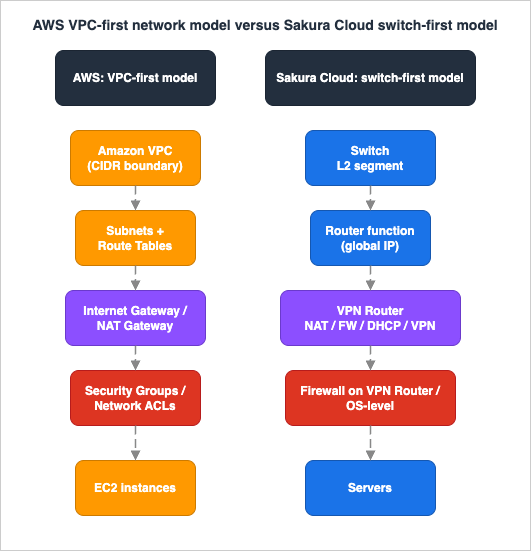
- There is no single "VPC" object. What AWS expresses as one VPC with subnets and gateways, Sakura Cloud expresses as one or more switches plus, where needed, a VPN Router. The composition is more explicit and more appliance-shaped.
- Packet filtering lives in a different place. AWS attaches a stateful security group to each instance and a stateless NACL to each subnet. Sakura Cloud's firewall function lives on the VPN Router (for traffic crossing the internet boundary) and, as on any server, in the guest OS. If your AWS design leans heavily on per-instance security groups, plan where that logic goes on Sakura Cloud.
- Cross-segment connectivity is its own set of appliances. To join switches across zones or regions at Layer 2, Sakura Cloud has Bridge (ブリッジ接続); to connect segments across accounts/projects at Layer 3, it has the Local Router (ローカルルータ). These loosely occupy the space that VPC peering and cross-account connectivity occupy in AWS, though the analogy is rough — they are L2/L3 appliance connections, not a managed peering relationship.
None of this makes one model better; they are different starting points that converge on the same outcomes. But if you port an AWS design over mechanically — "where is my VPC, where are my subnets, where is my security group" — you will fight the platform. Start instead from "which servers share a switch, does that switch need global reach, and what does the VPN Router need to do." For the AWS side of this reasoning — when you actually need routed connectivity versus service exposure — the AWS VPC Connectivity Decision Guide is a useful companion.
* You can sort the table by clicking on the column name.
| AWS | Sakura Cloud | Notes | Official docs |
|---|---|---|---|
| Amazon VPC (logical boundary) | Switch (スイッチ) + router function | Switch-first vs. VPC-first; no single "VPC" object. | Amazon VPC / Switch |
| Internet gateway / NAT gateway / VPN gateway | VPN Router (VPNルータ) | One appliance bundles NAT, firewall, DHCP, DNS forwarding, and VPN. Formerly "VPC Router" (renamed 2025-09-18). | VPC gateways / VPN Router |
| Security Group / Network ACL | VPN Router firewall / OS-level firewall | Packet filtering sits on the appliance and the guest, not per-ENI/per-subnet. | Security groups / VPN Router |
| VPC Peering (cross-VPC L3, approx.) | Local Router (ローカルルータ) | L3 connection across accounts/projects. Rough analogy. | VPC Peering / Local Router |
| Cross-AZ/Region L2 (no direct AWS analog) | Bridge (ブリッジ接続) | L2 connection of switches across zones/regions. | Bridge |
Zones and regions themselves — how Sakura Cloud's Ishikari and Tokyo zones relate to the AWS Region/Availability Zone model — are their own topic, covered in the Sakura Cloud overview and in the Ishikari Data Center article in this series rather than repeated here.
5. Storage
Object storage is the row AWS users care about most, because it is where a lot of portability lives. Sakura Cloud's Object Storage (オブジェクトストレージ) is the counterpart to Amazon S3, and the correspondence is real but bounded — the boundaries are what matter.The official documentation states that Object Storage "adopts the Amazon S3 protocol" for file operations, and that once a site is initialized you get "an endpoint that can be connected to with the Amazon S3-compatible protocol." That is the good news: existing S3 tooling and SDKs can, in general, talk to it. There are two important qualifications, both from the official docs:
- Two APIs, split by responsibility. Sakura Cloud exposes its own JSON control API (for operations like creating and deleting buckets — the control-panel-equivalent actions) and a separate Amazon S3-compatible API. The S3-compatible API operates on already-created buckets and their objects; bucket creation and deletion are done through Sakura's own API, not the S3 API. So a lift-and-shift of an application that creates buckets via the S3 API needs adjustment.
- Compatibility is bounded and stated as such. The official FAQ is explicit: SAKURA has verified compatibility for basic operations such as bucket handling, but "does not guarantee the behavior of all Amazon S3 APIs," and operations performed with third-party tools are "outside the scope of support." The API documentation does state Signature Version 4 support (configured as
s3v4in S3 clients), so the caveat is about API scope rather than signatures — treat the compatible surface as "core object operations over SigV4, verified" rather than "the entire S3 API."
The pragmatic reading for an AWS architect: Object Storage is a genuine S3-compatible object store suitable for storing and serving objects and for backend integration, and it is a strong fit when the requirement is Japan-resident object storage reachable with familiar S3 semantics — but validate your specific SDK and API calls against it rather than assuming full parity. The hands-on details of connecting the AWS CLI and SDKs, and the exact compatible operation set, are the subject of a dedicated implementation article later in this series.
Two more storage rows round out the picture. Disk (ディスク) is the block-storage counterpart to Amazon EBS (covered in Section 3). For shared file storage, the NFS Appliance (NFSアプライアンス) is a managed NFS (v3/v4) file server placed on a switch segment — the closest analog to Amazon EFS or certain Amazon FSx file systems, with the difference that it is an appliance you attach to a local segment rather than a Region-wide managed file system.
* You can sort the table by clicking on the column name.
| AWS | Sakura Cloud | Notes | Official docs |
|---|---|---|---|
| Amazon S3 | Object Storage (オブジェクトストレージ) | Adopts the S3 protocol; compatibility bounded; bucket create/delete via Sakura's own API. | Amazon S3 / Object Storage |
| S3 API compatibility scope | S3-compatible API (FAQ caveats) | "Does not guarantee the behavior of all Amazon S3 APIs"; third-party tools out of support scope. | Object Storage FAQ |
| Amazon EFS / Amazon FSx | NFS Appliance (NFSアプライアンス) | Managed NFS v3/v4 file server on a switch segment. | Amazon EFS / NFS Appliance |
6. Load Balancing, DNS, and CDN
The edge and traffic-management layer maps well, with one nuance worth flagging: where AWS has a single Elastic Load Balancing family with several types, Sakura Cloud has two distinct load-balancing services, and choosing between them is like choosing between an Application Load Balancer and a Network Load Balancer.The Enhanced Load Balancer (エンハンスドロードバランサ) is the Layer 7 option: an HTTP/HTTPS proxy that lives on Sakura Cloud's global network and can operate across zones. It is the closest match to an Application Load Balancer. The separate Load Balancer (ロードバランサ) is a Direct Server Return (DSR) appliance operating at Layer 4 over TCP within a single zone — closer in spirit to a Network Load Balancer. If you reach for "an ALB" on AWS, reach for the Enhanced Load Balancer here; if you reach for "an NLB," the DSR Load Balancer is the nearer analog.
DNS splits into two services that together cover what Amazon Route 53 does. The DNS appliance (DNS) is authoritative/content DNS: you manage zones and records through the console or API, much as you manage a Route 53 hosted zone (note that zone transfer is not supported). The health-checking and failover behavior that Route 53 provides through health checks and failover routing is instead delivered by GSLB (広域負荷分散), which performs DNS-based health checking and returns healthy addresses — and, usefully, can front not only Sakura Cloud resources but also other SAKURA services. For the AWS side of this design space — routing policies, health checks, and the failover pitfalls that come with them — see the Amazon Route 53 DNS Architecture Guide.
Finally, the CDN. Sakura Cloud's Web Accelerator (さくらのウェブアクセラレータ) — renamed with the "Sakura no" prefix in November 2025, with no change to functionality — is the counterpart to Amazon CloudFront. Like CloudFront, it caches and accelerates content at the edge, and it can sit in front of origins that are not on Sakura Cloud. One structural quirk worth knowing: its marketing and service site lives on a separate domain (cdn.sakura.ad.jp), even though its manual sits within the Sakura Cloud documentation and it is billed through a Sakura Cloud project. For how the AWS side structures origins and caching, the Amazon CloudFront Origin Architecture Guide is the reference.
* You can sort the table by clicking on the column name.
| AWS | Sakura Cloud | Notes | Official docs |
|---|---|---|---|
| Elastic Load Balancing — ALB (L7) | Enhanced Load Balancer (エンハンスドロードバランサ) | HTTP/HTTPS Layer 7 proxy on the global network; cross-zone. | ALB / Enhanced LB |
| Elastic Load Balancing — NLB (L4) | Load Balancer (ロードバランサ, DSR) | DSR, TCP, single zone. Separate service from the Enhanced LB. | NLB / Load Balancer |
| Amazon Route 53 (hosted zones) | DNS appliance (DNS) | Authoritative DNS; zones and records; no zone transfer. | Route 53 / DNS |
| Route 53 health checks / failover | GSLB (広域負荷分散) | DNS-based health checking and failover across sites. | Route 53 failover / GSLB |
| Amazon CloudFront | Web Accelerator (さくらのウェブアクセラレータ) | CDN; renamed Nov 2025; can front non-Sakura origins. | CloudFront / Web Accelerator |
7. Containers and Managed Databases
The managed-platform layer is younger on Sakura Cloud than on AWS, and this is where "verify the current status" matters most, because several of these services reached general availability only recently.For running containers, the counterpart is AppRun. It takes a container image and deploys, scales, and operates the application for you — the same value proposition as AWS App Runner (which is itself built on Fargate). AppRun became a formal, generally available service on 2025-12-09, and it comes in two plans: a shared plan (resources shared across users, scaling on request volume, aimed at development and validation) and a dedicated plan (running on a dedicated virtual server, scaling on CPU utilization, aimed at workloads that need more stable isolation). The important framing for an AWS user: AppRun is a managed container runtime, like App Runner or ECS-on-Fargate — it is not a Kubernetes cluster manager, so it is not an EKS analog. For the AWS pattern it most resembles, the Amazon ECS and Fargate Microservices Architecture Guide is the closest reference. Images for AppRun (or anything else) live in the Container Registry (コンテナレジストリ), the counterpart to Amazon ECR, which is likewise now a formal service.
For managed relational databases, the counterpart to Amazon RDS is the Database appliance (データベース). The most important detail for an AWS user is the engine list: Sakura Cloud's managed database offers PostgreSQL and MariaDB. There is no separate MySQL engine — MariaDB, which is MySQL-compatible and speaks the MySQL wire protocol, fills that role, so your MySQL clients connect, but you are choosing MariaDB. A clustering feature (Galera-based, MariaDB) was added at the end of 2025 for higher availability. If your RDS design depends on Aurora, Oracle, or SQL Server engines, there is no matching managed engine here; that is a real gap to plan around. For the AWS side of managed-database high availability, see the Amazon RDS and Aurora High Availability Guide.
A status caveat, stated honestly. Sakura Cloud also has a newer distributed database — the On-demand Database (オンデマンドデータベース, formerly the Enhanced Database, offering TiDB) — but as of this writing it is a "Customer Release" (CR) offering without an SLA, i.e., not yet generally available. Because this guide sticks to GA services, the RDS row maps to the GA Database appliance and treats the On-demand Database as one to watch rather than to design on today.
* You can sort the table by clicking on the column name.
| AWS | Sakura Cloud | Notes | Official docs |
|---|---|---|---|
| AWS App Runner / ECS on Fargate | AppRun (shared / dedicated) | Managed container runtime, not a Kubernetes cluster. GA 2025-12-09. | App Runner / AppRun |
| Amazon ECR | Container Registry (コンテナレジストリ) | Managed container image registry. | ECR / Container Registry |
| Amazon RDS (MySQL/PostgreSQL/MariaDB) | Database appliance (データベース) | Engines: PostgreSQL and MariaDB. No MySQL engine; no Aurora/Oracle/SQL Server. | Amazon RDS / Database |
8. Identity, Keys, and Secrets
Identity and cryptographic services are the newest part of Sakura Cloud's portfolio, and the mapping to AWS is close in intent even though the pieces arrived in a different order and are still settling.Access control is expressed through the IAM Policy (IAMポリシー) function, introduced in August 2025 as a replacement for the older per-project permission UI. As in AWS IAM, a policy states what a principal — a user, a group, or a service principal — can do and to which resources, and permissions attach to users and to API keys. On top of that, Sakura Cloud has an Organization / Folder (組織・フォルダ) hierarchy: a member account has one Organization at the root, Organizations contain Folders (for classification, up to five levels deep), and Folders contain Projects (the minimal management unit that holds real resources). The Organization / Folder IAM Policy feature — which lets you grant a policy at the organization or folder level and have it inherit down the hierarchy — began on 2026-07-09.
The useful way for an AWS user to hold this: Sakura Cloud's Organization/Folder/Project hierarchy plays the role that AWS Organizations plays (a management account, organizational units, and accounts), while the IAM Policy function plays the role of AWS IAM (principals, policies, inherited permissions). They are two features on Sakura Cloud that together cover what AWS splits between Organizations and IAM. If you want to sharpen your AWS-side model of how policies actually evaluate, the IAM Policy Evaluation Logic, Step by Step and the AWS IAM Glossary are good companions — useful for knowing which AWS concepts do and do not carry over.
Cryptography maps cleanly. KMS (Key Management Service) — one of the few Sakura Cloud services with an official English label — manages the key lifecycle backed by a FIPS 140-3 HSM, the counterpart to AWS KMS; it moved from beta to general availability on 2025-09-17. The Secret Manager (シークレットマネージャ), the counterpart to AWS Secrets Manager, stores and rotates credentials and, exactly like the AWS pairing of Secrets Manager with KMS, is built on top of KMS (you enable KMS to use it). It reached general availability on the same date, 2025-09-17. For the AWS-side treatment of secret storage and the Parameter Store trade-off, see the AWS Secrets Manager and Parameter Store Guide.
* You can sort the table by clicking on the column name.
| AWS | Sakura Cloud | Notes | Official docs |
|---|---|---|---|
| AWS IAM | IAM Policy (IAMポリシー) + API keys | Principals, policies, permissions. Introduced Aug 2025. | AWS IAM / IAM Policy |
| AWS Organizations | Organization / Folder / Project (組織・フォルダ) | Hierarchical, inherited policy. Org/Folder IAM policy began 2026-07-09. | Organizations / Resource hierarchy |
| AWS KMS | KMS (Key Management Service) | Key lifecycle; FIPS 140-3 HSM. GA 2025-09-17. | AWS KMS / KMS |
| AWS Secrets Manager | Secret Manager (シークレットマネージャ) | Secret storage / rotation; built on KMS. GA 2025-09-17. | Secrets Manager / Secret Manager |
9. Monitoring and Infrastructure as Code
Observability and automation are the last operational layer, and here one row is a clean match, one row splits in two, and one row is an honest gap.Monitoring corresponds to two Sakura Cloud services that together cover the ground of Amazon CloudWatch. Simple Monitoring (シンプル監視) is external, synthetic monitoring — it probes a server or website from the outside over ping, TCP, HTTP/HTTPS, DNS, SSH, SMTP, and more, and can alert on things like TLS-certificate expiry — roughly the role of CloudWatch Synthetics or an external health check. Monitoring Suite (モニタリングスイート) is the broader observability platform, storing logs, metrics, and traces and able to observe Sakura Cloud, other clouds, and on-premises together — closer to the metrics/logs/dashboards heart of CloudWatch (with a flavor of managed OpenTelemetry-style observability). If you lean on CloudWatch for both "is the endpoint up" and "show me the metrics and logs," expect to use Simple Monitoring for the former and Monitoring Suite for the latter.
Infrastructure as Code is the honest gap. Sakura Cloud does not offer a first-party, declarative, stack-management service in the mold of AWS CloudFormation or the AWS CDK; there is no vendor-native "stack" object you deploy. What it offers instead is a well-supported Terraform provider (the current-generation
sacloud/sakura provider, v3; the previous-generation sacloud/sakuracloud v2 remains available, with maintenance announced to end in December 2026) and the official usacloud CLI. So the IaC story is "use Terraform," and the CLI story is "use usacloud" — where an AWS shop might choose between CloudFormation, CDK, and Terraform, a Sakura Cloud shop's declarative path is Terraform. Everything is also reachable through the Sakura Cloud REST API. Because Terraform is common to both clouds, it is often the most natural automation layer for a team running AWS and Sakura Cloud together; for the AWS-side trade-offs among the IaC tools, see the IaC Tools Comparison: Terraform, CDK, SAM, and CloudFormation.* You can sort the table by clicking on the column name.
| AWS | Sakura Cloud | Notes | Official docs |
|---|---|---|---|
| Amazon CloudWatch (synthetics) | Simple Monitoring (シンプル監視) | External/synthetic probing (ping, TCP, HTTP, DNS, cert expiry). | CloudWatch / Simple Monitoring |
| Amazon CloudWatch (metrics/logs) | Monitoring Suite (モニタリングスイート) | Logs, metrics, and traces across cloud and on-premises. | CloudWatch / Monitoring Suite |
| AWS CloudFormation / AWS CDK | No native equivalent → Terraform provider | No first-party declarative stack service; Terraform is the IaC path. | CloudFormation / Terraform provider |
| AWS CLI / SDK | usacloud / REST API | Official CLI and REST API for automation. | AWS CLI / usacloud |
10. AI Services
Generative-AI inference is a fast-moving area on both clouds, so this section is an overview of the correspondence rather than a deep dive; the hands-on treatment is a later article in the series.The counterpart to Amazon Bedrock is the Sakura AI Engine (さくらのAI Engine), an inference API that runs foundation-model inference on GPU infrastructure and returns results over an API. It reached general availability on 2025-09-24. It is built on SAKURA's "high-firepower" (高火力 / Koukaryoku) GPU infrastructure, which is a separate infrastructure layer that this guide only notes in passing.
The most interesting point of correspondence for a Bedrock user is API compatibility. An OpenAI-compatible Chat Completions API has been available since general availability, and in May 2026 the AI Engine added an OpenAI-compatible Responses API and an Anthropic-compatible Messages API, the latter usable directly from Messages-API tooling. This parallels how Bedrock exposes the Anthropic Messages API for Claude models alongside its own Invoke and Converse APIs — both platforms let you talk to models through the vendor-standard Messages API. The parallel should not be overstated, though: at the time of writing, the AI Engine's Messages API supports a limited, preview model selection, so the shape of the API matches even where the model catalog does not. Treat this row as "there is an inference API here that speaks familiar protocols," and defer model-by-model and feature-by-feature detail to the dedicated article.
* You can sort the table by clicking on the column name.
| AWS | Sakura Cloud | Notes | Official docs |
|---|---|---|---|
| Amazon Bedrock | Sakura AI Engine (さくらのAI Engine) | Inference API on GPU infrastructure. GA 2025-09-24. | Amazon Bedrock / AI Engine |
| Bedrock Anthropic Messages API / Converse | Messages API (Anthropic-compatible) + Responses API (OpenAI-compatible) | Vendor-standard protocols on both; AI Engine model selection is limited/preview. Added 2026-05-20. | Bedrock APIs / AI Engine manual |
11. What Has No Direct Equivalent
An honest mapping has to name the gaps, and the constructive way to read this section is as "here is where you will not find a drop-in service, and here is the sensible design response" — not as a scorecard. AWS has spent nearly two decades accumulating breadth; Sakura Cloud offers a focused core of IaaS plus a growing platform layer. Several AWS capabilities therefore have no direct counterpart today:- Event-driven functions (AWS Lambda). There is no serverless function service in the Lambda mold. The nearest primitive is AppRun for request-driven containers, but that is a container runtime, not a per-event function-as-a-service. Design response: package the logic as a container on AppRun, run it on a Server, or keep the event-driven piece on AWS.
- Native declarative IaC (CloudFormation / CDK). As covered in Section 9, there is no first-party stack service. Design response: use the official Terraform provider, which is a first-class path and, conveniently, the same tool you may already use for AWS.
- Kubernetes cluster management (Amazon EKS) and full container orchestration (Amazon ECS as an orchestrator). AppRun manages a container runtime, not a cluster. Design response: if you need Kubernetes specifically, run it yourself on Servers, or keep the orchestrated workload on AWS.
- Specific managed database engines (Aurora, Oracle, SQL Server) and large-scale managed NoSQL. The managed relational offering is PostgreSQL and MariaDB (Section 7). Design response: match to PostgreSQL/MariaDB where you can, self-manage other engines on Servers, or keep those databases on AWS.
- The long tail of managed services — managed analytics (Athena, Redshift, EMR, Glue), streaming and messaging (Kinesis, MSK, SQS, SNS), and many others. Design response: this is exactly where a complement architecture earns its keep — keep breadth-dependent workloads on AWS and use Sakura Cloud for what it does well.
The theme across all of these is the same: a missing managed service is not a dead end. You either self-build on Sakura Cloud's solid IaaS, or you leave that responsibility with AWS — which is the whole point of running the two together.
12. Designing AWS and Sakura Cloud Together
Because the framing of this series is complement rather than replacement, the natural question after a mapping is "how do I actually run both?" The full treatment of multi-cloud design with Sakura Cloud is a later article; this section gives the entry point.The organizing principle is to place each workload by its dominant requirement. Data that must stay in Japan, or a workload you want on a Japanese data-center footprint, has a natural home on Sakura Cloud — using the Servers, Object Storage, Database appliance, and networking primitives mapped above. Workloads that depend on the breadth of AWS managed services, or on a specific engine or capability that has no Sakura Cloud equivalent (Section 11), stay on AWS. The mapping in this guide is what lets you make that placement decision service by service instead of all-or-nothing.
The practical seams between the two clouds tend to be the same handful of interfaces:
- A shared IaC layer. Terraform manages both AWS (via the AWS provider) and Sakura Cloud (via the
sacloudprovider), so one toolchain and one workflow can span both, even though there is no CloudFormation-equivalent on the Sakura side. - Object storage as a data-exchange point. Because Sakura Cloud Object Storage speaks the S3 protocol (within the bounds of Section 5), it can be an interchange surface for data moving between the two environments, using familiar S3 clients.
- DNS and traffic steering. The DNS appliance and GSLB, or your existing Route 53, can direct traffic across the two footprints; site-to-site IPsec VPN on the VPN Router connects networks where you need private reachability.
Keep this at the level of "which cloud hosts what, and how they connect." The detailed reference architectures — how to lay out a concrete complementary design, and the operational trade-offs — belong to the dedicated multi-cloud article in this series.
13. Frequently Asked Questions
Q. Is Sakura Cloud Object Storage really S3-compatible?A. Yes, within stated bounds. The official documentation says it adopts the Amazon S3 protocol and exposes an S3-compatible endpoint, so S3 SDKs and clients generally work for object operations. But the FAQ states plainly that not all S3 APIs are guaranteed and that third-party tools are outside support scope, and bucket creation/deletion is done through Sakura's own API rather than the S3 API. Treat it as "core object operations, verified" and test your specific calls. Details are in a dedicated article later in the series.
Q. Is there an English console and English documentation?
A. The authoritative documentation is primarily Japanese. A dedicated English manual existed until it was retired at the end of October 2023, so the current official English surface is mainly the company's English news releases. This series exists to provide an English, AWS-anchored guide; every fact here links to its Japanese-language official source.
Q. What is the equivalent of a VPC?
A. There is no single "VPC" object. Sakura Cloud composes the same outcome from a Layer 2 Switch, an optional router function for global connectivity, and a VPN Router appliance for NAT, firewall, DHCP, DNS forwarding, and VPN. Section 4 walks through the switch-first versus VPC-first difference, which is the biggest mental adjustment for an AWS user.
Q. Which managed database engines are available?
A. The generally available Database appliance offers PostgreSQL and MariaDB. There is no separate MySQL engine (MariaDB, which is MySQL-compatible, fills that role), and there is no managed Aurora, Oracle, or SQL Server. A newer distributed database (TiDB-based) exists but is a pre-GA Customer Release offering as of this writing.
Q. Is there an AWS Lambda equivalent?
A. Not a direct one. There is no serverless function-as-a-service in the Lambda mold. AppRun runs request-driven containers and is the nearest managed option, but it is a container runtime rather than a per-event function service; for event-driven functions you would package a container, run on a Server, or keep that piece on AWS.
Q. Can I use Terraform, and is there an official CLI?
A. Yes to both. There is an official Terraform provider (current generation:
sacloud/sakura; the previous sacloud/sakuracloud v2 is maintained only through December 2026) and an official CLI (usacloud), plus a REST API. There is no first-party declarative stack service like CloudFormation, so Terraform is the declarative IaC path — which also makes it a convenient shared layer for teams running AWS and Sakura Cloud together.Q. Does the AI inference service work with Anthropic or OpenAI SDKs?
A. The Sakura AI Engine added an OpenAI-compatible Responses API and an Anthropic-compatible Messages API in 2026, so vendor-standard tooling can target it — much as Amazon Bedrock exposes the Anthropic Messages API for Claude. The available model selection on the AI Engine's Messages API is currently limited/preview, so the protocol matches even where the model catalog differs. A dedicated article covers the specifics.
14. Summary
For an AWS user, Sakura Cloud is quickest to understand as a set of correspondences to services you already know. The clean one-to-one rows are the compute and edge layers: EC2 → Server, AMI → Archive, EBS → Disk, S3 → Object Storage (S3-compatible within bounds), ELB → Enhanced Load Balancer / Load Balancer, Route 53 → DNS + GSLB, CloudFront → Web Accelerator, App Runner → AppRun, ECR → Container Registry, RDS → Database appliance (PostgreSQL/MariaDB), IAM → IAM Policy, Organizations → Organization/Folder, KMS → KMS, Secrets Manager → Secret Manager, CloudWatch → Simple Monitoring + Monitoring Suite, and Bedrock → Sakura AI Engine.Three things need a genuine mental adjustment rather than a lookup. First, networking: Sakura Cloud is switch-first, not VPC-first, so what AWS bundles into a VPC is composed from a Switch, an optional router function, and a VPN Router appliance (Section 4). Second, infrastructure as code: there is no CloudFormation-equivalent, and Terraform is the declarative path (Section 9). Third, the gaps: no Lambda-style FaaS, no Kubernetes cluster service, and no Aurora/Oracle/SQL Server engines — each with a constructive response of self-build or keep-on-AWS (Section 11).
Read the mapping as a translation aid, not a verdict. It exists so you can place a workload service by service and run Sakura Cloud alongside AWS — keeping AWS for breadth, using Sakura Cloud for a Japanese footprint or data-residency need, and connecting the two through Terraform, S3-compatible object storage, and DNS. Because Sakura Cloud renames and promotes services regularly (this guide already reflects the VPC-Router-to-VPN-Router rename, the Web Accelerator rename, and several 2025–2026 GA milestones), confirm the current state in the official documentation linked throughout before you commit a design.
15. References
AWS official documentation- Amazon EC2 documentation · Amazon Machine Images (AMI)
- What is Amazon VPC? · Security groups
- What is Amazon S3? · Amazon EFS
- Elastic Load Balancing · Amazon Route 53 · Amazon CloudFront
- AWS App Runner · Amazon ECR · Amazon RDS
- AWS IAM · AWS Organizations · AWS KMS · AWS Secrets Manager
- Amazon CloudWatch · AWS CloudFormation · Amazon Bedrock
- Server · Archive · Disk · Startup Script
- Switch · VPN Router · Bridge · Local Router
- Object Storage · Object Storage FAQ · NFS Appliance
- Enhanced Load Balancer · Load Balancer · DNS · GSLB · Web Accelerator
- AppRun · Container Registry · Database appliance
- IAM Policy · Organization / Folder / Project hierarchy · KMS · Secret Manager
- Simple Monitoring · Monitoring Suite · Terraform provider (sacloud/sakura) · usacloud CLI
- Sakura AI Engine · AI Engine manual · SAKURA internet Inc. (English)
Related Articles
- Sakura Cloud Overview for Global Engineers - Services, Zones, APIs, and How It Complements Your Cloud Architecture
The series hub: the full service portfolio, zone model, and ecosystem that this mapping guide builds on. - Sakura Internet History and Timeline - Hosting, Data Centers, Cloud, and AI Infrastructure Milestones
When each Sakura Cloud capability arrived, from hosting through the AI-infrastructure era. - Sakura Internet Ishikari Data Center and Sustainable Cloud Design - Cold-Climate Cooling, Renewable Energy, and Choosing Infrastructure by Sustainability
The physical home of the Ishikari zones compared in Section 3, and the sustainability lens on choosing where workloads run. - AWS VPC Connectivity Decision Guide - VPC Peering, Transit Gateway, PrivateLink, VPC Lattice, and Cloud WAN
The AWS-side reasoning for when you need routed connectivity versus service exposure — useful background for the networking-model contrast in Section 4. - Amazon Route 53 DNS Architecture Guide
Routing policies, health checks, and failover on the AWS side — the counterpart to the DNS and GSLB mapping in Section 6. - Amazon ECS and Fargate Microservices Architecture Guide
The managed-container pattern that AppRun most resembles (Section 7). - IaC Tools Comparison - Terraform, CDK, SAM, and CloudFormation
Why Terraform is often the natural shared IaC layer across AWS and Sakura Cloud (Section 9).
References:
Tech Blog with curated related content
Written by Hidekazu Konishi