Sakura Cloud Overview for Global Engineers - Services, Zones, APIs, and How It Complements Your Cloud Architecture
First Published:
Last Updated:
Sakura Cloud (さくらのクラウド) is one of those options, and it is the subject of this article. It is the public cloud built and operated by Sakura Internet, one of Japan's long-standing infrastructure companies. There is very little systematic English-language material that introduces it end to end, so this article — the first in a series — sets out to be that introduction: the company behind it, the service portfolio, how zones and data centers are organized, the API/CLI/IaC ecosystem, and, importantly, how the platform fits alongside an existing AWS or multi-cloud architecture rather than replacing it.
Service facts in this article were verified against official Sakura Cloud documentation as of 2026-07-18. Cloud portfolios move quickly — services graduate from beta, get renamed, and add capabilities — so this article is maintained under a Last Updated convention, and it deliberately keeps its focus on the stable shape of the platform (its service categories, design model, and ecosystem) rather than on fast-changing specifics. This series is an independent publication by the author: it is not affiliated with, sponsored by, or reviewed by SAKURA internet Inc., and the official documentation linked throughout is always the authoritative source.
1. Introduction
This article is written for engineers and architects who are meeting Sakura Cloud for the first time. Three reader profiles motivated it:- You have a data-residency requirement. A contract, a regulator, or an internal policy says certain data must be stored and processed in data centers physically located in Japan, and you want to know which providers and which locations satisfy that.
- You are expanding into the Japanese market. You are standing up infrastructure for a business in Japan and want to understand the local cloud choices, including one operated by a domestic company with domestic support.
- You are looking for a complementary option to AWS. You already run on AWS (or another global platform) and want to know whether a Japanese provider can be added to your architecture — for a secondary region, a specific workload, or an interoperability scenario — without re-platforming everything.
If none of those describe you, this is still a reasonable tour of a platform you may not have seen. If one of them does, the series is designed to take you from this overview into progressively more concrete territory.
Scope note. This is a hub article. It maps the territory and links out; it does not implement anything. Pricing is out of scope entirely — this series discusses architecture and capability, not cost. Preview-stage features and any service line that is not generally available are also out of scope, because they change too often to describe reliably in an overview. Where a fact could not be confirmed against official documentation, it is omitted rather than guessed.
How to read the series. This overview establishes vocabulary and the big picture. Later articles go deep on individual areas — mapping AWS concepts to Sakura Cloud equivalents, using the S3-compatible object storage from AWS tooling, connecting the two clouds, and managing everything as code. Wherever a topic deserves its own article, this one hands off with a link (articles in the series that are still being written are noted as planned).
One more framing point before the tour. Throughout, Sakura Cloud is presented as a complement to your existing cloud, not a competitor to it. The interesting engineering question is rarely "which cloud is better"; it is "which capability belongs where, and how do the pieces interoperate." That is the lens this series uses.
2. What Is Sakura Internet
Sakura Cloud is operated by SAKURA internet Inc. (the company's official English name; さくらインターネット株式会社 in Japanese). Understanding the company helps explain the shape of the cloud, because the platform grew out of a hosting business rather than being designed from a blank sheet.The company was founded in December 1996 as a hosting (rental server) business and was incorporated in August 1999. It listed on the Tokyo Stock Exchange in 2005 and today trades on the TSE Prime Market. Over nearly three decades it moved up the stack in recognizable steps:
- Shared and dedicated hosting (from 1996) — the original rental-server business that still exists today as separate product lines.
- VPS (from 2010) — "Sakura no VPS," virtual private servers, a step toward self-service virtualized compute.
- Sakura Cloud IaaS (from 2011) — the public cloud that is the subject of this article, launched on 2011-11-15 together with the opening of the company's Ishikari Data Center in Hokkaido.
- Dedicated bare-metal servers (from 2012) — expanding the range of compute options. The original Sakura Dedicated Server service line was retired in stages - generations 1-3 on 2025-11-30, and generations 4-7 together with the Koukaryoku series on 2026-06-30; the newer Sakura Dedicated Server PHY line (from 2020) continues as the company's bare-metal offering.
- GPU infrastructure, the Koukaryoku (高火力) line (from 2016) — a GPU server line, expanded from 2024 onward with the Koukaryoku PHY, DOK, and VRT services for AI and high-performance workloads (the original 2016 dedicated-server Koukaryoku series was retired on 2026-06-30 along with the final generations of the original dedicated-server line; the brand continues through those newer services).
- Generative-AI platform services (from 2025) — inference and AI platform offerings layered on the GPU infrastructure.
Two things about this heritage are worth carrying into the technical sections. First, Sakura Internet builds and operates its own data centers — the Ishikari campus is the clearest example — rather than reselling someone else's capacity. For a reader whose interest in the platform is driven by data residency or locality, that vertical integration is the substance behind the statement that data stays in a specific place: the company owns and runs the facility. Second, because the cloud grew out of a long-running hosting and VPS business rather than a greenfield project, its primitives are deliberately conventional — virtual servers you get administrator access to, switches and routers you assemble by hand, appliances for load balancing and DNS. That conservatism is a feature for the audience of this article: if you already operate infrastructure elsewhere, very little of the mental model has to be relearned, and your effort goes into what is genuinely different rather than into novel abstractions. Operationally, it also means support, status communication, and the documentation ecosystem are centered on Japan and the Japanese language — a practical consideration this series returns to in Section 7.
A distinction worth fixing early, because it prevents confusion later: "Sakura Cloud" refers specifically to the self-service IaaS public cloud — servers, networking, storage, and a set of managed appliances. The rental servers, the VPS product, the dedicated bare-metal servers, and the Koukaryoku GPU line are sibling product lines from the same company, not sub-services of Sakura Cloud. They are relevant context — and some of them integrate with Sakura Cloud — but when this article says "Sakura Cloud," it means the IaaS platform.
The one adjacent line that this overview does touch is the AI platform, because it is delivered as an API that Sakura Cloud users commonly reach for. That service, Sakura AI Engine, runs on the GPU infrastructure and is covered briefly in Section 6.
A full company-and-platform timeline — the data-center build-out, each service launch, and the milestones along the way — is a topic in its own right and is handled in a dedicated history article: Sakura Internet History and Timeline - Hosting, Data Centers, Cloud, and AI Infrastructure Milestones.
3. Sakura Cloud Service Portfolio at a Glance
Sakura Cloud is organized much the way a global cloud is: a core of compute, networking, and storage, surrounded by managed services for databases, containers, security, observability, and AI. The figure below groups the generally-available services into categories so you can orient quickly before the section-by-section tour.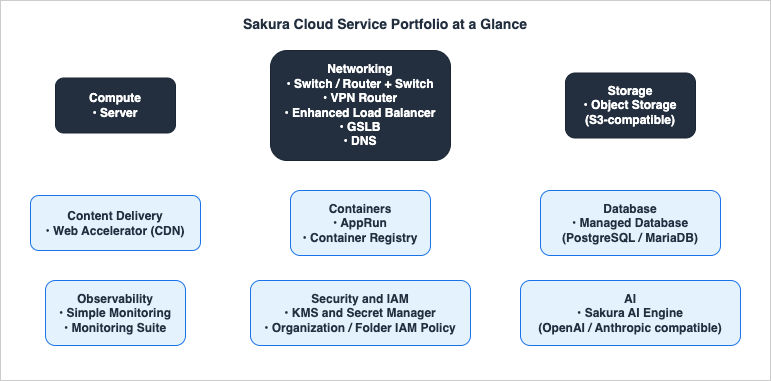
- Compute — Server, the core IaaS virtual server with full root/administrator access.
- Networking — Switch and Router + Switch (L2/L3 connectivity), the VPN Router (private networking, firewall, and VPN; formerly named "VPC Router"), the Enhanced load balancer, GSLB (DNS-based global server load balancing), and the DNS appliance (authoritative DNS).
- Storage — Object Storage, which speaks the Amazon S3 protocol and is designed for very high durability.
- Content Delivery — the Web Accelerator CDN.
- Containers — AppRun, a managed serverless container runtime, and the Container Registry for storing images.
- Database — the managed Database appliance (PostgreSQL or MariaDB).
- Observability — Simple Monitoring (external/synthetic checks) and the Monitoring Suite (integrated logs, metrics, and traces).
- Security and IAM — KMS and Secret Manager for keys and secrets, and Organization / Folder IAM Policy for hierarchical access control.
- AI — Sakura AI Engine, an inference API platform with OpenAI- and Anthropic-compatible interfaces.
Every service named above is generally available as of the fact-check date. Each category is expanded in Sections 5 and 6, with links to the official product and manual pages in the References. Two things to keep in mind while reading:
First, some services carry an official English name in Sakura's documentation (for example, Server, Enhanced load balancer, GSLB, Object Storage, Simple monitoring, Database), while others are used as-is in English or romanized form because Sakura has not published a localized English name (for example, AppRun, Container Registry, KMS, Secret Manager, VPN Router). This article uses the official English form where one exists and the as-is form otherwise, noting the Japanese name at first mention when helpful.
Second, this overview intentionally does not enumerate every plan, size, or optional feature of each service. Those details change, and they belong in the deep-dive articles. The goal here is to give you an accurate mental model of what exists and how it is grouped.
4. Zones and Data Centers
Sakura Cloud's physical footprint is organized into regions and zones, a two-level model that will feel familiar if you think in terms of AWS Regions and Availability Zones — with one important operational difference described below.A region corresponds to a city or metropolitan area. Sakura Cloud currently operates two regions:
- Ishikari (石狩), in Hokkaido, northern Japan — home to the company's large purpose-built data center campus.
- Tokyo — in the greater Tokyo area.
Within each region there are one or more zones, and a zone is the actual unit you operate against — you create a server, a disk, or a switch in a zone. Zones within a region are physically isolated from one another (separate rooms or separate buildings), which is what makes them useful for availability design. The current zones, using their official identifiers, are:
- Ishikari region:
is1a,is1b,is1c - Tokyo region:
tk1a,tk1b - A dedicated sandbox zone,
tk1v, for testing
The most recent addition, the third Ishikari zone (
is1c), opened on 2025-09-25 — a reminder that the footprint grows over time, so the zone list is exactly the kind of fact this article marks with its fact-check date. Always confirm the current zones in the official region/zone documentation for anything you design against.The operational difference worth internalizing. On Sakura Cloud, a zone is not just a placement hint — it is an independent operational unit with its own API endpoint. When you call the API (Section 7), the zone is part of the endpoint URL, and resources in different zones are managed through different endpoints. This is a slightly stronger separation than the AWS model, where a single regional endpoint serves all Availability Zones in the Region. In practice it means your automation is explicitly zone-scoped from the start, which is good discipline for building isolated, independently-failing units.
Designing for availability. Because zones within a region are physically isolated, the standard pattern for a resilient workload is to spread it across two or more zones in the same region and route traffic with the Enhanced load balancer (which operates across zones) or GSLB (at the DNS layer), so the loss of a single zone does not take the service down. For workloads that also need protection against a whole-region event, the second region gives you a geographically separate target inside Japan. The sandbox zone (
tk1v) complements this design work: it lets you rehearse provisioning and automation without touching a production zone. None of this is unfamiliar if you have designed for multiple Availability Zones on AWS — the vocabulary differs, but the principle of composing independently-failing units is the same.For teams whose interest in Sakura is specifically about where the infrastructure sits — data-center location, the environmental design of the Ishikari campus, and how to reason about location when selecting a provider — that is a topic of its own and is covered in a dedicated article: Sakura Internet Ishikari Data Center and Sustainable Cloud Design - Cold-Climate Cooling, Renewable Energy, and Choosing Infrastructure by Sustainability. For a broader comparison of how physical footprint and location factor into cloud selection generally, the same lens is explored for AWS in AWS History and Timeline regarding AWS Global Infrastructure.
5. Compute, Networking, and Storage
This section covers the core IaaS triad. The design philosophy across all three is consistent: expose primitives that are familiar to anyone who has built on virtualized infrastructure, with self-service provisioning through a control panel, an API, a CLI, and Terraform.5.1 Compute: Server
The Server service is Sakura Cloud's virtual machine. You choose CPU and memory, attach disks and network interfaces, pick an OS image, and you get administrator/root access to the instance. Servers are created and operated within a specific zone (Section 4). Because the service targets general-purpose IaaS use, the model is deliberately unopinionated: you bring your own operating system, runtime, and application stack, and you manage them as you would on any virtual server.If your mental model is an EC2 instance, Server is the closest analogue: a zone-scoped virtual machine that you provision and own end to end. The mapping is not one-to-one on every attribute — instance families, image handling, and disk semantics differ — and those differences are exactly what the AWS-mapping article in this series works through in detail: Sakura Cloud for AWS Users - Service Mapping, Terminology, and Design Differences.
5.2 Networking
Sakura Cloud's networking is built from a small set of composable pieces:- Switch and Router + Switch. A Switch is a virtual L2 switch that connects servers on a private network using private IP addresses. Router + Switch adds a router and a block of global IP addresses on top, so the connected servers can also reach and be reached from the internet through an assigned address range. Together these are the building blocks of private and public network segments.
- VPN Router. The VPN Router (formerly named "VPC Router") is a virtual router appliance for building a private, VPC-like network with richer features: firewalling, site-to-site VPN (IPsec), and remote-access VPN. If you need to connect a Sakura Cloud network to an on-premises site or to another cloud over an encrypted tunnel, the VPN Router is where that terminates. The 2025 rename from "VPC Router" to "VPN Router" did not change the feature set or the API — it is the same appliance under a clearer name — but you will still see both names in the wild, so it is worth knowing they refer to the same thing.
- Enhanced load balancer. A proxy-type load balancer for HTTP/HTTPS that runs on Sakura's global network rather than inside a single zone, so it can distribute traffic across zones. It handles TLS termination (including SNI) and is the appliance to reach for when you want managed L7 load balancing.
- GSLB. Global Server Load Balancing distributes traffic by varying the IP address returned in DNS responses. Because it works at the DNS layer and does not maintain per-connection state, it is used for cross-zone and cross-service availability — including spreading traffic across Sakura Cloud plus other environments — rather than for per-request L7 routing.
- DNS. A managed authoritative DNS service (the DNS appliance) for hosting your zones' records on Sakura's name servers.
Putting these together, a typical private topology looks like this: servers sit on a Switch (a private L2 segment); a Router + Switch or a VPN Router provides the boundary — assigning global addresses, applying firewall rules, and performing NAT for outbound traffic; the Enhanced load balancer fronts the public-facing tier; and GSLB together with the DNS appliance handle name resolution and cross-zone traffic distribution. You choose only the pieces a given design needs, which keeps simple deployments simple and lets complex ones grow without switching to a different networking model.
The composition philosophy here is worth noting: rather than a single monolithic "VPC" object, Sakura Cloud gives you switches, routers, and appliances that you assemble into the topology you need. The result is flexible, and it maps cleanly onto the AWS networking vocabulary (VPC, subnets, route tables, NAT, gateways, ELB, Route 53) — a mapping the AWS-users article works through explicitly: Sakura Cloud for AWS Users - Service Mapping, Terminology, and Design Differences.
5.3 Storage: Object Storage
Sakura Cloud's Object Storage stores objects over HTTPS and is designed for very high durability (the service is described in terms of eleven-nines-class durability). For engineers coming from AWS, the headline fact is compatibility: the service exposes an Amazon S3-compatible API. It adopts the S3 protocol for object operations, supports AWS Signature Version 4 (configured ass3v4 in S3 clients), and provides per-site endpoints — for example https://s3.isk01.sakurastorage.jp for the Ishikari site and https://s3.tky01.sakurastorage.jp for the Tokyo site.In practical terms, that means you can point the AWS CLI or an S3 SDK at a Sakura Object Storage endpoint by changing the endpoint and credentials, and use familiar object operations (listing, put, get, copy, delete, ACLs, tagging). This is what makes Object Storage a natural interoperability point in a multi-cloud design: tooling you already have can target it.
Typical uses follow directly from that compatibility: hosting static website assets and media, storing backups and archives, and acting as the exchange point for data that moves between clouds. The per-site endpoints (for example, the Ishikari and Tokyo endpoints shown above) let you place data in a specific location to satisfy a residency requirement while still reaching it with standard S3 tooling. And because the Web Accelerator CDN can use Object Storage as an origin, a static-site or asset-delivery design can live entirely within Sakura Cloud when that is what a project calls for.
The compatibility is broad but not total — bucket-lifecycle operations and some administrative actions are handled through Sakura's own object-storage API rather than the S3-compatible surface, and not every S3 API is guaranteed. Those specifics, plus concrete AWS CLI / SDK / rclone / Terraform examples and cross-cloud data-placement patterns, are the subject of a planned deep-dive article in this series. For this overview, the point to carry forward is that Object Storage speaks S3, and that opens a lot of doors.
6. Managed Services and Security
Above the core IaaS sit a set of managed services that reduce the amount of undifferentiated work you have to do. This section walks through the ones that most often matter when you are evaluating the platform.6.1 Database
The managed Database appliance lets you stand up a relational database through the control panel or API without installing and operating the engine yourself. The supported engines are PostgreSQL and MariaDB (the MySQL-compatible fork). If your workload needs a managed relational store and one of those engines fits, the Database appliance covers the common lifecycle — provisioning, backups, and redundancy — as a managed service. Managed-database design (configuration, backup, and high-availability patterns) is a topic worth its own treatment and is planned as a later article in the series.6.2 Containers: AppRun and Container Registry
AppRun is Sakura Cloud's managed serverless container runtime. You give it a container image and it deploys and scales the workload for you, in the spirit of AWS App Runner or Google Cloud Run. It became generally available in December 2025 (having previously run as a trial and then a limited release). Alongside it, the Container Registry stores your container images with public/private visibility settings and integrates with AppRun; it reached general availability at the same time.For teams that already think in terms of "hand the platform an image, let it run and scale," this pairing is the most direct on-ramp: build an image, push it to the Container Registry, and deploy it on AppRun. A hands-on treatment for engineers coming from ECS/Fargate or Cloud Run is a natural follow-up article.
6.3 Security: KMS and Secret Manager
Sakura Cloud provides a KMS (Key Management Service) and a Secret Manager, both of which reached formal (generally available) service status in September 2025. KMS manages encryption keys and is used to encrypt other resources — including disks and the secrets held by Secret Manager — with support for both service-generated keys and bring-your-own-key. Secret Manager stores secrets in an encrypted vault and depends on KMS for that encryption. If you have built key- and secret-management discipline on AWS KMS and Secrets Manager, the conceptual model transfers directly, and these services give you the Sakura-side equivalents.6.4 IAM: Organization and Folder Policies
Access control on Sakura Cloud gained a significant capability in July 2026 with Organization / Folder IAM Policy, which became available on 2026-07-09. Where access was previously scoped per project, this feature lets you grant IAM policies at the level of an organization or a folder, with permissions inheriting down the hierarchy so that a grant made at a higher level applies to the resources beneath it. For anyone who reasons about access in terms of AWS Organizations, organizational units, and IAM policy inheritance, this is the analogous building block on Sakura Cloud, and it is recent enough that little English material describes it. A dedicated IAM-design article is planned in the series to work through it against AWS vocabulary.6.5 AI: Sakura AI Engine
Sakura AI Engine is Sakura's inference API platform, running on the company's GPU infrastructure. It became generally available on 2025-09-24 and exposes generative-AI inference (chat completion, embeddings, and related capabilities) through HTTP APIs. Two facts make it particularly relevant to engineers who already work with large language models:- From general availability, its chat-completion endpoint has been OpenAI-compatible, so code and SDKs written for the OpenAI Chat Completions interface can target it by changing the base URL and key.
- On 2026-05-20, Sakura added an Anthropic-compatible Messages API, meaning tools built around Anthropic's Messages interface can use it directly as well.
The practical significance is that AI Engine lets you run inference against Japan-based GPU infrastructure through interfaces you likely already use, which is useful when a requirement calls for inference to happen within Japanese data centers. This overview deliberately does not list specific models or capabilities, because those evolve; the durable facts are the two compatibility surfaces above. Those surfaces are also what make the service low-risk to try: because your code speaks the same OpenAI- or Anthropic-style interface it already uses, pointing a specific inference call at AI Engine — and pointing it back — is a configuration change rather than a rewrite. A hands-on integration article — using AI Engine from OpenAI- and Anthropic-style SDKs — is planned in the series.
7. APIs, CLI, and Infrastructure as Code
A cloud is only as usable as its automation surface. Sakura Cloud is fully controllable beyond the web console, and this section summarizes the ecosystem. Implementation-level walkthroughs (real Terraform and CLI code) are deferred to a planned infrastructure-as-code article in this series.- Control Panel (web UI). The console lives at
secure.sakura.ad.jp/cloud/. It offers an English display mode, currently provided as a beta: you can switch the interface language, though some labels may remain in Japanese and new features tend to arrive in Japanese first. For day-to-day operation the console is fully functional; for anything you want to reproduce, the API and IaC paths below are the durable choice. - REST API. Sakura Cloud exposes a REST/JSON API (documented as the v1.1 API). You authenticate with an API key and secret token issued in the control panel (HTTP Basic/Digest), and — as noted in Section 4 — the API is zone-scoped: the zone is part of the endpoint URL, so automation targets a specific zone explicitly.
- usacloud (CLI). The official command-line client is usacloud, maintained in the
sacloudGitHub organization, written in Go and released under the Apache-2.0 license. It is the supported way to drive the platform from a terminal or a shell script. - Terraform Provider. Sakura Cloud has an official Terraform provider, and it is worth being precise about naming because the provider is in a generational transition. The current-generation provider is published as
sacloud/sakuraon the Terraform Registry; the earlier provider,sacloud/sakuracloud, remains available but is the previous generation, and Sakura Internet has announced that its maintenance ends at the end of December 2026. If you are starting fresh, target the current provider; if you inherit existing Terraform, be aware which one it uses and plan the migration before that date. (There have historically also been other tooling efforts in thesacloudorganization; treat the CLI and the official Terraform provider as the primary, actively-maintained automation paths.)
Which of these you reach for depends on the task: the control panel for exploration and one-off changes, the REST API for custom automation and integrations, usacloud for scripting, and Terraform for declarative, reviewable infrastructure. Whatever you choose, the zone-scoped model (Section 4) carries through — resources belong to a zone, and your automation names that zone explicitly, which is a helpful constraint when you are building isolated environments per zone or per region.
A neutral note on English documentation. It is worth being straightforward about the documentation situation, because it is easy to form the wrong expectation. Sakura Internet discontinued its English-language manual and API documentation in October 2023; the former English documentation URLs now redirect to the Japanese material. The console retains a beta English mode (above), and a few resources are available in English — notably some GitHub READMEs, particularly for the Terraform provider — but the systematic, first-party reference documentation for the API, CLI, and services is, in practice, Japanese-first. This is a statement of fact, not a criticism: it is precisely the gap that a systematic English-language guide can fill, which is the reason this series exists. Where you need authoritative detail, the official Japanese documentation (linked in the References) is the source of truth, and the deep-dive articles in this series aim to make the important parts accessible in English.
Getting started from outside Japan. A related expectation to set is the sign-up and billing path. Using Sakura Cloud requires a Sakura Internet member account (a member ID), and the registration flow is provided in Japanese. The phone-verification step assumes a Japanese domestic phone number; Sakura's official support guidance asks customers who wish to register an overseas phone number to contact the customer center (registration-details support page). Payment is managed through the member account, with credit cards among the supported methods alongside Japan-oriented options such as account transfer (official payment guide), and support channels, like the documentation, are Japanese-first. These are administrative rather than technical characteristics, but they shape the practical on-ramp: for many teams outside Japan, adopting the platform involves Japanese-language capability, a Japan-side presence or partner, or a conversation with the customer center. That is worth knowing before you plan a proof of concept — and it is also why this series is built for the evaluation stage, so that you can understand what the platform offers, and whether it fits your requirement, before investing in the onboarding step.
8. How Sakura Cloud Complements a Multi-Cloud Architecture
The most useful way to think about Sakura Cloud, for a reader who already runs on AWS or another global platform, is not as a replacement but as an additional option you can slot into an existing architecture. A few concrete complementary patterns make this tangible.Data residency for specific datasets. If a subset of your data must reside in Japan, you do not have to move your whole platform. You can keep your primary architecture where it is and place the residency-constrained data — object storage, a database, or a specific workload — in a Sakura Cloud zone. Because Object Storage is S3-compatible (Section 5.3), the data path from your existing tooling can be as small as an endpoint change.
A Japan-based secondary or DR target. Because Object Storage speaks S3 and the networking stack supports site-to-site VPN, Sakura Cloud can serve as a secondary location: replicate objects to a Sakura endpoint, keep a standby footprint, and use GSLB or DNS for failover. This gives you a provider-diverse and location-diverse fallback that sits inside Japan. The detailed multi-cloud DR patterns build directly on the storage and connectivity articles and are planned later in the series.
Interoperability rather than migration. The design intent throughout this series is that Sakura Cloud and your existing cloud interoperate. Object Storage is reachable with AWS tooling; the VPN Router terminates IPsec tunnels that can connect to an AWS Site-to-Site VPN; AI Engine answers OpenAI- and Anthropic-style calls. None of these require abandoning what you have; each is a seam where the two environments meet.
Generative-AI inference inside Japan. When a requirement calls for inference to run on Japan-based infrastructure, AI Engine's compatible APIs (Section 6.5) let you route those specific calls to Sakura while the rest of your AI stack stays where it is.
A workload-specific home. Sometimes the driver is a single workload rather than a category of data — a batch job that must run near Japan-resident data, a service a Japanese customer expects to be hosted domestically, or an experiment you want to keep separate from the primary account. Placing just that workload on Sakura Cloud, while everything else stays put, is a legitimate and low-commitment way to adopt the platform.
A note on framing the decision. The right question is never "AWS or Sakura Cloud." It is "does this specific requirement point to a capability that belongs on Sakura Cloud, and if so, how does it connect back to the rest of my architecture?" Framed that way, the platform becomes one more tool in the kit — reached for when a residency, locality, or interoperability requirement makes it the right fit, and left on the shelf otherwise.
The through-line is that adoption can be incremental and additive. You add a capability where it earns its place, connect it to what you already run, and keep your existing investment intact. A full, service-by-service mapping from AWS to Sakura Cloud — the "how do I translate what I know" article — is the direct next step in this series and the recommended follow-on read: Sakura Cloud for AWS Users - Service Mapping, Terminology, and Design Differences.
9. Frequently Asked Questions
Q. Is there an English console and English documentation?A. The control panel has an English display mode, provided as a beta — you can switch the interface language, but some labels may remain in Japanese and new features often ship in Japanese first. Formal English documentation for the manual and API was discontinued in October 2023, so the authoritative reference material is Japanese-first today. Some English exists in GitHub READMEs (notably the Terraform provider). Closing this English-language gap systematically is the reason for this series.
Q. Which zones are available, and how do zones relate to regions?
A. There are two regions: Ishikari (Hokkaido) with zones
is1a, is1b, and is1c, and Tokyo with zones tk1a and tk1b, plus a sandbox zone tk1v for testing. A region maps to a city; a zone is a physically-isolated unit within a region and is what you actually deploy into. Each zone has its own API endpoint, so your automation is zone-scoped. Confirm the current list in the official region/zone documentation, since the footprint grows over time.Q. Is the object storage really S3-compatible? Can I use the AWS CLI and S3 SDKs?
A. Yes — Object Storage exposes an Amazon S3-compatible API, supports Signature Version 4 (
s3v4), and provides per-site endpoints. You can point the AWS CLI or an S3 SDK at it by changing the endpoint and credentials and use standard object operations. The compatibility is broad but not total (some administrative and bucket-lifecycle actions use Sakura's own API), and the deep-dive article covers the exact boundaries and working examples.Q. Is Sakura Cloud a replacement for AWS?
A. This series treats it as a complement, not a replacement. It is an option you can add to an existing architecture — for data residency, a Japan-based secondary or DR target, or interoperability scenarios — while keeping your primary platform in place. The interesting decisions are about which capability belongs where, not about switching wholesale.
Q. Does Sakura Cloud have an equivalent to AWS IAM and to KMS/Secrets Manager?
A. Yes. KMS and Secret Manager reached general availability in September 2025 and cover key and secret management. For access control, Organization / Folder IAM Policy (available since 2026-07-09) grants permissions at the organization or folder level with inheritance down the hierarchy — the analogue to organization-and-OU-scoped policy on AWS.
Q. Can I manage Sakura Cloud as code, with Terraform?
A. Yes. There is an official Terraform provider on the Terraform Registry, and an official CLI (usacloud). The provider is in a generational transition — the current provider is
sacloud/sakura and an earlier sacloud/sakuracloud provider also exists — so target the current one for new work. A planned infrastructure-as-code article in this series will cover real Terraform and CLI usage.Q. How do I design for availability across zones?
A. Spread a workload across two or more zones in the same region and distribute traffic with the Enhanced load balancer or GSLB, so losing one zone does not take the service down; use the second region when you also need protection from a whole-region event. Because each zone has its own API endpoint, your automation is zone-scoped from the start, which reinforces building independently-failing units.
Q. Can I sign up and use Sakura Cloud from outside Japan?
A. Plan for a Japanese-language onboarding path. Service use requires a Sakura Internet member account created through a Japanese-language registration flow; the phone-verification step assumes a Japanese domestic number, and Sakura's support guidance asks customers with overseas numbers to contact the customer center. Payment (credit cards among the supported methods) and support are likewise Japan-centered. See the note in Section 7 — this series treats these onboarding realities as facts to plan around, and focuses on the evaluation work you can do before them.
Q. Where should I start?
A. If you are coming from AWS, the recommended next read is the service-mapping article, which translates EC2/VPC/S3/ELB/Route 53 and more into their Sakura Cloud equivalents: Sakura Cloud for AWS Users - Service Mapping, Terminology, and Design Differences. From there, the series continues into storage, connectivity, and infrastructure-as-code.
10. Summary
Sakura Cloud is the self-service IaaS public cloud operated by SAKURA internet Inc., a Japanese infrastructure company founded in 1996 and listed on the Tokyo Stock Exchange. It offers a familiar shape — compute (Server), composable networking (Switch/Router, VPN Router, Enhanced load balancer, GSLB, DNS), S3-compatible object storage, a managed relational database, a serverless container runtime (AppRun) with a registry, KMS and Secret Manager, organization/folder IAM, integrated observability, and an OpenAI- and Anthropic-compatible AI inference platform — spread across two regions (Ishikari and Tokyo) and their zones, and fully automatable through a REST API, the usacloud CLI, and an official Terraform provider.For an engineer outside Japan, the reason to care is specific and practical: when a requirement points toward Japanese data centers — data residency, local market presence, or a complementary secondary location — Sakura Cloud is a credible option that interoperates with what you already run rather than demanding a rewrite. Its S3-compatible storage, VPN-capable networking, and compatible AI APIs are the seams where it joins an existing AWS or multi-cloud architecture.
This article established the map. The next step, especially if you think in AWS terms, is the service-by-service mapping guide, which is the most direct way to turn what you already know into working knowledge of Sakura Cloud: Sakura Cloud for AWS Users - Service Mapping, Terminology, and Design Differences. The remainder of the series goes deeper — storage from AWS tooling, cross-cloud connectivity, infrastructure as code, and more — each building on the vocabulary set here.
11. References
Official Sakura Internet / Sakura Cloud sources (Japanese unless noted; verified as of 2026-07-18):- SAKURA internet Inc. - Corporate (English)
- Sakura Cloud - Product site
- Sakura Cloud Manual - Regions and Zones
- Sakura Cloud API v1.1 Documentation
- Sakura Cloud Manual - Object Storage overview
- Sakura Cloud Manual - Object Storage API
- Sakura Cloud - VPN Router product page
- Sakura Cloud - Enhanced Load Balancer product page
- Sakura Cloud - GSLB product page
- Sakura Cloud Manual - AppRun
- Sakura Cloud Manual - Container Registry
- Sakura Cloud Manual - Database appliance
- Sakura Cloud - KMS product page
- Sakura Cloud - Secret Manager product page
- Sakura AI Engine
- usacloud - official CLI (GitHub)
- Terraform Provider for Sakura Cloud - current generation (GitHub)
- Terraform Registry - sacloud/sakura
- Sakura Cloud News - Terraform provider v2 end of maintenance (end of December 2026)
Related Articles
- AWS History and Timeline regarding AWS Global Infrastructure
A companion lens on how physical footprint, regions, and data-center location factor into cloud selection — written for AWS, and a useful contrast to the Sakura Cloud region/zone model in Section 4.
Related Articles in This Series
- Sakura Cloud for AWS Users - Service Mapping, Terminology, and Design Differences
- Sakura Internet History and Timeline - Hosting, Data Centers, Cloud, and AI Infrastructure Milestones
- Sakura Internet Ishikari Data Center and Sustainable Cloud Design - Cold-Climate Cooling, Renewable Energy, and Choosing Infrastructure by Sustainability
References:
Tech Blog with curated related content
Written by Hidekazu Konishi