Where Connections Are Pooled on AWS - Lifetime, Session State, and Connection Budget Across Driver Pools, PgBouncer, RDS Proxy, and Aurora DSQL
First Published:
Last Updated:
This article organizes these six layers in a table, along with a diagram illustrating lifetime nesting and a chart detailing connection budgets. For each layer, it outlines connection lifetime management, responsibility for session state, the unit of multiplexing, what a failover cancels, IAM integration, and its relationship with AWS Lambda, as well as the maximum number of connections allowed. This article does not rank PgBouncer against RDS Proxy, nor does it discuss pricing. It clearly distinguishes between information explicitly stated in the documentation and information that is not found in the documentation. The information presented was verified on November 5, 2026.
Related articles on this site:
- Amazon RDS and Aurora High Availability Guide - Multi-AZ, Read Replicas, RDS Proxy, and Global Database Failover
- IAM Authentication to Databases, Caches, and Streams on AWS - Token Lifetime, What Revoking Access Does to Open Connections, and the Identity Inside the Service
- Amazon Aurora DSQL Design Decision Guide - Distributed SQL Between Amazon DynamoDB and Aurora PostgreSQL
- AWS Lambda Concurrency and Scaling Guide - Reserved and Provisioned Concurrency, Throttling, and Event Source Scaling
- How Amazon Aurora serverless Decides Its Capacity - What You Set, What Aurora Decides Within Your Range, What the Maximum ACU Fixes, and Where Each Shows Up
- AWS Lambda Managed Instances - Capacity Providers and the Multi-Concurrency Trap
- Zero-Downtime Database Change on RDS and Aurora - Blue/Green Deployments, Upgrades, and Rollback Design
- When Does a Connection to an AWS Endpoint Actually Use ML-KEM? - Client Defaults, Server Policies, Each Hop, and How to Tell
- What Happens to a Failed Asynchronous Lambda Invocation - Caller Retries, the Internal Queue, and Where a Discarded Event Goes
- Durability on Amazon ElastiCache for Valkey - Where an Acknowledged Write Survives, the 10-Second Buffer, and Changing It on a Live Cluster
Table of Contents
- 1. Scope and Assumptions
- 2. How to Read the Tables
- 3. Layer Diagram
- 4. Layer Overview
- 5. Lifetime Nesting
- 6. Session State Responsibility and Pinning
- 7. Connection Budget
- 8. Potential Negative Effects of Layering
- 9. Where the Sources Disagree and What Is Not Written
- 10. What This Setup Showed
- 11. Failure Modes
- 12. Frequently Asked Questions About Connection Pool Placement
- 13. Summary
- 14. References
1. Scope and Assumptions
This chapter will first define the intended audience, the scope of this article, the relevant source materials, and the terminology used. The following ten points will outline the key conclusions.- Connections can be pooled across six layers: the driver pool, AWS Advanced Wrapper, PgBouncer, RDS Proxy, the database engine, and Aurora DSQL. Which layer owns the connection lifetime, the session state, and the connection limit changes from layer to layer (see Chapters 3 and 4).
- The maximum duration of client connections for RDS Proxy is fixed at 24 hours. The connection settings page for RDS Proxy advises configuring the application pool's maximum connection lifetime to be shorter than 24 hours, and setting the idle timeout to be shorter than the Proxy's
IdleClientTimeout. The configuration guidelines page recommends setting longer timeouts in order, from client to Proxy to database (see Chapter 5). - The maximum connection duration for Aurora DSQL is 60 minutes. The DSQL Python connector documentation advises setting the pool's
max_lifetimeto be shorter than 3600 seconds. According to the DSQL Tortoise documentation, the default value formax_lifetimein psycopg_pool is 3600 seconds, which is the same as the DSQL limit (see Chapter 5). - Two articles on the AWS Database Blog offer conflicting information regarding whether a connection that reaches its 60-minute limit is closed even if a transaction is in progress. An article from May 11, 2026, states that connections are not closed mid-transaction, while an article from July 20, 2026, states that they are closed even if a transaction is in progress (see Section 9.2).
- When dealing with statements that change session state, the three layers exhibit different behavior. RDS Proxy pins the connection and suspends multiplexing until the session ends. PgBouncer's transaction mode lists those features as unusable, leaving session cleanup to the application. According to the July 20, 2026, Database Blog, Aurora DSQL does not support some of these features (see Chapter 6).
- The conditions under which RDS Proxy pins connections are listed on the pinning page, with details for four different database engines. Exceptions exist: transaction-level advisory locks in PostgreSQL, and
SET LOCALin MySQL and MariaDB, do not cause pinning. If the application pool usesDISCARD ALLin its cleanup statements, RDS Proxy pins the client connection when the pool releases it (see Chapter 6). - Whether prepared statements in PostgreSQL trigger pinning with RDS Proxy is dependent on the method used, and documentation offers conflicting information. SQL
PREPAREandEXECUTEstatements cause pinning. Regarding extended query protocol messages, a "What's New" article from November 10, 2023, and a Database Blog post state that multiplexing continues, while an AWS re:Post article indicates that connections are pinned (see Sections 6.5 and 9.1). - The connection budget is counted in a different unit at each layer. For Lambda, the limit is determined by multiplying the number of execution environments by the pool size. For RDS Proxy, it is the product of
MaxConnectionsPercentandmax_connections. For Aurora Serverless v2, it is a fixedmax_connectionsvalue based on the maximum ACU. For Aurora DSQL, it is limited to 10,000 connections, with a rate of 100 connections per second (see Chapter 7). - Certain combinations of layers can be counterproductive. The RDS Proxy workload page states that if the application tracks Aurora's topology in front of the Proxy, it may bypass the Proxy and connect directly to the DB instance. The AWS Advanced JDBC Wrapper README indicates that some of the wrapper's features, such as failover, are not compatible with RDS Proxy (see Chapter 8).
- According to the Proxy concepts page, if an application maintains its own connection pool, only connections involved in an in-progress transaction or SQL statement will be canceled during an RDS Proxy failover. The same page says that RDS Proxy keeps accepting connections at the same IP address and directs them to the new primary DB instance (see Section 4.2).
1.1 Intended Audience
This article is intended for developers and operations personnel responsible for designing and managing configurations that connect Lambda, Amazon ECS, and Amazon EC2 to PostgreSQL-compatible databases, including Amazon RDS, Amazon Aurora, and Aurora DSQL. Specifically, it is for readers who may believe any of the following to be true:- Using RDS Proxy eliminates the need to think about connection lifetime on the application side.
- RDS Proxy failover ensures that no connections are lost.
- When using PostgreSQL prepared statements, RDS Proxy will always pin connections.
- The
max_connectionssetting for Aurora Serverless v2 automatically adjusts based on changes in ACU. - With Aurora DSQL, the connection limit of 10,000 connections means that Lambda will never run out of available connections.
- Stacking application pools, the AWS Advanced Wrapper, and RDS Proxy makes the setup safer the more you stack.
The validity of these assumptions varies depending on the layers, engines, methods, and configurations used, or does not align with the documentation.
1.2 What This Article Covers and What It Does Not
This article will focus on how the responsible party changes depending on where connections are pooled and counted. Specifically, it will cover the following:- For each of the six layers: connection lifetime, session state, multiplexing units, failover, IAM, the relationship with Lambda, and connection limits.
- Nesting of lifetime between layers, and nesting of configurations.
- A comprehensive table detailing RDS Proxy pinning conditions, along with a comparison of its behavior against PgBouncer and Aurora DSQL.
- Calculating connection budgets from Lambda to Aurora and Aurora DSQL.
- Potential negative consequences of layering.
- Discrepancies in documentation and missing sentences.
The pinning table will cover the four engines supported by RDS Proxy (PostgreSQL, MySQL, MariaDB, and SQL Server). For other layers, examples will be provided using PostgreSQL-compatible databases. The example engine versions will be either Aurora PostgreSQL 17.7 (LTS) or 18, or RDS for PostgreSQL 17.7 or later, or 18 and later. According to the RDS for PostgreSQL release calendar, standard support for versions 17.5 and 17.6 ended on October 31, 2026. When referencing PgBouncer versions, the examples will use 1.26.1 (released October 14, 2026) or later. The example region will be
us-east-1.This article will not cover the following.
- Pricing and billing mechanisms.
- Determining whether to choose PgBouncer or RDS Proxy. This article will simply outline the differences in responsibility at each layer.
- Overview of RDS Proxy endpoints, configuration procedures, and advanced settings. This is covered in Chapter 6 of Amazon RDS and Aurora High Availability Guide on this site.
- Detailed information on IAM authentication, and how open connections are handled when tokens expire or permissions are revoked. This is covered in IAM Authentication to Databases, Caches, and Streams on AWS on this site. This article will outline the scope of IAM access at each layer, one line at a time.
- Optimistic concurrency control, schema, and migration for Aurora DSQL. This is covered in Amazon Aurora DSQL Design Decision Guide on this site.
- Reserved concurrency for Lambda, and the formula for using it to budget database connections. This is covered in AWS Lambda Concurrency and Scaling Guide on this site.
- Formula for
max_connectionsin Aurora Serverless v2, and a table showing the corresponding value based on the maximum ACU. This is covered in How Amazon Aurora serverless Decides Its Capacity on this site. - Blue/Green deployment switchovers and RDS Proxy. On April 9, 2026, What's New announced support for Blue/Green deployments with RDS Proxy. This is covered in Zero-Downtime Database Change on RDS and Aurora on this site.
- TLS key exchange. This is covered in When Does a Connection to an AWS Endpoint Actually Use ML-KEM? on this site.
- Detailed information on driver and AWS Advanced Wrapper functionality. This article will only cover where to place the wrapper and its relationship with RDS Proxy.
- Steps to induce connection exhaustion.
- Lambda Web Functions and Lambda MicroVMs.
- Connections to Amazon ElastiCache.
1.3 Date of Review and Materials Reviewed
This article was written after reviewing the following materials on November 5, 2026. Abbreviations enclosed in parentheses will be used throughout the text.- Amazon RDS User Guide: Introduction to RDS Proxy (Proxy entry page), Supported Regions and Engines (RDS Proxy compatibility page), Concepts and Terminology (Proxy concepts page), Avoiding Pinning (pinning page), Connection Considerations (connection settings page), Connecting (connecting page), Configuration Guidelines (configuration guidelines page), Applications and Workloads (workload page), CloudWatch Metrics (Proxy metrics page).
- Amazon Aurora User Guide: Introduction to RDS Proxy (Aurora version of the Proxy entry page), Supported Regions and Engines (Aurora version of the RDS Proxy compatibility page), Aurora Serverless Capacity (Serverless capacity page).
- Amazon Aurora DSQL User Guide: Quotas (DSQL quota page), Authentication Tokens (DSQL token page), Python Connector (DSQL Python connector page), Tortoise ORM Adapter (DSQL Tortoise page), SQLAlchemy Dialect (DSQL SQLAlchemy page), Migration from PostgreSQL (DSQL migration page), Connecting with PostgreSQL-compatible Clients (DSQL client page).
- AWS Lambda Developer Guide: Using RDS with Lambda (Lambda RDS page), Concurrency (Lambda concurrency page), Managed Instances Python Runtime (Managed Instances Python page).
- RDS for PostgreSQL and Aurora PostgreSQL Release Calendar.
- PgBouncer Website: Features (PgBouncer features page), Configuration (PgBouncer configuration page), Changelog (PgBouncer changelog).
- GitHub: AWS Advanced JDBC Wrapper README (wrapper README).
- Five articles from the AWS Database Blog: Article on the extended query protocol (November 10, 2023; extended query blog), Article on connecting to Aurora DSQL (May 11, 2026; DSQL connection blog), Article on Aurora DSQL connection pools (July 20, 2026; DSQL pool blog), Article on AWS Advanced JDBC Wrapper connection pools (August 10, 2026; wrapper pool blog), Article on the differences between PgBouncer and RDS Proxy (October 12, 2026; PgBouncer and RDS Proxy blog). Dates refer to the article publication dates.
- Four announcements from AWS What's New: Announcement on the extended query protocol (November 10, 2023), Announcement on end-to-end IAM (September 12, 2025), Announcement on Blue/Green deployments (April 9, 2026), Announcement on SQL Server 2022 (October 14, 2026). Dates refer to the
postDateTimevalue for the announcement. - AWS re:Post Knowledge Center: Article on resolving pinning issues with RDS Proxy (re:Post pinning article). The article's date is only displayed as "Updated a year ago."
1.4 Terms, and Things Spelled the Same
This article will consistently use the following terms.- Layer: A location where connections are pooled or counted. This article uses 6 layers (Chapter 3). As with other articles in this series, the layer is written in the
Layercolumn of the tables. - Driver pool: Within an application's process, this refers to the pool of connections managed by a driver or library. Examples include HikariCP, psycopg_pool, and node-postgres's
Pool. This article also puts pools handled by the Aurora DSQL connector in this layer. - Client connection and database connection: These are the terms of the connection settings page. A connection from the application to the Proxy is a client connection, while a connection from the Proxy to the database is a database connection. PgBouncer uses the terms client connection and server connection for the same concepts.
- Multiplexing: The process of lending a single database connection to a different client connection after each transaction completes. This is the term used on the Proxy concepts page.
- Pinning: RDS Proxy's process of assigning a client connection to a single database connection and preventing multiplexing until the session ends. Note that other articles on this site use the same term "pinning" to refer to different concepts, such as pinning a GitHub Actions commit or pinning an availability zone. In this article, "pinning" specifically refers to RDS Proxy's pinning functionality.
- Lifetime: The longest time from when a connection is opened until a layer closes it. This is distinct from the "idle timeout." The idle timeout refers to the time before a connection is closed when there are no requests.
- Connection budget: A term used in this article, not found in official documentation. It refers to the number of connections a layer can handle and how that number is calculated.
- Failover: Defined according to the Proxy concepts page. It is a high-availability feature that replaces a failed original database instance with a different database instance. The same page notes that failover applies to RDS database instances configured with Multi-AZ. The broader topic of failover for Aurora database clusters is covered in the Amazon RDS and Aurora High Availability Guide on this site. Aurora DSQL does not expose any user-facing failover operations. This article will address connection errors resulting from internal component replacements within DSQL, but will not refer to them as "failover."
- Pool: It is important to distinguish between RDS Proxy's connection pool (a collection of database connections) and a driver pool (a collection of client connections). This article will explicitly state which pool is being referenced each time.
max_connectionsandMaxConnectionsPercent:max_connectionsis a parameter of the database engine.MaxConnectionsPercentis a setting in the RDS Proxy target group, representing a percentage ofmax_connections.- Lambda function naming: The Lambda developer guide refers to what were previously called Lambda functions as "Lambda Event Functions." All functions in this article are Event Functions. The text will refer to them as "Lambda functions," but the original term will be used in direct quotes.
2. How to Read the Tables
This chapter defines the columns in the tables presented in this article, as well as how to describe the state of the sources and how to cite them. The columns in the summary table, found in Section 4.4, are used consistently across three articles in the same series.2.1 Table Columns
The summary table in Section 4.4 contains the following seven columns:Layer: The layer referenced in that row.What This Layer Keeps: What information or connection this layer holds.What Can Be Lost Here: What might be lost within this layer.Set By: The settings that determine the behavior of this layer, and the entity that controls those settings.How You Can Tell: How to determine what has occurred, and where to verify it.Where It Is Written: The origin or source of the information in this row.Source State: The state of the sources, described using the terms from Section 2.2.
The tables for the layers described in Sections 4.1 through 4.3, the table for lifetime in Section 5.1, the table outlining pinning conditions in Section 6.2, the table comparing the three layers in Section 6.3, and the table detailing connection budgets in Section 7.1 use this article's own columns. Each section describes its columns.
2.2 Terms for the State of the Sources
This article uses eight terms to describe the state of the sources. These English terms will also be used in the tables.- Stated: The documentation contains a statement regarding the matter.
- Stated as not supported: The documentation explicitly states that the matter is not supported or cannot be used.
- Documentation does not list: While a list or table exists, the specific item is not included. This does not necessarily indicate that the matter is unsupported or unavailable.
- Not recorded (stated): The documentation states that the information is not included in logs or records.
- No statement found: Despite searching using different search terms and examining different categories of documentation, no relevant statement could be found. This does not necessarily indicate that the matter is absent or does not occur.
- Sources disagree: The statements within two different documents regarding the same matter are contradictory. This article presents both statements, along with their sources, without designating either as incorrect.
- Inference: This is an inference made by this article, and is not a statement found within any of the documentation. This article indicates in the same sentence when a statement is an inference.
- Observation: This refers to findings observed during testing (as described in Chapter 10), and does not represent a statement from the documentation itself. This article does not overwrite documentation statements with observations.
This article keeps "Stated as not supported" and "No statement found" apart. The former refers to a statement in the documentation, while the latter indicates that this article was unable to find a relevant statement.
2.3 Citing Sources
In this article, for each point, the page containing the relevant text is given in the same sentence. Even when discussing RDS Proxy, this article treats the text from the pinning page, the connection settings page, and the workload page as separate sources. For example, the sentence saying that tracking the topology in front of the Proxy can bypass the Proxy is from the workload page, not the configuration guidelines page. For text from AWS blogs or re:Post, this article gives the article name and publication date in the same sentence. Blog content will not be given the same weight as content from the user guide.3. Layer Diagram
This chapter illustrates the arrangement of the six layers and indicates which layers separate client connections from database connections.3.1 Six Layers
From the perspective of the application, the following six layers exist, working from top to bottom. Not all configurations will include all six layers.- Driver Pool: Located in the application's process. In Lambda, one is created for each execution environment.
- AWS Advanced Wrapper: A layer that wraps JDBC or Python drivers. According to the wrapper pool blog, there are two options for placement: an external pool (which pools connections to the wrapper) and an internal pool (which pools physical connections to the database instance).
- PgBouncer: A connection pooler that users run on EC2 or within containers. It is placed between the application and the database.
- RDS Proxy: A database proxy managed by AWS. According to the Proxy entry page, it must be in the same VPC as the database and cannot be exposed publicly.
- Database Engine: An instance of RDS for PostgreSQL or Aurora PostgreSQL. The
max_connectionssetting determines the maximum number of connections it will accept. - Aurora DSQL: A distributed SQL database. According to the DSQL pool blog, it multiplexes connections per transaction inside the service.
Layers 3 and 4 receive client connections and establish separate database connections to the database. According to the connection settings page, with RDS Proxy, client connections terminate at the proxy, and database connections are managed inside the proxy. Layers 1 and 2 handle client connections to either the database, layer 3, or layer 4. According to the DSQL pool blog, connections are allocated to the Query Processor only during transactions. This article discusses the multiplexing within layer 6 as distinct from the multiplexing in layers 3 and 4, as DSQL is not a location where users place proxies.
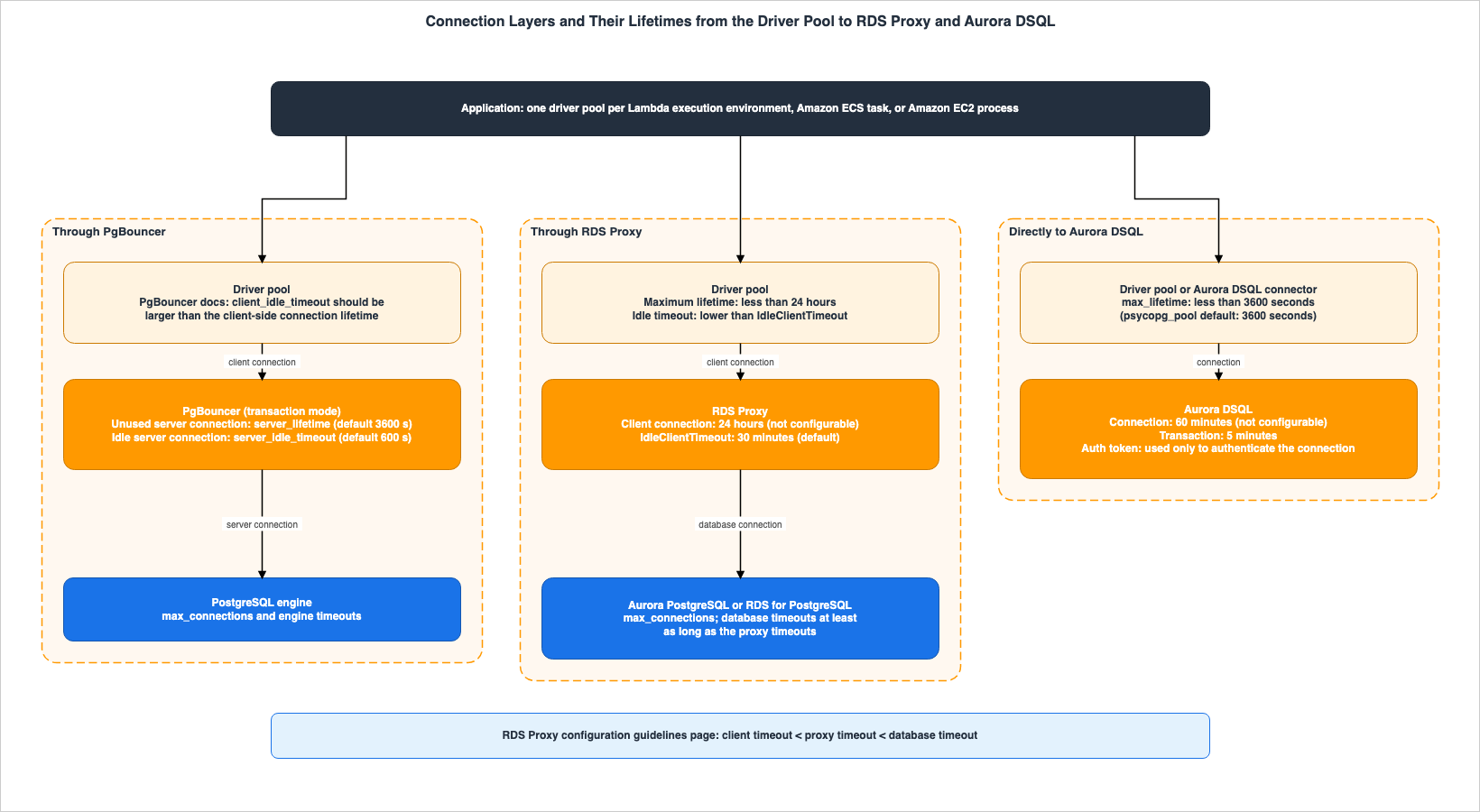
Figure 1 illustrates three paths: one through PgBouncer, one through RDS Proxy, and one directly to Aurora DSQL. It shows the arrangement of layers and the time each layer closes connections. The AWS Advanced Wrapper is located in the driver, so it is not depicted in the figure. The time values will be detailed in Chapter 5, along with supporting documentation.
3.2 Targets for RDS Proxy and Aurora DSQL
According to the RDS Proxy compatibility pages (RDS and Aurora versions), RDS Proxy is compatible with RDS DB instances and Aurora DB clusters. Within RDS, it supports MariaDB, MySQL, PostgreSQL, and SQL Server. For Aurora, it supports Aurora MySQL and Aurora PostgreSQL. The RDS version of the compatibility page states that RDS Proxy is not available with RDS for Db2 and RDS for Oracle. The Aurora version of the Proxy entry page states:You can use RDS Proxy with Aurora serverless clusters, but not with Aurora Serverless v1 clusters.The compatibility pages do not list Aurora DSQL as a supported target for RDS Proxy. On whether RDS Proxy can be placed in front of Aurora DSQL, this article writes Documentation does not list. It neither says that it can nor that it cannot. The DSQL pool blog, however, states the following about database-side proxies:
As a result, you should not use PgBouncer, pgpool-II, or similar database-side proxy solutions. The service’s connection architecture is redundant with these tools because transaction-level connection multiplexing is built in by default.This is a statement from a blog post. The DSQL connection blog also says not to use server-side connection poolers like PgBouncer or pgpool-II with Aurora DSQL, saying they can cause availability issues with its distributed connection handling. This article has not found a similar statement in the DSQL user guide (Section 9.3).
3.3 Layers from Lambda's Perspective
When connecting from a Lambda function, the Layer 1 pool is created per execution environment. The Lambda concurrency page states that Lambda provisions a separate execution environment for each concurrent request.For each concurrent request, Lambda provisions a separate instance of your execution environment.Therefore, a Lambda function has as many driver pools as its concurrency. The Lambda RDS page outlines two configurations: connecting directly to RDS and using RDS Proxy.
Direct connections are useful in simple scenarios, and proxies are recommended for production.With Lambda Managed Instances, a single execution environment can process multiple requests concurrently. According to the Managed Instances Python page, the Python runtime utilizes a separate process for each concurrent request, and these processes do not share memory. The implications of this pooling behavior are discussed in Section 6.3 of AWS Lambda Managed Instances.
4. Layer Overview
This chapter presents the six layers, organized into three tables, followed by a summary table. The columns in the table from Section 4.1 areLifetime (the time at which the layer closes connections), Session State (who is responsible for the session state), and Multiplexing Unit (the unit by which a single DB connection is allocated to different users). The columns in the table from Section 4.2 are At Failover (what happens during failover) and IAM (the extent to which IAM authentication is applicable). The columns in the table from Section 4.3 are With Lambda (the relationship when used with Lambda) and Ceiling (the maximum number of connections for that layer, and the basis for that calculation).4.1 Lifetime, Session State, Multiplexing Unit
| Layer | Lifetime | Session State | Multiplexing Unit |
|---|---|---|---|
| Driver Pool | Determined by the pool's maximum lifetime setting. Determined by the application. | Held by both the application and the pool. Some pools send a cleanup statement. | None. During borrowing, a single process uses one connection. |
| AWS Advanced Wrapper | For external pools, determined by the pool's configuration. For internal pools, determined by the wrapper's configuration. | Held by the application. | None. Internal pools are divided by the combination of the database instance and the user. |
| PgBouncer (transaction mode) | Unused server connections are closed after server_lifetime (default 3600 seconds). | Held by the application. Cleanup messages are not sent. | Transaction. |
| RDS Proxy | Client connections are closed after 24 hours. The default idle timeout is 30 minutes. | Protected by the Proxy through pinning, at the cost of multiplexing. | Transaction. When pinned, it becomes a session. |
| Database Engine | Determined by the engine's timeout settings. | Held by the engine's session. | None. |
| Aurora DSQL | Closed after 60 minutes. Not configurable. | Not supported for some session features. | Transaction (as described in the Aurora DSQL pool blog). |
The values for PgBouncer rows are from the PgBouncer configuration page. The values for RDS Proxy rows are from the connection settings page. For Aurora DSQL, the lifetime is determined by the
Maximum connection duration row on the DSQL quota page.4.2 Failover and IAM
| Layer | At Failover | IAM |
|---|---|---|
| Driver Pool | When connected directly to the database, existing connections are dropped and need to be re-established. | Applications or connectors create IAM tokens and pass them as passwords. |
| AWS Advanced Wrapper | Caches cluster topology and reconnects without waiting for DNS resolution. The wrapper README says failover, Enhanced Host Monitoring, and Read/Write Splitting are not compatible with RDS Proxy; the Simple R/W Splitting plugin is compatible from version 3.0.0 (Section 8.2). | Includes plugins for IAM and Secrets Manager. |
| PgBouncer (transaction mode) | Resolves hostnames at connection time and caches the results for the duration of dns_max_ttl (default 15 seconds). If the resolution changes, existing server connections are closed when they are released. | Does not support native IAM authentication. |
| RDS Proxy | Keeps accepting connections at the same IP address and directs them to the new primary. Only connections in the middle of a transaction or SQL statement are canceled. | Clients connect to the Proxy using IAM or database credentials. The Proxy connects to the database using Secrets Manager or end-to-end IAM. |
| Database Engine | Existing connections are terminated. | Uses IAM database authentication. |
| Aurora DSQL | Connections fail when internal components fail. Applications need to retry. | All connections use IAM tokens. Tokens are used only when establishing a connection. |
The failover cells of the driver pool and engine rows are based on what the Proxy concepts page says happens without RDS Proxy. The wrapper row refers to the wrapper's README, and the PgBouncer rows are based on the PgBouncer configuration page, specifically the
host and dns_max_ttl sections. The term failover does not appear on the PgBouncer features or configuration pages. The PgBouncer IAM row is based on the PgBouncer and RDS Proxy blog. IAM is also not listed in the auth_type section of the PgBouncer configuration page. The RDS Proxy IAM row is based on the Proxy concepts page. End-to-end IAM was added in the "What's New" update on September 12, 2025. According to the Proxy entry page, end-to-end IAM is not supported for RDS for SQL Server. The Aurora DSQL row is based on the DSQL connection blog and the DSQL token page. The DSQL client page states that single-region clusters have a single managed endpoint, and that traffic is automatically redirected if there is unavailability in the Region. The details of IAM, and the discrepancy between the Tip on the connecting page and the text of the Proxy concepts page, are addressed on this site in IAM Authentication to Databases, Caches, and Streams on AWS.Regarding RDS Proxy failover, the Proxy concepts page states:
For applications that maintain their own connection pool, going through RDS Proxy means that most connections stay alive during failovers or other disruptions. Only connections that are in the middle of a transaction or SQL statement are canceled. RDS Proxy immediately accepts new connections. When the database writer is unavailable, RDS Proxy queues up incoming requests.According to the connection settings page,
ConnectionBorrowTimeout (default 120 seconds) applies even when a DB instance is unavailable, such as during a failover. Requests that wait longer than this time will result in a timeout error. Documentation detailing the speed improvements during failover varies depending on the database engine. The PgBouncer and RDS Proxy blog states a maximum of 66% for PostgreSQL, while the "What's New" update on October 14, 2026, states a maximum of 83% for RDS for SQL Server Multi-AZ. This article does not apply either of these values to other database engines.4.3 Relationship with Lambda and Connection Limits
| Layer | With Lambda | Ceiling |
|---|---|---|
| Driver Pool | One pool is created for each execution environment. | The product of the number of execution environments and the maximum size of the pool. |
| AWS Advanced Wrapper | Same as the driver pool. | The number of pools is determined by the number of combinations of database instances and users. |
| PgBouncer (transaction mode) | Users run it somewhere the Lambda function can reach. | default_pool_size (default: 20) applies to each combination of user and database. The default for max_client_conn is 100. |
| RDS Proxy | The Lambda RDS page recommends using this in production. | The number of database connections is limited by the product of MaxConnectionsPercent and max_connections. Client connections are not limited by this number. |
| Database Engine | This represents the ultimate limit. | max_connections. For Aurora Serverless v2, this is a fixed value determined by the maximum ACU. |
| Aurora DSQL | The rate of new connections per second may be the limiting factor. | Up to 10,000 connections per cluster (can be increased), with a maximum of 100 new connections per second (cannot be increased), and a burst limit of 1,000. |
The information for the "wrapper" row comes from the wrapper pool blog. The information for the "PgBouncer" row comes from the PgBouncer configuration page, the "RDS Proxy" row from the connection settings page, and the "Aurora DSQL" row from the DSQL quota page. The calculation of connection budgets is discussed in Chapter 7.
4.4 Summary Table
The following table summarizes six layers, using common columns across three articles in the same series.| Layer | What This Layer Keeps | What Can Be Lost Here | Set By | How You Can Tell | Where It Is Written | Source State |
|---|---|---|---|---|---|---|
| Driver Pool | Open client connections and their associated session states. | Connections closed by the layer below. Residual state left by the previous user. | Application (pool configurations: lifetime, idle timeout, cleanup statement). | Pool statistics and connection errors. | Proxy connection settings page, DSQL Python connector page. | Stated |
| AWS Advanced Wrapper | Cluster topology and physical connections within the pool. | Failover functionality when used with RDS Proxy. | Application (plugin and internal pool configurations). | Wrapper logs. | Wrapper README, wrapper pool blog. | Stated |
| PgBouncer (transaction mode) | Server connections in the pool. | Cleanup of session state changed by one client (it can leak to the next client). | User (pool configuration, cleanup statement, pool size). | PgBouncer management console. | PgBouncer features page, PgBouncer configuration page, PgBouncer and RDS Proxy blog. | Stated |
| RDS Proxy | Database connections in the pool and mapping of pinned connections. | Connections in the middle of a transaction or statement at failover. Multiplexing for pinned connections. | User (connection limits, idle timeout, initialization queries) and AWS (24-hour lifetime). | DatabaseConnectionsCurrentlySessionPinned and Proxy logs. | Proxy concepts page, pinning page, connection settings page. | Stated |
| Database Engine | Connections up to max_connections and associated sessions. | Existing connections lost during failover. | User (parameter groups). For Aurora Serverless v2, the maximum ACU. | Engine connection count metrics. | Serverless capacity page, Proxy concepts page. | Stated |
| Aurora DSQL | Connections up to 60 minutes and the Query Processor during transactions. | Connections closed after 60 minutes, and new connections exceeding the rate per second. | AWS (quotas) and Application (pool configuration: lifetime, retry mechanisms). | Error messages such as CONFIGURED_LIMIT_EXCEEDED(53400). | DSQL quota page, DSQL pool blog. | Stated. Handling of transactions when connections are closed after 60 minutes – Sources disagree (Section 9.2). |
5. Lifetime Nesting
This chapter lists when each layer closes connections and shows, in the sources' own words, the rule that the upper layer's lifetime should be shorter than the lower layer's.5.1 Connection Closure Time Per Layer
The columns of the following table areLayer, Closes After (the time after which the layer closes connections), Configurable (whether users can change it), and Where It Is Written (the source).| Layer | Closes After | Configurable | Where It Is Written |
|---|---|---|---|
| Driver Pool | The pool's maximum lifetime and idle time. The default for max_lifetime in psycopg_pool is 3600 seconds. | Configurable | DSQL Tortoise page |
| PgBouncer Server Connections | Unused connections are closed after server_lifetime (default 3600 seconds), and idle connections are closed after server_idle_timeout (default 600 seconds). | Configurable | PgBouncer configuration page |
| PgBouncer Client Connections | client_idle_timeout (default 0, disabled). | Configurable | PgBouncer configuration page |
| RDS Proxy Client Connections | 24 hours. | Not configurable. | RDS Proxy connection settings page |
| RDS Proxy Client Connection Idle Time | IdleClientTimeout (default 30 minutes, between 1 minute and 8 hours). | Configurable | Configuration guidelines page |
| RDS Proxy DB Connections | Considered idle after 5 minutes of inactivity. Connections no longer in use are closed some time after 24 hours. | The number of idle connections can be changed with MaxIdleConnectionsPercent. | RDS Proxy connection settings page |
| Database Engine | Settings such as idle_in_transaction_session_timeout and transaction_timeout. | Configurable | Configuration guidelines page |
| Aurora DSQL Connections | 60 minutes. | Not configurable. | DSQL quota page |
| Aurora DSQL Transactions | 5 minutes. | Not configurable. | DSQL quota page |
| Aurora DSQL Authentication Tokens | Default 15 minutes, maximum 604,800 seconds (1 week). Used only when establishing a connection. | Configurable | DSQL token page |
Regarding the 24-hour period for RDS Proxy client connections, the connection settings page states:
Client connection max life: RDS Proxy enforces a maximum life of client connections of 24 hours. This value is not configurable. Configure your pool with a maximum connection life less than 24 hours to avoid unexpected client connection drops.The configuration guidelines page states that the 24 hours apply whether or not the connection is idle.
RDS Proxy closes the connection after 24 hours even if it doesn't qualify as idle.5.2 Shortening the Upper Layer Compared to the Lower Layer
The RDS Proxy documentation describes how to order times and limits across layers on two pages. The connection settings page specifies that, for application pools, the maximum lifetime should be shorter than 24 hours (as referenced in Section 5.1), and the idle time should be shorter than the idle time for the Proxy.Client connection idle timeout: RDS Proxy enforces a maximum idle time for client connections. Configure your pool with an idle connection timeout of a value lower than your client connection idle timeout setting for RDS Proxy to avoid unexpected connection drops.The configuration guidelines page describes this as a general rule for layers. The rule is to keep the upper layer's limits and timeouts inside those of the lower layer.
When choosing and tuning settings in a multi-layered environment, try to align configuration values such that the limits and timeouts at a lower layer are equal to or higher than the corresponding limits and timeouts at a higher layer. In other words, treat settings from one layer as an envelope that fits into the next configuration envelope further down the stack.The same page recommends allowing a small buffer between layers and illustrates the arrangement as follows.
client timeout < proxy timeout < database timeoutIn Aurora DSQL, the DSQL Python connector page describes the same rule for the 60 minutes.
The max_lifetime parameter should be set to less than 3600 seconds (one hour), as this is the maximum connection duration allowed by Aurora DSQL database.The DSQL Tortoise page notes that the default psycopg_pool configuration does not meet this rule.
psycopg_pool defaults max_lifetime to 3600.0 seconds — exactly Aurora DSQL's hard limit. Set it explicitly to a lower value (for example, 3300) to give the pool time to recycle connections before the cluster closes them:The PgBouncer configuration page also specifies that the
client_idle_timeout should be greater than the lifetime setting for client-side connections. On the PgBouncer configuration page, too, the lower layer's time encloses the upper layer's time. The DSQL SQLAlchemy page also recommends setting pool_recycle to a value shorter than 3600 seconds, noting that setting it to 3300 seconds provides a buffer.The driver pools for each column in Figure 1, and the band at the bottom of the figure, illustrate this rule. The driver pool's lifetime should be configured for a duration shorter than 24 hours when using RDS Proxy, and shorter than 60 minutes when connecting directly to Aurora DSQL. The idle time should be shorter than the
IdleClientTimeout when using RDS Proxy.5.3 Idle Timeout and Lifetime Work Separately
Lifetime and idle timeout are separate clocks. According to the configuration guidelines page, if an application pool sends a "liveness check" such asSELECT 1, that connection is not considered idle, and RDS Proxy cannot enforce the IdleClientTimeout setting. Nevertheless, the 24-hour lifetime timer still applies, regardless of connection activity. Therefore, even pools that frequently send liveness checks will still experience disconnections every 24 hours.The DSQL Tortoise page states that the
max_inactive_connection_lifetime setting in the asyncpg pool only applies to idle connections. This setting does not recycle connections that are in constant use, and they can reach the 60-minute limit. The same page suggests using the max_lifetime setting in psycopg pools, which imposes an age limit on connections regardless of their activity.5.4 Aligned Lifetimes Mean Replacements Happen Together
Even if the lifetime is set shorter than the lower layer's, connections opened at the same time will still be replaced at approximately the same time. The DSQL pool blog notes that connections opened together when an application starts expire at about the same time, and the resulting rush of new connection requests can exceed the rate of 100 per second. The same blog recommends adding a random variation (jitter) to the maximum lifetime. The DSQL connection blog states that HikariCP automatically adds a variation of ±2.5% to themaxLifetime setting. The same blog says that Aurora DSQL applies jitter to its own closures so that connections do not drop simultaneously. In this article's reading, the rush described above therefore comes from the pool's own maximum lifetime (Inference).The DSQL pool blog recommends, regarding Lambda functions, creating the pool outside the handler, setting the pool size to 1-3 connections, not setting an idle timeout, and adding jitter to the maximum lifetime, setting it to 55 minutes. This is a recommendation from the blog; this article does not treat these values as limits or rules.
5.5 Token Lifetime and Connection Lifetime Are Different Things
The expiration of Aurora DSQL authentication tokens and the connection lifetime work separately. The DSQL token page states:This token is used only for authenticating the connection. After the connection is established, the connection remains valid even if the authentication token expires.Therefore, in DSQL, it is the 60-minute connection limit, not the 15-minute default token lifetime, that determines when the pool replaces connections. New tokens are required when opening new connections. How existing connections behave after a token expires or after permissions are revoked, particularly in relation to RDS Proxy and RDS IAM authentication, is covered in this site's IAM Authentication to Databases, Caches, and Streams on AWS.
6. Session State Responsibility and Pinning
This chapter outlines the respective actions taken by PgBouncer, RDS Proxy, and Aurora DSQL when handling statements that modify session state.6.1 Three Layers, Three Approaches
When a connection pooler provides a single database connection to multiple clients, it is crucial that changes to the session state made by one client are not reflected for the next client. These three layers handle this requirement in different ways.- PgBouncer's transaction mode lists features that modify session state as unavailable and requires applications to avoid using them. The PgBouncer features page states:
This mode breaks a few session-based features of PostgreSQL. You can use it only when the application cooperates by not using features that break.- According to the PgBouncer configuration page, in transaction mode, the
server_reset_querycommand is not executed when returning a connection. The default value forserver_reset_queryisDISCARD ALL. The default value forserver_reset_query_alwaysis disabled. The PgBouncer and RDS Proxy blog states that in transaction mode, it is the application's responsibility to manage session state to prevent it from being passed between clients, providing an example of how row-level security session variables might persist for the next client. The PgBouncer configuration page also says that, by default, PgBouncer tracks the parameters that PostgreSQL reports to the client and that the client can change (for example,application_name,TimeZone, and, since PostgreSQL 18,search_path) and restores them on the server when the client becomes active; other parameters are listed intrack_extra_parameters. - RDS Proxy, when it detects commands that modify session state, pins the connection. According to the Proxy concepts page, a pinned connection uses the same database connection throughout the session, preventing other clients from using that connection. While session state is preserved, connection multiplexing is lost.
- Aurora DSQL, according to the DSQL pool blog, does not support certain session-dependent features. It lists
PREPAREandDEALLOCATESQL commands,WITH HOLDcursors, and advisory locks at the session level as unsupported features. The DSQL migration page notes that temporary tables are not available.
This article presents these three approaches – leaving it to the application, having the proxy protect it, and restricting functionality – as distinct methods. It does not evaluate which approach is preferable.
6.2 RDS Proxy Pinning Conditions
The following table lists all the pinning conditions on the pinning page, by engine. The columns areEngine, Condition, Pins, and Where It Is Written. For rows where the source is not specified, the condition is described on the pinning page itself.| Engine | Condition | Pins | Where It Is Written |
|---|---|---|---|
| All | Statement text exceeds 16 KB | Yes | Pinning page, Proxy entry page |
| PostgreSQL | Uses the SET command | Yes | |
| PostgreSQL | Uses SET and set_config to revert session variables to their default values | Yes | |
| PostgreSQL | Handles prepared statements using the PREPARE, DISCARD, DEALLOCATE, and EXECUTE commands | Yes | |
| PostgreSQL | Creates temporary sequences, tables, and views | Yes | |
| PostgreSQL | Declares cursors | Yes | |
| PostgreSQL | Discards the session state | Yes | |
| PostgreSQL | Listens to notification channels using LISTEN | Yes | |
| PostgreSQL | Loads modules for libraries like auto_explain | Yes | |
| PostgreSQL | Operates on sequences using nextval and setval | Yes | |
| PostgreSQL | Handles locks using pg_advisory_lock and pg_try_advisory_lock | Yes | |
| PostgreSQL | The four transaction-level advisory lock functions (e.g., pg_advisory_xact_lock). | No | |
| PostgreSQL | The pool uses DISCARD ALL in cleanup statements to return connections. | Yes, on release | Pinning page, Workload page |
| PostgreSQL | Extended query protocol messages | Sources disagree (Section 6.5) | What's New, extended query blog, re:Post pinning article |
| PostgreSQL | Uses session pinning filters | Not supported | Proxy entry page |
| MySQL, MariaDB | Uses LOCK TABLE, LOCK TABLES, FLUSH TABLES WITH READ LOCK | Yes | |
| MySQL, MariaDB | Creates named locks using GET_LOCK | Yes | |
| MySQL, MariaDB | Sets user or system variables (with exceptions) | Yes | |
| MySQL, MariaDB | Sets one of the 22 tracked variables, or uses DROP DATABASE, DROP SCHEMA, USE. | No (reused only by connections with the same values) | |
| MySQL, MariaDB | Sets TRANSACTION_ISOLATION and TRANSACTION_READ_ONLY within the scope of the next transaction | Yes | |
| MySQL, MariaDB | Creates temporary tables | Yes | |
| MySQL, MariaDB | Calls ROW_COUNT and FOUND_ROWS | Sometimes | |
| MySQL, MariaDB | Uses prepared statements (both SQL and binary protocol) | Yes | |
| MySQL, MariaDB | Uses SET LOCAL | No | |
| MySQL, MariaDB | Uses executable comments: MySQL's /*! ... */ and MariaDB's /*M! ... */ | Yes | |
| MySQL, MariaDB | The driver sets session_track_* variables | Yes | Configuration guidelines page |
| MySQL, MariaDB | Uses session pinning filter EXCLUDE_VARIABLE_SETS | SET statements no longer count toward pinning | Configuration guidelines page |
| SQL Server | Uses multiple active result sets (MARS) | Yes | |
| SQL Server | Uses distributed transaction coordinator (DTC) communication | Yes | |
| SQL Server | Creates temporary tables, transactions, cursors, and prepared statements | Yes | |
| SQL Server | Uses 18 SET statements listed on the pinning page (e.g., SET ANSI_DEFAULTS) | Yes | |
| SQL Server | Uses one of the 15 tracked statements (e.g., USE, SET ANSI_NULLS). | No (reused only by connections with the same values) | |
| MySQL, MariaDB, PostgreSQL | Calls stored procedures and stored functions | No (state changes inside them are not detected) |
For stored routine calls, the pinning page warns not to rely on session state changed inside them persisting across transactions. According to the configuration guidelines page,
EXCLUDE_VARIABLE_SETS is all-or-nothing for SET statements, and the SET statements are still passed to the database. The same page specifies that this filter can be safely used in only two specific scenarios.The pinning page lists
SET commands as a pinning condition in the PostgreSQL section, and lists SET LOCAL as an exception only in the MySQL and MariaDB section. Whether PostgreSQL's SET LOCAL is an exception is Documentation does not list. The PgBouncer and RDS Proxy blog, however, recommends SET LOCAL within a transaction block as transaction-scoped state and says that SET without the LOCAL keyword causes pinning in RDS Proxy. This is a statement from a blog post.6.3 How Three Layers Handle the Same Functionality
The following table lists six PostgreSQL session features for which all three layers have a statement in the sources. The columns areFeature, PgBouncer (transaction mode), RDS Proxy, and Aurora DSQL.| Feature | PgBouncer (transaction mode) | RDS Proxy | Aurora DSQL |
|---|---|---|---|
Session SET and RESET | Not supported (Never), except that PgBouncer restores the parameters it tracks (Section 6.1) | Pins | A listed set of session parameters can be set with SET and restored with RESET; other parameters return an error (DSQL client page). The migration page mentions TimeZone. |
SQL PREPARE and DEALLOCATE | Not supported (Never) | Pins | Not supported (DSQL pool blog). |
| Prepared statements at the protocol level | Usable if max_prepared_statements is not 0 | Sources disagree (see Section 6.5) | Works normally (DSQL pool blog). |
WITH HOLD cursors | Not supported (Never) | Pins cursors during declaration | Not supported (DSQL pool blog). |
| Advisory locks at the session level | Not supported (Never) | Pins | Not supported (DSQL pool blog). |
| Temporary tables | ON COMMIT DROP is supported. PRESERVE ROWS and DELETE ROWS are not supported. | Pins | No temporary tables (DSQL migration page). |
The PgBouncer column refers to the table on the PgBouncer features page. The RDS Proxy column refers to the pinning page. The table on the PgBouncer features page also lists
LISTEN and LOAD as functionalities that are not supported in transaction mode.6.4 Reducing Pinning
The pinning page suggests several methods: ensuring consistent variables and settings across all connections, utilizing session pinning filters within MySQL systems, and employing initialization queries. The configuration guidelines page clarifies that initialization queries – SQL statements executed each time the Proxy opens a new database connection – are not automatically removed from client communications, so applications must handle their removal. According to the Proxy entry page, in PostgreSQL, roles configured withALTER ROLE may not be utilized in pinned connections; therefore, it recommends including SET ROLE in the initialization query.The connecting page advises that when using the PostgreSQL JDBC driver, setting
assumeMinServerVersion to 9.0 or higher and configuring ApplicationName can help avoid pinning caused by SET statements during connection establishment. The frequency of pinning can be monitored through the DatabaseConnectionsCurrentlySessionPinned metric on the Proxy metrics page, and in the Proxy's logs, which provide reasons for pinning events.6.5 PostgreSQL Prepared Statements Are Categorized by Method
PostgreSQL prepared statements can be handled in two ways: using the SQLPREPARE and EXECUTE commands, and through messages of the extended query protocol (Parse, Bind, Execute). Many drivers utilize the latter method. The behavior of RDS Proxy differs depending on the method used, and the available documentation sometimes provides conflicting information.Both the pinning page and the extended query blog state that the SQL
PREPARE and EXECUTE commands cause pinning. The extended query blog states:Multiplexing support for prepared statements is limited to Extended Query Protocol messages. If you are using query-level PREPARE, DISCARD, DEALLOCATE, or EXECUTE statements or using queries against the pg_prepared_statements view, it will still result in pinning.Regarding the messages of the extended query protocol, the What's New announcement of November 10, 2023 states that RDS Proxy used to pin the connection, and that from that launch it continues to multiplex.
Prior to this launch, when RDS Proxy encountered an extended query protocol message, it automatically “pinned” the database connection, which meant applications could not benefit from efficient database connection reuse. Now, RDS Proxy will continue to pool and share database connections when it detects an extended query protocol messageOn the same day, the extended query blog also stated that applications connecting via the extended query protocol can benefit from multiplexing. In contrast, the re:Post pinning article, citing examples like asyncpg and mysql.connector, lists the following reasons for pinning in their logs:
A parse message was detected. and A protocol-level prepared statement was detected.If the client uses the prepared statements, then RDS Proxy pins the connection.The pinning page lists extended query protocol messages neither as a pinning condition nor as an exception. This article addresses whether prepared statements using the extended query protocol can trigger pinning within RDS Proxy, noting that "Sources disagree" (Section 9.1). The Amazon RDS and Aurora High Availability Guide in Section 6.2 lists prepared statements as an example of a cause of pinning; for the SQL
PREPARE method, this matches the pinning page.7. Connection Budget
This chapter outlines how the number of connections from Lambda to Aurora and Aurora DSQL is determined for each layer. The formula that uses Lambda's reserved concurrency to calculate the database connection budget is detailed in the AWS Lambda Concurrency and Scaling Guide available on this site. This article will focus on outlining the differences in units for each layer, without repeating that formula.7.1 Layer-Specific Units
The following table lists the columns:Layer, Counted In (what is being counted), What Sets the Number (what determines the number), and Where It Is Written (source of information).| Layer | Counted In | What Sets the Number | Where It Is Written |
|---|---|---|---|
| Lambda Driver Pool | Client connections per execution environment | The product of the number of concurrent executions and the size of the pool per environment. | Lambda concurrency page |
| RDS Proxy Client Connections | Client connections received by the Proxy | Not bound by the engine's max_connections. | Connection settings page |
| RDS Proxy DB Connections | DB connections established by the Proxy | Up to the product of MaxConnectionsPercent and max_connections. Reservations for monitoring may reduce the number of available connections. | Connection settings page |
| Pinned connections | One DB connection per pinned client connection | Pinning conditions | Workload page |
| Aurora Serverless v2 Engine | max_connections | A fixed value determined by the maximum ACU. In PostgreSQL with a minimum ACU of 0 or 0.5, the maximum is 2,000. | Serverless capacity page |
| PgBouncer Server Connections | Pools per user and database combination | default_pool_size (default 20) and max_db_connections. | PgBouncer configuration page |
| Internal Pool of Wrapper | Pools per DB instance and user combination | The total increases by the number of pools. Ensure the total remains within the max_connections limit. | Wrapper pool blog |
| Aurora DSQL | Connections per cluster and the rate of new connections | 10,000 (can be increased), 100 per second (cannot be increased), burst of 1,000, replenishment rate of 100 per second. | DSQL quota page |
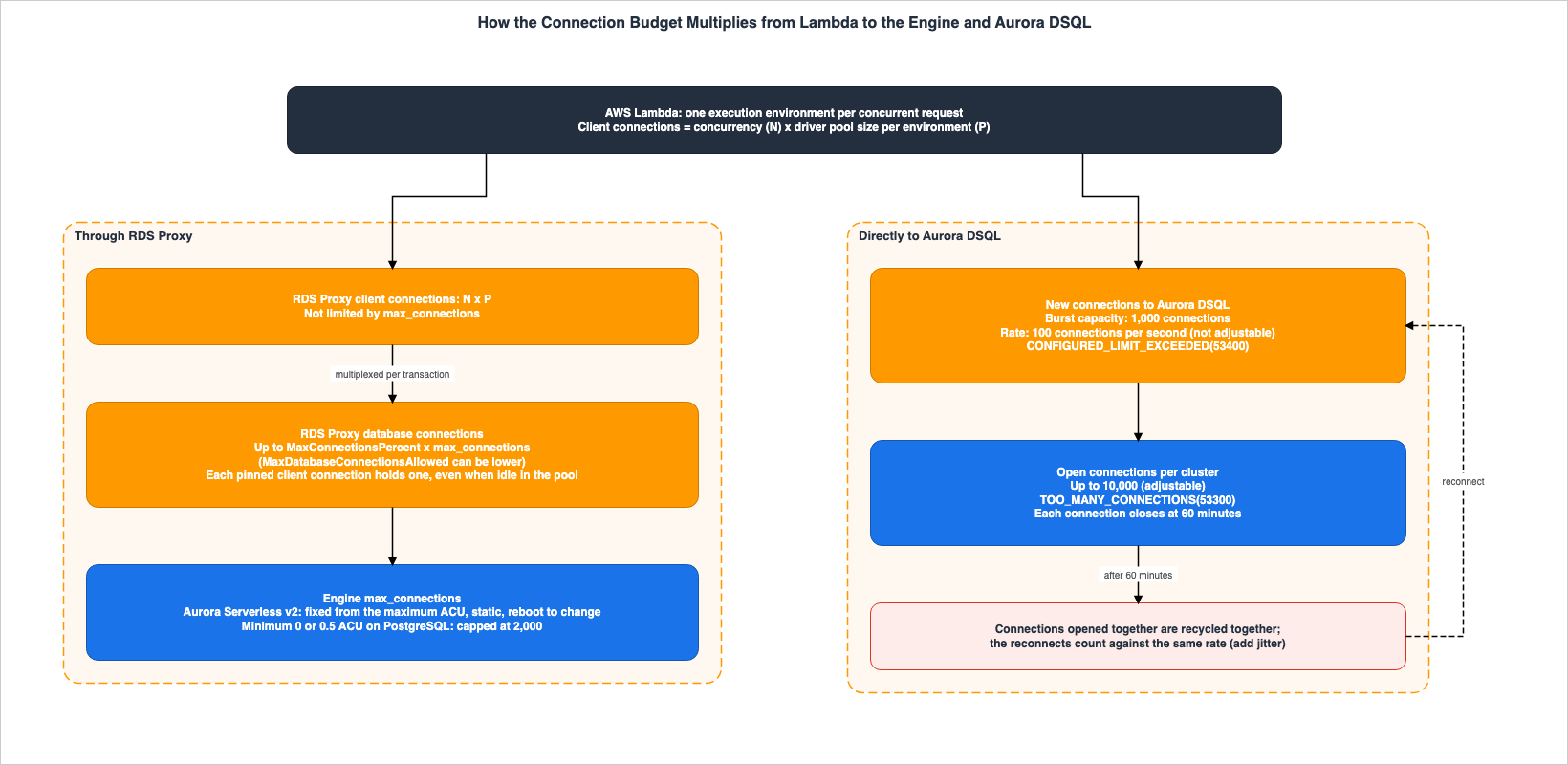
Figure 2 illustrates these calculations, separating the paths from Lambda to RDS Proxy and the engine, and from Lambda to Aurora DSQL.
7.2 From Lambda to RDS Proxy and the Database Engine
Lambda function driver pools are created for each execution environment (see Section 3.3). Consequently, the number of client connections on the Lambda side is the product of the concurrency and the pool size. RDS Proxy receives these as client connections. The connection settings page states that the number of client connections in the application pool is not constrained by themax_connections setting.The maximum number of client connections configured in your application-side connection pool does not have to be limited to the max_connections setting for RDS Proxy.The
MaxConnectionsPercent setting determines the number of database connections that RDS Proxy establishes. In the example on the connection settings page, if max_connections is set to 1000 and MaxConnectionsPercent is 95, the maximum number of connections is 950. The page also recommends setting a value at least 30% higher than the most recent peak usage, and suggests a minimum recommended value of 30 for db.t3.small instances and 20 for db.t3.medium and larger instances. The configuration guidelines page recommends higher minimums for the smaller instance classes: 100 for db.t3.small, 55 for db.t3.medium, 35 for db.t3.large, and 20 for db.r3.large or above (Sources disagree). RDS Proxy reserves a portion of these connections for monitoring and rapid failover. According to the connection settings page, the MaxDatabaseConnectionsAllowed metric does not include these reserved connections and may be lower than the value calculated using MaxConnectionsPercent.When multiplexing is effective, many client connections share a smaller number of database connections. Connections that are "pinned" cannot be shared. The workload page states that pinning creates a one-to-one relationship between client connections and database connections. The connection settings page notes that pinned connections that remain idle in the application pool will continue to hold onto database connections.
Client connections that are pinned but idle in the application-side connection pool continue to hold on to a database connection and prevent the database connection to be reused by other client connections.As an inference (Inference) of this article, in configurations with a high number of pinned connections, the number of database connections will tend to approach the product of the Lambda's concurrency and the pool size, and will quickly reach the limit defined by
MaxConnectionsPercent. The ConnectionBorrowTimeout setting determines the wait time when the limit is reached (see Section 4.2).7.3 The Engine Limit Does Not Move with Aurora Serverless v2
Aurora Serverless v2'smax_connections value does not adjust in response to changes in ACU (Aurora capacity unit) scaling. The Serverless capacity page states the following:When Aurora serverless evaluates the formula, it uses the memory size based on the maximum Aurora capacity units (ACUs) for the DB instance, not the current ACU value.According to the same page,
max_connections is a static parameter in Aurora Serverless. For the default value, which is derived from a formula, the value will not change unless the DB instance is restarted after changing the maximum capacity. The same page notes that if you set max_connections directly in a custom DB parameter group, no reboot is required. For PostgreSQL-compatible DB instances with a minimum capacity of 0 or 0.5 ACU, the maximum value for max_connections is 2,000. The same page also suggests considering a minimum ACU of 1 or greater for workloads with a high connection volume. The maximum number of DB connections supported by RDS Proxy is calculated by multiplying this fixed value by the MaxConnectionsPercent setting. Details on the formula and values are discussed in the article How Amazon Aurora serverless Decides Its Capacity.7.4 From Lambda to Aurora DSQL
Aurora DSQL has no RDS Proxy layer that users place in front of it. Instead, pools associated with each Lambda execution environment connect directly to DSQL. According to the DSQL quota page, the maximum number of connections per cluster is 10,000, and this limit can be increased. The maximum connection rate per cluster is 100 connections per second, and this limit cannot be increased.| Quota | Value | Adjustable | Error |
|---|---|---|---|
| Maximum connections per cluster | 10,000 connections | Yes | TOO_MANY_CONNECTIONS(53300) |
| Maximum connection rate per cluster | 100 connections per second | No | CONFIGURED_LIMIT_EXCEEDED(53400) |
| Maximum connection burst capacity per cluster | 1,000 connections | No | No error code |
| Connection Refill Rate | 100 connections per second | No | No error code |
The error message displayed when the rate limit is exceeded is
Unable to accept connection, rate exceeded. The DSQL quota page lists burst capacity and refill rate as separate entries, without describing their relationship. The DSQL connection blog describes them as a token bucket: each new connection consumes one token, the bucket refills at 100 per second, and connections can burst up to the 1,000-token capacity. As an inference (Inference) of this article, if a large number of Lambda execution environments are created simultaneously, and each attempts to open a connection, the burst capacity of 1,000 connections and the rate of 100 connections per second may be reached before the overall connection limit of 10,000 is reached. The DSQL pool blog also mentions that the rate of 100 connections per second may be reached during periods of high traffic. In the Section 10.2 setup, opening 2,000 connections within about one second, more than the 1,000-connection burst capacity, did not produce a rejection. This is a single observation, and it does not change the quota page values or this article's inference. The issue described in Section 5.4, connections opened together being replaced together, also counts against this rate.7.5 Counting PgBouncer Pools and Wrappers
According to the PgBouncer configuration page,default_pool_size represents the maximum number of server connections for each user and database combination, with a default value of 20. As the number of users and databases increases, the number of pools required also increases. The workload page notes that, with RDS Proxy too, pools are separated by user name. In configurations with a large number of users, pools may be divided into smaller pools for each user, which can reduce the effectiveness of connection multiplexing.According to the wrapper pool blog, the wrapper's internal pools are separated by combination of database instance and user, and cluster endpoints are not pooled. The same blog post recommends keeping pool sizes modest to ensure that the total across the pools does not exceed the database's
max_connections limit.8. Potential Negative Effects of Layering
This chapter uses examples to illustrate how layering can create conflicting combinations, where the functionality of the upper layer interferes with that of the lower layer. The workload page states that layering an application pool with RDS Proxy, in itself, does not present any conflicts.Using application-level pooling and other connection handling improvements does not inherently conflict with using RDS Proxy, and doesn't negate its benefits.The same page continues, outlining which application-side functions should be retained and which may conflict with the Proxy.
8.1 Tracking Topology in Front of the Proxy
The workload page states that as an application continues to track the topology of an Aurora cluster, it may bypass the Proxy.Keeping this topology tracking logic might lead to undesirable behavior, such as the application threads bypassing the proxy and connecting directly to individual database instances.The same page further states that in this scenario, the application should stop its own tracking and instead delegate the tracking of the cluster's topology to the RDS Proxy.
8.2 AWS Advanced Wrapper and RDS Proxy
The wrapper's README states that some of its features are not compatible with RDS Proxy.Due to this, functionality like Failover, Enhanced Host Monitoring, and Read/Write Splitting is not compatible since the driver relies on cluster topology and RDS Proxy handles this automatically.According to the same README, starting with version 3.0.0, the Simple R/W Splitting plugin is compatible with RDS Proxy. The README also indicates that even when used with RDS Proxy, the wrapper can still be helpful for IAM authentication and integration with Secrets Manager. This article suggests that whether or not the wrapper can be layered with RDS Proxy depends on whether it is being used for topology tracking or for authentication (Inference).
8.3 Cleanup with DISCARD ALL
Some PostgreSQL pool libraries run DISCARD ALL to clear the state each time a connection is returned. The workload page notes that this can conflict with RDS Proxy's state management.When using DISCARD, the proxy pins your client connection on release, reducing the multiplexing efficiency.The default
server_reset_query in PgBouncer is also DISCARD ALL, but according to the PgBouncer configuration page, it is not executed in transaction mode. The same statement is a cleanup in PgBouncer's session mode, and a cause of pinning in a pool in front of RDS Proxy.8.4 Liveness Checks and Idle Timeout
According to the configuration guidelines page, an application pool's liveness checks, whetherSELECT 1 or MySQL's COM_PING, are ordinary requests to RDS Proxy. Sending them prevents RDS Proxy from enforcing IdleClientTimeout and from managing the pool size according to MaxIdleConnectionsPercent (see Section 5.3). The same page suggests disabling liveness checks, or sending them only to connections that you do not want to time out. However, it also notes that there are reasons to keep liveness checks if you need to quickly detect when the Proxy has closed a connection, or if you need to identify connections that have been active for longer than the 24-hour lifetime threshold.8.5 Pool Size and Timeout Discrepancies
The workload page notes that if the application pool is too large or the proxy pool is too small, applications may attempt to open connections that the proxy cannot handle, resulting in delays or rejections. Regarding timeouts, the following example is provided:If the application pool keeps connections alive for 300 seconds, but the proxy is configured to close connections after 60 seconds, the application will see premature connection closures instead of the expected behavior.This is an example of a scenario where the nested rules outlined in Section 5.2 are violated.
8.6 A Proxy in Front of Aurora DSQL
As quoted in Section 3.2, the DSQL pool blog states that database-side proxies such as PgBouncer or pgpool-II should not be placed in front of Aurora DSQL. The reason given is that DSQL incorporates transaction unit multiplexing. The same blog recommends using connection pools on the application side. This passage will be treated as a blog post (see Section 9.3).9. Where the Sources Disagree and What Is Not Written
This chapter gathers the items this article marked with the Section 2.2 terms Sources disagree, Documentation does not list, and No statement found.9.1 Extended Query Protocol and Prepared Statements
Regarding whether RDS Proxy pins prepared statements of the PostgreSQL extended query protocol, the available documentation presents conflicting information.| Source | What It Says | Source State |
|---|---|---|
| Pinning page | Lists only the SQL commands PREPARE, DISCARD, DEALLOCATE, and EXECUTE as meeting PostgreSQL's criteria. Extended query protocol messages are not listed as meeting either the criteria or exceptions. | Documentation does not list |
| November 10, 2023, What's New | Even if extended query protocol messages are detected, the connection continues to be shared. | Stated |
| Extended Query Blog (November 10, 2023) | Applications connecting via the extended query protocol can benefit from multiplexing. SQL commands such as PREPARE will continue to be pinned. | Stated |
| PgBouncer and RDS Proxy Blog (October 12, 2026) | The blog states that RDS Proxy's support for prepared statements is handled via the extended query protocol. | Stated |
| re:Post Pinning Article | The article, using examples such as asyncpg and mysql.connector, states that using prepared statements results in pinning, providing an example of a log message. | Stated |
The re:Post pinning article mentions both PostgreSQL and MySQL drivers in the same section. According to the pinning page, RDS Proxy pins prepared statements for both MySQL and MariaDB, regardless of whether they are SQL statements or binary protocols. As an inference (Inference) of this article, the re:Post article may present a combined example for both MySQL and PostgreSQL, although this cannot be definitively determined from the article's text. This article concludes that sources disagree regarding extended query protocol prepared statements. This point was not tested in the Chapter 10 setup.
9.2 Does Aurora DSQL Close a Transaction at 60 Minutes?
The DSQL quota page only specifies a maximum connection time of 60 minutes, without detailing how transactions are handled at that point. Two articles on the Database Blog offer conflicting information:DSQL Connection Blog (May 11, 2026):
After one hour, the service closes the connection, regardless of whether it’s idle or active. This is by design: Amazon Aurora DSQL’s distributed architecture means internal components can fail and be replaced transparently, and the 1-hour limit makes sure your application periodically establishes fresh connections, naturally picking up healthy infrastructure. Amazon Aurora DSQL applies jitter to closures, so connections don’t drop simultaneously, and it won’t close a connection mid-transaction.DSQL Pool Blog (July 20, 2026):
When a connection reaches this age, the service closes it regardless of whether it’s idle or mid-transaction. Your pool must recycle connections before this happens.The May article states, in the same paragraph, that connections close regardless of their activity, but also that they do not close while a transaction is in progress. This article distinguishes between the terms "active" and "transaction in progress." The July article states that connections are closed even if a transaction is in progress. This article notes that sources disagree on how transactions are handled when they reach the 60-minute mark. Both articles recommend shortening the pool's lifetime to less than 60 minutes. According to the DSQL quota page, the maximum transaction time is 5 minutes. In the configuration described in Section 10.3, connections that were in the middle of a transaction at the 60-minute mark were not closed, and a COMMIT performed after 61.5 minutes was successful. This is a single observation, and this article does not change the "Sources disagree" conclusion.
9.3 A Proxy in Front of Aurora DSQL
The statement that database-side proxies should not be placed in front of DSQL is in the DSQL pool blog, and the DSQL connection blog says the same about server-side poolers (Section 3.2). This article searched the DSQL user guide three times, using different search terms, but was unable to find a similar statement. For the user guide, this article writes No statement found. Regarding whether RDS Proxy can be placed in front of DSQL, the RDS Proxy compatibility page does not list DSQL as a target, so this article writes Documentation does not list. This article does not write, as its own conclusion, that DSQL needs no proxy.9.4 The Default Value for max_prepared_statements in PgBouncer
The PgBouncer configuration page states that the default value for max_prepared_statements is 200. According to the PgBouncer changelog, version 1.24.0 (January 10, 2025) enabled support for prepared statements by default and set the default value to 200. However, the footnote in the table on the PgBouncer features page still states that a non-zero value must be set for max_prepared_statements to enable this feature. This article identifies a discrepancy between two pages on the same website, noting "Sources disagree," and treats the default value as defined on the configuration page.9.5 Other Things That Are Not Written
- PostgreSQL's
SET LOCALand RDS Proxy pinning: The pinning page writes theSET LOCALexception only in the MySQL and MariaDB section. Documentation does not list. The PgBouncer and RDS Proxy blog says thatSETwithoutLOCALcauses pinning (Section 6.2). - PgBouncer failover: The term
failoverdoes not appear on the PgBouncer features page or configuration page. How the server connection is handled when DNS resolution changes is described in the "host" section of the configuration page (Section 4.2). - PgBouncer IAM authentication: IAM is not listed in the "auth_type" options on the configuration page. Documentation does not list. The PgBouncer and RDS Proxy blog states that there is no native support.
- Inconsistencies regarding RDS Proxy IAM: The Tip on the connecting page states that the Proxy always connects to the database using passwords from Secrets Manager. The Proxy concepts page and the Proxy entry page state that end-to-end IAM allows the Proxy to use IAM to connect to the database. This discrepancy is addressed on this site's IAM Authentication to Databases, Caches, and Streams on AWS.
- Speed improvement during failover: The PgBouncer and RDS Proxy blog post mentions a 66% improvement, while a "What's New" update from October 14, 2026, mentions 83%, and the underlying engines are different (Section 4.2). This article does not treat this as a discrepancy.
- Minimum recommended
MaxConnectionsPercent: The connection settings page lists 30 fordb.t3.smalland 20 fordb.t3.mediumand above. The configuration guidelines page lists 100, 55, 35, and 20 fordb.t3.small,db.t3.medium,db.t3.large, anddb.r3.largeor above. Sources disagree (Section 7.2).
10. What This Setup Showed
This chapter details the results of observations made using an Aurora DSQL cluster and a Lambda function deployed in theus-east-1 region. Each is a single observation, not a promise of the documentation (Observation in Section 2.2). This article does not overwrite statements in the sources with these observations. RDS Proxy, PgBouncer, and Aurora PostgreSQL were not tested.10.1 Architecture
This setup consists of a single-region Aurora DSQL cluster and one Lambda function (Python, arm64) that is not placed within a VPC. The function, on each invocation, opens a predetermined number of connections simultaneously, executes aSELECT 1 query, and then closes the connections. The function does not utilize a driver pool. A local process keeps long-lived connections to the same cluster. The observations were made between 09:36 and 10:48 (UTC) on November 5, 2026.10.2 New Connection Rate
From a local machine, the function was invoked concurrently, creating batches of 500, 1,000, 1,500, and 2,000 new connections, opening each batch with a 60-second interval. Each function call was configured to open 10 connections concurrently. In every batch, all connections were successfully established, and no instances ofCONFIGURED_LIMIT_EXCEEDED(53400) occurred. The attempts to establish connections within each batch began within a 0.8-second window, and even the slowest connection completed within approximately 1.2 seconds. Even with the batch of 2,000 connections, which exceeds the 1,000-connection burst capacity listed on the quota page, no connection was rejected. This article does not overwrite the quota page values with this observation. The conditions under which rejections might occur remain unclear based on these observations.10.3 The 60-Minute Lifetime
In a local process, three connections were opened simultaneously. The first connection was left idle. The second connection periodically sent theSELECT 1 command every 60 seconds. The third connection started a transaction 57.5 minutes after it was opened, sent SELECT 1 every 15 seconds, and committed the transaction 61.5 minutes after it was opened. This kept the transaction within the 5-minute maximum transaction time while spanning the 60-minute mark. Concurrently, a connection pool was opened using psycopg_pool with a max_lifetime of 3300 seconds, borrowing a connection every minute.The first connection was closed approximately 60 minutes (between 3,596 and 3,601 seconds) after it was opened. The driver received a TLS error, not a PostgreSQL error. The DSQL quota page records the error at the 60-minute mark as
No error code.SSL error: unexpected eof while readingThe second connection's
SELECT 1 succeeded 60 minutes and 2 seconds after it was opened, and failed with the same error at 61 minutes and 3 seconds. The third connection, although in the middle of a transaction at the 60-minute mark, was not closed and the subsequent COMMIT at 61.5 minutes was successful. The connection pool replaced its connection between 53 and 54 minutes after it was opened, and the client side experienced no errors.10.4 After Token Expiration
A connection was established using a token with a 60-second expiration time. After 120 seconds, the same connection was used to executeSELECT 1. Subsequently, an attempt was made to open a new connection using the same, expired token. The SELECT 1 query successfully passed through the existing connection. However, the new connection was rejected with an error containing unable to accept connection, access denied and an expired signature (Signature expired). Both results align with the DSQL token page quoted in Section 5.5.11. Failure Modes
This chapter lists common failure scenarios based on the content of this article. All of these issues stem from failing to properly align the timing or resource allocation between different layers.- The pool's lifetime is equal to or longer than the lifetime of the lower layer. When connecting to Aurora DSQL with the default
max_lifetimeof 3600 seconds inpsycopg_pool, the pool's lifetime and DSQL's 60-minute timeout become the same (Section 5.2). If a pool in front of RDS Proxy keeps connections for 24 hours or more, the Proxy closes them first. - The idle time of the application's pool exceeds the
IdleClientTimeoutsetting of RDS Proxy. The application then experiences unexpected disconnections that it cannot explain (Section 8.5). - Frequent liveness checks prevent RDS Proxy from effectively managing idle connections, resulting in fewer idle connections being released (Section 8.4).
- In the application's pool, pinned connections remain idle, continuing to hold DB connections (Section 7.2).
- The PostgreSQL pool library sends
DISCARD ALLas a cleanup operation, and RDS Proxy pins connections each time it returns them (Section 8.3). - When using PgBouncer in transaction mode and utilizing
SETcommands or session advisory locks, state can persist and be passed to subsequent clients (Section 6.1). - Although the maximum ACU for Aurora Serverless v2 is increased, the DB instance is not restarted, and the
max_connectionsvalue remains at its previous setting. When using PostgreSQL with a minimum ACU of 0 or 0.5,max_connectionsis limited to 2,000 (Section 7.3). - Numerous Lambda execution environments simultaneously open connections to Aurora DSQL, or connections opened at the same time are closed and reopened at roughly the same time, reaching a rate of 100 connections per second (Sections 5.4 and 7.4).
- If each Lambda execution environment uses a large pool, the resulting multiplication by the number of environments can exceed the DB connection limit of RDS Proxy or the database's
max_connectionssetting (Section 7.2). - The application or AWS Advanced Wrapper tracks the cluster topology and directly connects to the DB instance, bypassing RDS Proxy (Sections 8.1 and 8.2).
12. Frequently Asked Questions About Connection Pool Placement
This chapter answers common questions that readers of Section 1.1 may have, referencing specific sections of the text.Q1. If you implement RDS Proxy, do you no longer need to think about connection lifetime on the application side?
You still need to consider it. RDS Proxy closes client connections after 24 hours, and this value cannot be changed. The connection settings page says to set the application pool's maximum lifetime shorter than 24 hours, and its idle time shorter than the Proxy'sIdleClientTimeout setting (see Section 5.2).Q2. Does RDS Proxy failover ensure that no connections are lost?
No. Some connections are canceled. According to the Proxy concepts page, if an application maintains its own connection pool, connections in the middle of a transaction or SQL statement are canceled. Most connections stay alive, and RDS Proxy keeps accepting connections at the same IP address and directs them to the new primary DB instance. Requests that wait during the DB instance's unavailability will result in a timeout error (Section 4.2) if they exceed theConnectionBorrowTimeout.Q3. Does RDS Proxy always pin connections when using prepared statements in PostgreSQL?
It depends on the method. According to the pinning page and the extended query blog, the SQLPREPARE and EXECUTE commands cause pinning. Regarding messages in the extended query protocol, the What's New announcement of November 10, 2023, and the extended query blog both state that multiplexing continues, while the re:Post pinning article reads as saying that it causes pinning. This article writes Sources disagree (Sections 6.5 and 9.1).Q4. Does the max_connections setting in Aurora Serverless v2 adjust based on changes in ACU (Aurora Capacity Units)?
No, it does not. According to the Serverless capacity page, max_connections is a fixed value calculated based on the maximum ACU, rather than the current ACU. It is a static parameter. If you change the maximum capacity, the default value will not change until you restart the DB instance; if you set max_connections directly in a custom DB parameter group, the page says no reboot is required (see Section 7.3).Q5. Aurora DSQL has a connection limit of 10,000. Is there any possibility that Lambda will run out of connections?
You can hit the limit on the rate of new connections before the limit on the number of connections. According to the DSQL quota page, the rate of new connections is capped at 100 per second, and this limit cannot be increased. The burst capacity is 1,000 connections (see Section 7.4). In the Section 10.2 setup, opening 2,000 connections at once did not produce a rejection (a single observation).Q6. Should PgBouncer or RDS Proxy be placed in front of Aurora DSQL?
The DSQL pool blog states that you should not place database-side proxies such as PgBouncer or pgpool-II in front of DSQL, and gives as the reason that transaction-level multiplexing is built in. The DSQL connection blog says the same about server-side poolers and gives availability issues as the reason. This article has not found similar wording in the DSQL user guide. Regarding RDS Proxy, the RDS Proxy compatibility page does not list DSQL (Sections 3.2 and 9.3).Q7. Can AWS Advanced Wrapper and RDS Proxy be used together?
It depends on the functionality being used. The wrapper README states that failover, Enhanced Host Monitoring, and Read/Write Splitting are not compatible with RDS Proxy. However, it notes that the wrapper is still useful with RDS Proxy for IAM authentication and Secrets Manager integration (Section 8.2).Q8. If the Aurora DSQL token expires after 15 minutes, will the connection also be terminated?
No, it will not. According to the DSQL token page, the token is only used when establishing a connection; once the connection is established, it remains valid even if the token's expiration date is reached. Connections are closed after a maximum of 60 minutes (see Section 5.5).Q9. What happens when you use SET in PgBouncer's transaction mode?
The PgBouncer features page lists SET and RESET as features that cannot be used in transaction mode. According to the PgBouncer configuration page, transaction mode does not run the cleanup statement. The PgBouncer and RDS Proxy blog provides an example where, during this mode, the session state might be exposed to the next client (see Sections 6.1 and 6.3).Q10. MySQL's SET LOCAL is not pinned by RDS Proxy, but what about PostgreSQL?
The pinning page lists SET LOCAL as an exception only in the MySQL and MariaDB section. The PostgreSQL section lists SET commands as eligible for pinning and does not mention any exceptions for SET LOCAL. This article writes Documentation does not list for the pinning page. The PgBouncer and RDS Proxy blog recommends SET LOCAL within a transaction block and says that SET without LOCAL causes pinning in RDS Proxy (Section 6.2).13. Summary
When deciding at which layer to pool connections, ensure the following:- List which of the six layers are in your setup. For each layer, list when it closes connections and its connection limit (Chapter 4).
- Set the driver pool's maximum lifetime shorter than the lifetime of the layer directly below it. If using RDS Proxy, set it to less than 24 hours; if connecting directly to Aurora DSQL, set it to less than 60 minutes. Do not leave the
psycopg_pooldefault of 3600 seconds unchanged (Section 5.2). - Set the driver pool's idle time to be shorter than the
IdleClientTimeoutof RDS Proxy. Be aware that liveness checks keep the Proxy's idle timeout from taking effect (Sections 5.3 and 8.4). - Add jitter to lifetime to prevent connections opened at the same time from being swapped simultaneously (Section 5.4).
- Verify how each of the three layers handles statements that change session state. For RDS Proxy, examine the pinning page table; for PgBouncer, examine the features page table; and for Aurora DSQL, check for unsupported features (Chapter 6).
- Ensure that the pool in front of RDS Proxy does not run
DISCARD ALL. For PostgreSQL JDBC, configure the two parameters on the connecting page (Sections 6.4 and 8.3). - Monitor the frequency of pinned connections using
DatabaseConnectionsCurrentlySessionPinnedand the reason codes in the Proxy logs (Section 6.4). - Compare the product of the number of Lambda concurrent executions and the pool size for each environment with the product of RDS Proxy's
MaxConnectionsPercentandmax_connections, and with Aurora DSQL's rate of 100 connections per second (Chapter 7). - For Aurora Serverless v2, if you change the maximum ACU and
max_connectionsuses its default value, restart the DB instance and verify thatmax_connectionshas changed (Section 7.3). - Verify that the application or wrapper is not tracking the cluster topology in front of RDS Proxy (Sections 8.1 and 8.2).
- For the three points where the sources disagree – prepared statements using the extended query protocol, transactions at DSQL's 60-minute mark, and the minimum recommended
MaxConnectionsPercent– decide which source to rely on before designing the solution (Sections 9.1, 9.2, and 9.5).
14. References
- Amazon RDS Proxy - Amazon Relational Database Service
- RDS Proxy concepts and terminology - Amazon Relational Database Service
- Avoiding pinning an RDS Proxy - Amazon Relational Database Service
- RDS Proxy connection considerations - Amazon Relational Database Service
- Connecting to a database through RDS Proxy - Amazon Relational Database Service
- Configuration guidelines - Amazon Relational Database Service
- Application and workload considerations - Amazon Relational Database Service
- Monitoring RDS Proxy metrics with Amazon CloudWatch - Amazon Relational Database Service
- Amazon RDS Proxy for Aurora - Amazon Aurora
- Supported Regions and DB engines for Amazon RDS Proxy - Amazon Relational Database Service
- Supported Regions and Aurora DB engines for Amazon RDS Proxy - Amazon Aurora
- Performance and scaling for Aurora serverless - Amazon Aurora
- Release calendars for Amazon RDS for PostgreSQL - Amazon Relational Database Service
- Release calendars for Aurora PostgreSQL - Amazon Aurora
- Cluster quotas and database limits in Amazon Aurora DSQL - Amazon Aurora DSQL
- Generating an authentication token in Amazon Aurora DSQL - Amazon Aurora DSQL
- Aurora DSQL Connector for Python - Amazon Aurora DSQL
- Aurora DSQL adapter for Tortoise ORM - Amazon Aurora DSQL
- Aurora DSQL dialect for SQLAlchemy - Amazon Aurora DSQL
- Migrating from PostgreSQL to Aurora DSQL - Amazon Aurora DSQL
- Accessing Aurora DSQL with PostgreSQL-compatible clients - Amazon Aurora DSQL
- Using AWS Lambda with Amazon RDS - AWS Lambda
- Understanding Lambda Event Function scaling - AWS Lambda
- Python runtime for Lambda Managed Instances - AWS Lambda
- PgBouncer features
- PgBouncer config
- PgBouncer changelog
- aws/aws-advanced-jdbc-wrapper - GitHub
- Amazon RDS Proxy multiplexing support for PostgreSQL Extended Query Protocol - AWS Database Blog
- Amazon Aurora DSQL connections: Drivers, strings, and best practices - AWS Database Blog
- Connection pooling strategies in Amazon Aurora DSQL - AWS Database Blog
- Configure AWS Advanced JDBC Wrapper connection pooling with the assistant - AWS Database Blog
- Understanding the differences between PgBouncer and Amazon RDS Proxy for PostgreSQL connection pooling - AWS Database Blog
- Amazon RDS Proxy now supports PostgreSQL Extended Query Protocol - AWS What's New
- Amazon RDS Proxy announces support for end-to-end IAM authentication - AWS What's New
- Amazon RDS Blue/Green Deployments now supports Amazon RDS Proxy - AWS What's New
- Amazon RDS Proxy now supports SQL Server 2022 - AWS What's New
- Resolve connection pinning issues in RDS Proxy - AWS re:Post
- Amazon RDS and Aurora High Availability Guide - Multi-AZ, Read Replicas, RDS Proxy, and Global Database Failover
- IAM Authentication to Databases, Caches, and Streams on AWS - Token Lifetime, What Revoking Access Does to Open Connections, and the Identity Inside the Service
- Amazon Aurora DSQL Design Decision Guide - Distributed SQL Between Amazon DynamoDB and Aurora PostgreSQL
- AWS Lambda Concurrency and Scaling Guide - Reserved and Provisioned Concurrency, Throttling, and Event Source Scaling
- How Amazon Aurora serverless Decides Its Capacity - What You Set, What Aurora Decides Within Your Range, What the Maximum ACU Fixes, and Where Each Shows Up
- AWS Lambda Managed Instances - Capacity Providers and the Multi-Concurrency Trap
- Zero-Downtime Database Change on RDS and Aurora - Blue/Green Deployments, Upgrades, and Rollback Design
- When Does a Connection to an AWS Endpoint Actually Use ML-KEM? - Client Defaults, Server Policies, Each Hop, and How to Tell
- What Happens to a Failed Asynchronous Lambda Invocation - Caller Retries, the Internal Queue, and Where a Discarded Event Goes
- Durability on Amazon ElastiCache for Valkey - Where an Acknowledged Write Survives, the 10-Second Buffer, and Changing It on a Live Cluster
References:
Tech Blog with curated related content
Written by Hidekazu Konishi