Counting Connections on ElastiCache for Valkey - Per-Node and Per-Cache Limits, Endpoints, and Reconnects After Failover
First Published:
Last Updated:
This article explains how connections to ElastiCache for Valkey are counted within one Region. The points where connections are counted are: client-side libraries, the node's
maxclients setting, CloudWatch's CurrConnections metric, and the serverless cache. It then details where connections are directed based on endpoint type, and what clients re-resolve and how they reconnect after an automatic failover in the Region, using direct references to the official documentation.In conclusion, the same "connection" is counted differently at each layer. The node
maxclients value of 65,000 is a limit set by ElastiCache and cannot be changed. Valkey's default value is 10,000, and the ElastiCache parameters page lists different values for some node types. For Serverless, 65,000 represents a limit per cache, not per node. After a failover, for clusters with cluster mode disabled, the DNS name resolution changes. For clusters with cluster mode enabled, clients refresh the slot map.This article is based on reviewing the documentation on November 11, 2026 (Japan Standard Time), and on observing connection counts on a serverless cache in the us-east-1 Region. The results are summarized in Chapter 7, presented separately from the official documentation. Pricing and performance comparisons are not covered.
Related articles on this site:
- Where Connections Are Pooled on AWS - Lifetime, Session State, and Connection Budget Across Driver Pools, PgBouncer, RDS Proxy, and Aurora DSQL
- Durability on Amazon ElastiCache for Valkey - Where an Acknowledged Write Survives, the 10-Second Buffer, and Changing It on a Live Cluster
- ElastiCache Global Datastore - Settings Fixed to the Primary, Replication Lag, and Manual Promotion
- IAM Authentication to Databases, Caches, and Streams on AWS - Token Lifetime, What Revoking Access Does to Open Connections, and the Identity Inside the Service
- AWS History and Timeline regarding Amazon ElastiCache - Overview, Functions, Features, Summary of Updates, and Introduction
- Amazon RDS and Aurora High Availability Guide - Multi-AZ, Read Replicas, RDS Proxy, and Global Database Failover
Table of Contents
- 1. Scope and Assumptions
- 2. How to Read the Tables and Terms
- 3. Connection Destinations for Each Endpoint
- 4. Locations Where Connections Are Counted and Reach a Limit
- 5. How Clients Hold Connections
- 6. What a Client Re-Resolves After a Failover
- 7. Observations on a Serverless Cache
- 8. Where the Sources Disagree and What They Do Not Say
- 9. Failure Modes
- 10. Frequently Asked Questions About ElastiCache for Valkey Connections
- 11. Summary
- 12. References
1. Scope and Assumptions
This chapter defines the intended audience, the scope of this article, and the relevant materials to be reviewed. The conclusions come first, in ten points:- ElastiCache for Valkey has three forms: cluster mode disabled, cluster mode enabled, and Serverless. Each form has different endpoints that applications connect to (Chapter 3).
- For clusters configured with cluster mode disabled, the reader endpoint is a DNS record. The endpoints page states that this is not a load balancer (Section 3.2).
- Node-based clusters have a
maxclientssetting of 65,000, which cannot be modified. The default value for Valkey itself is 10,000. Certain node types have different values. For Serverless, the 65,000 is per cache. (Section 4.1) - The
CurrConnectionsmetric does not include connections originating from read replicas. The node metrics page states that ElastiCache uses 4 to 6 connections for monitoring purposes (Section 4.2). - Valkey GLIDE allows a single client to multiplex multiple requests over a single connection. The GLIDE documentation states that in cluster mode, it keeps one connection to each node (two in the setup in Chapter 7, Observation). Consequently, the total number of connections increases as a product of the number of clients and the number of nodes each client connects to (Chapter 5).
- In clusters configured with cluster mode disabled, a failover event causes the DNS name associated with the primary endpoint to change, pointing to the promoted replica. The reader endpoint is also updated to point to the new replica. Applications must update their own connection information for the node endpoint (Section 6.1).
- In clusters configured with cluster mode enabled, the client library detects topology changes. On a
MOVEDresponse or a periodic check, it refreshes the slot map (Section 6.2). - If a large number of clients simultaneously attempt to re-establish connections and refresh the topology without any backoff mechanism, it can exhaust the server's CPU resources. The discovery page recommends using exponential backoff and jitter (Section 6.4).
- In a serverless cache, a proxy layer receives connections. The documentation contains conflicting statements: one indicates that nodes can be replaced without disconnecting clients, while another suggests that connections may be terminated for load balancing purposes (Section 6.3, Section 8.2).
- In a test on a serverless cache, a single GLIDE client kept four connections, two to port 6379 and two to port 6380, even with
ReadFrom.PRIMARY. With ten clients,CurrConnectionswas 40 (Sections 7.2 and 7.3, Observation).
1.1 Intended Audience
This article is intended for developers and operations personnel who are using ElastiCache for Valkey, either as node-based clusters or as serverless caches.It is also aimed at those responsible for estimating the number of connections required for the cache as the number of Lambda functions or container tasks increases, during the design phase.
Finally, it targets individuals seeking to avoid issues such as the
ERR max number of clients reached response, sudden increases in connection counts, and delays in reconnecting after a failover.This article assumes that readers are considering the following points, and checks each point against the sources:
- Each node can handle up to 65,000 connections, regardless of the node type.
CurrConnectionsis the actual number of connections currently established by applications.- Reader endpoints distribute read requests across replicas.
- After a failover, applications do not need to take any action.
- With GLIDE, connection pool design is unnecessary.
1.2 What This Article Covers and What It Does Not
This article addresses the following topics: endpoint types within a single Region, connection limits for nodes and caches, connection metrics, how clients manage connections, reconnection after automatic failover within a Region, disagreements between the sources, and observations on a serverless cache.This article does not cover:
- Pricing and performance comparisons.
- Connections to databases and their pools. This is covered in this site's article Where Connections Are Pooled on AWS. The same article lists connections to ElastiCache as one of the topics it does not cover. This article is where that topic goes.
- Write durability and configuration changes. This is covered in this site's article Durability on Amazon ElastiCache for Valkey.
- The mechanism by which IAM authenticated connections expire after 12 hours, and the validity period of tokens. Chapter 5 of this site's article IAM Authentication to Databases, Caches, and Streams on AWS covers this.
- Replication across Regions and promotion (Global Datastore). This article focuses solely on topics within a single Region. This site's article ElastiCache Global Datastore covers Global Datastore.
- A historical timeline of ElastiCache features. This site's article AWS History and Timeline regarding Amazon ElastiCache covers this.
- Procedures for migrating to a serverless cache, and the cutover.
- Procedures for triggering a failover, and increasing the number of connections to the maximum limit.
- ElastiCache for Memcached.
1.3 Date of Review and Materials Reviewed
This article was written after reviewing the following materials on November 11, 2026 (Japan Standard Time). Throughout the text, the English names in parentheses are used.From the Amazon ElastiCache User Guide, this article read the following pages:
- Finding connection endpoints in ElastiCache (endpoints page)
- ElastiCache components and features (components page)
- How ElastiCache works (how-it-works page)
- Engine-specific parameters: Valkey and Redis OSS parameters (parameters page)
- Valkey and Redis OSS configuration and limits (serverless configuration page)
- Metrics for Valkey and Redis OSS (node metrics page)
- Metrics and events for Valkey and Redis OSS serverless caches (serverless metrics page)
- Minimizing downtime in ElastiCache by using Multi-AZ with Valkey and Redis OSS (failover page)
- Large number of connections (Valkey and Redis OSS) (connections best-practice page)
- Cluster client discovery and exponential backoff (Valkey and Redis OSS) (discovery page)
- Lettuce client configuration (Valkey and Redis OSS) (Lettuce page)
- Persistent connection issues (troubleshooting page)
- Supported and restricted Valkey, Memcached, and Redis OSS commands (commands page)
- Setting up ElastiCache (setup page)
- Engine versions and upgrading in ElastiCache (engine versions page)
- Authenticating with IAM in ElastiCache (IAM page)
- Reliability Pillar in the Amazon ElastiCache Well-Architected Lens (Well-Architected Lens)
In addition, this article read the following sources:
- Amazon ElastiCache FAQ (FAQ) and the Managed Maintenance and Service Updates Help Page (maintenance FAQ).
- Three posts from the AWS Database Blog: Monitoring best practices with Amazon ElastiCache for Redis using Amazon CloudWatch (monitoring blog post), Configure Amazon ElastiCache for Redis for higher availability (availability blog post), and Resilience testing on Amazon ElastiCache with AWS Fault Injection Service (FIS blog post).
- Three articles from the AWS re:Post Knowledge Center: the article on connection issues with ElastiCache Serverless, the "Network allowance exceeded" article, and the article on error messages in ElastiCache Redis clients (re:Post).
- valkey.io: Client handling (Valkey clients page), Cluster specification (Valkey cluster spec), and pages for the
CLUSTER SLOTSandCLUSTER SHARDScommands. - glide.valkey.io: Pages for Connection Management, Configure Periodic Checks, Timeouts and Reconnect Strategy, High-Availability, Specify a Read Strategy, Use Client Pool, and Resilience Best Practices (GLIDE docs).
The user guide and the valkey.io pages were read using the original text obtained with curl. The FAQ, Database Blog, re:Post, and Well-Architected Lens were read using AWS Knowledge's search and reading features. The GLIDE documentation pages do not include dates. This article reflects the content read on November 11, 2026, and treats it as the state of valkey-glide 2.6.0, the release available on PyPI on that day.
1.4 Terms, and Different Things with the Same Spelling
This article will consistently use the following terms:- Connection: A single TCP connection between a client and a server.
- Client: An instance of a client library created within an application. The number of connections a single client holds varies depending on the library.
- Node-based cluster: A cluster created using a specific node type. It can exist in two forms: cluster mode disabled and cluster mode enabled.
- Serverless cache: A cache created using ElastiCache Serverless.
- Promotion: The process by which a replica assumes the role of a primary. In this article, failover refers only to automatic failover within a single Region.
- Slot map: A mapping of hash slots to nodes, maintained by clients operating in cluster mode.
The materials referenced in this article contain some terms that have the same spelling but different meanings:
- Reader endpoint: In ElastiCache, this refers to the DNS name for a replica within a cluster operating in cluster mode disabled. Amazon Aurora also has endpoints with the same name for its clusters. While ElastiCache APIs and CloudFormation return a
ReaderEndpointentry for serverless caches as well, in this article, "reader endpoint" refers only to those associated with clusters operating in cluster mode disabled. - Configuration endpoint: In ElastiCache, this is the DNS name for a cluster operating in cluster mode enabled. ElastiCache for Memcached also uses the same name. This article does not cover Memcached.
- Connection limit: The maximum number of connections in a client's pool, the
maxclientssetting for a node, and themaxclientssetting for a serverless cache are counted separately (see Chapter 4). MOVED: In this article,MOVEDrefers only to the response returned by Valkey's cluster mode servers, redirecting to a different node.
2. How to Read the Tables and Terms
This chapter defines the terminology used in the tables within this article, specifically the terms for the state of the sources, as well as the format for confirmation dates and other dates.2.1 Terms for the State of the Sources
This article uses seven terms to describe the state of the documentation. These terms, including their English spellings, will also be used in the tables.- Stated: The documentation contains a statement regarding the matter.
- Stated as not supported: The documentation explicitly states that the matter is not supported or cannot be used.
- Documentation does not list: While a list or table exists, the specific item is not included. This does not necessarily indicate that the matter is unsupported or unavailable.
- No statement found: Despite searching using different search terms and examining different categories of documentation (as described in Section 1.3), no relevant statement could be found. This does not necessarily indicate that the matter is absent or does not occur.
- Sources disagree: The documentation from two different sources provides conflicting statements regarding the same matter. This includes cases where the statements directly contradict each other, as well as cases where the scope, strength, or subject matter differs, and the text alone does not settle which one applies. This article presents both statements and their sources without designating either as incorrect.
- Inference: This represents an inference made by this article, and is not a statement found in any of the documentation. This article says in the same sentence that it is an inference.
- Observation: This is based on observations made during testing (as described in Chapter 7) and is not a commitment made by the documentation. This article will not override statements found in the documentation with observations.
This article distinguishes between "Stated as not supported" and "No statement found." The former refers to a statement within the documentation, while the latter indicates that this article was unable to find a relevant statement.
This article will not classify two statements that differ only in counting methods or versions as "Sources disagree." For example, the parameters page gives the default value of
tcp-keepalive as 0 in the Redis OSS 2.6.13 table and as 300 in the table of changes for Redis OSS 3.2.4. The page notes that this change occurred in version 3.2.4, indicating a version difference (see Section 8.1).2.2 Verification Date and Date Format
The verification date for this article is November 11, 2026 (Japan Standard Time). Pages may be updated after the verification date. In particular, themaxclients values for each node type, the default values for GLIDE, and the configuration values of serverless caches may change.The dates in Chapter 7 are written in Japan Standard Time, and every date includes the year.
3. Connection Destinations for Each Endpoint
This chapter outlines the types of endpoints an application connects to, and specifies which nodes each connection is directed towards.3.1 Three Forms and Their Endpoints
The endpoints page lists the endpoints used for each form as follows:- Clusters consisting of a single node: Use the endpoint of that node for both reading and writing. There is no primary endpoint.
- Clusters with cluster mode disabled, containing multiple nodes: These have three types of endpoints: primary, reader, and node.
- Clusters with cluster mode enabled: These have one configuration endpoint. A client compatible with cluster mode is required.
The troubleshooting page lists the endpoints that ElastiCache provides as DNS names as four types:
Configuration, Primary, Reader, and Node. The page also explains that a failover or a cluster change may change the IP addresses associated with these names, and that these updated values are automatically refreshed.Serverless caches are separate from these. The how-it-works page explains that the DNS endpoint connected to by the application is a single endpoint, and that a proxy layer receives the connections. The serverless configuration page explains that the cache advertises two ports with the same hostname. Port 6379 is the primary port, handling both read and write operations. Port 6380 is the read port, handling read operations with eventual consistency using the
READONLY command.Table 1 summarizes the destination for each endpoint type and how it is affected by configuration changes.
| Form | Endpoint | Connection Destination | Behavior on Configuration Change | Reference |
|---|---|---|---|---|
| Single Node | node endpoint | That node | — | Stated (endpoints page) |
| Cluster Mode Disabled | primary endpoint | Always the primary node | Follows the promotion of a replica | Stated (endpoints page) |
| Cluster Mode Disabled | reader endpoint | Any one replica node. Determined by DNS round robin. | Follows replica additions and deletions. | Stated (endpoints page) |
| Cluster Mode Disabled | node endpoint | A specific node | If replicas are added or removed, the application must update accordingly. | Stated (endpoints page) |
| Cluster Mode Enabled | configuration endpoint | Entry point for clients to discover primary and replica nodes for each shard. | Clients refresh the slot map (Section 6.2). | Stated (components page) |
| Serverless | Single DNS name, port 6379 | Proxy layer | Clients do not need to re-discover the topology. | Stated (how-it-works page) |
| Serverless | Same name, port 6380 | Proxy layer. For eventually consistent reads. | Same as above. | Stated (serverless configuration page) |
The troubleshooting page and the setup page state that a serverless cache needs both port 6379 and port 6380 open. The reason is the following sentence:
Many client libraries connect to both ports even if you don't actively use Read From Replica, so you must make both ports accessible.3.2 A Reader Endpoint Is Not a Load Balancer
Regarding reader endpoints, the endpoints page first states that incoming connections are split evenly among all read replicas. It then clarifies that how this distribution occurs depends on when the application establishes connections and how it reuses them. A note follows:A reader endpoint is not a load balancer. It is a DNS record that will resolve to an IP address of one of the replica nodes in a round robin fashion.This article interprets that sentence to mean that the reader endpoint distributes IP addresses returned each time a name is resolved, rather than requests themselves. Once a connection is established with a replica, it remains associated with that replica until the connection is closed. Applications that hold only a few connections and reuse them for extended periods may experience uneven distribution of connections across replicas. The second and third sentences of this paragraph are an inference (Inference).
Reader endpoints are only applicable to clusters configured with cluster mode disabled. In clusters with cluster mode enabled, clients locate replicas and determine where to send read requests based on their own configurations. In GLIDE, the value of the
ReadFrom read strategy determines this (see Section 5.2).3.3 A Configuration Endpoint Is an Entry Point for Discovery
The components page states that for clusters with cluster mode enabled, there is a single configuration endpoint. Connecting to this endpoint allows applications to discover the primary and read endpoints for each shard in the cluster. The discovery page indicates that clients can obtain the mapping between slots and nodes using either theCLUSTER SLOTS or CLUSTER NODES commands, recommending the CLUSTER SLOTS command.The Lettuce page explains that a DNS lookup of the configuration endpoint returns a list of all available nodes in the cluster, and that the name is resolved to one of them at random during cluster initialization. The discovery page further states that when using the configuration endpoint, the discovery load is distributed across all nodes in the cluster, up to a maximum of 90, rather than being limited to a small, predetermined number of nodes.
The configuration endpoint receives only the initial connection from the client and the queries for the slot map. After that, the client sends requests directly to the nodes given by the slot map. This paragraph is an inference (Inference) from the components page and the discovery page.
4. Locations Where Connections Are Counted and Reach a Limit
This chapter shows where the same connection is counted, and as which number.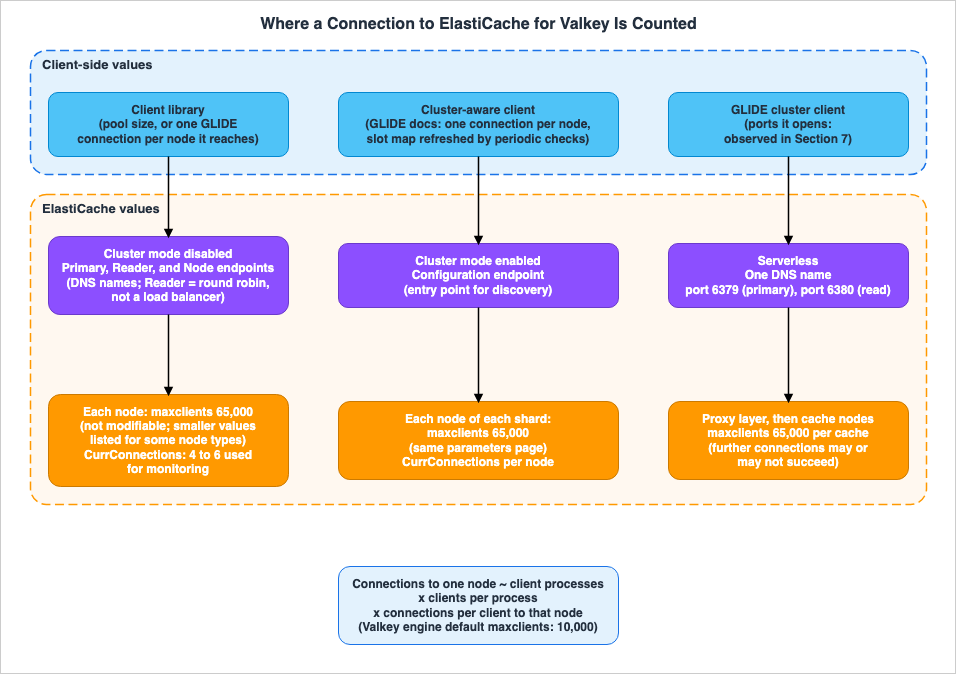
4.1 Four Values for maxclients
The value of maxclients varies depending on the documentation, with four distinct values identified.The first is the default value of Valkey itself. The Valkey clients page states:
The limit for the maximum number of clients that can be handled simultaneously is configurable using the maxclients directive in valkey.conf. The default is 10,000 clients.The same page also indicates that when the limit is reached and Valkey cannot accept new connections, it tries to send an error to the client and closes the connection immediately.
The second value applies to node-based clusters in ElastiCache. The parameters page lists the following for the
maxclients row. The spelling explicity is as in the original.maxclients
This value applies to all instance types except those explicity specified
Default: 65000
Type: integer
Modifiable: NoThe monitoring blog post also states that ElastiCache's default and non-modifiable value is 65,000, and that each node can use up to 65,000 simultaneous connections.
The third represents exceptions specific to each node type. The parameters page lists the following values directly below that row: 20,000 for
t4g.micro and t3.micro, and 46,000 for t3.small and t3.medium. These values are non-modifiable.However, the
maxclients row only appears once in the parameters page, within a table for Redis OSS 2.6.13. It does not appear in the sections detailing parameters for Valkey, nor in the section listing parameters for Valkey node types. That section only lists maxmemory. This article found no statement on whether these exception values apply to Valkey nodes (No statement found). The beginning of the parameters page states that Valkey 7.2 parameters are the same as those for Redis OSS 7, and that most Valkey 8 parameters are compatible with Redis OSS 7.1. Therefore, it can be inferred that the same values may apply to Valkey nodes. However, this reading is an inference (Inference).The fourth value applies to serverless caches. The serverless configuration page states that the configuration of serverless caches cannot be modified, and lists
maxclients as 65,000, with the following explanation:The maximum number of clients that can be connected to the cache at one time. Further connections established may or may not succeed.This value of 65,000 is per cache, not per node. Connections exceeding this limit may or may not be successful. This article did not try to exceed this limit.
The connections best-practice page states that serverless caches and individual nodes in ElastiCache for Redis OSS can handle a maximum of 65,000 concurrent connections. While the page title names both Valkey and Redis OSS, the sentence in question specifically refers to Redis OSS nodes. The same page also advises against consistently operating at that maximum number of connections.
Table 2 summarizes four values:
| Value | Unit | Modifiable | Reference | Status |
|---|---|---|---|---|
| 10,000 | Valkey process | Can be changed via valkey.conf | Valkey clients page | Stated |
| 65,000 | Node in a node-based cluster | Not possible | Parameters page, troubleshooting page, monitoring blog post | Stated |
| 20,000 and 46,000 | Node of some node types | Not possible | Table for Redis OSS 2.6.13 on the parameters page | Stated (No statement found regarding Valkey nodes) |
| 65,000 | Serverless cache | Not possible. Exceeding this limit does not guarantee successful connections. | Serverless configuration page | Stated |
4.2 CurrConnections and Monitoring Connections
CloudWatch'sCurrConnections is defined on the node metrics page as follows:The number of client connections, excluding connections from read replicas. ElastiCache uses 4 to 6 of the connections to monitor the cluster in each case. This is derived from the connected_clients statistic at INFO.Two things follow from this definition:
- Connections from read replicas to the primary are not included in the
CurrConnectionsmetric. - ElastiCache uses 4 to 6 connections for monitoring purposes. Even when the application is not connected, the metric may not always report a value of 0. The second sentence of this item is an inference (Inference) from the definition.
On the same page, under the
NewConnections row, there is a separate note. In Redis OSS versions 5 and below, ElastiCache uses 2 to 4 of the counted connections for monitoring. In Redis OSS versions 6 and above, monitoring connections are not included in this metric. This note is located under the NewConnections row and is not present under the CurrConnections row. This article does not combine these notes for both metrics. The page states at the beginning that these metrics are the same when using the Valkey engine. However, the note distinguishes between Redis OSS versions, and no statement was found on which of the two cases Valkey nodes fall under (No statement found).The
CurrConnections definition on the serverless metrics page simply states the number of client connections to the cache. It does not mention monitoring connections. The dimension name for the serverless cache metrics is clusterId, which is different from the CacheClusterId used for node-based clusters.When comparing
maxclients and CurrConnections, be aware of these two key differences. maxclients is the maximum limit for a node or cache, while CurrConnections may include monitoring connections. Additionally, CurrConnections does not include connections from read replicas.4.3 NewConnections and Connections That Are Opened and Closed
NewConnections is the total number of connections accepted by the server during a specific period. The troubleshooting page clarifies that CurrConnections reflects the number of connections established when the data was collected, while NewConnections is the number of connections created during that same period. The same page points out that a node with thousands of NewConnections per minute indicates that connections are created and used for only a few commands, which is not optimal.The monitoring blog post notes that even when a single node receives 100,000
NewConnections per minute, the CurrConnections count may not exceed 2,000. In such cases, the node is not reaching its maximum concurrent connection limit. However, establishing a TCP connection takes a few milliseconds, and rapidly opening and closing connections can impact the node's performance.The troubleshooting page recommends using connection pools or maintaining persistent connections, and limiting the pool to a few hundred connections at most.
4.4 timeout and tcp-keepalive
In node-based clusters, the server can also close unused connections. The default value fortimeout on the parameters page is 0, and this value can be modified. A value of 0 means that the server will not close unused client connections. Values between 1 and 19 are invalid, while values of 20 or greater represent the number of seconds before an idle connection is closed.The troubleshooting page describes a "connection leak" as a situation where an application malfunction causes a connection to be forgotten and remain unused. This can result in
CurrConnections continuously increasing. It notes that some administrators may set the timeout value when they are unable to immediately fix the application. The same page also states that setting a timeout value that is too small can lead to unnecessary disconnections and delays in clients re-establishing their connections.Setting a non-zero value for
tcp-keepalive (e.g., N) will cause the server to periodically check every N seconds to verify that the client is still connected. The table for Redis OSS 2.6.13 on the parameters page lists the default value as 0, while the table detailing changes in Redis OSS 3.2.4 lists the default value as 300. The monitoring blog post also states that the default value since Redis 3.2.4 is 300 seconds. There is no entry for tcp-keepalive in the Valkey section.The
timeout value for serverless caches is 0. The serverless configuration page includes the following description:Clients are not forcibly disconnected at a specific idle time, but they may be disconnected during steady-state for load balancing purposes.4.5 Items Counted Outside of Nodes
The number of connections is not solely limited by a node'smaxclients setting. The troubleshooting page and re:Post also mention connection limits tracked by the security groups associated with a node. When the NetworkConntrackAllowanceExceeded value in CloudWatch is non-zero, it indicates that the tracking limit has been exceeded, and new connections are likely to fail. re:Post notes that new connections may fail until ElastiCache closes existing connections, and gives two remedies: setting the server-side timeout to close idle connections, and using a connection pool on the client.Client-side limits also exist. The troubleshooting page provides an example of the ephemeral port range in Linux, noting that there is a limit to the number of connections that can be established from the same source to the same port on the same node.
5. How Clients Hold Connections
This chapter describes how client libraries handle connections and provides an estimate of the number of connections a node may receive.5.1 Clients with Pools and Multiplexed Clients
The connections best-practice page notes that creating TCP connections is a computationally intensive operation compared to typical Valkey commands, and recommends using a connection pool if the client library has one. The same page provides examples of pools for redis-py and Lettuce, with a maximum limit of 10. A pool with a finite size bounds the number of concurrent connections originating from the application.The "Connection Management" page in the GLIDE documentation presents a different approach. GLIDE is an asynchronous client that utilizes multiplexed connections. In many scenarios, a single GLIDE client is sufficient, and it can handle requests from multiple threads using a single connection. However, the same page recommends using separate clients for blocking commands, large values, Pub/Sub, and the
WATCH and UNWATCH operations. It then gives the following sentence:Be aware that in cluster mode, GLIDE maintains a connection to each node in the cluster; it is not scalable to open a large number of clients.The "Use Client Pool" page in the GLIDE documentation presents client pools as a preview feature. It is available in Python, Java, Node.js, and Go, and the default pool size is set to 10. As this is a preview, the API may be subject to change and does not necessarily adhere to standard versioning practices.
Within the same ElastiCache documentation, there are pages that recommend using pools and pages that introduce clients that do not require pools. This article does not call these two a disagreement. Clients that utilize pools borrow a connection for each request, while GLIDE multiplexes requests over a single connection. These represent different client types.
5.2 Read Strategies and the Nodes a Client Connects To
The "Specify a Read Strategy" page in the GLIDE documentation states that the default setting,PRIMARY, directs reads to the primary node that owns the slot. With PREFER_REPLICA, reads are distributed in a round-robin fashion across all replicas, and if no replicas are available, reads are sent to the primary. Other options, such as AZ_AFFINITY, which considers Availability Zones, are also available.The GLIDE documentation states that in cluster mode, GLIDE keeps a connection to each node. Since replicas are also nodes, clients may also keep connections to replicas, regardless of the read strategy. This reading is an inference (Inference). In a serverless cache, connections to port 6380 correspond to these replica connections. The setup page notes that many clients connect to both ports, even if they do not explicitly use Read From Replica. In the setup in Chapter 7, GLIDE 2.6.0 connected to both ports even with
ReadFrom.PRIMARY (Observation).5.3 Estimating the Number of Connections
The number of connections a node receives can be estimated using the following calculation:connections to one node ≈ (number of client processes) × (clients per process) × (connections per client to that node)Each term in the calculation is determined as follows:
- Client processes: The number of processes connecting to the cache. For Lambda functions, this corresponds to the number of execution environments; for containers, it corresponds to the number of tasks. The number of Lambda execution environments is determined by the concurrency level, as detailed in the AWS Lambda Concurrency and Scaling Guide.
- Clients per process: The number of clients created within a single process. The GLIDE documentation recommends a single client for most workloads, but suggests using separate clients for commands that might block.
- Connections per client to that node: For clients with a pool, this is the maximum size of the pool. In GLIDE's cluster mode, according to the GLIDE documentation, this is one connection to that node (two in Chapter 7, Observation).
For example, if there are 500 Lambda execution environments, and each of those has 2 GLIDE clients, then in a cluster mode enabled cluster, each primary node will receive at least 500 × 2 × 1 = 1,000 connections. Replica nodes may also receive the same number of connections, regardless of the read strategy (Section 5.2). This example is an inference (Inference) from applying the formula above.
Chapter 7 of this site's article Where Connections Are Pooled on AWS describes how to estimate the connection budget for databases by summing the values for each layer. Similarly, for ElastiCache, the result of the formula above should be compared against the node's
maxclients setting, as well as the monitoring connections in Section 4.2 and the limits outside the node in Section 4.5.5.4 What a Cluster-Mode-Enabled Client Does First
The discovery page states that clients connecting to a cluster with cluster mode enabled must be cluster aware. Clients keep a slot map that associates hash slots with nodes, allowing them to route requests to the correct node. They discover all slots and their nodes in the following two situations:- When initializing the client.
- When receiving a
MOVEDresponse from a server. For example, during a failover, when a replica takes over the slots previously served by the former primary.
The "Configure Periodic Checks" page in the GLIDE documentation states that GLIDE in cluster mode periodically checks the cluster topology and updates the slot map if it finds a change.
Periodic checks are enabled by default with a 60 second interval.If periodic checks are disabled, GLIDE refreshes the topology only when it receives a redirection error.
6. What a Client Re-Resolves After a Failover
This chapter outlines what changes and what a client re-resolves, depending on the endpoint type, following an automatic failover within a Region.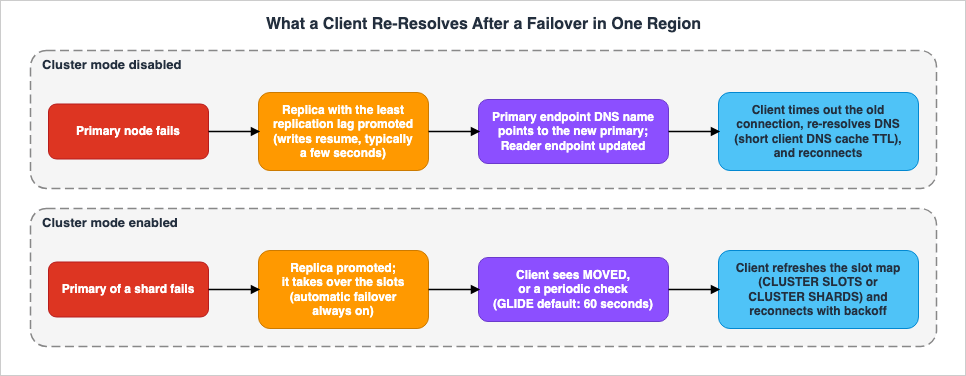
6.1 Cluster Mode Disabled: The DNS Name Points to a New Node
The failover page states that in clusters with Multi-AZ enabled, when the primary node fails, the replica with the least replication lag is promoted to primary. Regarding scenarios where only the primary node fails, the same page explains:Writes can resume as soon as the promotion process is complete, typically just a few seconds. If your application is writing to the primary endpoint, you don't need to change the endpoint for writes or reads. ElastiCache propagates the DNS name of the promoted replica.For the same case, the failover page details the impact on each endpoint after a new replica becomes available:
- Primary Endpoint: The DNS name of the new primary node is propagated to the primary endpoint. No application changes are required.
- Reader Endpoint: The endpoint is automatically updated to point to the new replica node.
Regarding node endpoints, the beginning of the failover page states: If you are reading from individual endpoints, you need to update the read endpoint of the replica that has been promoted to primary to point to the new replica's endpoint.
However, even though the DNS name resolution changes, existing connections will not automatically migrate to the new primary. The Well-Architected Lens states:
For cluster mode disabled, use timeouts so your clients detect if it needs to disconnect from the old primary node and reconnect to the new primary node, using the updated primary endpoint IP address.In clusters with cluster mode disabled, a client gives up on its connection to the old primary through a timeout, re-resolves the DNS name, and connects to the new IP address. The Well-Architected Lens explicitly states that it has not been updated with information on serverless caches and the Valkey engine. This article quotes the statement as the approach to reconnecting in clusters with cluster mode disabled.
When a client re-resolves the DNS name, if it continues to use old responses, it may inadvertently reconnect to the old primary. The Lettuce page recommends setting a low TTL (Time To Live) value of 5-10 seconds for the JVM's DNS cache, as ElastiCache nodes use dynamically changing DNS names. The availability blog post also recommends using a low TTL of approximately 5-10 seconds for clients, and not using the "cache forever" option. Both values are for the client-side cache. No statement was found regarding the TTL values that ElastiCache applies to DNS records (No statement found).
The failover page states that after a promotion, other replicas resynchronize with the new primary. Following the initial synchronization, the replicas are cleared and begin synchronizing data from the new primary. During this process, the replicas will be unavailable for brief periods. Connections attempting to read data from reader endpoints or node endpoints may fail during this time. This final sentence is an inference (Inference).
The failover page also indicates that in clusters with cluster mode disabled, utilizing Multi-AZ and running on engine versions 5.0.6 and later, planned node replacements complete while still accepting write operations. On 4.0.10 or earlier, a brief write interruption may occur during DNS updates, lasting up to a few seconds. Furthermore, the page states that a reboot of the primary by the customer does not trigger automatic failover.
6.2 Cluster Mode Enabled: The Client Refreshes the Slot Map
The failover page states that in clusters with cluster mode enabled, Multi-AZ is enabled by default, automatic failover is always required, and cannot be disabled. Planned node replacements complete while the cluster still accepts write operations.Regarding responsibility for re-establishing connections, the Well-Architected Lens states that in clusters with cluster mode enabled, the client's library is responsible for detecting changes in the cluster's topology. This is often configured in the client library, and the frequency and method of refresh are also set there.
Clients are primarily informed of changes through two methods:
MOVEDResponse: The Valkey cluster specification states that when a client receives aMOVEDresponse, it reissues the query to the endpoint and port specified by the response. The same document also mentions the option for the client to refresh its whole slot map upon receiving aMOVEDresponse, because a redirection is likely to mean that several slots were reconfigured.- Periodic checks: GLIDE periodically checks the topology, by default every 60 seconds (see Section 5.4).
An
ASK response indicates that a slot is currently being moved. The Valkey cluster specification states that when a client receives an ASK response, it should route only the redirected requests to the specified node, while continuing to send subsequent requests to the previous node, and without updating the slot map yet. The High-Availability page in the GLIDE documentation states that GLIDE automatically handles both MOVED and ASK responses, and also updates the slot map.The Resilience Best Practices page in the GLIDE documentation lists the
refreshTopologyFromInitialNodes setting. When enabled, if GLIDE cannot reach the existing nodes while refreshing the slot map, it falls back to the seed nodes it was first given. The same page notes that this setting is particularly important if the node initially used for discovery becomes unavailable. If the configuration endpoint was given first, GLIDE falls back to it. This final sentence is an inference (Inference).6.3 Serverless: The Proxy Layer Receives Connections
The how-it-works page states that in a serverless cache, the proxy layer receives connections and hides the cluster topology from the client. The same page concludes a paragraph with the following statement:This enables ElastiCache to intelligently load balance, scale out and add new cache nodes, replace cache nodes when they fail, and update software on the cache nodes, all without availability impact to your application or having to reset connections.The discovery page also states that in a serverless cache, the advertised cluster topology is fixed and consists of only two endpoints: a write endpoint and a read endpoint. Consequently, many potential issues are mitigated.
On the other hand, the serverless configuration page, as described in Section 4.4, states that clients may be disconnected for load balancing. The FIS blog post states that serverless caches handle Multi-AZ failover behind a managed proxy, so applications experience no disruption. The same post also states that the experiment is not supported on serverless caches. Section 8.2 discusses the differences in scope and strength of these three statements.
This article considers that clients need to be prepared to reconnect even with a serverless cache. This is because one of the sources states that clients may be disconnected. This statement is an inference (Inference).
6.4 Simultaneous Reconnection and Backoff
The discovery page documents common errors that occur when a client starts up or when it loses connection to the server and needs to rediscover the slot map.one common mistake is that the client application fires several reconnection and discovery requests without adding exponential backoff upon retry. This can render the Valkey or Redis OSS server unresponsive for a prolonged period of time, with the CPU utilization at 100%.The same page notes that similar issues have been observed in the past with clients using Python's redis-py-cluster and Java's Lettuce and Redisson. It recommends limiting concurrent connections using a bounded pool, implementing exponential backoff with jitter when timeouts occur, and using the configuration endpoint to distribute the discovery load across all nodes. The troubleshooting page also suggests using backoff procedures to handle connection timeouts and other exceptions.
The "Timeouts and Reconnect Strategy" page in the GLIDE documentation specifies GLIDE's default settings: a request timeout of 250 milliseconds, a connection timeout of 2000 milliseconds, and an exponential backoff strategy for reconnects. The "High-Availability" page states that GLIDE uses exponential backoff to avoid retry storms.
6.5 What the Six Minutes in the FAQ Measure
The FAQ describes the failover time as follows:A new healthy node joins the cluster within six minutes.These six minutes represent the time it takes for a new, healthy node to join the cluster. It does not refer to the time it takes for writes to resume. The failover page states that writes can be resumed once promotion is complete, typically within a few seconds. Later in the same FAQ response, it states that promotion in cross-Region failovers for Global Datastore can complete in under one minute. This article will not address that latter portion.
7. Observations on a Serverless Cache
This chapter details the results of testing conducted on ElastiCache Serverless in the us-east-1 Region on November 11, 2026 (Japan Standard Time). These are all observations (Observation), not promises made by the documentation. As each result comes from a single observation, this article does not claim that the same result will always occur.7.1 Setup
The setup consists of the following:- One serverless cache, using the Valkey 9 engine and a VPC endpoint. The configuration is left at the default settings, and no user group is attached.
- One Lambda function, located in a private subnet in the same VPC. It is written in Python 3.13, utilizes the arm64 architecture, and uses the
GlideClusterClientfrom valkey-glide 2.6.0. TLS is enabled. - The cache's security group only accepts inbound traffic on ports 6379 and 6380 from the Lambda function's security group.
The commands page notes that serverless caches do not support the
CLIENT LIST and CLIENT INFO commands. Therefore, the function reads the execution environment's /proc/net/tcp after creating a client and every minute while connected, counting sockets with destination ports 6379 and 6380. On the cache side, CloudWatch's CurrConnections and NewConnections metrics are read with a one-minute granularity.Four scenarios were tested, with a three-minute interval between each.
| Run | Description | Verification Point |
|---|---|---|
| R1 | One GLIDE client, connected for 5 minutes using ReadFrom.PRIMARY. CLUSTER SHARDS, CLUSTER SLOTS, CLUSTER INFO, and INFO are called once each. | The number of connections per destination port, and the values returned by the serverless cache for these commands. |
| R2 | Same as R1, using ReadFrom.PREFER_REPLICA. | Whether connections to port 6380 appear. |
| R3 | Ten GLIDE clients, connected for 5 minutes using ReadFrom.PRIMARY. | Whether the number of connections and CurrConnections are proportional to the number of clients. |
| R4 | Create a client every second, send a PING command, and close the client, repeating this process 60 times. | The difference between NewConnections and CurrConnections. |
The maximum number of concurrently open clients was 10. This setup did not try to approach the limit. No failover events were triggered.
R1 through R4 were run between 8:04 PM and 8:31 PM (Japan Standard Time) on November 11, 2026. Before that, a single connection attempt made right after the cache was created failed with a GLIDE connection timeout. The error was
connection attempt timed out. All connection attempts from about two minutes later succeeded.7.2 R1 and R2: The Ports One Client Connects To
Table 3 shows the number of connections counted from inside the function in R1. The counts are sockets in the ESTABLISHED state.| Time | Port 6379 | Port 6380 | Other States |
|---|---|---|---|
| Before client creation | 0 | 0 | — |
| Immediately after creation | 2 | 2 | 4 connections to port 6379 are closing. In R1 only, 1 connection to port 6380 is closing as well. |
| Every minute from 3 seconds to 5 minutes | 2 | 2 | During the first minute, 4 connections to port 6379 are in the TIME_WAIT state. |
| 5 seconds after closing | 0 | 0 | 2 connections to port 6379 and 2 connections to port 6380 are in the TIME_WAIT state. |
A single GLIDE client kept 4 connections, 2 to port 6379 and 2 to port 6380, for the 5-minute period, even with
ReadFrom.PRIMARY. The 2 connections to port 6379 went to a single IP address, while the 2 connections to port 6380 went to two different IP addresses. Immediately after creation, there were 4 more connections to port 6379, which closed within about 3 seconds. TIME_WAIT is the state that remains on a connection that the client side closed.With
ReadFrom.PREFER_REPLICA in R2, the numbers were the same as in R1. In this setup, changing the read strategy did not change the number of connections to port 6380. The statement on the setup page, that many clients connect to both ports even if they do not use Read From Replica, applied to GLIDE 2.6.0 as well.As Section 7.5 shows, the cache presents ports 6379 and 6380 as two separate nodes. This means GLIDE kept two connections per node. The "Connection Management" page in the GLIDE documentation states, in its explanation of
WATCH and UNWATCH, that a single client uses one multiplexed connection per cluster node. The two connections in this setup differ from that statement (Observation). No statement was found on the reason for the difference (No statement found). The Resilience Best Practices page states that GLIDE clients maintain a multiplexed connection pool internally, but it does not give the number of connections per node. In this setup, the last term of the formula in Section 5.3 was 2 connections per node, or 4 connections per client.7.3 R3: The Number of Clients and CurrConnections
Table 4 lists the number of connections counted inside the function, alongside the per-minute maximum ofCurrConnections reported by CloudWatch.| Scenario | Number of Clients | Connections inside the Function (Port 6379, Port 6380) | CurrConnections |
|---|---|---|---|
| Time with no clients | 0 | 0, 0 | 0 |
| R1 | 1 | 2, 2 | 3-5 per minute (1 during the first minute) |
| R2 | 1 | 2, 2 | 4 |
| R3 | 10 | 20, 20 | 40 (20 during the first minute) |
CurrConnections closely followed the total number of connections across the two ports. With 10 clients, both the number of connections inside the function and the CurrConnections value increased tenfold. In R3, there were three destination IP addresses per port.When there were no clients,
CurrConnections was 0. The 4 to 6 monitoring connections that the node metrics page describes did not appear in the metric of this serverless cache. No statement was found on why the per-minute values in R1 moved between 3 and 5 (No statement found).7.4 R4: Connections That Are Opened and Closed
In R4, the function created a client, sentPING, and closed the client, 60 times in 62.6 seconds. All 60 attempts succeeded.Right after the repetitions, the execution environment had 360 TIME_WAIT connections to port 6379 and 120 to port 6380. This means that each iteration opened and closed at least 8 connections, 6 to port 6379 and 2 to port 6380. Thirty seconds later, the TIME_WAIT connections had decreased to 186 and 62.
During this period, the per-minute maximum of
CurrConnections was 1 and then 0. NewConnections recorded 235, 462, and 22 in the three minutes from 8:30 PM to 8:32 PM, 719 in total. There were almost no concurrent connections, yet there were hundreds of new connections. This is the same pattern that the monitoring blog post describes (Section 4.3).NewConnections was higher than the number of connections counted inside the function. In R4, the function counted 480 or more connections, while NewConnections showed 719. In R3, the function counted 80 or more connections, while NewConnections showed 119. The count inside the function is a lower bound, because, besides open connections, it includes only connections that the client side closed. No statement was found on the reason for the difference (No statement found).7.5 The Topology a Serverless Cache Returns
In R1,CLUSTER SLOTS returned the following response. Part of the host name and the node IDs are redacted.[[0, 16383, ["b85-conn-demo-<redacted>.serverless.use1.cache.amazonaws.com", 6379, "<redacted>"], ["b85-conn-demo-<redacted>.serverless.use1.cache.amazonaws.com", 6380, "<redacted>"]]]All slots, from 0 to 16383, belong to a single primary. The primary is port 6379 of the host name, and the replica is port 6380 of the same host name.
CLUSTER SHARDS also returned a single shard with two nodes. The roles of the nodes were master and replica, the tls-port values were 6379 and 6380, and the health of both nodes was online. CLUSTER INFO returned 2 for cluster_known_nodes and 1 for cluster_size.This matches the statement on the discovery page that the advertised topology consists of only two entries, a write endpoint and a read endpoint. It also matches the statement on the serverless configuration page that all slots are owned by a single virtual node.
INFO clients returned an empty string. In this setup, the number of connections could not be read with INFO. INFO server returned 9.0 for valkey_version. The responses in R2 were the same.7.6 What This Setup Does Not Show
This setup does not show:- The number of connections within node-based clusters, nor the
maxclientsvalue for each node type. - Reconnection before and after a failover. This setup did not trigger a failover (Section 8.3).
- Behavior when connection limits are exceeded.
- The disconnection of IAM-authenticated connections after 12 hours.
- Behavior on public endpoints.
8. Where the Sources Disagree and What They Do Not Say
This chapter separates, among the sources this article read, the items that differ only in counting, the statements that disagree, and the items with no statement found.8.1 Items That Differ Only in Counting or Version
| Item | Sentence A | Sentence B | Handling in this article |
|---|---|---|---|
Default value for tcp-keepalive | The table on the parameters page for Redis OSS 2.6.13 lists 0. | The table on the same page for Redis OSS 3.2.4, detailing changes, lists 300. The monitoring blog post also mentions 300 seconds. | The same page notes that the default changed in 3.2.4. This is a version difference. |
| Monitoring connections | The CurrConnections section on the node metrics page states that ElastiCache uses 4 to 6 connections to monitor the cluster. | The note on the same page for NewConnections states that Redis OSS 6 and later do not include monitoring connections. | The metrics are different. They should not be combined (see Section 4.2). |
| Using a pool | The connections best-practice page recommends using a connection pool. | The GLIDE documentation recommends a single client for most workloads. | This reflects a difference in client types (see Section 5.1). |
| Subject of 65,000 | The title of the connections best-practice page refers to Valkey and Redis OSS. | The subject of the sentences on the same page refers to serverless caches and Redis OSS nodes. | The parameters page has no maxclients row in its Valkey sections (see Section 4.1). |
| Single-thread explanation | The connections best-practice page states that Valkey and Redis OSS handle requests sequentially using a single thread's event loop. | The engine versions page states that the enhanced I/O multiplexing of Valkey and Redis OSS 7 delivers increased throughput and reduced latency for high-throughput workloads that have many concurrent client connections. | It can be interpreted that request execution and network I/O are handled by different layers. This reading is an inference (Inference). |
8.2 Statements That Disagree
| Item | Document A | Document B | Status |
|---|---|---|---|
| Whether connections to a serverless cache are dropped | The how-it-works page states that node replacements and software updates are performed without resetting connections. The FIS blog post states that there is no interruption to the application. | The serverless configuration page states that clients may be disconnected for load balancing. | Sources disagree |
Positioning of CLUSTER SLOTS | The discovery page recommends using CLUSTER SLOTS. The valkey.io page dedicated to CLUSTER SLOTS does not mark it as deprecated. | The Valkey cluster specification lists CLUSTER SHARDS and the deprecated CLUSTER SLOTS as ways to refresh the client-side slot map. | Sources disagree |
| Name of the Configuration Endpoint | The endpoints page, components page, and re:Post all refer to it as the "configuration endpoint." | The maintenance FAQ recommends that clients compatible with cluster mode connect to the cluster discovery endpoint. | Sources disagree (they appear to refer to the same thing, but the text does not settle it) |
| Serverless Request Argument Limit | The serverless configuration page states 39,999. | re:Post, with a link to the same page, states 3,999. | Sources disagree |
Regarding the first item, this article does not definitively state that either source is correct. The how-it-works page and the FIS blog post discuss events such as node replacements. The serverless configuration page discusses load balancing during normal operation. Neither document specifies how often connections are dropped in normal operation. The reading up to this point is an inference (Inference). For design, follow the statement that connections can be dropped, and prepare for reconnection (see Section 6.3).
8.3 Items with No Statement Found
- The TTL value that ElastiCache assigns to DNS records (No statement found). The 5-10 second duration mentioned on the Lettuce page and in the availability blog post refers to the DNS cache value on the client side (Section 6.1).
- Whether the
maxclientsvalues for each node type listed on the parameters page apply to Valkey nodes (No statement found). - Which of the Redis OSS version cases in the note on
NewConnectionsapplies to Valkey nodes, and whether the 4 to 6 monitoring connections ofCurrConnectionsand the note onNewConnectionsapply to serverless caches (No statement found). The node metrics page states that its metrics are the same when using the Valkey engine. - Whether the
CurrConnectionsmetric for serverless caches counts connections between the client and proxy, or between the proxy and the node (No statement found). - What happens at the proxy layer of a serverless cache beyond
maxclients. The serverless configuration page only states that further connections may or may not succeed. - Whether
TestFailovercan be used with a serverless cache (No statement found). The FIS blog post states that the FIS experiment is not supported on serverless caches. - Why GLIDE in cluster mode kept two connections per node in the setup in Chapter 7 (No statement found). The "Connection Management" page in the GLIDE documentation states one multiplexed connection per node.
- Why
NewConnectionsof a serverless cache can be higher than the number of connections counted on the client side (No statement found).
9. Failure Modes
This chapter outlines potential failure scenarios based on the content of this article, categorized by type.- Estimating 65,000 for every node type. For smaller node types, the parameters page lists 20,000 and 46,000. No statement was found on whether these values apply to Valkey nodes. This article considers it safer to estimate with the smaller values listed for smaller node types. This statement is an inference (Inference) (Section 4.1).
- Reading
CurrConnectionsas the number of the application's connections itself. This includes monitoring connections, but not connections from read replicas (Section 4.2). - Reading the 65,000 of a serverless cache as a per-node value. It is per cache. (Section 4.1)
- Reading the reader endpoint as load balancing of requests. Using DNS round robin, the connection remains associated with the replica it initially connected to (Section 3.2).
- Creating a GLIDE client for each request. In cluster mode, each client adds at least one connection for each node it connects to, and
NewConnectionsalso increases (Sections 5.1 and 5.3). - Forgetting connections to replicas in the estimate. Regardless of the read strategy, connections can also go to replicas. In a serverless cache, connections can also go to port 6380 (Section 5.2).
- Assuming that the application needs to do nothing after a failover. In a cluster with cluster mode disabled, the client gives up on old connections through a timeout, re-resolves the name, and reconnects. If the client's DNS cache is long, it may reconnect to the old primary (Section 6.1).
- Leaving node endpoints written in the configuration. After a promotion, update them in the application (Section 6.1).
- Repeating reconnection and slot map refreshes all at once without backoff, which can sometimes lead to the server exhausting its CPU resources (Section 6.4).
- Assuming that connections are never dropped in a serverless cache. However, one source states that connections may be dropped for load balancing (Sections 6.3 and 8.2).
- Reading the "six minutes" in the FAQ as the time writes stop. It is the time for a new node to join (Section 6.5).
- Setting the
timeoutvalue too low. This can result in unnecessary disconnections and delayed reconnections (Section 4.4).
10. Frequently Asked Questions About ElastiCache for Valkey Connections
Q1. How many connections can a single node handle?
Themaxclients value for node-based clusters is 65,000 and cannot be changed. However, the parameters page lists 20,000 for t4g.micro and t3.micro, and 46,000 for t3.small and t3.medium. No statement was found on whether these values apply to Valkey nodes. The default value for Valkey itself is 10,000 (see Section 4.1).Q2. What does the 65,000 of a serverless cache count?
It is the maximum number of concurrent client connections for the entire cache, not a value per node. Connections beyond this limit may or may not succeed (see Section 4.1).Q3. Why does CurrConnections not drop to 0 even when no application is connected?
The node metrics page states that ElastiCache uses 4 to 6 connections for monitoring (see Section 4.2). The metric may include those connections.Q4. Does using a reader endpoint ensure that reads are distributed evenly across replicas?
Not necessarily. A reader endpoint provides a DNS record that returns replica IP addresses in a round-robin fashion, but it is not a load balancer. How connections are split depends on when connections are established and how they are reused (see Section 3.2).Q5. Does using GLIDE eliminate the need to consider the number of connections?
That is not the case. While GLIDE multiplexes a single client's requests into one connection, in cluster mode, a client keeps a connection to each node. Each additional client adds at least as many connections as there are nodes it connects to. The number of processes also plays a role (see Section 5.3).Q6. What should the application do after failover?
In clusters with cluster mode disabled, the names of the primary endpoint and reader endpoint can be used as they are. Clients give up on old connections through timeouts, re-resolve the names, and reconnect. If you use node endpoints, update them yourself. In clusters with cluster mode enabled, the client's library will detect topology changes throughMOVED responses and periodic checks, and it will refresh the slot map (see Chapter 6).Q7. How long does failover take?
The failover page states that writes can resume once the promotion is complete, typically in a few seconds. The six minutes mentioned in the FAQ refers to the time it takes for a new, healthy node to join the cluster (see Section 6.5).Q8. Does a serverless cache need any reconnection handling?
Yes. The how-it-works page states that node replacements are performed without resetting connections. However, the serverless configuration page indicates that connections may be dropped for load balancing (see Sections 6.3 and 8.2).Q9. Is it acceptable to close port 6380 on a serverless cache?
No. The setup page and troubleshooting page indicate that many clients connect to both ports, even without using Read From Replica, so the pages recommend keeping both ports open (see Section 3.1). In the setup in Chapter 7, GLIDE 2.6.0 connected to port 6380 even withReadFrom.PRIMARY (Observation).11. Summary
Connections to ElastiCache for Valkey are counted with a different number at each layer.- The limit for a node is ElastiCache's
maxclientsof 65,000, which cannot be changed. Some node types have different values listed. Valkey's own default value is 10,000. For a serverless cache, the 65,000 is per cache. CurrConnectionsmay include monitoring connections but does not include connections from read replicas.- The number of connections increases based on the product of the number of processes, the number of clients within each process, and the number of connections each client establishes with a node. GLIDE maintains connections on a per-node basis when operating in cluster mode.
- In a test on a serverless cache, a single GLIDE client kept two connections each to port 6379 and port 6380, regardless of the read strategy.
CurrConnectionsclosely followed that total (Observation). - Each endpoint directs connections to a different destination. For clusters with cluster mode disabled, the reader endpoint is a DNS record and not a load balancer. In clusters with cluster mode enabled, the configuration endpoint is the entry point for discovery. For a serverless cache, the proxy layer receives the connections.
- After a failover, for clusters with cluster mode disabled, the DNS name resolution changes, and clients re-resolve the name and reconnect. In clusters with cluster mode enabled, clients refresh the slot map. The discovery page and troubleshooting page recommend using a backoff mechanism for reconnection attempts.
12. References
- Finding connection endpoints in ElastiCache - Amazon ElastiCache
- ElastiCache components and features - Amazon ElastiCache
- How ElastiCache works - Amazon ElastiCache
- Engine specific parameters - Amazon ElastiCache
- Valkey and Redis OSS configuration and limits - Amazon ElastiCache
- Metrics for Valkey and Redis OSS - Amazon ElastiCache
- Metrics and events for Valkey and Redis OSS serverless caches - Amazon ElastiCache
- Minimizing downtime in ElastiCache by using Multi-AZ with Valkey and Redis OSS - Amazon ElastiCache
- Large number of connections (Valkey and Redis OSS) - Amazon ElastiCache
- Cluster client discovery and exponential backoff (Valkey and Redis OSS) - Amazon ElastiCache
- Lettuce client configuration (Valkey and Redis OSS) - Amazon ElastiCache
- Persistent connection issues - Amazon ElastiCache
- Supported and restricted Valkey, Memcached, and Redis OSS commands - Amazon ElastiCache
- Setting up ElastiCache - Amazon ElastiCache
- Engine versions and upgrading in ElastiCache - Amazon ElastiCache
- Authenticating with IAM in ElastiCache - Amazon ElastiCache
- Amazon ElastiCache Well-Architected Lens Reliability Pillar - Amazon ElastiCache
- Amazon ElastiCache FAQs
- Amazon ElastiCache Managed Maintenance and Service Updates Help Page
- Monitoring best practices with Amazon ElastiCache for Redis using Amazon CloudWatch - AWS Database Blog
- Configure Amazon ElastiCache for Redis for higher availability - AWS Database Blog
- Resilience testing on Amazon ElastiCache with AWS Fault Injection Service - AWS Database Blog
- How do I troubleshoot connection issues for ElastiCache Serverless for Valkey and ElastiCache Serverless for Redis OSS clusters? - AWS re:Post
- Why do I have a "Network allowance exceeded" metric in my self-managed ElastiCache cluster? - AWS re:Post
- How do I troubleshoot error messages in ElastiCache Redis clients? - AWS re:Post
- Client handling - Valkey
- Cluster specification - Valkey
- CLUSTER SLOTS - Valkey
- CLUSTER SHARDS - Valkey
- Connection Management - Valkey GLIDE
- Configure Periodic Checks - Valkey GLIDE
- Timeouts and Reconnect Strategy - Valkey GLIDE
- High-Availability - Valkey GLIDE
- Specify a Read Strategy - Valkey GLIDE
- Use Client Pool - Valkey GLIDE
- Resilience Best Practices - Valkey GLIDE
- Where Connections Are Pooled on AWS - Lifetime, Session State, and Connection Budget Across Driver Pools, PgBouncer, RDS Proxy, and Aurora DSQL
- Durability on Amazon ElastiCache for Valkey - Where an Acknowledged Write Survives, the 10-Second Buffer, and Changing It on a Live Cluster
- ElastiCache Global Datastore - Settings Fixed to the Primary, Replication Lag, and Manual Promotion
- IAM Authentication to Databases, Caches, and Streams on AWS - Token Lifetime, What Revoking Access Does to Open Connections, and the Identity Inside the Service
- AWS History and Timeline regarding Amazon ElastiCache - Overview, Functions, Features, Summary of Updates, and Introduction
- Amazon RDS and Aurora High Availability Guide - Multi-AZ, Read Replicas, RDS Proxy, and Global Database Failover
- AWS Lambda Concurrency and Scaling Guide - Reserved and Provisioned Concurrency, Throttling, and Event Source Scaling
References:
Tech Blog with curated related content
Written by Hidekazu Konishi