Durability on Amazon ElastiCache for Valkey - Where an Acknowledged Write Survives, the 10-Second Buffer, and Changing It on a Live Cluster
First Published:
Last Updated:
disabled durability, writes are stored in the primary node's memory and in the memory of replicas that have received them through asynchronous replication. In clusters configured with async durability, the primary node writes the write operation to the Multi-AZ transactional log after responding to the client. In the event of a failure, up to 10 seconds of writes may be lost, including writes that have already been acknowledged to the client. In clusters configured with sync durability, the primary node writes it to the log in two or more Availability Zones (AZs) before responding. Since October 27, 2026, you can switch between these three modes on live, node-based clusters.This article details how far acknowledged writes need to propagate to be considered persistent, presenting the underlying mechanisms in three layers and comparing the three modes in a table. It then discusses rejecting writes to adhere to the 10-second limit for
async durability, consistency in the event of failures, prerequisites and verification steps for switching modes on live clusters, and limitations. This article does not cover pricing or performance comparisons. It distinguishes between information provided in the official documentation and information that is not found in the documentation. The information presented in the documentation was verified as of November 5, 2026.Related articles on this site:
- AWS History and Timeline regarding Amazon ElastiCache - Overview, Functions, Features, Summary of Updates, and Introduction
- Vector Database Selection on AWS - OpenSearch, Aurora pgvector, MemoryDB, and S3 Vectors with Index Algorithm Internals
- Draining an Availability Zone for Days - What ARC Zonal Shift Moves and What Stays Pinned to the Zone
- IAM Authentication to Databases, Caches, and Streams on AWS - Token Lifetime, What Revoking Access Does to Open Connections, and the Identity Inside the Service
- AWS End-of-Support and EOL Reference - Lambda, EKS, RDS and Aurora, ElastiCache, and OpenSearch Service
- What Happens to a Failed Asynchronous Lambda Invocation - Caller Retries, the Internal Queue, and Where a Discarded Event Goes
- Where Connections Are Pooled on AWS - Lifetime, Session State, and Connection Budget Across Driver Pools, PgBouncer, RDS Proxy, and Aurora DSQL
Table of Contents
- 1. Scope and Assumptions
- 2. How to Read the Tables
- 3. Three Layers Where a Write Can Survive
- 4. Three Durability Modes
- 5. How the 10-Second Limit Is Kept
- 6. Consistency and Behavior During Failures
- 7. Switching Modes on a Live Cluster
- 8. Limitations
- 9. Where the Sources Disagree and What Is Not Written
- 10. What This Setup Showed
- 11. Failure Modes
- 12. Frequently Asked Questions About ElastiCache for Valkey Durability
- 13. Summary
- 14. References
1. Scope and Assumptions
This chapter first defines the intended audience, the scope of this article, the sources read, and the terms used. The key conclusions are the following ten points.- The mechanisms by which a write survives fall into three layers: replication from the primary to replica nodes, Append-Only File (AOF), and Multi-AZ transactional log. The layers that ElastiCache users can choose are replication and the transactional log. The parameters page says AOF is not supported from Redis OSS 2.8.22 on, and the page's Valkey parameter section does not list it. This article treats AOF as an unavailable option for ElastiCache for Valkey (Chapter 3).
- The default durability setting is
default. According to the configuration page, in Valkey 9.0, the effective value ofdefaultisdisabled.EffectiveDurabilityshows the mode currently in effect (Section 4.1). - With
sync, the primary node writes to the transactional log in two or more Availability Zones (AZs) before responding to the client. The durability entry page describes this as designed for zero data loss (Section 4.2). - With
async, the primary node responds to the client and then writes to the log. In the event of a failure, up to 10 seconds' worth of writes may be lost. This includes writes that have already been acknowledged to the client (Section 4.3). - Regarding
disabled, the change page states that there is an increased risk of losing acknowledged writes in the event of a failure. This article found no statement giving the amount or time window that can be lost (Sections 4.4 and 9.3). - To adhere to the 10-second limit for
async, if the elapsed time for the oldest write not yet persisted to the log exceeds 10 seconds, the primary node will reject new writes. During this time, read operations will continue. It is the client's responsibility to retry rejected writes (Chapter 5). - With
async, strong consistency is not maintained across primary node failovers. After a failover, the new primary node's read operations may not reflect all acknowledged writes (Chapter 6). - There are six prerequisites for changing the mode on a running cluster. According to the change page, changes to durability cannot be submitted as part of the same request as other changes (in the setup in Section 10.2, such a request was accepted). The switch replaces nodes, and for each shard a brief primary node change or an automatic failover occurs (Chapter 7).
- Even after the cluster status returns to
available, the change may not have been successful. Failed changes may be rolled back. Verify that theEffectiveDurabilitysetting matches the mode you requested (Section 7.4). - Durability is only available for clusters using Valkey 9.0 and later, with Cluster Mode Enabled, on nodes from eight Graviton families. The write throughput is limited to 100 MiBps per primary node. ElastiCache Serverless is not supported. This article does not treat ElastiCache with durability enabled as equivalent to Amazon MemoryDB (Sections 3.5 and 8).
1.1 Intended Audience
This article is intended for developers and operations personnel who have used ElastiCache for Valkey as a cache and are deciding whether to use it as a data store as well. Specifically, it is aimed at readers who likely believe one of the following statements:- If replicas are present, even if the primary node fails, acknowledged writes will persist.
- Even on ElastiCache, enabling AOF keeps writes on the node's disk.
- By using the
syncsetting, writes will never be lost, regardless of any failures. - With the
asyncsetting, the loss is always 10 seconds' worth. - If the 10-second limit is reached, the cluster will stop.
- Newly created Valkey 9.0 clusters are, by default, configured for durability.
- When changing the mode of an existing cluster, the mode switch is complete once the cluster returns to the
availablestate. - ElastiCache with durability enabled functions the same way as MemoryDB.
Depending on the mode, the layer, and the source, none of these holds, or each is stronger than what the sources say.
1.2 What This Article Covers and What It Does Not
This article addresses how far an acknowledged write must travel before it survives, and the mode settings that decide this. Specifically, it covers the following:- The differences between the three layers of persistence mechanisms: replication, AOF (Append-Only File), and transactional log.
- The three durability modes:
disabled,async,sync, and the default mode,default. - The rejection of writes that keeps the 10-second limit for
asyncmode, along with the associated metrics. - Data consistency and behavior during failures.
- Prerequisites, potential outcomes, and verification steps when switching modes on a running cluster.
- Limitations and boundaries with MemoryDB.
- Discrepancies in documentation and missing information.
The target is node-based ElastiCache for Valkey clusters, version 9.0 and later. The example Region is
us-east-1.This article does not cover the following:
- Pricing and billing mechanisms.
- Performance comparisons and benchmarks. Section 4.5 briefly mentions durability blog metrics, providing one example with associated conditions.
- ElastiCache Serverless and migration to ElastiCache Serverless. This article only states that durability is not applicable to Serverless and that online migration from self-managed Valkey or Redis OSS to a durable cluster is not supported.
- Client connections and connection pooling. The connection-pooling article in this series, Where Connections Are Pooled on AWS, addresses database connections.
- IAM authentication for ElastiCache. This site's article IAM Authentication to Databases, Caches, and Streams on AWS covers this topic. This article briefly mentions encryption in transit (TLS) as a prerequisite for switching modes.
- Global Datastore design.
- Availability Zone draining. This site's article Draining an Availability Zone for Days covers this.
- Procedures for triggering write rejections under load and injecting failures. This site's article Chaos Engineering on AWS with AWS Fault Injection Service covers the design of failure injection experiments.
- The historical development of ElastiCache features. This site's article AWS History and Timeline regarding Amazon ElastiCache covers this.
1.3 Date of Review and Materials Reviewed
This article was written after reviewing the following materials on November 5, 2026. The text uses the abbreviations in parentheses.- Ten pages from the "Durability" chapter of the Amazon ElastiCache User Guide: the chapter's entry page (the durability entry page), the Durability options page (the options page), the Configuring durability page (the configuration page), the Changing durability on an existing cluster page (the change page), the Consistency page (the consistency page), the Failure scenarios page (the failure page), the Limitations page (the limitations page), the Monitoring page (the monitoring page), the Getting started with durability page (the getting started page), and the Search write throttling page (the search write page).
- Seven other pages from the Amazon ElastiCache User Guide: the How ElastiCache works page (the how-it-works page), the Multi-AZ page (the Multi-AZ page), the Valkey and Redis OSS replication page (the replication page), the Engine specific parameters page (the parameters page), the supported commands page (the commands page), the engine versions page (the engine versions page), and the Extended Support page (the Extended Support page).
- The durability help page in the ElastiCache console (the console help).
- Three pages from the Amazon ElastiCache API Reference:
CreateReplicationGroup,ModifyReplicationGroup, andReplicationGroup(the API Reference). - Two announcements from AWS What's New: an announcement regarding durability from June 2, 2026 (June announcement), and an announcement from October 27, 2026, regarding changing durability on existing clusters (October announcement). The dates correspond to the
postDateTimevalue in the announcements. - A blog post from the AWS Database Blog regarding durability, published on June 2, 2026 (the durability blog). The date corresponds to the publication date of the article.
- The Amazon ElastiCache FAQ (the FAQ).
- Two pages from the Amazon MemoryDB Developer Guide: the What is MemoryDB page (the MemoryDB entry page) and the Consistency page (the MemoryDB consistency page).
- The page for the
WAITcommand on valkey.io (the WAIT page).
1.4 Terms, and Things Spelled the Same
This article uses the following terms consistently.- Layer: A location where write operations may persist. This article uses three layers (Chapter 3). As in the other articles in the series, the layer appears in the
Layercolumn of the tables. - Acknowledged Write: A write operation where the primary node has successfully returned confirmation to the client. Both the consistency page and the change page use the term
acknowledgedin this context. - Write Not Yet Persisted to the Log: A write operation that has not yet been written to the Multi-AZ transactional log. In
asyncmode, even an acknowledged write stays in this state for a while. The documentation uses different terms for the same concept. The durability entry page and the failure page refer to it asuncommitted data, while the options page usesunacknowledged write. In this article, the termunacknowledgedon the options page is interpreted, based on the surrounding text, to mean that the log has not yet received the write, rather than whether a response has been sent to the client (Inference). This article retains the original terminology only within direct quotations. - Multi-AZ Transactional Log: A log maintained by ElastiCache that persists write operations across multiple Availability Zones (AZs). This is different from the Amazon Aurora logs and from a database's transaction log.
- Mode: Refers to the three durability settings:
disabled,async, andsync. The API also includes adefaultsetting. - Effective Value: The currently active mode, as displayed in the API response for
EffectiveDurability.Durabilityrefers to the value specified by the user. - Failover: As in the connection-pooling article in this series, this refers to the high-availability feature that replaces a failed node with an alternative node. In ElastiCache, the Multi-AZ page describes an automated failover process where, if the primary node becomes unavailable, a replica node is promoted to primary.
- Replica: A Valkey read replica node, distinct from Aurora replicas.
- Durability: Used as the name of a feature within ElastiCache. This is separate from the durability of Amazon S3 or the durable functions within AWS Lambda, as described in other articles on this site.
2. How to Read the Tables
This chapter defines the columns of the tables in this article, the terms for the state of the sources, and how sources are cited. The columns in the summary table, as presented in Section 4.6, are shared by the three articles in the series.2.1 Table Columns
The summary table in Section 4.6 has the following seven columns:Layer: The layer referenced in that row.What This Layer Keeps: What information this layer stores or manages.What Can Be Lost Here: What data might be lost within this layer.Set By: The settings that determine the behavior of this layer, and the entity that controls those settings.How You Can Tell: How to determine what has occurred, and where to check.Where It Is Written: The origin or source of the information in that row.Source State: The state of the sources, described using the terms from Section 2.2.
The tables in Sections 3.2 (describing three layers), 4.5 (describing modes), 5.5 (describing mechanisms that hold back writes), 6.4 (describing failures), and 7.2 (describing switching) use this article's own columns. Each section describes its columns.
2.2 Terms for the State of the Sources
This article uses eight terms to describe the state of the sources. These English terms will also be used in the tables.- Stated: The documentation contains a statement regarding the matter.
- Stated as not supported: The documentation explicitly states that the matter is not supported or cannot be used.
- Documentation does not list: While a list or table exists, the specific item is not included. This does not necessarily indicate that the matter is unsupported or unavailable.
- Not recorded (stated): The documentation states that the information is not included in logs or records.
- No statement found: Despite searching using different search terms and examining different categories of documentation, no relevant statement could be found. This does not necessarily indicate that the matter is absent or does not occur.
- Sources disagree: The statements within two different documents regarding the same matter are contradictory. This article presents both statements, along with their sources, without designating either as incorrect.
- Inference: This is an inference made by this article, and is not a statement found within any of the documentation. This article indicates in the same sentence when a statement is an inference.
- Observation: This refers to findings observed during testing (as described in Chapter 10), and does not represent a statement from the documentation itself. This article does not overwrite documentation statements with observations.
This article keeps "Stated as not supported" and "No statement found" apart. The former refers to a statement in the documentation, while the latter indicates that this article was unable to find a relevant statement.
2.3 Citing Sources
For each point, this article names the page in the same sentence. Even within durability, this article treats the options page, the monitoring page, and the change page as separate sources. Sentences comparing AOF and replication refer to content from the FAQ, not the user guide. For sentences from a blog or What's New, this article gives the name and the date in the same sentence. This article does not give blog sentences the same weight as user guide sentences.3. Three Layers Where a Write Can Survive
This chapter lays out three layers where an acknowledged write may survive, and shows what the sources say about how far a write must get to survive which failures.3.1 Three Layers
The first layer involves replication from the primary to the replica. The replication page states that replicas are synchronized using an asynchronous mechanism.Asynchronous replication mechanisms are used to keep the read replicas synchronized with the primary.Therefore, a write acknowledged by the primary may not yet have reached the replica. The Multi-AZ page notes that clusters without durability enabled may experience some data loss during failover, while this limitation does not apply to clusters with durability enabled.
Valkey and Redis OSS replication is asynchronous. Therefore, when a primary node fails over to a replica, a small amount of data might be lost due to replication lag. For clusters with durability enabled, this limitation does not apply — all committed data is restored from the Multi-AZ transactional log.The second layer is AOF (Append-Only File). AOF is a feature in both open-source Valkey and Redis OSS that appends data modification commands to a file on the node's disk. The FAQ describes the difference between durability and AOF as follows.
ElastiCache uses a Multi-AZ transactional log to durably store data across multiple AZs whether you choose synchronous or asynchronous writes. In contrast, Valkey and Redis OSS include an optional append-only file (AOF) feature, which persists data in a file on a node's local disk in a single AZ. Even when AOF is enabled on replica nodes, replication between primary and replicas remains asynchronous, which can result in unbounded data loss and consistency issues during failover.This FAQ section compares AOF in open-source Valkey and Redis OSS. Separate documentation indicates whether AOF can be enabled in ElastiCache. In its description of the Redis OSS 2.6.13
appendonly parameter, the parameters page states that AOF cannot be used in Multi-AZ replication groups. The same page lists three parameters as no longer supported for Redis OSS 2.8.22 and later.The following parameters are no longer supported.
appendonly
appendfsync
repl-timeoutThe Valkey parameters section on the parameters page does not list
appendonly or appendfsync. This article treats AOF as not selectable on ElastiCache for Valkey. The AOF layer serves as a layer for comparison with self-managed Valkey. In the setup in Section 10.1, an event recorded when the nodes were created can also be read as saying that, depending on the node type, appendonly persistence is available (the event is an Observation; that reading is an Inference). This article does not change the treatment above based on this reading.The third layer is the Multi-AZ transactional log. The durability entry page differentiates between
sync and async based on the point at which they are written to the log.With synchronous writes, data is persisted across at least two Availability Zones (AZs) in a Multi-AZ transactional log before responding to the client.With asynchronous writes, data is persisted in a Multi-AZ transactional log after responding to the client, maintaining ElastiCache's microsecond write latency with the risk of losing up to 10 seconds of uncommitted data during a failure.For node-based clusters with durability enabled, the how-it-works page describes the write path and recovery when all cache nodes fail as follows.
Durability: Data is recoverable even if all cache nodes fail, from the Multi-AZ transactional log and snapshots stored in Amazon S3.Figure 1 illustrates these three layers and indicates the point at which the client receives a response, whether it is
sync or async. The AOF layer is depicted with a dashed line, representing the scenario with self-managed Valkey.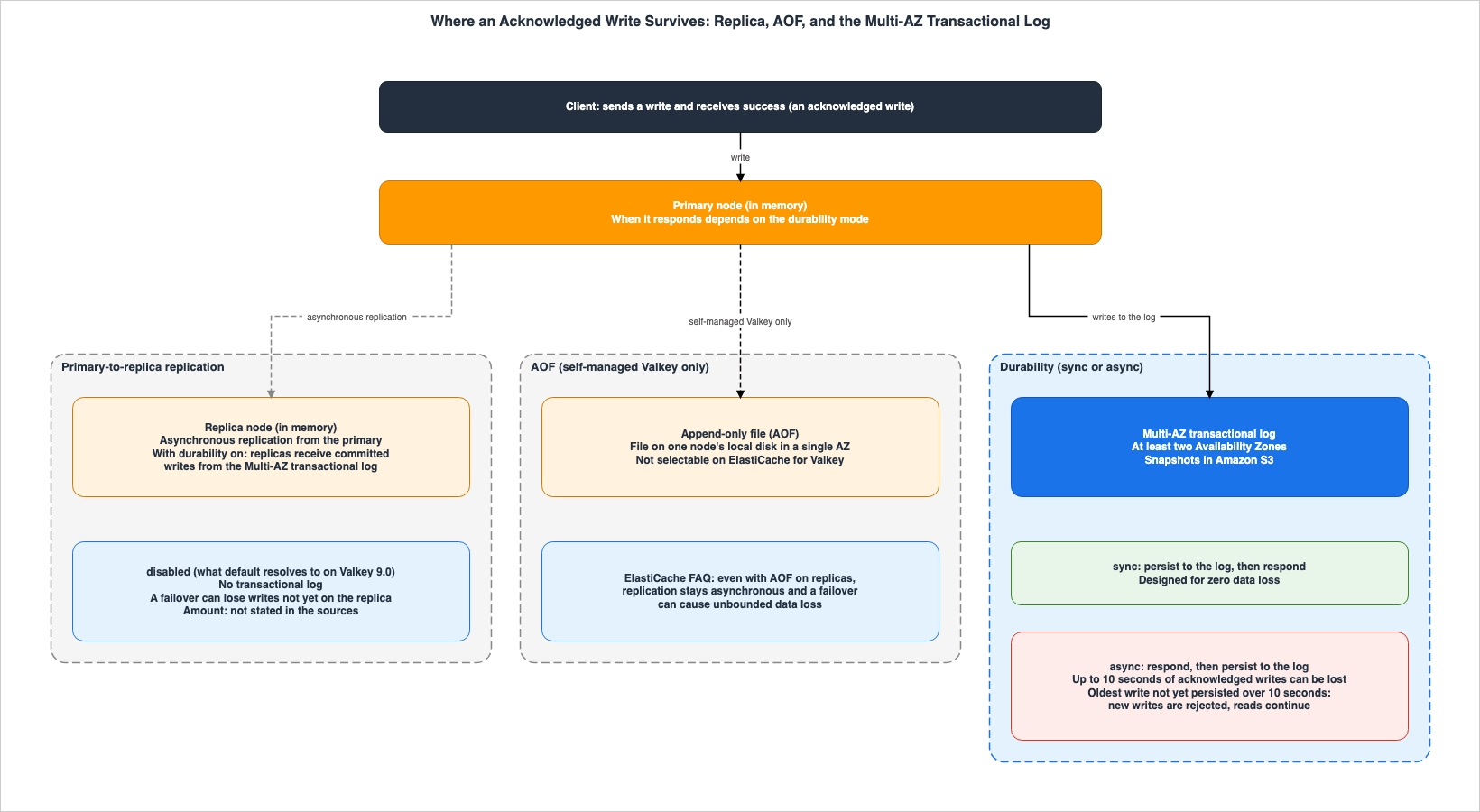
async box of Figure 1 is kept by the write rejection described in Chapter 5.3.2 Table of the Three Layers
The columns in the following table areLayer, Where It Is Kept, Asynchronous Part, What the Sources Say Can Be Lost, Selectable on ElastiCache, Where It Is Written, and Source State.| Layer | Where It Is Kept | Asynchronous Part | What the Sources Say Can Be Lost | Selectable on ElastiCache | Where It Is Written | Source State |
|---|---|---|---|---|---|---|
| Primary-to-Replica Replication | Memory of the replica node | The entire process of data transfer from primary to replica | During failover, a small amount of data corresponding to the replication lag may be lost. No quantity is specified. | Yes (Multi-AZ and the number of replicas) | Replication page, Multi-AZ page | Stated. Amount: No statement found |
| AOF | Local file on the node within a single Availability Zone (AZ) | Even on the replica, the transfer from the primary remains asynchronous. | During failover, there is a potential for data loss, potentially unlimited (the FAQ discusses AOF and replication). | No. Not supported in Redis OSS 2.8.22 and later. Not mentioned in the Valkey parameter section. | FAQ, parameters page | Stated as not supported in Redis OSS 2.8.22 and later. Valkey: Documentation does not list |
| Multi-AZ Transactional Log | Log spanning multiple Availability Zones (AZs) and Amazon S3 snapshots | After the response, the data is written to the log asynchronously (async). None for sync. | sync is designed not to lose acknowledged writes. With async, up to 10 seconds' worth may be lost. | Yes (the durability mode) | Durability entry page, options page, how-it-works page | Stated |
Only the third row states what can be lost with a time limit. The sources for the first and second rows do not give an amount. This article reads this difference as follows: only when the log is in place does the range that can be lost become a bounded value (Inference).
3.3 Where Replicas Receive Writes From When Durability Is Enabled
The how-it-works page states that in clusters where durability is enabled, replicas receive write operations from the transactional log.Read path (steady state): In steady state, replicas continuously receive committed writes from the Multi-AZ transactional log and apply them in order. Reads on replicas are served immediately from in-memory state.It also states that replicas can recover independently using both the log and snapshots.
Replica recovery: Replicas recover independently from the Multi-AZ transactional log and snapshots, without requiring any work from the primary node.Therefore, when durability is enabled, the replicas of the first layer sit behind the log of the third layer. However, according to the consistency page, replicas maintain eventual consistency (see Section 6.1). In any mode, a replica's reads may not reflect the very latest writes.
3.4 Eviction Occurs Independently of Durability
Durability is a system for preserving data in the event of a failure. Key eviction, which occurs when memory is insufficient, happens separately from durability. The options page states that even durable clusters use the same default parameter group as non-durable clusters.Durable clusters use the same default parameter group as non-durable clusters.According to the same page, this default parameter group sets
maxmemory-policy to volatile-lru. Consequently, even in durable clusters, keys with a time-to-live (TTL) may be evicted when memory becomes limited. To prevent eviction, you should use a custom parameter group and set maxmemory-policy to noeviction. With noeviction, when memory is full, instead of deleting keys, write commands will return an error. The options page also says to monitor BytesUsedForCache and DatabaseMemoryUsagePercentage.3.5 The Boundary with MemoryDB
The MemoryDB entry page states that MemoryDB stores data in a Multi-AZ transactional log from the start.MemoryDB also stores data durably across multiple Availability Zones (AZs) using a Multi-AZ transactional log to enable fast failover, database recovery, and node restarts.The MemoryDB consistency page states that MemoryDB's primary nodes are strongly consistent, persisting writes to the log before returning confirmation to the client.
In MemoryDB, primary nodes are strongly consistent. Successful write operations are durably stored in a distributed Multi-AZ transactional logs before returning to clients.ElastiCache for Valkey's
sync option exhibits similar behavior. However, ElastiCache also lets users choose async and disabled. In Valkey 9.0, the default effective value is disabled (see Section 4.1). Therefore, this article does not state that ElastiCache with durability enabled is equivalent to MemoryDB. This site's AWS History and Timeline regarding Amazon ElastiCache also describes the differences between the two services, as a difference in default posture. This site's Vector Database Selection on AWS covers choosing MemoryDB as a vector database.4. Three Durability Modes
This chapter defines three modes –disabled, async, and sync – as well as the default mode, default, in the words of the sources. It then gives the mode table and the summary table with the columns shared by the three articles in the series.4.1 Specified Values and Effective Values
The configuration page lists the values that can be specified for--durability when creating a cluster, along with their respective behaviors, and the EffectiveDurability values in Valkey 9.0. The Behavior column of that table reads as follows (the row layout is this article's).sync: Writes persisted to Multi-AZ transactional log before responding to client
async: Writes persisted to Multi-AZ transactional log after responding to client
disabled: No durability; standard ElastiCache behavior
default: ElastiCache determines setting based on engine version and cluster configurationIn the same table, the
EffectiveDurability column for Valkey 9.0 indicates sync for sync, async for async, disabled for disabled, and disabled for default. In other words, clusters created in Valkey 9.0 without specifying a durability setting are not durable. The configuration page's table only includes the Valkey 9.0 column and does not list how default is resolved in Valkey 9.1 and later versions (Documentation does not list). The console help also states that, by default, durability is disabled in Valkey 9.0.Default: ElastiCache manages durability based on your Valkey engine version. For Valkey 9.0, durability is off by default.According to the API Reference, the
Durability values for CreateReplicationGroup, ModifyReplicationGroup, and ReplicationGroup are four: default, async, sync, and disabled. The EffectiveDurability values for ReplicationGroup are three: async, sync, and disabled, and do not include default. The page for CreateReplicationGroup describes the resolution of default as follows:When set to default, the service determines the effective durability based on the engine version, cluster mode, and other parameters. The resolved setting is reflected in the EffectiveDurability property of the replication group.According to the configuration page, snapshots retain the
EffectiveDurability value, and when restoring from a snapshot, the actual mode is inherited.4.2 sync
The options page describes sync writes as follows:With synchronous writes, successful write operations are durably stored in the Multi-AZ transactional log before returning to clients. This incurs single-digit millisecond write latency and ensures that no acknowledged write operations will be lost in the event of a failure.The durability entry page describes the same
sync as designed for zero data loss. In its own prose, this article describes the sync guarantee in the durability entry page's wording. Section 9.2 lists how the wording differs across the sources.4.3 async
The options page describes async writes as follows:With asynchronous writes, successful write operations are returned to clients before being durably stored in the Multi-AZ transactional log. Since the write operations don't wait to be durably stored in the Multi-AZ transactional log, the write operation latency is equivalent to ElastiCache without durability. However, up to the last 10 seconds of successful write operations may be lost in the event of a failure.The change page states explicitly that the writes that can be lost are acknowledged writes.
With async, you can lose up to 10 seconds of acknowledged writes during a failure.Ten seconds is the maximum window that can be lost. It does not mean that each failure loses 10 seconds' worth. How much is lost depends on how many writes had not yet been persisted to the log at the time of the failure. You can see this amount in
DurabilityLag (Section 5.2).4.4 disabled
The configuration page describes disabled as representing the behavior of traditional ElastiCache, lacking durability (as referenced in Section 4.1). The change page notes a potential risk when switching to disabled, stating that acknowledged writes may be lost.Setting durability to disabled removes the Multi-AZ transactional-log durability guarantee. It increases the risk of losing acknowledged writes during a failure.The console help also describes the
disabled setting, stating:Off: No durability. Data may be lost during failures.The change page indicates an increased risk of losing acknowledged writes when using
disabled, while the console help states that data may be lost (Stated). This article found no statement specifying the amount or time window of potential data loss (No statement found). While the FAQ quoted in Section 3.1 mentions unbounded data loss, it does so in a comparison of AOF and replication, and does not directly refer to the disabled mode. This article does not say that disabled loses data without any limit (as mentioned in Section 9.3).4.5 Mode Table
The columns of the following table areMode, Response Timing, What a Primary Failure Can Lose, Reads on the New Primary, Write Rejection, All Nodes in a Shard Fail, and Source State.| Mode | Response Timing | What a Primary Failure Can Lose | Reads on the New Primary | Write Rejection | All Nodes in a Shard Fail | Source State |
|---|---|---|---|---|---|---|
disabled (default on Valkey 9.0) | Does not write to the transactional log. Replication is asynchronous. | Acknowledged writes. The amount is not in the sources. | The sources cover durable clusters only. | The sources describe it for async only. | The sources cover durable clusters only. | Stated (that writes can be lost). Amount: No statement found |
async | Writes to the log after responding. | Up to 10 seconds' worth of acknowledged writes. | May not reflect all acknowledged writes. | If the oldest write not yet persisted to the log exceeds 10 seconds, writes are rejected. Reads continue. | Replaces all nodes and recovers from the log. May lose up to 10 seconds of data. | Stated |
sync | Responds after writing to the log in two or more Availability Zones. | Designed not to lose acknowledged writes. | Maintains strong consistency across failovers. | For sync, the monitoring page says that DurabilityLag and the number of rejections are always 0. | Replaces all nodes and recovers from the log. No data is lost. | Stated |
In the sources' words, write latency is single-digit milliseconds with
sync and microseconds with async, the same as ElastiCache without durability. Read latency is measured in microseconds in both modes. The durability blog, under a configuration with one r7g.4xlarge primary node and one read replica, with a read ratio of 80% and a write ratio of 20%, and processing 50,000 operations per second, reports a P50 write latency of 147 µs without durability, 112 µs with async, and 2.15 ms with sync. These values are one measurement under the blog's conditions, and this article does not apply them to other configurations.4.6 Summary Table
The following table summarizes the three layers with the columns shared by the three articles in the series. The transactional log layer is divided intoasync and sync.| Layer | What This Layer Keeps | What Can Be Lost Here | Set By | How You Can Tell | Where It Is Written | Source State |
|---|---|---|---|---|---|---|
| Primary-to-Replica Replication | Writes in the replica's memory that have been received. | Writes that have not yet reached the replica. | User (Multi-AZ and the number of replicas). | Replication lag metrics. | Replication page, Multi-AZ page. | Stated. Amount: No statement found |
| AOF (Self-Managed Valkey) | Files on a local disk within a single AZ. | Files lost if that AZ is lost, and writes that have not yet reached the replica. | Configuration of the self-managed Valkey. Not listed for ElastiCache for Valkey (treated as not selectable). | — | FAQ, parameters page. | Redis OSS 2.8.22 and later: Stated as not supported. Valkey: Documentation does not list |
Multi-AZ Transactional Log (async) | The log across two or more AZs, and S3 snapshots. | Up to 10 seconds' worth of acknowledged writes. | User (Durability set to async). | DurabilityLag, DurabilityBufferExceededErrorCount, EffectiveDurability. | Options page, monitoring page, configuration page. | Stated |
Multi-AZ Transactional Log (sync) | Writes committed to the log in two or more AZs before the response. | Designed not to lose acknowledged writes. | User (Durability set to sync). | EffectiveDurability. | Durability entry page, options page, consistency page. | Stated |
4.7 Recommendations in the Sources and the Default Value
The durability entry page explains how to choose a mode as follows:If your application cannot tolerate any data loss, we recommend synchronous writes. Otherwise, we recommend asynchronous writes.The durability blog also recommends using
async as the default, unless data loss is absolutely unacceptable.We recommend asynchronous writes as the default for all workloads that do not require zero data loss, as this option provides durability with no latency penalty.These are recommendations in the sources, not the ElastiCache default. The default effective value for Valkey 9.0 is
disabled (see Section 4.1). The options page lists suitable uses for sync, such as knowledge bases for RAG applications, payment tokenization, and inventory management. It lists suitable uses for async as including caching application data, storing sessions, gaming leaderboards, and performing real-time analytics. This article does not determine which mode is better.5. How the 10-Second Limit Is Kept
This chapter describes the mechanism that keeps whatasync can lose within 10 seconds, and the metrics that show it working. The mechanism rejects writes; it does not stop the cluster.5.1 Durability Buffer and Write Rejection
The options page explains theasync limit using the concept of a durability buffer.The durability buffer represents the maximum age of any write that has been accepted by the primary node but not yet persisted to the Multi-AZ transactional log. The primary node tracks the age of the oldest unacknowledged write. As long as this age remains under 10 seconds, the node continues accepting new writes normally. If the age of the oldest unacknowledged write grows beyond 10 seconds, the primary node will reject all incoming write commands until it catches up. Read operations continue to be served at microsecond latency during this period. Once the pending writes are persisted, the node resumes accepting writes automatically. This ensures that potential data loss is limited to 10 seconds worth of writes in the event of a failure.Specifically, if the time elapsed since the oldest write not yet persisted to the log exceeds 10 seconds, the primary node will reject all new writes, while read operations continue with microsecond latency. Once the log catches up, the primary node automatically resumes accepting writes. This rejection limits what a failure can lose to 10 seconds' worth of writes. The monitoring page says that the count of these rejections is always 0 for
sync writes, so the rejection applies to async clusters (see Section 5.2).The durability blog states that, in typical operation, most writes are persisted in the log much faster than 10 seconds, and most clusters will not enter a rejection state. This article does not verify the frequency with which rejections actually occur.
5.2 DurabilityLag
The monitoring page describes a metric, DurabilityLag, that gives the age of writes not yet persisted to the log. The unit is milliseconds.DurabilityLag: The age in milliseconds of the oldest write operation that has been acknowledged to the client but not yet persisted to the Multi-AZ transactional log. When this value approaches 10,000 ms (10 seconds), the primary node will begin rejecting new writes. This metric is always 0 for synchronous writes because writes are persisted before being acknowledged.DurabilityLag gives a measure of how wide a window of writes a failure at this moment could lose. This article reads this value as the window at that moment, not as the upper limit of what can be lost (Inference).5.3 Who Retries a Rejected Write
The sources assign the retry of rejected writes to the client. The options page describes the client's configuration as follows:When configuring your client to send traffic to an asynchronous durable cluster, ensure that the client automatically retries with exponential backoff any write commands that are rejected with the cluster down error message.A rejected write comes back with an error message that says the cluster is down. This article found no statement that gives the error string itself (Section 9.7). This article does not read a rejection as the cluster stopping, because reads continue (Section 5.1).
5.4 DurabilityBufferExceededErrorCount
The monitoring page describes a separate metric for the number of rejected write operations.DurabilityBufferExceededErrorCount: The number of write commands rejected by a node because the durability buffer exceeded 10 seconds. When this metric is non-zero, your write requests will be rejected. Ensure your client is configured to retry with exponential backoff. This metric is always 0 for synchronous writes.5.5 Three Mechanisms That Hold Back Writes
In a durable cluster, there are two other mechanisms that hold back writes besides the 10-second rejection. The monitoring page describes the throttling when the volume of writes exceeds what the transactional log can process.In the event that the incoming write traffic exceeds the available throughput of the Multi-AZ transactional log, incoming write commands will be throttled. In the event that customer traffic is throttled, the TrafficManagementActive metric will emit 1.The search write page describes the throttling of writes to keys that belong to a search index. This throttling starts when the average CPU utilization of the search module's write threads, measured over a two-hour window, exceeds 50%. It only applies to writes to keys that belong to the index and does not affect reads. The same page says that throttled commands are delayed, not rejected, and that no errors are returned to the client.
The columns of the following table are
Mechanism (the mechanism), Trigger (the condition that starts it), What Happens to Writes (what happens to writes), Reads (reads), Metric (the metric to check), and Where It Is Written (the source).| Mechanism | Trigger | What Happens to Writes | Reads | Metric | Where It Is Written |
|---|---|---|---|---|---|
| Durability Buffer Rejection | When the oldest write not yet persisted to the log exceeds 10 seconds when using async. | All writes are rejected. Resumes when the log catches up. | Continues | DurabilityLag, DurabilityBufferExceededErrorCount | Options page, monitoring page |
| Log Throughput Throttling | When the volume of writes exceeds the log's processing capacity. | Writes are throttled. | The sources do not say. | TrafficManagementActive | Monitoring page |
| Search Write Throttling | When the average CPU utilization of the search module's write threads, measured over a two-hour window, exceeds 50%. | Only writes to keys belonging to the index are throttled. They are delayed, not rejected. | Not affected. | SearchWriteThrottleActive (and related metrics) | Search write page, limitations page |
The limitations page says durable clusters support up to 100 MiBps of writes per primary node (see Chapter 8). This article does not treat the volume that starts the log throttling as the same as this 100 MiBps. This article found no statement that links the two.
6. Consistency and Behavior During Failures
This chapter describes the consistency behavior ofsync and async operations, as well as the behavior when a primary node, a replica node, or all nodes in a shard are lost.6.1 sync Consistency
The consistency page describes the primary and replica components of sync as follows:Primary nodes are strongly consistent. Successful write operations are durably stored in the Multi-AZ transactional log before returning to clients. During normal operations, read operations on primaries always return the most up-to-date data reflecting the effects from all prior successful write operations. Such strong consistency is preserved across primary failovers. Replica nodes are eventually consistent.According to the same page, reading replicas using the
READONLY command may not reflect the latest writes, and lag metrics are reported to CloudWatch. Reads from a single replica are sequentially consistent, meaning that writes are applied to the replica in the same order they were executed on the primary.6.2 async Consistency
The consistency page states that, in typical operations, async offers the same consistency as sync, and then clarifies that this consistency is not maintained across failovers.However, as the write operations are returned to clients before being durably stored in the Multi-AZ transactional log, strong consistency is not preserved across primary failovers. In the event of a failure, up to 10 seconds of acknowledged write operations may be lost, meaning that after a failover, read operations on the new primary may not reflect all previously acknowledged writes.The same page also states that for workloads requiring strong consistency guarantees,
async is not recommended.6.3 What Happens to Nodes During Failures
The failure page describes what occurs when a primary node fails, and when a replica node fails, as follows:If a primary node fails, ElastiCache automatically triggers a failover to a replica, and the new primary takes over write operations. The failed primary is replaced and syncs data from the Multi-AZ transactional log. With synchronous writes, this process ensures no data loss. With asynchronous writes, up to 10 seconds of uncommitted data can be lost during the failover.When a replica fails, regardless of the mode, that node will be replaced and data will be recovered from the log. If all nodes within a shard fail, all nodes will be replaced, and data will be recovered simultaneously from the log. The failure page notes that in this scenario, with
sync mode, no data is lost, while with async mode, a maximum of 10 seconds of data may be lost. After the data is recovered, one of the replaced nodes will automatically be selected as the new primary.The durability blog provides a more detailed description of the sequence of events when a primary node fails.
The replica catches up from the transactional log and only then begins accepting writes as the new primary.The Multi-AZ page also notes that for clusters with durability enabled, the failover behavior differs from the previous behavior. Failed nodes restore committed data from the log without waiting for a complete synchronization from the primary.
6.4 Failure Table
The columns of the following table areFailure, What ElastiCache Does, sync, async, and Where It Is Written.| Failure | What ElastiCache Does | sync | async | Where It Is Written |
|---|---|---|---|---|
| Primary Node | Automatically fails over to a replica, replacing the lost node and recovering data from the log. | Data is not lost. | Up to 10 seconds of data may be lost. Reads on the new primary may not reflect all acknowledged writes. | Failure page, Consistency page |
| Replica Node | Replaces the node and recovers data from the log. | Same in either mode. | Same in either mode. | Failure page |
| All Nodes in a Shard | Replaces all nodes, simultaneously recovers data from the log, and selects one node to become the new primary. | Data is not lost. | Up to 10 seconds of data may be lost. | Failure page |
This table applies only to durable clusters. This article found no statement on the behavior when all nodes in a shard are lost in a
disabled cluster (No statement found).6.5 Snapshots
According to the how-it-works page, a temporary instance that reads the transactional log creates a durable cluster snapshot. It does not impact the primary workload. According to the configuration page, the snapshot has a value forEffectiveDurability, and a cluster restored from the snapshot will operate in the same mode.7. Switching Modes on a Live Cluster
This chapter describes switching the mode of an existing cluster, available since October 27, 2026. It covers the prerequisites, what happens, and how to verify the result.7.1 Changes on October 27, 2026
The October announcement states that durability can now be enabled or disabled on existing node-based clusters.Amazon ElastiCache for Valkey now lets you enable or disable durability on your existing node-based clusters.The change page states that a cluster can be switched between the
sync, async, and disabled modes without recreating it. ElastiCache will apply changes to clusters while they continue to process traffic. The CLI uses the --durability parameter with modify-replication-group, and the API uses the Durability parameter with ModifyReplicationGroup. For switching before this announcement, the sources disagree (see Section 9.4).7.2 Prerequisites and What Happens When You Switch
The change page lists six prerequisites to meet before switching. For the complete list of durability requirements and limitations, the same page refers to the limitations page (Chapter 8).The cluster runs Valkey 9.0 or later.
Multi-AZ is enabled with at least one replica per shard.
The cluster has encryption in transit (TLS) enabled.
The cluster uses Cluster Mode Enabled (CME).
The cluster is not an ElastiCache Serverless cache.
The cluster is not part of a Global Datastore.The same page says to send a durability change separately from other changes.
Change the durability mode as a standalone modification. ElastiCache rejects a ModifyReplicationGroup request that changes durability together with any other modification.In the setup in Section 10.2, a request that changed both durability and the cluster description was not rejected, and both changes were applied (Observation). This article does not overwrite the page's text with this single observation, and describes sending the change as a standalone request, as the page's procedure says.
During the switch, nodes are replaced.
Changing the durability mode involves node replacement. For each shard, this causes a brief primary node change or an automatic failover.In the setup in Section 10.4, no node replacement or failover event was recorded for the switch from
async to sync (Observation). This article does not overwrite the page's text with this observation.The columns of the following table are
Item, What the Page Says, Where It Is Written, and Source State.| Item | What the Page Says | Where It Is Written | Source State |
|---|---|---|---|
| Engine Version | Valkey 9.0 and later | Change page, Limitations page | Stated |
| Multi-AZ and Replicas | Multi-AZ is enabled, and there is at least one replica per shard. | Change page, Limitations page | Stated |
| Encryption in Transit | TLS is enabled. | Change page, Limitations page | Stated |
| Cluster Mode | Cluster Mode Enabled (CME) | Change page, Limitations page | Stated |
| Serverless | Not an ElastiCache Serverless cache. | Change page, Limitations page | Stated |
| Global Datastore | Not in the Global Datastore. | Change page, Limitations page | Stated |
| How the Request Is Sent | Changes to durability cannot be sent in the same ModifyReplicationGroup request as other changes. | Change page | Stated |
| Nodes | Nodes are replaced, and for each shard a brief primary node change or an automatic failover occurs. | Change page | Stated |
| Clients | Temporary connection interruptions may occur, and it may be necessary to refresh the view of the cluster topology. | Change page | Stated |
| Encryption at Rest | When changing from disabled to sync or async, it is automatically enabled. Even if you later revert to disabled, it will not be disabled. If you are using a customer-managed KMS key, that key is retained. | Change page | Stated |
| Verification of Completion | available alone does not confirm success. Verify that EffectiveDurability matches the requested mode. | Change page | Stated |
| Timing | The page recommends changing the mode during a planned operational window. | Change page | Stated |
| Time a Switch Takes | Not in the sources. | — | No statement found |
7.3 Procedure
The CLI example on the change page demonstrates switching tosync as follows. The cluster name is the one in the page's example.aws elasticache modify-replication-group \
--replication-group-id my-valkey-cluster \
--durability sync \
--region us-east-1When switching to
async, use --durability async; when switching to disabled, use --durability disabled. Do not include any other modifications, such as node type or parameter group changes, in the same request (see Section 7.2).The change page describes how to verify the status of the modification using the following command.
aws elasticache describe-replication-groups \
 --replication-group-id my-durable-cluster \
 --query "ReplicationGroups[0].{Id:ReplicationGroupId,Status:Status,Durability:Durability,EffectiveDurability:EffectiveDurability}" \
 --region us-east-1
To wait for the modification to complete, use the
replication-group-available waiter. This waiter waits until the cluster's Status reaches available.aws elasticache wait replication-group-available \
--replication-group-id my-durable-cluster \
--region us-east-17.4 available Is Not Proof of Success
The change page limits the meaning of available as follows:A status of available does not by itself confirm that the change succeeded, because a failed change can roll back. After the cluster is available, confirm that EffectiveDurability matches the durability mode you requested. If it does not match, the change might have rolled back; check the cluster's ElastiCache events for the reason.The same page also states that there may be instances where
EffectiveDurability resolves to a different value when Durability is set to default. In other words, the verification should focus on EffectiveDurability, not Status, and if there is a discrepancy, ElastiCache events should be examined.Figure 2 illustrates the process from checking the prerequisites to verifying
EffectiveDurability and the branch taken when the change has rolled back.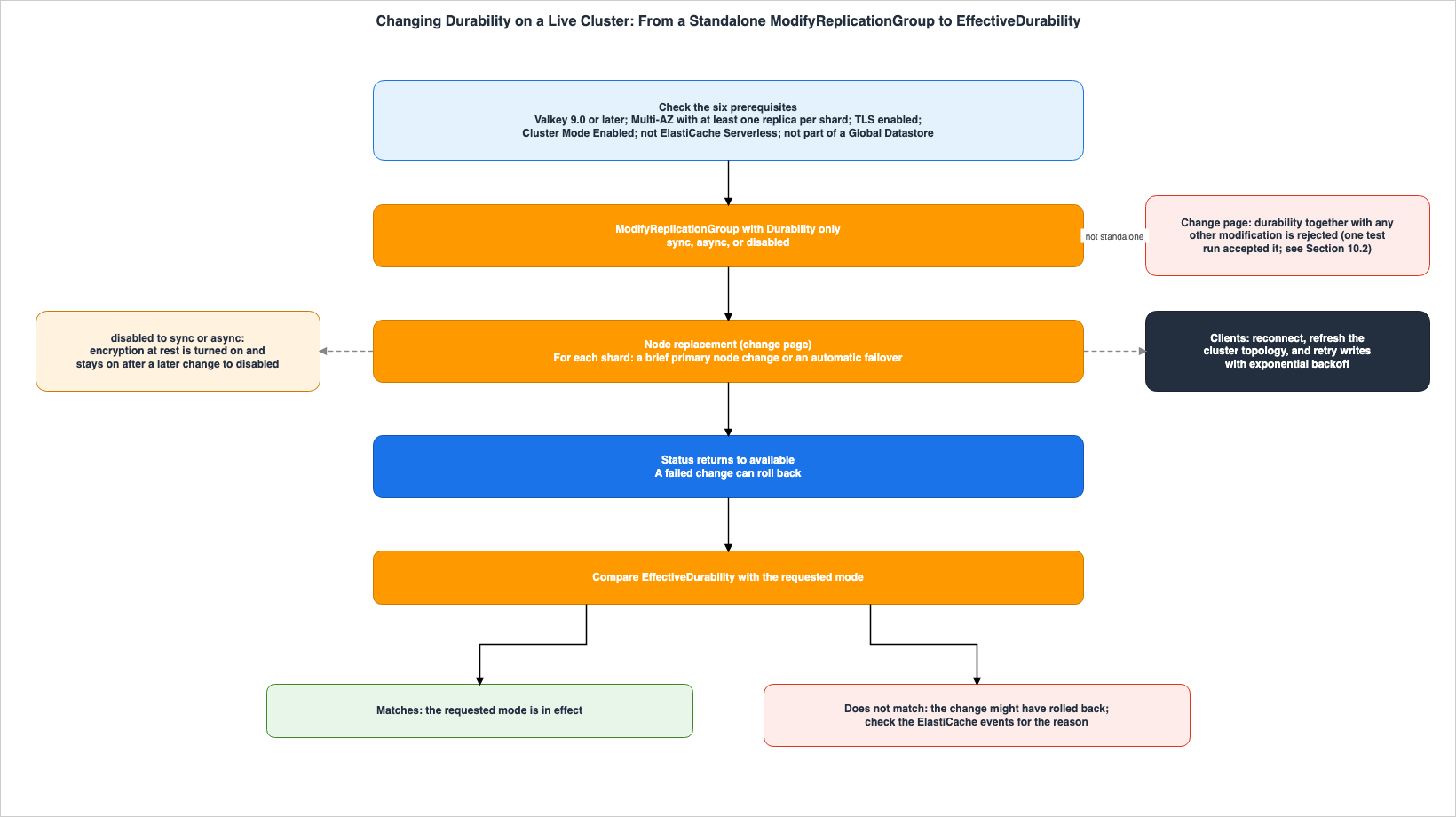
7.5 Client-Side Preparations
The change page says this about clients during the switch:Clients can experience transient connection interruptions during this process. Clients might also need to refresh their view of the cluster topology. Configure your clients to reconnect and to retry write operations with exponential backoff.Here too, it is the client that reconnects and retries writes. If the clients of an
async cluster already retry rejected writes as described in Section 5.3, this article reads that the same mechanism can be used here (Inference).8. Limitations
This chapter lists the durability limitations in the words of the limitations page. The limitations page says:Durability for ElastiCache is supported on Valkey 9.0 or later.
Durability for ElastiCache is supported for the following instance type families: R8g, R7g, R6g, M8g, M7g, M6g, C8gn, and C7gn.
Durability is not supported with ElastiCache Serverless.
Durability is not supported with Global Datastores, Outposts, Local Zones, or data tiering.
Durability enabled clusters support up to 100 MiBps of write throughput per primary node.
Durability for ElastiCache is not supported for Cluster Mode Disabled (CMD) clusters.
Durability for ElastiCache requires Multi-AZ enabled with at least one replica per shard.
Durability requires and automatically enables encryption at-rest.
Changing durability on an existing cluster requires encryption in transit (TLS) to be enabled.
Online migration from self-hosted Valkey or Redis OSS to a durable cluster is not supported.In addition to the above, the limitations page also describes write throttling when search indexes are configured (see Section 5.5).
This list shows the following:
- Nodes are limited to only eight Graviton families. The list does not include the "T" family. This article found no statement on which sizes within these families can be used (see Section 9.6).
- The maximum write volume is 100 MiBps per primary node. The unit is MiBps, not MB/s.
- ElastiCache Serverless, Global Datastore, AWS Outposts, Local Zones, and data tiering are not supported.
- Clusters with Cluster Mode Disabled are not supported. Only clusters with Cluster Mode Enabled are eligible.
- Online migration from self-managed Valkey or Redis OSS to durable clusters is not supported.
The supported engines are Valkey 9.0 and later. The limitations page does not list the ElastiCache Redis OSS engines (Documentation does not list). According to the Extended Support page, standard support for Redis OSS versions 4 and 5 ended on January 31, 2026, while standard support for Redis OSS 6 ends on January 31, 2027. This site's AWS End-of-Support and EOL Reference covers the engine version end-of-life calendar.
The scope of regions is described differently in two announcements. The June announcement states that durability is available in all AWS commercial Regions, AWS China Regions, and AWS GovCloud (US) Regions, starting with Valkey 9.0. The October announcement states that changes to existing clusters are available in all AWS Regions where ElastiCache for Valkey 9.0 and later is available. Both announcements should be read together with the limitations page's exclusion of Outposts and Local Zones. This article does not say that the feature is available in all locations.
9. Where the Sources Disagree and What Is Not Written
This chapter lists the points where the sources word things differently and the points where this article found no statement. For none of these points does this article decide that either source is wrong.9.1 How the Sources Word the 10-Second Boundary
Four sources word the point where rejection begins differently. The monitoring page says when the value approaches 10,000 ms.When this value approaches 10,000 ms (10 seconds), the primary node will begin rejecting new writes.The options page says when it grows beyond 10 seconds (see Section 5.1). The durability entry page says when the primary node cannot persist to the log for more than 10 seconds.
With asynchronous writes, if the primary node cannot persist changes to the Multi-AZ transactional log for more than 10 seconds, it will reject incoming write commands until the ability to persist writes is restored.The durability blog says when it reaches 10 seconds.
If this lag reaches 10 seconds, the primary node stops accepting writes until the log catches up.All four agree that 10 seconds is the mark for rejection. Whether rejection begins exactly at 10 seconds is worded differently (Sources disagree). This article does not definitively state the precise behavior at this boundary.
9.2 How the Sources Word the Strength of the sync Guarantee
The strength of the wording of the sync guarantee differs by source. The durability entry page, the June announcement, and the FAQ state that it is "designed for zero data loss." The options page states that it ensures that acknowledged writes will not be lost (see Section 4.2). The failure page states that it ensures no data loss (see Section 6.3). The durability blog's comparison table says "Zero data loss; every acknowledged write is durable across at least two Availability Zones," and the engine versions page describes synchronous writes as "zero data loss" without "designed for." On the Multi-AZ page, in the note about clusters with durability enabled, it states:During failovers, synchronous writes ensure zero data loss, while asynchronous writes may lose up to 10 seconds of uncommitted data.The console help explains the functionality without differentiating modes, stating:
ElastiCache writes data to a Multi-AZ transactional log spanning multiple Availability Zones. In the unlikely event of a failure, your cache recovers automatically without data loss.In its description of the modes, the same help says that
async may lose up to 10 seconds of data and describes sync as "designed for zero data loss." In its own prose, this article keeps the "designed for" wording and does not say that any mode never loses data.9.3 What disabled Can Lose
How the sources word what a disabled cluster can lose also differs. The Multi-AZ page mentions losing a small amount of data due to replication lag (Section 3.1). The FAQ states that even if AOF is enabled on the replica, data loss can occur, potentially without limit, because replication remains asynchronous (Section 3.1). Neither statement gives an amount. The FAQ's statement compares AOF and replication.This article states, as text from the change page and the console help, that
disabled can lose acknowledged writes (Stated). The strength of the wording differs (Sources disagree). This article found no statement specifying the quantity or time window of data loss (No statement found). This article does not state that data loss is either unlimited or limited to a small amount when using disabled.9.4 Switching Between sync and async Before October 27, 2026
The October announcement says that before it, the durability configuration of an existing cluster could not be changed in place.Previously, you couldn't change the durability configuration of an existing cluster in place.In contrast, the durability blog of June 2, 2026, and the getting started page provide examples of switching existing clusters between
sync and async modes.To switch an existing cluster between synchronous and asynchronous writes, use modify-replication-group:The
Durability description on the ModifyReplicationGroup page also gives changing durability from sync to async, or the reverse, as an example. Whether switching between sync and async was possible prior to October 27, 2026, is where the sources disagree (Sources disagree). This article only describes the current behavior on the change page: switching among the three modes.9.5 TLS When Creating a Cluster
The limitations page says TLS is required to change the mode on an existing cluster. This article found no statement on whether TLS is required to enable durability when creating a cluster (No statement found). The getting started page and the blog examples include the--transit-encryption-enabled flag. The console help does not list TLS as a requirement. This article reads that enabling TLS at creation meets the prerequisite for a later mode change (Inference).9.6 Usable Node Sizes
The limitations page and the console help specify the eight families of nodes that are available. This article found no statement on which sizes within each family can be used (No statement found).9.7 The Error String of a Rejection
The options page says that a rejected write returns with the cluster down error message. This article found no statement giving the exact error string the client receives (No statement found). This article did not cause a rejection in the setup in Chapter 10.9.8 The WAIT Command
Valkey's WAIT command makes the client wait until a specified number of replicas have received the preceding write operation. The WAIT page states that WAIT does not make Valkey a strongly consistent store.Note that WAIT does not make Valkey a strongly consistent store: while synchronous replication is part of a replicated state machine, it is not the only thing needed.The commands page lists
wait as an unsupported command for ElastiCache Serverless and does not include it in the list of commands that cannot be used with node-based clusters. This article found no statement on what combining durability and WAIT means (No statement found). This article limits its discussion of WAIT's functionality with node-based clusters to an inference from its absence from the list (Inference), and does not treat it as a substitute for durability.10. What This Setup Showed
This chapter gives the results of creating, inus-east-1, a cluster that durability switching can apply to, and trying only management operations on it. Each is a single observation and not a promise of the sources (Observation in Section 2.2). This article does not overwrite the sources with these observations. No clients were connected, no writes were performed, no load was applied, and no faults were injected.10.1 Configuration
The setup was one ElastiCache for Valkey 9.0 cluster. The node type iscache.m7g.large. Cluster Mode is enabled, with one shard and one replica. Multi-AZ and automatic failover are enabled, TLS is enabled, and durability is initially set to disabled. The observations were made on November 5, 2026, from 12:07 to 12:56 (UTC). The two nodes were placed in us-east-1b and us-east-1a. When creation finished, Durability and EffectiveDurability were both disabled, and encryption at rest was already enabled. For this reason, this setup did not show encryption at rest being turned on automatically when the mode changes from disabled.When the nodes were created, the following event was recorded for each of the two nodes:
This cache cluster does not support persistence (ex: 'appendonly'). Please use a different instance type to enable persistence.This event can also be read as saying that, depending on the node type,
appendonly persistence is available. This article found no statement on which node types can use it (No statement found). This article does not change the treatment in Section 3.1, which is based on the parameters page, with this observation.10.2 A Switch Sent Together with Another Change
--durability async and a change to the cluster description were sent, with --apply-immediately, in one modify-replication-group request. The request was sent at 12:14 (UTC) and was not rejected. The CLI exit code was 0, and there was no error message. The cluster's status changed to modifying. At 12:24, an event was recorded for the completion of a failover to node 0001-001. The replication-group-available waiter ended after exceeding its wait limit (40 attempts at 15-second intervals, or 10 minutes). After the cluster returned to available, both Durability and EffectiveDurability were async, and the cluster description had also changed to the new value.In other words, in this setup, a request that contained both the durability change and another change was accepted, and both were applied. This does not match the statement on the change page in Section 7.2 that such a request is rejected. This article shows both side by side. The conditions under which such a request is rejected cannot be determined from this single observation.
10.3 From disabled to async
This step was planned to send only --durability async and to record the Status, Durability, EffectiveDurability, encryption at rest, node role, and AZ every 30 seconds. Because the request in Section 10.2 had already put the cluster in async, this step was not run.10.4 From async to sync
At 12:50 (UTC), only --durability sync (with --apply-immediately) was sent, and Status, Durability, and EffectiveDurability were recorded every 30 seconds. During the 6 minutes of recording, the status never became modifying and stayed available. In the record at 12:51:23, both Durability and EffectiveDurability had become sync. At 12:51:00, the following event was recorded.Successfully updated the durability setting to sync.During this switch, no node replacement or failover event was recorded. The change page says that a mode switch replaces nodes and that, for each shard, a brief primary node change or an automatic failover occurs (Section 7.2). In this setup, the switch from
async to sync did not show those events. The switch from disabled to async in Section 10.2 recorded a failover event. This article does not generalize from these single observations to the behavior of each combination of modes. The time the switch took is also one value from this setup, and does not change the No statement found in Section 7.2.10.5 Metrics
The setup checked whether theDurabilityLag, DurabilityBufferExceededErrorCount, and TrafficManagementActive metrics are being published to CloudWatch, and if so, on which dimensions. All three appeared in the AWS/ElastiCache namespace. The dimensions were combinations of CacheClusterId, CacheClusterId and CacheNodeId, CacheClusterName, CacheClusterName and CacheNodeName, and no dimensions. For DurabilityLag and DurabilityBufferExceededErrorCount, data points taken with the CacheClusterId dimension existed only for node 0001-001, which became the failover target in Section 10.2. This article reads this node as the primary at that time (Inference). Data points for TrafficManagementActive existed for both nodes. Since no writes were performed, all values were 0.11. Failure Modes
This chapter lists common failure scenarios related to configuration and operation, based on the content of this article. All of these stem from either misinterpreting layers or modes, or from reading the sources more strongly than they are written.- Creating a Valkey 9.0 cluster without specifying durability and assuming it is durable. On Valkey 9.0,
defaultresolves todisabled(Section 4.1). - Assuming that because replicas exist, acknowledged writes will persist. With
disabled, replication is asynchronous and writes can be lost during failover (Section 3.1). - Assuming that enabling AOF in ElastiCache will ensure writes persist. The parameters page does not list AOF for ElastiCache for Valkey, and this article treats it as not selectable (Section 3.1).
- Reading
asyncas always losing exactly 10 seconds' worth of writes. Ten seconds is the maximum window that can be lost (Section 4.3). - Assuming that a rejection indicates a cluster shutdown and halting read operations. Rejections only apply to write operations; read operations continue (Section 5.1).
- Using a client that does not retry rejected writes in an
asynccluster. The client is responsible for retrying (Section 5.3). - Assuming that in a durable cluster, keys are not evicted. With the default
volatile-lrusetting, keys with TTLs may be evicted (Section 3.4). - Sending a request that combines durability switching with changes to node types or parameter groups. According to the change page, ElastiCache rejects this request. It was accepted in the setup in Section 10.2, but send the change as a standalone request without relying on either behavior (Sections 7.2 and 10.2).
- Assuming that when the
Statusreturns toavailable, the switch has completed. Failing to verifyEffectiveDurability(Section 7.4). - Assuming that reverting to
disabledwill also turn encryption at rest back off. This is not the case (Section 7.2). - Initiating a switch outside a planned operational window. The switch causes a brief primary node change or an automatic failover for each shard, and clients may experience connection interruptions (Sections 7.2 and 7.5).
- Designing a durability-enabled ElastiCache as equivalent to MemoryDB. The default settings and available modes differ (Section 3.5).
12. Frequently Asked Questions About ElastiCache for Valkey Durability
This chapter answers common questions that the readers described in Section 1.1 may have, with references to the relevant sections.Q1. If you use sync, will acknowledged writes absolutely never be lost?
The durability entry page describes sync as designed for zero data loss. The options page states that it ensures that acknowledged writes will not be lost. This article maintains the phrasing "designed for" in the main text. Differences in wording are discussed in Section 9.2.Q2. Does using async always result in a loss of 10 seconds?
No, it does not. Ten seconds is the maximum that can be lost. The actual amount of data lost depends on how much data had not yet been persisted to the log at the time of the failure. You can see this in DurabilityLag (see Sections 4.3 and 5.2).Q3. Does the cluster stop when the DurabilityLag reaches 10 seconds?
No, it will not. The primary node will reject new writes, but read operations will continue. Once the log catches up, the node will automatically resume accepting writes (see Section 5.1). The sources word the behavior at exactly 10 seconds differently (see Section 9.1).Q4. In Valkey 9.0, are clusters created without specifying durability considered durable?
In Valkey 9.0, clusters created without specifying durability are not durable. The default setting,default, resolves to disabled in Valkey 9.0. You can verify the currently active mode using EffectiveDurability (see Section 4.1).Q5. Does enabling AOF in ElastiCache serve as a replacement for durability?
This article treats it as not being a replacement. The parameters page states that ElastiCache'sappendonly and appendfsync are not supported for Redis OSS versions 2.8.22 and later, and these parameters are not listed in the Valkey parameter section. The FAQ compares AOF, which stores data on a local disk within a single Availability Zone, to durability (Section 3.1).Q6. Does ElastiCache, with durability enabled, function the same way as MemoryDB?
This article does not treat them as the same. From the start, MemoryDB stores writes in the transactional log before returning to the client. In ElastiCache, you can also choose theasync and disabled modes, and the default effective setting in Valkey 9.0 is disabled. The sync option behaves similarly in persisting writes to the log before acknowledging them, but this article found no source that compares the two services feature by feature (see Section 3.5).Q7. Can a single ModifyReplicationGroup request simultaneously change both durability and node type?
According to the change page, it cannot. ElastiCache rejects requests that include changes to durability along with other modifications. Changes to durability must be sent as a separate request (see Section 7.2). In the setup in Section 10.2, a request with both changes was accepted and both were applied, but this article does not overwrite the page's text with this single observation.Q8. If the Status returns to available after the switch, does that indicate a successful switch?
It does not necessarily mean it was successful. A failed change might be rolled back. Verify that the EffectiveDurability matches the requested mode. If it does not, check the ElastiCache events (see Section 7.4).Q9. If you switch back to the disabled setting, does encryption at rest also revert to being disabled?
No, it does not. When changing from disabled to either sync or async, encryption at rest is automatically enabled, and it will remain enabled even if you later revert to disabled (see Section 7.2).Q10. In durable clusters, are keys ever evicted?
Keys can be evicted. Even in durable clusters, if the default parameter group is used andmaxmemory-policy is set to volatile-lru, keys with TTLs may be evicted when memory becomes insufficient. To prevent this, configure a custom parameter group with noeviction (see Section 3.4).13. Summary
When you use ElastiCache for Valkey and need writes to survive beyond its use as a cache, check the following:- Identify the layers where writes are retained. Is it replication only, or does it extend to the transactional log? The parameters page does not list AOF for ElastiCache for Valkey, and this article treats it as not selectable (Chapter 3).
- Verify the currently active mode using
EffectiveDurability. The default effective durability setting in Valkey 9.0 isdisabled(Section 4.1). - Determine the acceptable data loss tolerance for your application before choosing between
syncandasync. Withasync, up to 10 seconds' worth of acknowledged writes may be lost (Chapter 4). - If using
async, configure your clients to retry rejected writes with an exponential backoff interval. MonitorDurabilityLagandDurabilityBufferExceededErrorCount(Chapter 5). - Be aware that there are three mechanisms that can throttle writes: the 10-second rejection, log throughput throttling, and search write throttling. Verify
TrafficManagementActiveto check the second mechanism (Section 5.5). - If strong consistency is required across failovers,
asyncis not enough (Chapter 6). - To prevent eviction, use a custom parameter group configured with the
maxmemory-policyset tonoeviction(Section 3.4). - Before switching the mode of a live cluster, check that the six prerequisites and the limitations in Chapter 8 are met (Section 7.2).
- Send the switch as a standalone request and perform it during a planned operational window. Make sure clients can reconnect, refresh the topology, and retry writes (Chapter 7).
- After the switch, verify the results using
EffectiveDurabilityrather thanStatus(Section 7.4). - Before designing your solution, confirm compatibility with the node family, 100 MiBps per primary node, and other limitations, such as Serverless and Global Datastore (Chapter 8).
- For the points where the sources disagree or say nothing, such as the 10-second boundary, the wording of the guarantee, and what
disabledcan lose, decide which source to rely on before you design (Chapter 9).
14. References
- Durability in ElastiCache - Amazon ElastiCache
- Durability options - Amazon ElastiCache
- Configuring durability - Amazon ElastiCache
- Changing durability on an existing cluster - Amazon ElastiCache
- Consistency - Amazon ElastiCache
- Failure scenarios - Amazon ElastiCache
- Limitations - Amazon ElastiCache
- Monitoring - Amazon ElastiCache
- Getting started with durability - Amazon ElastiCache
- Search write throttling - Amazon ElastiCache
- How ElastiCache works - Amazon ElastiCache
- Minimizing downtime in ElastiCache by using Multi-AZ with Valkey and Redis OSS - Amazon ElastiCache
- Understanding Valkey and Redis OSS replication - Amazon ElastiCache
- Engine specific parameters - Amazon ElastiCache
- Supported and restricted Valkey, Memcached, and Redis OSS commands - Amazon ElastiCache
- Engine versions and upgrading in ElastiCache - Amazon ElastiCache
- Versions with ElastiCache Extended Support - Amazon ElastiCache
- Data durability - Amazon ElastiCache console help
- CreateReplicationGroup - Amazon ElastiCache
- ModifyReplicationGroup - Amazon ElastiCache
- ReplicationGroup - Amazon ElastiCache
- Amazon ElastiCache for Valkey now supports durability - AWS What's New
- Amazon ElastiCache for Valkey now supports changing durability on existing clusters - AWS What's New
- Announcing durability for Amazon ElastiCache for Valkey - AWS Database Blog
- Amazon ElastiCache FAQs
- What is MemoryDB - Amazon MemoryDB
- Consistency - Amazon MemoryDB
- WAIT - Valkey
- AWS History and Timeline regarding Amazon ElastiCache - Overview, Functions, Features, Summary of Updates, and Introduction
- Vector Database Selection on AWS - OpenSearch, Aurora pgvector, MemoryDB, and S3 Vectors with Index Algorithm Internals
- Draining an Availability Zone for Days - What ARC Zonal Shift Moves and What Stays Pinned to the Zone
- IAM Authentication to Databases, Caches, and Streams on AWS - Token Lifetime, What Revoking Access Does to Open Connections, and the Identity Inside the Service
- AWS End-of-Support and EOL Reference - Lambda, EKS, RDS and Aurora, ElastiCache, and OpenSearch Service
- Chaos Engineering on AWS with AWS Fault Injection Service - Experiment Design, Stop Conditions, and Safety Rails
- What Happens to a Failed Asynchronous Lambda Invocation - Caller Retries, the Internal Queue, and Where a Discarded Event Goes
- Where Connections Are Pooled on AWS - Lifetime, Session State, and Connection Budget Across Driver Pools, PgBouncer, RDS Proxy, and Aurora DSQL
References:
Tech Blog with curated related content
Written by Hidekazu Konishi