ElastiCache Global Datastore - Settings Fixed to the Primary, Replication Lag, and Manual Promotion
First Published:
Last Updated:
This article clarifies what settings are propagated from the primary cluster to secondary clusters in a Global Datastore. These settings are categorized into three types: those that are fixed to match the primary, those that only inherit the initial values set during creation, and those that are not passed in the CLI and are inferred from the primary cluster. The article then details settings that persist independently within each Region, the management of parameter groups, metrics related to replication lag, and how manual promotion alters roles and write destinations. It provides this information using direct references to the official documentation.
In conclusion, the documentation divides the same settings into three groups across several pages: fixed, inheriting only initial values, or inferred. Parameter groups are automatically created for each cluster, and any changes to a parameter group are applied to all clusters. There is no automatic cross-Region failover; promotion is performed manually. No statement was found in the user guide or the API Reference on whether endpoint names change after a promotion. However, one post on the AWS Database Blog describes a configuration that involves updating the DNS records to point to the endpoint of the new primary cluster.
This article is based on a review of the documentation conducted on November 11, 2026 (Japan Standard Time). It does not include any practical testing. Pricing information is not discussed.
Related articles on this site:
- Durability on Amazon ElastiCache for Valkey - Where an Acknowledged Write Survives, the 10-Second Buffer, and Changing It on a Live Cluster
- Counting Connections on ElastiCache for Valkey - Per-Node and Per-Cache Limits, Endpoints, and Reconnects After Failover
- AWS History and Timeline regarding Amazon ElastiCache - Overview, Functions, Features, Summary of Updates, and Introduction
- AWS Multi-Region Active-Active Architecture Guide - Global Data Replication, Routing, and Failover with Route 53, DynamoDB Global Tables, and Aurora Global Database
- AWS Disaster Recovery Strategies Guide - Backup and Restore, Pilot Light, Warm Standby, and Multi-Site Active-Active
- AWS End-of-Support and EOL Reference - Lambda, EKS, RDS and Aurora, ElastiCache, and OpenSearch Service
Table of Contents
- 1. Scope and Assumptions
- 2. How to Read the Tables and Terms
- 3. Global Datastore Structure
- 4. What Crosses Regions
- 5. What Stays in Each Region, and Parameter Groups
- 6. Metrics for Replication Lag
- 7. What Changes with a Manual Promotion
- 8. Modifications and Side Effects of Inheritance
- 9. Where the Sources Disagree or Say Nothing
- 10. Failure Modes
- 11. Frequently Asked Questions about ElastiCache Global Datastore
- 12. Summary
- 13. References
1. Scope and Assumptions
This chapter first defines the intended audience, the scope of this article, and the materials it reviewed. The following ten points will outline the key conclusions.- Global Datastore is only available with node-based clusters. It is not compatible with ElastiCache Serverless or ElastiCache for Memcached. The engine version must be Valkey 7.2 or later, or Redis OSS 5.0.6 or later (Chapter 3).
- Only one primary cluster receives write operations. Secondary clusters only receive read operations. There can be a maximum of two secondary clusters, and up to three Regions in total (Chapter 3).
- For secondary clusters, the engine version, node type, number of shards, parameter group, encryption at rest, and encryption in transit are all fixed to the same values as the primary cluster (Section 4.1).
- Port settings, the number of replicas, subnet groups, security groups, KMS key, AUTH token, backups, maintenance windows, and SNS topics are initially set to the values of the primary cluster and can then be modified for each secondary cluster (Section 4.2).
- When creating a secondary cluster using the CLI, you do not pass 12 parameters. ElastiCache will infer these values from the primary cluster (Section 4.3).
- A parameter group is automatically created for each cluster. Modifying any single parameter group will apply the change to all clusters within Global Datastore. The documentation does not describe this as "shared" (Section 5.2).
- Replication lag across Regions can be monitored using CloudWatch's
GlobalDatastoreReplicationLagmetric and the Global Datastore Replica lag displayed in the console. TheReplicationLagmetric within a Region is a separate indicator. The FAQ states that there is no SLA for RPO and RTO (Chapter 6). - There is no automatic failover across Regions. Promotion is manual, and during a promotion the Global Datastore is in the
Modifyingstate and is unavailable. If multiple secondary clusters are promoted at the same time, which one becomes the primary is not guaranteed (Sections 7.1 to 7.3). - After the promotion, the original primary cluster becomes a secondary cluster and no longer receives write operations. Pointing the application's writes at the new primary Region is the user's job. No statement on whether the endpoint names change was found in the user guide or the API Reference (Sections 7.4 to 7.6).
- Once a cluster is added to a Global Datastore, automatic minor version upgrades are disabled, and cannot be reverted while the cluster remains part of Global Datastore (Section 8.4).
1.1 Intended Audience
This article is intended for the following audience:- Developers and operations personnel who are designing their systems using ElastiCache for Valkey or ElastiCache for Redis OSS, particularly those utilizing multiple Regions for read operations or as a safeguard against regional outages.
- Individuals who need to understand, prior to implementation, what configurations they need to manually set up in the secondary Region.
- Individuals who need to know, before writing a runbook, what actions applications and operations teams need to take when the primary Region becomes unavailable.
This article assumes that readers are thinking in the following ways, and each assumption will be validated in the documentation.
- The secondary cluster is a complete replica of the primary cluster's configuration.
- Parameter groups are shared across Regions.
- In the event of a failure in the primary Region, ElastiCache will automatically promote a secondary cluster.
- Following a promotion, applications can continue writing to the same endpoint.
- The
ReplicationLagmetric within each Region can be used to assess the lag across Regions.
1.2 What This Article Covers and What It Does Not
This article covers the structure of Global Datastore, its supported conditions and limitations, the settings that cross Regions, the settings that stay in each Region, handling of parameter groups, metrics for replication lag, manual promotion, the implications of changes and inheritance, and discrepancies in documentation.This article does not cover:
- Pricing. It will not include information on costs associated with cross-Region data transfer or Extended Support.
- A list of Regions where Global Datastore is available. Refer to the prerequisites page for that information.
- Step-by-step instructions for creating a Global Datastore.
- Strategies for disaster recovery. This is covered in the AWS Disaster Recovery Strategies Guide on this site.
- Endpoint types within a Region and reconnection after automatic failover within a Region. This site's article Counting Connections on ElastiCache for Valkey covers this.
- Write durability. This is covered in this site's article Durability on Amazon ElastiCache for Valkey. That article lists Global Datastore design as one of the topics it does not cover. This article is where that topic goes. Clusters with durability enabled cannot be used with Global Datastore (see Section 3.4).
- The timeline for when Global Datastore became available. This is covered in the AWS History and Timeline regarding Amazon ElastiCache on this site.
- ElastiCache Serverless and ElastiCache for Memcached.
1.3 Date of Review and Materials Reviewed
This article was written after reviewing the following materials on November 11, 2026 (Japan Standard Time). Throughout the text, English terms are used as indicated in parentheses.Regarding the Amazon ElastiCache User Guide, the following pages were reviewed:
- Replication across AWS Regions using global datastores (overview page)
- Prerequisites and limitations (prerequisites page)
- Using global datastores (console) (console page)
- Using global datastores (CLI) (CLI page)
- Metrics for Valkey and Redis OSS (node metrics page)
- Tagging your ElastiCache resources (tagging page)
- Event Notifications and Amazon SNS (events page)
- Versions with ElastiCache Extended Support (Extended Support page)
From the Amazon ElastiCache API Reference, the pages for the
CreateGlobalReplicationGroup, FailoverGlobalReplicationGroup, DisassociateGlobalReplicationGroup, ModifyGlobalReplicationGroup, and CreateReplicationGroup operations and the page for the GlobalReplicationGroup data type were reviewed (API Reference). Additionally, the failover-global-replication-group page was reviewed in the AWS CLI Command Reference (CLI Reference).In addition to the above, the following materials were also reviewed.
- Amazon ElastiCache FAQs (FAQ) and the Amazon ElastiCache features page (features page).
- The What's New announcement of September 24, 2026, Amazon ElastiCache Global Datastore now supports tagging and tag-based access control (tagging announcement).
- The AWS Database Blog post Build a multi-Region session store with Amazon ElastiCache for Valkey Global Datastore (session store blog post). This article read the version with the June 2026 update note.
- The AWS re:Post Knowledge Center article on monitoring the cross-Region replication lag of Global Datastore (re:Post).
This article read the user guide, the API Reference, the CLI Reference, the FAQ, the features page, the tagging announcement, the session store blog post, and re:Post as original text retrieved with curl. It also used the search feature of AWS Knowledge.
1.4 Terms, and Different Things with the Same Spelling
This article uses the following terms consistently:- Global Datastore: The name of the feature. In the API and CLI, it is referred to as a global replication group. This article uses this term to refer to both the feature and a single Global Datastore.
- Primary cluster: Within a Global Datastore, this is the cluster that receives write operations.
- Secondary cluster: Within a Global Datastore, this is a cluster that only receives read operations and replicates data from the primary cluster.
- Promotion: Converting a secondary cluster into the primary cluster within a Global Datastore. In this article, promotion refers only to manual promotions that span Regions.
- Node-based cluster: A cluster created by choosing a node type.
The documentation referenced in this article uses the same spelling for different things.
- Primary: Within a cluster, there are primary nodes that receive write operations, and there are primary clusters that receive write operations in the Global Datastore. This article will refer to individual nodes as "primary nodes" and to clusters as "primary clusters."
- Failover: Failover refers to ElastiCache automatically promoting a replica node to a primary node within a Region. The API operation
FailoverGlobalReplicationGroupis the name of the promotion operation that spans Regions. This article uses "failover" to refer to the former and "promotion" to refer to the latter. The automatic failover feature for Global Datastore also refers to the automatic failover process within a single Region (see Section 4.4). - Replication lag: Replication lag is reported under different names:
GlobalDatastoreReplicationLagin CloudWatch, the Global Datastore Replica lag on the console, andReplicationLagwithin a Region (see Chapter 6). - Security groups: Security groups on the console refer to VPC security groups. The
CacheSecurityGroupNamesparameter, which the CLI page lists among the parameters not to pass, refers to the names of the cache security groups. TheSecurityGroupIdsparameter is used to specify VPC security groups (see Section 4.3).
2. How to Read the Tables and Terms
This chapter defines the terms for the state of the sources used in the tables of this article, and how the verification date and other dates are written.2.1 Terms for the State of the Sources
This article uses six terms to describe the state of the documentation. These terms, including their English spellings, will also be used in the tables. Because this article did not test anything hands-on, it does not use the term Observation.- Stated: The documentation contains a statement regarding the matter.
- Stated as not supported: The documentation explicitly states that the matter is not supported or cannot be used.
- Documentation does not list: While a list or table exists, the specific item is not included. This does not necessarily indicate that the matter is unsupported or unavailable.
- No statement found: Despite searching using different search terms and examining different categories of documentation (as described in Section 1.3), no relevant statement could be found. This does not necessarily indicate that the matter is absent or does not occur.
- Sources disagree: The documentation from two different sources provides conflicting statements regarding the same matter. This includes cases where the statements directly contradict each other, as well as cases where the scope, strength, or subject matter differs, and the text alone does not settle which one applies. This article presents both statements and their sources without designating either as incorrect.
- Inference: This represents an inference made by this article, and is not a statement found in any of the documentation. This article says in the same sentence that it is an inference.
This article distinguishes between "Stated as not supported" and "No statement found." The former refers to a statement in the documentation itself, while the latter indicates that this article was unable to find a relevant statement.
This article will not classify two statements that differ only in counting or wording as "Sources disagree." For example, the FAQ gives the number of secondaries as
up to two secondary Regions, and the console page says that after the first secondary is created, you can add up to one additional secondary cluster. Both mean that there are at most two secondary clusters in total (see Section 9.1).2.2 Verification Date and Date Format
The verification date for this article is November 11, 2026 (Japan Standard Time). Page content may be updated after the verification date, particularly regarding available node types, available Regions, and tag handling.All dates are written with the year included.
3. Global Datastore Structure
This chapter describes the composition of the Global Datastore, where it accepts write operations, and under what conditions it can be utilized.3.1 Primary Clusters and Secondary Clusters
The overview page describes the Global Datastore as a collection of one or more clusters that replicate with each other. These clusters have one of two roles:- Primary (active) clusters: These clusters receive write operations and replicate them to all other clusters in the Global Datastore. They also accept read requests.
- Secondary (passive) clusters: These clusters only accept read requests and receive replicated updates from the primary cluster. A secondary cluster is placed in a different Region from the primary cluster.
The same page states that ElastiCache automatically configures and manages asynchronous replication between these two types of clusters. Because replication is asynchronous, there will be a delay before values written to the primary cluster are reflected in the secondary cluster (see Chapter 6).
The first note on the overview page reads:
Global Datastore is currently available for node-based clusters only.The FAQ states that ElastiCache for Memcached does not offer Global Datastore. Both the FAQ and the console page specify that the engine must be Valkey 7.2 or later, or Redis OSS 5.0.6 or later.
3.2 The Number of Secondary Clusters and the Number of Regions
The prerequisites page states that a primary cluster within a single Region can replicate to a secondary cluster in up to two other Regions. The FAQ also states that there can be at most two secondary Regions.This "2" refers to the number of secondary clusters. Including the primary Region, a single Global Datastore can have a maximum of three Regions in total.
The prerequisites page notes an exception: for the two Regions in China, replication is only possible between those two Regions.
3.3 Only the Primary Cluster Accepts Writes
Secondary clusters only receive read operations. When an application running in a secondary Region needs to write data, it writes to a cluster in the primary Region. The session store blog post describes this as follows:ElastiCache Global Datastore uses active-passive replication. Writes must go to the primary cluster in a single Region.The same article describes a configuration where applications in a secondary Region write data to a cluster in the primary Region, using VPC peering or Transit Gateway. This configuration relies on network connectivity between Regions. The same article also states that ElastiCache currently does not offer active-active replication configurations that accept write operations within each Region.
This site's AWS Multi-Region Active-Active Architecture Guide describes an architecture where read operations are handled within each Region, while write operations are directed to a single Region. This type of architecture is referred to as "write-home." Global Datastore falls under this category. This mapping is an inference made by this article (Inference).
3.4 Conditions for Use and Incompatible Configurations
The prerequisites page outlines the following conditions:- The cluster must be deployed within an Amazon VPC.
- The node types must be large or greater, belonging to the M5, M6g, M7g, M8g, R5, R6g, R7g, R8g, C7gn, and C8gn families. Node types from previous generations, such as M4 or R4, and data tiering node types are not supported. The page also notes that available node types may vary depending on the AWS Region.
- When automatic failover is enabled on a primary cluster, you cannot add a secondary cluster with only one node (see Section 4.4).
- If using an existing cluster with only one node, ensure replication is enabled.
- Existing clusters cannot be added as secondary clusters.
- This feature is not supported in Local Zones.
- It does not support IPv6.
- It cannot be used with clusters that have durability enabled.
- Clusters cannot span AWS accounts. Both the primary and secondary clusters must be located in the same AWS account.
Regarding existing clusters, the prerequisites page states:
To bootstrap from existing data, use an existing cluster as primary to create a global datastore. We don't support adding an existing cluster as secondary. The process of adding the cluster as secondary wipes data, which may result in data loss.If you want to begin with existing data, configure the cluster as a primary cluster and create a Global Datastore. Secondary clusters should be created new.
Concerning accounts, the prerequisites page includes the following statement:
Global Datastore doesn't support cross-account deployments. All primary and secondary clusters must reside within the same AWS account.4. What Crosses Regions
This chapter describes what is passed from the primary cluster when a secondary cluster is created, and how. The documentation divides how settings are passed into three ways and describes them across several pages.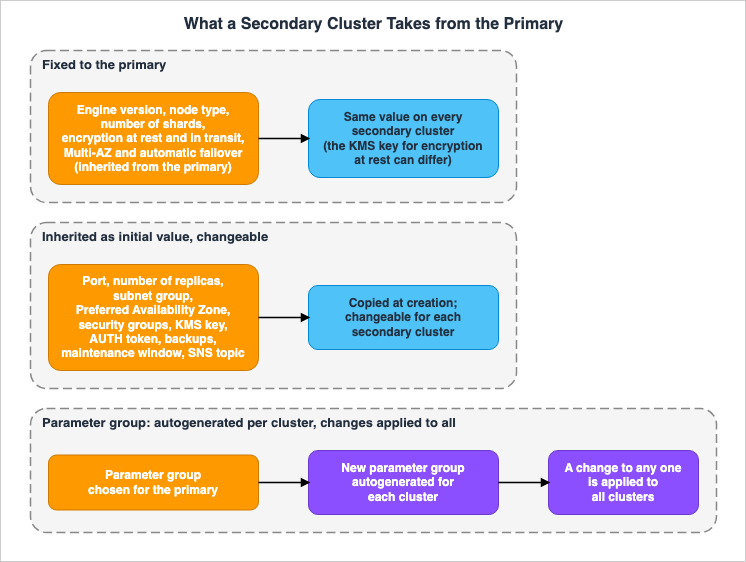
| Item | How It Is Passed | Source | Status |
|---|---|---|---|
| Engine Version | Fixed to the same value as the primary. | Console page, Prerequisites page | Stated |
| Node Type | Fixed to the same value as the primary. | Console page, Prerequisites page | Stated |
| Number of Shards | Fixed to the same value as the primary. | Console page, Prerequisites page | Stated |
| Parameter Group | Automatically created for each cluster, based on the primary's value. | Console page | Stated |
| Encryption at Rest | Enabled or disabled is fixed. A different key can be chosen. | Console page | Stated |
| Encryption in Transit | Fixed to the same value as the primary. | Console page | Stated |
| Multi-AZ and Automatic Failover | Inherited from the primary. | Prerequisites page | Stated |
| Port | Initial value is the same as the primary. Can be modified. | Console page | Stated |
| Number of Replicas | Initial value is the same as the primary. Can be modified. | Console page, Prerequisites page | Stated |
| Subnet Group | Initial value is the same as the primary. Can be modified. | Console page | Stated |
| Preferred Availability Zone | Initial value is the same as the primary. Can be modified. | Console page | Stated |
| Security Group | Initial value is the same as the primary. Can be modified. | Console page | Stated |
| Customer-Managed KMS Key | Initial value is the same as the primary. Can be modified. | Console page, Features page | Stated |
| AUTH Token | Initial value is the same as the primary. Can be modified. | Console page | Stated |
| Automatic Backups, Retention Period, and Backup Window | Initial value is the same as the primary. Can be modified. | Console page | Stated |
| Maintenance Window | Initial value is the same as the primary. Can be modified. | Console page | Stated |
| SNS Notification Topic | Initial value is the same as the primary. Can be modified. | Console page | Stated |
| Global Datastore Tags | Propagated to all Regions. | Tagging announcement | Sources disagree (Section 4.5) |
4.1 Items Fixed to the Same Values as the Primary
The console page, in the procedure for adding a secondary cluster, states that the following items are configured to match the primary cluster's settings and cannot be changed:- Engine version
- Node type
- Number of shards
- Parameter group
- Encryption at rest
- Encryption in transit
The prerequisites page also states that the primary and secondary clusters should have the same number of primary nodes, node type, engine version, and number of shards.
Encryption at rest is fixed to either enabled or disabled. For the key, the console page states that choosing a customer-managed KMS key lets you use a different key. The features page also states that the primary and secondary clusters can each use a separate customer-managed key.
The list of fixed items varies slightly depending on the steps outlined on the console page. The process for creating a new primary cluster includes Location and Instance type. The process for adding a Region includes Instance type and AUTH. The procedure that uses an existing cluster lists neither (Section 9.1).
4.2 Items That Inherit Only the Initial Value and Can Be Changed
The console page states that the remaining settings of the secondary cluster are filled in with the same values as the primary cluster, but these settings can be modified to meet the specific requirements of each cluster. The following 12 items are listed:- Port
- Number of replicas
- Subnet group
- Preferred Availability Zone
- Security group
- Customer-managed KMS key
- AUTH token
- Enable/disable automatic backups
- Backup retention period
- Backup time window
- Maintenance window
- SNS notification topic
The prerequisites page explains that the number of replicas can be configured differently for each Region to allow each cluster to be optimized for the read workload of that Region.
These items are copied from the primary cluster when the secondary cluster is created; nothing says that they then follow the primary. Since subnet groups and security groups are linked to a VPC, the secondary cluster will need to select options associated with the VPC in its Region. This is an inference (Inference). No statement was found on whether a value changed on the primary side after creation reaches the secondary side (No statement found).
4.3 Items Not Passed in the CLI and Inferred from the Primary
The CLI page states that when creating a secondary cluster usingcreate-replication-group with the --global-replication-group-id parameter, ElastiCache infers the values of certain parameters from the primary cluster, so these values should not be explicitly provided.PrimaryClusterId
AutomaticFailoverEnabled
NumNodeGroups
CacheParameterGroupName
CacheNodeType
Engine
EngineVersion
CacheSecurityGroupNames
EnableTransitEncryption
AtRestEncryptionEnabled
SnapshotArns
SnapshotNameThis list and the fixed list on the console page largely overlap. There are three differences:
- The list includes
CacheSecurityGroupNames, which refers to the parameter for the cache security group names. On the console page, the security groups that can be modified are VPC security groups, while in the API, these are passed usingSecurityGroupIds.SecurityGroupIdsis not listed here. - The list includes
EnableTransitEncryption, which is not a parameter name found in the API Reference forCreateReplicationGroup. The parameter for encryption in transit on that same page isTransitEncryptionEnabled(see Section 9.2). - The prerequisites page states that Multi-AZ is also inherited from the primary cluster, but
MultiAZEnabledis not listed in this list (Documentation does not list).
The inclusion of
SnapshotArns and SnapshotName in the list aligns with the fact that the secondary cluster is not created from a snapshot. Instead, the data is populated through replication from the primary cluster. This reading is an inference (Inference).4.4 Items Inherited That Cannot Take Another Value
The prerequisites page, regarding Multi-AZ and automatic failover, includes the following note:When you add a secondary cluster to a global datastore, the secondary cluster inherits the Multi-AZ and automatic failover settings from the primary cluster.The same note also states that automatic failover requires at least two nodes: one primary node and one replica node. If automatic failover is enabled on the primary cluster, each secondary cluster also needs at least one replica, and a secondary cluster with only one node cannot be added.
The prerequisites page uses the word "inherits" and does not itself state that these settings cannot be changed. On the console page, the procedure for creating a new primary cluster lists Location among the secondary cluster options that are prepopulated to match the primary cluster and cannot be changed, and the same procedure places the Multi-AZ and Auto-failover settings under Location when the primary cluster is created. This article reads these together to mean that a secondary cluster cannot take values for these two settings that differ from the primary cluster. This reading is an inference (Inference).
In this context, automatic failover refers to the mechanism that, within each Region, promotes a replica node when the primary node stops. The console page lists "Modify Automatic Failover" as one of the Global Datastore changes, and states that when enabled, if the primary node in a Region's cluster fails, ElastiCache fails over to a replica node within that Region. It is not an automatic failover across Regions (see Section 7.1).
4.5 Global Datastore Tags
The tagging announcement of September 24, 2026 says that Global Datastore now supports tagging and tag-based access control. TheAddTagsToResource, RemoveTagsFromResource, and ListTagsForResource functions can be used on a Global Datastore, and tags can be used as conditions in IAM policies and service control policies. On how tags propagate, the announcement says:Tag changes on a Global Datastore propagate automatically to every Region it spans, so access-control and cost-allocation policies stay consistent without per-Region operations.On the verification date, however, the tagging page still carries the following note:
You cannot tag Global Datastores. However, you can tag the individual member replication groups and clusters within a Global Datastore.This article does not decide that either is wrong (Sources disagree). The announcement provides the more recent information. Before implementing access control based on tags, check the tagging page and the page on tag condition keys as they stand at that time.
5. What Stays in Each Region, and Parameter Groups
This chapter outlines the settings that persist independently for each Region, as well as parameter groups, whose handling across Regions has two layers.5.1 What Stays Independent in Each Region
Section 4.2 outlines 12 items that are set for each secondary cluster. The following items are associated with Region boundaries:- Subnet groups and security groups: These will be selected for the VPC in the secondary Region. This is an inference (Inference; see Section 4.2).
- Customer-managed KMS keys: The features page states that both the primary and secondary clusters can each have their own key.
- AUTH tokens: These can be configured for each secondary cluster. However, AUTH is included in the fixed list for the procedure for adding a Region (see Section 9.1).
- Backup and maintenance windows: These are determined for each cluster.
- SNS notification topics: These are determined for each cluster. If you are setting up a mechanism to receive notifications for promotion, you will need to select topics for each Region. This is an inference (Inference; see Section 7.7).
Regarding access control, the console page states that when enabling encryption in transit, you will be prompted to choose from three options: No Access Control, User Group Access Control List, and AUTH Default User. This selection is also included in the procedure for the secondary cluster. No statement was found regarding whether user groups and users are replicated across Regions or created in each Region (No statement found).
5.2 The Two Layers of Parameter Groups
The parameter group is in the fixed list, but the primary cluster's parameter group is not one group shared across Regions. The documentation contains the following three statements on two pages:The console page includes the following note:
ElastiCache autogenerates a new parameter group from values of the provided parameter group and applies the new parameter group to the cluster. Use this new parameter group to modify parameters on a global datastore. Each autogenerated parameter group is associated with one and only one cluster and, therefore, only one global datastore.The prerequisites page includes the following statement:
Parameter updates are applied to all clusters when you modify a local parameter group of a cluster belonging to a global datastore.The console page, under the section on making changes, includes the following statement:
When you modify the parameter group of any cluster contained within a global datastore, it is applied to all the clusters within that global datastore.Taken together, these three statements indicate that the parameter groups are structured in two layers.
- Entity: ElastiCache automatically creates a new parameter group for each cluster, based on the values provided in the passed parameter group. These automatically created parameter groups are associated with only one cluster.
- Propagation of Changes: When a parameter group is modified for any single cluster, the change is applied to all clusters in the Global Datastore.
Therefore, this article avoids using the term "shared." Instead, it clarifies that each cluster has its own entity, while changes propagate to all clusters.
The console page, in the procedure for creating a new primary cluster, states that the selected parameter group is applied to all clusters in the Global Datastore. The same page also indicates whether a parameter group is part of the Global Datastore based on the "Global" attribute (yes or no) in the Parameter Groups page.
When migrating from Redis OSS to Valkey, the handling of parameter groups changes (see Section 8.3).
5.3 Where Pub/Sub Events Reach
The prerequisites page details the event reach for Pub/Sub messages, categorized by cluster mode.- Cluster mode disabled: Pub/Sub is fully supported. Events published on the primary cluster in the primary Region are delivered to the secondary Region.
- Cluster mode enabled: Events that are not in a keyspace are received only by subscribers in the same Region. Keyspace events are received by subscribers in all Regions.
6. Metrics for Replication Lag
This chapter lists the names of metrics used to monitor replication lag across Regions, and describes what each metric measures. There are three similar names.Table 2 summarizes these three names.
| Name | Location | What it Measures | Source | Status |
|---|---|---|---|---|
GlobalDatastoreReplicationLag | CloudWatch | The lag between the primary node in the secondary Region and the primary node in the primary Region. When cluster mode is enabled, it is the maximum lag among the shards. Unit: seconds | Node metrics page | Stated |
| Global Datastore Replica lag | Global Datastore page of the console | A single value for each secondary Region. Measures the same as described above. | Console page | Stated |
ReplicationLag | CloudWatch | The delay with which read replica nodes apply changes from the primary node. This metric applies only to nodes operating as read replicas. | Node metrics page | Stated |
6.1 GlobalDatastoreReplicationLag
The node metrics page describesGlobalDatastoreReplicationLag as follows:This is the lag between the secondary Region's primary node and the primary Region's primary node. For cluster mode enabled Valkey or Redis OSS, the lag indicates the maximum delay among the shards.The unit is seconds. In clusters with cluster mode enabled, this value is the maximum lag among the shards. Therefore, it is not possible to determine which shard is experiencing the highest lag based on this value alone. This reading is an inference (Inference).
No statement on which CloudWatch dimension to use for this metric was found on the node metrics page (No statement found).
6.2 Global Datastore Replica Lag in the Console
The console page says that the Global Datastore page of the console shows a Global Datastore Replica lag among the properties of the member clusters. The value is provided for each secondary Region. The description is largely the same as that in Section 6.1 (GlobalDatastoreReplicationLag), stating that when cluster mode is enabled, the value is the maximum lag in seconds among the shards.6.3 ReplicationLag within a Region
ReplicationLag measures the degree to which a read replica node within a cluster lags behind the primary node. The node metrics page specifies that this metric applies only to nodes operating as read replicas. For Valkey 7.2 and later, and Redis OSS 5.0.6 and later, the lag can be measured in milliseconds. The unit column says seconds.For the lag across the Regions of a Global Datastore, re:Post highlights the
ReplicationLag metric, suggesting that users compare the ReplicationLag values for the primary and secondary Regions on the Global Datastore page of the console. The re:Post article dates from when the engine was called Redis, and it does not mention GlobalDatastoreReplicationLag (see Section 9.2).For the lag across Regions, this article uses
GlobalDatastoreReplicationLag. ReplicationLag is treated as a separate metric for observing the lag of replicas within individual Regions.6.4 RPO and RTO
The FAQ describes RPO and RTO as follows:ElastiCache doesn’t provide an SLA for RPO and RTO. The RPO varies based on replication lag between Regions and depends on network latency between Regions and cross-Region network traffic congestion.It continues by stating that RPO is typically less than one second, and RTO is typically less than one minute. The features page also states that replication lag across Regions is typically less than one second, and promotion completes in less than one minute.
These values are not an SLA. As stated in the FAQ, RPO is determined by replication lag between Regions and can vary based on network latency and congestion. Section 2.3 of this site's AWS Disaster Recovery Strategies Guide notes that for asynchronous replication, RPO is constrained by replication lag. Global Datastore also exhibits this characteristic.
The session store blog post makes one more point. If an application in a secondary Region reads from its local cluster immediately after writing to the primary cluster, it may sometimes encounter situations where replication has not yet completed, resulting in a missing value. The same article states that while replication typically completes in less than one second, it is not guaranteed.
7. What Changes with a Manual Promotion
This chapter describes how roles, states, and write access change when transitioning a secondary cluster to a primary cluster using manual promotion, and what the sources do not say.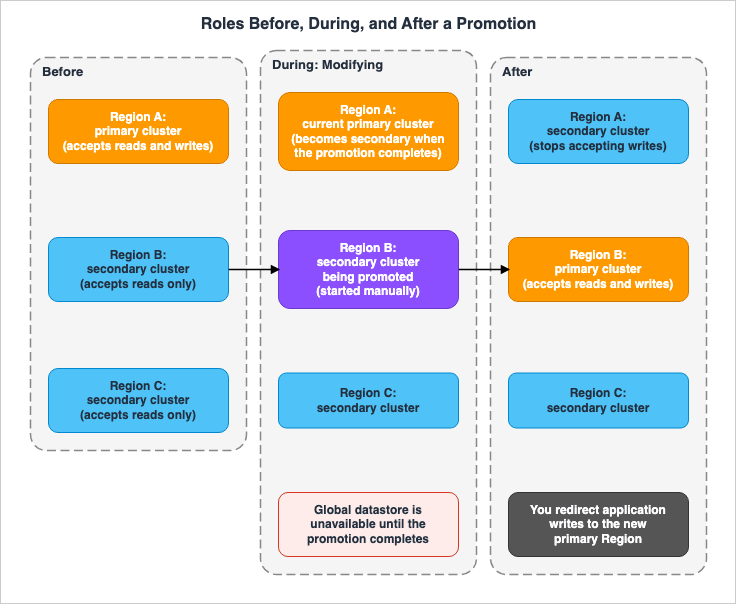
7.1 There Is No Automatic Failover Across Regions
The prerequisites page includes the following text:ElastiCache doesn't support autofailover from one AWS Region to another. When needed, you can promote a secondary cluster manually.The FAQ also answers the question of whether ElastiCache will automatically switch to a secondary cluster when the primary cluster's Region experiences a failure, says no, and says that you can start the failover manually by promoting a secondary cluster.
The automatic failover described in Section 4.4 is limited to within each Region. The user starts a promotion across Regions.
7.2 The Promotion Procedure and the Modifying State
The console page states that if the primary cluster or its Region is unavailable or experiencing performance issues, you can promote a secondary cluster to primary. In the console, select the secondary cluster on the Global Datastore page and choose "Promote to primary." A confirmation screen will display the following warning:The current primary cluster in primary region will become secondary and will stop accepting writes after this operation completes. Please ensure you update your application stack to direct traffic to the new primary region.Once confirmed, the Global Datastore will enter a
Modifying state and will be unavailable until the promotion process is complete. The console page lists five possible states for the Global Datastore: Creating, Modifying, Available, Deleting, and Primary-Only. For the member clusters, it lists four states: Associating, Associated, Disassociating, and Disassociated.The FAQ states that promotion typically completes in less than one minute (see Section 6.4).
7.3 Promotion Is Allowed Even While Other Changes Are in Progress
The console page describes promotion as follows:Promotion is allowed anytime, even if other modifications are in progress. You can also issue multiple promotions in parallel and the global datastore resolves to one primary eventually. If you promote multiple secondary clusters simultaneously, ElastiCache doesn't guarantee which one ultimately resolves to primary.Changes to the Global Datastore typically can only be implemented one at a time (see Section 8.1). However, promotion is an exception.
When using a Global Datastore with two secondaries, and initiating promotion from two different Regions, the Global Datastore eventually settles on a single primary. However, it is not guaranteed which Region will become the primary. It is necessary to designate a single person or system to initiate promotion. This conclusion is an inference made by this article (Inference).
7.4 The Original Primary Cluster Becomes Secondary
The API Reference page forFailoverGlobalReplicationGroup begins with the following sentence.Used to failover the primary region to a secondary region. The secondary region will become primary, and all other clusters will become secondary.The original primary cluster does not leave the Global Datastore; instead, it remains as a secondary cluster. As noted in Section 7.2, once promotion completes, it will no longer accept writes.
No statement was found on what happens to writes that the original primary cluster received but had not yet replicated at the time of the promotion (No statement found). Because replication is asynchronous, any writes that have not yet reached the secondary cluster as of the point promotion occurs will not be present on the new primary. This reading is an inference made by this article (Inference).
7.5 Arguments for FailoverGlobalReplicationGroup
The API Reference page forFailoverGlobalReplicationGroup lists three mandatory arguments.| Argument | API Reference Description | Status |
|---|---|---|
GlobalReplicationGroupId | The name of the Global datastore | Stated |
PrimaryRegion | The Amazon region of the primary cluster of the Global datastore | Stated |
PrimaryReplicationGroupId | The name of the primary replication group | Stated |
It is unclear from the documentation whether
PrimaryRegion and PrimaryReplicationGroupId refer to a secondary cluster that will become primary, or to the current primary cluster. The CLI Reference page for failover-global-replication-group provides the same ambiguous description. This article does not say which (No statement found).It is recommended to avoid using the examples provided on the CLI page. The example command,
aws elasticache failover-replication-group, uses an operation name that does not match failover-global-replication-group. The description for --primary-replication-group-id also says that it is the name of the Global Datastore, which does not match the API Reference (Section 9.2).The API Reference page states that if the Global Datastore is not available or is in the primary-only state, the operation returns an
InvalidGlobalReplicationGroupState error.7.6 Where Writes Are Accepted, and Endpoints
Following promotion, the new primary cluster receives writes. The warning in Section 7.2 tells the user to update the application stack to direct traffic to the new primary Region. Redirecting writes is the user's job.Each Region's cluster is a separate cluster, each with its own endpoint. The types of endpoints within each Region, and how they are handled after failover, are covered in this site's article Counting Connections on ElastiCache for Valkey.
No statement was found in the user guide or API Reference on whether the endpoint names of each cluster change between before and after a promotion. This article does not state whether or not the endpoint names change.
The session store blog post describes a configuration that switches the write destination after promotion. It involves creating a custom DNS record in a Route 53 private hosted zone that points to the endpoint of the primary cluster. The application code in both Regions then uses that record. The same article further states:
To prevent code modification after a global datastore failover, you can create an Amazon Route 53 custom DNS record to resolve the endpoint of the primary cluster, then add this custom DNS record in the code of the application in both us-west-1 and us-west-2.When promotion occurs, a Lambda function updates that record. The article continues:
The code in the function updates the CNAME in the DNS private zone to replace the previous endpoint with the endpoint of the new primary cluster.The article states that for clusters with cluster mode disabled, the record points to the primary endpoint of the primary cluster. For clusters with cluster mode enabled, the record points to the configuration endpoint.
In short, this blog post describes a configuration where, after promotion, the write destination is treated as an endpoint of a different cluster. This is the blog's description of a configuration (Stated), not a promise in the user guide.
The same article also mentions that the update of Route 53 records relies on Route 53's control plane, which operates in us-east-1. As a more robust configuration, it suggests Amazon Application Recovery Controller routing controls and Route 53 failover routing based on health checks.
7.7 Notification of a Promotion
The session store blog post states that when a Region is promoted to primary, the following event is published to the SNS topic associated with that Region:ElastiCache:ReplicationGroupPromotedAsPrimary : $ClusterNameThe list on the events page does not include this event (Documentation does not list). If you are incorporating the promotion notification mechanism, verify the event name in your environment at that time.
7.8 Removing a Secondary Cluster
Separate from promotion, there is an operation to detach the secondary cluster from the Global Datastore. The API Reference page forDisassociateGlobalReplicationGroup states that a removed secondary cluster will no longer receive updates from the primary cluster and will remain as a standalone cluster within that Region.The console page indicates that only secondary clusters can be detached. To delete a Global Datastore, you must first detach all secondary clusters. Once this is done, the Global Datastore is in the
Primary-Only state.8. Modifications and Side Effects of Inheritance
This chapter describes changes that may occur after creating a Global Datastore, and the settings that change when a cluster joins a Global Datastore.8.1 Modifications Proceed One at a Time
The console page states that changes in the Global Datastore can only be applied one at a time, with the sole exception being the secondary promotion.The API Reference for
ModifyGlobalReplicationGroup requires the ApplyImmediately parameter, and states that modifications to a Global Datastore cannot be requested to be applied in the maintenance window. The modifiable items include automatic failover, node type, parameter group, engine, engine version, and description.8.2 Scaling
The prerequisites page states that by modifying the Global Datastore, you can scale the cluster within each Region both vertically and horizontally, and that all the regional clusters are then scaled without interruption. For clusters with cluster mode enabled, the console page lists the ability to add, remove, and rebalance shards. The CLI page lists the following commands:increase-node-groups-in-global-replication-group, decrease-node-groups-in-global-replication-group, and rebalance-slots-in-global-replication-group.The node type and the number of shards are not changed per Region. Instead, these are modified at the Global Datastore level (see Section 4.1).
8.3 Engine Version Upgrades and Switching to Valkey
The console page states that when modifying the engine version, only Valkey 7.2 and later or Redis OSS 5.0.6 and later are available.The CLI page indicates that you can switch a Redis OSS Global Datastore to Valkey by passing a new engine and engine version to the
modify-global-replication-group command. If you are using a custom parameter group, you must also pass the custom parameter group specifically for Valkey. The condition is as follows:The input Valkey custom parameter group must have the same Redis OSS static parameter values as the existing Redis OSS custom parameter group.8.4 Automatic Minor Version Upgrades Are Disabled
The prerequisites page states that when a cluster is added to the Global Datastore, ElastiCache automatically disables the "Auto upgrade minor versions" setting. The reason for this is to prevent engine version inconsistencies among the member clusters. While a cluster is part of the Global Datastore, this setting cannot be re-enabled.Engine versions are fixed to the same value as the primary (see Section 4.1). To upgrade the version, modify it at the Global Datastore level (Section 8.3).
8.5 The Lowest Supported Engine Version and Extended Support
The lowest Redis OSS version for Global Datastore, 5.0.6, is a Redis OSS v5 version. The Extended Support page indicates that standard support for Redis OSS v4 and v5 ended on January 31, 2026, that Extended Support began on February 1, 2026, and that Extended Support ends and the versions reach end of life on January 31, 2029.For details on Extended Support pricing and a list of dates for each version, refer to this site's AWS End-of-Support and EOL Reference and the ElastiCache documentation. This article does not include pricing information.
9. Where the Sources Disagree or Say Nothing
This chapter separates, across the materials this article reviewed, items that differ only in counting or wording, statements that disagree, and items with no statement found.9.1 Items That Differ Only in Counting or Wording
| Item | Sentence A | Sentence B | Handling in this article |
|---|---|---|---|
| Number of secondary clusters | The FAQ and the prerequisites page state that there are at most two secondary Regions. | The console page states that after the first secondary is created, one more can be added. | Both mean at most two secondary clusters in total (Section 3.2). |
| Same configuration | The features page states that Global Datastore ensures that all participating clusters are identically configured. | The console page states that the 12 items of a secondary cluster are populated with the primary's values but can be changed for each cluster. | The features page sentence appears in the context of scaling and upgrading. This article reads it as referring to the fixed items in Section 4.1. This reading is an inference (Inference; see Sections 4.1 and 4.2). |
| Fixed items | The console page's procedure that uses an existing cluster lists engine version, node type, parameter group, number of shards, and two encryption methods. | The same page's procedure for a new cluster also lists Location and Instance type, and its procedure for adding a Region also lists Instance type and AUTH. | Read as a difference in how each procedure is written. This reading is an inference (Inference; see Section 4.1). |
| Node type | The prerequisites page lists the following families: M5, M6g, M7g, M8g, R5, R6g, R7g, R8g, C7gn, C8gn. | The console page's "Modify node type" section states that the available options include the R5 and M5 families. | The console page provides examples, without presenting a complete list. This article uses the list on the prerequisites page (Section 3.4). |
| Replication lag | The FAQ describes the functionality, stating that replication across Regions occurs in less than one second. | In the same FAQ, the answer regarding RPO states that it typically takes less than one second, and there is no SLA. | Not an SLA. This article follows the RPO answer (Section 6.4). |
9.2 Statements That Disagree
| Topic | Sentence A | Sentence B | Status |
|---|---|---|---|
| Global Datastore Tags | The tagging announcement states that, as of September 24, 2026, tags can be applied to Global Datastore. | The tagging page states that tags cannot be applied to Global Datastore. | Sources disagree |
| ID Prefix for us-west-1 | The CLI page states that the IDs of Global Datastore created in us-west-1 begin with virxk. | The API Reference for CreateGlobalReplicationGroup states that the IDs begin with dsdfu. | Sources disagree |
| Failover CLI Example | The API Reference uses the operation name FailoverGlobalReplicationGroup, and the CLI Reference uses failover-global-replication-group. | The CLI page example shows aws elasticache failover-replication-group. | Sources disagree |
Description of --primary-replication-group-id | Both the API Reference and the CLI Reference refer to the name of the primary replication group. | The CLI page example refers to the name of the Global Datastore. | Sources disagree |
| Parameter Name for Encryption in Transit | The API Reference for CreateReplicationGroup lists TransitEncryptionEnabled. | The CLI page lists EnableTransitEncryption among the parameters not to pass. | Sources disagree |
Value of Engine | The API Reference for ModifyGlobalReplicationGroup lists valkey, memcached, and redis. | The API Reference page for the GlobalReplicationGroup data type says Valkey or Redis OSS only. The FAQ states that Global Datastore is not available with Memcached. | Sources disagree |
| Access Control Versions | The console page, in the steps for creating with an existing cluster and creating with a new cluster, indicates Valkey 7.2 or later and Redis OSS 6.0 or later for the primary section. | The same page, in the steps for creating with a new cluster, indicates Valkey 7.2 or later and Redis OSS 6.4 or later for the secondary section. | Sources disagree |
| Metrics for the Lag Across Regions | Both the node metrics page and the console page mention GlobalDatastoreReplicationLag and Global Datastore Replica lag. | A re:Post article suggests looking at the ReplicationLag metric. | Sources disagree |
The prefix for IDs will not be included in this article. When you need it, look at the ID of the Global Datastore you created. The table of prefixes on the CLI page is shorter than the list of Regions on the prerequisites page.
9.3 Items with No Statement Found
- Prior to and following promotion, it is unclear whether the names of the endpoints for each cluster change (No statement found). This article searched the user guide and the API Reference three times with different search terms. The session store blog post shows a configuration that switches the write destination to the endpoint of the new primary cluster (Section 7.6).
- It is unclear whether the
PrimaryRegionandPrimaryReplicationGroupIdfields inFailoverGlobalReplicationGrouprefer to the cluster being promoted or the current primary cluster (No statement found). - It is unclear how writes to the original primary cluster are handled when they were not yet being replicated at the point of promotion (No statement found).
- It is unclear whether the values of items that initially inherit a value, but are later modified on the primary side, are propagated to the secondary cluster (No statement found).
- It is unclear whether RBAC user groups and users are replicated across Regions (No statement found).
- Which CloudWatch dimension to use for
GlobalDatastoreReplicationLag(No statement found). - The
ElastiCache:ReplicationGroupPromotedAsPrimaryevent is not listed on the events page (Documentation does not list).
10. Failure Modes
This chapter outlines potential failure scenarios based on the content of this article, categorized by type.- Assuming that ElastiCache promotes a secondary automatically when the primary Region has a problem. There is no automatic failover across Regions. The user starts the promotion (Section 7.1).
- Assuming that after a promotion, the application can keep writing to the same endpoint. The original primary cluster will become the secondary and will no longer accept write operations. It is the user's responsibility to redirect write operations to the new primary Region (Sections 7.4 and 7.6).
- Starting promotions from two Regions at the same time. There is no guarantee which Region will become the primary (Section 7.3).
- Trying to add an existing cluster as a secondary cluster. This is not supported. The process of adding a cluster as a secondary wipes data, which may result in data loss (Section 3.4).
- Assuming that one parameter group is shared across Regions. While the underlying entities are automatically created for each cluster, any changes will be applied to all clusters. Even if a change is intended for only one Region, it will be applied to all other Regions as well (Section 5.2).
- The security group, subnet group, KMS key, and backup settings for the secondary cluster are assumed to be managed by the primary cluster. Initial values are provided, but these settings are determined per Region (Sections 4.2 and 5.1).
- Reading
ReplicationLagwithin a Region as the lag across Regions. The lag across Regions is observed withGlobalDatastoreReplicationLag(Chapter 6). - Reading
GlobalDatastoreReplicationLagon a cluster mode enabled cluster as the average across all shards. It is the maximum among the shards (Section 6.1). - Building the FAQ's one second and one minute into the design as promised values. There is no SLA for RPO and RTO (Section 6.4).
- After writing to the primary cluster, it is assumed that the local secondary cluster will be able to read the data. Replication is asynchronous, and data may not always be immediately available (Section 6.4).
- Assuming that automatic minor version upgrades continue on a cluster in a Global Datastore. The setting is disabled automatically and cannot be turned back on while the cluster is in the Global Datastore (Section 8.4).
- Copying the failover example on the CLI page into a runbook as is. The operation name and the argument description do not match the API Reference (Sections 7.5 and 9.2).
11. Frequently Asked Questions about ElastiCache Global Datastore
Q1. Can I use a Global Datastore with ElastiCache Serverless?
No, you cannot. The overview page states that Global Datastore is only supported with node-based clusters. It is also not available with ElastiCache for Memcached (as stated in Section 3.1).Q2. How many secondary Regions can a Global Datastore have?
There can be at most two secondary Regions. Including the primary Region, a Global Datastore has at most three Regions in total. The two Regions in China replicate only between each other (see Section 3.2).Q3. Can the node type and engine version be changed in the secondary cluster?
No, they cannot. The engine version, node type, number of shards, parameter groups, encryption at rest, and encryption in transit are all fixed to the same values as those used in the primary cluster. The node type and engine version can be changed at the Global Datastore level (see Section 4.1 and Chapter 8).Q4. Are parameter groups shared across Regions?
No, they are not. ElastiCache automatically creates one parameter group for each cluster. If you modify the parameter group for any single cluster, those changes will be applied to all clusters in the Global Datastore (see Section 5.2).Q5. What should I use to monitor replication lag across Regions?
You can check theGlobalDatastoreReplicationLag in CloudWatch, or view the Global Datastore Replica lag in the console. When cluster mode is enabled, this is the maximum lag among the shards. ReplicationLag indicates the lag of replicas within a Region (see Chapter 6).Q6. If the primary Region becomes unavailable, does it switch over automatically?
No, it does not. There is no automatic failover that spans Regions. You promote a secondary cluster manually. During the promotion, the Global Datastore will be in aModifying state and will be unavailable (see Sections 7.1 and 7.2).Q7. What should the application do after a promotion?
Redirect the write destination to the new primary Region's cluster. The warning on the console page tells you to direct the application stack to the new primary Region. No statement on whether endpoint names change was found in the user guide or the API Reference. The session store blog post describes a configuration that rewrites Route 53's custom record to point to the endpoint of the new primary cluster (Section 7.6).Q8. What happens to the original primary cluster after a promotion?
Following promotion, the original primary cluster will become a secondary cluster and will no longer receive write operations once promotion completes. It will not be removed from the Global Datastore (see Section 7.4).Q9. What are the RPO and RTO values?
The FAQ states that the RPO is typically less than one second, and the RTO is typically less than one minute. However, there is no Service Level Agreement (SLA) in place. The RPO is affected by the replication lag between Regions (see Section 6.4).12. Summary
In Global Datastore, settings are passed from the primary cluster to the secondary clusters in three different ways.- The engine version, node type, number of shards, parameter group, and two encryption methods are fixed to the same values as the primary cluster. The key for encryption at rest can be a different one.
- Ports, number of replicas, subnet groups, security groups, KMS keys, AUTH tokens, backups, maintenance windows, and SNS topics initially take the values from the primary cluster, and can be modified for each Region.
- When creating a secondary cluster via the CLI, you do not pass 12 parameters. ElastiCache will infer these values from the primary cluster.
- A parameter group is automatically created for each cluster, and any changes to this group will be applied to all clusters.
- Replication lag across Regions can be monitored using
GlobalDatastoreReplicationLag. There is no SLA for RPO and RTO. - Automatic failover across Regions is not supported. Promotion is manual, and during a promotion the Global Datastore is in the
Modifyingstate and is unavailable. The original primary cluster becomes a secondary cluster and will no longer accept write operations. - It is the responsibility of the users to redirect write traffic to the new primary Region. No statement on whether endpoint names change was found in the user guide or the API Reference.
13. References
- Replication across AWS Regions using global datastores - Amazon ElastiCache
- Prerequisites and limitations - Amazon ElastiCache
- Using global datastores (console) - Amazon ElastiCache
- Using global datastores (CLI) - Amazon ElastiCache
- Metrics for Valkey and Redis OSS - Amazon ElastiCache
- Tagging your ElastiCache resources - Amazon ElastiCache
- Event Notifications and Amazon SNS - Amazon ElastiCache
- Versions with ElastiCache Extended Support - Amazon ElastiCache
- CreateGlobalReplicationGroup - Amazon ElastiCache
- FailoverGlobalReplicationGroup - Amazon ElastiCache
- DisassociateGlobalReplicationGroup - Amazon ElastiCache
- ModifyGlobalReplicationGroup - Amazon ElastiCache
- GlobalReplicationGroup - Amazon ElastiCache
- CreateReplicationGroup - Amazon ElastiCache
- failover-global-replication-group - AWS CLI Command Reference
- Amazon ElastiCache FAQs
- Amazon ElastiCache Features
- Amazon ElastiCache Global Datastore now supports tagging and tag-based access control - AWS What's New
- Build a multi-Region session store with Amazon ElastiCache for Valkey Global Datastore - AWS Database Blog
- How do I monitor cross-Region replication lag in ElastiCache for Redis Global Datastore? - AWS re:Post
- Durability on Amazon ElastiCache for Valkey - Where an Acknowledged Write Survives, the 10-Second Buffer, and Changing It on a Live Cluster
- Counting Connections on ElastiCache for Valkey - Per-Node and Per-Cache Limits, Endpoints, and Reconnects After Failover
- AWS History and Timeline regarding Amazon ElastiCache - Overview, Functions, Features, Summary of Updates, and Introduction
- AWS Multi-Region Active-Active Architecture Guide - Global Data Replication, Routing, and Failover with Route 53, DynamoDB Global Tables, and Aurora Global Database
- AWS Disaster Recovery Strategies Guide - Backup and Restore, Pilot Light, Warm Standby, and Multi-Site Active-Active
- AWS End-of-Support and EOL Reference - Lambda, EKS, RDS and Aurora, ElastiCache, and OpenSearch Service
References:
Tech Blog with curated related content
Written by Hidekazu Konishi