Draining an Availability Zone for Days - What ARC Zonal Shift Moves and What Stays Pinned to the Zone
First Published:
Last Updated:
This article provides a resource-by-resource table outlining what the zonal shift moves, what remains in the AZ, and who or what is responsible for moving the resources that remain. Furthermore, it differentiates between information documented in AWS documentation and information found only in blog posts, specifically focusing on what becomes apparent only when the zonal shift is run for an extended period (days). The article covers four resource types supported by zonal shift (Application Load Balancer, Network Load Balancer, Amazon EC2 Auto Scaling group, and Amazon EKS clusters) as well as ECS, RDS, Aurora, and ElastiCache, which are not in that list. For each resource, it indicates where the information is documented and where no statement was found.
This article does not provide instructions on how to enable zonal shift, nor does it explain the underlying principles of static stability, nor does it discuss pricing. The information presented was verified as of October 29, 2026.
Related articles on this site:
- Cell-Based Architecture and Shuffle Sharding on AWS - Blast Radius Reduction Patterns for Large-Scale Workloads
- Orchestrating Regional Failover with Amazon Application Recovery Controller Region Switch - What Plan Evaluation Checks, Which Region the Plan Runs From, and What a Green Status Does Not Guarantee
- What Counts as a Data Plane Action on AWS - IsDataPlane in the Service Reference, CloudTrail Data Events, and What an SCP or RCP Can Scope
- Amazon RDS and Aurora High Availability Guide - Multi-AZ, Read Replicas, RDS Proxy, and Global Database Failover
- How Elastic Load Balancing Scales - Scaling Rate, Capacity, and Load Balancer Capacity Unit Reservation
- AWS Elastic Load Balancing Decision Guide - Choosing and Operating Application, Network, and Gateway Load Balancers
- Who Owns the Load Balancer for an Amazon ECS Service - ECS Gateway, an ALB per Service, and Express Mode
- AWS Disaster Recovery Strategies Guide - Backup and Restore, Pilot Light, Warm Standby, and Multi-Site Active-Active
- Chaos Engineering on AWS with AWS Fault Injection Service - Experiment Design, Stop Conditions, and Safety Rails
Table of Contents
- 1. Scope and Assumptions
- 2. How to Read the Tables
- 3. What a Zonal Shift Moves
- 4. What Moves and What Stays, Resource by Resource
- 5. What Is Not in the Supported Resources List
- 6. Duration, Updates, Expiry, Autoshift, and Practice Runs
- 7. What Surfaces Only in a Multi-Day Evacuation
- 8. The Order of Recovery
- 9. What This Setup Showed
- 10. Where the Sources Disagree, Count Differently, or Are Silent
- 11. Failure Modes
- 12. Frequently Asked Questions About Draining an Availability Zone for Days
- 13. Summary
- 14. References
1. Scope and Assumptions
This section first defines the intended audience, the scope of this article, the consulted materials, and clarifies distinctions between similarly named components. The core conclusions are as follows:- A zonal shift affects the destination of traffic. The zonal shift takes the IP addresses of the load balancer nodes in that Availability Zone out of DNS, and the load balancer stops sending new requests to targets in that AZ. Auto Scaling groups create new instances in other AZs. EKS removes the endpoints of Pods within that AZ from service routing.
- Existing connections, instances, nodes, and Pods within that AZ remain. The ARC DG states that existing connections will continue to send requests to that AZ until the client reconnects, and that EKS nodes will not be terminated, nor Pods evicted. Auto Scaling groups will cease scaling down operations based on scaling policies.
- ECS, RDS, Aurora, and ElastiCache are not listed as supported resources for zonal shift. Moving these write destinations or tasks out of an AZ requires manual intervention by operators (such as updating ECS services, RDS failover by rebooting, or Aurora failover), or relies on the individual service's built-in mechanisms.
- The duration of a zonal shift is set between 1 minute and 72 hours at the time of initiation. The documentation indicates that the duration can be updated later. However, the number of times an update can be performed, or the total duration for which it can be extended, was not found in the consulted materials.
- An AWS Architecture Blog post from September 30, 2026, describes a multi-day evacuation process that includes considerations for Auto Scaling policies, deployment pipelines, outdated DNS and cached database endpoints, time-based processes such as certificate and credential rotation and cron jobs, infrequently used long-lived database connections, and recovery after several days. This is a blog post, not ARC documentation.
- Regarding the recovery order, EC2 Auto Scaling documentation recommends that when a zonal shift has been applied to both a load balancer with cross-zone load balancing disabled and an Auto Scaling group, the Auto Scaling group shift should be canceled first, followed by the load balancer once capacity is balanced. The Architecture Blog outlines a process where the EKS cluster shift is canceled first, followed by the load balancer.
1.1 Intended Audience
This article is intended for platform engineers and SREs who are operating ALB or NLB, EC2 Auto Scaling, EKS, ECS, RDS, or Aurora across multiple Availability Zones, and who are either currently using or considering using zonal shift or zonal autoshift. In particular, this article assumes readers who take one of the following for granted:- Starting a zonal shift is all it takes when an AZ fails.
- Initiating zonal shift will cause all resources within that AZ to stop.
- ECS services are also eligible for zonal shift.
- Databases also move to a different AZ along with the zonal shift.
Whether these assumptions hold true depends on factors such as the type of resource, cross-zone load balancing configuration, how long connections last, and whether manual control plane intervention is necessary.
1.2 Scope and Exclusions
This article addresses the following topics:- For each of the four resource types supported by zonal shift, what moves, what stays, and who moves it.
- Who moves ECS, RDS, Aurora, and ElastiCache, which are not in the supported resources list, and outbound connections from Pods, and with which operation.
- The configuration, updates, and consequences of zonal shift expiration, as well as zonal autoshift, practice runs, and capacity checks.
- What first surfaces in a multi-day evacuation, and the order of recovery.
- Discrepancies and omissions in the existing documentation.
This article does not cover the following topics. It does not discuss pricing for load balancers, instances, or practice runs.
- Regional failover and ARC Region switch. These topics are covered in the existing publication Orchestrating Regional Failover with Amazon Application Recovery Controller Region Switch.
- Cell design and the placement of zonal shift in the context of AZ dimensions. These topics are covered in the existing publication Cell-Based Architecture and Shuffle Sharding on AWS.
- The concept of static stability. This article uses the term solely to refer to a design that pre-provisions capacity to ensure continued operation with the remaining AZs, even if one AZ fails.
- The details of RDS and Aurora failover mechanisms. These topics are covered in the existing publication Amazon RDS and Aurora High Availability Guide.
- Load balancer scaling. These topics are covered in the existing publication How Elastic Load Balancing Scales.
- Designing experiments using AWS Fault Injection Service (FIS). These topics are covered in the existing publication Chaos Engineering on AWS with AWS Fault Injection Service.
- Authentication across Regions with Amazon Cognito user pools is covered in a related article, Amazon Cognito Multi-Region Replication.
- What happens when a replica leaves an Amazon DynamoDB global table is covered in a related article, Leaving an Amazon DynamoDB Global Table.
- ARC readiness checks. This feature stopped accepting new customers on April 30, 2026; the ARC DG states that this change does not affect zonal shift or zonal autoshift.
There are no changes to Region switch, routing controls, zonal shift, and zonal autoshift.1.3 The Check Date and the Sources Read
The information was verified on October 29, 2026. The materials reviewed are as follows. This article uses the following short names for them.- ARC Developer Guide (hereinafter referred to as the ARC DG): the entry chapter for zonal shift, How a zonal shift works, Supported resources (with four pages detailing resources), Best practices for zonal shifts in ARC, and the zonal autoshift pages (When AWS starts and stops autoshifts, When ARC schedules, starts, and ends practice runs, Capacity checks for practice runs, Precedence for zonal shifts), a page outlining the steps to initiate a zonal shift, the readiness check availability change page, and Document history.
- ARC Zonal Shift API Reference (hereinafter referred to as the API Reference):
StartZonalShift,UpdateZonalShift,CancelZonalShift,ListZonalShifts,ListManagedResources,GetManagedResource,ZonalShiftSummary,ZonalShiftInResource,AutoshiftSummary,StartPracticeRun. Also includes the AWS CLI Command Reference forstart-zonal-shift,update-zonal-shift, andlist-zonal-shifts. - Elastic Load Balancing User Guide (pages on zonal shift for ALB and NLB, enabling, attributes, and Document history).
- Pages on zonal shift in the EKS User Guide, EC2 Auto Scaling User Guide, ECS Developer Guide (page on task placement and Availability Zone rebalancing), RDS User Guide (page on Multi-AZ failover and reboot), Aurora User Guide (page on high availability and endpoints), and ElastiCache User Guide (page on Multi-AZ).
- AWS CloudFormation Template Reference for
AWS::AutoScaling::AutoScalingGroupandAWS::ElasticLoadBalancingV2::LoadBalancer. - What's New announcements (11 announcements from November 28, 2022, to July 10, 2026).
- Blog: From the AWS Architecture Blog, "Running multi-day AZ evacuation drills with ARC Zonal Shift" (September 30, 2026, hereinafter referred to as the Architecture Blog), from the AWS Networking and Content Delivery Blog, "Rapidly recover from application failures in a single AZ" (November 28, 2022) and "Using cross-zone load balancing with zonal shift" (November 22, 2024) (hereinafter referred to as the Networking Blog's 2022 article and 2024 article), and from the AWS Containers Blog, "Best practices for resilience and availability on Amazon ECS" (August 18, 2025, hereinafter referred to as the Containers Blog).
1.4 Words with the Same Spelling, Different Meanings
This article differentiates between similar terms as follows:- shift: ARC distinguishes between customer-initiated zonal shifts, AWS autoshifts, ARC's weekly practice runs, and shifts initiated by FIS experiments. When this article uses the term "zonal shift," it refers to shifts initiated by the user. For the other three, the specific name is used.
- zonal: The "zonal" in "zonal shift" refers to moving traffic based on Availability Zones. The "zonal" in previously published articles about load balancer scaling refers to the fact that a load balancer's capacity is divided across AZs. These are two distinct concepts.
- data plane: The "data plane" in Section 3.2 of this article refers to an operational category that is expected to continue functioning even during failures. This is different from the
IsDataPlanesetting in IAM Service Reference, or the categorization of data events in CloudTrail. The differences in terminology are discussed in Section 5 of the previously published article What Counts as a Data Plane Action on AWS. The EKS User Guide describes the target of a zonal shift as Kubernetes' data plane (nodes and Pods), differentiating it from the control plane managed by EKS. This is a different usage of the term compared to the distinction made in Section 3.2. - evacuation: AZ evacuation, as used in the Architecture Blog, is a term that the ARC DG does not use, instead opting to describe the action as shifting traffic away from an AZ.
2. How to Read the Tables
This section defines the columns in the tables in Sections 3 through 10, as well as how to describe the state of the sources. The terminology used for the columns and state words is shared with the Cognito article in the same series. In addition, this section further defines four terms: traffic, connection, capacity, and state, and specifies how to differentiate between descriptions for documents and blog posts.2.1 Columns
The tables in this article start with a column listing resources, followed by the columns below. Some tables may include aPrerequisite column after the Who Acts column to specify prerequisites.What Moves: Items that are moved from an Availability Zone when a zonal shift is initiated.What Stays: Items that remain in an Availability Zone even after a zonal shift is initiated.Who Acts: The entity responsible for moving the items. This could be ARC, the client, Auto Scaling, a specific service, or the operator.Where It Is Written: The source of the statement in that row. For a blog statement, the cell names the blog.No Statement Found: Instances where, despite searching through the materials described in Section 1.3, using different search terms and categories, no relevant statement could be found. If nothing applies, the cell reads—.
A non-empty
No Statement Found entry does not indicate that the matter is nonexistent or will not occur.2.2 Four States
The condition of the information is described using the following four terms:- No statement was found: This indicates that the information was not found in the examined material. The text writes
no statement was foundand adds the scope of the search. - The documentation does not list: This means that the item is not included in the lists or tables. The text writes
the documentation does not list. - The sources disagree: The text writes
the sources disagreewhen the sources provide conflicting information. The text lists both statements and their sources. This article does not definitively identify either source as incorrect. - Inference: This refers to a conclusion drawn by this article, rather than a statement found in any specific source. The same sentence says that it is this article's reading.
2.3 Traffic, Connections, Capacity, and State
This article distinguishes what moves out of an AZ from what stays, using the following four terms:- Traffic: The destination for new connections and new requests. DNS responses, load balancer node routing, and EKS EndpointSlices determine it. The zonal shift directly affects this traffic.
- Connections: TCP and HTTP connections. This article distinguishes between existing connections (already open) and new connections (about to be opened). This article uses "connection" and "request" as separate terms. Multiple requests may pass over a single connection.
- Capacity: The number of instances, nodes, Pods, tasks, and targets, as well as the amount they can process.
- State: Elements that do not move along with traffic, such as database write destinations (writers) and standby instances, client-cached endpoints, persistent volumes, and locations for time-based processes.
2.4 Documentation Statements and Blog Statements
This article writes statements from AWS documentation and statements from AWS blogs differently. A documentation statement, such as one from the ARC DG, the API Reference, or a service User Guide, takes the document or page name as its subject. A blog statement carries the blog name and date in the same sentence. Blogs are intended to present procedures or perspectives relevant to a specific date and are not treated as formal specifications. Much of the discussion of multi-day evacuation in Section 7 is based on content from the Architecture Blog.3. What a Zonal Shift Moves
This section clarifies how zonal shifts work to move traffic from one Availability Zone to another, outlines the characteristics of these operations, and explains which shift takes precedence when multiple shifts are applied to the same resource.3.1 The DNS Update and Each Resource's Mechanism
The "How a zonal shift works" page of the ARC DG states that the integrations of supported resources mark the specified Availability Zone as unhealthy, which shifts traffic away.ARC's supported resources provide integrations that mark the specified AZ as unhealthy,
which results in a traffic shifting away from the impaired AZ.Regarding load balancers, the "Best practices" page of the ARC DG explains that traffic redirection is achieved through DNS updates, distinguishing between new and existing connections.
A DNS update causes all new connections to be directed away from the impaired location.
However, clients with pre-existing open connections might continue to make requests against the impaired location
until the clients reconnect.
These two sentences form the core of this article. DNS updates redirect only new connections; existing connections stay until the client reconnects. The same page recommends minimizing the time clients are connected to an endpoint to expedite recovery.
Auto Scaling groups and EKS clusters avoid the Availability Zone within their own services, instead of relying on DNS. Auto Scaling groups provision new capacity in other Availability Zones, while EKS removes Pod endpoints from EndpointSlices (see Section 4).
The "How a zonal shift works" page also notes that traffic may not shift immediately. The time it takes for existing connections to terminate varies depending on client behavior and connection reuse, and in some DNS configurations, it can take longer than a few minutes.
3.2 A Data Plane Operation
The ARC DG's Best Practices page recommends that when aiming for a quick and reliable recovery, zonal shift operations should be initiated via the AWS CLI or API, using pre-stored credentials.But when fast, reliable recovery is critical, data plane operations are a better choice.The Architecture Blog refers to zonal shift as a data plane operation, while other operations involved in the evacuation process are termed control plane operations.
ARC Zonal Shift is a data plane operation by design. Because it works independently of the AWS control plane,
it remains available even during an AZ impairment. The other steps in this walkthrough (ECS service updates,
manual RDS failovers, manual Aurora failovers, subnet group modifications) are control plane operations.
Therefore, the recommendation to perform zonal shift as a data plane operation can be found in the ARC DG. Conversely, the Architecture Blog uses the term "control plane operation" to describe actions such as updating ECS services or performing database failovers. The same blog also advises that in the event of an actual failure, zonal shift should be initiated first to halt traffic, followed by control plane operations. When Section 5 of this article calls the operations that move resources not in the supported list "control plane operations," it follows this blog's classification.
3.3 Only One Shift Applies at a Time
The ARC DG documentation on Precedence for zonal shifts states that only one shift can be applied to a resource at a time.There can be no more than one applied zonal shift at a given time. That is, only one practice run zonal shift,
customer-initiated zonal shift, autoshift, or AWS FIS experiment for the resource.The table on the same page shows the outcome for 13 different combinations of the currently applied shift and a newly initiated shift, clarifying which shift takes effect. The principle is that a zonal shift initiated by the user takes precedence over other types.
The general principle for precedence is that zonal shifts that you start as a customer take precedence over other
shift types.
Of the rows in the table, the following three relate to evacuation over several days:
| Applied | Started | Result (Precedence page) |
|---|---|---|
| Manual zonal shift | Practice run | The practice run fails to start |
| Manual zonal shift | Zonal autoshift | The autoshift is ACTIVE but not APPLIED; the manual zonal shift takes precedence |
| Practice run | Manual zonal shift | The practice run is canceled with the outcome INTERRUPTED; the zonal shift is applied |
Unapplied shifts remain in an
ACTIVE state, marked as NOT_APPLIED. If AWS initiates an autoshift while a user is manually continuing a zonal shift, the autoshift will be recorded, but the manually initiated zonal shift remains the one in effect.3.4 When a Zonal Shift Has No Effect
The ARC DG describes scenarios where zonal shift fails to redirect traffic. The "Supported resources" section notes that it does not function when the load balancer is in a "fail open" state.When a Network Load Balancer or Application Load Balancer is in a fail open state, a zonal shift will have no effect.The "How a zonal shift works" section provides "fail open" examples, including situations where there are no instances in any of the target group's Availability Zones, and when all instances are unhealthy.
The ARC DG's ALB page states that zonal shift does not function with target groups that only have one Availability Zone.
Zonal shift won't work for single-AZ target groups.Both the ARC DG's ALB page, and the ELB User Guide's sections on zonal shift for ALB and NLB, state that only one Availability Zone can be used per load balancer for zonal shift. These sections also explain that when multiple underlying issues are impacting a service, AWS may proactively remove a load balancer's Availability Zone-specific IP addresses from DNS.
AWS proactively removes zonal load balancer IP addresses from DNS when multiple infrastructure issues impact services.4. What Moves and What Stays, Resource by Resource
This section organizes, for each of the four resource types that zonal shift supports, what moves, what remains, and the entity responsible for initiating the movement. The ARC DG's "Supported resources" page lists the supported resources as follows:- Amazon EC2 Auto Scaling groups
- Amazon Elastic Kubernetes Service
- Application Load Balancers with cross-zone load balancing enabled or disabled
- Network Load Balancers with cross-zone load balancing enabled or disabled
Both ALB and NLB zonal shifts are disabled by default. The ELB User Guide states that they must be enabled on a load balancer-by-load balancer basis.
Zonal shift is disabled by default and must be enabled on each Application Load Balancer.The NLB page also contains the same statement, referring to Network Load Balancers. The attribute name is
zonal_shift.config.enabled.4.1 Application Load Balancer
The Application Load Balancer (ALB) section on zonal shifts in the ELB User Guide states that when a zonal shift is initiated, the load balancer will stop sending new traffic to that Availability Zone. For ALBs with cross-zone load balancing enabled, all traffic to targets within that AZ will be stopped, and the AZ's IP address will be removed from DNS.When a zonal shift is started on an Application Load Balancer with cross-zone load balancing enabled,
all traffic to targets is blocked in the availability zone being impacted, and zonal IP addresses are removed from DNS.Regarding existing connections, the ARC DG's ALB page gives the default HTTP client keepalive duration and recommends lowering it to match the recovery time goal.
By default, Application Load Balancers set the HTTP client keepalive duration value to 3600 seconds, or 1 hour.
We suggest that you lower the value to be inline with your recovery time goal for your application,
for example, 300 seconds.
By default, clients may continue to use the same connection for up to one hour. During that time, requests on that connection will continue to be routed to the same load balancer node that was used before the zonal shift began.
The same page also notes that when the ALB is a target of an NLB, the zonal shift should be started on the NLB. Even if the shift is initiated on the ALB, the NLB will continue to send traffic to the ALB.
4.2 Network Load Balancer
The ARC DG section on NLBs states that when a zonal shift is initiated, ARC will cause the NLB's health checks to fail, and the load balancer nodes in that Availability Zone will be removed from DNS. The NLB will treat targets in that Availability Zone as disabled. Even disabled targets continue to receive health checks.Regarding existing connections, the NLB section in the ELB User Guide states, in a sentence that does not distinguish cross-zone load balancing settings, that zonal shift does not terminate existing connections.
Existing connections to targets in the affected Availability Zone are not terminated by zonal shift.
It might take several minutes for these connections to complete gracefully.
For NLBs with cross-zone load balancing enabled, both the ARC DG and the ELB User Guide state that existing connections will remain active until they naturally close, while new connections will no longer be routed to targets within that Availability Zone.
Existing connections to targets in the impaired Availability Zone persist until they organically close,
while new connections are no longer routed to targets in the impaired Availability Zone.
The ELB User Guide indicates that during a zonal shift, the NLB targets are assigned an
AdministrativeOverride state. This state can take one of four values: unknown, no_override, zonal_shift_active, and zonal_shift_delegated_to_dns, and is independent of the TargetHealth state. According to the description, the DescribeTargetHealth command can be used to determine if a target within a particular Availability Zone is subject to a zonal shift. However, when the state is zonal_shift_delegated_to_dns, the state is not visible through DescribeTargetHealth and must be viewed using the ARC API or console. In the NLB with cross-zone load balancing disabled in Section 9, this value persisted both before and during the zonal shift.To enable zonal shift on an NLB with cross-zone load balancing enabled, the "Enable" section in the ELB User Guide outlines the following prerequisites.
If you enable cross-zone load balancing for the load balancer, the load_balancing.cross_zone.enabled attribute of every
target group attached to the load balancer must be true or use_load_balancer_configuration (the default) before you
can enable zonal shift.
On September 24, 2026, the ARC DG and ELB User Guide documented that zonal shift became available for three more target group configurations on NLBs with cross-zone load balancing enabled: connection termination for unhealthy targets enabled, UDP, or an ALB as the target. As of this article's check date, no What's New item for this change was found (no statement was found).
4.3 EC2 Auto Scaling Group
The ARC DG Auto Scaling group page and the EC2 Auto Scaling User Guide describe three behaviors during a zonal shift. The first is scaling out, where all new capacity is created in healthy Availability Zones.Auto Scaling launches all new capacity requests in the healthy Availability ZonesThe second is dynamic scaling, where scale-in by scaling policies is blocked but scale-out is not.
Auto Scaling blocks scaling policies from decreasing desired capacity. Auto Scaling does not block scaling policies
from increasing desired capacity.
The third concerns instance refresh. The timeout is extended for an instance refresh that is delayed while a zonal shift is active. The documentation identifies scaling policies as the mechanism used to halt downsizing, and does not mention manual reductions in desired capacity. In the setup in Section 9, a manual decrease was accepted during the zonal shift.
Regarding instances already present in an AZ, neither document states that a zonal shift terminates them. Whether an instance is terminated depends on the health check behavior for the impaired AZ set on the Auto Scaling group. There are two options:
ReplaceUnhealthy: Instances identified as unhealthy are replaced across all AZs, including the AZ affected by the zonal shift.IgnoreUnhealthy: Instances identified as unhealthy are not replaced in the AZ affected by the zonal shift, but are replaced in other AZs.
The EC2 Auto Scaling User Guide recommends using
IgnoreUnhealthy for users who already have pre-provisioned capacity. A 2024 article on the Networking Blog states that in Auto Scaling groups with replacement enabled, instances in an impaired AZ may be terminated, and new instances may be created in other AZs.When combining EC2 Auto Scaling groups with load balancers that have cross-zone load balancing disabled, the EC2 Auto Scaling User Guide notes that AZ capacity imbalances may occur, so Auto Scaling has an extra validation. Users following the recommended practices can acknowledge this possibility by using the
skip-zonal-shift-validation parameter within CreateAutoScalingGroup, UpdateAutoScalingGroup, or AttachTrafficSources, or with the console checkbox. The same document also recommends distributing capacity across AZs using the balanced only setting.4.4 EKS Clusters
The ARC DG's EKS page and the EKS User Guide state that during a zonal shift, all nodes in the affected Availability Zone are cordoned. This prevents new Pods from being scheduled onto nodes within that AZ. The EndpointSlice controller will remove endpoints associated with Pods in the affected AZ from the EndpointSlice.The EndpointSlice controller finds all the Pod endpoints in the impaired AZ and removes them from the relevant
EndpointSlices.The nodes and Pods remain in place.
The nodes in the unhealthy AZ are not terminated and the Pods are not evicted from these nodes.When using managed node groups, Availability Zone rebalancing is suspended, and the node group's Auto Scaling group will be updated to only create new nodes within healthy AZs. When using EKS Auto Mode, no new nodes will be created in the affected AZ, and voluntary disruption such as consolidation or drift stops. The EKS User Guide page on enabling zonal shift states that self-managed Karpenter does this from version 1.12 when it runs with the
--enable-zonal-shift flag; the FAQ on the zonal shift page states only version 1.12 or greater. The EKS User Guide notes that this feature does not function with EKS Fargate. The same document also states that, by default, when EKS Fargate recognizes a zonal health event, Pods will prefer to run in the other AZs.The EKS User Guide cautions that initiating a zonal shift can impact availability if the workload is not sufficiently replicated across multiple AZs.
If your workloads are not spread across multiple AZs with sufficient replicas, starting a zonal shift can itself cause
an availability impact
The same document further explains that Pods using persistent volumes associated with the affected AZ cannot attach those volumes to newly launched Pods within a healthy AZ. This illustrates a scenario where traffic is shifted, but state does not move.
Zonal shift operates on east-west traffic in the EKS cluster. For traffic entering the cluster, the EKS User Guide states that an ALB or NLB handling ingress traffic will automatically route traffic to targets in the healthy AZs, and that you can also enable an ALB or NLB with ARC zonal shift. The page does not explain how the first happens (no statement was found). The Architecture Blog provides step-by-step instructions for initiating zonal shift on both the load balancer and the EKS cluster.
4.5 The Resource Table
This section summarizes Sections 4.1 through 4.4 in a table format.| Resource | What Moves | What Stays | Who Acts | Prerequisite | Where It Is Written | No Statement Found |
|---|---|---|---|---|---|---|
| ALB | New connections (the zonal IP address leaves DNS); with cross-zone enabled, all traffic to targets in the zone | Existing connections until clients reconnect (HTTP client keepalive default 3600 seconds); registered targets keep running | ARC (DNS and the load balancer); clients (reconnect); operator (keepalive setting) | zonal_shift.config.enabled (disabled by default); not a single-AZ target group; start from the NLB when the ALB is an NLB target | ARC DG (ALB page, Best practices); ELB User Guide (ALB zonal shift page) | — |
| NLB | New connections (the zonal node leaves DNS); targets in the zone get an AdministrativeOverride state (in the Section 9 setup, zonal_shift_delegated_to_dns both before and during the shift) | Existing connections until they close ("not terminated by zonal shift"); targets keep receiving health checks | ARC; clients; the NLB disables targets in the zone | zonal_shift.config.enabled; with cross-zone enabled, every target group uses cross-zone true or use_load_balancer_configuration | ARC DG (NLB page); ELB User Guide (NLB zonal shift page, enable page) | What's New item for the 2026-09-24 change |
| EC2 Auto Scaling group | New capacity goes to healthy zones | Existing instances (unhealthy ones in the zone are replaced only with ReplaceUnhealthy); scale-in by scaling policies is blocked | Auto Scaling; operator (health check behavior, desired capacity) | Zonal shift enabled on the group; skip-zonal-shift-validation with a cross-zone disabled load balancer | ARC DG (Auto Scaling group page); EC2 Auto Scaling User Guide | Whether a manual SetDesiredCapacity decrease is blocked (this setup accepted one; see Section 9) |
| EKS cluster | Pod endpoints leave EndpointSlices (east-west traffic); new nodes and Pods go to healthy zones | Nodes (cordoned, not terminated) and Pods (not evicted); persistent volumes bound to the zone | ARC and EKS; Karpenter or EKS Auto Mode (new nodes); operator (replicas, spread, the load balancer shift) | Zonal shift enabled on the cluster; not EKS Fargate; self-managed Karpenter 1.12 or later with --enable-zonal-shift | ARC DG (EKS page); EKS User Guide | — |
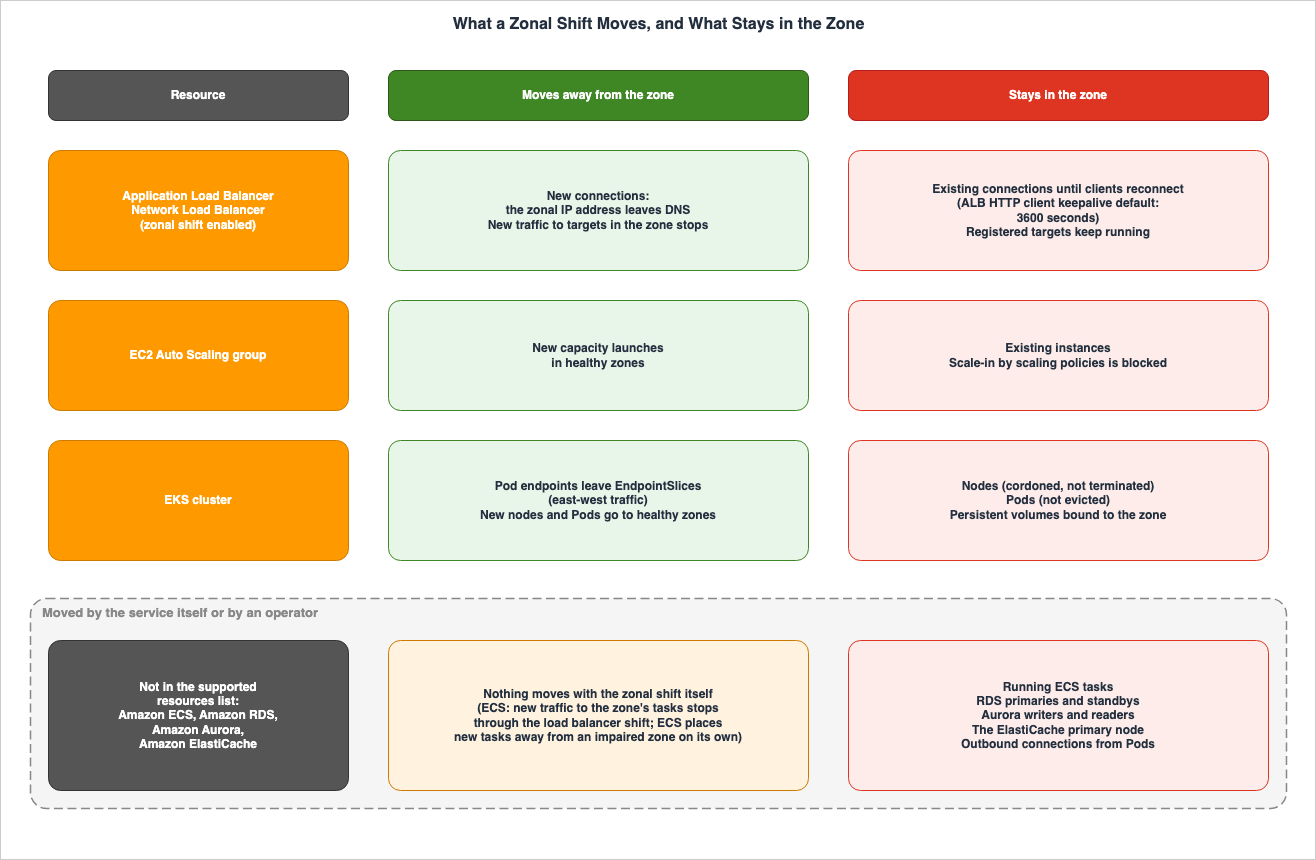
4.6 Cross-Zone Load Balancing Enabled and Disabled
The fundamental difference in how zonal shift functions with cross-zone load balancing enabled versus disabled is summarized in Section 3.3 of the previously published Cell-Based Architecture and Shuffle Sharding on AWS, using two sentences from the ELB User Guide. This article adds three considerations related to multi-day evacuation.First, consider the load on the remaining Availability Zones. When zonal shift is initiated on a load balancer with cross-zone load balancing disabled, the target capacity of that Availability Zone is also lost. The ALB section of the ELB User Guide states:
If your load balancers have cross-zone load balancing turned off and you use a zonal shift to remove a zonal load
balancer IP address, the Availability Zone affected by the zonal shift also loses target capacity.
Second, consider load balancers sharing targets. The "Supported resources" page of the ARC DG states that when multiple load balancers are directing traffic to the same target, zonal shift on a load balancer with cross-zone load balancing enabled reduces the target capacity for all load balancers.
If multiple load balancers are forwarding traffic to the same targets, a zonal shift on a cross-zone enabled load
balancer drops target capacity for all load balancers, even if their traffic is not shifted by a zonal shift.
Even if a zonal shift starts on only one load balancer, the target capacity visible from other load balancers sharing that target will also be reduced.
Third, consider the potential for imbalance after the zonal shift ends. A 2024 article on the Networking Blog notes that with cross-zone load balancing disabled, traffic is distributed evenly across Availability Zones. Therefore, if there is an imbalance in capacity, ending the zonal shift may result in a disproportionate load being directed to a subset of instances. The same article provides an example where instances in one Availability Zone receive approximately twice the traffic compared to those in other Availability Zones. The article emphasizes the importance of using
target_group_health.dns_failover.minimum_healthy_targets.count in this configuration to prevent an Availability Zone from receiving traffic until a sufficient number of healthy targets are available. With cross-zone load balancing enabled, traffic is distributed evenly for each target, minimizing the impact of this imbalance. This imbalance is a key factor in the reasoning behind the recovery order discussed in Section 8.5. What Is Not in the Supported Resources List
This section clarifies who moves resources not included in the list of supported resources for zonal shift, and with what operations. The ARC DG's "Supported resources" page places the following sentence before its list of four items:Amazon Application Recovery Controller (ARC) currently supports enabling the following resources for zonal shift and
zonal autoshift:ECS, RDS, Aurora, and ElastiCache are not in this list (the documentation does not list them). In the scope of this article's search of the sources in Section 1.3, no statement explicitly excluding these services from zonal shift was found (no statement was found). Therefore, instead of stating they are excluded, this article notes that they are not listed.
5.1 Amazon ECS Tasks
When an ECS service is behind a load balancer, a zonal shift will stop new traffic from being directed to tasks within that Availability Zone. The tasks themselves remain. The Architecture Blog states:Existing ECS tasks in that AZ remain running but stop receiving requests.Regarding the placement of new tasks, the Containers Blog (August 18, 2025) notes that if an ECS service is configured across multiple Availability Zones, ECS will avoid launching new tasks in an impaired Availability Zone, even without a specific zonal shift configuration.
When you configure your Amazon ECS services to span multiple AZs, Amazon ECS automatically routes your new task launch
requests away from an impaired AZ, without any zonal shift configuration.
This is a Containers Blog statement; the ECS Developer Guide's pages on task placement and Availability Zone rebalancing contain no statement about zonal shift or an impaired AZ (no statement was found). The blog describes an impaired AZ; no statement was found on whether ECS also treats a zone under a zonal shift that you started, such as a practice run on a healthy zone, as impaired (Containers Blog; ECS Developer Guide).
To ensure that no new tasks are placed in that Availability Zone, the Architecture Blog describes an update that removes the Availability Zone's subnet from the ECS service's network configuration. This is achieved using the
aws ecs update-service command with the --network-configuration parameter. The blog refers to this update, along with any desired changes to the number of tasks, as a control plane operation, recommending that it be performed before the drill starts, rather than during an actual failure. To revert, restore the subnet and then cancel the zonal shift. Tasks will then begin to redistribute across Availability Zones during subsequent deployments.5.2 Amazon RDS Multi-AZ DB Instances
RDS Multi-AZ DB instances automatically fail over to a standby instance in a different Availability Zone if a failure is detected in the primary instance. The RDS User Guide states:Amazon RDS automatically switches to a standby replica in another Availability Zone.However, a zonal shift does not trigger an RDS failover (this article's reading of the Architecture Blog's procedure; no statement was found in the RDS User Guide or the ARC DG). If the primary instance resides in the AZ where the zonal shift was initiated, the primary instance will remain in that AZ. To move the primary instance, operators should use a reboot that involves failover, as described in the RDS User Guide's reboot section. Using the AWS CLI, you can achieve this by adding the
--force-failover parameter to the aws rds reboot-db-instance command. The Architecture Blog outlines this process within its evacuation procedures and notes regarding the standby instance after failover:After failover, RDS recreates the standby in the evacuated AZ automatically.After failover, the standby instance is recreated in the evacuated Availability Zone. The same blog suggests that, as the standby instance does not receive client traffic, this is acceptable for a multi-day drill. It also provides a procedure for disabling Multi-AZ, removing the AZ's subnet from the DB subnet group, and then re-enabling Multi-AZ, as a way to avoid placing any RDS instances in the evacuated AZ.
5.3 Amazon Aurora
In an Aurora cluster, if a writer instance fails, one of the available readers will take over as the writer. The Aurora User Guide states that the cluster endpoint always points to the current primary instance. Zonal shifts do not trigger Aurora failover either (this article's reading, as in Section 5.2).The Architecture Blog describes a procedure where, if the writer instance is in an evacuated Availability Zone, a reader instance from a healthy Availability Zone is designated to initiate failover. Using the AWS CLI, this can be achieved by using the
--target-db-instance-identifier parameter with the aws rds failover-db-cluster command. The same blog also notes that if there is no reader instance in a healthy Availability Zone, promoting a writer requires creating a new instance, which typically takes less than 10 minutes. The blog further outlines the steps to remove the reader instance in the evacuated Availability Zone and create a new reader in a healthy Availability Zone.Aurora storage is replicated across multiple Availability Zones, separate from the DB instances. The Architecture Blog indicates that only the writer and reader instances are moved during an evacuation, while the storage remains available throughout the process.
5.4 Amazon ElastiCache
In ElastiCache clusters (using Valkey and Redis OSS) with Multi-AZ enabled, when the primary node fails, the primary role is automatically assumed by one of the read replicas. The ElastiCache User Guide describes this functionality in its Multi-AZ section, but it does not mention zonal shift (the documentation does not list it). If the primary node is located in the Availability Zone where zonal shift was initiated, the primary node will remain within that zone (this article's reading, as in Section 5.2). As of this article's check date, within this article's search of the sources in Section 1.3, no statement was found about a procedure for moving the ElastiCache primary node for a zonal shift (no statement was found).5.5 Outbound Connections from Pods
EKS zonal shifts move only traffic in the cluster, specifically east-west traffic. Connections from Pods to external dependencies, such as databases, do not move. The Architecture Blog states:Note that ARC zonal shift doesn't control outbound connections from pods to external dependencies like Amazon RDS.The same blog also suggests considering Istio's locality-aware routing when Pods connect to database endpoints on a per-AZ basis. It notes that Aurora cluster endpoints route to the current writer regardless of the AZ, so no additional configuration is required for traffic destined for the writer.
5.6 The Table of What Is Not in the List
This section summarizes information from Sections 5.1 through 5.5 in a table format.| Resource | What Moves | What Stays | Who Acts | Where It Is Written | No Statement Found |
|---|---|---|---|---|---|
| ECS tasks behind a load balancer | New traffic to tasks in the zone (through the load balancer shift); ECS itself places new tasks away from an impaired zone, without any zonal shift configuration (Containers Blog) | Running tasks in the zone | ECS (new task placement); operator (service update to remove the zone's subnets) | Architecture Blog (2026-09-30); Containers Blog (2025-08-18) | A statement in the ECS Developer Guide about zonal shift or an impaired zone; whether ECS treats a zone under a zonal shift you started as impaired |
| RDS Multi-AZ DB instance | Nothing moves with the zonal shift (this article's reading; see Section 5.2) | The primary and the standby | RDS (automatic failover on failure); operator (reboot with failover; subnet group change to move the standby) | RDS User Guide; Architecture Blog (2026-09-30) | — |
| Aurora DB cluster | Nothing moves with the zonal shift (this article's reading; see Section 5.2) | The writer and readers in the zone | Aurora (automatic failover on failure); operator (failover-db-cluster to a reader in a healthy zone) | Aurora User Guide; Architecture Blog (2026-09-30) | — |
| ElastiCache (Multi-AZ) | Nothing moves with the zonal shift (this article's reading; see Section 5.2) | The primary node in the zone | ElastiCache (automatic failover on failure) | ElastiCache User Guide | A procedure that moves the primary for a zonal shift |
| Outbound connections from Pods | Nothing moves with the EKS zonal shift | Connections to external dependencies such as RDS | Operator (locality-aware routing such as Istio) | Architecture Blog (2026-09-30) | — |
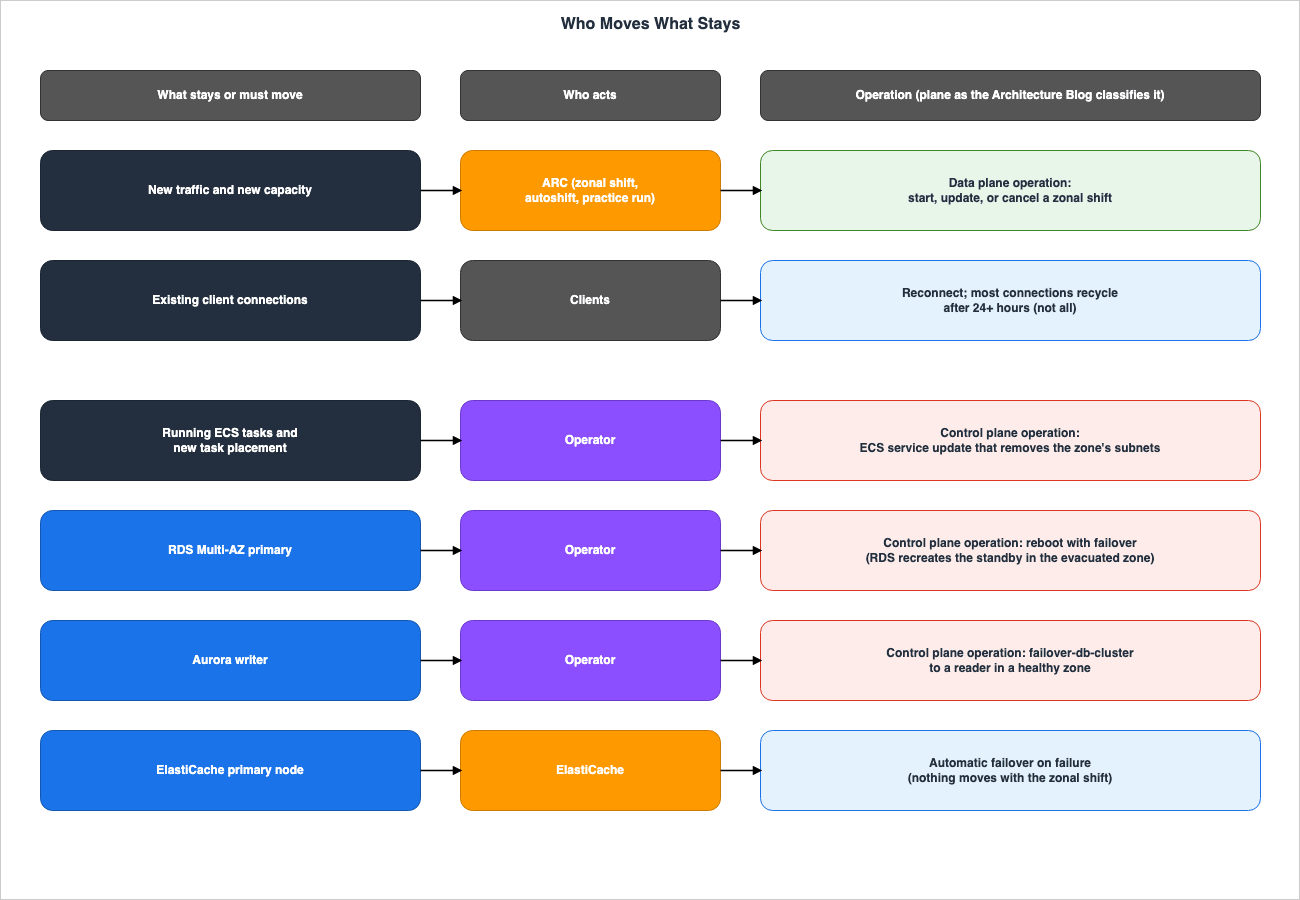
6. Duration, Updates, Expiry, Autoshift, and Practice Runs
This section clarifies how long the zonal shift can be maintained, what happens when it ends, and how AWS's autoshift and ARC's weekly practice runs conclude.6.1 The Expiration at Start
Zonal shifts are configured with an expiration period at the start. The entry chapter for zonal shift in the ARC DG states:You set an initial expiration when you start a zonal shift, from one minute up to three days (72 hours),
which you can extend, if you need to continue the traffic shift.The
StartZonalShift API Reference also states that the expiresIn parameter can initially be set for a maximum of 72 hours.You can set a zonal shift to be active initially for up to three days (72 hours).The
expiresIn parameter is specified as a string, consisting of an integer followed by either m to indicate minutes or h to indicate hours. The API Reference provides the example 20h, explaining that this indicates an expiration time of 20 hours. Both descriptions state that 72 hours is the maximum length that can be initially set.6.2 Updating the Expiration
Expiration periods can be updated later. The section "How a zonal shift works" states:You can initially set a zonal shift to expire in a maximum of three days (72 hours). However, you can update a zonal
shift to set a new expiration at any time.The page detailing the steps to initiate an ARC DG zonal shift states that the updated expiration length can be set, with a maximum of 3 days.
You must set an expiration, but you can update active shifts later to set a new expiration period of up to three days.Regarding when to start counting the updated expiration period, the
expiresIn parameter in the API Reference for UpdateZonalShift has the same description as StartZonalShift. It describes 20h as expiring in 20 hours. A 2022 article on the Networking Blog provides an example of update-zonal-shift with the --expires-in 4h flag, indicating that it will expire 4 hours from now. This article interprets the updated value as being calculated from the time of the update (this article's reading). In the scope of this article's research, no statements were found that indicated adding the updated value to the previous expiration period. In the setup in Section 9, the expiration updated with 30m was 30 minutes after the time of the update. Values exceeding 72 hours were rejected by a ValidationException both at start and at update.In the scope of this article's research, no statements were found regarding how many times an update can be performed, or the total duration for which a zonal shift can be maintained. This information was not found in the ARC DG documentation, the API Reference, the AWS CLI Command Reference, the SDK reference, the ARC product pages, or the ARC FAQ. The two blogs point in different directions on this point (the sources disagree). The Architecture Blog addresses expiration management as follows:
Expiry management: Zonal shifts have a maximum duration. You must monitor and extend them before they expire,
or traffic returns to the shifted AZ unexpectedly.
A 2022 article on the Networking Blog states:
You can keep the zonal shift in place for as long as it's needed.The Architecture Blog's
maximum duration can be interpreted as either the maximum expiration period that can be set at once, or the total maximum duration. This article does not definitively choose one interpretation.The ARC DG's "Best practices" page positions zonal shifts as a temporary measure and recommends reverting resources to their original redundant state as soon as the issue is resolved.
6.3 When a Shift Expires, Traffic Returns
The page explaining how a zonal shift works states that when a zonal shift expires or is canceled, ARC reverses the traffic migration process, treating the recovered Availability Zone as available and resuming traffic to that AZ. The Architecture Blog notes that if a zonal shift expires before being canceled, traffic automatically returns to the original AZ, and recommends updating before expiration based on the remaining time.In a multi-day evacuation, expiration means that traffic returns at a time the operator did not choose. To keep the recovery order in Section 8, you must either work through the cancellation sequence yourself before expiration, or update the expiration. Failing to account for expiration could result in the zonal shift for both the Auto Scaling group and the load balancer ending simultaneously, without following the recommended order. This paragraph is this article's reading, not a statement from the sources.
6.4 Zonal Autoshift
In resources enabled with zonal autoshift, AWS initiates autoshift when it detects an AZ failure. The "When AWS starts and stops autoshifts" page of the ARC DG states how autoshift concludes.AWS ends an autoshift when it determines that the Availability Zone has recovered.That same page also notes that autoshift is a feature designed for users who have pre-scaled capacity, and that they should not rely on scaling up after an autoshift or practice run starts.
You should not rely on scaling on demand when an autoshift or practice run starts.When autoshift concludes, ARC performs a capacity check on the load balancer resources. The "Capacity checks for practice runs" page of the ARC DG states that if this check fails, traffic will not be returned to the original AZ.
If the capacity check fails when the autoshift ends, traffic is not shifted back to the Availability Zone that it was
moved away from.
The capacity check at the end of autoshift applies only to load balancer resources. The same page indicates that load balancers with target groups of the Lambda or ALB type are not subject to this capacity check, as those targets are not configured on a per-AZ basis.
Within this article's search of the sources in Section 1.3, no statement was found about the maximum duration of an autoshift (no statement was found).
6.5 Practice Runs and Capacity Checks
In resources with zonal autoshift enabled, ARC initiates a practice run once a week. The ARC DG page for practice runs is documented as follows:ARC schedules a practice run for a resource weekly, for about 30 minutes.Users can also initiate practice runs themselves (as announced in the "What's New" update on June 30, 2025, regarding on-demand practice runs). When a practice run begins, ARC checks if there is sufficient capacity available in other Availability Zones. If there is insufficient capacity, the practice run's traffic shift does not start, and the practice run will end. The "Capacity checks for practice runs" page specifies that capacity checks are limited to load balancers and Auto Scaling groups.
Checks for balanced capacity are only completed for load balancers and Auto Scaling groups.The load balancer check verifies that the number of healthy hosts is balanced across the Availability Zones. The Auto Scaling group check verifies that the total healthy capacity across all Availability Zones meets the desired capacity. If a practice run fails the capacity check, the result will be marked as
CAPACITY_CHECK_FAILED.Practice runs will not start while FIS experiments are in progress or when there are AWS-related events occurring in the Region. They will also not start during any time windows that users have configured to prohibit practice runs.
6.6 The Duration and Ending Table
Sections 6.1 through 6.5 are summarized in the table below.| Shift Type | Who Starts It | Initial Length | Can It Be Extended | How It Ends | Where It Is Written | No Statement Found |
|---|---|---|---|---|---|---|
| Customer-initiated zonal shift | Operator | 1 minute to 72 hours | Yes; each update sets a new expiration of up to three days (console procedure page) | Expiry or cancel; traffic returns to the zone | ARC DG (entry chapter, How a zonal shift works, start procedure page); API Reference | Number of updates and total duration; the two blogs point in different directions |
| Autoshift | AWS | — | — | AWS ends it when it determines the zone has recovered; for load balancers, a failed capacity check keeps traffic away | ARC DG (start and stop page, capacity check page) | Maximum duration |
| Practice run | ARC (weekly) or operator (on demand) | About 30 minutes | — | Ends after about 30 minutes; interrupted by an autoshift, a manual zonal shift, or an alarm | ARC DG (practice run page, precedence page); API Reference | — |
7. What Surfaces Only in a Multi-Day Evacuation
This section outlines items that first become apparent after a zonal shift lasting several days, rather than just a few hours. Much of the discussion in this section is drawn from the Architecture Blog (September 30, 2026), rather than from ARC documentation.7.1 Six Items Listed by the Architecture Blog
The blog notes that extended evacuation periods can reveal failure patterns that are missed in short tests, bringing to light issues that might otherwise go unnoticed.A multi-day AZ evacuation forces time-dependent behaviors to play out completely, exposing failure modes that brief
tests missThe blog lists the following six examples:
- Auto Scaling policies that are not tuned for N-1 operation (operating with one Availability Zone unavailable) sustained over a full day.
- Deployment pipelines that do not verify the health of Availability Zones before deploying new workloads.
- Outdated DNS records and cached database endpoints.
- Time-based routine operations run against an N-1 configuration (certificate rotation, credential and secret rotation, maintenance windows, log rotation, automated backups, cron jobs).
- Long-lived database connections that are tied to specific Availability Zones and are rarely used.
- The recovery process after extended shifts, which involves a different procedure than simply returning to a warmed-up, nearly identical Availability Zone within a few minutes.
Regarding long-lived database connections, the blog states:
Long-lived database connections pinned to a specific AZ that are only used infrequently.7.2 When Connections Recycle
The Architecture Blog mentions that one of the changes occurring during extended evacuations is the replacement of connections in the connection pool.Connection pool cycling: After 24+ hours, most client connections will have recycled.This passage states that after more than 24 hours, most client connections have recycled. It doesn't state that all connections are replaced. The blog also notes that this allows administrators to verify whether the entire client base is adhering to DNS TTL settings, and that a one-hour test is insufficient for this verification. Even if the keepalive duration (default: 3600 seconds) is shortened, connection pools and long-lived connections within applications will still be replaced according to a different timeframe than the keepalive mechanism (this article's reading).
7.3 Capacity Imbalance and This Article's Inference
The Architecture Blog notes that, over a few days, Auto Scaling activity in healthy Availability Zones can lead to capacity imbalances, and recommends monitoring scaling and setting limits so that recovery does not overload the returning Availability Zone. The blog refers to this phenomenon as "Scaling drift."This article extends the discussion from Section 4.3 over a few days, and interprets the following points (this article's reading, not statements from the sources):
- Scale-in by scaling policies is blocked, while scale-out is not. If several load peaks occur over a few days, the scaled-out capacity may accumulate in healthy Availability Zones without being scaled back.
- If instances remain in an Availability Zone and the health check behavior stays
IgnoreUnhealthy, they will not be replaced and will remain. The total capacity will then be the sum of the expanded capacity in the healthy Availability Zones and the instances remaining in the evacuated Availability Zone. - In EKS, Pods associated with persistent volumes in that Availability Zone will be unable to use those volumes in healthy Availability Zones for as long as the zonal shift continues. These workloads will continue to run on the remaining replicas for several days.
7.4 The Multi-Day Evacuation Table
This table summarizes Sections 7.1 through 7.3.| Item | What Moves | What Stays | Who Acts | Where It Is Written | No Statement Found |
|---|---|---|---|---|---|
| Client connections | New connections after DNS changes | Long-lived connections; "most" (not all) have recycled after 24+ hours | Clients; operator (keepalive, connection pool settings) | Architecture Blog (2026-09-30); ARC DG (ALB page for the keepalive default) | — |
| Cached database endpoints and stale DNS | — | Endpoints cached by clients | Operator (client settings) | Architecture Blog (2026-09-30) | — |
| Time-based operations (certificate, credential, and secret rotation; maintenance windows; log rotation; backups; cron) | — | Jobs and their targets that assume all zones | Operator | Architecture Blog (2026-09-30) | — |
| Deployment pipelines | — | Pipelines that place new workloads without checking zone health | Operator | Architecture Blog (2026-09-30) | — |
| Auto Scaling capacity | New capacity in healthy zones | Capacity that scaling policies cannot scale in during the shift | Auto Scaling; operator (caps on scale-out) | EC2 Auto Scaling User Guide; Architecture Blog (Scaling drift); this article's reading for the build-up | — |
8. The Order of Recovery
This section outlines the order for returning traffic to the AZ after several days of evacuation. There are two sets of sources detailing this recovery order, each targeting different resources.The first is found in the EC2 Auto Scaling User Guide and the ARC DG's Auto Scaling group page. It recommends the following for users employing load balancers without cross-zone load balancing:
If you are using zonal shift on both Auto Scaling groups and load balancers, cancel the zonal shift on your Auto
Scaling group first. Then, wait for capacity to balance across all Availability Zones before canceling the zonal
shift on the load balancer.
First, cancel the zonal shift of the Auto Scaling group. This lets Auto Scaling provision capacity in the returned AZ and correct the imbalance between zones (this article's reading of the guide's instruction to wait until the capacity is balanced). During this time, the load balancer's zonal shift remains active, so traffic will not yet be directed to the returned AZ. Once capacity is balanced, cancel the load balancer's zonal shift. This will prevent overload caused by imbalances, as described in Section 4.6.
The second is the cleanup procedure in the Architecture Blog. It advises verifying that the evacuated AZ is healthy, then first canceling the zonal shift of the EKS cluster to restore east-west traffic, followed by canceling the load balancer's zonal shift to restore north-south traffic. If Auto Scaling has been adding capacity to the healthy AZs, scale it back gradually over 15 to 30 minutes. For environments without cross-zone load balancing, verify that the
target_group_health.dns_failover.minimum_healthy_targets.count parameter is properly configured.Cancel the EKS cluster zonal shift first (east-west traffic resumes).In this article's reading, these two procedures do not contradict each other. The first focuses on the order for Auto Scaling groups and load balancers, while the second details the order for EKS clusters and load balancers. A statement that sets one order for configurations using Auto Scaling groups, EKS clusters, and load balancers was not found in the scope of the research conducted for this article (no statement was found).
The resources in Section 5, which are not in the supported list, do not return when a zonal shift is canceled. The subnets for ECS services, the primary and standby instances for RDS, and the writer and reader instances for Aurora are left to the operator, who decides whether to move them back or leave them in their current state (this article's reading, not a statement from the sources).
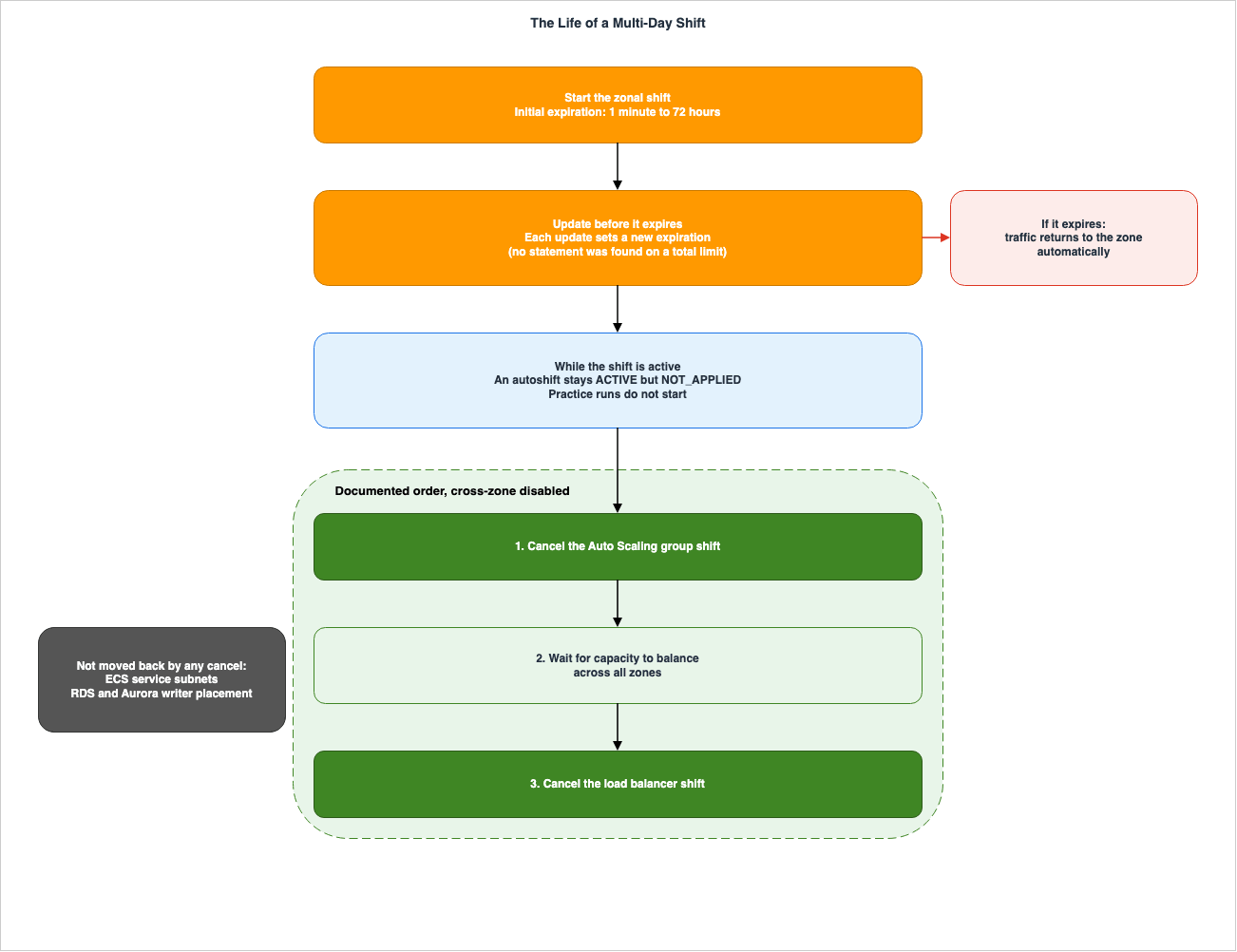
9. What This Setup Showed
This section describes what was observed by briefly operating the zonal shift and monitoring its behavior. It separates statements from the sources and values observed in this setup. The observed values, recorded from a single run and one configuration, may not be consistent with results obtained from other configurations or on different dates.9.1 Setup
This article built and observed the following setup on October 29, 2026 (from 7:13 PM to 7:39 PM UTC) in theus-east-1 Region. Availability Zones are designated as follows: the Availability Zone that the zonal shift moved traffic away from is referred to as AZ-a, while the remaining zones are designated as AZ-b and AZ-c.- One Network Load Balancer (NLB) facing the internet. Cross-zone load balancing was disabled, and zonal shift was enabled. It had two TCP listeners.
- One EC2 Auto Scaling group, spanning three Availability Zones. It started with a minimum of 3 instances, a maximum of 5 instances, and a desired capacity of 3 instances. Zonal shift was enabled. The health check behavior for the impaired Availability Zone was set to
IgnoreUnhealthy, and instance distribution across Availability Zones was set tobalanced only. Because it was combined with an NLB with cross-zone load balancing disabled,SkipZonalShiftValidationacknowledged the extra validation. - Zonal shift was initiated for both the NLB and the Auto Scaling group, moving traffic away from the same Availability Zone. DNS responses were read by querying the authoritative server for the NLB's name without recursion.
9.2 What Was Observed
| What Was Checked | What This Setup Recorded |
|---|---|
| Registration | Both the NLB and the Auto Scaling group appeared in ListManagedResources. GetManagedResource listed appliedWeights of 1.0 for the NLB's three zones; for the Auto Scaling group it listed six zone IDs of the Region, including three that the group does not use |
StartZonalShift with expiresIn of 73h or 4380m | ValidationException: Invalid expiresIn value. |
StartZonalShift with 20m | Started at 19:18:09Z with an expiry of 19:38:09Z |
| DNS answer | By the first check, about 20 seconds after the start, the authoritative answer had already gone from three addresses to two (TTL 60 seconds) and stayed at two while the shift was active |
appliedWeights during the shift | AZ-a became 0.0 for both the NLB and the Auto Scaling group; the NLB's zonal shift showed appliedStatus APPLIED |
AdministrativeOverride on NLB targets | zonal_shift_delegated_to_dns before and during the shift; zonal_shift_active did not appear |
| Manual scale-out to a desired capacity of 4 | The new instance launched in AZ-b; the instance in AZ-a stayed InService |
UpdateZonalShift with 30m at 19:23:10Z | The new expiry was 19:53:11Z (30 minutes after the update, not 30 minutes added to the earlier expiry); startTime did not change |
UpdateZonalShift with 73h or 4380m | ValidationException: Invalid expiresIn value. |
Manual SetDesiredCapacity from 4 to 3 during the shift | Accepted. The scaling activity terminated an instance in AZ-b; the instance in AZ-a stayed, leaving one instance in each zone |
| Cancel the Auto Scaling group shift, then the NLB shift | Canceled at 19:29:11Z and 19:29:13Z; capacity was already one instance per zone. The DNS answer was back to three addresses between 30 and 61 seconds after the NLB cancel |
The updated expiration time reflected the length calculated from the update time. Values exceeding 72 hours were accepted neither at start nor at update. The ability to manually reduce the desired capacity was available even during a zonal shift. What the documents say is blocked is scale-in by scaling policies (Section 4.3). In this configuration, the Auto Scaling group terminated one instance from the
AZ-b Availability Zone during the scale-in. This matches the usual choice that balances instances across Availability Zones, and does not show that the zonal shift kept the instance in AZ-a (this article's reading).In this NLB configuration, where cross-zone load balancing is disabled, the
AdministrativeOverride setting for the target remained zonal_shift_delegated_to_dns both before and during the zonal shift. The ELB User Guide describes this value as representing a state where the target's zonal shift status is not visible through DescribeTargetHealth, but can be observed through the ARC API or console. In this configuration, the zonal shift status was accessible through the ARC GetManagedResource API, specifically in the appliedWeights and zonalShifts fields.9.3 What This Setup Does Not Show
- This article does not verify whether the one address that dropped out of the DNS answer belongs to the
AZ-aload balancer node. This is due to the observation scripts being unable to obtain addresses on a per-Availability Zone basis for the NLB. - This configuration does not record whether existing connections continue after a zonal shift. For the same reason, the observation that connects directly to each zone's address did not run. For existing connections, this article follows the documentation in Sections 4.1 and 4.2.
- This configuration does not test whether scale-in by scaling policies is blocked. Only manual operations were tested.
- The configuration does not include ALB, EKS clusters, load balancers with cross-zone load balancing enabled, zonal autoshift, or practice runs.
- The time it takes for DNS responses to change and revert is recorded only once.
10. Where the Sources Disagree, Count Differently, or Are Silent
This section will list instances where information differs between documents, where the same items are counted differently, and where information is missing.10.1 Launch Dates
The date when zonal shift functionality was implemented varies by source and by configuration.| Item | Date | Source |
|---|---|---|
| Zonal shift preview (ALB and NLB, cross-zone disabled) | 2022-11-28 | What's New; Networking Blog (2022); the ELB ALB Document history lists "Zonal shift" on the same date |
| Zonal shift general availability | 2023-01-10 | What's New |
| Zonal autoshift | 2023-11-30 | What's New |
| NLB with cross-zone load balancing enabled | 2024-10-11 | What's New (a second item on 2024-10-22 also names it) |
| EKS | 2024-10-22 | What's New (the same item names NLB with cross-zone enabled) |
| EC2 Auto Scaling groups | 2024-11-18 | What's New |
| ALB with cross-zone load balancing enabled | 2024-11-22 | What's New; Networking Blog (2024) |
| AWS FIS recovery action for zonal autoshift | 2025-03-26 | What's New |
| On-demand practice runs and balanced capacity pre-checks | 2025-06-30 | What's New |
| Self-managed Karpenter | 2026-05-12 | What's New |
| EKS Auto Mode | 2026-07-10 | What's New |
| More NLB target group configurations | 2026-09-24 | ARC DG and ELB NLB Document history (no What's New item was found) |
The ELB Document history for Application Load Balancers includes a zonal shift entry dated November 28, 2022 (the preview date), and the "What's New" section announced general availability on January 10, 2023. NLBs with cross-zone load balancing enabled are listed under both announcements: one on October 11, 2024, and another on October 22, 2024, which announced support for EKS. This article presents these as distinct dates and does not identify either as incorrect.
10.2 NLB Prerequisites
A 2024 article on the Networking Blog states that when using zonal shift with an NLB that uses cross-zone load balancing, thetarget_health_state.unhealthy.connection_termination.enabled setting must be set to false. In this article's reading, following a change to the Document history on September 24, 2026, the requirement in the ELB User Guide regarding enabling this feature has been reduced to a single target group attribute (Section 4.2). The blog post reflects the state of affairs at the time of its publication, and this article adheres to the requirements outlined in the ELB User Guide.10.3 How Supported Resources Are Counted
The ARC DG's "Supported resources" page lists four types of supported resources. The Architecture Blog also mentions four: Application Load Balancer (ALB), Network Load Balancer (NLB), EC2 Auto Scaling group, and EKS clusters. The Containers Blog (August 18, 2025) lists three resources as examples of zonal shift support: NLB, Auto Scaling group, and EKS clusters, but does not mention ALB. These three are presented as examples, using the phrasesuch as. This article considers the four types listed on the "Supported resources" page to be the correct count.10.4 How Precedence Is Counted
The ARC DG section on "Precedence for zonal shifts" lists the priority levels for four types of shifts, including FIS experiments, in a table. The description of theappliedStatus field in the API Reference for ZonalShiftInResource lists three shift types.customer-initiated zonal shifts > autoshifts > practice run zonal shiftsThe
shiftType field in the API can have one of four values: ZONAL_SHIFT, PRACTICE_RUN, FIS_EXPERIMENT, and ZONAL_AUTOSHIFT. This article outlines the differences in how these are counted.10.5 Practice Run Outcome Values
The ARC DG practice run page writes the outcome of a practice run that continues without interruption asSUCCESSFUL. According to the API Reference, the practiceRunOutcome field in ZonalShiftSummary can have the values FAILED, INTERRUPTED, PENDING, SUCCEEDED, or CAPACITY_CHECK_FAILED; it does not include SUCCESSFUL (the sources disagree). When retrieving results via the API, use the value SUCCEEDED.10.6 What Is Not Written
This article did not find any descriptions regarding the following, even after searching using different search terms and examining various sources, as outlined in Section 1.3.| Item | Result |
|---|---|
| The number of updates and the total duration of a zonal shift | No statement was found (ARC DG, API Reference, AWS CLI, SDK references, ARC product page, ARC FAQ) |
Whether an updated expiresIn is added to the old expiration | No statement was found; the documented examples count from the time of the call, and so did this setup (Section 9) |
| What happens when an update passes a value longer than 72 hours | No statement was found; this setup received ValidationException (Section 9) |
| Maximum duration of an autoshift | No statement was found |
| A quotas page for zonal shift | No statement was found (the ARC DG has quotas pages for Region switch and routing control) |
| A statement that names ECS, RDS, Aurora, or ElastiCache as unsupported | No statement was found; the documentation does not list them |
Whether a manual SetDesiredCapacity decrease is blocked | No statement was found; the documents name scaling policies only. This setup accepted a manual decrease (Section 9) |
| A single cancel order for an Auto Scaling group, an EKS cluster, and a load balancer together | No statement was found |
| A What's New item for the 2026-09-24 NLB change | No statement was found |
11. Failure Modes
This section will outline common assumptions that can arise in the scope of this article, and the resulting consequences.11.1 Assuming Everything in the Zone Stops When a Zonal Shift Starts
A zonal shift affects traffic; instances, nodes, Pods, and tasks remain (as described in Section 4). Existing connections will continue to function, allowing clients to send requests to that Availability Zone until they reconnect. The default keepalive setting for ALB HTTP clients is 3600 seconds.11.2 Assuming ECS Services Are Zonal Shift Resources
While ECS resources are not included in the supported list (see Section 5.1), zonal shift for load balancers will stop new traffic from being directed to tasks within that Availability Zone, but the tasks themselves will remain. To ensure that no new tasks are placed within that AZ, an update is required to remove the AZ's subnet from the service's network configuration. The Architecture Blog refers to this as a control plane operation.11.3 Assuming the Database Moves with the Zonal Shift
RDS, Aurora, and ElastiCache are not listed as supported resources (see Sections 5.2 through 5.4). Zonal shift does not trigger a failover (this article's reading; see Section 5.2). Each service's automated failover mechanisms or operators' manual failover operations move the primary instance or writer. After a failover, RDS standby instances are recreated in the evacuated Availability Zone.11.4 Assuming a Zonal Shift Lasts at Most 72 Hours
72 hours is the maximum allowable duration that can be set at the start (as described in Section 6.1). The expiration can be updated. In the scope of this article's search, no statement was found specifying the number of times an update can be performed or the total allowable duration. Conversely, one cannot say that these shifts can continue for any number of days. The two blogs point in different directions on this.11.5 Assuming the Expiry Can Be Left Alone
When a zonal shift expires, traffic automatically returns to the original Availability Zone (see Section 6.3). If the zonal shifts for both the Auto Scaling group and the load balancer expire together, traffic may return without following the order outlined in Section 8 (which prioritizes the Auto Scaling group before the load balancer; this article's reading, see Section 6.3).11.6 Assuming Traffic Returns as Soon as an Autoshift Ends
At the end of the autoshift process, ARC performs a capacity check on the load balancer. If this check fails, traffic will not be routed back to the original Availability Zone (see Section 6.4).11.7 Assuming Auto Scaling Scales In as Usual During a Zonal Shift
While scale-in by scaling policies is blocked (see Section 4.3), prolonged operation over several days may result in the previously expanded capacity remaining in healthy Availability Zones (as inferred in Section 7.3).11.8 Assuming an EKS Zonal Shift Also Moves Outbound Connections
EKS zonal shifts only affect traffic in the cluster, specifically east-west traffic. Connections from Pods to external dependencies, such as RDS, will not be affected (see Section 5.5).11.9 Assuming a Zonal Shift on One Load Balancer Does Not Affect Others
When multiple load balancers share the same target, a zonal shift of a load balancer with cross-zone load balancing enabled will reduce the target capacity for all load balancers (see Section 4.6).12. Frequently Asked Questions About Draining an Availability Zone for Days
Q1. When a zonal shift starts, do the instances and Pods in the zone stop?
No, they will not. The zonal shift moves where new connections and new capacity go. The instances, EKS nodes, and Pods remain within their original Availability Zone. The ARC DG states that EKS nodes will not be terminated, and Pods are not evicted. Whether instances in an Auto Scaling group are replaced depends on the health check behavior you set for the impaired Availability Zone.Q2. When do existing connections leave the zone?
It happens when the client reconnects. According to the ARC DG, when DNS records are updated, the change applies to new connections. Existing connections will continue to send requests to that AZ until the client reconnects. The ARC DG suggests shortening the default keepalive duration for ALB's HTTP clients, for example, to 300 seconds. The Architecture Blog notes that most client connections have recycled after 24+ hours.Q3. Can you start a zonal shift on an ECS service?
The ARC DG does not list ECS among the supported resources. If you implement zonal shift on the load balancer in front of an ECS service, new traffic to tasks within that Availability Zone stops. The Containers Blog states that for ECS services spanning multiple Availability Zones, new task launches avoid an impaired Availability Zone, without any zonal shift configuration. Whether that includes a zone under a zonal shift that you started was not found (no statement was found).Q4. Do RDS and Aurora writers move to another zone with a zonal shift?
No, they do not. A zonal shift does not trigger a database failover (this article's reading; see Section 5.2). In RDS, operators use a reboot that involves failover. In Aurora, failover is initiated by specifying a reader within a healthy Availability Zone. The Architecture Blog refers to these actions as control plane operations and recommends initiating a zonal shift first in the event of an actual failure.Q5. How many days can a zonal shift last?
The expiry time that can be set at the start ranges from 1 minute to 72 hours. This expiry time can be updated, and the ARC DG procedure page states that updates allow setting a new expiry time of up to 3 days. However, in the materials reviewed for this article, no information was found regarding the number of updates or the total duration. In the setup in Section 9, values exceeding 72 hours were rejected both during initial setup and during updates, and updated expiry times were calculated from the time the update was performed.Q6. What happens if AWS starts an autoshift while you keep a zonal shift active by hand?
The manually initiated zonal shift takes precedence. The ARC DG page Precedence for zonal shifts states that the autoshift will remain in anACTIVE state but will not be applied; it will have a NOT_APPLIED status. As long as the manual zonal shift is in progress, a practice run will not begin.Q7. In what order should you cancel when you recover?
When zonal shifts are on both a load balancer with cross-zone load balancing disabled and an Auto Scaling group, the EC2 Auto Scaling User Guide recommends canceling the Auto Scaling group shift first, ensuring capacity is balanced across Availability Zones, before canceling the load balancer shift. For EKS clusters and load balancers, the Architecture Blog outlines a process that cancels the EKS cluster shift first.Q8. What does the ARC documentation ask you to check for a multi-day evacuation?
The points to consider during a multi-day evacuation, such as certificate rotation, credential rotation, cron jobs, and long-lived database connections, are not listed in ARC's documentation, but rather in the Architecture Blog (September 30, 2026). The ARC DG "Best practices" page recommends proactively ensuring sufficient capacity, minimizing client connection times, testing zonal shifts in advance, verifying that all Availability Zones are healthy and receiving traffic, starting zonal shifts with data plane operations, and using zonal shifts as a temporary measure.13. Summary
- Zonal shift moves where new connections and new capacity go. Existing connections, instances, EKS nodes, and Pods remain within their respective Availability Zones.
- For Application Load Balancers (ALB) and Network Load Balancers (NLB), the zonal shift removes the Availability Zone IP address from DNS, Auto Scaling groups create new capacity in other Availability Zones, and EKS removes Pod endpoints from EndpointSlice resources. Zonal shift is disabled by default for ALB and NLB and must be enabled on a per-load balancer basis. Auto Scaling groups and EKS clusters are also registered with ARC when zonal shift is enabled on them.
- ECS, RDS, Aurora, and ElastiCache are not included in the list of supported resources. These are moved either by each service's built-in mechanisms or by the operator's control plane operations (the Architecture Blog's classification).
- The expiration time can be set from 1 minute to 72 hours at the time of initiation and can be updated later. In the scope of this article's search, no statement was found regarding the number of updates or the cumulative duration. Upon expiration, traffic automatically returns.
- AWS ends an autoshift when it determines the zone has recovered. If the capacity check for the load balancer fails, traffic does not return. A practice run is performed weekly, lasting approximately 30 minutes, and includes capacity checks for both the load balancer and Auto Scaling group.
- The discussion regarding several days of evacuation (including connections recycling, time-based processes, long-lived database connections, and recovery after several days) is detailed in the Architecture Blog.
- When recovering, for load balancers with cross-zone load balancing disabled, the Auto Scaling group shift should be canceled first, and only after the capacity is balanced should the load balancer shift be canceled.
14. References
- Amazon Application Recovery Controller Developer Guide: Zonal shift in ARC
- Amazon Application Recovery Controller Developer Guide: How a zonal shift works
- Amazon Application Recovery Controller Developer Guide: Supported resources
- Amazon Application Recovery Controller Developer Guide: Application Load Balancers
- Amazon Application Recovery Controller Developer Guide: Network Load Balancers
- Amazon Application Recovery Controller Developer Guide: Amazon EC2 Auto Scaling groups
- Amazon Application Recovery Controller Developer Guide: Amazon Elastic Kubernetes Service
- Amazon Application Recovery Controller Developer Guide: Best practices for zonal shifts in ARC
- Amazon Application Recovery Controller Developer Guide: Starting, updating, or canceling a zonal shift
- Amazon Application Recovery Controller Developer Guide: When AWS starts and stops autoshifts
- Amazon Application Recovery Controller Developer Guide: When ARC schedules, starts, and ends practice runs
- Amazon Application Recovery Controller Developer Guide: Capacity checks for practice runs
- Amazon Application Recovery Controller Developer Guide: Precedence for zonal shifts
- Amazon Application Recovery Controller Developer Guide: Amazon Application Recovery Controller (ARC) readiness check availability change
- Amazon Application Recovery Controller Developer Guide: Document history for the Amazon Application Recovery Controller (ARC) Developer Guide
- ARC Zonal Shift API Reference: StartZonalShift
- ARC Zonal Shift API Reference: UpdateZonalShift
- ARC Zonal Shift API Reference: ZonalShiftSummary
- ARC Zonal Shift API Reference: ZonalShiftInResource
- ARC Zonal Shift API Reference: ListManagedResources
- AWS CLI Command Reference: update-zonal-shift
- Elastic Load Balancing: Zonal shift for your Application Load Balancer
- Elastic Load Balancing: Zonal shift for your Network Load Balancer
- Elastic Load Balancing: Enable zonal shift for your Network Load Balancer
- Elastic Load Balancing: Document history for Network Load Balancers
- Elastic Load Balancing: Document history for Application Load Balancers
- Amazon EC2 Auto Scaling User Guide: Auto Scaling group zonal shift
- Amazon EKS User Guide: Learn about Amazon Application Recovery Controller (ARC) zonal shift in Amazon EKS
- Amazon RDS User Guide: Failing over a Multi-AZ DB instance for Amazon RDS
- Amazon RDS User Guide: Rebooting a DB instance
- Amazon Aurora User Guide: High availability for Amazon Aurora
- Amazon ElastiCache User Guide: Minimizing downtime in ElastiCache by using Multi-AZ with Valkey and Redis OSS
- AWS CloudFormation Template Reference: AWS::AutoScaling::AutoScalingGroup AvailabilityZoneImpairmentPolicy
- AWS Architecture Blog: Running multi-day AZ evacuation drills with ARC Zonal Shift
- AWS Networking and Content Delivery Blog: Rapidly recover from application failures in a single AZ
- AWS Networking and Content Delivery Blog: Using cross-zone load balancing with zonal shift
- AWS Containers Blog: Best practices for resilience and availability on Amazon ECS
- What's New: Announcing preview for Amazon Route 53 Application Recovery Controller zonal shift
- What's New: Announcing the general availability of Amazon Route 53 Application Recovery Controller zonal shift
- What's New: Amazon Route 53 Application Recovery Controller launches zonal autoshift
- What's New: Cross-zone enabled Network Load Balancer now supports zonal shift and zonal autoshift
- What's New: Amazon Application Recovery Controller zonal shift and zonal autoshift extends support for two new multi-AZ resources
- What's New: Cross-zone enabled Application Load Balancer now supports zonal shift and zonal autoshift
- What's New: EC2 Auto Scaling now supports Amazon Application Recovery Controller zonal shift and zonal autoshift
- What's New: Amazon Application Recovery Controller announces AWS FIS recovery action for zonal autoshift
- What's New: ARC zonal autoshift practice now supports on-demand runs and balanced capacity pre-checks
- What's New: Karpenter now supports Amazon Application Recovery Controller zonal shift
- What's New: Amazon EKS Auto Mode now supports Application Recovery Controller zonal shift
References:
Tech Blog with curated related content
Written by Hidekazu Konishi