Orchestrating Regional Failover with Amazon Application Recovery Controller Region Switch - What Plan Evaluation Checks, Which Region the Plan Runs From, and What a Green Status Does Not Guarantee
First Published:
Last Updated:
However, you do not know if that procedure is still valid today.
The procedure is accurate for the configuration it was written against. Since then, one Auto Scaling group has been added, a policy that was previously deemed unused has been removed from one IAM role, the database engine version has been upgraded, and the service quotas for the standby Region were requested but have been forgotten. The procedure does not account for any of these changes. You will not know if it's truly correct until you actually attempt the switch.
Amazon Application Recovery Controller (ARC) Region switch provides a mechanism to replace that procedure with a declaration. You write each stage of the switch as an execution block, set the order and the parallelism, and the result is a plan. This plan is then continuously evaluated every 30 minutes during normal operation. Does the IAM role have the necessary permissions? Do the resources exist and are accessible? Are the capacity settings correct?
The subject of this article is that evaluation. More precisely, a green evaluation and a switch that works are not the same thing.
The core principle comes first. The plan evaluation only looks at the configuration and permissions you've declared – it does not reflect what you'll actually have available on the day of the switch. The primary sources say so by name: compute capacity is not guaranteed. And AWS itself advises against relying solely on the plan evaluation. A green evaluation is no substitute for having tried the switch.
The technical details in this article were verified against the Amazon Application Recovery Controller Developer Guide (as of September 7, 2026), the Region Switch API Reference, the AWS CloudFormation Template Reference, the Service Authorization Reference, the AWS General Reference, and the AWS News Blog. The availability status, supported Regions, limits, and the number of execution block types are subject to change. You must always verify this information at the time you read this article. This article does not discuss pricing, and it carries no self-measured switching times.
Table of Contents
- 1. Nothing Promises That the Runbook Still Works
- 2. Holding the Procedure as a Declaration
- 3. What an Execution Block Actually Moves
- 4. Graceful and Ungraceful
- 5. Evaluating It Continuously in Steady State
- 6. Which Region It Runs From
- 7. What It Does Not Guarantee
- 8. The Boundary With the Other ARC Capabilities
- 9. Failure Modes and Anti-Patterns
- 10. Where the Primary Sources Disagree
- 11. Frequently Asked Questions
- 12. Summary
- 13. References
1. Nothing Promises That the Runbook Still Works
1.1 The Situation This Article Assumes
This article assumes you already have a multi-Region configuration in place and a settled disaster recovery (DR) strategy. It is not intended for readers who are just beginning to consider multi-Region deployments.Specifically, the production application is already deployed across two Regions, and a decision has been made regarding the architecture – whether it's an active/passive or active/active setup. The data replication pathways have also been determined. What remains undefined is the mechanism for actually performing the failover. What you have in hand is a Confluence page, a failover script somebody wrote, and the minutes of last year's game day.
And there is no way to verify whether those three items are still accurate.
1.2 The Boundary With the Existing Articles
This website already contains articles on multi-Region and DR topics. This article stands as a continuation of that existing content. The boundary is drawn first.| Existing article | What that article owns | Where this article picks up |
|---|---|---|
| AWS Disaster Recovery Strategies Guide | Four strategies (Backup and Restore / Pilot Light / Warm Standby / Multi-Site Active-Active), RTO and RPO, a flowchart for strategy selection, and data replication data plane principles. Section 10 of that article gives Region switch one sentence, and its Section 11 places plan evaluation as the continuous readiness check. | The selection of a strategy is already a given. This article expands on those two sentences. ⛔ Do not rewrite the strategy classifications. |
| AWS Multi-Region Active-Active Architecture Guide | Global routing and replication of each data layer. Section 8 of that article owns ARC routing control and readiness check. | Do not rewrite the design of routing control or data replication. This article owns the third ARC capability, Region switch. |
| Route 53 Health Check and Failover | Mechanisms of Route 53 health checks, DNS failover, TTL and resolver caching, and calculated health checks. | This article will not cover DNS propagation or TTL. Delegate from the point where it touches the Route 53 health check execution block. |
| Cell-Based Architecture and Shuffle Sharding on AWS | Cell segmentation and reduction of blast radius. Section 10.4 of that article addresses the readiness check availability change from the perspective of cell design. | Delegate the decision of where to place the switching boundary. This article will not cover cell design. |
| AWS Service Lifecycle States | Classification of Maintenance / Sunset / Full Shutdown, and the fact that Closed to new customers is a description of a result, not a state name. | Do not describe the classifications. When mentioning readiness check states, delegate with a single sentence. |
| AWS History and Timeline regarding Amazon Route 53 | History of capability additions to ARC. | This article will not present a timeline. |
| Synthetic Monitoring and Real User Monitoring on AWS | Facts derived from external testing and facts provided by users. | The decision of whether or not to switch is within the scope of that document and previously published materials. |
| Continuous Profiling on AWS | Identifying where time is being spent within a process. | Same as above. |
The boundary reduces to a single point. What the existing articles own is how to design it. What this article owns is the mechanism that actually performs the switch, and what that mechanism does not verify.
1.3 What Region Switch Means in This Article
WhileRegion switch appears to be a common noun, it is the name of a capability inside ARC. Throughout this article, when this term is used, it always refers to that ARC capability. Where the ordinary sense of moving between Regions is meant, this article says switching a Region rather than Region switch.ARC has four capabilities. The developer guide arranges them along two axes.
| Axis | Capability | What it does |
|---|---|---|
| Single Availability Zone | zonal shift / zonal autoshift | Temporarily redirects traffic away from the affected Availability Zone. |
| Cross-Region | Region switch | Executes cross-Region recovery as a declared plan. |
| Cross-Region | routing control | Triggers DNS failover through an explicit on/off switch. |
| Cross-Region | readiness check | Continuously audits resource quotas, capacity, and routing policies. |
Not mixing these four up is the precondition for reading this article. Routing control and Region switch look close, but they are distinct capabilities. Routing control is a single switch, while Region switch is the entire process that includes that switch. In fact, the Region switch plan contains an execution block that manipulates routing control.
One note about service names. ARC was previously known as
Amazon Route 53 Application Recovery Controller. This article will only use the current name, Amazon Application Recovery Controller. However, the developer guide URLs still contain the path r53recovery, which is a remnant of the old name. Therefore, you should not attempt to infer the current name based on these URLs.2. Holding the Procedure as a Declaration
2.1 Plan, Workflow, Step, and Execution Block
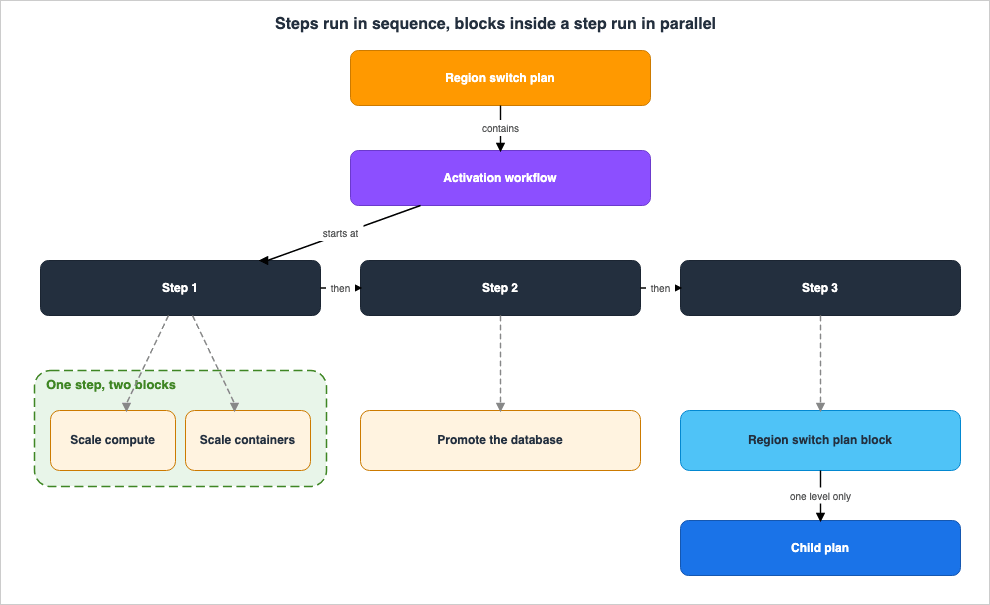
The top-level resource in Region switch is the plan. The developer guide recommends aligning plans with a single, multi-Region application.A plan consists of four nested levels.
| Level | Responsibility |
|---|---|
| Plan | Represents the complete recovery process for an application. It includes the target Region, recovery method, and the IAM role used for execution. |
| Workflow | Defines the steps for launching or stopping a Region. A plan can contain one or more workflows. |
| Step | A single stage within a workflow. Steps run in sequence. |
| Execution Block | The specific actions performed by a step. Multiple execution blocks within a single step can run in parallel. |
It's important to note that control of the sequence is divided into two levels. Steps run one after another, while the execution blocks inside a step run together. Therefore, if you need to ensure that a fourth operation only begins after three others have completed, you can express this dependency by placing those three execution blocks within a single step and placing the fourth execution block in the subsequent step.
2.2 How Many Workflows You Need Depends on the Recovery Approach
The number of workflows you create depends on whether you chose active/passive or active/active. The distinction is easy to get wrong.With an active/passive configuration, there are two options: you can create a single workflow that can activate either Region, or a separate activation workflow for each Region.
With an active/active configuration, you create one workflow to activate a Region and another to deactivate one. This is necessary because both Regions are already receiving traffic, and you need a way to stop one of them.
This difference becomes important when you later use child plans. Child plans must use the same recovery method as the parent plan.
2.3 A Child Plan Nests One Level Only
If your application has multiple components that need to be switched in a specific order, consider using plans with nested structures. The parent plan holds a Region switch plan execution block as a step, and that block executes the child plan.There is a limit to how deeply you can nest plans. While the developer guide describes this in two different ways, the underlying principle remains the same.
You can nest Region switch plans one level.The hierarchy of plans is limited to two levels (parent and child), but you can
include multiple child plans under the same parent plan.In other words, you cannot create grandchild plans. However, you can have multiple child plans associated with a single parent plan.
Child plans have two compatibility requirements. The child plan must support all Regions that the parent plan supports, and it must also use the same recovery method as the parent plan. If either of these conditions is not met, the parent plan's step will fail.
Control flowing from parent to child has one quirk worth keeping. A control operation started on the parent plan is automatically attempted on the child plan. Pausing, switching between graceful and ungraceful, and cancellation all behave this way. Skip operations are the exception.
Skips operations have a special behavior: the parent plan is skipped, but the child
plan will still execute.
The original wording is preserved. The developer guide uses the term
Skips operations.Even if you intend to skip a step in the parent plan, the child plan will still execute. During the switch, the operation you intended to skip may be executed.
2.4 The Limits You Can Count
Region switch has several numerical limits. Only the ones that bear on design appear here.| Item | Limit |
|---|---|
| Number of plans per account | 10 (increase requests can be submitted) |
| Number of execution blocks per plan | 100 |
| Number of parallel execution blocks per step | 20 |
| Number of CloudWatch alarms per trigger condition | 10 |
| Number of Route 53 health check execution blocks per plan | 25 |
The default limit of 10 plans per account can conflict with the design guidelines. The developer guide recommends assigning one plan per application. If you have 11 applications, the default limit will not be sufficient. You can request an increase, but that belongs to a quiet afternoon, not to the day of the switch.
2.5 Writing the Plan as Code
You can declare a plan in CloudFormation or in Terraform. The developer guide highlights the benefits, stating that it puts the switching procedure through the same discipline as the application itself: code review, version control, and CI/CD pipelines.In relation to the subject of this article, this means that procedures will now have a change history. This addresses one aspect of the problem mentioned earlier – the tendency for procedures to silently become outdated. However, it does not address the issue when the environments referenced in the procedures change. That is what plan evaluation, in Section 5, is for.
3. What an Execution Block Actually Moves
3.1 Why This Article Does Not List Every Type
This article does not list every execution block type. There are two reasons.First, the list is constantly growing. The AWS News Blog at launch put it this way:
At launch, Region switch supports nine types of execution blocks:Counting the rows of the execution block table in the developer guide on September 7, 2026 gives 17. It has nearly doubled in a year. A list placed here would be out of date by the time it is read.
Second, the way they are counted differs from document to document. Section 10.1 covers that.
Instead, this section gives the classification axes and representative examples. The list that is actually usable lives in the
Add execution blocks section of the developer guide.3.2 Four Axes
The 17 types listed in the developer guide's table divide into four groups by what they act on.| Area | Action | Examples |
|---|---|---|
| Increase Compute Resources | Bring the amount of compute in the activating Region up to match the source Region. | EC2 Auto Scaling group, Amazon ECS service scaling, Amazon EKS resource scaling, Aurora Provisioned Scaling, Aurora Serverless Scaling |
| Redirect Traffic | Switch which Region handles requests. | ARC routing control, Amazon Route 53 health check |
| Reconfigure Data Layer Roles and Replication | Switch which Region receives write operations. This also includes scenarios where replication is re-established after recovery. | Amazon Aurora Global Database, Amazon DocumentDB Global Cluster, Amazon Neptune Global Cluster, and three Amazon RDS blocks |
| Incorporate People and Custom Code | Insert approvals and custom processing steps into the process. | Manual approval, Custom action Lambda, Lambda event source mapping |
In addition to these four areas, there is one further type that differs significantly. The Region switch plan execution block does not fall into any of the above categories. It's a block used to call other plans, and is the type of child plan discussed in Section 2.3.
3.3 What the EC2 Auto Scaling Group Block Really Does
Classification alone does not show what a block does. Opening one of them does. The EC2 Auto Scaling group execution block stands for the axis that increases compute resources.The settings involve specifying the ARN of the Auto Scaling group for each Region, the percentage to match, the capacity monitoring approach, and the timeout.
Here's how the calculation works during execution:
ceil(percentToMatch * Source Auto Scaling group capacity)Capacity here means the number of instances whose state is
InService. The desired capacity calculated using this formula is compared to the current desired capacity of the target Auto Scaling group. If the target group already has a larger capacity, the process proceeds to the next step. Region switch does not scale an Auto Scaling group down.Subsequently, the process waits until the requested capacity is met before moving on to the next step.
There's one potential side effect that is not apparent during normal operation, as noted in the developer guide.
Executing this block modifies the minimum and desired capacity settings of your Auto
Scaling groups, which may cause configuration drift if you manage these values through
infrastructure-as-code tools or other automation.
Executing the switch rewrites the minimum and desired capacity of the Auto Scaling group. If Terraform or CloudFormation manages those values, that leaves a diff. The next pipeline run can put them back, at the one moment you least want them put back.
There are two options for monitoring capacity, and this choice will have implications later on. Using CloudWatch metrics provides greater accuracy, but requires that group metrics be enabled on the Auto Scaling group beforehand. The alternative skips that requirement and gives up some accuracy.
In an active/active configuration, Region switch treats the other active Region as the source.
4. Graceful and Ungraceful
4.1 When Things Are Broken, the Procedure Gets Shorter
There are two modes for plan execution, as defined in the developer guide:Graceful is planned execution. When the environment is healthy, every step runs in order.
Ungraceful is unplanned execution. Only the necessary steps and operations are used.
What matters here is that ungraceful is not a faster graceful. The developer guide's definition splits what the mode changes into two cases.
When you run a plan in ungraceful mode, it either changes the behavior of execution
blocks in a workflow or skips specific execution blocks, depending on the type of
execution block.
Either the behavior changes or the block is skipped. Which one happens depends on the block type.
4.2 Types That Change Behavior and Types That Are Skipped
The developer guide's table records, for each type, what happens to it when the run is ungraceful. Out of the 17 types, 8 change something when the run is ungraceful. The remaining 9 have empty entries in this column.These 8 types can be categorized by their behavior changes:
| Behavior Change | Type | What happens in an ungraceful scenario |
|---|---|---|
| Threshold Adjustment | EC2 Auto Scaling group | Allows you to specify a minimum percentage of compute capacity that must be met before proceeding to the next step. |
| Propagation to Child | Region switch plan | Starts the child plan using the child's own ungraceful configuration. |
| Falls back to an operation that can lose data | Aurora Global Database, Amazon DocumentDB Global Cluster, Amazon Neptune Global Cluster | Performs a failover instead of a switchover. The developer guide explicitly states that this can result in data loss. |
| Same as above | Amazon RDS Switchover Read Replica | Promotes the read replica directly. This too can cause data loss. |
| Skipped | Custom action Lambda, Lambda event source mapping | Skips the step. |
The third and fourth rows of this table are what ungraceful actually means. Choosing not to wait means, in the data layer, not waiting for replication to catch up. The developer guide uses the same phrasing to note that this can result in data loss for four different types.
The fifth row is also critically important. When a Custom action Lambda is skipped, the custom processing defined within it will not execute. If the core of the switch is placed in this block, an ungraceful run does not execute it.
4.3 You Can Switch Modes Mid-Execution
While a mode is selected when starting an execution, it can also be changed mid-execution. If an execution started in graceful mode is switched to ungraceful mode, any child plans will also switch to ungraceful mode.If Region switch block was executed gracefully, and then switched to ungraceful
execution mode, any child plan will also switch to ungraceful execution mode.From an operational perspective, this represents a practical use case for ungraceful mode. Starting an execution in ungraceful mode implies an acceptance of potential data loss from the outset. However, it's often preferable to begin in graceful mode and only switch to ungraceful mode when it becomes clear that the process will not complete otherwise, allowing for a more considered decision.
4.4 Nothing States That the Evaluation Distinguishes the Two Modes
One point belongs here rather than later. The plan evaluation discussed in Section 5 evaluates the configuration and permissions of a plan. The evaluation descriptions in the developer guide do not distinguish between graceful and ungraceful scenarios. Furthermore, the table listing evaluation targets by type does not include a column for modes.This does not mean that AWS explicitly states that there is no distinction. Rather, it means that the documentation does not address this distinction. What is certain is that there are different paths for graceful and ungraceful scenarios, and nowhere in the documentation is it stated that the evaluation results reflect this difference. There is no basis for reading a green evaluation as evidence that the ungraceful path behaves as intended.
5. Evaluating It Continuously in Steady State
5.1 When It Runs
The plan evaluation requires neither configuration nor activation; it comes automatically when you create a plan.The developer guide's section on
About Region switch states the trigger for execution as follows:Plan evaluation is an automated process that Region switch runs when a plan is created
or updated, and then every 30 minutes after that, during steady state.This statement includes two conditions. It runs once, immediately after creation and updates, and then again every 30 minutes during normal operation. If you summarize this by saying it's evaluated every 30 minutes, you lose the qualification
during steady state. The statement does not mention the frequency during periods when the system is not in a steady state – specifically, when an impairment is under way.The wording for how often the evaluation runs differs between documents. Section 10.2 covers that.
5.2 What It Looks At
The evaluation process, as described in the developer guide, comes down to three items: IAM permissions, resource configurations, and running capacity.At a finer grain, the developer guide defines a set of check categories per type. The developer guide's
Plan evaluation for Region switch plans lists checks for 16 different types, encompassing 6 categories.| Category | What to Verify | Example |
|---|---|---|
| Resource accessibility | Whether the target resources exist and are accessible from the plan's role. | Verify that an Auto Scaling group exists and is accessible. Verify that the target Kubernetes resources exist within the EKS cluster. |
| IAM permissions | Whether the plan's role has the necessary policies for the operations it performs. | Verify that the role has the necessary policies for Auto Scaling operations. |
| Capacity | Whether the capacity ceiling configured in the activating Region reaches the level required. | Verify that the maximum capacity of the target Auto Scaling group can be increased to match the capacity of the original Region. |
| Engine compatibility | Whether the database engine version supports the switchover process. | Verify that the Aurora engine version supports switchover and is compatible across both Regions. |
| Configuration | Whether the type-specific prerequisites are met. | Verify that the Lambda function's concurrency is greater than zero and that a dry run call is successful. |
| Kubernetes permissions | Whether the necessary Kubernetes permissions are in place. | Verify that the IAM role is mapped to the EKS access entry. |
Of these six categories, Resource accessibility is present for all 16 types, and IAM permissions are present for 15 out of the 16 types. The remaining four categories are added only when specific conditions apply to that type.
In addition to the checks for individual plans, there are also checks performed on the overall plan, covering triggers, report generation, and application health alarms. These include two additional categories: Role assumption and Cross-account configuration.
The row worth holding on to is Capacity. Section 7 returns to it.
5.3 How the Result Reaches You
Three channels carry the evaluation results: the plan details page in the management console, Amazon EventBridge, and theGetPlanEvaluationStatus API.The API returns four possible status values.
passed | actionRequired | pendingEvaluation | unknownTwo of these four values are neither green nor red.
pendingEvaluation indicates that the evaluation is not yet running, and unknown signifies an indeterminate state. When writing automation, whether to treat these two values as passed or actionRequired is a design decision. Both represent a state where no issues have been identified, but neither confirms that no issues exist.Warnings come back as an array. Each warning carries the ARN of the resource, the step name, the plan version, the warning message, its status, the time it last changed, and the workflow it belongs to. That workflow comes back as one of three actions.
activate | deactivate | postRecoveryThe evaluation does not look only at the activation side. It also raises warnings for the deactivation workflow and for the post-recovery workflow described later.
The evaluation results are not stored in a single location. The developer guide specifies the storage location as follows:
Region switch stores information about plan evaluation in all the Regions where your
plan is configured.
This approach is consistent with the design principles outlined in Section 6. It avoids a scenario where the evaluation results cannot be read unless you query the Region where the failure occurred.
5.4 AWS Itself Says Not to Rely on This Alone
This is the core of this article.Plan evaluation is the capability AWS itself names as the successor to readiness check. The page announcing the readiness check availability change writes the migration path this way:
For capabilities similar to readiness check, we recommend onboarding your multi-Region
application to ARC Region switch.
It includes a capability called plan evaluation, which regularly monitors the state of
your Region switch plan to ensure readiness for execution.The continuous readiness audit moved from readiness check to plan evaluation. Furthermore, the developer guide, immediately following the explanation of plan evaluation, states the following:
We recommend that you also test application recovery by executing your Region switch
plan, and that you don't rely solely on Region switch plan evaluation to test that your
recovery plan will work as you expect it to.
This is not a note about the limits of the capability. It is a prescription. It's telling you to perform the evaluation and, even then, to actually execute and test it.
A similar point is made on another page. The page describing reliability design lists, as best practices, creating a plan in advance and testing it regularly as part of game days and after new deployments.
The best practice is to create your Region switch recovery plan in advance of an actual
recovery, and to test it regularly as part of game days and after new deployments.
The condition
after new deployments is the one to notice. This is precisely the problem mentioned earlier. Procedures become outdated because the environment changes with each deployment. While the evaluation checks configurations and permissions every 30 minutes, AWS still states that you should execute and test it after deployments.The existing AWS Disaster Recovery Strategies Guide, in Section 11 of that article, states that for new deployments plan evaluation provides the same continuous readiness check that readiness check used to provide. This article is not contradicting that. As a continuous readiness audit, it has indeed taken over. What this article says is that the continuous audit is not a substitute for actually trying the switch. AWS is saying to do both.
Furthermore, the developer guide describes graceful and ungraceful execution modes for the plan. No description of a non-disruptive rehearsal mode appeared in the documents this article reviewed. The description of automatically generated reports, which lists disaster recovery testing and actual recovery events as the same type of event, is also consistent with this. Testing here means actually making the switch.
6. Which Region It Runs From
6.1 Execution Comes From the Side Being Activated
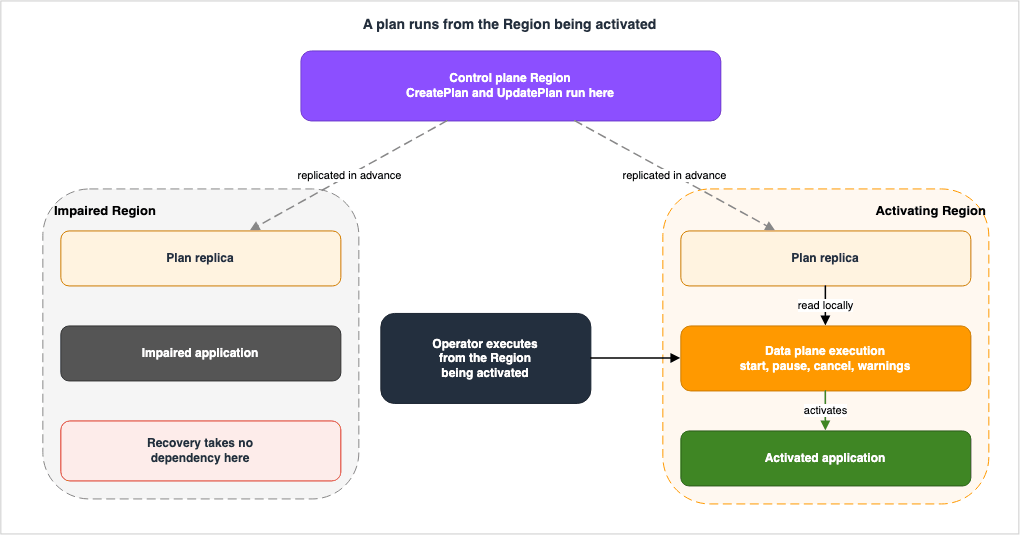
The most distinctive part of the Region switch design sits here. The plan runs from the Region being activated.The AWS News Blog, published at the time of the announcement, described this design as follows:
Region switch is built on a Regional data plane architecture, where Region switch plans
are executed from the Region being activated.
The developer guide provides supplementary information on how to proceed depending on the configuration. In an active/passive setup, the plan runs from the standby Region, the one being brought online. In an active/active setup, it runs from the healthy Region that will absorb the load.
The reason for this is straightforward: It keeps recovery from depending on the impaired Region. The switch operation itself is designed so that it does not depend on whether the Region you are switching away from is alive.
The developer guide also states where this design applies. Region switch is available in all commercial AWS Regions, as well as AWS GovCloud (US) Regions. Recovery runs between any two Regions where the service exists. That footprint changes, so check it again before it enters a design.
This principle is also reflected in the console's operational procedures. The steps for executing a plan, as described in the developer guide, begin by navigating to the Region you want to activate.
6.2 Separating the Control Plane From the Data Plane
This is where things become most practical.Region switch splits its API into a control plane and a data plane. The developer guide explicitly defines this boundary, including the Region name.
Plan creation and plan updates are control plane operations located in US East
(N. Virginia) (us-east-1) and AWS GovCloud (US-West) (us-gov-west-1).
Recovery-critical APIs, including plan execution, update execution, pause, cancel, and
retrieving open plan evaluation warnings, are all data plane operations.Creating and updating a plan is a control plane operation, and it lives in one Region per partition: us-east-1 in the commercial partition, us-gov-west-1 in GovCloud. Executing a plan, updating an execution, pausing, canceling, and retrieving open plan evaluation warnings are all data plane operations.
The significance of this separation is straightforward: the system is designed such that modifying plans during an incident is not possible. Plans should be created and updated during normal operation. During an incident, the only action possible is to execute an existing plan.
This is not a limitation, but rather an intentional design choice. It removes the less reliable path from the recovery process.
This leads to one conclusion. Because the control plane for the commercial partition sits in us-east-1, an impairment in us-east-1 itself may leave you unable to create or update a plan at all. The developer guide does not explicitly state this scenario, so it's important to understand this as a consequence of the documented information, rather than a directly stated fact. However, the developer guide itself defines the data plane as being designed to continue operating even when the control plane is unavailable. Based on that definition, this conclusion is unavoidable.
And this is not a reason to question the design. On the contrary, it explains why AWS repeatedly emphasizes the importance of creating plans in advance.
6.3 GetPlan and GetPlanInRegion Are Not the Same Operation
The list of API operations in the developer guide includes a column indicating whether each operation interacts with the control plane or the data plane. Reading this table, you will notice that pairs of operations exist with very similar names.| What you want to retrieve | Control Plane Operation | Data Plane Operation |
|---|---|---|
| Single plan | GetPlan | GetPlanInRegion |
| List of plans | ListPlans | ListPlansInRegion |
| Route 53 health checks for plans | Operation per plan | Operation per Region |
Operations with
InRegion are data plane operations. If you attempt to retrieve a plan from automation during an outage using GetPlan, that is a call to the control plane, even though an operation that reads the same plan sits on the data plane.The two operations are easily interchangeable. According to the API reference, both require only a single plan ARN as input, and both return a
Plan object. The difference is that GetPlanInRegion has a description indicating that it returns Region-specific information.This difference becomes apparent when writing switching scripts. During normal development, calling either operation will often return the same result, so the difference is not immediately obvious. The difference shows up at exactly the moment you would rather it did not.
6.4 There Are Two Dashboards as Well
The same design shows up in the console. Region switch has two dashboards, and the developer guide states conditionally which one to use.Be aware that, if there are impairments in a Region, the global dashboard might not show
all your plan data. Because of this, we recommend that you rely only on Regional
executions dashboard during operational events. The Regional executions dashboard is
more resilient because it uses the local Region switch data plane.In the event of a problem, do not use the dashboard that provides a broad overview. It may not accurately reflect the current status, and that fact will not be visible on the screen.
That belongs in the operational runbook. The global dashboard is a place where, mid-incident, you can conclude that a plan is missing when it is not.
6.5 The Plan Is Replicated Into Both Regions
Executing from the activating side has one prerequisite. If the activating side does not hold the plan, there is nothing to execute.Region switch resolves this on its own.
Region switch allows failover and failback workflows to live in the same plan, and
automatically replicates the plan in both Regions. This means a single plan contains
everything needed to recover in either direction, and both Regions always have the
latest configuration.
The developer guide details what this design prevents: incidents where recovery fails due to the target Region lacking the plan, or having an outdated version.
The property noted in Section 5.3, that Region switch stores evaluation results in every Region the plan is configured in, belongs to the same design. Both Regions hold the plan and its evaluation results. Reading them takes nothing from the impaired side.
7. What It Does Not Guarantee
7.1 Compute Capacity
Region switch has execution block types that scale compute resources. This is one of the axes described in Section 3.2. The developer guide includes a note immediately before the table listing them.Region switch includes execution block types that help scale compute resources as part
of recovery. If you use these execution blocks in a plan, be aware that Region switch
does not guarantee that the desired compute capacity with be attained.The original wording is preserved. The developer guide uses the term
with be.It also describes what to do in those circumstances.
If you have a critical application and need to guarantee access to capacity, we
recommend that you reserve the capacity.
Reserve the capacity if you need it: that is the AWS prescription. Region switch does not reserve anything.
The AWS News Blog, released at the time, states the same thing using different wording.
using one of the scaling execution blocks does not guarantee capacity, and actual
resource availability depends on the capacity in the destination Region at the time of
recovery
The phrase
at the time of recovery is doing the work here. What you can actually get is settled at the moment of the switch.7.2 The Capacity Check Reads a Ceiling, Not an Inventory
Return to the table in Section 5.2. The plan evaluation had a category called Capacity. Since it looks at capacity, surely capacity is one thing you no longer have to worry about. It is tempting to read it that way.It does not work that way. Listing only the Capacity category from the developer guide's evaluation table gives this:
| Type | What it verifies |
|---|---|
| EC2 Auto Scaling group | Whether the maximum capacity of the target Auto Scaling group can be scaled up to match the capacity of the original Region. |
| Amazon ECS service scaling | Whether the maximum scaling capacity of the target ECS service is sufficient to handle the load during the switch. |
| Aurora Serverless Scaling | Whether the scaling target of the target cluster is within the limit of 256 ACUs. |
All three checks are verifying the limits you've set. The maximum capacity of the Auto Scaling group, the maximum scaling capacity of ECS, and the scaling target of Aurora Serverless – all are limits you define.
Therefore, the question that the Capacity checks answer is: Are you allowing it to be scaled up to that level?
What they do not answer is: Does that instance actually exist when you try to scale it up?
The difference between these two questions is what Section 7.1 refers to as
does not guarantee. It's not a contradiction. The evaluation mechanism looks at your configuration; it does not check your inventory.7.3 What Has No Row in the Evaluation Table
Counting the types in the developer guide's evaluation table produces an offset. The developer guide lists 17 execution block types, and the evaluation table in that same developer guide lists 16. The missing type is the Region switch plan execution block, the one that calls child plans.This does not mean that child plans are not being evaluated. It simply means that this particular type is not listed in the table. A child plan itself is still a plan, so its evaluation naturally runs. What stays unclear is whether the parent's own evaluation covers that compatibility, meaning the alignment of Regions and recovery approach described in Section 2.3. The developer guide does not explicitly state this.
What is certain is this. The developer guide states that a broken child plan compatibility surfaces as a failure of the parent's step. It does not say whether anything warns you before the step runs.
7.4 That the Application Actually Works
There is one more thing the evaluation cannot answer, and the reason is structural.All six check categories in the plan evaluation look at the AWS resources: verifying their existence, permissions, capacity limits, compatibility with the engine version, fulfillment of prerequisites, and proper Kubernetes permissions. However, whether the application functions correctly in the target environment is not determined by any of these six factors.
In the target Region, the application might be referencing outdated configuration files. Certificates might have expired. The target environment's egress IP address might not be included in the allowlist for external services the application depends on. None of these issues relate to whether the resources exist, have proper permissions, or have sufficient capacity.
That is why AWS recommends executing the plan on top of the evaluation. The prescription in Section 5.4 exists to close this gap.
7.5 What Actual Recovery Time Measures
Region switch calculates an actual recovery time for every plan execution. You compare that value against the RTO you entered when you created the plan.The developer guide explains the calculation as follows:
Actual recovery time is calculated as the total of the time is takes for a plan
execution to complete, and any additional time that elapses before specific Amazon
CloudWatch alarms that you configure return to a green state.
The original wording is preserved. The developer guide uses the phrase
the time is takes. As with with be in Section 7.1, it stands uncorrected.It does not just measure the plan's execution time. The time it takes for the configured application health alarm to return to a green status is also added to the calculation.
This actually provides a partial answer to Section 7.4. The resulting value represents a state where the plan has completed, but the application is still not healthy. However, this value is only generated after the switch has occurred. It will not appear during normal operation.
The meaning of this value ultimately depends on the alarms you have configured. Shallow alarms produce a shorter actual recovery time.
8. The Boundary With the Other ARC Capabilities
8.1 Routing Control
Routing control is another ARC capability. It functions as an on/off switch within the data plane, and in conjunction with Route 53 health checks, it can redirect traffic. You can also configure safety rules to prevent actions that would drop all traffic simultaneously.This article does not cover the design of routing control. Detailed information on this topic can be found in the existing AWS Multi-Region Active-Active Architecture Guide, specifically in Section 8.
Regarding its relationship with Region switch, the Region switch plan includes an execution block that operates the routing control. Therefore, routing control is not a replacement for Region switch, but rather one of the components that Region switch utilizes.
There is another execution block that manages traffic: the Amazon Route 53 health check execution block. With this, you create health checks within ARC and associate them with your DNS records. When the plan is executed, the status of the health check changes, and traffic is routed according to your DNS settings. The hosted zone must reside within the same partition as the plan.
The behavior of DNS propagation, TTL, and resolver caching falls outside the scope of this article. This topic is covered in the existing Route 53 Health Check and Failover.
8.2 The Current State of Readiness Check
Readiness check is the third ARC capability, and it audited resource quotas, capacity, and routing policies at one-minute intervals.This capability is no longer open to new customers. The developer guide puts it plainly.
The readiness check feature in Amazon Application Recovery Controller (ARC) is no longer
open to new customers. Existing customers can continue to use the service as normal.
The document history in the developer guide records April 30, 2026, as the date of this change.
The same page states by name that the change does not reach Region switch.
ARC and ARC Region switch continue to be fully supported. Only the readiness check
feature is affected by this change. There are no changes to Region switch, routing
controls, zonal shift, and zonal autoshift.
AWS uses the phrasing
no longer open to new customers. It's important to note that this phrasing describes a result, rather than a lifecycle state, and that the definition of new customer varies depending on the service. This is discussed in the existing AWS Service Lifecycle States.In relation to the subject of this article, one point is worth stating: readiness check is hosted in a single Region.
Be aware that ARC readiness checks are hosted in a single AWS Region, US West (Oregon),
and during an outage or disaster, readiness check information could become stale or the
checks could become unavailable.
The mechanism that indicates readiness may return outdated information or fail to respond during outages. The developer guide also advises against using the readiness check as the primary trigger for failover.
This stands in contrast to the Region switch design described in Section 5.3 and Section 6.5. In that system, both the plan and its evaluation results are located across all Regions that comprise the plan. For the same question of whether the standby is ready, the place the answer lives has changed.
The method for re-auditing cell-level readiness is discussed in the existing Cell-Based Architecture and Shuffle Sharding on AWS, in Section 10.4 of that article.
8.3 Zonal Shift and Zonal Autoshift
Zonal shift and zonal autoshift handle Availability Zones rather than Regions. These mechanisms temporarily redirect traffic away from an affected Availability Zone, and autoshift is triggered by internal telemetry from AWS.Both are outside the scope of this article. Region switch moves between Regions; these two act on Availability Zones inside one Region.
8.4 Do Not Confuse This With Recovery Plans in AWS Elastic Disaster Recovery
Another capability carries a similar name. AWS Elastic Disaster Recovery introduced Recovery Plans in August 2026, which automate the startup order of applications consisting of multiple servers, focusing on server startup. It is a different capability of a different service from the ARC Region switch plan, so take care not to confuse the two when searching for material.9. Failure Modes and Anti-Patterns
The properties gathered so far produce the following list of things teams actually run into. Each one is structurally correct, and would not fail a mechanical inspection.| Failure | What Happens | Where to Prevent |
|---|---|---|
| Reading a green evaluation as proof that the switch will work. | The capacity may not be there on the day, or the application may not come up. | Section 5.4. Run the evaluation and still execute the plan to test it. |
| Attempting to modify the plan during an incident. | Plan creation and updates are controlled by the control plane, which is located in us-east-1. Depending on the nature of the incident, it may not be possible to modify the plan. | Refer to Section 6.2. Modify plans during normal operation. |
Calling GetPlan from automation. | Functions correctly during normal operation. During an incident, it will query the control plane. | Refer to Section 6.3. Use GetPlanInRegion. |
| Viewing the overall dashboard during an incident. | Not all plan data is displayed, and it may not be apparent when data is missing. | Refer to Section 6.4. View Region-specific dashboards. |
| Treating ungraceful as a faster graceful. | For the database types it becomes a failover rather than a switchover, and the developer guide states that this can cause data loss. | Refer to Section 4.2 |
| Putting the core of the switch into a Custom action Lambda block. | An ungraceful execution skips the step. | Refer to Section 4.2 |
| Skipping the parent step and assuming that settles it. | The parent step is skipped, but the child plan still executes. | Refer to Section 2.3 |
| Managing capacity in infrastructure as code while keeping the EC2 Auto Scaling group block. | The switch rewrites the minimum and desired capacity. The next time the pipeline runs, these values may be reverted. | Refer to Section 3.3 |
| Creating plans for each application and stopping at the 11th plan. | The default number of plans per account is 10. | Refer to Section 2.4. Requests to increase this limit should be made during normal operation. |
| The Region and recovery method of the child plan deviate from the parent plan. | The parent step fails. | Refer to Section 2.3 |
| The Route 53 hosted zone is in a different partition than the plan. | This fails to meet the prerequisites for the Route 53 health check execution block. | Refer to Section 8.1 |
| Assuming the post-recovery workflow runs from the activating side. | A post-recovery workflow runs in the Region that was previously impaired, and it needs both Regions healthy. | Contrast with Section 6.1 |
The first row in this table is more significant than the other eleven. The rest can be avoided if you know what to look for. The first row is the kind you cannot avoid by knowing about it, and the only answer is to actually make the switch.
10. Where the Primary Sources Disagree
Cross-referencing the primary sources for this article turned up five places where the accounts differ. While these discrepancies do not necessarily represent errors, reading only one source could lead to a different conclusion.10.1 Counting the Execution Block Types
Four documents produce three numbers.| Document | Number | What was counted |
|---|---|---|
| AWS News Blog (at launch) | 9 | At launch, Region switch supports nine types of execution blocks |
Developer guide Add execution blocks table | 17 | Rows in the table that lists, per type, the function and the ungraceful handling |
Region Switch API Reference, Step and its executionBlockType | 17 | Enumerated values in Valid Values |
CloudFormation ExecutionBlockConfiguration | 18 | Configuration fields |
The gap between 9 and 17 is time. The announcement was August 2025, and types have been added since. Quoting the number given at launch as though it were the current number produces an error.
The interesting part is that there are two seventeens, and they hold different things.
| Developer guide table | API Valid Values | CloudFormation | |
|---|---|---|---|
Parallel | Absent | Present | Present |
RdsSwitchoverReadReplica | Present | Absent | Present |
| Total | 17 | 17 | 18 |
The absence of
Parallel from the developer guide is a difference of granularity. The developer guide treats running blocks in parallel as a property of a step rather than as a type of its own. The API and CloudFormation both carry it as one of the configurations. Both readings are correct.The absence of
RdsSwitchoverReadReplica from the API Valid Values is not explained by granularity. That block exists in the developer guide table and in CloudFormation, and AWS announced it in What's New in August 2026. The enumerated values in the API reference are the only place that has not caught up.This is why this article does not build a list. The moment you write down how many types there are, you owe your reader the document you counted in. And the same number does not mean the same contents.
10.2 How the Evaluation Interval Is Worded
Here are four descriptions:| Document | Description |
|---|---|
Developer Guide About Region switch | Immediately after creation/update, and every 30 minutes thereafter. |
Developer Guide Add execution blocks | Same as above. |
Developer Guide Plan evaluation for Region switch plans | Multiple times per hour. |
| Console Help Panel | Approximately every 30 minutes. |
There are no contradictions. Evaluating multiple times per hour includes evaluations every 30 minutes.
The page worth noticing is the one dedicated to plan evaluation, because it is the vaguest of the four. The general rule shows through here: text written to convey a capability is the loosest, and text written to state a constraint is the most exact. If you need to refer to frequency information, it's best to consult the non-dedicated page.
10.3 API Operation Names Do Not Match Across Documents
The table in theRegion switch API operations section of the developer guide lists two operations for enumerating Route 53 health checks. However, these names do not match those found in the API reference, the SDKs for various languages, or the Service Authorization Reference.| Document | Name |
|---|---|
| Developer Guide API Operations List | ListRoute53HealthChecksForPlan / ListRoute53HealthChecksForPlanInRegion |
| Region Switch API Reference and SDKs | ListRoute53HealthChecks / ListRoute53HealthChecksInRegion |
| Service Authorization Reference IAM Actions | arc-region-switch:ListRoute53HealthChecks / arc-region-switch:ListRoute53HealthChecksInRegion |
Since two out of the three sources agree, it appears the table in the developer guide is inaccurate. When writing IAM policies, refer to the Service Authorization Reference; when writing code, consult the API reference and SDKs. The table in the developer guide should only be used to determine whether an operation is part of the data plane.
10.4 The Overview Page Carries No Lifecycle Note for Readiness Check
Every page in the readiness check chapter carries a note at the top saying that the capability is no longer open to new customers. This article checked that chapter, and the note was present without exception.The page that does not carry it is the ARC overview page. The
What is ARC? page presents readiness check as one of the four capabilities, with no lifecycle note attached.A reader meeting ARC for the first time opens the overview page, not the chapter for a specific capability. A reader who takes readiness check into a design after reading only the overview page finds out later that it is not open to new customers.
10.5 The Document History Does Not Record the 2026 Capability Additions
The developer guide's document history records two changes to readiness check and one entry for the arrival of Region switch.None of the Region switch capabilities added during 2026 appear there. This includes post-recovery workflows, blocks related to Amazon RDS, Aurora scaling, Amazon Neptune failover, and support for Terraform. AWS What's New announced every one of them, and the document history reflects none of them.
Furthermore, the page itself displays a last updated date of March 31st, 2026. However, the table on the same page includes an entry for April 30, 2026, indicating that the displayed date is not current.
⇒ Track capability additions in AWS What's New, and track availability changes in the document history. Neither one alone is enough.
11. Frequently Asked Questions
Q. If the plan evaluation is green, does that mean the switch will succeed?A. No. The developer guide recommends not relying solely on the plan evaluation, but rather actually executing and testing the process. The evaluation looks at configuration and permissions, not at what you can actually get on the day.
Q. Does executing a Region switch plan guarantee that the compute capacity will be there?
A. No. The developer guide states
Region switch does not guarantee that the desired compute capacity with be attained. and recommends reserving capacity if you need to guarantee it.Q. The plan evaluation has a check named Capacity. Does that confirm the resources will be there?
A. No. It verifies the ceilings you configured, checking whether the maximum capacity of an Auto Scaling group and the scaling target of an Aurora Serverless cluster are set high enough. Whether those instances can actually be allocated is a separate question.
Q. The ARC readiness check is closed to new customers. What replaces it?
A. The migration target that AWS names is plan evaluation in Region switch. Existing customers can keep using readiness check as before. It is not open to new customers.
Q. From which Region will the plan be executed?
A. From the Region you are activating. In an active/passive configuration that is the standby Region; in an active/active configuration it is the healthy Region that absorbs the load. The design exists so that recovery takes no dependency on the impaired Region.
Q. Can the plan be modified during a failure?
A. No, and the design assumes you will not need to. Plan creation and plan updates are control plane operations, and the control plane sits in us-east-1 and us-gov-west-1. Execution, pausing, cancellation, and retrieving evaluation warnings are data plane operations, so those still work during an impairment.
Q. Does choosing ungraceful make the switch faster?
A. Yes, and it costs you something. For the database types it becomes a failover rather than a switchover, and the developer guide states that this can lose data. An ungraceful run skips the Custom action Lambda and Lambda event source mapping blocks entirely.
Q. Can a child plan have a grandchild plan?
A. No. The hierarchy stops at two levels, parent and child. However, you can have multiple child plans under a single parent plan.
Q. If the parent step is skipped, does the child plan stop as well?
A. No. The child plan still runs. The developer guide clearly states that when a parent is skipped, the child plans will still execute. Pausing and cancellation behave the other way: those do propagate to the child plan.
Q. Which Regions is Region switch available in?
A. All commercial AWS Regions, plus AWS GovCloud (US) Regions, according to the developer guide. The supported Regions may change, so it's necessary to verify them during the design process.
12. Summary
A switching procedure is correct as written, against the configuration of the day it was written. From that day forward, the environment continued to evolve, and the next time anyone learns whether the procedure is still correct is when the switch is actually made.Region switch replaces that runbook with a declaration. The procedure is written across four levels, namely plan, workflow, step, and execution block, and child plans express the order between applications. And in steady state, every 30 minutes, Region switch holds that declaration up against the environment.
The single point this article most wants to make is that a green plan evaluation does not mean the switch will succeed. The evaluation runs six categories of check, covering whether the resource exists, whether the role has the permission, whether the ceiling reaches far enough, and whether the engine versions line up. Every one of them is about the side you declared.
The check named Capacity is the same. It verifies the maximum capacity of an Auto Scaling group, not the actual number of instances currently available. That is why the developer guide tells you to reserve the capacity when you need to guarantee it.
And AWS itself writes that you should not rely on plan evaluation alone. The prescription is to put the evaluation in place and then still execute the plan and test it. Moreover, this recommendation includes the condition
after new deployments. This indicates that AWS acknowledges that structural gaps can remain despite the evaluation.What is strongest in the design is where the execution happens. The plan runs from the Region being activated. Since both the plan and its evaluation results live in every Region the plan is configured in, nothing has to be fetched from the impaired Region. All the APIs required for recovery are located in the data plane, while only the tasks performed during normal operation remain in the control plane.
This design will only be effective if it's reflected in operations as well. The dashboards used during incidents are Region-specific, and the automated calls are made to
GetPlanInRegion. Only one member of each similarly named pair sits in the data plane, and the difference shows up at exactly the moment you would rather it did not.ARC readiness check is no longer open to new customers, and AWS names plan evaluation as the migration target. The job of continuously auditing readiness has moved from a mechanism hosted in one Region to one replicated into every Region the plan covers. This is a step forward.
Even so, green is no substitute for having made the switch.
13. References
- What is ARC? - Amazon Application Recovery Controller (ARC) Developer Guide
- Region switch in ARC - Amazon Application Recovery Controller (ARC) Developer Guide
- About Region switch - Amazon Application Recovery Controller (ARC) Developer Guide
- Region switch components - Amazon Application Recovery Controller (ARC) Developer Guide
- Reliability of Region switch as a recovery platform - Amazon Application Recovery Controller (ARC) Developer Guide
- Working with Region switch - Amazon Application Recovery Controller (ARC) Developer Guide
- Plan evaluation for Region switch plans - Amazon Application Recovery Controller (ARC) Developer Guide
- Create a Region switch plan - Amazon Application Recovery Controller (ARC) Developer Guide
- Add execution blocks - Amazon Application Recovery Controller (ARC) Developer Guide
- Amazon EC2 Auto Scaling group execution block - Amazon Application Recovery Controller (ARC) Developer Guide
- ARC Region switch plan execution block - Amazon Application Recovery Controller (ARC) Developer Guide
- Amazon Route 53 health check execution block - Amazon Application Recovery Controller (ARC) Developer Guide
- Create child plans - Amazon Application Recovery Controller (ARC) Developer Guide
- Execute a Region switch plan to recover an application - Amazon Application Recovery Controller (ARC) Developer Guide
- Region switch API operations - Amazon Application Recovery Controller (ARC) Developer Guide
- Quotas for Region switch - Amazon Application Recovery Controller (ARC) Developer Guide
- AWS Regions for Region switch - Amazon Application Recovery Controller (ARC) Developer Guide
- Amazon Application Recovery Controller (ARC) readiness check availability change - Amazon Application Recovery Controller (ARC) Developer Guide
- Readiness check in ARC - Amazon Application Recovery Controller (ARC) Developer Guide
- What is readiness check in Amazon Application Recovery Controller (ARC)? - Amazon Application Recovery Controller (ARC) Developer Guide
- Readiness checks and disaster recovery scenarios - Amazon Application Recovery Controller (ARC) Developer Guide
- Document history for the Amazon Application Recovery Controller (ARC) Developer Guide
- GetPlanEvaluationStatus - Region Switch API Reference
- Step - Region Switch API Reference
- AWS::ARCRegionSwitch::Plan ExecutionBlockConfiguration - AWS CloudFormation
- Actions, resources, and condition keys for Amazon ARC Region switch - Service Authorization Reference
- Amazon Application Recovery Controller (ARC) endpoints and quotas - AWS General Reference
- Introducing Amazon Application Recovery Controller Region switch: A multi-Region application recovery service - AWS News Blog
- AWS Elastic Disaster Recovery introduces Recovery Plans for orchestrated application recovery - AWS What's New
References:
Tech Blog with curated related content
Written by Hidekazu Konishi