Who Owns the Load Balancer for an Amazon ECS Service - ECS Gateway, an ALB per Service, and Express Mode
First Published:
Last Updated:
This article will present these three types side by side, detailing who creates what, what users can configure, what happens if they do not, when changes take effect, what happens if changes are made externally, where the results show, and what the sources do not state.
This article does not cover ALB functionality, how to use Amazon ECS Service Connect, Amazon VPC Lattice design, Amazon EKS Gateway API, or pricing. It also does not recommend which configuration is best. The information presented here was verified as of October 26, 2026, and the results from Section 9 were obtained using a small configuration created in the US East (N. Virginia) Region on October 26, 2026 (UTC).
Related articles on this site:
- Amazon ECS on Fargate Microservices Architecture Guide - Service Connect, Auto Scaling, Deployments, and Data-Tier Integration
- AWS Elastic Load Balancing Decision Guide - Choosing and Operating Application, Network, and Gateway Load Balancers
- AWS VPC Lattice Complete Guide - Service-to-Service Networking Across VPCs and Accounts
- Amazon ECS Deployment Lifecycle - Early Success Criteria, Deferred Cleanup, and Managed Daemon Rollouts
- How Elastic Load Balancing Scales - Scaling Rate, Capacity, and Load Balancer Capacity Unit Reservation
- Life After Ingress NGINX on Amazon EKS - Where the Upstream and AWS Disagree About the Order of Migration, and What GatewayClass Actually Decides
- AWS History and Timeline regarding Amazon ECS - Overview, Functions, Features, Summary of Updates, and Introduction
- Connecting Overlapping Networks on AWS - 1:1 NAT on Transit Gateway and Cloud WAN Attachments, Private NAT Gateways, and the Service Layer
- What a Domain Rule Matches in AWS Network Firewall - SNI, the Host Header, and Whether the Resolver Returned the Destination IP
Table of Contents
- 1. Scope and Assumptions
- 2. How to Read the Tables
- 3. Three Ways to Own the Load Balancer
- 4. The Three Parties Behind a Gateway
- 5. Capacity and What Fails
- 6. When Changes Take Effect
- 7. External Changes, Migrations, and Visibility
- 8. Where East-West Traffic Begins
- 9. What Was Recorded Using This Configuration
- 10. Failure Modes
- 11. Frequently Asked Questions About the Load Balancer of an ECS Service
- 12. Summary
- 13. References
1. Scope and Assumptions
This section first defines the intended audience, the scope of this article, the sources reviewed, and the names. To begin, here are seven key conclusions.- Regardless of the type, all ALBs reside in the user's AWS account. With an ALB per service, the user creates and manages the ALB. With ECS Gateway and Express Mode, Amazon ECS creates the ALB through an infrastructure role.
- The resources associated with ECS Gateway are visible and accessible to the user. The Amazon ECS Developer Guide states,
Amazon ECS creates all resources in your AWS account, where you can view and manage them with the AWS Management Console and the AWS APIs.The same page also states,Amazon ECS does not repair changes made outside it.The console's help panel states that the gateway can undo direct edits, and the sources disagree on this point. The Express Mode pages note that external changes may affect Express Mode's ability to manage the service, but that Express Mode does not overwrite these changes unless an Express Mode update requests it. - With ECS Gateway, the platform team creates the gateway and associates it with a cluster, while the application team adds gateway connectors to their services. To provide HTTPS endpoints for services, the application team needs neither
iam:PassRolenor permissions for the gateway operations. - A single ALB can accommodate up to 25 services, and this number is not configurable.
maxAlbCount, which defaults to 10, determines the number of ALBs that a gateway can create. The limits table on the overview page lists a limit of 200 ALBs per gateway. When all ALBs are full and the gateway is at its limit, the deployment of the service that opts in fails. Even if you increase the limit later, failed deployments will not be retried. - Association and disassociation changes do not affect existing services until each service's next deployment. Amazon ECS does not automatically redeploy the service. Services cannot select a gateway by name; instead, they connect to all compatible gateways.
- For omitted parameters in
UpdateGateway, the sources disagree. The Amazon ECS Developer Guide states that omitted parameters will either revert to their defaults or be removed. The Amazon ECS API Reference, however, indicates that, aside from the gateway name, no other parameters are required, and that omittingpropagateTagsleaves it unchanged. - The gateway pages do not mention Service Connect, VPC Lattice, or AWS App Mesh. ECS Gateway does not work with Express Mode services. The boundary with east-west traffic is one that this article draws by combining sources.
1.1 Intended Audience
The intended audience for this article is platform teams and application teams who are operating their applications behind an Application Load Balancer (ALB) with Amazon ECS. Specifically, the article assumes the reader has one of the following understandings:- The ALB used with ECS Gateway is held by Amazon ECS behind the scenes, and users cannot touch it; or, alternatively, users are free to modify it because it resides in their own account.
- Associating a gateway with a cluster allows existing services within that cluster to connect immediately; disassociating the gateway immediately disconnects them.
- Services can be connected to a specific gateway by specifying the gateway's name in the service configuration.
- Increasing
maxAlbCountautomatically fixes a deployment that failed at the limit. - An
UpdateGatewaycall that changes one setting keeps all the other settings. - ECS Gateway is either the same as, or a component of, Express Mode.
Items 1 through 4 and item 6 do not match the sources. For item 5, the sources disagree. The rationale for each of these points will be explained in Sections 3 through 8.
1.2 What This Article Covers, and What It Does Not
This article focuses on four key areas:- The three types that hold the entry (north-south) ALB, namely an ALB per service (
loadBalancers), ECS Gateway, and Express Mode, and how their owners differ. - For ECS Gateway: how the three parties divide the work, the resources Amazon ECS creates, permissions, limits and failures, when a change takes effect, omitted settings in
UpdateGateway, changes made outside Amazon ECS, migration, and where things show. - The fact that ECS Gateway and Express Mode cannot be used together.
- Tools for east-west traffic, namely Service Connect, service discovery, and VPC Lattice, and where they border ECS Gateway. One section covers this, in the scope of the sources.
This article does not cover:
- The functionality of Application Load Balancers, or choosing between ALB, Network Load Balancer, and Gateway Load Balancer. This is covered in the previously published AWS Elastic Load Balancing Decision Guide on this site.
- How to use Service Connect, or the steps users take to create their own ALBs. This is covered in Sections 4 and 5 of the previously published Amazon ECS on Fargate Microservices Architecture Guide on this site.
- The design of VPC Lattice (see AWS VPC Lattice Complete Guide on this site).
- The Kubernetes Gateway API in Amazon EKS, and the AWS Load Balancer Controller. While the names are similar, these are distinct from ECS Gateway (see Life After Ingress NGINX on Amazon EKS on this site).
- Detailed information about Express Mode. This article only includes information necessary for comparison purposes.
- Detailed information about Amazon ECS deployment strategies (see Amazon ECS Deployment Lifecycle on this site).
- Configurations that use Network Load Balancers, Amazon API Gateway, or Amazon CloudFront as entry points.
- Pricing.
- Procedures that unintentionally broaden the scope of public access.
1.3 Sources Reviewed and Verification Date
The information presented in this article was verified on October 26, 2026. The What's New post for ECS Gateway was published on October 20, 2026 at 23:26 (UTC). The sources reviewed are as follows:| Source | Pages read |
|---|---|
| Amazon ECS Developer Guide | Amazon ECS Gateway; Create and manage an Amazon ECS Gateway; Connect Amazon ECS services to a gateway; Monitor a gateway; Troubleshoot a gateway |
| Amazon ECS Developer Guide | Amazon ECS Express Mode; Resources created by Amazon ECS Express Mode services; Updating Resources Outside of Express Mode |
| Amazon ECS Developer Guide | Interconnect Amazon ECS services; Use Service Connect to connect Amazon ECS services with short names; Use Amazon VPC Lattice to connect, observe, and secure your Amazon ECS services; Use load balancing to distribute Amazon ECS service traffic; Amazon ECS service quotas |
| Amazon ECS API Reference | CreateGateway; UpdateGateway; DeleteGateway; DescribeGateway; DescribeGatewayResources; DescribeGatewayRoute; ListGatewayRoutes; AssociateGatewayWithCluster; DisassociateGatewayFromCluster; Gateway; HostSharedAlbConfiguration; UpdateGatewayConfiguration; UpdateGatewayAlbConfiguration; GatewayElbNetworkConfiguration; GatewayConnector; GatewayConnectorFilters; GatewayConnectorHealthCheck; CreateService; CreateExpressGatewayService |
| AWS Managed Policy Reference | AmazonECSInfrastructureRoleForGatewayHostSharedALB |
| AWS CloudFormation Template Reference | AWS::ECS::Gateway; AWS::ECS::GatewayClusterAssociations; AWS::ECS::Service; AWS::ECS::ExpressGatewayService |
| AWS General Reference | Amazon ECS endpoints and quotas; Services in Maintenance; Services in Sunset |
| AWS App Mesh User Guide | Getting started with AWS App Mesh and Amazon ECS |
| What's New | Announcing Amazon ECS Gateway, a managed ingress solution for your ECS services (2026-10-20); Announcing Amazon ECS Express Mode (2025-11-21); Amazon VPC Lattice now supports Amazon Elastic Container Service (Amazon ECS) (2024-11-18); Amazon ECS adds Amazon VPC Lattice support for blue/green, linear, and canary deployments (2026-10-02) |
| AWS News Blog | Introducing Amazon ECS Gateway: A fully-managed ingress solution for ECS services (2026-10-20) |
| AWS Management Console help panels (Amazon ECS) | Gateway details: Load balancers; Update gateway |
When this article refers to
the gateway pages, it refers to the five pages in the Amazon ECS Developer Guide's ECS Gateway section. the overview page, the managing page, the connect page, the monitoring page, and the troubleshooting page refer to those five pages, in the order listed in the table. the Express Mode pages refers to the three pages related to Express Mode.1.4 Names
This article differentiates between similarly spelled terms as follows.| Name in this article | What it refers to |
|---|---|
| ECS Gateway, gateway | The Amazon ECS resource created by CreateGateway; its type in this article is hostSharedAlb |
| gateway connector | The gatewayConnectors parameter of an Amazon ECS service; a service has at most one |
| gateway route | The resource that represents one connection between a service and a gateway |
| gateway-cluster association | The link created by AssociateGatewayWithCluster |
| infrastructure role | The IAM role that Amazon ECS assumes to create and manage the load balancers and related resources |
| load balancer per service | A service that references target groups you created, through loadBalancers in CreateService |
| Express Mode service | A service created by CreateExpressGatewayService; CloudFormation calls it AWS::ECS::ExpressGatewayService; it is not an ECS Gateway |
| Kubernetes Gateway API | The Kubernetes API that Amazon EKS uses with the AWS Load Balancer Controller; it is unrelated to ECS Gateway |
| NAT gateway, transit gateway | Amazon VPC and AWS Transit Gateway resources; they are unrelated to ECS Gateway |
| Amazon API Gateway | A separate service; it is unrelated to ECS Gateway |
Many names include "Gateway." The API name
CreateExpressGatewayService also contains "Gateway," but the page for ECS Gateway states, A gateway does not work with Express Mode services. This article refers to ECS Gateway as "gateway" or "ECS Gateway," and will not abbreviate any other terms.2. How to Read the Tables
This section defines the columns in the tables from Section 3 through Section 8, as well as how default values are indicated.2.1 Columns
The contract tables in Section 4 and Section 6.9 use the following seven column names in addition to the first column,Setting. The Setting column contains the names of gateway and gateway connector settings in Section 4 and the names of operations in Section 6.9.| Column | What the cell holds |
|---|---|
You Set | What the user can write, and where (the gateway, the gateway connector, or the cluster association) |
Allowed Values | The values the source lists, as of 2026-10-26 |
If You Set Nothing | What happens when the user writes nothing |
Source of the Default | Which source states the value in If You Set Nothing |
At the Boundary | What happens at an edge: a limit, a change in progress, a deployment, a disassociation, or a change made outside Amazon ECS |
Where It Shows | Where the result becomes visible: a status, an API response, an error message, or a metric dimension |
No Statement Found | What the sources in Section 1.3 do not state |
The table in Section 3 is a horizontal table that lists the three types, using the first column as
Setting. In that table, the row labeled Owned By indicates who owns what.2.2 How the Source of a Default Is Written
In theSource of the Default column, this article writes one of the following labels:| Label | What it means |
|---|---|
ECS gateway managing page | Create and manage an Amazon ECS Gateway |
ECS gateway connect page | Connect Amazon ECS services to a gateway |
ECS API Reference | CreateGateway, HostSharedAlbConfiguration, and GatewayElbNetworkConfiguration in the Amazon ECS API Reference |
2.3 No Statement Found, Not Listed, and the Sources Disagree
This article describes three distinct states with different words.- No statement found: Despite searching the sources in Section 1.3, no text describing that specific matter was found. This corresponds to the
No Statement Foundcolumn and the phraseno statement was foundin the main text. This state does not mean that the matter does not exist or cannot be done. - Not listed: The item is not listed in the index or reference materials. In the main text, this is expressed as
the documentation does not list. Again, this does not mean that the item is unusable. - The sources disagree: Two different sources provide conflicting information regarding the same matter. In the main text, this is expressed as
the sources disagree. This article does not presume that either source is incorrect. Instead, it lists the source and date, and differentiates between specification text (Developer Guide, API Reference, CloudFormation Template Reference) and announcement or explanation text (What's New, AWS News Blog).
2.4 Values from the Sources and Values Recorded in This Configuration
The tables and text in Sections 3 through 8 contain only the values from the sources. In Section 9, the values recorded in this article's configuration are presented in a separate table, distinct from the sources. The values in Section 9 are records of that configuration on that day and are not values guaranteed by the sources. Performance or comparisons cannot be determined based on the values presented in Section 9.3. Three Ways to Own the Load Balancer
This section lines up the three types (an ALB per service, ECS Gateway, and Express Mode): who creates the ALB, who can change it, and what happens when it is changed from outside.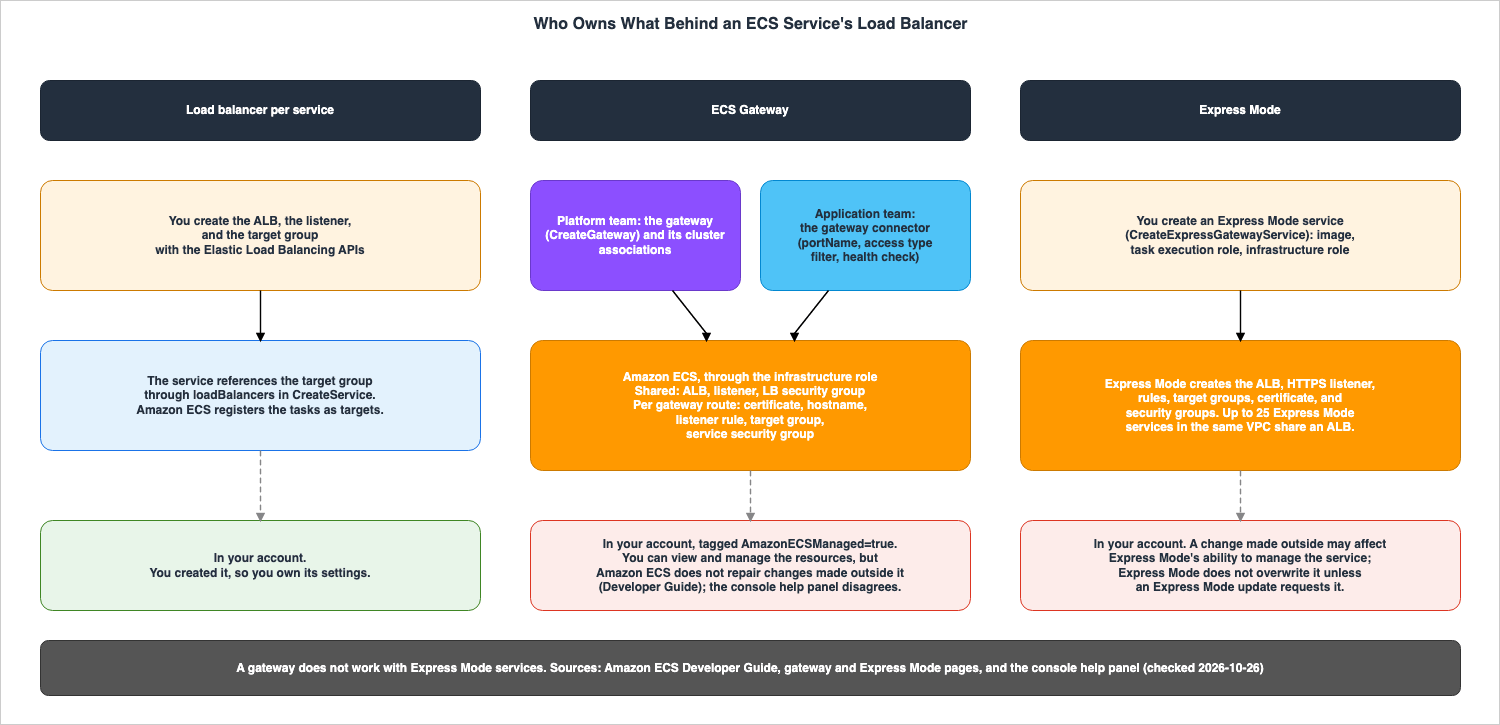
3.1 With an ALB per Service, the User Owns Everything
With an ALB per service, users create the ALB, listeners, and target groups using the Elastic Load Balancing API. The service then references these target groups via theloadBalancers setting. The CreateService API documentation specifies that, for both ALBs and Network Load Balancers, this item must contain the load balancer target group ARN, the container name, and the container port to access from the load balancer. For tasks using the awsvpc network mode, the target group's target type should be set to ip.Amazon ECS registers tasks as targets in the specified target group. The user creates and configures the ALB, listeners, and target groups. The load balancing page of the Amazon ECS Developer Guide states that a single service can receive traffic from multiple load balancers. Section 5 of the previously published Amazon ECS on Fargate Microservices Architecture Guide on this site details this type of configuration.
3.2 With ECS Gateway, Three Parties Divide the Work, and the Resources Are Created in the User's Account
The ECS Gateway involves three parties. The overview page states,Platform teams own the gateway. The platform team creates, configures, and associates the gateway with an Amazon ECS cluster. When application teams create or update a service, they add a gateway connector to include that service in the gateway. Amazon ECS assumes the infrastructure role and creates resources such as Application Load Balancers (ALB), listeners, target groups, security groups, and certificates from AWS Certificate Manager (ACM).These resources created by Amazon ECS are located in the user's account. The overview page states,
Amazon ECS creates all resources in your AWS account, where you can view and manage them with the AWS Management Console and the AWS APIs. The considerations on the same page state, Amazon ECS does not repair changes made outside it. If resources managed by the gateway are changed or deleted from outside, Amazon ECS does not restore them. Traffic to the affected services may be interrupted. Subsequent service deployments, gateway updates, and cleanup operations may also fail. In other words, while resources can be viewed and interacted with, Amazon ECS does not correct the results of those interactions. The troubleshooting page states, Make supported configuration changes through Amazon ECS Gateway operations rather than modifying the underlying resources directly.Meanwhile, the help panel for load balancers in the console's gateway details screen states, as of October 26, 2026,
Change these load balancers through the gateway rather than directly. The gateway can undo edits that you make directly to the infrastructure it manages. The Developer Guide and this help panel disagree on whether Amazon ECS undoes changes made outside it (the sources disagree). This article does not definitively state that either source is incorrect. Both sources agree on the point that changes should be made through the gateway.Even after creating the gateway and associating it with a cluster, Amazon ECS does not yet create any resources. It only begins creating resources when the first service is connected. At that point, it creates the initial ALB, its associated listener, its security group, and then the resources specific to that service.
3.3 In Express Mode, Express Mode Creates the Resources and Does Not Overwrite the User's Changes
In Express Mode, users define their service by providing container images, task execution roles, and infrastructure roles. Express Mode then creates the necessary components, including an Application Load Balancer (ALB) and HTTPS listener, listener rules, target groups, security groups, an ACM certificate, Auto Scaling configurations, log groups, and alarms. The AWS managed policy for the infrastructure role isAmazonECSInfrastructureRoleforExpressGatewayServices, which is different from the one for ECS Gateway.The resources created in Express Mode reside in the user's account. The page on updating resources outside of Express Mode states,
You can modify these resources outside of Express Mode using the AWS Console, AWS CLI, or APIs, but doing so may affect Express Mode's ability to manage your service. It further clarifies, The responsibility boundary in Express Mode is defined by API usage. The same page notes that direct changes persist and states, Express Mode will not overwrite changes unless requested as part of an Express Mode update. Express Mode does not validate whether direct changes conflict with its own configurations, nor does it prevent changes that could potentially disrupt the service. It is the user's responsibility to resolve any such conflicts.The page detailing Express Mode resources states regarding load balancer configurations,
Note that load balancer configurations can not be updated on Express Mode services. The ALB is shared at the VPC level, and the same page indicates, Up to 25 Express Mode services in the same VPC can share an Application Load Balancer.3.4 The Three Types Side by Side
| Setting | Load balancer per service | ECS Gateway | Express Mode |
|---|---|---|---|
Owned By | You create the ALB, listener, and target group; the service references the target group | The platform team owns the gateway; the application team adds the gateway connector; Amazon ECS creates the ALB and the rest through the infrastructure role | Express Mode creates the ALB and the rest through the infrastructure role when you create an Express Mode service |
| API you call | Elastic Load Balancing APIs, then loadBalancers in CreateService | CreateGateway, AssociateGatewayWithCluster, then gatewayConnectors in CreateService or UpdateService | CreateExpressGatewayService |
| Account where the ALB lives | Yours | Yours | Yours |
| What shares one ALB | Whatever you configure | Up to 25 services per ALB; a gateway manages up to maxAlbCount ALBs | Up to 25 Express Mode services in the same VPC |
| Who adds and removes ALBs | You | Amazon ECS, up to maxAlbCount; an ALB is removed when its last service leaves | Express Mode; it provisions additional ALBs and deprovisions unused ones |
| Managed policy for the infrastructure role | — | AmazonECSInfrastructureRoleForGatewayHostSharedALB | AmazonECSInfrastructureRoleforExpressGatewayServices |
| Tag on managed resources | — | AmazonECSManaged=true, plus aws:ecs:gateway-arn | A managed tag; the Express Mode pages call it the Managed Tag |
| A change made outside Amazon ECS | It is your resource | Amazon ECS does not repair changes made outside it. (Developer Guide); the console's help panel says the gateway can undo direct edits (Section 3.2) | It may affect Express Mode's ability to manage the service; Express Mode does not overwrite it unless an Express Mode update requests it |
| Hostname | Configured by you on your ALB | A generated https://<unique-id>.ecs.<region>.on.aws for each gateway route | An AWS-provided domain name for each service (What's New) |
| Listener | Whatever you configure | HTTPS on port 443 only | An HTTPS listener |
| Use with the other types | A service with its own load balancer can also add a gateway connector | Not with Express Mode services | Not with gateways |
| Source | CreateService in the API Reference; the load balancing page | the gateway pages | the Express Mode pages; CreateExpressGatewayService in the API Reference; What's New (2025-11-21) |
Regardless of the type, the ALB is in the user's account. The differences lie in who creates it and how it handles external changes. ALBs per service are considered the user's resources. The gateway pages state that Amazon ECS does not repair changes made outside it and that later operations can fail. The console's help panel states that the gateway can undo direct edits, and the sources disagree on this point. The Express Mode pages state that Express Mode does not overwrite changes made outside it.
3.5 Announcement Wording and Specification Text
The wording used in announcements and explanations may differ from that used on the specification pages. This article will use the language found in the specifications.- The What's New post for Express Mode (November 21, 2025) states,
you can directly access and modify any infrastructure resource. The Express Mode pages state that modifications are possible but may affect Express Mode's ability to manage the service. This article presents both points: that modifications are possible and that they may affect management. - The What's New post for ECS Gateway states that it assigns a unique DNS hostname to each service. The connect page specifies that hostnames are assigned for each gateway route. If there are two compatible gateways, the service will connect to both, resulting in two hostnames.
- The AWS News Blog (October 20, 2026) mentions that Amazon ECS creates
a service security group that permits inbound traffic only from the ALB. The gateway pages describe creating a service security group and, on the monitoring page,the service security group where the gateway manages the ingress rule, but do not specify that this rule only accepts traffic from the load balancer. This article will present this point as stated in the AWS News Blog.
4. The Three Parties Behind a Gateway
This section describes the gateway settings, which the platform team writes; the gateway connector settings, which the application team writes; the resources Amazon ECS creates; and the permissions of the two principals.4.1 The Platform Team's Settings — What You Write
Gateway configuration is specified inCreateGateway under configuration.hostSharedAlb. The managing page states that every setting inside it can be omitted, and that --configuration '{"hostSharedAlb": {}}' creates a gateway with the default values.| Setting | You Set | Allowed Values | If You Set Nothing | Source of the Default |
|---|---|---|---|---|
| Name | A gateway name | Unique within an account and Region (overview page); up to 255 characters | Required | ECS gateway managing page |
| Subnets | The subnets that the load balancers use | Subnet IDs | The subnets of the default VPC | ECS gateway managing page |
| IP address type | The IP address type of the load balancers | ipv4, dualstack, or dualstack-without-public-ipv4 | dualstack | ECS gateway managing page |
| Scheme | Whether the load balancers are internet-facing or internal | internet-facing or internal | internet-facing | ECS gateway managing page |
| Listener protocol and port | protocol and port in hostSharedAlb | HTTPS and 443 only; the API Reference lists HTTP and HTTPS as valid values of protocol | HTTPS on port 443 | ECS gateway managing page |
| Inbound security group | A security group that you manage for the load balancers | A security group ID | Amazon ECS creates one and allows inbound HTTPS from all IP addresses on port 443 | ECS gateway managing page |
maxAlbCount | How many ALBs the gateway can create | An integer | 10 | ECS gateway managing page |
| AWS WAF web ACL | A web ACL for every load balancer of the gateway | A regional web ACL ARN in the same Region | None | ECS gateway managing page |
httpDesync | The HTTP desync mitigation mode | monitor, defensive, or strictest | defensive | ECS gateway managing page |
| Access logs | An Amazon S3 bucket that you own | A bucket in the same Region whose policy lets Elastic Load Balancing write | Disabled | ECS gateway managing page |
| Test traffic rules | The header that routes test traffic to a new service revision | A header name and at least one value | None | ECS gateway managing page |
| Deletion protection | Whether the gateway can be deleted | true or false | Enabled | ECS API Reference |
| Tag propagation | Whether the gateway applies its tags to the infrastructure it manages | NONE or GATEWAY | GATEWAY | ECS API Reference |
Once created, certain items cannot be changed. The managing page lists the name, subnets, IP address type, and scheme, and subsequently states that protocol and port also cannot be modified. The overview page lists
name, type, scheme, listener port, listener protocol, subnets, or IP address type. Both pages indicate that to make these changes, a new gateway must be created, and the service must be migrated to it.4.2 The Platform Team's Settings — What Happens
This table lists the boundaries and where they show, in the same row order as Section 4.1.| Setting | At the Boundary | Where It Shows | No Statement Found |
|---|---|---|---|
| Name | Cannot be changed; a new gateway is needed | describe-gateway | — |
| Subnets | Decide which VPC and which Availability Zones the gateway covers; a service connects only to gateways that cover the VPC and every Availability Zone it runs in; cannot be changed | InsufficientAvailabilityZones when the subnets are in fewer than two Availability Zones; InvalidSubnet | — |
| IP address type | Cannot be changed | describe-gateway | How IPv6 clients reach a service through dualstack |
| Scheme | Cannot be changed; internet-facing gives the access type PUBLIC and internal gives PRIVATE | accessType in describe-gateway | — |
| Listener protocol and port | No other protocol or port is supported | protocol and port in describe-gateway | — |
| Inbound security group | Amazon ECS attaches it, removes the inbound rules it managed, and stops managing inbound rules; the load balancers are shared, so a rule change can affect every service | InvalidSecurityGroup when the group no longer exists | — |
maxAlbCount | When every ALB is full and the gateway is at the maximum, the deployment of the service that opts in fails; raising the maximum afterward does not retry it | currentAlbCount and maxAlbCount in describe-gateway | The maximum value that the API accepts; the overview page's limits table lists 200 ALBs per gateway (Section 5.2) |
| AWS WAF web ACL | Applies to every load balancer that the gateway manages | describe-gateway | — |
httpDesync | Applies to every load balancer that the gateway manages | describe-gateway | — |
| Access logs | One bucket receives logs for every service on the gateway; the infrastructure role is not involved in the writes | The hostname in each log record | — |
| Test traffic rules | A change applies to each service on its next deployment; Amazon ECS does not redeploy services | testListenerRuleArns in describe-gateway-route | — |
| Deletion protection | The gateway cannot be deleted until it is disabled; it propagates to the load balancers | deletionProtection in describe-gateway | — |
| Tag propagation | TagLimitExceeded when gateway tags and service tags exceed what a resource allows; AmazonECSManaged uses one tag slot | Tags on the managed resources | — |
The handling of
maxAlbCount is discussed in Section 5. How UpdateGateway changes the settings that can be changed after creation is covered in Section 6.6.4.3 What the Application Team Writes
The application team is responsible for writing only the service's gateway connector. The connect page states thatportName is required and that the health check settings and the access type filter are optional.| Setting | You Set | Allowed Values | If You Set Nothing | Source of the Default |
|---|---|---|---|---|
portName | The named port in the task definition that receives traffic | The name of a port mapping in the task definition that the service uses | Required | ECS gateway connect page |
filters.accessTypes | Which gateway access types the service accepts | PUBLIC, PRIVATE, or both | Either access type is accepted | ECS gateway connect page |
healthCheck | The health check on the target group that Amazon ECS creates | Path, port, protocol, interval, timeout, thresholds, and matcher | An HTTP request to / on the named port every 30 seconds, expecting 200 within 5 seconds | ECS gateway connect page |
The boundaries between these three settings are as follows:
| Setting | At the Boundary | Where It Shows | No Statement Found |
|---|---|---|---|
portName | Amazon ECS uses the port's number, protocol, and protocol version for the target group; a name that is not in the task definition fails the request | InvalidConfiguration: "portName not found in task definition portMappings" (troubleshooting page; Section 9.2 recorded InvalidParameterException) | — |
filters.accessTypes | Narrowing takes effect on the deployment it starts; the service drops its connections to gateways that no longer match, and their URLs stop working | accessType of each connection in describe-service-revisions | — |
healthCheck | A change replaces the target group, so it cannot be made on a service that uses the ROLLING deployment strategy | Target group properties cannot be changed with ROLLING deployment strategy | — |
portName refers to the port's name, not the container's port number. The troubleshooting page states, It is the name of the port, not the numeric container port. It also suggests verifying that the previously used name still exists after updating the task definition.When you want to change the health check, the connect page indicates that you should use either the
BLUE_GREEN or CANARY deployment strategy, or configure the health check during the initial connection. The troubleshooting page notes that if you reconnect the service to replace the target group, you should expect that the gateway's routes and hostnames will be removed and recreated.4.4 What Amazon ECS Creates
The resources created by Amazon ECS fall into two categories. The table on the overview page is as follows:| Resource type | Managed resources | Created |
|---|---|---|
| Shared infrastructure | Application Load Balancer, load balancer listener, load balancer security group | When the first service connects; reused by later services while the ALB has capacity |
| Service-specific infrastructure | ACM certificate, DNS hostname, listener rule, target group, service security group | For each gateway route |
Amazon ECS routes by hostname. Up to 25 services share one Application Load Balancer, and each service has its own hostname, certificate, and listener rules. The hostnames are in the format
https://<unique-id>.ecs.<region>.on.aws, and the overview page states, The domain varies by AWS partition. The connect page indicates that the hostname identifier is random and not derived from the service name.Amazon ECS tags managed resources with the tag
AmazonECSManaged=true and applies a system tag, aws:ecs:gateway-arn, which holds the ARN of the gateway. It also applies the tag aws:ecs:gateway-route-arn to target groups, listener rules, and service security groups created for each gateway route. The overview page recommends using these tags to locate resources in the Elastic Load Balancing, Amazon EC2, and ACM consoles.On how a hostname is resolved in DNS, no statement was found. None of the pages referenced (the gateway pages, the AWS News Blog and What's New for ECS Gateway, the API Reference gateway pages, and the
AWS::ECS::Gateway and AWS::ECS::GatewayClusterAssociations pages in the CloudFormation Template Reference) mention Amazon Route 53. The overview page describes DNS hostnames as resources that Amazon ECS creates and manages, listing them as one of the resources associated with each service. The AWS managed policy in Section 4.5 contains no Route 53 operation.4.5 Two Principals and Their Permissions
Operating the gateway involves two principals: the IAM principal that calls the API, and the infrastructure role assumed by Amazon ECS. The troubleshooting page states that a missing permission on one is not fixed by changing the other.- The infrastructure role has a trust policy that allows
ecs.amazonaws.comto assume it, and it is assigned the AWS managed policyAmazonECSInfrastructureRoleForGatewayHostSharedALB. The managing page states that this role is required to create, configure, and manage the load balancer, listener, target group, security group, and ACM certificate. - The principal creating or updating the gateway must have the
iam:PassRolepermission to pass the infrastructure role. ForUpdateGateway, the API Reference states that this permission is required when specifying aninfrastructureRoleArn(see Section 6.6). The troubleshooting page notes that a missingiam:PassRolepermission is the most common failure encountered when first attempting this operation. Even if the principal has the authority to create the gateway, this call will fail. The same page states,Adding permissions to the infrastructure role does not resolve a missing permission on the calling identity. - Application teams need neither of these two permissions. The managing page states,
An application team needs neither iam:PassRole nor the gateway operations to give its service an HTTPS endpoint.and it also states that they do not require permissions to create a load balancer.
The version of the AWS managed policy is v1, and it was created and last modified on September 25, 2026 at 21:17 (UTC). The policy description reads,
Default policy for the Amazon ECS Infrastructure Role for Amazon ECS Service Gateway Services. The policy itself defines different tag condition requirements for each type of operation.| Statement | Actions | Tag condition |
|---|---|---|
ServiceLinkedRoleCreateOperations | iam:CreateServiceLinkedRole for Elastic Load Balancing | None; the condition is the service name elasticloadbalancing.amazonaws.com |
ELBOperations | Create, modify, and delete operations on load balancers, listeners, listener rules, and target groups, plus listener certificates, load balancer security groups, and target registration | aws:ResourceTag/AmazonECSManaged is true |
TagOnCreateELBResources | elasticloadbalancing:AddTags | Only as part of CreateLoadBalancer, CreateListener, CreateRule, or CreateTargetGroup |
BlanketAllowCreateSecurityGroupsInVPCs | ec2:CreateSecurityGroup on VPCs | None |
CreateSecurityGroupResourcesWithTags | Create a security group and authorize its rules | aws:RequestTag/AmazonECSManaged is true |
TagOnCreateEC2Resources | ec2:CreateTags on security groups and security group rules | Only as part of CreateSecurityGroup, AuthorizeSecurityGroupIngress, or AuthorizeSecurityGroupEgress |
ModifySecurityGroupOperations | Authorize, revoke, and delete on security groups | aws:ResourceTag/AmazonECSManaged is true |
CertificateCreateOperations | acm:RequestCertificate | aws:RequestTag/AmazonECSManaged is true |
CertificateOperations | acm:AddTagsToCertificate and acm:DeleteCertificate | aws:ResourceTag/AmazonECSManaged is true |
WAFAssociationOnALBs and ELBSetWebACLOnALBs | Associate and disassociate a web ACL | None |
| Read statements | Describe and Get operations on Elastic Load Balancing, Amazon EC2, ACM, and AWS WAF | None |
An Important note on the managing page states that if you modify or remove the
AmazonECSManaged tag from managed ALBs, security groups, or listener rules, Amazon ECS can no longer update or clean up those resources.5. Capacity and What Fails
This section describes the number of services the gateway can handle, and what fails at that limit.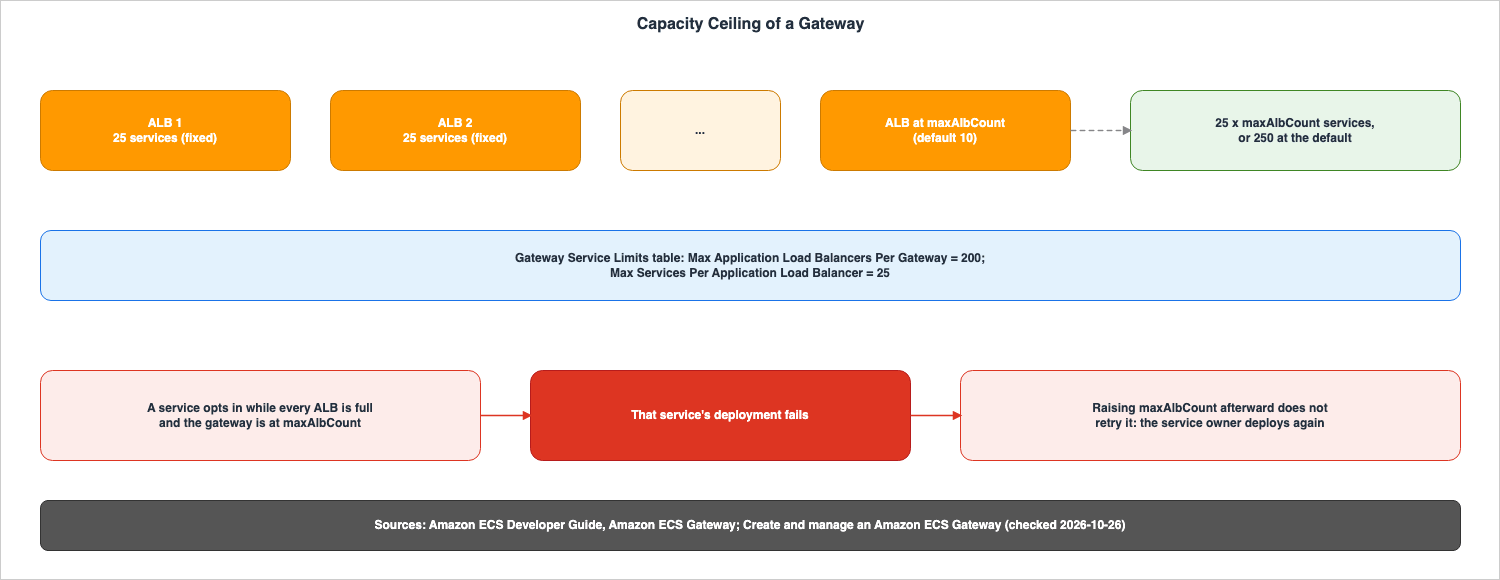
5.1 Two Limits
The managing page describes how two separate limits determine the number of services a gateway can handle.- Number of services per load balancer: Gateways configured with
hostSharedAlbcan host up to 25 services on a single Application Load Balancer (ALB). The page states that this is a fixed property of the ALB with host-based routing and cannot be changed. - Number of load balancers per gateway:
maxAlbCountis the limit users can set on the number of ALBs a gateway can create. The default value is 10.
Amazon ECS fills a single ALB to 25 services, then creates additional ALBs up to the
maxAlbCount limit. The managing page states, Together, the two limits cap a gateway at 25 x maxAlbCount services, or 250 at the default. This value of 250 is the result when using the default value of 10 for maxAlbCount, and does not represent the gateway's absolute maximum.5.2 Gateway Service Limits Table
The Gateway Service Limits table on the overview page lists the following five values:| Limit | Value |
|---|---|
| Max Gateway-Cluster Associations Per Cluster | 5 |
| Max Clusters Per Gateway | 10,000 |
| Max Gateway Connectors Per Service | 1 |
| Max Services Per Application Load Balancer | 25 |
| Max Application Load Balancers Per Gateway | 200 |
The number 200 in this table is the maximum number of Application Load Balancers (ALBs) per gateway. Regarding
maxAlbCount, the API Reference documents for HostSharedAlbConfiguration and UpdateGatewayAlbConfiguration only specify the data type as an integer, without stating the maximum value. This article does not write the product of 200 and 25 in this table as the number of services a gateway can handle. No source states that number. The AWS General Reference document, specifically the Amazon ECS quotas table, does not list gateway limits. On whether these limits can be raised, no statement was found.The example on the managing page illustrates increasing
maxAlbCount to both 25 and 50. The troubleshooting page says to increase it within the supported limit. The AWS News Blog refers to maxAlbCount as a quota limit and states, Default quota limit of maxAlbCount is 10. The developer guide describes maxAlbCount as a setting that users change with UpdateGateway.5.3 When the ALBs Are Full, What Fails Is That Service's Deployment
The managing page says to raise the maximum before you need it. If all Application Load Balancers (ALBs) are at their maximum capacity and the gateway is also at its limit when a service attempts to join, Amazon ECS will be unable to create an entry point for that service. This results in a failure during the service's deployment. The same page states,Raising the maximum afterward does not retry the deployment that failed, so the service owner must deploy the service again.While failures occur during service deployment,
maxAlbCount is a setting for the gateway, and the platform team owns the gateway. The troubleshooting page advises users to wait for the gateway update to complete before redeploying the affected services. It also states that changes to the gateway configuration do not necessarily resume deployments that have already failed.5.4 Amazon ECS Does Not Consolidate Load Balancers
The overview page states,Amazon ECS does not consolidate load balancers. The gateway adds load balancers when existing ALBs are full and removes them when they become empty. Since services are not moved between ALBs, several partially filled ALBs can remain after services leave.5.5 Failure Reason Codes
The troubleshooting page states that a gateway route reports a failure status but not the reason for it. Amazon ECS records the reason on the service deployment that triggered the provisioning and in the service's events. The following are the reasons listed on the page regarding subnets, capacity, and quotas. Reasons related to external changes are detailed in Section 7.1.| Reason | What the troubleshooting page says it means |
|---|---|
InsufficientAvailabilityZones | The gateway's subnets are in fewer than two Availability Zones, the minimum for an ALB |
InvalidSubnet | A configured subnet does not exist, belongs to a different VPC, or has no free IP addresses left |
LoadBalancerQuotaExceeded, TargetGroupQuotaExceeded | The account's limits in the Region |
ResourceQuotaExceeded | A per load balancer limit, such as listener rules or certificates |
CertificateQuotaExceeded | The account's certificate limit |
CertificateAnnualLimitExceeded | Certificates requested in the last 365 days; deleting certificates does not reduce this count |
SecurityGroupCapacityExceeded, SecurityGroupRuleCapacityExceeded | Security groups per VPC and rules per security group |
TestRuleLimitExceeded | Test traffic rules on one service |
TagLimitExceeded | Gateway tags and service tags that exceed what a resource allows, or tags that an account tag policy rejects |
When a cluster reaches the maximum number of gateway associations (5), Amazon ECS returns the message:
Cluster has reached the maximum number of gateway associations (5).6. When Changes Take Effect
This section describes when associations, disassociations, deletions, andUpdateGateway take effect on a service.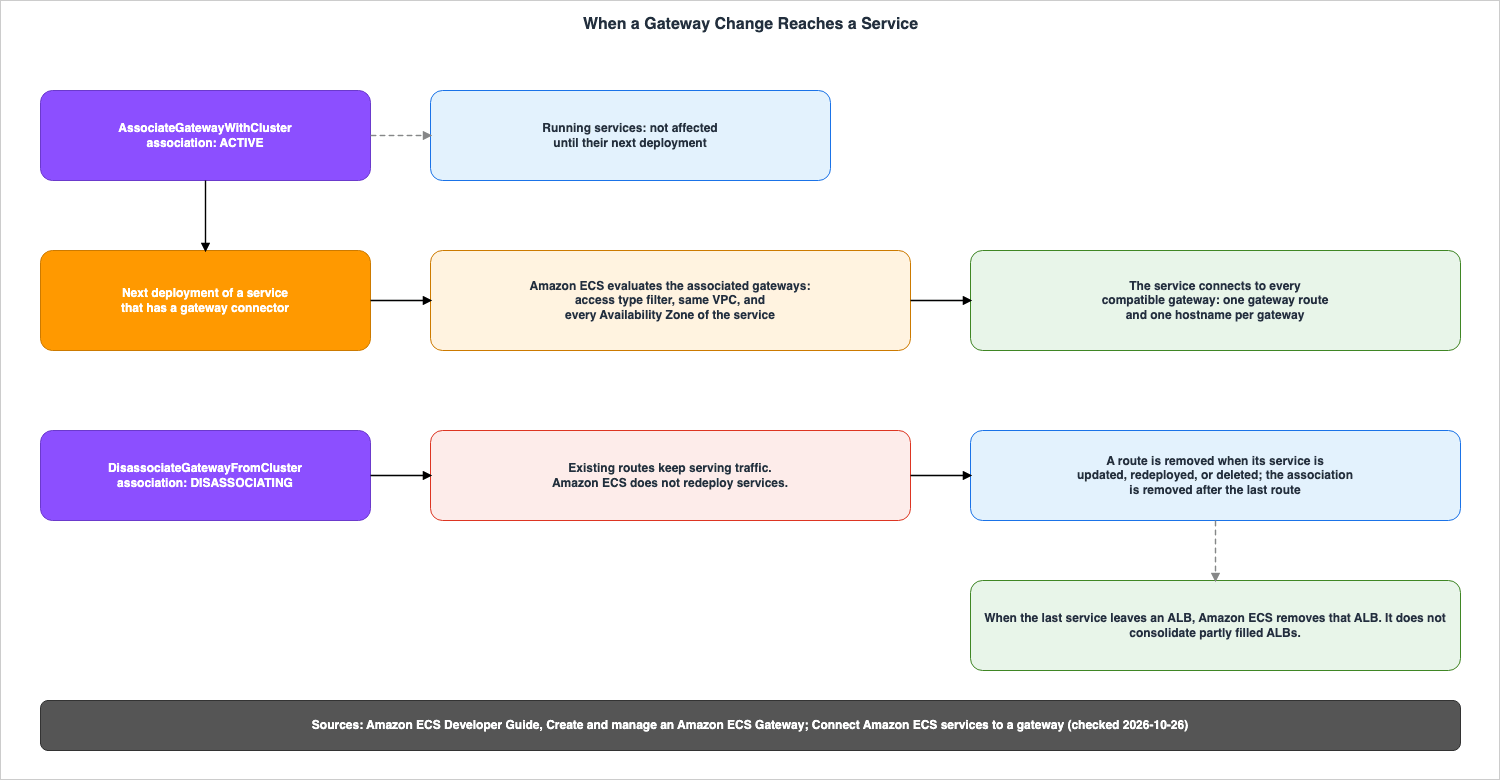
6.1 An Association Does Not Affect Existing Services Until Their Next Deployment
The managing page states that associating a gateway with a cluster does not route any traffic on its own and does not change how existing services receive traffic. A note on the same page clarifies,When you associate a gateway with a cluster, existing services are not affected until their next deployment. It also explains that adding another gateway to the cluster will not automatically connect running services. The console's help panel for updating a gateway states, as of October 26, 2026, Cluster associations take effect as soon as you save. For removing a cluster, the same panel states that Amazon ECS removes the gateway's routes for that cluster's services on each service's next deployment. No statement was found in the sources in Section 1.3 on how an association taking effect when saved relates to existing services not being affected until their next deployment.When a service with a gateway connector is deployed, Amazon ECS evaluates the gateways associated with the cluster. When a service is deployed after the association changes, or when the gateway connector is updated, Amazon ECS re-evaluates the compatible gateways. This deployment creates new routes to the newly compatible gateway and removes routes that are no longer compatible.
If you attempt to add a gateway connector to a service within a cluster that has no associated gateway, Amazon ECS will reject the request. The troubleshooting page provides the error message:
gatewayConnectors were specified but no gateways are associated with cluster. The connect page explains that this lets you find out immediately instead of waiting for a service that deploys without a URL. An association in DISASSOCIATING cannot be used for new connections either.6.2 Services Cannot Select a Gateway by Name
The overview page states,A service cannot choose a gateway by name. The gateway connector connects the service to every compatible gateway associated with the service's cluster. The connect page explains that compatibility is determined based on three conditions.| Condition | How Amazon ECS decides |
|---|---|
| Access type | The gateway matches filters.accessTypes in the gateway connector; if the filter is omitted, both PUBLIC and PRIVATE gateways are eligible |
| VPC | The gateway is in the same VPC as the service's subnets |
| Availability Zone | The gateway has configured subnets in every Availability Zone that the service's configured subnets use; partial coverage is not eligible |
The connect page states,
If more than one gateway is compatible, the service connects to all of them. Incompatible gateways are simply excluded; if other compatible gateways are available, the deployment will not fail. However, if no compatible gateways remain, the request will fail.Regarding the Availability Zone (AZ) condition, it must be complete coverage, not partial. The connect page also explains that a task launched in an AZ that the gateway does not cover never passes its health checks, and Amazon ECS replaces that task. The same page states that to connect a service to a particular gateway, you configure that gateway to cover every Availability Zone in which the service's tasks run, and that changes to cluster associations should be coordinated with the platform team because they can affect multiple services.
6.3 Filter on PRIVATE for a Service That Should Not Be Reachable from the Internet
The access type filter only decides which gateways are selected. The connect page states that this filter does not configure traffic rules or security rules. The following note appears on the same page:A service that should never be reachable from the internet must filter on PRIVATE. Without the filter, associating an internet-facing gateway with the cluster later exposes the service on its next deployment.
A service without the filter accepts both
PUBLIC and PRIVATE gateways. If the platform team later associates an internet-facing gateway with the cluster, that service will become accessible through that gateway on the next deployment. By restricting the service to PRIVATE, the connection to the public gateway is removed during the deployment with the filter applied, and that URL will no longer function.6.4 A Disassociation Stays DISASSOCIATING, and Amazon ECS Does Not Redeploy Services
When disassociated, the association status becomesDISASSOCIATING. The managing page states the following:- New services cannot connect to the gateway through the cluster.
- Existing services will continue to receive traffic through their gateway routes.
- Services will disconnect from the gateway during updates or redeployments.
- The association status will remain
DISASSOCIATINGuntil all gateway routes are removed.
The same page also states,
Amazon ECS does not automatically redeploy services when a gateway is disassociated from their cluster. To disconnect, the application team must update or redeploy the service. If there are no other gateways on the cluster, remove the gateway connector before redeploying. The monitoring page notes that a prolonged DISASSOCIATING status indicates that the service is still connected, and does not indicate a failure.While in the
DISASSOCIATING state, re-associating with the same cluster will revert the association status to ACTIVE. The managing page explains that services that were not redeployed during this period will continue to receive traffic using their existing routes and hostnames. Services that were redeployed during this period will lose their routes and will obtain new routes with new hostnames during the next deployment. Once a disassociation is complete, the association cannot be reactivated.6.5 Deletion and Cleanup
When a service removes its gateway connector or the service is deleted, Amazon ECS removes the service's gateway routes and associated resources. The connect page states that disconnecting takes effect on the deployment it starts. Until that deployment completes, the service continues to receive traffic through the gateway. If no services remain associated with a managed ALB, Amazon ECS will remove the ALB.To delete a gateway, its deletion protection must be disabled and it must have no association in the
ACTIVE or DISASSOCIATING state. The managing page explains that Amazon ECS only removes routes when the associated service is redeployed or deleted, and will not redeploy the service in its place. The DeleteGateway operation is synchronous; upon success, it returns the gateway in a DELETED state, and subsequent requests will return a GatewayNotFoundException (Section 9.2 recorded a different exception). The managing page indicates that nothing remains to be cleaned up afterward.6.6 UpdateGateway Replaces the Whole Configuration, and the Sources Disagree on Omitted Settings
The managing page has the following Important note.UpdateGateway replaces the gateway's configuration with the one in your request. Omitting a setting clears it rather than leaving it unchanged.
The same page also states that before updating, you should use
describe-gateway to retrieve the current configuration and include all settings you wish to keep in your request. The following table illustrates what happens when a setting is omitted:| Setting | Where to pass it | If you omit it (managing page) |
|---|---|---|
infrastructureRoleArn | Top level | The request fails (required) |
configuration.hostSharedAlb | Top level | The request fails (required) |
deletionProtection | Top level | Reset to true |
propagateTags | Top level | Reset to GATEWAY |
networkConfiguration.inboundSecurityGroup | hostSharedAlb | Removed; Amazon ECS resumes managing inbound rules |
webACLArn | hostSharedAlb | Removed; the web ACL is disassociated |
httpDesync | hostSharedAlb | Reset to defensive |
accessLogs | hostSharedAlb | Removed; access logging is turned off |
testTrafficRules | hostSharedAlb | Removed |
maxAlbCount | hostSharedAlb | Reset to 10 |
A note on the same page states,
The infrastructure role is required in every UpdateGateway request. and says that a request without the role returns a validation error.The
UpdateGateway page of the API Reference states something different. It lists only gateway as a required argument, while both infrastructureRoleArn and configuration are Required: No. Regarding propagateTags, the same page states, If you don't specify a value, the gateway's existing setting is unchanged. On what happens when deletionProtection or the fields within hostSharedAlb are omitted, no statement was found in the API Reference. As of October 26, 2026, these two sources disagree (the sources disagree).In the developer guide, some examples do not match the table. The troubleshooting page gives an example of increasing
maxAlbCount with a command that passes neither the role nor the other settings: aws ecs update-gateway --gateway my-gateway --configuration '{"hostSharedAlb":{"maxAlbCount":25}}'. Both the managing page's deletion procedure and the troubleshooting page provide an example of disabling deletion protection, also using a command that omits the role and configuration: aws ecs update-gateway --gateway my-gateway --no-deletion-protection.This article does not decide which of these sources is correct. The procedure on the managing page, which retrieves the current settings and includes every setting to keep and the role in the request, keeps those settings under either source's wording. This is this article's reading, which places the two sources side by side. What this article's configuration recorded is in Section 9.
6.7 Updates Are Asynchronous, and Old and New Configurations Mix in the Middle
UpdateGateway is an asynchronous operation. The gateway transitions to the UPDATE_IN_PROGRESS state, and Amazon ECS begins applying changes to all ALBs managed by the gateway, sequentially. Upon completion, the status changes to UPDATE_COMPLETE. A note on the managing page states that during an update, the load balancers hold a mix of the old and the new configuration. It also states that you should not assume all resources have reached their desired configuration until the status reaches UPDATE_COMPLETE.If the update fails for some load balancers, the gateway transitions to the
UPDATE_FAILED state. Amazon ECS attempts to update all resources, even if an initial failure occurs. The statusReason field indicates the number of load balancers that were successfully updated, while the failures field lists the resources that failed to update, along with the operation attempted, the error code, and a descriptive message. Up to 200 resources are logged, with a maximum of 5 error messages per resource. The troubleshooting page advises against assuming that updates are rolled back across the entire gateway.6.8 Test Traffic Rules Take Effect on Each Service's Next Deployment
Test traffic rules are set on the gateway rather than on individual services, so every service behind the gateway uses the same header. The managing page states that header matching is the only mechanism and that a percentage of traffic cannot be sent to a new revision.Changes to these rules will not affect currently running services. They will only take effect with the next deployment of each service. Amazon ECS does not modify existing rule matching criteria; instead, it creates new rules for newer revisions. The managing page also states that, since Amazon ECS does not redeploy services, any changes to the headers should be coordinated with the service owner.
6.9 The Operations Side by Side
This table lists the operations so far, with the operation names in the first column.| Setting | At the Boundary | Where It Shows | No Statement Found |
|---|---|---|---|
CreateGateway | Synchronous; returns ACTIVE; provisions nothing until the first service connects | describe-gateway | — |
AssociateGatewayWithCluster | Routes no traffic on its own; existing services are not affected until their next deployment; up to 5 gateways per cluster and 10,000 clusters per gateway | ACTIVE in list-gateway-cluster-associations | — |
| Add a gateway connector | Rejected when no gateway is associated with the cluster; the deployment connects the service to every compatible gateway | gatewayConnections in describe-service-revisions | — |
| Deploy after an association changes | Amazon ECS reevaluates the compatible gateways; it adds routes to newly eligible gateways and removes connections that no longer match | Routes in list-gateway-routes | — |
DisassociateGatewayFromCluster | DISASSOCIATING until every route on the cluster is removed; Amazon ECS does not redeploy services; associating again returns it to ACTIVE | DISASSOCIATING in list-gateway-cluster-associations | — |
UpdateGateway | Asynchronous; load balancers hold a mix of old and new configuration until it completes; omitted settings: the sources disagree | UPDATE_IN_PROGRESS, UPDATE_COMPLETE, or UPDATE_FAILED with statusReason and failures | How the API treats an omitted deletionProtection or hostSharedAlb field |
| Remove the connector or delete the service | Takes effect on the deployment it starts; an ALB with no service left is removed; Amazon ECS does not consolidate the remaining ALBs | currentAlbCount; describe-gateway-resources | — |
DeleteGateway | Requires deletion protection disabled and no ACTIVE or DISASSOCIATING association; synchronous | DELETED, then GatewayNotFoundException (managing page; Section 9.2 recorded AccessDeniedException) | — |
7. External Changes, Migrations, and Visibility
This section discusses what happens when resources are modified from outside of Amazon ECS, when migrating from your own load balancer, and how to watch the status and the traffic.7.1 Whether Amazon ECS Repairs Changes Made Outside It
The troubleshooting page states that even if resources managed by the gateway are modified or deleted outside of Amazon ECS, Amazon ECS does not automatically repair or recreate them. Changes to the load balancer, listeners, listener rules, target groups, certificates, or security groups can interrupt traffic or cause later service deployments, gateway updates, or cleanup operations to fail. The monitoring page indicates that the gateway reports only its own record and does not read the current state of resources, so it does not detect changes made outside Amazon ECS.As described in Section 3.2, the console's help panel states that the gateway can undo direct edits. On this point, it disagrees with the troubleshooting page (the sources disagree).
External changes may manifest as the following failure reasons:
| Reason | What the troubleshooting page says it means |
|---|---|
ManagedResourceDeleted | A resource that Amazon ECS created for the service was deleted outside Amazon ECS |
ConflictingListener | A listener on the gateway's port exists on the load balancer, and Amazon ECS did not create it |
SecurityGroupNameInUse | A security group with the name Amazon ECS wants exists and is not managed by Amazon ECS; Amazon ECS does not reconfigure or delete it |
InvalidSecurityGroup | The gateway's inbound security group no longer exists |
According to the troubleshooting page, if you have modified resources, revert them to their original configuration and redeploy the service. If you have deleted resources, remove the gateway connector from the service, redeploy, and then add the connector back and deploy again. The second deployment will create new resources and new routes. Since the service hostname will be new, update any client configurations and DNS records that refer to the old hostname.
7.2 Removing the Tag Stops Updates and Cleanup
The notes on the troubleshooting page state that you should not modify or remove theAmazonECSManaged tag from resources managed by the gateway. Amazon ECS uses this tag to identify resources under its control. If the tag is missing, Amazon ECS can no longer update or clean up those resources. As described in Section 4.5, the AWS managed policy makes the modify and delete operations on load balancers, security groups, and ACM certificates conditional on this tag.The Express Mode page also discusses managed tags. It explains that when you want no further Express Mode updates on a service, removing the Managed Tag from the resources means Amazon ECS can no longer identify and operate on it as an Express Mode service. The same page also provides information on how to restrict IAM permissions for Express Mode APIs.
7.3 Migrating from Your Own Load Balancer
The connect page explains that to migrate a service that currently uses your own load balancer, you need to add a gateway connector to that service. Amazon ECS creates a gateway route and a new hostname, and neither removes nor modifies your existing load balancer configuration. Because both your load balancer and the gateway will initially handle traffic, you can verify the gateway's URL before you remove your existing load balancer in a later update.When migrating from one gateway to another, the gateway connector will not hold the gateway's ARN, so the migration process relies on association and access type filters. The steps outlined on the connect page involve creating the destination gateway, associating it with the cluster, redeploying the service, and then, once the connection to the destination gateway is
ACTIVE, updating clients to use the new hostname. Finally, the platform team disassociates the old gateway, and the services are redeployed. The same page also notes that if the original gateway remains compatible, both routes can coexist during the migration.Hostnames change when a service is recreated. The connect page states,
The hostname's identifier is random. It is not derived from your service name, so a service that you delete and recreate under the same name gets a different URL.7.4 The Three Statuses Are Independent of Each Other
The monitoring page states that the gateway, gateway routes, and application targets are independent of each other.A gateway can be ACTIVE even if an individual gateway route failed to provision. A gateway route can be ACTIVE even if its application targets are unhealthy.
| What | API | Status values |
|---|---|---|
| Gateway | DescribeGateway, ListGateways | ACTIVE, UPDATE_IN_PROGRESS, UPDATE_COMPLETE, UPDATE_FAILED, DELETED |
| Gateway-cluster association | ListGatewayClusterAssociations | ACTIVE, DISASSOCIATING |
| Gateway route | DescribeGatewayRoute, ListGatewayRoutes | ACTIVE, CREATE_IN_PROGRESS, CREATE_FAILED, UPDATE_IN_PROGRESS, UPDATE_FAILED, DELETE_IN_PROGRESS, DELETE_FAILED |
| Application targets | Elastic Load Balancing target health | The target health states |
The status of a gateway reflects its own configuration and the results of updates to the resources it manages. If a service fails to create an entry point, this is reflected in the gateway route status. If applications are unhealthy, this is reflected in the target group's health status. Neither of these factors affects the gateway's status. The connect page states that connections that have a
CREATE_FAILED status will not change even if you wait.Regarding association status, the monitoring page table lists two states:
ACTIVE and DISASSOCIATING. The API Reference pages for AssociateGatewayWithCluster and DisassociateGatewayFromCluster also list INACTIVE as a possible value for the response's status field. On when INACTIVE appears, no statement was found.7.5 describe-gateway-resources Returns ARNs, Not the Current State
describe-gateway-resources returns the resources managed by the gateway, grouped by ALB. Each group includes the load balancer, its listener, its security group, and the gateway routes associated with it. The monitoring page notes that this response returns ARNs for resources managed by Amazon ECS, but does not provide the current status of those resources. To obtain the current status, you must query the services that own those resources, such as Elastic Load Balancing or Amazon EC2, using the ARNs provided.To track a single connection, use the
describe-gateway-route command. The response details the route's status, the service URL, and the resources associated with that connection, including the certificate, the load balancer and its listener, production and test listener rules, the load balancer's security groups, and the service's security groups. Production target groups and the alternate target group used for progressive deployments are shown on the service revision. Application teams can view their service's connections, URLs, access types, status, and resources using the gatewayConnections section of the describe-service-revisions command.7.6 Metrics and Logs Come from the ALB
The monitoring page states,Amazon ECS Gateway does not publish metrics of its own for this. Traffic and target health are monitored through ALB metrics sent to Amazon CloudWatch by Elastic Load Balancing, as well as Elastic Load Balancing's target health status.A single ALB can host up to 25 services, so metrics related to the load balancer's dimensions reflect the combined activity of all services hosted on it. The monitoring page states,
Application teams should use the target group dimension. Increased requests or 5XX errors observed through the load balancer's dimension may originate from other services using the same ALB and cannot be attributed to your own service.| Scope | Dimensions | Metrics the monitoring page lists |
|---|---|---|
| One service connection | TargetGroup with LoadBalancer | RequestCount, TargetResponseTime, HTTPCode_Target_5XX_Count, HealthyHostCount, UnHealthyHostCount |
| Shared load balancer | LoadBalancer | HTTPCode_ELB_5XX_Count, ActiveConnectionCount, RejectedConnectionCount, ConsumedLCUs |
| One Availability Zone | AvailabilityZone with the load balancer or target group dimensions | Target health and request metrics |
The gateway adds load balancers when services connect and removes them when services disconnect. The monitoring page notes that alarms tied to a single load balancer or target group ARN can stop measuring anything when that resource goes away, and recommends selecting resources using the gateway ARN tags. Since this is a shared load balancer, access logs may contain requests from multiple services. You can differentiate requests from each service by examining the hostname in each log record.
8. Where East-West Traffic Begins
This section describes the boundary between ECS Gateway and the tools for east-west traffic. The gateway pages do not mention Service Connect, VPC Lattice, or App Mesh. On the relationship between ECS Gateway and these tools, no statement was found. This section is this article's arrangement of other pages of the Amazon ECS Developer Guide.8.1 The Sources Name a Load Balancer for Connections from Outside and Three Ways Between Services
The service interconnection page of the Amazon ECS Developer Guide states that Elastic Load Balancing is recommended for external connections from the internet. For connecting to other applications running within Amazon ECS services, it lists three options that do not require a load balancer: Service Connect, service discovery, and VPC Lattice. ECS Gateway is an ALB entry point, so in the way the sources divide things, it sits on the side of connections from outside. This is this article's reading.| Option | What the Amazon ECS Developer Guide says | Network modes (the compatibility table; for ECS Gateway, the overview page) |
|---|---|---|
| Service Connect | Short names and standard ports to connect to Amazon ECS services in the same cluster, other clusters, including across VPCs in the same AWS Region | Bridged and awsvpc |
| Service discovery | AWS Cloud Map service discovery integration with DNS records | Bridged, awsvpc, and host (bridged and host need SRV records) |
| VPC Lattice | Amazon ECS tasks registered as IP targets in VPC Lattice target groups | Bridged, awsvpc, and host |
| ECS Gateway | Shared ALBs with host-based routing for HTTPS ingress | awsvpc only |
8.2 Service Connect
The Service Connect page states,Service Connect only interconnects services. The usage of Service Connect is covered in Section 4 of the previously published Amazon ECS on Fargate Microservices Architecture Guide on this website.The terminology description on the Service Connect page, regarding the name of a port in the task definition, states,
This configuration is only used by Amazon ECS Service Connect. On the gateway pages, the portName of the gateway connector refers to the name of the port in the same task definition. As of October 26, 2026, these two descriptions disagree (the sources disagree).8.3 VPC Lattice
Amazon ECS services can be associated with target groups in VPC Lattice. When a service's tasks are launched, Amazon ECS registers those tasks with the VPC Lattice target group. This integration was announced in What's New on November 18, 2024. On October 2, 2026, What's New announced that Amazon ECS services using VPC Lattice now support blue/green, linear, and canary deployment strategies. The design of VPC Lattice is covered in detail in the previously published AWS VPC Lattice Complete Guide on this site.8.4 AWS App Mesh
The AWS App Mesh User Guide states,On September 30, 2026, AWS will discontinue support for AWS App Mesh. This date is before the date on which this article checked the sources. The AWS General Reference document, under the "Services in Sunset" table, lists the announcement date for App Mesh as September 24, 2024, and the end-of-support date as September 30, 2026, and provides resources for migrating to Service Connect as an alternative.9. What Was Recorded Using This Configuration
This section describes what was recorded in a configuration built for this article in the US East (N. Virginia) Region. These values are records of that configuration on that day and are not values guaranteed by the sources. Performance or comparisons cannot be read from them.9.1 Configuration
The infrastructure was created using AWS CloudFormation and AWS CLI (version 2.38.5) on October 26, 2026 (UTC), deleted on the same day, and checked to confirm that no resources remained.- The VPC had an IP address range of
10.0.0.0/16and utilized the IPv6 range provided by Amazon. It contained a single public subnet in each of two Availability Zones. IPv6 ranges were also assigned to the subnets. This was done to ensure the gateway IP address type remained at the defaultdualstack. - Two services were created in the ECS cluster using AWS Fargate (ARM64, 0.25 vCPU, 0.5 GB), designated as Service A and Service B, and were created without a gateway connector. The task definition consisted of a single nginx container and included a named port,
web, on port 80. The security group associated with the tasks created by this configuration only accepted traffic on port 80 from within the VPC. - The infrastructure role was created in the form shown on the managing page, with an
ecs.amazonaws.comtrust policy and the AWS managed policy. - Two gateways were created using the AWS CLI. Gateway 1 was created by only specifying the subnets, leaving all other settings at their defaults (internet-facing). Gateway 2 was created with a scheme set to
internal. - There were 12 steps. All operations involving the gateway, associations, and gateway connectors were performed using the AWS CLI. No attempt was made to reach the
maxAlbCountlimit, modify managed resources from outside, or run a migration with a self-managed load balancer alongside the gateway.
9.2 Records by Step
TheRecorded column in the following table shows the result of each step's operation and the resulting state.| Step | What was done | Recorded |
|---|---|---|
| s01 | Added a gateway connector to service A before any gateway was associated with the cluster | Rejected with InvalidParameterException: gatewayConnectors were specified but no gateways are associated with cluster followed by the cluster ARN |
| s02 | Created gateway 1 with only its subnets | ACTIVE at once; deletionProtection true, propagateTags GATEWAY, scheme internet-facing, ipAddressType dualstack, httpDesync defensive, maxAlbCount 10, protocol HTTPS, port 443; no managed ALB |
| s03 | Associated gateway 1 with the cluster | Association ACTIVE; 60 seconds later, still no managed ALB and no route for services A and B |
| s04 | Set portName to 80, then to web, on service A | 80 was rejected: portName '80' not found in task definition portMappings; with web, the route went from CREATE_IN_PROGRESS to ACTIVE in about 3 minutes, one ALB was created, and the hostname returned HTTP 200 |
| s05 | Added the same gateway connector to service B | The route became ACTIVE in about 1 minute; currentAlbCount stayed at 1; service B got its own hostname, certificate, listener rule, target group, and service security group on the same ALB |
| s06 | Changed the health check path of service A, which uses ROLLING | Rejected: Target group properties cannot be changed with ROLLING deployment strategy for gatewayConnector with portName 'web'. Changed properties: [healthCheckPath]. Use a different deployment strategy to modify these properties. |
| s07 | Called UpdateGateway four ways on gateway 1 | See Section 9.3 |
| s08 | Created gateway 2 (internal), associated it with the cluster, waited 2 minutes, and then redeployed service A | Before the redeployment, service A had one route (gateway 1), and gateway 2 had no managed ALB; after the redeployment, service A had two routes, PUBLIC and PRIVATE, with two hostnames, and gateway 2 had one ALB |
| s09 | Narrowed the filter of service A to PRIVATE | The route to gateway 1 was removed in about 7 minutes; the former public hostname then no longer resolved in DNS |
| s10 | Disassociated gateway 2, waited 3 minutes, redeployed service A, and then removed its gateway connector | The association stayed DISASSOCIATING, and the route stayed ACTIVE; the redeployment was rejected because no associated gateway matched PRIVATE (associated gateway access types: [PUBLIC]); after the connector was removed, the route, the association, and the ALB of gateway 2 were gone in about 8 minutes |
| s11 | Deleted services A and B | The ALB of gateway 1 was removed about 7 minutes later |
| s12 | Ran the developer guide's example aws ecs update-gateway --gateway my-gateway --no-deletion-protection with this configuration's gateway name, then disabled deletion protection with the role and a configuration, disassociated gateway 1, and deleted both gateways | The example was rejected: infrastructureRoleArn is required and cannot be blank; with the role and a configuration, the update succeeded, and both deletions succeeded; describe-gateway on a deleted gateway returned AccessDeniedException (Access denied), not GatewayNotFoundException |
The rejection of the redeployment in s10 aligns with the statement in Section 6.2 that a request fails if no compatible gateway remains. At that time, gateway 1 was still associated with the cluster. The managing page indicates that the gateway connector should be removed before redeployment if no other gateways are available for the cluster, but s10 does not meet that specific condition. Whether these two conditions are treated the same cannot be determined from this configuration's records.
The resources that Amazon ECS created in s04 and s05 are as follows:
| Resource | Recorded |
|---|---|
| ALB | internet-facing, dualstack, two Availability Zones; deletion protection enabled; tags AmazonECSManaged=true, aws:ecs:gateway-arn, and the tag on the gateway (tag propagation GATEWAY) |
| Listener | HTTPS on port 443; default action fixed-response; the certificates of both services |
| Listener rule | One for each service; a host-header condition with the service's hostname; action forward; tags include aws:ecs:gateway-route-arn |
| Target group | One for each service; HTTP on port 80, target type ip; health check HTTP on / every 30 seconds, timeout 5 seconds, healthy threshold 5, unhealthy threshold 2, success code 200 |
| Certificate | One for each service; AMAZON_ISSUED, DNS validation; the domain is the service's hostname; tags AmazonECSManaged=true and aws:ecs:gateway-arn |
| Load balancer security group | Inbound TCP 443 and TCP 80 from 0.0.0.0/0 and ::/0 |
| Service security group | One for each service; inbound TCP 80 from the load balancer security group only; attached to the task's network interface next to the task security group that this configuration created |
| Hostname | https://<unique-id>.ecs.us-east-1.on.aws; DNS returned two A records and no CNAME: public addresses for gateway 1, and addresses in 10.0.0.0/16 for gateway 2 (internal) |
The managing page states that the security group that Amazon ECS creates for the load balancers accepts HTTPS on port 443 from all IP addresses. In this configuration, an inbound rule for port 80 was also created. The listener was on port 443 only. That the service security group accepted traffic only from the load balancer security group matched the AWS News Blog statement in Section 3.5.
9.3 When Settings Are Omitted in UpdateGateway
In s07,UpdateGateway was sent to gateway 1 in four ways.| Request | Parameters passed | Result | Gateway after the request |
|---|---|---|---|
| u1 | The role; configuration with maxAlbCount 10 and httpDesync monitor; --no-deletion-protection; --propagate-tags NONE | Accepted; UPDATE_COMPLETE about 17 seconds later | deletionProtection false, propagateTags NONE, httpDesync monitor; the ALB showed deletion protection false and desync mitigation mode monitor |
| u2 | The role; configuration with maxAlbCount 12 only | Accepted; UPDATE_COMPLETE about 17 seconds later | deletionProtection true, propagateTags GATEWAY, httpDesync defensive, maxAlbCount 12; the ALB showed deletion protection true and desync mitigation mode defensive |
| u3 | configuration without the role | Rejected: infrastructureRoleArn is required and cannot be blank | Unchanged |
| u4 | The role without configuration | Rejected: configuration is required | Unchanged |
In this configuration, the three settings that were omitted in u2 all reverted to their default values. Requests u3 and u4 were rejected. This matches the table and the notes on the managing page, and does not match the API Reference's
Required: No or its statement that omitting propagateTags leaves it unchanged. This is a record of this configuration on October 26, 2026, and does not decide which source is correct. Even after setting propagateTags to NONE in u1, the Application Load Balancer (ALB) still retained the gateway tags that had previously been propagated.9.4 What This Configuration Cannot Determine
- The reason why the
describe-gatewaycommand returned anAccessDeniedExceptionafter deletion. The managing page and the monitoring page stateGatewayNotFoundException. This configuration's records cannot determine it. - The reason why a rule for port 80 was created in the load balancer's security group. No statement was found in the sources.
- The time it took for the route to become
ACTIVE, and the time it took for the ALB to be deleted. These are values of this configuration on this day, and the sources give no guide for them. - Changes made outside Amazon ECS, the
maxAlbCountlimit, migration from self-managed load balancers, cancellation ofDISASSOCIATINGstatus, and access from IPv6 clients. These scenarios were not tested within this configuration.
10. Failure Modes
This section lists the failures that arise from the contracts in Sections 3 through 8, by symptom and cause.| Symptom | Cause in the contract | Where to look |
|---|---|---|
| A fix made directly on a gateway-managed ALB breaks a later deployment or the cleanup | The Developer Guide states that Amazon ECS does not repair changes made outside it; the console's help panel disagrees | Section 7.1 |
| A managed resource can no longer be updated or cleaned up | The AmazonECSManaged tag was changed or removed | Section 7.2 |
| A newly associated gateway serves none of the running services | Associating a gateway does not affect existing services until their next deployment | Section 6.1 |
| A service that should be internal gets an internet-facing URL | The connector has no PRIVATE filter, and an internet-facing gateway was associated with the cluster before its next deployment | Section 6.3 |
| A service has two URLs | Two gateways are compatible, and the service connects to all of them | Section 6.2 |
| A service does not connect to the gateway the team expected | The gateway does not cover every Availability Zone of the service, is in another VPC, or does not match the access type filter | Section 6.2 |
| A disassociated gateway still serves traffic | The association stays DISASSOCIATING until the services are redeployed or deleted, and Amazon ECS does not redeploy them | Section 6.4 |
A service's deployment fails while the gateway stays ACTIVE | Every ALB is full and the gateway is at maxAlbCount | Section 5.3 |
Raising maxAlbCount did not fix the failed service | Raising the maximum does not retry the deployment that failed | Section 5.3 |
| An update that changed one setting reset others | The managing page states that UpdateGateway replaces the configuration; the sources disagree on omitted settings | Section 6.6 |
| A health check change is rejected | A health check change replaces the target group, which the ROLLING strategy does not allow | Section 4.3 |
portName: 80 fails | portName is the name of a port mapping, not the container port number | Section 4.3 |
| A recreated service lost its URL | The hostname identifier is random and is not derived from the service name | Section 7.3 |
A gateway reports ACTIVE while a service has no working URL | Gateway, route, and target statuses are independent | Section 7.4 |
| A load balancer metric spikes for a service that did not change | Up to 25 services share the ALB; application teams use the target group dimension | Section 7.6 |
| Several partly filled ALBs remain after services leave | Amazon ECS does not consolidate load balancers | Section 5.4 |
11. Frequently Asked Questions About the Load Balancer of an ECS Service
Q1. Is the ALB of ECS Gateway in your account, and can you touch it?
It belongs to your account and can be accessed. The overview page states that Amazon ECS creates all resources in the user's AWS account, and that users can view and manage them through the console and API. However, the same page also states that Amazon ECS does not repair changes made outside it. The console's help panel states that the gateway can undo direct edits, and the sources disagree on this point. A change made outside can stop traffic and make later deployments, gateway updates, and cleanup fail. The troubleshooting page says to make configuration changes through the gateway operations (see Sections 3.2 and 7.1).Q2. If you associate a gateway with a cluster, will existing services automatically connect?
No, they will not. The association does not take effect for existing services until the next deployment. Services with a gateway connector get routes to every compatible gateway during the next deployment. Disassociation works the same way; the association remains in aDISASSOCIATING state until the service is updated, redeployed, or deleted. Amazon ECS does not redeploy services (see Sections 6.1 and 6.4).Q3. Can a service choose the gateway it connects to by name?
No. The gateway connector holds neither a gateway name nor an ARN. The service connects to every gateway that is associated with its cluster and matches on the access type, the VPC, and all Availability Zones. To connect to a specific gateway, you decide it through the associations, the Availability Zone coverage, and the access type filter (see Section 6.2).Q4. Does raising maxAlbCount fix a deployment that failed at the limit?
No, it will not. The managing page states that raising the maximum afterward does not retry the deployment that failed and that the service owner must deploy the service again. The troubleshooting page says to wait for the gateway update to complete and then redeploy the affected service (see Section 5.3).Q5. When you need to change only one setting, what should you pass to UpdateGateway?
The sources disagree. The managing page states thatUpdateGateway replaces all settings, reverting any omitted items to their defaults or disabling them, and outlines a process that involves passing all current settings and the role obtained from describe-gateway. The API Reference, however, does not require any arguments other than the gateway name, and states that omitting propagateTags leaves it unchanged. The procedure on the managing page keeps the settings you want to keep under either source's wording (see Sections 6.6 and 9.3).Q6. Are ECS Gateway and Express Mode the same thing, or can they be used together?
They are different. The overview page states,A gateway does not work with Express Mode services. Express Mode is created using CreateExpressGatewayService, shares an ALB among the Express Mode services in the same VPC, and uses a different AWS managed policy for the infrastructure role. They also handle external changes differently (see Section 3.4).Q7. Does the service hostname depend on the service's name?
No, it does not. The connect page states that the hostname's identifier is random and is not derived from the service name. If you delete a service and recreate it with the same name, the URL will change. When a gateway route is created again, it also gets a new hostname (see Sections 7.1 and 7.3).Q8. If the gateway is ACTIVE, is the service behind it healthy?
Not necessarily. The statuses of the gateway, the gateway route, and the application targets are independent. Failures to establish a route will be reflected in the route's status, and issues with the application will be reflected in the health of the target group. The monitoring page states,Application teams should use the target group dimension. See Sections 7.4 and 7.6.Q9. Will ECS Gateway replace Service Connect or VPC Lattice?
The sources do not say so. The gateway pages do not mention Service Connect, VPC Lattice, or App Mesh. The service interconnection page of the Amazon ECS Developer Guide recommends Elastic Load Balancing for external connections, and lists three methods for connections between services, without the use of a load balancer. This article positions ECS Gateway on the external connection side, which is this article's reading of the sources (Section 8).12. Summary
- Regardless of the chosen type, the ALB belongs to the user's account. With an ALB per service, the user creates and owns it. In ECS Gateway and Express Mode, Amazon ECS creates it through an infrastructure role.
- In ECS Gateway, the platform team owns the gateway, while the application team adds gateway connectors. Amazon ECS then creates the ALB, listener, security group, certificate, hostname, rules, and target group. To give a service an HTTPS endpoint, the application team needs neither
iam:PassRolenor permissions for the gateway operations. - The resources of ECS Gateway can be seen and touched, but Amazon ECS does not repair changes made outside it, and later deployments, updates, and cleanup can fail. The console's help panel states that the gateway can undo direct edits, and the sources disagree on this point. Removing the
AmazonECSManagedtag will prevent updates and cleanup operations. The Express Mode pages state that changes made outside can affect its ability to manage the service, and Express Mode does not overwrite these changes unless an Express Mode update requests it. - A single ALB can accommodate up to 25 services, and this limit is not configurable. The default value for
maxAlbCountis 10, allowing a gateway to manage up to25 x maxAlbCount(250 by default) services. The limits table lists up to 200 ALBs per gateway. When the ALBs are full, what fails is that service's deployment, and raising the limit does not retry it. - Associations and disassociations do not affect existing services until each service's next deployment. Amazon ECS does not automatically redeploy the service. Services cannot select a gateway by name; they connect to all compatible gateways. A service that should not be reachable from the internet filters on
PRIVATE. - For settings omitted in
UpdateGateway, the developer guide and the API Reference disagree. If you follow the developer guide's steps and pass all current settings and the role, the settings are kept under either source's wording. - The statuses of the gateway, the routes, and the targets are independent.
describe-gateway-resourcesreturns ARNs but does not reflect the current state. There are no gateway-specific metrics for monitoring traffic and target health; application teams use the target group dimension. - The gateway pages do not mention Service Connect, VPC Lattice, or App Mesh. The boundary with east-west traffic is this article's reading of the sources.
- In this article's configuration (us-east-1, two Availability Zones, AWS Fargate), the sources' statements held: an association reached existing services only on their next deployment, a service connected to all compatible gateways, and the ALB that the last service left was removed. Settings omitted in
UpdateGatewayreverted to their defaults, and requests that omitted the role orconfigurationwere rejected. This matches the managing page but not the API Reference.
13. References
- Amazon ECS Developer Guide: Amazon ECS Gateway
- Amazon ECS Developer Guide: Create and manage an Amazon ECS Gateway
- Amazon ECS Developer Guide: Connect Amazon ECS services to a gateway
- Amazon ECS Developer Guide: Monitor a gateway
- Amazon ECS Developer Guide: Troubleshoot a gateway
- Amazon ECS Developer Guide: Amazon ECS Express Mode
- Amazon ECS Developer Guide: Resources created by Amazon ECS Express Mode services
- Amazon ECS Developer Guide: Updating Resources Outside of Express Mode
- Amazon ECS Developer Guide: Interconnect Amazon ECS services
- Amazon ECS Developer Guide: Use Service Connect to connect Amazon ECS services with short names
- Amazon ECS Developer Guide: Use Amazon VPC Lattice to connect, observe, and secure your Amazon ECS services
- Amazon ECS Developer Guide: Use load balancing to distribute Amazon ECS service traffic
- Amazon ECS API Reference: CreateGateway
- Amazon ECS API Reference: UpdateGateway
- Amazon ECS API Reference: HostSharedAlbConfiguration
- Amazon ECS API Reference: UpdateGatewayAlbConfiguration
- Amazon ECS API Reference: GatewayConnector
- Amazon ECS API Reference: AssociateGatewayWithCluster
- Amazon ECS API Reference: DescribeGatewayResources
- Amazon ECS API Reference: CreateService
- Amazon ECS API Reference: CreateExpressGatewayService
- AWS Managed Policy Reference: AmazonECSInfrastructureRoleForGatewayHostSharedALB
- AWS CloudFormation Template Reference: AWS::ECS::Gateway
- AWS CloudFormation Template Reference: AWS::ECS::GatewayClusterAssociations
- AWS General Reference: Services in Sunset
- AWS General Reference: Amazon ECS endpoints and quotas
- AWS App Mesh User Guide: Getting started with AWS App Mesh and Amazon ECS
- What's New: Announcing Amazon ECS Gateway, a managed ingress solution for your ECS services
- What's New: Announcing Amazon ECS Express Mode
- What's New: Amazon VPC Lattice now supports Amazon Elastic Container Service (Amazon ECS)
- What's New: Amazon ECS adds Amazon VPC Lattice support for blue/green, linear, and canary deployments
- AWS News Blog: Introducing Amazon ECS Gateway: A fully-managed ingress solution for ECS services
- AWS Management Console help panel (Amazon ECS): Load balancers
- AWS Management Console help panel (Amazon ECS): Update gateway
References:
Tech Blog with curated related content
Written by Hidekazu Konishi