Connecting Overlapping Networks on AWS - 1:1 NAT on Transit Gateway and Cloud WAN Attachments, Private NAT Gateways, and the Service Layer
First Published:
Last Updated:
These three methods differ in who performs the address translation and who determines the destination for return traffic. This article will compare them side by side, by who performs the translation, who decides the return path, and what happens to the routes. For each method and setting, this article details the configurable settings, the available values, what happens if certain settings are missing, what occurs at the boundaries, where this information can be observed, and what the sources do not state.
This article does not cover how to choose among the five connection options, the overall design of Transit Gateway route tables, CIDR planning, the design of PrivateLink and VPC Lattice, or pricing. It also does not say which method is better. The information presented here was verified on October 25, 2026, and the results presented in Section 9 were obtained on October 26, 2026 (UTC), using a small configuration created in the US East (N. Virginia) Region.
Related articles on this site:
- AWS VPC Connectivity Decision Guide - VPC Peering, Transit Gateway, PrivateLink, VPC Lattice, and Cloud WAN
- AWS History and Timeline regarding AWS Transit Gateway - Overview, Functions, Features, Summary of Updates, and Introduction
- AWS VPC Lattice Complete Guide - Service-to-Service Networking Across VPCs and Accounts
- AWS PrivateLink and VPC Endpoints Complete Guide - Interface, Gateway, and Resource Endpoint
- AWS Hybrid Connectivity Decision Guide - Direct Connect, Site-to-Site VPN, and Resilient On-Premises Integration
- Amazon EKS Networking Deep Dive - VPC CNI, IP Address Management, Security Groups for Pods, and Pod Connectivity
- VPC Design Review Checklist - CIDR, Subnets, Transit Gateway
- What a Domain Rule Matches in AWS Network Firewall - SNI, the Host Header, and Whether the Resolver Returned the Destination IP
- Who Owns the Load Balancer for an Amazon ECS Service - ECS Gateway, an ALB per Service, and Express Mode
Table of Contents
- 1. Scope and Assumptions
- 2. How to Read the Tables
- 3. Three Ways Around an Overlap
- 4. 1:1 NAT Rules
- 5. Why Rules Are Needed on Both Sides
- 6. What 1:1 NAT Does to the Route Table
- 7. Comparing Transit Gateway and Cloud WAN
- 8. The Earlier Pattern and the Service Layer
- 9. What Was Recorded Using This Configuration
- 10. Failure Modes
- 11. Frequently Asked Questions About Connecting Overlapping Networks
- 12. Summary
- 13. References
1. Scope and Assumptions
This section first defines the intended audience, the scope of this article, the materials consulted, and the names used. To begin, here are six key conclusions.- In 1:1 NAT, the attachment that holds the rule performs the translation. According to the Transit Gateway User Guide, source NAT (SNAT) occurs on the source attachment, while destination NAT (DNAT) occurs on the destination attachment, and the rules apply in both directions. The rules have no priority order, and the rule number serves as an identifier. Translation is performed only for IPv4; IPv6 traffic is passed through without translation.
- If two networks have the same CIDR, rules are required on both attachments. Both the Transit Gateway User Guide and the Cloud WAN User Guide state,
Translating only one side doesn't work when the CIDRs are identical.This is because responses from the side without a rule are routed through the VPC's local routes. While the "What's New" announcement gives an example that translates only one side, the sources disagree here. - When a rule's original CIDR exactly matches the VPC's CIDR on a VPC attachment, the propagated route for that CIDR is replaced with a
systemroute pointing to the NAT CIDR. Other attachments that previously reached that VPC using the real address will no longer be able to connect. Rules that do not exactly match are accepted and translation will function, but the route will not be replaced, and static routes will be required. - Overlap checks of rules are performed only in the same attachment. Conflicts with other attachments or connected networks are the responsibility of the user.
- While Transit Gateway and Cloud WAN have similar rule characteristics, they differ in terms of the target attachment, the state of the attachment during configuration, the spelling of values, the method for deleting all rules, the handling of ownership, the ability to adjust limits, and the CloudFormation documentation. Cloud WAN configuration is performed through the attachment's API and is not written in the core network policy document. However, the segment sharing and the routing policies in the policy determine which segments the NAT CIDR reaches.
- Traditional private NAT gateways only translate the source address, while an Application Load Balancer receives the traffic at the destination. PrivateLink and VPC Lattice hide the provider's IP range from the consumer. What the consumer reaches is either the address of a network interface within their own VPC or a link-local address.
1.1 Target Audience
The intended audience for this article consists of network administrators who have inherited networks with the same10.0.0.0/16, potentially through acquisition, departmental separation, or partnerships. Specifically, it is written for readers who assume any of the following:- A VPC with an overlapping CIDR fails when attached to a Transit Gateway; or, once it is attached, it can be reached.
- 1:1 NAT configurations only require rules to be defined on one side.
- 1:1 NAT is a feature in which the user deploys a NAT gateway.
- Rules have a priority, and are evaluated in ascending order of rule number.
- Transit Gateway checks rules for overlap, even between different attachments.
- Even when 1:1 NAT is enabled, existing routes remain unchanged.
- In Cloud WAN, 1:1 NAT is written in the core network policy document.
- PrivateLink and VPC Lattice, like 1:1 NAT, deliver traffic to the IP address range of the target VPC.
Regarding the first point, the latter part, "once it is attached, it can be reached," is inconsistent with the sources, and the former part, "fails," is not something the sources state. The sources state that when the VPC is attached, its route is not propagated, and they do not address whether the attachment itself succeeds or fails. For point 2, the sources disagree: the example in the "What's New" announcement translates only one side, while the two User Guides state that translating only one side does not work when the CIDRs are identical (Section 5.2). Points 3 through 7 are not supported by the sources. Point 8 also differs from the way the sources describe it; the sources describe the destination as an address in the user's own VPC or a link-local address. The rationale for each of these points is detailed in Sections 3 to 8.
1.2 What This Article Covers, and What It Does Not
This article focuses on three key areas:- 1:1 NAT for Transit Gateway and Cloud WAN attachments (covering rule characteristics, available values, limits, full replacement, the reasons both sides need translation, route replacement and
systemroutes, target attachments, ownership and IAM, CloudFormation, metrics, and events). - Traditional configurations combining VPC private NAT gateways and Application Load Balancers (specifically, who translates what).
- Why PrivateLink and VPC Lattice do not need to consider overlapping CIDR ranges (one section).
This article does not cover:
- The selection process for VPC peering, Transit Gateway, PrivateLink, VPC Lattice, and Cloud WAN. This is covered in the previously published AWS VPC Connectivity Decision Guide on this site. Its Section 3.4 places the design of 1:1 NAT rules outside that guide. This article covers that part.
- The overall design of Transit Gateway route tables and segmentation.
- CIDR planning and IPAM to avoid overlaps (refer to VPC Design Review Checklist on this site).
- The design of PrivateLink and VPC Lattice (refer to individual guides on this site).
- IP address exhaustion for Amazon EKS Pods (refer to Amazon EKS Networking Deep Dive on this site).
- The selection process for Site-to-Site VPN and Direct Connect (refer to AWS Hybrid Connectivity Decision Guide on this site).
- Designing to avoid overlaps with IPv6, and methods for integrating NAT instances and third-party appliances.
- Pricing.
- Procedures for using NAT to obscure the source address.
1.3 Materials Reviewed and Verification Date
The information presented in this article was verified on October 25, 2026. The "What's New" announcement was published on October 23, 2026 at 15:43 (UTC). The revision histories for both the Transit Gateway User Guide and the Cloud WAN User Guide list the addition of 1:1 NAT on entries dated October 22, 2026. The materials reviewed are as follows:| Source | Pages read |
|---|---|
| AWS Transit Gateway User Guide | 1:1 NAT in AWS Transit Gateway; How 1:1 NAT works in AWS Transit Gateway; Routing behavior for 1:1 NAT in AWS Transit Gateway; Configure 1:1 NAT in AWS Transit Gateway; AWS Transit Gateway Quotas; CloudWatch metrics in AWS Transit Gateway; Transit gateway route tables in AWS Transit Gateway; Amazon VPC attachments in AWS Transit Gateway; Document history for transit gateways |
| AWS Cloud WAN User Guide | 1:1 NAT in AWS Cloud WAN; How 1:1 NAT works in AWS Cloud WAN; Routing behavior for 1:1 NAT in AWS Cloud WAN; Configure 1:1 NAT in AWS Cloud WAN; Permissions and IAM for 1:1 NAT in AWS Cloud WAN; AWS Cloud WAN Quotas; CloudWatch metrics in AWS Cloud WAN; Monitor with Amazon CloudWatch Events; Core network policy version parameters in AWS Cloud WAN; Document history for AWS Cloud WAN |
| AWS Network Manager User Guide (Transit Gateway Network Manager) | Monitoring events (monitoring-events.html) |
| Amazon EC2 API Reference | CreateTransitGatewayVpcAttachment |
| AWS CLI Command Reference | ec2 modify-transit-gateway-attachment-nat-configuration; ec2 get-transit-gateway-attachment-nat-configuration; networkmanager update-attachment-nat-configuration; networkmanager list-attachment-nat-configurations |
| AWS Global Networks for Transit Gateways API Reference | UpdateAttachmentNatConfiguration; ListAttachmentNatConfigurations |
| AWS CloudFormation Template Reference | AWS::EC2::TransitGatewayAttachmentNatConfiguration and its NatRule; AWS::NetworkManager::VpcAttachment; the resource lists for Amazon EC2 and AWS Network Manager |
| Amazon VPC User Guide | NAT gateways; NAT gateway use cases; Regional NAT gateways for automatic multi-AZ expansion |
| Amazon VPC Peering Guide | How VPC peering connections work; Create a VPC peering connection |
| Amazon VPC Lattice User Guide | What is Amazon VPC Lattice? |
| AWS Transit Gateway FAQs | Can I connect Amazon VPCs with identical CIDRs? |
| What's New | AWS Transit Gateway and AWS Cloud WAN now support 1:1 NAT (2026-10-23) |
| AWS whitepaper | Building a Scalable and Secure Multi-VPC AWS Network Infrastructure: Private NAT Gateway; Welcome; Document history |
| AWS Well-Architected Framework | REL02-BP05 Enforce non-overlapping private IP address ranges in all private address spaces where they are connected |
| AWS re:Post Knowledge Center | Configure NAT on VPC CIDR for a Site-to-Site VPN connection; Create VPC peering connection with VPC in another account |
| AWS Networking & Content Delivery Blog | Connecting Networks with Overlapping IP Ranges; Build secure multi-account multi-VPC connectivity for your applications with Amazon VPC Lattice |
| AWS General Reference | Services in Maintenance; Services in Sunset |
When this article refers to
the TGW NAT pages, it refers to the four pages in the Transit Gateway User Guide that describe 1:1 NAT. the Cloud WAN NAT pages refers to the five pages in the Cloud WAN User Guide that describe 1:1 NAT. While the two sets of pages share much of the same text regarding the nature of the rules, they differ somewhat in terms of the attachments they address, the configuration steps, and the routing information. This article will not expand the Transit Gateway pages to cover Cloud WAN, nor will it adapt the Cloud WAN pages to describe Transit Gateway. For each statement, it indicates which set of pages it comes from.As of October 25, 2026, the
ModifyTransitGatewayAttachmentNatConfiguration and GetTransitGatewayAttachmentNatConfiguration pages in the EC2 API Reference have been redirected to the API Reference's entry page. This article states the facts about these two operations from the AWS CLI Command Reference and the Transit Gateway User Guide.1.4 Names
In this article, the following terms, which may have similar or identical spellings but refer to different concepts, are used as follows:| Name in this article | What it refers to |
|---|---|
| 1:1 NAT | The address translation on Transit Gateway and Cloud WAN attachments that AWS announced on 2026-10-23 |
| NAT rule | One mapping on an attachment: a rule number, a MatchSourceCidr (the original CIDR), and a NatCidr (the NAT CIDR) |
| private NAT gateway | A NAT gateway resource in a VPC subnet with private connectivity, described in the Amazon VPC User Guide |
| Regional NAT gateway | The regional availability mode of a NAT gateway in the Amazon VPC User Guide; that page says Regional NAT gateways do not support private NAT. |
| attachment | A transit gateway attachment (Transit Gateway) or a core network attachment (Cloud WAN); this article states which one each time |
system route | A route that the transit gateway or the core network installs for NAT; the other route types are static and propagated |
| segment | A Cloud WAN segment of a core network |
| service layer | PrivateLink endpoints and VPC Lattice service networks, where the consumer addresses an endpoint or a service instead of the provider's IP range |
The Transit Gateway User Guide describes 1:1 NAT as "delivered as a Regional private NAT gateway embedded directly in your transit gateway," and continues, "There's no separate NAT appliance or NAT gateway resource to deploy or manage." The Cloud WAN User Guide uses similar wording, describing it as "embedded directly in your core network." The "What's New" announcement refers to it "through integration with Regional Private NAT Gateway." In contrast, the Amazon VPC User Guide's page on Regional NAT gateways states, "Regional NAT gateways do not support private NAT." No statement on the relationship between these two names was found in the sources in Section 1.3. This article treats the mechanism of 1:1 NAT as distinct from both a VPC NAT gateway resource and a Regional NAT gateway.
2. How to Read the Tables
This section defines the columns in the tables from Section 3 through Section 8, as well as how default values are indicated.2.1 Columns
The tables in Sections 4 and 6, in addition to theSetting column, use the following seven column names. The Setting column will contain either a rule item or the name of an attachment configuration.| Column | What the cell holds |
|---|---|
You Set | What the user can write, and where (a NAT rule, an attachment option, a VPC route table, or a transit gateway route table) |
Allowed Values | The values the source lists, as of 2026-10-25 |
If You Set Nothing | What happens when the user writes nothing |
Source of the Default | Which source states the value in If You Set Nothing |
At the Boundary | What happens at an edge: a rule on one side only, a rule that does not exactly match the VPC CIDR, an overlap with another network, a change in progress, or IPv6 traffic |
Where It Shows | Where the result becomes visible: the NAT configuration, the route type, a route state, or a metric |
No Statement Found | What the sources in Section 1.3 do not state |
The table in Section 3 arranges the three ways horizontally, with the first column labeled
Setting, and columns 2 through 4 containing information on 1:1 NAT, private NAT gateway and Application Load Balancer, and service layer. The table in Section 7 also has a first column labeled Setting, and the second column contains information on Transit Gateway, while the third column contains information on Cloud WAN.2.2 How the Source of a Default Is Written
In theSource of the Default column, this article writes one of the following labels:| Label | What it means |
|---|---|
TGW routing page | Routing behavior for 1:1 NAT in AWS Transit Gateway |
TGW configure page | Configure 1:1 NAT in AWS Transit Gateway |
TGW quotas page | AWS Transit Gateway Quotas |
EC2 CLI Reference | ec2 modify-transit-gateway-attachment-nat-configuration in the AWS CLI Command Reference |
2.3 No Statement Found, Not Listed, and the Sources Disagree
This article describes three distinct states with different words.- No statement found: Despite searching the sources in Section 1.3, no text describing that specific matter was found. This corresponds to the "No Statement Found" column and the phrase "no statement was found" in the main text. This state does not mean that the matter does not exist or cannot be performed.
- Not listed: The item is not listed in the index or reference materials. This is represented in the main text as "the documentation does not list." Again, this does not mean the item is unusable.
- The sources disagree: Two different sources provide conflicting information regarding the same matter. The main text uses the phrase "the sources disagree." This article does not presume to identify either source as being incorrect. Instead, it will list the sources and their dates, differentiating between specification text (User Guide, API Reference, CLI Reference) and announcement or commentary text (What's New, blog posts, re:Post, whitepapers).
2.4 Values from the Sources and Values Recorded in This Configuration
The tables and text in Sections 3 through 8 contain only the values from the sources. In Section 9, the values recorded in this article's configuration are presented in a separate table, distinct from the sources. The values in Section 9 are records of that configuration on that day and are not values guaranteed by the sources. Performance or comparisons cannot be determined based on the values presented in Section 9.3. Three Ways Around an Overlap
This section first confirms what happens when NAT is not used, and then arranges the three ways.3.1 What Happens When Not Using NAT
The Transit Gateway FAQ states,AWS Transit Gateway doesn’t support routing between Amazon VPCs with identical CIDRs. It continues, If you attach a new Amazon VPC that has a CIDR which is identical to an already attached Amazon VPC, AWS Transit Gateway will not propagate the new Amazon VPC route into the AWS Transit Gateway route table.The EC2 API Reference, specifically the page for CreateTransitGatewayVpcAttachment, also states,
If you attach a VPC with a CIDR range that overlaps the CIDR range of a VPC that is already attached, the new VPC CIDR range is not propagated to the default propagation route table.The Transit Gateway User Guide, on its routing page, provides an example stating that if both VPC-A and VPC-B use the same
10.0.0.0/16 CIDR block, Because VPC-B overlaps VPC-A, which was attached first, VPC-B's CIDR isn't propagated, and VPC-B isn't reachable through the transit gateway.All three of these statements indicate that when a VPC is attached, routes for VPCs attached later will not be propagated. No statement was found in the sources in Section 1.3 that the attachment request itself is rejected, nor any that definitively confirm a successful attachment. This article, regarding Transit Gateway without NAT, will state, in accordance with the documented wording, that "routes are not propagated, and the VPC is unreachable."
VPC peering works differently. The Amazon VPC Peering Guide states, "You cannot create a VPC peering connection between VPCs that have matching or overlapping IPv4 or IPv6 CIDR blocks." The "Create a VPC peering connection" page notes that if the IPv4 CIDR blocks overlap, "the status of the VPC peering connection immediately goes to failed," and continues, "This limitation applies even if the VPCs have unique IPv6 CIDR blocks." VPC peering connections are not among the attachments supported by 1:1 NAT (Section 7.1). While Transit Gateway peering attachments are included, that is a separate feature from VPC peering.
Regarding Cloud WAN, no statement was found in the sources in Section 1.3 that describes the behavior when attaching overlapping VPCs without using 1:1 NAT.
3.2 The Three Ways
These three ways are compared by who performs the translation, the direction, how the return path is decided, and the components that the user places.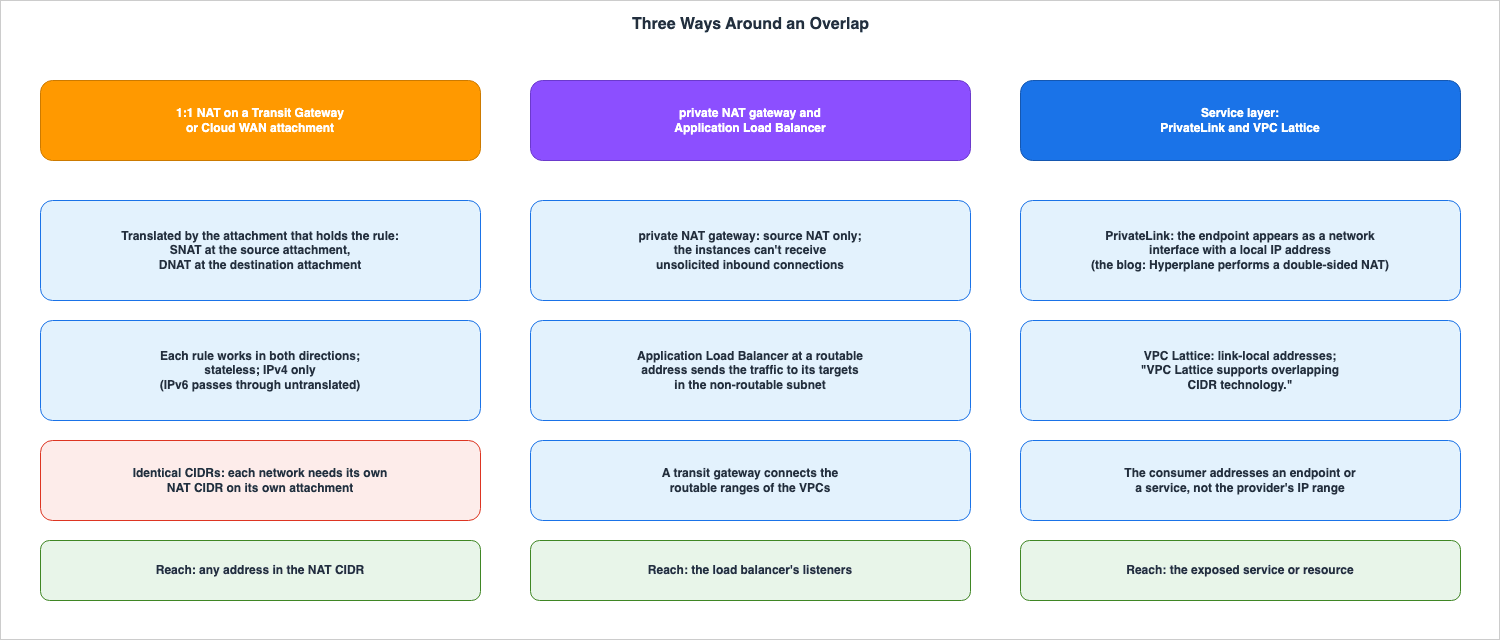
| Setting | 1:1 NAT on an attachment | private NAT gateway and Application Load Balancer | Service layer (PrivateLink, VPC Lattice) |
|---|---|---|---|
Translated By | The attachment that holds the rule: SNAT at the source attachment, DNAT at the destination attachment | The private NAT gateway translates the source; the load balancer receives the traffic at a routable address and sends it to its targets (the whitepaper says the ELB does the destination NAT; Section 8.2) | PrivateLink: the Networking & Content Delivery Blog says the underlying Hyperplane service performs a double-sided NAT; VPC Lattice: no statement on who translates was found; the consumer reaches a link-local address (Networking & Content Delivery Blog) |
| Direction | Each rule works in both directions; other networks can start connections to the NAT addresses | The private NAT gateway: the instances cannot receive unsolicited inbound connections | The consumer starts connections to the endpoint or the service |
| State | Stateless; no port translation | No statement found in the sources in Section 1.3 for the load balancer side | No statement found |
Return Path Decided By | The VPC route tables: replies must reach the transit gateway, so both networks need their own NAT CIDR when the CIDRs are identical | The private NAT gateway returns the replies to the instance that started the connection (whitepaper) | The endpoint or the service network |
| IP family | IPv4 only; IPv6 passes through untranslated | The overlapping-networks scenario of the Amazon VPC User Guide uses IPv4 ranges; no statement on IPv6 for this scenario was found | VPC Lattice: link-local IPv4 and IPv6 addresses (Networking & Content Delivery Blog) |
| What the user places | Rules on attachments; routes to the NAT CIDRs in the VPC route tables; static routes where routes are not installed | A routable subnet with a private NAT gateway in one VPC; a routable subnet with a load balancer in the other VPC; routes; a transit gateway | An endpoint service and endpoints, or a service network, services, and associations |
| What the consumer can reach | Any address in the NAT CIDR | The load balancer's listeners | The service or the resource that the endpoint or the service network exposes |
The sources for columns 3 and 4 are discussed in Section 8.
4. 1:1 NAT Rules
This section describes the characteristics of 1:1 NAT rules and explains what happens when these rules are modified. Unless otherwise specified, the information presented in the tables in Sections 4.1 and 4.2 is stated to the same effect in both the Transit Gateway User Guide and the Cloud WAN User Guide. Any differences are detailed in Section 7.4.1 Rules — What You Write
| Setting | You Set | Allowed Values | If You Set Nothing | Source of the Default |
|---|---|---|---|---|
| Rule number | A unique integer per attachment | 1 to 32766 | No rule exists; nothing is translated | TGW configure page |
MatchSourceCidr (original CIDR) | The source IPv4 CIDR of traffic arriving on the attachment | An IPv4 CIDR that does not overlap multicast (224.0.0.0/4) or link-local (169.254.0.0/16) | — | TGW configure page |
NatCidr (NAT CIDR) | The IPv4 CIDR to which source addresses are translated | RFC 1918 or CGNAT (RFC 6598, 100.64.0.0/10); the same prefix length as MatchSourceCidr | — | TGW configure page |
| Rules on one attachment | A list of rules | Up to 50 per attachment; no CIDR in a rule can overlap any other CIDR (match source or NAT) on the same attachment | Omitted in a change: the existing rules do not change | EC2 CLI Reference |
NatGatewaySupport | An attachment option | Transit Gateway: enable or disable; Cloud WAN: ENABLE or DISABLE | Omitted: the current setting is kept | EC2 CLI Reference |
NatSystemRouteSupport | An attachment option | Transit Gateway: enable or disable; Cloud WAN: true or false; fixed for some attachment types (Section 6.4) | Direct Connect gateway and BGP Site-to-Site VPN: enable; omitted later: the current value is kept | EC2 CLI Reference |
4.2 Rules — What Happens
| Setting | At the Boundary | Where It Shows | No Statement Found |
|---|---|---|---|
| Rule number | Rule numbers do not set a priority; each address matches at most one rule | The rule list of the NAT configuration | — |
MatchSourceCidr (original CIDR) | A rule whose original CIDR does not exactly match a VPC CIDR is accepted and translates traffic, but no route is replaced (Section 6.2) | Route type system when a route is replaced | — |
NatCidr (NAT CIDR) | Host bits carry over unchanged (10.0.0.5 becomes 100.64.1.5); a NAT CIDR inside the sender's own VPC CIDR is delivered locally and never reaches the transit gateway | The translated addresses that peers see | Whether DNS answers are translated |
| Rules on one attachment | The transit gateway checks for overlap only between rules on the same attachment, not with other attachments or connected networks | A rejected request | — |
NatGatewaySupport | NAT cannot be enabled with zero rules; disabling keeps the rules in the deactivated state | NatGatewaySupport and the rule states in the NAT configuration | — |
NatSystemRouteSupport | It does not affect translation; it controls only whether routes to the NAT CIDRs are installed | Route type system | — |
The direction of a rule is not written in the rule. The Transit Gateway User Guide describes the behavior as follows: If the source IP address falls in the original CIDR of the source attachment, SNAT translates it to the NAT CIDR. If the destination IP address falls in the NAT CIDR of the destination attachment, DNAT translates it back to the original CIDR. If both conditions are met, both the source and destination addresses are translated. The same page states, "This is the normal pattern when each overlapping network has its own NAT CIDR."
The translation process is stateless. The Transit Gateway User Guide states, "There is no port translation (this isn't NAPT), no NAT session state, and no port allocation." Because each address in the NAT CIDR corresponds to exactly one address in the original CIDR, connections can be initiated from either side.
Regarding IPv6, the Transit Gateway User Guide states, "IPv4 only. IPv6 isn't supported. IPv6 traffic passes through untranslated." The Cloud WAN User Guide makes a similar statement.
4.3 A Rule List Replaces All Rules, and Omitting It Keeps Them
Rules are not added or removed one by one. As stated on the configure page of the Transit Gateway User Guide, "You manage NAT for an attachment through a single operation that sets the NAT options and the full rule set together." The AWS CLI Command Reference'sec2 modify-transit-gateway-attachment-nat-configuration states that The rules that you specify replace all existing NAT gateway rules for the attachment. and continues, "If you omit this parameter, the existing rules don’t change." Similarly, networkmanager update-attachment-nat-configuration states, "The rules that you specify replace the existing rules of the attachment, matched by rule number. Existing rules that aren’t included in the request are deleted."In other words, for both Transit Gateway and Cloud WAN, when you provide a complete list of rules, that list becomes the entire set of rules for the attachment. Any rules not included in the list will be deleted. Conversely, if you omit the list of rules, the existing rules remain unchanged. The console operates in the same way; the Transit Gateway User Guide states, "When you save, the rules on the form replace all existing rules on the attachment. Any rule you remove from the form is deleted."
The method for deleting all rules differs between the two products (Section 7.3). In either product, NAT cannot be enabled with zero rules. The Transit Gateway User Guide states,
NAT can't be enabled with zero rules, so to remove every rule, also set NAT Gateway support to Disable in the same save.Even when NAT is disabled, the rules are not deleted. The Transit Gateway User Guide explains that disabling NAT sets the rules to the
deactivated state, and enabling it again returns them to the activated state.4.4 Changes Are Applied Asynchronously
According to the Transit Gateway User Guide, changes are applied asynchronously, and the attachment remains in theavailable state even while changes are being made. The CLI instructions say to run get-transit-gateway-attachment-nat-configuration repeatedly until the NatGatewaySupport status changes to enabled or disabled, all rules transition to activated or deactivated, and any deleted rules (which may show a deleting status) no longer appear. The AWS CLI Command Reference lists the possible status values for rules as pending, activated, deactivated, and deleting, explaining that pending indicates "The transit gateway is applying a change to the rule." While NatGatewaySupport is enabling or disabling, the configuration cannot be modified.For Cloud WAN attachments, the status changes to
Updating while changes are applied (see Section 7.2).5. Why Rules Are Needed on Both Sides
This section examines what happens when rules are placed on only one side, using examples from the sources.5.1 If the CIDR Blocks Are Different, a Rule on One Side Is Sufficient
The first example on the "how-it-works" page in the Transit Gateway User Guide uses only one rule. The branch network,10.10.100.0/24, is connected through a Site-to-Site VPN attachment, and the application resides in VPC-A, which uses the 172.16.0.0/16 range. A rule (rule number 100) is configured on the VPN attachment, translating 10.10.100.0/24 to 100.64.1.0/24.- When a host on the branch network,
10.10.100.5, connects to172.16.0.10, the VPN attachment rule translates the source address to100.64.1.5. Since there are no rules in VPC-A, the destination address remains unchanged. - The application in VPC-A responds to
100.64.1.5. The VPC-A route table sends traffic for100.64.1.0/24to the Transit Gateway. The destination address100.64.1.5matches the route to the VPN attachment, and the VPN attachment rule translates the destination back to10.10.100.5.
This scenario works because the CIDR range of VPC-A and the branch network are different. The destination address for the response from VPC-A,
100.64.1.5, does not fall within VPC-A's own CIDR range, so the VPC-A route table sends traffic to the Transit Gateway. The same page includes the note: "If the branch range overlaps a range already in use in your AWS environment, translate both networks, each to its own NAT CIDR."5.2 If the CIDR Blocks Are the Same, a Rule on One Side Does Not Bring Replies Back
The second example on the page shows that both VPC-A and VPC-B use the10.0.0.0/16 CIDR block. The page states, "Translating only one side doesn't work when the CIDRs are identical. The network without a rule would send replies to an address inside its own CIDR, and its VPC route table delivers that traffic locally instead of sending it to the transit gateway." The Cloud WAN User Guide uses the same wording, except the final portion reads, "instead of sending it to the core network."In the example, VPC-A has a rule that translates
10.0.0.0/16 to 10.1.0.0/16, and VPC-B has a rule that translates 10.0.0.0/16 to 10.2.0.0/16.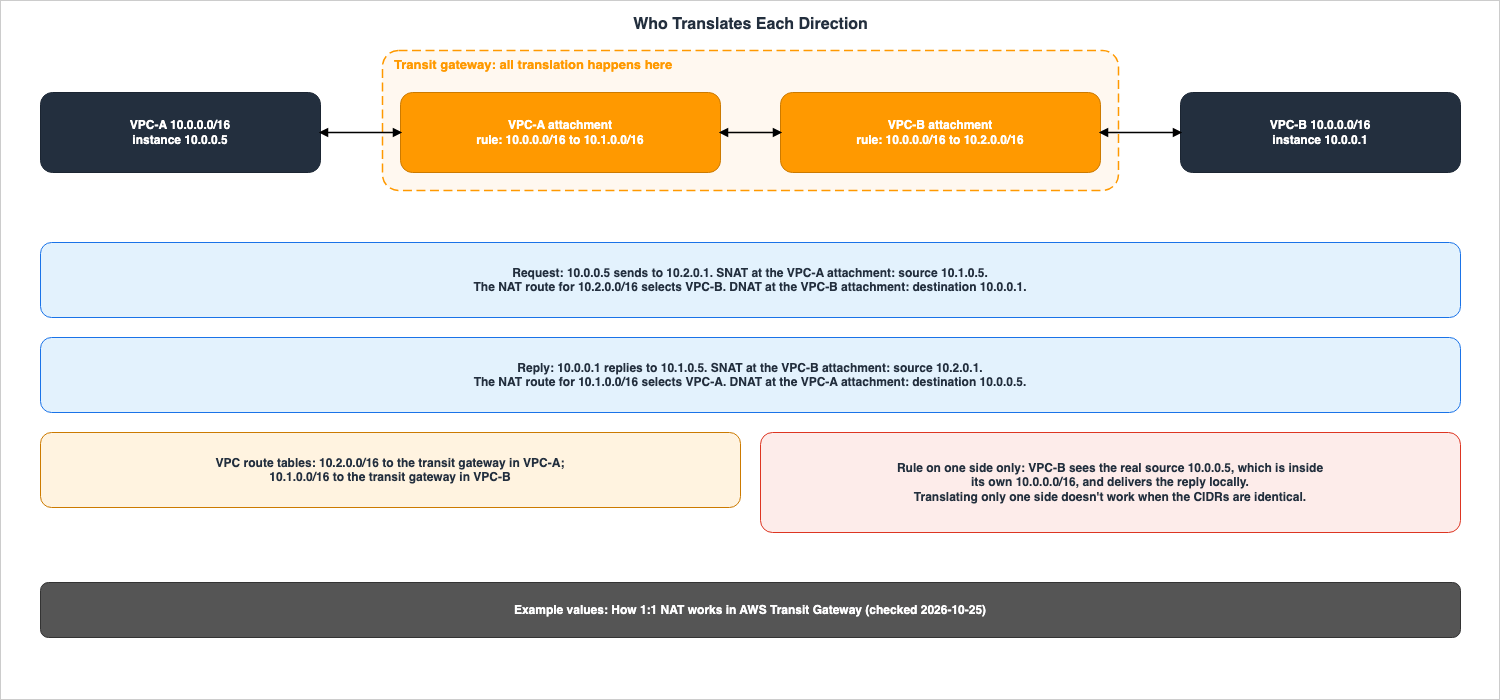
- An instance in VPC-A, with the IP address
10.0.0.5, sends traffic to the NAT address10.2.0.1in VPC-B. VPC-A's rule translates the source address to10.1.0.5, the NAT route for10.2.0.0/16selects VPC-B's attachment, and VPC-B's rule translates the destination address back to10.0.0.1. VPC-B receives the traffic with a source address of10.1.0.5and a destination address of10.0.0.1. - An instance in VPC-B, with the IP address
10.0.0.1, responds to10.1.0.5. VPC-B's rule translates the source address to10.2.0.1, the NAT route for10.1.0.0/16selects VPC-A's attachment, and VPC-A's rule translates the destination address back to10.0.0.5.
In both cases, the instances use their original IP addresses, but the traffic reaches the other VPC using the other VPC's NAT address. The page concludes, "All translation happens at the transit gateway."
Without VPC-A's rule, the source address of packets reaching VPC-B remains VPC-A's real address,
10.0.0.5. Since the destination address of VPC-B's response, 10.0.0.5, falls within VPC-B's own 10.0.0.0/16, VPC-B's route table delivers the response locally and does not forward it to the Transit Gateway. This is the meaning of the sentence at the beginning of Section 5.2.Both the Transit Gateway User Guide and the Cloud WAN User Guide state,
This is the recommended way to use 1:1 NAT for overlapping networks. regarding the practice of assigning a dedicated NAT CIDR for each overlapping network.However, the "What's New" announcement (dated October 23, 2026) provides a different example. The announcement states,
For example, if a customer acquires a business and both VPCs use 10.0.0.0/16, they translate one VPC's addresses to a non-overlapping range on its attachment and connect the networks immediately. This example concerns two VPCs, both using the same 10.0.0.0/16, but only translates the addresses of one of the VPCs. The wording in the User Guide and the example provided in the "What's New" announcement are inconsistent (the sources disagree). This article will adhere to the User Guide's description as the specification and will not treat the example in the "What's New" announcement as a specification.5.3 Traffic Fails When the NAT CIDR Range Falls Within the Sender's Own Range
The prerequisites of the How 1:1 NAT works page divide the potential overlap of NAT CIDR ranges into two scenarios:- Overlap in the route table: If a NAT CIDR range overlaps with a range already covered by a route in the Transit Gateway's route table, traffic destined for that range will be routed based on the longest prefix match and route priority, potentially preventing it from reaching the intended attachment.
- Overlap with the sender's network: VPCs handle traffic destined for addresses within their own CIDR range locally. Consequently, traffic to those addresses will not reach the Transit Gateway. For example, if VPC-A uses the
10.0.0.0/16CIDR, traffic from VPC-A will not reach VPC-B via the10.0.5.0/24NAT CIDR. The same applies to on-premises networks that internally route traffic within overlapping ranges.
The note on the same page says,
Reserve a dedicated address block for NAT CIDRs, for example part of the CGNAT range (100.64.0.0/10), and give each overlapping network its own slice of it.5.4 What Users Write
In addition to 1:1 NAT rules, there are other elements users need to configure. Based on the prerequisites and examples in the "How 1:1 NAT works" page, this article lists the following four:- VPC Route Tables: These define the routes that send traffic destined for a specific NAT CIDR to the Transit Gateway. In the example of overlapping VPCs, VPC-A routes
10.2.0.0/16, and VPC-B routes10.1.0.0/16. - Security Groups and Network ACLs: As illustrated in the VPN example, these configurations specify allowed traffic, such as
VPC-A security groups and network ACLs: Allow traffic from 100.64.1.0/24.The allowed source is the NAT CIDR, not the peer's real addresses. No statement was found in the sources in Section 1.3 on whether referencing another VPC's security groups works together with 1:1 NAT. - Routes that are not automatically added for attachments: For static VPNs, static peering, Connect, and VPN Concentrators, you need to either configure static routes pointing to the NAT CIDR or ensure that the peer advertises the NAT CIDR (see Section 6.4).
- Checking for conflicts with other attachments and connected networks: The Transit Gateway only checks for overlapping rules in the same attachment.
6. What 1:1 NAT Does to the Route Table
This section describes what happens in the Transit Gateway route table when 1:1 NAT is enabled. Unless otherwise specified, the information presented here is based on the Transit Gateway User Guide. Differences specific to Cloud WAN are discussed in Section 7.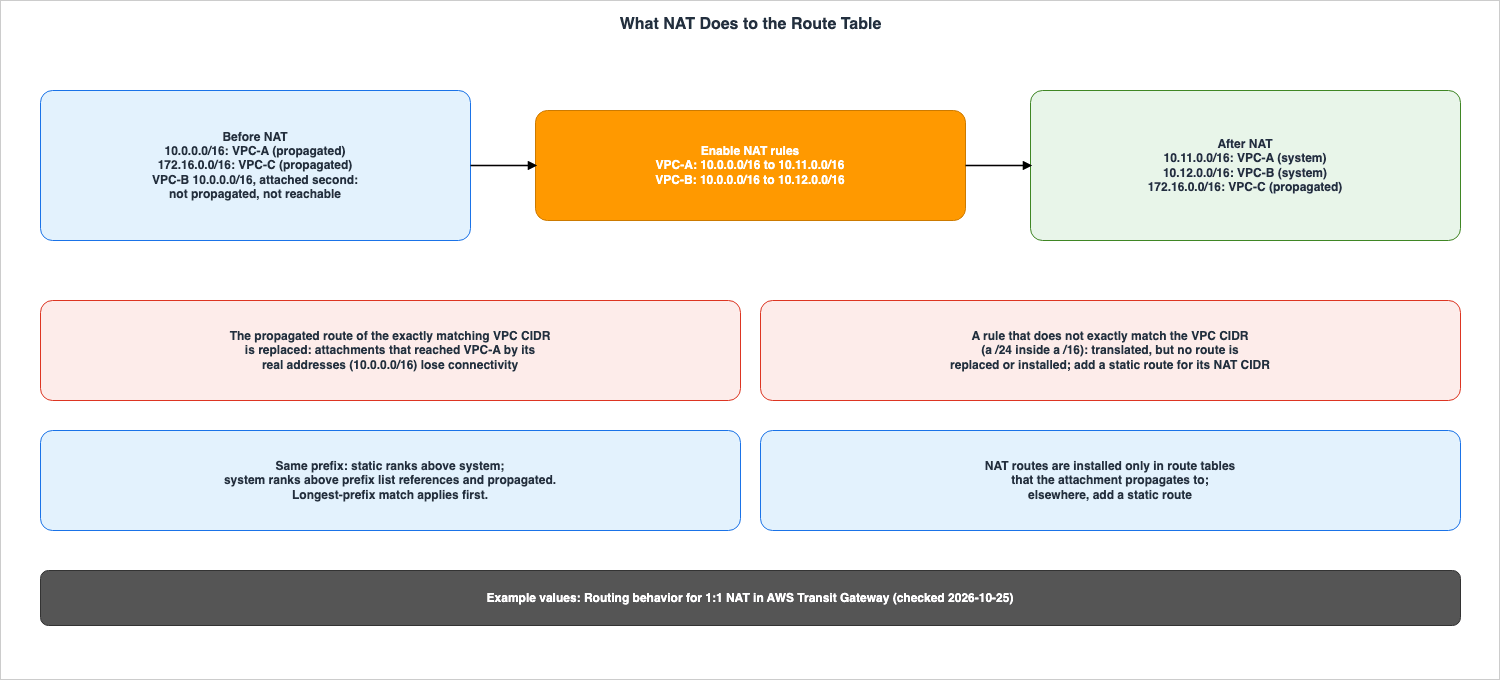
6.1 The Propagated Route Is Replaced by a system Route
According to the routing page, when a rule'sMatchSourceCidr in a VPC attachment exactly matches either the primary or secondary CIDR of a VPC, the Transit Gateway replaces the propagated route for that CIDR with a route to the rule's NatCidr.The example on the routing page illustrates a scenario where VPC-A and VPC-B both use
10.0.0.0/16, while VPC-C uses 172.16.0.0/16. The route table before NAT only includes routes for 10.0.0.0/16 (propagated from VPC-A) and 172.16.0.0/16 (propagated from VPC-C), and does not include routes for VPC-B. After mapping VPC-A to 10.11.0.0/16 and VPC-B to 10.12.0.0/16, the route table will show 10.11.0.0/16 (from VPC-A via the system route), 10.12.0.0/16 (from VPC-B via the system route), and 172.16.0.0/16 (propagated from VPC-C). VPC-C, which does not have a rule, experiences no change in its routing.The Important note on the configure page states: "On a VPC attachment, enabling NAT replaces the propagated route for each VPC CIDR that a rule matches with a route to its NAT CIDR. Other attachments that reach the VPC by its real addresses lose connectivity. Update those peers to use the NAT addresses before you save." Applying this note to the example above, if VPC-C was previously able to reach VPC-A using the real address
10.0.0.0/16, it will no longer be able to reach VPC-A after NAT is enabled.The Important note on the configure page uses the term "matches" when referring to CIDR matches, rather than "exactly." However, the procedure text of the same page, as well as the routing and how-it-works pages, use the term "exactly." This article reads this as a variation in wording in the Transit Gateway pages and defines the replacement condition as requiring an "exact match."
6.2 A Rule That Does Not Exactly Match Does Not Replace the Route
The routing page describes a rule that does not exactly match as follows:If MatchSourceCidr doesn't exactly match a VPC CIDR, for example a /24 inside a /16 VPC, the API accepts the rule and the rule still takes effect: traffic from the matching addresses is translated, and traffic to the rule's NAT addresses is translated back. However, no route is replaced. It continues that the propagated route of the VPC CIDR remains, and the Transit Gateway does not install a route for the rule's NatCidr. It then states, Until you add a static route for that NatCidr that targets the VPC attachment, traffic sent to the NAT addresses, including replies to translated traffic, isn't routed to the VPC attachment.In essence, a rule that translates only a portion of a
/16 VPC (for example, a single /24) will successfully translate outbound traffic, but return traffic will not be routed back. To ensure return traffic is routed correctly, users must add a static route in the Transit Gateway route table, for the NatCidr that targets the VPC attachment.6.3 The Priority of system Routes
According to the routing page, Transit Gateway routes used for NAT appear as the route typesystem in SearchTransitGatewayRoutes and ExportTransitGatewayRoutes. Other route types are static routes, created by the user, and propagated routes, learned through attachments. system routes consist of two types: routes where the VPC CIDR is replaced with the NAT CIDR, and routes that are added when NatSystemRouteSupport is enabled on Direct Connect gateway and BGP Site-to-Site VPN attachments. NAT CIDRs advertised from a user's BGP peers are displayed as propagated routes. The page states, "The route type shows who created the route, not whether NAT is involved."Regarding route priority, the page states, "For routes with the same prefix, a system route ranks below a static route and above prefix list references and propagated routes." It further explains that static routes created by the user take precedence over NAT routes, so even if NAT is enabled, manually configured routes will not be overwritten. The page also notes that longest-prefix match applies first.
6.4 Whether Routes Are Installed Automatically Depends on the Attachment Type
NatSystemRouteSupport determines whether Transit Gateway automatically adds routes to the NAT CIDR. The routing page indicates that this setting does not affect translation; NatGatewaySupport and the rules decide translation.| Setting | You Set | Allowed Values | If You Set Nothing | Source of the Default |
|---|---|---|---|---|
| VPC attachment | Nothing; the setting is fixed | Always enable; disable is rejected | The propagated route of an exactly matching VPC CIDR is replaced | TGW routing page |
| Peering and Site-to-Site VPN with static routing | A static route for the NAT CIDR that targets the attachment | Always disable; enable is rejected | No route to the NAT CIDR | TGW routing page |
| Connect and VPN Concentrator | NAT CIDRs advertised by the BGP peers | Always disable; enable is rejected | No route to the NAT CIDR | TGW routing page |
| Direct Connect gateway and Site-to-Site VPN with BGP | enable or disable | enable or disable | enable: a system route for each NatCidr | TGW routing page |
| Setting | At the Boundary | Where It Shows | No Statement Found |
|---|---|---|---|
| VPC attachment | A rule that does not exactly match the VPC CIDR gets no route (Section 6.2) | Route type system | — |
| Peering and Site-to-Site VPN with static routing | Until the static route exists, traffic to the NAT CIDR is not routed to the attachment | Route type static | — |
| Connect and VPN Concentrator | Until the peers advertise the NAT CIDRs, there is no route | Route type propagated | — |
| Direct Connect gateway and Site-to-Site VPN with BGP | With enable, the system route is active only while the network advertises a route that overlaps the original CIDR; otherwise its state is blackhole and traffic is dropped | Route state active or blackhole | — |
NAT routes are installed only in the route tables that the attachment propagates to. To route traffic to the NAT CIDR from route tables that the attachment does not propagate, you must add a static route.
Regarding BGP attachments, the Important note on the routing page states that when
NatSystemRouteSupport is set to disable, the network is no longer required to advertise the original CIDR. If the original CIDR overlaps with the CIDR of another attachment, stop advertising the original CIDR after advertising the NAT CIDR, ensuring that the two routes do not compete for the same prefix. The same note also states that this should not be done when enable is selected. When enable is selected, the NAT route will transition to the blackhole state if there is no advertisement overlapping with the original CIDR.6.5 Brief Traffic Loss During Changes
The final section of the routing page states that when enabling NAT, modifying rules, or disabling NAT, address translation and routing may be updated separately, and can take effect at slightly different times. During this brief period, traffic to the new NAT addresses can be dropped. The change completes on its own and does not require user action. The page says to change the NAT settings during a maintenance window and to update the address used by the other party after the change is complete, to minimize any impact.Connect attachments and their associated transport attachments (either a VPC or a Direct Connect gateway) can have NAT on only one of them. Attempting to enable NAT on one while it is already enabled on the other will be rejected with an
InvalidParameterValue error. When migrating, disable NAT on the existing attachment, wait for the NatGatewaySupport status to change to disabled, and then enable it on the new attachment.7. Comparing Transit Gateway and Cloud WAN
This section outlines the differences between the information presented in the Transit Gateway documentation and the Cloud WAN documentation. The properties of the rules (Section 4) are described in nearly the same sentences in both sets of pages.7.1 Supported Attachments
| Setting | Transit Gateway | Cloud WAN |
|---|---|---|
| Supported | VPC, Direct Connect gateway, Site-to-Site VPN (including Private IP VPN), Connect, intra-Region and inter-Region peering, and VPN Concentrator | VPC, AWS Direct Connect gateway, Connect, and Site-to-Site VPN |
| Unsupported | AWS Cloud WAN peering and route table attachments, Network Function, and Client VPN | Transit gateway route table attachments and Tunnelless Connect (TLC) attachments |
| Appliance mode | NAT cannot be enabled on a VPC attachment that has appliance mode enabled | The same restriction |
| Connect and transport | A Connect attachment and its transport attachment cannot both have NAT enabled | The same restriction; also, NAT cannot be enabled on a VPC attachment that is the transport for a tunnel-less Connect attachment |
The "What's New" announcement lists the supported targets as "across Amazon VPC, AWS Site-to-Site VPN, AWS Direct Connect, and SD-WAN appliances connected through Transit Gateway Connect," citing four options. The Transit Gateway User Guide, in addition, lists peering and VPN Concentrator. The list in the announcement is shorter than the list in the User Guide. This article will list the supported attachments as described in the User Guide.
7.2 Where NAT Is Configured, Owners, and State During a Change
| Setting | Transit Gateway | Cloud WAN |
|---|---|---|
| Where NAT is configured | The attachment, through ModifyTransitGatewayAttachmentNatConfiguration | The attachment, through UpdateAttachmentNatConfiguration (PATCH /attachments/attachmentId/nat-configuration in the API Reference); not in the core network policy document |
| Who can view and change it | Only the transit gateway owner account, also for a shared transit gateway | Currently, only the core network owner can configure NAT on Cloud WAN attachments. Attachment owners in other accounts cannot view or change it but receive the NAT metrics |
| IAM actions | ec2:ModifyTransitGatewayAttachmentNatConfiguration and ec2:GetTransitGatewayAttachmentNatConfiguration; ec2:Describe* grants do not include the Get action | networkmanager:UpdateAttachmentNatConfiguration and networkmanager:ListAttachmentNatConfigurations, authorized against the attachment ARN |
| At attachment creation | No statement found in the TGW NAT pages; the documentation does not list a NAT parameter in CreateTransitGatewayVpcAttachment | NAT can be included when the attachment is created; this needs both the create action and networkmanager:UpdateAttachmentNatConfiguration |
| Attachment state during a change | Stays available | Updating, then Available; traffic keeps flowing, but no further NAT change can be made |
| Reachability of the NAT CIDR | The route tables that the attachment propagates to | The attachment's segment and segments that share routes with it; the core network policy must allow the NAT CIDRs to propagate (segment sharing, segment actions, routing policies) |
| Static routes for rules that do not exactly match | A static route in the transit gateway route table | A static route in the core network policy |
| Advertisement to on-premises networks | No statement found in the TGW NAT pages | When a VPC's CIDR route is replaced by its NAT CIDR, the NAT CIDR, not the original VPC CIDR, is advertised to BGP-capable attachments |
Cloud WAN's 1:1 NAT configuration is not written in the core network policy document. The configure page of the Cloud WAN User Guide specifies that settings are configured on an attachment-by-attachment basis, using both the API (
UpdateAttachmentNatConfiguration) and the attachment configuration screen in the console. As of October 25, 2026, the Cloud WAN User Guide's page on core network policy parameters does not list any NAT-related options. However, the prerequisites of the how-it-works page of the Cloud WAN User Guide state, "Your core network policy allows the NAT CIDRs to propagate to the segments that need to reach them. Check segment sharing, segment actions, and any routing policies that filter prefixes." The policy determines which segments reach the NAT CIDRs.The Cloud WAN configure page states, "Currently, only the core network owner can configure NAT on Cloud WAN attachments. Shared attachment owners can't configure NAT." The word
Currently is the source's own. This article treats the sentence as the statement as of October 25, 2026.7.3 Values, Limits, IaC, and Observability
| Setting | Transit Gateway | Cloud WAN |
|---|---|---|
NatGatewaySupport values | enable, disable (state enabling, enabled, disabling, disabled) | ENABLE, DISABLE (state ENABLED, ENABLING, DISABLED, DISABLING, PENDING_ATTACHMENT_ACCEPTANCE) |
NatSystemRouteSupport values | enable, disable | true, false |
| Clearing all rules | --reset-nat-gateway-rules (ResetNatGatewayRules), not combined with a non-empty rule list | An empty list (--nat-gateway-rules '[]') |
| Rule states | pending, activated, deactivated, deleting (Section 4.4) | CREATING, MODIFYING, DELETING, ACTIVATED, ACTIVATING, DEACTIVATED, DEACTIVATING, FAILED, PENDING_ATTACHMENT_ACCEPTANCE (CLI Command Reference); the configure page says the rules are kept in the deactivated state when NAT is disabled |
| Route type of NAT routes | system in SearchTransitGatewayRoutes and ExportTransitGatewayRoutes | SYSTEM in GetNetworkRoutes and the console |
| Rules per attachment | NAT rules per transit gateway attachment: 50, adjustable No | NAT rules per core network attachment: 50, adjustable No |
| Rules in total | NAT rules per transit gateway (across all attachments): 1,000, adjustable No | NAT rules per core network edge: 1,000, adjustable Yes |
| CloudFormation | AWS::EC2::TransitGatewayAttachmentNatConfiguration, deployed in the account that owns the transit gateway | The documentation does not list a NAT resource or property |
| Metrics | BytesInNAT, BytesOutNAT, PacketsInNAT, PacketsOutNAT in AWS/TransitGateway | The same four metric names in AWS/Network Manager, published every minute in the US West (Oregon) Region |
| Events | No statement found in the TGW NAT pages or the Transit Gateway Network Manager monitoring page | EventBridge change type ATTACHMENT_NAT_CONFIGURATION_UPDATED, with the current and previous values |
The values and adjustment options listed in the tables were verified on October 25, 2026, on the AWS Transit Gateway Quotas and AWS Cloud WAN Quotas pages. The limit of 50 per attachment is the same for both products, and adjustments are not possible for either. The overall limit of 1,000 is not adjustable on a per-Transit Gateway basis, but can be adjusted on a per-Cloud WAN core network edge basis.
Regarding CloudFormation, the Transit Gateway User Guide says to use
AWS::EC2::TransitGatewayAttachmentNatConfiguration, while also stating that NAT configuration isn't available as properties on attachment resources such as AWS::EC2::TransitGatewayVpcAttachment. As of October 25, 2026, the page for this resource in the CloudFormation Template Reference lists each property description as "Property description not available." NatGatewayRules is a required property, and the number of elements must range from 1 to 50. For Cloud WAN, neither the AWS::NetworkManager::VpcAttachment page nor the list of AWS Network Manager resources includes NAT resources or properties (the documentation does not list them). The "What's New" announcement lists AWS Management Console, AWS Command Line Interface (AWS CLI), AWS SDKs, and AWS CloudFormation as methods for configuring both Transit Gateway and Cloud WAN. The announcement and the CloudFormation reference disagree here regarding Cloud WAN (the sources disagree).Regarding how metrics are counted, the Transit Gateway User Guide states that each NAT's metrics are counted against the attachment whose rule applied. For example, traffic from an attachment without a rule to a NAT address in a VPC with a rule will be reflected in the
PacketsOutNAT metric of that VPC attachment, but not in the PacketsInNAT metric of the originating attachment. When both the source and destination are translated, a single packet will be counted in both the PacketsInNAT metric of the originating attachment and the PacketsOutNAT metric of the destination attachment. The traditional BytesIn, BytesOut, PacketsIn, and PacketsOut metrics continue to count all traffic.Concerning events, the "What's New" announcement states that translated traffic can be monitored through
Amazon CloudWatch metrics and Amazon EventBridge events. The "Monitor with Amazon CloudWatch Events" page of the Cloud WAN User Guide indicates that a single event is generated each time a NAT configuration change is completed. This event has a change type of ATTACHMENT_NAT_CONFIGURATION_UPDATED, originates from aws.networkmanager, and includes both the current and previous values for natGatewaySupport, natSystemRouteSupport, and natGatewayRules. No statement was found on NAT events for Transit Gateway in the four 1:1 NAT pages of the Transit Gateway User Guide, the metrics page, or the "Monitoring events" page for Transit Gateway Network Manager.7.4 Where the Sources Disagree and How the Pages Differ
| Setting | One source | Another source | How this article writes it |
|---|---|---|---|
| Translating one side when the CIDRs are identical | TGW and Cloud WAN NAT pages: Translating only one side doesn't work when the CIDRs are identical. | What's New (2026-10-23): translate one VPC's addresses and connect immediately | The sources disagree; the article follows the User Guides (Section 5.2) |
| Supported attachments | What's New: four types | TGW NAT page: also peering and VPN Concentrator | The article uses the User Guide list (Section 7.1) |
| CloudFormation for Cloud WAN | What's New: AWS CloudFormation for both services | CloudFormation Template Reference: no NAT resource or property for Cloud WAN | The sources disagree (Section 7.3) |
exactly in the route replacement | TGW configure page, Important: matches | TGW routing and how-it-works pages: exactly matches | A variation within the TGW pages; the article writes an exact match (Section 6.1) |
| Route priority | TGW routing page: below static, above prefix list references and propagated | Cloud WAN routing page: below static, above propagated | A difference in what each page mentions, not a disagreement |
The "Use Cases" section on the page describing 1:1 NAT for Cloud WAN, as of October 25, 2026, uses the phrases "over a shared transit gateway" and "the transit gateway translates traffic" to explain overlapping IP addresses. Other sections on the same page refer to Cloud WAN using terms like "core network" and "core network edge." This article does not use the sentences of this section as the basis for Cloud WAN specifications.
8. The Earlier Pattern and the Service Layer
This section describes two ways that existed before 1:1 NAT, differentiating them based on who performs the translation and what is being translated.8.1 private NAT gateway and Application Load Balancer
The Amazon VPC User Guide's page on NAT gateways describes private NAT gateways, stating that "Instances in private subnets can connect to other VPCs or your on-premises network through a private NAT gateway, but the instances can't receive unsolicited inbound connections from the other VPCs or the on-premises network." A private NAT gateway is a component that translates the source address, and the instances behind it cannot receive connections initiated from the other VPCs or the on-premises network.The section "Enable communication between overlapping networks" in the NAT gateway use cases describes a configuration where instances in VPC A can reach services in VPC B.
- The IP address administrator defines the ranges that can overlap (non-routable) and those that cannot (routable) for each VPC, and adds the routable ranges for each VPC.
- A private NAT gateway is placed in the routable subnets of VPC A, and an Application Load Balancer is placed in the routable subnets of VPC B. Instances in the non-routable subnets of VPC B are registered in the load balancer's target group.
- A transit gateway connects the VPCs. The guide states,
Be sure to disable route propagation.and instructs users to use the routable ranges for each VPC when attaching them.
In this configuration, the private NAT gateway in VPC A handles source address translation, while the load balancer in VPC B receives the traffic and sends it to its targets. Instances in VPC A reach the load balancer's listeners.
8.2 Statements Written Before 1:1 NAT
The following three documents discuss methods for connecting overlapping networks without mentioning 1:1 NAT. This article reads all of them as statements written before the announcement of October 23, 2026.- The AWS re:Post Knowledge Center article "Configure NAT on VPC CIDR for a Site-to-Site VPN connection" (updated August 4, 2026) states,
Private NAT gateways can perform source IP address NAT, but they can't perform both source and destination NAT.It provides an example using NAT instances for both source and destination address translation. - The AWS re:Post Knowledge Center article "Create VPC peering connection with VPC in another account" (updated September 5, 2024) describes a process for connecting overlapping VPCs, utilizing a private NAT gateway and an Application Load Balancer through a Transit Gateway.
- AWS Well-Architected Framework, REL02-BP05, states,
You can either migrate to a new range of addresses or consider using techniques like private NAT Gateway or AWS PrivateLink if you need to connect the overlapping ranges.
The section on Private NAT Gateway in the whitepaper "Building a Scalable and Secure Multi-VPC AWS Network Infrastructure" describes a configuration where a private NAT gateway translates the source address, an Application Load Balancer forwards traffic to the target, and the private NAT gateway routes the return traffic back to the original instance. On who translates, the whitepaper states,
Private NAT gateway uses a unique private IP address to perform source NAT for the overlapping source IP address, and ELB does the destination NAT for the overlapping destination IP address. The whitepaper's Document history page lists the addition of the private NAT gateway section on February 22, 2022, and its welcome page gives the publication date of the whitepaper as April 17, 2024.This article does not cite these statements as the specifications of Transit Gateway and Cloud WAN as of October 25, 2026.
8.3 PrivateLink and VPC Lattice
These two services prevent consumers from seeing the IP address ranges of their counterparts.- The AWS Networking & Content Delivery Blog post, "Connecting Networks with Overlapping IP Ranges" (published June 16, 2022, updated June 3, 2026), describes PrivateLink, stating:
In each consumer VPC the PrivateLink endpoint appears as an Elastic Network Interface with a local IP address. In the provider VPC, connections from the consumer VPC appear to come from a local IP address within the producer VPC. The underlying Hyperplane service is performing a double-sided NAT operation in order to make PrivateLink work.
- The Amazon VPC Lattice User Guide, on the "What is Amazon VPC Lattice?" page, states: "VPC Lattice supports overlapping CIDR technology." The AWS Networking & Content Delivery Blog post, "Build secure multi-account multi-VPC connectivity for your applications with Amazon VPC Lattice" (published April 3, 2023, updated April 11, 2024), notes:
An important outcome of VPC Lattice using link-local IPv4 and IPv6 addresses is that you can use it to provide connectivity between services that may have overlapping IPv4 addresses.
The blog's sentence on PrivateLink says that Hyperplane performs NAT on both sides. This article reads this as meaning that the service layer also leaves the handling of addresses to AWS. The key difference lies in where the consumer connects. Consumers connect to either the address of a network interface within their own VPC, or to a link-local address, not to an IP address range in the other VPC. Behind those addresses, they reach only the services or resources that are exposed. With 1:1 NAT, connections are directed to any address in the NAT CIDR. The design of the service layer is detailed in AWS PrivateLink and VPC Endpoints Complete Guide and AWS VPC Lattice Complete Guide on this site.
9. What Was Recorded Using This Configuration
This section describes what was recorded using the configuration built for this article in the US East (N. Virginia) Region. The values presented here reflect the results obtained using that specific configuration and on that particular day, and are not values guaranteed by the sources. Performance comparisons or assessments cannot be drawn from this data.9.1 Configuration
The infrastructure was created using AWS CloudFormation on October 26, 2026 (UTC) and subsequently deleted to verify that no resources remained.- VPC-A and VPC-B both use
10.0.0.0/16and each have a single subnet with the10.0.1.0/24range within the same Availability Zone. - The Transit Gateway had routing propagation and default route table association enabled. The attachment for VPC-B was created after the attachment for VPC-A.
- A small EC2 instance was placed within VPC-B, listening at
10.0.1.10and returning the source address of any incoming connection unchanged. An AWS Lambda function was placed within VPC-A, configured to connect to a specific address with a 3-second timeout. - The route table for VPC-A routes traffic to the Transit Gateway for the
10.2.0.0/16range, while the route table for VPC-B routes traffic to the Transit Gateway for the10.1.0.0/16and10.3.0.0/16ranges. - 1:1 NAT rules were added and removed using the AWS CLI command
modify-transit-gateway-attachment-nat-configuration, following the examples provided in the how-it-works page of the Transit Gateway User Guide (specifically, the10.1.0.0/16and10.2.0.0/16ranges).
The Lambda function in VPC-A connected to the responder in VPC-B using VPC-B's NAT address,
10.2.1.10. In the source addresses that the responder observed, the last octet is masked as x.9.2 Records by Step
The following table lists the rules, the Transit Gateway route table, and the connection results for each step.| Step | NAT rules | Transit gateway route table | Connection to 10.2.1.10 | Source seen by the responder |
|---|---|---|---|---|
| s00 | None | 10.0.0.0/16 to VPC-A (propagated); no route for VPC-B | Timed out (2 of 2) | — |
| s01 | VPC-B: rule 100, 10.0.0.0/16 to 10.2.0.0/16 | 10.0.0.0/16 to VPC-A (propagated); 10.2.0.0/16 to VPC-B (system) | Timed out (3 of 3) | — |
| s02 | VPC-A: rule 100, 10.0.0.0/16 to 10.1.0.0/16; VPC-B as in s01 | 10.1.0.0/16 to VPC-A (system); 10.2.0.0/16 to VPC-B (system) | Succeeded (3 of 3) | 10.1.1.x |
| s04 | VPC-A: a list with rule 200 only, 10.0.0.0/16 to 10.1.0.0/16 | As in s02 | Succeeded (2 of 2) | 10.1.1.x |
| s05 | VPC-A: --nat-gateway-support disable without a rule list | 10.0.0.0/16 to VPC-A (propagated); 10.2.0.0/16 to VPC-B (system) | Timed out (2 of 2) | — |
| s07 | VPC-A: rule 100, 10.0.1.0/24 to 10.3.1.0/24 | As in s05; no route for 10.3.1.0/24 | Timed out (2 of 2) | — |
| s08 | As in s07; a static route 10.3.1.0/24 to VPC-A added | As in s07, plus 10.3.1.0/24 to VPC-A (static, active) | Timed out (3 of 3), in attempts about 20 to 40 seconds after the static route was created | — |
| s08b | No change after s08 | As in s08 | Succeeded (3 of 3), about 23 minutes after the static route was created | 10.3.1.x |
Records from s00 through s02 align with the text of the sources in Sections 3 and 5. When NAT was not enabled, the CIDR of VPC-B, attached later, was not present in the route table. In s01, where rules were only configured on the VPC-B side, a
10.2.0.0/16 system route was added, but connections did not succeed. In s02, where rules were configured on both sides, the VPC-A 10.0.0.0/16 propagated route was replaced by a 10.1.0.0/16 system route, and the responder saw the source as 10.1.1.x.Records from s07 and s08 have parts that align with the text in Section 6.2 and parts that this configuration cannot determine. The rule that does not exactly match was accepted and became
activated, but the 10.3.1.0/24 route was not added, and connections did not succeed. Three attempts on s08, made about 20 to 40 seconds after creating the static route, failed, while three attempts on s08b, approximately 23 minutes later, succeeded. Between these two attempts, neither the rules nor the routes were changed.9.3 Rule Replacement, Deactivation, and Rejection
In s04, the step passed a list containing only rule 200 to the VPC-A attachment. After 5 seconds, the NAT configuration had only rule 200, asactivated, and rule 100 was gone.In s05, the step passed
--nat-gateway-support disable without passing a list of rules. Rule 200 remained, but it was set to deactivated.In s06, the step deleted all rules with NAT disabled, and then attempted to enable the NAT without passing a list of rules. The request was rejected with the following error:
An error occurred (InvalidParameterCombination) when calling the ModifyTransitGatewayAttachmentNatConfiguration operation: NAT cannot be enabled with no NAT rules. Specify at least one rule in NatGatewayRules, or set NatGatewaySupport to 'disable' in the same request.In three instances where the NAT was enabled (s01, s02, and s07), the configuration was checked every 15 seconds. A verification performed between 34 and 35 seconds after the request showed that
NatGatewaySupport was set to enabled and the rules were activated.9.4 Metrics
After the three connections of s08b, the sums (Sum) of the NAT metrics of each attachment were taken over a 10-minute window. During this window, no other traffic passed through NAT besides the connections for s08b.| Attachment | PacketsInNAT | BytesInNAT | PacketsOutNAT | BytesOutNAT | PacketDropCountNoRoute |
|---|---|---|---|---|---|
| VPC-A | 15 | 894 | 15 | 1,410 | 0 |
| VPC-B | 15 | 1,410 | 15 | 894 | 0 |
In s08b, both the source and destination addresses are translated. According to the counting method described in Section 7.3, requests from VPC-A to VPC-B are counted in the
PacketsInNAT metric of VPC-A's attachment and the PacketsOutNAT metric of VPC-B's attachment, while responses are counted in the opposite direction. The values in the table are consistent with this counting method. The number of bytes for requests (VPC-A's In and VPC-B's Out) was 894 in both cases, while the number of bytes for responses (VPC-B's In and VPC-A's Out) was 1,410 in both cases.9.5 What This Configuration Cannot Determine
- It was not possible to determine how long after the static route was created before it became effective. Replies did not come back about 20 to 40 seconds after it was created and did come back after approximately 23 minutes; nothing was tried in between. The Transit Gateway User Guide's sentences on brief traffic loss cover enabling NAT, changing rules, and disabling NAT; no statement on how long a static route takes to take effect was found in the sources in Section 1.3.
- The socket address observed within the Lambda function was a link-local address within the
169.254.0.0/16range. This article judged the translation by the source address that the responder observed. - The configuration used one Availability Zone and only VPC attachments. Site-to-Site VPN, Direct Connect gateway, Connect, peering, and Cloud WAN were not tested.
- While the connection time was recorded, this article does not use that data to evaluate performance or make comparisons.
10. Failure Modes
This section outlines the failures that arise from the contracts discussed in Sections 3 through 8, categorizing them by symptoms and causes.| Symptom | Cause in the contract | Where to look |
|---|---|---|
| The second VPC with the same CIDR is not reachable through the transit gateway without NAT | Its CIDR is not propagated because it overlaps a VPC that was attached first | Section 3.1 |
A VPC peering connection between overlapping VPCs goes to failed | VPC peering does not accept matching or overlapping CIDR blocks, even with unique IPv6 blocks | Section 3.1 |
| Requests arrive but replies never come back | Only one side has a rule while the CIDRs are identical; the side without a rule delivers replies locally | Section 5.2 |
| A VPC cannot reach a NAT CIDR at all | The NAT CIDR overlaps the sender's own VPC CIDR, or the VPC route table does not send the NAT CIDR to the transit gateway | Sections 5.3 and 5.4 |
| A /24 rule inside a /16 VPC translates traffic, but replies are lost | The rule does not exactly match the VPC CIDR, so no route is replaced or installed | Section 6.2 |
| Another attachment lost connectivity to a VPC after NAT was enabled | The propagated route of the VPC CIDR was replaced by the NAT CIDR route; that attachment still uses real addresses | Section 6.1 |
| Traffic to a NAT CIDR goes to the wrong attachment | The NAT CIDR overlaps a range already routed in the route table; the overlap check covers only one attachment | Sections 4.2 and 5.3 |
The NAT route of a BGP attachment is blackhole | NatSystemRouteSupport is enable, and the network does not advertise a route that overlaps the original CIDR | Section 6.4 |
| Rules disappeared after one rule was added | The rule list replaces all rules; the earlier rules were not included | Section 4.3 |
| NAT cannot be enabled on a VPC attachment | Appliance mode is enabled, the attachment is the transport of a Connect attachment that already has NAT, or there are zero rules | Sections 4.3, 6.5, and 7.1 |
| Traffic to the new NAT addresses drops for a short time during a change | Translation and routes are updated separately | Section 6.5 |
| IPv6 traffic keeps the original addresses | 1:1 NAT translates IPv4 only | Section 4.2 |
| An account cannot see or change the NAT configuration of an attachment it uses | Only the transit gateway owner, or currently the core network owner, can view and change it | Section 7.2 |
| A Cloud WAN segment cannot reach the NAT CIDR | The core network policy does not share or propagate the NAT CIDR to that segment | Section 7.2 |
11. Frequently Asked Questions About Connecting Overlapping Networks
Q1. Does attaching a VPC with the same CIDR as an attached VPC to a Transit Gateway fail?
The sources in Section 1.3 do not specify whether the attachment will succeed or fail. Instead, they state that the CIDR block of the VPC attached after a VPC with the same CIDR will not propagate to the route table, and that VPC will not be reachable through the Transit Gateway (Section 3.1). The FAQ, EC2 API Reference, and Transit Gateway User Guide all state essentially the same thing. In the configuration of Section 9, the attachment for VPC-B, created after the one for VPC-A, could be created within the CloudFormation stack, and in s00 the route table did not contain VPC-B's CIDR block. This observation reflects that configuration and the records from that day, and does not represent a behavior that the sources guarantee.Q2. Can 1:1 NAT also solve an overlap between VPCs connected by VPC peering?
No. The scope of 1:1 NAT applies to attachments with Transit Gateway and Cloud WAN, but VPC peering connections are not included. VPC peering cannot be established when CIDR blocks overlap, and the connection status goes tofailed (see Sections 3.1 and 7.1).Q3. If two VPCs share the same CIDR block, is it sufficient to apply rules to only one of the attachments?
No, it is not. Both the Transit Gateway User Guide and the Cloud WAN User Guide state,Translating only one side doesn't work when the CIDRs are identical. Responses from the side without rules will be routed via that VPC's local routes (Section 5.2). While the "What's New" announcement provides an example of configuring only one side, this article will follow the guidance in the User Guides. There are cases where configuring rules on only one side works when the VPCs have different CIDR blocks (Section 5.1).Q4. Are there any priorities among the rules?
No. The Transit Gateway User Guide states,Rules have no priority order. and Rule numbers don't set a priority. Because CIDR blocks in the same attachment cannot overlap, an address can only be associated with a maximum of one rule (see Section 4.2).Q5. Does Transit Gateway check whether its rules conflict with other attachments or connected networks?
No, it does not. The Transit Gateway User Guide states, "The transit gateway checks for overlap only between rules on the same attachment. It doesn't check other attachments or your connected networks." Potential conflicts between NAT CIDRs from other attachments, CIDRs from attachments without NAT, and VPC and on-premises CIDRs that need to reach NAT addresses are the responsibility of the user to identify (see Section 5.3).Q6. Does enabling 1:1 NAT affect existing routes?
On a VPC attachment, they change. If a rule exactly matches a VPC's CIDR block, the propagated route for that CIDR block will be replaced with asystem route pointing to the NAT CIDR. Consequently, other attachments that reached the VPC by its real addresses will no longer connect. User-defined static routes will take precedence over the NAT route (see Sections 6.1 and 6.3).Q7. In Cloud WAN, is 1:1 NAT written in the core network policy document?
No. 1:1 NAT in Cloud WAN is configured withUpdateAttachmentNatConfiguration for each attachment. However, the policy's segment sharing, segment actions, and routing policies determine which segments can reach the NAT CIDR. Static routes for rules that do not exactly match are also written in the policy (see Section 7.2).Q8. Does 1:1 NAT translate DNS responses and IPv6 traffic as well?
IPv6 traffic is not translated. The Transit Gateway User Guide states thatIPv6 traffic passes through untranslated. No statement on whether DNS responses are translated was found in the sources in Section 1.3 (Section 4.2).12. Summary
- With Transit Gateways that do not use NAT, if you later attach a VPC with the same CIDR block, that CIDR block will not be propagated and will not be reachable through the transit gateway. The sources do not state whether the attachment itself succeeds or fails. VPC peering will result in a
failedstatus when CIDR blocks overlap. - 1:1 NAT translates traffic in both directions based on the rules configured for the attachment. There is no priority order for the rules, and the translation process is stateless, supporting only IPv4. If you provide a complete list of rules, all existing rules will be replaced; if you omit the list, the rules stay unchanged.
- In networks with identical CIDR blocks, both attachments require their own dedicated NAT CIDR rules. If only one attachment has a rule configured, responses will not return. The example provided in the "What's New" announcement disagrees with the User Guides.
- Rules that exactly match a VPC's CIDR block will replace propagated routes with
systemroutes pointing to the NAT CIDR. Other attachments that reached the VPC by its real addresses will no longer be able to connect. Rules that do not exactly match require static routes. - Overlap checks of rules are performed only in the same attachment. Conflicts with other attachments or connected networks are the responsibility of the user to identify.
- Transit Gateway and Cloud WAN differ in terms of the target attachment, the attachment state during a change, value spellings, methods for complete deletion, ownership, limit adjustments, CloudFormation integration, and event descriptions. With Cloud WAN, configurations are managed through the attachment's API, and policies determine reachability.
- In traditional configurations, the private NAT gateway handles the source, while the Application Load Balancer receives the traffic and sends it to its targets. The service layer does not expose the provider's IP range to the consumer and limits what the consumer reaches to a service or a resource.
- In the configuration of this article (us-east-1, VPC attachments only), the following were consistent with the sources: route replacement, the failure of connections with rules configured on only one side, complete replacement of rules, rules remaining after disabling, the rejection of enabling without rules, and the method for counting metrics. For a rule that does not exactly match plus a static route, the attempts about 20 to 40 seconds after the static route was created did not return replies, and the attempts about 23 minutes after it did.
13. References
- AWS Transit Gateway User Guide: 1:1 NAT in AWS Transit Gateway
- AWS Transit Gateway User Guide: How 1:1 NAT works in AWS Transit Gateway
- AWS Transit Gateway User Guide: Routing behavior for 1:1 NAT in AWS Transit Gateway
- AWS Transit Gateway User Guide: Configure 1:1 NAT in AWS Transit Gateway
- AWS Transit Gateway User Guide: AWS Transit Gateway Quotas
- AWS Transit Gateway User Guide: CloudWatch metrics in AWS Transit Gateway
- AWS Transit Gateway User Guide: Document history for transit gateways
- AWS Cloud WAN User Guide: 1:1 NAT in AWS Cloud WAN
- AWS Cloud WAN User Guide: How 1:1 NAT works in AWS Cloud WAN
- AWS Cloud WAN User Guide: Routing behavior for 1:1 NAT in AWS Cloud WAN
- AWS Cloud WAN User Guide: Configure 1:1 NAT in AWS Cloud WAN
- AWS Cloud WAN User Guide: Permissions and IAM for 1:1 NAT in AWS Cloud WAN
- AWS Cloud WAN User Guide: AWS Cloud WAN Quotas
- AWS Cloud WAN User Guide: CloudWatch metrics in AWS Cloud WAN
- AWS Cloud WAN User Guide: Monitor with Amazon CloudWatch Events
- AWS Cloud WAN User Guide: Core network policy version parameters in AWS Cloud WAN
- AWS Cloud WAN User Guide: Document history for AWS Cloud WAN
- AWS Network Manager: Monitoring events (Transit Gateway Network Manager)
- Amazon EC2 API Reference: CreateTransitGatewayVpcAttachment
- AWS CLI Command Reference: modify-transit-gateway-attachment-nat-configuration
- AWS CLI Command Reference: get-transit-gateway-attachment-nat-configuration
- AWS CLI Command Reference: update-attachment-nat-configuration
- AWS CLI Command Reference: list-attachment-nat-configurations
- AWS Global Networks for Transit Gateways API Reference: UpdateAttachmentNatConfiguration
- AWS Global Networks for Transit Gateways API Reference: ListAttachmentNatConfigurations
- AWS CloudFormation Template Reference: AWS::EC2::TransitGatewayAttachmentNatConfiguration
- AWS CloudFormation Template Reference: AWS::NetworkManager::VpcAttachment
- Amazon VPC User Guide: NAT gateways
- Amazon VPC User Guide: NAT gateway use cases
- Amazon VPC User Guide: Regional NAT gateways for automatic multi-AZ expansion
- Amazon VPC Peering Guide: How VPC peering connections work
- Amazon VPC Peering Guide: Create a VPC peering connection
- Amazon VPC Lattice User Guide: What is Amazon VPC Lattice?
- AWS Transit Gateway FAQs: AWS Transit Gateway FAQs
- What's New: AWS Transit Gateway and AWS Cloud WAN now support 1:1 NAT
- AWS whitepaper: Private NAT Gateway - Building a Scalable and Secure Multi-VPC AWS Network Infrastructure
- AWS whitepaper: Document history - Building a Scalable and Secure Multi-VPC AWS Network Infrastructure
- AWS Well-Architected Framework: REL02-BP05 Enforce non-overlapping private IP address ranges in all private address spaces where they are connected
- AWS re:Post Knowledge Center: Configure NAT on VPC CIDR for a Site-to-Site VPN connection
- AWS re:Post Knowledge Center: Create VPC peering connection with VPC in another account
- AWS Networking & Content Delivery Blog: Connecting Networks with Overlapping IP Ranges
- AWS Networking & Content Delivery Blog: Build secure multi-account multi-VPC connectivity for your applications with Amazon VPC Lattice
References:
Tech Blog with curated related content
Written by Hidekazu Konishi