What a Domain Rule Matches in AWS Network Firewall - SNI, the Host Header, and Whether the Resolver Returned the Destination IP
First Published:
Last Updated:
With this addition, domain rules can now match against two things: the client-asserted name and the provenance of the destination IP address. This article organizes these two aspects, examining how to write rules, considering different protocols, and looking at the levels (both the firewall policy level and the rule level). For each, it covers what users can write, the possible values, what happens if they do not write anything, what happens at the boundary, where this information is visible, and what the sources do not state.
This article does not cover the full range of Network Firewall features, TLS inspection configuration, aggregated configurations, how to choose which elements to place in which layer, the design of DNS Firewall rules, or pricing. It also does not offer recommendations on the best ways to write rules. The information presented was verified on October 26, 2026. The results presented in Section 9 were obtained from a small configuration created for this article in the US East (N. Virginia) Region, on October 26, 2026 (UTC).
Related articles on this site:
- AWS History and Timeline regarding AWS Network Firewall - Overview, Functions, Features, Summary of Updates, and Introduction
- AWS Zero-Trust Network Architecture Guide - Segmentation, Inspection, and Identity-Aware Access with VPC, Network Firewall, VPC Lattice, and Verified Access
- AWS Network and Application Protection Decision Guide - Where AWS WAF, AWS Shield, AWS Network Firewall, and AWS Firewall Manager Sit on the Request Path and What Each One Does Not Stop
- Amazon Route 53 DNS Architecture Guide - Routing Policies, Resolver, Private Hosted Zones, and Hybrid DNS
- Where the Logs Come From on AWS - The Network, What Each Source Actually Records, and Which Traffic Never Appears in Any of Them
- AWS History and Timeline regarding AWS Shield and AWS Firewall Manager - Overview, Functions, Features, Summary of Updates, and Introduction
- Connecting Overlapping Networks on AWS - 1:1 NAT on Transit Gateway and Cloud WAN Attachments, Private NAT Gateways, and the Service Layer
- Who Owns the Load Balancer for an Amazon ECS Service - ECS Gateway, an ALB per Service, and Express Mode
Table of Contents
- 1. Scope and Assumptions
- 2. How to Read the Tables
- 3. Two Things a Domain Rule Can Check
- 4. Two Levels — Policy Settings and Resolved-Domain Rules
- 5. How Target Types Combine
- 6. Scope and Boundaries of Validation
- 7. Where It Shows
- 8. Where DNS Firewall Ends
- 9. What Was Recorded Using This Configuration
- 10. Failure Modes
- 11. Frequently Asked Questions About Domain Rule Matching
- 12. Summary
- 13. References
1. Scope and Assumptions
This section first defines the intended audience, the scope of this article, the sources read, and the terminology used. The key conclusions are as follows:- Standard domain rules (domain lists with the
TLS_SNIorHTTP_HOSTtarget type) only match the names asserted by the client. The Network Firewall Developer Guide states, "It uses the SNI or host header, not the IP addresses, when evaluating domain list rule groups."TLS_SNIapplies only to HTTPS, whileHTTP_HOSTapplies only to HTTP. - Resolved IP validation checks whether the destination IP address matches one returned by Route 53 Resolver. The policy level can be used to match against any domain resolution and functions independently. The rule level, on the other hand, matches against specific domains and relies on the configuration of the policy level. Even if only the policy level is enabled, existing domain list matching remains unchanged.
- The behavior of the target type
AWS_ROUTE_53_RESOLVED_DOMAINvaries depending on the type of rule generated. When combined with an ALLOWLIST and a protocol target type, both must match for the rule to apply. In DENYLIST scenarios, or when usingAWS_ROUTE_53_RESOLVED_DOMAINalone, each condition is evaluated independently. An ALLOWLIST using onlyAWS_ROUTE_53_RESOLVED_DOMAINdoes not create a default rule to drop unmatched traffic. In REJECTLIST, the resolved-domain rule is generated for TCP only. - The scope of validation encompasses all VPCs associated with the DNS Firewall rule group referenced by the policy. This includes resolutions occurring within VPCs that do not send traffic through the firewall. Resolutions are recorded on a per-Availability Zone (AZ) basis, and connections arriving at an endpoint across AZs are treated as unresolved, with the exception of transit gateway-attached firewalls.
- The source ranges to validate and the destination ranges exempt from validation apply only to the check performed at the policy level. Rules at the rule level are evaluated regardless of these ranges.
- Logs do not distinguish the reasons for validation failures. The reasons are distinguished by four metrics. If the rule level has rules but the policy level is not configured, the policy remains in an
ACTIVEstate but will report a configuration error.
1.1 Intended Audience
The intended audience for this article is network and security professionals who utilize Network Firewall domain lists to permit outbound communication. The article assumes the reader has at least one of the following understandings:- Communication to destinations not on the domain allowlist will be blocked.
- Standard domain rules also consider the destination IP address.
- Domain rules apply to SSH and SFTP, or alternatively, do not apply regardless of configuration.
- Enabling "Resolved IP validation" will automatically strengthen existing allowlists.
- Creating an allowlist whose only target type is
AWS_ROUTE_53_RESOLVED_DOMAINwill block communication to destinations not on the list. - The scope of validation is limited to VPCs that send traffic through this firewall.
- If DNS Firewall blocks queries, the matching performed by Network Firewall examines the same information.
The first two points do not align with the sources. The third point is conditional. The fourth through seventh points differ from the way the sources describe them. The rationale for each of these points is detailed in Sections 3 through 8.
1.2 What This Article Covers, and What It Does Not
This article focuses on three key areas:- Understanding what domain rules (domain lists, Suricata-compatible rules, and standard stateful rules) match, and what they ignore.
- Examining the two levels of resolved IP validation, considering how target types combine, validation scope, evaluation timing, DNS TTL (time to live) and expiration, logs, metrics, and configuration errors.
- Defining the boundary between DNS Firewall rules and resolved IP validation.
This article does not cover:
- The complete functionality of Network Firewall, nor what it cannot see during TLS inspection. This is covered in the previously published AWS History and Timeline regarding AWS Network Firewall.
- The overall design of outbound allowlists. Section 4.3 of the previously published AWS Zero-Trust Network Architecture Guide provides examples using
TLS_SNIandHTTP_HOST. - The placement of WAF, Shield, Network Firewall, and Firewall Manager (refer to the previously published AWS Network and Application Protection Decision Guide).
- The design of DNS Firewall rules and managed domain lists (refer to Section 7 of the previously published Amazon Route 53 DNS Architecture Guide).
- Aggregated configurations using inspection VPCs and Transit Gateway routing tables. This article briefly mentions transit gateway-attached firewalls as the exception for Availability Zones.
- Stateless rules and Network Firewall Proxy.
- Pricing.
- Methods for spoofing SNI or Host headers, or techniques for evading validation.
1.3 Sources Reviewed and Verification Date
The information presented in this article was verified on October 26, 2026. The announcement for "What's New" was published on October 21, 2026 at 08:00 (UTC). The sources reviewed are as follows:| Source | Pages read |
|---|---|
| AWS Network Firewall Developer Guide | Resolved IP validation in AWS Network Firewall; How resolved IP validation works; Getting started with resolved IP validation; Configuring resolved IP validation on the firewall policy; Matching specific domains with resolved-domain rules; Recommendations for configuring resolved IP validation; Monitoring and troubleshooting resolved IP validation; Resolved IP validation log fields |
| AWS Network Firewall Developer Guide | Stateful domain list rule groups in AWS Network Firewall; Suricata compatible rule strings in AWS Network Firewall; Standard stateful rule groups in AWS Network Firewall; Managing evaluation order for Suricata compatible rules in AWS Network Firewall; Firewall policy settings in AWS Network Firewall; Considerations when working with TLS inspection configurations in AWS Network Firewall; Limitations and caveats for stateful rules in AWS Network Firewall; AWS Network Firewall metrics in Amazon CloudWatch; AWS Network Firewall quotas; Transit gateway-attached firewalls in Network Firewall; Logging network traffic from AWS Network Firewall; Simple single zone architecture with an internet gateway using AWS Network Firewall |
| AWS Network Firewall API Reference | RulesSourceList; FirewallPolicy; Route53ResolvedIPValidation; FirewallPolicyResponse; FirewallStatus; RuleOption; StatefulRule |
| AWS CLI Command Reference | network-firewall update-firewall-policy; network-firewall describe-firewall-policy; network-firewall describe-firewall |
| AWS SDK for Kotlin API Reference; AWS SDK for Ruby API Reference | Route53ResolvedIpValidation; Route53ResolvedIPValidation |
| AWS CloudFormation Template Reference | AWS::NetworkFirewall::RuleGroup and its RulesSourceList; AWS::NetworkFirewall::FirewallPolicy and its FirewallPolicy; the resource list for AWS Network Firewall |
| Amazon Route 53 Developer Guide | Using DNS Firewall to filter outbound DNS traffic; Resolved IP validation with Network Firewall; DNS Firewall rule groups and rules; Rule actions in DNS Firewall; Managing associations between your VPC and Resolver DNS Firewall rule group |
| AWS Network Security Manager Developer Guide | AWS Network Security Manager and AWS Firewall Manager |
| What's New | AWS Network Firewall now supports Route 53 Resolved IP Validation (2026-10-21); AWS Network Security Manager is now generally available in US East (N. Virginia) Region (2026-09-24) |
| AWS General Reference | Services in Maintenance; Services in Sunset; AWS Lifecycle Changes |
When this article refers to
the resolved IP validation pages, it refers to the seven pages in the "Resolved IP validation" section of the Network Firewall Developer Guide and the Resolved IP validation log fields page, eight pages in all. the domain list page refers to the page Stateful domain list rule groups in AWS Network Firewall. the entry page refers to the page Resolved IP validation in AWS Network Firewall.1.4 Names
This article differentiates between different items that share the same or similar spellings, as follows:| Name in this article | What it refers to |
|---|---|
| standard domain rule | A stateful domain list rule with the TLS_SNI or HTTP_HOST target type; it matches the host name that a client asserts |
| resolved IP validation | The firewall policy setting Route53ResolvedIPValidation (the policy level) |
| resolved-domain rule | A rule that uses the AWS_ROUTE_53_RESOLVED_DOMAIN target type or the aws_route_53_resolved_domain keyword (the rule level) |
| Route 53 Resolver | The Resolver that answers DNS queries in a VPC; Network Firewall pages call it Amazon Route 53 Resolver, Route 53 pages call it Route 53 VPC Resolver or VPC Resolver, and What's New calls it Amazon Route 53 VPC Resolver |
| DNS Firewall | Route 53 Resolver DNS Firewall, which filters DNS queries; it is a different service from Network Firewall |
| DNS Firewall rule group | A rule group of DNS Firewall; for resolved IP validation, its VPC associations define the validation scope, and it does not need any rules |
| Network Firewall rule group | A stateful or stateless rule group of Network Firewall |
| domain list | A Network Firewall stateful rule group type; DNS Firewall also has domain lists, which are a different resource |
| Allow, Deny, Reject, Alert | The console names of a domain list action; the API calls them ALLOWLIST, DENYLIST, REJECTLIST, and ALERTLIST |
ALERT (policy level) | A value of the Action of resolved IP validation; it is not the DNS Firewall rule action Alert and not ALERTLIST |
| validation scope | The VPCs associated with the DNS Firewall rule group that the policy references |
The name for Route 53 Resolver varies across different documentation. The Network Firewall Developer Guide refers to it as "Amazon Route 53 Resolver." The Route 53 Developer Guide uses "Route 53 VPC Resolver" and "VPC Resolver" on the page discussing resolved IP validation, while the "What's New" announcement uses "Amazon Route 53 VPC Resolver." Regardless, all these documents refer to the same function: resolving DNS within a VPC. This article retains the specific name used in the original documentation when quoting it directly, but generally refers to it as Route 53 Resolver.
2. How to Read the Tables
This section defines the columns in the tables from Section 3 through Section 8, as well as how default values are indicated.2.1 Columns
The contract tables in Section 4 and Section 6.8 use the following seven column names in addition to the first column,Setting. The Setting column contains the names of firewall policy items in Section 4 and the names of boundaries in Section 6.8.| Column | What the cell holds |
|---|---|
You Set | What the user can write, and where (the firewall policy, a rule group, or a DNS Firewall rule group association) |
Allowed Values | The values the source lists, as of 2026-10-26 |
If You Set Nothing | What happens when the user writes nothing |
Source of the Default | Which source states the value in If You Set Nothing |
At the Boundary | What happens at an edge: a connection that fails validation, a source or destination outside a range, a change in progress, a zone boundary, or an expired resolution |
Where It Shows | Where the result becomes visible: a log field, a metric, the policy status, or the firewall status |
No Statement Found | What the sources in Section 1.3 do not state |
The table in Section 3.3 is a horizontal table that lists the target types and the policy level side by side, using the first column as
Setting. The tables in Section 5 list target types and their combinations vertically in the first column, Setting. In the horizontal table in Section 3, the row labeled Matched Against indicates what the entries are compared to.2.2 How the Source of a Default Is Written
In theSource of the Default column, this article writes one of the following labels:| Label | What it means |
|---|---|
NF policy setting page | Configuring resolved IP validation on the firewall policy |
NF API Reference | Route53ResolvedIPValidation in the AWS Network Firewall API Reference |
NF rules page | Matching specific domains with resolved-domain rules |
2.3 No Statement Found, Not Listed, and the Sources Disagree
This article describes three distinct states with different words.- No statement found: Despite searching the sources in Section 1.3, no text describing that specific matter was found. This corresponds to the
No Statement Foundcolumn and the phraseno statement was foundin the main text. This state does not mean that the matter does not exist or cannot be done.
- Not listed: The item is not listed in the index or reference materials. In the main text, this is expressed as
the documentation does not list. Again, this does not mean that the item is unusable.
- The sources disagree: Two different sources provide conflicting information regarding the same matter. In the main text, this is expressed as
the sources disagree. This article does not presume that either source is incorrect. Instead, it lists the source and date, and differentiates between specification text (Developer Guide, API Reference, CLI Reference) and announcement text (What's New).
2.4 Values from the Sources and Values Recorded in This Configuration
The tables and text in Sections 3 through 8 contain only the values from the sources. In Section 9, the values recorded in this article's configuration are presented in a separate table, distinct from the sources. The values in Section 9 are records of that configuration on that day and are not values guaranteed by the sources. Performance or comparisons cannot be determined based on the values presented in Section 9.3. Two Things a Domain Rule Can Check
This section verifies what aligns with the standard domain rules and what does not, and then lists what resolved IP validation validates.3.1 The Standard Domain Rules Examine the Names Asserted by Clients
The domain list page specifies that, over HTTPS, it determines the host name based on the TLS handshake's Server Name Indication (SNI), and over HTTP, it uses the Host header. The same paragraph states,In both cases, Network Firewall doesn't pause connections to do out-of-band DNS lookups. It continues, It uses the SNI or host header, not the IP addresses, when evaluating domain list rule groups.The same paragraph also describes how to inspect destination IP addresses.
If you want to inspect IP addresses, to mitigate situations where the SNI or host headers have been manipulated, write separate rules for that and use them together with or instead of your domain list rules. It also suggests adding the AWS_ROUTE_53_RESOLVED_DOMAIN target type as another option.The entry page for resolved IP validation clarifies this distinction in two sentences:
A standard domain rule matches on the host name that a client asserts—the TLS Server Name Indication (SNI) or the HTTP Host header. The second sentence explains that resolved IP validation adds a check on the provenance of the destination IP address, closing a gap: This closes the gap where a client sets Host: allowed.example.com but connects to an unrelated IP address.In essence, an allowlist based solely on standard domain rules may allow a connection whose asserted name is on the list even if its IP address was never resolved for that domain. This article does not describe how those connections are established.
3.2 How Resolved IP Validation Works: Examining the Provenance of Destination IP Addresses
The How resolved IP validation works page explains that when VPC resources resolve domains using Route 53 Resolver, the Resolver records the resulting IP addresses. Network Firewall then matches the destination IP address of connections against these recorded IP addresses. This matching process is based on the destination IP address, rather than application-layer headers. The entry page notes,This includes protocols other than HTTP and HTTPS, which standard domain rules can't inspect.The matching process involves two levels (Section 4). The policy level verifies that the destination IP address was resolved in the associated VPCs, regardless of the domain. The "how-it-works" page describes this as,
This check is independent of the specific domain. The rule level determines whether the destination IP address was resolved for a particular domain.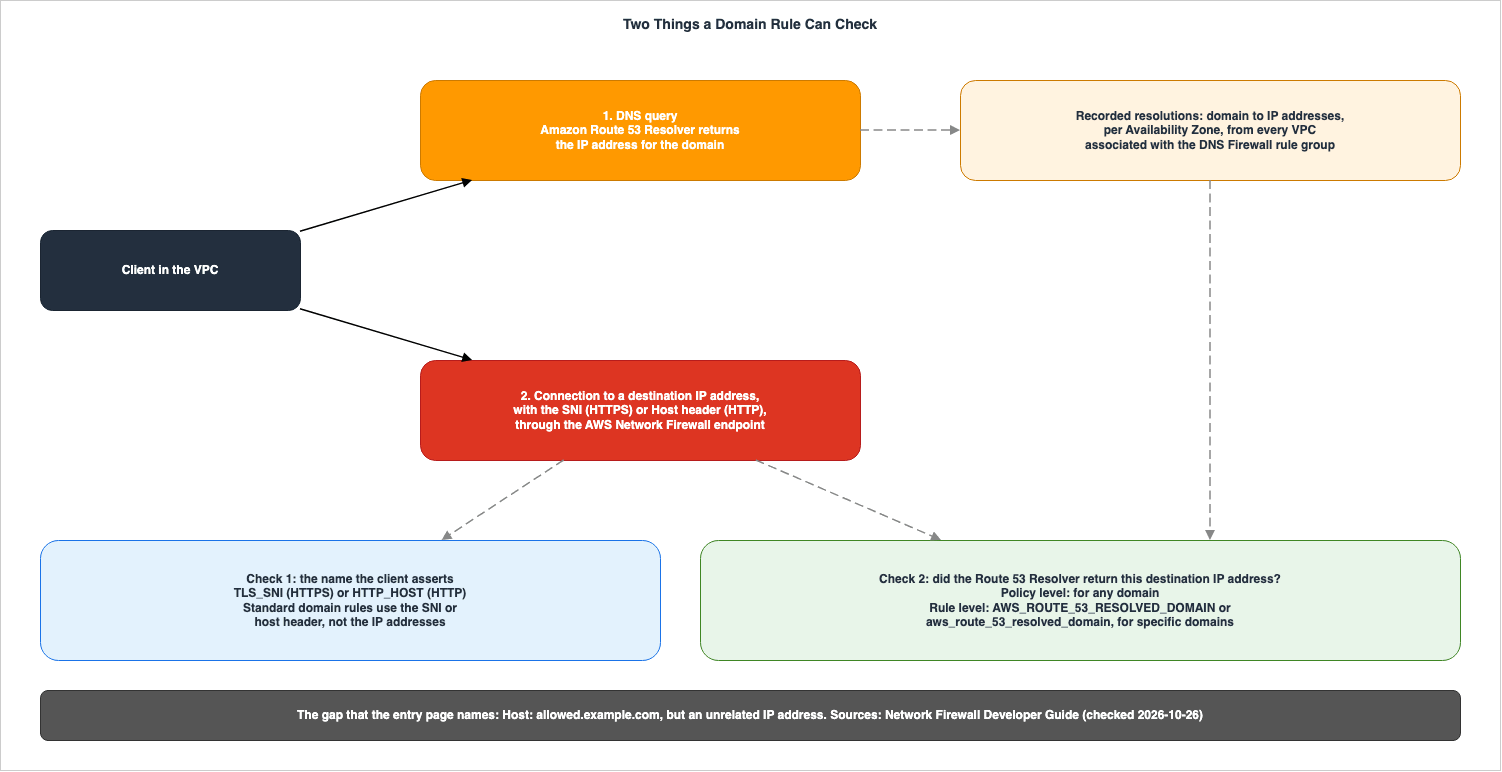
3.3 Lining Up Target Types and the Policy Level
The target types and the policy level are arranged side by side for comparison.| Setting | TLS_SNI | HTTP_HOST | AWS_ROUTE_53_RESOLVED_DOMAIN | Policy-level resolved IP validation |
|---|---|---|---|---|
Matched Against | The SNI in the TLS handshake | The HTTP Host header | The domain that the Route 53 Resolver resolved the destination IP address for | Whether the Route 53 Resolver returned the destination IP address for any domain |
| Asserted by the client | Yes | Yes | No | No |
| Protocols matched | HTTPS only | HTTP only | All protocols, at the IP layer (exceptions in Section 5.1) | Connections from sources in scope, for any protocol |
| A domain is specified | Yes | Yes | Yes | No |
| Needs the policy-level setting | No | No | Yes | — |
Adds a default drop in an ALLOWLIST | Yes, under default action order | Yes, under default action order | No | — |
| Source | the domain list page | the domain list page | the domain list page; the RulesSourceList page of the API Reference | the resolved IP validation pages |
From the protocol's perspective, the following applies. HTTPS connections may match the
TLS_SNI rule, the AWS_ROUTE_53_RESOLVED_DOMAIN rule, and potentially the policy-level check. HTTP connections may match the HTTP_HOST rule, the AWS_ROUTE_53_RESOLVED_DOMAIN rule, and potentially the policy-level check. For connections that are neither HTTP nor HTTPS, standard domain rules do not apply. Only the AWS_ROUTE_53_RESOLVED_DOMAIN rule and the policy-level check may match.The domain list cannot restrict matching to a single protocol or specific port. The domain list page states,
It can't scope matching to a single specific protocol or to particular ports. It advises users to write Suricata-compatible rules or standard stateful rules if they require such specificity.3.4 Announcement Wording and Specification Text
The "What's New" announcement uses different wording than the specification pages. This article follows the language used in the specification pages.- The "What's New" announcement states that this feature is
extending domain-based filtering beyond HTTP/HTTPS to protocols such as SFTP and SSH. SFTP and SSH are examples. The Developer Guide statesprotocols other than HTTP and HTTPSwithout specifically naming the protocols. - The "What's New" announcement states:
It simplifies protection against Server Name Identifier (SNI) spoofing by validating the IPs resolved by the Route 53 VPC Resolver against the SNI. This phrasing reads as if the IP addresses that the Resolver returned are compared with the SNI. In the Developer Guide, the policy level does not examine the SNI and instead validates the destination IP address for any domain resolution. As ways to require both the SNI and the resolved domain, the documentation provides examples of how to combineTLS_SNIandAWS_ROUTE_53_RESOLVED_DOMAINin an allowlist, and how to combinetls.sniandaws_route_53_resolved_domainin Suricata rules (Sections 4.3 and 5.2). - The "What's New" announcement expands SNI to
Server Name Identifier. The domain list page and the entry page useServer Name Indication. This article usesServer Name Indication.
4. Two Levels — Policy Settings and Resolved-Domain Rules
This section outlines five items related to the policy level and three ways to define the rule level. The entry page states, regarding the policy level,You can use this level on its own. Regarding the rule level, it states This level requires the policy-level setting.4.1 The Policy Level — What You Write
| Setting | You Set | Allowed Values | If You Set Nothing | Source of the Default |
|---|---|---|---|---|
Route53ResolvedIPValidation | The whole setting in the firewall policy | Present or absent | Resolved IP validation does not apply, and resolved-domain rules do not take effect | NF rules page |
Action | The action for connections that fail validation | ALERT, DROP, or REJECT | Required when the setting is present | NF API Reference |
DNSFirewallRuleGroupId | The DNS Firewall rule group whose associated VPCs define the validation scope | An ID that matches ^rslvr-frg-[0-9a-f]+$, exists, and is accessible from the account | Required when the setting is present | NF API Reference |
DNSExpiryExceptionPolicy | The action when a recorded resolution has expired from the resolved IP cache but traffic to that IP address continues | CONTINUE, DROP, or REJECT | Required when the setting is present | NF API Reference |
SourceIPRanges | The client source ranges whose connections are validated | Up to 100 IPv4 or IPv6 addresses or CIDR ranges | The sources disagree: the firewall's VPC CIDR ranges, or those and the CIDR ranges of any additional VPCs attached to the firewall (Section 6.2) | NF policy setting page; NF API Reference |
BypassDestinationValidationIPRanges | Destination ranges exempt from the policy-level check | Up to 100 IPv4 or IPv6 addresses or CIDR ranges | — | — |
The API Reference describes the three possible values for
Action. ALERT marks the flow in the flow log without interrupting the connection. The policy setting page specifies that enabling logging is required for the ALERT setting. DROP terminates the connection without sending a response. REJECT terminates the connection and sends a TCP reset to the client. For non-TCP traffic, the connection is dropped instead of sending a reset.4.2 The Policy Level — What Happens
Following the same order as in Section 4.1, the table lists the boundaries and where they show.| Setting | At the Boundary | Where It Shows | No Statement Found |
|---|---|---|---|
Route53ResolvedIPValidation | Removing it tears down the DNS Firewall rule group association; if a rule group with resolved-domain rules stays in the policy, those rules become inactive | ROUTE53_RESOLVED_IP_VALIDATION_MISSING in the policy errors (Section 7.4) | — |
Action | Applies to unresolved connections, to connections that crossed zones, and to connections in an unsupported Availability Zone | route53_resolved_ip: false in flow logs; DnsUnresolvedFlows increments for any action, including ALERT | — |
DNSFirewallRuleGroupId | A change swaps the association asynchronously; the policy shows UPDATING, and further changes to the setting are rejected until it returns to ACTIVE | The policy status; DNS_FIREWALL_RULE_GROUP_UNAVAILABLE when the rule group is unavailable | What the "managed" association in the API Reference refers to (Section 8.3) |
DNSExpiryExceptionPolicy | Handles connections already in progress when a resolution expires from the cache; new connections fail as unresolved | route53_ttl_expiry_triggered: true | How long the cache keeps a resolution beyond the TTL |
SourceIPRanges | Applies to the policy-level check only; resolved-domain rules evaluate destinations regardless of it; an empty list means no source is validated | route53_resolved_ip is absent for connections that validation skipped | — |
BypassDestinationValidationIPRanges | Applies to the policy-level check only; resolved-domain rules still evaluate connections to these destinations | route53_resolved_ip is absent for bypassed destinations | — |
4.3 Three Ways to Write the Rule Level
The page detailing matching specific domains with resolved-domain rules lists three methods for writing the rule level.- Domain List: Add the
AWS_ROUTE_53_RESOLVED_DOMAINtarget type alongside, or in place of,TLS_SNIandHTTP_HOST. In the console's Getting Started instructions, selectDNS (Route 53 resolved domains)as the protocol. - Suricata-Compatible Rules: Write the domain value within double quotes after the keyword
aws_route_53_resolved_domain. - Standard Stateful Rule: Add the keyword
aws_route_53_resolved_domainas a rule option. In the API, add aRuleOptioncontaining the keywordaws_route_53_resolved_domainand a single setting that contains the domain names in double quotes. The example value provided in the documentation is"example.com,cdn.example.com".
As examples of Suricata-compatible rules, this article quotes three of the five examples on the page: those with
sid values 1, 2, and 5.drop ip $HOME_NET any -> $EXTERNAL_NET any (aws_route_53_resolved_domain:"example.com"; flow:to_server, established; sid:1;)
pass ip $HOME_NET any -> $EXTERNAL_NET any (aws_route_53_resolved_domain:".example.com"; flow:to_server, established; sid:2;)
pass tls $HOME_NET any -> $EXTERNAL_NET any (tls.sni; content:"example.com"; nocase; startswith; endswith; aws_route_53_resolved_domain:"example.com"; flow:to_server, established; sid:5;)The documentation page explains that the first rule drops communication to destinations resolved for
example.com, the second rule allows communication including subdomains with a leading dot, and the third rule conditions on both SNI and the resolved domain.The same page also lists constraints for writing rules. The
reject action, used to send a reset, cannot be used with the ip protocol; it must be written using tcp. Domain values should be enclosed in double quotes, and only one instance of the aws_route_53_resolved_domain keyword should be used per rule. Wildcards should be written with a leading dot (e.g., .example.com), and asterisks should not be used. Multiple domains should be separated by commas within a single value.4.4 The Rule Level Is Dependent on the Policy Level
The rules page states,Resolved-domain rules take effect only when you configure resolved IP validation on the firewall policy. The API Reference page for RulesSourceList also states regarding AWS_ROUTE_53_RESOLVED_DOMAIN, This target type takes effect when you configure resolved IP validation on the firewall policy.The reverse is not true. Even if you enable only the policy level, existing domain list matching will not change. The API Reference page for
RulesSourceList states, When you don't include AWS_ROUTE_53_RESOLVED_DOMAIN, the generated rules match only on the SNI or Host header, without checking how the destination IP address was resolved. The policy level simply matches the destination IP address for any domain resolution, without adding conditions to the rules in the domain list. To require both the asserted name and the provenance of the destination IP address for existing allowlists, users must either add AWS_ROUTE_53_RESOLVED_DOMAIN to the rule group or add keywords to the Suricata rules.The behavior when rules are present in the rule level but the policy level is not configured is described in Section 7.4.
4.5 Things Not Listed in the CloudFormation Reference
As of October 26, 2026, the AWS CloudFormation Template Reference page forAWS::NetworkFirewall::RuleGroup lists TargetTypes with the description, Valid values are TLS_SNI and HTTP_HOST. Neither the page for AWS::NetworkFirewall::FirewallPolicy nor its sub-pages mention Route53ResolvedIPValidation. Furthermore, none of the five CloudFormation pages referenced in Section 1.3 mention either AWS_ROUTE_53_RESOLVED_DOMAIN or Route53ResolvedIPValidation.This does not mean that these features cannot be used in CloudFormation simply because they are not listed in the documentation. Both the API Reference and the AWS CLI Command Reference list
Route53ResolvedIPValidation as an option for FirewallPolicy.5. How Target Types Combine
This section describes how the matching behavior and default drop actions change when combining theGeneratedRulesType of a domain list with target types.5.1 Rules Generated for Each Target Type
The domain list page states that when a rule group is saved, Network Firewall generates Suricata-compatible rules based on the domain list and target type. The communication matched by these generated rules is determined by the target type.| Setting | Generated rules match | Exception |
|---|---|---|
TLS_SNI | HTTPS only, using the TLS SNI | — |
HTTP_HOST | HTTP only, using the HTTP Host header | — |
AWS_ROUTE_53_RESOLVED_DOMAIN | All protocols, at the IP layer; a standalone resolved-domain rule matches any traffic to that IP address | In an ALLOWLIST that also uses TLS_SNI or HTTP_HOST, the condition is combined into the protocol rule and inherits its protocol scope; with Reject, the rule is generated on TCP only |
The same page also states:
A resolved IP match is a property of the destination IP address, not of an application protocol.5.2 The Type of Rule That Is Generated Determines How the Conditions Combine
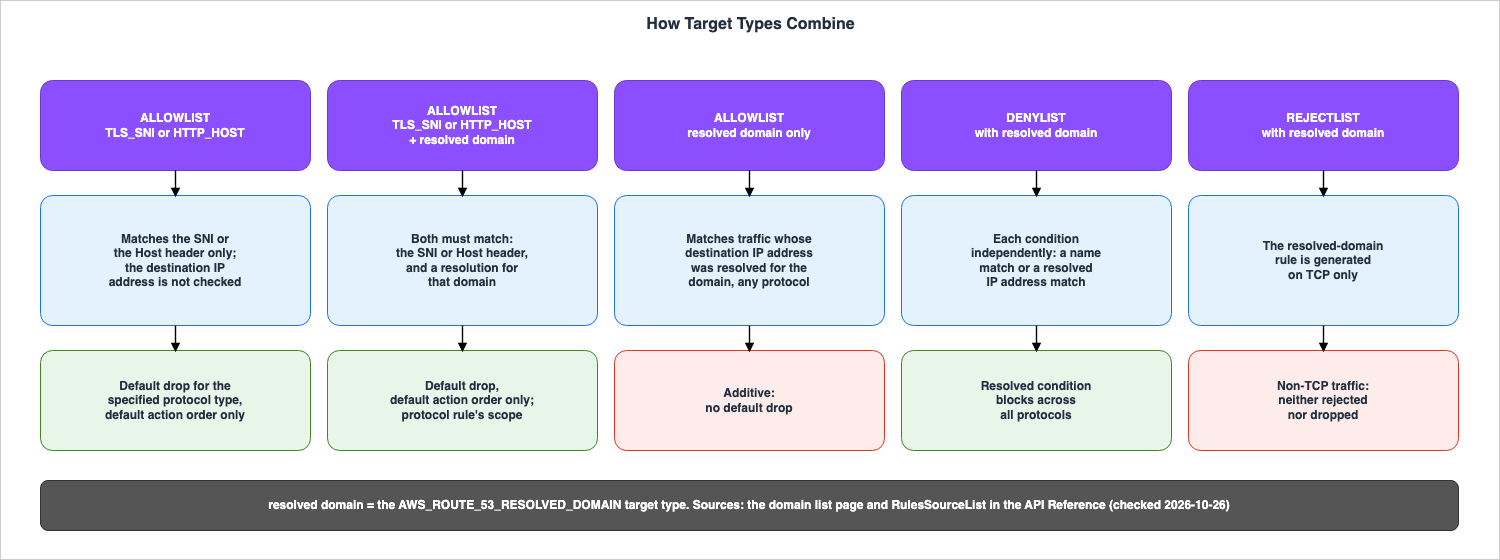
| Setting | How the conditions combine | Default drop for non-matching traffic | Source |
|---|---|---|---|
ALLOWLIST with TLS_SNI or HTTP_HOST | A match on the SNI or the Host header | Yes, for traffic of the specified protocol type, under default action order only | the domain list page |
ALLOWLIST with TLS_SNI or HTTP_HOST, and AWS_ROUTE_53_RESOLVED_DOMAIN | Both: the SNI or Host header matches the domain, and the destination IP address was resolved for that domain | Yes, under default action order only | the domain list page; the RulesSourceList page |
ALLOWLIST with AWS_ROUTE_53_RESOLVED_DOMAIN only | The destination IP address was resolved for the domain | No: the list is additive | the domain list page; the RulesSourceList page |
DENYLIST with AWS_ROUTE_53_RESOLVED_DOMAIN, alone or with a protocol target type | Each condition independently: a match on the SNI or Host header, or on the resolved destination IP address, triggers the rule | Not applicable | the domain list page; the RulesSourceList page |
REJECTLIST with AWS_ROUTE_53_RESOLVED_DOMAIN | The resolved-domain rule is generated on TCP only | Not applicable | the domain list page |
REJECTLIST or ALERTLIST with a protocol target type and AWS_ROUTE_53_RESOLVED_DOMAIN | No statement found on how the two conditions combine | Not applicable | — |
Regarding the match on both conditions in an ALLOWLIST, the domain list page states:
If a client sets the Host header to an allowed domain but connects to an IP address that was never resolved for that domain, the check fails and the connection isn't allowed.Regarding an ALLOWLIST whose only target type is AWS_ROUTE_53_RESOLVED_DOMAIN, the same page notes:
An allow list whose only target type is AWS_ROUTE_53_RESOLVED_DOMAIN is additive: it allows matching traffic but doesn't add a default rule that drops non-matching traffic. Only the TLS_SNI and HTTP_HOST target types add that default drop. To allow only the resolved domains and drop all other traffic, include a protocol target type as well.
The API Reference documentation for
RulesSourceList states the same concept, using the phrases doesn't generate a default rule that drops non-matching traffic and Only the TLS_SNI and HTTP_HOST target types generate that default drop.Regarding DENYLIST configurations and configurations whose only target type is AWS_ROUTE_53_RESOLVED_DOMAIN, the documentation for domain lists states:
In a deny list, or when AWS_ROUTE_53_RESOLVED_DOMAIN is the only target type, Network Firewall enforces each condition independently. The API Reference uses the term "DENYLIST" in the same sentence. No statement was found in Section 1.3 regarding how a protocol target type and AWS_ROUTE_53_RESOLVED_DOMAIN are combined in REJECTLIST and ALERTLIST configurations.5.3 The Default Drop Changes Based on the Order of Evaluation
The default drop behavior for the allowlist is determined by the rule evaluation order of the firewall policy. The domain list page states,For Allow, the firewall denies traffic of the specified protocol type that does not match the domain specifications. It continues, This denial applies only when the firewall policy uses default action order. Under strict order, this denial does not apply.The same page provides recommendations for policies using the default action order. It advises,
We recommend that you avoid combining Reject or Alert domain list rule groups with Allow domain list rule groups. The reason is that the default drop rule added by Allow rule groups takes effect before Reject and Alert rules.The page on evaluation order also instructs users to select the default action "Drop established" when using their own domain lists under strict order. This is because
Network Firewall requires an established connection in order to evaluate whether to pass or drop the packets for domain lists.5.4 Reject Only Works with TCP
The Reject action only works with TCP. The domain list page states that when combined withAWS_ROUTE_53_RESOLVED_DOMAIN, it generates resolved-domain rules specifically for TCP to send TCP reset packets. Therefore, traffic to the resolved IP address using protocols other than TCP will not match those rules. The same page clarifies that Network Firewall neither rejects nor drops that traffic. It recommends using "Deny" if you want to block traffic across all protocols.The
REJECT action at the policy level functions differently. The API Reference states that for policy-level REJECT, traffic other than TCP is dropped instead of sending a reset (Section 4.1). Although both use the term "REJECT," the behavior regarding traffic other than TCP differs between the domain list's "Reject" and the REJECT action at the policy level.6. Scope and Boundaries of Validation
This section describes which resolutions are used for validation, which connections are validated, and what occurs at the boundaries.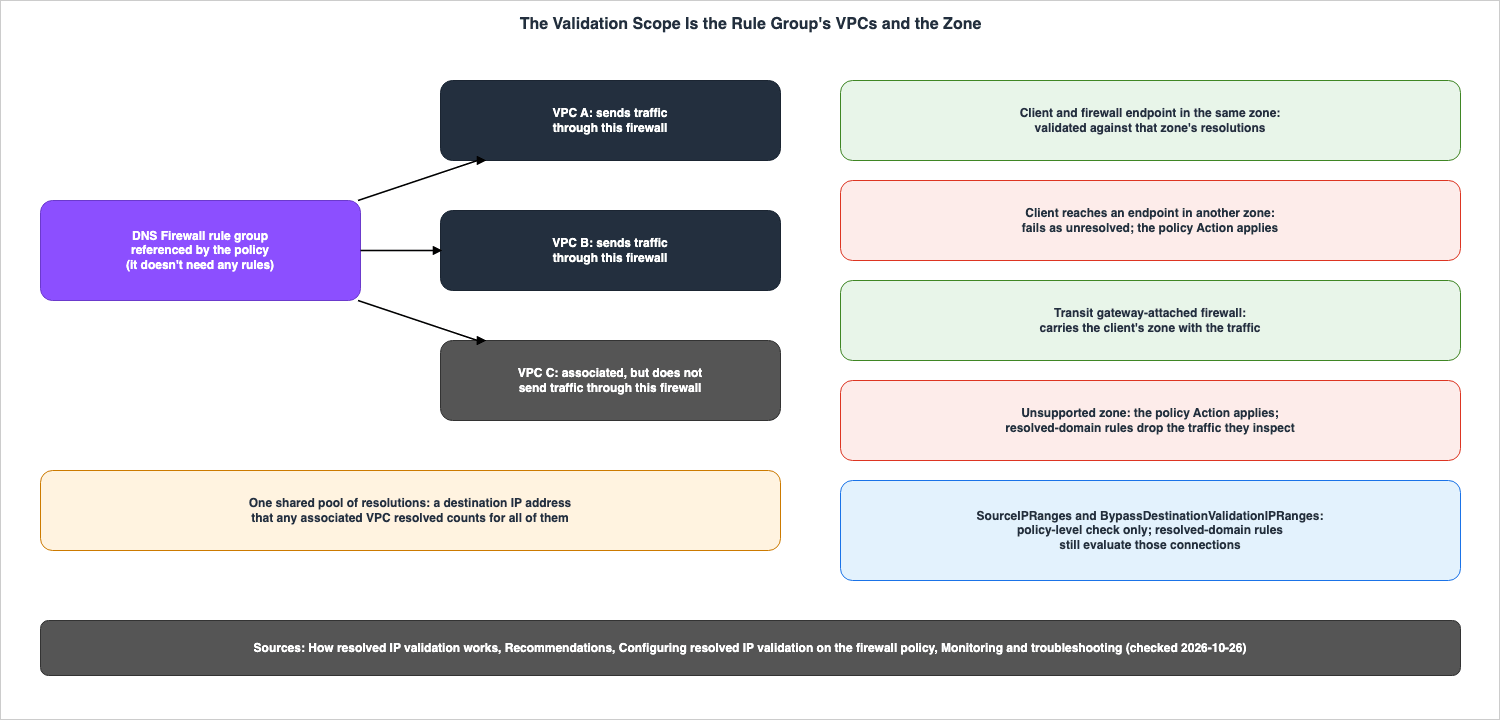
6.1 Associated VPC Resolutions Become a Single, Shared Pool
The "how-it-works" page describes the validation scope as the collection of VPCs associated with the DNS Firewall rule group referenced in the policy. The resolutions of all associated VPCs go into a single shared pool, and the firewall matches against that entire pool. The page continues,This includes VPCs that are associated with the rule group but don't send traffic through this firewall. It also states, A destination IP address that any associated VPC resolved for a domain is considered resolved for all of them.The "Recommendations" page recommends limiting the rule group to a single firewall deployment. The reasoning provided is that reusing the same rule group across multiple firewalls or unrelated deployments will broaden the range of what each firewall accepts. The page advises,
Use a separate rule group for each firewall deployment.DNS Firewall rule groups are created and managed within DNS Firewall, not Network Firewall. The "Getting started" page states,
The rule group doesn't need any rules. It explains that the purpose of the rule group is to define which VPCs are included in the validation scope.6.2 The Source Ranges and the Exempt Destination Ranges Only Apply to the Policy Level
SourceIPRanges and BypassDestinationValidationIPRanges define the scope for matching at the policy level. The policy setting page states regarding SourceIPRanges:This scope applies to the policy-level check only. Stateful rules that use the AWS_ROUTE_53_RESOLVED_DOMAIN target type or the aws_route_53_resolved_domain keyword still evaluate their destinations regardless of this setting.
Similarly, the same page states regarding
BypassDestinationValidationIPRanges: This exemption applies only to the policy-level check. It also notes that resolved-domain rules will continue to evaluate connections to those destinations. The API Reference also states the same principle for both items.The sources disagree regarding the scope when
SourceIPRanges is not specified. The policy setting page and the Getting started page state: If you don't specify any ranges, validation applies to the firewall's VPC CIDR ranges. The API Reference states: If you omit this field, resolved IP validation applies to the CIDR ranges of the firewall's VPC and of any additional VPCs attached to the firewall. The AWS CLI Command Reference, the SDK for Kotlin, and the SDK for Ruby API Reference all contain the same wording as the API Reference. This article does not definitively identify either as incorrect.The API Reference continues,
Specifying an empty list is not the same as omitting the field: an empty list means that Network Firewall doesn't validate any source addresses. However, no statement describing the handling of an empty list was found in the Developer Guide.6.3 Resolutions Are Recorded for Each AZ, and Matching Is Also Performed Within Each AZ
The "how-it-works" page states,Resolutions are recorded for each Availability Zone, and validation is scoped to the zone. A firewall endpoint validates against the resolutions recorded within its own Availability Zone. While endpoints can be deployed across multiple Availability Zones, a client must connect to an endpoint located in the same Availability Zone.Regarding connections reaching endpoints across Availability Zones, the same page explains that the firewall is unaware the client is in a different Availability Zone, and therefore, those connections fail validation as unresolved and are subject to the configured
Action. It continues, The exception is a transit gateway-attached firewall, which carries the client's zone with the traffic. The "Recommendations" page suggests using a transit gateway-attached firewall for centralized deployments that inspect traffic from multiple Availability Zones.6.4 In Unsupported Availability Zones, the Policy Level and the Rule Level Behave Differently
The troubleshooting page states,Resolved IP validation isn't available in every Availability Zone. Traffic originating from unsupported Availability Zones cannot be validated. Network Firewall treats these connections as if they failed validation and applies the configured Action. In this context, for a standard firewall, the AZ refers to the endpoint's AZ, while for a transit gateway-attached firewall, it refers to the client's AZ.The rule level exhibits different behavior in unsupported Availability Zones. The same page notes that resolved-domain rules cannot be evaluated in these zones, and continues:
Instead, Network Firewall drops the traffic that the rule inspects, regardless of the policy's Action setting or the rule's own action.
For rules that match only resolved domains, all traffic matching the rule will be dropped. For the policy level, the same page says to check the
DnsAzUnavailableFlows metric when you first enable the feature and, if it is not zero, to keep the firewall's Action set to ALERT or to exclude the affected clients using SourceIPRanges. As the quotation above states, the rule-level drop does not depend on the policy's Action. For the rule level, the same page says to confirm that DnsAzUnavailableFlows is zero before adding resolved-domain rules.No list of unsupported Availability Zones was found in the sources in Section 1.3.
6.5 The Evaluation Is Performed Only Once, on the First Packet of the Connection
The "how-it-works" page states thatNetwork Firewall evaluates resolved IP validation once for each connection, on the connection's first packet. The evaluation uses both the connection's source IP address and destination IP address, and the source address must fall in the configured range. Regarding the result, the same page states, The result applies for the life of the connection, in the connection's originating (client-to-server) direction.6.6 Resolutions Are Maintained Longer Than the TTL, and After Expiration Only Ongoing Connections Are Subject to the Exception Policy
The policy setting page states,Resolved IP validation keeps a resolution in the resolved IP cache for longer than the DNS record's time to live (TTL), so a short TTL alone doesn't cause connections to fail. No specific numerical value indicating how long the resolution is retained was found in the sources in Section 1.3.After a resolution expires in the cache, the
DNSExpiryExceptionPolicy determines how it is handled. The troubleshooting page states that this policy only applies to connections that are already in progress, while new connections will not pass validation and remain unresolved. CONTINUE treats expired resolutions as if they are still valid.6.7 Potential Causes of Unresolved Connections (As Listed in the Documentation)
The troubleshooting page lists four common causes related to connections displayingroute53_resolved_ip: false and increasing DnsUnresolvedFlows.| Setting | Cause in the troubleshooting page | What the page suggests |
|---|---|---|
| A destination not resolved through the VPC's Route 53 Resolver | The client legitimately connects to it, for example by a hardcoded IP address | Add the destination to BypassDestinationValidationIPRanges, or remove the client from the SourceIPRanges scope |
| A cached answer | The client still uses a DNS answer from before the feature was enabled | It typically clears as caches refresh (Section 7.5) |
| An IP address used long after the TTL | An application-level cache or a resolver that ignores TTLs | Fix the client so that it re-resolves, or set the expiry exception policy to CONTINUE for in-progress connections |
| Traffic crossing Availability Zones | The firewall is not a transit gateway-attached firewall | The transit gateway recommendation |
No statement related to encrypted DNS (such as DNS over HTTPS, or DoH), resolution through on-premises resolvers, and recording of AAAA record resolution was found in Section 1.3. This article does not offer conclusions or analysis outside of the provided documentation.
6.8 Arranging Boundaries
| Setting | At the Boundary | Where It Shows | No Statement Found |
|---|---|---|---|
| Validation scope | Resolutions from every VPC associated with the DNS Firewall rule group count, including VPCs that do not send traffic through this firewall | — | — |
| Cross-zone path | A connection that reaches an endpoint in another zone fails as unresolved; a transit gateway-attached firewall carries the client's zone | route53_resolved_ip: false; DnsUnresolvedFlows | — |
| Unsupported Availability Zone | The policy-level Action applies; resolved-domain rules drop the traffic they inspect | route53_resolved_ip: false; DnsAzUnavailableFlows | The list of supported zones |
| First packet | One evaluation per connection; the result applies for the life of the connection in the client-to-server direction | The route53_resolved_ip value in the to-server flow | — |
| Expired resolution | In-progress connections follow DNSExpiryExceptionPolicy; new connections fail as unresolved | route53_ttl_expiry_triggered: true | The retention period of the cache |
| Name resolution outside the Route 53 Resolver | Only resolutions that the Route 53 Resolver recorded count | route53_resolved_ip: false | Encrypted DNS, on-premises resolvers, and AAAA records |
7. Where It Shows
This section describes where you can find the results of resolved IP validation: specifically, within logs, metrics, and the status of policies and firewalls.7.1 Log Fields
The "Resolved IP validation log fields" page describes that when a policy utilizes resolved IP validation, the following fields are added to EVE flow and alert logs.| Setting | Event | When it appears |
|---|---|---|
route53_resolved_ip | Flow events (flow.route53_resolved_ip, or netflow.route53_resolved_ip in the to-server flow entry) and the top level of alert events | true when validated, false when not; absent for connections that validation skipped, such as sources outside the configured ranges and bypassed destinations |
route53_ttl_expiry_triggered | The same events as route53_resolved_ip | true when the connection was validated but a resolution later expired and the expiry exception policy applied; otherwise omitted |
route53_domain_validated | Alert events | true when the alert is from a resolved-domain rule and the destination IP address was resolved for the matched domain |
route53_domain | Alert events | The matched domain name, alongside route53_domain_validated |
Logs require firewall log settings. The "Getting started" page lists enabling flow logs as one of the prerequisites.
7.2 Logs Do Not Differentiate the Reasons Why Validation Failed
The troubleshooting page states:The logs don't distinguish why a flow wasn't validated. The same note continues, Unresolved destinations, unsupported Availability Zones, and transient resolution errors all appear as route53_resolved_ip: false (resolution errors omit the field). It advises using metrics to differentiate the reasons. The log fields page also states: A false value doesn't indicate why validation didn't pass.7.3 Metrics
The AWS Network Firewall metrics page in Amazon CloudWatch lists four metrics that count the results of resolved IP validation.| Setting | What it counts |
|---|---|
DnsResolvedFlows | Flows whose destination IP address was confirmed as resolved for a domain; counted once per flow, at the first validation verdict |
DnsUnresolvedFlows | Flows for which validation ran but the destination IP address was not resolved; independent of the configured action, so it increments even under ALERT |
DnsResolutionErrorFlows | Flows for which validation did not complete because of an error |
DnsAzUnavailableFlows | Flows that validation cannot evaluate because the Availability Zone does not support the feature: the client's zone for a transit gateway-attached firewall, and the endpoint's zone for other firewalls |
7.4 Configuration Errors and States
The troubleshooting page indicates that Network Firewall detects certain issues asynchronously after a policy creation or update request succeeds. The policy remains in theACTIVE state while the following two errors appear in the policy's Errors list in DescribeFirewallPolicy. The last row of the table is a policy status, not an error:| Setting | Meaning | What the page says to do |
|---|---|---|
ROUTE53_RESOLVED_IP_VALIDATION_MISSING | A stateful rule group that uses the aws_route_53_resolved_domain keyword is associated with the policy, but the policy does not have resolved IP validation configured | Add resolved IP validation to the policy, or remove the keyword rules |
DNS_FIREWALL_RULE_GROUP_UNAVAILABLE | The DNS Firewall rule group that resolved IP validation references is unavailable, for example deleted or no longer accessible from the account | Update the rule group ID, or remove the resolved IP validation configuration |
UPDATING (policy status) | A DNS Firewall rule group change is in progress; further changes to resolved IP validation are rejected until the policy returns to ACTIVE | The API Reference says to wait until the swap completes, then retry |
Network Firewall automatically clears each error once the underlying cause is resolved. The same page states that if a configuration error in a policy is detected, it will also appear on the firewall. For the relevant firewall endpoint, the
DescribeFirewall command returns an ERROR attachment status, with the message "The firewall policy has configuration errors." The firewall continues to synchronize the rules, but only the affected resolved-domain rules will become inactive.7.5 Starting with ALERT
The Recommendations page suggests that when initially enabling the feature, setAction to ALERT and leave it that way for approximately 24 hours before switching to DROP or REJECT. The rationale provided is that resolved IP validation only recognizes the destination after the domain has been resolved through Route 53 Resolver in the VPC, and during that period, the client's DNS cache will update. It recommends monitoring the flow logs and metrics, and only switching to DROP or REJECT once the percentage of unresolved flows has stabilized.8. Where DNS Firewall Ends
This section outlines the differences between DNS Firewall rules and resolved IP validation.8.1 What Looks at Queries, and What Looks at Connections
The Route 53 Developer Guide, on the resolved IP validation page, states thatDNS Firewall rules filter outbound DNS queries, whereas resolved IP validation acts on the connections that your VPCs make after those queries resolve. The DNS Firewall page of the same guide notes that both services offer domain-based filtering, but operate at different points in the connection process. Regarding Network Firewall, the page states that Network Firewall does not have visibility into queries made by Route 53 VPC Resolver.8.2 How DNS Firewall Rules Affect Validation Results
The Route 53 Developer Guide, on the "Resolved IP validation" page, states that when you add rules to a rule group, DNS Firewall filtering and resolved IP validation function as two independent layers. If a rule blocks a query, VPC Resolver will not return an IP address for that query, preventing Network Firewall from allowing connections based on it. Regarding rules that only generate alerts for queries, the same page states,If a rule only alerts on a query, the query still resolves and the connection can pass validation.| Setting | DNS query | Resolved IP validation |
|---|---|---|
| DNS Firewall rule action Block | The query is blocked; the VPC Resolver returns no IP address | Network Firewall does not allow connections based on that query |
| DNS Firewall rule action Alert | The query resolves, and an alert is logged | The connection can pass validation |
| No rules in the rule group | DNS Firewall does not filter any query | Resolved IP validation still works |
No direct statement describing the impact of an Allow action in DNS Firewall rules on the outcome of resolved IP validation was found in the sources in Section 1.3.
8.3 Rule Groups Without Rules, and Their Associations
The Route 53 Developer Guide states that to use resolved IP validation without using DNS Firewall's domain filtering, you associate a rule group that contains no rules with the VPCs whose traffic the firewall inspects. The "Getting started" page also provides instructions where users create a rule group in the VPC console and associate it with each VPC behind the firewall. The association status changes fromUpdating to Complete.In contrast, the API Reference describes the
DNSFirewallRuleGroupId parameter, stating that changing its value swaps the managed rule group association and that Each policy can have only one managed Route 53 Resolver DNS Firewall association. The policy setting page indicates that removing resolved IP validation from a policy tears down the DNS Firewall rule group association. No statement was found in Section 1.3 that clarifies the relationship between this managed association and the association with VPCs created by users.8.4 Firewall Manager and Network Security Manager
This article does not address distribution within an organization. The AWS Network Security Manager Developer Guide states,AWS Network Security Manager is the service that is replacing AWS Firewall Manager. A "What's New" update from September 24, 2026, announced the general availability of Network Security Manager, with the words with support for AWS Network Firewall soon to follow. This article did not investigate whether the resolved IP validation configuration can be deployed in either service.9. What Was Recorded Using This Configuration
This section describes what was recorded using the configuration built in the US East (N. Virginia) Region for this article. The values presented here reflect the results obtained using that specific configuration and on that particular day, and are not values guaranteed by the sources. Performance comparisons or assessments cannot be drawn from this data.9.1 Configuration
The infrastructure was created using AWS CloudFormation and AWS CLI (version 2.38.5) on October 26, 2026 (UTC), and subsequently deleted to verify that no resources remained.- The VPC was configured with the address space
10.0.0.0/16, and used a single Availability Zone. Within this zone, a firewall subnet and a protected subnet were each created. The routing was configured in the style of the Developer Guide's "Simple single zone architecture with an internet gateway," and no NAT gateway was used. - The firewall policy was configured with the default action order, directing all stateless traffic to the stateful engine. Logs for both flow and alerts were sent to Amazon CloudWatch Logs.
- A DNS Firewall rule group, containing no rules, was created and associated with the VPC.
- A single EC2 instance (t4g.nano) with a public IPv4 address was placed within the protected subnet. Connections were tried from it with AWS Systems Manager Run Command. The target destinations were
example.comandexample.net(HTTPS and HTTP) from the IANA reserved domains, as well as ports 443 and 22 of an Elastic IP address in the same account that was not associated with any resource. Connections to the Elastic IP address were attempted by directly specifying the IP address. - The four domain list rule groups and the resolved IP validation setting were attached and detached step by step with the AWS CLI. At the policy level,
ActionremainedALERTin every step where the setting was present, and theDNSExpiryExceptionPolicywas set toCONTINUE. - No connection that spoofs the SNI or the Host header was tried.
All four rule groups created became
ACTIVE, including the three that contained AWS_ROUTE_53_RESOLVED_DOMAIN.9.2 Records by Step
TheRecorded column in the following table shows the connection results for each step, as well as the values that remained in the firewall logs.| Step | Policy level | Rule group | Recorded |
|---|---|---|---|
| s00 | None | None | All four requests to example.com and example.net returned HTTP 200; no route53_* field in the flow logs |
| s01 | ALERT | None | The connections to the Elastic IP address (address written directly) had route53_resolved_ip: false; the connections to example.com and example.net right after the setting was enabled also had false, and from s02 on, about 9 minutes later, they had true; inbound connections from the internet to the instance had no route53_resolved_ip field; DnsAzUnavailableFlows was 0 |
| s02 | ALERT | ALLOWLIST with TLS_SNI and HTTP_HOST (example.com, .amazonaws.com) | example.com returned HTTP 200; example.net timed out over HTTPS and HTTP, with alerts not matching any TLS allowlisted FQDNs and not matching any HTTP allowlisted FQDNs, verdict drop, and route53_resolved_ip: true |
| s03 | ALERT | The same list with AWS_ROUTE_53_RESOLVED_DOMAIN added | The same results as s02 |
| s04 | ALERT | ALLOWLIST with AWS_ROUTE_53_RESOLVED_DOMAIN only (example.com) | All four requests to example.com and example.net returned HTTP 200 |
| s05 | ALERT | DENYLIST with AWS_ROUTE_53_RESOLVED_DOMAIN only (example.com) | example.com timed out over HTTPS and HTTP, with alerts matching resolved domain denylisted FQDNs, verdict drop, route53_resolved_ip: true, route53_domain_validated: true, and route53_domain: example.com; example.net returned HTTP 200 |
| s06 | Removed | The s05 rule group kept | See Section 9.3 |
In each of the steps s02 through s05, no alerts were recorded regarding connections to ports 443 and 22 on the Elastic IP address. Since this Elastic IP address is not associated with any resource, these connections received no responses in any step.
The metrics
DnsResolvedFlows, DnsUnresolvedFlows, DnsResolutionErrorFlows, and DnsAzUnavailableFlows were all recorded across three dimensions: FirewallName, AvailabilityZone, and Engine (with a value of Stateful). Both DnsResolutionErrorFlows and DnsAzUnavailableFlows were zero in every step.9.3 When the Policy-Level Setting Is Removed
In s06, the Resolved IP validation setting was removed from the policy, while the DENYLIST from s05 remained in place. The update request was accepted. Approximately 2 minutes later, the records were as follows:| Setting | Recorded |
|---|---|
| Policy status | ACTIVE |
Policy Errors | ROUTE53_RESOLVED_IP_VALIDATION_MISSING, with the message An attached rule group requires Route 53 Resolved IP Validation on the policy - add the configuration or remove the keyword rules |
| Firewall attachment status | ERROR, with the message The firewall policy has configuration errors. |
| Firewall status | PROVISIONING |
Connections to example.com | HTTP 200 over HTTPS and HTTP; the DENYLIST no longer stopped them |
| Flow logs | No route53_* field |
Approximately 5 minutes later, the records were the same.
The list of DNS Firewall rule group associations (
list-firewall-rule-group-associations) showed only one user-created association at any point. The number of associations did not change, whether Resolved IP validation was enabled or disabled. The managed association mentioned in Section 8.3 did not appear in this list.9.4 What This Configuration Cannot Determine
- The reason why connections to
example.comandexample.netwere initiallyfalseimmediately after activation in s01. The troubleshooting page lists one common cause as clients continuing to use DNS responses from before the feature was enabled, but the records of this configuration cannot determine the cause. - Routing across Availability Zones, transit gateway-attached firewalls, unsupported Availability Zones, and the behavior after a resolution expires. These were not tested in this configuration.
- The behavior of
REJECTand REJECTLIST. These were not tested in this configuration. - Whether adding
AWS_ROUTE_53_RESOLVED_DOMAINto the ALLOWLIST changes the result for a connection that uses an allowed name but goes to a destination that the Resolver did not return. No such connection was tried in this configuration (Section 9.1). - Retention periods. These were not measured in this configuration.
10. Failure Modes
This section outlines the failures that arise from the contracts discussed in Sections 3 through 8, categorizing them by symptoms and causes.| Symptom | Cause in the contract | Where to look |
|---|---|---|
| A connection with an allowed host name reaches an IP address that was never resolved for it | Standard domain rules use the SNI or Host header, not the IP addresses | Section 3.1 |
| SSH or SFTP traffic passes a domain allowlist | TLS_SNI and HTTP_HOST match HTTPS and HTTP only, and their default drop covers only the specified protocol type | Sections 3.3 and 5.2 |
| Enabling resolved IP validation did not tighten an existing allowlist | The policy level accepts a resolution for any domain; the rule level applies only after a resolved-domain target type or keyword is added | Section 4.4 |
| Traffic to domains outside an allowlist still passes | The allowlist has AWS_ROUTE_53_RESOLVED_DOMAIN as its only target type, so it is additive | Section 5.2 |
| An allowlist does not drop non-matching HTTPS under strict order | The default drop of an ALLOWLIST applies only under default action order | Section 5.3 |
| UDP traffic to a resolved domain is not rejected | Reject generates the resolved-domain rule on TCP only; non-TCP traffic does not match | Section 5.4 |
| A destination that this firewall's clients never resolved passes validation | Another VPC associated with the same DNS Firewall rule group resolved it | Section 6.1 |
| Excluding a source range did not stop a resolved-domain rule from acting | SourceIPRanges and BypassDestinationValidationIPRanges apply to the policy-level check only | Section 6.2 |
| Connections from one zone fail validation while others pass | They cross zones to reach an endpoint, or the zone is unsupported | Sections 6.3 and 6.4 |
| All traffic that a resolved-domain rule inspects is dropped | The rule is in an unsupported Availability Zone | Section 6.4 |
Logs show route53_resolved_ip: false but not the reason | The logs do not distinguish the reasons; the metrics do | Sections 7.2 and 7.3 |
Resolved-domain rules stopped working while the policy is ACTIVE | The policy lost its resolved IP validation setting, or the DNS Firewall rule group became unavailable | Section 7.4 |
| A domain that DNS Firewall alerts on still passes validation | An alert-only rule lets the query resolve | Section 8.2 |
11. Frequently Asked Questions About Domain Rule Matching
Q1. Are destinations not on the domain allowlist unreachable?
It is not necessarily the case, based solely on standard domain rules. The domain list page states that Network Firewall usesthe SNI or host header, not the IP addresses. If the asserted name matches the allowlist, the destination IP address is not checked. Standard domain rules do not apply to communications other than HTTP and HTTPS. The default "drop" action for the ALLOWLIST only takes effect when the default action order is applied, and only for communications of the specified protocol types (Sections 3.1 and 5.3).Q2. Does enabling "Resolved IP validation" automatically apply stricter rules to existing domain allowlists?
The allowlist rules do not become more restrictive. The policy level only checks whether the destination IP address was resolved for any domain; it does not add conditions to the rules in the domain list. However, the getting started page states that if the policy level'sAction is set to "Drop" or "Reject," the firewall will drop or reset connections to destination IP addresses that Route 53 Resolver did not resolve within the associated VPCs. The same page states that connections to destinations in the bypass ranges, and connections from sources outside the configured source ranges, are not affected. The policy level does not add a condition that the IP address was resolved for that name. To require both matches for the allowlist, users must add AWS_ROUTE_53_RESOLVED_DOMAIN to the ALLOWLIST, or add aws_route_53_resolved_domain to Suricata rules (Section 4.4).Q3. If AWS_ROUTE_53_RESOLVED_DOMAIN is the only target type of the allowlist, will traffic to destinations not on that list be blocked?
No. The domain list page describes this allowlist as additive and notes that it does not add a default rule that blocks unmatched communications. Only TLS_SNI and HTTP_HOST add that default rule (Section 5.2).Q4. If you add AWS_ROUTE_53_RESOLVED_DOMAIN to the REJECTLIST, will that block all protocols?
No, it will not. When used with the Reject action, the resolved-domain rule is only generated for TCP traffic. Communication using other protocols will not match that rule. The domain list page indicates that you should use the Deny action to block all protocols (Section 5.4).Q5. Do domain rules also apply to SSH and SFTP?
Standard domain rules do not apply.TLS_SNI works only with HTTPS, and HTTP_HOST works only with HTTP. The matching by AWS_ROUTE_53_RESOLVED_DOMAIN rules and by the policy level is based on the destination IP address, so it applies to protocols other than HTTP and HTTPS. The "What's New" announcement provides examples of SFTP and SSH, and the Developer Guide states protocols other than HTTP and HTTPS (Sections 3.3 and 3.4).Q6. Will the scope of the validation be limited to VPCs that send traffic through this firewall?
No, it will not. The scope includes all VPCs associated with the DNS Firewall rule group referenced in the policy, including resolution for VPCs that do not send traffic through this firewall. The Recommendations page advises using a separate rule group for each firewall deployment (Section 6.1).Q7. Will connections that traverse AZ (Availability Zone) to reach endpoints also be validated?
They are validated, and they fail. Resolutions are recorded and matched within each AZ, so connections that cross AZ boundaries are treated as unresolved and trigger theAction setting. The exception is transit gateway-attached firewalls, which carry the client's AZ along with the connection (Section 6.3).Q8. Are DNS Firewall rules and resolved IP validation checking the same thing?
No, they are not. DNS Firewall rules inspect queries, while resolved IP validation examines connections after a query has been resolved. If DNS Firewall rules block a query, any connection based on that resolution will not be permitted. If the rules only trigger an alert, the query still resolves, and the connection can pass validation (Sections 8.1 and 8.2).Q9. Can you write resolved IP validation using CloudFormation?
As of October 26, 2026, the CloudFormation Template Reference does not list eitherRoute53ResolvedIPValidation or AWS_ROUTE_53_RESOLVED_DOMAIN. The absence of these entries in the documentation does not mean that it cannot be written. The API Reference and the AWS CLI Command Reference both list Route53ResolvedIPValidation as a member of FirewallPolicy (Section 4.5).12. Summary
- Standard domain rules match only the names asserted by clients (HTTPS SNI, HTTP Host headers) and do not match the destination IP address. They do not apply to protocols other than HTTP and HTTPS.
- Resolved IP validation checks whether the destination IP address matches the one returned by Route 53 Resolver. The policy level can be applied to any domain resolution and functions independently. The rule level, on the other hand, applies to specific domains and relies on the policy level.
- When combined with an allowlist, the protocol target type and
AWS_ROUTE_53_RESOLVED_DOMAINmust both match. In a denylist, or whenAWS_ROUTE_53_RESOLVED_DOMAINis the only target type, each condition is evaluated independently. An allowlist using onlyAWS_ROUTE_53_RESOLVED_DOMAINdoes not create a default drop action. The default drop action for an allowlist only takes effect when the default action order is configured. Reject only applies to TCP connections. - The scope of validation includes all VPCs associated with the DNS Firewall rule group, including VPCs that do not send traffic through this firewall. Source IP range restrictions and destination exemptions only apply to the policy level. The scope when
SourceIPRangesis not specified differs between the Developer Guide and the API Reference. - Resolution is recorded on a per-Availability Zone (AZ) basis, and matching also occurs within each AZ. Connections that cross AZs are unresolved, with the exception of transit gateway-attached firewalls. In unsupported AZs, the policy level applies the configured
Action, while the rule level drops the traffic being inspected. - Evaluation occurs only once, on the first packet of a connection, and the result is maintained throughout the connection's lifetime. Resolution is retained longer than the TTL, and after it expires, only ongoing connections follow the
DNSExpiryExceptionPolicy. - Logs do not distinguish reasons, while four metrics do. If rules are added to the rule level without the policy level configured, the policy remains
ACTIVEwith a configuration error, and the endpoint returnsERROR. - DNS Firewall rules inspect queries, while resolved IP validation inspects connections. DNS Firewall rules that only generate alerts allow queries to resolve.
- In this article's configuration (us-east-1, one AZ, default action order), the following aligned with the documentation: an ALLOWLIST that uses only
AWS_ROUTE_53_RESOLVED_DOMAINlet unmatched destinations pass, the alert fields of the DENYLIST, and the configuration error and the endpointERRORwhen the policy-level setting was removed.
13. References
- AWS Network Firewall Developer Guide: Resolved IP validation in AWS Network Firewall
- AWS Network Firewall Developer Guide: How resolved IP validation works
- AWS Network Firewall Developer Guide: Getting started with resolved IP validation
- AWS Network Firewall Developer Guide: Configuring resolved IP validation on the firewall policy
- AWS Network Firewall Developer Guide: Matching specific domains with resolved-domain rules
- AWS Network Firewall Developer Guide: Recommendations for configuring resolved IP validation
- AWS Network Firewall Developer Guide: Monitoring and troubleshooting resolved IP validation
- AWS Network Firewall Developer Guide: Resolved IP validation log fields
- AWS Network Firewall Developer Guide: Stateful domain list rule groups in AWS Network Firewall
- AWS Network Firewall Developer Guide: Suricata compatible rule strings in AWS Network Firewall
- AWS Network Firewall Developer Guide: Standard stateful rule groups in AWS Network Firewall
- AWS Network Firewall Developer Guide: Managing evaluation order for Suricata compatible rules in AWS Network Firewall
- AWS Network Firewall Developer Guide: Firewall policy settings in AWS Network Firewall
- AWS Network Firewall Developer Guide: AWS Network Firewall metrics in Amazon CloudWatch
- AWS Network Firewall Developer Guide: Transit gateway-attached firewalls in Network Firewall
- AWS Network Firewall Developer Guide: Simple single zone architecture with an internet gateway using AWS Network Firewall
- AWS Network Firewall API Reference: RulesSourceList
- AWS Network Firewall API Reference: FirewallPolicy
- AWS Network Firewall API Reference: Route53ResolvedIPValidation
- AWS Network Firewall API Reference: FirewallPolicyResponse
- AWS CLI Command Reference: update-firewall-policy
- AWS CloudFormation Template Reference: AWS::NetworkFirewall::RuleGroup RulesSourceList
- AWS CloudFormation Template Reference: AWS::NetworkFirewall::FirewallPolicy FirewallPolicy
- Amazon Route 53 Developer Guide: Resolved IP validation with Network Firewall
- Amazon Route 53 Developer Guide: Using DNS Firewall to filter outbound DNS traffic
- Amazon Route 53 Developer Guide: Rule actions in DNS Firewall
- AWS Network Security Manager Developer Guide: AWS Network Security Manager and AWS Firewall Manager
- What's New: AWS Network Firewall now supports Route 53 Resolved IP Validation
- What's New: AWS Network Security Manager is now generally available in US East (N. Virginia) Region
References:
Tech Blog with curated related content
Written by Hidekazu Konishi