Service Insertion in AWS Cloud WAN - Which Traffic a Core Network Policy Sends to Inspection
First Published:
Last Updated:
send-via or send-to segment actions. The routes directing traffic to the inspection VPC are not defined by the user; instead, Cloud WAN propagates these routes from the policy to both the segment route tables and the NFG route tables. However, simply defining a policy does not guarantee that all traffic will be routed for inspection. Traffic in the same segment will not pass through the inspection device unless that segment is isolated. Furthermore, traffic between segments without any defined actions does not reach the other segment at all. Whether traffic originating from the internet can be inspected via service insertion is a point where the sources disagree.This article aims to clarify which traffic is routed for inspection and which is not, presenting a table and two diagrams to illustrate the different traffic types. It also details what users can and cannot configure within NFG route tables, explains in which Region and how many times traffic is inspected when crossing Regions, and outlines policy constraints that will either result in errors or simply cause traffic to be dropped. This article distinguishes between information provided in the official documentation, information that cannot be found in the documentation, and discrepancies between different documentation sources. The information presented here was verified on November 6, 2026.
This article is not an introduction to Cloud WAN, nor is it a step-by-step guide on how to write policies. It does not cover pricing, nor does it describe methods for bypassing inspection.
Related articles on this site:
- Connecting Overlapping Networks on AWS - 1:1 NAT on Transit Gateway and Cloud WAN Attachments, Private NAT Gateways, and the Service Layer
- AWS VPC Connectivity Decision Guide - VPC Peering, Transit Gateway, PrivateLink, VPC Lattice, and Cloud WAN
- What a Domain Rule Matches in AWS Network Firewall - SNI, the Host Header, and Whether the Resolver Returned the Destination IP
- AWS Zero-Trust Network Architecture Guide - Segmentation, Inspection, and Identity-Aware Access with VPC, Network Firewall, VPC Lattice, and Verified Access
- AWS Network and Application Protection Decision Guide - Where AWS WAF, AWS Shield, AWS Network Firewall, and AWS Firewall Manager Sit on the Request Path and What Each One Does Not Stop
- AWS Hybrid Connectivity Decision Guide - Direct Connect, Site-to-Site VPN, and Resilient On-Premises Integration
- VPC Design Review Checklist - CIDR, Subnets, Transit Gateway
- Querying Glue Iceberg Tables with a Partner's OIDC Token - Token Exchange at AWS Sign-In, One Role, and Lake Formation
- What Decapsulate Does Not Tell You - AWS KMS ML-KEM Keys and Implicit Rejection
Table of Contents
- 1. Scope and Assumptions
- 2. How to Read the Tables
- 3. Who Writes the Routes Toward Inspection
- 4. Whether Each Type of Traffic Is Sent to Inspection
- 5. NFG Route Table
- 6. Where and How Many Times Cross-Region Traffic Is Inspected
- 7. Policy Constraints and What Happens When One Is Not Met
- 8. Differences from Transit Gateway and Inspection Inside a VPC
- 9. Where the Sources Disagree and What Is Not Written
- 10. What This Setup Showed
- 11. Failure Modes
- 12. Frequently Asked Questions About Cloud WAN Service Insertion
- 13. Summary
- 14. References
1. Scope and Assumptions
This chapter will first define the intended audience, the scope of this article, the relevant source materials, and the terminology used. The following twelve points will outline the conclusions.- Service insertion allows users to define policies specifying NFG and segment actions. Cloud WAN then propagates routes from the policy to both the segment's route table and the NFG's route table (Chapter 3, Chapter 5). Users cannot add, remove, or share routes in the NFG's route table.
send-viais used for east-west communication, that is, communication between attachments.send-tois used for north-south communication; withsend-to, traffic that passes through the inspection device goes out to the internet or on premises and does not re-enter the AWS cloud (Chapter 4).send-viais a bidirectional action. According to the service insertion page, if you definesend-viafrom segment A to segment B, you do not need to definesend-viafrom segment B to segment A (Section 4.2).- To inspect traffic in the same segment, you must enable isolation for that segment. The service insertion page refers to this as "Isolated mode," while the Cloud WAN FAQ states that you must enable the
isolate-attachmentssetting for that segment (Section 4.2). - By default, Cloud WAN does not allow traffic between segments for which nothing is written in the policy. Before the question of inspection arises, the traffic does not reach the other segment at all (Section 4.2).
- Whether traffic originating from the internet can be inspected through service insertion is a point where the sources disagree. The Cloud WAN FAQ lists internet ingress and egress as uses for
send-to. The service insertion page definessend-toas only referring to outbound traffic, while the ingress blog inspects ingress traffic in the Ingress VPC (Section 4.3, Section 9.1). - Traffic traversing Regions is inspected once in either Region when using single-hop, and in both Regions when using dual-hop. According to the geo-segmented blog, even with dual-hop, traffic in the same Region is inspected once per direction (Chapter 6).
- According to the What is Cloud WAN page, by default, when using single-hop, the Region used for inspection is the Region listed first in the Region table on that page. Users can override this selection using
with-edge-overrides(Section 6.2). - Policy constraints can result in errors during version generation, or simply result in dropped traffic. According to the geo-segmented blog, if the inspection VPC's subnet does not have a route back to the core network, both policy application and attachment will succeed, but traffic will be silently dropped (Chapter 7).
- Appliance mode is not a mechanism for determining which traffic to inspect. Instead, it is a setting for a VPC attachment that sends both directions of a single flow to the same Availability Zone in the inspection VPC. The necessity of appliance mode is described differently across various documents (Section 7.2, Section 9.1).
- Cloud WAN's network function group and Transit Gateway's network function attachment are different. The latter is an attachment that directly connects AWS Network Firewall to a Transit Gateway (Section 1.4).
- In the single-Region setup in Chapter 10, traffic within a segment that was not isolated did not pass through the inspection device, and it did when isolation was enabled. A version with an NFG that had no attachment was generated and applied, and the CIDRs toward the other segment became blackholes. A version that added a second NFG for the same segment pair was rejected when the version was created. Each of these was observed once.
1.1 Intended Audience
This article is intended for the following readers:- Network engineers responsible for designing Cloud WAN core networks that incorporate inspection VPCs using NFG.
- Security professionals who review and approve changes to Cloud WAN policies.
- Engineers considering migrating from centralized inspection using Transit Gateway route tables to Cloud WAN service insertion.
Specifically, this article assumes that the reader likely believes one or more of the following:
- If
send-viais configured, traffic in the same segment will also be routed for inspection. send-vianeeds to be configured in both directions.- Service insertion can inspect traffic originating from the internet.
- The NFG route table either has no routes, or users can add routes to it.
- In a dual-hop configuration, traffic is always inspected twice.
- Enabling appliance mode will route traffic for inspection.
- Incorrect routing in the inspection VPC will result in policy application errors.
1.2 What This Article Covers and What It Does Not
This article addresses how traffic is routed to the inspection device within Cloud WAN service insertion. It covers routing paths based on communication type, NFG route tables, selection methods when traversing Regions, policy constraints, attachment policies, policy versions and change sets, and the role of appliance mode.This article does not cover:
- Connecting VPCs with overlapping CIDR blocks using 1:1 NAT. This is covered on this site in Connecting Overlapping Networks on AWS. This article focuses on inspection routing, not NAT.
- Methods for connecting VPCs. This is covered on this site in AWS VPC Connectivity Decision Guide. This article only addresses inspection routing after selecting Cloud WAN.
- Rules in the inspection device. This site's What a Domain Rule Matches in AWS Network Firewall details domain rules within AWS Network Firewall. This article focuses on whether traffic reaches the inspection device.
- General principles of symmetric routing. This site's AWS Zero-Trust Network Architecture Guide discusses appliance mode and symmetry in relation to Transit Gateway.
- Design of Transit Gateway route tables and centralized egress NAT configurations.
- Design of SD-WAN Connect attachments.
- Methods for bypassing inspection, and comparisons of products and services.
- Pricing.
- Token exchange and key management. These topics are covered in separate articles in the same series. Token exchange is addressed in an article about reading Iceberg tables in AWS Glue using partner OIDC tokens (Querying Glue Iceberg Tables with a Partner's OIDC Token), and key management is covered in an article about keys for AWS KMS ML-KEM (What Decapsulate Does Not Tell You).
1.3 Date of Review and Materials Reviewed
This article was written after reviewing the following materials on November 6, 2026. Throughout the text, this article refers to each source by the English name given in the list below.- AWS Cloud WAN User Guide, service insertion page.
- AWS Cloud WAN User Guide, policy JSON page.
- AWS Cloud WAN User Guide, NFG console page.
- AWS Cloud WAN User Guide, What is Cloud WAN page.
- AWS Cloud WAN User Guide, policy version page and policy deploy page.
- AWS Cloud WAN User Guide, VPC attachment page.
- AWS Cloud WAN User Guide, quotas page and document history.
- AWS Network Manager API Reference, pages for
GetNetworkRoutes,PutCoreNetworkPolicy, andCreateVpcAttachment. Throughout this article, these pages are referred to as the "GetNetworkRoutes API page," for example. - AWS Cloud WAN FAQ.
- AWS What's New, post dated June 11, 2024, regarding service insertion. The date corresponds to the
postDateTimevalue. - AWS Networking & Content Delivery Blog, the following five posts. The dates correspond to the
article:published_timevalue for each article. - Post dated June 11, 2024, introducing service insertion (launch blog).
- Post dated September 11, 2024, regarding the migration of multi-Region inspection to service insertion (migration blog).
- Post dated May 12, 2025, detailing performance and metrics improvements for Transit Gateway and Cloud WAN (enhancement blog).
- Post dated April 21, 2026, regarding centralized ingress inspection in Cloud WAN (ingress blog).
- Post dated October 29, 2026, regarding geo-segmented Cloud WAN and service insertion (geo-segmented blog).
- Amazon VPC Transit Gateways, TGW VPC attachment page and TGW how it works page.
- Amazon VPC User Guide, VPC middlebox routing page.
This article attributes statements from a blog to that blog. In particular, statements from the geo-segmented blog are results of the validation that the post describes as
All findings are lab-validated, and this article does not treat them as commitments of the User Guide.1.4 Terms, and Different Things with the Same Spelling
This article will consistently use the following terms.- Core network: The central network managed by Cloud WAN. The core network policy defines Regions, segments, Network Function Groups (NFGs), segment actions, and attachment policies.
- Core network edge (CNE): Connection points created by Cloud WAN for each Region, as defined in the policy.
- Segment: A routing domain in the policy. According to the policy JSON page, by default, attachments can only communicate with other attachments in the same segment.
- Attachment: A connection point that links a VPC, VPN, Connect, Direct Connect gateway, or Transit Gateway route table to the core network.
- Attachment policy: Rules that determine which segment or Network Function Group (NFG) an attachment is connected to, based on its tags and other conditions.
- Network Function Group (NFG): A collection of attachments equipped with inspection devices. According to the What is Cloud WAN page, NFG is created as a managed segment.
- Segment action: An action specified in the policy's
segment-actions. Available actions includeshare,create-route,send-via,send-to, andassociate-routing-policy. send-via: A segment action that routes east-west traffic to an attachment within an NFG.send-to: A segment action that routes north-south traffic to an attachment within an NFG.- Single-hop and dual-hop: Values for the
modeparameter insend-via, as defined in Section 6.1. - Isolate: Setting the
isolate-attachmentsparameter for a segment totrue. This prevents direct communication between attachments in the same segment. - Inspection VPC: A VPC that houses inspection devices and whose VPC attachment is connected to an NFG.
- Inspection device (appliance): A device in the inspection VPC that inspects traffic. The service insertion page provides examples such as third-party devices, AWS Network Firewall, and Gateway Load Balancer.
- Policy version and change set: A version created each time the policy is modified, and the difference between that version and the LIVE version. Explained in Section 3.2.
- Layer: A term of this article, not a term from the documentation. It refers to each individual step or stage when the verifying entity changes. Layers are numbered from N1 to N7.
- Boundary: A term of this series, not a term from the documentation. It refers to a point where the verifying entity changes. Used in the
Boundarycolumn in Section 2.1.
Here are four distinct entities with similar or identical names:
- Cloud WAN's network function group and Transit Gateway's network function attachment: According to the TGW how it works page, a network function attachment is a resource that directly connects network security functions, such as AWS Network Firewall, to a Transit Gateway. A Cloud WAN's NFG (Network Function Group) is a collection of attachments, such as inspection VPCs. This article does not cover Transit Gateway's network function attachments.
- Cloud WAN's appliance mode and Transit Gateway's appliance mode: Both are VPC attachment configurations that direct both directions of a single flow to the same Availability Zone. Cloud WAN's appliance mode is described on the VPC attachment page, while Transit Gateway's appliance mode is described on the TGW VPC attachment page. This article focuses solely on Cloud WAN's appliance mode.
- The
sharesegment action and AWS Resource Access Manager (RAM) sharing:shareis a segment action that shares routes between two segments. It is distinct from AWS RAM, which is used to share resources between accounts.
- The edge of the core network and Amazon CloudFront edge locations: In this article, the term "edge" refers exclusively to the edge of Cloud WAN's core network.
2. How to Read the Tables
This chapter defines the columns in the tables presented in this article, as well as how to describe the state of the sources and how to cite them. The columns in the summary table, as presented in Section 4.5, are used consistently across three articles in the same series.2.1 Table Columns
The summary table in Section 4.5 has the following seven columns:Boundary: The layer being considered in that row. This article refers to layers N1 through N7 by number and name.Who Checks: The entity that checks at this layer.What Is Checked: What is being verified within this layer.What Is Not Checked Here: Items not being verified in this layer. If verification occurs in another layer, that layer is specified here.Set By: The configuration that governs the behavior of this layer, along with the owner of that configuration.Where It Is Written: The source of the information in this row.Source State: The state of the documentation. Described using the terminology from Section 2.2.
The traffic type table in Section 4.1, the NFG route table summary in Section 5.1, the constraints table in Section 7.1, and the comparison table in Section 8.1 use columns specific to this article. Each section provides a detailed explanation of the columns.
2.2 Terms for the State of the Sources
This article uses eight terms to describe the state of the documentation. The tables also use these English terms.- Stated: The documentation contains a statement regarding the matter.
- Stated as not supported: The documentation explicitly states that the matter is not supported or cannot be used.
- Documentation does not list: While a list or table exists, the specific item is not included. This does not necessarily indicate that the matter is unsupported or unavailable.
- Not recorded (stated): The documentation states that the information is not included in logs or records.
- No statement found: Despite searching using different search terms and examining different categories of documentation (as described in Section 1.3), no relevant statement could be found. This does not necessarily indicate that the matter is absent or does not occur.
- Sources disagree: The documentation from two different sources provides conflicting statements regarding the same matter. This includes cases where the statements directly contradict each other, as well as cases where the scope, strength, or subject matter differs, and the text does not settle which one applies. This article presents both statements and their sources without designating either as incorrect.
- Inference: This is an inference made by this article, and is not a statement found in any of the documentation. This article says in the same sentence that it is an inference.
- Observation: This is based on observations made during testing (as described in Chapter 10) and is not a commitment made by the documentation. This article will not override statements found in the documentation with observations.
This article distinguishes between "Stated as not supported" and "No statement found." The former refers to a statement in the documentation, while the latter indicates that this article was unable to find a relevant statement.
2.3 Citing Sources
This article will cite the specific page containing each statement in the same sentence. Even for the same Cloud WAN topic, this article treats statements from the User Guide, the Cloud WAN FAQ, and blog posts as separate sources. A blog post reflects what was written as of its date. For example, the launch blog describes how dynamic routes were handled as of June 11, 2024, and the same statement is not found on the current service insertion page (Section 9.3).3. Who Writes the Routes Toward Inspection
This chapter shows the steps through which the routes toward the inspection device get into the segment route tables and the NFG route table.3.1 What Users Define and What Cloud WAN Creates
The service insertion page describes the service insertion process as follows:Once the policy version is deployed and your new core network LIVE, Cloud WAN will automatically redirect network traffic between the segments to the specified core network attachments for the respective network function group.As stated above, users define policies, not routes. The following outlines what users define and what Cloud WAN creates:
- What Users Define: Segments in the policy, network function groups (NFGs), attachment policies, segment actions (
send-viaorsend-to), attachment tags, and the route table in the inspection VPC's subnet. - What Cloud WAN Creates: Routes in the segment route tables that have the NFG attachment as the next hop, and the routes in the NFG route table.
The launch blog describes the NFG's route table as follows:
NFG have their own route tables, these routes are automatically propagated (with next hop redirections) based on your service insertion configuration in the policy document. While you have full visibility into these routes you cannot add, delete, or share routes within an NFG.A similar statement can also be found in the Cloud WAN FAQ. The contents of the NFG's route table are detailed in Chapter 5.
The routes in the inspection VPC are outside of the service insertion process. In the inspection VPC, the user defines, in the VPC's route table, the routes that direct traffic to the device and the routes that return traffic from the device to the core network. The geo-segmented blog notes that if a return route is missing, communication will silently fail (see Section 7.1).
3.2 Policy Versions, Change Sets, LIVE
Policy changes are applied after creating a version. The policy version page describes the version as follows:New versions of policies are not automatically deployed, so once you create a policy version you can deploy that policy at a time of your own choosing.According to the policy version page, a version's change set status can be: Ready to execute, Execution succeeded, Out of date, Failed generation, or Pending generation. When a version is created, Cloud WAN generates a change set. If the generation is successful, the status becomes Ready to execute; if it fails, the status becomes Failed generation. According to the policy deploy page, when a user applies a change set, that version becomes the new LIVE version, and the change set status changes to Execution succeeded. According to the PutCoreNetworkPolicy API page, when a version is created via the API, a change set is generated that reflects the differences from the current LIVE version.
This article infers (Inference) that, of the constraints in Section 7.1, those that are checked when a version is generated stop at this change set generation step. The geo-segmented blog states that the console stops constraints such as the one on segment pairs and NFGs with a validation error at policy creation time. In the setup in Chapter 10, the segment pair constraint stopped the version even earlier, when the version was created, before change set generation (Observation, Section 10.5).
The service insertion page describes the initial policy as follows:
The initial policy you deploy when you create your first core network doesn't include any service insertion features.According to the service insertion page, to use service insertion, you must first create a version of the current policy and then add the service insertion configuration to it.
3.3 Figure 1
Figure 1 illustrates the steps involved, from when a user defines a policy, through the segment and NFG route tables, to reaching the inspection VPC.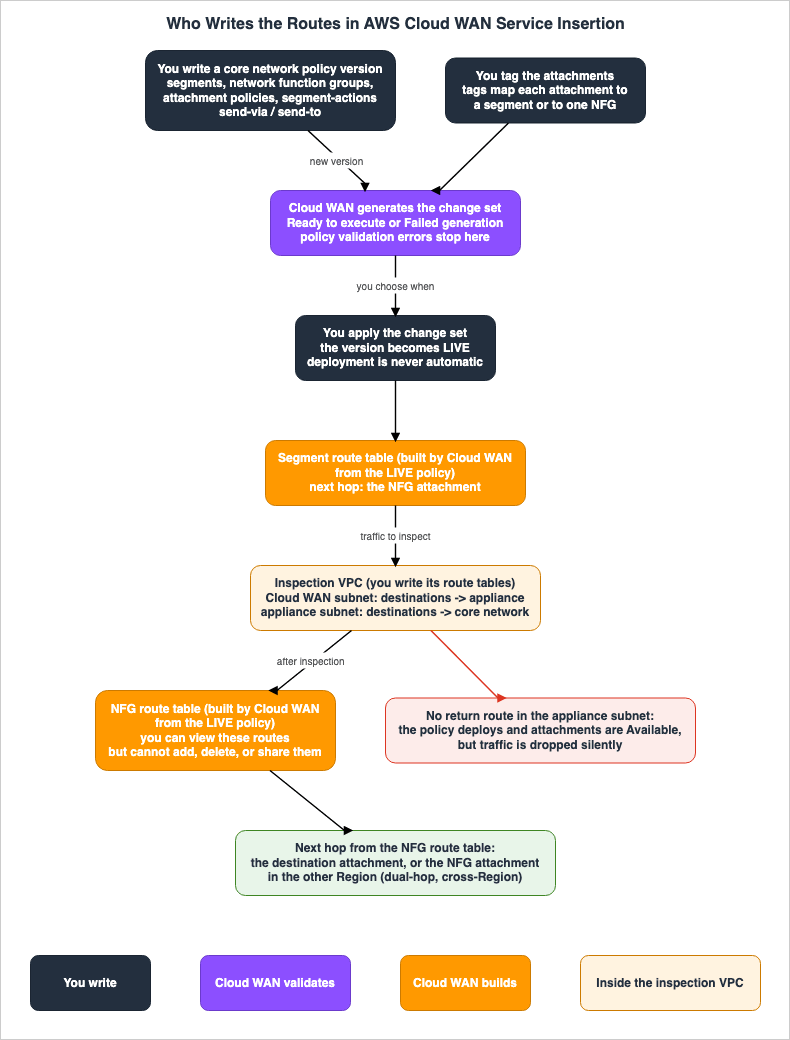
4. Whether Each Type of Traffic Is Sent to Inspection
This chapter presents the core table of this article. It categorizes communications into nine types and outlines which communications will be routed to the inspection device based on the policies defined.4.1 Traffic Type Table
In the following table,Traffic is the type of traffic, What You Write in the Policy is what you write in the policy, What Decides the Path is what decides the path, Sent to Inspection? is whether the traffic is sent to the inspection device, Inspection Passes is the number of inspections per direction, and Source State uses the terms in Section 2.2.| Traffic | What You Write in the Policy | What Decides the Path | Sent to Inspection? | Inspection Passes | Source State |
|---|---|---|---|---|---|
| T1 Within the same segment, no isolation | Nothing needs to be written; it arrives | The segment's route table. Attachments reach each other directly. | No | 0 | Isolation requirement: Stated. Direct path without inspection: Inference (Section 4.2); Observation (Section 10.3) |
| T2 Within the same segment, isolation enabled | Set isolate-attachments to true and include the segment in the send-via when-sent-to list, or use "*" | Cloud WAN adds routes to the NFG attachment in the segment's route table. | Yes | Once, within the same Region (Observation, Section 10.3). The geo-segmented blog states once per direction within one Region (Chapter 6); no statement found names the count for traffic within one segment. | Isolation and the "*" form: Stated. List form: No statement found (Section 9.3) |
| T3 Between different segments, within the same Region | send-via. The mode is either single-hop or dual-hop. | Cloud WAN. The NFG attachment within that Region. | Yes | Once. | Stated |
| T4 Between different segments, crossing Regions, single-hop | send-via and mode: single-hop. with-edge-overrides is optional. | Cloud WAN. By default, in the order listed in the What is Cloud WAN page's Region table; overrides are specified using with-edge-overrides. | Yes | Once. Either of the two Regions. | Stated |
| T5 Between different segments, crossing Regions, dual-hop | send-via and mode: dual-hop. | Cloud WAN. Both Regions' NFG attachments. | Yes | Twice. | Stated |
| T6 Egress, exiting to the internet or on-premises | send-to. mode and the segments field in when-sent-to are not used. | Cloud WAN directs the segment's default routes (0.0.0.0/0 and ::/0) to the NFG attachment. | Yes | Exits the device and goes outside. Traffic does not re-enter the AWS cloud. | Stated |
| T7 Ingress, entering from the internet | Varies depending on the documentation. | In the ingress blog, the device within the Ingress VPC. | Varies depending on the documentation. | Varies depending on the documentation. | Sources disagree |
| T8 Between different segments, with nothing written | Nothing is written. | No route exists. | Traffic does not arrive. | 0 | Stated |
T9 Between different segments, only share is written | share | The route created by share. | No | 0 | Inference |
Rows T1, T8, and T9 are the rows where traffic is not sent to inspection even though a policy is written. This article does not remove these three rows from the table. Traffic in rows T2 through T6 is sent to inspection only when all the conditions in its row are met. Even in the "Yes" rows, traffic does not arrive if the constraints outlined in Section 7.1 are not met, or if the routing in the inspection VPC is incorrect.
4.2 East-West Traffic: T1 to T5, T8, and T9
East-west communication is routed for inspection usingsend-via. The policy JSON page describes send-via as an action that sends east-west communication from one Cloud WAN attachment to another.send-via is bidirectional. The service insertion page states:Send via is a bi directional action so if you have a send via action from Segment A to Segment B you do not need to also specify a send via action of Segment B to Segment A.The geo-segmented blog also notes that
send-via is bidirectional, and that rules from segment A to segment B automatically include rules from B to A.Communication in the same segment (T1 and T2) requires isolation. The Considerations section of the service insertion page states:
Isolated mode is required for service insertion to work between attachments belonging to the same segment. This setting ensures there is no direct connectivity between attachments associated with the same segment by bypassing the network functions group.This sentence on the service insertion page uses the term "Isolated mode" without specifying the policy argument names. The Cloud WAN FAQ describes service insertion in the same segment as follows:
You need to enable isolate-attachments setting for the segment for same-segment service insertion.This article treats the "Isolated mode" on the service insertion page as a setting for the segment's
isolate-attachments. According to the policy JSON page, the default value for isolate-attachments is false. When set to true, only shared routes or static routes are available.In the article's reasoning (Inference), attachments within a non-isolated segment can directly reach each other via the segment's route table, bypassing the inspection device. The text on the service insertion page states that isolation eliminates direct communication, implying that without isolation, direct communication remains.
Regarding what to specify in
send-via's when-sent-to when routing communication within an isolated segment for inspection, the launch blog states:A “*” will also provide intra-segment service-insertion for isolated segments.In the launch blog's example, the value of
segments within when-sent-to is the string "*". The policy JSON page describes segments as a list of segments used by the send-via action. No statement was found in the sources in Section 1.3 on whether communications in the same segment are sent to inspection when the segment's own name is written in the when-sent-to list (Section 9.3). In the setup in Chapter 10, communications in the same segment passed through the inspection device with both the list form and the "*" form (Section 10.3).Communications between different segments (T3 to T5) are subjected to inspection via
send-via. According to the service insertion page, this redirection works for both communications in the same Region and those that cross Regions. mode determines the number of inspections when crossing Regions (Chapter 6).Communications between segments for which nothing is written in the policy (T8) do not reach their destination. The policy JSON page states the following regarding segments:
Each segment is created and operates as a completely separate routing domain. By default, attachments can only communicate with other attachments in the same segment.Communications between segments configured with only
share (T9) are not subjected to inspection, according to this article's inference (Inference). According to the policy JSON page, share creates routes between the attachments of two segments. There is no statement in the sources in Section 1.3 that the share routes pass through the NFG. No statement was found on which action takes precedence when both share and send-via are specified for the same segment pair (Section 9.3).4.3 North-South Traffic: T6 and T7
Outbound communication (T6) is routed for inspection usingsend-to. The service insertion page defines send-to as follows:Send to — Traffic flows north-south. That is, traffic flows into the network appliance, such as an Inspection VPC, and out to the Internet or to an on-premises location. Traffic does not re-enter the AWS cloud.According to the launch blog,
send-to directs outbound communication from a segment's workload to the NFG attachment using the default routes 0.0.0.0/0 and ::/0. The geo-segmented blog also states that send-to takes no destination CIDR and instead steers the segment's default route. According to the policy JSON page, mode is only used when the action is send-via, and the segments field in when-sent-to is not used with send-to.Inbound communication (T7) presents conflicting information. In its answer on the two main segment actions, the Cloud WAN FAQ describes
send-to as follows:You can use segment action “send-to” to steer traffic from a segment to a network function group attachment (for example an north south Internet ingress/egress use-case).The What's New post also lists "north-south (Internet Ingress/Egress) security inspection" among what service insertion makes easy, without naming
send-to. By contrast with the FAQ example above, the definition of send-to on the service insertion page, as described above, only applies to traffic exiting the device and heading towards the internet or on-premises infrastructure. The ingress blog describes the scope of service insertion as follows:AWS Cloud WAN service insertion supports centralized East-West traffic inspection through the send-via action and centralized internet egress traffic inspection through the send-to action.The ingress blog states that inbound traffic from the internet is first inspected by services in the Ingress VPC, such as AWS Network Firewall. Subsequently, it is possible to optionally add east-west service insertion to traffic flowing from the Ingress segment to the Application segment.
This article does not state whether or not traffic from the internet can be inspected through service insertion. This article can only state the following two points:
- The definition of
send-toon the service insertion page only applies to outbound traffic. - In the configuration described in the ingress blog, the device in the Ingress VPC, and not service insertion, is responsible for inspecting traffic from the internet to the Ingress VPC.
4.4 Example Policy
The following examples represent a single policy combining the T2, T3, and T6 entries from the table in this article. The form of the example is based on the JSON examples in the launch blog and the geo-segmented blog. The segment names, NFG names, ASNs, and Regions are examples and are not recommendations. For the reasons in Section 9.4, this article does not base the form of its examples on the examples on the policy JSON page.{
"version": "2021.12",
"core-network-configuration": {
"asn-ranges": ["64512-64520"],
"edge-locations": [{"location": "us-east-1"}]
},
"segments": [
{"name": "prod", "require-attachment-acceptance": false, "isolate-attachments": true},
{"name": "dev", "require-attachment-acceptance": false}
],
"network-function-groups": [
{"name": "InspectionNFG", "require-attachment-acceptance": false}
],
"attachment-policies": [
{"rule-number": 90, "condition-logic": "and",
"conditions": [{"type": "tag-exists", "key": "nfg"}],
"action": {"add-to-network-function-group": "InspectionNFG"}},
{"rule-number": 100, "condition-logic": "or",
"conditions": [{"type": "tag-exists", "key": "segment"}],
"action": {"association-method": "tag", "tag-value-of-key": "segment"}}
],
"segment-actions": [
{"action": "send-via", "segment": "prod", "mode": "single-hop",
"when-sent-to": {"segments": ["dev", "prod"]},
"via": {"network-function-groups": ["InspectionNFG"]}},
{"action": "send-to", "segment": "dev",
"via": {"network-function-groups": ["InspectionNFG"]}}
]
}In this example, attachments tagged with
nfg are added to the NFG, and attachments tagged with segment are associated with the segment whose name equals the tag's value. According to the policy JSON page, attachment policy rules are evaluated in ascending order of rule number, and the process stops at the first matching rule. The send-via lines route traffic between prod and dev, as well as traffic in the isolated prod environment, through the NFG. The send-to lines direct the default route for dev to the NFG.In the setup in Chapter 10, a policy version in the same form as this example was generated and applied successfully (Observation, Section 10.2, P4c).
4.5 Summary Table
The following table lists seven layers, using common columns across the three articles in the same series.| Boundary | Who Checks | What Is Checked | What Is Not Checked Here | Set By | Where It Is Written | Source State |
|---|---|---|---|---|---|---|
| N1 Attachment policy | Cloud WAN | Conditions specified in attachment tags, among other criteria. Rules are evaluated from the lowest number, and each attachment is connected to either a segment or an NFG. | Whether the attachment's VPC actually possesses the inspection device. Attachments that do not match any rule are not connected anywhere. | The owner of the core network defines the attachment policy, while the creator of the attachment assigns the tags. | Policy JSON page, service insertion page | Stated |
| N2 Policy generation and change set | Cloud WAN | Validation of the policy during version generation: one NFG per segment pair, reuse of a dual-hop NFG, and mixing single-hop and dual-hop within one segment. | Routes within the inspection VPC, and IPv6 settings for the attachment. | Users create versions and select which to apply. | Policy version page, policy deploy page, geo-segmented blog | Stated |
| N3 Segment route table | Cloud WAN | For segments with send-via and send-to specified, routes are added that direct traffic to an NFG attachment as the next destination. | Communication within the same segment that is not isolated. | Cloud WAN creates this from the LIVE policy. | Service insertion page, launch blog | Stated |
| N4 NFG route table | Cloud WAN | The next destination for traffic returning from inspection: the destination attachment, or an NFG attachment in a different Region. | Routes added, removed, or shared by users. The CIDRs of the attachments in the NFG. | Only Cloud WAN. | Cloud WAN FAQ, launch blog, service insertion page | Stated |
| N5 Inspection VPC route tables | VPC Route Tables | Checks if a route exists that matches the destination. | The absence of a route that returns traffic from the device back to the core network. Neither the policy nor the attachments report an error. | The owner of the inspection VPC. | Geo-segmented blog | Stated |
| N6 Appliance | Inspection Device | The content of the traffic. Outside the scope of this article. | Which traffic reaches the device. Determined by N3 and N4. | The owner of the device. | Service insertion page | Stated |
| N7 Appliance mode | Cloud WAN | Sends both directions of a single flow to the same Availability Zone within the inspection VPC. | Which traffic is routed to inspection. Attachments other than VPC attachments. | The creator of the VPC attachment can enable this option. | VPC attachment page, launch blog, Cloud WAN FAQ | Sources disagree on whether it is required |
The geo-segmented blog describes the constraints in row N2 as validation errors in the console. The behavior in row N5 is a result of the validation in the geo-segmented blog.
5. NFG Route Table
This chapter outlines the NFG route table, differentiating between what users cannot configure, what will not be included in the route table, and what Cloud WAN will create. The interpretation "NFG has no routes" is inconsistent with the documentation.5.1 NFG Route Table Summary
The following table lists descriptions related to the NFG route table.Aspect refers to the subject matter, What the Sources Say presents the descriptions from the sources, Source indicates the origin, and Source State refers to the terminology from Section 2.2.| Aspect | What the Sources Say | Source | Source State |
|---|---|---|---|
| Route Table Presence | NFG has its own route table. NFG is created as a managed segment. | Cloud WAN FAQ, launch blog, What is Cloud WAN page | Stated |
| Items Users Cannot Modify | Users cannot add, delete, or share routes within the NFG. | Cloud WAN FAQ, launch blog | Stated |
| Items Users Can View | Users can view the routes within the NFG. | Cloud WAN FAQ, launch blog | Stated |
| Items Automatically Created | Routes are automatically propagated based on the service insertion policy, rewriting the next hop destination. | Cloud WAN FAQ, launch blog | Stated |
| Items Not Included: NFG Attachment CIDR | The VPC CIDR and dynamic routes associated with attachments added to the NFG are not propagated to the NFG's route table. | launch blog | Stated |
| Items Not Included: Policy-Defined Static Routes | Static routes defined in the policy are not automatically propagated to the NFG's route table. | service insertion page | Stated |
| Required Configuration for Route Propagation to NFG | The service insertion page states that propagation to NFGs requires a specific configuration in the policy that defines which routes should be available to the network functions, but does not specify what that configuration is. | service insertion page | No statement found |
| Route Update Delay | BGP route updates may take up to 30 minutes to appear in the GetNetworkRoutes API and the console, although this does not affect the routing itself. | service insertion page | Stated |
Default Routes for send-to Segments | In segments where send-to is enabled, you may see 0.0.0.0/0 and ::/0 appearing as blackholes in the route table, which is the expected behavior. | service insertion page | Stated |
| Dynamic Route Restrictions (as of 2024) | The launch blog states that, as of the time of writing, dynamic routes advertised from dynamic attachments to the NFG are not included in the NFG's route table. This statement is not present on the current service insertion page. | launch blog | No statement found |
As outlined above, the documentation regarding NFG route tables can be divided into three categories:
- Unmodifiable: Users are unable to add, delete, or share routes in the NFG.
- Not Automatically Included: CIDR blocks for attachments added to NFG, and static routes defined in policies, are not automatically added to the NFG's route table.
- Automatically Created: Cloud WAN automatically creates routes in the NFG's route table based on service insertion configurations.
This article does not combine these three aspects into a single overview.
5.2 What the NFG Route Table Determines
In the launch blog's example in the same Region, traffic returning from the inspection VPC is directed to the attachment of the destination VPC by the NFG route table. In the launch blog's dual-hop example across Regions, the next destination in the NFG route table is the attachment of the inspection VPC in the other Region. The geo-segmented blog also states that, for dual-hop traffic across Regions, the NFG route table in the source Region resolves the destination to the inspection VPC in the other Region.In essence, the NFG route table determines where traffic goes after the inspection process. It also determines whether the traffic will undergo another inspection (see Chapter 6).
5.3 How to View Routes
According to the GetNetworkRoutes API page, theRouteTableIdentifier parameter for the GetNetworkRoutes operation can accept either CoreNetworkSegmentEdge, which refers to segment edges, or CoreNetworkNetworkFunctionGroup, which refers to the route tables of Network Function Groups (NFGs). CoreNetworkNetworkFunctionGroup identifies an NFG's route table using its core network ID, edge location, and the NFG's name.According to the service insertion page, if
0.0.0.0/0 and ::/0 appear as blackholes in a segment with send-to, you can verify that the destination is pointing to the correct location by checking the routes in the console's routes tab or using the get-network-routes API. In the configuration described in Chapter 10, get-network-routes returned 0.0.0.0/0 and ::/0 in the send-to segment as STATIC and ACTIVE routes, with the inspection VPC as the destination (see Section 10.4).6. Where and How Many Times Cross-Region Traffic Is Inspected
This chapter outlines where and how often cross-Region communication is inspected, specifically for single-hop and dual-hop configurations usingsend-via.6.1 Single-Hop and Dual-Hop
The service insertion page describes two modes as follows:Single hop — Traffic traverses a single intermediate attachment, using the deterministically preferred source or destination Region.Dual hop — Traffic traverses inserted attachments in both the source and destination core network edges. For this option, the inspection attachment should be located in both Regions for each service insertion-enabled segment.According to the Cloud WAN FAQ, in single-hop mode, communication that spans two Regions is routed to the network function in only one of those Regions and is not inspected twice. According to the Cloud WAN FAQ, users can choose dual-hop mode to enable inspection in both Regions.
The second inspection in dual-hop mode only occurs when communication crosses a Region boundary. The geo-segmented blog states the following:
That second pass applies only across Regions: within one Region the NFG route table resolves straight to the destination attachment, so traffic is inspected once per direction.This article will treat this statement from the geo-segmented blog as a validation result for that article.
6.2 Choosing the Region for Single-Hop Usage
The service insertion page describes the default Region selection process as follows:By default, Cloud WAN selects an attachment in one of the two Regions used for the network function.According to the service insertion page, when the inspection VPC exists in only one Region, Cloud WAN will use that Region for all cross-Region communication. When the inspection VPC exists in both Regions, the service insertion process will deterministically select the Region to use based on a predefined list of Region priorities.
The order of this priority list is specified in the What is Cloud WAN page, in the table of Regions. The What is Cloud WAN page notes the following below the table of Regions:
The order of Regions in this table is also used as the default priority list for AWS Cloud WAN service insertion. When Cloud WAN selects between multiple Regions for network function group traffic steering, it uses this order by default. If you haven't configured an explicit preference using with-edge-overrides in segment-actions, Cloud WAN selects the Region that appears first in the list.As of November 6, 2026, the table of Regions on the What is Cloud WAN page begins with us-east-1. In the single-hop example in the launch blog, the combination of us-east-1 and us-west-2 is used, and us-east-1 is selected as the default inspection Region. This article does not reproduce the table; check the order on the What is Cloud WAN page.
The migration blog states that for single-hop configurations, the unused inspection VPC is used as a backup. This mention of a backup is not found in the User Guide pages listed in Section 1.3 or in the Cloud WAN FAQ.
6.3 with-edge-overrides
Users can override the default selection behavior using with-edge-overrides. According to the policy JSON page, with-edge-overrides is written inside via (the page's example is a send-via action), and multiple overrides can be specified. Each override consists of edge-sets and use-edge-location.edge-sets: A list of edge sets to which this override applies. If two edges are listed, the override applies to communication between those two edges in both directions. If three or more edges are listed, the override applies to communication between any two of those edges.use-edge-location: The edge to use for communication within this edge set. According to the policy JSON page, when the NFG has attachments on both edges of the set, Cloud WAN will send communication to this edge. If no override is specified, Cloud WAN selects an edge based on its default priority list.
The following example is an override that directs communication between us-east-1 and us-west-2 to be inspected in the inspection VPC in us-west-2. There is no JSON example of
with-edge-overrides in the blog post mentioned in Section 1.3. The format of this example is based on the argument descriptions in the policy JSON page.{"action": "send-via", "segment": "prod", "mode": "single-hop",
"when-sent-to": {"segments": ["dev"]},
"via": {"network-function-groups": ["InspectionNFG"],
"with-edge-overrides": [
{"edge-sets": [["us-east-1", "us-west-2"]], "use-edge-location": "us-west-2"}
]}}The date when
with-edge-overrides was introduced, and the date when the ability to specify multiple overrides was added, cannot be found in the document history or What's New section (Section 9.3).6.4 Figure 2
Figure 2 illustrates the NFG attachments used for communication in the same Region, as well as single-hop and dual-hop communication between different Regions.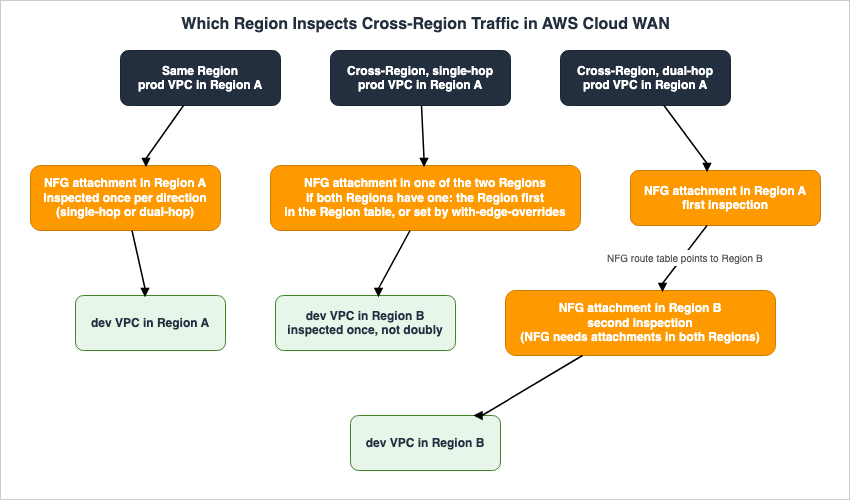
with-edge-overrides setting. The right column of Figure 2 illustrates dual-hop communication. Communication traverses the NFG attachments of both the source Region and the destination Region, once in each. For dual-hop communication, the NFG must have attachments in both Regions.7. Policy Constraints and What Happens When One Is Not Met
This chapter outlines the policy constraints regarding service insertion, categorizing the consequences of violation into two scenarios: instances where version generation will halt due to an error, and instances where communication will fail without generating an error.7.1 Table of Constraints
The following table lists the consequences of violating each constraint, along with their source.Constraint refers to the constraint itself, If It Is Not Met describes the outcome when the constraint is not met, Source indicates the origin, and Source State refers to the terms defined in Section 2.2.| Constraint | If It Is Not Met | Source | Source State |
|---|---|---|---|
| An attachment can only be connected to either a segment or an NFG. | According to the NFG console page, an attachment connected to a segment cannot be connected to an NFG. The specific point at which this occurs is not documented. | Service insertion page, NFG console page | Stated |
| An NFG can only have one attachment within a single Region. | The behavior when this condition is violated is not documented. | Service insertion page, geo-segmented blog | Stated |
A segment pair must use only one NFG for all send-via configurations. | According to the geo-segmented blog, the console will stop the policy creation process with a validation error. | Geo-segmented blog, launch blog | Stated |
An NFG used with a send-via configuration for dual-hop cannot be used for a single-hop send-via or for send-to. | According to the geo-segmented blog, the process will stop with a validation error. | Service insertion page, geo-segmented blog | Stated |
A segment cannot simultaneously use both single-hop and dual-hop send-via configurations. | According to the geo-segmented blog, the process will stop with a validation error. | Geo-segmented blog | Stated |
| To inspect traffic within the same segment, the segment must be isolated. | Based on the reasoning presented in this article, no error occurs, and traffic is delivered directly without passing through the inspection device. | Service insertion page, Cloud WAN FAQ | Constraint: Stated, Outcome: Inference |
| The inspection VPC's device subnet must have a route back to the core network. | According to the geo-segmented blog, the policy is applied, the attachment succeeds, but traffic is silently dropped. There are no error messages in the logs, no metrics indicating the attachment dropped packets, and no policy errors. | Geo-segmented blog | Stated |
| In a dual-stack configuration, enable IPv6 support for the attachment. | According to the geo-segmented blog, no error occurs, but the VPC's IPv6 prefix does not appear in the segment or NFG route tables. | Geo-segmented blog | Stated |
| Add an attachment to an NFG. | The documentation provides conflicting information. Some documentation states that version generation succeeds and the traffic is blackholed, while other documentation states that version generation fails (Section 9.1). | Service insertion page, enhancement blog, policy JSON page | Sources disagree |
| An NFG uses one segment of the core network. | According to the quotas page, there is a limit of 40 segments per core network. According to the launch blog and Cloud WAN FAQ, an NFG uses one of those segments. | Quotas page, launch blog, Cloud WAN FAQ | Stated |
| A policy version is not automatically applied. | Simply creating a version does not change the routes. | Policy version page, policy deploy page | Stated |
The geo-segmented blog quotes the console error for the segment pair constraint as follows:
A segment pair can only use ONE NFG for all send-via actions between them. Error: Segments X and Y are configured to use network function group A but are also configured to use network function group BThe service insertion page describes the reuse of a dual-hop NFG as follows:
If a network function group is used by a send via dual hop action it cannot be reused for a single hop or a send to action.According to the geo-segmented blog, NFG used in a single-hop configuration can also be used with
send-to.Regarding return routes, the geo-segmented blog states:
The policy deploys cleanly and attachments move to the Available state. Traffic is still dropped silently. The cause is ordinary VPC routing. After the appliance re-emits an inspected packet, the inspection subnet’s route table needs an explicit route back to the core network, or the VPC drops it.According to the geo-segmented blog, an inspection VPC for an NFG used by
send-via requires two route tables. One is for the subnet that hosts the Cloud WAN attachment's network interface, directing workload traffic to the inspection device. The other is for the subnet that hosts the inspection device, directing workload traffic to the core network. The geo-segmented blog indicates that if the latter is missing, the device will receive and forward traffic, but the VPC will drop that traffic.7.2 Appliance Mode Positioning
Appliance mode is not a mechanism for determining which traffic is routed for inspection. The VPC attachment page describes appliance mode as follows:This ensures that Cloud WAN uses the same Availability Zone for that VPC attachment for the lifetime of the flow of traffic between a source and destination.According to the VPC attachment page, appliance mode is only applicable to VPC attachments. Traffic, whether originating from VPN connections, Connect, or other types of attachments, can still enter the core network.
The necessity of appliance mode varies depending on the documentation.
- The Considerations section of the service insertion page states that appliance mode must be enabled in the inspection VPC to ensure traffic flows in both directions.
- The launch blog states that appliance mode is required when you want to guarantee stateful inspection as a security foundation and is orthogonal to service insertion. The Cloud WAN FAQ also states that appliance mode is independent of service insertion and is required when you want to guarantee stateful inspection.
- The VPC attachment page states that appliance mode is required in the inspection VPC when using a Gateway Load Balancer endpoint, regardless of whether the device is stateful.
This article does not attempt to synthesize these three perspectives. Instead, this article focuses on the following points: appliance mode does not determine which traffic is routed for inspection; for stateful inspection and for Gateway Load Balancer endpoints, the sources say appliance mode is required; and the service insertion page mentions it without any specific conditions.
As a prerequisite for Availability Zone-aware routing, the VPC attachment page says to associate spoke VPC attachments with segments so that their routes are propagated dynamically. According to the VPC attachment page, static routes defined in the core network policies do not contain Availability Zone information.
8. Differences from Transit Gateway and Inspection Inside a VPC
This chapter outlines the differences between Cloud WAN's service insertion, Transit Gateway, and VPC-based inspection, differentiating them based on which entity controls the routing path to the inspection point. This article does not aim to determine which approach is superior.8.1 Comparison Table
The following table usesAspect to denote the subject, Cloud WAN Service Insertion, Transit Gateway, and Routing Inside a VPC to represent different methods, and Source State as defined in Section 2.2.| Aspect | Cloud WAN Service Insertion | Transit Gateway | Routing Inside a VPC | Source State |
|---|---|---|---|---|
| Person responsible for defining the route | Users define policies using send-via and send-to, and Cloud WAN propagates the routes. | Users modify the Transit Gateway's route table to direct traffic to the inspection attachment. | Users define routes within a subnet's route table, with the device as the destination. | Stated |
| Method of connecting the inspection device | The inspection VPC (or other attachment) is placed within the NFG. | Either the inspection VPC's VPC attachment or the AWS Network Firewall's network function attachment. | The destination of the route can be a Gateway Load Balancer endpoint, a Network Firewall endpoint, a NAT gateway, or the device's network interface. | Stated |
| Configuration to send both directions of a single flow to the same Availability Zone | Appliance mode of the VPC attachment. | Appliance mode of the VPC attachment. Automatically enabled with Network Firewall attachments. | Not covered in this article. | Stated |
| Location for inspecting cross-Region traffic | Single-hop and dual-hop, default Region priority, and with-edge-overrides. | Not covered in this article. | Not covered in this article. | Stated |
The information for the Transit Gateway column is sourced from the TGW how it works page and the TGW VPC attachment page. The TGW how it works page states the following regarding Network Firewall attachments:
Once your firewall and attachment are ready, you can simply modify your Transit Gateway route tables to send traffic to the attachment for inspection.The source of the
Routing Inside a VPC column is the VPC middlebox routing page. According to the VPC middlebox routing page, to route communication between two subnets to a device, you need to create a route in the route table of one of the subnets, with the destination being the CIDR of the other subnet, and point that destination to the device.8.2 Key Differences
The difference between the three approaches lies in who controls the routing path. In inspections within Transit Gateway and VPCs, users define the routes, and traffic flows according to those user-defined routes. With Cloud WAN's service insertion, users define their intent through policies, and Cloud WAN creates the routes. Therefore, in Cloud WAN's service insertion, users cannot modify the NFG route tables, but instead can view the routes usingGetNetworkRoutes to verify that they were created as intended (see Section 5.3).However, even with Cloud WAN's service insertion, the routes in the inspection VPC are still defined by the user (see Section 3.1). This article infers (Inference) that the routes that users verify within Cloud WAN's service insertion fall into two categories: examining the NFG and segment route tables, and defining the route tables in the inspection VPC.
The launch blog notes that, prior to service insertion with Cloud WAN, it was necessary to create static routes in the inspection segment's route table each time a new VPC was added.
9. Where the Sources Disagree and What Is Not Written
This chapter gathers instances where the information in the sources conflicts, where information is missing, or where no statement could be found.9.1 Where the Sources Disagree
- Regarding traffic entering from the internet: The Cloud WAN FAQ mentions both ingress and egress of the internet as examples in the
send-tosection. The What's New post also lists "north-south (Internet Ingress/Egress) security inspection" among what service insertion makes easy, without namingsend-to. The service insertion page definessend-toas referring only to traffic exiting the device. The ingress blog states that service insertion handles both east-west inspection and egress inspection, and that ingress traffic is inspected in the Ingress VPC (Section 4.3). - Regarding Network Function Groups (NFGs) without attachments: The service insertion page indicates that even if an NFG lacks an attachment, the attachment policy can still succeed, and the execution of
send-toandsend-viapolicies directed at the NFG will also succeed. However, traffic destined for the NFG will remain blackholed until an attachment is added. The enhancement blog also confirms that after this enhancement, the policy can succeed even if the NFG lacks an attachment. The policy JSON page states that attachment policies, including those for NFGs, require an attachment, while policies for service insertion that do not include an attachment will fail to generate. This article infers (Inference) that the statement in the policy JSON page describes the behavior prior to the enhancement mentioned in the enhancement blog. The policy JSON page does not include a date. In the setup in Chapter 10, a version with an NFG that had no attachment was generated and applied successfully (Observation). - Regarding the
condition-logicfor NFG attachment policies: The policy JSON page, in the explanation foradd-to-network-function-group, states that NFGs must useandin thecondition-logic. However, the same page, in the explanation forcondition-logic, states that for NFGs, the policy JSON allows for bothandandoras options. The launch blog provides an example using"condition-logic": "or"for rules connecting to an NFG. - Regarding the format for rules connecting to an NFG: The policy JSON page describes a format using the action for
add-to-network-function-groupand the conditiontag-exists. The launch blog provides an example using anassociation-methodoftagand atag-value-of-keythat uses the NFG's name as the tag value. - Regarding the types of attachments that can be associated with an NFG: The service insertion page lists five options: Connect, Direct Connect gateway, Transit Gateway route tables, VPCs, and VPNs. The policy JSON page lists four options for the
attachment-typecondition:vpc,site-to-site-vpn,connect, andtransit-gateway-route-table, but does not include Direct Connect gateway. The Cloud WAN FAQ lists four options: VPC, VPN, Connect, and Transit Gateway peering route tables. The launch blog lists four options as of June 11, 2024, while the enhancement blog lists four options as of May 12, 2025. According to the document history, support for Direct Connect attachments was added on November 25, 2024. This article uses the five options listed in the service insertion page. - Regarding the requirement for appliance mode: The service insertion page states that appliance mode is required without any conditions. The launch blog and Cloud WAN FAQ state that it is required during stateful inspection. The VPC attachment page states that it is required for endpoints using a Gateway Load Balancer (Section 7.2).
- Regarding the scope of
send-via: The procedure section of the service insertion page describessend-viaas an action that sends east-west traffic between all VPCs. The policy JSON page and the traffic actions section of the service insertion page describesend-viain terms of thesegmentand the segments listed inwhen-sent-to, and do not say that it covers all VPCs.
This article does not declare any of the items to be incorrect.
9.2 What the Documentation Does Not List
- An attachment that connects AWS Network Firewall directly to Cloud WAN: the list on the policy JSON page of attachment types that a core network supports has five entries, Transit Gateway Connect, Direct Connect gateway, VPC, VPN, and Transit Gateway route table, and does not list a Network Firewall attachment. This does not indicate that Cloud WAN lacks an equivalent to the network function attachment for Transit Gateway.
- The
with-edge-overridesentry: the document history lists the service insertion entry of June 11, 2024, but does not list an entry forwith-edge-overrides.
9.3 Items with No Statement Found
This article identifies the following items where descriptions could not be found after searching the materials from Section 1.3 and AWS documentation:- The date
with-edge-overrideswas introduced, and the date when multiple overrides became possible (as documented in the document history and What's New sections). - The content of the specific configuration that the service insertion page says is required to propagate routes to NFGs.
- The priority when both
shareandsend-viaare specified for the same segment pair. - Whether communications in the same segment are sent to inspection when the segment's own name is listed in the
when-sent-tolist. The launch blog uses the"*"form. In the setup in Chapter 10, the traffic passed through the inspection device with the list form as well (Observation). - Whether the dynamic route constraints mentioned in the launch blog as of June 11, 2024, still apply. The launch blog states that dynamic routes advertised from dynamic attachments to NFG are not added to the NFG route table, and that users must advertise default routes from dynamic attachments to NFG. The current service insertion page does not contain this statement; instead, it includes a statement regarding the delay in displaying BGP updates.
- The symmetry when an attachment for Connect is added to NFG. Appliance mode is only available with VPC attachments.
- The explicit mention of GA (General Availability). The heading of the What's New post uses the word "introduces" for service insertion, and neither the word "preview" nor "GA" appears in the body. As of June 11, 2024, the What's New post states that service insertion is available in all Regions where Cloud WAN is available.
9.4 Important Notes When Reading
The JSON examples provided on the policy JSON page contain elements that cannot be used directly. This article does not base its examples on the examples found on the policy JSON page.- In the
send-viaexample, there are trailing spaces at the end of the names of the keys"segments ","with-edge-overrides ", and"edge-sets ". - The value of
segmentin thesend-viaexample isSendToInspectionVPC, which does not align with the description that mentionsdevelopment. - The
send-toexample has an extraneous closing bracket]at the end. - In the attachment policy example, there is a missing comma after
"add-to-network-function-group": "SendToInspectionVPC".
The
when-sent-to value in the launch blog example uses a string "*" for segments. Both the geo-segmented blog and the policy JSON page descriptions use a list format. This article's examples also utilize a list format.10. What This Setup Showed
This chapter details the results of testing, using the configuration built in us-east-1, where the policy versions were varied to determine which communications pass through the inspection device. The information presented here represents observations, and is not a commitment of the sources. This article does not override the statements of the sources in Chapters 3 through 9 with these observations.10.1 Setup
The testing was conducted on November 6, 2026, using AWS CLI version 2.39.3. The configuration was created using a CloudFormation template and the AWS CLI.- The core network edge consists of a single point in the us-east-1 Region. Cross-Region communication was not tested.
- There are two segments:
prodanddev. There is one NFG namedInspectionNFG. - There are four VPCs.
prod-a(10.1.0.0/24) andprod-b(10.2.0.0/24) are connected to theprodsegment.dev-a(10.11.0.0/24) is connected to thedevsegment. The inspection VPC (100.64.1.0/24) is associated with the NFG, and appliance mode is enabled on that VPC attachment. - EC2 instances in the three workload VPCs pinged each other three times every 30 seconds, and the number of received responses was recorded.
- An EC2 instance in the inspection VPC stood in for the inspection device and forwarded received IPv4 packets. The instance acting as a replacement for the inspection device counted received ICMP (In) and sent ICMP (Out) packets every 30 seconds. AWS Network Firewall was not used.
- The route tables of the inspection VPC followed the two-route-table form described in Section 7.1. Subnets associated with the Cloud WAN attachment were directed to the device using the 10.0.0.0/8 range, while device subnets were directed to the core network using the same 10.0.0.0/8 range.
- The attachment policy was configured with two rules, mirroring the example in Section 4.4. The rule connecting to the NFG used a policy JSON page format, utilizing the
add-to-network-function-groupaction,and, and thetag-existscondition.
10.2 Steps and Versions
The following table lists the steps tested, the policy versions, and the results of policy generation and application.| Step | Version | What Changed | Generation and Execution |
|---|---|---|---|
| P0 | 1 | No service insertion | Applied during core network creation. |
| P1 | 2 | Added NFG and send-via (single-hop) from prod to dev. The inspection VPC attachment is not yet in place. | Both generation and application were successful. |
| After P1 | 2 | Added the inspection VPC attachment. | No policy changes. |
| P2 | 3 and 4 | Set isolate-attachments in prod to true. Version 3 has when-sent-to listed as ["dev","prod"], while Version 4 has it set to "*" | Both generation and application were successful. Observations related to P2 were made with Version 4. |
| P3 | 4 | No policy changes. Removed and then re-added the return route for the inspection VPC's device subnet. | — |
| P4a | 5 | Changed the condition-logic of the NFG rule to or, adding two conditions. | Generation was successful. Application was not performed. |
| P4b | Not created | Attempted to add a send-via with a second NFG to the same segment pair. | Rejected at the version creation stage. |
| P4c | 6 | Added send-to for dev to Version 3, reusing the single-hop NFG. | Both generation and application were successful. |
10.3 Connectivity and the Traffic Seen by the Inspection Instance
The following table lists, for each step, the results of the ping tests and the communication seen by the instance that stood in for the inspection device.| Step | prod-a and prod-b | dev-a and prod | Seen by the Inspection Instance | Source State |
|---|---|---|---|---|
| P0 | Received | Not Received | None | Observation |
| P1, without attachment | Received | Not Received | None | Observation |
| P1, with attachment | Received | Received | Requests and responses between dev-a and prod-a, and between dev-a and prod-b. Includes requests initiated from dev-a. No communication between prod-a and prod-b. | Observation |
| P2 | Received | Received | Requests and responses between prod-a and prod-b, in addition to the communication observed in P1. | Observation |
| P3, without return route | Not Received | Communication initiated from prod was not received. | Only incoming and outgoing requests; no responses. | Observation |
| P3, after return | Received | Received | Requests and responses. | Observation |
| P4c | Received | Received | Includes requests and responses between prod-a and prod-b. | Observation |
Based on this configuration, the following was observed.
- Between segments with nothing written in the policy, communication was not received (P0). This is the same as T8 in Section 4.1.
- While
send-viawas only configured for one-way communication fromprodtodev, communication initiated fromdev-aalso passed through the inspection device (P1). This is consistent with the service insertion page description in Section 4.2, which states thatsend-viais bidirectional. - Communication between
prod-aandprod-bwithin segments that were not isolated did not pass through the inspection device (P1). However, when isolation was enabled andwhen-sent-toincludedprod, the communication did pass through (P2, P4c). With both the list form and the"*"form ofwhen-sent-to, the version was generated and applied, and in P4c, with the list form, communication in the same segment passed through the inspection device. - In the sections where the return route was disabled, communication originating from
prodwas not received. Ping records fromdev-aonly captured data from before the return route was disabled.
10.4 Route Tables
The following table summarizes key aspects of the route tables for segments and the NFG, as observed withget-network-routes. Attachment IDs have been obscured, and destinations are listed by VPC name.| Step | Segment prod | Segment dev | NFG InspectionNFG |
|---|---|---|---|
| P0 | 10.1.0.0/24 routes to prod-a; 10.2.0.0/24 routes to prod-b | 10.11.0.0/24 routes to dev-a | ValidationException. Message: Network Function Group not found. |
| P1, no attachment | 10.11.0.0/24 routes to BLACKHOLE with no destination. | 10.1.0.0/24 and 10.2.0.0/24 route to BLACKHOLE with no destination. | 10.1.0.0/24 routes to prod-a; 10.2.0.0/24 routes to prod-b; 10.11.0.0/24 routes to dev-a. |
| P1, with attachment | 10.11.0.0/24 routes to the inspection VPC; 10.2.0.0/24 routes to prod-b. | 10.1.0.0/24 and 10.2.0.0/24 route to the inspection VPC. | Same as P1, no attachment. |
| P2 | 10.1.0.0/24, 10.2.0.0/24, and 10.11.0.0/24 all route to the inspection VPC. | Same as P1, with attachment. | Same as P1, no attachment. |
| P4c | Same as P2. | 0.0.0.0/0 and ::/0 are both STATIC and ACTIVE, routing to the inspection VPC. Otherwise, same as P2. | Same as P1, no attachment. |
Based on this configuration, the following was observed.
- Even in the version with an NFG that had no attachment, the version was generated and applied, and the CIDRs toward the other segment became
BLACKHOLE(P1). This behavior matches the service insertion page and enhancement blog side of the discrepancy on NFGs without attachments in Section 9.1. This article does not claim that the wording on the policy JSON page is incorrect based on this single observation.
- The NFG's route table contained the CIDR of the workload's VPC, with its attachment listed as the destination. The CIDR of the inspection VPC was not included. This aligns with the launch blog's statement that the CIDR of attachments added to an NFG does not propagate to the NFG's route table (as described in Section 5.1).
- This article infers (Inference) that the fact that, in P1, the
prodsegment hadprod-bas the destination for 10.2.0.0/24 was the reason why communication in the segment that was not isolated did not pass through the inspection device.
- In the
devsegment, wheresend-towas added,0.0.0.0/0and::/0were displayed asSTATICandACTIVEroutes pointing to the inspection VPC, rather than appearing as a blackhole (P4c). The service insertion page states that these may sometimes appear as a blackhole; however, in this observation, they did not.
- Even after removing the return routes, the Cloud WAN's route table remained unchanged, and no errors were reported in either the policies or the attachments (P3). The instance standing in for the inspection device received and sent out the requests, but no responses came back. This is consistent with the results of the geo-segmented blog's validation (as described in Section 7.1).
10.5 What Stopped When the Version Was Created
The P4b version was rejected with aCoreNetworkPolicyException at the point where PutCoreNetworkPolicy was called, and therefore no version was created. The Errors section of the response, retrieved using the AWS CLI with the --cli-error-format json option, is as follows:"ErrorCode": "CONFLICTING_NETWORK_FUNCTION_GROUP_FOR_SEGMENT_PAIR",
"Message": "$.segment-actions[1]: Segments dev and prod are configured to use network function group SecondNFG but are also configured to use network function group InspectionNFG in $.segment-actions[0]",The latter part of this message has the same form as the console error message quoted from the geo-segmented blog in Section 7.1. In this setup, this constraint stopped the version at version creation, not at change set generation.
A version of P4a, where the
condition-logic for the rule connecting to the NFG was set to or, did not fail during generation. Since this article did not apply the P4a version, it did not observe whether attachments are associated with the NFG under the or rule.10.6 What This Setup Cannot Tell
- Communication across Regions was not tested. For the Region used by single-hop, the two inspections of dual-hop, and
with-edge-overrides, this article has only the statements of the sources in Chapter 6. - Egress to and ingress from the internet were not tested. Neither the workload VPCs nor the inspection VPC has an exit to the internet. What P4c showed is only the route table for
send-to. - The inspection device is simply an EC2 instance that forwards packets. This article has not tested behavior with AWS Network Firewall, Gateway Load Balancer, or third-party devices.
- Only one Availability Zone is used. This configuration does not reveal whether appliance mode sends both directions of a single flow in the same Availability Zone.
- All observations were made only once. This article has not attempted to reproduce results over time or in other accounts.
11. Failure Modes
This chapter gathers common types of failure, drawing from the materials presented in Chapters 4 through 7.- Assuming that writing
send-viaalso inspects traffic in the same segment: According to the service insertion page, isolated mode is required to route traffic in the same segment for inspection. According to the Cloud WAN FAQ, you need to enableisolate-attachmentsfor that segment. Attachments within a segment that is not isolated, according to this article's inference (Inference), reach each other directly. - Assuming that segments connected with
shareare inspected:shareonly creates routes between two segments, and there is no statement in the sources in Section 1.3 thatshareroutes pass through the NFG. - Deciding that traffic coming from the internet can also be inspected with
send-to: The sources disagree. The ingress blog describes a configuration that inspects ingress traffic within an Ingress VPC (Section 4.3). - Forgetting the return route in the inspection VPC: According to the geo-segmented blog, policies and attachments are successfully applied, but traffic silently drops. You need to add a route in the device's subnet route table that directs workload traffic to the core network.
- Using the dual-hop NFG for egress as well: According to the service insertion page, the NFG used with dual-hop
send-viacannot be used with single-hopsend-viaorsend-to. The geo-segmented blog describes a configuration that uses a separate NFG for egress traffic. - Adding a second NFG to a segment pair: According to the geo-segmented blog, a segment pair can only use one NFG for all
send-viaconfigurations, and the console will stop the process with a validation error. - Mixing single-hop and dual-hop within one segment: According to the geo-segmented blog, this will result in a validation error. You need to determine the
modefor each segment first. - Assuming that dual-hop inspects traffic in the same Region twice: According to the geo-segmented blog, the second inspection only occurs when traffic crosses Region boundaries.
- Applying the policy without adding an attachment to the NFG: According to the service insertion page, traffic destined for the NFG will be blackholed until an attachment is added.
- Assuming that enabling appliance mode sends traffic to inspection: Appliance mode only sends both directions of a single flow to the same Availability Zone and does not determine which traffic to route for inspection.
- Trying to add routes to the NFG's route table: According to the Cloud WAN FAQ and the launch blog, users are not permitted to add, delete, or share routes in the NFG.
- Pasting the example from the policy JSON page as is: As noted in Section 9.4, some key names have trailing spaces and a comma is missing.
12. Frequently Asked Questions About Cloud WAN Service Insertion
This chapter addresses common questions, focusing on the misconceptions outlined in Section 1.1, and provides answers with references to relevant sections of the text.Q1. Does specifying send-via trigger inspection of traffic in the same segment?
It will not, unless that segment is isolated. According to the service insertion page, isolated mode is required to trigger inspection of traffic in the same segment. According to the Cloud WAN FAQ, you need to enable isolate-attachments for that segment (Section 4.2).Q2. Does send-via need to be written in reverse as well?
No. According to the service insertion page, send-via is a bidirectional action. Therefore, if you define a send-via action from segment A to segment B, you do not need to define a send-via action from segment B to segment A (Section 4.2).Q3. Can communication entering from the internet also be inspected through service insertion?
The sources disagree. The Cloud WAN FAQ mentions both internet ingress and egress as examples usingsend-to. The What's New post also lists "north-south (Internet Ingress/Egress) security inspection" among what service insertion makes easy, without naming send-to. However, the send-to definition on the service insertion page only describes outbound traffic. The ingress blog details a configuration where devices in the Ingress VPC inspect traffic entering from the internet (Section 4.3).Q4. Can users add routes to the NFG route table?
NFG's route table does not allow users to add routes. According to the Cloud WAN FAQ and the launch blog, while users can view NFG's routes, they are unable to add, delete, or share them. NFG's route table is not empty; Cloud WAN creates its routes from the service insertion configuration in the policy (Chapter 5).Q5. How many times is communication across Regions inspected?
Themode determines the number of inspections. According to the service insertion page and the Cloud WAN FAQ, single-hop connections are inspected once in one Region, while dual-hop connections are inspected in both Regions. According to the geo-segmented blog, the second inspection for dual-hop connections only occurs when communication crosses Regions; in the same Region, communication is inspected once per direction (Section 6.1).Q6. For single-hop deployments, in which Region will the inspection be performed?
By default, the inspection is performed in the Region listed first in the Region table on the What is Cloud WAN page. If the inspection VPC exists in only one Region, according to the service insertion page, that Region is used. Users can specify the edge to be used for each edge pair using thewith-edge-overrides parameter (see Sections 6.2 and 6.3).Q7. Is appliance mode required for service insertion?
The wording varies depending on the documentation. The service insertion page states that it is required without any conditions. The launch blog and the Cloud WAN FAQ state that it is required during stateful inspection. The VPC attachment page specifies that it is required when using a Gateway Load Balancer endpoint. In none of the sources is appliance mode a setting that decides which traffic is routed for inspection (see Section 7.2).Q8. If the routing in the inspection VPC is incorrect, will the policy application fail?
According to the validation in the geo-segmented blog, it will not. Even if the inspection device's subnet lacks a route back to the core network, policy application and attachment will still succeed, and communication will simply fail without any error messages (see Section 7.1).Q9. Are Cloud WAN's network function groups the same as Transit Gateway's network function attachments?
No. According to the TGW how it works page, network function attachments are resources that directly connect network security functions, such as AWS Network Firewall, to Transit Gateway. Cloud WAN's network function groups (NFGs) consist of a collection of attachments, such as inspection VPCs (see Section 1.4).13. Summary
Before applying Cloud WAN service insertion policies, ensure the following:- Communications you want to inspect are categorized based on which of the T1 through T9 designations (as described in Section 4.1) they fall under.
- If you want to inspect communications in the same segment, set
isolate-attachmentstotrueand ensure that thesend-viasetting'swhen-sent-toincludes that segment. The launch blog example uses the"*"format. - Pairs of segments connected solely via
shareare not treated as being inspected. - You are not relying solely on service insertion to inspect communications originating from the internet. You know that the sources disagree.
- Use only one NFG for each segment pair, and ensure that each segment has only one configured
mode. Do not reuse a dual-hop NFG forsend-to. - Each NFG has one attachment per Region used for inspection. In dual-hop configurations, ensure there are attachments in both Regions.
- For single-hop configurations, the Region used for inspection is either determined by the order listed in the What is Cloud WAN page's Region table, or by using
with-edge-overrides. - The device subnet in the inspection VPC has a route back to the core network. If using dual-stack, ensure that the attachment's IPv6 support is enabled.
- The attachment in the inspection VPC has appliance mode enabled when necessary. Do not treat appliance mode as a setting that determines which communications are routed for inspection.
- After creating a version, verify the contents of the change set before applying it.
- After applying, use
GetNetworkRoutesto review the segment's route table and the NFG's route table, confirming that the routes are as intended. Conduct connectivity testing to verify that traffic is flowing through the inspection devices.
14. References
- AWS Cloud WAN service insertion - AWS Network Manager
- Core network policy version parameters in AWS Cloud WAN - AWS Network Manager
- Create a network function group in an AWS Cloud WAN policy version - AWS Network Manager
- What is AWS Cloud WAN? - AWS Network Manager
- Core network policy versions in AWS Cloud WAN - AWS Network Manager
- Deploy an AWS Cloud WAN core network policy version - AWS Network Manager
- VPC attachments in AWS Cloud WAN - AWS Network Manager
- AWS Cloud WAN Quotas - AWS Network Manager
- Document history for AWS Cloud WAN - AWS Network Manager
- GetNetworkRoutes - AWS Network Manager API Reference
- PutCoreNetworkPolicy - AWS Network Manager API Reference
- CreateVpcAttachment - AWS Network Manager API Reference
- AWS Cloud WAN FAQs - Amazon Web Services
- AWS Cloud WAN introduces Service Insertion to simplify security inspection at global scale - AWS What's New
- Simplify global security inspection with AWS Cloud WAN Service Insertion - AWS Networking & Content Delivery Blog
- Migration to AWS Cloud WAN multi-Region inspection using service insertion - AWS Networking & Content Delivery Blog
- Performance and metrics enhancements for AWS Transit Gateway and AWS Cloud WAN - AWS Networking & Content Delivery Blog
- Centralized ingress inspection architecture in AWS Cloud WAN - AWS Networking & Content Delivery Blog
- Designing geo-segmented AWS Cloud WAN with service insertion - AWS Networking & Content Delivery Blog
- Amazon VPC attachments in AWS Transit Gateway - Amazon VPC
- How AWS Transit Gateway works - Amazon VPC
- Example routing options - Amazon Virtual Private Cloud
References:
Tech Blog with curated related content
Written by Hidekazu Konishi