What Decapsulate Does Not Tell You - AWS KMS ML-KEM Keys and Implicit Rejection
First Published:
Last Updated:
Encapsulate operation creates a 32-byte shared secret and its ciphertext, while the Decapsulate operation recovers the shared secret from the ciphertext. These two operations only check a limited portion of what users might expect. Encapsulate does not receive a byte string of a public key; instead, KMS generates a shared secret and returns it in plaintext. Decapsulate only returns an exception when the ciphertext length is incorrect; otherwise, it returns a 32-byte value, even if the ciphertext was created with a different key or has been altered.This article outlines, in operation tables and two diagrams, how far KMS checks and where the caller's checks begin when using KMS ML-KEM keys. For example, a successful response from
Decapsulate does not indicate that the ciphertext and key are valid. It is the caller's responsibility to confirm that both parties have obtained the same shared secret. This article differentiates between what the documentation states, what is not found within the documentation, and where discrepancies exist between different pieces of documentation. The documentation was verified as of November 6, 2026.This article is not a mathematical explanation of ML-KEM, nor is it a step-by-step guide on how to create keys. It also does not discuss pricing. Furthermore, it does not detail methods for attacking ML-KEM.
Related articles on this site:
- When Does a Connection to an AWS Endpoint Actually Use ML-KEM? - Client Defaults, Server Policies, Each Hop, and How to Tell
- Enforcing an ML-DSA Policy on AWS - What kms:KeySpec and acm:KeyAlgorithm Can Stop, and What AWS Private CA and Imported Certificates Leave Open
- AWS KMS Envelope Encryption and Data Key Caching Patterns - Design Decisions for the AWS Encryption SDK and Multi-Region Keys
- Post-Quantum Cryptography Standardization Timeline and Migration on AWS - From Algorithm Selection to Service Support
- AWS History and Timeline regarding AWS Key Management Service - Overview, Functions, Features, Summary of Updates, and Introduction to KMS
- Cryptography Glossary for Engineers - AES, RSA, ECDSA, HKDF, Envelope Encryption, and TLS Explained
- Querying Glue Iceberg Tables with a Partner's OIDC Token - Token Exchange at AWS Sign-In, One Role, and Lake Formation
- Service Insertion in AWS Cloud WAN - Which Traffic a Core Network Policy Sends to Inspection
Table of Contents
- 1. Scope and Assumptions
- 2. How to Read the Tables
- 3. Where the Shared Secret Crosses the AWS KMS Boundary
- 4. For Each Operation: What It Accepts, What It Returns, and What It Does Not Check
- 5. Two Forms of Encapsulation
- 6. Implicit Rejection and Who Owns the Confirmation
- 7. What Can and Cannot Be Done with Key Management
- 8. Differences from ML-DSA Keys, ECDH, and ML-KEM in TLS
- 9. Where the Sources Disagree and What Is Not Written
- 10. What This Setup Showed
- 11. Failure Modes
- 12. Frequently Asked Questions About KMS ML-KEM Keys
- 13. Summary
- 14. References
1. Scope and Assumptions
This chapter will first define the intended audience, the scope of this article, the relevant source materials, and the terminology used. The following twelve points will outline the conclusions.- KMS ML-KEM keys support three key specifications:
ML_KEM_512,ML_KEM_768, andML_KEM_1024. The key usage of these keys isENCAPSULATE_DECAPSULATE. The private key never leaves KMS in an unencrypted form (see Section 4.1). - The
Encapsulateoperation does not accept a byte string representing a public key. Instead, the caller specifies a KMS key using theKeyId, and KMS uses the public key from that key pair. KMS then generates a 32-byte shared secret and returns it in plaintext along with the ciphertext (see Section 4.3). - The caller can also retrieve the public key using the
GetPublicKeyoperation and encapsulate with an external cryptographic library. In this case, the caller is responsible for generating the shared secret, and KMS only becomes involved during theDecapsulateoperation (see Chapter 5). - The
Decapsulateoperation only returns an exception if the length of the ciphertext does not match the key specification. Otherwise, even when presented with a ciphertext created with a different key or an altered ciphertext,Decapsulatereturns a 32-byte pseudo-random value. The Decapsulate API page refers to this behavior as implicit rejection (see Chapter 6). - A successful response from
Decapsulatedoes not indicate that the ciphertext and key are valid. The Decapsulate API page says to confirm that both parties have obtained the same shared secret before using it. The Key type table, which lists KMS operations, includes neither a confirmation operation nor a key derivation operation (see Section 6.4). - Operations on KMS ML-KEM keys have no encryption context. The
EncapsulateandDecapsulateoperations do not accept anEncryptionContextargument. The CreateGrant API page states that asymmetric key operations do not support encryption contexts (see Section 4.6). - Policy conditions that can be used with these keys include
kms:KeySpec,kms:KeyUsage, and a dedicatedkms:EncapsulationAlgorithm. The value forkms:EncapsulationAlgorithmis limited to a single value:ML_KEM(see Section 7.5). - Automatic and on-demand key rotation, key material import, and custom key stores are not supported with KMS ML-KEM keys. The sources disagree on whether these keys can be multi-Region keys (see Chapter 7).
- In the CloudTrail examples, the shared secret and ciphertext are omitted from the
Encapsulatelog entries, and the ciphertext is omitted from theDecapsulatelog entries (see Section 5.2). - The sources disagree on the Regions where KMS ML-KEM keys are not available. The What's New post lists the Middle East (UAE), Middle East (Bahrain), and China Regions, while the API pages and the guide list only the China Regions (see Section 7.7).
- The
GenerateDataKeyPairoperation also creates ML-KEM data key pairs. These data key pairs are intended for use outside of KMS, while the parent key is a symmetric KMS key. They are distinct from KMS ML-KEM keys (see Section 4.5). - In the setup in Chapter 10,
Decapsulatereturned a 32-byte value for a ciphertext from a different key of the same key spec and for a ciphertext with one byte changed, and that value did not match the original shared secret. CloudTrail recorded these calls as calls with no error. Creating a multi-Region key succeeded, and theReplicateKeycall to another Region returned a replica key in theCreatingstate. Each of these is a single observation.
1.1 Intended Audience
This article is intended for the following readers:- Developers designing mechanisms to establish shared secrets with others using KMS ML-KEM keys.
- Security professionals responsible for reviewing the design and key policies that utilize KMS ML-KEM keys.
- Individuals considering migrating from RSA key encryption or ECDH key agreement to KMS ML-KEM keys.
In particular, this article assumes readers who believe any of the following:
- You pass the other party's public key to
Encapsulate. - KMS does not see the shared secret.
- If
Decapsulateis successful, the ciphertext and key are valid. InvalidCiphertextExceptiondetects tampered ciphertexts.- Access can be restricted with an encryption context, even when using KMS ML-KEM keys.
- KMS ML-KEM keys can also be automatically rotated.
1.2 What This Article Covers and What It Does Not
This article addresses the API contract of KMS ML-KEM keys. It covers key creation, retrieval of public keys,Encapsulate, Decapsulate, creation of ML-KEM data key pairs, and key management and policies.This article does not cover the following:
- TLS key exchange using ML-KEM for connecting to AWS endpoints. This is covered in this site's When Does a Connection to an AWS Endpoint Actually Use ML-KEM?.
- The entirety of ML-DSA keys and the policies that define key specifications using
kms:KeySpec. This is covered in this site's Enforcing an ML-DSA Policy on AWS. - The design of envelope encryption and data keys. This is covered in this site's AWS KMS Envelope Encryption and Data Key Caching Patterns.
- The history of post-quantum cryptography standardization and the timeline of AWS service adoption. This is covered in this site's Post-Quantum Cryptography Standardization Timeline and Migration on AWS.
- The mathematics, security evaluations, and attack methods related to ML-KEM.
- Detailed specifications for PQ-HPKE. This article only touches upon what the PQ keys page covers (Section 4.3).
- Pricing.
- Token exchange and network routing. Both of these are covered in other articles within this series. Token exchange is addressed in the article about reading AWS Glue Iceberg tables with a partner's OIDC token (Querying Glue Iceberg Tables with a Partner's OIDC Token), and routing is covered in the article about AWS Cloud WAN service insertion (Service Insertion in AWS Cloud WAN).
1.3 Date of Review and Materials Reviewed
This article reviewed the following materials on November 6, 2026. In the body, this article uses the English names in parentheses.- The AWS KMS Developer Guide page on post-quantum keys (PQ keys page)
- The AWS KMS Developer Guide key spec reference page (Key spec reference)
- The two tables on the AWS KMS Developer Guide key type reference page (Key type table and Special features table)
- The AWS KMS Developer Guide page on condition keys (KMS condition keys page)
- The AWS KMS Developer Guide page on request quotas (Request quotas page)
- The AWS KMS Developer Guide page on key rotation (Rotation page)
- The AWS KMS Developer Guide page on importing key material (Import page)
- The AWS KMS Developer Guide page on multi-Region keys (Multi-Region overview)
- The two AWS KMS Developer Guide CloudTrail log example pages for
EncapsulateandDecapsulate(CloudTrail examples) - The AWS KMS Developer Guide page on key states (Key states page)
- The AWS KMS Developer Guide page on KMS cryptography essentials (KMS cryptography essentials page)
- The AWS KMS API Reference pages for
Encapsulate,Decapsulate,GetPublicKey,CreateKey,GenerateDataKeyPair,CreateGrant,DeriveSharedSecret, andScheduleKeyDeletion. In the body, this article names each one by adding "API page" to the operation name, as in Encapsulate API page - The AWS What's New announcement of October 26, 2026, that KMS supports ML-KEM (What's New post). The date is the value of the announcement's
postDateTime - The text of NIST FIPS 203 (FIPS 203). This is not an AWS document
1.4 Terms, and Different Things with the Same Spelling
This article uses the following terms consistently:- KMS ML-KEM key: An asymmetric KMS key with a key specification of
ML_KEM_512,ML_KEM_768, orML_KEM_1024, and a key usage ofENCAPSULATE_DECAPSULATE. The private key is inside KMS. - KEM: Key encapsulation mechanism – a system that creates a shared secret using only the recipient's public key.
- Encapsulation: The process of creating a shared secret and its ciphertext using a public key. This refers to both the
Encapsulateoperation and processing within external cryptographic libraries. - Shared secret: A 32-byte value held by both parties. The name of this field in the API is
SharedSecret. - Ciphertext: A value created during encapsulation and sent to the recipient. The name of this field in the API is
SharedSecretCiphertextBlob. This article will refer to this value simply as "ciphertext." - Caller: The application that calls the KMS API. In this article, this term may refer to either the side holding the KMS ML-KEM key or the other party's side. The specific meaning will be clarified within each sentence.
- Confirmation: The process of confirming that both parties have obtained the same shared secret. This corresponds to
confirm the two parties derived the same shared secreton the Decapsulate API page. - Key derivation: The process of creating a different key or nonce from the shared secret. This uses a KDF (key derivation function).
- Implicit rejection: A term from the Decapsulate API page. This refers to the behavior of returning a pseudo-random value instead of an exception when presented with an invalid ciphertext. This article will use the English spelling directly.
- Layer: A term of this article, not a term from the documentation. It refers to each individual step or stage when the verifying entity changes. Layers are numbered from B1 to B6.
- Boundary: A term of this series, not a term from the documentation. It refers to a point where the verifying entity changes. Used in the
Boundarycolumn in Section 2.1.
Three pairs of different things share the same spelling.
- KMS ML-KEM keys and TLS ML-KEM: TLS ML-KEM is used in key exchange when connecting to AWS endpoints, utilizing hybrid groups such as
X25519MLKEM768. KMS ML-KEM keys are used to create shared secrets through the KMS API. This article does not cover TLS ML-KEM. - Key encapsulation and key agreement: ECDH key agreement derives a shared secret from both parties' keys. In KMS, this is the
DeriveSharedSecretoperation, and the key usage isKEY_AGREEMENT. KEM generates a shared secret using only the recipient's public key (see Section 5.3). - KMS ML-KEM keys and ML-KEM data key pairs: The data key pairs are generated and returned by the
GenerateDataKeyPairoperation and are used outside of KMS. A copy of the private key is returned, encrypted using a symmetric KMS key (see Section 4.5).
2. How to Read the Tables
This chapter defines the columns in the tables presented in this article, as well as how to describe the state of the sources and how to cite them. The columns in the summary table, as presented in Section 4.7, are used consistently across three articles in the same series.2.1 Table Columns
The summary table in Section 4.7 has the following seven columns:Boundary: The layer being considered in that row. This article refers to layers B1 through B6 by number and name.Who Checks: The entity that checks at this layer.What Is Checked: What is being verified within this layer.What Is Not Checked Here: Items not being verified in this layer. If verification occurs in another layer, that layer is specified here.Set By: The configuration that governs the behavior of this layer, along with the owner of that configuration.Where It Is Written: The source of the information in this row.Source State: The state of the documentation. Described using the terminology from Section 2.2.
The operation table in Section 4.6, the encapsulation comparison table in Section 5.2, and the key management table in Section 7.1 use columns specific to this article. Each section provides a detailed explanation of the columns.
2.2 Terms for the State of the Sources
This article uses eight terms to describe the state of the documentation. The tables also use these English terms.- Stated: The documentation contains a statement regarding the matter.
- Stated as not supported: The documentation explicitly states that the matter is not supported or cannot be used.
- Documentation does not list: While a list or table exists, the specific item is not included. This does not necessarily indicate that the matter is unsupported or unavailable.
- Not recorded (stated): The documentation states that the information is not included in logs or records.
- No statement found: Despite searching using different search terms and examining different categories of documentation (as described in Section 1.3), no relevant statement could be found. This does not necessarily indicate that the matter is absent or does not occur.
- Sources disagree: The documentation from two different sources provides conflicting statements regarding the same matter. This includes cases where the statements directly contradict each other, as well as cases where the scope, strength, or subject matter differs, and the text does not settle which one applies. This article presents both statements and their sources without designating either as incorrect.
- Inference: This is an inference made by this article, and is not a statement found in any of the documentation. This article says in the same sentence that it is an inference.
- Observation: This is based on observations made during testing (as described in Chapter 10) and is not a commitment made by the documentation. This article will not override statements found in the documentation with observations.
This article distinguishes between "Stated as not supported" and "No statement found." The former refers to a statement in the documentation, while the latter indicates that this article was unable to find a relevant statement.
2.3 Citing Sources
This article will cite the specific page containing each statement in the same sentence. Even for the same KMS topic, this article treats statements from the Developer Guide, the API Reference, and the What's New post as separate sources. For example, the PQ keys page's description of the flow between Alice and Bob and the request parameters on the Encapsulate API page describe the same operation in different ways (Section 9.1). For materials outside of AWS, such as FIPS 203, the name of the document will be included in the same sentence.3. Where the Shared Secret Crosses the AWS KMS Boundary
This chapter lists where the private key, the public key, the shared secret, and the ciphertext reside when KMS ML-KEM keys are used, and divides the flow into six layers by the entity that checks.3.1 Three Locations
When using KMS ML-KEM keys, the values reside in one of three locations:- Within KMS: This is where the private key is stored. According to the PQ keys page, KMS creates and protects all ML-KEM keys using hardware security modules (HSMs) validated to FIPS 140-3 security level 3. According to the Key spec reference, the private key that decapsulates shared secrets never leaves KMS in an unencrypted form.
- At the boundaries of the KMS API: This refers to the requests and responses passing through the
EncapsulateandDecapsulateoperations. Here, KMS evaluates key policies and IAM policies, and checks the key state and the key usage. - Outside of KMS: This includes copies of the public key, external cryptographic libraries, and the calling application. Regardless of the encapsulation method used, the shared secret ultimately resides in the memory of the calling application.
The Key spec reference describes both encapsulation methods in a single sentence:
You can use the Encapsulate and Decapsulate operations within AWS KMS, or download the public key to encapsulate a shared secret outside of AWS KMS.This article refers to the first method as encapsulation inside KMS and the second as encapsulation outside KMS. The differences between the two are detailed in Chapter 5.
3.2 Six Layers
This article divides the flow of using a KMS ML-KEM key into the following six layers by the entity that checks.| Layer | Name | Entity | Involved Operations |
|---|---|---|---|
| B1 | Key policy and grants | KMS | All operations |
| B2 | KMS request validation | KMS | All operations |
| B3 | Encapsulate inside KMS | KMS | Encapsulate |
| B4 | External library encapsulation | Caller's cryptographic library | Processing outside KMS after GetPublicKey |
| B5 | Decapsulate (length error only) | KMS | Decapsulate |
| B6 | Caller confirmation and key derivation | Caller | No KMS operation |
The validation process in layer B2 examines the key state, key usage, and the value of the
EncapsulationAlgorithm. Layers B3 and B4 represent mutually exclusive paths. Layer B6 occurs outside of the KMS API.3.3 Figure 1
Figure 1 illustrates three locations and indicates where the shared secret crosses the KMS boundary.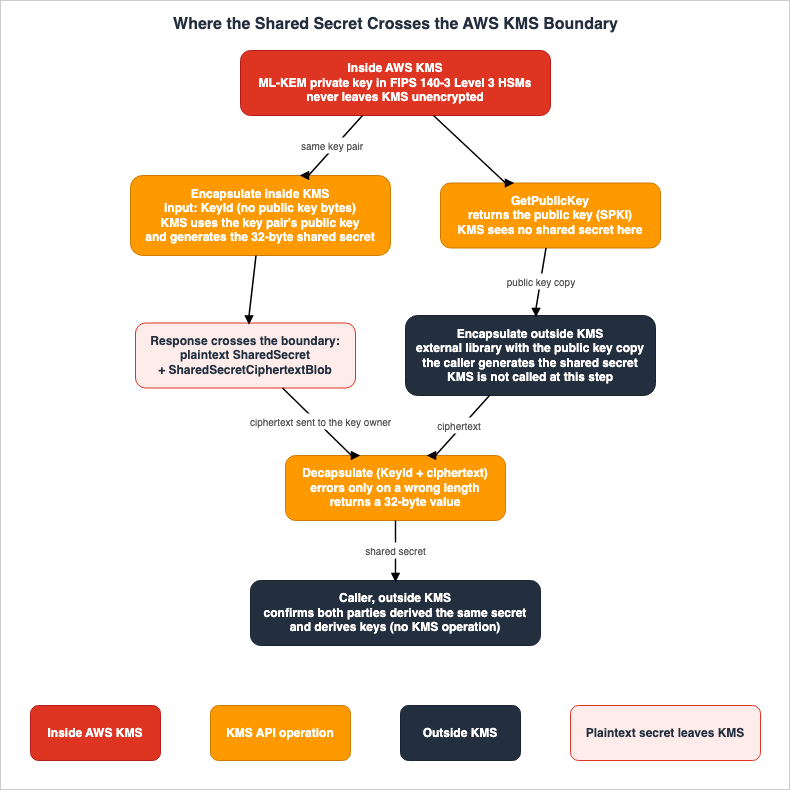
Decapsulate request, and the recovered shared secret leaves KMS in the response. Confirmation that both parties have obtained the same shared secret happens outside KMS, at the bottom of Figure 1.4. For Each Operation: What It Accepts, What It Returns, and What It Does Not Check
This chapter will examine the five operations related to KMS ML-KEM keys, reviewing each one as described in the API Reference. The chapter ends with an operation table and a summary table.4.1 CreateKey
To create a KMS ML-KEM key, you must use the CreateKey request, specifying the key specification and the key usage. The CreateKey API page states that for asymmetric KMS keys that hold an ML-KEM key pair, the key usage should be set to ENCAPSULATE_DECAPSULATE. The valid values for the key specification are ML_KEM_512, ML_KEM_768, and ML_KEM_1024. The CreateKey API page also notes that the ML-KEM key specs are not available in the China Regions.According to the Key spec reference, KMS supports the
ML_KEM encapsulation algorithm for all three key specifications. The Key spec reference describes the role of the ML-KEM key pair as follows: the public key is used to encapsulate a shared secret, while the private key is used to decapsulate it.KMS generates the key material for KMS ML-KEM keys. The Import page excludes ML-DSA and ML-KEM key types from the list of key types that can be imported (see Section 7.3).
4.2 GetPublicKey
GetPublicKey retrieves the public key of a KMS ML-KEM key. According to the GetPublicKey API page, the public key is a X.509 public key in DER format, as defined by RFC 5280, specifically the SubjectPublicKeyInfo (SPKI). When received via the AWS CLI, the value is Base64 encoded.According to the GetPublicKey API page, the
EncapsulationAlgorithms field in the response appears only when the KMS key has a key usage of ENCAPSULATE_DECAPSULATE, and its value is ML_KEM.The PQ keys page states that KMS strongly recommends verifying that the received public key belongs to the intended party before using it to encapsulate a shared secret.
AWS KMS strongly recommends verifying that the public key you receive came from the expected party before using it to encapsulate a shared secret.Verification of the origin of the public key is not a KMS operation; it is the responsibility of the caller who receives the public key.
The GetPublicKey API page also notes, as a general precaution when using the public key outside of KMS, that using the public key within KMS provides the benefits of authentication, authorization, and logging associated with KMS operations, which are not available when used outside of KMS.
When you use the public key within AWS KMS, you benefit from the authentication, authorization, and logging that are part of every AWS KMS operation.This passage lists
Encrypt, ReEncrypt, and Verify as operations that utilize the public key within KMS, but does not explicitly mention Encapsulate. This article applies this statement to the difference between the two forms of encapsulation, and this application is an inference (Inference) (see Section 5.2).4.3 Encapsulate
Encapsulate creates a shared secret and its ciphertext. The request on the Encapsulate API page accepts only four arguments:| Argument | Required | Value |
|---|---|---|
KeyId | Yes | The KMS ML-KEM key's key ID, key ARN, alias name, or alias ARN. To reference a key in a different account, use the key ARN or alias ARN. |
EncapsulationAlgorithm | Yes | ML_KEM only |
GrantTokens | No | An array of grant tokens |
DryRun | No | Checks only whether the request would succeed |
The request does not include an argument to pass the public key as a byte sequence. It also does not include an argument for
EncryptionContext. The Encapsulate API page states that KMS uses the specified key pair's public key to encapsulate the shared secret.AWS KMS uses the public key in the specified key pair to encapsulate the shared secret.Therefore, the public key used by
Encapsulate is the public key of the KMS ML-KEM key referenced by KeyId. The caller can invoke Encapsulate even without a copy of the public key. The caller cannot provide Encapsulate with a public key they have obtained themselves or one received from another party.The response on the Encapsulate API page includes four fields:
| Field | Value |
|---|---|
SharedSecret | The shared secret in plaintext. A 32-byte cryptographically random value. |
SharedSecretCiphertextBlob | The ciphertext. Before Base64 encoding, the length is 768 bytes for ML_KEM_512, 1088 bytes for ML_KEM_768, and 1568 bytes for ML_KEM_1024. |
KeyId | The KMS ML-KEM key used for encapsulation. |
EncapsulationAlgorithm | ML_KEM |
The Encapsulate API page describes
SharedSecret as the shared secret in plaintext. The PQ keys page states that when Bob calls Encapsulate, KMS creates a 32-byte random shared secret and its ciphertext. KMS creates the shared secret and returns it to the caller in plaintext.The list of exceptions on the Encapsulate API page does not include
InvalidCiphertextException. This is because the Encapsulate operation does not receive ciphertext. The list does include exceptions such as DisabledException when the key is disabled, InvalidKeyUsageException when the key usage is incorrect, KMSInvalidStateException when the key state is incompatible, and DryRunOperationException when performing a dry run.The PQ keys page discusses APIs that directly encrypt using ML-KEM keys, referencing the PQ-HPKE draft. PQ-HPKE combines three steps into one operation: encapsulation, derivation of an AES key with a KDF, and AES-GCM encryption. The PQ keys page notes that KMS is closely tracking the standardization of this draft at the IETF.
AWS KMS is closely tracking the standardization of this draft at the IETF as a PQ-safe replacement for RSA-based encryption.This passage does not describe planned features or services. This article does not state that this operation is planned.
4.4 Decapsulate
Decapsulate recovers the shared secret from a ciphertext. The request on the Decapsulate API page accepts five arguments:| Argument | Required | Value |
|---|---|---|
KeyId | Yes | The KMS ML-KEM key. |
SharedSecretCiphertextBlob | Yes | The ciphertext. Length 1 to 6144 |
EncapsulationAlgorithm | Yes | ML_KEM only |
GrantTokens | No | An array of grant tokens |
DryRun | No | Checks only whether the request would succeed |
The request does not include an
EncryptionContext argument. The response contains three fields: SharedSecret, KeyId, and EncapsulationAlgorithm. The Decapsulate API page describes SharedSecret as a 32-byte value.The Important note on the Decapsulate API page describes the conditions under which
Decapsulate returns an exception, and the values it returns otherwise. This note is detailed in Chapter 6.4.5 GenerateDataKeyPair and the ML-KEM Data Key Pair
GenerateDataKeyPair creates and returns a data key pair for use outside of KMS. The KeyPairSpec values on the GenerateDataKeyPair API page include ML_KEM_512, ML_KEM_768, and ML_KEM_1024. According to the GenerateDataKeyPair API page, the ML-KEM key specs are not available in the China Regions.The GenerateDataKeyPair API page states that the private key of an ML-KEM data key pair is in seed format inside the DER-encoded PKCS #8 PrivateKeyInfo. Consequently, the length of the private key is the same across the three key specifications.
The copy of the data key pair's private key is encrypted under a symmetric KMS key. In the Key type table, the
ENCAPSULATE_DECAPSULATE column indicates "No" for GenerateDataKeyPair. This means that it is not possible to create a data key pair using a KMS ML-KEM key as a parent key. The GenerateDataKeyPair API page clarifies that the usage restrictions for KMS keys do not apply to data key pairs used outside of KMS.When using an ML-KEM data key pair, the private key resides outside of KMS. The calling application's cryptographic library performs both encapsulation and decapsulation. Unlike KMS ML-KEM keys, the decapsulation operation does not involve KMS authorization or logging. As an inference of this article (Inference), this difference is the axis for choosing between a KMS ML-KEM key and a data key pair. The design of envelope encryption is covered in this site's AWS KMS Envelope Encryption and Data Key Caching Patterns.
4.6 Operation Table
The following table lists five operations, organized by the columns described in this article.Input refers to the arguments of the request, Output refers to the response, Fails When indicates the primary exceptions documented, Not Checked or Guaranteed by KMS specifies what KMS does not verify or guarantee, and Source State refers to the terms defined in Section 2.2.| Operation | Input | Output | Fails When | Not Checked or Guaranteed by KMS | Source State |
|---|---|---|---|---|---|
CreateKey | KeySpec (3 options), KeyUsage is ENCAPSULATE_DECAPSULATE | Key metadata | China Regions. A deny by policy condition keys | Importing key material (not supported). Changing the key usage later | Stated |
GetPublicKey | KeyId | SPKI public key, KeySpec, KeyUsage, EncapsulationAlgorithms | Incompatible key state | Who the recipient of the public key believes it belongs to. | Stated |
Encapsulate | KeyId, EncapsulationAlgorithm, GrantTokens, DryRun. No public key or EncryptionContext. | Plaintext SharedSecret (32 bytes), SharedSecretCiphertextBlob | Key is disabled, wrong key usage, or incompatible key state. There is no InvalidCiphertextException | Who receives the shared secret in the response and where it is delivered. | Stated |
Decapsulate | KeyId, SharedSecretCiphertextBlob, EncapsulationAlgorithm, GrantTokens, DryRun. No EncryptionContext. | SharedSecret (32 bytes) | InvalidCiphertextException when the ciphertext length does not match the key spec. Key state and key usage | That the ciphertext and key are valid. That both parties obtained the same shared secret | Stated |
GenerateDataKeyPair | Symmetric KMS key KeyId, KeyPairSpec (including 3 ML-KEM options) | Data key pair. The private key in plaintext and as an encrypted copy | ML-KEM key specs in the China Regions | Usage of the data key pair outside of KMS. | Stated |
According to the Encapsulate API page and the Decapsulate API page,
DryRun is an argument that checks whether the request would succeed. As an inference of this article (Inference), what DryRun checks is the permissions, not whether the ciphertext is valid.4.7 Summary Table
The following table lists the six layers in the columns shared by the three articles in the same series.| Boundary | Who Checks | What Is Checked | What Is Not Checked Here | Set By | Where It Is Written | Source State |
|---|---|---|---|---|---|---|
| B1 Key policy and grants | KMS | Key policies, IAM policies, and permissions within grants for kms:Encapsulate and kms:Decapsulate. Conditions for kms:EncapsulationAlgorithm, kms:KeySpec, and kms:KeyUsage. | Encryption context (ML-KEM key operations have none) | Key owner. Key policies and grants. | Encapsulate API page, Decapsulate API page, KMS condition keys page, CreateGrant API page | Stated |
| B2 KMS request validation | KMS | Key state, key usage, and that EncapsulationAlgorithm is ML_KEM. | Where the shared secret in the response is delivered. | AWS | Key states page, Encapsulate API page | Stated |
| B3 Encapsulate inside KMS | KMS | Encapsulation using the public key of the key pair specified by KeyId. KMS creates the shared secret. | The recipient of the shared secret. KMS returns the shared secret in plaintext. | Caller selects KeyId. | Encapsulate API page, PQ keys page | Stated |
| B4 External library encapsulation | Caller's cryptographic library | Encapsulation using the public key. The caller creates the shared secret. | KMS authorization and logging are not applied. Origin of the public key. | Caller | Key spec reference, What's New post, GetPublicKey API page | Inference (no KMS authorization or logging) |
| B5 Decapsulate (length error only) | KMS | Whether the ciphertext length matches the key specification (the only ciphertext condition the documentation says is returned as an error). | Whether the ciphertext and key are valid is not reported. It returns 32 bytes for a ciphertext from a different key and for an altered one | AWS | Decapsulate API page | Stated |
| B6 Caller confirmation and key derivation | Caller | Confirmation that both parties have obtained the same shared secret. Key derivation from the shared secret. | Outside of KMS API calls; KMS is not involved. | Caller's design | Decapsulate API page, FIPS 203 | No statement found (confirmation method) |
5. Two Forms of Encapsulation
This chapter compares encapsulation inside KMS with encapsulation outside KMS. The choice determines which entity creates the shared secret and whether KMS takes part in authorization and logging.5.1 What the Sources Say
The PQ keys page describes both forms of encapsulation in one paragraph, within the flow in which Alice and Bob establish a shared secret.Bob calls Encapsulate with Alice's public key. AWS KMS generates a random 32-byte shared secret and its encapsulated (ciphertext) form. Bob keeps the shared secret and sends only the encapsulated form to Alice. Because encapsulation requires only the public key, Bob can also encapsulate the shared secret outside of AWS KMS with his own cryptographic library.The first part of this paragraph is encapsulation inside KMS, and the second part is encapsulation outside KMS. The What's New post explains that a public key can be retrieved using
GetPublicKey and distributed to others or external systems, allowing for encapsulation using cryptographic libraries such as AWS-LC, OpenSSL, and Bouncy Castle. However, this article does not cross-reference the versions of these libraries and their respective supported ranges with the libraries' documentation.The phrase
with Alice's public key in the first sentence on the PQ keys page is written differently from the request arguments on the Encapsulate API page. This discrepancy will be addressed in Section 9.1.5.2 Comparison Table
The following table compares two encapsulation methods:Inside KMS (encapsulation inside KMS) and Outside KMS (encapsulation outside KMS).| Aspect | Inside KMS | Outside KMS | Source State |
|---|---|---|---|
| Entity that creates the shared secret | KMS | Caller's cryptographic library | Stated (PQ keys page, Key spec reference) |
| Does the shared secret appear in the KMS response? | Yes. As plaintext SharedSecret. | No. KMS is not called during the encapsulation process. | Stated |
| What the caller needs to possess | Permission for kms:Encapsulate. | A copy of the public key. | Stated |
| How is the origin of the public key verified? | The caller names the KMS key with KeyId and does not receive a public key (Inference). | The caller verifies that the received public key belongs to the expected entity. | Outside: Stated (PQ keys page). Inside: Inference |
| Does the encapsulation have KMS authorization? | Yes. Key policies, IAM policies, grants, and condition keys | No. | Inference for Outside KMS (general statement on the GetPublicKey API page) |
| Is the encapsulation recorded in CloudTrail? | Yes. In the example, the shared secret and ciphertext are omitted from the logs. | No. Only subsequent Decapsulate operations are recorded in KMS logs. | Inside: Not recorded (stated). Outside: Inference |
| Encapsulation quota | Shares the default ML-KEM cryptographic operations quota of 1,000 requests per second (per account and Region) with Decapsulate | KMS quotas do not apply | Inside: Stated. Outside: Inference |
| Decapsulation | Decapsulate | Decapsulate | Stated |
The
Encapsulate example in CloudTrail examples states that the shared secret and ciphertext are omitted from the logs.The shared secret and its encapsulated (ciphertext) form returned in the response are omitted from the log entry.The
Decapsulate example in the CloudTrail examples omits the ciphertext passed in the request from the log entry. In both examples, the requestParameters only include the key ID and encapsulationAlgorithm, while responseElements is null. In both cases, the tlsDetails section shows keyExchange as X25519MLKEM768, which is the TLS key exchange value for the connection to the KMS endpoint and is distinct from KMS ML-KEM keys (see Section 1.4).As an inference of this article (Inference), when encapsulation happens outside KMS, the KMS records no longer show when and by whom encapsulation was done. The KMS records contain only the key owner's
Decapsulate. In the setup in Chapter 10, there was also no Encapsulate record for the encapsulation outside KMS (see Section 10.5). Conversely, when using encapsulation inside KMS, KMS generates a shared secret and returns it in plaintext. This article does not determine which approach is more secure. The choice between the two depends on whether you are comfortable allowing KMS to generate the shared secret and whether you require encapsulation logs.5.3 Differences from Key Agreement with ECDH
The PQ keys page describes the differences between KEM and ECDH as follows:Unlike a key agreement mechanism such as Elliptic Curve Diffie-Hellman (ECDH), which derives a shared secret from a key contributed by each party, a key encapsulation mechanism generates the shared secret using only the recipient's public key.ECDH in KMS is the
DeriveSharedSecret operation. According to the DeriveSharedSecret API page, DeriveSharedSecret is called with a NIST elliptic curve or SM2 KMS key pair that has a key usage of KEY_AGREEMENT. SM2 is available only in the China Regions. The DeriveSharedSecret request takes the other party's public key, while the Encapsulate request does not take a public key.The DeriveSharedSecret API page states that KMS recommends following NIST's guidelines when deriving a symmetric key from the raw shared secret. The PQ keys page and the Encapsulate API page indicate that for ML-KEM's shared secret, it can either be used directly as key material or passed through a key derivation function (KDF) to generate multiple keys and nonces.
6. Implicit Rejection and Who Owns the Confirmation
This chapter clarifies what theDecapsulate operation checks and what it does not, based on the Decapsulate API page and FIPS 203.6.1 The Important Note on the Decapsulate API Page
The Important note on the Decapsulate API page consists of the following four sentences:Decapsulate returns an InvalidCiphertextException when the length of the SharedSecretCiphertextBlob is inconsistent with the ML-KEM key spec.
In all other cases, Decapsulate returns a 32-byte pseudo-random value.
This is true even when the SharedSecretCiphertextBlob was created using a different ML-KEM key or altered from its original value.
This behavior is a security feature called implicit rejection that helps protect against chosen-ciphertext attacks.The note is followed by this sentence:
Because a response does not indicate that the ciphertext and key are valid, confirm the two parties derived the same shared secret before using it.Based on these five sentences, the following can be stated:
- The only ciphertext condition under which
Decapsulatereturns an exception is a ciphertext length that does not match the key spec. - If the ciphertext length is correct,
Decapsulatewill return a 32-byte value. This is true even if the ciphertext was created using a different ML-KEM key, or if it has been tampered with;Decapsulatewill still return a value. - The response from
Decapsulatedoes not indicate whether the ciphertext and key are valid. - It is the caller that confirms whether both parties have obtained the same shared secret.
The Decapsulate API page states that this behavior is designed to protect against chosen ciphertext attacks. This article does not delve into the methods of such attacks.
6.2 FIPS 203 Requirements
FIPS 203 handles the ciphertext in ML-KEM decapsulation in two stages. The first stage is the input check before decapsulation. According to the "Decapsulation input check" section of FIPS 203, if the ciphertext is not a byte sequence of the length determined by the parameter set, the input check will fail. FIPS 203 notes that this check guarantees neither that the decapsulation key was correctly generated nor that the ciphertext was correctly produced. FIPS 203 requires the ciphertext check on every decapsulation.The second stage is a comparison inside decapsulation. According to FIPS 203, decapsulation re-creates the ciphertext from the decrypted value and compares it to the received ciphertext. If they do not match, the process replaces the candidate shared secret with a hash of the ciphertext and a random value stored in the private key. FIPS 203 refers to this as an implicit rejection. FIPS 203 states the following regarding the result of this comparison:
In particular, returning the value of the flag as an output in any form is not permitted.FIPS 203 does not permit decapsulation to return the result of the comparison as an output in any form. As an inference of this article (Inference), the way KMS
Decapsulate raises an exception only for a length mismatch and otherwise returns a value corresponds to the FIPS 203 input check and implicit rejection. The KMS documentation does not state this correspondence by naming the sections of FIPS 203.FIPS 203 also establishes requirements for deriving further keys from the shared secret.
If further key derivation is needed, the final symmetric keys shall be derived from this 256-bit shared secret key in an approved manner, as specified in SP 800-108 and SP 800-56C [16, 17].6.3 What InvalidCiphertextException Indicates
InvalidCiphertextException is an exception shared by several KMS operations. After the cases for Decrypt, ReEncrypt, and ImportKeyMaterial, the errors section on the Decapsulate API page describes the Decapsulate case as follows:From the Decapsulate operation, the request was rejected because the length of the SharedSecretCiphertextBlob is inconsistent with the specified ML-KEM key spec.An
InvalidCiphertextException during Decrypt is returned when the ciphertext or encryption context is corrupted, missing, or incorrect. In the case of Decapsulate, this exception indicates only a length mismatch. Although it shares the same name, with Decapsulate, it does not signify that tampering has been detected.The length of the ciphertext is determined by the key specification. According to the Encapsulate API page, before Base64 encoding, the length is 768 bytes for
ML_KEM_512, 1088 bytes for ML_KEM_768, and 1568 bytes for ML_KEM_1024. As an inference of this article (Inference), a ciphertext created with a key of a different key spec gets InvalidCiphertextException because the length does not match. A ciphertext created with a different key of the same key spec gets a value because the length matches. The setup in Chapter 10 returned results in this way as well (Section 10.4).6.4 Confirmation and Key Derivation Are the Caller's Responsibility
Operations marked "Yes" in theENCAPSULATE_DECAPSULATE column of the Key type table refer to key management operations, as well as operations like Encapsulate, Decapsulate, and GetPublicKey. There are no operations listed in this column to confirm that both parties have obtained the same shared secret. There are also no key derivation operations listed.This article searched three times with different search terms for a statement that directly says KMS has no key derivation operation, but could not find one (No statement found). The KMS cryptography essentials page states that KMS internally uses a KDF to derive per-call keys for every encryption under a KMS key. This is an internal process within KMS and is not an operation available to the caller. Therefore, this article can only state that the Key type table does not list any key derivation operations.
The PQ keys page, the Encapsulate API page, and the Decapsulate API page all state that the shared secret can be used directly as key material, or that it can be passed through a KDF to generate multiple keys and nonces. However, none of these pages specify which KMS operations utilize the KDF.
For the confirmation method, this article could not find a statement in the KMS documentation (No statement found). As an inference of this article (Inference), confirmation takes the form of both parties exchanging values that show the other party holds the same key derived from the shared secret. For example, this could be confirmed by checking if decryption using the derived key is successful, or if a MAC generated using the derived key matches. The specific method chosen is a design decision within the caller's protocol.
6.5 Figure 2
Figure 2 illustrates whatDecapsulate returns for each input.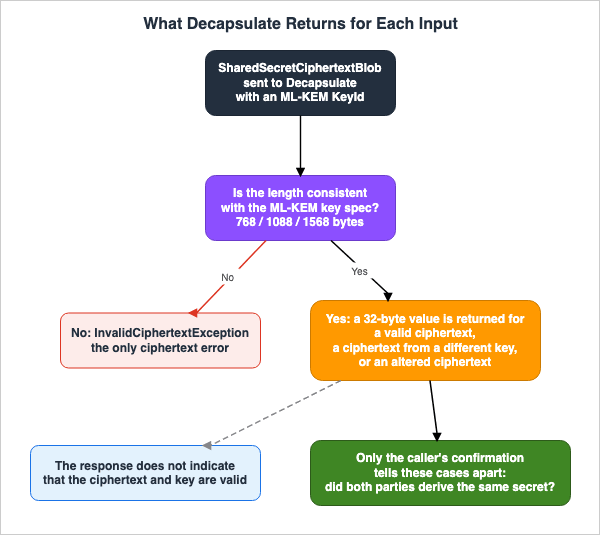
Decapsulate returns an InvalidCiphertextException. The right branch of Figure 2 represents all other cases. Regardless of whether the ciphertext is valid, was created with a different key of the same key specification, or has been altered, Decapsulate returns a 32-byte value. Only the caller's confirmation, at the bottom of Figure 2, can tell these three apart.6.6 Differences in Writing on the Decapsulate API Page
The description for theSharedSecret field in the response from the Decapsulate API page states:The plaintext shared secret recovered from the encapsulated form. It is a 32-byte value that matches the shared secret held by the encapsulating party.This description indicates that the value returned matches the shared secret on the encapsulating side. The Important note on the same page states that a 32-byte value is also returned for a ciphertext created with a different key or for an altered ciphertext. The two statements differ in strength for the same field (Sources disagree). As an inference of this article (Inference), the field description covers only the case of a valid ciphertext. This article is written on the basis of the Important note.
7. What Can and Cannot Be Done with Key Management
This chapter outlines what is possible and what is not possible regarding key management and policy control for KMS ML-KEM keys.7.1 Key Management Table
The following table outlines what can be done with KMS ML-KEM keys for each key management function.Status for ML-KEM Keys describes the handling of KMS ML-KEM keys.| Feature | Status for ML-KEM Keys | Source | Source State |
|---|---|---|---|
| Automatic Key Rotation | Not supported. EnableKeyRotation is No. | Rotation page, Key type table | Stated as not supported |
| On-Demand Key Rotation | Not supported. RotateKeyOnDemand is No. | Rotation page, Key type table | Stated as not supported |
| Manual Rotation | Possible. Create a new key and switch to it | Rotation page | Stated |
GetKeyRotationStatus | Available. KeyRotationEnabled is always false. | Key type table | Stated |
| Key Material Import | Not supported. | Import page, Key type table | Stated as not supported |
| Custom Key Store | Not supported. Only symmetric encryption keys. | Key type table page, CreateKey API page | Stated as not supported |
| Multi-Region Keys | The sources disagree | Key type table, Multi-Region overview, CreateKey API page | Sources disagree |
| Grant | Available. Operations include Encapsulate and Decapsulate. Encryption context restrictions are not supported. | CreateGrant API page | Stated |
| Condition Keys | kms:KeySpec, kms:KeyUsage, kms:EncapsulationAlgorithm. | KMS condition keys page | Stated |
| Encryption Context | None. The requests have no such argument | Encapsulate API page, Decapsulate API page, CreateGrant API page | Stated |
| Key Deletion | Deleted after a waiting period of 7 to 30 days. | ScheduleKeyDeletion API page | Stated |
7.2 Rotation
The Rotation page states that automatic key rotation is supported only for symmetric encryption KMS keys with key material that KMS generates. The Rotation page states that asymmetric keys support neither automatic nor on-demand rotation, but that they can be rotated manually.Neither automatic nor on-demand key rotation is supported for the following types of KMS keys, but you can rotate these KMS keys manually.In the
ENCAPSULATE_DECAPSULATE column of the Key type table, EnableKeyRotation, DisableKeyRotation, and RotateKeyOnDemand are No. GetKeyRotationStatus is Yes, and KeyRotationEnabled is always false. ListKeyRotations is Yes, and the Rotations field is always null or empty.For manual rotation, a new KMS ML-KEM key is created, and the new public key is distributed to the other party again. As an inference of this article (Inference), a ciphertext encapsulated with the old key's public key can be decapsulated only with the old key. Therefore, it is necessary to verify that no old ciphertext remains before deleting the old key.
7.3 Importing and Custom Key Stores
The Import page lists the key types that support imported key material and excludes ML-DSA and ML-KEM keys from asymmetric keys.Asymmetric KMS keys (except ML-DSA and ML-KEM keys)In the Key type table, the
ENCAPSULATE_DECAPSULATE column indicates "No" for ImportKeyMaterial, GetParametersForImport, and DeleteImportedKeyMaterial. Only KMS creates key material for KMS ML-KEM keys.Regarding custom key stores, the key type reference page that contains the Key type table states that custom key stores support only symmetric encryption keys. The CreateKey API page states that custom key stores do not support other key types.
7.4 Multi-Region Keys
Sources disagree on whether KMS ML-KEM keys can be used as multi-Region keys.- In the Key type table, the
ENCAPSULATE_DECAPSULATEcolumn indicates "Yes" forReplicateKey. - The Multi-Region overview lists asymmetric KMS keys as a type of multi-Region key that can be created. The opening paragraph of the same page describes symmetric or asymmetric multi-Region keys "for encryption or signing" and does not name key encapsulation.
- The description of the
MultiRegionparameter on the CreateKey API page indicates that both symmetric and asymmetric multi-Region keys can be created. - However, the section on multi-Region keys at the beginning of the CreateKey API page lists supported key types as: symmetric encryption keys, HMAC keys, asymmetric encryption keys, and asymmetric signing keys. Neither
ENCAPSULATE_DECAPSULATEkeys norKEY_AGREEMENTkeys are included in this list.
No statement names ML-KEM keys and says that they can be multi-Region keys. This article does not definitively identify either set of documentation as incorrect. In the setup in Chapter 10, the creation of an
ML_KEM_768 multi-Region key succeeded, and the ReplicateKey call to us-west-2 returned a replica key in the Creating state. This represents a single observation and does not resolve the discrepancy in the documentation.7.5 Policy: Condition Keys and Grants
According to the KMS condition keys page, thekms:EncapsulationAlgorithm condition key controls access based on the EncapsulationAlgorithm value in Encapsulate and Decapsulate requests. This condition key can be used in both key policies and IAM policies.The only valid value for EncapsulationAlgorithm is ML_KEM.The
kms:EncryptionAlgorithm is another condition key used with KMS encryption keys. For KMS ML-KEM key operations, the kms:EncapsulationAlgorithm is the relevant condition key.The value for
kms:KeyUsage includes ENCAPSULATE_DECAPSULATE. According to the KMS condition keys page, kms:KeyUsage controls access based on the key usage specified in CreateKey requests and the key usage for KMS keys used in operations. kms:KeySpec also controls access based on the key specification in CreateKey requests and the key specification for KMS keys used in operations. As an inference of this article (Inference), kms:KeySpec can be used to restrict the creation of keys with specifications such as ML_KEM_512. Policies that restrict key specs with kms:KeySpec as a whole are covered in this site's Enforcing an ML-DSA Policy on AWS.The list of operations on the CreateGrant API page includes
Encapsulate and Decapsulate. The CreateGrant API page states the following regarding grant restrictions for encryption contexts.You cannot use an encryption context grant constraint for cryptographic operations with asymmetric KMS keys or HMAC KMS keys. Operations with these keys don't support an encryption context.This statement is about asymmetric keys and HMAC keys as a whole and does not name ML-KEM keys. KMS ML-KEM keys are asymmetric keys, and the
Encapsulate and Decapsulate requests do not have an EncryptionContext argument. Based on these two points, this article states that KMS ML-KEM key operations have no encryption context. Unlike symmetric encryption keys, it is not possible to restrict usage with an encryption context.7.6 Quotas and Key States
According to the Request quotas page, theEncapsulate and Decapsulate operations share a default quota of 1,000 requests per second in each account and Region as cryptographic operations on ML-KEM KMS keys. The GenerateDataKeyPair and GenerateDataKeyPairWithoutPlaintext operations for ML-KEM data key pairs have a quota of 100 requests per second. The Request quotas page states that, with the exception of quotas for CloudHSM key store requests, all KMS request quotas are adjustable.According to the Key states page, the
Encapsulate and Decapsulate operations are available when the key is enabled or being updated. They are not available when the key is disabled, pending deletion, or being created. The GetPublicKey operation is available even when the key is disabled.7.7 Regions Where KMS ML-KEM Keys Cannot Be Used
The sources disagree on the Regions where KMS ML-KEM keys cannot be used (Sources disagree). The What's New post states the following:ML-KEM is available in all AWS Regions where KMS is available, except the the Middle East (UAE), Middle East (Bahrain), and China Regions.This article quotes the What's New post as written.
the the is the original wording.The Encapsulate API page and the Decapsulate API page state that these operations are not available in the China Regions. The PQ keys page, the CreateKey API page, and the GenerateDataKeyPair API page also list only the China Regions. The What's New post is the only document that lists the Middle East (UAE) and Middle East (Bahrain) Regions. This article has not tested whether KMS ML-KEM keys actually work in these Regions.
8. Differences from ML-DSA Keys, ECDH, and ML-KEM in TLS
This chapter presents a single table comparing three elements that are easily confused with KMS ML-KEM keys.| Aspect | KMS ML-KEM Key | KMS ML-DSA Key | KMS ECDH Key | TLS ML-KEM |
|---|---|---|---|---|
| Purpose | Creating a shared secret | Signing | Deriving a shared secret | Connection key exchange |
| Key Usage | ENCAPSULATE_DECAPSULATE | SIGN_VERIFY | KEY_AGREEMENT | Not a KMS key |
| Primary Operations | Encapsulate, Decapsulate | Sign, Verify | DeriveSharedSecret | TLS handshake |
| Public Key Taken by the Request | Not received | Not received | Receives the other party's public key | Exchanged within TLS |
| Related Content on This Site | This article | Enforcing an ML-DSA Policy on AWS | Section 5.3 of this article | When Does a Connection to an AWS Endpoint Actually Use ML-KEM? |
The PQ keys page states that post-quantum KMS keys protect the data and signatures they safeguard, and that post-quantum TLS should be used to protect the confidentiality of the requests and responses exchanged with KMS.
To also protect the confidentiality of the requests and responses that you exchange with AWS KMS itself, use post-quantum TLS.In encapsulation inside KMS, the plaintext shared secret is included in the response to the
Encapsulate operation. As an inference of this article (Inference), the confidentiality of this response is protected by the TLS connection to the KMS endpoint. Even if a KMS ML-KEM key is selected, the connection's key exchange does not automatically become post-quantum. The connection's key exchange is discussed in When Does a Connection to an AWS Endpoint Actually Use ML-KEM?.9. Where the Sources Disagree and What Is Not Written
This chapter collects the items that fall under Sources disagree, Documentation does not list, and No statement found in Section 2.2.9.1 Where the Sources Disagree
- Input format for
Encapsulate: The PQ keys page states that Bob callsEncapsulatewith Alice's public key. The What's New post states that theEncapsulateAPI uses a public key. The request on the Encapsulate API page has no public key argument; instead, the caller specifies a KMS key usingKeyId, and KMS uses the public key of that key pair. The text does not settle whether the PQ keys page means passing a public key or naming Alice's KMS key (see Sections 4.3 and 5.1). - Response format for
Decapsulate: The Decapsulate API page describes theSharedSecretfield as containing a value that matches the shared secret on the encapsulating side. The Important note on the same page states that a 32-byte value is also returned for a ciphertext from a different key and for an altered ciphertext (see Section 6.6). - Excluded Regions: The What's New post lists the Middle East (UAE), Middle East (Bahrain), and China Regions. The Encapsulate API page, Decapsulate API page, PQ keys page, CreateKey API page, and GenerateDataKeyPair API page list only the China Regions (see Section 7.7).
- Multi-Region keys: The Key type table, the Multi-Region overview, and the description of the
MultiRegionparameter on the CreateKey API page read as allowing it. The list in the opening section of the CreateKey API page does not include ML-KEM keys, and the opening paragraph of the Multi-Region overview describes asymmetric multi-Region keys "for encryption or signing" (see Section 7.4). - Key usage for
GetPublicKey: TheKeyUsagefield on the GetPublicKey API page describes asymmetric key pairs with the valuesENCRYPT_DECRYPT,SIGN_VERIFY, andKEY_AGREEMENT. The list of values for this field also includesENCAPSULATE_DECAPSULATE.
For every item, this article does not decide that either source is wrong.
9.2 What the Documentation Does Not List
- The
ENCAPSULATE_DECAPSULATEcolumn in the Key type table does not list an operation that confirms that both parties have obtained the same shared secret. It does not list a key derivation operation either (see Section 6.4). - The GetPublicKey API page lists
Encrypt,ReEncrypt, andVerifyas operations that utilize a public key within KMS, but does not includeEncapsulate(see Section 4.2). - The Request quotas page lists the quota for ML-KEM cryptographic operations as a single row, shared between
EncapsulateandDecapsulate. It does not list these two operations as separate rows.
9.3 Items with No Statement Found
This article could not find statements on the following items in the materials in Section 1.3 or by searching the AWS documentation.- Statements explicitly mentioning the absence of key derivation operations within KMS (three searches with different search terms). Key derivation operations are not listed in the Key type table (Section 6.4).
- Methods for confirming that both parties have obtained the same shared secret (Section 6.4).
- Statements explicitly stating that KMS ML-KEM keys can be used for multi-Region keys (Section 7.4).
- The minimum versions of the AWS SDK and AWS CLI that support KMS ML-KEM keys.
- Versions of AWS-LC, OpenSSL, and Bouncy Castle that support ML-KEM. This article did not cross-reference these with the respective library documentation (Section 5.1).
- Explicit mentions of either General Availability (GA) or preview status. Neither the What's New post nor the PQ keys page mentions the term "preview." Similarly, the term "GA" is also absent.
- Plans to provide APIs that directly encrypt using ML-KEM keys. The PQ keys page only mentions that it is tracking the standardization of the PQ-HPKE draft (Section 4.3).
9.4 Important Notes When Reading
TheeventTime in the Encapsulate and Decapsulate examples in the CloudTrail examples is October 18, 2026. This date precedes the October 26, 2026, date mentioned in the What's New post. The values used in these examples are for illustrative purposes only and do not represent the actual date when the feature became available.10. What This Setup Showed
This chapter details the results of testingEncapsulate and Decapsulate in the setup built in us-east-1. What this chapter describes is observation (Observation), not a commitment of the documentation. This article does not use these observations to override the documentation statements in Chapters 4 through 9.10.1 Setup
The setup was built only with AWS CLI commands and local scripts. The test was conducted on November 6, 2026, using AWS CLI version 2.39.3 and OpenSSL version 4.1.0.- Three KMS ML-KEM keys. The key specifications are
ML_KEM_512,ML_KEM_768, andML_KEM_1024, and all are single-Region keys. - One
ML_KEM_768KMS key created as a multi-Region primary key, and its replica in us-west-2. - The local OpenSSL, used for encapsulation outside KMS. The local OpenSSL listed ML-KEM-512, ML-KEM-768, and ML-KEM-1024 as KEM algorithms.
- The script only recorded the length of the data, whether it matched or did not match, and the names of any exceptions, without outputting the shared secret, ciphertext, or public key values to either the screen or files.
10.2 Keys and Public Keys
TheCreateKey operation passed successfully for all four keys. The responses from DescribeKey indicated that each key had a key usage of ENCAPSULATE_DECAPSULATE and an Origin value of AWS_KMS. The DescribeKey responses also included a field for EncapsulationAlgorithms. For all keys, the EncapsulationAlgorithms field in the GetPublicKey response was ML_KEM.The length of the SPKI public key returned by
GetPublicKey, after Base64 decoding, was as follows:| Key Specification | SPKI Public Key Length |
|---|---|
ML_KEM_512 | 822 bytes |
ML_KEM_768 | 1206 bytes |
ML_KEM_1024 | 1590 bytes |
10.3 Encapsulation and Decapsulation with the Same Key
Using any of the three keys, the response fromEncapsulate contained four fields: EncapsulationAlgorithm, KeyId, SharedSecret, and SharedSecretCiphertextBlob. The shared secret was 32 bytes for all three keys. The ciphertext was 768 bytes when using ML_KEM_512, 1088 bytes when using ML_KEM_768, and 1568 bytes when using ML_KEM_1024. When Decapsulate was called with the same key, it returned a 32-byte value for all three keys, and the value matched the shared secret produced by Encapsulate.10.4 Decapsulation with Invalid Input
The following table shows the results of changing the 1088-byte ciphertext fromEncapsulate with the ML_KEM_768 key and passing it to Decapsulate. Result indicates the response, and Same as the Original Secret indicates whether the returned value matches the original shared secret.| Input | Result | Same as the Original Secret |
|---|---|---|
Recovering with a different key of the same key spec. The multi-Region ML_KEM_768 key was used | 32-byte value | Does not match |
Recovering with the ML_KEM_512 key | InvalidCiphertextException | N/A |
Recovering with the ML_KEM_1024 key | InvalidCiphertextException | N/A |
| Ciphertext with the last 1 byte changed, using the same key. | 32-byte value | Does not match |
| Ciphertext with the first 1 byte changed, using the same key. | 32-byte value | Does not match |
| Ciphertext that is 1 byte shorter (1087 bytes), using the same key. | InvalidCiphertextException | N/A |
| Ciphertext that is 1 byte longer (1089 bytes), using the same key. | InvalidCiphertextException | N/A |
When the same changed ciphertext was recovered twice with the same key, the same 32-byte value was returned both times. In this setup,
Decapsulate only returned an exception when the length of the ciphertext did not match the key specification.10.5 Encapsulation Outside KMS and Decapsulation in KMS
The local OpenSSL read the SPKI fromGetPublicKey for the ML_KEM_768 key as the public key for ML-KEM-768. When encapsulating with OpenSSL, a 32-byte shared secret and a 1088-byte ciphertext were generated. Passing this ciphertext to the KMS Decapsulate operation resulted in a 32-byte value that matched the shared secret produced by OpenSSL.The CloudTrail event history showed no
Encapsulate event corresponding to the encapsulation performed by OpenSSL. Only the Decapsulate event that recovered the shared secret from that ciphertext was recorded.10.6 DryRun and Key Management Operations
The following table shows the results of calling DryRun and key management operations using the ML_KEM_768 key.| Operation | Result |
|---|---|
Encapsulate with DryRun enabled | DryRunOperationException |
EnableKeyRotation | UnsupportedOperationException |
GetKeyRotationStatus | KeyRotationEnabled is false |
RotateKeyOnDemand | UnsupportedOperationException |
GetParametersForImport | UnsupportedOperationException |
Encrypt | InvalidKeyUsageException |
10.7 Multi-Region Keys
The creation of theML_KEM_768 key, with the MultiRegion attribute set in the CreateKey command, was successful, and the DescribeKey command confirmed that the MultiRegion setting was true. The ReplicateKey operation to us-west-2 also succeeded, and the response indicated that the replica key's status was "Creating," while the multi-Region key type was "REPLICA." This article did not try Decapsulate with the replica key.10.8 CloudTrail Logs
The CloudTrail event history showed that the number of attempted calls matched the number of recorded events. There were 4 instances ofEncapsulate (including 1 DryRun call), and 14 instances of Decapsulate.- The
requestParametersfor bothEncapsulateandDecapsulateevents contained only the key ID andencapsulationAlgorithm. Calls with theDryRunparameter also included thedryRunparameter. - For all events, the
responseElementswerenull. Neither the shared secret nor the ciphertext was recorded. Decapsulatecalls that resulted in mismatched lengths were recorded as events with anerrorCodeofInvalidCiphertextException.Decapsulatecalls with a ciphertext from a different key or a changed ciphertext were recorded as events without anerrorCode. These events had the same form as the events forDecapsulatewith a valid ciphertext.- In every event, the
keyExchangevalue withintlsDetailswasX25519MLKEM768.
As an inference of this article (Inference), the CloudTrail records cannot tell a decapsulation of a valid ciphertext apart from a decapsulation that returned a value through implicit rejection.
10.9 What This Setup Cannot Tell
The results presented in this chapter are observations from a single account in the us-east-1 Region, each test performed once. The following cannot be determined from this setup:- Whether KMS ML-KEM keys can be used in the Middle East (UAE) and Middle East (Bahrain) Regions (see Section 7.7).
- Whether multi-Region keys can be created in any Region, and whether the
Decapsulateoperation works with replica keys. - Encapsulation outside KMS with AWS-LC and Bouncy Castle. This setup only used OpenSSL.
- Whether the same value is always returned for the same changed ciphertext.
- Processing speed. This article does not measure performance.
11. Failure Modes
This chapter collects common failures from the documentation statements in Chapters 4 through 7.- Interpreting
Decapsulatesuccess as confirmation of ciphertext validity: According to the Decapsulate API page, if the length is correct, the API will return a 32-byte value even for ciphertext that is either from a different key or has been tampered with. Before using it, confirm that the key derived from the shared secret matches the key held by the other party. - Using
InvalidCiphertextExceptionfor tamper detection: TheInvalidCiphertextExceptionthrown byDecapsulateonly indicates a length mismatch in the ciphertext. It has a different meaning than the similarly named exception inDecrypt. - Attempting to pass the other party's public key to
Encapsulate: The request on the Encapsulate API page has no public key argument. To encapsulate with the other party's public key, use an external cryptographic library. If the other party's key is a KMS ML-KEM key and you have thekms:Encapsulatepermission, specify the other party's key ARN inKeyId. - Assuming KMS never sees the shared secret: In encapsulation inside KMS, KMS generates the shared secret and returns it in plaintext. If you do not want KMS to generate the shared secret, choose encapsulation outside KMS.
- Confusing condition keys: The operation of KMS ML-KEM keys is restricted by
kms:EncapsulationAlgorithm, notkms:EncryptionAlgorithm. - Trying to restrict usage with an encryption context: Neither
EncapsulatenorDecapsulaterequests include anEncryptionContextargument. The CreateGrant API page states that you cannot use encryption context restrictions with asymmetric key grants. - Assuming automatic rotation: Automatic and on-demand rotation are not available. With manual rotation, redistribute the new public key and keep the old key so that old ciphertexts can still be decapsulated.
- Failing to verify the origin of the public key: The PQ keys page strongly recommends verifying that the received public key is from the expected party before encapsulation.
- Reading the excluded Regions as the China Regions only: The What's New post lists the Middle East (UAE) and the Middle East (Bahrain) as well.
- Assuming multi-Region primary keys can be deleted immediately: According to the ScheduleKeyDeletion API page, the waiting period for a multi-Region primary key with replicas begins only when the last replica is deleted.
12. Frequently Asked Questions About KMS ML-KEM Keys
This chapter addresses common questions, focusing on the misconceptions outlined in Section 1.1, and provides answers with references to specific sections of the text.Q1. Do you pass the other party's public key to Encapsulate?
No. The request on the Encapsulate API page has no argument for passing public key bytes. Instead, the caller specifies the KMS ML-KEM key using the KeyId, and KMS uses the public key associated with that key pair. If you need to encapsulate using a public key outside of KMS, you should use an external cryptographic library (see Section 4.3 and Chapter 5).Q2. Does KMS see the shared secret?
With encapsulation inside KMS, it does. According to the PQ keys page, KMS creates the shared secret, and according to the Encapsulate API page, KMS returns the shared secret in plaintext. In encapsulation outside KMS, the caller creates the shared secret. Subsequently, when the key owner callsDecapsulate, KMS recovers and returns the shared secret (Section 5.2).Q3. If Decapsulate succeeds, are the ciphertext and key valid?
No. The Decapsulate API page states that a successful response does not indicate the correctness of the ciphertext and key. If the length matches, Decapsulate returns a 32-byte value even for a ciphertext from a different key or an altered ciphertext. The caller confirms whether both parties obtained the same shared secret (see Chapter 6).Q4. If an InvalidCiphertextException is not returned, does that mean the ciphertext has not been altered?
No. Decapsulate will only return an InvalidCiphertextException when the ciphertext length does not match the key specification (see Section 6.3).Q5. Does KMS have an operation that derives keys from the shared secret?
The Key type table does not list any key derivation operations. This article did not find a statement that directly says KMS has no key derivation operation. KMS documentation indicates that shared secrets can be used directly as key material or can be processed through a key derivation function (KDF). Furthermore, FIPS 203 specifies that if further key derivation is required, the keys shall be derived with the methods in SP 800-108 and SP 800-56C (Sections 6.2 and 6.4).Q6. Can an encryption context restrict how KMS ML-KEM keys are used?
No. TheEncapsulate and Decapsulate operations do not accept an EncryptionContext argument. The CreateGrant API page states that asymmetric key operations do not support encryption contexts. To restrict usage, use key policies, IAM policies, and grants, along with the condition keys kms:EncapsulationAlgorithm, kms:KeySpec, and kms:KeyUsage (see Section 7.5).Q7. Can KMS ML-KEM keys be rotated automatically?
No. According to the Rotation page and the Key type table, neither automatic nor on-demand key rotation is supported. Manual key rotation is possible (see Section 7.2).Q8. Can KMS ML-KEM keys be multi-Region keys?
The sources disagree (Sources disagree). The Key type table listsReplicateKey as Yes, while the Multi-Region overview lists asymmetric keys and, in its opening paragraph, describes them "for encryption or signing." The list in the opening section of the CreateKey API page does not include ML-KEM keys. No statement naming ML-KEM keys was found (Section 7.4). In the setup in Chapter 10, key creation succeeded, and the ReplicateKey call returned a replica key in the Creating state. This is based on a single observation.Q9. Does using a KMS ML-KEM key make the connection to KMS post-quantum as well?
No. The PQ keys page states that to protect the confidentiality of requests and responses when interacting with KMS, post-quantum TLS should be used. The KMS ML-KEM key and the ML-KEM used for the connection's TLS are distinct (see Chapter 8).13. Summary
Before creating a shared secret using a KMS ML-KEM key, ensure the following:- You have determined whether it is permissible to have KMS create the shared secret, and have decided whether to use encapsulation inside KMS or outside KMS.
- When using encapsulation outside KMS, there is a process to verify that the received public key belongs to the expected party's KMS ML-KEM key, prior to encapsulation.
- The success of
Decapsulateis not being treated as confirmation that the ciphertext and key are valid. - The caller's protocol includes a process to confirm that both parties have obtained the same shared secret, and a method for deriving a key from the shared secret.
InvalidCiphertextExceptionis only being treated as an indicator of length mismatch.- Key policies and IAM policies restrict access to
kms:Encapsulateandkms:Decapsulateto only necessary entities, and, if necessary, further restrict access usingkms:EncapsulationAlgorithm,kms:KeySpec, andkms:KeyUsage. These policies do not rely on encryption contexts. - On the premise that automatic rotation is not available, a process is in place to redistribute the public key through manual rotation, and the period for keeping old keys has been decided.
- If using a multi-Region key, it has been verified that it can be created in your own setup.
- The Region you use is in neither the What's New post's excluded Regions nor the API pages' excluded Regions.
- The capacity estimates take into account that
EncapsulateandDecapsulateshare a default quota of 1,000 requests per second per account and Region.
14. References
- Post-quantum keys in AWS KMS - AWS Key Management Service
- Key spec reference - AWS Key Management Service
- Key type reference - AWS Key Management Service
- AWS KMS condition keys - AWS Key Management Service
- Request quotas - AWS Key Management Service
- Rotate AWS KMS keys - AWS Key Management Service
- Importing key material for AWS KMS keys - AWS Key Management Service
- Multi-Region keys in AWS KMS - AWS Key Management Service
- Encapsulate (CloudTrail log example) - AWS Key Management Service
- Decapsulate (CloudTrail log example) - AWS Key Management Service
- Key states of AWS KMS keys - AWS Key Management Service
- AWS KMS cryptography essentials - AWS Key Management Service
- Encapsulate - AWS Key Management Service API Reference
- Decapsulate - AWS Key Management Service API Reference
- GetPublicKey - AWS Key Management Service API Reference
- CreateKey - AWS Key Management Service API Reference
- GenerateDataKeyPair - AWS Key Management Service API Reference
- CreateGrant - AWS Key Management Service API Reference
- DeriveSharedSecret - AWS Key Management Service API Reference
- ScheduleKeyDeletion - AWS Key Management Service API Reference
- AWS Key Management Service now supports ML-KEM for post-quantum key encapsulation - AWS What's New
- FIPS 203, Module-Lattice-Based Key-Encapsulation Mechanism Standard - NIST
References:
Tech Blog with curated related content
Written by Hidekazu Konishi