Querying Glue Iceberg Tables with a Partner's OIDC Token - Token Exchange at AWS Sign-In, One Role, and Lake Formation
First Published:
Last Updated:
This article details each of these nine layers, outlining who performs verification at each stage and what is not verified, using a table and two diagrams. For example, Lake Formation applies permissions to the customer's specified IAM role, not to the partner's user. The effective access is the intersection of the role's permissions, the session policy passed in
scope, and Lake Formation's permissions. This article aims to distinguish between what the documentation states, what is not found in the documentation, and any discrepancies between different pieces of documentation. The information presented in this article was verified as of November 6, 2026.This article does not provide step-by-step instructions for setting up a connection with a partner. It also does not discuss pricing, nor does it cover methods for token forgery or validation circumvention.
Related articles on this site:
- The Iceberg Catalog Layer on AWS - Catalog Federation, the REST Catalog API, and Scoped Credential Vending
- AWS IAM Inbound Workload Federation - IAM Roles Anywhere, OIDC, and SPIFFE Converging on One Trust Policy Condition
- Agent Toolkit for AWS and the AWS MCP Server - How IAM, SCPs, and CloudTrail Tell an Agent's Calls Apart, and Where They Cannot
- Fine-Grained Access Control for AI Data with AWS Lake Formation - LF-Tags, Column-Level Permissions, and Cross-Account Sharing
- JWT Signing Algorithms on AWS Endpoints - What IAM, Application Load Balancer, API Gateway, AppSync, Cognito, and IAM Identity Center Accept, and What They Check Besides the Signature
- Identity-Aware Data Access on AWS - Propagating Workforce Identity from IAM Identity Center to Lake Formation and S3 Access Grants
- Which MCP Clients a Remote MCP Server Lets In - Client ID Metadata Documents, Pre-Registration, Deprecated Dynamic Client Registration, and the Allowlists Layered on Top
- What Decapsulate Does Not Tell You - AWS KMS ML-KEM Keys and Implicit Rejection
- Service Insertion in AWS Cloud WAN - Which Traffic a Core Network Policy Sends to Inspection
Table of Contents
- 1. Scope and Assumptions
- 2. How to Read the Tables
- 3. The Flow Through Nine Layers
- 4. For Each Layer: Who Checks What, and What Is Not Checked
- 5. Effective Access Is Decided by an Intersection
- 6. Subject Token Requirements and the Access Token Lifetime
- 7. Records, and Ways to Look Into Them Later
- 8. Differences from the AWS MCP Server and the SigV4 Entry Point
- 9. Where the Sources Disagree and What Is Not Written
- 10. What This Setup Showed
- 11. Failure Modes
- 12. Frequently Asked Questions: Reading Iceberg Tables in Glue with Partner OIDC Tokens
- 13. Summary
- 14. References
1. Scope and Assumptions
This chapter first defines the intended audience, the scope of this article, the relevant source materials, and the terminology used. The following eleven points outline the key conclusions.- This pathway involves three parties: the customer (data owner), partners, and users of the partner. The partner, without AWS credentials, can read the customer's data using only the user's JWT (see Section 1.4).
- The entity verifying the token changes across nine layers. This article refers to nine elements – the partner's IdP, the Sign-In pre-authentication check, STS and the IAM OIDC provider, the role trust policy, the Sign-In post-authentication check, the session policy, the Glue Iceberg REST endpoint, Lake Formation, and S3 – as layers (see Chapters 3 and 4).
- Who validates the subject token differs by document. The Sign-In Glue page states that AWS STS performs the validation, while the Sign-In OAuth overview states that AWS Sign-In performs the validation (see Section 9.1).
- The JWT's
https://aws.amazon.com/rolesclaim contains exactly one role ARN. The partner's IdP uses this claim to select the role, and the customer's trust policy conditions this selection using the condition keysts:RoleAuthorizedByIdp(see Sections 4.4 and 6). - Effective access is the intersection of the role permissions, the
scopesession policy, and Lake Formation permissions. Organizational SCPs, RCPs, and VPC endpoint policies also apply at their respective layers (see Chapter 5). - Lake Formation applies permissions to the IAM role specified by the customer. Lake Formation does not differentiate between users who name the same role (see Sections 4.8 and 5.3).
- Whether Lake Formation restricts access to the column level varies depending on the documentation. The Sign-In Glue page specifies column-level access, while the S3 Tables page requires the full table access setting for external engines. The LF integration page requires either the full table access setting or IAM session tag validation. It is not clear from the documentation whether credentials are vended to a column-restricted role through this pathway (see Sections 4.8 and 9.1).
- The access token is valid for a maximum of one hour, and refresh tokens are not issued. The token exchange API page states that lifetime is the shorter of the remaining validity period of the subject token and one hour (see Section 6.3).
- Regarding requests to exchange tokens using an invalid subject token, the Sign-In Glue page states that rejections do not leave events in the target account's CloudTrail. Only requests with valid issuers and valid subject tokens leave records (see Section 7.2).
- AWS MCP Server also receives the same token exchange using the same token endpoints. The differences from Glue lie in the destination specified by the
resource, the authorization on the destination side, and the origin of the client (see Chapter 8). - In the setup in Chapter 10, S3 credentials were not vended even to the all-columns role until the Lake Formation setting for external engines was enabled. Even after enabling the setting, credentials were not vended to the column-restricted role. The
expires_invalue was 3599, even though the subject token's expiration was 300 seconds. Each of these is a single observation.
1.1 Intended Audience
This article is intended for the following audiences:- Data infrastructure owners who want their partner's query engines or data platforms to read their Iceberg tables.
- Developers on the partner's side who are building functionality to read Glue's Iceberg tables.
- Security personnel responsible for reviewing the boundaries of this access path.
Specifically, this article assumes the reader believes at least one of the following statements to be true:
- AWS Sign-In verifies the entire data path, from the token to the table data.
- Lake Formation consistently restricts access to both columns and rows, even within this access path.
- Requests made with invalid tokens leave no trace in CloudTrail.
- Tokens obtained through exchange are exclusively for use with Glue.
- AWS MCP Server's OAuth functionality only supports interactive authorization through a browser.
1.2 What This Article Covers and What It Does Not
This article addresses the process by which partners access the Glue Data Catalog Iceberg REST endpoint using access tokens obtained through a Sign-In token exchange.This article does not cover:
- A comprehensive list of Iceberg REST operations, nor the mechanism for scoping vended credentials down to a single prefix. This is covered on this site in The Iceberg Catalog Layer on AWS.
- The design of Lake Formation permissions and the overall integration with external engines. This is covered on this site in Fine-Grained Access Control for AI Data with AWS Lake Formation.
- The general principles of assuming IAM roles from external OIDC providers, nor a list of claim condition keys. This is covered on this site in AWS IAM Inbound Workload Federation.
- The general principles outlined in RFC 8693. This is covered on this site in Identity Lifecycle for AI Agents and Where AI Agent Authorization Standards Stand.
- The signing algorithms that IAM OIDC providers accept. This is covered on this site in JWT Signing Algorithms on AWS Endpoints.
- Specific configuration steps for particular partner products, as these vary depending on the product and version.
- Pricing. Methods for token forgery or circumventing validation.
- Key encryption and network routing. These topics are covered in separate articles in the same series. Key encryption is addressed in the article about AWS KMS ML-KEM keys (What Decapsulate Does Not Tell You), and network routing is covered in the article about AWS Cloud WAN service insertion (Service Insertion in AWS Cloud WAN). This article only addresses condition keys related to VPC endpoints.
1.3 Date of Review and Materials Reviewed
This article was written after reviewing the following materials on November 6, 2026. The body text uses the English names given in parentheses.- AWS Sign-In User Guide, page for configuring OAuth access to the Glue Iceberg REST Catalog (Sign-In Glue page).
- AWS Sign-In User Guide, page for the OAuth 2.0 overview (Sign-In OAuth overview).
- AWS Sign-In User Guide, page for configuring OAuth access to AWS MCP Server (Sign-In MCP page).
- AWS Sign-In User Guide, page for condition key reference (Sign-In condition keys page).
- AWS Sign-In User Guide, page for AWS PrivateLink (Sign-In PrivateLink page).
- AWS General Reference, page for Sign-In endpoints and quotas (Sign-In endpoints page).
- AWS Sign-In API Reference, page for
CreateOAuth2TokenWithTokenExchange(token exchange API page), page forIntrospectOAuth2TokenWithIAM(introspection API page), and page forRevokeOAuth2TokenWithIAM(revocation API page). - Service Authorization Reference, page for AWS Sign-In (Sign-In authorization reference) and page for AWS STS (STS authorization reference).
- AWS Glue Developer Guide, page for connecting to the Data Catalog using Iceberg REST endpoints (Glue IRC page), and page for the Glue REST APIs for the Iceberg specifications (Glue REST APIs page).
- Amazon S3 User Guide, page for reading S3 tables using Glue's Iceberg REST endpoints (S3 Tables page). This page describes the tables in the S3 table bucket.
- AWS Lake Formation Developer Guide, page for using application integration (LF integration page) and page for application integration for full table access (LF full table page).
- IAM User Guide, page on identity-provider controls for shared OIDC providers (IAM shared provider page).
- AWS What's New, announcement dated October 26, 2026, regarding Glue Data Catalog's support for OAuth on the Iceberg REST Catalog API (Glue OAuth announcement). The date refers to the
postDateTimevalue of the announcement. - OpenAPI specification for Apache Iceberg's REST Catalog (Iceberg REST spec) and page for PyIceberg configuration (PyIceberg configuration page). These are not AWS documents.
1.4 Terms, and Different Things with the Same Spelling
This article uses the following terms consistently:- Customer: The owner of the data. In the Sign-In Glue page terminology, this is
Customer (data owner). The customer sets up the IAM OIDC provider, the IAM role that the partner assumes, and the Lake Formation grants. - Partner: An external query engine or service that reads the customer's tables. In the Sign-In Glue page terminology, this is
Integration partner. It performs token exchange and calls the Glue Iceberg REST endpoint on behalf of the end user. - End User: The user of the partner. The end user's JWT is used as the basis for the exchange.
- Subject Token: The JWT that the partner submits for exchange, representing the end user. The partner's IdP issues it.
- Access Token: An OAuth token issued as a result of the exchange. The partner passes this to the Glue Iceberg REST endpoint as a Bearer token.
- Token exchange: Converting a subject token into an access token. This is an OAuth 2.0 Token Exchange grant (RFC 8693).
- Roles Claim: The
https://aws.amazon.com/rolesclaim in the subject token. This contains the ARN of the role to be assumed. resource: A parameter in the exchange request that specifies the service to which the access token is destined. In Glue, this isglue.amazonaws.com.scope: A parameter in the exchange request that specifies the ARN of the IAM managed policy to be applied as a session policy. This is not a list of permissions like a general OAuth scope.- Credential Vending: The process by which Glue provides temporary credentials to the partner in the response to a
LoadTablerequest, allowing it to read from S3. This article does not refer to this as "issuance." - Layer: A term of this article, not a term from the documentation. It refers to each individual step or stage when the verifying entity changes. Layers are numbered from L1 to L9.
- Boundary: A term of this series, not a term from the documentation. It refers to a point where the verifying entity changes. Used in the
Boundarycolumn in Section 2.1.
2. How to Read the Tables
This chapter defines the columns in the tables presented in this article, as well as how to describe the state of the sources and how to cite them. The columns in the summary table, as presented in Section 4.10, are used consistently across three articles in the same series.2.1 Table Columns
The summary table in Section 4.10 has the following seven columns:Boundary: The layer being considered in that row. This article refers to layers L1 through L9 by number and name.Who Checks: The entity that checks at this layer.What Is Checked: What is being verified within this layer.What Is Not Checked Here: Items not being verified in this layer. If verification occurs in another layer, that layer is specified here.Set By: The configuration that governs the behavior of this layer, along with the owner of that configuration.Where It Is Written: The source of the information in this row.Source State: The state of the documentation. Described using the terminology from Section 2.2.
The table outlining the controls described in Section 5.1, the table detailing the subject token requirements in Section 6.1, and the table comparing with the AWS MCP Server in Section 8.1 use columns specific to this article. Each section provides a detailed explanation of the columns.
2.2 Terms for the State of the Sources
This article uses eight terms to describe the state of the documentation. The tables also use these English terms.- Stated: The documentation contains a statement regarding the matter.
- Stated as not supported: The documentation explicitly states that the matter is not supported or cannot be used.
- Documentation does not list: While a list or table exists, the specific item is not included. This does not necessarily indicate that the matter is unsupported or unavailable.
- Not recorded (stated): The documentation states that the information is not included in logs or records.
- No statement found: Despite searching using different search terms and examining different categories of documentation (as described in Section 1.3), no relevant statement could be found. This does not necessarily indicate that the matter is absent or does not occur.
- Sources disagree: The documentation from two different sources provides conflicting statements regarding the same matter. This includes cases where the statements directly contradict each other, as well as cases where the scope, strength, or subject matter differs, and the text does not settle which one applies. This article presents both statements and their sources without designating either as incorrect.
- Inference: This is an inference made by this article, and is not a statement found in any of the documentation. This article says in the same sentence that it is an inference.
- Observation: This is based on observations made during testing (as described in Chapter 10) and is not a commitment made by the documentation. This article will not override statements found in the documentation with observations.
This article distinguishes between "Stated as not supported" and "No statement found." The former refers to a statement in the documentation, while the latter indicates that this article was unable to find a relevant statement.
2.3 Citing Sources
This article will cite the specific page containing each statement in the same sentence. Even for the same AWS Sign-In topic, this article treats statements from the user guide, API reference, and Service Authorization Reference as separate sources. For example, the statement that shortens the access token lifetime to the remaining validity of the subject token comes from the token exchange API page, not the Sign-In Glue page. For materials outside of AWS, such as the Iceberg REST spec, the name of the document will be included in the same sentence.3. The Flow Through Nine Layers
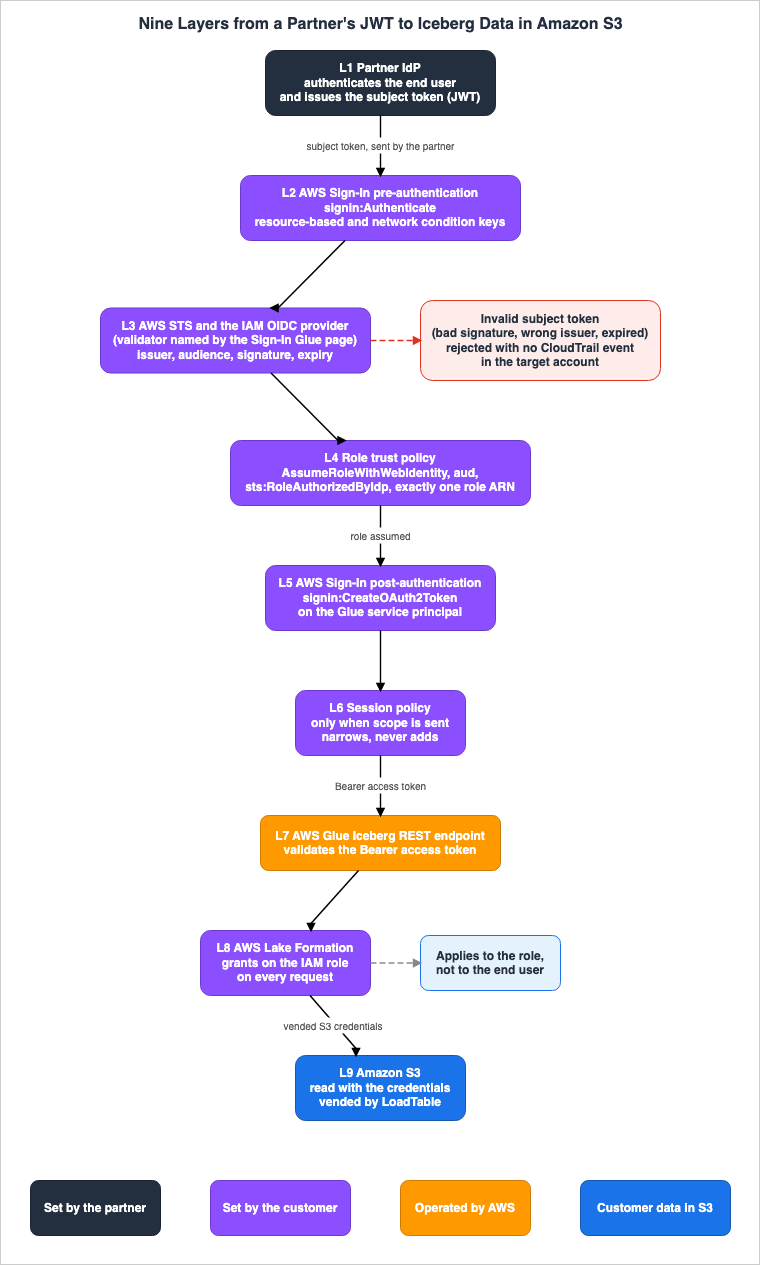
This chapter breaks down how a partner's JWT (JSON Web Token) reaches the Iceberg data residing on S3, into nine layers.3.1 The Six Steps on the Sign-In Glue Page
The Sign-In Glue page describes the flow of the exchange and the calls in six steps.1. The partner sends a token exchange request to the AWS Sign-In token endpoint with the end user's OIDC token.
2. AWS Sign-In performs a pre-authentication authorization check on the signin:Authenticate action, evaluating resource-based and network condition keys before any downstream call when using a private network or VPCE.
3. AWS STS validates the subject token (issuer, audience, signature) against the customer's IAM OIDC provider, enforces the role trust policy and the sts:RoleAuthorizedByIdp condition, and assumes the single role named in the token's https://aws.amazon.com/roles claim.
4. AWS Sign-In performs the principal-based signin:CreateOAuth2Token authorization, then issues an OAuth access token scoped to the AWS Glue service principal (glue.amazonaws.com).
5. The partner calls the AWS Glue Iceberg REST endpoint with the access token in the Authorization: Bearer header.
6. AWS Glue validates the token and enforces the customer's Lake Formation permissions on every request.This article calls these six flow steps 1 to 6, to tell them apart from the setup Steps 1 to 6 on the same page. These six steps can be divided into nine layers when categorized by the verifying entity. This article refers to these nine categories as "layers."
| Layer | Name | Flow Step on the Sign-In Glue Page | Entity |
|---|---|---|---|
| L1 | Partner IdP | Before flow step 1 | Partner |
| L2 | Sign-In Pre-Authentication | Flow step 2 | AWS Sign-In |
| L3 | STS and IAM OIDC Provider | Flow step 3 (first half) | AWS STS |
| L4 | Role Trust Policy | Flow step 3 (second half) | AWS STS |
| L5 | Sign-In Post-Authentication | Flow step 4 | AWS Sign-In |
| L6 | Session policy | Flow step 4, at issuance | AWS Sign-In |
| L7 | Glue Iceberg REST Endpoint | Flow steps 5 and 6 (first half) | AWS Glue |
| L8 | Lake Formation | Flow step 6 (second half) | AWS Lake Formation |
| L9 | S3 | After flow step 6 (data read) | Amazon S3 |
The Partner IdP from Layer L1 does not appear in the six steps. This article includes L1 as a layer because it is the entity that issues the subject token and determines its contents. The L6 session policy only applies when a
scope is passed. Layer L9 (S3) is included as a layer because the Glue IRC page documents the S3 credentials vended by LoadTable.3.2 Two Tokens and the S3 Credentials
In this process, three items pass through the partner's hands.- Subject token: Issued by the partner's IdP and submitted to Sign-In.
- Access token: Issued by Sign-In and submitted to Glue.
- S3 credentials: Vended by Glue in the
LoadTableresponse; the partner's engine presents them to S3.
The Glue IRC page describes the S3 credentials vended by
LoadTable as follows:For the LoadTable operation, the Amazon S3 credentials that AWS Glue vends are bounded by the assumed IAM role and the Lake Formation grants on that role.The partner does not hold any long-term AWS credentials for any of these three items. The Glue OAuth announcement states that this process allows customers to grant their partners access to tables without providing them with AWS credentials.
3.3 Layer Ownership
Customers configure settings for layers L2 through L6 and L8. They are responsible for creating the IAM OIDC provider, role trust policies, role permissions, managed policies used withscope, and Lake Formation permissions. Partners determine the content of the subject token in layer L1 and whether to include scope in exchange requests. AWS services, across layers L2 through L9, verify the settings defined by both the customer and the partner.Figure 1 illustrates the nine layers and their respective owners.
4. For Each Layer: Who Checks What, and What Is Not Checked
This chapter examines each of the nine layers individually and summarizes them in the table in Section 4.10.4.1 L1 Partner IdP
In L1, the partner's Identity Provider (IdP) authenticates users and issues subject tokens. The partner's IdP determines the values for theiss, sub, aud, exp, and iat claims in the subject token, as well as the roles claim and the claim specifying the session name for each role (see Section 6.1).Customers cannot configure anything within L1. The partner's IdP decides which role ARN a user will have included in the roles claim. As an inference of this article (Inference), the customer's boundary must be designed to be secure based on the L4 trust policy and permissions from L5 through L8, without relying on the partner's IdP correctly selecting roles.
AWS STS locates the key used for the subject token from the issuer's
/.well-known/openid-configuration document. The Sign-In Glue page describes this as follows:AWS STS validates it by discovering the issuer's keys through the issuer's /.well-known/openid-configuration document.The method by which the partner's IdP authenticates users is outside the scope of AWS documentation. Within L1, AWS performs no verification.
4.2 L2 Sign-In Pre-Authentication Check
In L2, AWS Sign-In performs a pre-authentication authorization check on thesignin:Authenticate action. The sentence in flow step 2 on the Sign-In Glue page ends with the following phrase:when using a private network or VPCEIt is unclear from the sentence whether this phrase applies to the entire sentence or only to the phrase
before any downstream call.The Sign-In condition keys page states that network condition keys are evaluated for all three actions, including
signin:Authenticate, in both resource-based policies and RCPs. This page does not limit the evaluation to requests through a VPC endpoint.AWS Sign-In evaluates them for all AWS Sign-In actions (signin:Authenticate, signin:AuthorizeOAuth2Access, and signin:CreateOAuth2Token) in both resource-based policies and RCPs.At L2, the principal is not yet established. According to the Sign-In condition keys page,
aws:PrincipalArn and aws:PrincipalAccount can only be used in post-authentication actions after the principal has been established. Instead, the Sign-In-specific condition key signin:PrincipalArn is only usable in the signin:Authenticate action. The condition key signin:OAuthClientId is not usable with signin:Authenticate.According to the Sign-In PrivateLink page, in the pre-authentication phase of a VPC endpoint policy, only
aws:ResourceOrgId and aws:ResourceAccount can be used as condition keys.L2 does not verify subject tokens or roles; that is the responsibility of L3 and L4. The owner of L2's configuration is the customer. The customer configures L2 in the account's Sign-In resource-based policy, the organization's RCP, and the VPC endpoint policy. The Sign-In authorization reference lists
PutResourcePermissionStatement as an action that creates a statement for the account's Sign-In resource-based policy.The Sign-In authorization reference describes the
Authenticate action as the permission to authenticate to the AWS Management Console. The Sign-In Glue page uses the same action for the pre-authentication check of the token exchange. This difference is discussed in Section 9.1.4.3 L3 STS and IAM OIDC Provider
In L3, AWS STS validates the subject token against the customer's IAM OIDC provider. According to flow step 3 of the Sign-In Glue page, AWS STS verifies the issuer, audience, and signature. According to the subject token claims table,exp and iat are required, and nbf is validated if present.Customers create an IAM OIDC provider, registering the issuer URL and audience. According to the Sign-In Glue page, the issuer URL must match the
iss value in the subject token. The audience to be registered corresponds to the token exchange endpoint for each Region.https://{region}.oauth.signin.awsL3 does not verify whether the user may read the table. That is the responsibility of partners (L1) and customers (L8). L3 also handles the selection of the signature algorithm. This article does not specify the algorithms and instead refers to JWT Signing Algorithms on AWS Endpoints.
The entity responsible for validating the subject token is referred to as AWS Sign-In in the Sign-In OAuth overview. The Sign-In Glue page refers to it as AWS STS. This article will discuss this distinction in Section 9.1.
4.4 L4 Role Trust Policy
In L4, the role trust policy determines whether a subject token holder is permitted to assume a role. The trust policy for the Sign-In Glue page example consists of three elements:- It allows the action
sts:AssumeRoleWithWebIdentityto an L3 OIDC provider. - It verifies that the audience is the endpoint for the Sign-In token exchange, using the condition
{oidc-provider-issuer}:aud. - It sets the condition
sts:RoleAuthorizedByIdptotrue.
The STS authorization reference describes
sts:RoleAuthorizedByIdp as follows. Its type is Bool.Filters access based on whether the identity provider authorized the role via the roles claim in the OIDC tokenAccording to flow step 3 of the Sign-In Glue page, AWS STS assumes a single role specified in the roles claim. According to the table of subject token claims, the roles claim must contain exactly one ARN.
When a partner issuer is classified as a shared provider, the customer must add a condition to the trust policy to verify the tenant. According to the IAM shared provider page, IAM requires specific claim evaluations in the trust policy for recognized shared OIDC providers. Without these evaluations, role creation and trust policy updates will fail with a
MalformedPolicyDocument error. According to the IAM shared provider page, IAM does not evaluate existing trust policies against this rule, but it does require this evaluation when modifying the trust policy for an existing role.L4 does not differentiate between individual users. Users who have the same role ARN in their roles claim will be treated as the same role in L5 and beyond. As an inference of this article (Inference), the name of the role session may provide clues for distinguishing users in logs from L5 onwards. The CloudTrail example for the Sign-In Glue page shows an assumed role session, such as
PartnerReadOnly/partner-session, in the userIdentity. The Sign-In Glue page does not state that this session name originates from the claims in https://aws.amazon.com/role_session_name. This is an inference based on the information in this article.4.5 L5 Sign-In Post-Authentication Check
In L5, AWS Sign-In authorizes thesignin:CreateOAuth2Token action with the permissions of the assumed role. Step 4 of the Sign-In Glue page provides an example of an identity-based policy for the role, allowing this action for the following resource.arn:aws:signin:{region}:{your-account-id}:service-principal/glue.amazonaws.comIn L5, the principal is already established. According to the Sign-In condition keys page, this layer allows the use of
aws:PrincipalArn and aws:PrincipalAccount, as well as network condition keys. At L5, OAuth condition keys can also be used.signin:OAuthGrantType: Specifies the grant types that are permitted. One possible value isurn:ietf:params:oauth:grant-type:token-exchange. The Sign-In condition keys page provides an example that only allows this value for the Glue service principal.signin:OAuthClientId: Specifies the permitted OAuth clients. For token exchange, there is no need to register clients on a per-partner basis. Instead, an implicit client ID is used (see Section 6.5).
According to the Sign-In condition keys page, OAuth condition keys can be used in various policy types that correspond to Sign-In actions, such as identity-based policies, SCPs, and RCPs.
L5 does not verify the permissions for the table data. L5 only authorizes the issuance of access tokens that target Glue. Permissions for the table data are verified in L7 and L8.
4.6 L6 Session Policy
L6 is triggered only when a request for exchange includes ascope. According to the Sign-In Glue page, AWS Sign-In applies the managed policy in scope as a session policy on the assumed role. Access tokens are bound by the intersection of the assumed role and the session policy.The Sign-In Glue page limits the policies that can be specified for
scope to:The scope parameter accepts only a customer-owned managed policy in the customer's account. Cross-account policies are not accepted.A session policy only restricts permissions; it does not add permissions that are not already part of the role. Customers define the
scope policies, while partners include the scope in exchange requests. The Sign-In Glue page states that customers configure scope for partner connections. As an inference of this article (Inference), boundaries that the customer wants to keep even when the partner does not include a scope should be defined in the role's identity-based policies and Lake Formation permissions, rather than in the scope itself.The number of policies that can be specified for
scope varies depending on the documentation. The Sign-In Glue page lists a single ARN, while the token exchange API page describes a series of ARNs separated by spaces (see Section 9.1).4.7 L7 Glue Iceberg REST Endpoint
Within L7, AWS Glue validates access tokens. The Glue IRC page states that the Glue Iceberg REST endpoint accepts two forms of authentication: SigV4 and OAuth 2.0 Bearer tokens. Regarding Bearer tokens, the Glue IRC page indicates that AWS Glue validates the tokens and applies Lake Formation permissions on a per-request basis.The Glue REST APIs page states that the role needs the
glue:GetCatalog IAM action to access the Glue endpoint and metadata, for both authentication methods (with a bearer token, the identity is the IAM role assumed during token exchange). The same page states that the IAM actions and Lake Formation permissions documented for each operation are enforced on every request regardless of the authentication method.Details on what Glue verifies in the tokens are not found on the Glue IRC page, the Glue REST APIs page, or the Sign-In Glue page. The Sign-In OAuth overview states that, concerning OAuth tokens, AWS services evaluate requests against existing authorization mechanisms such as IAM policies, SCPs, RCPs, and permission boundaries.
The Glue IRC page lists twelve Iceberg REST operations that the endpoint accepts.
LoadTable is one of these. The Iceberg REST operation getToken, used to obtain tokens, is not included in this list.The format of the response when authorization fails within L7 is not documented in Glue's materials. The Iceberg REST spec states that the service should return an appropriate 401 or 403 response for unauthenticated or unauthorized requests.
4.8 L8 Lake Formation
In L8, AWS Lake Formation applies, on every request, the permissions that the customer granted to the role. The Troubleshooting section of the Sign-In Glue page notes that access to table data is restricted by the customer's Lake Formation permissions associated with the assumed role. Similarly, the Glue IRC page states that the S3 credentials used withLoadTable are also subject to the customer's Lake Formation permissions for that role. For tables in S3 table buckets, the S3 Tables page states which principal the Lake Formation permissions apply to on the Bearer token path:When a query engine authenticates with an OAuth bearer token, the Lake Formation permissions are enforced on the IAM role that the customer configured for the integration.What Lake Formation sees is the role. It does not differentiate between users who name the same role.
The documentation describes three different approaches to the granularity with which Lake Formation enforces permissions.
- Step 3 of the Sign-In Glue page states that customers grant roles permissions to access specific databases, tables, and columns. The same page also explains that Lake Formation enforces fine-grained access control with each query.
- The Prerequisites section of the same Sign-In Glue page provides examples of permissions, listing databases and tables, but not columns.
- The S3 Tables page explains that for external engines to access data, it is necessary to enable the setting that allows full table access. According to the S3 Tables page, this setting allows third-party applications using roles with full permissions to a requested table to obtain temporary credentials from Lake Formation.
The LF integration page states that by default, operations that allow third-party services to obtain temporary access to S3 data –
GetTemporaryGlueTableCredentials and GetTemporaryGluePartitionCredentials – are disabled. It explains that there are two ways to enable this access: either by validating IAM session tags each time, or by configuring a setting that permits full table access. The LF full table page clarifies that this setting can be configured using the put-data-lake-settings command, using the AllowFullTableExternalDataAccess parameter. As an inference of this article (Inference), this setting is a data lake setting and applies at the level of the account's data lake, rather than to individual tables or roles. The Sign-In Glue page and the Glue IRC page do not mention this setting. The Glue IRC page also does not state whether Glue uses these operations on this path (Section 4.9).Whether S3 credentials are vended through this path to roles with limited column permissions is not determined by any of the available documentation. The text discussing row filtering cannot be found on either the Sign-In Glue page or the Glue IRC page. This article lists this disagreement in Section 9.1 and tests it in the setup in Chapter 10.
4.9 L9 S3
In L9, the partner's engine reads Iceberg data files in S3 using credentials vended byLoadTable. According to the Glue IRC page, these credentials are bound to the assumed role and the Lake Formation permissions associated with that role.The mechanism for restricting credentials to a single prefix is covered in this site's The Iceberg Catalog Layer on AWS. The Glue IRC page does not specify which API Glue uses to create these credentials.
L9's S3 is unaware of the partner's users. L9 only receives the vended credentials.
4.10 Summary Table
The following table lists nine layers, using the columns common to the three articles in the same series.| Boundary | Who Checks | What Is Checked | What Is Not Checked Here | Set By | Where It Is Written | Source State |
|---|---|---|---|---|---|---|
| L1 Partner IdP | Partner's IdP | User authentication. Issuance of the subject token and its contents. | AWS does not verify the contents of L1. | Partner | Sign-In Glue page – Claim table | Authentication methods – No statement found (outside the scope of AWS documentation). |
| L2 Sign-In pre-authentication | AWS Sign-In | Resource-based condition keys and network condition keys for signin:Authenticate. | Signature and role (L3, L4) of the subject token. Principal condition keys cannot be used. | Customer. Sign-In resource-based policies, RCP, VPC endpoint policies. | Sign-In Glue page – flow step 2, Sign-In condition keys page, Sign-In PrivateLink page | Scope of the flow step 2 sentence – Sources disagree (Section 9.1). |
| L3 STS and IAM OIDC provider | AWS STS (AWS Sign-In in Sign-In OAuth overview) | Issuer, audience, signature. Ensures it is not expired. nbf (not before) if present. | Whether the user is permitted to read the table (L1, L8). | Customer. Issuer URL and audience of the IAM OIDC provider. | Sign-In Glue page – flow step 3 and claim table | Who validates – Sources disagree (Section 9.1). |
| L4 Role trust policy | AWS STS | sts:AssumeRoleWithWebIdentity, condition for aud, sts:RoleAuthorizedByIdp, roles claim with exactly one ARN. Tenant condition for shared providers. | Each individual user. Users with the same role are not distinguished. | Customer. Role trust policy. | Sign-In Glue page – Step 2 and flow step 3, STS authorization reference, IAM shared provider page | Stated |
| L5 Sign-In post-authentication | AWS Sign-In | signin:CreateOAuth2Token with role permissions. Principal, network, and OAuth condition keys. | Permissions for the data in the table (L7, L8). | Customer. The role's identity-based policy, SCP, RCP, VPC endpoint policies. | Sign-In Glue page – flow step 4 and Step 4, Sign-In condition keys page | Stated |
L6 Session policy (scope) | AWS Sign-In | Intersection as a session policy. | Whether to include scope (determined by the partner; Inference). | Customer writes the policy, partner includes it in the request. | Sign-In Glue page, token exchange API page | Number of policies – Sources disagree (Section 9.1). |
| L7 Glue Iceberg REST endpoint | AWS Glue | Access token. Application of Lake Formation permissions on a per-request basis. | Details of what is checked in the token. | AWS. The role's IAM permissions are set by the customer. | Glue IRC page, Sign-In Glue page – flow step 6 | Details of token validation – No statement found. |
| L8 Lake Formation | AWS Lake Formation | Permissions for the role. | Partner's users. Whether column-specific permissions take effect through this path. | Customer. Lake Formation permissions and external engine configuration. | Sign-In Glue page – Step 3, S3 Tables page, LF integration page, LF full table page | Granularity – Sources disagree (Section 9.1). |
| L9 Amazon S3 | Amazon S3 | Vended credentials. | Partner's users. | Customer. Role and Lake Formation permissions determine the scope of the credentials. | Glue IRC page | API for creating credentials – No statement found. |
5. Effective Access Is Decided by an Intersection
This chapter organizes what partners can actually read, based on how different settings restrict access.5.1 The Intersection Formula and the Control Table
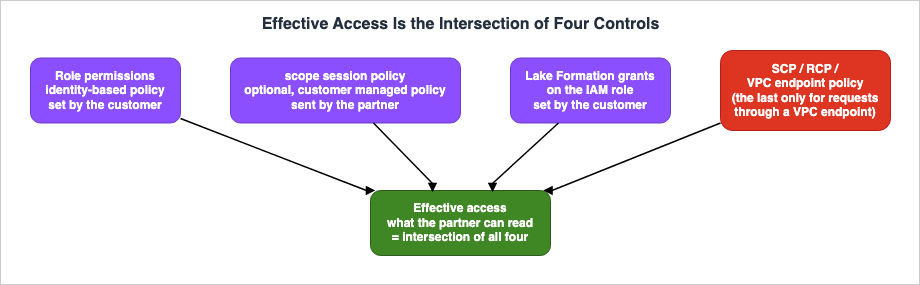
Step 5 of the Sign-In Glue page describes the effective access as follows:The effective access is the intersection of the role's permissions, this policy, and your Lake Formation grants.The Sign-In OAuth overview states that OAuth tokens work in conjunction with existing IAM identities, policies, SCPs, RCPs, and other AWS authorization mechanisms. This article puts these elements together in the following formula. The form of the formula is this article's own arrangement (Inference); no source writes it this way.
effective access = role permissions ∩ scope session policy ∩ Lake Formation grants on the role ∩ SCP / RCP / VPC endpoint policyThe following table lists the controls involved in the intersection. The
Control column lists the name of the control, the Who Sets It column indicates the owner of the control's configuration, the Evaluated At column specifies the layer at which it is evaluated, the What It Narrows column describes what it restricts, and the Where It Is Written column indicates the source. The Source State column describes the state of the documentation.| Control | Who Sets It | Evaluated At | What It Narrows | Where It Is Written | Source State |
|---|---|---|---|---|---|
| Role trust policy | Customer | L4 | Which subject tokens are eligible for the role | Step 2 of the Sign-In Glue page | Stated |
| Role identity-based policy | Customer | L5, L7 | signin:CreateOAuth2Token and Glue actions | Step 4 of the Sign-In Glue page, Sign-In OAuth overview | Stated |
scope session policy | Customer (writes), Partner (sends) | L6 | Further restricts the scope of the role's permissions | Sign-In Glue page, token exchange API page | Stated |
| Lake Formation Permissions | Customer | L8 | Which databases, tables, and columns the role can access | Step 3 of the Sign-In Glue page, S3 Tables page | Sources disagree on column handling |
| Lake Formation External Engine Configuration | Customer | L8 | Whether to vend credentials to external engines | LF integration page, LF full table page, S3 Tables page | No statement on the Sign-In Glue page |
| SCP | Organization | Actions performed by the role's principal | Maximum allowed actions for the role | Sign-In OAuth overview, Sign-In condition keys page | Stated |
| RCP | Organization | L2, L5, and access to resources | Access to Sign-In actions and resources | Sign-In OAuth overview, Sign-In condition keys page | Stated |
| Sign-In Resource-Based Policy | Customer | L2, L5 | Network and principal conditions on Sign-In actions | Sign-In condition keys page | Stated |
| VPC Endpoint Policy | VPC Endpoint Owner | Only requests passing through the VPC endpoint | Accounts and organizations, in the pre- and post-authentication phases | Sign-In PrivateLink page | Token exchange mode: Documentation does not list (Section 9.2) |
5.2 scope Only Narrows, and the Partner Is the One Who Sends It
The L6 scope further restricts the permissions defined in the role. scope does not add permissions that are not already included in the role. The Sign-In Glue page states that scope is limited to customer managed policies in the customer's account, and rejects policies from other accounts, as well as policies that cannot be resolved in the account.No statement was found in the documentation on whether the
scope policy needs to include the signin:CreateOAuth2Token action. Step 5 of the Sign-In Glue page simply states that scope policies should restrict Glue actions and resources. This article tests both a policy that includes the signin:CreateOAuth2Token action and one that does not, in the setup in Chapter 10.The documentation also does not specify how actions from services other than Glue are handled when included in the
scope.5.3 Lake Formation Sees the Role
Lake Formation applies permissions to the role. If two partner users have subject tokens that name the same role, Lake Formation considers them to be the same. As an inference of this article (Inference), if a customer wants to define different access scopes for each user, they should create separate roles and have the partner's Identity Provider (IdP) assign different roles to each user via the roles claim. The partner's IdP decides which role it names (Section 4.1).A separate path that carries IAM Identity Center user identities to Lake Formation is covered in this site's Identity-Aware Data Access on AWS. The path in this article does not carry user identities to Lake Formation.
5.4 Network Conditions See the Partner's Network
The Troubleshooting section of the Sign-In Glue page describes requests rejected by network conditions as follows.The token exchange propagates the real caller's network context (aws:SourceIp, aws:SourceVpc, aws:SourceVpce, aws:VpcSourceIp). Verify that the role trust policy, resource control policies, and VPC endpoint policies permit the partner's network origin.The partner initiates the token exchange request. Therefore, the network conditions defined in the trust policy, RCP (Resource Control Policy), and VPC endpoint policy are evaluated in relation to the origin of the partner's network. According to the Sign-In condition keys page, a single request can only have either a public network
aws:SourceIp or a VPC endpoint aws:SourceVpc.Figure 2 illustrates how effective access results from the intersection of four controls.
6. Subject Token Requirements and the Access Token Lifetime
This chapter outlines the requirements for the subject tokens that partners submit, and the lifetime of the access tokens that Sign-In returns.6.1 Subject Token Requirements Table
The following table lists the claims table from the Sign-In Glue page, with an added column indicating the entity responsible for verification. TheClaim column lists the claim name, the Required column indicates whether the claim is mandatory, the What the Page Says column describes the requirements as stated on the Sign-In Glue page, the Checked By column identifies the entity performing the verification, and the Source State column reflects the status of the information.| Claim | Required | What the Page Says | Checked By | Source State |
|---|---|---|---|---|
iss | Yes | Must match the IAM OIDC provider registered for the customer's account. | AWS STS (L3) | Stated |
sub | Yes | Represents the partner's user. | No entity specified | No statement found |
aud | Yes | Must match the audience registered with the customer's OIDC provider. This is the URL for the Region-specific token exchange endpoint. | AWS STS (L3) and trust policy conditions (L4) | Stated |
exp | Yes | Expiration time. Epoch seconds. | AWS STS (L3) | Stated |
iat | Yes | Issuance time. Epoch seconds. | No entity specified | Stated (mandatory) |
nbf | No | If present, it will be validated. | No entity specified | Stated |
jti | No | A unique identifier for the token. | No entity specified | Stated |
https://aws.amazon.com/roles | Yes | ARN of the role that is permitted. Must contain exactly one ARN. | AWS STS and sts:RoleAuthorizedByIdp (L4) | Stated |
https://aws.amazon.com/role_session_name | Yes | The name of the role session. Must be between 2 and 64 characters and conform to the pattern [\w+=,.@-]. | No entity specified | Stated |
https://aws.amazon.com/session_duration | No | The maximum session time. Must be between 900 and 43200 seconds, and is capped by the role's maximum session duration. | No entity specified | Stated |
Regarding
sub, the Sign-In Glue page simply states that it represents a partner user, but it does not explain how customers can utilize it. The CloudTrail example on the Sign-In Glue page does not include a field to display sub. In the introspection API page, sub refers to the ARN of the session for the role that has been assumed, rather than the user's sub (see Section 7.3).6.2 The Audience Is Fixed to the Sign-In Endpoint
Theaud value in the subject token is the URL of the Sign-In token exchange endpoint, not the URL of a partner or data destination. Customers register this URL with the IAM OIDC provider as the audience and also write it in the aud condition of the trust policy. The Sign-In Glue page writes this URL with {region} in it. As an inference of this article (Inference), the Region in the aud value, the Region of the token endpoint to which the partner sends exchange requests, and the Region where the tables reside need to match. The Sign-In Glue page says to create all resources in the Region where the Iceberg tables reside.6.3 Access Token Lifetime
The Sign-In Glue page describes the access token lifetime as follows:Valid for up to one hour. No refresh token is issued; the partner performs a new token exchange when the token expires.The token exchange API page describes the
expires_in value in the response as follows:Token lifetime in seconds. Value is the minimum of the subject token's validity and 1 hour (3600 seconds).These two statements are not contradictory. The statement on the token exchange API page adds the condition of the remaining validity period of the subject token to the statement on the Sign-In Glue page. As an inference of this article (Inference), if the partner's IdP issues a JWT with a short validity period, the access token obtained through the exchange will also have a shorter validity period.
No statement was found in the documentation on whether the claim
https://aws.amazon.com/session_duration affects the expires_in value. The Sign-In MCP page states that a non-interactive access token is "Valid for the shorter of one hour or the remaining AWS session duration." That page describes its non-interactive authorization as SigV4 client credentials and lists token exchange authorization as a separate authorization model, while the Sign-In OAuth overview lists JWT-based token exchange under non-interactive authorization; the page does not say whether the row applies to token exchange. This article tests this in the setup in Chapter 10.Since refresh tokens are not available, when the access token expires, the partner will exchange it again using a new subject token. The owner of this re-exchange process is the partner.
6.4 Form of the Exchange Request
The Sign-In Glue page shows an exchange request sent form-encoded toPOST /v1/token.POST /v1/token HTTP/1.1
Host: {region}.oauth.signin.aws
Content-Type: application/x-www-form-urlencodedThe token exchange API page illustrates the same request, showing the syntax for sending it as a JSON body to a URL with an appended query string.
POST /v1/token?x-amz-oauth-token-method=token-exchange HTTP/1.1
Content-type: application/json
This difference is further explained in Section 9.1. Both documents specify
grant_type as urn:ietf:params:oauth:grant-type:token-exchange and subject_token_type as urn:ietf:params:oauth:token-type:jwt. According to the token exchange API page, resource is a required parameter for the token exchange grant, with glue.amazonaws.com provided as an example.The token exchange API page lists the exceptions that may occur in case of failure, including
InvalidGrantException, InvalidScopeException, ValidationException, TooManyRequestsError, ServiceUnavailableException, and InternalServerException. The description for InvalidGrantException indicates that the provided grant is either invalid or expired. The documentation does not provide a mapping that specifies which type of rejection corresponds to which exception.6.5 No Client Registration Is Required; an Implicit Client ID Is Used
Token exchange does not require partner-specific OAuth client registration. The Sign-In condition keys page describes the implicit client ID used in the token exchange flow as follows:arn:aws:signin:::external-client/token-exchange/jwtCustomers can use this value with the condition key
signin:OAuthClientId. According to the Sign-In OAuth overview, the /v1/register endpoint for Dynamic Client Registration only accepts redirect URIs that are on the approved list. According to the Sign-In MCP page, Dynamic Client Registration is a mechanism for agents to register during interactive authorization. The implicit client ID used in token exchange does not differentiate between individual partners. As an inference of this article (Inference), partners are distinguished not by the client ID, but by the IAM OIDC provider (issuer) and role.7. Records, and Ways to Look Into Them Later
This chapter describes where and how exchanges and calls are recorded.7.1 CloudTrail's CreateOAuth2Token
According to the Sign-In Glue page, CloudTrail logs token exchanges and token introspection. The CloudTrail example on the Sign-In Glue page, detailing an exchange, is shown below:eventSourceissignin.amazonaws.com, andeventNameisCreateOAuth2Token.userIdentityisAssumedRole, and includes the ARN of the assumed role's session.requestParameters.resourceisglue.amazonaws.com.additionalEventData.grant_typeisurn:ietf:params:oauth:grant-type:token-exchange.
This example does not include a field indicating the user's
sub. The Sign-In Glue page does not specify whether events related to STS's AssumeRoleWithWebIdentity are also separately recorded in the customer's CloudTrail. Furthermore, neither the Glue IRC page nor the Sign-In Glue page states how calls using a Bearer token to the Glue Iceberg REST endpoint are logged in CloudTrail. This article tests this in the setup in Chapter 10.7.2 Invalid Subject Tokens Are Not Recorded in the Target Account
The Sign-In Glue page describes token exchange requests with an invalid subject token as follows:Token exchange requests that present an invalid subject token (bad signature, wrong issuer, or expired token) are rejected without generating a CloudTrail event in the target account. Only requests carrying a valid subject token with a valid issuer are logged.This statement refers to the target account. It does not state that this information is not logged anywhere within CloudTrail. The invalid subject tokens mentioned in this statement encompass those with invalid signatures, those issued by an incorrect issuer, and those that have expired. Requests using valid subject tokens that are rejected due to L4 trust policy failures or L5 authorization failures fall under the latter part of this statement, which refers to requests using valid subject tokens from a valid issuer. As an inference of this article (Inference), such requests fall on the logged side.
As an inference of this article (Inference), a consequence of this statement is that customers cannot determine, using only their own account's CloudTrail logs, how many attempts were made with invalid subject tokens. Instead, they must rely on logs maintained by their partner's Identity Provider (IdP).
7.3 What You Can Learn Through Introspection
The Sign-In Glue page includes theIntrospectOAuth2Token API for examining tokens. According to the introspection API page, this API implements token introspection as defined in RFC 7662, using endpoints authenticated with SigV4. The primary fields in the response are as follows:aud: The OAuth resource that the token is intended for.iss: Alwayssignin.amazonaws.comin the context of Sign-In.sub: The ARN of the IAM principal. In the case of assumed roles, this is the ARN of the session.client_id: The identifier of the OAuth client that requested the token.signin_session: The ARN of the Sign-In session associated with the token.active: This field istrueonly when the token is valid, not expired, not revoked, and belongs to the calling account.
According to the introspection API page, attempting to examine a token from a different account will result in a response of
{"active": false}. The sub field in introspection does not represent the sub of a partner user.7.4 No Statement Found on an API to Revoke Access Tokens
The table on the Sign-In Glue page, which lists APIs for managing tokens, only includesIntrospectOAuth2Token. The revocation API page states that it only accepts refresh tokens. Token exchange does not issue refresh tokens. In the range this article searched, no statement was found on an API that revokes an access token obtained through token exchange before it expires.The revocation API page explains that even if you revoke a refresh token, previously issued access tokens remain valid until their expiration. To block access immediately, the revocation API page says to use an IAM policy that denies the session with the condition key
aws:SignInSessionArn. This explanation specifically refers to refresh tokens. No statement was found on whether this method also applies to access tokens obtained through token exchange.8. Differences from the AWS MCP Server and the SigV4 Entry Point
This chapter compares this path with the AWS MCP Server, which uses the same Sign-In token exchange, and with the SigV4 entry point on the same Glue Iceberg REST endpoint.8.1 Comparison with AWS MCP Server
The Sign-In MCP page includes a section titled Token exchange authorization. According to this section, third-party applications can exchange existing OIDC ID tokens for short-lived OAuth access tokens. The AWS CLI example on the Sign-In MCP page specifiesaws-mcp.amazonaws.com in the resource field.The following table compares Glue and AWS MCP Server. The
Item column lists the items, the Glue Iceberg REST column lists the Glue Iceberg REST endpoint, the AWS MCP Server column lists AWS MCP Server, and the Where It Is Written column indicates the source.| Item | Glue Iceberg REST | AWS MCP Server | Where It Is Written |
|---|---|---|---|
| Token Endpoint | Sign-In's /v1/token | Sign-In's /v1/token | Sign-In OAuth overview |
| Token Exchange Grant | RFC 8693 | RFC 8693 | Sign-In Glue page, Sign-In MCP page |
resource | glue.amazonaws.com | aws-mcp.amazonaws.com | Sign-In Glue page, Sign-In MCP page |
| Required IAM Actions | signin:CreateOAuth2Token | signin:CreateOAuth2Token | Sign-In Glue page, Sign-In MCP page |
| IAM Resource ARN | service-principal/glue.amazonaws.com | service-principal/aws-mcp.amazonaws.com | Sign-In Glue page, Sign-In MCP page |
| Authorization on the Destination Side | Glue applies Lake Formation permissions on every request. | Role permissions and service-specific authorization controls continue to apply. | Sign-In Glue page, Sign-In MCP page |
| Client Origin | External JWT only. | For interactive authorization, the Dynamic Client Registration allowlist. Also SigV4 client credentials for non-interactive authorization, and token exchange. | Sign-In MCP page, Sign-In OAuth overview |
| Refresh Tokens | Not issued. | Issued only for interactive authorization. | Sign-In Glue page, Sign-In MCP page |
| Token exchange row in the lifetime table | Up to 1 hour | No such row | Sign-In Glue page, Sign-In MCP page |
Using the same token endpoint and grant, the destination
resource is different. The tokens obtained through exchange are not of a type specifically created for Glue. The Sign-In Glue page, in its Glue procedure, indicates that the access token is directed towards the Glue service principal. The OAuth functionality of the AWS MCP Server is not limited to interactive authorization.This site covers the interactive and SigV4 logging aspects of AWS MCP Server OAuth in the Agent Toolkit for AWS and the AWS MCP Server. The general principles of registering MCP clients are covered in this site's Which MCP Clients a Remote MCP Server Lets In.
8.2 The SigV4 Entry Point on the Same Endpoint
According to the Glue IRC page, Glue's Iceberg REST endpoint supports two authentication methods: SigV4 and OAuth 2.0 Bearer tokens. SigV4 is the default method for authentication using AWS credentials, commonly used with the AWS SDK and AWS analytics engines. Bearer tokens are intended for use with external partners and third-party query engines. The Glue OAuth announcement states that Bearer tokens are accepted in addition to SigV4.This site's The Iceberg Catalog Layer on AWS details the entry point for the Iceberg REST endpoint, using SigV4 authentication, as of September 5, 2026. On October 26, 2026, support for Bearer tokens was added to the same endpoint.
8.3 Relationship Between the Iceberg REST Spec and Its OAuth Endpoint
The Iceberg REST spec describes the operation/v1/oauth/tokens, where the catalog itself issues tokens, as follows:The oauth/tokens endpoint is DEPRECATED for REMOVAL. It is not recommended to implement this endpoint, unless you are fully aware of the potential security implications.
All clients are encouraged to explicitly set the configuration property oauth2-server-uri to the correct OAuth endpoint.
Deprecated since Iceberg (Java) 1.6.0. The endpoint and related types will be removed from this spec in Iceberg (Java) 2.0.Regarding the
securitySchemes in the Iceberg REST spec, when using a different authorization server, it is described as follows:If a separate authorization server is used, substitute the tokenUrl with the full token path of the external authorization server, and use the resulting token to access the resources defined in the spec.The list of operations on the Glue IRC page does not include
getToken. As an inference of this article (Inference), the Glue path uses Sign-In as a separate authorization server and passes its token to the Iceberg REST endpoint. This approach aligns with the recommendations outlined in the Iceberg REST spec. However, the Sign-In token exchange assumes that the partner possesses a subject token, which differs in form from the client credentials flow in the Iceberg REST spec.The PyIceberg configuration page states that the value of the Bearer token used in the Authorization header can be passed through the
token setting. The page lists token under "Legacy OAuth2" and states that these properties will be removed in PyIceberg 1.0 in favor of the pluggable AuthManager properties. The Glue OAuth announcement states that query engines such as Apache Spark, Trino, and Apache Flink, which implement OAuth 2.0 natively, can now authenticate to the endpoint with bearer tokens. No AWS documentation was found that gives the client configuration properties for PyIceberg or Spark. The examples provided on the Glue IRC page and the S3 Tables page only demonstrate SigV4 configuration.8.4 Difference from the Path That Carries IAM Identity Center User Identities
The path used to transmit user identities from the trusted token issuer within IAM Identity Center to Lake Formation is separate from the path described in this article. As noted in Section 5.3, the information that reaches Lake Formation via the path described in this article is a role, not a user identity.9. Where the Sources Disagree and What Is Not Written
This chapter gathers instances where the information in the sources conflicts, where information is missing, or where no statement could be found.9.1 Where the Sources Disagree
- The meaning of
signin:Authenticate: The Sign-In authorization reference describesAuthenticateas the permission for authentication to the AWS Management Console, specifying the resource type asconsole. The Sign-In Glue page uses the same action for the pre-authentication check of the token exchange (Section 4.2). - Supported Regions: The Glue OAuth announcement states that the capability is available in all AWS Regions where Glue and Lake Formation are available. The Sign-In endpoints page lists 29 Regions for OAuth endpoints. Regions that are listed in the standard Sign-In endpoints table but not in the OAuth endpoints table are
ap-southeast-5,ap-southeast-6,ap-east-2,ap-southeast-7,mx-central-1, and the two AWS GovCloud (US) Regions. This article does not specifically compare the supported Regions for Glue and Lake Formation on a Region-by-Region basis. - Scope of the Flow Step 2 Sentence: The flow step 2 sentence on the Sign-In Glue page concludes with a clause about using a VPC endpoint (Section 4.2). The Sign-In condition keys page does not limit the evaluation of network condition keys for
signin:Authenticateto requests through a VPC endpoint (Section 4.2). - Lake Formation Granularity: Step 3 on the Sign-In Glue page describes permissions for databases, tables, and columns, as well as application on a query-by-query basis. The Prerequisites section on the same page lists databases and tables. The S3 Tables page requires the full table access setting for external engines. The LF integration page requires either IAM session tag validation or the full table access setting when credentials are vended to third parties (Section 4.8).
- Who Validates the Subject Token: Flow step 3 on the Sign-In Glue page names AWS STS. The Sign-In OAuth overview states that AWS Sign-In validates external JWTs against the customer's IAM identity provider and trust policy. The Token exchange authorization section on the Sign-In MCP page refers to AWS (Section 4.3).
- Format of Exchange Requests: The Sign-In Glue page describes a form-encoded
POST /v1/token. The token exchange API page describes it asPOST /v1/token?x-amz-oauth-token-method=token-exchangein a JSON body (Section 6.4). - Number of
scopePolicies: The Sign-In Glue page describesscopeas a single ARN for customer-managed IAM policies. The token exchange API page describes it as a list of customer-managed policy ARNs, separated by spaces (Section 4.6).
This article does not declare any of the items to be incorrect.
9.2 What the Documentation Does Not List
- The Sign-In PrivateLink page lists VPC endpoints for two modes: interactive and non-interactive (using SigV4 client credentials). It does not list VPC endpoints for the token exchange mode. The Sign-In OAuth overview groups token exchange under non-interactive authorization, while the PrivateLink page defines its non-interactive mode as the SigV4 client credentials grant; neither page says which VPC endpoint token exchange uses. The Sign-In Glue page references VPC endpoints in flow step 2 and discusses VPC endpoint policies in the Troubleshooting section.
- The token lifetime table on the Sign-In MCP page lists three rows: interactive and non-interactive access tokens, and refresh tokens. It does not include a row for access tokens used with token exchange, and it does not say whether the non-interactive row (the shorter of one hour or the remaining AWS session duration) applies to them; the same page lists token exchange authorization as a separate authorization model.
- The table on the Sign-In Glue page, listing APIs for managing tokens, only includes
IntrospectOAuth2Token. It does not list APIs related to token revocation (see Section 7.4).
9.3 Items with No Statement Found
This article identifies the following items for which descriptions could not be found after reviewing the materials in Section 1.3 and searching AWS documentation. Some of these items were observed in the setup in Chapter 10, but the observations do not substitute for statements in the documentation.- The format of access tokens. The token exchange API page states that access tokens contain the principal identity, resource scope, and session metadata, but it does not specify whether they are in JWT format or another format. The introspection API page lists the
tokenpattern asASO[AR][A-Za-z0-9+/=_\-]+. - Which exceptions are returned when a request with a valid subject token is rejected at L4 or L5 (Section 6.4).
- The status codes and response body returned by the Glue Iceberg REST endpoint when authorization fails with a Bearer token (Section 4.7).
- Which client configuration properties PyIceberg and Spark use with the Glue Iceberg REST endpoint (the Glue OAuth announcement names Spark as able to authenticate, but no configuration is documented; Section 8.3).
- How Glue handles the
X-Iceberg-Access-Delegationheader inLoadTablerequests. - Whether S3 credentials are vended to roles with column-filtered Lake Formation permissions via this pathway, and how row filtering is handled (Section 4.8).
- Whether the
scopepolicy needs to includesignin:CreateOAuth2Token, and how actions other than Glue are handled (Section 5.2). - Whether the claim
https://aws.amazon.com/session_durationaffects theexpires_invalue (Section 6.3). - Whether the event for STS
AssumeRoleWithWebIdentityappears in the customer's CloudTrail logs, and the format of the logs for Glue calls using Bearer tokens (Section 7.1). - How to revoke an access token obtained through token exchange before its expiration date (Section 7.4).
- Clarification of whether it is a Generally Available (GA) or preview release. Neither the Glue OAuth announcement nor the Sign-In Glue page mention the term "preview," nor do they mention "GA."
9.4 Important Notes When Reading
When reviewing the CloudTrail example on the Sign-In Glue page, note that theeventTime is 2026-09-25T05:10:04Z. This date precedes the Glue OAuth announcement date of October 26, 2026. The example value is provided for illustrative purposes only and does not indicate the date when the feature became available.10. What This Setup Showed
This chapter describes the results of testing the exchange and the calls in a setup built in us-east-1. What is written here is an observation (Observation), not a commitment of the documentation. This article does not overwrite the documentation statements in Chapters 4 through 9 with observations.10.1 Setup
The setup consists of a single AWS CloudFormation stack and resources created using AWS CLI commands.- A minimal OIDC issuer. This is an AWS Lambda function URL that returns the
/.well-known/openid-configurationdocument and a JWKS containing only public keys. The signing key was created locally and is not stored in AWS. - One IAM OIDC provider with an audience of
https://us-east-1.oauth.signin.aws. - Two IAM roles for partners to assume. The
b78-oauth-demo-fullrole grants SELECT access to all columns in the table, while theb78-oauth-demo-colrole grants SELECT access to only theidandregion_codecolumns, both within Lake Formation. Both roles have the same three conditions as the example in Step 2 of the Sign-In Glue page. - Two customer managed policies used for the
scope. Both policies only allow read access to the catalog and database. One policy includes thesignin:CreateOAuth2Tokenpermission. - One Iceberg table with three rows and three columns, created using Amazon Athena's CTAS. The S3 location of the table has been registered in Lake Formation.
- The exchange and Glue invocations were performed from a local environment with AWS credentials removed.
- The Lake Formation setting for external engines,
AllowFullTableExternalDataAccess, was initially disabled and then enabled during the demonstration. This is a setting of the account's data lake, so the original value was saved before the demonstration and restored during the cleanup process.
The following six items were tested. The exchange and Glue invocations were performed between 04:15 and 04:19 (UTC) on November 6, 2026. PyIceberg and introspection were performed at 04:56 (UTC) on the same day. The setup was deleted on the same day, and the deletion was verified.
- Exchange responses. Fourteen exchanges were sent; six succeeded and eight were rejected.
- Calls to the Glue Iceberg REST endpoint, both with the Lake Formation setting for external engines disabled and enabled.
- Reads using PyIceberg 0.12.0.
- CloudTrail event history.
- Introspection from the customer's side.
- A
scopepolicy that includessignin:CreateOAuth2Tokenand one that does not.
10.2 Exchange Responses and the Access Token Lifetime
Successful exchanges totaled six, all returning an HTTP 200 status. In all six, the roles claim was a plain string; the one-element array in Section 10.3 was rejected (single observation; the documentation does not say which form is expected). The response body contained four fields:access_token, expires_in, issued_token_type, and token_type. The issued_token_type was urn:ietf:params:oauth:token-type:access_token, and the token_type was Bearer.The values for
expires_in were as follows:| Exchange Request | Subject Token Expiration | expires_in |
|---|---|---|
| All-columns role, form format | 300 seconds from issuance | 3599 |
| Column-restricted role, form format | 300 seconds from issuance | 3599 |
All-columns role, https://aws.amazon.com/session_duration with 900 | 300 seconds from issuance | 899 |
| All-columns role, subject token expiration set to 1 hour | 3600 seconds from issuance | 3599 |
| All-columns role, token exchange API page format | 300 seconds from issuance | 3599 |
All-columns role, scope policy that includes signin:CreateOAuth2Token | 300 seconds from issuance | 3599 |
In this setup, even when the subject token expiration was 300 seconds, the
expires_in value was 3599. This observation (Observation) does not match the text on the token exchange API page, which states that expires_in is the shorter of the subject token's validity and 1 hour (Section 6.3). This article does not override the documented text with the observed behavior. For the exchange with 900 in the https://aws.amazon.com/session_duration claim, the expires_in value was 899.Exchanges using the token exchange API page format (a JSON body sent to a URL with
?x-amz-oauth-token-method=token-exchange) and exchanges using the Sign-In Glue page form format were both successful.The access token, ranging from 3,559 to 3,838 characters, consisted of three parts separated by periods. The second part, when decoded using base64url, could be read as JSON and contained keys named
aud, client_id, exp, iat, iss, jti, nbf, region, session, signin_session_arn, and sub. The first part could not be read as JSON. This article only records the names of the keys, not their values. The character set for the token pattern on the introspection API page does not include periods (see Section 9.3).10.3 How Rejections Appear
The following table lists the results of the eight exchange attempts expected to be rejected. The Sign-In Record and STS Record columns indicate whetherCreateOAuth2Token and AssumeRoleWithWebIdentity events were recorded in CloudTrail event history.| Exchange Request | HTTP | Error | Sign-In Record | STS Record |
|---|---|---|---|---|
| Expired subject token | 400 | invalid_grant | None | None |
| Subject token signed with a key the issuer does not publish | 400 | invalid_grant | None | None |
| Audience not a Sign-In endpoint | 400 | invalid_grant | None | None |
| Two ARNs in the roles claim | 400 | invalid_grant | None | None |
| Roles claim is a single-element array | 400 | invalid_grant | None | None |
Missing https://aws.amazon.com/role_session_name claim | 400 | invalid_scope | None | None |
scope policy that does not include signin:CreateOAuth2Token | 400 | invalid_grant | AccessDenied | Success |
resource is aws-mcp.amazonaws.com | 400 | invalid_grant | AccessDenied | Success |
The response body contained three fields:
error, error_description, and message. For all invalid_grant errors, the error_description was the same:The subject token credentials provided is invalid.In this setup, the first six attempts in the table did not produce any records in either Sign-In or STS. In addition to the three factors (signature, issuer, and expiration) named in the statement on the Sign-In Glue page (Section 7.2), no records were generated for a different audience, the form of the roles claim, or the absence of the role session name claim. For the two attempts at the bottom of the table, STS assumed the role, while the
CreateOAuth2Token step in Sign-In resulted in an AccessDenied error.The
scope policy that does not include signin:CreateOAuth2Token resulted in a failed exchange, while the policy that does include it was successful (Section 5.2). In this observation, the scope policy needed to permit signin:CreateOAuth2Token in addition to Glue's actions.10.4 Glue Calls and the Lake Formation Setting for External Engines
The following table lists the HTTP status codes returned when calling the Glue Iceberg REST endpoint. TheLoadTable operation yielded the same result whether the X-Iceberg-Access-Delegation: vended-credentials header was present or absent.| Access Token | GetConfig, ListNamespaces | ListTables | LoadTable, Setting Disabled | LoadTable, Setting Enabled |
|---|---|---|---|---|
| All-columns role | 200 | 200 | 403 | 200 |
| Column-restricted role | 200 | 200 | 403 | 403 |
All-columns role with a scope policy that includes signin:CreateOAuth2Token | 200 | 403 | 403 | 403 |
When the setting was disabled, the
LoadTable operation returned the following message for both roles:Insufficient Lake Formation permissions. Verify the data lake settings for accountWhen the setting was enabled, the
LoadTable operation for the all-columns role returned a response containing the keys s3.access-key-id, s3.secret-access-key, s3.session-token, and s3.session-token-expires-at-ms in the config section. This article does not record the values. The storage-credentials section of the response was empty. The LoadTable operation for the column-restricted role resulted in a 403 error with the following message:Insufficient Lake Formation permission(s): FULL SELECT or SUPER privileges required on the table.In this setup, the column-restricted role did not receive S3 credentials, even when the setting was enabled. This observation does not resolve the disagreement described in Section 4.8. Row filtering and session tag validation have not been tested.
For the token with a
scope, both ListTables and LoadTable operations resulted in a 403 error, stating that the role's session was not authorized to perform glue:GetTables and glue:GetTable. The scope policy only permitted read access to the catalog and database.Calls with an invalid string as the Bearer token resulted in a 403 error with the following message. Calls without an
Authorization header resulted in a 403 error with Missing Authentication Token.The Bearer token included in the request is invalid.10.5 PyIceberg Configuration
When callingGetConfig with a Bearer token, the response returned, in its defaults, rest.sigv4-enabled as true and rest.signing-name as glue. The Iceberg REST spec states that defaults are applied before client configuration, and overrides are applied after client configuration.Properties that should be used as default configuration; applied before client configuration.In PyIceberg 0.12.0, when passing an access token obtained through exchange to the
token property, and without specifying any other signing settings, PyIceberg attempted to use SigV4 signing during the LoadTable stage, but failed due to the absence of AWS credentials. When the client setting rest.sigv4-enabled was set to false, the table could be read using the token of the all-columns role. The data consisted of three rows and three columns. The token of the column-restricted role was rejected with the same message as in Section 10.4. Both read operations were performed in an environment without AWS credentials. Reading the table with the token of the all-columns role relied solely on the S3 credentials vended by LoadTable.10.6 CloudTrail Records
In this setup, successful exchanges generated two events:CreateOAuth2Token from Sign-In and AssumeRoleWithWebIdentity from STS.- The
CreateOAuth2Tokenevent includedclient_idandresourcein itsrequestParameters. Theclient_idwas the implicit client IDarn:aws:signin:::external-client/token-exchange/jwt. The successful event containedgrant_type,success, andsignInSessionArnin itsadditionalEventData. - The
AssumeRoleWithWebIdentityevent had aWebIdentityUsertype foruserIdentity, andRoleAuthorizedByIdpinadditionalEventDatawas set totrue. TheroleSessionNameinrequestParametersmatched the value of thehttps://aws.amazon.com/role_session_nameclaim in the subject token. For exchanges with ascope, therequestParametersincludedpolicyArns. - The user's
subvalue only appeared in theuserIdentity.userNameandresponseElements.subjectFromWebIdentityTokenof theAssumeRoleWithWebIdentityevent. It did not appear inCreateOAuth2Token, Glue, or Lake Formation events.
Glue calls generated events for
GetConfig, GetDatabases, GetTables, and GetTable. Each event included the assumed role's session in its userIdentity, and the IcebergRestOperation in additionalEventData contained the name of the Iceberg REST operation. The lakeFormationPrincipal in additionalEventData was the ARN of the role. Events for rejected calls included an error code of ForbiddenResponse. Lake Formation generated GetDataAccess events.As an inference of this article (Inference), if all users use the same value for the role session name, as in this setup, customers will be unable to distinguish users in Glue events. If you need to tell users apart in records, it is necessary to agree with the partner that it puts a user-specific value in the role session name claim.
10.7 Introspection
From the customer's side, the two access tokens obtained through exchange were examined using the AWS CLI commandaws signin introspect-oauth2-token-with-iam. For both tokens, active was true, iss was signin.amazonaws.com, aud was glue.amazonaws.com, the client ID was the implicit client ID, and sub was the ARN of the assumed role's session. The difference between the exp and iat values was 3600 seconds. The key names in the AWS CLI output, such as clientId, tokenType, accountId, and signinSession, differed in form from names such as client_id in the response syntax on the introspection API page.10.8 What This Setup Cannot Tell
This setup used a single account, a single Region, and a custom, minimal issuer. It has not been tested with actual partner IdPs, shared OIDC providers, VPC endpoints, organizational SCPs and RCPs, tables from another account, row filtering, or IAM session tag validation. It has also not been tested with clients other than PyIceberg. Each observation is from a single run.11. Failure Modes
This chapter gathers common failure scenarios, drawing from the Troubleshooting section of the Sign-In Glue page, as well as the content from Chapters 4 through 7.- Issues related to roles claims with two ARNs: The Sign-In Glue page requires that the roles claim have exactly one ARN. Its Troubleshooting section says to check this when the role cannot be assumed.
- Incorrect audience: The
audin the subject token should be the URL of the Sign-In token exchange endpoint. Using the Glue endpoint URL or the partner's own audience will result in an issuer or audience mismatch. As an inference of this article (Inference), the URL of a Sign-In endpoint in a different Region also results in a mismatch. - Failure to specify tenant conditions for shared providers: According to the IAM shared provider page, creating roles and updating trust policies will fail with a
MalformedPolicyDocumenterror. - Overlooking configuration for external engines in Lake Formation: The S3 Tables page and LF integration page require the full table access setting or session tag validation for vending credentials to external engines. These configuration steps are not included in the Sign-In Glue page instructions.
- Assuming that restricting columns means the partner sees only those columns: Whether column-restricted permissions take effect on this path is not determined by the documentation (Section 4.8).
- Passing a policy from another account in the
scope: According to the Sign-In Glue page, policies from other accounts, and policies that cannot be resolved in the account, will be rejected. - Using
scopeas the sole boundary: The partner is the one who includesscopein the request. As an inference of this article (Inference), boundaries that the customer wants to keep even when the partner does not sendscopeshould be placed in the role and Lake Formation. - Forgetting that it expires in one hour: Access tokens are valid for a maximum of one hour, and refresh tokens are not issued. According to the token exchange API page, if the remaining validity period of the subject token is short, the access token will also have a shorter validity period.
- Rejection due to network conditions: The token exchange process transmits the partner's actual network information. The network conditions specified in the trust policy, RCP, and VPC endpoint policy must allow the partner's network origin.
- Attempting to count invalid token attempts in your own account's CloudTrail: Requests with invalid signatures, different issuers, or expired subject tokens will not leave CloudTrail events in the target account.
12. Frequently Asked Questions: Reading Iceberg Tables in Glue with Partner OIDC Tokens
This chapter addresses common questions, referencing specific sections of the text, focusing on the assumptions outlined in Section 1.1.Q1. Does AWS Sign-In verify everything, from the token to the data in the table?
No. The entity performing the verification changes across nine layers. AWS Sign-In performs the pre-authentication check (L2), the post-authentication authorization ofsignin:CreateOAuth2Token (L5), and the application of the scope session policy (L6). The subject token is validated by AWS STS according to the Sign-In Glue page, and by AWS Sign-In according to the Sign-In OAuth overview (Section 9.1). AWS Glue verifies the access token, and AWS Lake Formation manages data permissions (Chapter 4).Q2. Do you need to share your AWS credentials with your partner?
No. The Glue OAuth announcement states that partners can be granted access to tables without sharing AWS credentials. The "Token exchange authorization" section of the Sign-In MCP page also indicates that AWS credentials are not required to obtain the tokens through exchange. Instead, partners will possess JWTs issued by their own Identity Provider (IdP) for the users.Q3. Does Lake Formation filter down to both columns and rows within this path?
The information cannot be determined from the documentation. Step 3 of the Sign-In Glue page specifies permissions up to the column level, and details how these apply to individual queries. The S3 Tables page and the LF integration page require the full table access setting or session tag validation to vend credentials to external engines. Text regarding row filtering cannot be found, either on the Sign-In Glue page or the Glue IRC page (Sections 4.8 and 9.1). In the setup in Chapter 10, the column-restricted role was not vended S3 credentials. This was observed once.Q4. Does Lake Formation tell the partner's users apart, one by one?
No. According to the Sign-In Glue page and the Glue IRC page, Lake Formation permissions apply to the assumed role. The note on the S3 Tables page also states that Lake Formation permissions are enforced on the IAM role that the customer configured for the integration. Lake Formation treats users who assume the same role as identical. To differentiate users, it is necessary to differentiate the roles themselves (see Section 5.3).Q5. Are requests made using invalid tokens not recorded in CloudTrail?
The Sign-In Glue page states that requests with invalid signatures, incorrect issuers, or expired subject tokens are rejected without creating CloudTrail events in the target account. This statement applies to the target account. Only requests containing valid subject tokens issued by a valid issuer will generate CloudTrail records (see Section 7.2).Q6. Are the tokens you obtain through exchange specific to Glue?
No. Theresource specified in the exchange request determines the destination for the token. In the Glue process, the resource is set to glue.amazonaws.com. Using the same token endpoint, but setting the resource to aws-mcp.amazonaws.com, will result in a request for a token destined for the AWS MCP Server (see Section 8.1).Q7. Does the AWS MCP Server's OAuth functionality only support interactive authorization?
No. The Sign-In MCP page includes three sections: interactive authorization, non-interactive authorization using SigV4 client credentials, and token exchange authorization (Section 8.1).Q8. Is it necessary to register your partner's client with Sign-In?
No. According to the Sign-In condition keys page, the token exchange flow includes an implicit client ID. Customers can utilize this value using the condition keysignin:OAuthClientId. As an inference of this article (Inference), partners are told apart by the IAM OIDC provider and the role (see Section 6.5).Q9. Can the access token obtained through exchange be revoked before its expiration date?
In the range this article searched, no statement on such an API was found. According to the revocation API page, the API only accepts refresh tokens, and token exchange does not issue refresh tokens. Access tokens expire after a maximum of one hour (see Section 7.4).Q10. Can this be used in any Region, or kept entirely on VPC endpoints?
The documentation does not provide a definitive answer. The Glue OAuth announcement states availability in all Regions where Glue and Lake Formation are available, but the OAuth endpoint table on the Sign-In endpoints page omits some Regions. Furthermore, the Sign-In PrivateLink page does not list VPC endpoints for the token exchange mode (see Sections 9.1 and 9.2).13. Summary
Before allowing partners to read Iceberg tables in Glue using their OIDC tokens, customers check the following:- The issuer URL of the IAM OIDC provider matches the
issclaim in the partner's JWT and the audience is the Sign-In URL in the formathttps://{region}.oauth.signin.aws. - The role's trust policy includes
sts:AssumeRoleWithWebIdentity, a condition foraud, andsts:RoleAuthorizedByIdp. For shared providers, it also includes a tenant condition. - The partner's IdP includes exactly one role ARN in the roles claim, and the specific role assigned to each user is pre-determined in agreement with the partner.
- The role's identity-based policy allows
signin:CreateOAuth2Tokenon the Glue service principal and allows the Glue actions the partner needs (includingglue:GetCatalog, per the Glue REST APIs page), limited to the necessary scope. If necessary, further restrict usingsignin:OAuthGrantTypeandsignin:OAuthClientId. - Boundaries that the customer wants to keep, even without the partner including a
scope, are defined in the roles and Lake Formation. - Lake Formation permissions are granted to the roles, not the users. The customer has verified external engine configuration and handling of column-level permissions within their own setup.
- Network conditions in SCP, RCP, and VPC endpoint policies allow for the partner's network origin.
- The customer's CloudTrail logs show
CreateOAuth2Tokenactivity. The customer understands that attempts to use invalid subject tokens are not recorded in the target account. - Operations assume that access tokens expire after a maximum of one hour and that no revocation API for them was found.
- The Region being used is listed in the OAuth endpoint table on the Sign-In endpoints page.
14. References
- Configure OAuth access to AWS Glue Iceberg REST Catalog - AWS Sign-In
- Sign-In with OAuth 2.0 - AWS Sign-In
- Configure OAuth access to AWS MCP Server - AWS Sign-In
- AWS Sign-In condition keys reference - AWS Sign-In
- AWS PrivateLink - AWS Sign-In
- AWS Sign-In endpoints and quotas - AWS General Reference
- CreateOAuth2TokenWithTokenExchange - AWS Sign-In API Reference
- IntrospectOAuth2TokenWithIAM - AWS Sign-In API Reference
- RevokeOAuth2TokenWithIAM - AWS Sign-In API Reference
- Actions, resources, and condition keys for AWS Signin - Service Authorization Reference
- Actions, resources, and condition keys for AWS Security Token Service - Service Authorization Reference
- Connecting to the Data Catalog using AWS Glue Iceberg REST endpoint - AWS Glue
- AWS Glue REST APIs for Apache Iceberg specifications - AWS Glue
- Accessing Amazon S3 tables using the AWS Glue Iceberg REST endpoint - Amazon Simple Storage Service
- Using Lake Formation application integration - AWS Lake Formation
- Application integration for full table access - AWS Lake Formation
- Identity-provider controls for shared OIDC providers - AWS Identity and Access Management
- AWS Glue Data Catalog now supports OAuth for Apache Iceberg REST Catalog APIs - AWS What's New
- Apache Iceberg REST Catalog OpenAPI specification (rest-catalog-open-api.yaml)
- PyIceberg Configuration
References:
Tech Blog with curated related content
Written by Hidekazu Konishi