Which MCP Clients a Remote MCP Server Lets In - Client ID Metadata Documents, Pre-Registration, Deprecated Dynamic Client Registration, and the Allowlists Layered on Top
First Published:
Last Updated:
MAY, domain trust policies for accepting Client ID Metadata Documents (CIMD), it leaves the specific implementation details of the authorization server outside its scope. In practice, authorization server operators, MCP server operators, workspace and organization administrators, and the companies that provide MCP servers decide which clients are admitted.MCP specification version 2026-07-28 counts three registration mechanisms through which MCP clients obtain client IDs: Client ID Metadata Documents (CIMD), pre-registration, and Dynamic Client Registration (DCR). The same specification version also deprecates DCR. Meanwhile, in the examples checked, some remote MCP servers select which clients to admit separately from the registration mechanism. Figma's documentation states that only clients listed in the Figma MCP Catalog can connect to the Figma MCP Server. The AWS MCP Server, a remote MCP server operated by AWS, uses AWS Sign-In as its authorization server. AWS Sign-In's documentation says that only approved agents can register through DCR. The documentation for the AWS Agent Registry (found in the AgentCore developer guide) differentiates between pre-registered clients, which are listed in
allowedClients, and DCR clients, for which allowedClients is not specified and allowedAudience can be set instead. Some docs state which admission control to use for which registration mechanism.This article separates the registration mechanisms (CIMD, pre-registration, DCR) from the admission controls layered on top of them (vendor catalogs and approval lists, administrator approval lists, token claim checks, and transport checks). For each, it details the hop where the check runs, what it looks at, and who decides. It also describes what the client sees when it is not admitted, with the specification version, the draft version, and the verification date of each company's docs. The supporting evidence includes the MCP specification, the IETF datatracker, each company's docs, release notes, changelogs, blogs, and forum posts by provider staff, verified as of October 9, 2026. No server was run locally to try registration. This article does not rank registration mechanisms, clients, or servers, and does not recommend any registration mechanism.
Related articles on this site:
- What a Translating LLM Gateway Drops - Thinking Blocks, Signatures, Cache Breakpoints, Tool Call IDs, and Citations on Each Route Between the Messages, Chat Completions, Responses, and Converse APIs
- Where AI Agent Authorization Standards Stand - RFCs, IETF Working Group Documents, Individual Drafts, and Specifications from Other Bodies
- MCP Server Implementation Reference - Anthropic, OpenAI, Google, Cloudflare, and AWS
- Migrating to the Stateless Model Context Protocol - What Breaks in Session-Based Servers and What Replaces It
- Model Context Protocol Specification Version Timeline - Version-by-Version Changes and Adoption Milestones
- MCP Server on AWS Lambda Complete Guide - Building Model Context Protocol Servers with Streamable HTTP and OAuth 2.1
- MCP Server Ecosystem Reference 2026
- Amazon Bedrock AgentCore Implementation Guide Part 2: Multi-Layer Security with Identity, Gateway, and Policy
- AWS Agent Registry and the Agentic Resource Discovery Specification - Governance Before Discovery
- Agent Toolkit for AWS and the AWS MCP Server - How IAM, SCPs, and CloudTrail Tell an Agent's Calls Apart, and Where They Cannot
- Identity Lifecycle for AI Agents - Registration, Delegated Authorization, Access Review, and What Retirement Leaves Behind
- JWT Signing Algorithms on AWS Endpoints - What IAM, Application Load Balancer, API Gateway, AppSync, Cognito, and IAM Identity Center Accept, and What They Check Besides the Signature
Table of Contents
- 1. The Scope of This Article and the Date It Was Verified
- 2. How to Read the Tables — Hops, Outcome Words, and What the Caller Sees
- 3. MCP Specification Version 2026-07-28 Counts Three Registration Mechanisms
- 4. What the Server Checks at Each Mechanism, and Where It Rejects
- 5. Admission Controls Layered on Top of Registration, and the Mechanisms They Apply To
- 6. From the Client Side — Claude, Claude Code, ChatGPT, and Codex
- 7. Where the Sources Disagree and Where No Statement Was Found
- 8. Frequently Asked Questions about Client Registration and Admission for Remote MCP Servers
- 9. Summary
- 10. References
1. The Scope of This Article and the Date It Was Verified
This section defines the scope of this article. It then sets out the verification date, the sources read, the terms used in this article, and what it does not cover.1.1 Registration Mechanisms and Client Admission Are Separate Questions
The Authorization Overview page of MCP specification version 2026-07-28 describes the authorization server's role as interacting with the user (if necessary) and issuing access tokens. It also requires MCP clients to obtain a client ID through one of three registration mechanisms before starting the authorization flow.Before initiating the authorization flow, MCP clients MUST obtain a client ID through one of three registration mechanisms: Client ID Metadata Documents, pre-registration, or Dynamic Client Registration, following the requirements and selection priority defined in Client Registration.The subject of this sentence is the MCP client, and what it is required to do is obtain a client ID. Which clients the authorization server or the MCP server should accept is outside the scope of this sentence. The same page puts the implementation details of the authorization server outside the scope of the specification.
The implementation details of the authorization server are beyond the scope of this specification.Specification version 2026-07-28 defines the checks for each registration mechanism (such as redirect URI validation; see Chapter 4), and for acceptance policy, it describes with
MAY a trust policy for accepting CIMD (Section 4.2). Furthermore, the same specification version makes authorization itself optional.Authorization is OPTIONAL for MCP implementations.Section 7.5 of Identity Lifecycle for AI Agents covers how a compliant server that implements no authorization is left unprotected. This article assumes a remote MCP server that implements authorization. Building upon that assumption, it distinguishes between registration mechanisms (the methods by which clients obtain a client ID) and admission control (the mechanism that decides which clients to admit).
The client name (
clientInfo) that appears in MCP requests is a self-declaration by the client. As stated in Section 4.1 of Migrating to the Stateless Model Context Protocol, the specification designates this information for display, logging, and debugging purposes. This article does not treat it as a means of admission control.1.2 The Verification Date and the Sources Read
This article draws on the following sources, checked on October 9, 2026:- MCP Specification: The four authorization pages of version 2026-07-28 (Overview, Authorization Server Discovery, Client Registration, Security Considerations), the list of deprecated features, the changelog, the policy on feature lifecycles, and the authorization pages from previous versions 2025-11-25 and 2025-06-18. Also included are the official MCP blog post from July 28, 2026, and pull requests in the specification repository.
- IETF: The datatracker status and history of
draft-ietf-oauth-client-id-metadata-document, the text of its-00,-01, and-02, and RFC 7591. - Client Providers: Anthropic's connectors documentation (authentication and troubleshooting for Claude), and the IP address page. Also included are Claude Code's documentation, CHANGELOG, and GitHub releases, the MCP connector documentation for the Claude API, OpenAI's plugins authentication documentation, Codex's documentation and GitHub releases.
- Server Providers: Figma's developer documentation, Figma MCP Catalog, Figma's blog and community forum, Notion's Help Center and developer documentation, Atlassian's support documentation, the documentation for the github-mcp-server repository and docs.github.com, Cloudflare's workers-oauth-provider documentation and blog, and Linear's documentation.
- AWS: Developer guide for AgentCore (MCP endpoints for the AWS Agent Registry, inbound JWT authorizer, inbound authorization for the Gateway, and how to use the Gateway), AWS Sign-In user guide and API reference, Agent Toolkit for AWS user guide, and AWS's What's New and blog.
This article does not attempt to register with or test individual company servers. The authorization server metadata that those companies' servers publish is also not used as a basis for the content presented here. As an exception, the Claude Code CIMD document shown in Section 4.2 was fetched on October 9, 2026, from the URL that Anthropic's docs give. This article uses forum posts only when the poster carries the provider's staff badge, and keeps them separate from the docs.
1.3 Terminology Used in This Article
Many terms share the same spelling but refer to different things, so this article uses the following terms:- Registration Mechanism: This refers to the method by which an MCP client obtains a client ID. It is the specification's term and covers CIMD, pre-registration, and DCR.
- Admission Control: This is the mechanism that decides whether to admit a client, at the authorization server, the MCP server, or the transport in front of them. It is this article's term, and this article treats it as a separate axis from the registration mechanisms.
- MCP Client: This refers to the application that sends requests to the MCP server (e.g., Claude, Claude Code, ChatGPT, Codex). In the context of OAuth, it corresponds to the OAuth client.
- MCP Server: This is the server that provides the tools. In the context of OAuth, it corresponds to the resource server. The authorization server is a separate role responsible for client registration and token issuance, and may sometimes reside on the same host as the MCP server.
- Registration: In this article, this term specifically refers to the registration of an OAuth client. Registration of records with AWS Agent Registry or listing in a vendor's catalog are referred to by name.
- Vendor: This refers to the company that provides the MCP server (e.g., Figma, AWS). The provider of the MCP client is not referred to as a vendor in this article.
- Allowlist: In this article, what the list contains is always stated. Examples include a vendor's catalog (e.g., Figma MCP Catalog), a vendor's approval list (e.g., a list of redirect URIs approved by AWS), an administrator's approval list (e.g., Notion), a domain allowlist (e.g., CIMD trust policy, Atlassian redirect domains), an IP allowlist, and
allowedClients. These are all distinct entities. The word allowlists in the title is a collective name for the admission controls covered in Chapter 5.
Specification versions look like dates, as in
2026-07-28. When this article refers to a specification version, it writes specification version 2026-07-28, to distinguish it from the date of an event.1.4 What This Article Does Not Cover
This article does not cover the following items, or mentions them only briefly.- General authorization flows, Protected Resource Metadata (RFC 9728), and token validation: Covered in MCP Server on AWS Lambda Complete Guide and in Section 2.4 of MCP Server Ecosystem Reference 2026.
- A list of MCP implementations by vendor: Covered in MCP Server Implementation Reference.
- Procedures for migrating to specification version 2026-07-28: Chapter 6 of Migrating to the Stateless Model Context Protocol covers this, including the deprecation of DCR, its migration path, and its removal timing.
- History of specification versions: Covered in Model Context Protocol Specification Version Timeline.
- Procedures for configuring AgentCore and operating the AWS Agent Registry: Covered in Amazon Bedrock AgentCore Implementation Guide Part 2 and AWS Agent Registry and the Agentic Resource Discovery Specification.
- IAM condition keys for AWS MCP Server and CloudTrail logging: Covered in Agent Toolkit for AWS and the AWS MCP Server.
- Registration and delegation of agent identities: Covered in Identity Lifecycle for AI Agents.
- Enterprise-Managed Authorization: This is an extension that allows enterprise identity providers to determine user access. As it is a separate mechanism from client admission control, this article will only mention it by name.
- Verification of JWT signatures: Covered in JWT Signing Algorithms on AWS Endpoints.
- Conversion of LLM API formats: Covered in What a Translating LLM Gateway Drops. This article borrows that article's way of reading the tables (Chapter 2).
- Stages of agent authorization documents (RFCs, IETF Working Group documents, individual drafts, and specifications from outside the IETF): Covered in Where AI Agent Authorization Standards Stand. CIMD and RFC 7591 are also listed in the tables of that article.
This article does not give pricing or plan prices. Plan names are mentioned only as the condition for using a feature. It also does not describe how to impersonate a client or abuse registration.
2. How to Read the Tables — Hops, Outcome Words, and What the Caller Sees
This section defines the terms and columns used in the tables in this article. This article borrows the way of reading the tables from Chapter 2 of What a Translating LLM Gateway Drops. However, that article's hops are hops on the path to the model, so this article redefines the hops here for the path to tools.2.1 Hops
In this article, a hop is where the decision to admit or reject a client runs. TheHop column of the tables gives the English name of each hop.MCP Client: It selects the registration mechanism, proceeds with the authorization flow, and sends a request to the MCP server with a token attached. It also determines what is displayed to the user if the request is rejected.Authorization Server: It accepts client registration (the DCR registration endpoint, and fetching CIMD documents) and processes authorization and token requests.MCP Server: It receives requests with an attached token and validates the token. This hop also includes any gateway or managed endpoint that sits in front of it, such as the AgentCore Gateway or the AWS Agent Registry MCP endpoint.Transport: This hop is the TLS connection and the source IP address. It is the location where the platform sending the request is verified, using client certificates or source IP address ranges.
Vendor catalogs and administrator approval lists are not counted as hops. Instead, they are the sources of the rules used at some hop, and are listed in the
Decided By column. AWS Agent Registry is referenced as one of the MCP servers in this article. If a source does not state the hop, the Hop column says The source does not say.2.2 Outcome Words (What Happens)
TheWhat Happens column in the table starts with one of the following two words to say what happens to the client at that hop:Admitted: The source says that at that hop the client is accepted, connected, or registered.Rejected: The source says that at that hop the client's request fails (is rejected, canceled, blocked, or returns an error).
When
Rejected, the stage at which the rejection occurs is indicated in parentheses. This article uses only these five stage terms: registration stage (DCR registration request), authorization request stage, token request stage, MCP request stage, and TLS connection stage. While the CIMD document retrieval and validation process is shown in the specification flow diagram as the authorization request stage, one implementation's docs say it is rejected at the token request stage (see Section 4.4). If the source does not state the stage, the parentheses say stage not stated. The term Rejected is used with the same meaning as in the Rejected result term in What a Translating LLM Gateway Drops (i.e., failure due to an error).2.3 What the Caller Sees
TheWhat the Caller Sees column displays information that begins with one of four terms, the same as those used in What a Translating LLM Gateway Drops. The caller in this context refers to the MCP client and its users.No error and no warning: The source says there is no error and no warning, or that it is silent.Reported only on request: The caller is only notified when specifically requested.Error: An error response is returned. If the source gives details, the cell adds the error code, the HTTP status code, and the message displayed to the client.The source does not say.: The documentation does not specify what the caller sees.
For
Admitted rows, nothing is rejected, so this column shows —.2.4 Common Columns, and How Status and Versions Are Written
The tables presenting results will share the following six columns:Hop: The hop where the decision runs (Section 2.1).Decided By: The entity responsible for this rule, and its version. Examples include: specification requirements, the operator's policy for an authorization server, vendor catalogs, workspace administrators, IAM policy creators, and MCP server configurations.What Happens: The outcome word from Section 2.2, along with a description (or summary) from the relevant documentation.What the Caller Sees: The visibility word from Section 2.3, along with a description (or summary) from the relevant documentation.Status and Version: Version and date, the status of the release, and the date of verification.Where the Source Says So: The documentation that provides the basis for this row.
Columns that have the same value across all rows of a table should be written only once in the sentence preceding the table and then excluded from the table itself. Tables comparing specification versions (Section 3.2), datatracker status (Section 3.4), the list of admission controls (Section 5.6), changes to Claude Code (Section 6.2), client comparisons (Section 6.6), and the section numbers of the CIMD draft (Section 7.1) will have columns tailored to their specific content.
Status and version information should be written as follows:
- MCP Specification: Write the specification version as shown (e.g.,
MCP 2026-07-28), and include the terminology for requirements (MUST,SHOULD,MAY) and deprecated status (Deprecated) in English. - IETF Drafts: Write the version and date as shown (e.g.,
draft-ietf-oauth-client-id-metadata-document-02 (2026-07-06)), and include the terminology for datatracker status (e.g.,WG Document,I-D Exists) in English. - Products: Write the version and date as a pair (e.g.,
Claude Code 2.1.288 (2026-10-02)). The date should reflect the release date on GitHub (UTC). - Verification Date: Write as
checked 2026-10-09.
2.5 When the Source Does Not Say, and When Sources Disagree
What Happens and What the Caller Sees cells should contain only the information described in the documentation (or a summary thereof). If the source does not say it, write The source does not say. Before writing that, search the full text of the documentation, as well as the linked page, and any other pages from the same provider (such as administrator pages, FAQs, troubleshooting guides, changelogs, and release notes), using the subject of the row and the terms allowlist, catalog, approve, registration, client_id, reject, 403, and invalid_client. If the documentation only describes general principles and does not specifically address the scenario in question, do not write The source does not say. Instead, begin the cell with General rule only, followed by the general principle and a note indicating that the scenario is not explicitly mentioned (in parentheses).When there are discrepancies between different pieces of documentation, list both descriptions with their respective sources, without favoring either. The discrepancies identified in this article, as well as instances where searches failed to locate relevant information, are summarized in Chapter 7.
3. MCP Specification Version 2026-07-28 Counts Three Registration Mechanisms
This section outlines the registration mechanisms defined in the MCP specification, their priority order, the differences between specification versions, the meaning of the DCR deprecation, and the draft status of CIMD. This section focuses solely on how MCP clients obtain a client ID. Which clients are admitted is covered in Chapter 5.3.1 The Three Mechanisms and the Priority Order the Specification Sets
The Client Registration page of specification version 2026-07-28 counts three registration mechanisms and says when each fits.MCP supports three client registration mechanisms. Choose based on your scenario:
- Client ID Metadata Documents: When client and server have no prior relationship (most common)
- Pre-registration: When client and server have an existing relationship
- Dynamic Client Registration: For backwards compatibility or specific requirementsThe same page uses
SHOULD to ask clients that support all three to try them in the following order.Clients supporting all options SHOULD use the following priority order:
1. Use pre-registered client information for the server if the client has it available
2. Use Client ID Metadata Documents if the Authorization Server indicates that it supports them (via `client_id_metadata_document_supported` in OAuth Authorization Server Metadata)
3. Use Dynamic Client Registration as a fallback if the Authorization Server supports it (via `registration_endpoint` in OAuth Authorization Server Metadata)
4. Prompt the user to enter the client information if no other option is availableThe subject of this order is MCP clients that support all three mechanisms. If the client has pre-registration information, it should use that. Otherwise, it should use CIMD if the authorization server's metadata includes
client_id_metadata_document_supported, or DCR if it includes registration_endpoint. A fourth method, where the user manually enters client information, is not included in the count of mechanisms. The pre-registration section of the same page lists a UI where the user registers an OAuth client and then enters details as one form of pre-registration (see Section 4.1).The Authorization Overview page gives the requirements for authorization servers and MCP clients. CIMD is
SHOULD, and DCR is MAY with a note that DCR is deprecated.Authorization servers and MCP clients SHOULD support OAuth Client ID Metadata Documents (draft-ietf-oauth-client-id-metadata-document-00).
Authorization servers and MCP clients MAY support the OAuth 2.0 Dynamic Client Registration Protocol (RFC7591). Note that Dynamic Client Registration is deprecated and retained for backwards compatibility with authorization servers that do not support Client ID Metadata Documents.Pre-registration carries no requirement word for authorization servers to support it. The requirement in the pre-registration section is that MCP clients support static credential options (
SHOULD).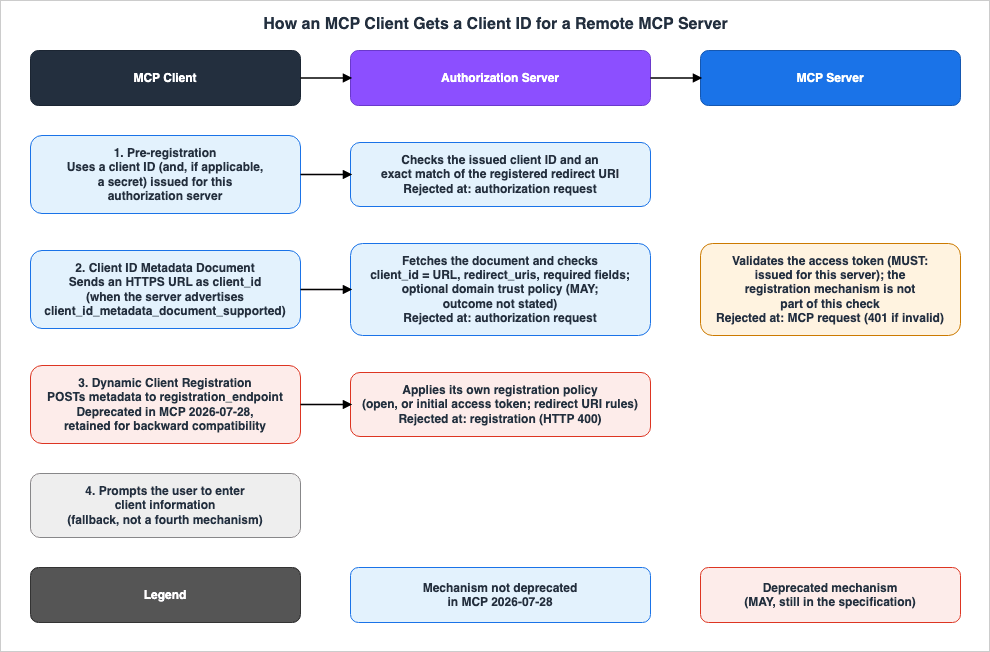
3.2 Differences Between Specification Versions
The requirement words for the registration mechanisms have changed across specification versions. The following table lists the authorization pages for specification versions 2025-06-18, 2025-11-25, and 2026-07-28. The verification date for every row is October 9, 2026.| Version | Client ID Metadata Documents | Pre-registration | Dynamic Client Registration | Priority Order | Where the Source Says So |
|---|---|---|---|---|---|
| MCP 2025-06-18 | No statement found (not listed in the referenced standards either). | Not named as a mechanism. For authorization servers that do not support DCR, it lists hardcoding a client ID or a UI where the user enters it. | SHOULD (for the authorization server and MCP client). | No statement found. | Authorization (2025-06-18) |
| MCP 2025-11-25 | SHOULD. References draft-ietf-oauth-client-id-metadata-document-00. | Section name is Preregistration. MCP clients support an option for static credentials (SHOULD). | MAY. To maintain backward compatibility with previous versions of the authorization specification. | SHOULD (Pre-registration, CIMD, DCR, and user input, in that order). | Authorization (2025-11-25) |
| MCP 2026-07-28 | SHOULD. References the same -00 document. | Section name is Pre-registration. The requirements are the same as those in 2025-11-25. | MAY. Deprecated (retained for backward compatibility with authorization servers that do not support CIMD). | SHOULD (same order). | Authorization, Client Registration (2026-07-28) |
Specification version 2025-06-18 gave, as one reason for making DCR
SHOULD, that authorization servers can implement their own registration policies.Authorization servers can implement their own registration policies.Specification version 2025-11-25 described, with
MAY, the trust policy for authorization servers that accept CIMD, and gave examples in a bulleted list. At the end, it stated that servers decide their own access policies.Authorization servers MAY implement domain-based trust policies:
- Allowlists for trusted domains (for protected servers)
- Accept any HTTPS `client_id` (for open servers)
- Reputation checks for unknown domains
- Restrictions based on domain age or certificate validation
- Display the CIMD and other associated client hostnames prominently to prevent phishing
Servers maintain full control over their access policies.In specification version 2026-07-28, the same trust policy is expressed in a single sentence, and the example list has been replaced with references to sections of the CIMD draft (see Section 4.2). The changelog for version 2026-07-28 lists two changes related to registration, in addition to the deprecation of DCR. They are specifying
application_type during DCR (SEP-837) and binding client credentials to the authorization server that issued them (SEP-2352).8. Require MCP clients to specify an appropriate `application_type` during Dynamic Client Registration to avoid OpenID Connect redirect URI conflicts (SEP-837).
9. Clarify that client credentials are bound to the authorization server that issued them: clients MUST key persisted credentials by the issuer identifier, MUST NOT reuse them with a different authorization server, and MUST re-register when the authorization server changes (SEP-2352).The publication dates for each version of the specification, as well as other changes specific to each version, are detailed in the Model Context Protocol Specification Version Timeline.
3.3 What the Deprecation of DCR Means
The changelog for specification version 2026-07-28 deprecates DCR as a registration mechanism and names CIMD as the migration path.4. Deprecate the OAuth 2.0 Dynamic Client Registration Protocol (RFC7591) as a client registration mechanism in favor of Client ID Metadata Documents (PR #2858). It remains available for backwards compatibility with authorization servers that do not support Client ID Metadata Documents.A similar warning appears at the beginning of the DCR section on the Client Registration page.
Dynamic Client Registration is deprecated. New implementations should use Client ID Metadata Documents instead. This option remains available for backwards compatibility with authorization servers that do not support Client ID Metadata Documents.The list of deprecated features includes the following entry for DCR:
- Deprecation SEP:
PR #2858 - Deprecated in:
2026-07-28 - Migration path:
Client ID Metadata Documents - Earliest removal:
First revision released on or after 2027-07-28
The meaning of the deprecated status is explained at the beginning of the same list. Deprecated features remain in the specification and are slated for eventual removal. New implementations
SHOULD NOT adopt such a feature, and existing implementations SHOULD migrate before its earliest removal. Earliest removal marks when the feature becomes eligible for removal, but the actual removal is at the discretion of the core maintainers and may occur later.A Deprecated feature remains part of the specification but is scheduled for removal: new implementations SHOULD NOT adopt it, and existing implementations SHOULD migrate before the feature's earliest removal. The earliest removal marks when a feature becomes eligible for removal; the actual removal is a Core Maintainer decision taken during release preparation and may happen later.The same list describes itself as a view derived from the per-feature deprecation notices and changelog entries, and states that those are the normative records.
This registry is a derived view kept consistent with the per-feature deprecation notices and changelog entries, which are the normative records.Therefore, as of specification version 2026-07-28, DCR remains in the specification. Support for DCR by authorization servers and MCP clients is still
MAY. The length of the deprecation period is set by the feature lifecycle policy (SEP-2596) adopted in the same specification version, which sets a minimum of 12 months. This policy also allows the core maintainers to shorten this period for features with ongoing security risks, but even in such cases, at least 90 days must remain between deprecation and the earliest removal. Sources word the removal timing differently (see Section 7.2). The deprecation of DCR, along with its migration path and removal timing, is discussed in Sections 6.3 and 6.4 of Migrating to the Stateless Model Context Protocol.3.4 CIMD Is a Working Group Document at the IETF
While the MCP specification makes CIMDSHOULD, CIMD itself is an Internet-Draft in the IETF's OAuth Working Group; it is not an RFC. As of October 9, 2026, the datatracker page for draft-ietf-oauth-client-id-metadata-document shows the following status:| Item | Value on Datatracker | Where the Source Says So |
|---|---|---|
| WG state | WG Document | Datatracker (document page) |
| IESG state | I-D Exists | Datatracker (document page) |
| Intended RFC status | (None) | Datatracker (document page) |
| Current version | -02 (2026-07-06) | Datatracker (document page, history) |
| Expires | 2027-01-07 | Datatracker (document API) |
| First version under the WG document name | -00 (2025-10-08). The same day has a WG -00 approved record, and the document replaced draft-parecki-oauth-client-id-metadata-document. | Datatracker (history) |
| Previous version | -01 (2026-03-01) | Datatracker (history) |
MCP specification versions 2025-11-25 and 2026-07-28 both pin
-00. In the later draft versions -01 and -02, the section numbers and content changed. Section 7.1 addresses the discrepancies between the section numbers referenced in the specification and their corresponding locations in the current version, as well as how the draft text and the datatracker describe the intended status differently.4. What the Server Checks at Each Mechanism, and Where It Rejects
This section details, for each of the three mechanisms, what the authorization server checks and where it rejects, based on the specification's requirements and the docs that implement them. The order follows the specification's priority order (pre-registration, CIMD, DCR). Section 4.4 then summarizes the results in tables with the common columns.4.1 Pre-Registration — An Issued Client ID and an Exactly Matching Redirect URI
Pre-registration is the mechanism for when a prior relationship exists between the MCP client and the authorization server. The Client Registration page of specification version 2026-07-28 says that MCP clientsSHOULD support static credential options, and gives two forms.MCP clients SHOULD support an option for static client credentials such as those supplied by a pre-registration flow. This could be:
1. Hardcode a client ID (and, if applicable, client credentials) specifically for the MCP client to use when interacting with that authorization server, or
2. Present a UI to users that allows them to enter these details, after registering an OAuth client themselves (e.g., through a configuration interface hosted by the server).One form involves the client developer embedding the client ID (and, if necessary, client credentials) to use with that authorization server. The other form allows users to register their own OAuth client (for example, through a configuration screen hosted by a server) and then input those details into the MCP client. In either case, the MCP client already has the client ID to use with that authorization server before initiating the authorization flow.
The authorization server checks the client ID (and, for confidential clients, the client secret) along with the registered redirect URI. The Security Considerations page of specification version 2026-07-28 requires (
MUST) the authorization server to validate the redirect URI exactly against the registered value.MCP clients MUST have redirect URIs registered with the authorization server.
Authorization servers MUST validate exact redirect URIs against pre-registered values to prevent redirection attacks.Regarding strict validation, the Claude Code documentation describes a case in which, in v2.1.229 (2026-08-12), the redirect URI form changed and servers that exact-match the registered redirect URI rejected the sign-in. Claude Code v2.1.231 (2026-08-13) restored the earlier form.
In v2.1.229, Claude Code sent `http://127.0.0.1:PORT/callback` instead, and servers that exact-match the registered redirect URI rejected the sign-in with a redirect URI mismatch. Claude Code v2.1.231 restored the `localhost` form.Regarding the port of loopback redirect URIs, the AWS Agent Registry documentation for MCP endpoints notes that some authorization servers do not let a range of ports be configured as an allowed redirect URI. In that case, it says to set one port in both the pre-registered client's allowed redirect URI and the MCP client's configuration.
Some authorization servers like Auth0 and Cognito don’t let you configure a range of ports as allowed redirect URIs, so you need to explicitly set one in the preregistered client’s allowed redirect/callback URL, as well as in the mcp.json.The credentials used for pre-registration are associated with the issuing authorization server. Specification version 2026-07-28 requires (
MUST) clients to store these credentials, keyed by the authorization server's issuer. Furthermore, when the authorization server changes, as indicated by Protected Resource Metadata, the client SHOULD surface an error rather than use the credentials.Pre-registered credentials are inherently specific to a particular authorization server. If the authorization server indicated by protected resource metadata no longer matches the one the credentials were registered with, clients SHOULD surface an error rather than silently attempting to use mismatched credentials.The CIMD draft also describes a form that combines CIMD with pre-registration. This form was added in draft version
-01 (March 1, 2026). In version -02, it can be found in Section 7.2. This approach involves the authorization server pre-registering CIMD URLs, and then treating the clients identified by those URLs in the same way as pre-registered clients.An authorization server MAY pre-register Client Identifier URLs. This is a valid deployment pattern that leverages the namespacing and key-binding properties of Client Identifier URLs described in this specification, while not relying on the authorization server automatically fetching client metadata at request time.Section 7.2 in draft version
-02 anticipates that this approach will be common in enterprise environments where customers want to explicitly onboard specific clients.This deployment pattern is expected to be common in enterprise environments where enterprise customers wish to explicitly onboard particular clients into their environment.This is described in draft version
-02. However, no similar statement was found on the Client Registration page in MCP specification version 2026-07-28.4.2 CIMD — A URL as the Client ID, and Validation of the Fetched Document
CIMD is the mechanism for when there is no prior relationship between the MCP client and the authorization server. The client sends a client ID as an HTTPS URL. The authorization server retrieves a JSON document (the Client ID Metadata Document) from that URL and validates its contents. The Client Registration page of specification version 2026-07-28 requires the following of the client and of the authorization server.For MCP Clients:
- Clients MUST host their metadata document at an HTTPS URL following RFC requirements
- The `client_id` URL MUST use the "https" scheme and contain a path component, e.g. `https://example.com/client.json`
- The metadata document MUST include at least the following properties: `client_id`, `client_name`, `redirect_uris`
- Clients MUST ensure the `client_id` value in the metadata matches the document URL exactly
- Clients MAY use `private_key_jwt` for client authentication (e.g., for requests to the token endpoint) with appropriate JWKS configuration as described in Section 6.2 of Client ID Metadata DocumentFor Authorization Servers:
- SHOULD fetch metadata documents when encountering URL-formatted client_ids
- MUST validate that the fetched document's `client_id` matches the URL exactly
- SHOULD cache metadata respecting HTTP cache headers
- MUST validate redirect URIs presented in an authorization request against those in the metadata document
- MUST validate the document structure is valid JSON and contains required fields
- SHOULD follow the security considerations in Section 6 of Client ID Metadata Document and in Client ID Metadata Document SecurityThe authorization server checks a client ID in the form of a URL, along with the
client_id, the redirect_uris, and the required fields of the fetched document. As an example of an actual document, here is the document at the URL that Anthropic's docs give as Claude Code's CIMD, fetched on October 9, 2026, and formatted. The client_id is the URL of the document itself, and the redirect_uris are loopback URIs without a port number.{
"client_id": "https://claude.ai/oauth/claude-code-client-metadata",
"client_name": "Claude Code",
"client_uri": "https://claude.ai",
"redirect_uris": [
"http://localhost/callback",
"http://127.0.0.1/callback"
],
"grant_types": ["authorization_code", "refresh_token"],
"response_types": ["code"],
"token_endpoint_auth_method": "none"
}The authorization server indicates its support for CIMD in its own metadata using the
client_id_metadata_document_supported field. The MCP client uses this value to select CIMD (see Section 3.1). However, some clients do not select CIMD unless other values are also present (see Chapter 6).In the specification's flow diagram, the rejection happens at the authorization request stage. The CIMD flow diagram on the Client Registration page shows that after user authentication, the authorization server detects a client ID in the form of a URL and retrieves the document. It then verifies that the
client_id matches the URL and that the redirect URI is in the document's list of redirect URIs, validates the document's structure, and optionally checks domain permissions under a trust policy. If validation fails, the diagram shows an error response with error=invalid_client or invalid_request. Regarding cases where the document cannot be retrieved, Section 5.1 of the CIMD draft -02 says that the authorization server SHOULD abort the authorization request.If the authorization server attempts to fetch the Client ID Metadata Document, and fetching the metadata document fails, the authorization server SHOULD abort the authorization request.In specification version 2026-07-28, a single trust-policy sentence written with
MAY covers which clients CIMD accepts.Authorization servers MAY implement domain-based trust policies for accepting Client ID Metadata Documents, as described in Section 6.4 and Section 6.8 of the Client ID Metadata Document specification.This text refers to Sections 6.4 (OAuth Phishing Attacks) and 6.8 (Client ID Domain Trust) of CIMD draft
-00. In version -02, Section 6.8 was moved to Section 8.9, and an example of domain allowlists was added (the document history of -02 says Added discussion of domain allowlists to Client ID Domain Trust).The authorization server may choose to have its own heuristics and policies around the trust of domain names used as client IDs.
For example, the authorization server could require that the first 100 users to authorize a client_id see an additional warning screen before the OAuth consent screen. The authorization server could check attributes of the domain reputation, such as how recently the domain was registered, and put up extra warnings for new domains. An authorization server may also maintain allowlists of trusted domain patterns, such as treating any Client Identifier URL under *.example.com as belonging to a known and trusted operator, and apply reduced friction for clients matching such patterns.The examples in Section 8.9 of
-02 are adding warnings (for example, for new domains) and reducing friction for clients that match an allowlist. Rejecting clients that do not match an allowlist is not among the examples in that section; whether to reject such clients is left to the authorization server's policy.A CIMD client ID can be used across authorization servers. The Client Registration page of specification version 2026-07-28 states that, unlike pre-registration or DCR credentials, clients do not need to re-register when switching authorization servers.
Client IDs based on Client ID Metadata Documents are portable across authorization servers, since they are self-hosted HTTPS URLs resolved by the authorization server on demand. No re-registration is needed when the authorization server changes.OpenAI's documentation states that the CIMD client ID's stability can be used in the authorization server's policies.
If you support CIMD, set `client_id_metadata_document_supported: true` in your authorization server metadata. This lets ChatGPT use one stable client identity for MCP servers that choose CIMD, which your authorization server can use for redirect URI allowlists, rate limits, and other policies.However, according to the same documentation, the CIMD URLs sent by ChatGPT will fall into two categories, depending on whether the authorization server meets the issuer identification requirements (RFC 9207; see Section 6.3). A single, stable URL is only possible when the authorization server meets these requirements.
4.3 DCR — The Registration Endpoint and the Authorization Server's Registration Policy
DCR is the mechanism in which MCP clients send their metadata to the authorization server's registration endpoint (registration_endpoint in the metadata) and receive a client ID in return. According to specification version 2026-07-28, support for DCR by both authorization servers and MCP clients is MAY, and DCR is deprecated (see Section 3.3).What the authorization server checks is the client metadata in the registration request (
redirect_uris, grant_types, token_endpoint_auth_method, and so on). The rejection happens at the registration stage. For registration errors, RFC 7591 has the authorization server return HTTP 400 with a JSON error, and defines the error codes invalid_redirect_uri, invalid_client_metadata, invalid_software_statement, and unapproved_software_statement.When a registration error condition occurs, the authorization server returns an HTTP 400 status code (unless otherwise specified) with content type "application/json" consisting of a JSON object [RFC7159] describing the error in the response body.RFC 7591 writes protection of the registration endpoint with
MAY. When it is protected, the endpoint can accept an initial access token and limit registration to parties authorized in advance.The client registration endpoint MAY be an OAuth 2.0 [RFC6749] protected resource and it MAY accept an initial access token in the form of an OAuth 2.0 access token to limit registration to only previously authorized parties.The same section goes on to say, with
SHOULD, that the registration endpoint allows requests with no authorization, to support open registration.To support open registration and facilitate wider interoperability, the client registration endpoint SHOULD allow registration requests with no authorization (which is to say, with no initial access token in the request).Specification version 2025-06-18 said that authorization servers can implement their own registration policies (see Section 3.2). The following are examples of docs that describe a registration policy.
- AWS Sign-In (the authorization server for AWS MCP Server): The registration API (
CreateOAuth2PublicClient) only accepts redirect URIs that match the allowlisted patterns and assigns a 90-day validity period for registrations. Acceptedgrant_typesareauthorization_codeandrefresh_token, andtoken_endpoint_auth_methodis limited tonone. A list of redirect URIs approved by AWS is discussed in Section 5.2. - Cloudflare's workers-oauth-provider: This is a library for creating an authorization server. In the documentation's configuration table, both the DCR registration endpoint (
clientRegistrationEndpoint) and CIMD lookup (clientIdMetadataDocumentEnabled) are disabled by default. WithclientRegistrationCallback, the application can allow or reject a registration according to its own policy. - Linear: The security page's list of known items that are out of scope for vulnerability reports includes the open DCR on the MCP server (unauthenticated registration and arbitrary redirect URIs). The reason provided is that the MCP server is designed according to the MCP specification, and authorization requires users to explicitly approve both the client and the redirect URI on the consent screen.
Only redirect URIs matching the allowlisted patterns are accepted during registration.`clientRegistrationCallback` can allow or reject registration based on application policy.Open Dynamic Client Registration on the MCP server (mcp.linear.app), including unauthenticated registration and arbitrary redirect URIs
Open by design per the MCP spec; authorization still requires explicit user approval of the client and its redirect URI at the consent screenSpecification version 2026-07-28 requires (
MUST) an application_type during DCR. According to the same page, if application_type is omitted in an OpenID Connect authorization server, it is treated as web, which can conflict with redirect URIs for native applications. The page also defines how clients handle a rejected registration.MCP clients MUST be prepared to handle registration failures due to redirect URI constraints when authorization servers implement OIDC. When a registration request is rejected, clients SHOULD surface a meaningful error to the user or developer. Clients MAY retry registration with an adjusted `application_type` or with redirect URIs that conform to the authorization server's requirements for the given application type.For DCR, the client's behavior affects the number of registrations. Anthropic's documentation states that Claude registers a new client via DCR on every new connection. For servers that receive many connections from the directory, Anthropic recommends CIMD or credentials that Anthropic holds.
For servers expecting high traffic from the directory, prefer CIMD or `oauth_anthropic_creds` over DCR. DCR causes Claude to register a new client on every fresh connection, which can result in very large numbers of registered clients on your authorization server. CIMD and Anthropic-held credentials avoid the registration call entirely.OpenAI's documentation states that ChatGPT performs DCR once for each connection to an MCP server, and that it continues to use the registered client for that connection. It then notes that many separate connections can still create many registered clients.
DCR is still supported. If you include `registration_endpoint`, ChatGPT can register dynamically when the plugin builder chooses DCR or CIMD is not available. ChatGPT runs DCR once per MCP server connection, then keeps and reuses the registered OAuth client for that connection. DCR can still create many registered clients across many separate connections, so CIMD is usually easier to administer at scale.Some remote MCP servers do not support DCR. The host integration docs in the github-mcp-server repository state that the remote GitHub MCP Server does not support DCR at this time, and require registering a GitHub App or OAuth App for each MCP client (the host application; see Section 5.3).
Dynamic Client Registration is NOT supported by Remote GitHub MCP Server at this time.4.4 Results by Mechanism
This section presents the results from Sections 4.1 through 4.3, organized by common columns. The first table details the outcomes as defined in the specification, the CIMD draft, and RFC 7591. In every row,Hop is Authorization Server or MCP Server, and the verification date is October 9, 2026.| Hop | Decided By | What Happens | What the Caller Sees | Status and Version | Where the Source Says So |
|---|---|---|---|---|---|
Authorization Server | Specification requirements (registered redirect URI) | Rejected (authorization request stage). Redirect URI that does not strictly match the registered value. | Error (Claude Code documentation states, in the v2.1.229 example, that servers that exact-match the redirect URI rejected the sign-in with a redirect URI mismatch). | MCP 2026-07-28 (MUST) | Security Considerations, Claude Code documentation (MCP) |
Authorization Server | Specification requirements (CIMD document validation) | Rejected (authorization request stage). Mismatch between client_id and URL, redirect URI not present in the document, or missing required fields. | Error (The specification flow diagram indicates invalid_client or invalid_request). | MCP 2026-07-28 (MUST) | Client Registration |
Authorization Server | CIMD draft (document retrieval failure) | Rejected (authorization request stage). Aborting is SHOULD. | The source does not say. | draft-ietf-oauth-client-id-metadata-document-02 (2026-07-06), WG Document | Section 5.1 of CIMD -02 |
Authorization Server | Authorization server trust policy (CIMD domain) | The source does not say. (The specification uses MAY for trust policies. The examples in Section 8.9 of -02 are adding warnings (for example, for new domains) and reducing friction for clients that match an allowlist; rejecting is not among them.) | The source does not say. | MCP 2026-07-28 (MAY), CIMD -02 | Security Considerations, Section 8.9 of CIMD -02 |
Authorization Server | RFC 7591 (DCR registration request) | Rejected (registration stage). | Error (HTTP 400, along with codes such as invalid_redirect_uri and invalid_client_metadata). | RFC 7591 (July 2015) | Section 3.2.2 of RFC 7591 |
Authorization Server | OpenID Connect authorization server (application_type and redirect URI constraints) | Rejected (registration stage). | Error. Clients SHOULD surface a meaningful error to the user or developer. | MCP 2026-07-28 (MUST, SHOULD) | Client Registration |
MCP Server | Specification requirements (token validation) | Rejected (MCP request stage). Token that has not been issued for that specific MCP server. | Error (HTTP 401 is MUST for invalid or expired tokens). | MCP 2026-07-28 (MUST) | Authorization |
The following table presents the results that the docs of authorization servers and libraries implementing the specification describe. In every row,
Hop is Authorization Server, and the verification date is October 9, 2026.| Decided By | What Happens | What the Caller Sees | Status and Version | Where the Source Says So |
|---|---|---|---|---|
| AWS Sign-In (Authorization Server for AWS MCP Server) | Rejected (registration stage). A redirect URI that does not match the allowlisted patterns. | General rule only (the API reference lists both AccessDeniedException and ValidationException as HTTP 400 errors, but does not say which one applies when the redirect URI does not match). | checked 2026-10-09 | CreateOAuth2PublicClient, Configure OAuth access to AWS MCP Server |
workers-oauth-provider (clientRegistrationCallback) | Rejected (registration stage). Based on the application's policy. | The source does not say. | main documentation (checked 2026-10-09) | Cloudflare workers-oauth-provider (authorization-server.md) |
| workers-oauth-provider (CIMD document) | Rejected (token request stage). Unable to retrieve or validate the document. | Error (a generic invalid_client error. Details are recorded in onError.internal). | main documentation (checked 2026-10-09) | Cloudflare workers-oauth-provider (authorization-server.md) |
| Authorization server operator (expiry, deletion, or replacement of registered clients or secrets) | Rejected (stage not stated). OpenAI's documentation mentions the case in which the authorization server lets a client or secret expire, or deletes or replaces it, while a connection is in use. | Error (invalid_client. The documentation says users and reviewers may receive this error when they connect). | checked 2026-10-09 | OpenAI Authentication (plugins) |
These two tables show that what the authorization server checks differs by registration mechanism. For pre-registration, the redirect URI is strictly verified during the authorization request stage. For CIMD, the authorization server fetches and validates the document, and in the specification the room for a trust policy stays at
MAY. In DCR, the authorization server's registration policy is applied during the registration stage. At the MCP server hop, the specification requires (MUST) that tokens be validated according to OAuth 2.1 Section 5.2, verifying that they were issued for that specific server. The registration mechanism is not included in this validation. What the AWS docs give as an example for selecting clients at the MCP server hop is checking token claims (see Section 5.4).5. Admission Controls Layered on Top of Registration, and the Mechanisms They Apply To
This section details the admission controls that decide which clients to admit, separate from the registration mechanisms. The parties that decide these rules include vendors, workspace and organizational administrators, operators of authorization servers and MCP servers, and creators of IAM policies. The hops where admission controls apply are the authorization server, the MCP server, and the transport. Sections 5.2 and 5.3 group the controls by who decides, and Sections 5.4 and 5.5 by how the control works. Some docs state which admission control to use for which mechanism. Finally, Section 5.6 presents tables of the admission controls and the mechanisms they apply to.5.1 Admission Control Is a Separate Axis from Registration Mechanisms
The registration mechanisms are the methods by which MCP clients obtain a client ID (Chapter 3). Admission control is the mechanism that decides whether to admit a client. Specification version 2026-07-28 places the implementation details of the authorization server outside the scope of the specification (see Section 1.1).A Figma staff member wrote on the Figma community forum that supporting MCP and being authorized to connect to Figma's hosted MCP service are treated as separate things. The post is dated September 18, 2026, and the poster carries the Figmate staff badge. This is a forum post, not Figma's docs.
Regarding your data, supporting the MCP protocol and being authorized to connect to Figma’s hosted MCP service are treated as separate things. Your existing Figma permissions still determine which files you can access, while the client review applies to the application handling that access.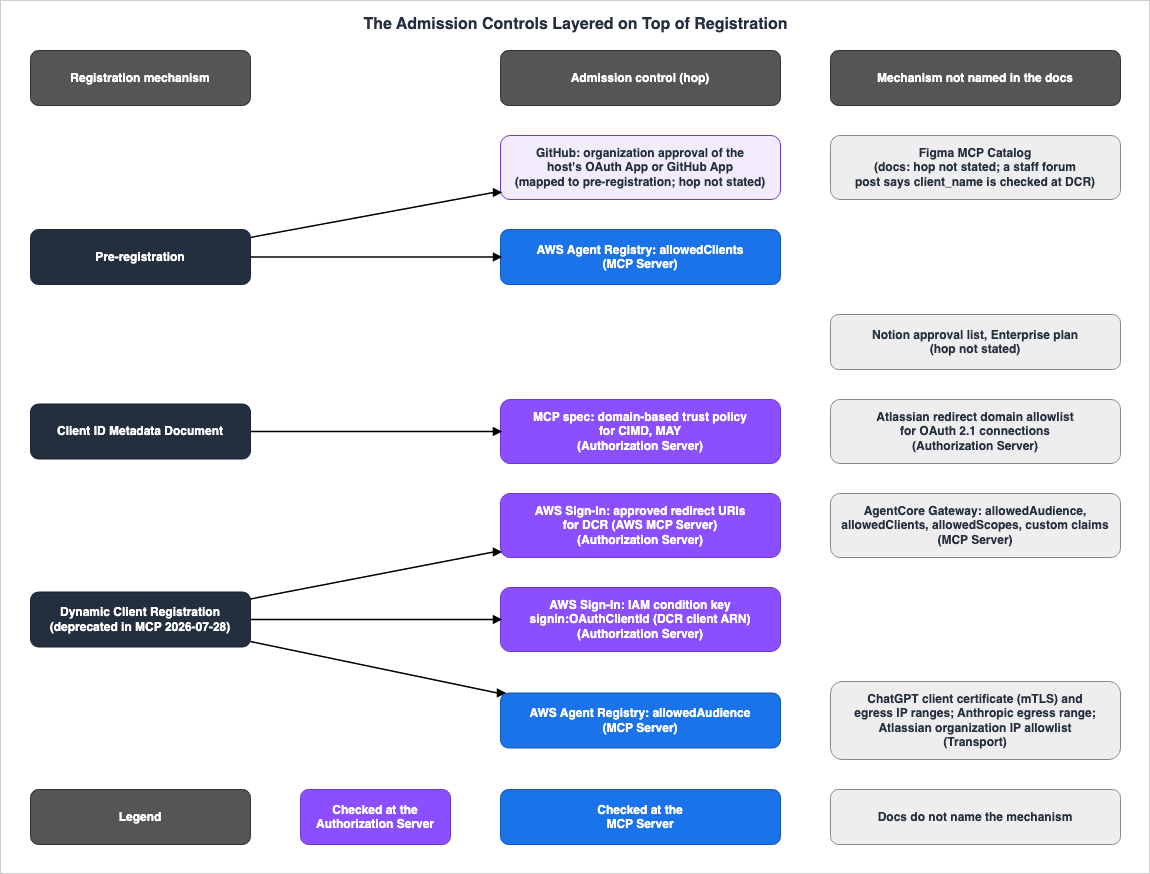
5.2 Admission Controls Decided by Vendors — Figma's Catalog and the Redirect URIs AWS Approved
Figma: Figma's developer documentation states that only clients listed in the Figma MCP Catalog can connect to the Figma MCP Server. Statements to the same effect appear on three docs pages (the Figma MCP server overview, remote server setup, and rate limits and access). The following quote is from the overview page, and the remote server setup page gives VS Code, Cursor, and Claude Code as examples of listed clients.Only clients listed in the Figma MCP Catalog can connect to the Figma MCP Server. If you're a developer interested in connecting a new MCP client, you can join the waitlist.The Figma MCP Catalog page instructs developers of clients to apply for remote access for their client and to contact their account team.
If you’re looking to connect the Figma remote MCP server to your MCP client, you can apply to register your client for remote access, please reach out to your account team for more information.A Figma blog post, "Design Context, Everywhere You Build" (published September 23, 2025, and updated August 27, 2026), outlines Figma's policy of reviewing MCP clients. The post does not name the catalog, but it links the words "partner catalog" to the Figma MCP Catalog page.
Going forward, all public third-party integrations and MCP clients will be reviewed by Figma before they can access your data. This adds a layer of confidence for anyone adopting new apps or workflows and is consistent with how we review plugins and widgets.No statement of the client registration mechanism (CIMD, pre-registration, or DCR) was found in Figma's docs pages (the terms and pages searched are in Section 7.5). The documentation states that users sign in through Figma's OAuth authentication flow. At which hop the catalog is used, and what a client not in the catalog sees, were also not found in the docs.
Figma staff members have described in community forum posts how the catalog works. Each poster carries the Figmate staff badge; these are forum posts, not Figma's docs. A post from May 1, 2026, states that Figma's remote MCP server validates the
client_name against an allowlist during DCR registration, and that the mcp:connect scope is limited to supported clients during the beta.Our remote MCP server allowlists client_name during dynamic client registration, and right now, opencode isn't on that list. This was confirmed by our team on the forum—the mcp:connect scope is intentionally gated to supported clients while we're in beta.A post from August 27, 2026, states that, at that time, Figma had paused adding new MCP clients and the
mcp:connect scope was limited to catalog-approved clients.We're being intentional about the integrations we support in the near term, and at the moment we've paused adding new MCP clients while we continue to build a strong and scalable foundation for all partners.A standard Figma OAuth app client ID/secret on its own won't grant mcp:connect access - that scope is currently limited to catalog-approved clients.AWS MCP Server: The AWS MCP Server, operated by AWS, uses AWS Sign-In as its authorization server. The AWS Sign-In user guide says that agents register with AWS Sign-In through DCR and use approved redirect URIs, listing these URIs in a table. The table has 20 rows, including Localhost (
localhost, 127.0.0.1), Claude (https://claude.ai/*), ChatGPT (https://chatgpt.com/*), Visual Studio Code (vscode://*), and Cursor Desktop (cursor://anysphere.cursor-mcp/oauth/callback), among others. The troubleshooting section on the same page says that only approved agents can register with DCR.Agents can register with AWS Sign-In and use one or more approved redirect URIs during the OAuth authorization process.Only approved agents can register through Dynamic Client Registration (DCR). If you are developing an MCP-compatible agent, contact AWS support.A note on the same page says that currently only public redirect URIs can be used with DCR, and that internal development and non-production URIs cannot be used even for the clients in the table.
Currently, only public redirect URIs are supported for Dynamic Client Registration (DCR). Private redirect URIs are not supported, including internal development and non-production URIs—even for the public OAuth clients listed in the following table.So, with AWS MCP Server, a list of redirect URIs approved by AWS (a vendor approval list) is layered on top of the DCR mechanism. The registration API (
CreateOAuth2PublicClient) only accepts redirect URIs that match the allowlisted patterns (Section 4.3). AWS announced OAuth support for AWS MCP Server in What's New on July 9, 2026. No statement about CIMD was found in the AWS Sign-In docs (see Section 7.7).5.3 Admission Controls Decided by Administrators — Notion, Atlassian, and GitHub
Notion: Notion's Help Center states that administrators on the Enterprise plan can manage which MCP clients and AI apps are allowed to connect to their workspace through Notion MCP.Admins on the Enterprise plan can manage which MCP clients and AI apps are allowed to connect to their Notion workspace through Notion MCP (for example Cursor, Claude, or ChatGPT).Workspace owners on the Enterprise plan can restrict the AI applications that members can connect to, limiting them to
Only from approved list in the Permissions tab of the Connections settings. The same page explains that when this restriction is enabled, any AI applications already connected to Notion MCP will automatically be added to the approval list. Regarding clients removed from the approval list, the FAQ on the same page says that while existing tokens cannot be revoked, Notion blocks all calls from clients not on the approval list.If a tool was connected before it was removed from the approved list, it may still appear under Connected tools because we cannot revoke existing tokens for previously connected tools. Even so, Notion blocks every call from any AI app or MCP client that is not on the approved list, so it is functionally blocked.AI applications can be added to the approval list by searching for them in the modal shown in the steps. Regarding clients not found in the directory, the same FAQ states that workspace owners or administrators can approve them if they successfully connect the client to Notion MCP.
To add a new tool to the approved list, a workspace owner or admin needs to successfully connect to Notion MCP from that tool (for example, by using a custom MCP connector if the tool supports it).The "Build an MCP client for Notion" page in Notion's developer documentation states that Notion MCP's authorization server supports DCR, and that CIMD can also be used as an alternative. The "Enterprise-managed authorization" page also says to obtain a client ID through DCR or CIMD. Which mechanism the approval list applies to was not found in the docs. What a client not on the list sees was also not found in the docs (Section 7.7).
Alternatively, use a Client ID Metadata Document (CIMD), which Notion MCP supports.Atlassian: Atlassian's support documentation explains that the Atlassian MCP server uses a domain allowlist for OAuth 2.1 connections. Atlassian provides a list of domains that are allowed by default (Atlassian-supported domains), and organization administrators can add trusted domains or block the Atlassian-supported domains as a whole.
By default, we automatically allow Atlassian-supported domains to access apps in your organization. You can add the domains you trust or block Atlassian-supported domains. These domain rules only apply to tools connecting via OAuth 2.1.The Atlassian-supported domains cannot be blocked individually.
You can block all Atlassian-supported domains from accessing apps in your organization. You cannot block individual domains. You can only allow or block the entire domain list.Atlassian's documentation describes what these domain rules control as the client origins that can receive OAuth 2.1 redirects and tokens. The table listing Atlassian-supported domains includes entries like
127.0.0.1, localhost, and callback URLs of various services (e.g., app.asana.com/-/integrations/oauth/callback).Which client origins can receive OAuth 2.1 redirects and tokens. The client’s origin must match a domain or pattern in this list.An Atlassian support knowledge base article lists the following error under Diagnosis. The causes identified include: API tokens being disabled for the organization, redirect URIs such as localhost not being permitted, and the domain settings in the administration panel not being fully reflected in the backend configuration.
Your organization admin must authorize access from this redirect URLTools connecting with API tokens are not subject to the domain allowlist. The organization's IP allowlist applies to requests passing through Atlassian MCP, whether the tool uses OAuth 2.1 or an API token (Section 5.5). No statement about the client registration mechanisms (CIMD, pre-registration) was found in Atlassian's docs. DCR appears in a knowledge base article on troubleshooting VS Code, which says that the endpoint
/v1/mcp/authv2 uses Atlassian as the DCR OAuth provider.GitHub: The documentation in the github-mcp-server repository states that, at this time, the remote GitHub MCP Server does not support DCR (Section 4.3). According to the same documentation, each MCP client (host application) registers a GitHub App or an OAuth App. As this article classifies it, this is pre-registration (the docs do not use that word). On top of that, approval by the organization's administrators applies.
Organization admins must approve OAuth App requests before host apps can access organization dataThis approval is due to the organization's OAuth App access restrictions. The policies and governance docs in the github-mcp-server repository say that these restrictions only apply when the host application is registered as an OAuth App and users connect using the OAuth 2.0 flow. For GitHub Apps, the organization administrator installs the App and approves repositories and permissions. When connecting with personal access tokens (PATs), neither the organization's OAuth App access restrictions nor the control over GitHub App installations apply. docs.github.com states that for new organizations, OAuth App access restrictions are enabled by default.
When you create a new organization, OAuth app access restrictions are enabled by default.The documentation for the github-mcp-server's host integration states that organizations may block GitHub Apps and OAuth Apps until they approve them, and it requests that the host application detect these failures and provide users with the next steps. Error codes and HTTP status codes were not found in the docs (see Section 7.7).
Organizations may block GitHub Apps and OAuth Apps until explicitly approved.5.4 Admission Controls Based on Token Claims — AgentCore Gateway, AWS Agent Registry, and AWS Sign-In Condition Keys
At the MCP server hop, what the AWS docs use for admission control is the token claims (client_id, aud, and scope). The validation that the specification requires of the MCP server (Section 4.4) does not include the registration mechanism.AgentCore Gateway: The AgentCore developer guide's page on inbound JWT authorizers states that the AgentCore Runtime and AgentCore Gateway can validate tokens based on four criteria. These are: the permitted audience (
aud claim), the permitted client (client_id claim), the permitted scope, and any required custom claims.Allowed audiences : A list of permitted audiences that AgentCore Identity will validate against the `aud` claim in the JWT token.
Allowed clients : A list of permitted client identifiers that AgentCore Identity will validate against the `client_id` claim in the JWT token.At least one of the fields is required for the configuration: allowed audiences, allowed clients, allowed scopes, or required custom claims. If more than one is used, the authorizer will verify them all.The Gateway's inbound authorization page gives the response to a rejected request: 401 if the token is missing or invalid, and 403 if the token is valid but the scope is insufficient.
401 Unauthorized – The request has no token or an invalid token. The `WWW-Authenticate` header includes `resource_metadata` and `scope` parameters.

403 Forbidden – The token is valid but does not contain the required scopes. The `WWW-Authenticate` header includes `error="insufficient_scope"`, `scope`, and `resource_metadata` parameters.
The page does not name which of the two applies to a token whose
client_id is not in allowedClients. The AgentCore Gateway supports versions 2026-07-28, 2025-11-25, 2025-06-18, and 2025-03-26 of the MCP specification. The AWS Artificial Intelligence blog (published July 28, 2026) notes that upgrading the protocol version does not change the Gateway's inbound authorization. The configuration process is covered in Sections 4.6 and 5.3 of the Amazon Bedrock AgentCore Implementation Guide Part 2.The name of the
client_id claim can vary depending on the identity provider. The AWS Artificial Intelligence blog (Building a secure auth code flow setup using AgentCore Gateway with MCP clients) mentions that some identity providers use different claim names for client identification. In that case, it says to match the claim with custom claim validation.Other IdPs might use different claim names for client identification, scopes, and so on (for example, cid, azp, scp).AWS Agent Registry: The documentation for the AWS Agent Registry's MCP endpoint describes how requests are authorized using the same CustomJWTAuthorizerConfiguration that is set on the registry, and differentiates between three methods for configuring the MCP client. Two of these methods correspond to pre-registration and DCR.
1. Bearer token: use a separate process to fetch bearer token and configure it in MCP client header
2. Pre-registered client: create a client in your authorization server, and allowlist the client on registry’s configuration.
3. Dynamic client registration: if your authorization server supports dynamic client registration (DCR), you can allowlist the audience in registry’s configuration.
The DCR section says, with
NOT in uppercase, not to specify allowedClients.Most MCP client applications support dynamic client registration. In this case, you should NOT specify `allowedClients` value in registry. Instead, you can choose to set `allowedAudience`. The value can be the same as your MCP registry. You should configure your authorization server to issue JWT with `aud` field with the same value as in `allowedAudience`.So the AWS Agent Registry documentation distinguishes the two under the same admission control mechanism (JWT claim matching): pre-registered clients are listed in
allowedClients, and for DCR clients allowedClients is not specified and allowedAudience can be set. The reason for this distinction was not found in the docs. The same page also describes connecting to the MCP endpoint of a registry that uses IAM (SigV4) for authorization instead of OAuth. The beginning of the page says that the registry's MCP endpoint follows MCP specification version 2025-11-25. The section on common errors in DCR setup says that, as of October 9, 2026, the registry does not return a scope challenge in the WWW-Authenticate header.Currently registry does not return scope challenge in www-authenticate header.AWS Agent Registry reached General Availability (GA) on August 31, 2026 (as noted in AWS What's New). The beginning of the same documentation describes the transition to a new namespace,
agent-registry, and the end of support for the preview namespace, bedrock-agentcore.AWS Agent Registry has launched under the new `agent-registry` namespace. Support for the public preview `bedrock-agentcore` namespace will be discontinued on October 30, 2026.The endpoint example this article shows is in the
agent-registry namespace (https://agent-registry.<region>.api.aws/registry/<registryId>/mcp). How to operate a registry and how to choose its authorization method are covered in Sections 6.4 and 7.2 of AWS Agent Registry and the Agentic Resource Discovery Specification.AWS Sign-In Condition Keys: For AWS MCP Server, admission control by IAM policy can also be applied at the authorization server (AWS Sign-In) hop. The condition key
signin:OAuthClientId is the ARN of the OAuth client that made the request. Clients registered through DCR have ARNs in the format arn:aws:signin:{region}::external-client/dcr/{uuid}. According to the list of AWS Sign-In condition keys, for non-interactive flows using IAM credentials (client credentials), the implicit client ID is arn:aws:signin:::client-credentials/sigv4. The IAM page of the Agent Toolkit for AWS user guide describes this condition key as follows.The ARN of the OAuth client making the request. Use this key to allow only approved OAuth clients to access AWS MCP Server.There is also a condition key,
signin:OAuthRedirectUri, which allows filtering based on the redirect URI. The list of condition keys and the CloudTrail records are covered in Agent Toolkit for AWS and the AWS MCP Server.5.5 Admission Controls on the Transport — ChatGPT's Client Certificate, Egress Ranges, and IP Allowlists
OpenAI's documentation lists TLS client certificates (mTLS) and published egress IP address ranges as methods for MCP servers to verify that requests actually come from ChatGPT.A frequent question is how your MCP server can confirm that a request actually comes from ChatGPT. ChatGPT presents an OpenAI-managed client certificate when connecting to MCP servers, so you can verify the client at the transport layer with mTLS. You can also allowlist ChatGPT’s published egress IP ranges.The same documentation says to verify that the certificate chains to the OpenAI Connectors intermediate CA, is valid for client authentication, and has a SAN
dnsName of mtls.prod.connectors.openai.com. It also says that mTLS authenticates ChatGPT as the client, and that OAuth 2.1 continues to be used for user authentication and tool authorization. The same section also notes that CIMD further strengthens the identification of ChatGPT.Use mTLS to authenticate ChatGPT as the MCP client. Continue to use OAuth 2.1 to authenticate the end user and authorize tool access.Anthropic's documentation for connectors gives the source range of Anthropic's outbound traffic to the server, and says to use it when allowing Anthropic in conditional access or firewall rules.
Anthropic's outbound traffic to your server originates from `160.79.104.0/21`. See the IP address reference if you need to allowlist Anthropic for conditional access or firewall rules.Anthropic's IP address page describes this range as the source of Anthropic's outbound requests, giving MCP tool calls to external servers as an example.
These are the stable IP addresses that Anthropic uses for outbound requests (for example, when making MCP tool calls to external servers).The troubleshooting section of the connectors documentation states that if a WAF rejects traffic from this range, the connection will fail with the message "Couldn't reach the MCP server." It also says that these errors appear when users use the server as a connector in claude.ai or the desktop app.
Atlassian: Atlassian's documentation describes an organization's IP allowlist as a separate control that is combined with the domain rules. Requests passing through Atlassian MCP, whether connected via OAuth 2.1 or using an API token, are subject to this IP allowlist. It says that if the source IP address is not allowed, an error similar to the following message appears, and tool calls fail even though the OAuth 2.1 consent screen may still appear.
You don't have permission to connect from this IP address. Please ask your admin for access.The same documentation cautions that some AI tools use their own originating IP addresses, and that even if a user connects from an approved network, calls may be blocked if the tool's IP range is not also approved.
Admission control on the transport checks the platform that sent the request, or the network it came from. OpenAI's documentation places transport checks and CIMD in the same section as ways to identify ChatGPT. No statement linking the egress range or the IP allowlist to a registration mechanism was found in Anthropic's or Atlassian's docs.
The client certificate that ChatGPT presents is covered, as one example outside AWS, in When Public Certificates Stop Carrying clientAuth - Where AWS Sends or Accepts Client Certificates, and What Each Path Says About Extended Key Usage, which also lists the places where AWS sends or accepts client certificates and what each source says about the
clientAuth extended key usage that publicly trusted certificate authorities are increasingly removing.5.6 The Admission Controls and the Mechanisms They Apply To
This section presents the admission controls from Sections 5.2 through 5.5, along with the CIMD trust policy from Section 4.2, in two tables. The columns are the name of the admission control (Admission Control), the hop where it applies (Hop), who decides (Decided By), the mechanism it applies to (Which Mechanism It Applies To), what the client sees when rejected (What the Caller Sees), and the source (Where the Source Says So). In Which Mechanism It Applies To, the mechanism is written only when the source names it; otherwise the cell gives the scope the source states. Where this article maps something to a mechanism, the cell says so. All rows have a verification date of October 9, 2026.The first table lists the admission controls decided by vendors and administrators.
| Admission Control | Hop | Decided By | Which Mechanism It Applies To | What the Caller Sees | Where the Source Says So |
|---|---|---|---|---|---|
| Figma MCP Catalog | The source does not say. (A staff forum post says the check happens at DCR registration.) | Figma | The docs do not name the mechanism (mentions OAuth sign-in). A staff forum post (2026-05-01) says client_name is checked at DCR registration. | The source does not say. | Figma MCP server docs, Figma MCP Catalog, Figma Forum |
| List of redirect URIs approved by AWS | Authorization Server | AWS | DCR | General rule only (the registration API lists HTTP 400 errors, but does not say which one applies when the redirect URI does not match). | Configure OAuth access to AWS MCP Server, CreateOAuth2PublicClient |
| Atlassian's redirect domain allowlist | Authorization Server | Atlassian (default list) and organization administrators | OAuth 2.1 connection (the docs do not name the mechanism). | Error (the KB's diagnosis example is "Your organization admin must authorize access from this redirect URL." Three causes are listed.) | Atlassian MCP server domains, Atlassian support KB |
| Notion's approval list (MCP Governance) | The source does not say. (The documentation states that calls are blocked.) | Workspace owners and administrators (Enterprise plan) | The docs do not name the mechanism (AI apps and MCP clients). | The source does not say. | Notion Help Center (Notion MCP) |
| GitHub's organization approval (OAuth App access restrictions, GitHub App installation) | The source does not say. | Organization owners and administrators | An OAuth App or GitHub App that the host application registered (pre-registration, as this article classifies it; the docs say DCR is not supported at this time) | The source does not say. (The host application is asked to detect failures.) | github-mcp-server docs, docs.github.com |
The following table lists the admission controls decided by authorization server policy (CIMD trust policies, IAM condition keys), by token claims, and on the transport.
| Admission Control | Hop | Decided By | Which Mechanism It Applies To | What the Caller Sees | Where the Source Says So |
|---|---|---|---|---|---|
| CIMD trust policy (domain) | Authorization Server | Authorization server operator | CIMD | The source does not say. | MCP 2026-07-28 Security Considerations, Section 8.9 of CIMD -02 |
AWS Sign-In IAM condition keys (signin:OAuthClientId, etc.) | Authorization Server | IAM policy creator | DCR (ARN of the DCR client). For non-interactive flows, an implicit client ID is used. | The source does not say. | OAuth 2.1 authentication for AWS MCP Server, AWS Sign-In condition keys reference |
AgentCore Gateway inbound JWT authorizer (allowedAudience, allowedClients, allowedScopes, custom claims) | MCP Server | Gateway operator | The Gateway pages do not name the mechanism. | General rule only (If the token is missing or invalid, returns Error (401); if the scope is insufficient, returns Error (403, insufficient_scope). The case where client_id does not match is not named.) | Configure inbound JWT authorizer, Set up inbound authorization for your gateway |
AWS Agent Registry (allowedClients) | MCP Server | Registry operator | Pre-registration | The source does not say. | Using the Registry MCP endpoint |
AWS Agent Registry (allowedAudience) | MCP Server | Registry operator | DCR (allowedClients is not specified) | The source does not say. | Using the Registry MCP endpoint |
| ChatGPT mTLS and egress IP ranges | Transport | MCP server operator | The docs do not name the mechanism (CIMD is listed in the same section). | The source does not say. | OpenAI Authentication (plugins) |
| Anthropic egress range | Transport | MCP server operator | The docs do not name the mechanism. | Error (If a WAF rejects it, claude.ai and the desktop app display "Couldn't reach the MCP server"). | Claude connectors docs (Authentication, Troubleshooting), IP addresses |
| Atlassian organization IP allowlist | Transport | Organization administrator | Both OAuth 2.1 and API tokens | Error (You don't have permission to connect from this IP address. Please ask your admin for access.) | Understand Atlassian MCP server, Control Atlassian MCP server settings |
In the two tables, the admission controls whose sources name the mechanism are the list of redirect URIs approved by AWS and the AWS Sign-In condition keys (DCR), two items related to the AWS Agent Registry (pre-registration and DCR), and the trust policy for CIMD (CIMD). For GitHub, the docs say DCR is not supported at this time and ask the host application to register an App (pre-registration, as this article classifies it). Even within AWS, two different services handle this differently: the documentation for the AWS Agent Registry separates the items configured for pre-registration and DCR, while the documentation for AWS MCP Server layers an approval list on top of the DCR mechanism. No statement of which mechanism the admission control applies to was found in Figma's, Notion's, or Atlassian's docs. For Figma, a staff forum post describes the check at DCR registration.
6. From the Client Side — Claude, Claude Code, ChatGPT, and Codex
This section lays out what the MCP client side's docs say about the conditions under which each mechanism is chosen, and, where the docs say so, what users see when the client is not admitted. For server operators, it shows that clients coming to the same server can arrive through different mechanisms. It does not rank the clients.6.1 Claude (claude.ai, Claude Desktop, Claude Mobile, and Cowork)
Anthropic's documentation for connectors (Authentication for connectors) outlines the OAuth requirements for developers building remote MCP servers. It states that the same authentication infrastructure backs claude.ai, Claude Desktop, Claude Mobile, Claude Code, and Cowork.The same authentication infrastructure backs claude.ai, Claude Desktop, Claude mobile, Claude Code, and Cowork, so the requirements here apply to all of them.The documentation lists the authentication types supported by Claude in a table. DCR (
oauth_dcr) and CIMD (oauth_cimd) are available by default. Two additional options require contacting Anthropic: one where Anthropic holds the credentials (oauth_anthropic_creds), and another where users provide their client information when connecting (custom_connection). The table also lists a form where an organization owner enters static credentials (static_headers; a beta limited to some organizations) and no authentication (none).Claude selects CIMD only when the authorization server metadata advertises both of two values.
Claude selects CIMD only when your authorization server metadata advertises both `"client_id_metadata_document_supported": true` and `"none"` in `token_endpoint_auth_methods_supported`. The second is required because Claude's CIMD client authenticates as a public client at your token endpoint. If either is missing, Claude falls back to DCR.If a user leaves an optional client ID blank when connecting, Claude falls back to the standard order: Anthropic-held credentials, CIMD, and then DCR. Anthropic-held credentials involve the server operator creating an OAuth client for Claude within their own authorization server and providing those credentials to Anthropic. The documentation describes this as having a registered, stable client without DCR or CIMD on the server operator's side. As this article classifies it, this is pre-registration.
If a user leaves an optional client ID blank, Claude falls back to its standard order: Anthropic-held credentials for that URL if Anthropic holds any, then CIMD, then DCR.For servers whose client credentials Anthropic holds (
oauth_anthropic_creds), claude.ai, Claude Desktop, Claude Mobile, and Cowork share that one client. Claude Code does not use it. The documentation states that Claude Code runs its own OAuth flow on the user's machine and identifies itself using its own CIMD (see Section 6.2).When users encounter connection issues, the troubleshooting section lists two messages: "Couldn't reach the MCP server" and "Authorization with the MCP server failed." It says these messages appear in claude.ai and the desktop app. One potential cause listed for the first message is the absence of a means to register the client.
No way to register a client: Claude needs one of RFC 7591 dynamic client registration (a `registration_endpoint` in your authorization server metadata), Client ID Metadata Documents (`"client_id_metadata_document_supported": true`), or a pre-registered client. Without any of these, Claude can't obtain a client identity.What Claude displays when the admission controls in Chapter 5 (catalogs or approval lists) reject it was not found in the docs. The links in these docs for CIMD and the authorization requirements point to pages of MCP specification version 2025-11-25.
6.2 Claude Code
The documentation for Claude Code (Connect Claude Code to tools via MCP) provides examples of errors encountered when interacting with servers that do not support DCR, and details the automatic detection of CIMD.Some MCP servers don't support automatic OAuth setup via Dynamic Client Registration. If you see an error like "Incompatible auth server: does not support dynamic client registration," the server requires pre-configured credentials. Claude Code also supports servers that use a Client ID Metadata Document (CIMD) instead of Dynamic Client Registration, and discovers these automatically.A pre-registered client is passed with the
--client-id flag of claude mcp add, and a confidential client adds --client-secret (the secret is requested through masked input). When the server requires the redirect URI to be registered in advance, --callback-port fixes the callback port. The CIMD document that Claude Code identifies itself with is shown in Section 4.2.The Claude Code documentation explains that when a server returns a
401 Unauthorized or 403 Forbidden response, Claude Code marks the server in /mcp as needing authentication. However, it notes that connectors for claude.ai and servers where the Authorization header is manually configured are handled differently. The handling of situations where a server returns a 403 with insufficient_scope during a tool call is described differently in the documentation and the CHANGELOG (see Section 7.4).The following table lists eight of the Claude Code CHANGELOG entries related to MCP OAuth (client registration, step-up authorization, and scopes), with their GitHub dates (UTC). Only the date for 2.1.243 is a tag date; the others are release dates.
| Version | GitHub Date (UTC) | CHANGELOG Entry |
|---|---|---|
| 2.1.30 | 2026-02-03 | Added support for specifying pre-configured OAuth client credentials (--client-id and --client-secret) for servers that do not support DCR. |
| 2.1.49 | 2026-02-19 | Improved MCP OAuth authentication (including support for step-up authorization and discovery caching). |
| 2.1.81 | 2026-03-20 | Added support for CIMD (SEP-991) on servers that do not support DCR. |
| 2.1.85 | 2026-03-26 | Fixed an issue where step-up authorization would fail when a refresh token was present. |
| 2.1.243 | 2026-08-24 | Fixed an issue where sign-in attempts initiated from desktop applications would fail with an "Invalid redirect URI" error on servers that support CIMD (e.g., Linear). |
| 2.1.271 | 2026-09-14 | Fixed an issue related to client registration (e.g., creating new registrations when consent is declined, or re-using existing registrations with different redirect URIs). |
| 2.1.274 | 2026-09-17 | Fixed an issue where calls to tools that were rejected with a 403 insufficient_scope error would be reported as a sign-in expiration. |
| 2.1.288 | 2026-10-02 | When a server requests additional OAuth scopes during a tool call, a re-authentication prompt is now displayed. |
The original text for the CHANGELOG entries for versions 2.1.30 and 2.1.81 is as follows:
Added pre-configured OAuth client credentials for MCP servers that don't support Dynamic Client Registration (e.g., Slack). Use `--client-id` and `--client-secret` with `claude mcp add`.Updated MCP OAuth to support Client ID Metadata Document (CIMD / SEP-991) for servers without Dynamic Client Registration6.3 ChatGPT
OpenAI's documentation (Authentication for plugins) lists CIMD, DCR, and predefined OAuth clients as registration mechanisms for ChatGPT and Codex (OpenAI's hosts). The same sentence also lists PKCE.Supported clients use Client ID Metadata Documents (CIMD), dynamic client registration (DCR), predefined OAuth clients, and PKCE.ChatGPT prioritizes CIMD when it is available. However, when both CIMD and DCR are available, the plugin developer can choose DCR.
`client_id_metadata_document_supported`: set to `true` when you want ChatGPT to use CIMD for client registration. ChatGPT prioritizes CIMD when it is available, but the plugin builder can choose DCR when both CIMD and DCR are available.The URL for the client ID that ChatGPT sends via CIMD will vary depending on whether the authorization server meets the issuer identification requirements (RFC 9207). If it does, the URL is the stable
https://chatgpt.com/oauth/client.json; if it does not, it is the callback-specific https://chatgpt.com/oauth/{callback_id}/client.json. With DCR, ChatGPT registers once per connection to the MCP server.ChatGPT identifies itself as the OAuth client. When the MCP server uses CIMD, ChatGPT skips dynamic client registration and sends a CIMD document URL as the `client_id`. For authorization servers that meet the issuer identification requirements above, ChatGPT uses the stable `https://chatgpt.com/oauth/client.json`; for other servers, it uses the callback-ID-specific `https://chatgpt.com/oauth/{callback_id}/client.json`.For client authentication at the token endpoint with CIMD, ChatGPT supports
none and private_key_jwt. The documentation states that ChatGPT is adopting a proposal (SEP-3149) that puts token_endpoint_auth_methods_supported in the CIMD document. As of October 9, 2026, SEP-3149 is a pull request in the MCP specification repository in the Open state.ChatGPT is adopting the CIMD transition proposed in MCP SEP-3149.The documentation describes one thing the user sees and one condition for ChatGPT's support. If the authorization server lets registered clients or secrets expire, or deletes or replaces them, an
invalid_client error may be returned when users connect (Section 4.4). Additionally, ChatGPT does not support MCP servers whose authorization server metadata lacks code_challenge_methods_supported or does not advertise S256. Ways to check ChatGPT on the transport (mTLS and egress IP ranges) are covered in Section 5.5.6.4 Codex
Codex's docs give three conditions under which the Codex CLI automatically chooses CIMD. These conditions are: the authorization server indicatesclient_id_metadata_document_supported: true, includes none in token_endpoint_auth_methods_supported, and the callback uses a supported loopback URL. If these conditions are not met, the CLI will use DCR if available. The configured client ID is always prioritized.Codex supports OAuth Client ID Metadata Documents (CIMD) and Dynamic Client Registration (DCR). By default, Codex automatically chooses CIMD when the authorization server advertises `client_id_metadata_document_supported: true`, includes `none` in `token_endpoint_auth_methods_supported`, and the callback uses a supported loopback URL. Otherwise, Codex uses DCR when available. A configured OAuth client ID always takes precedence and skips client registration.The documents used by Codex's CLI with CIMD are hosted on the ChatGPT domain. For authorization servers that support issuer identification, a shared
https://chatgpt.com/oauth/codex/client.json is used. For servers that do not, a https://chatgpt.com/oauth/codex/<callback_id>/client.json is used for each MCP server. The method for registering a single login can be selected using the --oauth-client-registration flag (either cimd or dcr) with the codex mcp login command. Pre-registered clients can be provided using the --oauth-client-id flag with codex mcp add and are saved in the config.toml file under the client_id setting.The release notes for Codex version 0.158.0 (released on 2026-09-28) describe support for the secrets of pre-registered OAuth clients.
Connect to MCP servers that require pre-registered OAuth client secrets, including through `codex mcp add --oauth-client-secret`.As of October 9, 2026, the
--oauth-client-secret flag was not found on the MCP page in Codex's documentation (Section 7.3).6.5 The Claude API MCP Connector
The Claude API MCP connector (beta, headermcp-client-2025-11-20) connects requests from the Messages API to a remote MCP server. The documentation states that users of the API are responsible for completing the OAuth flow and obtaining access tokens.API consumers are expected to handle the OAuth flow and obtain the access token prior to making the API call, and to refresh the token as needed.For MCP servers that require OAuth authentication, the API user handles the OAuth flow and obtains and refreshes the access token on their own.
6.6 How Each Client Chooses a Mechanism
The table below summarizes Sections 6.1 through 6.4. TheForms Mapped to Pre-registration column maps the forms that the docs describe to pre-registration, as this article classifies it. All rows have a verification date of October 9, 2026.| Client | Mechanisms in the Docs | Order or Condition | Forms Mapped to Pre-registration | Where the Source Says So |
|---|---|---|---|---|
| Claude (claude.ai, Claude Desktop, Mobile, Cowork) | CIMD, DCR, Anthropic-held credentials, input at connection time | Anthropic-held credentials, then CIMD, then DCR. CIMD only when both client_id_metadata_document_supported: true and none are advertised. | Anthropic-held credentials (oauth_anthropic_creds), input at connection time (custom_connection) | Authentication for connectors |
| Claude Code | CIMD (its own document), DCR, pre-configured credentials | CIMD is automatically detected. The documentation does not specify an order. | --client-id, --client-secret, and --callback-port when used with --client-id | Claude Code docs (MCP), CHANGELOG |
| ChatGPT | CIMD, DCR, predefined OAuth clients | CIMD is prioritized. When both are available, the plugin developer can choose DCR. | Predefined OAuth clients | OpenAI Authentication (plugins) |
| Codex (CLI) | CIMD (documents hosted on ChatGPT's domain), DCR, configured client ID | Configured client ID, then CIMD (with 3 conditions), then DCR. | --oauth-client-id. The secret is only mentioned in the release notes for version 0.158.0 (--oauth-client-secret) | Codex docs (MCP), Codex 0.158.0 release notes |
Even for the same server, the criteria for clients to choose CIMD can differ. Claude and Codex also require that the authorization server includes
none in its token_endpoint_auth_methods_supported. ChatGPT may sometimes use DCR, depending on the plugin developer's choice. Regarding what happens when the conditions are not met, Claude's documentation states that it reverts to DCR, while Codex's documentation says that it will use DCR if possible.7. Where the Sources Disagree and Where No Statement Was Found
This section collects the places where sources describe things differently and the places where searches found no statement. Where sources differ, both descriptions are given with their sources, without saying which is correct. Where nothing was found, the search terms and pages are given, and the article does not say that the statement does not exist.7.1 The CIMD Draft — The -00 the Specification Cites and the Current -02
MCP specification version 2026-07-28 pins CIMD draft -00 and cites its section numbers. In the current draft version, -02, the section on security considerations has moved from Section 6 to Section 8. The following table lists the sections cited by MCP 2026-07-28 and the sections in -02 with the same titles:| Cited by MCP 2026-07-28 | Title in -00 | Section in -02 | Where MCP 2026-07-28 Cites It |
|---|---|---|---|
| Section 6 | Security Considerations | Section 8 | Client Registration, Security Considerations |
| Section 6.2 | Client Authentication | Section 8.2 | Client Registration (private_key_jwt) |
| Section 6.4 | OAuth Phishing Attacks | Section 8.5 | Security Considerations (Trust Policies) |
| Section 6.8 | Client ID Domain Trust | Section 8.9 | Security Considerations (Trust Policies) |
Section 8.9 of
-02 added an example of domain allowlists to Section 6.8 of -00 (see Section 4.2). Section 6.8 of -00 writes, with MAY, that the authorization server may have its own policies, and Section 8.9 of -02 writes the same sentence with a lowercase may.How the intended status of the document is written also differs. The datatracker page for the document shows
Intended RFC status as (None). The headers of -00 and -02 say Intended Status: Standards Track.7.2 When DCR Will Be Removed — Three Ways of Putting It
When DCR will be removed from the specification is described differently depending on the source.The list of deprecated features in the MCP specification gives Earliest removal as
First revision released on or after 2027-07-28, and says that this is when removal becomes possible and that the actual removal may come later (see Section 3.3).The earliest removal marks when a feature becomes eligible for removal; the actual removal is a Core Maintainer decision taken during release preparation and may happen later.An article on the MCP official blog, published on July 28, 2026, states that while DCR will continue to function for backward compatibility, it will be removed in a future version of the MCP specification.
Dynamic Client Registration itself is now formally deprecated in favor of CIMD. DCR continues to work for backward compatibility, but will be removed in a future version of the MCP spec.A blog post from Cloudflare, published on August 6, 2026 (The next generation of MCP), says that DCR is slated for removal after the summer of 2027. This is Cloudflare's phrasing and is not a statement in the MCP specification.
DCR is deprecated for new implementations and is slated for removal after summer 2027.The three sources put the removal timing as, respectively, the first specification version in which removal becomes possible, a future version, and after the summer of 2027. The level of detail regarding the timing of removal differs between them. The specification's list treats the per-feature deprecation notices and the changelog as the normative records (Section 3.3).
7.3 Codex's --oauth-client-secret — Release Notes and Docs
The release notes for Codex version 0.158.0 (released September 28, 2026) describe support for secrets of pre-registered OAuth clients through codex mcp add --oauth-client-secret (see Section 6.4). This entry comes from pull request #47891 (Support client secrets for pre-registered MCP OAuth clients), which was merged on September 24, 2026. However, on the MCP page of the Codex documentation (including the Markdown version), the four terms secret, client-secret, client_secret, and confidential return zero hits, and no statement about --oauth-client-secret was found. The section on OAuth client registration in the documentation describes the --oauth-client-id CLI flag and the client_id setting in config.toml for pre-registered clients.7.4 Claude Code and Requests for Additional Scope — Docs and CHANGELOG
The Claude Code documentation (the Restrict OAuth scopes section) states that when the server returns a403 with insufficient_scope during a tool call, the call fails and the server is shown in /mcp as needing authentication.If the server later returns a 403 `insufficient_scope` for a tool call, the call fails with a `needs additional permissions` message that names the scope the server asks for. The server shows as needing authentication in `/mcp`.The CHANGELOG for Claude Code 2.1.288 (2026-10-02) states that Claude Code now shows a re-authentication prompt when the server requests additional scopes during a tool call.
Added a re-authenticate prompt when an MCP server asks for more OAuth scope during a tool callThe documentation's sentence is in the section about pinning scopes with
oauth.scopes. Whether the CHANGELOG entry changed the behavior in that section or refers to a different situation was not found in either source. Step-up authorization itself first appears in the CHANGELOG for 2.1.49 (2026-02-19; see Section 6.2).7.5 How Figma's Catalog Rejects — Docs and Forum Posts
Figma's documentation states that only clients listed in the catalog can connect, but at which hop and stage it rejects, and what a rejected client sees, were not found in the docs. Searching four docs pages (the Figma MCP server overview, remote server setup, rate limits and access, and Known issues with MCP clients) for403, blocked, error, not supported, register, client ID, Dynamic, and metadata found no relevant statement. The hits for error were the title of a 500 error page, explanations of file permission errors, a description of token limits for Claude Code, and an explanation of token expiration for Cursor.Forum posts by Figma staff describe how the catalog rejects. A post from May 1, 2026, states that during DCR registration, the
client_name is checked against an allowlist, and that during the beta period, the mcp:connect scope is limited to supported clients (Section 5.2). Another post from a different thread on April 2, 2026, also states that general third-party OAuth applications cannot currently use the mcp:connect scope. Both are posts by posters with the Figma staff badge, not Figma's docs. Both threads also contain reports of errors that users saw, but this article does not use reports from posters who are not staff.At the moment, the mcp:connect scope isn't available for general third-party OAuth apps — MCP access is currently limited to supported clients and integrations.7.6 Linear and CIMD — Docs and the Claude Code CHANGELOG
Linear's documentation for MCP describes the interactive setup as OAuth 2.1 with DCR.The interactive setup flow uses OAuth 2.1 with dynamic client registration.Searching the same page for
metadata, CIMD, and client id returns zero hits, and no statement about CIMD was found. In contrast, the CHANGELOG for Claude Code 2.1.243 (2026-08-24) lists Linear as an example of a server that supports CIMD.Fixed MCP server sign-in started from the desktop app failing with "Invalid redirect URI" on servers that support client ID metadata documents (for example Linear)This article presents these two points—one from Linear's documentation and one from Claude Code's CHANGELOG—without favoring either source, on the question of whether Linear's server supports CIMD.
7.7 Where No Statement Was Found
In the following places, searches found no statement. None of these proves that the statement does not exist.- AWS documentation regarding CIMD: Three searches were run with the aws-knowledge MCP for statements about CIMD in AgentCore, AWS Agent Registry, and AWS Sign-In (the search terms were
AgentCore client ID metadata document CIMD client_id_metadata_document_supported,AgentCore Identity MCP client metadata document URL client_id HTTPS, and"Client ID Metadata Document" AWS). No relevant statement was found. The MCP endpoints of AgentCore Gateway and AWS Agent Registry validate JWTs issued by the ID provider specified via thediscoveryUrl. The AWS Agent Registry documentation indicates that pre-registered clients are created on the authorization server, and that DCR is for when the authorization server supports it. - Amazon Cognito and DCR: The Cognito console's help panel includes pages on DCR (Dynamic client registration, Open registration, Authenticated registration grant types). The help panel describes how open registration works without an initial access token, and how authenticated registration uses tokens from an app client with the
aws.cognito/dcr/registerscope. It also states that, for authenticated registration, a registration request that asks for a grant type that was not selected is rejected. A developer guide page and an AWS What's New announcement with the same content were not found in three searches. - Tokens that do not match
allowedClientsin AgentCore Gateway: The AgentCore Gateway's inbound authorization page gives 401 for a missing or invalid token and 403 for an insufficient scope, but does not name the case where theclient_iddoes not match (see Section 5.4). - What a client not on Notion's approval list sees: Searching Notion's Help Center page on Notion MCP for
403,forbidden,access denied,not approved,contact your admin,error message, andinvalid_clientreturned zero hits. - Errors when a GitHub organization lacks approval: Searching the github-mcp-server host integration documentation for
403,denied,error code,status code, andinvalid_clientreturned zero hits. The documentation only requests that the host application detect failures. - Admission control in Linear's MCP: No statement about a client allowlist was found in Linear's MCP documentation (searches for
allowlistyielded zero results. Searches forapprov,restrict, andadminreturned results related to approving a work plan, read-only API keys, and site navigation, respectively). No mention of MCP was found in Linear's documentation on third-party app approvals.
8. Frequently Asked Questions about Client Registration and Admission for Remote MCP Servers
This chapter answers, within this article's scope, questions that tend to come up when running a remote MCP server and deciding which clients to admit.Q1. Has the MCP specification removed DCR?
No. Specification version 2026-07-28 designates DCR asDeprecated. The deprecated feature remains in the specification, and support for DCR by authorization servers and MCP clients remains MAY. The list of deprecated features gives Earliest removal as First revision released on or after 2027-07-28, and says this is when the feature becomes eligible for removal, and that the removal itself is a core maintainer decision that may come later. The wording used in the official MCP blog and the Cloudflare blog is detailed in Section 7.2.Q2. If a server supports CIMD, does it admit any client with an HTTPS URL?
Not necessarily. CIMD is a registration mechanism; which clients to admit is decided separately. Specification version 2026-07-28 says, withMAY, that authorization servers that accept CIMD can have domain-based trust policies. Section 8.9 of the CIMD draft -02 gives adding warnings (for example, for new domains) and reducing friction for clients that match an allowlist as examples. Other admission controls (vendor catalogs, administrator approval lists, token claim matching, and transport checks) are listed in Chapter 5.Q3. To admit only specific clients, which values do you select on?
What the docs say differs by mechanism and product. The AWS Agent Registry documentation says that pre-registered clients are listed inallowedClients, and that for DCR clients allowedClients is not specified and allowedAudience can be set (allowedAudience checks the token's audience, not the client). Regarding CIMD client IDs, OpenAI's documentation says that ChatGPT's stable client ID can be used for policies such as redirect URI allowlists (however, a stable URL is only achieved when the authorization server meets the issuer identification requirements). For AWS MCP Server, the ARNs of clients registered through DCR can be narrowed with the IAM condition key signin:OAuthClientId. Atlassian's documentation describes what its domain rules control as the client origins that can receive OAuth 2.1 redirects and tokens. A Figma staff forum post says that client_name is checked at DCR registration (this is not Figma's docs).Q4. Can Claude and ChatGPT use different mechanisms against the same server?
Yes. Claude only selects CIMD when the authorization server's metadata advertises bothclient_id_metadata_document_supported: true and none in token_endpoint_auth_methods_supported; if either is missing, it falls back to DCR. ChatGPT prioritizes CIMD, but when both CIMD and DCR are available, the plugin developer can choose DCR. Codex uses the configured client ID if one is set; otherwise, it selects CIMD based on three conditions, and if those are not met, it uses DCR if available (see Section 6.6).Q5. The number of clients registered on the authorization server keeps growing. Where should you look?
The number of DCR registrations is affected by client behavior. Anthropic's documentation states that Claude registers a new client with DCR on every new connection. For servers receiving many connections from the directory, Anthropic recommends CIMD or credentials that Anthropic holds over DCR. OpenAI's documentation indicates that ChatGPT performs DCR once per connection, and that many separate connections can mean many registrations. AWS Sign-In assigns a 90-day validity period for DCR registrations (see Section 4.3).Q6. Do AgentCore Gateway and AWS Agent Registry support CIMD?
No statement about CIMD was found in the AWS docs searched for AgentCore, AWS Agent Registry, and AWS Sign-In (see Section 7.7). The MCP endpoints of AgentCore Gateway and AWS Agent Registry validate JWTs issued by the ID provider specified in thediscoveryUrl. The validation uses allowedAudience, allowedClients, allowedScopes, and custom claims. The documentation for AWS Agent Registry states that pre-registered clients are created on the authorization server, and that DCR is for when the authorization server supports it.9. Summary
MCP specification version 2026-07-28 counts three registration mechanisms through which MCP clients obtain a client ID: CIMD, pre-registration, and DCR. It asks, withSHOULD, clients that support all three to use the order pre-registration, CIMD, then DCR. Support for CIMD by authorization servers and MCP clients is SHOULD, support for DCR is MAY, and DCR is now Deprecated. Deprecated features remain in the specification. Earliest removal is First revision released on or after 2027-07-28, although the actual removal may occur later, and sources word the removal timing differently (see Section 7.2). At the IETF, CIMD is an Internet-Draft in the WG Document state, and its section numbers differ between the -00 that the specification cites and the current -02 (2026-07-06).What the authorization server checks differs by registration mechanism. For pre-registration, the authorization server matches the registered redirect URI exactly at the authorization request stage. For CIMD, the authorization server fetches the document and validates that
client_id matches the URL, the redirect URIs, and the required fields. For DCR, the authorization server applies its registration policy at the registration stage. The token validation that the specification requires of the MCP server does not include the registration mechanism. At the MCP server hop, what the AWS docs use to admit clients is token claims.In some of the services checked, admission controls separate from the registration mechanisms decide which clients are admitted. The specification describes CIMD's trust policy, designating it as
MAY, while leaving the implementation details of the authorization server outside the scope. Figma's documentation states that only clients listed in the Figma MCP Catalog can connect. AWS Sign-In's documentation specifies that only approved agents can register through DCR, and that it only accepts redirect URIs that match the allowlisted patterns. Notion's documentation says that when workspace owners restrict member connections to an approval list, calls from clients not on that list are blocked (Enterprise plan). Atlassian's documentation, regarding OAuth 2.1 connections, states that redirect domains are restricted with an allowlist. GitHub's documentation notes that organizations may block GitHub Apps and OAuth Apps until they approve them. AgentCore Gateway validates tokens against whichever of aud, client_id, scope, and custom claims are configured. AWS Agent Registry's documentation differentiates between pre-registered clients, which are listed in allowedClients, and DCR clients, for which allowedAudience can be configured. OpenAI's documentation gives ChatGPT's client certificate and egress ranges, and Anthropic's documentation gives the egress range, as ways to check on the transport.Some admission controls have sources that name the mechanism they apply to, and some do not. The ones whose sources name the mechanism are AWS Sign-In (DCR), AWS Agent Registry (for pre-registered and DCR clients), and CIMD's trust policy (CIMD). For GitHub, the docs say DCR is not supported at this time and ask the host application to register an App (pre-registration, as this article classifies it). No statement of which mechanism the admission control applies to was found in Figma's, Notion's, or Atlassian's docs (for Figma, a staff forum post describes the check at DCR registration). What a rejected client sees was also not found in many of the docs.
Finally, here are five things to verify on your own remote MCP server.
- Which registration mechanisms does your authorization server metadata advertise with
client_id_metadata_document_supported,registration_endpoint, andtoken_endpoint_auth_methods_supported? Do they match the conditions under which the clients you expect choose CIMD (Section 6.6)? - If DCR is open, which policies are applied at the registration stage (open registration or an initial access token, redirect URI restrictions, registration lifetime)? How does the number of registrations grow?
- Do the redirect URIs registered for pre-registered clients exactly match the form the client sends (including how loopback ports are handled)?
- On the MCP server or gateway, which claims (
aud,client_id, scope) are being validated? Do those checks hold for the tokens of clients that came through each mechanism? - What is returned to the client and user when a request is rejected? If the docs do not say, what does your own server return?
10. References
- Authorization (2026-07-28) - Model Context Protocol
- Client Registration (2026-07-28) - Model Context Protocol
- Authorization Security Considerations (2026-07-28) - Model Context Protocol
- Authorization Server Discovery (2026-07-28) - Model Context Protocol
- Deprecated Features (2026-07-28) - Model Context Protocol
- Changelog (2026-07-28) - Model Context Protocol
- Feature lifecycle and deprecation policy - Model Context Protocol
- Versioning - Model Context Protocol
- Authorization (2025-11-25) - Model Context Protocol
- Changelog (2025-11-25) - Model Context Protocol
- Authorization (2025-06-18) - Model Context Protocol
- The 2026-07-28 Specification - Model Context Protocol Blog
- Authorization spec split - modelcontextprotocol/modelcontextprotocol Pull Request #2858
- SEP-3149: Require Token Endpoint Auth Methods Supported in CIMD - modelcontextprotocol/modelcontextprotocol Pull Request #3149
- draft-ietf-oauth-client-id-metadata-document - IETF Datatracker
- OAuth Client ID Metadata Document (draft-ietf-oauth-client-id-metadata-document-02) - IETF
- OAuth Client ID Metadata Document (draft-ietf-oauth-client-id-metadata-document-00) - IETF
- RFC 7591 - OAuth 2.0 Dynamic Client Registration Protocol
- Authentication for connectors - Claude.ai Documentation
- Troubleshoot your connector - Claude.ai Documentation
- Connect Claude Code to tools via MCP - Claude Code Docs
- Claude Code CHANGELOG - anthropics/claude-code - GitHub
- Releases - anthropics/claude-code - GitHub
- MCP connector - Claude Platform Docs
- IP addresses - Claude Platform Docs
- Authentication - Plugins - OpenAI Developers
- Model Context Protocol - ChatGPT Learn
- Release rust-v0.158.0 - openai/codex - GitHub
- Support client secrets for pre-registered MCP OAuth clients - openai/codex Pull Request #47891
- Introduction - Figma MCP Server - Figma Developer Docs
- Set up the remote server (recommended) - Figma Developer Docs
- Rate limits and access - Figma Developer Docs
- Known issues with MCP clients - Figma Developer Docs
- Figma MCP Catalog
- Design Context, Everywhere You Build - Figma Blog
- Figma's MCP product - Figma Forum
- Figma's approach breaks the core promise of MCP - Figma Forum
- How to Access MCP OAuth Scope (mcp:connect)? - Figma Forum
- Connect AI tools with Notion MCP - Notion Help Center
- Build an MCP client for Notion - Notion Docs
- Enterprise-managed authorization - Notion Docs
- Understand Atlassian MCP server - Atlassian Support
- Control Atlassian MCP server settings - Atlassian Support
- Available Atlassian MCP server domains - Atlassian Support
- Fix OAuth consent block for Atlassian Rovo MCP server in Atlassian Cloud - Atlassian Support
- Troubleshooting Atlassian Rovo MCP Authorization and Session Expiration in VS Code - Atlassian Support
- host-integration.md - github/github-mcp-server - GitHub
- policies-and-governance.md - github/github-mcp-server - GitHub
- About OAuth app access restrictions - GitHub Docs
- authorization-server.md - cloudflare/workers-oauth-provider - GitHub
- The next generation of MCP - The Cloudflare Blog
- MCP server - Linear Docs
- Security - Linear
- Using the Registry MCP endpoint - AWS Agent Registry
- Configure inbound JWT authorizer - Amazon Bedrock AgentCore
- Set up inbound authorization for your gateway - Amazon Bedrock AgentCore
- Use an AgentCore gateway - Amazon Bedrock AgentCore
- How AgentCore Gateway supports the MCP 2026-07-28 spec - AWS Artificial Intelligence Blog
- Building a secure auth code flow setup using AgentCore Gateway with MCP clients - AWS Artificial Intelligence Blog
- AWS Agent Registry for centralized agent discovery and governance is now generally available - AWS What's New
- Configure OAuth access to AWS MCP Server - AWS Sign-In User Guide
- CreateOAuth2PublicClient - AWS Sign-In API Reference
- AWS Sign-In condition keys reference - AWS Sign-In
- OAuth 2.1 authentication for AWS MCP Server - Agent Toolkit for AWS
- How AWS MCP Server works with IAM - Agent Toolkit for AWS
- OAuth support for the AWS MCP Server - AWS What's New
- Dynamic client registration - Amazon Cognito console help panel
References:
Tech Blog with curated related content
Written by Hidekazu Konishi