AWS Network Firewall Next Generation Policies - Two Engines, Separate Capacity, and What Classic Policies Keep
First Published:
Last Updated:
FirewallPolicyV2 and represent a distinct resource type. The developer guide recommends using Next Generation policies for new firewalls, while referring to existing policies as "Classic Network Firewall" policies.This article will outline which engine and which capacity each Next Generation policy rule is counted against, what factors determine rule evaluation order, and what features remain exclusive to Classic policies. Finally, it will detail what cannot be carried over when moving from Classic policies to Next Generation policies. This article is not a migration guide and does not provide instructions on writing Suricata rules, nor does it cover pricing.
In conclusion:
- Next Generation policies utilize two engines sequentially. The firewall engine is drop by default, while the IPS engine is pass by default. Only traffic permitted by the firewall engine is passed on to the IPS engine.
- Capacity is allocated separately for each engine. The firewall engine can accommodate 30,000 rules per policy, while the IPS engine can handle 50,000 rules, for a total of 80,000. These capacities are fixed and cannot be increased.
- Embedded rules written directly within a policy do not reserve capacity up front. However, the combined total of embedded rules across the two sections is limited to 30,000 rules and 5 MB. Disabled rules are included in this count.
- The order in which rules are evaluated varies depending on the policy type and section. For firewall sections, the order is determined by the priority of each entry. For IPS sections, the order is determined by the action order. For Classic policies, the order is determined by
RuleOrder. IPS sections do not support strict order evaluation. - Stateless rule groups,
RuleOrder, and no-source-preservation mode are only available for Classic policies. - Once created, the policy type cannot be changed. Associating a policy of a different type with a firewall restarts stateful inspection, and open connections can be reset.
This article reviewed the documentation on November 14, 2026 (Japan Standard Time). It does not include observations from actual AWS accounts.
Related articles on this site:
- AWS History and Timeline regarding AWS Network Firewall - Overview, Functions, Features, Summary of Updates, and Introduction
- What a Domain Rule Matches in AWS Network Firewall - SNI, the Host Header, and Whether the Resolver Returned the Destination IP
- AWS Network and Application Protection Decision Guide - Where AWS WAF, AWS Shield, AWS Network Firewall, and AWS Firewall Manager Sit on the Request Path and What Each One Does Not Stop
- AWS Zero-Trust Network Architecture Guide - Segmentation, Inspection, and Identity-Aware Access with VPC, Network Firewall, VPC Lattice, and Verified Access
Table of Contents
- 1. Scope and Terms
- 2. What Changed on November 10, 2026
- 3. Two Engines in Sequence
- 4. Where a Rule Counts
- 5. Policy Mode and Firewall Default Action
- 6. What Only Classic Policies Have
- 7. Moving From a Classic Policy
- 8. Where the Sources Disagree, and Where No Statement Was Found
- 9. Failure Modes
- 10. Frequently Asked Questions About Next Generation Policies
- 11. Summary
- 12. References
1. Scope and Terms
This chapter defines the scope, intended audience, source materials, and terminology used in this article. The key conclusions are as follows:- This article focuses solely on the evaluation order, capacity, and differences from Classic policies of Next Generation policies. The timeline of Network Firewall and what a domain rule matches are covered by other articles on this site (Section 1.2).
- The terms "policy," "rule group," "capacity," "order," and "default" may refer to different concepts in the documentation (Section 1.4).
- Each row in the tables shows the state on the date of review for that row.
- This article will not state that something is "absent" or "impossible" if it is not explicitly mentioned in the source material (Section 1.5, Section 8.3).
1.1 Intended Audience
This article is intended for the following readers:- Individuals currently using Network Firewall with Classic policies and considering whether to transition to Next Generation policies.
- Those who are creating new firewalls and need to decide which type of policy (Classic or Next Generation) to choose.
- Users whose rule count is approaching the capacity limit and who want to understand how that limit changes with Next Generation policies.
This article assumes readers are considering the following points, and checks each point against the statements in the documentation:
- Classic policies are being deprecated and will eventually be discontinued.
- Existing stateful rule groups can be placed in Next Generation policies as they are.
- Next Generation policies still allow you to define rule order using
STRICT_ORDER. - If you write nothing, traffic passes.
- When operating in monitor mode, no traffic will be blocked.
- It is possible to convert existing firewall policies directly to Next Generation policies.
1.2 Scope and Exclusions
This article covers the following:- The name, resource, and scope of the recommendation of Next Generation policies.
- The two engines and the order of their evaluations, as well as their default behavior.
- Which capacity a rule is counted against, and how embedded rules and referenced rule groups are counted.
- Policy modes and firewall default actions.
- Features unique to Classic policies and features unique to Next Generation policies.
- What the documentation says about moving from Classic policies.
- Disagreements between sources, and points where no statement was found.
This article does not cover:
- Pricing.
- The timeline of Network Firewall. This is covered by AWS History and Timeline regarding AWS Network Firewall on this site.
- Whether a domain rule matches the SNI, the Host header, or the Resolver's response. This is covered by What a Domain Rule Matches in AWS Network Firewall on this site.
- Choosing between AWS WAF, AWS Shield, and AWS Firewall Manager. This is covered by AWS Network and Application Protection Decision Guide on this site.
- How to write Suricata rules. This article quotes only two examples from the developer guide.
- Migration procedures.
1.3 Date of Review and Materials Reviewed
This article was written after reviewing the following materials on November 14, 2026 (Japan Standard Time). In the body, this article uses the English names in parentheses.- What's New: AWS Network Firewall launches next-generation firewall policy (What's New post). Published on November 10, 2026.
- AWS Network Firewall Developer Guide: Document history (Document history).
- AWS Network Firewall Developer Guide: Firewall policy versions page (policy versions page).
- AWS Network Firewall Developer Guide: What is AWS Network Firewall? page (What is page).
- AWS Network Firewall Developer Guide: Pages from the chapter on Next Generation policies. The English titles of these pages are referenced in the text.
- AWS Network Firewall Developer Guide: Quotas page (quotas page).
- AWS Network Firewall Developer Guide: Pages related to Classic policies. These include Classic Network Firewall policies, Firewall policy settings, Managing evaluation order for Suricata compatible rules, and Stream exception policy options.
- AWS Network Firewall API Reference: Pages for
FirewallPolicyV2,FirewallRuleGroupEntry,IpsRuleGroupEntry,CreateRuleGroup,AssociateFirewallPolicy, andStatefulEngineOptions(API Reference). - AWS WAF, AWS Firewall Manager, and AWS Shield Advanced Developer Guide: Page on How Firewall Manager manages your Network Firewall resources (Firewall Manager page).
- CloudFormation Template Reference: Page on Network Firewall resources.
The AWS pages were read in the text retrieved through the AWS Knowledge MCP Server. The verbatim quotes in this article were checked against this text.
The developer guide contains two pages with the same title: "Setting rule group capacity in AWS Network Firewall." One is in the chapter on Next Generation policies, and the other pertains to Classic rule groups. This article will refer to the former as the "capacity page (Next Generation)" and the latter as the "capacity page (Classic)."
1.4 Terms, and Different Things with the Same Name
This article will consistently use the following terms with the same meaning:- Classic policy: This refers to a Classic Network Firewall policy. The resource is
FirewallPolicy, and it examines traffic using both a stateless and a stateful engine. - Next Generation policy: The resource is
FirewallPolicyV2, and it examines traffic using a firewall engine and an IPS engine. - Firewall engine: This is the access control engine of the Next Generation policy. It is drop by default.
- IPS engine: This is the intrusion detection and prevention engine of the Next Generation policy. It is pass by default.
- Firewall section and IPS section: These are the two sections in the Next Generation policy, each containing rules that its respective engine evaluates.
- Hook: This is a point of inspection for connection state as the connection progresses. The console refers to this as "Connection state."
- Referenced rule group: This is a rule group created as a separate resource and referenced by the policy.
- Embedded rules: These are rules written directly in the policy. The developer guide also refers to these as "inline rules."
- Counted against: This indicates which limit a rule is counted against. Each time this article gives the number of a limit, it states in the same sentence what is counted and what is not.
- Date of review: The date on which this article reviewed the materials, which is November 14, 2026.
The materials reviewed for this article contain distinct entities that share the same names.
- policy: The term "firewall policy" refers to both Classic policies and Next Generation policies. These are distinct resource types. This article uses the term "firewall policy" only when the type is not limited.
- rule group: The description for the
Typeparameter inCreateRuleGroupspecifiesSTATELESSandSTATEFULfor Classic policies, andFIREWALLandIPSfor Next Generation policies. The "Valid Values" section on the same page also listsSTATEFUL_DOMAIN. In the same type, referenced rule groups and embedded rules are counted differently (see Chapter 4). - capacity: There are three types of capacity. The first is a fixed capacity determined when creating a rule group. The second is the capacity of each engine in a policy. The third is the maximum number of embedded rules (see Chapter 4).
- order: There are four different orderings. These are the
RuleOrderfor Classic policies, the priority of entries in a firewall section, the action order for the IPS engine, and theprioritykeyword in Suricata. While both the priority of entries in a firewall section and theprioritykeyword in Suricata use values from 1 to 65535, they are distinct (see Section 3.4). - default: There are three. The "drop by default" of the firewall engine and the "pass by default" of the IPS engine are the default behavior of each engine. The "firewall default action" is a setting that determines how the firewall engine handles traffic that does not match any rule. Classic policies have stateless and stateful default actions.
- two engines: The two engines in a Classic policy are the stateless engine and the stateful engine. The two engines in a Next Generation policy are the firewall engine and the IPS engine. When earlier articles on this site refer to "two engines," they are referring to the two engines in a Classic policy.
1.5 Terms for the State of the Sources
This article uses the following six terms to describe the state of the documentation. These terms, including their English spellings, are also used in the tables.- Stated: The documentation contains a statement regarding the matter.
- Stated as not supported: The documentation explicitly states that the matter is not supported or cannot be used.
- Documentation does not list: While a list or table exists, the specific item is not included. This does not necessarily indicate that the matter is unsupported or unavailable.
- No statement found: Despite searching using different keywords and categories of documentation (as described in Section 1.3), no relevant statement could be found. This does not necessarily indicate that the matter is absent or impossible.
- Sources disagree: The statements regarding the same matter in two different documents are contradictory. This article presents both statements, along with their sources, without designating either as incorrect.
- Inference: This is an inference made by this article, and is not a statement found in any of the documentation. This article says in the same sentence that it is an inference.
All dates referenced in this article are presented with the year. Pages may be rewritten after the date of review.
2. What Changed on November 10, 2026
This chapter will outline, in sequential order, the name, resources, scope of the recommendation, and publication date of the Next Generation policy, as described in the relevant documentation.2.1 Name and Resource
The Next Generation policies in AWS Network Firewall page of the developer guide states:An AWS Network Firewall Next Generation policy (the FirewallPolicyV2 resource) is a firewall policy that filters traffic using two separate inspection engines: a firewall engine for access control and an IPS engine for intrusion detection and prevention.The same page states that Next Generation policies are a different resource type than Classic policies, and that the two types exist side by side, and a firewall uses one or the other.
The two policy types exist side by side, and a firewall uses one or the other.The What's New post refers to the same concept as a "next-generation firewall (NGFW) policy." For consistency with the developer guide, this article will use the term "Next Generation policy."
Next Generation policies are managed using different API operations than Classic policies. The "Managing your Next Generation policy in AWS Network Firewall" page lists five such operations:
CreateFirewallPolicyV2, UpdateFirewallPolicyV2, DescribeFirewallPolicyV2, ListFirewallPoliciesV2, and DeleteFirewallPolicyV2. Rule groups use the same RuleGroup resource and operations, such as CreateRuleGroup, as Classic policies, and require you to select a type during creation.2.2 Scope of the Recommendation
The What is page states:Network Firewall offers two kinds of firewall policy. We recommend Next Generation policies for new firewalls.The scope of the recommendation is new firewalls. The policy versions page states the same recommendation, and also states the following about Classic policies:
Classic Network Firewall remains fully supported, so you can keep using it for existing firewalls.The documentation reviewed for this article did not contain any announcements regarding the end of new Classic policy registrations, the end of support, or deprecation. This article does not state that Classic policies are deprecated. The What's New post states that existing policies continue to operate without changes.
On the console creation screen, the default setting for "Policy Version" is Next Generation. The Creating a Next Generation policy in AWS Network Firewall page states that Next Generation is the recommended option and is the default selection.
2.3 Publication Date and Region
The publication date for the What's New post is November 10, 2026. The Document history lists the entries related to the Next Generation policy with the date November 9, 2026. This article presents both dates together (Section 8.1).The What's New post lists the supported Regions as all commercial Regions and the AWS GovCloud (US) Regions.
3. Two Engines in Sequence
This chapter illustrates the order in which traffic passes through two engines and the sequence in which each engine evaluates its rules. Figure 1 summarizes the flow described in this chapter.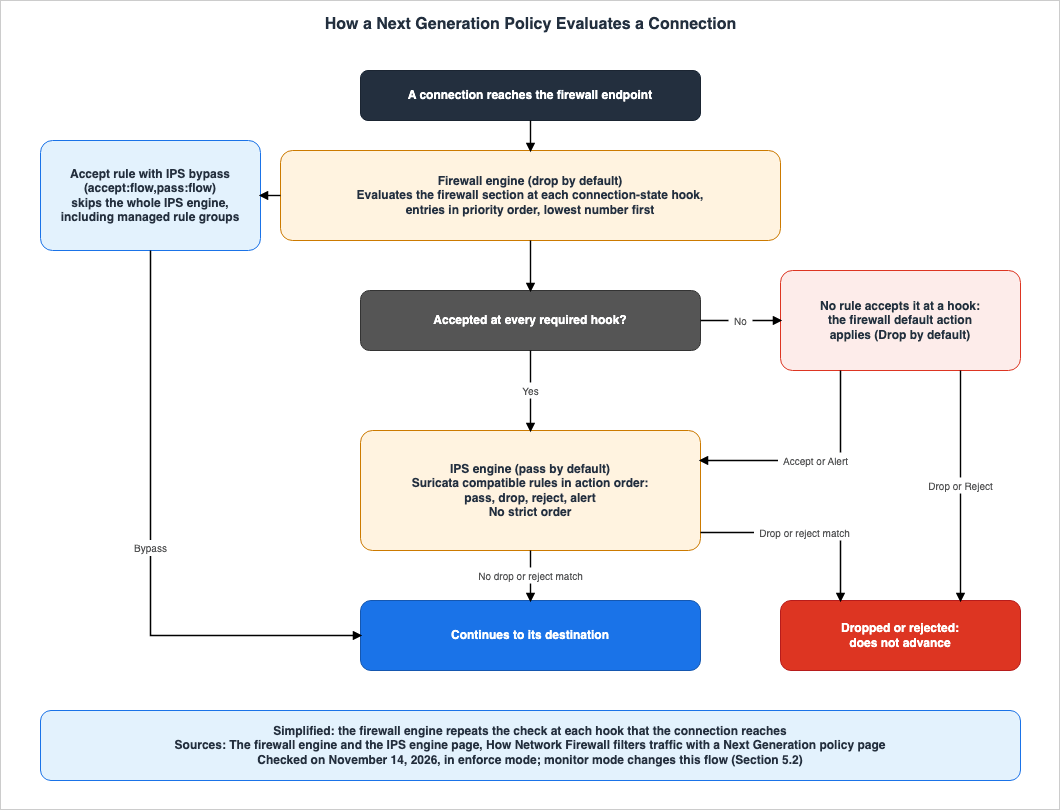
3.1 Firewall Engine
The How Network Firewall filters traffic with a Next Generation policy page states:A Next Generation policy doesn't use stateless rule groups. Traffic travels through a firewall engine and then an IPS engine.The firewall engine evaluates firewall section rules in order of priority for each connection hook. The firewall engine is drop by default, so a connection only proceeds to the next stage if it is accepted at every required hook. The policy's firewall default action handles traffic that is not accepted.
The Firewall engine hooks page states that only connections accepted by all preceding hooks are passed to subsequent hook rules. To avoid manually specifying acceptance for preceding hooks, you can use the "accept prior hooks" setting.
The firewall engine is built on top of Suricata's firewall mode. The developer guide points to the Suricata 8.0.3 firewall mode documentation as where to read how hooks correspond to connection states.
Within a firewall section, the order is determined by the priority of each entry. The firewall section and the IPS section page states that each entry has a unique priority, ranging from 1 to 65535, and that the lowest number is evaluated first. The Managing evaluation order for firewall rules page states that within a rule group, rules are processed in the order they are defined and are not reordered by the rule's action.
The firewall engine matches rules in this defined order regardless of each rule's action.Firewall rule groups can generate accept rules from a list of domain names. The Generating firewall rules from domain names page states that this generation in the firewall engine supports allow lists only.
Firewall rule groups do not support IP set references. The Working with firewall rule groups in AWS Network Firewall page states that to use CIDR ranges in firewall rules, you use rule variables. IP set references are available in IPS rule groups and with Classic policies' stateful rule groups.
3.2 IPS Engine
The firewall engine and the IPS engine page describes the IPS engine as follows:The IPS engine is pass by default: traffic that doesn't match a rule is allowed.The same page also states that the IPS engine examines threats in the same way as the stateful engine in a Classic policy, using Suricata-compatible rules. The Working with IPS rule groups in AWS Network Firewall page states that IPS rules are written using the same syntax and semantics as the stateful rules in a Classic policy. The IPS engine does not use hooks.
The IPS engine evaluates rules based on their action order. The Managing evaluation order for IPS rules page states that it processes rules in the order of
pass, drop, reject, and alert. In the same action, the order can be determined using the Suricata priority keyword. The firewall section and the IPS section page states that IPS section entries do not have a priority, and continues as follows:The IPS engine in a Next Generation policy doesn't support strict rule evaluation order.The How Network Firewall filters traffic with a Next Generation policy page states that the IPS engine behaves in the same way as the stateful engine in a Classic policy that evaluates rules in the default action order.
The developer guide provides the following example rule for the IPS engine: a rule that drops connections that negotiate older versions of TLS.
drop tls $EXTERNAL_NET any -> $HOME_NET any (msg:"Deprecated TLS version blocked"; flow:established,to_client; ssl_version:tls1.0,tls1.1; sid:100; rev:1;)3.3 Between the Engines
The firewall engine and the IPS engine page describes the interaction between the engines as follows:Only traffic that the firewall engine accepts at every required hook advances to the IPS engine.Traffic dropped by the firewall engine does not reach the IPS engine. Conversely, an accept rule in the firewall engine can make a connection skip the IPS engine. The Bypassing the IPS engine for accepted traffic page illustrates how the primary
accept action can be linked to the secondary pass action. An example from the developer guide is provided below.accept:flow,pass:flow tcp:all $HOME_NET any -> $EXTERNAL_NET 443 (sid:1001;)This page also states that traffic that bypasses the IPS engine receives no inspection, not only from the IPS section's rules, but also from AWS managed rule groups, including Active Threat Defense. The console adds the Active Threat Defense managed rule group to a Next Generation policy by default. The page advises using a bypass only for traffic that has been verified as trustworthy through other means.
When the firewall default action is set to Accept, the firewall engine becomes pass by default. The Firewall default action page describes this configuration as a common setup for policies whose purpose is threat detection and prevention, rather than access control. The page cautions users to select this setting with the understanding that it represents an intentional departure from the default "drop" posture.
Both the firewall engine and the IPS engine log events using the same
alert event type. The Logging for a Next Generation policy in AWS Network Firewall page explains that in the alert log, engine values of fw indicate the firewall engine, while td indicates the IPS engine.3.4 What Determines Each Order
Table 1 outlines what determines each order, by policy type. The date of review for all rows is November 14, 2026.| Which order | What determines it | Scope | Source |
|---|---|---|---|
| Between the engines | Fixed. The firewall engine, then the IPS engine. | Next Generation policy | How Network Firewall filters traffic with a Next Generation policy |
| Between entries in the firewall section | Priority for each entry, from 1 to 65535, lowest number first. | Next Generation policy | The firewall section and the IPS section, FirewallRuleGroupEntry |
| Within a rule group in the firewall section | Defined order. Not reordered by the rule's action. | Next Generation policy | Managing evaluation order for firewall rules |
| In the IPS section | Action order: pass, drop, reject, alert. Within each action, uses the Suricata priority keyword. Does not support strict order (Stated as not supported). | Next Generation policy | Managing evaluation order for IPS rules, The firewall section and the IPS section |
| Stateful rules | RuleOrder. Can be DEFAULT_ACTION_ORDER or STRICT_ORDER; the default is DEFAULT_ACTION_ORDER. Can only be configured when creating a policy. | Classic policy | Firewall policy settings, StatefulEngineOptions |
The Managing evaluation order for Suricata compatible rules page for Classic policies, and
StatefulEngineOptions in the API Reference, recommend using STRICT_ORDER. This recommendation applies to stateful rules in the Classic policy and does not apply to the IPS section of the Next Generation policy.4. Where a Rule Counts
This chapter shows which limit each rule is counted against, and what is not counted. Figure 2 summarizes the limits in this chapter.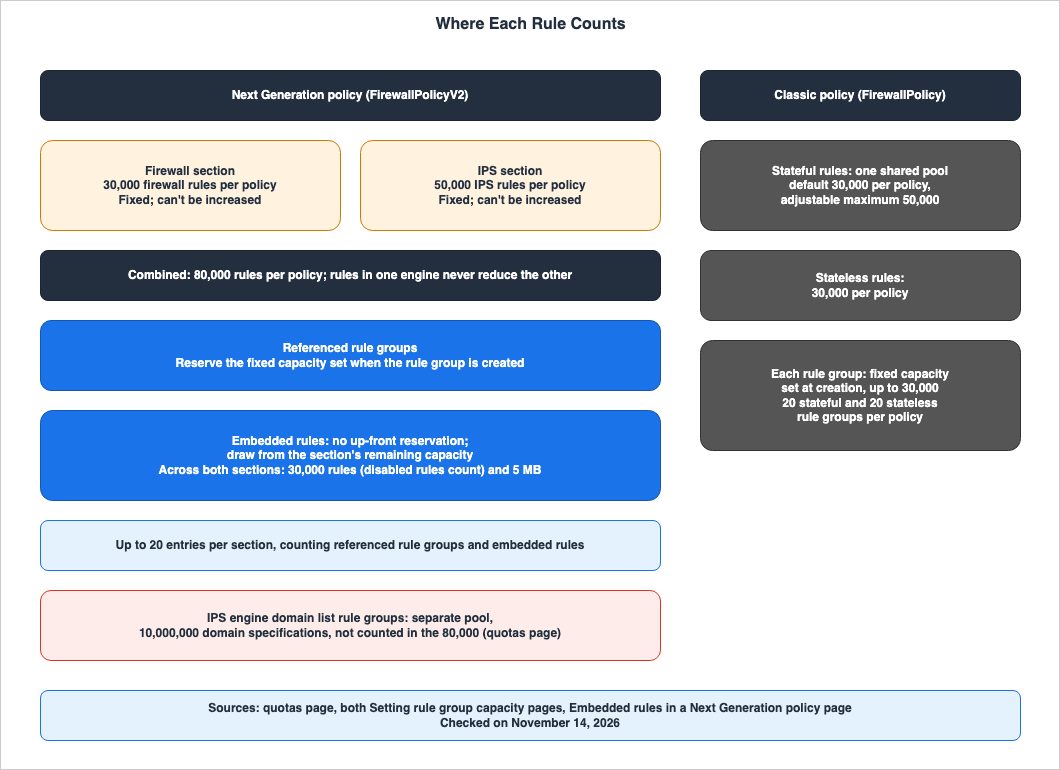
4.1 Limits of a Next Generation Policy
The capacity page (Next Generation) states:In a Next Generation policy, the firewall engine and the IPS engine have dedicated, separate rule capacity: 30,000 rules for the firewall engine and 50,000 rules for the IPS engine, for a combined total of 80,000 rules per policy.The same page states that because the two pools are separate, the rules in one engine never reduce the capacity of the other engine.
Table 2 lists the limits for the Next Generation policy on the quotas page. Each row represents a value per individual Next Generation policy. The date of review for all rows is November 14, 2026.
| Limit | Value | What is counted | What is not counted | Can be increased |
|---|---|---|---|---|
| Number of Firewall Rules | 30,000 | Embedded rules in the firewall section and all rules within any rule groups referenced by the firewall section | Rules in the IPS section | No |
| Number of IPS Rules | 50,000 | Embedded rules in the IPS section and all rules within any rule groups referenced by the IPS section | Rules in the firewall section | No |
| Total of Firewall and IPS Rules | 80,000 | Sum of the above two rows | Domain list rule groups for the IPS engine | No |
| Number of Embedded Rules | 30,000 | Total of embedded rules from both sections, including disabled rules | Rules within any referenced rule groups | No |
| Size of Embedded Rules | 5 MB | Total size of the rule strings for embedded rules from both sections | Rules within any referenced rule groups | No |
| Number of Entries in Firewall Section | 20 | Both referenced rule groups and embedded rules | Entries in the IPS section | No |
| Number of Entries in IPS Section | 20 | Both referenced rule groups and embedded rules | Entries in the firewall section | No |
| Domain List Rule Groups for IPS Engine | 10,000,000 domain name specifications | Domain name specifications in the domain list rule groups for the IPS engine | The combined 80,000 | No |
Additional notes regarding Table 2 are as follows.
- The quotas page lists all values from Table 2 in its table of limits that cannot be changed. Specifically, the rows for the number of firewall rules and the number of IPS rules indicate a fixed limit, stating that every policy has this full capacity and that it cannot be increased.
- The row pertaining to the IPS engine's domain list rule groups is a description found in the row for firewall rules on the quotas page. The handling of this row is detailed in Section 8.2.
- The Generating firewall rules from domain names page states that firewall rules generated from domain names are counted against the policy's firewall rule limit.
4.2 Referenced Rule Groups and Embedded Rules
The two methods involve different approaches to capacity allocation. The capacity page (Next Generation) states that the policy reserves the referenced rule group's capacity, a fixed value set when the rule group is created. This capacity cannot be changed after the rule group is created.Embedded rules, on the other hand, do not reserve capacity up front. The Embedded rules in a Next Generation policy page describes this as follows:
Embedded rules have no such fixed reservation: their capacity is drawn automatically from the engine section's remaining capacity.The capacity page (Next Generation) states that embedded rules draw from the capacity that remains after the fixed capacity of the rule groups referenced in that section is reserved.
As a calculation example by this article, assume that a firewall section references a rule group with a capacity of 25,000. Since the limit on firewall rules is 30,000, only 5,000 remains for the firewall section's embedded rules. The embedded rules for the IPS section, however, draw from a separate allocation of 50,000. However, the combined total for embedded rules across both sections cannot exceed 30,000. As an inference by this article, to fully use the IPS section's 50,000 allocation, the IPS section's referenced rule groups must have a capacity of at least 20,000.
The amount of capacity being used can be viewed in the "Consumed capacity" field in the console, and also in the responses from the API. An example response on the Creating a Next Generation policy in AWS Network Firewall page includes three fields:
ConsumedFirewallRuleCapacity, ConsumedIpsRuleCapacity, and ConsumedIpsDomainCapacity.4.3 Constraints of Embedded Rules
The Embedded rules in a Next Generation policy page lists two constraints:- They cannot be shared or reused. Embedded rules do not have an ARN and belong to a single policy. They travel with the policy only when the whole policy is shared through AWS Resource Access Manager.
- They cannot be domain lists.
An embedded entry can't be a domain list (an FQDN rule group that uses a RulesSourceList).To use a domain list, you add it as a referenced firewall rule group.
The Signature ID uniqueness page states that the SID of embedded rules must be unique across all embedded rules within both the firewall section and the IPS section. The SID of a referenced rule group only needs to be unique within that rule group.
4.4 How the Limits of a Classic Policy Differ
The capacity page (Next Generation) describes the Classic policy capacity as follows:This differs from a Classic Network Firewall policy, where all stateful rules share a single pool with a default capacity of 30,000 and an adjustable maximum of 50,000 rules per policy.Table 3 lists the Classic policy limits on the quotas page and the capacity page (Classic). The date of review for all rows is November 14, 2026.
| Limit | Value | Source |
|---|---|---|
| Number of Stateful rules for a single policy (total across all referenced rule groups) | Default: 30,000. Can be requested for an increase, up to a maximum of 50,000. | quotas page, capacity page (Next Generation) |
| Number of Stateless rules for a single policy (total across all referenced rule groups) | 30,000. Not changeable. | quotas page |
| Capacity of Stateful rule groups | 30,000. Not changeable. | quotas page, capacity page (Classic) |
| Capacity of Stateless rule groups | 30,000. Not changeable. | quotas page, capacity page (Classic) |
| Number of Stateful rule groups for a single policy | 20. Not changeable. | quotas page |
| Number of Stateless rule groups for a single policy | 20. Not changeable. | quotas page |
Classic policy stateful rules share a single pool. In the Next Generation policy, the firewall engine and IPS engine pools are separate. The What's New post states that firewall rules and IPS rules now each have their own capacity, eliminating the need to reduce one capacity to accommodate the other.
5. Policy Mode and Firewall Default Action
This chapter explains what happens to traffic that does not match any defined rules, and what traffic is not blocked in monitor mode.5.1 Firewall Default Action
The firewall default action determines how the firewall engine handles traffic that does not match any rule at a specific hook. The Firewall default action page lists four possible values:- Drop: The default and recommended option. This blocks the traffic.
- Accept: This allows the traffic to pass. The firewall engine becomes pass by default.
- Alert: This allows the traffic to pass, and also logs an alert each time the default action is applied.
- Reject: This blocks the traffic and sends a TCP reset to the client. For protocols other than TCP, it functions the same as "Drop."
The firewall default action only applies to the firewall engine. The same page notes that there is no separate default action setting for the IPS engine, which remains pass by default.
The API Reference for
FirewallPolicyV2 clarifies that ALERT is distinct from setting the policy mode to MONITOR.5.2 Enforce and Monitor
The Policy mode: enforce and monitor page lists two possible values for the policy mode.- Enforce: This is the default setting. The engines apply their actions. The firewall engine blocks traffic that is not accepted, and the IPS engine blocks traffic that matches "drop" or "reject" rules.
- Monitor: The engines evaluate traffic and log it, but do not block it. Except for
accept:hookrules, rules function as alert rules.
The same page also describes how to use the monitor mode in a phased rollout. The page says to review the alert logs and the Amazon CloudWatch metric
FirewallDefaultActionApplied, to confirm that traffic you intend to allow is not hitting the default drop action, and only then to switch to Enforce mode.Monitor mode approximates Enforce mode, but they are not identical. The same page states the following three points:
- In monitor mode, a firewall engine rule that would block traffic becomes an accept of the entire flow, and that flow bypasses the IPS engine. Logs generated by subsequent hooks or the IPS engine in Enforce mode will not appear in the monitor logs.
- In the IPS engine, all actions, including
pass, are recorded as alerts. - The stream exception policy uses "Continue" in monitor mode. Any "Drop" or "Reject" settings apply again when you switch back to Enforce mode.
5.3 What Still Blocks in Monitor Mode
The "Troubleshooting Next Generation policies in AWS Network Firewall" page lists what still blocks or resets connections, even in monitor mode.- TLS layer resets: This occurs when the SNI is missing or invalid, when the SNI does not match the server's certificate, or when the TLS handshake fails.
- TLS inspection certificate revocation checks: This applies when the action for a revoked certificate or an unknown status is Drop or Reject.
- Route 53 Resolved IP validation: It applies its configured action and DNS expiry exception policy even in monitor mode.
The "Policy mode: enforce and monitor" page states that the console defaults the action for Route 53 Resolved IP validation to "Reject." The same page suggests considering changing this action to "Alert" or disabling it entirely when verifying functionality in monitor mode.
5.4 Changes That Restart Inspection
The Managing your Next Generation policy in AWS Network Firewall page states that adding, removing, or changing rules does not interrupt established traffic flows. Rule changes apply only to new traffic flows.The same page states that the following three changes restart stateful inspection:
- Changing the firewall default action.
- Changing the policy mode.
- Associating a different type of policy with the firewall.
This interrupts the firewall's established traffic flows, and open connections can be reset.Switching from monitor mode to enforce mode is also considered a change in policy mode. As an inference by this article, you would switch from monitor to enforce at a time when resets of open connections are acceptable.
6. What Only Classic Policies Have
This chapter lists items exclusive to the Classic policy and those exclusive to the Next Generation policy.6.1 Only in Classic Policies
Table 4 lists features that are exclusive to the Classic policy, or that the Next Generation policy offers in a different way or has no statement for. The date of review for all rows is November 14, 2026.| Item | Classic Policy | Next Generation Policy | Source |
|---|---|---|---|
| Stateless Rule Groups | Exist. Stateless default actions also exist. | Not used. The firewall engine provides the functions of stateless rules. | The firewall engine and the IPS engine, Firewall policy settings |
| Order of Stateful Rule Evaluation | RuleOrder. Either DEFAULT_ACTION_ORDER or STRICT_ORDER. | The firewall section uses the priority of each entry. The IPS section uses action order and does not support strict order (Stated as not supported). | The firewall section and the IPS section, Firewall policy settings |
| Default Action for Non-Matching Traffic | Stateless default actions and stateful default actions when using strict order. | Firewall default action. The IPS engine is pass by default, with no setting. | Firewall default action, Firewall policy settings |
| No-Source-Preservation Mode | Preview. Only available in the US East (Ohio) Region. | Not supported (Stated as not supported). | What is page |
| TLS Inspection Session Holding | Optional. The default is disabled. | Session holding only. | TLS inspection with a Next Generation policy |
| Stream Exception Policy - Continue | Available. | Only "Drop" and "Reject" are available. The default is "Reject." | Stream exception policy options, Stream exception policy for Next Generation policies |
| IP Set References in Firewall Rules | Available for stateful rule groups. | Not supported for firewall rule groups. Supported for IPS rule groups. | Working with firewall rule groups in AWS Network Firewall |
| Distribution from Firewall Manager Policies | The Firewall Manager page mentions adding both stateless and stateful rule groups. | No statement found. | Firewall Manager page |
Regarding no-source-preservation mode, the What is page states:
No-source-preservation mode applies only to Classic Network Firewall policies. Next Generation policies don't support it.Regarding the stream exception policy, the Stream exception policy options page for Classic policies states that Continue is available only for Classic policies, and that Next Generation policies support only Drop and Reject.
6.2 Only in Next Generation Policies
Conversely, the following features are exclusive to the Next Generation policy:- Evaluation per hook, and configuration of "accept prior hooks" (Section 3.1)
- Firewall default action options: Drop, Accept, Alert, and Reject (Section 5.1)
- Policy mode options: Enforce and Monitor (Section 5.2)
- Embedded rules, and capacity allocated separately for each engine (Chapter 4)
- Accept rules in the firewall engine that skip the IPS engine (Section 3.3)
7. Moving From a Classic Policy
This chapter clarifies what the documentation covers and what it does not, when transitioning from the Classic policy to the Next Generation policy. This article does not provide step-by-step instructions.7.1 The Policy Type Cannot Be Changed
The Updating a Next Generation policy in AWS Network Firewall page states:You can't change a Classic Network Firewall policy into a Next Generation policy, or the reverse.The same page continues by stating that the policy type is determined at the time of creation. To move from a Classic policy to a Next Generation policy, you create a new Next Generation policy.
The same applies to rule groups. The "Rule groups for Next Generation policies in AWS Network Firewall" page states that the rule group type is selected during creation and cannot be changed later. The description for the
Type parameter in CreateRuleGroup specifies that STATEFUL is for Classic policies, while IPS is for Next Generation policies. As an inference by this article, to use the rules of a Classic policy's stateful rule group in an IPS section, you recreate the rule group using the IPS type with the same rules.7.2 What Carries Over and What Does Not
The What's New post describes the backward compatibility of IPS rules as follows:Your existing policies continue to operate without changes, and IPS rules remain backward compatible.The Working with IPS rule groups in AWS Network Firewall page states that IPS rules use the same syntax and semantics as stateful rules in Classic policies. However, the IPS engine evaluates rules only in action order. As an inference by this article, if stateful rules written to rely on the order of
STRICT_ORDER are moved to the IPS section, the order of evaluation changes.Stateless rules cannot be carried over as they are. The page titled The firewall engine and the IPS engine explains that the firewall engine provides the functions of stateless rules. Firewall engine rules use hooks and action scopes such as
accept:flow. IPS rules do not use hooks.The firewall engine is drop by default. As an inference by this article, if a Classic policy that allowed traffic that did not match any rules is moved to a Next Generation policy, that traffic will be blocked by the firewall's default action (Drop) until a rule allowing it is written in the firewall section. The monitor mode in Section 5.2 is there for this check.
7.3 Switching the Policy of a Firewall
The policy versions page describes how to associate policies with a firewall as follows:You can associate either a Classic Network Firewall policy or a Next Generation policy with a firewall, but not both.You can switch the policy of the same firewall from a Classic policy to a Next Generation policy. As mentioned in Section 5.4, associating a different type of policy restarts stateful inspection, and open connections can be reset.
This article did not find a statement that names the API used for this switch in the Next Generation policy chapter (No statement found). The
AssociateFirewallPolicy page in the API Reference states Associates a FirewallPolicy to a Firewall. and does not mention Next Generation policies.7.4 API, Conversion, and Distribution
The Creating a Next Generation policy in AWS Network Firewall page describes the AWS CLI commands as dedicated commands such ascreate-firewall-policy-v2, and continues as follows:The commands for Classic Network Firewall policies don't operate on Next Generation policies.The following three points represent aspects that this article was unable to find documentation for on the review date. None of them indicates that the matter is absent or impossible.
- Functionality or tools for converting Classic policies to Next Generation policies: No mention of conversion or migration features was found in the developer guide or the What's New post (No statement found).
- Methods for distributing Next Generation policies from AWS Firewall Manager: The Firewall Manager page describes adding stateless and stateful rule groups. The
AWS::FMS::Policysection in the CloudFormation Template Reference, specifically the Network Firewall example, also references stateless and stateful rule groups. No mention of Next Generation policies was found (No statement found). - CloudFormation's
AWS::NetworkFirewall::FirewallPolicyV2: Navigating to the page for this template name redirects to the "Introduction" page for the Template Reference. TheAWS::NetworkFirewall::FirewallPolicypage describes defining stateless and stateful behavior (No statement found).
8. Where the Sources Disagree, and Where No Statement Was Found
This chapter summarizes discrepancies found in the source materials and instances where information was not found.8.1 Where the Sources Disagree
This article found one point where the sources disagree. This article does not decide that either one is wrong.It is the publication date. The What's New post was published on November 10, 2026. The Document history, on the other hand, lists entries such as "New Next Generation policies," "New rule group types for Next Generation policies," and "Added quotas for Network Firewall Next Generation policies," with a date of November 9, 2026.
8.2 What This Article Does Not Call a Disagreement
This article does not call the following two items a disagreement between sources.The first is the resource list on the What is page. The AWS Network Firewall AWS resources section of this page lists four items: Firewall, VpcEndpointAssociation, FirewallPolicy, and RuleGroup, stating that RuleGroups utilize both stateless and stateful types. This list does not include
FirewallPolicyV2 or the FIREWALL and IPS types (Documentation does not list). At the beginning of the same What is page, Next Generation policies are recommended. As an inference by this article, the resource list may still be the text from before Next Generation policies.The second is the domain lists of the IPS engine. The quotas page states:
IPS engine domain list rule groups use a separate capacity pool.The same text continues by stating that this pool allows up to 10,000,000 domain name specifications per policy. The Updating a Next Generation policy in AWS Network Firewall page states that the console details screen displays the consumed capacity for firewall rule groups, IPS rule groups, and IPS domain lists. In contrast, the Generating firewall rules from domain names page states:
Domain name rule generation is available for firewall rule groups. It isn't available for IPS rule groups.The latter text describes a function for generating accept rules from domain names. The former text concerns IPS engine domain list rule groups. This article found no statement clarifying whether these two refer to the same thing. Furthermore, it found no statement regarding what IPS engine domain list rule groups are or how they are created in the Next Generation policy chapter (No statement found).
The quotas page also has another row, with a value of 10,000,000, in its table of limits that cannot be changed.
Maximum consumed domain capacity per firewall policy. This is the total number of domain name specifications across all AWS Marketplace managed rule groups in the firewall policy that use the stateful-domain-rulegroup resource type.This article found no statement on whether the capacity in this row and the pool for IPS engine domain list rule groups are the same (No statement found).
8.3 Where No Statement Was Found
This article did not find a statement on the following five items in the documentation on the date of review. None of them indicates that the matter is absent or impossible.- Functionality or tools for converting Classic policies to Next Generation policies (Section 7.4)
- Methods for distributing Next Generation policies from AWS Firewall Manager (Section 7.4)
- The
AWS::NetworkFirewall::FirewallPolicyV2resource in CloudFormation (Section 7.4) - The name of the API that switches a firewall to a Next Generation policy (Section 7.3)
- Information on what IPS engine domain list rule groups are and how to create them (Section 8.2)
9. Failure Modes
This chapter lists failures that can occur with a Next Generation policy, as symptom, cause, and source.- Symptoms: Traffic is dropped even though you did not write a deny rule. Cause: The firewall engine is drop by default, and the firewall default action is Drop unless you change it. Reference: Troubleshooting Next Generation policies in AWS Network Firewall (Section 5.1).
- Symptoms: Rules in subsequent hooks are never matched. Cause: Connections are being stopped before reaching subsequent hooks because they are not being accepted in the previous hook. Reference: Firewall engine hooks, Troubleshooting Next Generation policies in AWS Network Firewall (Section 3.1).
- Symptoms: You wrote an allow rule for a domain, but traffic covered by TLS inspection is blocked. Cause: Both the SNI rule at the TLS
client_hellohook and the HTTPHostrule for the decrypted request are required. Reference: Troubleshooting Next Generation policies in AWS Network Firewall. - Symptoms: While in "monitor" mode, some connections are being reset. Cause: TLS layer resets, certificate revocation checks, and Route 53 Resolved IP validation all block connections even in "monitor" mode. Reference: Troubleshooting Next Generation policies in AWS Network Firewall (Section 5.3).
- Symptoms: Rule matches that did not appear in the "monitor" mode logs appear in "enforce" mode. Cause: In "monitor" mode, firewall rules that should be blocking traffic are instead allowing the entire flow, bypassing subsequent hooks and the IPS engine. Reference: Policy mode: enforce and monitor (Section 5.2).
- Symptoms: When switching to "enforce" mode, open connections are cut. Cause: Changing the policy mode restarts stateful inspection. Reference: Managing your Next Generation policy in AWS Network Firewall (Section 5.4).
- Symptoms: The order of rules in the IPS section is not being applied as written. Cause: The IPS engine evaluates rules based on action order and does not support strict order. Reference: The firewall section and the IPS section (Section 3.2).
- Symptoms: When adding a domain list to embedded rules, creation or updates fail. Cause: Embedded rules cannot be domain lists. Reference: Embedded rules in a Next Generation policy (Section 4.3).
- Symptoms: When embedded rules have duplicate SIDs, creation or updates fail. Cause: SIDs must be unique across all embedded rules in the two sections. Reference: Signature ID uniqueness (Section 4.3).
- Symptoms: Traffic bypassing the IPS engine is not being inspected by Active Threat Defense. Cause: Bypassing the IPS engine skips the entire IPS engine, including managed rule groups. Reference: Bypassing the IPS engine for accepted traffic (Section 3.3).
- Symptoms: You cannot update a Next Generation policy using AWS CLI commands designed for Classic policies. Cause: Commands for Classic policies do not work with Next Generation policies. Reference: Creating a Next Generation policy in AWS Network Firewall (Section 7.4).
10. Frequently Asked Questions About Next Generation Policies
Q1. Has the Classic policy been deprecated?
The documentation that this article reviewed contains no statements indicating that the Classic policy has been deprecated. The policy versions page states that the Classic policy remains fully supported and can be kept for existing firewalls. The recommendation is to use the Next Generation policy for new firewalls (Section 2.2).Q2. Can you put your current stateful rule groups into a Next Generation policy as they are?
This article did not find a statement that says you can. The type of rule group is determined at creation time, and theCreateRuleGroup documentation specifies that STATEFUL is for Classic policies, while IPS is for Next Generation policies. The rules for IPS use the same syntax and meaning as stateful rules in Classic policies. As an inference by this article, you recreate the rule groups with the IPS type, using the same rule strings (Sections 7.1 and 7.2).Q3. Can a Next Generation policy also set the order of rules with STRICT_ORDER?
No, it cannot. The IPS engine evaluates based on action order and does not support strict order. The firewall section evaluates based on the priority of each entry and the order defined within rule groups. RuleOrder is a setting specific to Classic policies (Section 3.4).Q4. In a Next Generation policy, does traffic pass if you write nothing?
It will not pass through the firewall engine. The firewall engine is drop by default, and the firewall default action is Drop by default. Traffic that passes through the firewall engine will pass through the IPS engine, unless it matches a "drop" or "reject" rule (Chapter 3, Section 5.1).Q5. How many rules can one policy hold?
The firewall rules are limited to 30,000, while the IPS rules are limited to 50,000, for a total of 80,000. These limits are fixed and cannot be increased. Embedded rules, combined, are limited to 30,000 rules and 5 MB. Rules in referenced rule groups do not count towards the embedded rules limit (Section 4.1).Q6. In monitor mode, is nothing blocked?
Some things are still blocked. TLS layer resets, certificate revocation checks, and Route 53 Resolved IP validation still block or reset connections, even in monitor mode (Section 5.3).Q7. Can an existing firewall be switched to a Next Generation policy?
Yes, it can. A single firewall uses either a Classic policy or a Next Generation policy, not both. Associating a different type of policy restarts stateful inspection, and open connections can be reset. Since the policy type itself cannot be changed, you create a new Next Generation policy (Sections 7.1 and 7.3).Q8. Is there a feature that converts a Classic policy to a Next Generation policy?
This article did not find a description of such a conversion function in the documentation reviewed. This does not indicate that it is absent (Section 7.4).Q9. Can no-source-preservation mode be used with a Next Generation policy?
No, it cannot. The What is page states that no-source-preservation mode applies only to Classic policies, and that Next Generation policies do not support it (Section 6.1).11. Summary
The Next Generation policy can be understood in terms of the following five points:- Resources: The Next Generation policy utilizes
FirewallPolicyV2, a different resource type than the Classic policy. A firewall uses one or the other. The recommendation applies to new firewalls, and Classic policies remain fully supported. - Order: Traffic passes through the firewall engine before proceeding to the IPS engine. The firewall engine is drop by default and evaluates rules based on their priority at each hook. The IPS engine is pass by default and evaluates rules based on action order, but does not support strict order.
- Capacity: Firewall rules are limited to 30,000, and IPS rules to 50,000, for a total of 80,000. Both capacities are fixed. Embedded rules do not pre-allocate capacity, and the two sections combined are limited to 30,000 rules and 5 MB.
- Exclusive to Classic: Certain features are only available with Classic policies, including stateless rule groups,
RuleOrder, no-source-preservation mode, and the "Continue" option for stream exception policies. - When Switching: Once created, the type of a policy and rule group cannot be changed. Associating a firewall with a policy of a different type will restart stateful inspection. On the date of review, this article found no statement on a conversion feature or on distribution from Firewall Manager.
12. References
- AWS Network Firewall launches next-generation firewall policy - AWS What's New
- Document history for AWS Network Firewall - AWS Network Firewall Developer Guide
- AWS Network Firewall firewall policy versions - AWS Network Firewall Developer Guide
- What is AWS Network Firewall? - AWS Network Firewall Developer Guide
- Next Generation policies in AWS Network Firewall - AWS Network Firewall Developer Guide
- The firewall engine and the IPS engine - AWS Network Firewall Developer Guide
- How Network Firewall filters traffic with a Next Generation policy - AWS Network Firewall Developer Guide
- The firewall section and the IPS section - AWS Network Firewall Developer Guide
- Embedded rules in a Next Generation policy - AWS Network Firewall Developer Guide
- Signature ID uniqueness - AWS Network Firewall Developer Guide
- Firewall default action - AWS Network Firewall Developer Guide
- Policy mode: enforce and monitor - AWS Network Firewall Developer Guide
- Stream exception policy for Next Generation policies - AWS Network Firewall Developer Guide
- Managing your Next Generation policy in AWS Network Firewall - AWS Network Firewall Developer Guide
- Creating a Next Generation policy in AWS Network Firewall - AWS Network Firewall Developer Guide
- Updating a Next Generation policy in AWS Network Firewall - AWS Network Firewall Developer Guide
- Troubleshooting Next Generation policies in AWS Network Firewall - AWS Network Firewall Developer Guide
- Rule groups for Next Generation policies in AWS Network Firewall - AWS Network Firewall Developer Guide
- Working with firewall rule groups in AWS Network Firewall - AWS Network Firewall Developer Guide
- Firewall engine hooks - AWS Network Firewall Developer Guide
- Managing evaluation order for firewall rules - AWS Network Firewall Developer Guide
- Bypassing the IPS engine for accepted traffic - AWS Network Firewall Developer Guide
- Generating firewall rules from domain names - AWS Network Firewall Developer Guide
- Working with IPS rule groups in AWS Network Firewall - AWS Network Firewall Developer Guide
- Managing evaluation order for IPS rules - AWS Network Firewall Developer Guide
- Setting rule group capacity in AWS Network Firewall (Next Generation policies) - AWS Network Firewall Developer Guide
- Setting rule group capacity in AWS Network Firewall (Classic rule groups) - AWS Network Firewall Developer Guide
- TLS inspection with a Next Generation policy in AWS Network Firewall - AWS Network Firewall Developer Guide
- Logging for a Next Generation policy in AWS Network Firewall - AWS Network Firewall Developer Guide
- AWS Network Firewall quotas - AWS Network Firewall Developer Guide
- Classic Network Firewall policies in AWS Network Firewall - AWS Network Firewall Developer Guide
- Firewall policy settings in AWS Network Firewall - AWS Network Firewall Developer Guide
- Managing evaluation order for Suricata compatible rules in AWS Network Firewall - AWS Network Firewall Developer Guide
- StatefulEngineOptions - AWS Network Firewall API Reference
- Stream exception policy options in your AWS Network Firewall firewall policy - AWS Network Firewall Developer Guide
- FirewallPolicyV2 - AWS Network Firewall API Reference
- FirewallRuleGroupEntry - AWS Network Firewall API Reference
- IpsRuleGroupEntry - AWS Network Firewall API Reference
- CreateRuleGroup - AWS Network Firewall API Reference
- AssociateFirewallPolicy - AWS Network Firewall API Reference
- How Firewall Manager manages your Network Firewall resources - AWS WAF, AWS Firewall Manager, and AWS Shield Advanced Developer Guide
- AWS::FMS::Policy - AWS CloudFormation Template Reference
- AWS::NetworkFirewall::FirewallPolicy - AWS CloudFormation Template Reference
- Firewall Mode Design - Suricata 8.0.3 documentation
References:
Tech Blog with curated related content
Written by Hidekazu Konishi