Leaving an Amazon DynamoDB Global Table - Disassociation Protection, the Replication Stop Boundary, and Who Acts in Each Account
First Published:
Last Updated:
This article lays out these three paths in a table and shows what remains and what changes for both the replica that is leaving and the remaining replicas, and who acts, from which account and Region, with which permissions. It then checks, against each source, the three places that guard disassociation: the disassociation protection setting, the method for verifying a completed disassociation, and the
TableType property within AWS CloudFormation. The focus is on global tables of the Current version configured for multi-Region eventual consistency (MREC), encompassing both same-account and multi-account configurations. This article distinguishes between what the documentation explicitly states and what was not found in the sources listed in Section 1.3.This article is neither an introduction to new features nor an explanation of global table design. It does not provide instructions for migrating Regions or accounts, nor does it discuss pricing. The information presented was verified as of October 30, 2026.
Related articles:
- Amazon DynamoDB Capacity and Global Tables Guide - Capacity Modes, Auto Scaling, Warm Throughput, and Multi-Region Design
- AWS Multi-Region Active-Active Architecture Guide - Global Data Replication, Routing, and Failover with Route 53, DynamoDB Global Tables, and Aurora Global Database
- AWS History and Timeline regarding Amazon DynamoDB - Overview, Functions, Features, Summary of Updates, and Introduction
- Change Data Capture on AWS Beyond Zero-ETL - Logical Decoding, Streaming Connectors, and the Guarantees Each Capture Point Gives You
- What Consistent Means, Service by Service on AWS - The Same Word, a Different Contract, and What You Must Not Carry Across
- Amazon DynamoDB Master Index - A Hub for DynamoDB Design, Key Modeling, and Capacity Planning Articles
Table of Contents
- 1. Scope and Assumptions
- 2. How to Read the Tables
- 3. Three Ways to Leave a Global Table
- 4. What Stays and What Changes After Disassociation
- 5. Who Acts, from Where, with Which Permissions
- 6. Three Places That Guard Disassociation
- 7. Blocking Conditions, Failure and Rollback, and No Way Back
- 8. What This Setup Showed
- 9. Where the Sources Disagree and What They Do Not Say
- 10. Failure Modes
- 11. Frequently Asked Questions About Disassociating from a Global Table
- 12. Summary
- 13. References
1. Scope and Assumptions
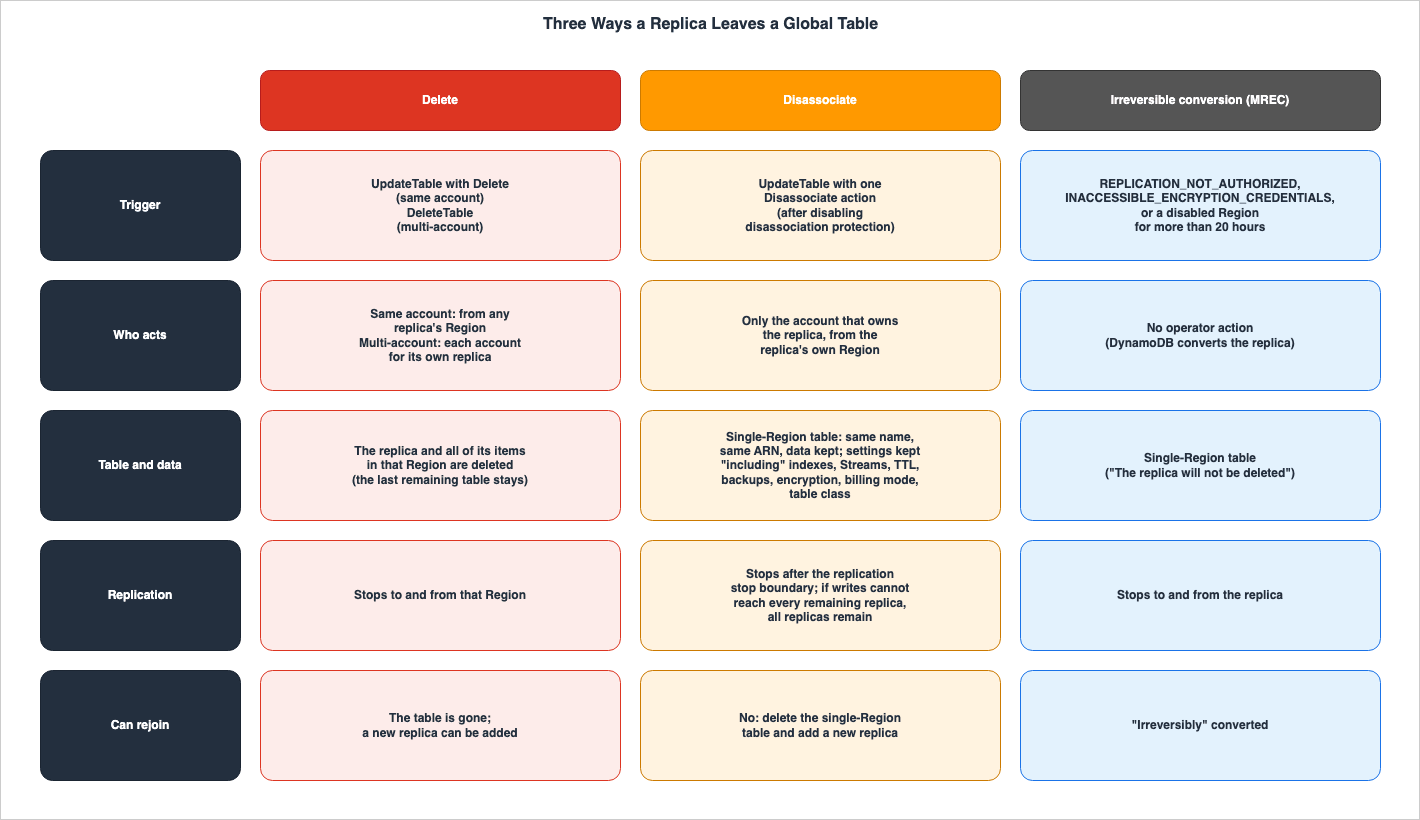
This section will first define the intended audience, the scope of this article, the source materials consulted, and how to distinguish between different entities that may share the same name. The conclusions come first, in the following seven points.- There are three ways for a replica to leave a global table. Delete deletes the table and its data in that Region. Disassociate stops replication while preserving the table and data. In an MREC global table, irreversible conversion occurs without operator intervention when a loss of replication permissions, a loss of access to encryption keys, or a disabled Region lasts more than 20 hours.
- When a replica is disassociated, it becomes a single-Region table in the same account and Region, retaining its table name and ARN. The DynamoDB Developer Guide lists indexes, DynamoDB Streams, Time to Live (TTL), backups, encryption, billing mode, and table class as examples of settings that remain. No statement was found in the sources in Section 1.3 on whether point-in-time recovery (PITR), tags, auto scaling, or deletion protection stay; in the setup in Section 8, they all stayed.
- When DynamoDB accepts a disassociation request, it establishes a replication stop boundary and waits for any changes written directly to the disassociated replica up to that boundary to be propagated to all remaining replicas. If those changes cannot be delivered, disassociation does not complete, and all original replicas remain in the global table.
- Only replicas within your own account can be disassociated. The request is sent to the Region where the replica resides. The required IAM permissions are
dynamodb:UpdateTableanddynamodb:DisassociateTableReplica. Note thatdynamodb:DisassociateTableReplicais the name of an IAM permission, not an API operation name. - Disassociation protection is enabled by default for each replica and is independent of deletion protection. Disabling deletion protection does not disable disassociation protection.
- Simply returning the
TableStatustoACTIVEdoes not indicate successful disassociation. When disassociation rolls back, the table can also return toACTIVE(the DG says it "might return to ACTIVE"). Therefore, verify the contents of theReplicaslist from both the disassociated side and the remaining side. - In CloudFormation, only updates that change the
TableTypetoRegionalresult in disassociation. Any other removal of a replica entry from theReplicaslist will result in the deletion of that replica and its data. Disassociation cannot be reversed, and the same table cannot rejoin the global table it left.
1.1 Who This Article Is For
This article is intended for developers and platform engineers who operate DynamoDB global tables (MREC, same-account or multi-account) and want a replica to leave a global table to exit a Region, separate accounts, or split a table. Specifically, this article targets readers who may believe any of the following to be true:- Making a replica leave a global table will delete the table.
- Disabling deletion protection will allow you to disassociate replicas.
- Disassociated tables can be re-added to the same global table later.
- When the
TableStatusreturns toACTIVE, the disassociation was successful. - Removing a replica's entry from the
Replicassection in a CloudFormation template will result in disassociation.
Each of these holds in some cases and not in others, depending on the specific path taken, the protection mechanisms modified, the methods used to verify the status, and how the template is configured.
1.2 What This Article Covers and What It Does Not
This article will cover the following topics:- The three paths by which a replica leaves a global table, and how each path affects tables, data, and replication.
- What remains, what changes, and the replication stop boundary during disassociation.
- Who can disassociate a table, from which accounts and Regions, and with what operations and permissions.
- The three places that guard disassociation: disassociation protection, how to confirm the result, and the CloudFormation
TableType. - Conditions that prevent disassociation, potential failures and rollbacks, the fact that there is no way back, and the procedure the sources give when you want a replacement.
- Discrepancies and omissions in the documentation.
This article will not cover the following topics. It does not give pricing, including for replicated writes, storage, and backups.
- Details on the MREC mechanism, the MRSC (multi-Region strong consistency) mechanism, capacity design, and configuration synchronization. This is covered in the previously published Amazon DynamoDB Capacity and Global Tables Guide.
- Multi-Region reference architecture and how to utilize replication. This is covered in the previously published AWS Multi-Region Active-Active Architecture Guide.
- A timeline of DynamoDB features. This is covered in the previously published AWS History and Timeline regarding Amazon DynamoDB.
- Guarantees for extracting changes from DynamoDB Streams. This is covered in the previously published Change Data Capture on AWS Beyond Zero-ETL.
- Procedures for migrating across Regions and accounts. This article only describes the sentences on two DynamoDB Developer Guide pages that mention migration as a use case for disassociation, and the fact that the migration procedure in the Database Blog follows the delete path.
- Disassociation for MRSC global tables and for global tables of Version 2017.11.29 (Legacy). Both are outside the scope of this article.
- Replica user pools of Amazon Cognito across Regions are covered in an article in the same series: Amazon Cognito Multi-Region Replication.
- Moving traffic from a single Availability Zone over several days is covered in an article in the same series: Draining an Availability Zone for Days.
1.3 Date Checked and Sources Read
The information was verified on October 30, 2026. The materials reviewed are as follows. In the text, this article abbreviates their names as follows.- Amazon DynamoDB Developer Guide (hereinafter referred to as DG): The page on "Disassociating a global table replica" (hereinafter, the DG disassociation page), the pages on "DynamoDB global tables security" (two pages covering same-account and multi-account configurations; hereinafter, the DG security page and the DG multi-account security page), the page on "How DynamoDB global tables work" (Current version; hereinafter, the DG How it works page), the multi-account version of that page (hereinafter, the DG multi-account How it works page; this page was read on October 31, 2026, and the other pages on October 30, 2026), the pages on "Global tables: How it works" (Legacy version) and "Global tables version 2017.11.29 (Legacy)" (hereinafter, the DG Legacy pages), "Global tables core concepts," "Best practices and requirements," the multi-account tutorial, the page on "Point-in-time backups," and the page on "Basic operations on DynamoDB tables," as well as the "Document history."
- Amazon DynamoDB API Reference (hereinafter referred to as API Reference):
UpdateTable,DescribeTable,DeleteTable,ReplicationGroupUpdate,ReplicaDescription,TableDescription,DeleteReplicationGroupMemberAction. - AWS CLI Command Reference (version 2.39.2) for
update-tableanddescribe-table(hereinafter referred to as CLI pages). - AWS SDK Reference: For AWS SDK for Java 2.x,
DisassociateReplicationGroupMemberActionandReplicationGroupUpdate; for Boto3 (version 1.43.122),update_table. - AWS CloudFormation Template Reference for
AWS::DynamoDB::GlobalTableandAWS::DynamoDB::GlobalTable ReplicaSpecification(hereinafter referred to as CFN pages), as well as the "Document history" section of the Template Reference. - Service Authorization Reference for DynamoDB. The host for retrieving this information is
servicereference.us-east-1.amazonaws.com. This article calls it the Service Reference. - Announcements in "What's New": "Amazon DynamoDB global tables now support disassociating replicas" (October 20, 2026), and "Amazon DynamoDB global tables now support replication across multiple AWS accounts" (February 3, 2026).
- Blog: From the AWS Database Blog, "Amazon DynamoDB global tables now support replication across AWS accounts" (February 3, 2026; hereinafter, the Database Blog multi-account post), "Upgrade your Amazon DynamoDB global tables to the current version" (June 4, 2025; read, but no statement from it is cited), and "Best practices for Amazon DynamoDB Global Tables – Part 1: Operational readiness" (May 20, 2026; hereinafter, the Database Blog operational post).
This article quotes statements page by page, because the DG, the API Reference, the CLI pages, and the CFN pages sometimes describe the same matter in different sentences, and the scope differs by page.
1.4 Same Spelling, Different Things
In this article, similar terms are distinguished as follows:- replica: In this article, "replica" refers to a table within a DynamoDB global table. It is different from the replica user pool in the Cognito article of the same series. In a DynamoDB global table with MREC, any replica can accept write operations. This article does not import the distinction between "primary" and "replica" authority that exists in the Cognito article. This article calls the table that a new replica copies its data from the "source replica." This terminology is consistent with the term "source" used in the DG disassociation page, but does not represent authority for writing data.
- protection: "Disassociation protection" refers to a setting that prevents replicas from being disassociated, and is named
DisassociationProtectionEnabled. "Deletion protection" is a setting that prevents tables from being deleted, and is namedDeletionProtectionEnabled. CloudFormation'sDeletionPolicyis a CloudFormation attribute that determines whether a table should be retained when a resource is removed from a stack; it is separate from these two protection settings. - disassociate: In this article, "disassociate" refers to the operator's
Disassociateaction that takes a replica out of an MREC global table of the Current version; the automatic path is called irreversible conversion. The DG Legacy page also uses the term "completely disassociated," but this refers to a description specific to the Legacy version and is a different concept than the "disassociation" described in this article. It is also unrelated to APIs with names beginning with "Disassociate" for services other than DynamoDB, such as Amazon EC2 and Amazon ECS. - single-Region table: In this article, tables that do not belong to a global table are referred to as "single-Region tables," aligning with the terminology used in DG. In the CFN page, "Regional" is the name of a value in the
TableTypeparameter.
1.5 Versions and Consistency Modes in Scope
The DG disassociation page limits the scope as follows:You can disassociate replicas from same-account and multi-account global tables
configured for multi-Region eventual consistency (MREC), using Global Tables version
2019.11.21 (Current). This operation is not supported for multi-Region strong consistency
(MRSC) or Global Tables version 2017.11.29 (Legacy).The
TableType description on the CFN page also states that disassociation is not supported for MRSC global tables. Regarding the Legacy version, the DG Legacy page indicates that this version should be avoided for new global tables.This documentation is for version 2017.11.29 (Legacy) of global tables,
which should be avoided for new global tables.This article focuses solely on MREC global tables of the Current version. MRSC and Legacy are only mentioned in relation to the irreversible conversion comparison in Section 3.3 and the source disagreements in Section 9.
2. How to Read the Tables
This section defines the columns in the tables from Sections 3 through 9, as well as how to describe the state of the sources. The column names and the state terms are shared with the Cognito article and the AZ article in the same series. In addition, this article defines the terms used to refer to the three paths, and specifies how to describe items that are not yet documented in the API Reference.2.1 Columns
The table in this article is structured with a column at the beginning indicating either a path, a setting, or the entity performing an action, followed by subsequent columns. Some tables add aCan Rejoin column after Who Acts, which indicates whether the table can be returned to the original global table.What Moves: Items or entities that stop or transition as they traverse the path. In this article, this primarily refers to replication.What Stays: Items or entities that remain after traversing the path. In this article, this primarily refers to tables, data, and settings.Who Acts: The entity initiating and performing the action. This specifies which account, from which Region, and which operation is involved.Where It Is Written: The source of the statement in that row. It names the source and the page.No Statement Found: Instances where, despite searching through the materials described in Section 1.3, using different search terms and document categories, no relevant statement was found. In such cases, a dash (—) is used.
A non-empty
No Statement Found entry does not indicate that the matter is nonexistent or will not occur.2.2 Four Source States
This article writes the state of the sources with the following four terms:- No statement found: written in the text as
no statement was found, with the scope of the search. - Not listed: a list or table does not contain the item. Written in the text as
the documentation does not list. - Disagreement: written in the text as
the sources disagree, with both statements and their sources. This article does not decide that either one is wrong. - Inference: the same sentence states that this is this article's reading and not a statement in any source.
2.3 Names for the Three Paths
This article uses the general term "leave" to describe a replica's departure from the global table. This article uses the following terms to differentiate between the three distinct paths:- delete: This path deletes the replica. In a same-account configuration, this is achieved through the
Deleteoperation withinReplicaUpdatesofUpdateTable. In a multi-account configuration, it is achieved through theDeleteTableoperation in each account. This action deletes both the table and its data in that Region. - disassociate: This path keeps the replica as a single-Region table and takes it out of replication. This is achieved through the
Disassociateoperation withinReplicaUpdatesofUpdateTable. The table and its data remain. - irreversible conversion: This path, initiated by DynamoDB rather than by an operator, converts the replica into a single-Region table. In an MREC global table, this occurs when a loss of replication permissions, a loss of access to encryption keys, or a disabled Region lasts more than 20 hours.
This article does not mix these three terms. Inside verbatim quotes, it keeps the source's word, such as remove.
2.4 What the API Reference Does Not Yet Describe
As of the date of the verification, the API Reference website did not include documentation on disassociation. On October 30, 2026, this article retrieved seven pages –UpdateTable, ReplicationGroupUpdate, ReplicaDescription, TableDescription, DescribeTable, DeleteReplicationGroupMemberAction, and DeleteTable – and counted the occurrences of words beginning with "disassociat." In all seven pages, the count was zero. When the URL for the DisassociateReplicationGroupMemberAction page was accessed, it redirected to the main page of the API Reference.In contrast, the DG, CLI, SDK Reference, CFN, and What's New sections do include documentation on disassociation. Using the same counting method, the
update-table page in the CLI was found to contain the term 32 times, the update_table page in Boto3 contained it 31 times, and the DisassociateReplicationGroupMemberAction page in the AWS SDK for Java 2.x contained it 52 times.This article states that, as of the verification date, the API Reference pages did not document disassociation. It does not state that the API Reference is incorrect, nor does it suggest that any documentation is missing. This article describes the shape of the operation with the statements on the DG, the CLI pages, and the SDK references.
2.5 Documentation Statements and Blog Statements
This article writes statements from the DG pages, the API Reference pages, the CLI pages, and the CFN pages with the page name as the subject. For a Database Blog statement, it puts the blog name and date in the same sentence and does not cite it as a documentation specification. This article cites two Database Blog statements: the migration procedure in the multi-account post and the caution about disruptions in the operational post.3. Three Ways to Leave a Global Table
This section examines the three paths one by one and summarizes them in a table and a figure.3.1 Delete
Delete is the path that deletes the replica table in that Region, together with its data. The API Reference page forReplicationGroupUpdate describes the Delete action as follows. The words "all if its items" in the quote are spelled as in the original.An existing replica to be deleted. The request invokes the DeleteTableReplica action
in the destination Region, deleting the replica and all if its items in the destination Region.In a same-account configuration, you can also delete replicas in other Regions using the
UpdateTable operation. The DG security page states that when using UpdateTable to delete a replica, you need dynamodb:UpdateTable permission on the table in the Region you are calling, and you need dynamodb:DeleteTable and dynamodb:DeleteTableReplica permissions on the tables in each Region where the replicas are being deleted.In a multi-account configuration, this is different. The DG multi-account security page states:
Unlike same-account Global Table, you cannot use `UpdateTable` to delete a replica table
in a remote region and each replica must be deleted through the `DeleteTable` API
from the account that controls it.
Regarding the deletion of global table replicas down to the last one, the DG security page states that the table in the last remaining Region is not deleted.
It does not delete the underlying DynamoDB table in the last remaining Region.
The table in the last Region continues to exist as a standard DynamoDB table
with the same data and settings.
Delete is also subject to a time constraint. The DG How it works page states that tables used to add new replicas cannot be deleted until 24 hours after the replica's creation.
You can't delete a table used to add a new global table replica until 24 hours
have elapsed since the new replica was created.
The API Reference page for
ReplicationGroupUpdate notes that even when deleting replicas manually, related auto scaling registrations, scaling policies, and Amazon CloudWatch alarms will not be automatically removed.When you manually remove a table or global table replica, you do not automatically
remove any associated scalable targets, scaling policies, or CloudWatch alarms.This note is included as a follow-up to the description of the
Delete action. No statement on what happens to auto scaling registrations during disassociation was found in the sources in Section 1.3. The setup in Section 8 observed this.3.2 Disassociate
Disassociate is the path that keeps the replica as a single-Region table and takes it out of replication. On October 20, 2026, What's New announced this operation as follows:Amazon DynamoDB global tables now support disassociating a replica without deleting
its table or data.The DG disassociation page states that when a replica is disassociated, it becomes a single-Region table in the same account and Region, retaining its original table name and ARN.
The replica becomes a single-Region table in the same AWS account and Region
and keeps its table name and Amazon Resource Name (ARN).
The outcome depends on the number of replicas in the global table. According to the DG disassociation page, if there are three or more replicas, only the disassociated replica will become a single-Region table, while the remaining replicas will continue to function as part of the global table. If there are only two replicas, both will become single-Region tables.
If the global table has two replicas, both tables become single-Region tables.
Neither table nor its data is deleted.
To perform the disassociation operation, you must send an
UpdateTable request, including a single Disassociate action in the ReplicaUpdates section. The DG Document history says, in its row for October 20, 2026, that the disassociation procedure was added.3.3 Irreversible Conversion
Irreversible conversion represents a path where a replica can become a single-Region table, even if the operator does not explicitly disassociate it. This article gathered the following three triggers from several DG pages:The first trigger is the loss of replication permissions. The DG security page states that if the replica's resource-based policies deny the necessary permissions for the service-linked role (SLR) associated with the global table, the replica's status will change to
REPLICATION_NOT_AUTHORIZED. For MREC global tables, the page states:For multi-Region eventual consistency (MREC) global tables, if a replica
remains in the `REPLICATION_NOT_AUTHORIZED` state for more than
20 hours, the replica is irreversibly converted to a single-Region DynamoDB table.The DG multi-account security page also states the same 20-hour timeframe for multi-account global tables.
The second trigger is the loss of access to the encryption key. The DG security page indicates that if DynamoDB access to the customer-managed key used for replica encryption is disabled or revoked, the replica's status will change to
INACCESSIBLE_ENCRYPTION_CREDENTIALS. The page further states that if this status persists for more than 20 hours on the MREC global table, the replica will irreversibly become a single-Region table.The third trigger is a disabled Region. The DG How it works page states:
If you disable an AWS Region that contains global table replicas, those replicas
are permanently converted to single-Region tables 20 hours after the Region is disabled.
The API Reference's
ReplicaDescription page describes the same concept using different wording. The INACCESSIBLE_ENCRYPTION_CREDENTIALS description has a note that names the AWS KMS key where the following note names the AWS Region. The REGION_DISABLED description includes the following note:If the AWS Region remains inaccessible for more than 20 hours, DynamoDB will remove
this replica from the replication group. The replica will not be deleted and
replication will stop from and to this region.The DG uses the terms "irreversibly converted" and "permanently converted," while the API Reference states that the replica is "removed" from the replication group. In this article's reading, the two wordings describe the same result. No statement was found that says the two refer to the same result.
However, the outcome differs for MRSC global tables. The DG security page states that if an MRSC replica remains in the
REPLICATION_NOT_AUTHORIZED state for more than 7 days, the replica becomes permanently inaccessible.If a replica remains in the `REPLICATION_NOT_AUTHORIZED` state for more than seven days,
the replica becomes permanently inaccessible, and write and strongly
consistent read operations will continue to fail with an error.When an MRSC replica enters the
INACCESSIBLE_ENCRYPTION_CREDENTIALS state and remains in that state for more than 7 days, the replica is either archived or becomes permanently inaccessible, depending on the permissions revoked. The 20-hour period for MREC and the 7-day period for MRSC represent separate timeframes that can lead to different outcomes. This article focuses on MREC, so when the term "irreversible conversion" is used below, it refers to the 20-hour timeframe associated with MREC.3.4 Table of the Three Paths
This table summarizes Sections 3.1 through 3.3.| Path | What Moves | What Stays | Who Acts | Can Rejoin | Where It Is Written | No Statement Found |
|---|---|---|---|---|---|---|
| Delete | Replication to and from that Region stops; the replica and all of its items in that Region are deleted | Other replicas; the last remaining table when every other replica is deleted; auto scaling targets, scaling policies, and CloudWatch alarms are not removed automatically | Same account: UpdateTable with Delete, from the Region of any replica. Multi-account: each account calls DeleteTable for its own replica | Not applicable (the table is gone); a new replica can be added | API Reference (ReplicationGroupUpdate); DG (security pages, How it works) | — |
| Disassociate | Replication to and from the replica stops after the replication stop boundary | The table, its name, its ARN, its data, and settings including indexes, Streams, TTL, backups, encryption, billing mode, and table class | The account that owns the replica, from the replica's own Region: UpdateTable with one Disassociate action | No: "You cannot undo disassociation or reattach the same table to the global table it left." | DG (disassociation page, security pages); CLI page; CFN pages | Whether PITR, tags, auto scaling registrations, deletion protection, Contributor Insights, Kinesis Data Streams settings, and resource policies stay |
| Irreversible conversion (MREC) | Replication to and from the replica stops | The table ("converted to a single-Region DynamoDB table"; "The replica will not be deleted") | No operator action: the state lasts more than 20 hours (REPLICATION_NOT_AUTHORIZED, INACCESSIBLE_ENCRYPTION_CREDENTIALS, or a disabled Region) | Not stated beyond "irreversibly" | DG (security pages, How it works); API Reference (ReplicaDescription) | Which settings stay; whether the data is complete; whether writes made before the conversion reach the other replicas |
3.5 When the Global Table Has Two Replicas
When a global table has only two replicas, regardless of whether you choose to delete or disassociate, the other remaining table also becomes a single-Region table. For disassociate, the DG disassociation page states that both tables become single-Region tables, and that neither table nor its data is deleted. For delete, the DG security page states that the table in the last remaining Region is not deleted, but will persist as a standard table with the same data and configuration.In multi-account configurations, this also applies to tables in the other account. If account A disassociates its replica from a two-replica global table, the replica in account B will also become a single-Region table. The CloudFormation section of the DG disassociation page mentions this scenario as an example where a table becomes single-Region outside of a stack.
A table can also become regional outside the stack. For example, you disassociate it
with the AWS CLI, or another account disassociates the other replica of a two-replica
global table.
In a multi-account global table with two replicas, disassociation in the other account turns your table into a single-Region table as well (the DG disassociation page, quoted above). This article's reading is that disassociation protection, which prevents your own replica from being disassociated, does not prevent disassociation initiated by the other account. No statement was found that says disassociation protection does not apply to operations performed in the other account.
4. What Stays and What Changes After Disassociation
This section examines what remains and what changes on the disassociated replica, verifying these aspects in the order of table names, configurations, replication stop boundaries, and read/write operations.4.1 Table Name and ARN
Disassociated replicas retain the table's name and ARN. This aligns with the description of replica disassociation in Section 3.2. If an application references the table within its Region using either its name or ARN, it will continue to be able to read and write to it after the disassociation. However, the table no longer receives replicated writes from other Regions.4.2 Settings
The DG disassociation page describes the configuration settings that remain after a disassociation, as follows:The resulting table retains its table settings, including indexes, DynamoDB Streams,
Time to Live (TTL), backups, encryption, billing mode, and table class.
Replication-specific settings and metrics no longer apply.This list, presented as examples following the word "including," is not an exhaustive enumeration of all remaining configuration settings. This article searched four times, changing the search terms, across the DG, CFN, API Reference, CLI, and aws-knowledge resources. No statement was found on whether point-in-time recovery (PITR), tags, auto scaling registrations, deletion protection, CloudWatch Contributor Insights, Amazon Kinesis Data Streams integration, and resource-based policies stay.
These settings share a common characteristic. The DG How it works page divides global table configurations based on their synchronization methods, categorizing them into three groups: settings that are always synchronized across all replicas, settings that are synchronized but can be overridden on a per-replica basis, and settings that are never synchronized. The settings that are never synchronized are listed in the DG How it works page as follows:
The following settings are never synchronized between replicas: Deletion protection
Point-in-time Recovery Tags Table CloudWatch Contributor Insights enablement
GSI CloudWatch Contributor Insights enablement Kinesis Data Streams definition
Resource Policies Streams definition in MRSC mode
The examples on the DG disassociation page primarily focus on settings that are either always synchronized or can be overridden. Index settings, MREC Streams, TTL, encryption, and billing mode are always synchronized, while table classes can be overridden. The settings for which no statement was found overlap with the settings that are never synchronized. In this article's reading, most of the settings for which no statement was found are settings that each replica holds on its own. No statement was found in which the DG describes this relationship.
For multi-account global tables, the DG multi-account How it works page lists table class and server-side encryption (SSE) type among the settings that are not synchronized. The same page also states that the synchronized settings cannot be overridden per Region (read auto scaling is the exception).
The following table lists the three categories and the source state on whether each setting stays after a disassociation. The values observed in Section 8 are listed in their respective columns.
| Setting | Synchronization Class (DG How it works, same-account) | In the DG Disassociation Page's Examples | Stays After Disassociation | Observed in Section 8 |
|---|---|---|---|---|
| Key schema, GSI definitions, capacity mode | Always synchronized | Yes (indexes, billing mode) | Written ("retains its table settings, including ...") | Stayed (same key schema; provisioned 1 RCU and 1 WCU; no GSI in the setup) |
| Streams (MREC) | Always synchronized | Yes | Written | Stayed (NEW_AND_OLD_IMAGES) |
| TTL | Always synchronized | Yes | Written | Stayed (enabled on expires_at) |
| Server-side encryption type | Always synchronized | Yes (encryption) | Written | No change (default encryption; no SSEDescription before or after) |
| Write and read auto scaling | Write: always synchronized; read: overridable | No | no statement was found | Stayed (2 scalable targets, 2 scaling policies, 8 alarms in us-west-2) |
| Table class | Overridable | Yes | Written | No change (no TableClassSummary before or after) |
| Deletion protection | Never synchronized | No | no statement was found | Stayed (true) |
| PITR | Never synchronized | No (the examples say "backups") | no statement was found | Stayed (ENABLED) |
| Tags | Never synchronized | No | no statement was found | Stayed (2 tags set only on us-west-2) |
| Contributor Insights | Never synchronized | No | no statement was found | Stayed (ENABLED) |
| Resource policies | Never synchronized | No | no statement was found | Stayed (the policy was still returned) |
| Kinesis Data Streams definition | Never synchronized | No | no statement was found | Not tested (no Kinesis stream in the Section 8 setup) |
Regarding PITR, the DG Point-in-time backups page states that PITR can be enabled for each replica of the global table.
You can enable point-in-time recovery on each local replica of a global table.The DG disassociation page does not specify whether the example backups include PITR. This article treats PITR as a configuration option not included in the example.
The sentence after the examples states that replication-specific settings and metrics no longer apply. No statement listing which settings and metrics those are was found in the sources in Section 1.3.
4.3 The Replication Stop Boundary
Disassociation does not occur the moment a request is accepted. The DG disassociation page states:When you request disassociation, DynamoDB establishes a replication stop boundary, a
point in time it chooses after accepting the request, and waits until every remaining
replica has received all writes made directly to the departing replica up to that
boundary.The stop boundary is the point selected after DynamoDB accepts the request. The wait time is required to ensure that changes written directly to the disassociated replica up to that boundary have reached all remaining replicas. For the case where those writes cannot be delivered, the same page states:
If DynamoDB cannot deliver those writes to every remaining replica, disassociation does
not complete and all original replicas remain in the global table.
This article searched for information regarding whether changes written to the disassociated replica after the stop boundary reach the remaining replicas. The DG disassociation page simply states that after completion, no further write operations are sent to or received from the replica. No statement was found on how changes written between the stop boundary and completion are handled. In the Section 8 configuration, a single write operation was performed to the replica being disassociated, both immediately before and immediately after the request was accepted, in order to observe the propagation.
4.4 Reads, Writes, and Possibly Missing Writes
The table accepts read and write operations both during and after disassociation. The DG disassociation page states:The table continues serving reads and writes during and after disassociation. It
retains its data, but because MREC replicates changes asynchronously, it might not
contain the latest writes from other Regions. When disassociation completes, the table
no longer sends or receives replicated writes.The stop boundary only waits for a change in one direction. It waits for changes that are written directly to the disassociated replica up to the boundary and then propagate to the remaining replicas. Regarding changes in the opposite direction – changes from other Regions toward the disassociated replica – the DG only states that the table might not contain the latest writes, and does not specify how far the replication will proceed before it stops. Disassociated tables may not contain the most recent writes from other Regions. This difference between the two directions is this article's reading, which combines two DG statements.
4.5 DynamoDB Streams
The examples on the DG disassociation page include DynamoDB Streams as part of the remaining configuration. The DG How it works page describes how the MREC global table reads changes from the DynamoDB Streams of the replica tables and applies them to other replicas, thereby replicating data. It states that Streams are enabled by default on the MREC replicas and cannot be disabled. The previously published Change Data Capture on AWS Beyond Zero-ETL clarifies this point, differentiating between the Streams on single-Region tables and those on MREC global tables. No statement was found in the sources in Section 1.3 on whether the usage of Streams on a disassociated table is the same as that on single-Region tables.5. Who Acts, from Where, with Which Permissions
This section checks who performs the disassociation, from which account and Region, in the following order: same-account, multi-account, and CloudFormation. The findings will be summarized in a table, detailing the associated permissions.5.1 Same-Account Global Tables
Even in a same-account configuration, requests to disassociate are sent to the Region of the replica being disassociated. The DG disassociation page states that both requests to modify protection and to disassociate are sent from the replica's Region and the account that owns it.Make both requests from the replica's Region and owning account.The SDK reference for the
DisassociateReplicationGroupMemberAction also states the same regarding the RegionName parameter. The AWS SDK for Java 2.x page states:The Region of the replica to disassociate. Set this value to the Region where you send
the UpdateTable request. You must use credentials for the account that owns the replica.When deleting in the same account, as described in Section 3.1, replicas in other Regions can also be deleted using
UpdateTable. However, when disassociating, the request must be sent from the same Region specified in the RegionName. In this article's reading, this is the difference between delete and disassociation in where the request is sent from. The setup in Section 8 recorded the response when the disassociation of the us-west-2 replica was sent to us-east-1.5.2 Multi-Account Global Tables
In a multi-account configuration, each account can only disassociate its own replicas. The DG disassociation page states:For a multi-account global table, an account can disassociate only its own replica.The DG multi-account security page states that being a member of the global table does not grant an account the permission to disassociate replicas belonging to other accounts.
Global table membership doesn't grant permission to disassociate a replica owned by
another account.
What's New describes a use case for multi-account configurations where an account can leave a shared global table and continue to use its own table independently.
An account can leave a shared multi-account global table and continue using its table
independently.
When deleting replicas within a multi-account configuration, each account, as described in Section 3.1, deletes its own replicas using the
DeleteTable operation. In a multi-account configuration, both deletion and disassociation apply only to an account's own replicas. The difference lies in whether the table and data remain.5.3 CloudFormation
When managing replicas using theAWS::DynamoDB::GlobalTable resource, CloudFormation can only disassociate replicas in the same account and Region of the stack. The DG disassociation page states:CloudFormation disassociates only the replica in the stack's account and Region.The same page also notes that in multi-account configurations, each account can disassociate its own replicas from its own stack. If you want to disassociate replicas in a different Region in the same account, first import those replicas into a stack in the replica's Region, with
TableType set to GlobalTableReplica. Then, perform an update on that stack. The IAM principal used by CloudFormation for stack updates also requires the permissions outlined in Section 5.4. The CFN page lists dynamodb:DisassociateTableReplica among the necessary permissions for operating on the resource.5.4 IAM Permissions
Two permissions are required for disassociation. The DG disassociation page states the following:Disassociation uses the Disassociate action in the ReplicaUpdates array of UpdateTable.
You need both dynamodb:UpdateTable and dynamodb:DisassociateTableReplica
on the local replica's table ARN. dynamodb:DisassociateTableReplica is an
IAM permission, not a separate API operation.dynamodb:DisassociateTableReplica is the name of a permission that you write in an IAM policy; there is no API operation with that name. The operation used to perform this action is UpdateTable, where you include a Disassociate entry in the ReplicaUpdates section. Changes to disassociation protection require the dynamodb:UpdateTable permission, while verifying and monitoring the completion of disassociation requires the dynamodb:DescribeTable permission. The DG disassociation page provides an example of an identity-based policy that grants these three permissions for a single table.{
"Version": "2012-10-17",
"Statement": [
{
"Effect": "Allow",
"Action": [
"dynamodb:UpdateTable",
"dynamodb:DisassociateTableReplica",
"dynamodb:DescribeTable"
],
"Resource": "arn:aws:dynamodb:us-west-2:111122223333:table/Music"
}
]
}The permissions required for deletion are different. The DG security page states that deleting a replica in each Region requires both
dynamodb:DeleteTable and dynamodb:DeleteTableReplica permissions for the corresponding table. A policy that only grants dynamodb:UpdateTable will prevent both deletion and disassociation. A policy that grants dynamodb:UpdateTable and dynamodb:DisassociateTableReplica but not dynamodb:DeleteTableReplica allows disassociation but prevents deletion. In this article's reading, this combination lets you separate the two paths by permissions. No statement was found in which the DG recommends this separation.5.5 Values in the Service Reference
The DynamoDB JSON for the Service Reference includesDisassociateTableReplica as a write permission. The values obtained on October 30, 2026, indicated that IsWrite was true, the resource type was table, IAM Access Analyzer Policy Generation was false, and IAM Action Last Accessed was false. In the same JSON for UpdateTable, both of these values are true.In this article's reading, these two
false values indicate that the permission does not appear in either the IAM Access Analyzer policy generation or the IAM action last accessed information. This reading is based solely on these two values in the JSON. In this article's reading, to find records of this permission being used, you look at the ReplicaUpdates in the UpdateTable records in CloudTrail.5.6 Table by Actor
This table summarizes the information from Sections 5.1 through 5.5, and the delete path from Section 3.1.| Actor | Who Acts | From Which Region | Operation | IAM Permissions | How to Confirm | Where It Is Written |
|---|---|---|---|---|---|---|
| Same-account disassociation | The account that owns the global table | The Region of the replica being disassociated (RegionName must equal that Region) | UpdateTable with one Disassociate action (DisassociationMode WAIT_FOR_REPLICATION) | dynamodb:UpdateTable, dynamodb:DisassociateTableReplica; dynamodb:DescribeTable to check | DescribeTable on the replica and on a remaining replica | DG (disassociation page, security page); CLI page; SDK reference |
| Multi-account disassociation | Only the account that owns the replica ("Global table membership doesn't grant permission ...") | The replica's own Region | Same as above | Same as above, in the owning account | Same as above; the remaining replica's view needs credentials that can describe it | DG (disassociation page, multi-account security page); What's New |
| CloudFormation disassociation | The stack's account | The stack's Region only (import a replica from another Region into a stack in its own Region first) | Two stack updates; the second sets TableType to Regional | The stack's IAM principal needs the permissions above | Stack status, DescribeTable, drift detection | DG (disassociation page); CFN pages |
| Same-account delete | The account that owns the global table | Any replica's Region (UpdateTable with Delete) | UpdateTable with Delete | dynamodb:UpdateTable in the calling Region; dynamodb:DeleteTable and dynamodb:DeleteTableReplica in each Region where a replica is deleted | DescribeTable on a remaining replica | API Reference (ReplicationGroupUpdate); DG (security page) |
| Multi-account delete | Each account, for its own replica | The replica's own Region | DeleteTable | dynamodb:DeleteTable, dynamodb:DeleteTableReplica | DescribeTable on another replica | DG (multi-account security page) |
| Irreversible conversion | No operator action (DynamoDB, after the state lasts more than 20 hours) | — | — | — | ReplicaStatus and ReplicaStatusDescription before the 20 hours pass (this article's reading) | DG (security pages, How it works); API Reference (ReplicaDescription) |
6. Three Places That Guard Disassociation
This section checks the three places that guard disassociation, in order: disassociation protection, how to confirm the result, and theTableType setting in CloudFormation. The three places sit in different locations and stop different errors.6.1 Disassociation Protection
Disassociation protection is enabled by default for each replica. The DG disassociation page states:Disassociation protection is enabled by default for each global table replica.
Disable disassociation protection and wait for the update to finish before requesting
disassociation. Disabling protection does not stop replication. Disassociation
protection is independent of deletion protection. Disabling deletion protection does
not disable disassociation protection.This paragraph shows the following:
- Even if disassociation protection is disabled, replication will not stop. Disabling it is a preparatory step to allow disassociation requests to proceed.
- Disassociation protection and deletion protection are independent of each other. Even if deletion protection is disabled, disassociation protection remains active.
- Requests to disable protection and disassociation requests must be sent separately. You should wait for the protection update to complete before requesting disassociation.
The two protections have opposite default values. The CFN page for
ReplicaSpecification describes DeletionProtectionEnabled as follows:Determines if a replica is protected from deletion. When enabled, the table cannot be
deleted by any user or process. This setting is disabled by default.The same page describes
DisassociationProtectionEnabled as follows:Protects a global table replica from disassociation. Enabled by default and independent
of DeletionProtectionEnabled. You manage this setting independently for each replica.Deletion protection is disabled by default, while disassociation protection is enabled by default.
The CLI page for
--no-disassociation-protection-enabled states that changes to this protection cannot be combined with other changes in a single UpdateTable request.You can't combine this change with any other change in the same UpdateTable request.The CLI page also states that if
--disassociation-protection-enabled is omitted, the current setting will not change. The DG disassociation page outlines a procedure that disables protection, then verifies that the table status in DescribeTable becomes ACTIVE and DisassociationProtectionEnabled is false. The procedure also indicates that you should not proceed if DisassociationProtectionEnabled is missing from the response or if its value is true.6.2 How to Confirm the Result
The disassociation request does not end once it is accepted. The DG states that a successful response from disassociation indicates the request was accepted, and the operation continues asynchronously. It then describes how to verify completion, stating:Confirm both that TableStatus is ACTIVE and that Replicas no longer lists any peer
replicas. The list can be absent, empty, or contain only the local table. Also verify
the updated membership from a remaining replica, using credentials authorized to
describe that table.The note that follows explains why
ACTIVE alone is not sufficient proof of success.ACTIVE alone does not confirm success. A table might return to ACTIVE after
disassociation rolls back and still be a member of the global table. Always check
replica membership.TableStatus returns to ACTIVE when disassociation is complete, and can also return to ACTIVE when it is rolled back. The difference lies in the contents of Replicas. The DG disassociation page also says to verify the membership from a remaining replica. In multi-account configurations, the remaining replica might be a table in a different account, requiring credentials to describe that table.The wording of the check differs by source. The DG disassociation page accepts three forms of
Replicas as success: absent, empty, or only the local table. The CLI's update-table page and the Boto3 update_table page state:To confirm successful disassociation, call DescribeTable in the replica's Region
and verify that TableStatus is ACTIVE and Replicas is absent or empty. If TableStatus
returns to ACTIVE but the response still includes a Replicas list, the disassociation
did not complete.The CLI page states that if the
Replicas list remains, the disassociation is not complete. The DG disassociation page states that a list containing only the table in your own Region is a successful outcome. The sources disagree. This article does not decide that either is wrong. If the Replicas list contains only the table in your own Region, no other replica is listed; the DG counts this as success, while the CLI wording counts it as incomplete. In this article's reading, a Replicas list that is absent or empty meets both statements; a list that contains only your own table meets the DG statement, and confirming from a remaining replica that the departed replica is no longer listed is the check that does not depend on either wording. The setup in Section 8 recorded which form was returned.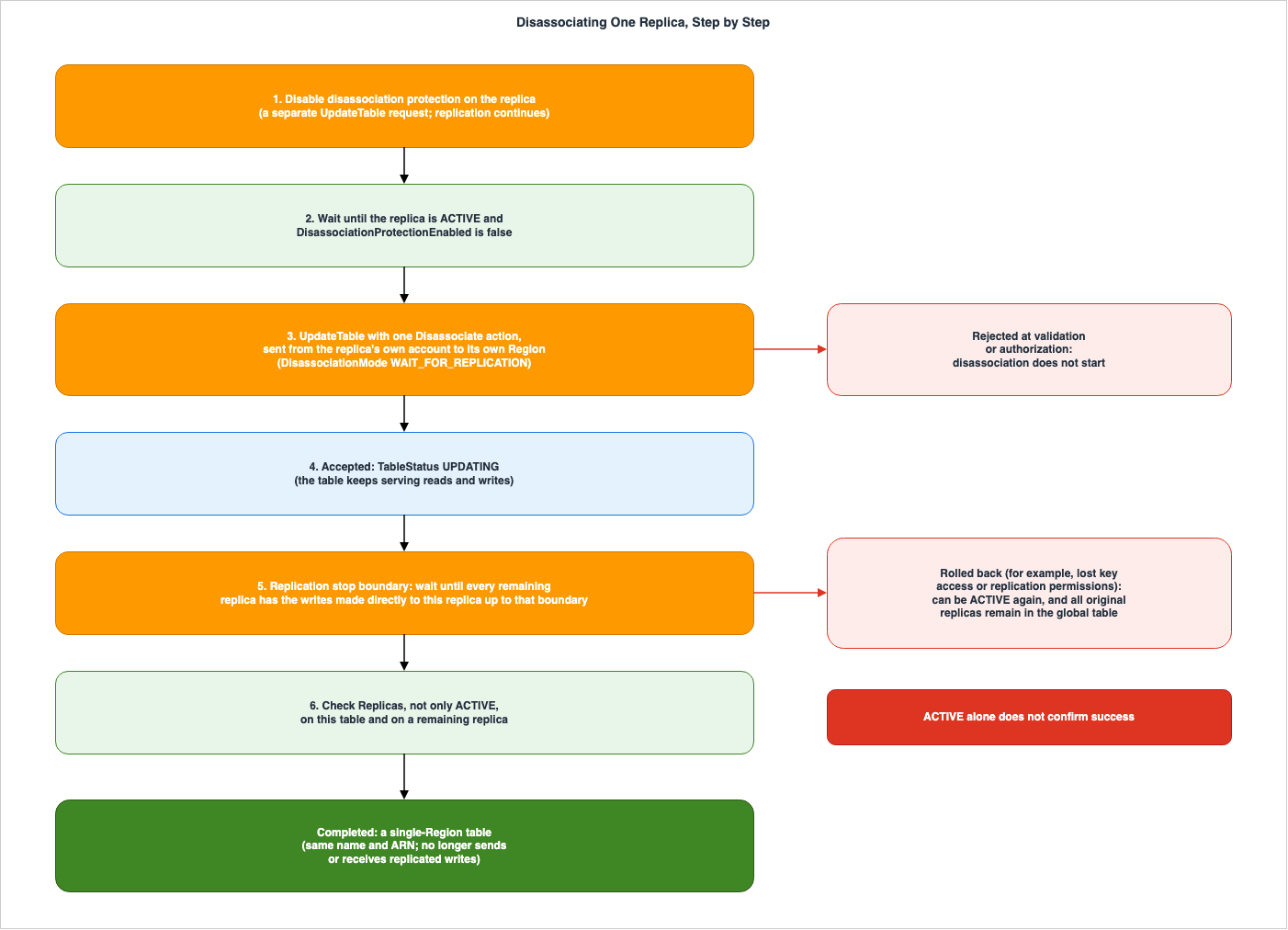
6.3 CloudFormation TableType
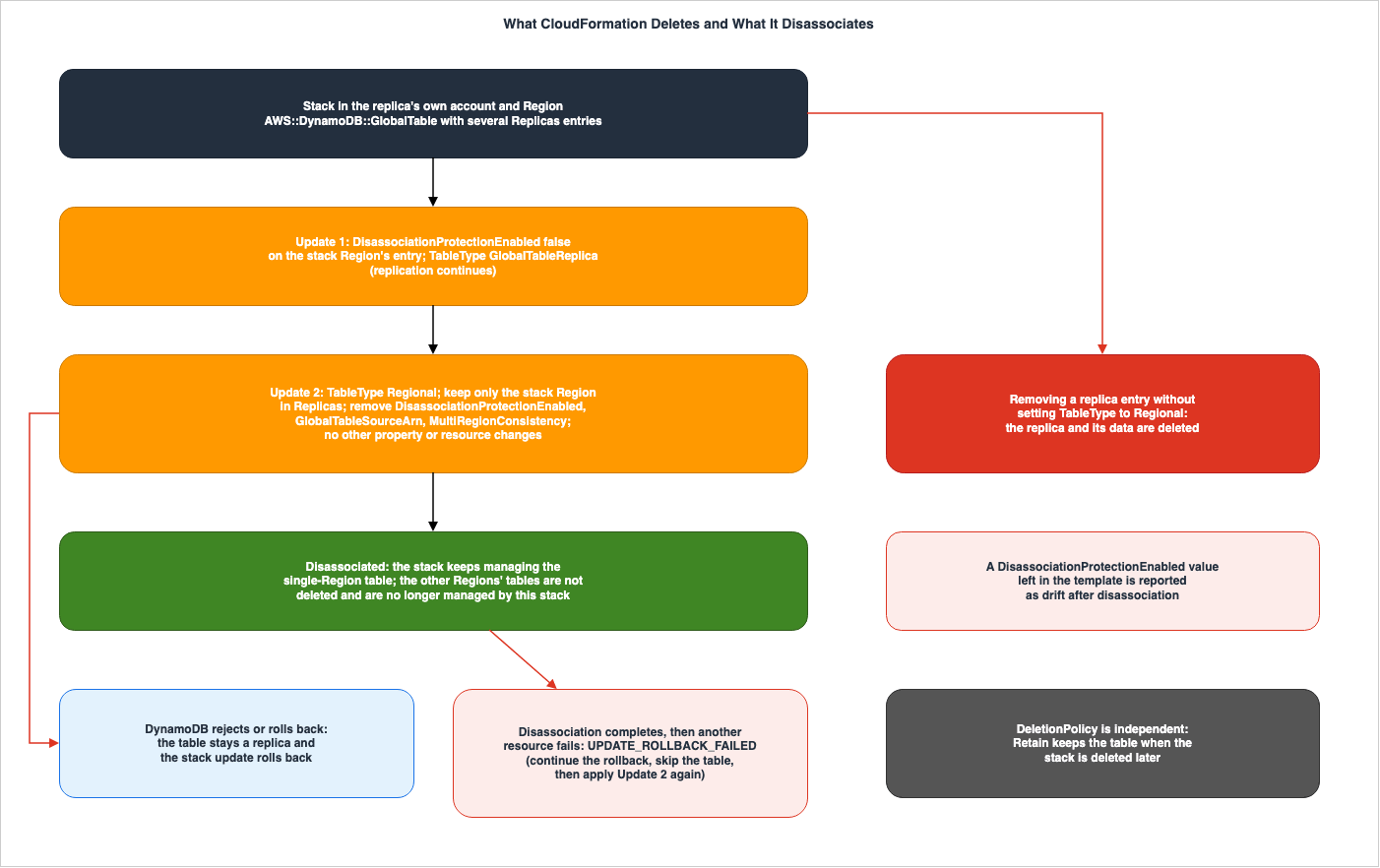
In CloudFormation, updates that remove replica entries from the Replicas section of a template typically result in a delete operation. The CFN page states:Removing a replica from the Replicas property deletes that replica and its data, except
in the update that sets TableType to Regional.The DG disassociation page describes the same matter in a different sentence.
The TableType change tells CloudFormation to disassociate the replica instead of deleting
it. Removing the other Region entries in this update doesn't delete those tables.
Removing a replica entry without changing TableType to Regional deletes that replica,
as in any other stack update.
Disassociation is performed through two stack updates. The DG disassociation page specifies that both updates run in the replica's own account and Region.
- First Update: Set the
DisassociationProtectionEnabledproperty tofalsein theReplicasentry for the stack's Region, and set theTableTypetoGlobalTableReplica. Wait for the update to complete. Replication continues as normal. - Second Update: Set the
TableTypetoRegional, leaving only the stack's Region in theReplicassection. Remove theDisassociationProtectionEnabledproperty from that entry. IfGlobalTableSourceArnandMultiRegionConsistencyare present, remove them as well. When removingGlobalTableSourceArn, ensure you reflect the current values for settings inherited from the original table, such asKeySchema,AttributeDefinitions,BillingMode, andStreamSpecification. Changes to other attributes should be performed in separate stack updates.
The CFN page further states that for the second update, changes to billing mode, throughput, indexes, encryption, and tags should be performed in separate stack updates. The CFN page also describes what happens when
TableType is omitted.This property has no default value. If you omit it, CloudFormation determines the table
type from the template: a Replicas list with more than one entry or a GlobalTableSourceArn
describes a replica of a global table. Otherwise, the table is Regional.Templates that describe a global table with
TableType set to Regional will be rejected. The CFN page for ReplicaSpecification indicates that DisassociationProtectionEnabled should be removed during the second update. If it is not removed, the remaining value will be reported as drift after disassociation.The setting applies only while the table is a replica, so a value left in the template
is reported as drift after disassociation.The second update has a rollback trap. If DynamoDB rejects the disassociation or rolls back, the table remains as a replica, and the stack update also rolls back. Conversely, if the stack update rolls back after the disassociation is complete, due to failures in other resources, CloudFormation cannot reverse the completed disassociation. The CFN page states:
If the disassociation completes and the stack update then rolls back, for example because
another resource fails, CloudFormation can't restore the table as a replica of the global
table. The stack enters the UPDATE_ROLLBACK_FAILED state.
As a recovery procedure, the CFN page and the DG disassociation page say to continue the rollback while skipping the table resource, check whether the table is still a replica, and, if it has become a single-Region table, apply the second update again. Recovering the stack does not require deleting the table or its data. To avoid this state, the CFN page says not to update other resources in the update that sets
TableType to Regional.CloudFormation's
DeletionPolicy is independent of disassociation. The CFN page states:Disassociation preserves data independently of DeletionPolicy. To retain the table when
deleting the stack or removing the resource from the template, use DeletionPolicy: Retain.The examples on the DG disassociation page use
DeletionPolicy: Retain, but the same page says that this is not required for the disassociation itself, but rather to preserve the table if the stack is deleted later.The table may sometimes become a single-Region table outside of the stack. This can occur when disassociating through the CLI, or when the other account disassociates from a global table with two replicas. In such cases, the DG disassociation page says that, if you apply the second update, CloudFormation recognizes that the table is a single-Region table and does not delete the former replicas, and that you then run drift detection.
7. Blocking Conditions, Failure and Rollback, and No Way Back
This section examines the conditions that prevent disassociation from beginning, what happens if it fails after it has started, and the fact that it cannot be undone after it completes.7.1 Conditions Before the Request
The DG disassociation page lists the conditions that must be met before making a request, as follows:The replica must be ACTIVE, all replicas must be reachable, and the permissions and
encryption-key access required for replication must remain available. Only one
replica-lifecycle operation can run for a global table at a time, so wait for other
operations, including replica creation and another disassociation, to finish before
you submit the request.The same page states that disassociation is blocked if any replica is in the following states:
INACCESSIBLE_ENCRYPTION_CREDENTIALSREPLICATION_NOT_AUTHORIZEDARCHIVINGARCHIVED
These blocking conditions apply not only to the replica being disassociated, but also to any replica of the global table. It is a requirement that all replicas are reachable. In this article's reading, therefore, if a Region is inaccessible due to an outage, replicas in other Regions cannot be disassociated. No statement was found that names disassociation during an outage. The Database Blog operational post (May 20, 2026) recommends against performing control plane operations such as adding or removing replicas during a Region outage, explaining that changes to configurations are not permitted if any replica is unreachable.
Global tables synchronize settings across all replicas by default, so setting changes
aren't permitted when one of the replicas is inaccessible.
That post was written before the disassociation feature was released, and the term "disassociation" does not appear within it.
7.2 The 24-Hour Source Replica Rule
The DG disassociation page states that in the last 24 hours, replicas that served as the source for newly added replicas cannot be disassociated.You also cannot disassociate a replica that has acted as the source for a new replica
added in the last 24 hours. Wait until 24 hours have elapsed since the new replica was
added.As described in Section 3.1, the DG How it works page also states that tables used to add new replicas cannot be deleted for 24 hours. This article combines these two statements and reads them as follows: for the first 24 hours after a new replica is added, an operator cannot make the source replica leave the global table, either by delete or by disassociation. Irreversible conversion in Section 3.3 is not an operator action. No statement was found on whether irreversible conversion is subject to this 24-hour restriction.
The previously published Amazon DynamoDB Capacity and Global Tables Guide, Section 7.1, states that replicas, including the original table, can be added or removed at any time. In light of these two 24-hour restrictions, the phrase "at any time" does not include the first 24 hours after a new replica is added. This is this article's reading.
7.3 Shape of the Request
There are constraints on the format of requests forUpdateTable. Both the CLI page and the Boto3 page state that the Disassociate action must be the only replica update in the request.The Disassociate action must be the only replica update in the request. If the request
includes any other update, UpdateTable fails with a ValidationException and the
disassociation does not start.The
Disassociate action requires two mandatory parameters: RegionName and DisassociationMode. The CLI page and the SDK reference specify that DisassociationMode must be set to WAIT_FOR_REPLICATION, and this is the only valid option. UpdateTable is an asynchronous operation, and while the table is in the UPDATING state, you cannot submit another UpdateTable request.7.4 Two Layers of Failure
Failures in disassociation occur in two layers. The "Handling Failures" section of the DG disassociation page describes the first layer as follows:A request rejected during validation or authorization does not start disassociation.Requests that are rejected during validation or authorization will not initiate disassociation. The DG says to read the error response, address the reported issue, and then retry. Examples provided include disabling disassociation protection, waiting for concurrent operations to complete, and restoring access to an inaccessible replica. If a request times out or a response is lost, the DG advises checking the table's status and membership before retrying, because the request might have been accepted.
The second layer involves failures occurring after a request has been accepted.
An accepted operation can fail later. For example, losing access to a replica's
encryption key or required replication permissions can cause disassociation to roll back.
After rollback, the replica remains part of the global table.
After a rollback, users should examine
ReplicaStatus and ReplicaStatusDescription, restore the necessary access, and then wait for the replica to reach an ACTIVE state before retrying. The same section concludes with a statement directing users to the DG security page for more detailed information.Continued inaccessibility is still subject to the global table's existing recovery behavior.In this article's reading, the existing recovery process includes the 20-hour irreversible conversion described in Section 3.3. While the "Handling Failures" section did not explicitly mention the 20-hour process, leaving access unrecovered after a rollback could result in the replica undergoing an irreversible conversion to a single-Region table, rather than completing disassociation. This is also this article's reading.
7.5 No Way Back
Disassociation cannot be reversed. The DG disassociation page states:You cannot undo disassociation or reattach the same table to the global table it left.This same page outlines the steps to create a replacement replica for a disassociated Region in three steps:
- Apply the changes you need to keep from the single-Region table to the remaining global table. Any discrepancies should be resolved according to the application's rules.
- Delete the single-Region table.
- Add a new replica. This new replica will replicate data from the remaining global table.
Then delete the standalone table and add a new replica. The new replica copies data from
the remaining global table.
No statement was found in the sources in Section 1.3 on whether a new replica can be added while a table with the same name still exists in the Region. In the DG procedure, deleting the single-Region table is placed before adding the new replica.
7.6 About Migration Procedures
The DG disassociation page describes its purpose as follows:You can use this operation after a Region or account migration, or when you no longer
need a table to participate in replication.The DG multi-account How it works page states that, when moving from a same-account global table to a multi-account global table, you can disassociate an MREC replica.
You can only add replicas by starting with a single-Region table. To migrate from a
same-account global table, you can disassociate an MREC replica. Disassociation preserves
the table and its data. The resulting regional table can serve as the source for a new
multi-account global table. For requirements and instructions, see Disassociating a
global table replica.
This statement sends the requirements and instructions to the DG disassociation page. It does not give a step-by-step migration procedure.
No page in which AWS describes a migration procedure that uses disassociation was found in the sources in Section 1.3. The Database Blog multi-account post (February 3, 2026) describes a process for moving tables between accounts, but that process follows the delete path. The steps are to create a replica in a new account within a different Region, wait 24 hours, switch over the application, then delete the replica in the original account. Subsequently, add a replica in the new account in the original Region. The post explains that this process requires temporarily using a different Region because, at the time of writing, multi-account global tables did not support replication in the same Region. In this procedure, the post also states that pending writes are copied automatically when the replica is deleted.
(The system will automatically copy over all pending writes before removing the replica.)This is a blog statement, not a documentation specification. This article does not describe a process for using disassociation to perform migrations.
8. What This Setup Showed
This section describes what was observed in an MREC global table made of a table in us-east-1 and replicas added in us-west-2 and us-east-2. The observations relate to two periods: approximately 22:30 to 23:10 on October 29, 2026, and approximately 02:45 to 03:25 on October 31, 2026 (both times in UTC). These observations document the behavior observed within this specific configuration and do not necessarily indicate that the same behavior would be observed in other configurations. The values presented here are not used for performance comparisons. In the output, the account ID has been replaced with 111122223333, and the table name has been replaced with DemoTable.8.1 Setup
This setup is a same-account global table in one account. The setup created a provisioned table in the us-east-1 Region (1 RCU, 1 WCU), enabled DynamoDB Streams and TTL, and registered auto scaling for reads and writes (minimum 1, maximum 2). It then added a replica in the us-west-2 Region from the us-east-1 table, and then added another replica in the us-east-2 Region. The table in the us-east-1 Region serves as the source replica. This article disassociated the replica in the us-west-2 Region, which is not a source replica.Only the replica in the us-west-2 Region was configured with two tags, PITR, deletion protection, Contributor Insights, and a resource-based policy. The us-east-1 table carried one tag of its own. The resource-based policy only allows the same account to perform the
dynamodb:DescribeTable action. The operations used the AWS SDK for Python (Boto3). This setup did not observe a multi-account global table.8.2 Defaults and Rejected Requests
Immediately after creation, all three replicas hadDisassociationProtectionEnabled set to true and DeletionProtectionEnabled set to false. This setup changed the DeletionProtectionEnabled setting for us-west-2 to true. All three replicas had a GlobalTableVersion of 2019.11.21.In this setup, the following five requests were all rejected with a
ValidationException.| Case | Request | Error Message (verbatim) |
|---|---|---|
| R1 | Disassociate on us-west-2 while disassociation protection is enabled | Cannot disassociate table DemoTable in region us-west-2 because it has disassociate protection enabled. Disable disassociate protection first. |
| R2 | Disassociate on us-east-2 after turning deletion protection on and then off | Cannot disassociate table DemoTable in region us-east-2 because it has disassociate protection enabled. Disable disassociate protection first. |
| R5 | DisassociationProtectionEnabled and DeletionProtectionEnabled changed in one request | One or more parameter values were invalid: DisassociateProtectionEnabled modification must be the only operation in the request |
| R3 | Disassociate and an Update for another replica in one request | Update table operation with more than one type of replica actions not allowed. |
| R4 | Disassociate for the us-west-2 replica sent to us-east-1 | DisassociateReplicaAction can only disassociate the replica in the region receiving the request. |
The R2 request was rejected because, even after deletion protection was enabled and then disabled, disassociation protection remained active. This matches the DG statement in Section 6.1. In R5, neither the deletion protection value nor the disassociation protection value changed.
The error messages use the spellings "disassociate protection" and "DisassociateProtectionEnabled." Note that the API item name is
DisassociationProtectionEnabled, which has a different spelling. The statement regarding R3 indicates that the request was rejected because it involved more than one type of replica operation. This wording differs from the requirement on the CLI page, which specifies that only a single replica update is permitted.8.3 How Disassociation Progressed and Where Writes Arrived
After disabling the disassociation protection in us-west-2, the setup sent aDisassociate request from us-west-2 to us-west-2. The TableDescription response initially showed a TableStatus of UPDATING. The setup read DescribeTable in all three Regions every 6 to 8 seconds, and approximately 141 seconds after the request was accepted, it observed that the table in us-west-2 became ACTIVE and that the peer replicas disappeared from its Replicas list.During this process, the status was as follows:
- All tables in the three Regions showed a
TableStatusofUPDATING. - The
ReplicaStatusof the us-west-2 replica, as viewed from the remaining Regions of us-east-1 and us-east-2, transitioned toUPDATING. - From the perspective of the departing us-west-2 table, the two peer replicas remained in an
ACTIVEstate throughout the process.
After completion, the
DescribeTable response from us-west-2 no longer included the Replicas field. The DisassociationProtectionEnabled and GlobalTableVersion fields were also absent. Of the three forms in Section 6.2, this setup returned the absent form. The Replicas fields in the remaining Regions of us-east-1 and us-east-2 only listed each other's replicas.Regarding data replication, the following was observed:
- Items written to us-west-2 immediately before the request were successfully replicated to the two remaining replicas.
- Items written to us-west-2 immediately after the request was accepted, while it was still in the
UPDATINGstate, were also replicated to the two remaining replicas. - Items written to us-west-2 after disassociation completed were not replicated to the two remaining replicas, even 90 seconds later.
- Items written to us-east-1 after the completion of the process were present in us-east-2 after 90 seconds, but were not present in us-west-2.
This article reads the arrival of the write made immediately after the request as indicating that the stop boundary was placed after those writes. This is this article's reading of a single observation in this setup and does not show when the stop boundary is placed.
8.4 Settings That Stayed on the Disassociated Table
A few minutes after the disassociation completed, the setup read the settings for the table in the us-west-2 Region. The table name and ARN remained unchanged from before the disassociation. As the table in Section 4.2 shows, every setting outside the DG examples that this setup observed stayed.- PITR remained enabled.
- The two tags applied only to us-west-2 remained unchanged.
- Deletion protection remained set to true.
- Contributor Insights remained enabled.
- The resource-based policy was still returned by
GetResourcePolicy. - Two auto scaling registrations, two scaling policies, and eight target tracking alarms remained.
The tags applied to the table in the us-east-1 Region had never been replicated to the us-west-2 and us-east-2 replicas from the time of their creation. This matches the DG list in Section 4.2, in which tags are never synchronized. While the auto scaling registrations were only configured in us-east-1, they were also present in both us-west-2 and us-east-2.
This observation represents a record of what remained in this configuration on this particular day. The sources do not guarantee these results.
8.5 The 24-Hour Source Replica Rule
The setup disabled the disassociation protection of the table in us-east-1 and sent aDisassociate request from us-east-1 to us-east-1. Approximately 30 minutes after adding the final replica, the request was rejected with a ValidationException and the following message.Replica cannot be disassociated because it has acted as a source region for new replica(s)
being added to the table in the last 24 hours.Even after the rejection, both us-east-1 and us-east-2 remained part of the global table. This matches the DG statement in Section 7.2.
8.6 Two CloudFormation Updates
In us-east-1, anAWS::DynamoDB::GlobalTable (on-demand) was created with two replicas – one in us-east-1 and one in us-west-2 – without specifying the TableType. The first update (setting DisassociationProtectionEnabled to false and setting TableType to GlobalTableReplica for the us-east-1 entry) completed successfully with a status of UPDATE_COMPLETE.The second update, attempted shortly after creation, was subject to the same 24-hour constraint described in Section 8.5. Because the us-east-1 table was configured as the source replica for the us-west-2 replica, both versions – the version that kept
DisassociationProtectionEnabled and the documented version in Section 6.3 – resulted in the table resource failing to update (UPDATE_FAILED) and returning the same error message as described in Section 8.5. The stack then reached a state of UPDATE_ROLLBACK_COMPLETE, leaving the table still configured as a global table with two replicas. Drift detection after the rollback reported a status of IN_SYNC. This result is consistent with the statement in Section 6.3 that, when DynamoDB rejects the disassociation, the table remains a replica and the stack update rolls back.On October 31, 2026 (UTC), more than 24 hours after the stack was created, the setup applied the two updates again, in order, on the same stack. Because the first update had already been applied the previous day, rerunning it was rejected with a
ValidationError as an update with no changes.The second update, using the version that kept
DisassociationProtectionEnabled, completed with a status of UPDATE_COMPLETE in approximately 5 minutes. While the documented procedure in Section 6.3 removes this property, in this setup the version that kept it was also accepted, and disassociation completed. Since there were two replicas, both the table in us-east-1 and the table in us-west-2 became single-Region tables. The DescribeTable responses for both tables no longer included the Replicas, DisassociationProtectionEnabled, and GlobalTableVersion fields.The subsequent drift detection reported a status of
DRIFTED. The only difference was the following one.| Property Path | Expected Value | Actual Value | Difference Type |
|---|---|---|---|
/Replicas/0/DisassociationProtectionEnabled | false | null | REMOVE |
This is the same result as the statement on the CFN
ReplicaSpecification page in Section 6.3 that a value left in the template is reported as drift after disassociation. Subsequently, applying the second update with the documented version, which removes DisassociationProtectionEnabled, resulted in UPDATE_COMPLETE, and drift detection returned to IN_SYNC.8.7 Delete and the 24-Hour Rule
On October 31, 2026, after every table in this setup had passed 24 hours since its creation, the setup deleted all of them. The order was as follows:- The stack was deleted. The stack's us-east-1 table was deleted with the stack. The us-west-2 table that remained outside the stack was deleted with
DeleteTable. - In all three Regions, the setup removed the auto scaling registrations, because, as noted by the API Reference in Section 3.1, deleting a table does not automatically remove auto scaling registrations.
- The us-east-2 replica of the remaining global table was deleted from us-east-1 with the
Deleteaction ofUpdateTable. Then the us-east-1 table was deleted withDeleteTable. - The deletion protection of the disassociated us-west-2 table was disabled, and the table was then deleted with
DeleteTable.
All requests were accepted. The us-east-1 table had been the source replica for the two replicas, but more than 24 hours had passed since then, so
DeleteTable was accepted. This setup did not try to delete a source replica within 24 hours of adding a replica. The rejection of a delete within 24 hours, described in the DG How it works page statement in Section 3.1, was not observed in this setup.After the deletion, the setup confirmed that
DescribeTable returned ResourceNotFoundException in all three Regions, that ListTables listed no table of this setup, that auto scaling registrations, target tracking alarms, and backups were all zero, and that DescribeStacks for the stack returned ValidationError.9. Where the Sources Disagree and What They Do Not Say
This section will list the discrepancies and omissions identified while reviewing the documents referenced in this article.9.1 API Reference Pages
As of the verification date of October 30, 2026, and as described in Section 2.4, seven web pages related to the API Reference do not contain any information regarding disassociation. The DG, CLI, SDK Reference, CFN, and What's New pages do contain such information. This article records that, as of the verification date, the API Reference pages still lacked this information.9.2 Two Statements on the Legacy Page
The DG Legacy page, in the "Common tasks" section, states that replica tables can be deleted like any other table, and that it is not possible to sever the replication and keep the copies as independent tables.You can delete a global table's replica table the same as a regular table. This will stop
replication to that Region and delete the table copy kept in that Region. You cannot sever
the replication and have copies of the table exist as independent entities.In the "Global table concepts" section of the same page, it states that when a replica table is removed from the global table, it becomes completely disassociated and becomes an independent table.
You can also remove a replica table from a global table. If you do this, the table is
completely disassociated from the global table.
Within that single page, the two statements point in opposite directions. Both are statements on the page for the Legacy version, and do not reflect the disassociation behavior in the Current version. This article lists these two statements as a disagreement in the Legacy page, and does not state that they contradict the disassociation behavior in the Current version.
9.3 How to Confirm Completion
As stated in Section 6.2, the DG disassociation page accepts, as success, aReplicas list that contains only the local table. However, the CLI and Boto3 pages consider a successful outcome only when Replicas is absent or returns an empty form. The sources disagree.9.4 Number of ReplicaStatus Values
The ReplicaDescription page in the API Reference lists 10 values for ReplicaStatus: CREATING, CREATION_FAILED, UPDATING, DELETING, ACTIVE, REGION_DISABLED, INACCESSIBLE_ENCRYPTION_CREDENTIALS, ARCHIVING, ARCHIVED, and REPLICATION_NOT_AUTHORIZED. The CLI's update-table and describe-table pages list the same 10 values. Neither list includes a value indicating the status during disassociation. This article follows a disassociation in progress through the TableStatus value UPDATING.9.5 Wordings for Irreversible Conversion
As stated in Section 3.3, the DG uses the terms "irreversibly converted" and "permanently converted," and the API Reference'sReplicaDescription page mentions removing from a replication group. In this article's reading, these describe the same result in different words, but no statement was found that confirms this.The DG multi-account How it works page uses the word "disassociate" for a multi-account global table whose replication keeps falling behind.
DynamoDB sends an initial notification within 3 hours of elevated replication latency,
followed by a second notification after 20 hours if the issue remains unresolved. If the
problem is not corrected within the required time window, DynamoDB will automatically
disassociate the replica from the global table. The affected replica will then be
converted to a regional table.
This page gives only the times of the notifications, not the length of the time window. In this article's reading, the automatic "disassociate" in this quotation is the same path as the irreversible conversion in Section 3.3, and is a different operation from the disassociation that an operator requests in Section 6. No statement was found that confirms this.
9.6 Console Procedure
What's New states that disassociation can be initiated through the AWS Management Console, AWS CLI, DynamoDB API, and CloudFormation. However, the DG disassociation page gives procedures only for the CLI and CloudFormation; for a console procedure,the documentation does not list one.9.7 Settings Outside the Examples
As stated in Section 4.2,no statement was found on whether PITR, tags, auto scaling registration, deletion protection, Contributor Insights, Kinesis Data Streams integration, and resource-based policies remain after disassociation. In the configuration observed in Section 8, out of the six items (excluding Kinesis Data Streams), all six remained. This represents a record of that specific configuration.9.8 Migration Procedures
As described in Section 7.6,no statement was found for a migration procedure that uses disassociation. The migration procedure in the Database Blog follows the delete path.10. Failure Modes
This section lists various scenarios where the preconditions outlined in Section 1.1 do not hold true, identifying them as forms of failure.10.1 Assuming That Leaving a Global Table Deletes the Table
When a replica takes the disassociate path, the table stays. When it takes the delete path, the table is deleted. On the irreversible conversion path, even if the operator takes no action, the table stays while replication stops. For delete and disassociate, the operation name and the contents ofReplicaUpdates in the request show which path was taken; an irreversible conversion has no request and shows up only in ReplicaStatus and the Replicas list (this article's reading).10.2 Assuming That Disabling Deletion Protection Allows Disassociation
Disassociation protection is independent of deletion protection. Even if deletion protection is disabled, disassociation protection remains active, and the disassociation request will not be processed. To disassociate, disable disassociation protection with another request and wait for the update to complete.10.3 Assuming That ACTIVE Means Success
Even when a disassociation rolls back, the table can return to ACTIVE. On the disassociated table, verify that the Replicas list contains no Region other than its own (absent or empty also meets the CLI wording); on a remaining table, verify that the departed replica is no longer listed (this article's reading; see Section 6.2).10.4 Assuming That a Disassociated Table Can Rejoin the Same Global Table
A disassociated table cannot rejoin the original global table. When a replacement replica is needed, apply the changes you need to keep to the remaining global table, delete the single-Region table, and then add a new replica.10.5 Assuming That Removing an Entry from Replicas Disassociates the Replica
When removing items from Replicas in CloudFormation, the replica will be deleted along with its data, unless that update sets TableType to Regional. Disassociation should be performed through two stack updates. During the second update, ensure that no other resources are modified.10.6 Assuming That Disassociation Keeps Every Setting
The DG disassociation page states that the settings retained during a disassociation include indexes, Streams, TTL, backups, encryption, billing mode, and table class. This list is an example that follows "including." No statement in the sources read says whether settings associated with each replica, such as PITR, tags, auto scaling registrations, and deletion protection, will also be retained. Check them yourself after the disassociation.10.7 Assuming That Global Table Membership Lets You Disassociate Another Account's Replica
It is not possible to disassociate replicas of other accounts. In a multi-account configuration, each account can only disassociate its own replicas, and only from the Region where those replicas are located. However, in a global table with two replicas, a disassociation by the other account turns your own table into a single-Region table as well.11. Frequently Asked Questions About Disassociating from a Global Table
Q1. Do the table and data of a disassociated replica stay?
Yes. The DG disassociation page states that a disassociated replica becomes a single-Region table in the same account and Region. It will retain its table name and ARN. While the data will remain, it might not contain the latest writes from other Regions.Q2. Which IAM permissions does disassociation need?
Two permissions are required:dynamodb:UpdateTable and dynamodb:DisassociateTableReplica. Both are granted on the ARN of the replica table. dynamodb:DescribeTable is also necessary for verifying protection and monitoring completion. dynamodb:DisassociateTableReplica is the name of the IAM permission; the API operation you call is UpdateTable.Q3. Can I disassociate a replica after disabling deletion protection?
Not by that alone. Disassociation protection is independent of deletion protection and is enabled by default. Send a separate request to disable disassociation protection, and then request disassociation after the update is complete.Q4. How do I confirm that disassociation succeeded?
To verify whether the disassociation was successful, confirm on the disassociated table that theTableStatus is ACTIVE and that the Replicas list is absent or empty, which meets both the DG and the CLI; a list that contains only your own table meets the DG statement but not the CLI wording (this article's reading; see Section 6.2). The DG also says to verify the updated membership from a remaining replica. Even after a rollback, the TableStatus can return to ACTIVE.Q5. Can a disassociated table rejoin the global table it left?
No. The DG states that you cannot undo disassociation or reattach the same table to the global table it left. If a replacement replica is required, apply the changes you need to keep to the remaining global table, delete the single-Region table, and add a new replica.Q6. How do I disassociate a replica with CloudFormation?
To disassociate using CloudFormation, you need to perform two stack updates. In the first update, set theDisassociationProtectionEnabled property of the stack Region's replica to false and the TableType to GlobalTableReplica. In the second update, change the TableType to Regional, leave only the stack's Region in the Replicas list, and remove DisassociationProtectionEnabled from that entry. If you remove an item from the Replicas list without changing the TableType, that replica will be deleted.Q7. Can I disassociate a replica from an MRSC global table or a Legacy global table?
No. The DG disassociation page states that this operation is not supported in MRSC and in Version 2017.11.29 (Legacy). The DG Legacy pages describe a different mechanism for Legacy replicas (Section 9.2).12. Summary
There are three ways a replica can leave a global table: delete, which deletes the table and its data; disassociate, which keeps the table and data but stops replication; and, in an MREC global table, irreversible conversion, which automatically stops replication when a replica loses access to permissions or keys, or when the Region is disabled, for a period exceeding 20 hours, without operator intervention. The path chosen determines whether the table and data remain, and whether the same table can rejoin the global table.Disassociation is protected in three locations. Disassociation protection is enabled by default and is independent of deletion protection. Completion is not verified solely by checking the
TableStatus as ACTIVE; instead, it requires examining the contents of the Replicas from both sides. In CloudFormation, only updates that change the TableType to Regional are considered disassociation; removing an item from Replicas in any other update results in deletion.Only the account that owns a replica can disassociate it. The request is sent to the Region where the replica resides. Replication stops at the replication stop boundary, and disassociation does not complete until changes written to the disassociated replica up to that boundary reach the remaining replicas. Tables that have been disassociated retain certain configurations, such as those listed as examples in the DG. No statement in the sources read says whether the settings that each replica holds on its own stay. In the demo setup in Section 8, PITR, tags, auto scaling registration, deletion protection, Contributor Insights, and resource-based policies were retained. As of October 30, 2026, the API Reference pages still do not document disassociation.
13. References
- Amazon DynamoDB Developer Guide: Disassociating a global table replica
- Amazon DynamoDB Developer Guide: DynamoDB global tables security
- Amazon DynamoDB Developer Guide: DynamoDB global tables security (multi-account)
- Amazon DynamoDB Developer Guide: How DynamoDB global tables work
- Amazon DynamoDB Developer Guide: How DynamoDB global tables work (multi-account)
- Amazon DynamoDB Developer Guide: Global tables: How it works (Version 2017.11.29, Legacy)
- Amazon DynamoDB Developer Guide: Global tables version 2017.11.29 (Legacy)
- Amazon DynamoDB Developer Guide: Point-in-time backups for DynamoDB
- Amazon DynamoDB Developer Guide: Document history for DynamoDB
- Amazon DynamoDB API Reference: UpdateTable
- Amazon DynamoDB API Reference: ReplicationGroupUpdate
- Amazon DynamoDB API Reference: ReplicaDescription
- AWS CLI Command Reference: update-table
- AWS SDK for Java 2.x API Reference: DisassociateReplicationGroupMemberAction
- Boto3 Documentation: update_table
- AWS CloudFormation Template Reference: AWS::DynamoDB::GlobalTable
- AWS CloudFormation Template Reference: AWS::DynamoDB::GlobalTable ReplicaSpecification
- AWS CloudFormation Template Reference: Document history
- Service Authorization Reference: Amazon DynamoDB service reference information (JSON)
- What's New: Amazon DynamoDB global tables now support disassociating replicas
- What's New: Amazon DynamoDB global tables now support replication across multiple AWS accounts
- AWS Database Blog: Amazon DynamoDB global tables now support replication across AWS accounts
- AWS Database Blog: Upgrade your Amazon DynamoDB global tables to the current version
- AWS Database Blog: Best practices for Amazon DynamoDB Global Tables – Part 1: Operational readiness
References:
Tech Blog with curated related content
Written by Hidekazu Konishi