Tenant Isolation per Data Service on AWS - Which Quota Stops a Silo First and What a Pool Hands to Your Code
First Published:
Last Updated:
This article addresses these two questions, focusing on five AWS data services: Amazon ElastiCache, Amazon DynamoDB, Amazon Aurora, Amazon OpenSearch Service, and Amazon S3. For each service, this article sets the unit at which tenants are separated and shows the quota a silo hits first, with its default value, adjustability, and source. It then sets out where the responsibility for isolation moves when you move to a pool: the application's routing layer, IAM, or KMS.
To state the conclusion first, the first thing to stop is not the number of tables or buckets. In one account and one Region, if you create an Aurora DB cluster with a writer and a reader for each tenant, the number of DB instances runs out at about 20 tenants under the default quota. ElastiCache Serverless caches run out at 40. You can request an increase for both. When you move to a pool, many of these quotas recede, but the boundary moves from the resource to your own code, IAM conditions, and database engine settings. How deep IAM reaches differs by service.
This article read the documentation on November 22, 2026 (Japan Standard Time). The figures are the values on the quota pages on that date. This article was written from the documentation; it does not create any resources. It does not cover pricing or cost comparisons.
Related articles on this site:
- AWS SaaS Multi-Tenant Architecture Guide - Tenant Isolation, Pool and Silo Models, Onboarding, and Metering
- AWS Service Quotas - A Practical Cheat Sheet for Major AWS Services
- Cell-Based Architecture and Shuffle Sharding on AWS - Blast Radius Reduction Patterns for Large-Scale Workloads
- Counting Connections on ElastiCache for Valkey - Per-Node and Per-Cache Limits, Endpoints, and Reconnects After Failover
- Multi-Tenant Generative AI SaaS Architecture on AWS - Tenant Isolation, Per-Tenant Knowledge Bases, and Guardrails with ABAC
- DynamoDB Key Design Dictionary: PK/SK, GSI/LSI Selection, Hot Partition Avoidance, and Re-Keying Patterns
- IAM Authentication to Databases, Caches, and Streams on AWS - Token Lifetime, What Revoking Access Does to Open Connections, and the Identity Inside the Service
Table of Contents
- 1. Scope and Assumptions
- 2. Isolation Units and the First Quota a Silo Hits
- 3. ElastiCache
- 4. DynamoDB and S3
- 5. Aurora and OpenSearch Service
- 6. Quotas That Grow Sideways with Tenants
- 7. What Your Code Holds When You Move to a Pool
- 8. Frequently Asked Questions About Tenant Isolation per Data Service
- 9. Summary
- 10. References
1. Scope and Assumptions
This chapter first defines the intended audience, scope, terms, sources read, and how to read the tables. The key conclusions are as follows:- The unit for separating tenants varies depending on the service. There are outer-level units (clusters, tables, DB clusters, domains, buckets) and inner-level units (as detailed in Chapter 2).
- The quota a silo hits first also varies by service. Counting at the defaults in one account and one Region, HA Aurora stops at about 20 tenants and ElastiCache Serverless at 40 tenants (as detailed in Chapter 2).
- The figure of approximately 150 tenants, based on the ElastiCache node quota of 300, assumes a minimum HA configuration of 2 nodes and the creation of one cluster per tenant (as detailed in Chapter 3).
- Encryption for ElastiCache is managed using a single key per cluster. If tenant-specific keys are required, either dedicated clusters or client-side encryption will be necessary (as detailed in Chapter 3).
- DynamoDB tables can initially support up to 2,500, and this can be increased to a maximum of 10,000 through the account team. To exceed this limit, resources must be distributed across multiple accounts. The limit of 10,000 for S3 general purpose buckets is defined at the account level, not the Region level (as detailed in Chapter 4).
- The VPC security group quota is 2,500 per Region on the quota page. The core blog's 500 per VPC does not match the quota page (as detailed in Chapter 6).
- When you move to a pool, the boundary moves to the application's routing layer, IAM conditions, KMS and client-side encryption, and database engine settings. How deep IAM reaches varies by service, from DynamoDB items to Aurora DB instances (as detailed in Chapter 7).
- Many SaaS providers place larger tenants within silos and smaller tenants within pools. The challenge is not isolation itself, but rather keeping a form in which the application does not need to know where a tenant is placed (as detailed in Chapter 7).
1.1 Target Audience
This article is intended for the following audience:- Architects building or operating multi-tenant SaaS solutions on AWS.
- Backend engineers responsible for designing data layer connections, keys, and permissions.
- Anyone who wants to decide again, for each data service, between silo and pool before the number of tenants grows from dozens to hundreds.
This article does not cover the overall SaaS design, tenant identification using Amazon Cognito, or the implementation of IAM policies (specifically session tag and ABAC). These topics are addressed in the AWS SaaS Multi-Tenant Architecture Guide.
1.2 Scope
This article covers five data services, along with the sideways quotas that grow with tenants (VPC security groups, KMS keys, IAM roles).- Amazon ElastiCache: Focuses on the Valkey engine. This includes both node-based clusters and ElastiCache Serverless caches.
- Amazon DynamoDB
- Amazon Aurora: A primary example is Aurora PostgreSQL.
- Amazon OpenSearch Service: Focuses on domains. OpenSearch Serverless is not covered.
- Amazon S3: Focuses on general purpose buckets.
The focus on Valkey within ElastiCache is due to the database-level ACLs discussed in this article being a feature of Valkey 9.1. Note that standard support for ElastiCache for Redis OSS versions 4 and 5 ended on January 31, 2026, and these versions have moved to Extended Support. The ElastiCache Extended Support page recommends migrating to Valkey or Redis OSS 6 and later.
The following are explicitly excluded:
- A comprehensive list of quota values. This is covered in AWS Service Quotas - A Practical Cheat Sheet for Major AWS Services. This article covers only which quota comes first for each isolation unit.
- Cell size and cell routers. This is covered in Cell-Based Architecture and Shuffle Sharding on AWS.
- The number of connections for ElastiCache. This is covered in Counting Connections on ElastiCache for Valkey.
- Isolation of generative AI layers (Knowledge Bases, Guardrails, vector indexes). This is covered in Multi-Tenant Generative AI SaaS Architecture on AWS.
- Pricing and cost comparisons. The core blog lists amounts, but this article does not copy them.
1.3 The Terms Silo, Pool, and Bridge
The AWS Well-Architected SaaS Lens identifies three models for isolation: silo, pool, and bridge. A silo model provides dedicated resources for each tenant. A pool model shares resources among tenants. A bridge model combines silo and pool approaches within a single SaaS application, organizing them by layer or service.The SaaS Lens describes the pool model as follows:
With shared resources, implementing isolation is not as clear and typical networking and IAM constructs cannot be relied upon to create boundaries between tenants.The Database Blog article that this article is built on (November 11, 2026, Expert (400)) states that for a single resource such as the cache layer, the choice narrows to two.
At the level of a specific resource such as the cache layer, the choice reduces to two: silo, where each tenant runs on dedicated infrastructure and the boundary is enforced by the resource itself, or pool, where tenants share infrastructure and the boundary is enforced logically within it.This article follows that interpretation. For a single data service, you choose between a silo or a pool. The approach of combining silo and pool models for different tenant layers or services will be discussed in Section 7.5.
However, some sources use the term bridge in a different sense. A Database Blog article about Aurora and RDS PostgreSQL describes a configuration where a single DB instance is shared, and databases or schemas are separated for each tenant, referring to this as bridge. This article calls this form an inner unit of a shared resource and does not call it bridge.
1.4 Sources Read and Check Date
This article is based on the following sources, which are referred to by the names within parentheses throughout the text.- Core blog: Database Blog's Multi-tenancy with Amazon ElastiCache: Choosing the right isolation model (November 11, 2026)
- Pages for each service's quotas: Quotas for ElastiCache in the ElastiCache User Guide (ElastiCache UG quota page), the ElastiCache and OpenSearch Service page in AWS General Reference (General Reference), DynamoDB, Aurora, S3, KMS, IAM, and VPC quotas pages.
- ElastiCache features pages: RBAC page, Parameters page (Engine-specific parameters), Encryption at rest page, Extended Support page.
- Valkey 9.1 What's New (June 23, 2026) and Database Blog's Announcing Valkey 9.1 for Amazon ElastiCache (June 29, 2026).
- SaaS Lens pages for silos, pools, and bridges.
- Inner units of Aurora: Database Blog's Choose the right PostgreSQL data access pattern for your SaaS application (March 6, 2023, PostgreSQL access pattern blog) and Multi-tenant data isolation with PostgreSQL Row Level Security (May 18, 2020, RLS blog).
- Inner units of OpenSearch Service: APN Blog's Storing Multi-Tenant SaaS Data with Amazon OpenSearch Service (September 13, 2022, OpenSearch APN blog) and the quota page in the OpenSearch Service Developer Guide.
- How far IAM reaches: Security Blog's How to implement SaaS tenant isolation with ABAC and AWS IAM (June 9, 2021, ABAC blog).
- Other pages: S3 access point limitations page, Aurora serverless DB cluster creation page.
- Quota increase process: Requesting a quota increase in the Service Quotas User Guide.
The check date of this article is November 22, 2026 (Japan Standard Time). The default quota values may change after the check date. In particular, changes are frequently announced around the time of re:Invent 2026 (November 30 to December 4, 2026). Before using any figure in a design, check the value for your own account in the Service Quotas console.
Note that the core blog links to the SaaS Tenant Isolation Strategies whitepaper. As of the check date, that link points to the cover page of SaaS Lens, and the URL for the HTML version of the whitepaper also redirects to the SaaS Lens cover page. Therefore, this article cites the SaaS Lens pages rather than the whitepaper itself.
1.5 How to Read the Tables
The tables in this article show each quota with four items: default value (Default), adjustability (Adjustable), unit, and source. The default value and adjustability are presented using the terminology from the quota page. When the quota page gives a maximum for increases, this article lists it separately from the default value.The status of a source is shown with the following four terms:
- Stated: The source contains a statement about the item.
- Sources disagree: For the same item, the statements from two sources do not match. This article lists both statements and their respective sources, and if a quota page exists, it considers the quota page's statement as the correct one.
- No statement found: The sources this article read do not contain a statement regarding that specific item. This does not necessarily indicate that the item is absent.
- Inference: This represents a conclusion drawn by this article, and is not a statement in any source. This article marks an inference as such in the same sentence.
Every tenant count in this article is an inference. Each count is the result of dividing the quota value by the number of resources used by a single tenant, based on the assumptions outlined in Section 2.3.
2. Isolation Units and the First Quota a Silo Hits
This chapter puts the units that separate tenants and the first quota a silo hits for the five data services into one table. Chapters 3 through 5 will explore each row of this table in detail.2.1 Outer Units and Inner Units
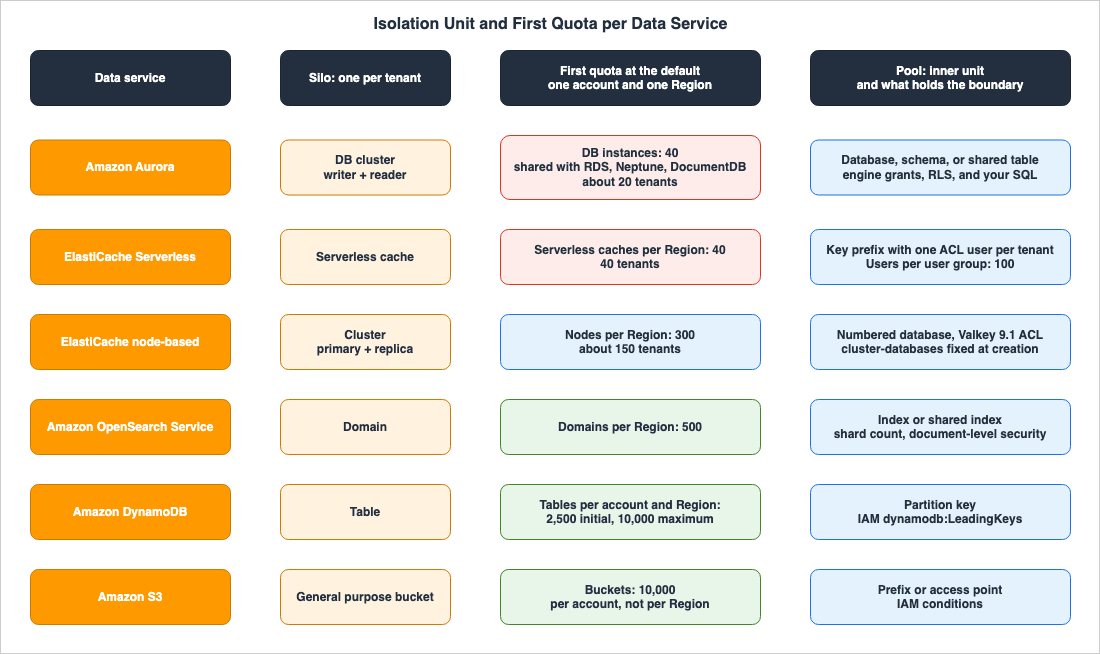
Data services utilize two levels of units to separate tenants. The outer unit is the AWS resource itself. In a silo configuration, these units are created for each tenant. The inner unit is a division inside one resource. In a pool configuration, tenants are separated by these inner units.Table 1 shows the outer and inner units for each service, and what enforces the inner boundary.
| Service | Outer Unit (Silo) | Inner Unit (Pool) | What Enforces the Inner Boundary | Sources |
|---|---|---|---|---|
| ElastiCache | Cluster, Serverless Cache | Key prefix, Numbered Database | ACL (Engine), Application Key Assembly | Core blog |
| DynamoDB | Table | Partition Key | IAM Conditions, Application | ABAC Blog |
| Aurora | DB Cluster | Database, Schema, Shared Table with Tenant Columns | Database Engine Permissions, RLS, Application | PostgreSQL access pattern blog |
| OpenSearch Service | Domain | Index, Document with Tenant Attributes | IAM Conditions, Fine-Grained Access Control | OpenSearch APN Blog |
| S3 | General purpose bucket | Prefix, Access Point | IAM Conditions, Bucket Policy | ABAC Blog |
What enforces the inner boundary in Table 1 is the subject of Chapter 7. In a silo, the boundary is the resource itself, and AWS enforces it. In a pool, the boundary is one of the items in the second column from the right of Table 1, and keeping that item correctly configured is the customer's responsibility.
2.2 The First Quota a Silo Hits
Table 2 shows the first quota reached when you create the outer unit for each tenant. The values are those on the quota pages on the check date.| Service | Created on a Per-Tenant Basis | First Quota Reached | Default Value | Adjustable | Unit | Tenants at the Default (Inference) |
|---|---|---|---|---|---|---|
| Aurora | DB cluster with 2 DB instances (writer and reader) | DB instances | 40 (20 in ap-south-1) | Yes | Account and Region (shared with RDS, Neptune, DocumentDB) | Approximately 20 |
| ElastiCache | Serverless caches | Serverless caches per Region | 40 | Yes | Account and Region | 40 |
| ElastiCache | Cluster with 2 nodes (primary and replica) | Nodes per Region | 300 | Yes | Account and Region | Approximately 150 |
| OpenSearch Service | Domains | Domains per Region | 500 | Yes | Account and Region | 500 |
| DynamoDB | Tables | Number of Tables | Initial 2,500 (maximum 10,000) | Can be increased through the account team | Account and Region | 2,500 |
| S3 | General purpose bucket | General purpose buckets | 10,000 | Request through Service Quotas | Account | 10,000 |
Applied to a SaaS with 200 tenants, Table 2 reads as follows. This paragraph is an inference. If you create an HA Aurora DB cluster per tenant, you need the first increase at about 20 tenants. If you create an ElastiCache Serverless cache per tenant, you need it at 40. For node-based ElastiCache clusters, you need it at about 150. If each tenant uses only one DynamoDB table, one S3 bucket, or one OpenSearch Service domain, the default values will not be reached with 200 tenants.
Figure 1 combines Table 1 and Table 2 into a single view.
2.3 Assumptions Regarding the Number of Tenants
The number of tenants presented in Table 2 is based on the following assumptions:- All tenants are placed within a single account and a single Region.
- Each tenant gets exactly one resource of the service (DB clusters consist of two instances: a writer and a reader; node-based ElastiCache utilizes two nodes: a primary and a replica).
- No other resources of the same type are present in the same account and Region for any other purpose.
- No requests to increase the resource limits have been submitted.
In a real-world account, development and validation resources, as well as resources for other services, are also counted against the same limit. Specifically, Aurora DB instances share a single limit with instances from RDS, Neptune, and DocumentDB (see Section 5.1). Furthermore, if a single tenant utilizes multiple data services, the sideways quotas in Chapter 6 grow with the product of the number of tenants and the number of services.
3. ElastiCache
This chapter looks at ElastiCache, taking the quota and then the boundary for the two silo forms (node-based clusters and Serverless caches) and the two pool forms (key prefixes with ACLs, and numbered databases with database-level ACLs). Finally, it looks at the unit of the encryption key.3.1 Node-Based Clusters: 300 Nodes per Region
The core blog describes the quota you hit when you create a node-based cluster per tenant as follows:ElastiCache allows 300 nodes per Region for provisioned clusters by default. If the smallest high availability (HA) configuration is two nodes (primary + replica), that ceiling supports roughly 150 tenants before a quota increase is needed.This approximate figure of 150 tenants is based on three conditions: maintaining the default values, ensuring a minimum High Availability (HA) configuration of two nodes (primary and replica), and creating one cluster per tenant. If the number of replicas is increased to two, each tenant would utilize three nodes, and the default setting would accommodate 100 tenants. This final statement is an inference.
Two pages count this quota differently. The ElastiCache UG quota page gives a default value of 300 for "Nodes per Region" and states:
This quota applies to your non-reserved nodes within the given Region. You can have up to 300 non-reserved nodes in the same Region.The General Reference gives the same row with Adjustable set to Yes and states:
This quota applies to both your reserved and non-reserved nodes within the given Region. You can have up to 300 reserved nodes and 300 non-reserved nodes in the same Region.The UG does not mention reserved nodes, while the General Reference counts 300 reserved nodes and 300 non-reserved nodes separately. This article does not decide that either one is wrong (Sources disagree). If you plan to purchase reserved nodes, it is recommended to verify the values in your account's Service Quotas. Note that the UG quota page does not include a column indicating whether adjustments are possible. The adjustment possibilities described in this article reflect the values presented in the General Reference.
3.2 Serverless Caches: 40 per Region
The core blog recommends a Serverless cache per tenant as the starting point for a silo, and describes the quota as follows:The default quota is 40 serverless caches per Region, lower than the 300-node provisioned limit, so the ceiling may be reached sooner (though both are adjustable).Both the ElastiCache User Guide's quota page and the General Reference state that the number of Serverless caches per Region is limited to 40. The General Reference sets Adjustable to Yes.
In essence, while Serverless eliminates the need for capacity planning and maintenance overhead, the number of tenants it can support is a limiting factor, arriving sooner than with a node-based approach. Two-node High Availability (HA) clusters stop at approximately 150 tenants, whereas Serverless caches are limited to 40 tenants. Furthermore, the core blog notes that even with Serverless, a routing layer to manage tenant and endpoint associations, as well as tenant-specific monitoring, is necessary. The routing layer will be discussed in Section 7.2.
3.3 Shared Clusters and ACLs: 100 Users per User Group
The first pool form shares one cluster, creates an ACL user for each tenant, and restricts the keys these users can access to a format like~tenant_42:*. The core blog highlights the advantage of this approach, stating that a mistake in how the application builds a key returns a permission error rather than another tenant's data. The ElastiCache RBAC page states that RBAC is the only way to control access to Serverless caches, so this form also works on Serverless caches.However, ACLs only govern access to data. Tenants share the same CPU and memory resources. The core blog also notes the following regarding ACLs:
ACLs restrict access by pattern, but they do not prefix keys automatically, so the application stays responsible for constructing each key correctly even though the engine is what enforces the restriction.The limitation of this configuration is not the number of tenants, but rather the number of users. The core blog states that a single user group can accommodate approximately 100 users. If each tenant is assigned a single user, the practical ceiling for a single cluster is close to 100 tenants. The relevant rows on the quota pages are as follows:
| Quota | Default | Adjustable (General Reference) | Unit | Sources |
|---|---|---|---|---|
| Users per user group | 100 | Yes | User group | UG quota page, General Reference |
| User groups per replication group | 1 | Not listed | Replication group | UG quota page |
| Users per Region | 2,000 | Yes | Account and Region | UG quota page, General Reference |
| User groups per Region | 200 | Yes | Account and Region | UG quota page, General Reference |
Since only one user group can be associated with a single replication group, the number of tenants within a single cluster, using the default settings, is limited to 100. Also, because Users per Region is 2,000, spreading this form across more clusters still stops at 2,000 tenant users in one Region at the default value. These two sentences are inferences from the values in the table.
Note that the ElastiCache RBAC page also has a table of limits. That table specifies a limit of 100 users per user group, a total of 1,000 users, and 100 user groups. These figures do not match the quota pages' 2,000 and 200 (Sources disagree). This article will use the values presented on the quota page.
3.4 Numbered Databases and Database-Level ACLs
The second pool form assigns a Valkey numbered database to each tenant. Valkey 9.0 enabled the use of numbered databases in cluster mode. Valkey 9.1 added database-level ACLs, which narrow the databases an ACL user can use, for example todb=0,1. The core blog notes that with this combination, a misconfigured client cannot SELECT into another tenant's database.ElastiCache's "What's New" (June 23, 2026) announces Valkey 9.1's support for node-based clusters.
Amazon ElastiCache now supports Valkey 9.1 for node-based clusters, delivering higher throughput, improved memory efficiency, and stronger access control for multi-tenant workloads.As of the check date, this article treats database-level ACL as a feature of node-based clusters. The sources this article read contain no statement that the feature works on Serverless caches (No statement found).
The
cluster-databases parameter on the parameters page determines the number of databases. The parameters page gives its values as 1 to 10,000 and its default as 0, and its Modifiable column says the value is set at creation. This parameter defines the number of databases for a cluster in cluster mode. Therefore, the number of databases allocated to a cluster in cluster mode is determined when the cluster is created and cannot be increased later. An estimate of the number of tenants is required before creating the cluster.On the default value, the core blog states:
ElastiCache for Valkey supports up to 10,000 databases per cluster (the default is 16, and Valkey OSS imposes no hard limit). However, each additional database adds metadata and CPU overhead. We recommend staying in the low thousands and load-testing against your production workload before scaling further.The maximum of 10,000 matches the parameters page. The default value does not match: 0 on the parameters page and 16 in the core blog (Sources disagree). This article does not decide which value applies. For clusters that separate tenants using databases, it is advisable to explicitly set the
cluster-databases parameter during creation. This final sentence is an inference.This configuration still retains the user limit described in Section 3.3. To use database-level ACLs to restrict the databases accessible to each tenant, a dedicated user is required for each tenant. So even if you provision 10,000 databases, with one user per tenant the tenants in one cluster stop at the default Users per user group value of 100. This paragraph is this article's inference. The core blog does not discuss how the two quotas relate.
3.5 One Key per Cluster
On ElastiCache encryption, the core blog explains both encryption at rest and encryption in transit, stating:Both operate at the cluster level with a single key. Neither offers a per-tenant key.The same article states that data in memory is plaintext and that encryption at rest protects data only when it touches disk (during synchronization, backups, swapping, writing to S3, and logging for Multi-AZ durability). The ElastiCache at-rest encryption page notes that encryption at rest is always enabled for Serverless caches, can be enabled during creation for node-based clusters, but cannot be enabled for existing replication groups. You can choose a customer managed key at creation.
Therefore, for tenants requiring a unique key per tenant, there are two options. One is to create a dedicated cluster for each tenant, using a different customer managed key for each. The other is for the application to encrypt the data before it is cached. The core blog recommends using AWS KMS hierarchical keyrings with the AWS Encryption SDK, utilizing tenant-specific branch keys. In this approach, one KMS key protects many tenants' branch keys, which are held in a DynamoDB key store.
3.6 Four Forms of ElastiCache
Table 3 lines up the four forms in Sections 3.1 through 3.4 by what holds the boundary and the first quota reached.| Form | Data Boundary | CPU and Memory Boundary | First Quota Reached (Default) | Sources |
|---|---|---|---|---|
| Serverless Cache per Tenant | Resource | Resource | Serverless caches per Region (40) | Core blog, quota pages |
| Node-Based Cluster per Tenant | Resource | Resource | Nodes per Region (300 nodes) | Core blog, quota pages |
| Shared Cluster with Key Prefix ACL | Engine ACL. Key assembly is application-managed. | None | Users per user group (100) | Core blog, quota pages |
| Shared Cluster with Numbered Databases and Database-Level ACL | Engine ACL | None | Users per user group (100). Number of databases: cluster-databases at creation time (maximum 10,000) | Core blog, parameters page |
The first quota listed in the fourth row of Table 3 refers to the inference described in Section 3.4.
4. DynamoDB and S3
This chapter looks at the silo quotas for DynamoDB and S3, and at the boundary when you move to a pool. For both, the silo quota is far away at 200 tenants. The differences are in the unit of the quota and the path for raising it.4.1 DynamoDB: Tables – Initial 2,500, Maximum 10,000
In a silo architecture where tables are created for each tenant, the limit is the number of tables. The DynamoDB developer guide's quota page states:For any AWS account, there is an initial quota of 2,500 tables per AWS Region.The same page describes the process for exceeding 2,500 tables:
If you need more than 2,500 tables for a single account, please reach out to your AWS account team to explore an increase up to a maximum of 10,000 tables. For more than 10,000, the recommended best practice is to setup multiple accounts, each of which can serve up to 10,000 tables.This process differs from other services. For services like ElastiCache, Aurora, and S3, you can request quota increases through Service Quotas. For DynamoDB tables, the process, as described on the page, involves requesting an increase through your account team, with a maximum limit of 10,000 tables. To hold more than 10,000 tenants in table silos, splitting them across accounts is the path the page recommends.
In a pool architecture, tenants share a single table, with the tenant identifier placed at the beginning of the partition key. The IAM condition key
dynamodb:LeadingKeys narrows access to the caller's tenant's partition keys. Chapters 5 and 6 of the AWS SaaS Multi-Tenant Architecture Guide cover how to write it, and pattern P13 of the DynamoDB Key Design Dictionary covers the key design. The latter also covers the "noisy neighbor" scenario, where a single tenant reaches the partition write limit.4.2 S3: 10,000 General Purpose Buckets per Account
When creating silos by creating buckets for each tenant, the limit is the number of general purpose buckets. The S3 user guide states:By default, you can create up to 10,000 general purpose buckets per AWS account.This limit is defined per AWS account, not per Region. The same page also states that the quota for general purpose buckets in commercial Regions is only visible and manageable from the US East (N. Virginia) Region. Even if a tenant's buckets are distributed across multiple Regions, they share the limit of 10,000 within a single account. This final statement is an inference based on the page's reference to "per AWS account."
The same page also states that, in accounts with a quota above 10,000,
ListBuckets requests that are not paginated are rejected. In accounts whose quota is raised above 10,000, operations scripts that count tenant buckets are also affected.Within a pool, tenants share a single bucket and differentiate their data using prefixes. IAM policies are used to include tenant identifiers in the ARN of objects and the
s3:prefix condition. This approach is discussed in Section 6.4 of the AWS SaaS Multi-Tenant Architecture Guide. Between the prefix and the bucket, there is also a unit called an access point. The S3 access point page states that the limit for access points is 10,000 per account and per Region.5. Aurora and OpenSearch Service
This chapter examines Aurora and OpenSearch Service. Inside the outer unit of a silo (DB cluster, domain), both have several levels of inner units: databases, schemas, indexes, and documents. So a pool also has several places to put the boundary.5.1 Aurora: The 40 DB Instances Are Shared with Other Engines
The Aurora user guide's quota page specifies a default value of 40 for both DB clusters and DB instances per Region, with the ability to adjust this value. (DB instances in the ap-south-1 Region are limited to 20). The same page notes the following regarding DB instances:By default, you can have up to a total of 40 DB instances. RDS DB instances, Aurora DB instances, Amazon Neptune instances, and Amazon DocumentDB instances apply to this quota.When creating DB clusters with one writer and one reader per tenant, each tenant will utilize two DB instances. With the default limit of 40, approximately 20 tenants can be supported. The limit for DB instances (40) will be reached before the limit for DB clusters (40). If the same account and Region also contain instances of RDS, Neptune, or DocumentDB, this limit will be reached even sooner. The tenant counts in this paragraph are inferences.
For Aurora serverless DB clusters too, the Aurora user guide says to add a writer DB instance with the
db.serverless DB instance class. The sources this article read contain no statement that serverless DB instances count toward the DB instances quota (No statement found). Because they are added as DB instances, it is safer to assume that they count. This final statement is an inference.The PostgreSQL access pattern blog also lists service quotas as one of the trade-offs of a silo. The same blog post, regarding the creation of IAM roles for each tenant (as described in Section 6.3), states that the IAM quotas determine the maximum number of tenants.
5.2 Inner Units of Aurora: Databases, Schemas, and Shared Tables
When a single DB cluster is shared among tenants, there are three inner units: a database per tenant, a schema per tenant, and a shared table with a tenant column. The PostgreSQL access pattern blog calls the first two bridge and the last one pool (see Section 1.3).The same blog writes about choosing between databases and schemas for separation, stating:
Its recommended to use one database per tenant instead of one schema per tenant.As reasons, the blog points out that schemas are logical constructs in PostgreSQL and do not separate data on disk. Schema files are placed in the same directory in the database, and in scenarios with a large number of tenants, you might encounter system limitations such as inode exhaustion.
In this form, the database engine's permissions hold the boundary. Even when using IAM authentication, the scope of what IAM can control is limited. The same blog writes:
An important consideration with IAM Auth in this model is that the IAM policy can only restrict access to the database instance, not to the database or any database objects within it.Consequently, the blog suggests creating a database user for each tenant and including that user in the ARN (Amazon Resource Name) of the IAM policy's resource. IAM decides only which database user a connection can log in as; the engine's permissions determine the database and tables that the user can access. This final point is an inference based on the previous quote.
In a pool with shared tables, PostgreSQL row level security (RLS) allows rows to be filtered by tenant. However, the same blog notes regarding RLS that uses session variables to identify the tenant:
The isolation here is weak as anyone with access to query the table can modify the session variable.The blog recommends coding standards that require adding a tenant-specific
WHERE clause to every SQL statement, together with RLS policies. In other words, in an Aurora pool, the application's SQL handles some of the boundary enforcement.5.3 OpenSearch Service: 500 Domains per Region
The General Reference specifies that OpenSearch Service allows for up to 500 Domains per Region, with adjustments permitted. The default number of Instances per domain is 200, although requests can be submitted to increase this to 1002. If a domain is created for each tenant, a tenant count of 200 will fall below the default number of domains. The General Reference's table for OpenSearch Service does not include a row specifying the number of instances per Region.The OpenSearch APN blog highlights the challenges of creating domains for each tenant – specifically, it points out difficulties in monitoring operations across tenants, scaling domains individually, and the need to create a new domain each time a new tenant is added. In other words, what gets heavy first in this form is not the quota but the operations work that grows with the number of domains.
5.4 Inner Units of OpenSearch Service: Indexes and Documents
When a single domain is shared among tenants, there are two inner units: a tenant-specific index and a shared index containing documents with tenant attributes.When dividing by index, the number of shards sets the limit. An index is divided into one or more shards. The OpenSearch Service developer guide's quota page states that for OpenSearch 2.17 and later, the maximum number of shards is 1,000 per 16 GB of heap, up to a maximum of 4,000. This default limit cannot be changed. Through OpenSearch 2.15, the limit is 1,000 and can be changed with the
cluster.max_shards_per_node setting. The same table does not state whether the row for 2.17 and later applies per node or per domain (No statement found).The OpenSearch APN blog describes the index-per-tenant form as follows:
So, the index per tenant model may not be suitable if you have hundreds and thousands of tenants.The ABAC blog also states that the form that separates by putting an IAM tag in the index name is constrained by the number of indexes the cluster (domain) can support.
Within a shared index pool, IAM conditions do not reach the tenant attributes in the documents. The OpenSearch APN blog states:
The IAM mechanism used with the silo model does not allow you to describe isolation based on the tenantId stored in your document.The same blog post highlights the pool boundaries by referencing OpenSearch's Security plugin's fine-grained access control, specifically document-level security. This mechanism restricts the documents a role can see by a tenant attribute. Therefore, within an OpenSearch Service pool, the boundaries are not defined by IAM, but rather by the mapping of roles in the domain and the definition of those roles.
6. Quotas That Grow Sideways with Tenants
This chapter looks not at the data services themselves but at the quotas that grow alongside each tenant's silo. When you assign dedicated security groups to clusters for each tenant, and create separate KMS keys and IAM roles for each tenant, these limits increase based on the product of the number of tenants and the number of data services.6.1 VPC Security Groups: 2,500 per Region
The core blog describes the quota you hit when each tenant cluster gets its own security group as follows:Virtual private cloud (VPC) security groups (500 per VPC by default) can become another constraint if each tenant cluster has its own.In contrast, the VPC user guide's quota page states the limit for security groups, listed as "VPC security groups per Region," is the default value of 2,500, with adjustments permitted (Yes). The security group table on the same page has no row for security groups per VPC.
The two sources differ in both value and unit (Sources disagree). This article will use the value of 2,500 per Region as stated on the quota page. That page also clarifies that this limit applies to both your own VPCs and shared VPCs. If you have 200 tenants and assign each tenant three dedicated security groups for their data services, that totals 600, which is below the default limit of 2,500. This final sentence is an inference.
6.2 KMS: The Number of Keys and the Shared Request Quota
When creating customer managed keys for each tenant, the limit is the number of keys. The KMS developer guide's resource quota page states that the limit for customer managed keys is 100,000 per account and Region, and that adjustments are permitted. The same page clarifies that this limit applies to all customer managed keys, regardless of their key spec or key state. Keys disabled due to tenant termination, as well as keys scheduled for deletion, are counted against this limit. This last sentence is an inference from the wording on key state. Even with one key per data service for 200 tenants, this quota is far away.The primary constraint is not the number of keys, but the number of requests. The KMS request quota page states that cryptographic operations using symmetric KMS keys share a single request limit. Operations that share this limit include
Decrypt, Encrypt, and GenerateDataKey. The default values are tiered, with three levels per Region: 10,000, 20,000, and 100,000, with US East (N. Virginia) set to 100,000. The same page specifies that this limit applies to all requests for keys of the same type within an account and Region.Therefore, even if you separate keys for each tenant, the request limit remains unchanged. All cryptographic operations across all tenants share a single limit within a single account and Region. The core blog's hierarchical keyring approach caches branch keys in the application and only calls KMS and DynamoDB when the cache expires. This approach also reduces the number of requests. This last sentence is an inference.
6.3 IAM Roles and STS
Creating IAM roles for each tenant limits the system based on the number of roles. The IAM user guide's quota page states that the default value for "Roles per account" is 1,000 and the maximum is 10,000, and adds:Requests up to the maximum quota are automatically approved and completed within a few minutes.The count of roles is based on accounts, not Regions. The PostgreSQL access pattern blog recommends scoped-down session policies or ABAC instead of an IAM role per tenant. If it is necessary to separate roles by tenant, it may necessitate dividing tenants into separate accounts. Chapter 5 of the AWS SaaS Multi-Tenant Architecture Guide covers how to write ABAC.
With ABAC, the number of STS requests rather than the number of roles may set the limit. The IAM quota page states that the default quota for STS requests made with AWS credentials is 600 per second per account and Region, and that operations like
AssumeRole and GetCallerIdentity share this limit. If your architecture involves calling AssumeRole with each tenant request, this limit may be reached quickly. Reusing each tenant's temporary credentials until they expire addresses this quota. The final two sentences of this paragraph are based on inference.6.4 The Work of Raising Quotas and the Decision to Split Accounts
Except for the number of DynamoDB tables, you can request increases for the quotas in Table 2 through Service Quotas. The Service Quotas user guide describes the process for requesting increases as follows:Smaller increases are usually automatically approved while larger requests are submitted to Support. Larger increase requests take time to review, process, approve, and deploy.For ElastiCache, the core blog states that each increase requires a support request and lead time. It also states that when dealing with hundreds of tenants, quota planning becomes an integral part of capacity planning. The same article further suggests that while increasing the number of accounts can resolve limit issues, it also adds complexity. In contrast, the Service Quotas user guide indicates that smaller increase requests are typically approved automatically. Whether a wait time is required for an increase request can vary depending on the size of the increase. This final statement is an inference.
Based on these two resources, it is logical to proceed as follows. This paragraph is an inference. First, identify the limits from Table 2 that are most likely to be reached within your current configuration and request increases before exceeding the anticipated number of tenants. Next, at the design stage, set apart the quotas that have a ceiling on increases, such as DynamoDB's 10,000, and the values that cannot be changed after creation, such as ElastiCache's
cluster-databases. Separating accounts is advisable when you reach the increase limits or when you require tenant-specific account boundaries. The creation of tenant-specific account silos is addressed in Chapter 10 of the AWS SaaS Multi-Tenant Architecture Guide.7. What Your Code Holds When You Move to a Pool
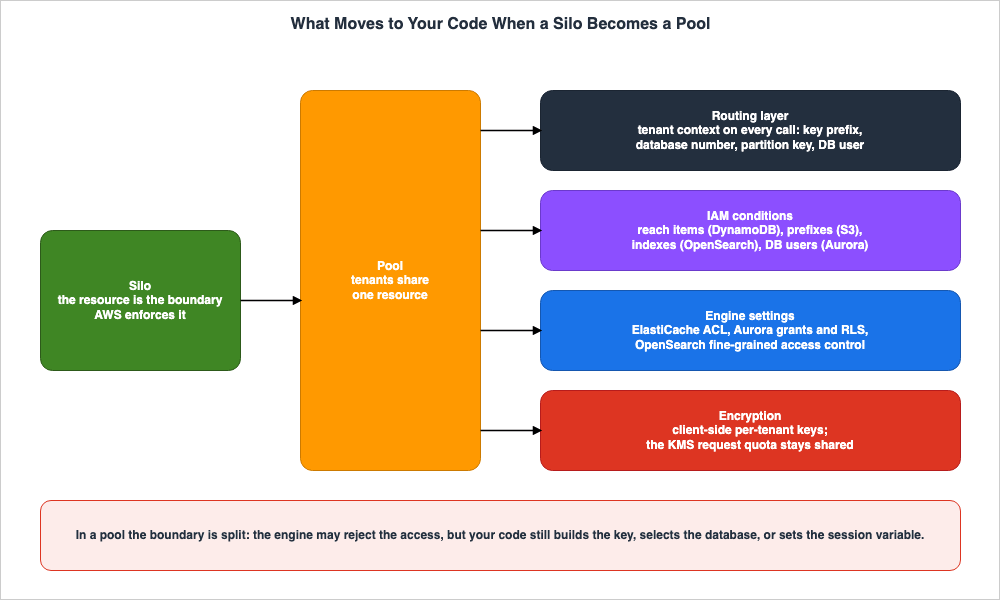
This chapter outlines where the responsibility for isolation shifts when moving to a pool. In a silo, the boundary is the resource itself, and AWS enforces it. In a pool, the boundary moves to one of these: the application's routing layer, IAM conditions, KMS and encryption, or database engine settings.7.1 Two Approaches to Boundary Protection
The core blog differentiates boundary protection into two categories: what the server protects and what the application protects.In a server-enforced model, the engine rejects unauthorized access regardless of what the application code does. In an application-enforced model, isolation depends on the code constructing the correct key prefix, selecting the correct database, and never making a mistake.Pool boundaries often involve a combination of these two approaches. For example, in ElastiCache's ACL, the engine rejects invalid key formats, while the application is responsible for constructing the correct keys (see Section 3.3). Similarly, in Aurora's RLS, the engine filters rows, but the application is responsible for correctly setting session variables (see Section 5.2).
Figure 2 shows how, when a silo becomes a pool, the boundary moves from the resource to routing, IAM, KMS, and engine settings.
7.2 The Routing Layer
Even within a silo environment, a routing layer is necessary. The core blog states the following about the per-tenant cluster form:The routing layer itself is infrastructure the SaaS provider builds and maintains. It maps tenant to cluster endpoint and is typically backed by a configuration store such as Amazon DynamoDB or a parameter service.The same article states that this layer must handle adding tenants, rotating endpoints during failover, and cleanup when a tenant is removed. The OpenSearch APN blog also recommends a table that lists tenant index names and cluster names, noting that such a table would make it easier to migrate tenant indexes.
In a pool environment, the routing layer not only selects the connection destination but also plays a role in attaching tenant context to every call. In DynamoDB, this is a tenant identifier at the beginning of the partition key. In ElastiCache, it is either a key prefix or a database number selected using
SELECT. In Aurora, it is the database user to connect as or the RLS session variable. This paragraph is an inference that puts together the source statements in Chapters 3 through 5.7.3 How Deep IAM Reaches
Whether IAM conditions can define boundaries within a pool varies depending on the service. Table 4, based on the sources this article read, indicates the deepest level of granularity at which IAM can be applied.| Service | Deepest Unit IAM Reaches | Boundary Inside It | Sources |
|---|---|---|---|
| DynamoDB | Item. Can be restricted by the beginning of the partition key using dynamodb:LeadingKeys. | — | ABAC Blog |
| S3 | Object prefix | — | ABAC Blog |
| OpenSearch Service | Index (the index name in the resource ARN) | Documents are secured through fine-grained access control and document-level security. | ABAC Blog, OpenSearch APN Blog |
| Aurora | DB instance and the user connecting to the database | Database, schema, and rows are secured through engine permissions and RLS. | PostgreSQL access pattern blog |
| ElastiCache | User connecting (when using IAM authentication) | Key shape and database are secured through Access Control Lists (ACLs). | Core blog, RBAC page |
The top two rows in Table 4 indicate that boundaries in the pool can be defined solely through IAM. For OpenSearch Service, IAM reaches the index name, so the index-per-tenant form can also be held by IAM alone. Documents inside a shared index are secured through fine-grained access control. In the bottom two rows, IAM only restricts access to the resource or the connecting user; the service's own permission mechanisms manage the boundaries within those resources. IAM authentication for ElastiCache is discussed in IAM Authentication to Databases, Caches, and Streams on AWS.
7.4 KMS and Encryption
Within a pool, tenant data is mixed within a single resource, so the key for that resource does not isolate tenants. An example of this is a single key used for ElastiCache, as described in Section 3.5. If you require keys on a per-tenant basis, there are two options: either revert the resource to a silo configuration, or have the application encrypt the data using the tenant-specific key before writing it.The core blog positions the latter as a compensating control for a pool in which the application enforces the boundary. Even if an application mistake reads another tenant's data, what it reads is ciphertext that cannot be decrypted. The same article also notes that client-side encryption comes with a trade-off: encrypted values cannot be used as search keys, and certain operations, such as duplicate detection and
INCR, will not work with data types that have been encrypted.The methods for using tenant-specific KMS keys and encryption contexts are discussed in Section 6.3 of the AWS SaaS Multi-Tenant Architecture Guide. As mentioned in Section 6.2, the maximum KMS request limits remain unchanged, even when using separate keys for each tenant.
7.5 Mixing Silo and Pool, and Moving a Tenant
The core blog states that many SaaS platforms operate with multiple models simultaneously, and that tenant placement is not determined by the number of tenants, but rather by contractual agreements, compliance posture, and risk tolerance. The OpenSearch APN blog illustrates a similar approach, suggesting a tiered system: free-tier tenants share an index, standard-tier tenants have dedicated indexes, and premium-tier tenants have dedicated domains.The core blog notes that the challenge is not isolation itself, but rather maintaining a system where applications do not need to be aware of the tenant tier. Therefore, the article recommends a data access layer that keeps access patterns consistent across tiers, with the only variations being the connection target and encryption status. It also states that the tenant-to-target mapping changes only when a tenant is added or moved, so the mapping can be cached in process.
The sources this article read contain no step-by-step procedure for moving a tenant between tiers (No statement found). From the source statements, the following order can be put together. This paragraph is an inference. Create the target resource (a dedicated cluster, table, or index). Move the data. Switch the mapping in the routing layer. Delete the tenant's data from the original resource. For data such as a cache, which can be rebuilt from the source of truth, another path is to rebuild it empty on the target. For the case where inadvertent access to a branch key is confirmed, the core blog states that the cleanest response is usually to flush the tenant's keyspace and let it repopulate from the source of truth. The control plane for moving tenants between cells is addressed in Cell-Based Architecture and Shuffle Sharding on AWS.
8. Frequently Asked Questions About Tenant Isolation per Data Service
This chapter briefly summarizes the key conclusions presented in the main body in a question-and-answer format.Q1. When tenants reach 200, which data service's silo stops first?
If you keep the defaults in one account and one Region, the Aurora DB cluster with a writer and a reader per tenant stops first. About 20 tenants use up the DB instances quota of 40. Next, ElastiCache Serverless caches, dedicated to each tenant, will be exhausted with 40 tenants. Node-based ElastiCache clusters with two nodes will reach their limit with approximately 150 tenants. DynamoDB tables, S3 buckets, and OpenSearch Service domains, if allocated one per tenant, will not reach their default limits with 200 tenants. Every count here is an inference with the assumptions in Section 2.3.Q2. Does ElastiCache stop at about 150 tenants?
It depends on the conditions. The figure of approximately 150 tenants is calculated by dividing the default value of 300 nodes per Region by the number of nodes (2) in a cluster consisting of a primary and a replica. With more replicas, it stops sooner. If you create a Serverless cache for each tenant, the limit will be 40. All of these limits are adjustable, and you can submit requests to increase them.Q3. Is the VPC security group quota 500 per VPC?
Not on the quota page. The VPC user guide's quota page lists VPC security groups per Region with a default value of 2,500 and Adjustable set to Yes, and has no row per VPC. The core blog's 500 per VPC does not match the quota page. This article will use the values listed on the quota page.Q4. Can one cluster hold 10,000 tenants with Valkey's numbered databases?
Counting databases only,cluster-databases goes up to 10,000. But the value is set when the cluster is created and cannot be changed later. The core blog recommends staying in the low thousands and load-testing. Also, if you create a database-level ACL user per tenant, the users in one cluster stop at the default Users per user group value of 100 (this article's inference).Q5. Can you increase the number of DynamoDB tables beyond 10,000?
The DynamoDB quota page gives 10,000 as the maximum for one account. Beyond 2,500 tables you can go up to a maximum of 10,000 through your account team, and beyond that, splitting across multiple accounts is the recommended path.Q6. Is the 10,000 quota on S3 general purpose buckets per Region?
No. The S3 user guide states the quota for general purpose buckets as 10,000 per AWS account. You view the quota for commercial Regions, and request an increase, from US East (N. Virginia).Q7. If you move to a pool, do the concerns about quotas go away?
No, they do not. The type of limit changes. In a shared ElastiCache cluster, the number of per-tenant ACL users becomes the quota. In the OpenSearch Service index-per-tenant form, the number of shards becomes the quota. In an ABAC pool, the number of STS requests and the shared KMS request quota set the limit. Furthermore, a portion of the responsibility for holding the boundary between tenants shifts to the application's code.Q8. Can ElastiCache use a per-tenant encryption key?
It is not possible within a single cluster. ElastiCache's encryption at rest and encryption in transit both use a single key at the cluster level. If you require tenant-specific keys, you can either use a different customer managed key for each tenant's cluster, or have your application encrypt the data before storing it in the cache. For the latter, the core blog recommends the AWS KMS hierarchical keyring.9. Summary
- Each service has two levels of units that separate tenants. The outer units (cluster, table, DB cluster, domain, bucket) represent silo units, while the inner units (key prefix, numbered database, partition key, database and schema, index and document, prefix) represent pool units.
- If you build silos at the defaults in one account and one Region, the first to stop are HA Aurora (about 20 tenants on 40 DB instances) and ElastiCache Serverless (40 tenants). The figure of about 150 tenants for node-based ElastiCache is the value for two-node clusters.
- The 40 DB instances for Aurora are shared across RDS, Neptune, and DocumentDB. The 10,000 S3 general purpose buckets and the 1,000 IAM roles are per account. DynamoDB tables go up to a maximum of 10,000 through the account team, and beyond that you split accounts.
- Encryption for ElastiCache is managed with a single key per cluster.
cluster-databasesis set when the cluster is created. Database-level ACLs are a feature of node-based clusters as of the check date. - The VPC security group quota is 2,500 per Region on the quota page. The core blog's 500 per VPC does not match the quota page.
- Moving to pools shifts the boundaries to application routing, IAM conditions, KMS and encryption, and engine settings. Only DynamoDB, S3, and an index per tenant in OpenSearch Service can hold the boundary with IAM alone. For documents inside a shared OpenSearch Service index, and for Aurora and ElastiCache, the permission mechanisms inside the service hold the inner boundaries.
- When mixing silos and pools, keep the access pattern the same across tiers, with the only differences being the connection target and the presence or absence of encryption. The specified numerical limits are based on the check date (November 22, 2026). Before using these values in your design, verify them within your own account's Service Quotas.
10. References
- Multi-tenancy with Amazon ElastiCache: Choosing the right isolation model - AWS Database Blog
- Quotas for ElastiCache - Amazon ElastiCache
- Amazon ElastiCache endpoints and quotas - AWS General Reference
- Role-Based Access Control (RBAC) - Amazon ElastiCache
- Engine specific parameters - Amazon ElastiCache
- At-Rest Encryption in ElastiCache - Amazon ElastiCache
- Versions with ElastiCache Extended Support - Amazon ElastiCache
- Amazon ElastiCache now supports Valkey 9.1 - AWS
- Announcing Valkey 9.1 for Amazon ElastiCache - AWS Database Blog
- Quotas in Amazon DynamoDB - Amazon DynamoDB
- General purpose bucket quotas, limitations, and restrictions - Amazon Simple Storage Service
- Access points naming rules, restrictions, and limitations - Amazon Simple Storage Service
- Quotas and constraints for Amazon Aurora - Amazon Aurora
- Creating a DB cluster that uses Aurora serverless - Amazon Aurora
- Choose the right PostgreSQL data access pattern for your SaaS application - AWS Database Blog
- Multi-tenant data isolation with PostgreSQL Row Level Security - AWS Database Blog
- Amazon OpenSearch Service endpoints and quotas - AWS General Reference
- Amazon OpenSearch Service quotas - Amazon OpenSearch Service
- Storing Multi-Tenant SaaS Data with Amazon OpenSearch Service - AWS Partner Network (APN) Blog
- Amazon VPC quotas - Amazon Virtual Private Cloud
- Resource quotas - AWS Key Management Service
- Request quotas - AWS Key Management Service
- IAM and AWS STS quotas - AWS Identity and Access Management
- How to implement SaaS tenant isolation with ABAC and AWS IAM - AWS Security Blog
- Requesting a quota increase - Service Quotas
- Silo isolation - SaaS Lens
- Pool isolation - SaaS Lens
- The bridge model - SaaS Lens
- AWS SaaS Multi-Tenant Architecture Guide - Tenant Isolation, Pool and Silo Models, Onboarding, and Metering
- AWS Service Quotas - A Practical Cheat Sheet for Major AWS Services
- Cell-Based Architecture and Shuffle Sharding on AWS - Blast Radius Reduction Patterns for Large-Scale Workloads
- Counting Connections on ElastiCache for Valkey - Per-Node and Per-Cache Limits, Endpoints, and Reconnects After Failover
- Multi-Tenant Generative AI SaaS Architecture on AWS - Tenant Isolation, Per-Tenant Knowledge Bases, and Guardrails with ABAC
- DynamoDB Key Design Dictionary: PK/SK, GSI/LSI Selection, Hot Partition Avoidance, and Re-Keying Patterns
- IAM Authentication to Databases, Caches, and Streams on AWS - Token Lifetime, What Revoking Access Does to Open Connections, and the Identity Inside the Service
References:
Tech Blog with curated related content
Written by Hidekazu Konishi