DynamoDB Key Design Dictionary: PK/SK, GSI/LSI Selection, Hot Partition Avoidance, and Re-Keying Patterns
First Published:
Last Updated:
Where the companion article Amazon DynamoDB Single Table Design Complete Guide explains the philosophy of access-pattern-driven modeling with five canonical patterns, this dictionary catalogs PK/SK patterns by use case across five categories, plus GSI vs LSI selection criteria, hot-partition avoidance, online re-keying procedures, and an anti-pattern catalog. Read that one first if you have not internalized the access-pattern-first methodology; come here when you have a specific design decision to make and want a quick, opinionated answer.
Note: Service quotas (GSI count, item collection size, per-partition throughput) are stated as defaults at the time of writing. AWS occasionally raises soft limits and adds new defaults; for production capacity planning always confirm the current values on the DynamoDB Service Quotas page.
0. How to Use This Dictionary
This article is organized so you can jump to the section that answers your current question:- Section 1: DynamoDB Data Model in 60 Seconds — minimum vocabulary you need to follow the rest of the dictionary.
- Section 2: Partition Key vs Sort Key — Design Decisions — when to use a simple PK only, when to use a composite PK+SK, how to structure the SK.
- Section 3: GSI vs LSI Decision Matrix — the single most asked question, answered with a one-page decision flow and a comparison table.
- Section 4: Key Design Patterns by Use Case — the core catalog. Find your access pattern, copy the PK/SK structure, adapt the boto3 sample.
- Section 5: Hot Partition Avoidance Techniques — when adaptive capacity is not enough.
- Section 6: Migration and Re-Keying Strategies — change the keys of a live table without downtime.
- Section 7: Anti-Patterns Catalog — the design choices that look right and fail in production.
- Section 8: Summary and Section 9: References.
boto3 against DynamoDB tables that follow the conventional generic-attribute schema (PK, SK, GSI1PK, GSI1SK, ...). Translate freely to your SDK of choice — the design decisions are language-independent.1. DynamoDB Data Model in 60 Seconds
This section is deliberately minimal. If any term below is unfamiliar, read the Single Table Design Complete Guide before continuing.- Item: a row. Up to 400 KB including attribute names and values.
- Partition Key (PK): the hash that determines which physical partition holds the item. Required. Picking it well is the single most consequential decision in DynamoDB.
- Sort Key (SK): optional second attribute. When present, items with the same PK are stored together, sorted by SK byte order. Together
(PK, SK)form the primary key. - Item Collection: the set of all items with the same PK value. Maximum 10 GB only when the table has at least one Local Secondary Index; without LSIs, item collections can grow without that ceiling.
- Global Secondary Index (GSI): a separate physical structure with its own PK/SK. Asynchronously maintained. Eventually consistent. Default soft limit of 20 per table (raise via the AWS Service Quotas console).
- Local Secondary Index (LSI): an alternate sort order on the same partition as the base table. Synchronously maintained. Strongly consistent on demand. Up to 5 per table, created at table creation only, never added or removed afterward.
- DynamoDB Streams: a 24-hour change-data-capture log per table, consumed natively by Lambda Event Source Mappings and Kinesis Client Library applications. A separate opt-in feature, Kinesis Data Streams for DynamoDB, exports the same change records to a Kinesis Data Stream that you own (longer retention, fan-out, multi-region pipelines). Both are the backbone of online migrations and asynchronous aggregation.
GetItem (single primary-key lookup), Query (scan within one PK, optionally bounded by SK conditions), and BatchGetItem / BatchWriteItem (parallel multi-key fetch / write, up to 100 / 25 items respectively). Scan is for one-off admin work; treat its appearance in production code as a bug.For a comparison of how DynamoDB's quorum model relates to other AWS databases (Aurora, Neptune, OpenSearch), see the companion article Summary of Differences and Commonalities in AWS Database Services using the Quorum Model.
2. Partition Key vs Sort Key — Design Decisions
2.1 PK Alone vs Composite (PK + SK)
Use a simple PK (no SK) only for tables that store a single item per logical entity with no need to fetch siblings together. Examples that fit:- Token vaults (
PK = jti, item = JWT metadata + revocation flag). - Distributed lock manager (
PK = lock_name, item = lease holder + expiry). - Simple session stores (
PK = session_id, item = user identity + expiry).
The default schema for any non-trivial table:
PK = ENTITY#<entity_id>
SK = METADATA (or #META, or "v0_<entity>")METADATA (or any fixed sentinel) is a placeholder so future child items can join the same item collection without colliding with the parent. This pattern is sometimes called the "reserved root".2.2 Sort Key Structure — Hierarchical, Composite, Sortable
The sort key is your secondary access path within a partition. Three structural choices dominate, and you will use all three across a real table.Hierarchical SK — encodes a fixed hierarchy from coarse to fine:
SK = <Continent>#<Country>#<State>#<City>#<ZipCode>begins_with("ASIA#JAPAN#") query returns all Japan locations; begins_with("ASIA#JAPAN#TOKYO#") narrows to Tokyo. The order of segments is locked at design time — any later change to the hierarchy means a full re-key.Composite filter SK — encodes multiple filter dimensions in fixed order:
SK = REGION#<region>#STATUS#<status>#DATE#<YYYY-MM-DD>#ORDER#<order_id>Sortable timestamp SK — encodes time directly so chronological ordering is free:
SK = EVENT#<ISO8601_timestamp>#<event_id>
SK = EVENT#<ULID> # ULID/KSUID encodes a millisecond timestamp in its leading bitsOne rule that catches more bugs than any other: prefix every SK segment with a type tag (
USER#, ORDER#, EVENT#). It costs a few bytes and lets begins_with queries cleanly target one entity type out of an overloaded item collection. The cost of forgetting the prefix is debuggability — Query(PK=...) returns an undifferentiated stream of items and you cannot tell types apart at 3 AM.2.3 Generic Key Names + Type Attribute
Single-table designs that mix multiple entity types in one table use generic key names rather than entity-specific ones:Bad: userId (PK), addressId (SK)
Good: PK, SK, with a separate Type attribute on each itemUSER#u_123 on a User item and ORDER#o_456 on an Order item without semantic confusion. The Type attribute (Type = "User", Type = "Order", Type = "Address") is essential for stream-processing Lambdas that need to route updates to type-specific handlers, and for ad-hoc CLI debugging.GSIs follow the same convention with
GSI1PK, GSI1SK, GSI2PK, GSI2SK, etc. — generic names so a single GSI can be overloaded for multiple access patterns (Section 3.3).3. GSI vs LSI Decision Matrix
This is the most-asked DynamoDB design question. The answer fits on one page.3.1 The Comparison Table
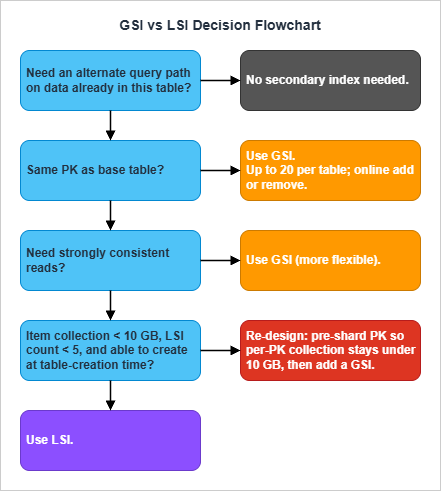
* You can sort the table by clicking on the column name.
| Characteristic | Global Secondary Index (GSI) | Local Secondary Index (LSI) |
|---|---|---|
| Partition key relationship | Any attribute. PK can differ from base table. | Must share the base table's PK. Only SK differs. |
| Item collection size limit | None | 10 GB per PK value (cap applies to the base table once any LSI is defined) |
| Add or remove after table creation | Yes — online operation | No — created at table creation only, cannot delete |
| Query scope | Whole table, scattered across all partitions | Single partition (one PK value) |
| Read consistency | Eventual only | Eventual or strong (caller chooses) |
| Provisioned throughput | Separate from base table | Shares base table's throughput |
| Non-projected attribute fetch | Not possible | Possible (extra RCU, server-side fetch) |
| Default count limit per table | 20 (soft limit, raise via Service Quotas) | 5 (hard limit, not adjustable) |
3.2 LSI vs GSI — The Decision in One Sentence Each
Choose an LSI when you need a strongly consistent read on an alternate sort order on data that is already partitioned correctly, and you can guarantee per-PK item collections stay under 10 GB forever.Choose a GSI in every other case — and as the default when you are uncertain. GSIs are more flexible (any PK), online (add/remove anytime), and unconstrained by the 10 GB ceiling.
The hidden cost of an LSI is the 10 GB ceiling on every item collection in the table that activates the moment any LSI exists. A table that worked fine for years can hit a wall when a single popular PK accumulates enough data to exceed 10 GB; the only fix is a re-keying migration. GSIs do not impose this constraint.
3.3 Sparse, Inverted, and Overloaded Indexes
These three index patterns are not separate index types — they are uses of GSIs that recur often enough to deserve names.Sparse index — only items that have the indexed attribute appear in the GSI. Items where the GSI key attribute is absent are filtered out automatically. Use when the attribute is present on a minority of items: "all soft-deleted orders", "all users with verified email", "all orders pending review". The GSI cost is proportional to the indexed-item count, not the table size.
Base item (active order):    {PK=ORDER#abc, SK=METADATA, status="ACTIVE"}
Base item (deleted order):   {PK=ORDER#xyz, SK=METADATA, status="DELETED",
                              GSI1PK="DELETED_ORDER", GSI1SK="2026-05-01T..."}

Only the deleted order appears in GSI1.Base table: PK=USER#alice, SK=GROUP#42 (membership edge)
GSI1: GSI1PK=GROUP#42, GSI1SK=USER#alice
Query the base table for "groups of alice". Query GSI1 for "members of group 42".GSI1PK / GSI1SK depending on the item type. The classic example from AWS documentation: an Employees table where one GSI overloads GSI1PK to hold employee name on Employee items, warehouse ID on Inventory items, hire date on HR records, etc. — all queryable through the same index. See GSI Overloading for the canonical example.Overloading is what lets a real single-table design ship five access patterns on three GSIs instead of one GSI per pattern. Plan two or three "reserve" GSIs from day one (
GSI1, GSI2, GSI3) and treat them as overload slots, not as dedicated single-purpose indexes.4. Key Design Patterns by Use Case
This is the core of the dictionary. The patterns are grouped into five categories. Each pattern follows the same structure:- Use case — one-line statement of the access pattern.
- PK/SK — the key layout, with sentinel values shown literally.
- Access patterns — the read/write operations enabled by the layout, with
boto3-style pseudocode. - GSI/LSI — when an index is required, the index keys and projection.
- Pitfalls — the design choices that look right and fail in production.
boto3 Table objects bound to a single-table schema with generic attribute names (PK, SK, GSI1PK, GSI1SK).4.1 Category 1: Lookup & CRUD
These four patterns cover ~70% of pre-launch CRUD code in a typical service.Pattern P1: Single-Entity Lookup by ID
Use case: Retrieve one entity (user, product, order, document) by its identifier. The most common access pattern in any service.PK/SK:
PK = USER#<userId>
SK = METADATASK = METADATA sentinel reserves the partition for child items (profile, addresses, orders) added later under the same user.Access patterns:
# Single user fetch (O(1))
resp = table.get_item(Key={"PK": "USER#u_001", "SK": "METADATA"})
user = resp.get("Item")

# User plus all child items in one query
resp = table.query(KeyConditionExpression=Key("PK").eq("USER#u_001"))
items = resp["Items"]   # METADATA + child items
PK = "u_001") as the sole PK with no USER# prefix means you cannot distinguish entity types when mixing them in one table. Always use a type prefix from day one — adding it later is a re-keying migration.Pattern P2: Composite Uniqueness (Multi-Attribute Unique Constraint)
Use case: Enforce uniqueness across a combination of attributes (e.g., one email per user, one slug per tenant) without a relational unique constraint.PK/SK:
Primary item:    PK = USER#<userId>,           SK = METADATA
Constraint item: PK = USEREMAIL#<email>, SK = CONSTRAINTTransactWriteItems call with a ConditionExpression that fails if the constraint item already exists.Access patterns:
# Atomic registration: create user only if email not yet taken
table.meta.client.transact_write_items(
    TransactItems=[
        {
            "Put": {
                "TableName": table.name,
                "Item": {"PK": "USER#u_001", "SK": "METADATA",
                         "email": "alice@example.com", "name": "Alice"},
                "ConditionExpression": "attribute_not_exists(PK)",
            }
        },
        {
            "Put": {
                "TableName": table.name,
                "Item": {"PK": "USEREMAIL#alice@example.com", "SK": "CONSTRAINT",
                         "userId": "u_001"},
                "ConditionExpression": "attribute_not_exists(PK)",
            }
        },
    ]
)
TransactWriteItems.Pattern P3: Lookup by Alternative Key (Sparse GSI)
Use case: Resolve a user by an alternative identifier (email, OAuth provider ID, employee number, external system reference) that not every item necessarily has.PK/SK:
Base table: PK = USER#<userId>, SK = METADATA
            Attributes set when applicable:
              GSI1PK = EMAIL#<email>
              GSI1SK = USER#<userId>

GSI1: GSI1PK partition key, GSI1SK sort key.
Sparse — items without GSI1PK are excluded automatically.# Resolve email to userId
resp = table.query(
IndexName="GSI1",
KeyConditionExpression=Key("GSI1PK").eq("EMAIL#alice@example.com"),
)
user_item = resp["Items"][0] if resp["Items"] else None
GSI1PK = OAUTH#<provider>#<external_id> or GSI1PK = EMPNO#<employee_number> to resolve other alternative keys through the same index.Pitfall: If the alternative-key attribute ends up on a majority of items, the GSI is no longer sparse and you have paid for a full-size second index without the cost benefit. Sparse GSIs only make economic sense when the attribute is present on a clear minority of items.
Pattern P4: Soft Delete with TTL
Use case: Mark items as logically deleted (for undo, audit, recycling-bin UX) without immediate physical removal. Eventually purged by DynamoDB TTL.PK/SK:
Active item:   PK=ORDER#<orderId>, SK=METADATA, status="ACTIVE"
Soft-deleted:  PK=ORDER#<orderId>, SK=METADATA, status="DELETED",
               deletedAt=<epoch>, ttl=<epoch + 30d>,
GSI1PK="DELETED_ORDER", GSI1SK=<ISO deletedAt># Soft delete
table.update_item(
Key={"PK": "ORDER#o_001", "SK": "METADATA"},
UpdateExpression=("SET #s = :deleted, deletedAt = :now, "
"#ttl = :expiry, GSI1PK = :gpk, GSI1SK = :gsk"),
ExpressionAttributeNames={"#s": "status", "#ttl": "ttl"},
ExpressionAttributeValues={
":deleted": "DELETED",
":now": int(time.time()),
":expiry": int(time.time()) + 30 * 86400,
":gpk": "DELETED_ORDER",
":gsk": datetime.utcnow().isoformat(),
},
)
# Recently deleted orders, newest first (recycle bin)
resp = table.query(
IndexName="GSI1",
KeyConditionExpression=Key("GSI1PK").eq("DELETED_ORDER"),
ScanIndexForward=False,
Limit=20,
)
status = "ACTIVE" (or use a sparse GSI for active items) so soft-deleted items are excluded immediately, regardless of when TTL physically removes them.4.2 Category 2: One-to-Many & Hierarchy
These patterns model parent-child and tree relationships within a partition.Pattern P5: Parent-Child with Prefix Sort Key
Use case: Store a parent entity and its children together so a singleQuery returns the complete aggregate (user + profile + addresses + orders).PK/SK:
PK = USER#<userId>
SK = METADATA              (parent)
SK = PROFILE               (one profile child)
SK = ADDR#<addrId>         (zero-or-more address children)
SK = ORDER#<orderId> (zero-or-more order children; orderId = ULID for time sort)# Whole user aggregate in one Query
resp = table.query(KeyConditionExpression=Key("PK").eq("USER#u_001"))
# Only the addresses
resp = table.query(
KeyConditionExpression=Key("PK").eq("USER#u_001")
& Key("SK").begins_with("ADDR#"),
)
# Latest 10 orders (ULID sorts chronologically)
resp = table.query(
KeyConditionExpression=Key("PK").eq("USER#u_001")
& Key("SK").begins_with("ORDER#"),
ScanIndexForward=False, Limit=10,
)
Query(PK=USER#...) becomes severe even with Limit. For unbounded children, separate them into a different partition with a time-bucketed PK (Pattern P10), or move them entirely to a child table. Also, if any LSI exists on the table, item collections are capped at 10 GB and a popular user could hit the wall.Pattern P6: Materialized Path Tree
Use case: Hierarchies like organizational trees, file-system paths, category taxonomies, comment threads. Subtree retrieval must be a singleQuery.PK/SK:
PK = ORG#<root_id>
SK = PATH#<root>#<level1>#<level2>#<level3>PK=ORG#acme SK=PATH#root
PK=ORG#acme SK=PATH#root#engineering
PK=ORG#acme SK=PATH#root#engineering#cloud
PK=ORG#acme SK=PATH#root#engineering#cloud#aws_squad
PK=ORG#acme SK=PATH#root#sales
PK=ORG#acme SK=PATH#root#sales#emea# Entire engineering subtree
resp = table.query(
KeyConditionExpression=Key("PK").eq("ORG#acme")
& Key("SK").begins_with("PATH#root#engineering"),
)
# Direct children of engineering only (post-filter by depth)
direct = [i for i in resp["Items"] if i["SK"].count("#") == 3]
Pattern P7: Adjacency List for Many-to-Many
Use case: Bidirectional graph relationships — users and groups, students and courses, tags and articles, invoices and line items.PK/SK:
Base table: PK = USER#<userId>,  SK = GROUP#<groupId>   (membership edge, queryable from user side)

GSI1 (inverted):
  GSI1PK = SK value (= GROUP#<groupId>)
GSI1SK = PK value (= USER#<userId>)Access patterns:
# Groups for a user
resp = table.query(
    KeyConditionExpression=Key("PK").eq("USER#u_001")
        & Key("SK").begins_with("GROUP#"),
)

# Users in a group (via inverted GSI)
resp = table.query(
    IndexName="GSI1",
    KeyConditionExpression=Key("GSI1PK").eq("GROUP#g_42")
        & Key("GSI1SK").begins_with("USER#"),
)
GSI1PK = GROUP#g_42#shard#0..N) and scatter-gather reads — the same write-sharding technique covered in Section 5.2. Plan the shard suffix at design time even if you only use a single shard initially; introducing it later is a re-key.See Best Practices for Managing Many-to-Many Relationships for the canonical AWS treatment.
Pattern P8: Hierarchical Aggregation / Rollup
Use case: Maintain pre-computed aggregates (per-day totals, per-month rollups, leaderboards) updated asynchronously by stream processing.PK/SK:
Event item: PK = SONG#<songId>, SK = PLAY#<eventId>, playedAt=...

Aggregate item (sparse, only on rollup items):
  PK = SONG#<songId>, SK = AGG#<YYYY-MM>
  Attributes: month=<YYYY-MM>, playCount=<int>
  GSI1PK = MONTH#<YYYY-MM>      (GSI for "top songs in month")
GSI1SK = playCount (sort by count)# Atomic increment on event arrival (Lambda from DynamoDB Streams).
# DynamoDB rejects an UpdateExpression that names the same attribute in two
# action clauses (e.g., ADD playCount + SET GSI1SK = playCount in one call) with
# "Two document paths overlap with each other", so split the update into two
# steps: increment the counter, then mirror the post-increment value into the
# GSI sort key. ReturnValues="UPDATED_NEW" returns the value after ADD applied.
resp = table.update_item(
Key={"PK": f"SONG#{song_id}", "SK": f"AGG#{month}"},
UpdateExpression="ADD playCount :one SET #m = :m, GSI1PK = :gpk",
ExpressionAttributeNames={"#m": "month"},
ExpressionAttributeValues={
":one": 1, ":m": month, ":gpk": f"MONTH#{month}",
},
ReturnValues="UPDATED_NEW",
)
new_count = int(resp["Attributes"]["playCount"])
table.update_item(
Key={"PK": f"SONG#{song_id}", "SK": f"AGG#{month}"},
UpdateExpression="SET GSI1SK = :sk",
ExpressionAttributeValues={":sk": new_count},
)
# Top 10 songs for a month
resp = table.query(
IndexName="GSI1",
KeyConditionExpression=Key("GSI1PK").eq("MONTH#2026-05"),
ScanIndexForward=False, Limit=10,
)
ADD only if eventId not in a deduplication set), or accept the count as approximate. For exact counts (financial, regulatory), use TransactWriteItems to atomically write the event item and increment the aggregate — but be aware this consumes 2× the WCU and limits per-transaction action count to 100. The two-step UpdateItem pattern shown above is also non-atomic across the two calls; in production, mirror GSI1SK from a DynamoDB Streams consumer reading the post-image so retries converge on the same value.See Best Practices for Managing Aggregations and Sparse GSI Patterns for the official pattern.
4.3 Category 3: Time-Series & Event Stream
These patterns optimize for append-heavy workloads and time-range queries.Pattern P9: Append-Only Events with KSUID/ULID Sort Key
Use case: Event sourcing, order state machines, chat messages, audit logs — anywhere immutable events accumulate against an aggregate, with strict chronological ordering.PK/SK:
PK = ORDER#<orderId>
SK = EVENT#<ULID>Access patterns:
# All events for an order, in order
resp = table.query(
    KeyConditionExpression=Key("PK").eq("ORDER#o_001")
        & Key("SK").begins_with("EVENT#"),
)

# Most recent event only
resp = table.query(
    KeyConditionExpression=Key("PK").eq("ORDER#o_001")
        & Key("SK").begins_with("EVENT#"),
    ScanIndexForward=False, Limit=1,
)

# Events in a time window (ULID time-prefix encoding lets between() bound the range)
start_ulid = ulid_at(start_timestamp)
end_ulid   = ulid_at(end_timestamp)
resp = table.query(
    KeyConditionExpression=Key("PK").eq("ORDER#o_001")
        & Key("SK").between(f"EVENT#{start_ulid}", f"EVENT#{end_ulid}"),
)
SERIAL, a DynamoDB counter, or a managed source like Kinesis) over distributed ULID generation.Pattern P10: Time-Bucketed Partition Key
Use case: High-volume time series — IoT sensor readings, request logs, security telemetry — where a single device or tenant generates more events than a single partition can hold (10 GB cap with LSIs) or sustain (1,000 WCU/s per partition).PK/SK:
PK = DEVICE#<deviceId>#<YYYY-MM>     (monthly bucket — adjust granularity as needed)
SK = <ISO8601 timestamp>#<event_id>PK = DEVICE#<deviceId>#<YYYY-MM-DD>
PK = DEVICE#<deviceId>#<YYYY-MM-DDTHH># Readings for a device on a specific day
resp = table.query(
KeyConditionExpression=Key("PK").eq("DEVICE#d_001#2026-05")
& Key("SK").begins_with("2026-05-15"),
)
# Multi-month query: parallel queries across N buckets, application-side merge
import asyncio, aioboto3
async def query_window(device_id, months):
async with aioboto3.Session().resource("dynamodb") as ddb:
tbl = await ddb.Table("AppTable")
results = await asyncio.gather(*[
tbl.query(KeyConditionExpression=Key("PK").eq(f"DEVICE#{device_id}#{m}"))
for m in months
])
return [item for r in results for item in r["Items"]]
1 / (peak_writes_per_second / 500) rounded to a calendar boundary. See Best Practices for Time Series Data for the AWS-recommended approach including the tactic of rolling cold time periods to a smaller capacity tier.Pattern P11: Latest-N with v0 Sentinel
Use case: Always-current latest value plus full revision history, with O(1) latest read. Equipment audit trails, document revisions, compliance-grade configuration items.PK/SK:
PK = EQUIPMENT#<id>
SK = v0_AUDIT          (always overwritten with the latest copy)
SK = v1_AUDIT          (immutable historic version 1)
SK = v2_AUDIT          (immutable historic version 2)
SK = vN_AUDITv0_ sentinel sorts before v1_ lexicographically because 0 < 1 in ASCII. GetItem(SK=v0_AUDIT) always returns the latest version in O(1) without a Query.Zero-padding requirement: Lexicographic sort breaks once you cross a digit boundary —
v10_ sorts between v1_ and v2_, not after v9_. Pad the version number to a fixed width that comfortably exceeds the maximum revision count (e.g., v0000_, v0001_, ..., v9999_) so history queries return revisions in the intuitive numeric order. The same padding rule applies to any numeric component you embed in an SK.Access patterns:
# Latest version, O(1)
resp = table.get_item(Key={"PK": "EQUIPMENT#e_001", "SK": "v0_AUDIT"})
latest = resp.get("Item")

# Full revision history (excludes v0 sentinel)
resp = table.query(
    KeyConditionExpression=Key("PK").eq("EQUIPMENT#e_001")
        & Key("SK").begins_with("v"),
)
history = [i for i in resp["Items"] if i["SK"] != "v0_AUDIT"]

# Update: write new vN AND overwrite v0 atomically
table.meta.client.transact_write_items(TransactItems=[
    {"Put": {"TableName": tbl_name,
             "Item": {"PK": pk, "SK": f"v{new_n}_AUDIT", **new_attrs}}},
    {"Put": {"TableName": tbl_name,
             "Item": {"PK": pk, "SK": "v0_AUDIT", **new_attrs}}},
])
TransactWriteItems. Also add an optimistic-locking version attribute so concurrent updaters cannot silently overwrite each other's work — the loser gets TransactionCanceledException and retries with the new state.See Best Practices for Sort Keys — Version Control for the official version-control pattern.
Pattern P12: Inverted GSI for Entity-Time Scan
Use case: Admin and reporting queries like "all users sorted by signup date" or "all orders in the last 24 hours across all customers". A full table scan is unacceptable.PK/SK:
Base item: PK = USER#<userId>, SK = METADATA
  Attributes: GSI1PK = "USER", GSI1SK = <ISO createdAt>

GSI1: GSI1PK = entity type (constant per type),
GSI1SK = createdAt (timestamp).# Newest 50 users
resp = table.query(
IndexName="GSI1",
KeyConditionExpression=Key("GSI1PK").eq("USER"),
ScanIndexForward=False, Limit=50,
)
# All orders in May 2026
resp = table.query(
IndexName="GSI1",
KeyConditionExpression=Key("GSI1PK").eq("ORDER")
& Key("GSI1SK").between("2026-05-01", "2026-06-01"),
)
GSI1PK = "USER" puts every user item in one GSI partition. At ten million active users this becomes a hot read partition. Add a low-cardinality shard suffix derived from the timestamp itself (GSI1PK = USER#<YYYY-MM>) to spread the load, and accept that range queries now require fan-out across month buckets. If sub-second freshness is required, the inverted-GSI approach is the wrong tool — use a streaming aggregation into OpenSearch or a materialized view in Aurora.4.4 Category 4: Search-like & Multi-Tenant
These patterns support filtered listings, multi-dimensional filters, and per-tenant isolation.Pattern P13: Multi-Tenant Prefixed PK
Use case: SaaS pooled-tenancy model. All tenants share one table, isolation is enforced by always prefixing the PK with the tenant identifier.PK/SK:
PK = TENANT#<tenantId>
SK = USER#<userId> (or ORDER#<orderId>, CONFIG#<configKey>, ...)# All users for a tenant
resp = table.query(
KeyConditionExpression=Key("PK").eq("TENANT#acme")
& Key("SK").begins_with("USER#"),
)
dynamodb:LeadingKeys condition key, scoped to the caller's tenant ID:{
"Effect": "Allow",
"Action": ["dynamodb:GetItem", "dynamodb:Query", "dynamodb:PutItem"],
"Resource": "arn:aws:dynamodb:*:*:table/AppTable",
"Condition": {
"ForAllValues:StringEquals": {
"dynamodb:LeadingKeys": ["TENANT#${aws:PrincipalTag/tenantId}"]
}
}
}
PK = TENANT#bigco#shard#0..N). Plan the suffix slot from day one.Pattern P14: Range Filter via Composite SK
Use case: Multi-dimensional filtered listings — "all orders for store X, region Y, in date range Z" — without a separate GSI per filter combination.PK/SK:
PK = STORE#<storeId>
SK = REGION#<region>#DATE#<YYYY-MM-DD>#ORDER#<orderId># All January 2026 orders for the West region of store 001
resp = table.query(
KeyConditionExpression=Key("PK").eq("STORE#001")
& Key("SK").begins_with("REGION#WEST#DATE#2026-01"),
)
# Same store/region, but only late January
resp = table.query(
KeyConditionExpression=Key("PK").eq("STORE#001")
& Key("SK").between(
"REGION#WEST#DATE#2026-01-15",
"REGION#WEST#DATE#2026-01-31~", # ~ (0x7E) sorts after every printable ASCII char
),
)
Pattern P15: Sparse GSI for "Needs Attention" Queue
Use case: Filtered actionable list — pending approvals, unread tickets, failed jobs, orders requiring manual review — without scanning the whole table.PK/SK:
Base item:
  PK = ORDER#<orderId>, SK = METADATA, status = "PENDING"
  GSI1PK = "PENDING_ORDER"     (set only while status = "PENDING")
  GSI1SK = <createdAt ISO>      (oldest first = FIFO queue)

GSI1: sparse — only items with GSI1PK present appear.# Oldest pending orders first (FIFO)
resp = table.query(
IndexName="GSI1",
KeyConditionExpression=Key("GSI1PK").eq("PENDING_ORDER"),
ScanIndexForward=True, Limit=20,
)
# Dequeue: change status, REMOVE the GSI1PK attribute
table.update_item(
Key={"PK": "ORDER#o_001", "SK": "METADATA"},
UpdateExpression="SET #s = :p REMOVE GSI1PK, GSI1SK",
ExpressionAttributeNames={"#s": "status"},
ExpressionAttributeValues={":p": "PROCESSING"},
)
Pattern P16: Finite State Machine (FSM) Status Tracking
Use case: Workflow state tracking — order lifecycle (PENDING → PROCESSING → SHIPPED → DELIVERED), incident state, document review — with enforced transitions and queryable per-state lists.PK/SK:
Base item:
  PK = ORDER#<orderId>, SK = METADATA
  Attributes: status, updatedAt
  GSI1PK = STATUS#<currentStatus>    (overwritten on each transition)
  GSI1SK = <updatedAt ISO>

Transition: UpdateItem with ConditionExpression "status = :expectedCurrentStatus"
(rejects invalid transitions atomically)# List all orders currently in PROCESSING
resp = table.query(
IndexName="GSI1",
KeyConditionExpression=Key("GSI1PK").eq("STATUS#PROCESSING"),
)
# Atomic transition PROCESSING -> SHIPPED
table.update_item(
Key={"PK": "ORDER#o_001", "SK": "METADATA"},
UpdateExpression="SET #s = :new, GSI1PK = :gpk, GSI1SK = :ts",
ConditionExpression="#s = :expected",
ExpressionAttributeNames={"#s": "status"},
ExpressionAttributeValues={
":new": "SHIPPED", ":expected": "PROCESSING",
":gpk": "STATUS#SHIPPED", ":ts": datetime.utcnow().isoformat(),
},
)
ConditionExpression's job. If you forget the condition, an UpdateItem can take the order from DELIVERED directly to PENDING and no error is raised. Also, a status with very high cardinality (e.g., STATUS#PENDING covering 80% of orders) creates a hot GSI partition — fall back to time-bucketing the GSI key (GSI1PK = STATUS#PENDING#<YYYY-MM-DD>) when this happens.4.5 Category 5: High-Throughput & Geospatial
These patterns scale beyond the single-partition cap and support proximity searches.Pattern P17: Write Sharding for Hot Keys
Use case: A single logical entity ("today's date", "the global event log", a viral product) generates more writes than a single partition can absorb (1,000 WCU/s cap).PK/SK (random suffix):
PK = EVENT#<YYYY-MM-DD>#<random 0..N-1>
SK = <ULID or eventId>async def read_day(day, n_shards):
async with aioboto3.Session().resource("dynamodb") as ddb:
tbl = await ddb.Table("AppTable")
results = await asyncio.gather(*[
tbl.query(KeyConditionExpression=Key("PK").eq(f"EVENT#{day}#{i}"))
for i in range(n_shards)
])
return [item for r in results for item in r["Items"]]
PK = EVENT#<YYYY-MM-DD>#<hash(event_id) % N>GetItem retrieve a known item by recomputing the hash. Random suffix forces every read to fan out across all N shards. Pick calculated when you ever need to look up a specific event by ID; random is simpler when reads are always full-day scans.Choosing N: Start with
N = ceil(peak_writes_per_second / 1000). Going higher costs read fan-out without a write benefit. Going lower allows partitions to throttle.Pitfall: Over-sharding. N=200 sounds safe but means every read becomes 200 parallel
Query calls and any cross-shard merge logic. Start at the minimum N that meets your write rate, monitor ThrottledRequests, and bump N when needed. The Choosing the Right Number of Shards blog post describes a dynamic-N approach where N is stored in a metadata table and increased reactively when throttles appear.See Using Write Sharding for the canonical AWS treatment.
Pattern P18: Read Sharding (Replicated Items, Scatter-Gather)
Use case: A read-mostly workload where a single PK serves more RCU than one partition can deliver (3,000 RCU/s cap). Leaderboards, popular product details with derived stats, global counters that must be served at high read rate.PK/SK:
Base item: PK=IMAGE#<imageId>, SK=METADATA, viewCount=...
           shard = "PARTITION_<random 0..N-1>"   (assigned at create time)
GSI1: GSI1PK = shard, GSI1SK = viewCount# Top 10 globally - query each shard, merge top-K
async def top_k_across_shards(k, n_shards):
async with aioboto3.Session().resource("dynamodb") as ddb:
tbl = await ddb.Table("AppTable")
per_shard = await asyncio.gather(*[
tbl.query(IndexName="GSI1",
KeyConditionExpression=Key("GSI1PK").eq(f"PARTITION_{i}"),
ScanIndexForward=False, Limit=k * 2)
for i in range(n_shards)
])
merged = sorted(
(item for r in per_shard for item in r["Items"]),
key=lambda x: x["viewCount"], reverse=True,
)
return merged[:k]
Limit=k * 2 per shard ensures the global top K is not missed if a shard happens to hold many of them.Pitfall: Top-K accuracy degrades with insufficient per-shard fetch. If you set
Limit=k on each of N shards, the globally top item could be displaced from a shard's local top-K and missed. Always over-fetch (2K-3K per shard) and trim after merge. Read-sharding leaderboards are also vulnerable to stale per-shard sort orders if the GSI is lagging — for sub-second-fresh leaderboards, ElastiCache for Redis or DAX is a better fit.Pattern P19: Geohash Bucket + GSI
Use case: Proximity search — "shops within 1 km", "users near point (lat, lng)" — without a native geospatial database.PK/SK:
Base item: PK = SHOP#<shopId>, SK = METADATA
           Attributes: lat, lng, geohash7 (precision 7 ~ 150 m x 150 m cell)
           GSI1PK = "GEOHASH"
GSI1SK = <full geohash>#<shopId># Shops within ~1 km of a target: query 9 cells (target + 8 neighbors), then haversine-filter
async def nearby(lat, lng, radius_km):
target = geohash_encode(lat, lng, precision=6) # ~1.2 km cell
cells = [target, *neighbors_of(target)] # 9 cells
async with aioboto3.Session().resource("dynamodb") as ddb:
tbl = await ddb.Table("AppTable")
results = await asyncio.gather(*[
tbl.query(IndexName="GSI1",
KeyConditionExpression=Key("GSI1PK").eq("GEOHASH")
& Key("GSI1SK").begins_with(c))
for c in cells
])
candidates = [i for r in results for i in r["Items"]]
return [s for s in candidates if haversine(lat, lng, s["lat"], s["lng"]) <= radius_km]
GSI1PK = "GEOHASH" puts every location in one GSI partition. At scale this becomes a hot read partition. Add a shard suffix (GSI1PK = "GEOHASH#<0..9>") and parallelize across shards within each cell. Also, the open-source dynamodb-geo library uses numeric-hash partitioning instead of full geohash strings; structurally similar but watch the differences when porting examples between sources.For the AWS implementation pattern see Implementing Geohashing at Scale in Serverless Web Applications on the AWS Compute Blog.
Pattern P20: Counter Sharding with Atomic ADD
Use case: Distributed counter — page views, vote tallies, inventory across warehouses — that exceeds the per-item write cap (1,000 WCU/s implies a single counter is hard-capped at ~1,000 increments/s).PK/SK:
PK = COUNTER#<counterId>#SHARD#<random 0..N-1>
SK = METADATA
Attributes: count (Number)

N = ceil(expected_increments_per_second / 500) (50% headroom)# Increment - random shard
shard = random.randrange(N)
table.update_item(
Key={"PK": f"COUNTER#pageviews#SHARD#{shard}", "SK": "METADATA"},
UpdateExpression="ADD #c :one",
ExpressionAttributeNames={"#c": "count"},
ExpressionAttributeValues={":one": 1},
)
# Total - read all shards and sum (every read is N requests)
def total(counter_id, n_shards):
pks = [{"PK": f"COUNTER#{counter_id}#SHARD#{i}", "SK": "METADATA"}
for i in range(n_shards)]
resp = table.meta.client.batch_get_item(RequestItems={table.name: {"Keys": pks}})
return sum(item.get("count", 0) for item in resp["Responses"][table.name])
ADD is not idempotent. If a Lambda triggered by Streams retries (the default Streams behavior is at-least-once), the counter double-counts. For exact counts, use a ConditionExpression keyed off an idempotency token, or write an event item and increment via stream processing where the deduplication store is checked first. For approximate counts (page views, "likes"), accept the small over-count.4.6 Pattern Quick-Reference Table
* You can sort the table by clicking on the column name.| Pattern | Use Case | Index Required | Notes |
|---|---|---|---|
| P1 | Single entity by ID | None | Default for non-trivial tables |
| P2 | Multi-attribute uniqueness | None (constraint item) | Always pair create/delete in transactions |
| P3 | Lookup by alternative key | Sparse GSI | Only sparse if attribute is minority |
| P4 | Soft delete with TTL | Sparse GSI (deleted view) | TTL up to 48 h lag |
| P5 | Parent-child aggregate | None | Watch unbounded children |
| P6 | Tree / materialized path | None | Tree edits are expensive |
| P7 | Many-to-many (graph) | Inverted GSI | Shard popular nodes |
| P8 | Pre-computed aggregate | Sparse GSI on rollup | Stream + ADD; idempotency |
| P9 | Append-only events | None | Use ULID monotonic mode |
| P10 | Time-bucketed PK | None | Granularity = 1 / (writes_per_sec / 500) |
| P11 | Latest-N with v0 sentinel | None | Always TransactWriteItems |
| P12 | Entity-time scan | Inverted GSI | Constant PK = hot partition risk |
| P13 | Multi-tenant pooled | None | IAM LeadingKeys for isolation |
| P14 | Composite-SK range filter | None | Leading-prefix only |
| P15 | "Needs attention" queue | Sparse GSI | Only sparse if action is minority |
| P16 | FSM status tracking | Sparse GSI per state | ConditionExpression enforces FSM |
| P17 | Write sharding | None | Pick calculated suffix when GetItem needed |
| P18 | Read sharding | GSI sharded per partition | Over-fetch by 2-3× per shard |
| P19 | Geohash + GSI | GSI on geohash | Shard GEOHASH PK at scale |
| P20 | Counter sharding | None | ADD not idempotent |
5. Hot Partition Avoidance Techniques
5.1 The Mechanism — Why Hot Partitions Exist
DynamoDB partitions data physically across many storage nodes. Each physical partition has hard caps:- 3,000 RCU/s sustained read throughput
- 1,000 WCU/s sustained write throughput
- 10 GB stored data (only enforced when the table has at least one LSI)
ProvisionedThroughputExceededException in both provisioned-capacity and on-demand modes (the on-demand throttle reuses the same exception class because it is still a per-partition condition; RequestLimitExceeded is a separate account-level API rate-limit error and does not indicate a hot key). Adaptive capacity automatically and continuously reallocates unused throughput from cool partitions to hot ones, and can let a hot partition burst beyond its proportional share, but it cannot raise the per-partition physical caps above 3,000 RCU/s and 1,000 WCU/s. Split-for-heat can split a hot partition asynchronously (taking minutes), but only when the heat distribution lets new partitions inherit a meaningful subset of keys; sustained writes against a single PK cannot be split. Once sustained writes against a single PK exceed the 1,000 WCU/s physical cap there is no automatic remedy — you must change the key design so the load is distributed across multiple PK values.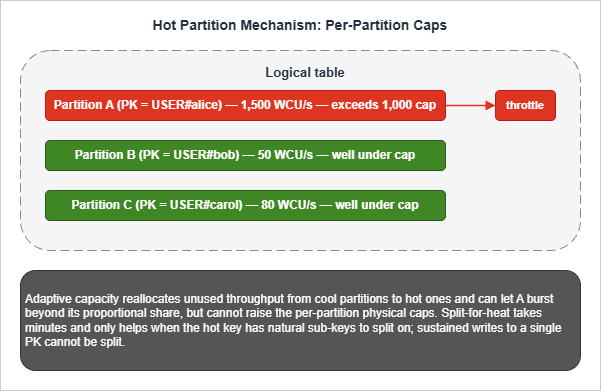
ThrottledRequests, ReadThrottleEvents, and WriteThrottleEvents.The AWS Database Blog series Scaling DynamoDB: How partitions, hot keys, and split for heat impact performance is the most thorough public explanation of the underlying mechanics, including the surprising result that LSIs prevent split-for-heat (because the partition cannot split without the LSI partition splitting in lockstep, and LSIs are pinned to the base partition).
5.2 Write Sharding — Random vs Calculated vs Calendar
The three write-sharding strategies are different trade-offs, not three forms of the same idea.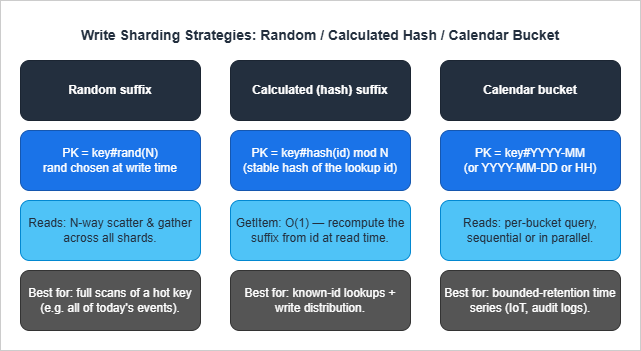
Calculated (hash) suffix distributes writes uniformly and lets
GetItem retrieve a known item in O(1) by recomputing the hash. Use when most reads target a known ID. The hash function must be stable (hash(orderId) % N works only if N never changes — see the AWS GSI Sharding for High-Cardinality Indexed Attributes for a worked example).Calendar bucket (Pattern P10) bounds the per-PK item collection size by time and naturally distributes writes if the underlying entity is many devices each writing into their own bucket. Use for IoT and audit-log workloads.
The three are composable. A high-volume IoT pipeline might use
PK = DEVICE#<id>#<YYYY-MM-DD>#<hash(eventId) % 4> — calendar bucket and per-device hash sharding within each bucket.5.3 Read Sharding — Replicated Items and Scatter-Gather
Read sharding (Pattern P18) targets the 3,000 RCU/s read cap. The base item lives once in the table, but its position in a leaderboard or popularity ranking is replicated across N GSI partitions by setting ashard attribute. Reads scatter across shards, gather, merge.The cost is double:
- Storage: the GSI duplicates the projected attributes in every shard partition.
- Per-read RCU: the read cost is proportional to N regardless of how many items are returned.
GetItem and Query results at microsecond latency without changing the schema.5.4 Time Bucketing and Bounded Cardinality
Time bucketing (Pattern P10) is structurally a form of write sharding where the suffix is a time period. It additionally bounds item-collection growth, which matters when LSIs are present (10 GB ceiling) and when aQuery(PK=...) would otherwise grow unboundedly.A practical rule for picking bucket granularity:
- Daily buckets when peak per-key writes are 100-1,000/s.
- Hourly buckets when peak per-key writes are 1,000-10,000/s.
- For sustained writes above 10,000/s on a single key, bucket and shard within bucket (
PK = METRIC#<name>#<YYYY-MM-DD-HH>#<shard>).
userIdentity.principalId = "dynamodb.amazonaws.com", so archival Lambdas can distinguish retention deletes from user-initiated deletes.5.5 Hot Partition Anti-Patterns
These designs create hot partitions and should never appear in production:- Monotonically increasing PK (
PK = INVOICE#<auto_increment>) with high write rate — every write hits the most recent partition. Use ULID/KSUID instead. - Single global counter item without sharding (Pattern P20). The single item can only sustain ~1,000 WCU/s.
- Single status value GSI partition (
GSI1PK = "PENDING") when most items are pending. The constant key is a hot read partition. - Per-day PK (
PK = "2026-05-06") with global write fan-in. Today's date is one partition. Either calendar-shard with a suffix or per-tenant calendar key.
6. Migration and Re-Keying Strategies
Re-keying — changing PK or SK schema — is the most operationally expensive change you can make to a live DynamoDB table. The reason is structural: DynamoDB has noALTER TABLE for the primary key. A re-key requires a parallel-table migration with synchronization, validation, and a controlled cutover.6.1 The Five-Step Online Re-Keying Procedure
This is the procedure that has worked across multiple production migrations, including the MuleSoft online migration on DynamoDB case study and AWS-recommended approaches.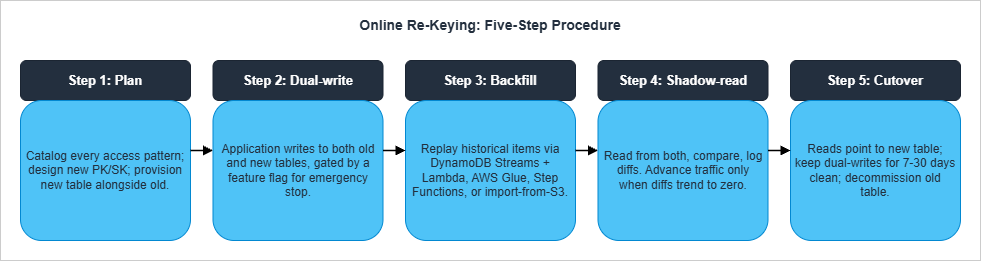
grep for query, get_item, scan). Group them by access pattern (not by table). Design the new key schema using the access-patterns worksheet from the Single Table Design guide. Provision the new table alongside the old.Step 2 — Dual-write. Every mutation writes to both tables in the same Lambda or service. Wrap the dual-write behind a feature flag for emergency rollback. Fail closed: if either write fails, the request fails. Run for at least 24 hours to confirm no operational regressions.
Step 3 — Backfill historical data. Items that existed before dual-write turned on must be backfilled. Three options:
- DynamoDB Streams + Lambda from the start (requires kicking off a Stream replay or
ContinueProcessingfor already-processed records — operationally tricky). - AWS Glue with the DynamoDB connector (best for tables under ~1 TB).
- Step Functions distributed map over a parallel
Scan(best for large tables, lets you tune parallelism). - DynamoDB import from S3 for an export-import path: export to S3 (point-in-time export), transform offline, import to a new table.
Step 4 — Shadow-read. In a controlled subset of traffic (1% → 10% → 50% → 100%), read from both tables and compare results. Log all diffs. Do not advance the percentage until diffs trend to zero. Common diff sources: timing (item updated between the two reads), missing backfilled items, type coercion bugs in transformation code.
Step 5 — Cutover. Switch reads to point only at the new table. Continue dual-writing for at least one full retention cycle (7-30 days depending on your audit requirements) so you can roll back if a regression is discovered. Stop dual-writes. Decommission the old table — but keep an export in S3 for at least one quarter.
6.2 Backfill Choice Matrix
* You can sort the table by clicking on the column name.| Backfill mechanism | Best for | Caveat |
|---|---|---|
| DynamoDB Streams + Lambda | Tables <100 GB; live at start of migration | Stream is 24 h retention only; not for re-runs |
| AWS Glue + DynamoDB connector | Tables <1 TB; one-time analytic-style transform | Provisioned capacity needs sizing; slow on huge tables |
| Step Functions distributed map + parallel Scan | Large tables; need fine-grained parallelism control | Scan cost is real; rate-limit to avoid base-table throttling |
| Export to S3 → transform → Import from S3 | Tables >1 TB; offline transformation | No throughput consumed on the source table; new table is created from the import (cannot import into an existing table) |
6.3 GSI Changes — Add and Remove
Unlike re-keying the primary key, GSI changes are online operations:- Add a GSI: backfill is automatic; the GSI becomes available when status reaches
ACTIVE. Costs WCU on the GSI partition during backfill, so provision the new index generously (or use on-demand) to avoid extending the build time. Backfill duration scales with table size and is typically the dominant cost of the operation. - Delete a GSI: a metadata operation; immediate. The GSI's storage is reclaimed.
- Change a GSI's projection: not directly supported. You must add a new GSI with the desired projection and then delete the old one. The transitional period costs double GSI storage.
GSI1, GSI2, GSI3) free for future overload patterns. Adding a GSI later is cheap; designing the schema to not need one is cheaper still.6.4 Common Re-Key Pitfalls
- Forgetting reserved attributes. When the new schema introduces
GSI1PK,GSI1SK,Type, items must have these attributes from the start of dual-write or the GSI will be sparse in unintended ways. - Type coercion in transforms. DynamoDB has typed attributes (
Sfor string,Nfor number). TransforminguserId = 123(number) toPK = "USER#123"(string) is a type change that often breaks deserialization on the read side. - TTL changes mid-migration. Migrating items past their TTL during dual-write quietly drops them.
- Stream backlog during cutover. Cutover under heavy stream load can leave the new table behind the old by minutes. Pause at low-traffic windows.
7. Anti-Patterns Catalog
A summary of the design choices that look reasonable and fail in production. Each has been covered in context above, gathered here for reference.* You can sort the table by clicking on the column name.
| # | Anti-Pattern | Why It Fails | Better Approach |
|---|---|---|---|
| A1 | Sequential numeric PK from a centralized counter (USER#0001, USER#0002 ...) | Requires a global counter as a single writer; IDs are predictable and trivially enumerable; PK carries no embedded metadata | ULID, KSUID, UUIDv7, or hashed natural key |
| A2 | No type prefix (PK = "u_001") | Cannot mix entity types in a single table; debug is painful | Always prefix (USER#, ORDER#) |
| A3 | PK = current_date | Today's PK is hot for the whole day | Calendar shard with suffix (Pattern P17) |
| A4 | Scan in production code paths | Every read is full-table; cost scales with size | Query against an index designed for the access pattern |
| A5 | FilterExpression for >10% of items | Filter runs after RCU is consumed | Redesign keys so filter is unnecessary |
| A6 | LSI to "improve query flexibility" | 10 GB cap activates; cannot be removed; prevents split-for-heat | GSI |
| A7 | One GSI per access pattern | 20-GSI ceiling; storage cost grows linearly | Overload GSIs (Section 3.3) |
| A8 | Single global counter item | 1,000 WCU/s ceiling | Sharded counter (Pattern P20) |
| A9 | Constant GSI PK on 80% of items | Hot read partition on the GSI | Time-bucket the GSI key |
| A10 | Reading after write through a GSI | GSI is eventually consistent | Read base table with ConsistentRead=True |
| A11 | No ConditionExpression on FSM transitions | Invalid state transitions silently succeed | Always condition on expected current state |
| A12 | TransactWriteItems for all multi-item writes | 2× WCU cost | Use only when invariants must hold across items |
| A13 | Storing large blobs in DynamoDB | 400 KB item ceiling; full item rewrite per update | Pointer to S3 |
| A14 | BatchWriteItem without retry on UnprocessedItems | Partial failures silently lost | Always retry with exponential backoff |
| A15 | Unbounded item collection per PK | Performance degrades; LSI 10 GB ceiling | Time-bucket or split into child table |
| A16 | TTL for correctness-critical deletion | Up to 48 h lag | Filter on status attribute and use TTL only for storage cleanup |
| A17 | ConsistentRead=True everywhere | 2× RCU; rejected on GSIs | Use only when the read-after-write boundary requires it |
| A18 | Forgetting Type attribute on overloaded items | Stream consumers cannot route updates; debug pain | Set Type on every item |
8. Summary — The Decision Order
When in doubt, follow this order — every step depends on the previous:- Access patterns. Enumerate every read and write in plain English before drawing any keys. If a pattern requires
ScanorFilterExpressionon a large fraction of items, redesign the access pattern before redesigning the keys. - PK schema. Choose a high-cardinality, evenly-distributed PK with a type prefix. If a single logical entity exceeds 1,000 WCU/s or 3,000 RCU/s, plan write-sharding or read-sharding into the design from day one.
- SK schema. Decide hierarchical, composite, or sortable based on the dominant range query. Use type-prefixed SK segments (
ORDER#,EVENT#,ADDR#). - GSIs. Design the minimum GSIs that serve the remaining access patterns, prefer overloading over per-pattern indexes, leave 2-3 reserve slots, and accept eventual consistency.
- LSIs. Use only when strong consistency on an alternate sort is required and item collections are guaranteed under 10 GB forever.
- Sharding. Pre-plan write/read sharding for any entity with hot-partition risk. Pick
N = ceil(peak_load / per_partition_cap). - Code. Implement against the access-pattern catalog. Treat any design drift (Scan in prod, FilterExpression on majority, dynamic key construction in app code) as a code review failure.
9. References
Official AWS Documentation
- Best Practices for Designing and Architecting with DynamoDB
- Best Practices for Designing and Using Partition Keys Effectively
- Using Write Sharding to Distribute Workloads Evenly
- Best Practices for Using Sort Keys to Organize Data
- Best Practices for Using Secondary Indexes
- GSI Sharding for High-Cardinality Indexed Attributes
- Best Practices for Modeling Relational Data in DynamoDB
- Best Practices for Managing Many-to-Many Relationships (Adjacency Lists)
- Using Global Secondary Index Overloading
- Best Practices for Managing Many-to-Many Aggregations and Sparse GSI Patterns
- Best Practices for Handling Time Series Data in DynamoDB
- DynamoDB Service Quotas
- DynamoDB TTL
AWS Database Blog
- Scaling DynamoDB Part 1: Loading
- Scaling DynamoDB Part 2: Querying
- Scaling DynamoDB Part 3: Best Practices
- Choosing the Right DynamoDB Partition Key
- Choosing the Right Number of Shards for Your Large-Scale DynamoDB Table
- Effective Data Sorting with Amazon DynamoDB
- Single-Table vs. Multi-Table Design in Amazon DynamoDB
- Implementing Geohashing at Scale in Serverless Web Applications
- Data Modeling for an Internet-Scale OLTP System
Industry References
- Alex DeBrie — Single Table Design
- Alex DeBrie — One-to-Many Relationships
- MuleSoft Online Re-Keying Migration Case Study
- Rick Houlihan — DAT401 (re:Invent 2018, foundational design patterns)
Related Articles in This Series
- Amazon DynamoDB Single Table Design Complete Guide — The companion philosophy and 5-pattern article
- Summary of Differences and Commonalities in AWS Database Services using the Quorum Model — How DynamoDB's consistency model relates to Aurora, Neptune, and OpenSearch
- AWS History and Timeline — When DynamoDB GSI/LSI/on-demand/PITR/Streams were added
- DynamoDB Capacity Calculator Tool — Sanity-check RCU/WCU estimates for the patterns above
References:
Tech Blog with curated related content
Written by Hidekazu Konishi