Forensic Evidence on AWS - Acquisition Order, the Forensics Account, Re-Encryption, and EBS Snapshot Lock
First Published:
Last Updated:
This article treats preserving evidence as separating it from the compromised account's control. It asks in what order evidence is acquired, which account it moves to, which key re-encrypts it, and which lock it is placed under, and it shows each step of that handoff in the words of the AWS documentation. The main sources are five: FND05-BP10 Prepare forensic capabilities in the AWS Well-Architected Framework, cyber forensics in the AWS Security Reference Architecture (AWS SRA), the AWS Security Incident Response Guide, Automated Forensics Orchestrator for Amazon EC2 and EKS, and the snapshot lock, sharing, and copy pages of the Amazon EBS User Guide.
Within what the primary sources state, the answers are as follows. The Automated Forensics Orchestrator's disk acquisition process involves copying the snapshot within the compromised account, then sharing it with a dedicated forensics account. Finally, it copies the snapshot again using a KMS key of the forensics account. The documentation cites two reasons for this final copy: to protect against the original account being compromised and to safeguard against the shared snapshot being deleted. Amazon EBS snapshot locks prevent anyone from deleting a locked snapshot. However, it is still possible to delete the KMS key used to encrypt the locked snapshot. According to the documentation, the only way to delete a snapshot locked in compliance mode before the lock expires is to close the account. The order of acquisition steps varies across the sources. Some sources do not include an isolation step, while others place it after the acquisition, and others list it first among their phase names.
On November 16, 2026, two developments occurred. First, Amazon EBS added the ability to associate additional KMS keys with snapshots. This now allows snapshots encrypted with AWS managed keys to be shared with other accounts. However, this association does not re-encrypt the data. The second development was a revision to the AWS Well-Architected Framework. According to an announcement on the AWS Architecture Blog, preparation for forensics has moved to the new Cloud Foundations, and the "Prepare forensic capabilities" section has been updated from SEC10-BP03 to FND05-BP10. The current SEC10-BP03 now addresses a different topic.
This article is neither an introduction to incident response, nor an explanation of forensic analysis techniques. It is not a user guide for tools, nor does it describe attack methods. Pricing information is also not included. This article shows only the design of the evidence handoff and the decisions that the design leaves to you, in the words of the sources. The information presented was verified on November 17, 2026.
Related articles on this site:
- AWS Security Incident Response Playbooks - First-Response Runbooks for Common Scenarios
- Amazon GuardDuty Extended Threat Detection Architecture - Attack Sequences, Runtime Monitoring, and Response Automation
- AWS Backup Data Protection and Governance - Backup Plans, Vault Lock, and Cross-Account Copy Design
- Object Lock, Legal Holds, and Event Holds in Amazon S3 - Who Can Shorten a Retention Period, What a Hold Adds, and When the Retention Clock Starts
- AWS Multi-Account Operational Patterns - Control Tower, Organizations, SCPs
- Cross-Account Sharing by Service on AWS - AWS RAM Resource Shares, Service-Native Sharing, and What Each Route Leaves the Owner Able to Stop
- Stopping an AI Agent on AWS - What Each Control Stops, What Keeps Running, and Who Can Undo It
- AWS History and Timeline regarding Amazon EBS - Overview, Volume Types, Features, Summary of Updates, and Introduction
Table of Contents
- 1. Scope and Assumptions
- 2. How to Read the Tables
- 3. What to Prepare Before an Incident
- 4. The Order of Acquisition
- 5. How a Snapshot Leaves the Compromised Account
- 6. Keeping the Evidence from Being Deleted
- 7. Originals, Copies, and the Chain of Custody
- 8. What the Automation Covers
- 9. Where the Sources Disagree and What They Do Not Say
- 10. Decisions This Design Leaves to You
- 11. Failure Modes
- 12. Frequently Asked Questions About Forensic Evidence on AWS
- 13. Summary
- 14. References
1. Scope and Assumptions
This chapter will first define the intended audience, the scope of this article, the sources this article read, and the terminology used throughout this article. The conclusions, stated first, are the following eight.- The location for forensics accounts varies by source. FND05-BP10 describes a configuration that separates the security OU and the forensics OU. AWS SRA describes the forensics account as a type of security tooling account within the security OU, with the option of creating a separate forensics OU.
- The handling of Regions also varies by source. FND05-BP10 presents it as a choice between a single account or accounts per Region. If using accounts per Region, it notes that SCPs can prevent copying data outside of the Region. AWS SRA states that forensic capabilities should be deployed in every available Region, and that SCPs should restrict Regions that are not used.
- AWS SRA recommends pre-configuring the KMS key policy to ensure that the entities used for forensics can access the keys. Modifying the key policy after a security event could potentially impact operations.
- The order of steps varies across sources. FND05-BP10 and the AWS Security Incident Response Guide do not include isolation as a step. Automated Forensics Orchestrator isolates after acquiring memory. Automated Incident Response and Forensics Framework lists containment first among its phase names, and isolates after acquisition in its workflow description.
- For Automated Forensics Orchestrator, disk acquisition involves three steps: a copy in the compromised account, sharing with the forensics account, and copying with the forensics account's key. The Amazon EBS User Guide also recommends copying shared encrypted snapshots using your own key.
- Associated KMS keys, added on November 16, 2026, change the sharing path, but do not re-encrypt the data. Creating a volume from an encrypted snapshot requires access to the key that encrypts that snapshot.
- Amazon EBS snapshot locks prevent snapshot deletion, but do not prevent deletion of the KMS key that encrypts the snapshot. The only way to delete a snapshot locked in compliance mode before the lock expires is to close the account.
- Regarding handling of the original evidence, the sources state that analysis should be performed on an exact replica, and that work should be done on copies of copies. A chain of custody is a record that documents the transfer of evidence from one person to another, including when and how it was transferred.
1.1 Who This Article Is For
This article is intended for security engineers and platform engineers who manage multiple AWS accounts within AWS Organizations and already have security accounts and Organizational Units (OUs) in place. Specifically, this article targets readers who may believe any of the following statements to be true:- Taking EBS snapshots during an incident will preserve evidence.
- Sharing snapshots with a forensics account will make the snapshots belong to that forensics account.
- Locking a snapshot will guarantee that it remains readable and preserved.
- AWS recommends that forensics accounts be placed outside of security OUs.
- Every source places isolation before evidence collection.
Each of these holds only in part, or not at all, depending on which statement in which source you read.
1.2 What This Article Covers and What It Does Not
This article addresses the following topics:- Locations for the forensics OU and accounts, their distribution by Region, service control policies (SCPs), and role assignments.
- Documentation regarding the order of acquisition and where isolation is placed.
- The sharing, copying, and re-encryption a snapshot goes through until it leaves the compromised account, and the key that applies at each step.
- The two modes of Amazon EBS snapshot locking and which snapshots should be locked.
- Distinguishing between original and copy data, and maintaining a chain of custody record.
- The procedures automated by Automated Forensics Orchestrator for Amazon EC2 and EKS, and the decisions that remain the responsibility of the user.
This article does not cover the following topics.
- Analysis techniques and command syntax for memory and disk analysis.
- Attack methods.
- Pricing.
- Procedures for the initial response to security incidents. The existing article AWS Security Incident Response Playbooks - First-Response Runbooks for Common Scenarios covers them. Its Section 2.3 states the principle of preserving evidence before destroying resources. This article covers the design of the handoff for that preservation.
- Design for detection. The existing article Amazon GuardDuty Extended Threat Detection Architecture - Attack Sequences, Runtime Monitoring, and Response Automation covers it. This article begins after detection has occurred.
- Design for backups and AWS Backup Vault Lock. The existing article AWS Backup Data Protection and Governance - Backup Plans, Vault Lock, and Cross-Account Copy Design covers them.
- Details of Amazon S3 Object Lock and legal holds. The existing article Object Lock, Legal Holds, and Event Holds in Amazon S3 - Who Can Shorten a Retention Period, What a Hold Adds, and When the Retention Clock Starts covers them. This article touches on Object Lock only in Section 6.5, as a place for files such as memory dumps.
- The AWS Security Incident Response service. The AWS Security Incident Response Guide referenced in this article is a separate document from this service.
- Procedures for stopping and containing AI agents. The existing article Stopping an AI Agent on AWS - What Each Control Stops, What Keeps Running, and Who Can Undo It covers them.
The Forensics account page of AWS SRA and the Automated Forensics Orchestrator pages both state that they make no claim that their content is suitable for the investigation of crime, or that collected evidence can be used in a court of law. This article follows the same principle. Handling evidence is a matter to be determined in consultation with legal counsel.
1.3 Confirmation Date and Sources
This article was verified on November 17, 2026, using the following materials. Throughout the text, these will be referred to by their short names, as indicated in parentheses.- AWS Well-Architected Framework's FND05-BP10, "Prepare forensic capabilities" (FND05-BP10). This item was added in the revision dated November 16, 2026. This article also read the release notes and the announcement article on the AWS Architecture Blog from the same date.
- The November 6, 2024 version of the Security Pillar, SEC10-BP03, "Prepare forensic capabilities" (the former SEC10-BP03). The page at this URL could still be read on the confirmation date.
- The following pages from AWS SRA – cyber forensics: introduction, "Forensics in the context of security incident response," "Forensics account," and "Document history" (AWS SRA). According to the "Document history," this document was separated from the "AWS SRA – core architecture" section on December 22, 2025.
- The PDF version of AWS Security Incident Response Guide (IR Guide). The publication date is January 1, 2023, and the most recent revision is dated May 11, 2023.
- The "Automate incident response and forensics" pattern from AWS Prescriptive Guidance (automation pattern). The framework that this pattern deploys is called the Automated Incident Response and Forensics Framework.
- The following pages from the implementation guide for Automated Forensics Orchestrator for Amazon EC2 and EKS (AFO): welcome, "Architecture overview," "Forensic memory and disk acquisition service," and "Disk forensics acquisition workflow," as well as the "Guidance" page on the AWS Solutions Library.
- The following pages from the Amazon EBS User Guide (EBS UG): "Snapshot lock" (overview, concepts, considerations, control access), sharing snapshots, sharing KMS keys, copying snapshots, and "Associated KMS keys." Also, the following from the Amazon EC2 API Reference:
LockSnapshot,AssociateKmsKeyId, andDisassociateKmsKeyId. - The "Amazon EC2 security group connection tracking" section from the Amazon EC2 User Guide (EC2 UG).
- "Delete an AWS KMS key" in the AWS KMS Developer Guide, "Locking objects with Object Lock" in the Amazon S3 User Guide, and the page on closing a member account in the AWS Organizations User Guide.
- Two "What's New" announcements (November 15, 2023, regarding snapshot lock, and November 16, 2026, regarding associated KMS keys), and the "New – Amazon EBS Snapshot Lock" article from the AWS News Blog.
- Two articles from the AWS Security Blog: "Forensic investigation environment strategies in the AWS Cloud" (published October 28, 2021 – the environment article), and "How to automate forensic disk collection in AWS" (published August 24, 2021 – the disk article).
- IETF RFC 3227, "Guidelines for Evidence Collection and Archiving" (published February 2002 – RFC 3227).
On the verification date, the locations of two documents had changed. One was the IR Guide. The URLs for each page of the HTML were redirecting to the AWS Security Incident Response user guide; however, those specific pages did not exist at the redirect destination. This article references the PDF version obtained on the verification date. The other document was the Security Pillar. The entry page for the Security Pillar was redirecting to the Security page within the integrated framework. The URL of the former SEC10-BP03 could still be read on the verification date. Both may change after this article is published.
1.4 Terms Used in This Article
This article uses the following terms with the following meanings:- Compromised Account: An account that contains a compromised EC2 instance. AFO refers to the application account, the disk article refers to the monitored account, and AWS SRA refers to a potentially compromised account.
- Forensics Account: An account used to collect, store, and analyze evidence. This corresponds to the Forensics account in AWS SRA and FND05-BP10.
- Original Key: Within a compromised account, the KMS key that encrypts the original snapshot.
- Forensics Key: A customer managed key held by the forensics account.
- Handoff: The process where an account holding evidence, the key required to read the evidence, or the entity capable of deleting the evidence is replaced with another.
- Original: The initial evidence obtained and preserved for safekeeping.
- Working Copy: A copy created from the original, used for analysis.
This article refers to the AWS Security Incident Response Guide as the IR Guide. AWS services that begin with the same phrase, "AWS Security Incident Response," are outside the scope of this article.
2. How to Read the Tables
This chapter defines the columns in the tables from Chapter 3 through Chapter 9, as well as how the state of the sources is written. The terms for the state of the sources are shared with this site's Moving an Amazon DynamoDB Table Across Accounts and Regions - What Carries Over, What You Set Again, and Where Control Changes Hands.2.1 Terms for the State of the Sources
This article uses four terms to describe the condition of the sources. This article uses these English spellings in table cells as well.- Stated: The source contains a statement regarding the matter in question.
- No statement found: Despite searching using different keywords and examining different categories of sources, no relevant statement could be found. This does not indicate that the matter is nonexistent or impossible.
- Sources disagree: The statements from two different sources regarding the same matter are inconsistent. This includes cases where the statements directly contradict each other, as well as cases where the scope, intensity, or subject matter differs, making it impossible to determine which statement is correct based on the text. This article also uses this term for two statements within one source. This article will present both statements and their sources without designating either as incorrect.
- Inference: This represents an inference made by this article, and is not a statement found in any of the sources. This article will clearly indicate when a statement is an inference.
All dates referenced in this article will be presented with the year. Pages may be rewritten after the confirmation date.
2.2 What the Order Table Shows
The order table in Chapter 4 has one row for each source. The columns are the sequence of phases each source gives, where isolation is placed, how volatile data is handled, and the section the statement comes from. If a source does not specify an order, the table indicates "No statement found." This article does not merge the orders in the sources into one.3. What to Prepare Before an Incident
This chapter covers what should be prepared before an incident. It focuses on four key areas: the location of forensics accounts, their deployment per Region and SCPs, the roles within those accounts, and preparing key policies in advance. FND05-BP10 states that accounts should be prepared in advance, as follows:Provision forensics accounts and configure automation before an incident occurs.The former SEC10-BP03 gave the time it takes to provision new accounts as the reason.
3.1 Where the Forensics Account Sits
The Organizational Unit (OU) where the forensics account is located varies by source. The first implementation step of FND05-BP10 reads:Create an account structure with a security OU and a forensics OU.FND05-BP10 details the process of placing log collection accounts and accounts for security tools within the "security" OU, while placing the forensics account within a "forensics" OU. A diagram on the same page illustrates an organizational structure that separates the "security" and "forensics" OUs. The former SEC10-BP03 also mentioned both the "security" OU and the "forensics" OU. The example in the environment article uses separate OUs and accounts for security and forensics.
AWS SRA describes the forensics account as a type of "security tooling" account located within the "security" OU.
The Forensics account is a separate and dedicated type of Security Tooling account that is within the Security OU.AWS SRA also mentions the option of creating a separate "forensics" OU.
You can create a separate Forensics OU to host this account if you want to further emphasize the separation of duties, least privilege, and restrictive guardrails.AWS SRA emphasizes that, regardless of the OU location, the "security tooling" account and the "forensics" account should be kept separate. It provides four reasons for this separation: differences in teams and permissions; the fact that automation for the "security tooling" account is best suited for the AWS control plane, while the "forensics" account handles data from operating systems and applications; potential requirements for additional access restrictions or legal holds based on organizational or regulatory needs; and the possibility that malicious code, such as malware, may need to be analyzed in a secure environment. Even if the same team manages both, the page recommends keeping the accounts separate.
We recommend separate Security Tooling and Forensics accounts, even if your organization's forensics and security resources are on the same team and all functions can be performed by any member of the team.Table 1 lists where each source places the forensics account.
| Source | Location of Forensics Accounts | Status |
|---|---|---|
| FND05-BP10 (November 16, 2026) | Forensics OU. Separate from the Security OU. | Stated |
| Former SEC10-BP03 (November 6, 2024 version) | Forensics OU. Separate from the Security OU. | Stated |
| AWS SRA | Within the Security OU. A separate Forensics OU is an option. | Stated |
| Environment Article (2021) | As an example, a separate OU for forensics. | Stated |
| Disk Article (2021) | Places the final copy of the evidence in the security account. | Stated |
| Automation Pattern | Separate the security account and the forensics account. No OU is specified. | No statement found |
In Table 1, the FND05-BP10 row and the AWS SRA row disagree (Sources disagree). However, no source in Table 1 places the forensics account in an account used for production workloads.
FND05-BP10 states:
Isolate forensics accounts from production workloads.The discrepancy lies in whether to place the forensics account within the same OU as the security account, or in a separate OU. SCPs applied to an OU apply to all accounts within that OU. As an inference of this article, if the goal is to apply strict SCPs only to the forensics account, placing it in a separate OU means you do not need to consider the effect on the other accounts in the Security OU. The restrictive guardrails that AWS SRA recommends for a separate Forensics OU likely refer to this point.
3.2 One Account or One per Region
The approach to Regions varies by source. For FND05-BP10, the text specifies that whether to use a single account or accounts per Region should be determined based on data sovereignty requirements. It further outlines the advantages of using accounts per Region.With per-Region accounts, you can apply SCPs that block resources from being copied outside the intended Region.AWS SRA states that forensic capabilities should be deployed in every available Region.
The forensic capabilities described in this section should be deployed into every available AWS Region, even if your organization isn't actively using the capabilities.The same paragraph also indicates that in Regions where resources are not planned for use, AWS resource creation should be restricted using SCPs. Furthermore, it recommends keeping investigations and data retention within the same Region, as follows:
Additionally, maintaining investigations and storage of forensic artifacts within the same Region helps avoid issues with the changing regulatory landscape of data residency and ownership.The environment article calls a forensics account per Region a good practice.
Having a forensic investigation account per Region is also a good practice, as it keeps the investigative capabilities close to the data being analyzed, reduces latency, and avoids issues of the data changing regulatory jurisdictions.The handling of Regions also involves the characteristics of EBS snapshots. The EBS UG states that snapshots remain within the Region where they were created.
Snapshots are constrained to the Region in which they were created.To share snapshots with another Region, they must first be copied to that Region before sharing. As an inference of this article, by using Region-specific forensics accounts, evidence snapshots can be transferred to a forensics account within the same Region without needing to copy them outside of that Region. If using a single account, cross-Region copying is needed, and you need to decide whether that copy meets data residency requirements. The former SEC10-BP03 also emphasized the need to carefully verify compliance with data sovereignty requirements when using forensics accounts that span multiple Regions.
3.3 Roles in the Forensics Account
The environment article provides the following four examples of roles within a forensics account: Responder, which acquires evidence; Investigator, which analyzes evidence; Data custodian, which copies, moves, deletes, and expires evidence; and Analyst, which utilizes forensic reports. The article further specifies that the Investigator should only have read access to the original evidence, and that read access should be denied to any roles that do not need to handle the evidence.The automation pattern gives, as one reason to separate the Security account and the Forensics account, the ability to differentiate between the Responder, which acquires evidence, and the Investigator, which analyzes it.
From the handoff view of this article, roles decide which entities can delete evidence. In snapshot lock governance mode, discussed in Sections 6.1 and 6.4, only entities with the
ec2:UnlockSnapshot permission—the ability to unlock snapshots—can delete them after unlocking. As an inference of this article, restricting this permission to the Data custodian role (as defined in the environment article) and not granting it to the Responder or Investigator aligns with the role separation strategy.3.4 Key Policies Prepared in Advance
Snapshots of compromised account EBS volumes are encrypted with the original key. For a principal in the forensics account to read and re-encrypt these snapshots, the key policy for the original key must grant that entity permission to use the key. AWS SRA states:An organization's AWS KMS key policies should allow authorized IAM principals for forensics to use the key to decrypt data in the source account and re-encrypt it in the Forensics account.AWS SRA also recommends that this permission be pre-configured in all potentially affected keys.
These permissions should exist on all KMS keys that can be used to encrypt resources on AWS that could be collected during a forensics investigation.The rationale provided by AWS SRA highlights the potential impact of modifying key policies after the fact.
If you update the KMS key policy after a security event, the subsequent resource policy update for a KMS key that's in use might impact your business.The same section continues by noting that permission-related issues can extend the time required for incident response (MTTR). AWS SRA also suggests managing keys centrally through Infrastructure as Code (IaC) and ensuring that only authorized IAM entities have the minimum necessary permissions.
This preparation appears to conflict with standard operational practices. It would involve including forensic entities in the key policies for production keys, even though these entities are not typically used in day-to-day operations. The guidance from AWS SRA indicates that proactively configuring these permissions is preferable to making changes after an incident. Modifying key policies during an incident could impact the services that rely on those keys. As an inference of this article, in the urgency of a response, there is a risk of making errors when attempting to modify these policies.
AWS SRA procedures involve a process that allows forensic investigators to utilize the original key directly. The sources also show two routes that do not let the other side use the original key. One is step 1 of AFO, the copy. Within the compromised account, you can copy a snapshot using the key shared with the forensics account (see Section 5.1). The other is the associated KMS key added on November 16, 2026. You can associate a different customer managed key with the snapshot (see Section 5.4). In both cases, the operations are performed within the compromised account. The AFO Disk forensics acquisition workflow states that the Lambda function that takes the snapshot assumes a role in the application account. As an inference of this article, whichever route you choose, the principal that runs in the compromised account and the key shared with the forensics account need to be prepared before the incident. Regarding the necessary permissions for association, the EBS UG lists
ec2:AssociateKmsKeyId and the KMS permissions required for Amazon EBS to utilize the KMS key. The pages this article read do not state whether those KMS permissions are needed on the key being associated or on the original key. This article does not state that step 1 of AFO or an associated KMS key replaces the advance preparation in AWS SRA. Which route to use is something to decide and test before an incident.4. The Order of Acquisition
This chapter lays out what each source says about what to acquire in which order. In conclusion, the order from volatile data to disk storage is a pattern reflected in RFC 3227, and AWS sources also present the acquisition of volatile data alongside disk storage. Where isolation is placed differs by source. This article does not assert that any single order is correct. Figure 1 shows the acquisition steps and what each step can lose. Because where isolation is placed differs by source, Figure 1 does not draw isolation as a step; instead, it lists where each source places isolation in a band below the steps.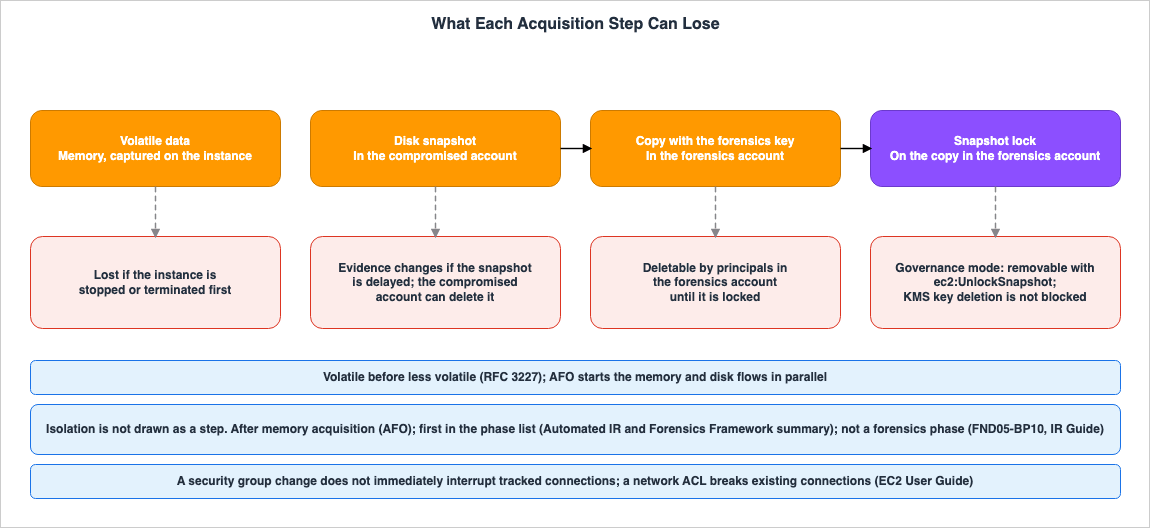
4.1 What Each Source Says About Order
Table 2 lists the descriptions of order as presented in each source. Phase names keep the spelling of each source.| Source (Section) | Sequence of Steps Described | Isolation Location | Volatile Data Details |
|---|---|---|---|
| FND05-BP10 (Implementation guidance) | Collection, Examination, Analysis, Reporting | Not a phase | Collection includes memory dumps |
| Former SEC10-BP03 | Collection, Examination, Analysis, Reporting | Not a phase | Collection includes memory dumps |
| IR Guide (Develop forensics capabilities) | Collection, Examination, Analysis, Reporting | Containment is covered in a separate chapter (Containment) | Collection includes memory dumps |
| AWS SRA (Forensics account) | collection, examination, analysis, reporting | Include both isolation and quarantine procedures within the Forensics account. Assess the impact on operations before quarantine. | Volatile data on EC2 instances can be captured only on the instance itself. |
| AFO (Welcome) | acquisition, isolation, investigation, reporting | After acquisition | List acquisition of memory and disk images. |
| AFO (Architecture overview and Forensic memory and disk acquisition service) | Begin acquiring memory and disk images in parallel. | After acquiring memory. If isolation is specified, isolate regardless of the results of memory acquisition. | Describes the process of acquiring memory. |
| Automation Pattern (Summary) | Containment, Acquisition, Examination, Analysis | First in the list of phase names. | List as a target for examining acquired memory and disk images. |
| Automation Pattern (Workflow and Epics) | Apply the "Contain" tag after acquiring memory and disk. | After Acquisition | Acquire memory and disk. |
| RFC 3227 (Sections 2.1 and 2.2) | From most volatile to least volatile. | Do not shut the system down until evidence collection is complete. Describes the risk of disconnecting from the network. | Acquire memory before disk. |
| Disk Article | Take snapshots as close as possible to the time of the incident. | No statement found | List as a target for collecting memory dumps. |
The automation pattern page describes this in two ways. The "Summary" section lists items in the following order:
The Automated Incident Response and Forensics framework follows a standard digital forensic process consisting of the following phases: Containment Acquisition Examination AnalysisIn contrast, the "Workflow" section, also on the same page, describes a process that first acquires memory and disk, then applies the "Contain" tag, and subsequently isolates it using IAM roles and security groups. The Epics section also states that the "Contain" tag is applied again at the end of the process.
The Lambda function will also retag the asset at the end (or on failure) with Contain.As an inference of this article, the order in the "Summary" section can be read as a list of phase names, rather than a sequence of operations. However, the sentence before it in the same Epics row also states that applying the tag automatically starts isolation and the acquisition of memory and disk. This article treats where this page places isolation as Sources disagree.
4.2 Volatile Data First
RFC 3227 states that when gathering evidence, you should proceed from the most volatile data to the less volatile, and its example order puts memory before disk.When collecting evidence you should proceed from the volatile to the
less volatile.AWS SRA states that volatile data on EC2 instances can be captured only on the instance itself.
For example, capturing volatile data on EC2 instances is possible only on the instance itself, and might include valuable data that can be used as forensic evidence.Combining these two points, stopping or terminating an instance results in a lost opportunity to collect volatile data. RFC 3227, in Section 2.2, advises against stopping the system before evidence collection is complete. The existing article AWS Security Incident Response Playbooks - First-Response Runbooks for Common Scenarios, in Section 2.3, also recommends taking EBS snapshots before terminating the instance.
Disk snapshots also have time constraints. The disk article states:
It is important to take a point-in-time snapshot of an instance as close in time to the incident as possible.The same article further explains that if delayed, the data on the disk may change or be lost, rendering the evidence unusable. AFO starts memory and disk acquisition in parallel. As an inference of this article, acquiring memory first and avoiding delays in taking snapshots can be effectively achieved through parallel operations.
4.3 When to Isolate
Isolation can stop an attacker's actions, but it can also impact evidence. The sources state three things about when to isolate.First, consider the impact on operations. AWS SRA states:
Before you quarantine an EC2 instance, weigh its overall business impact and criticality.The same paragraph suggests considering procedures to consult with relevant parties before implementing automated isolation. AWS SRA also notes, in a separate section, that fully automated forensic responses to false positives can negatively impact operations.
Second, the method of isolation can affect whether existing connections are severed. The EC2 UG states:
When you change a security group rule, its tracked connections are not immediately interrupted.The same page states that a network ACL breaks existing connections.
Adding a network ACL that blocks traffic in either direction breaks existing connections.The "Source containment" section within the IR Guide's Containment chapter also states that changing security groups will not close tracked connections. AWS SRA provides an example where, after removing security group rules, a network ACL is applied to terminate existing connections. Because network ACLs apply to subnets, they affect other instances within the same subnet. As an inference of this article, the decision on whether to use a network ACL should be made in conjunction with the assessment of operational impact.
Third, there is a risk associated with disconnecting from the network itself. Section 2.2 of RFC 3227 states that disconnecting or filtering network traffic could trigger a mechanism (a deadman switch) that erases evidence.
AFO determines whether to isolate based on actions within Security Hub. The Architecture overview states:
It then determines if isolation is required based on the Security Hub action and if acquisition is required based on tags associated with the instance.Regarding AFO's memory acquisition process, it isolates after acquisition. However, if isolation is specified, it will isolate even if the acquisition fails.
When the isolation flag is set to true, isolation is still performed regardless of the memory acquisition result.AFO isolates by applying a security group with no ingress or egress rules and removing the existing security group. As noted in the "Source containment" section of the IR Guide, even when applying a new security group for isolation, changing security groups will not close tracked connections.
5. How a Snapshot Leaves the Compromised Account
This chapter details the steps by which an EBS snapshot is removed from the control of a compromised account. It illustrates which stages involve changes to the account holding the snapshot and the keys required to access it. Figure 2 shows this process.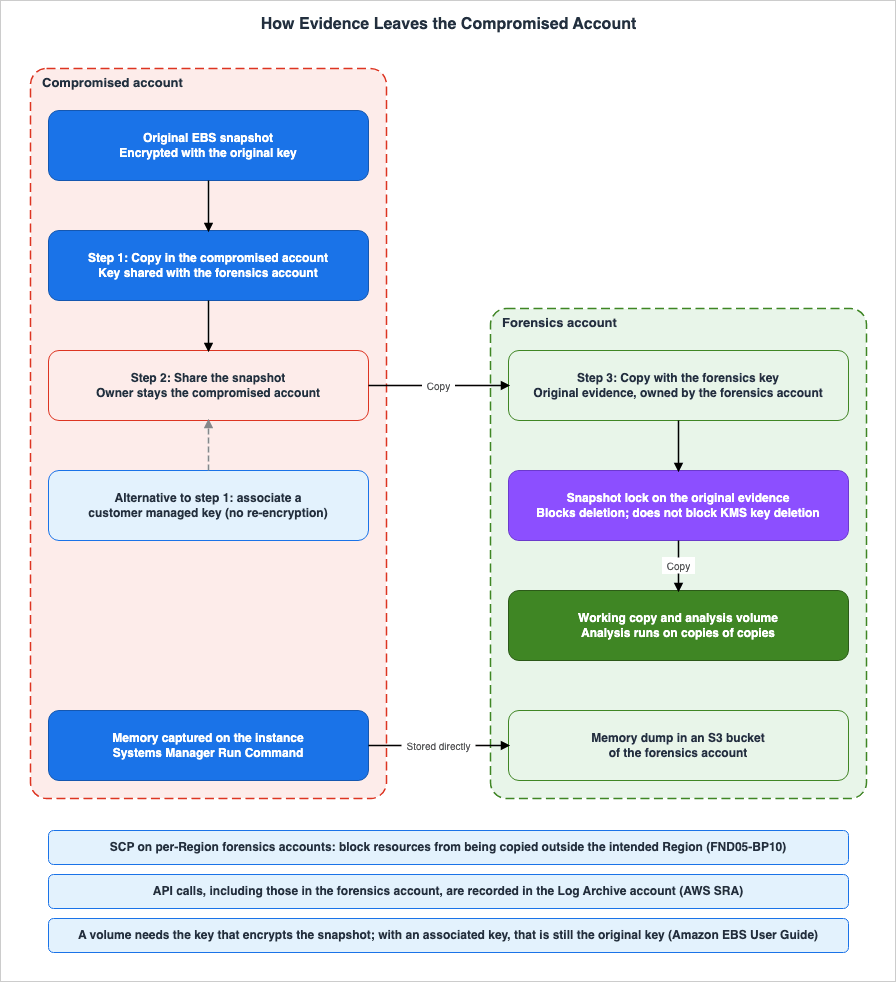
5.1 Three Steps in the AFO Disk Workflow
The AFO disk forensics acquisition workflow, following the creation of a snapshot, proceeds in three steps:Step 1 is a copy in the compromised account.
The disk acquisition flow copies the compromised instance snapshot using AWS KMS keys shared with the forensic account.Step 2 is sharing the copied snapshot.
After the copy snapshot operation of the compromised instance, the disk acquisition flow shares the copied EBS snapshot with the forensic account.Step 3 is a copy in the forensics account.
To keep the copy of snapshot in the forensic account, copy the shared copy of compromised instance snapshot using Forensic KMS keys.The disk article also describes these same three steps. "CopySnapshot" makes the copy with a forensics KMS key, "ShareSnapshot" shares that copy, and "FinalCopySnapshot" creates another copy of the shared snapshot. However, in the disk article, the forensics key is in the security account, and the final copy is also placed within the security account.
This key is stored in the security account and will be used throughout the remainder of the process.Table 3 lists the accounts holding the snapshot and the keys required to access them, for each of the three steps.
| Step | Account Holding the Snapshot | Key Required for Access | Source |
|---|---|---|---|
| Original Snapshot | Compromised Account | Original Key | AFO, Disk Article |
| Step 1 Copy | Compromised Account | Key Shared with the Forensics Account | AFO, Disk Article |
| Step 2 Share | Compromised Account. The forensics account only receives the shared copy. | Key Shared with the Forensics Account | AFO, Disk Article, EBS UG |
| Step 3 Copy | Forensics Account | Forensics Key | AFO, Disk Article |
Following Step 2, the account holding the snapshot remains the compromised account. The disk article notes this as the reason for the final copy.
FinalCopySnapshot – This function copies the shared snapshot into the security account, as the original shared snapshot is still owned by the monitored account.5.2 Why the Copy Uses the Forensics Account's Key
Three sources explain the reason for the third copy. AFO states:This step allows protection of the shared snapshot with a local copy to perform forensics in case of the AWS account being compromised, or the shared snapshot being deleted by the security team.The page regarding the EBS UG snapshot copy recommends creating a new copy using your own key for shared, encrypted snapshots.
When using an encrypted snapshot that is shared with you, we recommend that you re-encrypt the snapshot by copying it and using a KMS key that you own.The same page explains the reason as follows:
This protects you if the original KMS key is compromised, or if the owner revokes your access, which could cause you to lose access to the snapshot and any encrypted volumes that you created from it.AWS SRA describes re-encrypting with the KMS key of the forensics account as a measure to protect the data (see Section 3.4).
Summarizing the reasons provided by the three sources from a handoff perspective, the owner, the account that was compromised, can delete the shared snapshot or stop the sharing. If the key used for sharing belongs to the compromised account, the owner of that key can modify the key policy or schedule its deletion. With the third copy, the snapshot ownership is transferred to the forensics account, and the key required to read it is replaced with the forensics account's key. It is in this step that the evidence is first removed from the compromised account's control.
EBS UG states that creating a copy encrypted with a different KMS key results in a full copy, rather than an incremental one.
However, if you encrypt the snapshot copy using a different KMS key, the copy is a full copy.As an inference of this article, the third copy can take a significant amount of time, depending on the volume size. During that time, the evidence is still under the control of the compromised account.
5.3 Snapshots Encrypted with an AWS Managed Key
Snapshots encrypted with an AWS managed key have an additional limitation. The EBS UG's section on sharing states:You can only share snapshots that are encrypted with a customer managed key.The key policy for an AWS managed key cannot be modified to grant access to another account. Therefore, the EBS UG's section on Associated KMS keys states that snapshots encrypted with an AWS managed key cannot be shared with, nor copied to, another account. As an inference of this article, step 1 of AFO and of the disk article also gets past this limit. This is because, within a compromised account, the snapshots can be re-encrypted using a customer managed key that is shareable.
As of November 16, 2026, there is another option. The EBS UG's section on sharing states the following regarding snapshots encrypted with an AWS managed key:
To share such a snapshot across accounts, first associate a customer managed KMS key with the snapshot.5.4 What Associated KMS Keys Change and What They Do Not
Associated KMS keys are customer managed keys that you can add to encrypted snapshots. The What's New post states:This new capability enables you to share and copy encrypted snapshots across accounts without first re-encrypting them, simplifying your disaster recovery and backup workflows.The EBS UG describes what associated KMS keys do not do:
The associated KMS key does not replace or change the existing KMS key that encrypts the snapshot, it does not grant access to that key, and associating it does not re-encrypt the snapshot's data.The other account can copy the snapshot with the associated KMS key.
You can associate a KMS key that you also share with the other account, and the other account can then copy the snapshot using the associated KMS key.To use an associated KMS key from another account, both the key policy for that key and the IAM policy for the user in the other account must permit the use of the key. The EBS UG states that one alone is not sufficient.
Granting one without the other is not sufficient.Two things change with an associated KMS key. First, the snapshot can be shared without step 1 of AFO (the re-encrypting copy in the compromised account). According to the EBS UG quoted in Section 5.2, a copy encrypted with a different key is a full copy. Therefore, as an inference of this article, you can reduce the amount of time evidence remains within the compromised account by the duration of that copy. Second, a forensics account can copy the snapshot without needing access to the original key.
What does not change is described in the EBS UG. Creating a volume requires access to the key that encrypts the snapshot.
To create a volume from an encrypted snapshot, you must have access to the existing KMS key that encrypts the snapshot.Regarding the path of an associated KMS key, shared snapshots remain encrypted with the original key. Therefore, a forensics account needs access to the original key to create an analysis volume from that snapshot. To analyze a snapshot received with an associated KMS key, the forensics account must copy it. Step 3, the copy, remains on this route too.
The pages this article reviewed do not state two things. First, whether a key owned by the forensics account can be associated with a snapshot in the compromised account. The EBS UG's procedures describe sharing the key with the other account. Second, whether the KMS permissions required for the association operation also apply to the original key (Section 3.4). The EBS UG also describes the process of disassociating a key. The EC2 API Reference for
DisassociateKmsKeyId states:After you disassociate the key, it can no longer be used to access the snapshot's data.As an inference of this article, if a principal in the compromised account removes the association, the forensics account, before completing the third copy, will no longer be able to read snapshots using the associated KMS key. In this regard as well, the evidence leaves the compromised account's control only when the third copy is complete.
5.5 Memory Dumps Take a Different Route
Memory dumps reach the forensics account by a different path than snapshots. The AFO's "Forensic memory and disk acquisition service" details how to acquire memory using AWS Systems Manager's Run Command on compromised instances, placing the dump in an S3 bucket within the forensics account.The memory dump is stored in an S3 bucket of the forensic account.As an inference of this article, memory dumps are transferred directly to the forensics account without leaving a copy within the compromised account. However, the data acquisition process itself runs on the compromised instance. As stated by AWS SRA, volatile EC2 data can only be collected on the instance itself (see Section 4.2). RFC 3227, Section 2.2, advises against trusting programs running on the system. Where the program used for acquisition comes from, and how it is brought onto the instance, is something to decide in advance.
6. Keeping the Evidence from Being Deleted
This chapter discusses methods for ensuring that evidence transferred to a forensics account is not deleted. The primary focus is on using Amazon EBS snapshot locks. The EBS UG states the following about a locked snapshot.While a snapshot is locked, it can't be deleted by any user, regardless of their IAM permissions.Snapshot locks were announced on November 15, 2023, as part of What's New.
6.1 Governance Mode and Compliance Mode
Snapshot lock offers both governance mode and compliance mode. Table 4 lists descriptions from the EBS UG concepts section and theLockSnapshot API Reference.| Item | Governance Mode | Compliance Mode |
|---|---|---|
| Point at which deletion is prevented | From the point of locking. | From the point of locking. Deletion is not possible during the cooling-off period. |
| Point at which modifications are prevented | No point at which modifications are prevented. There is no cooling-off period. | If a cooling-off period is specified, modifications are prevented after that period. If no cooling-off period is specified, modifications are prevented from the point of locking. |
| Unlocking | Authorized IAM users can unlock the snapshot at any time. | During the cooling-off period, authorized IAM users can unlock the snapshot. After the cooling-off period, it cannot be unlocked, regardless of permissions. |
| Shortening the lock duration | Authorized IAM users can shorten the lock duration at any time. | After the cooling-off period, the lock duration cannot be shortened. |
| Lengthening the lock duration | Possible. | Possible. |
| Changing modes | Can be changed to compliance mode. | After the cooling-off period, the mode cannot be changed. |
| Deleting before the lock duration | Unlock the snapshot or wait for the expiration date. | After the cooling-off period, wait for the lock to expire. The exception is closing the account. |
The lock duration can be specified as either a number of days or a specific date and time. The number of days can range from 1 to 36500.
The duration can range from 1 day to 36500 days (100 years).The EBS UG gives two uses of governance mode: limiting who can unlock snapshots, and testing a lock configuration before compliance mode.
6.2 The Cooling-Off Period and Closing the Account
The cooling-off period for compliance mode is optional and ranges from 1 to 72 hours.The cooling-off period can range from 1 to 72 hours.During the cooling-off period, snapshots cannot be deleted.
A snapshot can't be deleted during the cooling-off period.Regarding what happens after the cooling-off period, the EBS UG states the following.
After the cooling-off period expires, users can't unlock the snapshot, change the lock mode, reinstate the cooling-off period, or decrease the lock duration, regardless of their permissions.There is only one way to delete a compliance mode snapshot before the expiration date. Both the "Concepts" and "Considerations" sections of the EBS UG state the following.
The only way to delete a snapshot that is locked in compliance mode before its lock expires is to close the associated AWS account.The "Considerations" section continues by explaining how accounts with locked snapshots are handled when closed.
If you close your AWS account while you have locked snapshots, AWS suspends your account for 90 days with your snapshots intact.According to the same section, if an account is not reactivated within 90 days, its snapshots will be deleted, even if they are locked. According to the AWS Organizations User Guide, member accounts can be closed by signing in to the organization's management account, or by signing in as the root user of that account. As an inference of this article, the last safeguard for evidence locked in compliance mode is to limit who can close the forensics account. The existing article AWS Multi-Account Operational Patterns - Control Tower, Organizations, SCPs also contains similar cautions regarding accounts used to protect logs in S3 Object Lock's compliance mode.
6.3 A Lock Does Not Protect the Key
Snapshot locks prevent the deletion of snapshots. However, they do not prevent the deletion of the KMS key that encrypts those snapshots. As stated on the "Considerations" page in the EBS UG:You can delete the KMS key used to encrypt a locked snapshot.The AWS KMS Developer Guide describes data behavior after a key is deleted:
After a KMS key is deleted, you can no longer decrypt the data that was encrypted under that KMS key, which means that data becomes unrecoverable.Deleting a KMS key has a waiting period of 7 to 30 days. During this waiting period, the deletion can be canceled.
Because it is destructive and potentially dangerous to delete a KMS key, AWS KMS requires you to set a waiting period of 7 – 30 days.Combining these points, from a handoff perspective, it can be said that even if a snapshot within a compromised account is locked, if that snapshot is encrypted with a key of the compromised account, a principal that schedules the deletion of that key can make the evidence unreadable. To ensure the evidence remains accessible, the key used to encrypt the snapshot must be in the possession of the party responsible for protecting the evidence. This supports locking, after the third copy in Section 5.2, a snapshot encrypted with the forensics key.
6.4 Which Snapshot to Lock
The AWS sources did not contain any written instructions on which snapshot to lock during the handoff process. The AFO Disk forensics acquisition workflow also does not specify a step for snapshot locking. This section arranges this point as an inference drawn from the sources. Table 5 lists three candidate snapshots to consider locking.| Candidate Snapshot | What the Lock Prevents | What the Lock Does Not Prevent |
|---|---|---|
| Original snapshot of the compromised account | Deletion by an entity in the compromised account. If using governance mode, entities with the ec2:UnlockSnapshot permission can unlock it. | Deletion of the original key. Account closure. |
| Shared snapshot | The owner is still the compromised account. Whether it can be locked from the forensics account is not stated in the pages this article read. | The owner revoking the sharing. Deletion of the key. |
| Copy of the snapshot for forensics use | Deletion by an entity in the forensics account. If using compliance mode, it cannot be unlocked by anyone after the cooling-off period. | Deletion of the forensics key. Closure of the forensics account. |
As an inference of this article, locking the third candidate, the copy in the forensics account, keeps the evidence from being deleted after it is separated from the compromised account. Locking the first candidate, the original snapshot, can protect the time until the third copy is complete. However, an entity in the compromised account can unlock the snapshot in governance mode. Locking in compliance mode leaves a snapshot in the compromised account that cannot be deleted until the lock expires. The News Blog states that both modes allow for sharing and copying of snapshots.
Snapshots in either mode can still be shared or copied.Regarding lock modes, as an inference of this article, the following split can be considered: During the investigation, lock the snapshot in governance mode, limiting the ability to unlock it to a designated role, such as the Data custodian. Once the period for retaining the evidence is determined, switch to compliance mode. The EBS UG states that the locking duration can be restricted using the condition key
ec2:SnapshotLockDuration, and the cooling-off period can be restricted using the condition key ec2:CoolOffPeriod. The period for retaining the evidence should be determined in consultation with the legal team.6.5 Files in Amazon S3
Evidence files, such as memory dumps, logs, and other data, are stored in S3 buckets. The environment article lists S3 Object Lock, MFA delete, and S3 versioning as ways to protect evidence in S3, such as memory dumps. The S3 User Guide describes S3 Object Lock's compliance mode using language similar to that used for EBS snapshot locks.The only way to delete an object under the compliance mode before its retention date expires is to delete the associated AWS account.Details regarding Object Lock modes, legal holds, and the ability to shorten retention periods, as well as what a hold adds and when the retention clock starts, are covered in the existing article Object Lock, Legal Holds, and Event Holds in Amazon S3 - Who Can Shorten a Retention Period, What a Hold Adds, and When the Retention Clock Starts.
6.6 Snapshots Created by AWS Backup
EBS UG recommends against locking EBS snapshots created by AWS Backup.We recommend that you do not lock snapshots created by AWS Backup.The same page states that AWS Backup prevents snapshots from being deleted before the retention period expires, and further suggests using AWS Backup Vault Lock for additional protection. This article addresses snapshots taken for evidentiary purposes during incidents, rather than those taken as backups. AWS Backup Vault Lock is discussed in the existing article AWS Backup Data Protection and Governance - Backup Plans, Vault Lock, and Cross-Account Copy Design.
7. Originals, Copies, and the Chain of Custody
This chapter addresses the distinction between original and copy within forensics accounts, and the chain of custody used to document their transfer.7.1 Analysis on Copies of Copies
The IR Guide states that analysis should be performed on exact replicas of the collected evidence.Analysis should only be performed on exact replicas of the collected artifacts to maintain integrity.The environment article states that work should be done on copies of copies if the original cannot be made immutable.
Work should be performed on copies of copies if rendering the original immutable isn’t possible, especially if any modification of the artifact will happen.RFC 3227 also states that, for analysis, a bit-by-bit copy should be created from the evidence copy, and analysis should not be performed directly on the evidence copy itself.
From the handoff view of this article, there are three layers within forensics accounts. The first layer is the snapshot copied with the forensics key and locked. This is the original. The second layer is a working copy created from the original. The third layer is the analysis volume created from the working copy. Locking the original does not stop creating volumes from it or copying it. The EBS UG's overview of snapshot lock states that locked snapshots can continue to be used in the same way as other snapshots. As an inference of this article, not giving the Investigator role the permission to create an analysis volume directly from the original fits the sources' statements about working on copies of copies.
7.2 What the Chain of Custody Records
Section 4.1 of RFC 3227 lists the items that should be recorded as part of the chain of custody. This includes records of when the custodian of the evidence changes.- When the evidence changed custody, when and how did the
transfer occur (include shipping numbers, etc.).The IR Guide emphasizes the importance of maintaining the chain of custody and outlines methods for doing so.
It is important to maintain chain of custody for artifacts collected during incident response.The same paragraph notes that automation, the automatic recording of collection activities, and storing evidence in read-only repositories can be beneficial. AWS SRA states that AWS API operations, including those called in the forensics account, are recorded in the Log Archive account, and states the benefit as follows.
Having such logs can help avoid allegations of mishandling or tampering of artifacts.The AFO Architecture overview also states that, to help ensure the chain of custody, the isolation security group removes access for users, administrators, and developers.
7.3 Each Handoff as a Custody Transfer
From the handoff view of this article, each step outlined in Chapters 5 and 6 corresponds to a change of custody, as defined in RFC 3227. Table 6 lists, for each step, the account holding the evidence, the key required to access it, the entity authorized to delete it, and the API used to perform operations on that step. The "Authorized Deletion Entity" column is derived from the text in Chapters 5 and 6.| Step | Account Holding Evidence | Key Required for Access | Authorized Deletion Entity | Operation API |
|---|---|---|---|---|
| Original Snapshot | Compromised Account | Original Key | Entity with permissions on the compromised account | CreateSnapshot |
| Step 1 Copy or Key Association | Compromised Account | Shared Key or Associated KMS Key | Entity with permissions on the compromised account | CopySnapshot or AssociateKmsKeyId |
| Step 2 Share | Compromised Account | Same as above | Owner. The owner can also revoke the sharing. | ModifySnapshotAttribute |
| Step 3 Copy (Original) | Forensics Account | Forensics Key | Entity with permissions on the forensics account | CopySnapshot |
| Lock on the Original | Forensics Account | Forensics Key | In governance mode, any entity with ec2:UnlockSnapshot permissions. In compliance mode, after the cooling-off period, no entity can delete it except for closing the account. | LockSnapshot |
| Memory Dump | S3 Bucket in the Forensics Account | Bucket Encryption Key | Determined by Object Lock settings. | Not covered in this article. |
The API names are those used in the Amazon EC2 API Reference. AWS SRA states that operations through AWS APIs, including those called in the forensics account, are recorded in the Log Archive account (Section 7.2). This article does not cover in which records each step's operations appear.
8. What the Automation Covers
This chapter outlines the procedures that AFO will automate, as well as the decisions that will remain with users. FND05-BP10 notes that manual evidence collection is slow, prone to errors, and can compromise the chain of custody, and recommends automating collection using AWS Step Functions, AWS Lambda, and AWS Systems Manager. As reference architectures, FND05-BP10 mentions "Automate incident response and forensics" and "Automated Forensics Orchestrator for Amazon EC2."8.1 What AFO Automates
According to the AFO Architecture overview, the process follows this sequence. Within an application account, detections from services like GuardDuty send findings to Security Hub. EventBridge then initiates a Step Functions workflow. Step Functions retrieves instance information, decides whether isolation is required from the Security Hub action, and decides whether acquisition is required from the instance tags. Subsequently, it begins both the memory acquisition process and the disk acquisition process in parallel.Two acquisition flows are initiated in parallel: The Memory Forensics Flow is a Step Functions workflow that captures the memory data and stores it in Amazon Simple Storage Service (Amazon S3).After acquiring memory, instances are isolated using security groups.
Post memory acquisition, the instance is isolated using security groups.The disk acquisition process consists of the three steps described in Section 5.1. Once the acquisition is complete, an investigation process begins, launching an instance from a forensic AMI to analyze the acquired data.
The AFO welcome page states that AFO also supports EKS clusters; however, this is limited to clusters running on EC2 instances.
The Guidance currently supports EKS clusters hosted on EC2 instances.The process for acquiring evidence from containers falls outside the scope of this article.
8.2 What AFO Leaves to You
AFO determines whether to isolate based on the choices made within Security Hub actions, and whether to acquire data based on instance tags (Section 4.3). The decision on which actions to select and which tags to apply to which instances is made outside of AFO. AWS SRA states that in cases of false positives, fully automated responses could negatively impact operations. AWS SRA's section on Security Hub CSPM suggests adding manual review steps to the automated workflow to verify whether data collection is truly necessary.AFO has no snapshot lock step (Section 6.4). The decision on how long to retain evidence and in what mode to lock it is made outside of AFO.
How to treat AFO is also your decision. The AWS Solutions Library's Guidance page refers to AFO's code as "AWS Content" and states:
You should not use this AWS Content in your production accounts, or on production or other critical data.AFO's welcome page explicitly states that AFO does not claim to be suitable for criminal investigations, nor does it assert that the collected evidence will be admissible in court.
We make no claim as to the suitability of Automated Forensics Orchestrator for Amazon EC2 and EKS in the detection or investigation of crime, nor the ability of data or forensics evidence captured by this Guidance to be used in a court of law.The name of AFO has also changed. The implementation guide and the Guidance page refer to it as "Automated Forensics Orchestrator for Amazon EC2 and EKS." The reference list in FND05-BP10 and Appendix B of the IR Guide call it "Automated Forensics Orchestrator for Amazon EC2." On the date of verification, the GitHub repository was located under the "aws-solutions-library-samples" organization and had not been archived.
9. Where the Sources Disagree and What They Do Not Say
This chapter summarizes the discrepancies among the sources and the matters that the sources do not address, as discussed in Chapters 3 through 8.9.1 Where the Sources Differ
Table 7 lists the points where the sources differ. This article does not definitively identify either source as incorrect.| Item | Source A | Source B |
|---|---|---|
| OU for Forensics Accounts | FND05-BP10 and the former SEC10-BP03: A separate forensics OU, distinct from the security OU. | AWS SRA: Within the Security OU. A separate forensics OU is an option. |
| Region | FND05-BP10: Allows selection between a single account or accounts per Region. | AWS SRA: Deploy forensic capabilities in every available Region, and restrict unused Regions with SCPs. |
| Location of Isolation | AFO: After memory acquisition. | Automation pattern Summary: First in the list of phase names. |
| Whether Isolation Is a Phase | FND05-BP10, the former SEC10-BP03, IR Guide: Not a phase. | AFO welcome: The second phase. |
| Account for Storing the Final Copy of Evidence | AFO, AWS SRA: Forensics account. | Disk Article: Security account. |
| Location of Isolation in the Automation Pattern | Workflow: Applies the "Contain" tag after acquisition. | Epics, in the row with the retag sentence: The tag starts isolation and acquisition automatically. |
9.2 What the Sources Do Not Say
The materials reviewed for this article did not contain any statements regarding the following:- Which step's snapshot in the handoff to lock with snapshot lock. The AFO disk flow has no lock step either.
- Whether a KMS key owned by the forensics account can be associated with a snapshot in the compromised account.
- Whether the KMS permissions required for the association operation are also required for the original key.
- Whether an account that has received a share can lock the shared snapshot.
- Whether an associated KMS key can be used in place of the advance key policy preparation in AWS SRA.
10. Decisions This Design Leaves to You
This chapter lists the decisions in this design that the sources do not make and that you make. All of these decisions should be made and tested before an incident occurs.- Should the forensics account be placed within the Security OU, or in a separate Forensics OU? (Section 3.1)
- Should a single account be used, or accounts configured on a per-Region basis? If using Region-specific accounts, which SCP should be used to prevent copying data outside of each Region? (Section 3.2)
- Which route should let the forensics account read snapshots in the compromised account: granting prior permission to the original key (AWS SRA), copying within the compromised account (step 1 of AFO), or using an associated KMS key? Which principal within the compromised account will perform this operation? (Sections 3.4, 5.4)
- When should isolation be implemented? Should isolation be achieved using security groups, or should network ACLs also be utilized? Who will determine the impact on business operations in the event of a false positive? (Section 4.3)
- Which snapshots should be locked, in what mode, and for how long? Who will be granted the authority to unlock these snapshots? Which principals will be authorized to close the forensics account? (Sections 6.2, 6.4)
- Which roles will be granted the authority to create working copies from the original data, and which roles will be granted the authority to create analysis volumes? (Section 7.1)
- What level of automation should be employed, and where should manual verification steps be incorporated? (Section 8.2)
- What is the retention period for evidence, and how should preparations be made for potential legal proceedings? This should be determined in consultation with the legal department. (Section 1.2)
11. Failure Modes
This chapter lists potential failure scenarios within the described design, with the source statements behind each.- Assuming that taking a snapshot in the compromised account constitutes a successful preservation measure. A principal with permissions in the compromised account can delete that snapshot. The encryption key used for that snapshot also belongs to the compromised account (Section 5.1).
- Assuming that sharing a snapshot with a forensics account constitutes a successful preservation measure. The owner of the shared snapshot remains the compromised account (Sections 5.1 and 5.2).
- Assuming that a locked snapshot stays readable. The KMS key used to encrypt the locked snapshot can be deleted (Section 6.3).
- Modifying the key policy for the production key during an incident. AWS SRA notes that such changes could impact operations and recommends proactive preparation (Section 3.4).
- Assuming that because a snapshot is associated with a KMS key and shared, it can be directly analyzed from the forensics account. The shared snapshot remains encrypted with the original key, and creating a volume requires access to that original key (Section 5.4).
- Assuming that changing security groups immediately cuts an attacker's connection. Tracked connections are not immediately interrupted (Section 4.3).
- Stopping an instance before acquiring memory. Volatile data on EC2 can be captured only on the instance itself (Section 4.2).
- Creating the forensics account after an incident has occurred. FND05-BP10 recommends creating the account prior to an incident (Chapter 3).
- Locking EBS snapshots created by AWS Backup using snapshot lock. The EBS UG recommends against doing so (Section 6.6).
- Creating analysis volumes directly from the original snapshot. The sources call for analysis on an exact replica or on copies of copies (Section 7.1).
12. Frequently Asked Questions About Forensic Evidence on AWS
This chapter briefly summarizes the content of this article in response to six common questions.Is taking an Amazon EBS snapshot enough to preserve evidence from a compromised EC2 instance?
No. An entity with permissions in the compromised account can delete a snapshot in that account. The KMS key that encrypts it is also a key of the compromised account. The disk flow of Automated Forensics Orchestrator for Amazon EC2 and EKS (AFO) shares the snapshot and then copies it again with a KMS key of the forensics account. AFO gives two reasons for this: the possibility that the original account could be further compromised, and the risk that the shared snapshot could be deleted.Does the forensics account have to be in its own organizational unit?
It depends on the source. FND05-BP10 outlines a configuration that separates the security OU and the forensics OU. The AWS Security Reference Architecture (AWS SRA) describes the Forensics account as a type of Security Tooling account in the Security OU, and treats a separate Forensics OU as an option. Neither source places the forensics account in an account used for production workloads, and both separate it from the "Security Tooling" account.Why re-encrypt a shared snapshot with a key in the forensics account?
The owner of the shared snapshot is still the compromised account. If the key used for sharing is a key of the compromised account, the key's owner is the same. The Amazon EBS User Guide recommends re-encrypting shared, encrypted snapshots using a key from your own account, as a precaution against the original key being compromised or the owner revoking access. By creating a copy encrypted with the forensics account's key, both the snapshot's owner and the key required to read it are removed from the compromised account's control.Do associated KMS keys remove the need to copy the snapshot?
No. An associated KMS key does not re-encrypt the data. The Amazon EBS User Guide states that creating a volume from an encrypted snapshot requires access to the key used to encrypt that snapshot. On the associated KMS key route, that key is still the original key. What changes with an associated KMS key is that it allows another account to copy the snapshot without granting them direct access to the original key.Can anyone delete a snapshot locked in compliance mode?
No, once the cooling-off period has ended, it is not possible to delete the snapshot. Regardless of permissions, it is impossible to unlock it or shorten the lock period. According to the Amazon EBS User Guide, the only way to delete a snapshot locked in compliance mode before the lock expires is to close the account. When an account is closed, AWS suspends it for 90 days. If the account is not reactivated within that time, the locked snapshot will also be deleted. However, the KMS key used to encrypt that snapshot can be deleted.Should an instance be isolated before or after evidence is collected?
It depends on the source. Automated Forensics Orchestrator for Amazon EC2 and EKS isolates instances using security groups after memory acquisition. The Automate incident response and forensics pattern lists containment first among its phase names, and its workflow isolates after acquisition. FND05-BP10 and the AWS Security Incident Response Guide do not include isolation among the forensics phases. The AWS Security Reference Architecture recommends assessing the impact on operations before isolation, and the Amazon EC2 User Guide notes that tracked connections are not immediately interrupted when a security group rule changes.13. Summary
This article treats evidence preservation as evidence leaving the compromised account's control. EBS snapshots are taken within the compromised account and are encrypted with the account's key. The AFO disk flow changes the snapshot's owner and key in three steps: a copy in the compromised account, sharing with the forensics account, and a copy with the forensics account's key. The associated KMS key added on November 16, 2026, alters the sharing path. Because it does not re-encrypt, the copy in the forensics account is still needed.The snapshot lock prevents deletion of the snapshot. Deletion of the KMS key is not prevented. In this article's arrangement, the copy to lock is the one encrypted with the forensics key. Once in compliance mode, the lock cannot be removed by anyone after the cooling-off period. The only way to delete it before the lock expires is to close the account.
Where the forensics account sits, how Regions are handled, and where isolation is placed differ by source. FND05-BP10 separates the security OU and the forensics OU, while AWS SRA places the forensics account within the security OU. In AFO, isolation comes after acquisition; it is not a phase in FND05-BP10 or the IR Guide. FND05-BP10 recommends preparing the forensics account, while AWS SRA recommends configuring key policy permissions, both before the incident. The source statements are as of November 17, 2026.
14. References
- AWS Well-Architected Framework: FND05-BP10 Prepare forensic capabilities
- AWS Well-Architected Framework: SEC10-BP03 Develop and test security incident response playbooks
- AWS Well-Architected Framework: Release notes
- Security Pillar - AWS Well-Architected Framework (November 6, 2024): SEC10-BP03 Prepare forensic capabilities
- AWS Architecture Blog: Announcing updates to the AWS Well-Architected Framework
- AWS Prescriptive Guidance: AWS Security Reference Architecture (AWS SRA) – cyber forensics
- AWS Prescriptive Guidance: Forensics in the context of security incident response
- AWS Prescriptive Guidance: Forensics account
- AWS Prescriptive Guidance: Document history (AWS SRA – cyber forensics)
- AWS Prescriptive Guidance: Automate incident response and forensics
- AWS Technical Guide: AWS Security Incident Response Guide (PDF)
- Automated Forensics Orchestrator for Amazon EC2 and EKS: Welcome
- Automated Forensics Orchestrator for Amazon EC2 and EKS: Architecture overview
- Automated Forensics Orchestrator for Amazon EC2 and EKS: Forensic memory and disk acquisition service
- Automated Forensics Orchestrator for Amazon EC2 and EKS: Disk forensics acquisition workflow
- AWS Solutions Library: Guidance for Automated Forensics Orchestrator for Amazon EC2 and EKS
- Amazon EBS User Guide: Amazon EBS snapshot lock
- Amazon EBS User Guide: Amazon EBS snapshot lock concepts
- Amazon EBS User Guide: Considerations for Amazon EBS snapshot lock
- Amazon EBS User Guide: Control access to Amazon EBS snapshot lock
- Amazon EBS User Guide: Share an Amazon EBS snapshot with other AWS accounts
- Amazon EBS User Guide: Share the KMS key used to encrypt a shared Amazon EBS snapshot
- Amazon EBS User Guide: Copy an Amazon EBS snapshot
- Amazon EBS User Guide: Associated KMS keys
- Amazon EC2 API Reference: LockSnapshot
- Amazon EC2 API Reference: AssociateKmsKeyId
- Amazon EC2 API Reference: DisassociateKmsKeyId
- Amazon EC2 User Guide: Amazon EC2 security group connection tracking
- AWS Key Management Service Developer Guide: Delete an AWS KMS key
- Amazon S3 User Guide: Locking objects with Object Lock
- AWS Organizations User Guide: Closing a member account in an organization with AWS Organizations
- What's New: Amazon EBS announces Snapshot Lock to protect snapshots from inadvertent or malicious deletions
- What's New: Amazon EBS now supports associating additional KMS keys with snapshots
- AWS News Blog: New – Amazon EBS Snapshot Lock
- AWS Security Blog: Forensic investigation environment strategies in the AWS Cloud
- AWS Security Blog: How to automate forensic disk collection in AWS
- GitHub: aws-solutions-library-samples/automated-forensic-orchestrator-for-amazon-ec2
- IETF: RFC 3227 - Guidelines for Evidence Collection and Archiving
References:
Tech Blog with curated related content
Written by Hidekazu Konishi