Moving an Amazon DynamoDB Table Across Accounts and Regions - What Carries Over, What You Set Again, and Where Control Changes Hands
First Published:
Last Updated:
This article aims to organize these methods into a single table, using four key criteria. First, it identifies the possible destinations for each method: a different Region in the same account, the same Region in a different account, or a different Region in a different account. Second, it clarifies whether the method creates a new table or writes to an existing one. Third, it shows what carries over with the table and what you set again at the destination. Finally, it shows where control changes hands, that is, whose permissions, policies, or keys in which account decide whether the move goes through or stops.
Within the scope of the available documentation, the answers are as follows: AWS Backup does not restore directly across accounts. Instead, it copies backups to accounts within the same AWS Organizations organization and then restores them in the destination account. If the accounts are part of different organizations, the Developer Guide indicates the use of export and import. Import only creates new tables and cannot be used with tables that have local secondary indexes (LSIs). The list of settings you set again after a restore varies by page, ranging from 6 to 9 items across the 5 pages this article read. Multi-account global tables place each replica in a different account and a different Region, so they cannot be used to move a table to a different account in the same Region. The process for moving accounts with global tables is documented in the AWS Database Blog; no such procedure was found in the Developer Guide.
This article does not provide a migration guide, nor does it offer an explanation of backup design. It does not include any information on pricing. It does not say which method to use. Instead, it simply outlines, based on the documentation, the conditions for each approach, as well as what carries over and what does not. The information presented was verified on November 16, 2026.
Related articles on this site:
- Leaving an Amazon DynamoDB Global Table - Disassociation Protection, the Replication Stop Boundary, and Who Acts in Each Account
- Bulk Put Items in Amazon DynamoDB - Loading S3 Data into an Existing Table, Per-Item Conditions, and the Report
- AWS Backup Data Protection and Governance - Backup Plans, Vault Lock, and Cross-Account Copy Design
- Amazon DynamoDB Capacity and Global Tables Guide - Capacity Modes, Auto Scaling, Warm Throughput, and Multi-Region Design
- Where a Stream Consumer Can Start on AWS - Starting Positions in DynamoDB Streams, Kinesis Data Streams, KCL, and Lambda Event Source Mappings
- AWS History and Timeline regarding Amazon DynamoDB - Overview, Functions, Features, Summary of Updates, and Introduction
- AWS Disaster Recovery Strategies Guide - Backup and Restore, Pilot Light, Warm Standby, and Multi-Site Active-Active
- AWS Multi-Account Operational Patterns - Control Tower, Organizations, SCPs
Table of Contents
- 1. Scope and Assumptions
- 2. How to Read the Tables
- 3. The Methods AWS Names
- 4. Where Each Method Can Go
- 5. What Carries Over and What You Set Again
- 6. Where Control Changes Hands
- 7. Keeping Writes in Step
- 8. Limits and Boundaries
- 9. Where the Sources Disagree and What They Do Not Say
- 10. Failure Modes
- 11. Frequently Asked Questions About Moving a DynamoDB Table
- 12. Summary
- 13. References
1. Scope and Assumptions
This chapter defines the intended audience, scope, relevant documentation, distinctions between similarly named features, and the four key terms used in this article. The core conclusions are as follows:- The Developer Guide page on migrating between accounts lists two methods. AWS Backup cross-account backup and restore assumes that both the source and destination accounts belong to the same AWS Organizations organization. The export and import methods are described as options when operating across organizations or when AWS Backup is not desired.
- AWS Backup does not directly restore resources from one account to another. Instead, backups are copied to the destination account and restored within that account. The copy process re-encrypts the data using the keys associated with the destination vault.
- A table on the Developer Guide page about resource-based policies states that the APIs for point-in-time recovery (PITR) restores, on-demand backup restores, export, and import do not support calls from other accounts. A principal in the account that contains the source table calls restore and export, and a principal in the account that creates the new table calls import.
- Both restore and import operations create new tables. The feature that writes S3 data to an existing table is bulk put items, which does not support global tables.
- The list of settings you set again after a restore varies by page. The five pages referenced in this article list 6, 7, 8, 8, and 9 items respectively. No page was found that lists what an import brings over.
- The settings that are synchronized differ between same-account global tables and multi-account global tables. The encryption type is always synchronized in same-account global tables and is not synchronized in multi-account global tables.
- Multi-account global tables only support Multi-Region Eventual Consistency (MREC), placing each replica in a different account and a different Region. They do not support AWS managed keys. The source replica cannot be deleted within the first 24 hours.
- Writes made to the source table during the move can be caught up with DynamoDB Streams or Kinesis Data Streams for DynamoDB. Since DynamoDB Streams items are kept for 24 hours, the Developer Guide says to plan to complete the restore or import within that window.
1.1 Who This Article Is For
This article is intended for developers and platform engineers who need to move DynamoDB tables between development, testing, and production accounts, or between accounts undergoing organizational restructuring, or across different AWS Regions. Specifically, this article is for readers who believe any of the following statements to be true:- AWS Backup allows direct restoration to any account.
- Restored tables retain all of the source table's configurations.
- Importing from S3 allows you to add data to existing tables.
- For multi-account global tables, you can move the table to a different account within the same Region.
- The settings you set again are listed the same way on every page.
Each of these is true only in part, or not at all, depending on which method you use and which page's statement you read.
1.2 What This Article Covers and What It Does Not
This article addresses the following topics:- The complete list of methods mentioned in AWS documentation, and which methods the documentation identifies as migration methods.
- The destination for each method, specifying whether it involves creating new tables or writing to existing ones.
- For each method, what carries over, what you set again, and how the lists differ from page to page.
- The places where control changes hands during a move: AWS Organizations, AWS Backup's advanced features, the destination vault key and a shared customer managed key, the S3 bucket owner and
S3BucketOwner, the resource-based policy that allows the replication service principal, and the account of the principal that makes the call. - How to catch up with writes made during the move.
- Limits and boundaries, including the status of AWS Data Pipeline.
- Discrepancies and omissions within the documentation.
This article does not cover the following: It does not include pricing information. It also does not cover AWS Backup's copy and restore, export and import, or PITR (point-in-time recovery) pricing.
- Replicating console operation procedures. This article describes only what the Developer Guide procedure pages assume and what they say.
- Designing AWS Backup vaults, vault locking, and general key management principles. This is covered in the existing AWS Backup Data Protection and Governance article.
- Modes of consistency for global tables, capacity planning, and details regarding configuration synchronization within the same account. This is covered in the existing Amazon DynamoDB Capacity and Global Tables Guide article.
- Procedures for removing replicas from a global table, protection against disassociation, details regarding the 24-hour rule, and how to implement this in AWS CloudFormation. This is covered in the existing Leaving an Amazon DynamoDB Global Table article.
- Input format for bulk put items, record-specific conditions, reporting, scenarios where it is not applicable, and detailed limitations. This is covered in the existing Bulk Put Items in Amazon DynamoDB article.
- Determining the starting position for consumers of DynamoDB Streams and Kinesis Data Streams. This is covered in the existing Where a Stream Consumer Can Start on AWS article.
- Implementing Amazon EMR, AWS Glue, and custom scripts. This article focuses solely on describing how these are referenced as options in the re:Post article.
- Moving Amazon Keyspaces tables and other databases.
1.3 Confirmation Date and Sources
The information presented was verified on November 16, 2026. The sources consulted are listed below. In this document, the names of these sources will be abbreviated as follows.- Amazon DynamoDB Developer Guide (hereinafter referred to as "DG"): the pages in the next nine items.
- DG: The "Migrating a DynamoDB table from one account to another" page (hereinafter, the DG migration page) and the two pages under it: "Migrate a table using AWS Backup for cross-account backup and restore" (hereinafter, the DG Backup migration page) and "Migrate a table using export to S3 and import from S3" (hereinafter, the DG S3 migration page).
- DG: "Restore a table in DynamoDB" (hereinafter, the DG PITR restore page), "Backing up and restoring DynamoDB tables with DynamoDB: How it works" (hereinafter, the DG DynamoDB backup page), and "Backing up and restoring DynamoDB tables with AWS Backup: How it works" (hereinafter, the DG AWS Backup page).
- DG: "DynamoDB data export to Amazon S3: how it works" and "Requesting a table export in DynamoDB" (hereinafter, together, the DG export page).
- DG: "DynamoDB data import from Amazon S3: how it works," "Requesting a table import in DynamoDB," and "Import format quotas and validation" (hereinafter, together, the DG import page).
- DG: "Global tables - multi-active, multi-Region replication" (hereinafter, the DG global tables entry page); the same-account and multi-account versions of "How DynamoDB global tables work" (hereinafter, the DG same-account How it works page and the DG multi-account How it works page); "DynamoDB multi-account global tables" (hereinafter, the DG multi-account page); the multi-account version of "DynamoDB global tables security" (hereinafter, the DG multi-account security page); "Using DynamoDB global tables" (hereinafter, the DG global table design page); and "Disassociating a global table replica" (hereinafter, the DG disassociation page).
- DG: "DynamoDB API operations supported by resource-based policies" (hereinafter, the DG RBAC table page).
- DG: "Working with bulk put items" and "Bulk put items considerations, quotas, and permissions" (hereinafter, together, the DG bulk put items page).
- DG: "Using vector indexes in DynamoDB," "Requirements and limitations," and "Using vector indexes with global tables" (hereinafter, together, the DG vector index page).
- DG: "Quotas in Amazon DynamoDB" (hereinafter, the DG quotas page).
- Amazon DynamoDB API Reference (hereinafter referred to as "API Reference"):
RestoreTableFromBackup,RestoreTableToPointInTime,ExportTableToPointInTime,ImportTable. - AWS Backup Developer Guide (hereinafter referred to as "Backup DG"): "Creating backup copies across AWS accounts" (hereinafter, the Backup DG cross-account page), "Advanced DynamoDB backup" (hereinafter, the Backup DG advanced features page), "Encryption for backups in AWS Backup" (hereinafter, the Backup DG encryption page), and "Restore a Amazon DynamoDB table" (hereinafter, the Backup DG DynamoDB restore page).
- AWS Data Pipeline Developer Guide: "Document History" (hereinafter referred to as "Data Pipeline Document History").
- Three announcements from "What's New": "Amazon DynamoDB global tables now support replication across multiple AWS accounts" (February 3, 2026), "Amazon DynamoDB now supports real-time vector search" (August 5, 2026), "Amazon DynamoDB now supports bulk put items" (November 5, 2026). The dates refer to the Coordinated Universal Time (UTC) date when each page was published.
- Blog: From the AWS Database Blog, "Amazon DynamoDB global tables now support replication across AWS accounts" (February 3, 2026) (hereinafter referred to as "Database Blog multi-account article"), and from the AWS Big Data Blog, "Migrate workloads from AWS Data Pipeline" (hereinafter referred to as "Big Data Blog Data Pipeline article").
- From AWS re:Post Knowledge Center: "How can I migrate my DynamoDB tables from one AWS Account to another?" (hereinafter referred to as "re:Post migration article").
This article quotes statements page by page, because different DG pages and the API Reference sometimes describe the same matter in different sentences, and the scope of what is described differs depending on the page.
1.4 Words That Look the Same but Mean Different Things
In this article, similar terms are distinguished as follows:- Restore: The restoration processes discussed in this article encompass three options: restoring from DynamoDB's point-in-time recovery (PITR), restoring from DynamoDB's on-demand backups, and restoring from recovery points in AWS Backup. All three options create new tables. This article will specify which restoration process is being referenced each time.
- Copy: AWS Backup's "copy" operation involves replicating recovery points to a different vault, potentially to a different account or a different AWS Region. "Export," on the other hand, is a separate operation that writes table data to an S3 bucket.
- Import: In this article, "import" refers to DynamoDB's "Import from Amazon S3," which creates a new table from data stored in S3. "Bulk put items" is a different feature that writes data from S3 to an existing table. The DG bulk put items page also separates the two.
- Replica: Replicas of a global table within the same account are all managed by a single account. For multi-account global tables, each account manages only its own replica.
- Synchronized: The DG same-account How it works page and the DG multi-account How it works page each have a different list of synchronized settings. This article will specify which list is being referenced each time.
- Global Table: Global tables have two versions: Version 2019.11.21 (Current) and Version 2017.11.29 (Legacy). Multi-account global tables only support the Current version. Consistency modes include MREC and MRSC (multi-Region strong consistency). This article assumes the Current version.
- Account: Operations may involve at least five accounts. These include the account making the API calls, the account owning the table, the account owning the S3 bucket, the account owning the AWS KMS key, and the account owning the AWS Backup vault. This article will refer to accounts by name.
1.5 Carries Over, Set Again, and Control Changes Hands
This article uses the following terms with the following meanings:- Goes together: A statement in one of the sources treats a setting as a pair with the table. In this article, this applies to settings created alongside a table during restoration or replication.
- Carries over: This means that the destination table automatically inherits the same settings as the source table, without manual configuration. Throughout this article, whenever "carries over" is used, the method and the page whose statement it is will be in the same sentence.
- Set again: This refers to settings that require manual configuration on the destination table, as indicated in the documentation. For example, the DG PITR restore page states
You must manually set the following on the restored table:. Throughout this article, whenever "set again" is used, the specific list being referenced will be included in the same sentence. - Control changes hands: This refers to the transfer of authority to approve or deny migration operations from one account (including its associated policies and keys) to another. Throughout this article, whenever "control changes hands" is used, the specific accounts involved (from whom and to whom) will be included in the same sentence.
2. How to Read the Tables
This chapter defines the columns in the tables from Chapter 3 through Chapter 10, as well as how to describe the state of the sources. The terms for the state of the sources and the kinds of difference are the same as in this site's containerd, Kubernetes, and Docker Engine Support Timeline.2.1 Terms for the State of the Sources
This article uses six terms to describe the condition of the sources. This article uses these English spellings in table cells as well.- Stated: The source contains text describing the matter in question.
- Stated as not supported: The source explicitly states that it does not support, or cannot be used for, the matter.
- Documentation does not list: While a list or table exists, the specific item is not included. This does not mean that the item does not exist or is not supported.
- No statement found: Despite searching using different keywords and source categories (as described in Section 1.3), no relevant text could be found within the source. This does not mean that the matter does not exist or cannot be done.
- Sources disagree: The text from two different sources provides conflicting information regarding the same matter. This includes cases where the text directly contradicts each other, as well as cases where the scope, strength, or subject matter differs, so that the text does not decide which one applies. This article will present both texts and their sources without designating either as incorrect.
- Inference: This represents an inference made by this article, and is not a statement found in any of the sources. This article will clearly indicate when a statement is an inference.
Dates referenced in this article will always include the year. Pages can be rewritten after the confirmation date.
2.2 Kind of Difference
The values in the "Kind of Difference" column of the table in Chapter 9 are as follows:Sources disagree: The wording in two sources does not match, as defined in Section 2.1.Disagrees within the same page: The wording differs between sentences on the same page.Different kinds of statements: The sources are presenting different types of statements. For example, one might describe a process, while another discusses whether an action is possible. This article does not determine which, if any, is incorrect.Different record formats: The same information appears different due to differences in how it is recorded.
This article does not speculate on the reasons why the sources differ unless the sources themselves provide that information.
2.3 Three Kinds of Destination
This article divides destinations into three kinds. The column names in the tables will also use these English terms.Same Account, Other Region: Tables being moved to a different Region within the same account.Other Account, Same Region: Tables being moved to the same Region within a different account.Other Account, Other Region: Tables being moved to a different Region within a different account.
Moving a table within the same account and the same Region, that is, copying it to change its name, falls outside the scope of this article.
2.4 Documentation Statements and Blog Statements
This article writes statements from the DG, the API Reference, and the Backup DG with the page name as the subject. For statements from the re:Post article and from the Database Blog and Big Data Blog articles, this article names the article in the same sentence and does not cite them as documentation specifications. The re:Post article is a Knowledge Center article written by AWS. As of November 16, 2026, its page shows "Updated 2 years ago."3. The Methods AWS Names
This chapter lists the methods mentioned in AWS documentation and clarifies which of these are referred to as migration methods. The number of methods listed, and even what is considered a "method," varies depending on the documentation.| Method | What It Produces | Presented as a Way to Move a Table By | Note |
|---|---|---|---|
| AWS Backup cross-account copy and restore | A new table in the destination account | DG migration page, re:Post migration article | The source and destination accounts must belong to the same organization. |
| Export to S3 and import from S3 | A new table | DG migration page, re:Post migration article | The source table must have point-in-time recovery (PITR) enabled. |
| DynamoDB PITR restore | A new table, which can be created in a different Region. | Not listed on the DG migration page. The DG PITR restore page describes cross-Region restores. | Hong Kong and Bahrain Regions do not support cross-Region restores. |
| DynamoDB on-demand backup restore | A new table, which can be created in a different Region. | Not listed on the DG migration page. The DG DynamoDB backup page describes cross-Region restores. | — |
| Same-account global tables | A replica in a different Region | The DG global table design page lists Region migration as a use case for MREC global tables. | Add a new Region and remove the old one. |
| Multi-account global tables | A replica in a different account and Region | Database Blog multi-account article. The DG multi-account How it works page describes, in one sentence, moving from a same-account global table. | Available since February 3, 2026. MREC only. |
| Bulk put items | Writes to an existing table | Not referred to as a migration method (No statement found). | Available since November 5, 2026. Does not support global tables. |
| Amazon EMR | A new table | re:Post migration article | Create and maintain an EMR cluster. |
| Amazon S3 and AWS Glue | Writes to a table in a different account | re:Post migration article | Maintain Glue ETL jobs. |
| Custom export and import scripts | Writes to the destination table | re:Post migration article | Suitable for small datasets (around 2 GB) or one-time migrations. |
| AWS Data Pipeline | S3 files | re:Post migration article | Not offered to new customers (Section 3.6). |
3.1 The Two Options in the Developer Guide
The migration page in the Developer Guide lists only two methods:DynamoDB offers two options for migrating tables from one AWS account to another:The first is cross-account backup and restore using AWS Backup. The DG migration page states that this method allows you to back up tables in one account and restore them to a different account within the same AWS Organizations organization. The second method is exporting to and importing from S3. The DG migration page describes this as exporting an entire table to an S3 bucket and then importing that data into a new table in a different account, outlining scenarios where this method is suitable.
This approach is suitable when you need to migrate between accounts that are not part of the same AWS Organization or if you do not want to use AWS Backup.The same page includes a note stating that import does not support tables with LSIs.
Import from Amazon S3 does not support tables with Local Secondary Indexes (LSIs), but it does support Global Secondary Indexes (GSIs).The two child pages of the DG migration page give the prerequisites and procedures for each method. The prerequisites for migrating using AWS Backup state that both the source and destination accounts must belong to the same AWS Organizations organization, and that you must have the necessary IAM permissions to create and use an AWS Backup vault. The prerequisites for migrating using S3 state that point-in-time recovery (PITR) must be enabled on the source table, and that you must have sufficient IAM permissions for both exporting and importing.
3.2 The Six Methods on re:Post
The re:Post migration article lists six methods: AWS Backup, DynamoDB export to Amazon S3 and import, Amazon EMR, AWS Data Pipeline, Amazon S3 and AWS Glue, and custom export and import scripts. This adds four methods to the two on the DG migration page.The AWS Backup section of the re:Post migration article specifies that it is limited to accounts within the same organization. It details the process of creating vaults in both the source and destination accounts, and then allowing copies from accounts within the organization. The section on custom scripts provides an example using
Scan to read the source table and BatchWriteItem to write to the table in the destination account, noting that this approach is suitable for smaller datasets (around 2 GB) or one-time migrations. The section on AWS Glue explains that the job script uses the dynamodb.sts.roleArn parameter to assume a role in a different account.The export and import section of the re:Post migration article has one sentence that this article takes care not to confuse with a documentation statement. The last note in that section states that this option requires setting up and managing AWS Data Pipeline. The same note also appears in the section dedicated to AWS Data Pipeline. The steps in the export and import section do not use Data Pipeline. This article does not treat this note as a prerequisite for export and import (Section 9.1).
3.3 Restore Within an Account and Across Regions
The DG migration page does not list DynamoDB's point-in-time recovery (PITR) and on-demand backup restoration as methods for cross-account migration. These two are described as ways to move a table to a different Region on the DG PITR restore page and the DG DynamoDB backup page. The DG PITR restore page states:You can also restore your DynamoDB table data across AWS Regions such that the restored table is created in a different Region from where the source table resides.The same page indicates that restores across commercial Regions, China Regions, and AWS GovCloud (US) are possible, with the following exception:
Cross-Region restore isn't supported if the source or destination Region is Asia Pacific (Hong Kong) or Middle East (Bahrain).Neither the DG PITR restore page nor the DG DynamoDB backup page mentions restoring to a different account. The DG RBAC table page tabulates, for each API, whether resource-based policies support it and whether calls from other accounts are supported. In that table, the Cross-account support column is No for
RestoreTableToPointInTime and RestoreTableFromBackup (Section 4.2). As an inference by this article, the requests for these two APIs have no parameter that names a destination account, so the restored table can be read as created in the account of the principal that sent the request. No statement saying so was found.3.4 Global Tables as a Way to Move
The DG global table design page lists Region migration as one of the use cases of MREC global tables.Seamless Region migration. You can add a new Region and delete the old Region to migrate a deployment from one Region to another without downtime at the data layer.This is about moving between Regions within the same account. For moving between accounts, no procedure page was found in the DG. The DG multi-account How it works page describes moving from a same-account global table to a multi-account global table as follows.
To migrate from a same-account global table, you can disassociate an MREC replica. Disassociation preserves the table and its data. The resulting regional table can serve as the source for a new multi-account global table.This statement sends readers to the DG disassociation page for the requirements and instructions and does not give a step-by-step migration procedure. Section 7.6 of the existing article Leaving an Amazon DynamoDB Global Table reaches the same conclusion.
The Database Blog multi-account article details the process of moving tables between accounts, providing a step-by-step guide. The article notes that, at the time of writing, multi-account global tables do not support same-Region replication, necessitating the temporary use of a different Region. The steps outlined in the article are as follows: Configure the application to switch between the account and Region used for authentication. Add a resource policy to the table in Account1, Region1. Create a replica in Account2, Region2. Wait 24 hours. Switch the application to the table in Account2, Region2. Delete the replica in Account1, Region1. From Account2, call
update-table to add a same-account replica in Region1. Once the status returns to ACTIVE, switch the application to Account2, Region1. If necessary, delete the replica in Account2, Region2. About the writes when a replica is deleted, the article states the following.The system will automatically copy over all pending writes before removing the replica.This article treats this procedure as a blog statement and does not cite it as a documentation specification. The end state of the procedure is either a same-account global table in Account2 or a single-Region table in Account2, Region1.
3.5 Bulk Put Items After the Move
Bulk put items is a feature that writes data from S3 to an existing table. The DG bulk put items page clarifies the difference from import as follows:Import from Amazon S3 creates a new table from data in Amazon S3, while bulk put items writes into a table that already exists.The sources this article read do not refer to bulk put items as a method for migrating tables (No statement found). Instead, this article will focus on using bulk put items as a means of appending S3 data to a table after it has been migrated, covering the topic in Chapter 7. Details on input formats, record-level conditions, reporting, and limits are covered in the existing article Bulk Put Items in Amazon DynamoDB.
3.6 AWS Data Pipeline
The re:Post migration article lists AWS Data Pipeline as a method. However, the most recent entry in the Data Pipeline's Document History states:AWS Data Pipeline is no longer available to new customers. Existing customers of AWS Data Pipeline can continue to use the service as normal.The Release Date for this entry is July 25, 2025. In contrast, the Big Data Blog Data Pipeline article states that new customer access was closed on July 25, 2024. The two sources disagree on the year (Sources disagree). This article does not adopt one date over the other. This article only notes that as of November 16, 2026, the Document History states that Data Pipeline is not available to new customers. This article will not include Data Pipeline in any comparative tables.
4. Where Each Method Can Go
This chapter shows the destinations of each method, specifying whether it creates new tables or writes to existing ones.| Method | Same Account, Other Region | Other Account, Same Region | Other Account, Other Region | New or Existing Table |
|---|---|---|---|---|
| AWS Backup Cross-Account Copy and Restore | Stated. The DG AWS Backup page states that you can copy a backup to another Region and then restore it in that Region. | Stated. Limited to accounts within the same organization. | Stated. The copy step on the DG Backup migration page says to enter the AWS Region of the destination account. Limited to accounts within the same organization. | New table. Existing tables cannot be overwritten. |
| S3 Export and S3 Import | Stated. The new table created by an import can be in a different Region from the S3 bucket. | Stated | Stated. Export can write to buckets in a different account and a different Region. | New table. |
| DynamoDB PITR Restore | Stated (cross-Region restore; the page does not name the account, Section 3.3). Excludes Hong Kong and Bahrain. | No statement found. The API does not support calls from a different account. | No statement found. The API does not support calls from a different account. | New table. |
| DynamoDB On-Demand Backup Restore | Stated (cross-Region restore; the page does not name the account, Section 3.3). | No statement found. The API does not support calls from a different account. | No statement found. The API does not support calls from a different account. | New table. Existing tables cannot be overwritten. |
| Same-account global tables | Stated. Allows adding replicas in a new Region. | — | — | New replica. |
| Multi-account global tables | — | Stated as not supported. | Stated. MREC only. | New replica. Before adding the initial replica, it is a single-Region table. |
| Bulk Put Items | Uses an existing table in the account initiating the call. The input bucket can be in a different Region. | The account initiating the call must be the owner of the table. The input bucket can be in a different account. | Same as above. | Existing table. |
The following diagram arranges the first six rows of this table in a grid of the three kinds of destination, with the two DynamoDB restore rows combined into one.
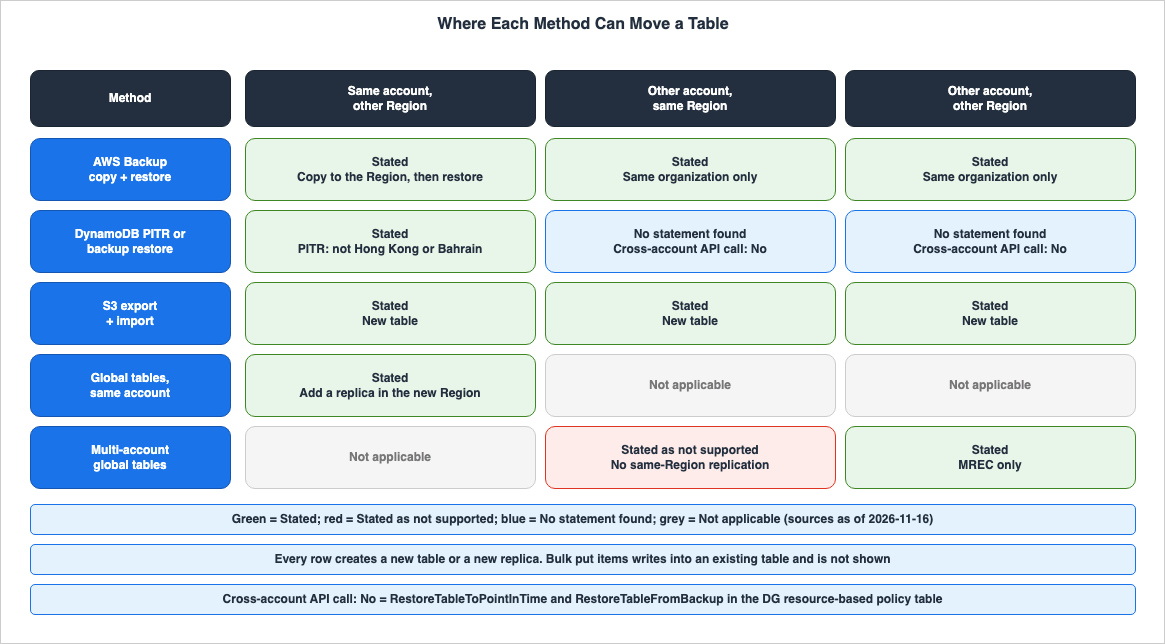
4.1 Restores and Imports Create a New Table
Based on the documentation reviewed, both restore operations and imports create new tables. The DG PITR restore page states that a restore restores to a new table. The DG DynamoDB backup page states that restores cannot overwrite existing tables. The DG AWS Backup page describes AWS Backup restores as follows:AWS Backup restores are nondestructive. You can't overwrite an existing table during a restore operation.The DG import page states that an import creates a new table, as follows:
Import into existing tables is not currently supported by this feature.Writing S3 data to an existing table is the job of bulk put items (Section 3.5). The two methods for global tables do not create new tables; instead, they add replicas in a new Region. The DG import page also states that after an import is complete, replicas for the global table can be added.
4.2 Which APIs Another Account Can Call
The DG RBAC table page describes cross-account API calls as follows:However, for cross-account access, you can only use a certain set of DynamoDB APIs through resource-based policies.Within the table on that page, the following rows relate to the methods described in this article. The values in the table are taken directly from the two columns on the DG RBAC table page.
| API | Resource-Based Policy Support | Cross-Account Support |
|---|---|---|
CreateBackup | Yes | No |
RestoreTableFromBackup | No | No |
RestoreTableToPointInTime | Yes | No |
ExportTableToPointInTime | Yes | No |
ImportTable | No | No |
DescribeTable | Yes | Yes |
UpdateTable | Yes | Yes |
PutItem, BatchWriteItem | Yes | Yes |
GetRecords, GetShardIterator, DescribeStream (DynamoDB Streams) | Yes | Yes |
As the table shows, the APIs for restoring, exporting, and importing cannot be called from another account. The DG export page describes the failure when an export is requested from a different account as follows:
A request made from a different account fails with a ValidationException: "This action is only supported by accounts that match the resource owner's account."That same page states that to export a table owned by another account, you assume an IAM role in the table's account and make the request with that role's credentials. Conversely, APIs for reading and writing items, as well as APIs for reading DynamoDB Streams, can be permitted to another account using resource-based policies. Catching up with writes in Chapter 7 depends on this difference.
4.3 Moving Between Accounts in the Same Region
For moving a table to a different account in the same Region, the sources differ by method. AWS Backup's copy and restore, as well as export and import, are documented as methods for moving data to a different account without changing the Region. Multi-account global tables cannot be used for this destination, because the DG global table design page states the following.Every replica in a multi-account global table must be in a different AWS account and Region. DynamoDB doesn't support same-Region replication.The Database Blog multi-account article describes a procedure that temporarily uses another Region because of this constraint (Section 3.4).
5. What Carries Over and What You Set Again
This chapter shows, page by page, what carries over to the destination table and what you set again. This is the core chapter of this article.5.1 Five Pages, Five Lists
Regarding DynamoDB restoration, this article identified five pages, each with a list of settings you set again. These pages are the API ReferenceRestoreTableFromBackup and RestoreTableToPointInTime pages, the DG DynamoDB backup page, the DG AWS Backup page, and the DG PITR restore page. The five lists contain 6 to 9 items, and only the DG DynamoDB backup page and the DG AWS Backup page have the same list. The following table lists whether each setting is found on each of these pages. The term Listed indicates that the setting is included in that page's list.| Setting | API Reference RestoreTableFromBackup | API Reference RestoreTableToPointInTime | DG DynamoDB Backup Page | DG AWS Backup Page | DG PITR Restore Page |
|---|---|---|---|---|---|
| Auto Scaling Policies | Listed | Listed | Listed | Listed | Listed |
| IAM Policies | Listed | Listed | Listed | Listed | Listed |
| CloudWatch Metrics and Alarms | Listed | Listed | Listed | Listed | Listed |
| CloudWatch Contributor Insights Configuration | Documentation does not list | Documentation does not list | Documentation does not list | Documentation does not list | Listed |
| Tags | Listed | Listed | Listed | Listed | Listed |
| DynamoDB Streams Configuration | Listed | Listed | Listed | Listed | Listed |
| TTL Configuration | Listed | Listed | Listed | Listed | Listed |
| Deletion Protection Settings | Documentation does not list | Documentation does not list | Listed | Listed | Listed |
| PITR Configuration | Documentation does not list | Listed | Listed | Listed | Listed |
| Number of Items | 6 | 7 | 8 | 8 | 9 |
The names of the CloudWatch rows vary depending on the page. The DG PITR restore page writes it as the first line below, and the other four pages write it as the second line. In this article, these two formats are presented in the same row.
Amazon CloudWatch Events metrics and alarms
Amazon CloudWatch metrics and alarms
Regarding restoring DynamoDB backups, the API Reference
RestoreTableFromBackup page lists 6 items, while the DG DynamoDB backup page lists 8. For PITR restores, the API Reference RestoreTableToPointInTime page lists 7 items, while the DG PITR restore page lists 9 (Sources disagree). This article does not designate one list as correct and dismiss the others as inaccurate. The six items that appear on every page's list are auto scaling policies, IAM policies, CloudWatch metrics and alarms, tags, DynamoDB Streams configuration, and TTL (Time to Live) settings.The list of settings that can be modified during restoration, or the settings included in the restored table, also varies from page to page.
| Page | Settings Named | Description |
|---|---|---|
| DG PITR Restore Page | GSIs, LSIs, billing mode, provisioned read and write capacity, encryption settings | Settings that can be changed on the restored table. |
| DG DynamoDB Backup Page | GSIs, LSIs, billing mode, provisioned read and write capacity, encryption settings | Settings that can be changed during restoration. |
| DG AWS Backup Page | Encryption settings | Settings that can be changed during restoration. The page also states that the table is restored with all original indexes. |
API Reference RestoreTableToPointInTime | GSIs, LSIs, vector indexes, provisioned read and write capacity, encryption settings | Settings included in a new table along with the data. |
The requests for the API Reference functions
RestoreTableFromBackup and RestoreTableToPointInTime both include parameters that override the billing mode, GSIs, LSIs, vector indexes, provisioned capacity, on-demand capacity, and encryption settings.5.2 Method by Setting
The following table lists, for each method, whether a setting carries over, is set again, or is decided during the move. TheCarries over and Set again cells name the page. The same-account global table column uses the three category words of the DG same-account How it works page (Synchronized, Synchronized and overridable, and Never synchronized). The multi-account global table column uses the two category words of the DG multi-account How it works page (Synchronized and Not synchronized).| Setting | AWS Backup Copy and Restore | DynamoDB PITR or Backup Restore | S3 Export and Import | Same-Account Global Table Replica | Multi-Account Global Table Replica |
|---|---|---|---|---|---|
| Item | Restores the entire table to a new table (DG AWS Backup page). | PITR restores data to a specific point in time; backup restores data to the time the backup was taken. | Imports exported data. If keys are duplicated, only one item remains for each key, and the pages grouped as the DG import page differ on which one (Section 9.1). | DynamoDB performs the initial synchronization. (DG global table design page) | Can start from a non-empty single-Region table, and existing items are copied (Database Blog multi-account article). |
| GSI | Carries over (DG AWS Backup page). | Carries over (DG DynamoDB backup page, API Reference RestoreTableToPointInTime), and can be excluded at restore (DG PITR restore page, DG DynamoDB backup page). | Defined in the import request. | Synchronized (definition). | Synchronized (definition). |
| LSI | Carries over (DG AWS Backup page). | Carries over (DG DynamoDB backup page, API Reference RestoreTableToPointInTime), and can be excluded at restore (DG PITR restore page, DG DynamoDB backup page). | Stated as not supported. | Documentation does not list. | Synchronized (definition). |
| Vector Index | No statement found. | Definition is restored, and the index is rebuilt from the restored data (DG vector index page). | Export includes items with vector attributes. Defined in the import request. | Definition is replicated to new replicas. | Definition is replicated to new replicas. |
| Capacity Mode and Capacity | Capacity at the time the backup was requested (DG AWS Backup page). | Can be changed during restoration. The default value for PITR is "Sources disagree" (Section 9.1). | Determined in the import request. | Capacity mode and write capacity are synchronized. Read capacity is synchronized and overridable. | Synchronized. Only read auto scaling policies can be overridden. |
| Encryption | Selected at restore (Backup DG DynamoDB restore page). | Can be changed during restoration. | Determined in the import request. | SSE type is synchronized. | SSE type and KMS key are not synchronized. AWS managed keys are not supported. |
| TTL | Set again (DG AWS Backup page). | Set again (all five pages). | Documentation does not list. | Synchronized. | Synchronized. |
| DynamoDB Streams | Set again (DG AWS Backup page). | Set again (all five pages). | Documentation does not list. | MREC definition is synchronized. | MREC definition is synchronized. |
| Auto Scaling | Set again (DG AWS Backup page). | Set again (all five pages). | Documentation does not list. | Writes are synchronized. Reads are synchronized and overridable. | Synchronized. Reads can be overridden. |
| Tags | Set again (DG AWS Backup page). | Set again (all five pages). | Documentation does not list. | Never synchronized. | Not synchronized. |
| PITR | Set again (DG AWS Backup page). | Set again (four pages; not the API Reference RestoreTableFromBackup page). | Documentation does not list. | Never synchronized. | Not synchronized. |
| Deletion Protection | Set again (DG AWS Backup page). | Set again (the three DG pages). The two API Reference pages: Documentation does not list. | Documentation does not list. | Never synchronized. | Not synchronized. |
| Resource-Based Policies | No statement found. | No statement found. | Documentation does not list. | Never synchronized. | Not synchronized. Policies allowing the replication service principal are required for all replicas. |
| Contributor Insights | Documentation does not list. | Set again (DG PITR restore page only). The other four pages: Documentation does not list. | Documentation does not list. | Never synchronized. | Not synchronized. |
| Table Class | Documentation does not list. | Documentation does not list. | Documentation does not list. | Synchronized and overridable. | Not synchronized. |
For the resource-based policy row, no statement was found on whether the IAM policies item in the five pages' lists includes the resource-based policy attached to the table (No statement found). For the AWS Backup column, the Backup DG advanced features page states that backups taken after advanced features are enabled inherit the tags of the source table. This is about the tags of the backup's recovery point, not the tags of the restored table. The DG AWS Backup page states that you set tags again on the restored table.
5.3 What the Two Global Table Models Synchronize
Same-account global tables and multi-account global tables have different lists of synchronized settings. Among the differences, four relate to how you choose the migration method.First, there is encryption. The DG same-account How it works page places the SSE type among the settings that are always synchronized. The DG multi-account How it works page places the SSE type and the KMS key ID among the settings that are not synchronized. The DG global table design page states that for multi-account global tables, the encryption key management mode does not need to be consistent between replicas. The same page also states:
Multi-account global tables don't support AWS managed keys.Second, there are per-replica overrides. The DG same-account How it works page places read capacity, read auto scaling, table class, and on-demand maximum read throughput among the settings that are synchronized but can be overridden per replica. The DG multi-account How it works page states that, in multi-account global tables, synchronized settings cannot be overridden per Region, and that the only exception is read auto scaling policies. The same page also states that when creating a multi-account global table, you must set
GlobalTableSettingsReplicationMode to ENABLED on each replica.Third, there are LSIs. The DG multi-account How it works page places the LSI definition among the synchronized settings. The list on the DG same-account How it works page does not include LSIs (Documentation does not list). The same page ends its lists with the sentence
All other settings are not synchronized between replicas.Fourth, there is table class. It is synchronized and can be overridden in same-account global tables, and it is not synchronized in multi-account global tables.
Section 8.3 of the existing article Amazon DynamoDB Capacity and Global Tables Guide covers the same-account list. This article covers only the multi-account list and the differences between the two.
5.4 Vector Indexes
According to the "What's New" documentation, DynamoDB vector indexes became generally available on August 5, 2026. The DG vector index page describes how they interact with the ways to move a table. When restoring from PITR (point-in-time recovery) or on-demand backups, DynamoDB restores the table's data and the vector index definition. The vector index is then rebuilt from the restored data, requiring a backfilling process before it can be used for searches. An export writes items that include their vector attributes. In an import, you define vector indexes in the import request in the same way as withCreateTable. In global tables, adding a replica replicates the index definition to the new replica's Region. The DG vector index page includes multi-account global tables in this.The DG vector index page states that vector indexes only support on-demand capacity mode, and the associated table must also be configured with on-demand capacity mode. No statement was found on how AWS Backup restores handle vector indexes (No statement found). Furthermore, the accelerated performance tier for bulk put items cannot be used with tables that utilize vector indexes (DG bulk put items page).
5.5 What an Import Brings
The DG import page states that new tables created through the import process are defined using theTableCreationParameters within the import request. The values supported by the TableCreationParameters in the API Reference for ImportTable include attribute definitions, key schema, billing mode, Global Secondary Indexes (GSIs), provisioned capacity, on-demand capacity, encryption settings, table name, and vector indexes. These values do not include TTL, DynamoDB Streams, tags, deletion protection, PITR, table class, or resource-based policies (Documentation does not list).No statement was found on the DG import page or the DG migration page on whether these settings carry over to the table after an import (No statement found). As an inference by this article, the settings of the source table are not in the export files, so they can be read as needing to be set at the destination. No statement says so.
6. Where Control Changes Hands
This chapter lists where the decision to let a move go through or stop it changes hands, and from whom to whom.| Gate | Who Decides | Control Changes Hands From → To | Where It Is Written |
|---|---|---|---|
| AWS Organizations and AWS Backup settings | The organization's management account, and both the source and destination accounts | Principal of the source account → Organization's management account's cross-account backup settings and the destination vault's access policy | DG Backup migration page, Backup DG cross-account page |
| Destination vault keys and shared customer managed keys | The account holding the destination vault's key, and the account holding the key for the source resource | Key of the source account → Key of the destination vault | Backup DG cross-account page, Backup DG encryption page, Backup DG DynamoDB restore page |
S3 bucket owner and S3BucketOwner | The account owning the bucket, based on the bucket policy and the IAM policy of the caller | Principal of the table's account → Account owning the bucket, based on the bucket policy | DG export page, DG import page, DG bulk put items page |
| Resource-based policies that permit replication service principals | Each replica account | Resource policy of each table → replication.dynamodb.amazonaws.com | DG global table design page, DG multi-account How it works page |
| Account of the caller | API's cross-account support values | Cannot be called from a different account → Can only be called by the principal of the table's account | DG RBAC table page, DG export page, DG bulk put items page |
The following diagram illustrates the first four gates in the table and shows the account of the caller in the flow from the source account to the destination account.
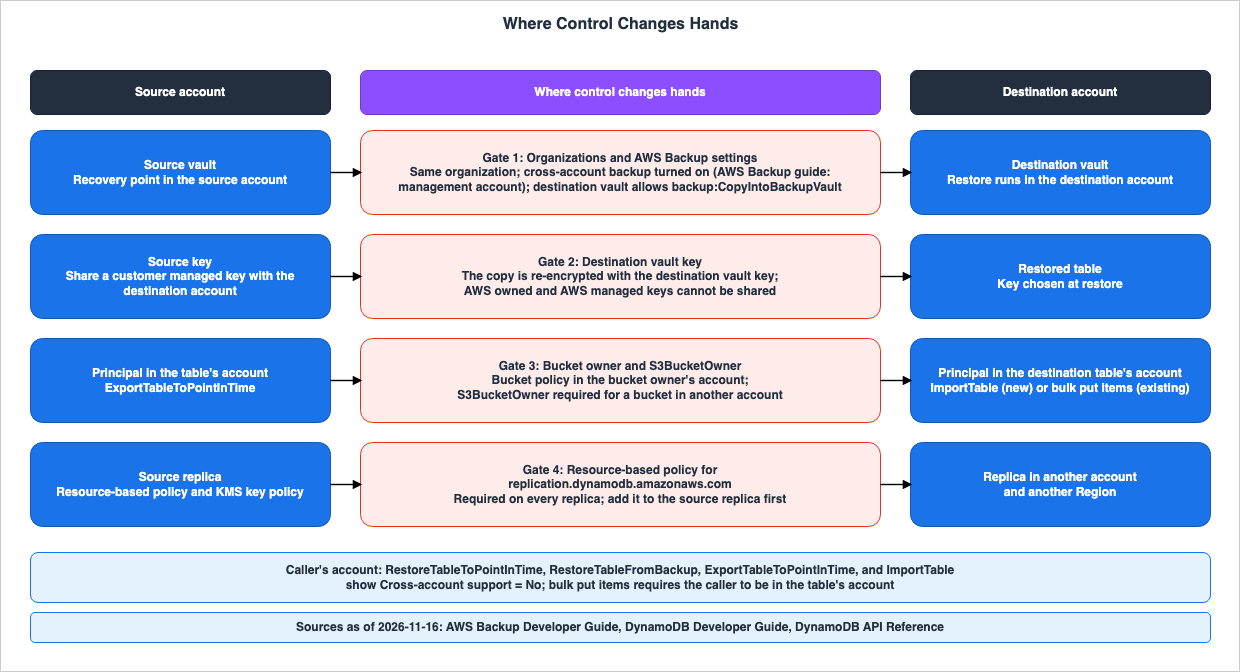
6.1 AWS Organizations and AWS Backup Settings
AWS Backup's cross-account copying functionality shifts control from the source account's principal to the organization's management account settings and the destination vault's access policy. The Backup DG cross-account page states the requirement as follows:Before you manage resources across multiple AWS accounts in AWS Backup, your accounts must belong to the same organization in the AWS Organizations service.The same page states that cross-account backup is enabled with the credentials of the AWS Organizations management account. The destination vault's access policy must permit the
backup:CopyIntoBackupVault action. The IAM role in the source account must have permissions for both backup:CopyFromBackupVault and backup:CopyIntoBackupVault. The same page describes operations from other accounts as follows:Any cross-account action other than backup:CopyIntoBackupVault will be rejected.The DG Backup migration page first instructs users to verify that advanced features for AWS Backup's DynamoDB settings are enabled in both the source and destination accounts, and then proceed to enable cross-account backups. In contrast, the Backup DG cross-account page states that cross-account backup can be enabled or disabled only with the credentials of the management account. When the source and destination accounts are not the management account, the two pages provide conflicting information regarding who can enable cross-account backups (Sources disagree, Section 9.1). The Backup DG advanced features page states that advanced features are enabled by default for customers who had not created a backup vault before November 21, 2021, and that backups created through backup plans or on-demand backups are automatically opted-in. For backups created by a backup policy, manual opt-in is required.
The Backup DG cross-account page states that AWS Backup does not directly restore resources from another account.
AWS Backup does not support recovering resources from one AWS account to another.The same page explains that while it is not possible to directly restore backups from Account A to Account B, the backups can be copied to Account B and then restored within Account B. As an inference by this article, the DG migration page's statement that a backup can be restored to another account in the same organization can be read as writing the two steps, copy and restore, in one sentence, but no statement says so (Section 9.1).
6.2 The Destination Vault Key and a Shared Customer Managed Key
In encryption, control shifts from the source account's key to the destination vault's key. The Backup DG cross-account page describes the encryption for copies as follows:AWS Backup re-encrypts your copy using the encryption key of your destination vault.If the source account's resources are encrypted using a customer managed key, this page indicates that you must share that key with the destination account. For resources fully managed by AWS Backup, you can use either a customer managed key or the
aws/backup managed key within the destination vault. For all other resources, a customer managed key is required. The Backup DG encryption page states that AWS Backup does not support cross-account copying with AWS managed keys for resources that are not fully managed by AWS Backup. The Backup DG advanced features page states that enabling DynamoDB's advanced features transfers full management of DynamoDB backups to AWS Backup.Regarding the key used when restoring in the destination account, the Backup DG DynamoDB restore page gives the details. For backups fully managed by AWS Backup, you can choose a DynamoDB-owned key, a DynamoDB-managed key, or a customer managed key. To restore a copied backup using the same key as the source table, two conditions must be met: If the copy spans Regions, the key must be a multi-Region key. If the copy spans accounts, you must share the source account's key with the destination account. AWS owned keys and AWS managed keys are not multi-Region keys and cannot be shared between accounts.
The Backup DG cross-account page states the following regarding copies in the cold storage tier:
AWS Backup does not support cross-account copies for storage in cold tiers.6.3 The Bucket Owner and S3BucketOwner
During export, import, and bulk put items operations, control shifts from the principal in the table's account to the bucket policy of the account owning the bucket.Regarding export, the DG export page states that the destination bucket does not need to be in the same Region as the source table, nor does it need to belong to the same account. To write to a bucket owned by a different account, the bucket's policy must explicitly grant write access. The API Reference for
ExportTableToPointInTime specifies S3BucketOwner as follows:S3BucketOwner is a required parameter when exporting to a S3 bucket in another account.If you encrypt the export with an AWS KMS key, that key must be in the same Region as the destination bucket. If either the table or the bucket is encrypted with a customer managed key, the key's policy must permit DynamoDB to use the key.
Regarding import, the DG import page states that data can be read from buckets owned by other accounts. When using the API, the default value for the bucket owner is the ID of the account initiating the call. For buckets owned by a different account, the page instructs users to provide the ID of the bucket owner's account. If S3 objects are encrypted using SSE-KMS, the entity initiating the import must be able to decrypt the objects with the key. Import does not support objects encrypted with SSE-C. If you encrypt the new table with a key that DynamoDB does not own, you need the KMS permissions to operate a table encrypted with a customer managed key.
Regarding bulk put items, the DG bulk put items page states that for a bucket owned by a different account, you set
S3BucketOwner. Both the IAM policy of the caller and the bucket policy must grant access. The same page describes the following behavior when an incorrect value is provided for S3BucketOwner:DynamoDB can write items to the table before the operation fails with S3AccessDenied, and it outputs no report or manifest.6.4 The Resource Policy for the Replication Service Principal
In multi-account global tables, control shifts from the resource policies of each account's table to the DynamoDB replication service principal. The DG global table design page states that all replicas in the replication group must have a resource-based policy that allowsreplication.dynamodb.amazonaws.com to read and write data, and that you add this policy to the source replica before adding a new replica. If the source replica is encrypted with an AWS KMS key, the key's policy must grant the same service principal permissions for kms:Decrypt, kms:ReEncrypt*, kms:GenerateDataKey*, and kms:DescribeKey. These permissions are not required with an AWS owned key.The same page indicates that when creating replicas through the console, operations begin in the destination Region of the destination account. Each account can only delete its own replicas and change only the non-replicated settings of its own replica. The page also states that it is not possible to delete replicas belonging to other accounts, or to modify their point-in-time recovery (PITR) or backup settings. There is a 24-hour limitation described in the following sentence:
You cannot delete the source replica for the first 24 hours after creating a multi-account global table.A statement regarding whether multi-account global tables require AWS Organizations was not found in any of the following documentation: the DG multi-account page, the DG multi-account How it works page, the DG global table design page, the DG global tables entry page, the DG multi-account security page, or the Database Blog multi-account article (No statement found). While What's New states that multi-account global tables are ideal for customers that adopt multi-account strategies or use AWS Organizations, this is presented as a description of the use case, rather than a requirement.
6.5 The Account of the Caller
The last gate is the account of the principal that calls the API. As shown in the table in Section 4.2,RestoreTableToPointInTime, RestoreTableFromBackup, ExportTableToPointInTime, and ImportTable do not support calls from other accounts. The DG bulk put items page states that the caller must be in the table's account.The caller must be in the table's account. Cross-account callers are blocked on start, describe, and cancel.In other words, a principal in the account that owns the table requests an export, and only the destination bucket can be in a different account. For import and bulk put items, a principal in the account that owns the table being written to calls the operation, and only the source bucket can be in a different account.
7. Keeping Writes in Step
This chapter lists what the sources say about bringing writes made to the source table during the move over to the destination table.7.1 What the Migration Page Says
The DG S3 migration page states that if you can pause writes to the source table during the migration, the source and destination tables match after the migration. If you cannot pause writes, the destination table is normally a bit behind the source table after the migration. The DG S3 migration page further explains that this lag can be addressed by using DynamoDB Streams or Kinesis Data Streams for DynamoDB to replay any writes that occurred on the source table after the backup or export process. Regarding the time to begin reading the stream, the page provides the following information:You should start reading the stream records prior to the timestamp when you exported the source table to S3.As an example on the same page, if an export occurs at 2:00 PM and the import completes at 11:00 PM, the page says to start reading DynamoDB Streams at 1:58 PM. The page also lists methods for using AWS Lambda functions to replay each write to the destination table. Concerning the retention time for DynamoDB Streams, the page's notes state:
Items are kept in the DynamoDB Streams for 24 hours, so you should plan to complete your backup and restore or export and import within that window.This note applies not only to export and import, but also to backup and restore operations. The DG S3 migration page does not specify the retention time for Kinesis Data Streams for DynamoDB. The methods for specifying the starting position for reading the stream are covered in the existing article Where a Stream Consumer Can Start on AWS.
7.2 Reading the Stream from the Destination Account
On the DG RBAC table page, theDescribeStream, GetShardIterator, and GetRecords operations for DynamoDB Streams support calls from other accounts. The PutItem and BatchWriteItem operations, which write items, also support this. As an inference by this article, a principal in the destination account reading the source table's stream and a principal in the source account writing to the destination table are both combinations that resource-based policies can allow, but the DG S3 migration page describes neither.7.3 Full Export and Incremental Export
The steps on the DG S3 migration page choose Full export. The DG export page describes Incremental export in addition to Full export and states the period of an incremental export as follows:The export period duration must be at least 15 minutes and be no longer than 24 hours.A procedure that uses incremental export to catch up during a migration was found on none of the DG migration page, the DG S3 migration page, and the DG export page (No statement found). Because the DG import page states that import only creates new tables, the output of an incremental export cannot be imported into an existing table.
7.4 Writing S3 Data into the Table You Moved
If you need to append data from S3 to the table you moved, the feature for that is bulk put items. The DG bulk put items page states that bulk put items writes to an existing table, and if a record does not have a condition expression, it will overwrite existing items with the same key. The same page states the following about global tables.Bulk put items does not support global tables.The same page states that
BatchWriteItem or PutItem should be used to write to a global table. You cannot initiate bulk put items while the table is transitioning to or from a global table, or while it is being restored from a backup. Bulk put items do not pass through DynamoDB Accelerator (DAX). The complete list of scenarios where it cannot be used, along with its limitations, is covered in Section 8.7 and Chapter 9 of the existing article Bulk Put Items in Amazon DynamoDB.7.5 Writes During a Global Table Move
In a global tables configuration, replication handles write propagation between replicas. The DG global table design page states that you can add a new Region to an MREC global table at any time and that DynamoDB handles the initial sync and ongoing replication. The Database Blog multi-account article states that when a replica is removed, pending writes are automatically copied before deletion (Section 3.4). This is a blog statement; the same statement was not found on the DG pages.8. Limits and Boundaries
This chapter lists the limits and boundaries associated with the migration process, along with their sources. The values presented are as of November 16, 2026.| Item | Value | Where It Is Written |
|---|---|---|
| Concurrent import jobs | Up to 50. In us-east-1, us-west-2, and eu-west-1, up to a total of 15 TB of original objects. In other Regions, up to a total of 1 TB. | DG import page, DG quotas page |
| Number of objects per import job | Up to 50,000 per job (all Regions). | DG import page, DG quotas page |
| Import data format | CSV, DynamoDB JSON, Amazon Ion. Compression options: GZIP, ZSTD, or uncompressed. | DG import page |
| Concurrent export tasks | Full exports: up to 300, or a total of 100 TB of running exports. Incremental exports have the same limits. | DG quotas page |
| Incremental export duration | From 15 minutes to 24 hours. | DG export page, DG quotas page |
| Export format | DynamoDB JSON and Amazon Ion. | DG export page |
| Concurrent DynamoDB restores | From on-demand backups and PITR, up to 50 concurrent restores, with a total of 50 TB. | DG quotas page |
| Concurrent AWS Backup restores | Up to 50 concurrent restores, with a total of 25 TB. | DG quotas page |
| PITR recovery window | The last 35 days. The recovery period can be set to any value between 1 and 35 days. | API Reference RestoreTableToPointInTime |
| Cross-Region restores for PITR and on-demand backups | For PITR restores, the Hong Kong and Bahrain Regions cannot be used as either the source or destination. For on-demand backup restores, the DG DynamoDB backup page has no such statement (No statement found). | DG PITR restore page, DG DynamoDB backup page |
| DynamoDB Streams retention | 24 hours. | DG S3 migration page |
| Source table of a global table | Cannot be deleted until 24 hours have passed since a new replica was created. In multi-account global tables, too, the source replica cannot be deleted for the first 24 hours. | DG same-account How it works page, DG global table design page |
| Multi-account global tables | Only MREC. Each replica must be in a different account and a different Region. Before the first replica is added, the table is a single-Region table. AWS managed keys are not supported. | DG multi-account page, DG global table design page |
| MRSC global tables | Exactly three Regions. When converting a single-Region table, the table must be empty. You cannot add replicas to an existing MRSC global table. Does not support TTL or LSI. | DG same-account How it works page |
| Cross-account copies with AWS Backup | Only within the same organization. Does not support copies in the cold storage tier. The initial copy is a full copy. | Backup DG cross-account page |
| Bulk put items | Up to 5 concurrent operations per performance tier, per account. A maximum of 1 concurrent operation per table. A single operation can accept up to 100 GB with Standard tier, or 1 TB with Accelerated tier. Up to 50,000 input objects, with a maximum object size of 5 GB. MaxWriteRequestUnits minimum is 1,024. | DG quotas page |
| Vector index | Only available with on-demand capacity mode. | DG vector index page |
The DG multi-account page states the following regarding MRSC:
Global tables configured for Multi-Region strong consistency (MRSC) do not support the multi-account model.The DG same-account How it works page states the following about converting to MRSC:
Converting a single-Region table to a MRSC global table with existing items is not supported.9. Where the Sources Disagree and What They Do Not Say
9.1 Where the Sources Differ
| Event | What Each Source Says | Kind of Difference |
|---|---|---|
| Settings to set again after restoring a DynamoDB backup | The API Reference RestoreTableFromBackup page lists 6 items. The DG DynamoDB backup page lists 8 items, including deletion protection and PITR. | Sources disagree |
| Settings to set again after a PITR restore | The API Reference RestoreTableToPointInTime page lists 7 items. The DG PITR restore page lists 9 items, including Contributor Insights and deletion protection. | Sources disagree |
| Default capacity after a PITR restore | The DG PITR restore page states that a full table restore uses the capacity at the time the backup was requested, and gives an example in which restoring to three weeks ago gives 100 read and 100 write capacity units. The API Reference RestoreTableToPointInTime page states that the included settings are based on the source table's current settings at the time of the restore. | Sources disagree |
| Settings that can be changed during the restore process | The DG DynamoDB backup page lists 5 items. The DG AWS Backup page lists only encryption settings. | Different kinds of statements |
| Moving to a different account using AWS Backup | The DG migration page states that backups can be restored to a different account within the same organization. The Backup DG cross-account page states that it does not support restoring resources from one account to another, and states that you copy the backup and then restore it in the destination account. | Different kinds of statements |
| Moving from a global table in the same account to a multi-account environment | The DG global table design page states that an existing single-account global table must delete its replicas before becoming a multi-account global table. The DG multi-account How it works page states that you can create a multi-account global table by disassociating MREC replicas and using the remaining table. | Different kinds of statements |
| Account required to enable cross-account backups | The DG Backup migration page states that you turn on Cross-account backup in both the source and destination accounts. The Backup DG cross-account page states that only the credentials of the AWS Organizations management account can enable or disable this feature. | Sources disagree |
| Accepting new customers for AWS Data Pipeline | The Document history entry for Data Pipeline lists a Release Date of July 25, 2025. The Big Data Blog Data Pipeline article states that new customer access was closed on July 25, 2024. | Sources disagree |
| Export and import notes in the re:Post migration article | Within the same article, the steps in the export and import section do not use Data Pipeline. The final note in the section states that Data Pipeline configuration and management are required. | Disagrees within the same page |
| Naming of CloudWatch metrics | Only the DG PITR restore page includes the word "Events" in the naming of CloudWatch metrics (Section 5.1). | Different record formats |
| Duplicate keys in an import | Within the DG import page, "DynamoDB data import from Amazon S3: how it works" states that the import overwrites the items until only the last overwrite remains, and "Import format quotas and validation" states that the duplicate items are overwritten in random order. | Sources disagree |
Regarding the default capacity settings for PITR restoration, the example text on the DG PITR restore page reads:
In this case, DynamoDB restores your table data to that point in time with the provisioned throughput from that time (100 read capacity units and 100 write capacity units).The API Reference
RestoreTableToPointInTime page reads:All these settings come from the current settings of the source table at the time of restore.This article does not claim that either of these is incorrect. Both pages state that the restoration request can override the capacity.
Regarding AWS Data Pipeline, this article presents both dates with the source of each, as each source states them.
9.2 What the Sources Do Not Say
The following are items that could not be found after searching the documentation using various search terms and examining different sections (No statement found). None of them means that the matter does not exist or cannot be done.- Whether a PITR restore or an on-demand backup restore can create the restored table in a different account. The DG RBAC table page states that the two APIs do not support calls from other accounts, but no statement covers the destination account (Section 3.3).
- Whether multi-account global tables require an AWS Organizations organization. This article checked six pages (Section 6.4).
- Whether an import brings over TTL, DynamoDB Streams, tags, deletion protection, PITR, table class, or resource-based policies (Section 5.5).
- How an AWS Backup restore handles resource-based policies and vector indexes.
- Whether the IAM policies item in the lists of settings to set again includes the table's resource-based policy.
- A DG page with a procedure for moving a table between accounts with global tables (Section 3.4).
- A procedure for using incremental export as part of a migration process (Section 7.3).
- A Backup DG statement on whether one AWS Backup copy can target a different account and a different Region at the same time. The copy step on the DG Backup migration page says to enter the AWS Region of the destination account.
10. Failure Modes
This chapter lists potential issues that may arise when misinterpreting the information presented in this document, categorized by the type of misinterpretation. Each row stays within what the sources state.| Failure Mode | What Can Happen | What the Sources Say |
|---|---|---|
| Believing that AWS Backup allows direct restoration to a different account. | Restoration procedures cannot be established. | AWS Backup does not restore resources from one account directly to another. You must first copy the resources to the destination account and then restore from that account. |
| Using AWS Backup to move a table to an account in a different organization. | Cross-account copying cannot be configured. | The source and destination accounts must belong to the same AWS Organizations organization. The DG migration page presents export and import for accounts in different organizations. |
| Performing a cross-account copy without sharing the customer managed key from the source account. | The copy can fail. | If the source resource is encrypted with a customer managed key, that key must be shared with the destination account. |
| Attempting to restore using the same key as the source table in the destination account. | With AWS owned keys or AWS managed keys, the same key cannot be used. | To restore with the same key, key sharing is required across accounts, and a multi-Region key is required across Regions. |
| Moving tables with Local Secondary Indexes (LSIs) using export and import. | The table cannot be imported as an LSI-enabled table. | Import does not support tables with LSIs; it does support GSIs. |
| Using the same prefix in the import request as used in the export request. | The import path is incorrect. | The same prefix used in the export request cannot be used in the import request. The path should be in the format s3://bucket/prefix/AWSDynamoDB/<XXXXXXXX-XXXXXX>/data/, where XXXXXXXX-XXXXXX is the export ID. |
| Attempting to import into an existing table. | The import cannot write into the existing table. | Import only creates new tables. To write to an existing table, use bulk put items. |
| Duplicate keys exist in the source data. | The number of items processed during import does not match the number of items in the table. | If duplicate keys exist, only one item for each key remains. |
| Assuming that restoring or importing will automatically carry over all source table settings. | After a restore, operations begin without TTL, DynamoDB Streams, tags, auto scaling, PITR, or deletion protection. | The lists on the five pages each name 6 to 9 settings to set again. No source lists what an import brings over. |
| A principal in the destination account requests an export of the source table. | The request fails with a ValidationException. | Export requests must originate from the principal of the account that owns the table. If exporting a table in another account, you must assume that account's role. |
Exporting to a bucket in another account without specifying the S3BucketOwner. | The export cannot be written. | When exporting to a bucket in another account, specifying the S3BucketOwner is required. |
Incorrectly specifying the S3BucketOwner when using bulk put items. | The operation can write some items and then fail with an S3AccessDenied error, and no report or manifest is generated. | The DG bulk put items page describes this behavior. |
| Starting DynamoDB Streams reads after the export time. | Some writes are missing from the destination table. | Begin reading DynamoDB Streams before the export time. DynamoDB Streams items are retained for 24 hours. |
| Using multi-account global tables to move a table to a different account in the same Region. | Replicas cannot be created. | Each replica must reside in a different account and a different Region. Same-Region replication is not supported. |
| Using a table with AWS managed keys in a multi-account global table. | Replicas cannot be created. | Multi-account global tables do not support AWS managed keys. |
| Deleting the source replica right after creating a multi-account global table. | The source replica cannot be deleted. | The source replica cannot be deleted for the first 24 hours after the multi-account global table is created. |
| Overriding settings per replica in a multi-account global table, as in a same-account global table. | The setting cannot be overridden. | In multi-account global tables, synchronized settings cannot be overridden per Region. The only exception is read auto scaling policies. |
| Using bulk put items to write to the global table after the move. | The operation cannot be started. | Bulk put items do not support global tables. |
| Attempting to use AWS Data Pipeline in a new account. | Unable to begin using Data Pipeline. | The Data Pipeline Document History states that Data Pipeline is not available to new customers. |
11. Frequently Asked Questions About Moving a DynamoDB Table
Can AWS Backup restore a DynamoDB table directly into another AWS account?
AWS Backup cannot directly restore a DynamoDB table into another AWS account. The AWS Backup Developer Guide page on cross-account copies states that AWS Backup does not support restoring resources from one account to a different account. Instead, you must copy the backup to a vault in the destination account and then restore it within that account. Both the source and destination accounts must belong to the same AWS Organizations organization.Do the source and destination accounts have to be in the same AWS Organizations organization?
For the AWS Backup method, they do. The DynamoDB Developer Guide page on migrating with AWS Backup and the AWS Backup Developer Guide page on cross-account copies both say so. For the export and import method, the DynamoDB Developer Guide migration page says that it suits moves between accounts that are not part of the same organization. No statement on whether multi-account global tables require an organization was found on the six pages this article checked.Can I import data from Amazon S3 into an existing DynamoDB table?
You cannot import data from Amazon S3 into an existing DynamoDB table. The DynamoDB Developer Guide import page states that import creates new tables and does not support importing data into existing tables. Bulk put items, the feature that writes S3 data into an existing table, has been available since November 5, 2026. Bulk put items does not support global tables.Which settings do I have to set again after restoring a DynamoDB table?
It depends on the page. The five pages this article read list six to nine items. All of the pages list six items: auto scaling policies, IAM policies, CloudWatch metrics and alarms, tags, DynamoDB Streams configuration, and TTL settings. Whether or not deletion protection, PITR (point-in-time recovery), and Contributor Insights are included varies from page to page.Can I move a table to another account in the same Region with multi-account global tables?
It is not possible. The DynamoDB Developer Guide page on using global tables states that each replica of a multi-account global table must reside in a separate account and a different Region, and that same-Region replication is not supported. The methods that the sources describe for moving a table to another account in the same Region are AWS Backup copy and restore, and export and import. An AWS Database Blog article on multi-account global tables describes a procedure that temporarily uses another Region, but this is a blog procedure.How do I keep the destination table current while the migration runs?
The DynamoDB Developer Guide page on migrating with export and import mentions either pausing writes to the source table or using DynamoDB Streams or Kinesis Data Streams for DynamoDB to replay writes after the export. It advises starting the read process before the time the export began. DynamoDB Streams retains items for 24 hours, so the same page says to plan to complete the restore or import within that window.12. Summary
The DG migration page lists only two methods for moving tables across accounts and Regions: using AWS Backup for copying and restoring between accounts within the same organization, and using export and import, which are independent of organizational boundaries. Point-in-time recovery (PITR) and on-demand backup restoration move tables to a different Region, and their APIs do not support calls from other accounts. For global tables, a move within the same account adds Regions, while multi-account global tables can only move a table to a different account and a different Region. The procedure for moving accounts with global tables is written in the Database Blog.After a restore, some settings do not carry over to the restored table, according to the DG and API Reference pages. The list of settings you set again after a restore has six to nine items depending on the page, and no source lists what an import brings over. Global tables, whether within the same account or across multiple accounts, have different sets of configurations that are synchronized, and the encryption type and per-replica overrides go in opposite directions.
Where control changes hands depends on the method. For AWS Backup, it is determined by the settings of the management account and the keys of the destination vault. For export and import, and for bulk put items, it is determined by the bucket owner's bucket policy and the
S3BucketOwner. For multi-account global tables, it is determined by resource-based policies that allow the replication service principal. A principal in the source table's account calls restore and export, a principal in the account that creates the new table calls import, and a principal in the destination table's account calls bulk put items. The information presented is current as of November 16, 2026.13. References
- Amazon DynamoDB Developer Guide: Migrating a DynamoDB table from one account to another
- Amazon DynamoDB Developer Guide: Migrate a table using AWS Backup for cross-account backup and restore
- Amazon DynamoDB Developer Guide: Migrate a table using export to S3 and import from S3
- Amazon DynamoDB Developer Guide: Restore a table in DynamoDB
- Amazon DynamoDB Developer Guide: Backing up and restoring DynamoDB tables with DynamoDB: How it works
- Amazon DynamoDB Developer Guide: Backing up and restoring DynamoDB tables with AWS Backup: How it works
- Amazon DynamoDB Developer Guide: DynamoDB data export to Amazon S3: how it works
- Amazon DynamoDB Developer Guide: Requesting a table export in DynamoDB
- Amazon DynamoDB Developer Guide: DynamoDB data import from Amazon S3: how it works
- Amazon DynamoDB Developer Guide: Requesting a table import in DynamoDB
- Amazon DynamoDB Developer Guide: Import format quotas and validation
- Amazon DynamoDB Developer Guide: Global tables - multi-active, multi-Region replication
- Amazon DynamoDB Developer Guide: How DynamoDB global tables work
- Amazon DynamoDB Developer Guide: How DynamoDB global tables work (multi-account)
- Amazon DynamoDB Developer Guide: DynamoDB multi-account global tables
- Amazon DynamoDB Developer Guide: DynamoDB global tables security (multi-account)
- Amazon DynamoDB Developer Guide: Using DynamoDB global tables
- Amazon DynamoDB Developer Guide: Disassociating a global table replica
- Amazon DynamoDB Developer Guide: DynamoDB API operations supported by resource-based policies
- Amazon DynamoDB Developer Guide: Working with bulk put items
- Amazon DynamoDB Developer Guide: Bulk put items considerations, quotas, and permissions
- Amazon DynamoDB Developer Guide: Using vector indexes in DynamoDB
- Amazon DynamoDB Developer Guide: Requirements and limitations (vector indexes)
- Amazon DynamoDB Developer Guide: Using vector indexes with global tables
- Amazon DynamoDB Developer Guide: Quotas in Amazon DynamoDB
- Amazon DynamoDB API Reference: RestoreTableFromBackup
- Amazon DynamoDB API Reference: RestoreTableToPointInTime
- Amazon DynamoDB API Reference: ExportTableToPointInTime
- Amazon DynamoDB API Reference: ImportTable
- AWS Backup Developer Guide: Creating backup copies across AWS accounts
- AWS Backup Developer Guide: Advanced DynamoDB backup
- AWS Backup Developer Guide: Encryption for backups in AWS Backup
- AWS Backup Developer Guide: Restore a Amazon DynamoDB table
- AWS Data Pipeline Developer Guide: Document History
- What's New: Amazon DynamoDB global tables now support replication across multiple AWS accounts
- What's New: Amazon DynamoDB now supports real-time vector search
- What's New: Amazon DynamoDB now supports bulk put items
- AWS Database Blog: Amazon DynamoDB global tables now support replication across AWS accounts
- AWS Big Data Blog: Migrate workloads from AWS Data Pipeline
- AWS re:Post Knowledge Center: How can I migrate my DynamoDB tables from one AWS Account to another?
References:
Tech Blog with curated related content
Written by Hidekazu Konishi