Bulk Put Items in Amazon DynamoDB - Loading S3 Data into an Existing Table, Per-Item Conditions, and the Report
First Published:
Last Updated:
This article details which of five outcomes one row of the input has (written, overwritten, skipped, an error, or not read), and where each outcome is tracked (or not tracked). It also describes what remains in the table if the operation is interrupted, and from which point you would need to resume the process.
To summarize, rows that are skipped due to the conditional checks are not counted as failures. If the output report does not include the
CONDITION_CHECK_FAILURE type, no record or count of those skipped rows remains. Rows that have been written are not rolled back, even if the operation fails or is canceled.This article reviewed the documentation on November 11, 2026 (Japan Standard Time) and, on the same day, tested five scenarios on a small table in the us-east-1 Region. The results are presented as observations in Chapter 10, separate from the statements in the documentation. Pricing and speed comparisons between the performance tiers are not included.
Related articles on this site:
- DynamoDB Key Design Dictionary: PK/SK, GSI/LSI Selection, Hot Partition Avoidance, and Re-Keying Patterns
- AWS History and Timeline regarding Amazon DynamoDB - Overview, Functions, Features, Summary of Updates, and Introduction
- Amazon DynamoDB Capacity and Global Tables Guide - Capacity Modes, Auto Scaling, Warm Throughput, and Multi-Region Design
- Leaving an Amazon DynamoDB Global Table - Disassociation Protection, the Replication Stop Boundary, and Who Acts in Each Account
- Amazon DynamoDB Single Table Design Complete Guide - Access-Pattern-Driven Data Modeling Patterns
- Where a Stream Consumer Can Start on AWS - Starting Positions in DynamoDB Streams, Kinesis Data Streams, KCL, and Lambda Event Source Mappings
- Amazon DynamoDB Master Index - A Hub for DynamoDB Design, Key Modeling, and Capacity Planning Articles
Table of Contents
- 1. Scope and Assumptions
- 2. How to Read the Tables
- 3. Where Bulk Put Items Fits
- 4. Input Format and Per-Record Conditions
- 5. Where One Record Goes
- 6. What Is Recorded and What Is Not
- 7. How an Operation Ends and What Stays in the Table
- 8. What Happens Around the Table
- 9. MaxWriteRequestUnits and Quotas
- 10. Observations on a Small Table
- 11. Where the Sources Disagree and What They Do Not Say
- 12. Failure Modes
- 13. Frequently Asked Questions About DynamoDB Bulk Put Items
- 14. Summary
- 15. References
1. Scope and Assumptions
This chapter first defines the intended audience, the scope of this article, the materials reviewed, and the terminology used. The following ten points outline the key conclusions.- Bulk put items writes data to an existing table. It is a separate function from Import from Amazon S3 and does not create new tables. The writes run on a separate path and do not use the table's read or write capacity (Chapter 3).
- Input data must be in DynamoDB JSON or Amazon Ion format, with one record per line. CSV is not supported. A condition expression is written per record. Records without a condition overwrite the existing item with the same key (Chapter 4).
- For each record in the input, there are five possible outcomes: it is written, overwritten, skipped by a condition, results in an error, or is not read. Only rows that result in an error are counted in the
FailedItemCount(Chapter 5). - Rows skipped by a condition are recorded only if the output report types include
CONDITION_CHECK_FAILURE. Otherwise, no record or count of them remains (Chapter 6). - There are six status values, four of which represent end states.
COMPLETEDindicates that theFailedItemCountis zero, but does not necessarily mean that all rows have been written (Section 7.1). - Rows that are written will remain in the table, even if the operation fails (
FAILED) or is canceled (CANCELLED). They cannot be reverted (Sections 7.3 and 7.4). - Following an internal failover, the same record may be written twice. The second write will also apply the record's condition expression. If you put a version condition on every row, you can prevent an older value from overwriting a newer one (Section 7.6).
- You cannot initiate a bulk put items operation on tables that belong to a global table (Section 8.7).
MaxWriteRequestUnitsdefines the maximum write speed for this operation and is independent of the table's capacity settings. The minimum value is 1,024. On-demand tables have a parameter with the same name for the table's own limit (Chapter 9).- When testing with a small table, an operation that completed (
COMPLETED) with aFailedItemCountof zero still had five out of seven rows skipped by a condition. Because that report was not requested, the output was only the manifest (Section 10.3, Observation).
1.1 Intended Audience
This article is intended for the following readers:- Developers designing how to load data from S3 into existing DynamoDB tables in a production environment.
- Operations personnel considering transitioning daily delta updates or bulk migration loads from
BatchWriteItemloops or custom pipelines to bulk put items. - Individuals responsible for defining procedures to verify which rows have been written after a data transfer.
This article assumes readers are considering the following points, and each point is validated in the article's content:
- If the number of failures is 0, then all input rows have been written.
- If an operation fails, the written rows are rolled back.
- The number of processed items,
ProcessedItemCount, represents the number of rows written. - Writing a condition expression on one row makes the entire file insert-only.
- Using the same
ClientTokenensures that re-running the process will not result in duplicate writes.
1.2 What This Article Covers and What It Does Not
This article addresses the behavior when writing to existing tables, row-level conditions, where each row goes and where it is recorded, status values and how an operation stops, re-runs and idempotency, the effects around the table, the cases where it cannot be used,MaxWriteRequestUnits and quotas, IAM actions, discrepancies between the sources, and observations on a small table.This article does not cover:
- Pricing and billing units.
- A comparison of the speeds of the Standard and Accelerated performance tiers. This article also does not list the Regions where Accelerated is available.
- The process of importing from Amazon S3 and creating new tables. Chapter 6 of this site's DynamoDB Key Design Dictionary discusses this as one migration approach.
- A historical timeline of DynamoDB features. This is covered in this site's AWS History and Timeline regarding Amazon DynamoDB.
- The process of removing a table from a DynamoDB Global Table. This is detailed in this site's Leaving an Amazon DynamoDB Global Table.
- The implementation of
BatchWriteItemand handling partial failures. Chapter 11 of this site's Amazon DynamoDB Single Table Design Complete Guide addresses this. - Designing DynamoDB Streams consumers and determining the starting position for reading. This site's Where a Stream Consumer Can Start on AWS covers this.
- Selecting a method for moving tables between accounts and Regions.
Chapter 6 of this site's DynamoDB Key Design Dictionary states in its table, for Import from Amazon S3, that a new table is created and that data cannot be imported into an existing table. As of November 11, 2026, the Import from S3 page still states the same. The bulk put items covered in this article is a different feature.
1.3 Date of Review and Materials Reviewed
This article reviewed the following materials on November 11, 2026 (Japan Standard Time). Throughout the text, the English names in parentheses are used.- Amazon DynamoDB Developer Guide: The "Working with bulk put items" section (how-it-works page).
- Same guide: the page on performance tiers (performance tiers page), the page on input formats (input formats page), the page on running an operation (running page), the page on output and reconciliation (output page), the page on considerations, quotas, and permissions (considerations page), and the page on best practices (best practices page).
- Same guide: The "Bulk put items" section of the "Quotas in Amazon DynamoDB" page (quotas page).
- Same guide: The "Import from Amazon S3" section (Import from S3 page).
- Amazon DynamoDB API Reference: The pages for
StartBulkPutItems,DescribeBulkOperation,ListBulkOperations, andCancelBulkOperation(API reference), as well as the pages forBatchWriteItem,PutItem, andUpdateTable(for comparison). - AWS CLI Command Reference: The page for
start-bulk-put-items(CLI reference). - AWS What's New: The announcement from November 5, 2026 (What's New post).
- AWS Database Blog: The article "Introducing bulk put items for Amazon DynamoDB" (launch blog post).
- AWS Machine-Readable Service Reference: The DynamoDB JSON (service reference).
All materials were reviewed in their original, raw format (obtained via curl). As of November 11, 2026, the DynamoDB page in the Service Authorization Reference redirects to the table of contents page. IAM actions were reviewed in the table on the considerations page and in the service reference.
1.4 Terms, and Different Things with the Same Spelling
This article will consistently use the following terms:- Operation: A single bulk put items process initiated by
StartBulkPutItems. The documentation also calls it a bulk operation. - Record: A single line from the input file, containing an
Itemand optional condition fields. - Item: A DynamoDB item as it appears in the table.
- Condition Expression: The
ConditionExpressionwritten for each record. It follows the same syntax asPutItem. - Skip: When a condition expression evaluates to false, resulting in the record not being written.
- Report: A file written to the output location, containing a list of items that were not written. There are two types:
ERRORandCONDITION_CHECK_FAILURE. - Manifest: A file written to the output location, detailing the processing status of each object from the input. The running page also calls it a completion manifest.
The materials that this article reviewed contain different things with the same spelling:
MaxWriteRequestUnits: In the context of bulk put items, this refers to the maximum write speed for a single operation. Similarly, on-demand tables also have a parameter with the same name, representing the maximum number of write units for the table in on-demand capacity mode. The command examples in Chapter 2 of the Amazon DynamoDB Capacity and Global Tables Guide refer to the latter (Section 9.2).- Import: Import from Amazon S3 refers to the functionality for creating new tables. The launch blog post also calls a single run of bulk put items an "import." However, this article uses the term "operation" to refer to a bulk put items execution, reserving the term "import" specifically for Import from Amazon S3.
- Report: In this article, "report" refers only to the two file types specified by
OutputType. The manifest is not included in the report. - Condition: In this article, "condition" refers only to the
ConditionExpressionfor each record. Conditions such as whether a table is in theACTIVEstate are referred to as table states. - Bulk and Batch: Bulk put items is distinct from the "batch" used in the
BatchWriteItemAPI. This article uses the term "batch" only in reference to theBatchWriteItemAPI.
2. How to Read the Tables
This chapter defines the terminology used in the tables in this article, specifically the terms for the state of the sources, and how this article writes verification dates and dates.2.1 Terms for the State of the Sources
This article uses seven terms to describe the state of the documentation. These terms, including their English spellings, will also be used in the tables.- Stated: The documentation contains a statement regarding the matter.
- Stated as not supported: The documentation explicitly states that the matter is not supported or cannot be used.
- Documentation does not list: While a list or table exists, the specific item is not included. This does not necessarily indicate that the matter is unsupported or unavailable.
- No statement found: Despite searching using different search terms and examining different categories of documentation (as described in Section 1.3), no relevant statement could be found. This does not necessarily indicate that the matter is absent or does not occur.
- Sources disagree: The documentation from two different sources provides conflicting statements regarding the same matter. This includes cases where the statements directly contradict each other, as well as cases where the scope, strength, or subject matter differs, and the text alone does not settle which one applies. This article presents both statements and their sources without designating either as incorrect.
- Inference: This represents an inference made by this article, and is not a statement found in any of the documentation. This article says in the same sentence that it is an inference.
- Observation: This is based on observations made during testing (as described in Chapter 10) and is not a commitment made by the documentation. This article will not override statements found in the documentation with observations.
This article distinguishes between "Stated as not supported" and "No statement found." The former refers to a statement in the documentation, while the latter indicates that this article was unable to find a relevant statement.
This article does not call two statements that differ only in what they count "Sources disagree." For example, a statement listing six status values and another listing four end states simply differ in scope (Section 11.1).
2.2 How This Article Writes Verification Dates and Dates
The verification date for this article is November 11, 2026 (Japan Standard Time). The general availability of bulk put items began on November 5, 2026, and the verification date is six days after that. Pages may be updated after the verification date. In particular, theFailureCode table, quota information, the Regions where Accelerated is available, and the handling of global tables may be subject to change.This article writes the date of the observations in Chapter 10 in Japan Standard Time, and writes every date with its year.
3. Where Bulk Put Items Fits
This chapter explains how bulk put items differs from the other ways of writing.3.1 A Separate Path That Writes into an Existing Table
The how-it-works page describes bulk put items as follows:Bulk put items loads data from Amazon Simple Storage Service (Amazon S3) into an existing Amazon DynamoDB table. The writes run on a separate path and consume none of the table's read or write capacity, so your application traffic sees no impact from these bulk put items.The same page states that items become available for reading as they are written. The same page also states the difference from Import from Amazon S3 in one sentence.
Import from Amazon S3 creates a new table from data in Amazon S3, while bulk put items writes into a table that already exists.The operation is asynchronous.
StartBulkPutItems immediately returns the ARN of the operation. DynamoDB then reads the input objects, writes each item to the table, handles retries and exceptions, and writes a report to the designated output location (as described on the how-it-works page).The mandatory inputs required to initiate the operation are as follows (see the running page and API reference):
TableName: The name or ARN of the table to which data will be written.InputS3Configuration: The location of the input data.S3BucketandInputFormatare required;S3BucketOwner,S3KeyPrefix, andInputCompressionTypeare optional.OutputS3Configuration: The location for the output data.S3BucketandOutputTypeare required.
Specifying the output location is essential. The running page states that the output configuration is mandatory. The optional parameters are
PerformanceTier, MaxWriteRequestUnits, and ClientToken.3.2 Differences from Other Ways of Writing
The following table lists ways of writing S3 data and large numbers of items into DynamoDB. All columns are based on the information in Section 1.3. TheBatchWriteItem and PutItem rows are based on their respective API reference pages.| Method | Destination | Input | Per-Item Conditions | Result Logging |
|---|---|---|---|---|
| Bulk Put Items | Existing Table | S3 DynamoDB JSON or Amazon Ion | Yes. ConditionExpression per record | S3 reports and manifests, count from DescribeBulkOperation |
| Import from Amazon S3 | New Table. Created during import initiation | S3 CSV, DynamoDB JSON, Amazon Ion | Documentation does not list | Not covered in this article |
BatchWriteItem | Existing Table | API Request | No. Conditions cannot be applied to individual Put and Delete requests | Unprocessed requests are returned in the response's UnprocessedItems |
PutItem | Existing Table | API Request | Yes. ConditionExpression per request | Success or failure is returned in the response |
The Import from S3 page states that it cannot be used to write data to existing tables.
Import into existing tables is not currently supported by this feature.This passage describes the Import from Amazon S3 feature. Since November 5, 2026, bulk put items has been available as a way to write S3 data to existing tables.
3.3 Small Inputs Suit the Existing APIs
The launch blog post states that the initial few minutes are used for preparation, during which the counters do not move. It further suggests that if you need to write only a few items within a few seconds,PutItem and BatchWriteItem are suitable options.For delivering a handful of items in seconds, PutItem and BatchWriteItem remain the right tools.Bulk put items writes complete items. The launch blog post recommends using
UpdateItem for changes to individual attributes. There is no way to modify only a portion of an existing item using bulk put items. A record without a condition replaces the whole item with the same key (see Section 4.3).Global tables do not support bulk put items. The considerations page recommends using
BatchWriteItem or PutItem in such cases (see Section 8.7).4. Input Format and Per-Record Conditions
This chapter describes the format of the input file and explains how condition expressions are evaluated for each record.4.1 Formats and Compression
TheInputFormat value can be either DYNAMODB_JSON or ION (see the input formats page and API reference). DYNAMODB_JSON is a JSON Lines format where each line contains a single JSON object, representing DynamoDB's typed JSON. No line breaks are allowed within a single record. ION is in Amazon Ion text format, with each record represented as an Ion struct, separated by line breaks. There are no CSV options available.The
InputCompressionType value can be GZIP, ZSTD, or NONE. The CLI reference states that if no value is specified, it defaults to NONE.The input can consist of a single S3 object, or multiple objects with the same key prefix. If
S3KeyPrefix is specified, DynamoDB will read all objects under that prefix. The input formats page states that all objects under the same prefix must use the same format and the same compression type.You cannot mix DynamoDB JSON and Ion objects, or mix compressed and uncompressed objects, in a single bulk put items operation.4.2 Fields in One Record
A single record can have only four top-level fields (see the input formats page):Item: The item to be written. Required.ConditionExpression: The condition expression. Optional.ExpressionAttributeNames: Replacements for attribute names in the condition expression. Optional.ExpressionAttributeValues: Replacements for values in the condition expression. Optional.
A record with any other top-level field causes a validation error that stops the reading of that object (see Section 5.2). The following example demonstrates a DynamoDB JSON input, where the first line has no condition, the second line has an insert-only condition, and the third line has a version condition.
{"Item":{"id":{"S":"order-001"},"status":{"S":"PENDING"},"version":{"N":"1"}}}
{"Item":{"id":{"S":"order-002"},"status":{"S":"PENDING"},"version":{"N":"1"}},"ConditionExpression":"attribute_not_exists(id)"}
{"Item":{"id":{"S":"order-003"},"status":{"S":"SHIPPED"},"version":{"N":"4"}},"ConditionExpression":"attribute_not_exists(#v) OR #v < :new","ExpressionAttributeNames":{"#v":"version"},"ExpressionAttributeValues":{":new":{"N":"4"}}}
4.3 How Condition Expressions Are Evaluated
Condition expressions use the same syntax, operators, and functions as those used inPutItem (see the how-it-works page). A record is written only when the condition expression evaluates to true; otherwise, the record is skipped. The input formats page details the evaluation results, categorized into four outcomes:| Record | Result |
|---|---|
| No condition expression | The item is written unconditionally. If an item with the same primary key already exists, it will be overwritten. |
attribute_not_exists(pk) | Insert-only for that record. It is written only when there is no existing item with the same primary key. |
Version-based condition (e.g., #v = :expected) | The record is written based on a comparison of the version attribute. To write both new items and new versions, use attribute_not_exists(#v) OR #v < :new. |
| Condition not met | The item is skipped. It is recorded only when a CONDITION_CHECK_FAILURE report is requested. |
Records without conditions are written in their entirety. Attributes present in the existing item but not included in the record's
Item will be lost after the overwrite. In the setup in Chapter 10, when a record without a condition overwrote an existing item, the attribute category that was previously present on the item was removed (Observation).No limit on the length or the number of operands of condition expressions specific to bulk put items was found in the materials in Section 1.3 (No statement found). The output page notes that if the operands in a condition expression are invalid, the record may result in an
ERROR.4.4 Without a Condition on Every Record, a File Is Not Insert-Only
Conditions are specified for each record. There are no fields for applying conditions to the entire file or the entire operation. The input formats page states that to make the entire file insert-only, you must write a condition expression on every record.Because conditions are per-item, you must include a ConditionExpression on every record if you want put-if-not-exists behavior across the entire file.The same page states that if you generate input in an ETL pipeline, you add
ConditionExpression to the record template, and that existing files without conditions are reprocessed to add the condition before the operation starts. A record without a condition silently overwrites the existing item.5. Where One Record Goes
This chapter shows where one input record goes and where it is counted.5.1 Five Destinations
A single input record can have one of five possible destinations.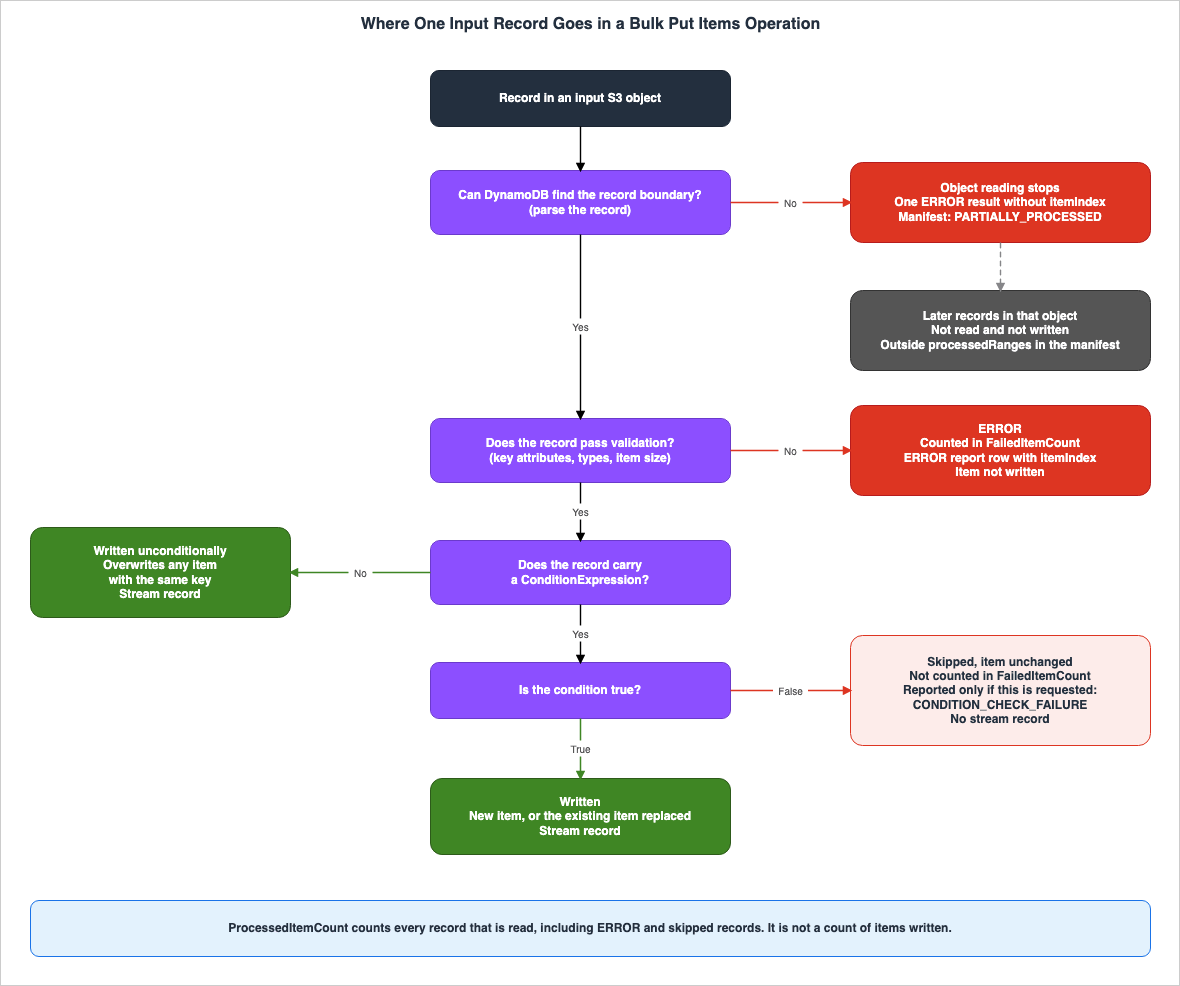
| Destination | Table Items | ProcessedItemCount | FailedItemCount | Report | Stream Record |
|---|---|---|---|---|---|
| Written. New Key | Newly written | Counted | Not counted | No report | Record generated |
| Overwritten. No condition, or condition is true | Completely replaced | Counted | Not counted | No report | Record generated |
| Skipped based on condition | Unchanged | Counted | Not counted | Report generated only when CONDITION_CHECK_FAILURE is requested | No record generated |
| Error. Validation error, etc. | Unchanged | Counted | Counted | Report generated when ERROR is requested | No record generated |
| Not read. After reading of the object stopped | Unchanged | Documentation does not list | Documentation does not list | No report | No record generated |
ProcessedItemCount represents the number of records read. This count includes records that failed validation or were skipped due to conditions, but does not represent the number of items written.ProcessedItemCount – The number of input records read so far, including records that failed validation or a condition check. This is a count of records read, not items written.FailedItemCount represents the number of items that failed for deterministic reasons. Records skipped based on a condition are not included in this count.FailedItemCount – The number of items that failed for deterministic reasons, such as validation errors. Condition-check failures are not included in this count.The stream column is based on the text in the considerations page. In tables with DynamoDB Streams or Kinesis Data Streams enabled, every bulk write produces a stream record. However, items skipped based on a condition do not generate a record (see Section 8.1). This article infers (Inference) that error rows and rows that are not read are not written to the table and therefore do not produce stream records. In the setup in Chapter 10, error rows and rows that were not read did not have corresponding records (Observation).
The statement that unread rows are not included in the
ProcessedItemCount is not found in the material in Section 1.3. In the setup in Chapter 10, the two rows after a truncated record were not included in either the ProcessedItemCount or the FailedItemCount (Observation, Section 10.4).5.2 Errors That Fail One Record and Errors That Stop an Object
Errors can occur in two ways: those that fail only that one record, and those that prevent the rest of an object from being read (see the input formats page).Validation errors that apply to one complete record will include an
itemIndex in the report row and will not prevent the rest of the object from being processed. The output page provides examples, including items exceeding the maximum allowed size and items missing required key attributes.Errors that prevent DynamoDB from locating the next record boundary stop the reading of that object. The input formats page lists examples such as malformed or truncated JSON or Ion, errors in the record structure, missing or duplicate
Item fields, unknown top-level fields, invalid DynamoDB values, invalid UTF-8 encoding, input exceeding the parser's nesting limit, records exceeding the parser's read limit, decompression errors, compression mismatches, and some S3 object-read errors.When one of these errors occurs, DynamoDB produces one error result and stops reading that Amazon S3 object. Other input objects can continue.In these cases, the
ERROR report row will include itemLocation.inputSourceArn and errorMessages, but will not include itemLocation.itemIndex. The manifest will mark the object as PARTIALLY_PROCESSED and will document the range of records that were processed in the processedRanges field.5.3 Unread Records and How the Operation Ends
When reading of an object stops, there are two possible end states for the operation (input formats page).- If DynamoDB cannot verify that it has read all the bytes of the stored input, the operation will end with a status of
FAILED, and theFailureCodewill beValidationException. - In some cases, if all stored bytes have been read before an error is encountered, the operation may end with a status of
COMPLETED_WITH_ERRORS. In this scenario,ProcessedInputByteswill be equal toTotalInputBytes.
The best practices page notes that a single record that DynamoDB cannot parse can stop the reading of the rest of that object, and can end the whole operation
FAILED. It recommends running validation tests with a sample of the input data before initiating large operations.Unread records do not appear as individual rows in the
ERROR report. Examining processedRanges in the manifest identifies the range of unread data. The decision on which records to correct and which to resubmit should be based on the final status, the ERROR report, and the manifest (input formats page).6. What Is Recorded and What Is Not
This chapter outlines the locations where operational results are recorded, and specifies what information is included and what is not.6.1 The Two Report Types
OutputType is an array that contains one or both of the following values (running page, output page).OutputType Value | Items Included |
|---|---|
ERROR | Items that failed for deterministic reasons, such as validation errors. |
CONDITION_CHECK_FAILURE | Items for which the condition expression for that record was not met. |
For inputs that use condition expressions, the input formats page states that you request
CONDITION_CHECK_FAILURE. If it is not requested, records and counts of skipped items will not be retained.When your input uses condition expressions, request CONDITION_CHECK_FAILURE so skipped items are reported, because without it DynamoDB keeps no record or count of them.The number of skipped items will not appear as a separate count in the response from
DescribeBulkOperation either. The output page states this in an Important note.Condition-check failures are not exposed as a separate count in the DescribeBulkOperation response.Combining these two points, this article infers (Inference) that if an operation does not request
CONDITION_CHECK_FAILURE, neither which records were skipped nor how many were skipped can be determined from the operation's records. They can be found only by comparing the current items in the table with the input.6.2 What the Counts Mean
The response fromDescribeBulkOperation returns progress and counts in the following fields (running page, output page).| Field | Meaning |
|---|---|
ProcessedItemCount | The number of records read. This includes records that failed due to validation or conditions. This is not the number of items written. |
FailedItemCount | The number of items that failed for deterministic reasons. This does not include items skipped due to conditions. |
ProcessedInputBytes | The total number of bytes read and processed from S3 so far. |
TotalInputBytes | The total size of the input objects. This value is not included in the response until it is calculated during the initial input validation. |
This table has no field for the number of items written. The API reference for
DescribeBulkOperation also does not list a field that returns the number of items written. The running page states that the progress fields update periodically and are not live counters, and that you do not rely on a fixed refresh interval.6.3 The Manifest
DynamoDB, in addition to the report, writes the status of processing for each input object to a manifest file (output page). The manifest is an uncompressed JSON Lines file, with one line per input object. Each line contains the following fields:inputSourceArn, fileProcessingStatus, processedRanges, and etag. The processedRanges field contains an array of ranges, represented as [start, end] pairs, indicating the records that were processed.The
fileProcessingStatus field can take one of four values:| Value | Meaning |
|---|---|
FULLY_PROCESSED | All items for this object have been processed. |
PARTIALLY_PROCESSED | Not all items have been processed. processedRanges may be empty, for example, when the first record cannot be parsed. |
NOT_PROCESSED | The operation ended before it reached this object, due to cancellation, failure, or timeout. |
NOT_AVAILABLE | It was not possible to determine how much of the object was processed. No range is written. Treat the object as not fully processed. |
The manifest is written after the operation ends. The output page states that
NOT_PROCESSED never means that the object is still waiting to be processed.The manifest indicates how much of each input object was processed. Whether individual items failed or were skipped based on a condition is indicated in the report (output page), not in the manifest. This article infers (Inference) that the manifest does not show that a record in the processed range was written. The range may include records that were skipped due to a condition or records that resulted in an error. In the setup in Chapter 10, even when four out of nine records were skipped or resulted in an error, the manifest range was
[[0, 8]] (Observation).If the operation cannot write the manifest to the output location, the operation will end with a status of
FAILED, even if all items have been written.6.4 Where the Output Goes
The manifest is written to the following path (output page).s3://output-bucket/output-prefix/AWSDynamoDB/BulkOperation/account-id:operation-id/manifest-files.jsonReports are written to directories specific to each internal job. For example, the
ERROR report can be found at the following path, while the CONDITION_CHECK_FAILURE report is located in the condition-check-failures/ directory at the same level.output-prefix/AWSDynamoDB/BulkOperation/account-id:operation-id-n/output/errors/output-NNNNN.json.gzThe report files are gzipped JSON Lines files. Because DynamoDB closes each file at 200 MiB and starts a new one, report files can appear while an operation is still
IN_PROGRESS. A file for a requested report type is written only if at least one item belongs to that type (output page).Each row in a report contains
itemLocation and errorMessages. itemLocation includes inputSourceArn and itemIndex. However, if a record is truncated and the system is unable to read the remainder of the object, the itemIndex may be missing. For CONDITION_CHECK_FAILURE rows, both the newImage of the item that the operation tried to write and the oldImage of the item as it existed in the table are included. Consequently, condition reports can be larger than the input they describe. ERROR rows may not include a newImage if the item exceeded the maximum allowed size or for a record with an invalid condition operand (output page).In some cases, nothing is written to the output. The output page lists the following two cases:
- The
S3BucketOwnerdoes not match the owner of the output bucket, causing the operation to fail and preventing both the report and the manifest from being written. - If another operation is running on the same table, a
ResourceInUseExceptionmay cause the operation to fail, preventing both the manifest and the report from being written.
6.5 Reconciliation Procedure
The output page describes a procedure for understanding the overall results. This article lists its first two steps as the following four items:- Call
DescribeBulkOperationuntil the status reachesCOMPLETED,COMPLETED_WITH_ERRORS,CANCELLED, orFAILED, recording theProcessedItemCountandFailedItemCount. - List all objects that begin with
output-prefix/AWSDynamoDB/BulkOperation/account-id:operation-id. This will return the manifest file and all report files. If no manifest file is found, check theFailureCode. - Read the manifest file, verifying the
fileProcessingStatusandprocessedRangesfor each input object, and confirming that theetagmatches the object's ownetag. - Read all of the report files.
The output page states that this method, combining analysis of the API count and the S3 report files, provides the most accurate reconciliation. The API provides an overall summary, while the S3 reports provide details for each individual item.
For operations that did not request
CONDITION_CHECK_FAILURE, the files read in the fourth item of this list do not contain any skipped items. This article infers (Inference) that this procedure cannot count the skipped items of such an operation.The input formats page notes that re-run or resumed operations may report a condition mismatch for an item that the operation itself wrote earlier. To tell this apart from a mismatch with existing data, compare the existing item in the report with the item you supplied. If they are equal, the operation wrote that item, and the mismatch is expected.
6.6 Permissions for Reading the Results
DynamoDB uses the credentials of the IAM principal that calledStartBulkPutItems to read the input and write the report and manifest (output page). It is not necessary to grant access to DynamoDB's service principal. The input and output buckets can reside in different AWS accounts, and the input bucket can even be in a different AWS Region than the table.To verify the results, the principal that checks them needs
s3:ListBucket and s3:GetObject permissions on the output bucket. The output page states that the example write policy does not grant these read permissions, and that they are granted in a separate statement to the principal that checks the results. The bulk put items operation itself does not require these read permissions.6.7 BulkOperationUsage
The response fromDescribeBulkOperation includes a BulkOperationUsage field, which returns the number of bytes written for each destination (output page). This field contains values for tables, global secondary indexes, local secondary indexes, and vector indexes. Bulk operations do not use the ConsumedCapacity field, which is returned by item-level operations such as PutItem.BulkOperationUsage represents the number of bytes written for each destination, and does not indicate the number of items written. This article does not derive the number of items written from this field. The output page states that items that reach the table and fail a condition check are metered as table writes. Therefore, the value for the table in this field can include bytes for skipped items (Stated). In the setup in Chapter 10, the value for the table after R1 was 7,168 bytes, which this article reads as 7 × 1,024 bytes for the five written rows and the two skipped rows (Observation, Inference).7. How an Operation Ends and What Stays in the Table
This chapter describes the status values, the reasons for failure, cancellation, and re-runs.7.1 Six Status Values, Four End States
There are sixBulkOperationStatus values. The running page and the Valid Values of the CancelBulkOperation page in the API reference list the same six.| Value | End State? | Meaning on the Running Page |
|---|---|---|
IN_PROGRESS | No | Reading input and writing items. |
COMPLETED | Yes | All input has been read, and FailedItemCount is 0. Some items may have been skipped based on conditions. |
COMPLETED_WITH_ERRORS | Yes | All input has been read, but FailedItemCount is greater than 0. View the ERROR report. |
CANCELLING | No | Applying the cancellation request. |
CANCELLED | Yes | The operation stopped due to the cancellation request. The written items remain in the table. The FailureCode is RequestCancelled. |
FAILED | Yes | The operation could not be completed. View the FailureCode. |
The definition of
COMPLETED states in the same sentence that some items may have been skipped based on conditions.COMPLETED – All input was read and FailedItemCount is 0. Items can still have failed a condition check.COMPLETED indicates that the number of failures is 0. It does not necessarily mean that all input records have been written. The definition of COMPLETED_WITH_ERRORS also says that all input was read. The input formats page states that an operation can end COMPLETED_WITH_ERRORS when DynamoDB read all stored bytes before detecting an error, so records after a broken record can remain unread (Section 5.3).Figure 2 illustrates the state transitions and, for each end state, what remains in the table, report, and manifest.
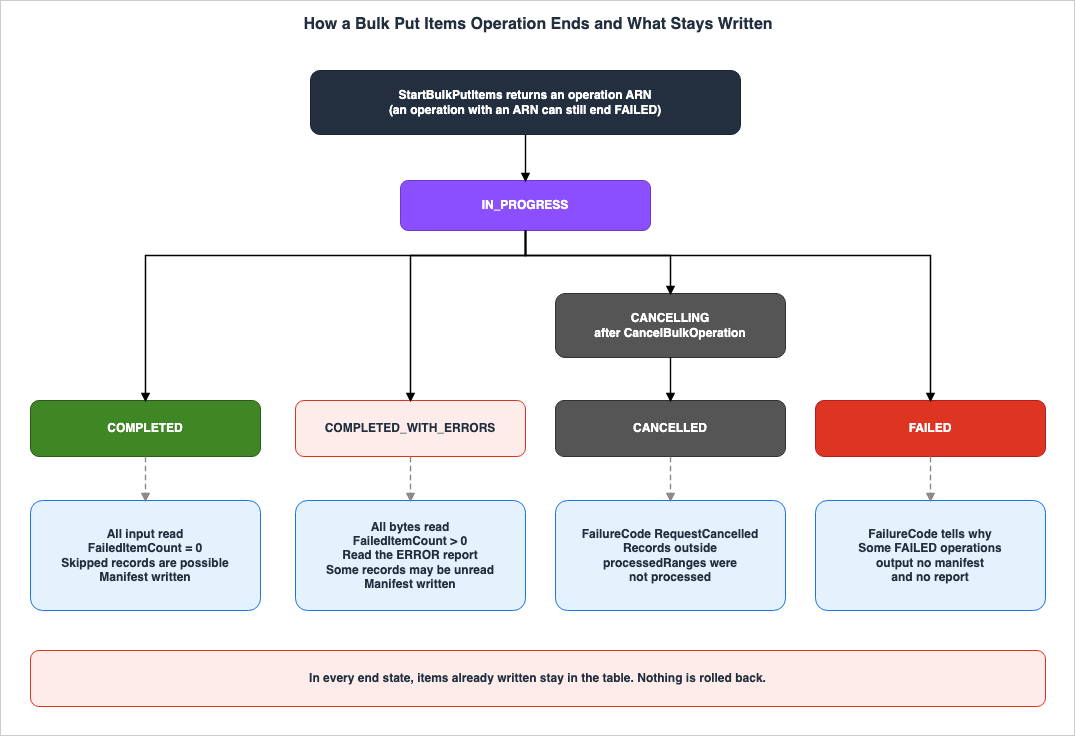
CANCELLED, the running page states that CANCELLED does not mean that data is missing, and that the manifest records what was processed.7.2 FailureCode
AFAILED operation indicates the reason with FailureCode. The table on the running page lists the following values (as of November 11, 2026).FailureCode | Cause | What the running page says to do |
|---|---|---|
Timeout | Exceeded the maximum processing time. | Resubmit the remainder from the manifest. |
ValidationException | An error occurred while reading the input object, and it was not possible to verify that all saved bytes had been read. | Fix the record, then resubmit it together with the records outside processedRanges. |
InputObjectTooLarge | The input object exceeded 5 GB. | Split the object. |
S3ObjectsCountLimitExceeded | The number of input objects exceeded 50,000. | Reduce the number of objects or request an increase in the quota. |
SizeLimitExceeded | The total input size exceeded the limit for a single request. Standard: 100 GB, Accelerated: 1 TB. | Split the input or use Accelerated mode. |
ObjectModifiedInS3DuringImport | The input object was modified while processing. | Do not modify the input object while processing. |
KmsAccessDeniedException, KmsDisabledException, KmsNotFoundException, KmsInvalidKeyUsageException, KmsInvalidStateException | Unable to use the AWS KMS key for the table or S3 object. | Verify the key's status and the permissions of the caller. |
S3AccessDenied | Access to the S3 input or output location was denied. This may occur when the S3BucketOwner does not match the bucket owner. | Verify the caller's S3 permissions, the bucket policy, and the S3BucketOwner. |
ResourceInUseException | Another operation was already in progress on the same table. | Wait for the current operation to complete and then retry. |
DynamoDBResourceNotFoundException | The table could not be found or accessed. | Verify the table name and status. |
DynamoDBAccessDeniedException | The caller lost permission to write to the table. | Restore dynamodb:BulkPutItems on the table, then resubmit the remainder. |
DynamoDBItemCollectionSizeLimitExceededException | For tables with local secondary indexes, the item collection exceeded the size limit. | Reduce the amount of data for the partition key value. |
Regarding timeouts, the running page states that
Timeout is an expected outcome, not a fault, for a very large input or for an operation whose rate is capped with MaxWriteRequestUnits. The maximum processing time is not listed in the running page or in the other materials in Section 1.3 (Documentation does not list).If the manifest cannot be written to the output location, the operation will fail, even if every item was written.
If DynamoDB cannot output the completion manifest to the output location, the operation ends FAILED even if every item was written.The failure message in this scenario begins with
Manifest is not available., and the FailureCode indicates the underlying cause. The running page instructs users to verify S3 and AWS KMS permissions for the output prefix, and to compare the table and input data to determine what was actually written.Errors related to
S3BucketOwner are only identified after the operation has begun. The considerations page states:If S3BucketOwner is wrong, StartBulkPutItems still returns an operation ARN. DynamoDB can write items to the table before the operation fails with S3AccessDenied, and it outputs no report or manifest.A returned ARN does not indicate that the operation will succeed. This article infers (Inference) that in a
FAILED operation where neither a report nor a manifest is available, the only way to determine which items were written is by comparing the table and input data.7.3 Written Items Are Not Rolled Back
Bulk put items has no mechanism to undo written items. The running page states the following in its section on cancellation:Items already written before cancellation are not rolled back. They remain in the table and are immediately readable.Even if the operation fails (
FAILED), the same applies. The running page states that, in the case of a Timeout or when the manifest cannot be written, any previously written items will remain in the table. The considerations page states that if the caller loses dynamodb:BulkPutItems permissions or AWS KMS access to the table's customer managed key during execution, the operation will fail (FAILED), and any previously written items will remain in the table.Therefore, after a
FAILED or CANCELLED operation, the table may end up with only a portion of the intended data written. The launch blog post states that a canceled operation may leave the table partially updated.7.4 Cancellation
CancelBulkOperation is used to asynchronously cancel an ongoing operation (API reference). The response status will be CANCELLING, and the operation will transition from CANCELLING to CANCELLED. The API reference specifies that cancellation will not delete any data that has already been written.The running page indicates that while the status is
CANCELLING, the progress counters can be lower than the final values. It advises users to wait for the status to reach CANCELLED before verifying the results. In the manifest, a partly processed object is PARTIALLY_PROCESSED, and records outside processedRanges were not processed. The running page instructs users to resubmit these records, along with any records that have been corrected from ERROR reports.7.5 ClientToken and Deliberate Re-runs
ClientToken is an idempotency token for the start request. The API reference states:During the 8 hours after the initial request, repeated requests that use the same token and parameters return the same bulk operation. If a request reuses the token with different parameters, DynamoDB returns an IdempotentParameterMismatchException.If a token is not provided, the AWS SDK automatically generates one. The best practices page recommends providing a
ClientToken when retrying a start request to prevent the operation from being initiated multiple times.The purpose of
ClientToken is to prevent the same start request from triggering the operation more than once. It does not prevent re-running the same file with a new start request. The launch blog post states that a deliberate re-run is a new operation.A deliberate re-run, however, is a new operation, and only your conditions stop it from overwriting data your application wrote in the meantime.What keeps a re-run from overwriting existing items is each record's condition expression. The launch blog post suggests defining conditions to ensure that a second execution of the same file does not result in any changes. It recommends using
attribute_not_exists for purely inserting new data and version comparisons for updates.7.6 When the Same Record Is Written Twice, and Version Conditions
Within a single operation, the same record may sometimes be written twice. The considerations page states:During an operation, DynamoDB can write some records a second time after an internal failover. Each repeated write uses the record's condition expression, so a version guard on every record prevents a repeated write from replacing newer data.The same page states that if an application writes to the same keys during an operation, a repeated write of a record without a condition can overwrite a more recent write from the application. To protect such keys, it recommends assigning a version attribute to each item and using a condition expression such as
attribute_not_exists(#v) OR #v < :new.The launch blog post states that when an item is involved in an in-flight transaction, the transaction takes precedence, and the item will not be modified until the transaction is complete. No such statement was found in the developer guide (No statement found).
7.7 Where to Re-run From
Combining the content from Sections 7.1 through 7.6, the records to re-run after an operation are decided from the following three:- Records for objects marked as
PARTIALLY_PROCESSED,NOT_PROCESSED, orNOT_AVAILABLEin the manifest, that fall outside theprocessedRanges. - Records from the
ERRORreport, after you correct them. - Records for
CONDITION_CHECK_FAILUREreports, that you decide to write after reviewing the existing item.
Records that are re-run also carry condition expressions. A re-run is a new operation, and without condition expressions it overwrites both the items that the previous operation wrote and the items that the application wrote in the meantime. This article infers (Inference) that, for a
FAILED operation without a manifest, the records to re-run can only be determined by comparing the table with the input data.8. What Happens Around the Table
This chapter describes how bulk put items appear within streams, indexes, caches, metrics, and logs, and also identifies situations where they cannot be used.8.1 DynamoDB Streams and Kinesis Data Streams
The considerations page states the following regarding tables with streams enabled:On a table with DynamoDB Streams or a Kinesis data stream enabled, every bulk write produces a stream record, delivered at the operation's write rate. Items that fail a condition check do not produce a stream record.The same page also notes that consumers sized for normal traffic can fall behind. It explains that because DynamoDB Streams retains records for 24 hours, consumers experiencing delays exceeding 24 hours will lose those records. It advises using
MaxWriteRequestUnits to control the write rate and protect downstream consumers (see Section 9.1).The launch blog post states that bulk write operations are reflected in the stream as if they were individual application writes. In the setup in Chapter 10, the
userIdentity of the bulk write records was empty, and they could not be told apart from the records of the PutItem calls that inserted the seed items (Observation).8.2 Secondary Indexes
Bulk put items automatically updates both global and local secondary indexes during the operation (see the considerations page). No separate steps are required to propagate data to the indexes. Writes to the indexes are metered independently.You cannot start an operation on a table that is creating an index (see Section 8.7). On a table with a local secondary index, if an item collection exceeds the size limit, the operation will fail with a
DynamoDBItemCollectionSizeLimitExceededException (see Section 7.2).Writes to tables with vector indexes are only supported at the Standard performance tier. Requests for Accelerated performance will result in validation failures (see the considerations page).
8.3 DynamoDB Accelerator
Bulk writes do not go through DynamoDB Accelerator (DAX). The considerations page states the following:Bulk writes bypass DAX, so items cached in DAX stay stale until their DAX TTL expires.When using DAX, after an operation, older items may be read until the DAX Time-to-Live (TTL) expires.
8.4 CloudWatch Metrics
Bulk writes are not reflected in theConsumedWriteCapacityUnits metric, nor do they appear in Contributor Insights. The considerations page states that this is because bulk writes do not consume capacity. It also notes that during these operations, you should track progress and failures using DescribeBulkOperation and the S3 output, rather than the table's CloudWatch metrics. The launch blog post similarly states that the table's alarms do not indicate when a bulk operation fails, and recommends distinguishing between COMPLETED and COMPLETED_WITH_ERRORS statuses.8.5 AWS CloudTrail
The considerations page describes how AWS CloudTrail records bulk put items as follows:- Calls to
StartBulkPutItemsare logged as a management event namedStartBulkOperation. The resource type isAWS::DynamoDB::BulkOperation. - During the operation, DynamoDB periodically emits data events for the target table, related to
BulkPutItems. The resource isAWS::DynamoDB::Table, and the operation is identified byserviceEventDetails.BulkOperationArn. - By default, data events are not logged. To log them, you must configure your trail or event data store to record data events for DynamoDB tables.
- A single operation may emit multiple data events related to
BulkPutItems. Individual item writes are not logged asPutItemevents.
While the API name is
StartBulkPutItems, the event name in CloudTrail and the action name in IAM are StartBulkOperation. When you search CloudTrail for the start record, search for the name StartBulkOperation.8.6 AWS KMS and S3 Accounts
Regarding AWS KMS, the considerations page states the following:- The
S3SseKmsKeyIdsetting is required whenS3SseAlgorithmis set toKMSand is not permitted when set toAES256. When providing a key ID, theS3SseAlgorithmsetting is mandatory. - For tables encrypted with customer-managed keys, the caller must have the
kms:Decryptpermission for that key. Otherwise,StartBulkPutItemswill return anAccessDeniedException, and the operation will not begin.
Regarding S3 accounts, the considerations page states the following:
- The caller must be in the table's account. Starting, retrieving status, or canceling operations from a different account will be rejected.
- When using a bucket in a different account, specify the
S3BucketOwner. DynamoDB will send thex-amz-expected-bucket-ownerheader, with the default value being the caller's account. - Using input or output buckets in a different Region may result in delayed or failed operations, potentially leading to timeouts, if that Region experiences issues. The considerations page recommends using buckets in the table's Region.
8.7 When Bulk Put Items Cannot Be Used
The sources state that the following scenarios are not supported. The replica row is the reverse case: adding a replica is rejected while an operation is running. In the other rows, an operation cannot be started.| Scenario | Relevant Documentation | Status |
|---|---|---|
| Tables belonging to a global table | Important note on the considerations page | Stated as not supported |
| Adding a replica to a table with an active operation | Considerations page | Stated as not supported |
| Tables undergoing index creation | Running page, considerations page. Returns a ResourceInUseException. | Stated as not supported |
| Tables in the process of migrating to or from a global table, or tables being restored from backup | Considerations page | Stated as not supported |
| Tables where another operation is already in progress | Running page. Returns a ResourceInUseException. Start requests that arrive at the same time can each return an ARN (Section 9.3). | Stated as not supported |
| Accelerated operations on tables with vector indexes | Considerations page | Stated as not supported |
Regarding global tables, the considerations page states:
Bulk put items does not support global tables.The launch blog post states the same matter as not supported at launch.
Importing into global tables isn't supported at launchThe developer guide explicitly states that the functionality is not supported. The launch blog post adds the qualifier that this is at launch. This article states that bulk put items does not support global tables as of November 11, 2026, and does not state that it never will. For writing to a global table, the considerations page recommends using
BatchWriteItem or PutItem.On whether a table that has left a global table can be a target of bulk put items, the materials in Section 1.3 only state that a table that is part of a global table is excluded. That a table that has left the global table can be a target if it meets the other conditions is this article's inference (Inference). The process of leaving a global table is covered on this site at Leaving an Amazon DynamoDB Global Table.
Regarding the table state, the running page states that the table must be
ACTIVE, or UPDATING with a change that does not conflict with bulk writes. A statement listing which UPDATING changes do not conflict was not found in the materials in Section 1.3 (No statement found).9. MaxWriteRequestUnits and Quotas
This chapter outlines the maximum write rate of an operation and the values of the quotas.9.1 MaxWriteRequestUnits
MaxWriteRequestUnits defines the maximum number of write request units per second that an operation can use (running page). This limit applies to the total number of write request units used by the operation across the table and all of its indexes. For example, in a table where two global secondary indexes both project items, the running page gives the example that a limit of 1,024 allows about 340 items of 1 KB per second.The running page indicates that this setting has no relation to the table's capacity and has a minimum value of 1,024.
This setting applies only to the bulk operation and has no relation to the table's provisioned or on-demand capacity. The minimum value is 1,024.The API reference notes that the actual write speed may be lower than this value.
MaxWriteRequestUnits represents an upper limit and does not guarantee a specific speed.The best practices page recommends avoiding setting this value lower than necessary. A low limit can slow down operations, so that a large operation might not finish within the maximum processing time and end
FAILED with Timeout, leaving the remaining items unwritten. It advises selecting the highest speed that downstream consumers can handle.The quotas page states that the minimum value for
MaxWriteRequestUnits is checked at the time of the StartBulkPutItems call. In the setup in Chapter 10, a start request with a value of 1,000 was rejected with a ValidationException, and no operation was created (Observation).9.2 Different Things with the Same Name
On-demand tables also have a parameter namedMaxWriteRequestUnits. It is passed in the OnDemandThroughput of UpdateTable and sets the maximum number of write units for the table in on-demand capacity mode. The example commands in Chapter 2 of the Amazon DynamoDB Capacity and Global Tables Guide refer to MaxWriteRequestUnits in this context.In bulk put items,
MaxWriteRequestUnits is a parameter passed to StartBulkPutItems, and it is a limit for one operation only. It does not change the table's capacity settings and is not bound by them. Although they share the same name, these two parameters apply to different things.9.3 Quotas
The quotas page lists the following values (as of November 11, 2026).| Quota | Value |
|---|---|
| Number of concurrent operations, Standard | 5 per account |
| Number of concurrent operations, Accelerated | 5 per account |
| Number of concurrent operations per table | 1 |
| Total input per operation, Standard | 100 GB |
| Total input per operation, Accelerated | 1 TB |
| Number of objects per operation | 50,000 |
| Size of each input object | 5 GB |
Minimum MaxWriteRequestUnits | 1,024 |
The quotas page specifies that the number of concurrent operations for Standard and Accelerated are counted separately, per account and Region.
The same page divides the points at which quotas are checked into two categories. The number of concurrent operations and the minimum
MaxWriteRequestUnits are checked during the StartBulkPutItems call. Requests exceeding the account's concurrent operation limit will return a LimitExceededException and no operation will be created. Other quotas are checked after a successful start call, and operations exceeding these quotas will end with a status of FAILED. Exceeding the total input limit will result in a SizeLimitExceeded error, exceeding the number of objects will result in an S3ObjectsCountLimitExceeded error, and objects larger than 5 GB will result in an InputObjectTooLarge error.Regarding start requests for the same table, the quotas page states that attempting to start an operation on a table that already has an operation in progress will return a
ResourceInUseException. If multiple start requests arrive simultaneously for the same table, each may return an ARN, but all except one will end with a FailureCode of ResourceInUseException and a status of FAILED.The table on the quotas page does not include a column indicating whether quotas can be increased (Documentation does not list). The
FailureCode table on the running page lists requesting a quota increase as a possible action to address S3ObjectsCountLimitExceeded.9.4 Performance Tiers
ThePerformanceTier value can be either STANDARD or ACCELERATED, with STANDARD being the default (running page, API reference). The performance tiers page states that Standard is the default choice, suitable for most operations, while Accelerated is intended for workloads with strict completion time requirements, aiming for higher throughput. Standard is available in all commercial AWS Regions and the AWS GovCloud (US) Regions. The performance tiers page provides a list of Regions where Accelerated is available. This article does not list specific Regions.The performance tiers page also notes that factors such as table size, item size, key distribution, the number of indexes being updated, and the available system capacity affect actual throughput. The best practices page advises that objects sorted by partition key create a rolling hot partition, where consecutive writes go to the same partition. It recommends randomizing the order before performing operations. This article does not compare the speeds of the different performance tiers.
10. Observations on a Small Table
This chapter summarizes the results of tests conducted on a small table in the us-east-1 Region on November 11, 2026 (Japan Standard Time). Each is an observation from one try on one setup (Observation), not a commitment of the documentation. This article does not use the speed values for performance comparisons.10.1 Setup
The setup is as follows:- One DynamoDB table. The partition key is a string
id, and it has one global secondary index with the attributecategory. DynamoDB Streams is enabled with both new and old images. - Two S3 buckets, one for input and one for output.
- All operations use the Standard performance tier. Input data is uncompressed DynamoDB JSON.
- A single principal with administrator privileges invokes the operations, using the AWS SDK for Python. Minimal IAM policies have not been tested.
Before testing, five items were inserted into the table using
PutItem. Each item has an origin attribute set to seed and a version attribute. The five scenarios tested are as follows. One operation each was created in R1, R2, and R3, and two in R5, for a total of five operations.| Round | Input | Verification |
|---|---|---|
| R1 | 9 rows: an unconditional overwrite, insert-only conditions on an existing and a new key, version conditions that are newer and older on existing keys and one on a new key, a row missing its key, a row with the wrong key type, and an unconditional new row | Where one row goes, and the two report types |
| R2 | Re-runs the correct 7 rows from R1. Requests only ERROR reports. | Verification of skipped records and ClientToken. |
| R3 | A file with a row that is cut off midway, and a correct two-row file. | Unread rows and the end state |
| R4 | A start request with MaxWriteRequestUnits set to 1,000. | Verification at the start of the operation. |
| R5 | Two consecutive start requests sent to the same table, using different tokens. | Second operation on the same table. |
10.2 R1: Where One Row Goes
The R1 operation endedCOMPLETED_WITH_ERRORS. The ProcessedItemCount was 9, and the FailedItemCount was 2.- Five rows were written. These were the unconditional overwrite, the insert-only record for a new key, the version 4 record against version 3 in the table, the version-condition record for a new key, and the unconditional record for a new key.
- Two rows were skipped due to conditions. These were the insert-only record for an existing key and the version 4 record against version 5 in the table. Both were reported under
CONDITION_CHECK_FAILURE, including theitemIndex,errorMessagescontainingThe conditional request failed,newImage, andoldImage. - Two rows resulted in errors. One row failed with
Missing the key id in the itemand contained anewImage. The other row failed withType mismatch for key id expected: S actual: Nand did not contain anewImage. - Items overwritten unconditionally were completely replaced. The
categoryattribute, which existed in the original item, was no longer present after the overwrite.
The output consisted of one manifest file, and two report files located in the internal job directory, ending in
-0: errors/ and condition-check-failures/. The manifest file had a fileProcessingStatus of FULLY_PROCESSED and a processedRanges value of [[0, 8]].When checking the status every 15 seconds, it was
IN_PROGRESS at 2 seconds with a count of 0. The next status change occurred at 81 seconds, at which point it had already reached COMPLETED_WITH_ERRORS. No intermediate count changes were observed.10.3 R2: Without the Skip Report
R2 re-ran the correct 7 rows from R1 as a separate operation. The two rows without conditions only had theorigin value modified. The report type was specified as ERROR only.The operation for R2 completed with a status of
COMPLETED. ProcessedItemCount was 7, and FailedItemCount was 0. Looking at the table, only the two rows without conditions were written, while the five rows with conditions were skipped. The output consisted of only one manifest. The manifest status was FULLY_PROCESSED, and processedRanges was [[0, 6]].The five skipped rows appeared nowhere in this operation's records: neither in the
DescribeBulkOperation counts nor in the S3 output files. This matches the two statements in Section 6.1.In R2, the following was also attempted regarding the start request:
- Sending the start request again with the same
ClientTokenand parameters resulted in the return of the same operation ARN. - A request with the same
ClientTokenbut a differentOutputTypewas rejected with anIdempotentParameterMismatchException, and no operation was created.
R2, which was started with a different token than R1, functioned as a new operation and re-wrote the two rows without conditions, as described in the launch blog post referenced in Section 7.5.
10.4 R3: A Truncated Record
R3 input consists of two objects. The first object contains five rows, but the JSON on the third line is not properly closed. The second object has two valid rows.The R3 operation completed with errors (
COMPLETED_WITH_ERRORS) rather than failing. ProcessedItemCount is 5, FailedItemCount is 1, and ProcessedInputBytes and TotalInputBytes are equal. This corresponds to the second scenario described in Section 5.3.- The manifest indicates that the first object is marked as
PARTIALLY_PROCESSEDwith the range[[0, 1]], while the second object is marked asFULLY_PROCESSEDwith the range[[0, 1]]. - There is one row in the
ERRORreport, which does not include anitemIndexand contains the messageUnexpected token. Remainder of the file will not be processed. - The two rows preceding the truncated row of the first object, and the two rows of the second object, were written to the table. The two rows following the truncated row were not in the table. These two rows are also absent from the report.
The
ProcessedItemCount of 5 aligns with the sum of the two rows preceding the truncated row, the truncated row itself, and the two rows of the second object. The two unread rows appear not to be included in the count. Because a row-by-row breakdown is not provided, this is an inference from the total count (Inference).10.5 R4 and R5: Rejection at the Start and a Second Operation on the Same Table
In R4, a start request withMaxWriteRequestUnits set to 1,000 was sent to the service. The AWS SDK for Python normally checks for a minimum value of 1,024 before sending, but this check was disabled specifically for R4. The start request was rejected with a ValidationException. The count for ListBulkOperations did not increase, and no operations were created.1 validation error detected: Value '1000' at 'maxWriteRequestUnits' failed to satisfy constraint: Member must have value greater than or equal to 1024In R5, two start requests were sent to the same table, with different tokens, approximately one second apart. Both requests returned an operation ARN, and the status was
IN_PROGRESS. The second operation failed approximately two seconds after the start, with a FailureCode of ResourceInUseException. Neither the manifest nor the report for the second operation were present in the output S3 bucket. The first operation completed successfully. This behavior aligns with the descriptions in Sections 9.3 (quotas) and 6.4 (output).For the first operation in R5, the count reached 2 while the status remained
IN_PROGRESS after 66 seconds, and then transitioned to COMPLETED after 82 seconds. Of the four operations that processed their input to the end, this was the only one where the counts moved before the status reached an end state.10.6 Streams and CloudTrail
After R1 through R5, all records in the table's stream were read.- There were records indicating either
INSERTorMODIFYfor each of the 13 changes written via bulk operations. These were distributed as follows: 5 in R1, 2 in R2, 4 in R3, and 2 in R5. - Records skipped by a condition had no stream records. The two keys skipped in R1 had only the
INSERTrecords from when the seed items were inserted. The 5 rows skipped in R2 had no stream records either. - There were also no stream records for records that resulted in errors or were not read.
- None of the records had a
userIdentityvalue, and it was impossible to distinguish between records from bulk operations and records from inserting the seed items withPutItembased solely on the records themselves.
In the CloudTrail event history, the following was seen:
- There were 8 requests initiating bulk operations, named
StartBulkOperation. This included one request on R2 that used the same token, one request rejected with anIdempotentParameterMismatchException, and one request rejected with aValidationExceptionon R4, all of which were recorded as individual events. DescribeBulkOperationandListBulkOperationswere also recorded as management events.- No trail for data events was created, so the
BulkPutItemsdata events were not examined.
10.7 What This Setup Does Not Show
This setup does not test the following. For each of them, this article relies only on the statements in the materials in Section 1.3.- The Accelerated performance tier, and speed with large inputs.
- Global tables, buckets spanning accounts, and buckets in different Regions.
- Tables and buckets encrypted with customer-managed keys.
- CloudTrail data events and DAX.
- Second writes resulting from internal failover.
Timeout, cancellation, andCANCELLEDstatus.- The page-size boundary of
ListBulkOperations. The five operations created all fit in the default page size. - Evaluation under a minimal IAM policy that grants
ListBulkOperationsonbulk-operation/*.
11. Where the Sources Disagree and What They Do Not Say
This chapter collects the differences between the sources and the matters for which no statement was found.11.1 Differences Only in Counting or Premise
The following differences are only differences in what is counted or in the premise, and this article does not call them Sources disagree.- Number of Status Values: The running page and the API reference list 6 possible values for
BulkOperationStatus. The launch blog post states that the operation ends in one of 4 states:COMPLETED,COMPLETED_WITH_ERRORS,FAILED, andCANCELLED. The launch blog post counts the end states, which aligns with 4 of the 6 values, excludingIN_PROGRESSandCANCELLING. - Number of IAM Actions: The considerations page states that a minimal policy requires 5 actions. The launch blog post lists 2 actions required for initiating the operation:
dynamodb:StartBulkOperationanddynamodb:BulkPutItems. The subject of the sentence in the launch blog post refers to the entity initiating the operation. The considerations page notes that with only these 2 actions, an operation can be started, but its status cannot be retrieved and it cannot be canceled. - Handling of Skipped Items: The launch blog post states that items skipped due to conditions are not considered failures, are included in the processed count, and that the operation completes, with the skipped items being recorded in the report. The input formats page specifies that this recording only occurs when requesting
CONDITION_CHECK_FAILURE. The CLI example in the launch blog post requests bothERRORandCONDITION_CHECK_FAILURE. This article reads the wording in the launch blog post as written on the premise of that example (Inference). - Number of Items per Page for
ListBulkOperations: The running page states that each page returns a maximum of 25 items. The API reference states that the default value forMaxResultsis 10, with a maximum of 25. The maximum of 25 is consistent, while the running page does not list the default value (Documentation does not list).
The launch blog post describes the handling of skipped items as follows:
An item skipped by its condition isn't treated as a failure. It counts toward the processed total, the operation still completes, and the skip is recorded in the report.11.2 Where the Sources Disagree
- Table Status: The launch blog post states that the target table must be active. The running page and considerations page indicate that it can be in the
ACTIVEstate, orUPDATINGwith a change that does not conflict with bulk writes. The scope differs (Sources disagree). - Global Table: The considerations page states plainly that global tables are not supported. The launch blog post states that they are not supported at launch. The strength differs (Sources disagree). As of November 11, 2026, both documents agree that it is not supported.
ListBulkOperationsResource: The IAM table in the considerations page specifies the scope ofdynamodb:ListBulkOperationsasbulk-operation/*, and the example policy also associates this action withbulk-operation/*. The service reference does not assign a resource type toListBulkOperations. It is this article's inference (Inference) that, under the usual IAM evaluation, actions without a resource type are permitted when the policy'sResourcefield is set to*. Because the setup in Chapter 10 ran with administrator privileges, this discrepancy has not been verified.
11.3 Items Not Found
The following items could not be found in the materials in Section 1.3, even after searching using different search terms and categories of documentation (No statement found). None of these items indicate the absence of the subject matter or its non-occurrence.- Relationship to Time-to-Live (TTL) values. For example, how items with a TTL attribute are handled when written using bulk put items. This article does not state that there is no impact.
- Whether items written by bulk put items are included in point-in-time recovery (PITR) and AWS Backup. Starting an operation on a table that is being restored from a backup is covered in Section 8.7.
- Maximum processing time values. The
Timeoutsection in the running page does not specify a value. - Length and operand-count limits specific to the condition expressions of bulk put items.
- A list of which
UPDATINGchanges will not conflict with bulk writes. - Descriptions in the developer guide regarding the relationship with in-flight transactions. The launch blog post states that transactions take precedence.
- Descriptions in the developer guide stating that
ProcessedInputBytescounts bytes after compression. The launch blog post states that it counts bytes after compression. Chapter 10 only uses uncompressed input, so this has not been verified.
12. Failure Modes
This chapter collects common misreadings from the statements in Chapters 3 through 11.- The misreading that a
FailedItemCountof 0 means all rows have been written: Rows skipped due to conditions are not included in this count. Even with aCOMPLETEDstatus, rows may still be skipped (see Sections 5.1 and 7.1). In the setup in Chapter 10, 5 of 7 rows were skipped in an operation that endedCOMPLETED(see Section 10.3). - The misreading that
ProcessedItemCountis the number of items written: This count reflects the number of records read, including those with errors and those skipped due to conditions (see Section 6.2). - The misreading that using only
ERRORin theOutputTypefield indicates that skipped rows can be identified: Without requestingCONDITION_CHECK_FAILURE, no record or count of skipped rows will be retained (see Section 6.1). - The misreading that a condition applied to a single row applies to the entire file: Conditions are evaluated on a record-by-record basis. Records without a condition will overwrite existing items (see Section 4.4).
- The misreading that records without a condition only modify a portion of an existing item's attributes: Items are written entirely, and any attributes not present in the record will be lost (see Section 4.3).
- The misreading that
FAILEDorCANCELLEDoperations revert written items: Written items remain in the table (see Section 7.3). - The misreading that using the same
ClientTokenprevents overwriting when re-submitting data: TheClientTokenprevents a retry of the same start request from creating a second operation. A deliberate re-run is a new operation, and what prevents overwriting is the condition expression (see Section 7.5). - The misreading that within a single operation, each record is written only once: Following an internal failover, the same record may be written twice (see Section 7.6).
- The misreading that records in the
processedRangesin the manifest have been written: This range includes records that were skipped due to conditions and records that resulted in errors (see Section 6.3). - The misreading that receiving an ARN indicates that the operation will succeed: With a wrong
S3BucketOwner, or with simultaneous starts on the same table, the operation endsFAILEDafter the ARN is returned (see Sections 7.2 and 9.3). - The misreading that stream consumers sized for normal traffic are sufficient: Bulk writes produce stream records at the operation's write rate. DynamoDB Streams consumers that fall behind by more than 24 hours may lose records (see Section 8.1).
- The misreading that an alarm on the table's
ConsumedWriteCapacityUnitscan monitor bulk operations: Bulk writes are not reflected in this metric (see Section 8.4). - The misreading that the on-demand table's
MaxWriteRequestUnitsand the bulk put items'MaxWriteRequestUnitsare the same: These apply to different targets (see Section 9.2). - The misreading that CloudTrail records the start of an operation using the name
StartBulkPutItems: The event name is actuallyStartBulkOperation(see Section 8.5). - The misreading that bulk put items can write to tables that belong to a global table: This functionality is not supported as of November 11, 2026 (see Section 8.7).
13. Frequently Asked Questions About DynamoDB Bulk Put Items
This chapter answers the reader assumptions in Section 1.1 using the statements in Chapters 3 through 11.Q1. If the number of failures is 0, does that mean all input rows have been written?
Not necessarily.FailedItemCount represents the number of items that failed for deterministic reasons, and does not include items that were skipped due to conditions (see Section 5.1). COMPLETED indicates that the number of failures is 0, and the running page states in the same sentence that skipped items are possible (see Section 7.1). Skipped rows can only be identified when a CONDITION_CHECK_FAILURE report is requested (see Section 6.1).Q2. Does ProcessedItemCount represent the number of items written?
No, it does not. The running page describes ProcessedItemCount as the number of records read, including records that failed validation or a condition check (see Section 6.2). The API reference for DescribeBulkOperation does not list a field that returns the number of items written (Documentation does not list).Q3. If an operation ends FAILED, are the items it wrote rolled back?
No. The running page states for cancellation and timeouts, and the considerations page states for lost permissions, that items already written stay in the table (see Sections 7.3 and 7.4). How far the operation wrote is checked with the manifest and the reports. For a FAILED operation without a manifest, the table is compared with the input (see Section 7.2).Q4. If the same file is re-run, is it written twice?
It depends on the conditions. Records without a condition overwrite the item with the same key every time the file is re-run. What theClientToken prevents is a retry of the same start request creating two operations; a deliberate re-run is a new operation (see Section 7.5). If every row carries an insert-only condition or a version condition, a re-run does not change the existing items. In the setup in Chapter 10, re-running the correct 7 rows of R1 resulted in the 5 rows with conditions being skipped and the 2 rows without conditions being rewritten (see Section 10.3, Observation).Q5. If attribute_not_exists is written on one row, is the whole file insert-only?
No. The condition expression is evaluated for each record, and the input formats page states that to ensure the entire file only inserts data, you need to write a condition expression for every record (Section 4.4).Q6. Can bulk put items be used on a table in a global table?
As of November 11, 2026, it cannot be used. The considerations page states that bulk put items does not support global tables, and the launch blog post states that it is not supported at launch (Section 8.7). The considerations page also specifies that when writing to a global table, you should useBatchWriteItem or PutItem.Q7. Can operations be monitored using the table's alarms or CloudWatch metrics?
TheConsumedWriteCapacityUnits metric and Contributor Insights do not reflect bulk write operations (see Section 8.4). The considerations page recommends tracking progress and failures using DescribeBulkOperation and S3 output.Q8. Does setting the MaxWriteRequestUnits affect the table's capacity settings?
No, it does not. The running page states that this setting applies only to the operation and is not related to the table's provisioned or on-demand capacity (see Section 9.1). While there is a parameter with the same name for on-demand tables, it is a separate parameter (see Section 9.2).Q9. What happens when you write items with a TTL attribute?
This article found no description in the reviewed materials regarding the relationship between bulk put items and TTL (No statement found, Section 11.3). This does not indicate that there is no impact.14. Summary
Before using DynamoDB's bulk put items to write to an existing table, ensure the following:- The target table is not part of a global table and is not currently undergoing index creation (see Section 8.7).
- All records that should not overwrite existing items have either an insert-only condition or a version condition applied (see Sections 4.4 and 7.6).
- For input using condition expressions, the
OutputTypeincludesCONDITION_CHECK_FAILURE(see Section 6.1). - A procedure is defined to compare the results, not only with the
FailedItemCount, but also against the manifest and two types of reports. The principal accessing the output bucket has the necessary permissions to read from it (see Sections 6.5 and 6.6). - The way to decide which records to re-run is defined, taking into account that some items may remain in the table if the operation ends with a
FAILEDorCANCELLEDstatus (see Sections 7.3 and 7.7). - Wherever the start request might be retried, a
ClientTokenis passed (see Section 7.5). - The stream consumers and DAX have been checked against the operation's writes, and, if needed,
MaxWriteRequestUnitsis set to the highest value that the consumers can sustain (see Sections 8.1, 8.3, and 9.1). - You know that the start of an operation is found in CloudTrail under the name
StartBulkOperation, and that item writes are not recorded unless data events are configured (see Section 8.5). - The developer guide has been reopened to confirm that the
FailureCodetable, the quotas, and the handling of global tables have not changed since the verification date of November 11, 2026 (see Section 2.2).
15. References
- Working with bulk put items - Amazon DynamoDB
- Performance tiers - Amazon DynamoDB
- Amazon S3 input formats for bulk put items - Amazon DynamoDB
- Running a bulk put items operation - Amazon DynamoDB
- Bulk put items output and reconciliation - Amazon DynamoDB
- Bulk put items considerations, quotas, and permissions - Amazon DynamoDB
- Best practices for bulk put items in DynamoDB - Amazon DynamoDB
- Quotas in Amazon DynamoDB - Amazon DynamoDB
- DynamoDB data import from Amazon S3: how it works - Amazon DynamoDB
- StartBulkPutItems - Amazon DynamoDB API Reference
- DescribeBulkOperation - Amazon DynamoDB API Reference
- ListBulkOperations - Amazon DynamoDB API Reference
- CancelBulkOperation - Amazon DynamoDB API Reference
- BatchWriteItem - Amazon DynamoDB API Reference
- PutItem - Amazon DynamoDB API Reference
- UpdateTable - Amazon DynamoDB API Reference
- start-bulk-put-items - AWS CLI Command Reference
- Amazon DynamoDB now supports bulk put items - AWS What's New
- Introducing bulk put items for Amazon DynamoDB: Load data from Amazon S3 into existing tables at scale - AWS Database Blog
- Amazon DynamoDB service reference (JSON) - AWS
- DynamoDB Key Design Dictionary: PK/SK, GSI/LSI Selection, Hot Partition Avoidance, and Re-Keying Patterns
- AWS History and Timeline regarding Amazon DynamoDB - Overview, Functions, Features, Summary of Updates, and Introduction
- Amazon DynamoDB Capacity and Global Tables Guide - Capacity Modes, Auto Scaling, Warm Throughput, and Multi-Region Design
- Leaving an Amazon DynamoDB Global Table - Disassociation Protection, the Replication Stop Boundary, and Who Acts in Each Account
- Amazon DynamoDB Single Table Design Complete Guide - Access-Pattern-Driven Data Modeling Patterns
- Where a Stream Consumer Can Start on AWS - Starting Positions in DynamoDB Streams, Kinesis Data Streams, KCL, and Lambda Event Source Mappings
- Amazon DynamoDB Master Index - A Hub for DynamoDB Design, Key Modeling, and Capacity Planning Articles
References:
Tech Blog with curated related content
Written by Hidekazu Konishi