Stopping an AI Agent on AWS - What Each Control Stops, What Keeps Running, and Who Can Undo It
First Published:
Last Updated:
This article details each control mechanism, outlining what is stopped, what continues to function, the speed of effect, who can activate it, and who can revert it. Following this, this article reads three best practices from the AWS Well-Architected Framework's Agentic AI Lens and translates them into practical design considerations: pre-shutdown preservation and credential revocation, gateway-level capability toggling, and a "break-glass" procedure. This article is not a general guide to incident response, nor is it an introduction to agents. Pricing information will not be included.
To summarize, simply stopping an agent's process or session does not prevent it from restarting with the same identity and permissions. The
StopRuntimeSession function within AgentCore Runtime stops the compute resources associated with a session, but the session itself remains, and a subsequent call with the same session ID will provision new compute resources. Applying a deny-all policy to an execution role will affect existing credentials, although it may take a few minutes for the changes to propagate. IAM's "Revoke active sessions" denies only credentials issued up to about 30 seconds after the action, and does not affect credentials obtained after that. Cedar policies within AgentCore, when configured to "forbid" access, are, according to the documentation, effective within a few seconds, but only prevent calls passing through the gateway. Users with the bedrock-agentcore:UpdateGateway permission can modify the policy engine to LOG_ONLY, effectively disabling the "forbid" setting. Setting a gateway rate limit to rate=0 takes effect within 30 seconds, although it may still allow requests through during temporary errors. It is crucial to design the permission to stop an agent and the permission to revert the stop separately.This article is based on documentation reviewed on November 13, 2026 (Japan Standard Time). This article does not involve the actual shutdown of any agents. The content is derived solely from the documentation and inferences drawn from it.
Related articles on this site:
- Agent Sandboxing and Blast-Radius Isolation on AWS - Choosing the Unit of Each Containment Boundary and What Each One Does Not Stop
- Identity Lifecycle for AI Agents - Registration, Delegated Authorization, Access Review, and What Retirement Leaves Behind
- OWASP Top 10 for Agentic Applications Mapped to AWS Controls - What Each Control Mitigates and What Residual Risk Remains
- AWS Lambda Concurrency and Scaling Guide - Reserved and Provisioned Concurrency, Throttling, and Event Source Scaling
Table of Contents
- 1. Scope and Terms
- 2. What Does It Mean to Stop an Agent?
- 3. The Control Surface Table
- 4. Order: Preservation, Revocation, Notification
- 5. Toggling Capabilities at the Gateway
- 6. Stopping the AgentCore Runtime from Outside
- 7. Break-Glass Procedure
- 8. Where the Sources Disagree, and Where No Statement Was Found
- 9. Failure Modes
- 10. Frequently Asked Questions About Stopping AI Agents
- 11. Summary
- 12. References
1. Scope and Terms
This chapter defines the scope of this article, the audience, the materials consulted, and the terminology used. The main conclusions are as follows:- This article addresses both the process of stopping active agents and what remains after they are stopped (Section 1.2).
- Four terms – "revoke," "stop," "
LOG_ONLY," and "session" – each name more than one thing. This article will address each of these separately (Section 1.4). - This article will ensure that what keeps running for each control surface is not omitted from any of the tables, figures, FAQs, or summaries (Chapter 3).
- Only the time to take effect for which numerical data is provided in the source materials will be presented with numbers (Chapter 3, Section 8.2).
- All rows in the tables reflect the state as of November 13, 2026.
1.1 Intended Audience
This article is intended for individuals who:- Operate AI agents on AWS and need to document procedures for when agents behave unexpectedly.
- Design access control mechanisms (permissions) for agents using Amazon Bedrock AgentCore's Runtime, Gateway, and Policy components, specifically focusing on the ability to stop agents.
- Wish to adapt best practices from the Agentic AI Lens to their own environment's procedures.
This article assumes that readers hold the following beliefs, and checks each one against the documentation:
- Stopping an agent's session will halt its operation.
- Revoking credentials will prevent the agent from accessing AWS.
- Restricting tool access through the gateway's policy will prevent the agent from using those tools.
- Only the individual who stopped the agent can resume its operation.
- Procedure documents can be stored on the company's internal wiki.
1.2 Scope and Exclusions
This article covers the following:- Control surface tables: What is stopped, what remains, time to take effect, stop operations, and revert operations.
- The order in the Agentic AI Lens (AGENTSEC07-BP04) and two methods for credential revocation.
- AGENTREL06-BP05, covering capability switching at the gateway, the Cedar policy, the policy engine mode, and the gateway rate limit.
- AgentCore Runtime's
StopRuntimeSession, including endpoint redirection and deletion, and the differences in compute types for Instances. - The break-glass procedure (AGENTOPS07-BP04), including activation conditions, locations, and exercise frequency.
This article does not cover:
- Pricing.
- General incident response procedures. Refer to the AWS Security Incident Response Playbooks on this site.
- Agent retirement. Refer to the Identity Lifecycle for AI Agents on this site.
- Writing Cedar policies. Refer to the Amazon Bedrock AgentCore Policy Implementation Guide on this site.
- Layers preceding the stop process, including retries, loop detection, and escalation to human intervention. Refer to the Agent Reliability Engineering Design Guide on this site.
- Selecting isolation boundaries. Refer to the Agent Sandboxing and Blast-Radius Isolation on AWS on this site.
- Detailed information on Lambda concurrency. Refer to the AWS Lambda Concurrency and Scaling Guide on this site.
- The entirety of the Agentic AI Lens. This article only covers three best practices.
- Creating anomaly detection systems. Section 4.4 only provides an introduction.
- Methods for circumventing the stop process. This article only describes the design from the stopping side.
This article does not evaluate the merits of different stopping methods. Where Agentic AI Lens and AgentCore documentation recommend specific approaches, this article quotes them as what those pages say.
1.3 Date of Review and Materials Reviewed
This article was written after reviewing the following materials on November 13, 2026 (Japan Standard Time). Throughout the text, the names in parentheses are used.Regarding the AWS Well-Architected Framework's Agentic AI Lens, the following pages were reviewed:
- Lens landing page
- AGENTSEC07-BP04: Behavioral anomaly detection and agent containment
- AGENTREL06-BP05: Implement dynamic capability toggling
- AGENTOPS07-BP04: Implement break-glass operational runbooks
Regarding the Amazon Bedrock AgentCore Developer Guide, the following pages were reviewed.
- Stop a running session (Stop session page)
- Use isolated sessions for agents (Sessions page)
- Configure Amazon Bedrock AgentCore lifecycle settings (Lifecycle settings page)
- Quotas for Amazon Bedrock AgentCore (Quotas page)
- Instances (Instances page)
- Manage your data on Runtime Instances (Instances data page)
- Security model and permissions for Runtime Instances (Instances security page)
- File system configurations for AgentCore Runtime (File system page)
- Resource-based policies for Amazon Bedrock AgentCore (Resource-based policies page)
- Policy in Amazon Bedrock AgentCore: Control Agent Interactions (Policy overview page)
- Policy enforcement modes (Enforcement modes page)
- Test a policy in LOG_ONLY mode (LOG_ONLY page)
- Manage Policies and Policy Engines (Policy engines page)
- Add rate limits to a gateway (Rate limits page)
- Rate limit enforcement (Rate limit enforcement page)
- Policy sessions and identity propagation (Policy sessions page)
- Get workload access token (Workload access token page)
- Release notes for Amazon Bedrock AgentCore (Release notes)
This article reviewed the following pages in the AgentCore API Reference:
StopRuntimeSession, DeleteCapacityProviderSession, UpdatePolicy, UpdateGateway, UpdateAgentRuntimeEndpoint, DeleteAgentRuntimeEndpoint, CreateGatewayRateLimit, and BatchPutGatewayRateLimits.In the IAM User Guide, this article read the sections on "Revoke IAM role temporary security credentials" (IAM revoke page) and "Disabling permissions for temporary security credentials" (IAM disable page). Additionally, it consulted the following resources: "Configuring reserved concurrency for an Event Function" (Lambda concurrency page) in the AWS Lambda Developer Guide, "DisableRule" in the Amazon EventBridge API Reference (EventBridge DisableRule page), "Service control policies (SCPs)" in the AWS Organizations User Guide (SCP page), "Request access to models" in the Amazon Bedrock User Guide (Bedrock model access page), and "How to use AWS AppConfig Agent to retrieve configuration data" in the AWS AppConfig User Guide (AppConfig Agent page).
This article read the following AWS What's New posts: the general availability of Policy (Policy GA post, March 3, 2026), the general availability of Instances on AgentCore Runtime (Instances GA post, August 6, 2026), and the preview of session storage on AgentCore Runtime (Session storage post, March 25, 2026). It also read "Automating agentic AI Well-Architected reviews with the AWS Agentic AI Lens" from the AWS Architecture Blog (Architecture Blog post, October 28, 2026). Additionally, it read two posts from the AWS Artificial Intelligence Blog: "Secure AI agents with Policy and Lambda interceptors in Amazon Bedrock AgentCore gateway" (Interceptors blog post, June 1, 2026) and "Building a secure auth code flow setup using AgentCore Gateway with MCP clients" (Auth code flow blog post, June 1, 2026). The dates listed in the "What's New" section and the blog posts refer to the publication dates.
This article reviewed the AWS pages retrieved through the AWS Knowledge MCP Server and the original text of publicly available pages. Any direct quotes in this article are verified against these sources.
1.4 Terms, and Different Things with the Same Name
This article will consistently use the following terms with the meanings described below:- Control surface: An operation that can be activated to restrict a portion of an agent's behavior. Examples include
StopRuntimeSession, deny policies for execution roles, and Cedar forbid policies. - What stops: The resource that is affected when the control surface is activated, as documented in the materials.
- What keeps running: The resource that continues to operate even when the control surface is activated, as documented in the materials. If the materials do not specify, this should be noted.
- Stop operation: The API operation that activates the control surface.
- Revert operation: The API operation that reverts the stopping state.
- Execution role: The IAM role that AgentCore Runtime uses to provide credentials to the agent's code. The materials refer to this as an "execution role."
- Runtime session: A session within AgentCore Runtime, distinguished by the
runtimeSessionId. Used with the same meaning as in another article on this site (What a Snapshot Carries on AgentCore Runtime V2 - Startup Work, Per-Request Values, and Session Credentials). - Compute type: The manner in which AgentCore Runtime runs the agent. There are two options: microVMs and Instances (see Chapter 6).
- Policy engine: A collection of Cedar policies for AgentCore Policy, associated with the gateway.
- Verification date: The date on which the materials were reviewed: November 13, 2026.
The materials reviewed for this article contain terms that have related, but distinct, meanings.
- revoke: This term has three meanings. The first is the action of applying a "deny-all" policy to the execution role, as documented in AGENTSEC07-BP04. The second is "Revoke active sessions" within IAM, which involves attaching an inline policy named
AWSRevokeOlderSessionsto a role through the IAM console. The third refers to revoking OAuth tokens at the Identity Provider (IdP). This article will refer to the first as "deny-all," the second as "Revoke active sessions," and the third as "OAuth token revocation" (see Section 4.2). - stop: This term has four meanings. The first is stopping an agent's process. The second is
StopRuntimeSession. The third is deleting a session for Instances usingDeleteCapacityProviderSession. The fourth is retiring an agent. This article will not cover the fourth meaning. LOG_ONLY: This term has two meanings. The first is a mode for the policy engine, configured in the gateway'spolicyEngineConfigurationunder themodesetting. The second is anenforcementModeapplied to individual policies. This article will refer to the first as "engine'sLOG_ONLY" and the second as "policy'sLOG_ONLY" (see Section 5.3).- session: This term has two meanings. The first is a runtime session. The second is a session associated with an IAM role, representing the unit of temporary credentials created by
sts:AssumeRole. This article will refer to the second as "role session." - kill switch: This site's AWS Lambda Concurrency and Scaling Guide refers to setting the reserved concurrency to 0 as a "kill switch." The Interceptors blog post suggests using Cedar's "forbid" rules when an emergency "kill switch" is required. The term has different meanings in different contexts. This article will avoid using this term and instead refer to the specific feature being described.
1.5 Terms for the State of the Sources
This article uses the following six terms to describe the state of the documentation. These terms, including their English spellings, are also used in the tables.- Stated: The documentation contains a statement regarding the matter.
- Stated as not supported: The documentation explicitly states that the matter is not supported or cannot be used.
- Documentation does not list: While a list or table exists, the specific item is not included. This does not necessarily indicate that the matter is unsupported or unavailable.
- No statement found: Despite searching using different keywords and categories of documentation (as described in Section 1.3), no relevant statement could be found. This does not necessarily indicate that the matter is absent or impossible.
- Sources disagree: The statements regarding the same matter in two different documents are contradictory. This article presents both statements, along with their sources, without designating either as incorrect.
- Inference: This is an inference made by this article, and is not a statement found in any of the documentation. This article says in the same sentence that it is an inference.
All dates referenced in this article are presented with the year. Pages may be rewritten after the verification date.
2. What Does It Mean to Stop an Agent?
This chapter categorizes the targets to be stopped and outlines anti-patterns as listed in AGENTSEC07-BP04.2.1 Targets for Interruption: Six Categories
When stopping an agent, the targets for interruption can be categorized into at least six distinct areas. This categorization is this article's own.- Process: The execution environment where the agent's code is running. In AgentCore Runtime, this refers to the compute within a runtime session.
- Session: A unit of context that can be resumed in subsequent calls. In AgentCore Runtime, this is the runtime session.
- Credentials: The role session of the execution role used by the agent when accessing AWS, as well as OAuth tokens used when accessing external services.
- Capabilities: The tools the agent can access. This refers to calls to tools that pass through the AgentCore Gateway.
- Trigger: The event that initiates the agent. This could be an EventBridge rule or an event received by Lambda.
- Model Invocation: The call to an Amazon Bedrock model used for the agent's inference.
In many cases, one control surface stops only one or two of these areas, while the others continue to operate. A table in Chapter 3 will detail these correspondences for each control surface.
2.2 Stopping the Process Alone Lets It Come Back
AGENTSEC07-BP04 describes one anti-pattern as follows:Implementing quarantine by stopping the agent process without revoking credentials, so the agent can be restarted with the same identity and permissions.The same page also identifies another anti-pattern: failing to leave state and logs before isolation.
Not preserving agent state and logs before quarantine, losing forensic evidence from the agent's memory, active sessions, and pending operations.Another anti-pattern is an isolation process that requires manual intervention. The same page notes that affected agents may continue operating for hours while waiting for a human response.
As an inference by this article, AgentCore Runtime demonstrates this first anti-pattern in a concrete way. The Sessions page states that after a session is stopped using
StopRuntimeSession, the session returns to an Active state on the next invocation and a new compute resource is provisioned (see Section 6.1). Even after the process is stopped, the agent returns with the same session ID and the same execution role.2.3 This Is a Separate Process from Retirement
Stopping an agent in an emergency and retiring an agent are distinct operations. Section 6.2 of "Identity Lifecycle for AI Agents" on this site clarifies that these are separate processes, and that retirement procedures should be initiated separately after an emergency stop. This article focuses solely on the emergency stop process.3. The Control Surface Table
This chapter presents the control surfaces in tables with 12 rows. Table 1 indicates what stops and what keeps running. Table 2 details the time to take effect, stop operations, and revert operations. The rows in both tables are arranged in the same order. The verification date is November 13, 2026. Figure 1 illustrates where each control surface takes effect in the call path.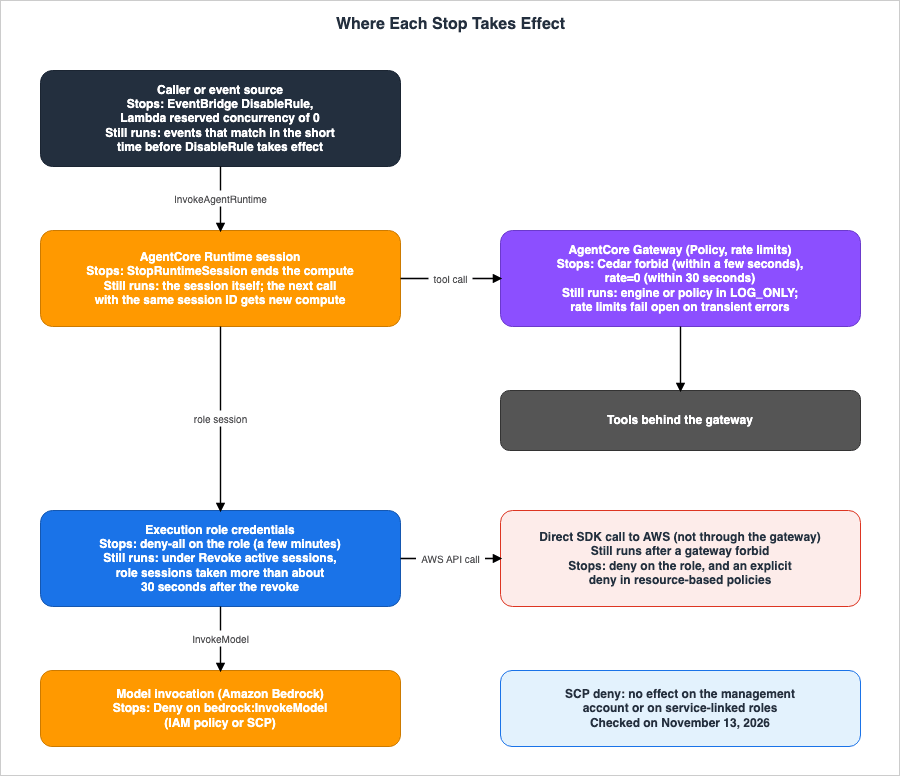
3.1 What Stops and What Keeps Running
Table 1 lists what stops and what keeps running. The terms used to describe the cell states are those defined in Section 1.5.| Control surface | What stops | What keeps running | Source |
|---|---|---|---|
StopRuntimeSession (microVMs) | The compute associated with the specified runtime session, and any ongoing streaming responses. | The session itself. A new compute will be provisioned for subsequent calls with the same session ID. Session storage files. | Stop session page, Sessions page |
StopRuntimeSession (Instances) | A single runtime associated with a specified agent within the session. | Other agents' runtimes within the same session. Persistent volumes. EC2 instances. | Instances data page |
| Endpoint redirection and deletion | The version the endpoint is redirecting to. | The DEFAULT endpoint. Ongoing sessions: Documentation does not list. | API reference, Resource-based policies page |
| Deny-all for execution role | AWS requests from sessions associated with that role, including issued credentials. | Requests permitted by resource-based policies. Paths that do not use the role. | AGENTSEC07-BP04, IAM disable page |
| Revoke active sessions | Sessions associated with that role issued before the specified time. | Sessions associated with that role taken more than approximately 30 seconds after the operation. Service-linked role. | IAM revoke page |
| Cedar gateway forbid | Calls passing through the gateway that match the forbid. | Calls not passing through the gateway. Calls while the engine is in LOG_ONLY. Calls that only a policy in LOG_ONLY matches. | AGENTREL06-BP05, Enforcement modes page, LOG_ONLY page |
Gateway rate=0 | Requests for that dimension combination passing through the gateway. | Requests during temporary errors. Requests where the dimension cannot be resolved. Requests that do not match any entry. | Rate limits page, Rate limit enforcement page |
| Lambda reserved concurrency 0 | The function processing events. | Ongoing invocations: Documentation does not list. Other functions. | Lambda concurrency page |
EventBridge DisableRule | The rule matching events. | Events matching the rule within a period of time. Processes that have already started. | EventBridge DisableRule page |
| SCP deny | Permissions for users and roles in member accounts. | Management account. Service-linked role. | SCP page |
bedrock:InvokeModel deny | Invoking the model. | Calls to tools. API calls other than the model. | Bedrock model access page |
| Flags within the application | The functionality of the code checking the flag. | Paths within the application that do not check the flag. | AGENTREL06-BP05 |
Table 1 lists items that can continue to function even after being stopped. There are no empty cells in any row. The Lambda concurrency page refers to functions as "Event Functions." This article will use the term "functions."
3.2 Time to Take Effect, Stop Operation, Revert Operation
Table 2 lists the time to take effect, stop operations, and revert operations. Time to take effect is only recorded when the documentation includes a numerical value or a term indicating a time duration. For revert operations, if the documentation does not specify how to revert, this article lists the API names as an inference.| Control surface | Time to take effect | Stop operation | Revert operation |
|---|---|---|---|
StopRuntimeSession (microVMs) | instantly terminates (Stated) | StopRuntimeSession | Next InvokeAgentRuntime with the same session ID (Stated) |
StopRuntimeSession (Instances) | Documentation does not list | StopRuntimeSession | Next call with the same session ID (Inference) |
| Endpoint redirection and deletion | Documentation does not list | UpdateAgentRuntimeEndpoint, DeleteAgentRuntimeEndpoint | UpdateAgentRuntimeEndpoint (Inference) |
| Deny-all for execution role | a few minutes (Stated) | Add policy to the role | Remove the policy (Inference) |
| Revoke active sessions | Documentation does not list | Apply inline policy with PutRolePolicy permission | Remove AWSRevokeOlderSessions (Inference) |
| Cedar gateway forbid | within a few seconds (Stated) | CreatePolicy, UpdatePolicy | UpdateGateway (Stated). UpdatePolicy, DeletePolicy (Inference) |
Gateway rate=0 | Within 30 seconds (Stated) | CreateGatewayRateLimit, UpdateGatewayRateLimit, BatchPutGatewayRateLimits | Modify entry, DeleteGatewayRateLimit (Inference) |
| Lambda reserved concurrency 0 | Documentation does not list | PutFunctionConcurrency | Remove the limit (Stated). The corresponding action is DeleteFunctionConcurrency (Inference) |
EventBridge DisableRule | a short period of time (Stated) | DisableRule | EnableRule (Inference) |
| SCP deny | Documentation does not list | AttachPolicy | DetachPolicy (Inference) |
bedrock:InvokeModel deny | a few minutes (Stated) if using an IAM policy | Add IAM policy or SCP | Remove the deny (Inference) |
| Flags within the application | Based on the configured polling interval (Stated) | Change the configured value | Revert the value (Inference) |
In Table 2, the revert operation is an action that can override a stopped state. When the stop and revert operations are held by the same entity, the stopped state can be overridden solely at the discretion of that entity. The process for assigning these operations to different parties will be discussed in Section 7.5.
3.3 Understanding the Tables
Tables 1 and 2 provide the following three key insights:- Each control mechanism limits what can be stopped.
StopRuntimeSessionstops the compute but retains credentials and sessions. Deny-all rejects requests made with the role's credentials but does not prevent tools behind the gateway from operating with different credentials. Cedar's forbid stops tool invocations, but does not prevent invocations that bypass the gateway. - Only some rows have numerical values. These are within 30 seconds for the gateway's rate limits and within a few seconds for Cedar's policies. Updates to IAM policies may take a few minutes. The action "Revoke active sessions" does not apply to role sessions taken more than approximately 30 seconds after the operation (see Section 4.2). Rows without numerical values are not described as either "immediate" or "non-effective."
- Many of these controls can be reverted using similar types of operations. Cedar's forbid can be overridden with either the authority to modify the policy or the authority to change the gateway (see Section 5.3).
4. Order: Preservation, Revocation, Notification
This chapter outlines the containment order in AGENTSEC07-BP04 and two methods of credential revocation.4.1 AGENTSEC07-BP04 Sequence
AGENTSEC07-BP04 defines the containment sequence as follows:capture a forensic snapshot of the agent's current memory, active sessions, and pending operations to Amazon S3, then revoke the agent's credentials by attaching a deny-all policy to its IAM role (preserving the role for forensic analysis), then broadcast a quarantine event through Amazon EventBridge to notify dependent workflows to activate their circuit breaker logic.The sequence consists of preservation, revocation, and notification.
- Preservation: Persists the agent's memory, ongoing sessions, and pending operations to Amazon S3.
- Revocation: Applies a deny-all policy to the execution role. The role is not deleted and is retained for investigation purposes.
- Notification: Sends a quarantine event via EventBridge, triggering circuit breakers for any workflows that rely on the agent.
The same page states that this sequence can be implemented either within an AWS Lambda function invoked by EventBridge rules, or within an AWS Systems Manager Automation document. It suggests that Lambda is suitable for scenarios requiring custom code or conditional branching, while Systems Manager Automation is appropriate for executing a predefined sequence of steps.
A second anti-pattern described in Section 2.2 explains the reason for prioritizing preservation. If revocation or session termination were to occur first, the agent's memory and ongoing sessions could be lost. As an inference by this article, within AgentCore Runtime's microVMs, when
StopRuntimeSession halts compute, any memory and files outside of the session storage are no longer retained. The Sessions page indicates that when a session ends, the entire microVM is stopped, resulting in memory erasure.4.2 Two Methods for Revoking Credentials
There are two distinct methods for revoking AWS credentials. Both involve adding a deny policy to a role. As noted in Section 7.2 of "Agent Sandboxing and Blast-Radius Isolation on AWS" on this site, no operation revokes previously issued credentials; the only possible action is the addition of denials based on the time of issuance. Both methods described in this article similarly prevent the use of credentials rather than directly invalidating them.The first method is "deny-all." As described in AGENTSEC07-BP04, this involves attaching a policy that denies all actions to the execution role. The IAM disable page states that modifying a role's policy will change the permissions for all temporary credentials associated with that role, including those previously issued.
When you update the policy, the changes affect the permissions of all temporary security credentials associated with the role, including credentials that were issued before you changed the role's permissions policy.The same page further explains the impact as follows:
It might take a few minutes for policy updates to take effect."Deny-all" does not rely on a specific issuance time. As an inference by this article, as long as the policy is attached to the role, it will apply to subsequent sessions assumed by that role.
The second method is "Revoke active sessions." The IAM revoke page indicates that this operation involves attaching an inline policy named
AWSRevokeOlderSessions to the role, which uses the aws:TokenIssueTime condition to deny credentials issued before a specified time. The IAM revoke page also states that this method does not affect users who assume the role after the policy is applied.If the user assumes the role after you revoked the permissions, then the deny policy does not apply to that user.Any user who assumes the role more than approximately 30 seconds after you choose Revoke active sessions is not affected.The same page notes that sessions associated with service-linked roles cannot be revoked using this method. Furthermore, it requires the
PutRolePolicy permission for the role.Chapter 7 of "AWS IAM Inbound Workload Federation" on this site states that after using "Revoke active sessions," affected workloads will obtain new credentials and resume operation. As an inference by this article, agents that automatically obtain new credentials will not necessarily stop simply by using "Revoke active sessions." The Instances security page indicates that for agents running on instances, AgentCore periodically refreshes the execution role's credentials. Therefore, as an inference by this article, to effectively stop agents, "Revoke active sessions" should be used in conjunction with either "deny-all" or another method that prevents automatic credential retrieval.
4.3 Resource-Based Policies and Paths Without Roles
Deny statements attached to roles may not prevent requests that resource-based policies permit. The IAM disable page states:If there's a resource-based policy that allows the principal access, you must also add an explicit deny for that resource.If agents utilize S3 buckets, KMS keys, SQS queues, or other resources that have resource-based policies, those policies must also include explicit deny statements.
There are also paths that do not utilize roles. When an agent calls external services using OAuth tokens, IAM role deny statements will not block those requests. According to the Policy sessions page, the workload access token used by AgentCore Identity has a TTL of 15 minutes. The Workload access token page states that workload identities managed by Runtime and Gateway cannot directly obtain tokens. On the AgentCore side, no statement was found on a procedure for revoking previously issued workload access tokens or OAuth tokens (No statement found, Section 8.2). The Auth code flow blog post describes a cleanup process that involves revoking OAuth tokens issued during testing using the IdP's revocation endpoint.
There is another path related to the compute type of Instances. The Instances security page states that AgentCore does not isolate credentials between agents on the same instance.
AgentCore doesn't isolate credentials between agents on the same instance.As an inference by this article, if another agent is present in the same Instances session, a deny-all policy on the role of the agent you want to stop does not stop the credentials of the other agents' execution roles, if the agent you want to stop had read them. The Instances security page recommends against running agents with different permission requirements in the same session.
4.4 Automated Containment and Manual Override
AGENTSEC07-BP04 describes automating the process from detection to containment within a few minutes. It lists Amazon CloudWatch Anomaly Detection, Amazon Bedrock AgentCore Evaluations, Amazon GuardDuty, Amazon Macie, and AWS Security Hub CSPM as potential detection points. This article does not cover how to configure detection mechanisms.The same page further explains that as a means of manual override, Systems Manager Automation procedures can be used to quarantine or restore agents. Restoration requires approval from multiple individuals.
multi-person authorization for restoration helps prevent premature re-activation.The seventh step in the implementation described on the same page is to test the containment procedures on a quarterly basis.
4.5 Notifications and Circuit Breaker
AGENTSEC07-BP04 describes how a workflow, following an isolation event, switches to a safe alternative path. The same page states that within AWS Step Functions workflows, if an agent is detected as unavailable in the "Catch" state, the workflow is routed to an alternative path. Workflows that rely on a stopped agent may remain in an error state, and this stoppage can itself trigger further issues.5. Toggling Capabilities at the Gateway
This chapter details capability toggling in AGENTREL06-BP05, and what remains when doing so in the AgentCore Policy and rate limit settings.5.1 What AGENTREL06-BP05 Says
AGENTREL06-BP05 states that stopping the entire agent due to a single function's malfunction is not a worthwhile trade-off.Feature flags at the gateway boundary let operators disable the affected capability immediately, keeping the rest of the agent usable while fixes or investigations proceed.The same page describes how, in the AgentCore Policy's Cedar policy, specific tools can be enabled or disabled without requiring a redeployment.
Policy updates propagate quickly, so the toggle can be flipped while an incident is still active rather than waiting for a deployment window.The same page also details how the agent should behave when a capability is disabled. Examples include shifting from semantic search to keyword search, from complex reasoning to simple rules, and from real-time data to cached values. Furthermore, the page instructs that the switch state and the use of alternative paths should be monitored within Amazon Bedrock AgentCore Observability, and that an alert should be triggered based on the usage rate of alternative paths.
5.2 Cedar's Forbid and Time to Take Effect
AgentCore Policy evaluates tool calls against the policy engine's policies, receiving communication from agents passing through the gateway. The Policy overview page states:Policy in AgentCore intercepts all agent traffic through Amazon Bedrock AgentCore Gateways and evaluates each request against defined policies in the policy engine before allowing tool access.The Interceptors blog post indicates that gateways with a policy engine attached, by default, reject calls and that in Cedar, forbid rules take precedence over permit rules. As an inference by this article, to prevent a tool from being used, add a forbid policy that matches the tool's call. The method for writing policies is detailed in the Amazon Bedrock AgentCore Policy Implementation Guide on this site.
Regarding time to take effect, AGENTREL06-BP05 simply states "quickly." The Considerations and limitations section on the LOG_ONLY page reads:
Changes are eventually consistent. Creating, updating, or promoting a policy is applied to the evaluation path within a few seconds.This section applies to the creation, updating, and promotion of policies. The documentation does not list the time to take effect when changing the gateway's
policyEngineConfiguration (Documentation does not list, Section 8.2).UpdatePolicy is an asynchronous operation. The API reference for UpdatePolicy instructs you to check the status in GetPolicy to confirm completion. The Policy engines page states that policies with valid syntax but failing type checking will return an HTTP 202 status and eventually settle to UPDATE_FAILED; it advises waiting for the status to become ACTIVE. As an inference by this article, after adding a forbid policy, do not consider the tool stopped until the status reaches ACTIVE.The API reference for
UpdatePolicy states that updating a temporal policy will invalidate all ongoing temporal sessions in the policy engine, returning an HTTP 409 status to ongoing sessions. In environments using temporal policies, updating a policy effectively stops any ongoing calls.5.3 Two Permissions to Override "Forbid"
The "forbid" state, once applied, can be overridden through two distinct types of operations.First, there is the mode of the gateway's policy engine. The Enforcement modes page states:
If you have the bedrock-agentcore:UpdateGateway permission, you can change a Gateway's policyEngineConfiguration.mode from ENFORCE to LOG_ONLY. In LOG_ONLY mode, all policies are evaluated but not enforced, and every tool call succeeds regardless of forbid policies.The same page also indicates that the
policyEngineConfiguration can be set to null with the same permissions, removing the policy engine. The page continues:No separate action or condition key protects the mode field beyond bedrock-agentcore:UpdateGateway, so grant this permission only to trusted principals.The LOG_ONLY page clarifies that when the engine is in
LOG_ONLY mode, it does not enforce any individual policy, regardless of the policy's mode.Second, there is the policy's
enforcementMode. The UpdatePolicy function allows changing the enforcementMode of each policy to either ACTIVE or LOG_ONLY. The LOG_ONLY page states that policies set to LOG_ONLY do not influence decisions. As an inference by this article, changing a "forbid" policy to LOG_ONLY or deleting it with DeletePolicy will render the "forbid" ineffective.As an inference by this article, the entities capable of reverting the "forbid" state on the gateway are those possessing the
bedrock-agentcore:UpdateGateway permission and those able to modify the policy engine's policies. The wording on the Enforcement modes page suggests that the former permission should only be granted to trusted entities. AGENTSEC07-BP04 indicates that multiple approvals should be required for recovery. As an inference from these two statements, this article suggests that these two permissions should not be included in the agent's execution role or the daily permissions required to operate the agent.5.4 Rate Limit with rate=0
Rate limiting was added to the gateway in the August 2026 release notes. The release notes state the following regarding rate=0:Setting rate=0 on an entry acts as an explicit block for that dimension combination, enabling emergency caller isolation without gateway reconfiguration.The Rate limits page indicates a time to take effect of within 30 seconds. The same page also states that the rate limit defaults to "fail open."
Rate limits use fail-open behavior by default. If the rate limit service is unavailable or a dimension cannot be resolved, the gateway allows the request to proceed.The same page advises against relying solely on rate limits for security. The Rate limit enforcement page explains that requests that do not match any entry, when no
* default entry exists, will bypass the rate limit. The gateway evaluates rate limits before applying any gateway rules.As an inference by this article,
rate=0 is for scenarios where you want to restrict specific callers or tools within 30 seconds. However, it allows requests experiencing transient errors and requests whose dimensions cannot be resolved to proceed. To enforce continuous restrictions, this article suggests, as an inference, combining rate=0 with Cedar's "forbid" or credential denials.According to the release notes, the operations for managing rate limits are:
CreateRateLimit, GetRateLimit, UpdateRateLimit, DeleteRateLimit, ListRateLimits, and BatchPutRateLimitEntries. The AgentCore Control Plane API Reference lists the same operations under names such as CreateGatewayRateLimit, UpdateGatewayRateLimit, DeleteGatewayRateLimit, and BatchPutGatewayRateLimits. Table 2 uses the API Reference names.5.5 What the Gateway Does Not See
The gateway's Cedar policies and rate limits only evaluate calls that pass through the gateway. This site's OWASP Top 10 for Agentic Applications Mapped to AWS Controls states that the policies evaluated by the gateway do not govern tools the agent reaches without passing through the gateway. If an SDK is called directly from within a microVM using the execution role's credentials, it bypasses the Cedar layer.This article treats the same fact with the same level of certainty as that article. Even if the gateway blocks calls, AWS APIs that the agent's execution role can call directly will remain accessible. Mitigating this involves denying access for the execution role and implementing deny policies on the resource side (see Sections 4.2 and 4.3). Similarly, if model calls do not pass through the gateway, they can be blocked by denying the
bedrock:InvokeModel action.5.6 Flags Within the App
AGENTREL06-BP05 states the following regarding more granular switching in the agent.use a managed configuration service with local caching and configurable polling intervals so agents respond to changes within seconds.The AppConfig Agent page indicates that it is possible to set the polling interval. However, the main AppConfig page that this article reviewed does not specify a default interval (No statement found). As an inference by this article, the flags in the app only halt the code path that checks the flag. Code paths that do not check the flag, and processes that began before the flag is read, continue to run.
6. Stopping the AgentCore Runtime from Outside
This chapter describes how to stop an AgentCore Runtime session from an external source and highlights the differences based on compute type.6.1 microVMs' StopRuntimeSession
The Stop session page describes the StopRuntimeSession function as follows:When called, this operation instantly terminates the specified session and stops any ongoing streaming responses.The prerequisites are the IAM permissions for
bedrock-agentcore:StopRuntimeSession, the ARN of the agent runtime, and the ID of the ongoing session. The page also notes that one use case is to forcibly terminate unresponsive or stalled sessions. If the service is in the process of preparing or cleaning up a session, a RetryableConflictException will be returned, with an HTTP status code of 409.The Sessions page describes the state of a session after it has been stopped. The session will transition to a "Stopped" state. Triggers for this state are inactivity, reaching the compute limit for the runtime (lifetime), an explicit call to
StopRuntimeSession, or a health check determining the session is unhealthy.The session transitions back to Active on the next invocation and a new compute is provisionedThe session itself remains valid until the AgentCore Runtime ARN is deleted.The same page states that for runtimes configured with session storage, files in the mounted path persist across stops and restarts. The File system page indicates that session storage is in "Preview." The File system page also states that when
StopRuntimeSession is called explicitly, the caller should wait for completion before attempting to resume.As an inference by this article,
StopRuntimeSession primarily stops the compute resources associated with a session; it does not close the session itself. If a user can call InvokeAgentRuntime with the same session ID, the agent will resume with a new compute. To prevent resumption, a separate mechanism is required to reject the call. The Resource-based policies page provides an example of how to use runtime and endpoint resource-based policies to deny calls to bedrock-agentcore:InvokeAgentRuntime, noting that explicit denials take precedence over other permissions.6.2 Instances and StopRuntimeSession
In addition to microVMs, AgentCore Runtime also includes Instances, which offer a different compute type. The Instances GA post states that general availability was launched on August 6, 2026. The Instances page describes Instances sessions as isolated EC2 instances created from a capacity provider. A single session can host multiple agent runtimes. The maximum duration of a session is 14 days.The Instances data page clarifies that
StopRuntimeSession stops the following:One agent runtime within a session. Other agent runtimes in the session are unaffected.The same page also indicates that after using
StopRuntimeSession, persistent volumes remain attached to the session. Furthermore, it states that even if a single agent runtime is stopped, the data is not lost, and the instance itself will not be stopped.As an inference by this article, when an Instances session hosts multiple agents, calling
StopRuntimeSession on one agent will not affect the operation of other agents on the same instance. As mentioned in Section 4.3, other agents may have been able to access the credentials of the agent that was stopped.6.3 Deleting Instances Sessions
The operation that deletes instance sessions, along with the associated instances and persistent volumes, is referred to asDeleteCapacityProviderSession. The API reference describes it as follows:After you delete a session, you cannot restart it.The table on the Instances data page states that
DeleteCapacityProviderSession terminates the entire session, the EC2 instance, and network interfaces, and then deletes the persistent volumes. DeleteCapacityProvider deletes the capacity provider and all of its associated sessions. The same page also indicates that deleting a session requires the runtimeSessionId used when initiating the call.As an inference by this article,
DeleteCapacityProviderSession is not compatible with the preservation measures described in Section 4.1. Because it deletes persistent volumes, it should be used after preservation has been completed.6.4 Endpoint Redirection and Deletion
The documentation does not describe how to disable AgentCore Runtime endpoints (No statement found). The body of theUpdateAgentRuntimeEndpoint request includes three fields: agentRuntimeVersion, clientToken, and description. According to the documentation, endpoints can be redirected or deleted.- Redirection: Using
UpdateAgentRuntimeEndpoint, an endpoint can be directed to a previous version. - Deletion: Using
DeleteAgentRuntimeEndpoint, an endpoint can be deleted. The File system page indicates that bothDeleteAgentRuntimeandDeleteAgentRuntimeEndpointdelete session storage data for either the runtime or the endpoint.
The Resource-based policies page states that the
DEFAULT endpoint automatically routes to the latest version. As an inference by this article, even if a named endpoint is deleted, users who can access the DEFAULT endpoint can still access the latest version. The documentation does not specify what happens to active sessions when an endpoint is deleted or redirected (Documentation does not list, Section 8.2).6.5 Session Lifetime and the Boundary of Isolation
Even if not explicitly stopped, sessions terminate when their lifetime ends. The Quotas page and Lifecycle settings page indicate that microVM sessions automatically terminate after a default idle time of 15 minutes or a maximum lifetime of 8 hours. Both of these settings can be adjusted using theLifecycleConfiguration's idleRuntimeSessionTimeout and maxLifetime parameters. On Instances, the maximum lifetime is 14 days. Details regarding session lifetimes and the credentials received by those sessions are covered in another article on this site (What a Snapshot Carries on AgentCore Runtime V2 - Startup Work, Per-Request Values, and Session Credentials).A separate issue concerns how far the boundary of the box that runs agent code holds, and against whom. Another article on this site (What a Nitro Sandbox Isolates - What the Parent Instance Can Still Do in Isolated and Confidential Modes on EKS, ECS, and EC2) details the capabilities of the Nitro Sandbox's parent instance, including its ability to stop the sandbox. This article does not include isolation boundary information in the control surface table.
7. Break-Glass Procedure
This chapter outlines the break-glass procedure for AGENTOPS07-BP04, divided into four sections: activation conditions, location, contents, and exercise. Figure 2 illustrates the process, compiled from AGENTSEC07-BP04 and AGENTOPS07-BP04.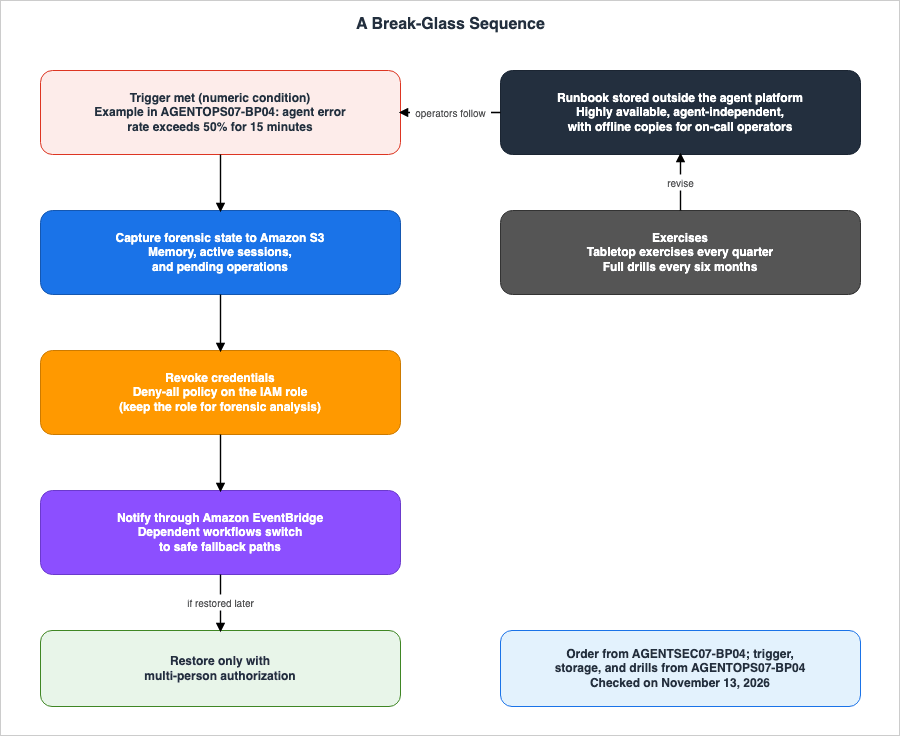
7.1 Activation Conditions
AGENTOPS07-BP04 requires you to define the conditions for switching to manual procedures. The same page provides examples of such conditions, such as:Clear conditions, for example, "agent error rate exceeds 50% for 15 minutes" or "complete agent infrastructure unavailability for 5 minutes", tell operators when to switch to manual proceduresThe same page also states that automated notifications indicating that a condition has been met make the decision obvious. One potential anti-pattern is failing to define clear conditions, which can lead to operators debating whether or not to switch to manual operation, resulting in delays. The page provides examples such as 50%, 15 minutes, and 5 minutes. This article does not treat these as recommended values.
7.2 Placement
AGENTOPS07-BP04 defines an anti-pattern for placement as follows:Storing emergency procedures in locations inaccessible during the outage scenarios they are designed to address (for example, in systems that depend on the failing agent infrastructure).The same page states that this is the most common failure mode, and the most dangerous. Procedures placed within a wiki that relies on the agent's infrastructure become inaccessible during outages. The same page recommends placing procedures in a location with high availability, independent of the agent's infrastructure, and ensuring that offline copies are available for on-call operations personnel.
As an inference by this article, the reasoning behind this approach regarding procedure placement also applies to authorization for shutdown operations. If the roles or tools used to shut down an agent rely on the same infrastructure or permissions as the agent itself, the agent may become uncontrollable if that infrastructure becomes unavailable.
7.3 Contents of the Procedure Document
AGENTOPS07-BP04 lists the following items that a procedure document should include:- Activation conditions
- Step-by-step manual execution instructions
- Required credentials
- Contact information for primary and secondary personnel responsible for the process.
- Estimated time to completion
- Criteria for returning to automated operations.
The same page also identifies procedures that only one or two individuals can execute as another single point of failure. It advises writing procedures in a manner accessible to those without specialized expertise, and utilizing tabletop exercises and cross-training to expand knowledge.
As an inference by this article, the tables in Chapter 3 will serve as a resource when documenting the "step-by-step manual execution instructions" and "criteria for returning to automated operations" within this procedure document. For each control surface, the procedure document should clearly specify what is stopped, what remains active, and who is authorized to revert the process.
7.4 Exercise Cycle
AGENTOPS07-BP04 defines the exercise cycle as follows:Tabletop exercises quarterly, operators walking through runbook steps without executing them, catch outdated references and missing steps. Full drills semi-annually, operators actually executing manual procedures in a non-production environmentQuarterly tabletop exercises involve reviewing procedures without execution, identifying outdated references and missing steps. Semi-annual full drills involve manually executing procedures in a non-production environment. The exercises' results are used to update the procedure documentation. AGENTSEC07-BP04 also specifies that containment procedures should be tested on a quarterly basis.
As an inference by this article, full drills should verify what keeps running in the tables in Chapter 3. For example, confirming that a call with the same session ID after
StopRuntimeSession brings the session back, and verifying whether agents continue to operate with new credentials after the "Revoke active sessions" process.7.5 Authority to Stop and Authority to Revert
If the authority to revert an operation (as described in Table 2) is granted to the same entity that has the authority to stop it, then that entity alone can lift the stopped state. The documentation has two statements on this point. AGENTSEC07-BP04 specifies that restoring functionality requires approval from multiple individuals. The Enforcement modes page states that thebedrock-agentcore:UpdateGateway permission should only be granted to trusted entities.As an inference by this article, the following three points are design considerations for the stopping side:
- The agent's execution role should not include the stop and revert operations outlined in Table 2. This specifically includes permissions for
bedrock-agentcore:UpdateGateway, the ability to modify policies in the policy engine, and the IAM permissions to modify the agent's own role policies. - The stop operation should be designed to allow on-call operations personnel to pull it quickly. The revert operation, however, should require a multi-person approval process.
- A record should be maintained to document who initiated the stop and who subsequently reverted it.
8. Where the Sources Disagree, and Where No Statement Was Found
This section summarizes discrepancies found in the source materials and instances where information was not found.8.1 Where the Sources Disagree
This article has identified one point where the documentation contains discrepancies. This article does not definitively state that either source is incorrect.The question is whether Agentic AI Lens can be used with the AWS Well-Architected Tool. The Architecture Blog post, as of October 28, 2026, states:
The Agentic AI Lens is available today as prescriptive guidance, though it is not yet selectable as a lens in the AWS Well-Architected Framework.The Lens landing page, in the section on Lens availability, states that Agentic AI Lens should be taken from the public custom lens GitHub repository and imported into the AWS WA Tool. As an inference by this article, the two statements are consistent if they are read to mean that the lens cannot be selected as a built-in lens, but can be imported as a custom lens. This article will address this point as a discrepancy in the documentation (Sources disagree). The Lens landing page states that the publication date is June 10, 2026.
This article will not consider the following two points as discrepancies:
- The time it takes for Cedar policies to be reflected: AGENTREL06-BP05 states "quickly," while the Interceptors blog post states that the "forbid" rules take effect "immediately." The LOG_ONLY page states that changes are eventually consistent and reflected within a few seconds. This article interprets these three statements as different ways of describing the same fact, and will use the wording from the LOG_ONLY page when referring to the time to take effect.
- Fail-open rate limiting: The release notes state that requests are allowed through in the event of a temporary error, while the Rate limits page states that requests are allowed through when the rate limit service is unavailable or when a dimension cannot be resolved. The latter is a more detailed explanation of the former.
8.2 What the Documentation Does Not List, and Where No Statement Was Found
This section lists items for which documentation was not found or were not included in the list of available materials. It is important to note that these omissions do not necessarily indicate that these features are unavailable or non-functional.- Handling of active sessions when deleting or redirecting endpoints: The
DeleteAgentRuntimeEndpointandUpdateAgentRuntimeEndpointAPI references do not list it (Documentation does not list). - Handling of active runtime sessions when an execution role is assigned a "deny-all" policy: While the IAM disable page mentions evaluating temporary credential permissions for each AWS request, no such information was found in the AgentCore Runtime documentation (No statement found).
- Operations on the AgentCore side to revoke workload access tokens and OAuth tokens: No statement found.
- Time taken for changes to the gateway's
policyEngineConfigurationto take effect: Documentation does not list this. - Handling of active invocations when Lambda reserved concurrency is set to 0: The Lambda concurrency page does not provide this information (Documentation does not list).
- Time taken for changes made to SCPs to take effect: The SCP page does not provide this information (Documentation does not list).
- Number of best practices for Agentic AI Lens: The Architecture Blog post states the number is 150. The Lens landing page does not specify this number (Documentation does not list).
9. Failure Modes
This chapter will outline failures that occur when a control surface is mistakenly read, organizing the information by symptoms, causes, and relevant materials.- Symptom: An agent that has been stopped begins operating again with the same session ID after a few minutes. Cause:
StopRuntimeSessionstops the compute resource, but the session remains, and a new compute resource is provisioned on the next call. Reference: Sessions page (Section 6.1). - Symptom: The necessary memory and files are missing for investigation. Cause: The session was stopped before the preservation process. Reference: AGENTSEC07-BP04 (Section 4.1).
- Symptom: Even after "Revoke active sessions," the agent continues to call AWS. Cause: The agent has obtained a new role session. "Revoke active sessions" does not affect role sessions taken more than approximately 30 seconds after the operation. Reference: IAM revoke page (Section 4.2).
- Symptom: Agent requests still pass immediately after applying a deny-all policy. Cause: It may take a few minutes for the policy updates to be fully reflected. Reference: IAM disable page (Section 4.2).
- Symptom: Despite applying a deny-all policy, agent requests to an S3 bucket are still passing. Cause: The bucket policy allows the role, and there is no explicit deny configured on the resource side. Reference: IAM disable page (Section 4.3).
- Symptom: Actions performed on a tool that the gateway blocked are still occurring. Cause: The agent is directly calling the SDK with the execution role's credentials, bypassing the gateway. Reference: Policy overview page, this site's OWASP Top 10 for Agentic Applications Mapped to AWS Controls (Section 5.5).
- Symptom: Tool invocations are succeeding even after a policy has been applied. Cause: The policy status is
UPDATE_FAILEDand has not transitioned toACTIVE, or the gateway engine is inLOG_ONLYmode. Reference: Policy engines page, Enforcement modes page (Sections 5.2 and 5.3). - Symptom: A tool that was stopped becomes usable again without being explicitly restored. Cause: An entity with the
bedrock-agentcore:UpdateGatewaypermission has set the engine toLOG_ONLYornull, or an entity with permission to modify policies has changed the forbid policy toLOG_ONLY. Reference: Enforcement modes page, LOG_ONLY page (Section 5.3). - Symptom: Requests from a caller that was stopped with
rate=0are partially passing. Cause: Rate limits default to a "fail open" configuration, or the dimensions cannot be resolved. Reference: Rate limits page (Section 5.4). - Symptom: Even after stopping one agent within an Instances session, the same action continues. Cause:
StopRuntimeSessiononly stops the runtime for one agent; other agents in the same session continue to operate. Reference: Instances data page (Section 6.2). - Symptom: After deleting an Instances session, the necessary volumes also disappear. Cause:
DeleteCapacityProviderSessiondeletes persistent volumes. Reference: Instances data page (Section 6.3). - Symptom: Even after disabling an EventBridge rule, agents continue to start. Cause: Immediately after disabling, incoming events may still match the rule. Reference: EventBridge DisableRule page (Chapter 3).
- Symptom: Despite being denied by SCP, agents in the management account are still running. Cause: SCP does not apply to users and roles in the management account. Reference: SCP page (Chapter 3).
- Symptom: During an incident, the procedure document is inaccessible. Cause: The procedure document is located in a place that depends on the infrastructure of the agent being stopped. Reference: AGENTOPS07-BP04 (Section 7.2).
10. Frequently Asked Questions About Stopping AI Agents
Q1. Will the agent stop when StopRuntimeSession is called?
While the compute stops, the session remains. The Stop session page states that StopRuntimeSession "instantly terminates the specified session and stops any ongoing streaming responses." The Sessions page indicates that the terminated session becomes active again on the next call, and a new compute is provisioned. If someone else can access the session using the same session ID, the agent will resume. As an inference by this article, to prevent resumption, combine it with resource-based policies that deny InvokeAgentRuntime. To stop AWS calls after resumption, combine it with a deny-all policy applied to the execution role (see Sections 4.2 and 6.1).Q2. If you use "Revoke active sessions," will the agent no longer be able to access AWS?
Not necessarily. The IAM revoke page states that it will not apply to users who assumed the role more than approximately 30 seconds after the revocation. Agents that automatically reacquire credentials may continue to function using new credentials. AGENTSEC07-BP04 describes a method that involves a "deny-all" policy for the role. A "deny-all" policy, while applied to a role, affects both existing credentials and any credentials subsequently obtained (see Section 4.2).Q3. Will it take effect immediately if I attach "deny-all"?
It may take a few minutes. The IAM disable page states that it can take a few minutes for policy updates to take effect. If the resource's policy allows it, a specific "deny" rule is also required on that resource (see Sections 4.2 and 4.3).Q4. If a tool is stopped due to a gateway policy, will its operation cease entirely?
Calls passing through the gateway will be stopped. Calls that do not pass through the gateway will continue to function. The Policy overview page states that the policy evaluates communication for agents passing through the gateway. This site's OWASP Top 10 for Agentic Applications Mapped to AWS Controls indicates that directly calling the SDK with execution role credentials bypasses the Cedar layer. Furthermore, entities possessing thebedrock-agentcore:UpdateGateway permission can set the engine to LOG_ONLY and remove the restriction (see Sections 5.3 and 5.5).Q5. When will Cedar's policy changes take effect?
The LOG_ONLY page states that when a policy is created, updated, or when promotion is involved, the changes are reflected in the evaluation path within a few seconds, and that changes are eventually consistent. TheUpdatePolicy function performs an asynchronous operation, and GetPolicy is used to verify that the policy is in the ACTIVE state. The documentation does not specify the time it takes for changes to be reflected when the gateway engine's mode is changed (see Sections 5.2 and 8.2).Q6. Does setting rate=0 in the rate limit reliably stop requests?
No, it does not guarantee a complete stop. While the Rate limits page states that changes are reflected within 30 seconds, it also notes that rate limits are, by default, configured to operate in "fail open" mode. Therefore, even when the rate limit service is unavailable or when a dimension cannot be resolved, requests will still be processed. The same page advises against relying solely on rate limits as a security boundary (see Section 5.4).Q7. Does StopRuntimeSession function in the same way during Instances sessions as well?
It functions differently. The Instances data page states that StopRuntimeSession stops the runtime of only one agent within a session, without affecting the runtimes of other agents. Persistent volumes remain. To delete an entire session, use DeleteCapacityProviderSession. Once a session is deleted in this way, it cannot be resumed (see Sections 6.2 and 6.3).Q8. Where should the break-glass procedure document be placed?
AGENTOPS07-BP04 says the procedure should be placed in a location that offers high availability and is independent of any specific agent. It should also have an offline copy accessible to the on-call operations personnel. Placing the procedure document on the infrastructure of an agent that might be stopped means it could become inaccessible during an incident. The same page describes quarterly tabletop exercises and semi-annual full drills (see Sections 7.2 and 7.4).11. Summary
Read how to stop an AI agent through the following five points:- Targets to Stop: Processes, sessions, credentials, capabilities, triggers, and model calls can be stopped individually. In many cases, one control surface stops only one or two of these elements. Stopping only processes or sessions may result in a return using the same ID and permissions.
- Runtime:
StopRuntimeSessionstops the compute resource, but the session remains, and subsequent calls using the same session ID will resume. On Instances, only the runtime of a single agent is stopped; other agents and persistent volumes remain. There is no documented action to disable endpoints; the options are to redirect or delete them. - Credentials: The "deny-all" setting applies to existing credentials, but it may take a few minutes for the change to take effect. "Revoke active sessions" does not apply to role sessions taken more than approximately 30 seconds after the operation. Explicit "deny" policies are required on the resource side. The order of operations is preservation, revocation, and notification.
- Gateway: Cedar's "forbid" setting takes effect within a few seconds, but it only stops calls that pass through the gateway. Entities with the
bedrock-agentcore:UpdateGatewaypermission can set the engine toLOG_ONLYornull, and entities that can modify policies can remove the "forbid" setting. Settingrate=0takes effect within 30 seconds, but it operates on a "fail open" basis. - Procedures: Define activation conditions, place procedures where they do not depend on the agent, and verify their functionality through quarterly tabletop exercises and semi-annual full drills. As an inference by this article, do not give both stop and revert operations to the same entity. Tables 1 and 2 reflect the state as of November 13, 2026.
12. References
- Agentic AI Lens - AWS Well-Architected Framework
- AGENTSEC07-BP04 Behavioral anomaly detection and agent containment - Agentic AI Lens
- AGENTREL06-BP05 Implement dynamic capability toggling - Agentic AI Lens
- AGENTOPS07-BP04 Implement break-glass operational runbooks - Agentic AI Lens
- Automating agentic AI Well-Architected reviews with the AWS Agentic AI Lens - AWS Architecture Blog
- Stop a running session - Amazon Bedrock AgentCore Developer Guide
- Use isolated sessions for agents - Amazon Bedrock AgentCore Developer Guide
- Configure Amazon Bedrock AgentCore lifecycle settings - Amazon Bedrock AgentCore Developer Guide
- Quotas for Amazon Bedrock AgentCore - Amazon Bedrock AgentCore Developer Guide
- Instances - Amazon Bedrock AgentCore Developer Guide
- Manage your data on Runtime Instances - Amazon Bedrock AgentCore Developer Guide
- Security model and permissions for Runtime Instances - Amazon Bedrock AgentCore Developer Guide
- File system configurations for AgentCore Runtime - Amazon Bedrock AgentCore Developer Guide
- Resource-based policies for Amazon Bedrock AgentCore - Amazon Bedrock AgentCore Developer Guide
- Policy in Amazon Bedrock AgentCore: Control Agent Interactions - Amazon Bedrock AgentCore Developer Guide
- Policy enforcement modes - Amazon Bedrock AgentCore Developer Guide
- Test a policy in LOG_ONLY mode - Amazon Bedrock AgentCore Developer Guide
- Manage Policies and Policy Engines - Amazon Bedrock AgentCore Developer Guide
- Add rate limits to a gateway - Amazon Bedrock AgentCore Developer Guide
- Rate limit enforcement - Amazon Bedrock AgentCore Developer Guide
- Policy sessions and identity propagation - Amazon Bedrock AgentCore Developer Guide
- Get workload access token - Amazon Bedrock AgentCore Developer Guide
- Release notes for Amazon Bedrock AgentCore - Amazon Bedrock AgentCore Developer Guide
- StopRuntimeSession - Amazon Bedrock AgentCore Data Plane API Reference
- DeleteCapacityProviderSession - Amazon Bedrock AgentCore Data Plane API Reference
- UpdatePolicy - Amazon Bedrock AgentCore Control Plane API Reference
- UpdateGateway - Amazon Bedrock AgentCore Control Plane API Reference
- CreateGatewayRateLimit - Amazon Bedrock AgentCore Control Plane API Reference
- BatchPutGatewayRateLimits - Amazon Bedrock AgentCore Control Plane API Reference
- UpdateAgentRuntimeEndpoint - Amazon Bedrock AgentCore Control Plane API Reference
- DeleteAgentRuntimeEndpoint - Amazon Bedrock AgentCore Control Plane API Reference
- Policy in Amazon Bedrock AgentCore is now generally available - AWS What's New
- AgentCore runtime instances are now generally available - AWS What's New
- Amazon Bedrock AgentCore Runtime now supports managed session storage for persistent agent filesystem state (preview) - AWS What's New
- Revoke IAM role temporary security credentials - AWS Identity and Access Management User Guide
- Disabling permissions for temporary security credentials - AWS Identity and Access Management User Guide
- Configuring reserved concurrency for an Event Function - AWS Lambda Developer Guide
- DisableRule - Amazon EventBridge API Reference
- Service control policies (SCPs) - AWS Organizations User Guide
- Request access to models - Amazon Bedrock User Guide
- How to use AWS AppConfig Agent to retrieve configuration data - AWS AppConfig User Guide
- Secure AI agents with Policy and Lambda interceptors in Amazon Bedrock AgentCore gateway - AWS Artificial Intelligence Blog
- Building a secure auth code flow setup using AgentCore Gateway with MCP clients - AWS Artificial Intelligence Blog
- Agent Sandboxing and Blast-Radius Isolation on AWS - Choosing the Unit of Each Containment Boundary and What Each One Does Not Stop
- Identity Lifecycle for AI Agents - Registration, Delegated Authorization, Access Review, and What Retirement Leaves Behind
- OWASP Top 10 for Agentic Applications Mapped to AWS Controls - What Each Control Mitigates and What Residual Risk Remains
- AWS Lambda Concurrency and Scaling Guide - Reserved and Provisioned Concurrency, Throttling, and Event Source Scaling
- AWS IAM Inbound Workload Federation - IAM Roles Anywhere, OIDC, and SPIFFE Converging on One Trust Policy Condition
- AWS Security Incident Response Playbooks - First-Response Runbooks for Common Scenarios
- Amazon Bedrock AgentCore Policy Implementation Guide - Cedar-Based Agent Authorization and Default-Deny Design
- Agent Reliability Engineering Design Guide - Retries, Loop Detection, Timeout Budgets, and Human Escalation for AI Agents
References:
Tech Blog with curated related content
Written by Hidekazu Konishi