What a Nitro Sandbox Isolates - What the Parent Instance Can Still Do in Isolated and Confidential Modes on EKS, ECS, and EC2
First Published:
Last Updated:
This article outlines the boundaries of the Nitro Sandbox, specifying how far it holds against each of three parties: the parent instance, other sandboxes in the same parent instance, and AWS operators. Both Amazon EKS and Amazon ECS offer two modes: isolated mode and confidential mode. This article will detail what the parent instance can and cannot do within each of these modes. It will also describe the process by which AWS KMS checks the attestation document and releases a key in confidential mode, along with the prerequisites for each entry point (EKS, ECS, and EC2). This article is not an installation guide and does not cover pricing.
In conclusion, the Nitro System creates separation between the sandbox and the parent instance, between sandboxes themselves, and between the sandbox and AWS operators. In confidential mode, the parent instance cannot read the sandbox's memory or CPU registers. However, the parent instance still controls the resources the sandbox relies on. The parent instance can stop the sandbox, and it can falsify the time, DNS, and placement metadata. The parent instance can also mount the same Amazon EFS file system using its own IAM credentials. Documentation for ECS states that, even in confidential mode, the parent instance can inject arbitrary task role credentials. Documentation for EKS states that the parent instance can mint Pod Identity credentials for any pod on the node. In isolated mode, there are no restrictions on which containers can be run. Task definitions and pod specs are treated as trusted inputs. In confidential mode, the attestation policy pins the conditions for container startup, and AWS KMS releases a key only when the values of PCR17 and PCR8 match. If the key policy does not check them, the measurement stops nothing.
This article is based on documentation reviewed on November 13, 2026 (Japan Standard Time). This article does not involve actually running a Nitro Sandbox. The content is based solely on the information presented in the materials and inferences drawn from that information.
Related articles on this site:
- AWS Nitro Enclaves and Confidential Computing on AWS - Attestation, PCR Measurements, and KMS Condition Keys
- Workload Isolation Levels on Amazon EKS - Which Level You Stopped At, and What That Level Does Not Stop
- Agent Sandboxing and Blast-Radius Isolation on AWS - Choosing the Unit of Each Containment Boundary and What Each One Does Not Stop
- Metadata Endpoints Across AWS Compute - What Code on EC2, ECS, EKS, and Lambda Can Ask the Platform, How Each Endpoint Checks the Caller, and Where Location and Credentials Come From
Table of Contents
- 1. Scope and Terms
- 2. What Was Added on November 9, 2026
- 3. The Parent Instance and the Sandbox
- 4. What Isolated Mode Separates, and What It Does Not Restrict
- 5. Confidential Mode and Attestation
- 6. Prerequisites for Launching Sandboxes on EKS, ECS, and EC2
- 7. What the Sandbox Does Not Protect
- 8. How This Relates to Nitro Enclaves, RuntimeClass Levels, and Agent Sandboxes
- 9. Where the Sources Disagree, and Where No Statement Was Found
- 10. Failure Modes
- 11. Frequently Asked Questions About Nitro Sandbox Isolation
- 12. Summary
- 13. References
1. Scope and Terms
This chapter defines the scope, audience, source materials, and terminology used in this article. The key conclusions are as follows:- This article addresses whom the Nitro Sandbox boundary holds against, and at which layer it is enforced. (Section 1.2)
- The EC2-layer modes and the modes for EKS and ECS are separate axes. The term "confidential" appears in both. (Section 1.4)
- This article does not drop what is not protected from the parent instance, whether in the summary, a table, a figure, or the FAQ. (Chapter 7)
- All rows in the tables reflect the state as of November 13, 2026. (Chapters 2, 6, and 7)
- This article will not state that something is "unavailable" or "impossible" if it is not explicitly mentioned in the source materials. (Sections 1.5 and 9.2)
1.1 Intended Audience
This article is intended for readers who:- Want to run potentially untrusted code within EKS pods or ECS tasks. This might include code generated by AI agents or code specific to individual tenants.
- Are interested in understanding whether using confidential mode can protect data from node administrators.
- Need to write KMS key policies for confidential mode.
- Wish to run Nitro Sandbox using Firecracker on their own EC2 instances.
This article assumes readers are considering the following points, and each will be verified with supporting documentation:
- Selecting isolated mode restricts which containers can run.
- Selecting confidential mode means the parent instance can see nothing and do nothing.
- Using EBS encryption protects the contents of volumes from the parent instance.
- If there is an attestation document, that alone keeps a tampered environment from starting.
- Any instance type that supports Nitro Enclaves can be used to run Nitro Sandbox.
1.2 Scope and Exclusions
This article covers the following:- The relationship between the parent instance and the sandbox, the three directions that the Nitro System separates, and the differences from Nitro Enclaves.
- Confidential mode and Direct mode at the EC2 layer.
- Isolated mode and confidential mode for EKS and ECS.
- The attestation process, KMS condition keys, and encrypted container images.
- Prerequisites for launching EKS, ECS, and EC2.
- What is not protected from the parent instance, limitations, and points where the sources disagree.
This article does not cover:
- Pricing. The documentation states that Nitro Sandboxes do not incur additional charges. This article only mentions this single sentence regarding pricing.
- The complete implementation steps. It only outlines the declaration format.
- The format of attestation documents and general concepts related to PCRs. AWS Nitro Enclaves and Confidential Computing on AWS on this site covers it.
- A mapping of isolation levels for EKS, and the mechanisms of gVisor and Kata Containers. Workload Isolation Levels on Amazon EKS on this site covers it.
- How to choose the isolation unit for agents. Agent Sandboxing and Blast-Radius Isolation on AWS on this site covers it.
- How to stop running agents. Another article on this site (Stopping an AI Agent on AWS - What Each Control Stops, What Keeps Running, and Who Can Undo It) covers it.
- Methods for crossing sandbox boundaries. This article only describes where those boundaries exist.
This article does not compare the merits of different isolation methods. Whether gVisor, Kata Containers, Firecracker, Nitro Enclaves, or Nitro Sandboxes is best depends on the threat model.
1.3 Date of Review and Materials Reviewed
This article was written after reviewing the following materials on November 13, 2026 (Japan Standard Time). In the body, this article uses the English names given in parentheses.Regarding the Amazon EC2 User Guide, the following pages were reviewed:
- Isolate workloads with AWS Nitro Sandboxes (EC2 Nitro Sandboxes page)
- Run Nitro Sandboxes with Firecracker (EC2 Firecracker page)
- Attest a Nitro Sandbox (EC2 attestation page)
Regarding the Amazon ECS Developer Guide, the following pages in the Isolated and confidential tasks chapter were reviewed:
- Isolated and confidential tasks (ECS landing page)
- Overview (ECS overview page)
- Getting started (ECS getting started page)
- Security model (ECS security model page)
- Confidential policy configuration (ECS confidential policy page)
- Encrypted container images (ECS encrypted images page)
- Considerations and limitations (ECS considerations page)
Regarding the Amazon ECS API Reference, the
TrustedExecutionConfiguration page was reviewed.Regarding the Amazon ECS console help panel, the Isolation mode page was reviewed (ECS console help panel).
Regarding the Amazon EKS User Guide, the following pages were reviewed:
- Sandboxing on Amazon EKS with isolated and confidential pods (EKS sandboxing page)
- Run a pod in isolated mode (EKS isolated mode page)
- Run a pod in confidential mode (EKS confidential mode page)
- Security model and parent instance trust assumptions (EKS security model page)
- IAM permissions for Nitro Sandboxes (EKS IAM page)
- Considerations (EKS considerations page)
- Review EKS Auto Mode release notes (EKS Auto Mode release notes)
It also read the AWS KMS Developer Guide's section on Condition keys for Nitro Enclaves and Nitro Sandboxes (KMS condition keys page), the Amazon EKS FAQs (EKS FAQ), and the Amazon Bedrock AgentCore FAQs (AgentCore FAQ). It read the AWS What's New post announcing AWS Nitro Sandboxes on Amazon EKS, ECS, and EC2 for hardware-isolated pods, tasks, and VMs (What's New post). It read the AWS Compute Blog post, "Nitro Sandboxes: Hardware isolation for every EKS pod, ECS task, and EC2 workload" (Compute Blog post), and the AWS Containers Blog post, "AWS Nitro Sandboxes: Hardware-enforced workload isolation on Amazon EKS" (EKS blog post). What's New dates are given as the posting date.
This article read the AWS pages as text obtained from the AWS Knowledge MCP Server, and the two blog posts from the HTML source of their public pages. Any direct quotes in this article are verified against the original text of these pages.
1.4 Terms, and Different Things with the Same Name
This article will consistently use the following terms to refer to specific concepts:- Nitro Sandbox: A lightweight virtual machine managed by the Nitro Hypervisor. This article will also refer to it as a sandbox.
- Parent instance: An EC2 instance that provides vCPUs and memory to the Nitro Sandbox. Documentation may refer to this as a "parent instance." In EKS and ECS, it may also be referred to as a node or host.
- Isolated mode: Refers to the
isolated-sandboxruntime class in EKS and theISOLATED_SANDBOXsetting in ECS. Documentation may use the terms "isolated mode," "isolated pods," or "isolated tasks." - Confidential mode: Refers to the
confidential-sandboxruntime class in EKS and theCONFIDENTIAL_SANDBOXsetting in ECS. Documentation may use the terms "confidential mode," "confidential pods," or "confidential tasks." - Attestation policy: In confidential mode, a document that sets which containers can start with which settings, and what the parent instance is allowed to do. In ECS, it goes in the
attestationPolicyfield. In EKS, it is written in Cedar and included as an annotation on the pod. - Attestation document: A document signed by the Nitro Security Module inside the sandbox. It contains PCR values. Documentation may refer to this as an "attestation document."
- PCR (Platform Configuration Register): A register that stores measurement values.
- Date of review: The date on which this article reviewed the relevant documentation: November 13, 2026.
The sources that this article read contain different things with the same name.
- confidential: This term has three meanings. First, it refers to the Confidential mode at the EC2 layer. The EC2 Nitro Sandboxes page states that for each Nitro Sandbox, you choose between Confidential mode and Direct mode at launch. Second, it refers to the confidential mode available in EKS and ECS. Third, it's a general term referring to confidential computing. This article will refer to the first meaning as EC2's Confidential mode, and the second as "confidential mode." No statement mapping the two was found (Section 9.2).
- isolated: This term refers to the isolated mode available in EKS and ECS. There is no mode called "isolated" within EC2. EC2's Direct mode is distinct from the isolated mode (Section 3.4).
- attestation: This encompasses both attestation with a Nitro attestation document and attestation in the software supply chain. The latter refers to documents that show where an artifact came from, a topic covered on this site's Software Supply Chain Security on AWS page. In this article, "attestation" refers only to the former.
- sandbox: This refers to both Nitro Sandboxes and sandboxes provided by technologies like gVisor and WebAssembly. In this article, "sandbox" refers only to Nitro Sandboxes.
- enclave: This refers to the enclave within Nitro Enclaves. While Nitro Sandboxes use the Nitro Enclaves driver and launch option, they are distinct from an enclave (Section 3.3).
- snapshot: The EC2 Nitro Sandboxes page states that Nitro Sandboxes do not support snapshot and restore functionality. The "snapshot" mentioned on the ECS security model page refers to reverting storage to a previous state. A separate article on this site (What a Snapshot Carries on AgentCore Runtime V2 - Startup Work, Per-Request Values, and Session Credentials) refers to a "snapshot" as a record of the agent's state after the AgentCore Runtime has completed its startup. These are three separate concepts.
- microVM: The EKS sandboxing page describes a pod's Nitro Sandbox as a Firecracker microVM. The microVM used by AgentCore Runtime refers to the execution environment allocated by AgentCore Runtime for each session. The AgentCore FAQ describes it as a Firecracker microVM. No statement was found saying that AgentCore Runtime's microVM runs as a Nitro Sandbox (Section 9.2).
1.5 Terms for the State of the Sources
This article uses the following six terms to describe the state of the documentation. These terms, including their English spellings, are also used in the tables.- Stated: The documentation contains a statement regarding the matter.
- Stated as not supported: The documentation explicitly states that the matter is not supported or cannot be used.
- Documentation does not list: While a list or table exists, the specific item is not included. This does not necessarily indicate that the matter is unsupported or unavailable.
- No statement found: Despite searching using different keywords and categories of documentation (as described in Section 1.3), no relevant statement could be found. This does not necessarily indicate that the matter is absent or impossible.
- Sources disagree: The statements regarding the same matter in two different documents are contradictory. This article presents both statements, along with their sources, without designating either as incorrect.
- Inference: This is an inference made by this article, and is not a statement found in any of the documentation. This article says in the same sentence that it is an inference.
All dates referenced in this article are presented with the year. Pages may be rewritten after the verification date.
2. What Was Added on November 9, 2026
This chapter shows the announcement of Nitro Sandboxes and its three entry points.2.1 Dates
Table 1 lists announcements related to Nitro Sandboxes. The date of review is November 13, 2026.| Date | Event | Source |
|---|---|---|
| November 9, 2026 | Launch of Nitro Sandboxes, supporting EKS pods, ECS tasks, and VMs on EC2. | What's New post |
| November 9, 2026 | EKS Auto Mode now supports Nitro Sandboxes. | EKS Auto Mode release notes |
| November 9, 2026 | Explanation of Nitro Sandboxes for EKS. | EKS blog post |
| November 10, 2026 | Explanation of the design and three entry points for Nitro Sandboxes. | Compute Blog post |
The What's New post refers to Nitro Sandboxes as follows:
AWS Nitro Sandboxes are now available as lightweight VMs managed by the Nitro Hypervisor.The same What's New post describes the scope of the offering as follows:
AWS Nitro Sandboxes are available today on most Nitro-based EC2 instances, in all commercial regions worldwide, at no additional charge.The terminology regarding supported instance types varies across different documentation. This article treats the table on the EC2 Nitro Sandboxes page as authoritative (Sections 7.4 and 9.1).
2.2 Three Entry Points
The EC2 Nitro Sandboxes page lists three ways to use Nitro Sandboxes:- Amazon EKS: The service runs one Nitro Sandbox per pod, selected via the
runtimeClassNamein the pod spec. - Amazon ECS: The service runs one Nitro Sandbox per task, selected via the
trustedExecutionConfigurationin the task definition. This is only available with ECS Managed Instances. - Amazon EC2: Users launch Nitro Sandboxes using their own orchestrator and Firecracker.
These three entry points share the same underlying components: the parent instance, the Nitro Hypervisor, the Nitro Security Module inside the sandbox, and AWS KMS condition keys. The difference lies in who creates the sandbox, who defines the attestation policy, and who performs the measurements. In EKS and ECS, the service creates the sandbox, and the attestation policy is measured inside the sandbox. On EC2, the user's orchestrator and Firecracker create the sandbox, while the Nitro System measures the image (see Section 5.1).
3. The Parent Instance and the Sandbox
This chapter illustrates what the parent instance provides to the sandbox, and what the Nitro System separates. Figure 1 depicts this relationship.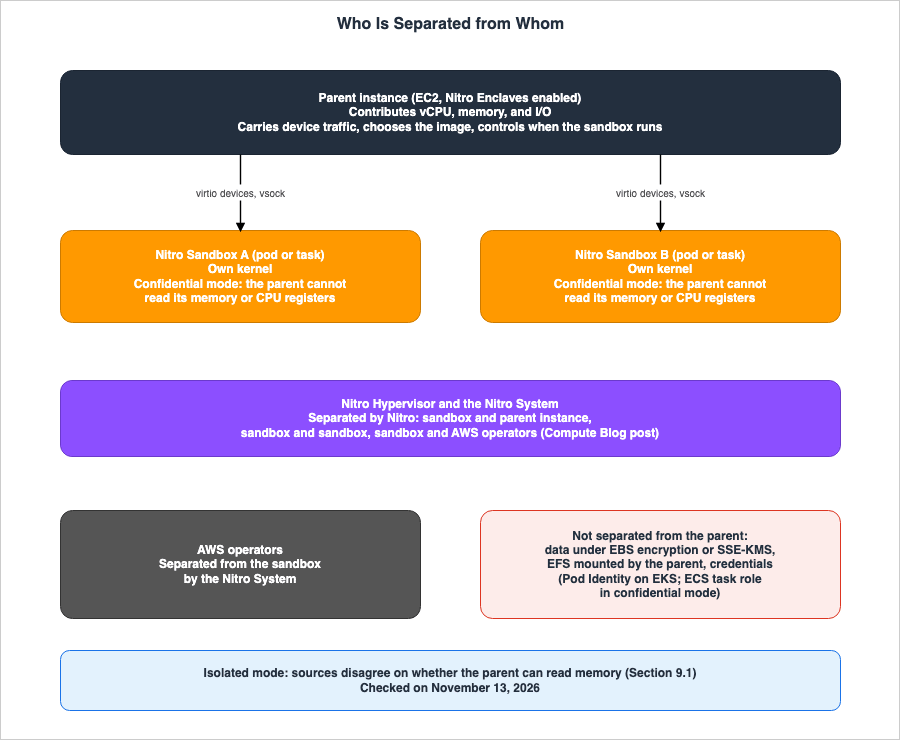
3.1 What the Parent Instance Provides, What the Nitro System Separates
The Compute Blog post describes the relationship between the parent instance and the sandbox as follows:The Nitro System enforces separation between the sandbox and its parent instance, between sandboxes, and between the sandbox and AWS operators. The parent instance contributes vCPU, memory, and I/O.These two sentences convey two points. First, there are three directions in which separation occurs: between the sandbox and the parent instance, between sandboxes themselves, and between the sandbox and AWS operators. Second, the parent instance provides the vCPU, memory, and I/O that the sandbox uses.
The EC2 Nitro Sandboxes page describes the same relationship as follows: Nitro Sandboxes run alongside the parent instance on the Nitro Hypervisor. The Nitro System separates Nitro Sandboxes from each other. Code within a Nitro Sandbox cannot access the memory of the parent instance. The only way for a Nitro Sandbox to interact with the parent instance is through virtual devices.
3.2 What the Parent Instance Keeps Control Of
The parent instance provides the resources that the sandbox relies on. Therefore, even with boundaries in place, the parent instance can still influence the sandbox from the resource side. The EC2 Nitro Sandboxes page states the following regarding EC2's Confidential mode.The parent instance still carries the device traffic, chooses the image, and controls when the Nitro Sandbox runs.The ECS security model page and the EKS security model page also express a similar concept. The parent instance controls the CPU, memory, network, and storage that the sandbox depends on. These two pages separately list what the parent instance cannot and can do.
The following are actions the parent instance cannot perform:
- Reading or writing to the sandbox's memory.
- Accessing the state of the CPU registers inside the sandbox.
- Forging attestation documents or measurements from the Nitro Security Module.
- Decrypting layers of encrypted images.
- Reading the writable layer of containers in confidential mode.
- Reading or modifying NFS communication between the sandbox and Amazon EFS mount targets.
The ECS security model page states that these protections are maintained even if the parent instance's operating system is compromised. Both pages mention memory access without specifying a particular mode. However, the treatment of memory in isolated mode differs from the statements in the EKS FAQ (Section 9.1).
The ECS considerations page states that the managed daemons that Amazon ECS runs on the parent instance do not have access to tasks inside the Nitro Sandbox. Chapter 7 lists what the parent instance can do.
3.3 Differences from Nitro Enclaves
Nitro Sandboxes are built upon the same Nitro System isolation technology as Nitro Enclaves. The EC2 Nitro Sandboxes page states that enabling Nitro Enclaves is required when launching the parent instance. The Compute Blog post highlights three key differences between Nitro Enclaves and Nitro Sandboxes.First, a sandbox's vCPUs can share cores with the parent instance through time slicing. Second, the parent can attach standard virtio network and block devices, not only a vsock channel, so the sandbox gets real networking and storage. Third, you can run the sandbox through a standard virtual machine monitor (VMM) such as Firecracker.These three differences are:
- CPU: Nitro Enclaves dedicate entire CPU cores to the enclave. Nitro Sandbox vCPUs can share cores with the parent instance through time slicing.
- Devices: Nitro Enclaves only have vsock as a connection path to the parent instance. Nitro Sandboxes allow the parent instance to connect to virtio network and block devices.
- VMM: Nitro Sandboxes can run on a VMM such as Firecracker.
The EC2 Nitro Sandboxes page describes two use cases as follows: Nitro Enclaves are suitable for small, tightly scoped workloads that handle highly sensitive data. Enclaves do not have persistent storage, interactive access, or external network connectivity. Nitro Sandboxes are generally suitable for sharing a single instance across independent workloads. The same page provides examples such as AI agents that run user code, workloads from separate tenants, and build jobs.
3.4 Two Modes at the EC2 Layer
The EC2 Nitro Sandboxes page describes how the Nitro Sandbox allows you to select the extent to which the parent instance can observe its activity. There are two modes available.You choose the mode at launch, and you can't change it later.- Confidential mode: This is the default mode. The Nitro System prevents the parent instance, and its administrator, from accessing the Nitro Sandbox's memory. They cannot read or modify this memory. Each device communicates using dedicated buffers. The Nitro Security Module inside the Nitro Sandbox provides attestation.
- Direct mode: The parent instance can share and read/write to the Nitro Sandbox's memory. There is no Nitro Security Module and no attestation. The EC2 Nitro Sandboxes page states that the trust model is equivalent to that of a nested VM.
The EC2 Nitro Sandboxes page indicates that Direct mode is used when a single, trusted entity manages both the sandbox and the parent instance. The Compute Blog post provides examples of using Direct mode to run operating systems such as Windows or Android.
EC2's Direct mode is distinct from the isolated mode of EKS and ECS. Both the EKS sandboxing page and the ECS security model page state, regardless of the mode, that the parent instance cannot access the sandbox's memory (see Section 3.2). This article does not treat Direct mode as the same thing as isolated mode. No statement was found on which EC2-layer mode each of the two EKS and ECS modes runs in (see Section 9.2).
4. What Isolated Mode Separates, and What It Does Not Restrict
This chapter explains what isolated mode in EKS and ECS separates, and what it does not restrict.4.1 What Isolated Mode Separates
The ECS overview page describes the purpose of isolated mode as separating tasks running on shared instances. Each task runs within its own Nitro Sandbox. If a task is compromised, it cannot access the memory or storage of other tasks, nor can it escape to the parent instance. TheTrustedExecutionConfiguration API Reference also states that for tasks running in ISOLATED_SANDBOX, a task cannot access the memory or storage of other tasks.The EKS sandboxing page describes isolated pods as follows: the parent instance is trusted, while the guest is not. The goal is to protect the node and other pods from compromised workloads.
What is not trusted in isolated mode is the code inside the sandbox. The ECS security model page states that this feature was created to run untrusted container images. The binaries, libraries, and scripts running inside the container can originate from untrusted sources. The sandbox isolates and contains them.
4.2 What Isolated Mode Does Not Restrict
Isolated mode does not restrict which containers can run inside the sandbox. The ECS security model page states:For isolated tasks, the auto-generated attestation policy does not restrict which containers can run inside the Nitro Sandbox. Any valid container spec is accepted.The EKS sandboxing page describes isolated mode as follows:
The policy does not pin container admission fields, so any valid container spec is accepted.The ECS confidential policy page expresses the same fact differently. Within
ISOLATED_SANDBOX, the attestationPolicy is not used. The conditions for launching containers are not fixed, and any valid container definition in the task definition will be accepted. The EKS confidential mode page states that if no Cedar policy is attached in isolated mode, the sandbox applies a built-in default policy that allows all containers and operations.The ECS security model page further explains the implications: an actor who can run an
ISOLATED_SANDBOX task can run any container image with any capabilities inside the sandbox. The Nitro Hypervisor prevents containers from escaping to the parent instance. However, there are no restrictions on what can run inside the sandbox.4.3 Task Definitions and Pod Specs Are Trusted Inputs
Both isolated mode and confidential mode treat task definitions and pod specs as trusted inputs. The ECS security model page states:It is not designed to run untrusted task definitions.The ECS security model page continues:
Isolated and confidential tasks do not defend against an adversary who can register or run an arbitrary task definition in your cluster.Trusted inputs include references to container images, commands and entry points, environment variables, volumes and mounts, Linux security settings, and resource requests. The ECS security model page also says to treat task definition registration and the
RunTask and CreateService operations as privileged operations, and to restrict who can perform them with IAM.The EKS security model page follows a similar structure. Pod specs and the Cedar policies generated from them are considered trusted inputs. The EKS security model page says to restrict, with Kubernetes RBAC and admission control, who can create or modify pods that use the
isolated-sandbox and confidential-sandbox runtime classes.As an inference by this article, what isolated mode limits is how far a running container reaches outside. Whoever can write task definitions and pod specs decides which containers run.
4.4 What the Parent Instance Can See in Isolated Mode
In isolated mode, the parent instance is trusted, allowing it to observe the contents of the sandbox. The ECS overview page states:The parent instance is trusted and retains observability and control over the task, such as task exec and log streaming.The EKS sandboxing page describes the following regarding pods in isolated mode:
- The parent instance can use
exec,stdin, logs, stats, and the process list. - The overlay file system is not encrypted, for faster pod startup.
- The service account token is not replicated into the sandbox.
- IMDS, NTP, and Pod Identity credentials are allowed.
The ECS security model page also states that, regarding tasks in isolated mode, the overlay is not encrypted, and the parent instance can read and write to the ephemeral layer.
5. Confidential Mode and Attestation
This chapter shows who measures what in confidential mode, and which values AWS KMS checks before it releases a key. Figure 2 illustrates this process.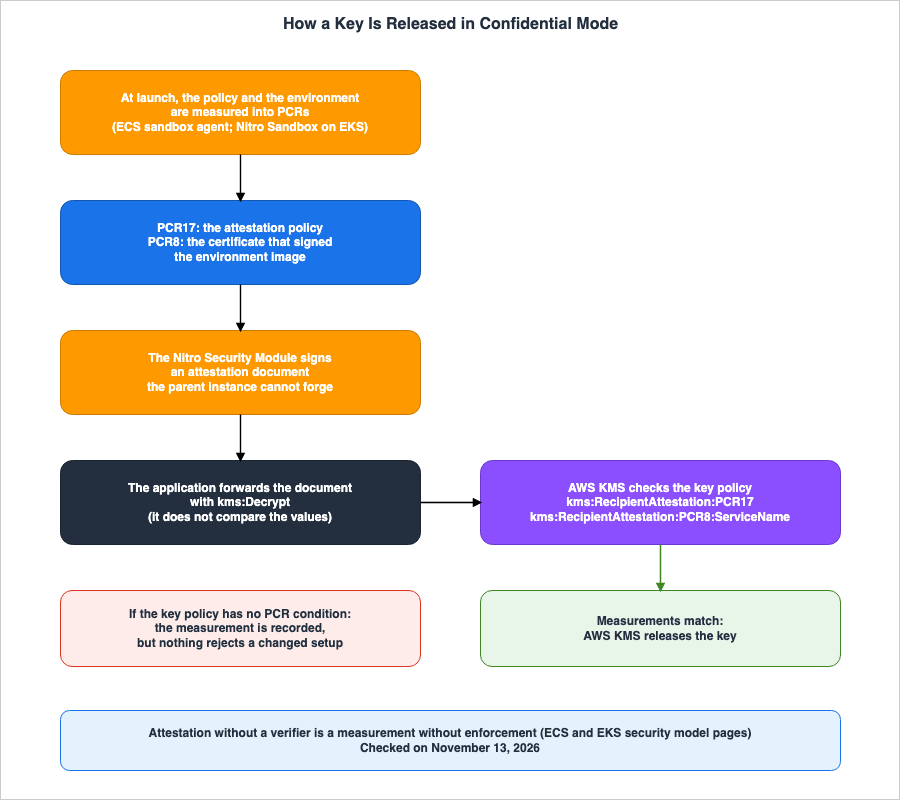
5.1 Who Measures What
The ECS getting started page describes attestation for confidential tasks as follows: Each task can generate an attestation document using the Nitro Security Module. When the environment is launched, the ECS sandbox agent inside the sandbox measures the environment and stores the values in PCRs. Applications retrieve the attestation document when decrypting data and submit it to AWS KMS along with the decryption request. The Nitro System signs the attestation document, and AWS KMS compares the measurements inside the document with the PCR values specified in the key policy.Your application does not perform the comparison; it only forwards the attestation document. KMS releases the key material only when the measurements match.The ECS confidential policy page and the EKS IAM page list the two PCRs that ECS and EKS check.
- PCR17: Measures the attestation policy. In ECS, this is the same document specified in the task definition's
attestationPolicy. In EKS, it's the hash of the Cedar policy. - PCR8: Measures the certificate used to sign the image of the environment in which the task is running. The ECS confidential policy page states that the environment image includes the kernel, kernel parameters, and the root file system. Amazon ECS provides and signs this image.
When using Firecracker on EC2 to run your own Nitro Sandbox, the entity performing the measurement and the PCRs being measured differ. The EC2 attestation page states that the Nitro System measures PCRs 0 through 6. PCR0 contains the image and its launch settings, PCR3 contains the ARN of the IAM role in the parent instance's instance profile, and PCR4 contains the instance ID of the parent instance. The Nitro System does not set PCRs 16 through 31; the workload can extend and lock them. The EC2 attestation page also states that the Nitro System does not measure the contents of block devices.
5.2 KMS Condition Keys
The KMS condition keys page lists the condition keys used for the attestation of Nitro Enclaves and Nitro Sandboxes. For use with ECS and EKS in confidential mode, the following two keys are used:kms:RecipientAttestation:PCR17: Compares the measured value of the attestation policy.kms:RecipientAttestation:PCR8:ServiceName: Compares with the name of the service that signed the environment image. The values areecs.amazonaws.comandeks.amazonaws.com.
The KMS condition keys page specifies that AWS KMS maintains a mapping between PCR8 values and the names of AWS services, and populates this condition key with the service name. The ECS confidential policy page says to use
kms:RecipientAttestation:PCR8:ServiceName rather than the raw PCR8 value. This is because Amazon ECS rotates the signing certificate on a regular cadence, and the raw PCR8 value changes each time.The EKS IAM page states that using only PCR17 as a condition for releasing the key is insufficient.
Gating on PCR17 alone is not sufficientThe
ecs-nitro-sandbox-genpolicy tool that the ECS confidential policy page describes generates an attestation policy from the task definition, providing a predicted value for PCR17. Similarly, the eks-nitro-sandbox-genpolicy for EKS generates a Cedar policy from the pod manifest, providing a predicted value for PCR17. Both are used to define key policies before the sandbox is launched.When you run sandboxes yourself on EC2, the key policy checks the PCRs of the image. The EC2 Nitro Sandboxes page says to always check the measurement of the image in the key policy. The EC2 attestation page notes that in debug mode, PCR0, PCR1, PCR2, PCR5, and PCR6 read as zero, while PCR3 and PCR4 retain the values from the parent instance.
A key policy that checks only PCR3 or PCR4 therefore also releases secrets to a Nitro Sandbox in debug mode.5.3 Measurement Alone Stops Nothing
Measurement only records what is running. The ECS getting started page states:Attestation measurement alone is passive: it records what is running, but does not by itself prevent a modified configuration from being accepted.The ECS security model page describes what happens without an external verifier. Even if the cluster operator changes the configuration, the sandbox will still launch. The attestation changes, but nothing rejects the task. Only when an external service checks the attestation document before releasing secrets is the trust loop closed. AWS KMS fulfills this role. The ECS security model page and the EKS security model page conclude with the same sentence.
Attestation without a verifier is a measurement without enforcement.As an inference by this article, the core of what confidential mode guarantees lies in the conditions of the AWS KMS key policy. Even if
runtimeClassName or isolationMode selects confidential mode, without PCR conditions in the key policy, the mechanism that protects secrets from the parent instance is not closed.5.4 What the Attestation Policy Pins
The attestation policy in confidential mode pins the conditions under which a container can start. The ECS confidential policy page lists the following items thatecs-nitro-sandbox-genpolicy pins:- Image digest
- Entrypoint and command
- Environment variables
- Working directory
- User and group
- Linux capabilities
- Mounts
- Security settings, such as read-only root file systems.
The ECS confidential policy page states that the generation tool pins the entire predicted OCI runtime specification. Consequently, the parent instance cannot modify the container's specification without changing the attestation measurement.
The EKS confidential mode page indicates that the built-in confidential profile denies
exec and stdin and allows logs. The EKS security model page states that if the policy permits logs, exec, or stdin, the parent instance receives that data, and says to deny them for workloads that handle confidential data. The ECS confidential policy page specifies that the policy of a confidential task, by default, does not allow any exec other than an exec health check declared in the task definition.5.5 When the Policy Must Be Regenerated
Because the attestation policy pins values of the task definition and the pod spec, it goes stale when a pinned value changes. The ECS confidential policy page provides examples such as adding a sidecar or updating container images. Until the policy is regenerated, set as theattestationPolicy, and the PCR17 condition for the KMS key is refreshed, the ECS sandbox agent will reject container startup, and tasks will fail to launch.During deployments, older and newer tasks may run concurrently. The ECS confidential policy page says to list the two PCR17 values within a single
StringEqualsIgnoreCase condition. It advises against using ForAnyValue and ForAllValues. Since kms:RecipientAttestation:PCR17 represents a single value in the request, using set operators could result in a policy that is overly permissive.The EKS confidential mode page says to generate the policy after admission or mutating webhooks have changed the pod spec. A spec changed after the policy was generated no longer matches it, and the pod is denied.
5.6 Encrypted Container Images
The layers of a container image are visible to the parent instance unless they are encrypted. The ECS encrypted images page states that it is possible to encrypt these layers according to the OCI image encryption specifications. The parent instance retrieves the encrypted layers from the registry and passes them to the sandbox without unpacking them. The sandbox then unwraps the layer encryption key through AWS KMS and decrypts each layer before unpacking it.The parent instance never sees plaintext layer data.Encrypted images can only be used in confidential mode. The ECS encrypted images page specifies that encrypted images require
CONFIDENTIAL_SANDBOX. In ISOLATED_SANDBOX, the parent instance unpacks the layers itself and cannot decrypt them, so a task that references an encrypted image fails to start. Both the ECS encrypted images page and the EKS considerations page state that images containing a mix of encrypted and unencrypted layers are not supported.6. Prerequisites for Launching Sandboxes on EKS, ECS, and EC2
This chapter outlines the prerequisites of the three entry points. Table 2 provides a summary of these requirements. The date of review is November 13, 2026.| Item | Amazon EKS | Amazon ECS | Amazon EC2 |
|---|---|---|---|
| Selection Method | runtimeClassName in the pod spec | isolationMode in the trustedExecutionConfiguration of the task definition | Firecracker configuration; the mode is chosen for each sandbox |
| Mode Values | isolated-sandbox, confidential-sandbox | SHARED, ISOLATED_SANDBOX, CONFIDENTIAL_SANDBOX | Confidential mode (default), Direct mode |
| Version Prerequisites | Kubernetes 1.36 or later | Only with ECS Managed Instances. Not supported with EC2 or Fargate launch types. | AL2023 with kernel6.18 version 6.18.51-120.162.amzn2023 or later, Firecracker 1.18 or later |
| Node Preparation | Auto Mode requires no additional configuration. For your own node groups, use an AMI with the Nitro Sandbox runtime and set EnclaveOptions.Enabled=true in the launch template. | Set nitroEnclavesEnabled to true in the InstanceLaunchTemplate of the capacity provider. | Use run-instances with --enclave-options Enabled=true and reserve a memory pool. |
| Networking | VPC IP address per pod. Pods with hostNetwork: true will not launch. | awsvpc only. host is not supported. Service Connect is not supported. | Determined by the VMM network backend. |
| Attestation policy in confidential mode | Put the Cedar policy in a pod annotation. | attestationPolicy is required. | Check the PCRs of your own image in the key policy. |
Additional notes for Table 2 are as follows.
- EKS Auto Mode: The EKS isolated mode page states that Auto Mode supports Nitro Sandbox with no additional setup, and that you do not build or manage an AMI. The EKS Auto Mode release notes indicate that Auto Mode provisions nodes with Nitro Enclaves enabled on supported instance types and runs the pods in Nitro Sandboxes.
- ECS Capacity Provider: The ECS considerations page notes that
nitroEnclavesEnableddefaults tofalse, and that if it is set totrue, the capacity provider must include at least one instance type that supports Nitro Sandbox. Furthermore,nitroEnclavesEnabledcannot be enabled together with theuseLocalStoragelocal storage setting. - ECS Verification: After launching a task, you can verify its
isolationModeandattestationPolicyStatusby examining the task's read-onlytrustedExecutionSummary.
Regarding your own node groups in EKS, the EKS isolated mode page clarifies that simply selecting an instance type that supports Nitro Enclaves is not sufficient.
Choosing an instance type that supports Nitro Enclaves is not sufficient on its own; without Nitro Enclaves enabled, the node never advertises sandbox capacity.Concerning the VMM when running on EC2, the EC2 Nitro Sandboxes page states:
Currently, Firecracker is the only VMM that supports Nitro SandboxesThe EC2 Firecracker page outlines the responsibilities when your orchestrator manages the parent instance. These responsibilities include creating guest images, operating device backends, treating data from the sandbox as untrusted input, restricting network resources and access to IMDS for each sandbox, and relaying attestation traffic between the sandbox and the external verifier.
The EKS sandboxing page names the authoritative selector: the system derives the mode from
runtimeClassName and ignores any mode annotation in the pod spec.The EKS isolated mode page says that when you create pods with controllers such as Deployments, you put both the
runtimeClassName and the sandbox.amazonaws.com/ annotation in the pod template. Annotations added to the controller's metadata.annotations are accepted, but have no effect.7. What the Sandbox Does Not Protect
This chapter lists what the parent instance can still do even with the Nitro Sandbox boundary in place, and the features that cannot be used.7.1 What the Parent Instance Can Do
The ECS security model page and the EKS security model page list the actions that a malicious or compromised parent instance can perform. Table 3 summarizes the information described on these two pages, as well as the EC2 Nitro Sandboxes page. The date of review is November 13, 2026.| What the parent instance can do | Isolated mode | Confidential mode | Source |
|---|---|---|---|
| Stop the sandbox, limit CPU and memory, drop packets, corrupt storage. | Possible | Possible | ECS and EKS security model pages |
| Spoof Region, Availability Zone, and Availability Zone ID values. | Possible | Possible | ECS and EKS security model pages |
Intercept, delay, drop, or modify unencrypted communication and DNS traffic. Write to /etc/hosts. | Possible | Possible | ECS and EKS security model pages |
| Mount the same Amazon EFS file system with its own IAM credentials and read or write it. | Possible | Possible | ECS and EKS security model pages |
| Advance or rewind the system time. | Possible | Possible | ECS and EKS security model pages |
| Write arbitrary content to paths where the policy permits write access. | Possible | Possible | ECS and EKS security model pages |
| In ECS, inject arbitrary task role credentials and redirect AWS API calls to a different account. | No statement found | Possible | ECS security model page |
| In EKS, mint Pod Identity credentials for any pod on that node. | Possible | Possible | EKS security model page |
In EKS, receive log, exec, and stdin data when the policy permits. | Possible | When the policy permits | EKS security model page |
| In EKS, a root process on the parent instance connects to vsock ports bound inside the guest. | Possible | Possible | EKS security model page |
| Read the container's writable layer and ephemeral volumes. | Possible | Not possible | ECS and EKS security model pages |
| Read the sandbox's memory and CPU registers. | Not possible (Sources disagree, Section 9.1) | Not possible | ECS and EKS security model pages |
Table 3 provides the following additional information.
- For rows where the sources do not limit the statement to one mode, both the isolated mode and confidential mode columns show the same value.
- Regarding the rows describing ECS task role credentials: the ECS security model page describes this information in the section that lists ways a confidential workload defeats its own confidentiality. No statement about isolated mode was found.
- Regarding the rows describing EKS Pod Identity: the EKS security model page describes this information without differentiating by mode, and says to treat the permissions of the pod identity role as available to the parent instance.
The EKS security model page describes Pod Identity credentials as follows:
The parent instance can mint Pod Identity credentials for any pod scheduled on the node.The ECS security model page describes task role credentials in the confidential mode section as follows:
the parent instance can inject arbitrary IAM task role credentials and redirect AWS API calls to an attacker-controlled AWS account.As an inference by this article, what confidential mode protects is the data inside the sandbox and the secrets that attestation releases. AWS credentials given to the sandbox cannot be treated as protected from the parent instance, even in confidential mode.
7.2 Storage
Encryption of storage does not protect data from the parent instance. The EC2 Nitro Sandboxes page states that the parent instance can read all block devices presented to the sandbox. This includes encrypted Amazon EBS volumes.Amazon EBS encryption and server-side encryption with AWS KMS keys (SSE-KMS) do not protect data from the parent instance.The EC2 Nitro Sandboxes page says that to keep data confidential, you encrypt it inside the sandbox with a key that AWS KMS releases only to an attested sandbox.
The storage available at each entry point is as follows:
- Amazon EFS: The ECS overview page states that data stored on EFS is not protected from the parent instance. The parent instance can mount the same file system using its own IAM identity. Because the sandbox performs the NFS mount and terminates TLS, the parent instance is not on the data path. The EKS security model page notes that EFS mounts use the IAM identity of the EFS CSI Node DaemonSet, and that all pods on a node share a single IAM principal.
- Amazon EBS: The EKS security model page states that EBS volumes mounted using the EBS CSI driver connect as raw virtio-blk devices, allowing the parent instance to directly read their contents. The EKS considerations page notes that a single EBS volume cannot be shared among multiple pods. The ECS considerations page states that attaching an EBS volume to an individual task is not supported.
- ECS ephemeral storage: The ECS considerations page states that each task has 20 GiB of ephemeral storage, which is encrypted at rest using EBS encryption. In confidential mode, the writable layer is placed in an encrypted overlay inside the sandbox.
- EKS Secrets: The EKS security model page states that secrets passed through the Secrets Store CSI Driver are visible to the parent instance.
7.3 Metadata and Credentials
The way IMDS is handled differs by entry point.When running on EC2, the EC2 Nitro Sandboxes page states that a Nitro Sandbox does not have its own IMDS. However, if the parent instance routes traffic from the sandbox (for example, with NAT), the sandbox can access the parent instance's IMDS and read the credentials of the parent instance's IAM role. The same page further states:
IMDSv2 and the hop limit of 2 that Amazon Linux 2023 AMIs use do not prevent this.To prevent this, the EC2 Nitro Sandboxes page says to reject traffic from the sandbox to
169.254.169.254 on the parent instance. Metadata Endpoints Across AWS Compute on this site covers the IMDS of EC2.ECS and EKS provide alternative endpoints inside the sandbox.
- ECS: The ECS overview page states that the sandbox provides an alternative endpoint that only supports IMDSv2. This endpoint returns placement metadata (Region, Availability Zone, and Availability Zone ID), as well as the service domain and partition. Other paths return a 404 error, and requests for IMDSv1 are rejected. Credentials for the task role are received through the same endpoints used by standard ECS tasks.
- EKS: The EKS considerations page states that only five paths are accessible:
placement/region,placement/availability-zone,placement/availability-zone-id,services/domain, andservices/partition. Other paths return a 404 error. AWS credentials are received through EKS Pod Identity.
The placement metadata for ECS and EKS can be spoofed (see Section 7.1). The ECS security model page and the EKS security model page advise against making security decisions based on this placement metadata.
The EKS sandboxing page states that adding the annotation
sandbox.amazonaws.com/network-isolated with a value of "true" to a pod will cause the sandbox to launch without network devices. In this state, there are no DNS, NTP, IMDS, or Pod Identity credentials available. The same page notes that the vsock channel remains, so this is not absolute isolation.7.4 CPU, Memory, and Instance Types
The EC2 Nitro Sandboxes page outlines the following limitations:- vCPU: Each vCPU either has a dedicated hardware thread from the parent instance, or shares vCPUs from the parent instance through CPU overcommit. For each sandbox, you select an option at launch. When using overcommit, the total vCPU usage across all sandboxes cannot exceed 5 times the number of vCPUs on the parent instance.
- Quantity: Up to 5 sandboxes can run per vCPU of the parent instance, and at most 896 sandboxes can run on a single parent instance.
- SMT instance types: On instance types with 2 threads per core, a core runs only one sandbox, or only the parent instance, at a time. The amount of compute available to a sandbox is bounded by the number of physical cores, which is approximately half the number of vCPUs. Graviton instance types have 1 thread per core.
- Immutability: Once running, the vCPU and memory allocated to a sandbox cannot be changed. Snapshot and restore, pausing and resuming, and live migration are not supported.
- GPU: GPU passthrough is currently not supported.
- Types: Flex instance types are not supported. The supported instance types are listed in tables for each instance family: general purpose, compute optimized, memory optimized, storage optimized, and accelerated computing. For many families, the smallest size and the metal sizes are excluded from the tables. On accelerated computing instance types, a sandbox runs CPU workloads only.
The following limitations apply to ECS and EKS, as described in their respective documentation:
- The ECS considerations page states that isolation is not supported for burstable instances. This includes the T family and flex instance types. Only
SHAREDtasks can utilize GPUs. - The ECS getting started page indicates that tasks with no CPU value set share the host's cores. The capacity provider sets the sharing factor, up to 5 times for each vCPU.
- The EKS considerations page notes that the following are not supported: user namespaces,
hostNetwork: true, expanding running EBS volumes, in-place changes to CPU and memory, and GPU and device passthrough. The maximum number of concurrent outbound connections per pod is, by default, 4096 per IP family. The default rate for DNS queries is 100 per second, with a maximum of 512 per second. Both of these values can be modified using annotations.
7.5 EKS Auto Mode Exclusions
The EKS considerations page describes cases in which Auto Mode does not provision a Nitro Sandbox node. In such cases, sandbox pods remain in aPending state.This occurs when:
- The NodeClass uses FIPS AMIs.
- The matching AMI for the instance type is a GPU or Neuron variant.
- The instance type is either a multi-NUMA instance type or a type for which measurements and validation have not yet been completed.
The EKS considerations page also includes a temporary exclusion, which remained in place as of November 13, 2026.
At launch, the `r5a`, `r5ad`, and `m5ad` instance types are not available for Nitro Sandboxes on EKS Auto Mode, pending a Nitro fix.7.6 What the Workload Itself Leaks
Confidential mode protects the data of the workload from the parent instance. However, it does not protect against data leaks originating from the workload itself. The ECS security model page and the EKS security model page provide examples of how workloads within a sandbox can compromise their own confidentiality.- Exposing secrets to standard output or standard error, which can be leaked if the parent instance can read the logs.
- Writing secrets in plaintext to Amazon EFS.
- Sending secrets to a destination provided by an attacker. While TLS obscures communication from the parent instance, the destination receives the secrets in plaintext.
- Loading and executing untrusted code during runtime.
The ECS security model page states that when handling sensitive data, users are responsible for auditing container images, application code, and any extensions loaded during execution.
7.7 Shared Responsibility
Both the ECS security model page and the EKS sandboxing page describe the responsibility sharing model in the same way. AWS is responsible for the Nitro Hypervisor, the Nitro Sandbox boundary, and the guest system image. Users are responsible for the container images, task definitions and pod specs, attestation policies and Cedar policies, AWS KMS key policies, and the application code.8. How This Relates to Nitro Enclaves, RuntimeClass Levels, and Agent Sandboxes
This chapter connects the content of this article with that of other articles on this site.8.1 Nitro Enclaves Attestation
The EC2 attestation page states that the attestation process for Nitro Sandboxes functions in the same way as the attestation process for Nitro Enclaves. The format of the attestation documents, the general principles of PCR values, and the mechanism for releasing keys with KMS condition keys are the subject of AWS Nitro Enclaves and Confidential Computing on AWS on this site. The EC2 attestation page highlights the following differences between Nitro Enclaves and Nitro Sandboxes: PCR0 also includes flags for the launch settings, so it differs from the PCR0 thatnitro-cli reports for the same files. PCR3 and PCR4 retain their values even in debug mode. PCR5 and PCR6 are new in Nitro Sandboxes.8.2 RuntimeClass Levels
Workload Isolation Levels on Amazon EKS on this site lists four levels of isolation within EKS. That article defines level 4 as follows:The fourth level replaces the container runtime the Pod uses. This is where the sharing of the kernel stops.As an inference by this article, pods using the
isolated-sandbox and confidential-sandbox runtime classes meet this definition. Both utilize a RuntimeClass that selects a different runtime, and according to the EKS sandboxing page, these pods run within a Nitro Sandbox that provides them with their own Linux kernel. That article covers how the levels overlap and why an upper level does not replace a lower one.8.3 Agent Sandboxes
Agent Sandboxing and Blast-Radius Isolation on AWS on this site addresses agent containment across five boundaries: execution environment, credentials, network, data, and time. Nitro Sandbox is one option for managing the execution environment boundary. As shown in the table in Section 7.1, Nitro Sandbox does not protect AWS credentials passed to the sandbox from the parent instance. Design the credential boundary separately.The EC2 Nitro Sandboxes page lists four options, depending on how much of the machinery you run yourself:
- When you want to handle nothing: AWS Lambda MicroVMs.
- When you want to run your own instance but delegate boundary management between workloads to AWS: Nitro Sandboxes.
- A small, tightly scoped job on highly sensitive data: Nitro Enclaves.
- When you want to run your own hypervisor and operating system: nested virtualization.
The Compute Blog post provides an example in which AI agents that write and run their own code use a separate sandbox for each session. The same post says that code a prompt injection gets the agent to run stays inside one VM, and that the VM is deleted when the session ends. As an inference by this article, the credential rows of the table in Section 7.1 apply to this example as well.
9. Where the Sources Disagree, and Where No Statement Was Found
This chapter summarizes where the sources disagree and where this article found no statement.9.1 Where the Sources Disagree
This article found four points where the sources disagree. This article does not decide that either source is wrong.First, there are differences in how the instance types are described. The What's New post states "most Nitro-based EC2 instances," while the Compute Blog post states:
Every EC2 instance type that supports Nitro Enclaves, across general purpose, compute optimized, memory optimized, storage optimized, and accelerated familiesThe EKS blog post states "all Nitro-enabled instance families." The table on the EC2 Nitro Sandboxes page excludes flex instances and, for many families, the smallest size and the metal sizes. The EKS isolated mode page states that Nitro Sandboxes operate on a subset of instance types that support Nitro Enclaves. This article treats the table on the EC2 Nitro Sandboxes page as authoritative. The term "most" in the What's New post does not contradict the table.
Second, there are discrepancies in how isolated mode handles memory. The EKS FAQ describes two modes as follows:
isolated mode provides the hardware VM boundary, and confidential mode (optionally enabled) adds encrypted memory and cryptographic attestationThe "Key features" section of the EKS sandboxing page states that, regardless of the mode, the parent instance cannot observe the CPU and memory state of the sandbox. The ECS security model page also states that, regardless of the mode, the parent instance cannot read or write to the guest's memory. The Compute Blog post states that, regardless of the mode, cluster administrators, platform teams, and AWS cannot read the memory of EKS pods or ECS tasks. The wording in the EKS FAQ could also be interpreted as stating that memory is not encrypted in isolated mode. This article treats whether the parent instance can read the sandbox's memory in isolated mode as a point where the sources disagree (Sources disagree).
The third is the operator that compares
kms:RecipientAttestation:PCR8:ServiceName. The examples on the ECS confidential policy page and the EKS IAM page use StringEqualsIgnoreCase. The example on the KMS condition keys page uses StringEquals and states:Use the `StringEquals` policy operator for an exact match on the service name.The fourth is whether Amazon EFS volumes can be attached to tasks in ECS confidential mode. The ECS considerations page states, regardless of the mode, that Amazon EFS storage can be attached. The ECS overview page also describes EFS volumes for tasks running in Nitro Sandboxes, regardless of the mode. The ECS console help panel states:
Confidential sandbox also rules out Amazon Elastic File System volumes, trace collection, and metric collection.This article did not attach EFS to a confidential mode task to check this. The EFS rows in Section 7.2 and Table 3 describe what the parent instance can do.
This article does not count the following three points as places where the sources disagree.
- VMM: The What's New post mentions that Amazon Linux and Firecracker are supported, and that patches are available for other options. The EC2 Nitro Sandboxes page states that currently, only Firecracker is a VMM compatible with Nitro Sandboxes. The Compute Blog post says that AWS has started to upstream support into Linux and other VMMs. Having patches available and being supported are two different things.
- CPU: The EC2 Nitro Sandboxes page states that you can choose between a dedicated hardware thread and CPU overcommit. The EKS sandboxing page explains that sandboxes do not have dedicated physical cores, and vCPUs are time-shared. The ECS getting started page states that a task with an explicit CPU value gets native Amazon EC2 CPU performance. This article reads them as differences between entry points.
- The attestation policy in isolated mode: The ECS security model page states that the auto-generated attestation policy does not restrict containers. The ECS confidential policy page states that isolated mode does not use an
attestationPolicy. Both describe the same fact: in isolated mode, container admission is not pinned.
9.2 What the Documentation Does Not List, and Where No Statement Was Found
For the following four items, this article found no statement in the sources it read, or found that the documentation does not list them. None of these shows that the matter is absent or impossible.- How the EKS and ECS modes map to the EC2-layer modes: No statement was found on whether isolated mode and confidential mode each run in EC2's Confidential mode or Direct mode (No statement found).
- AgentCore Runtime's microVM and Nitro Sandbox: The AgentCore FAQ states that each session runs on a Firecracker microVM, which is hardware-isolated. However, no statement was found saying that these microVMs run as Nitro Sandboxes (No statement found).
- Regions outside the commercial Regions: The documentation refers to all commercial Regions. No statement was found regarding support for AWS GovCloud (US) or Regions in China (No statement found). This article does not state whether these Regions are supported or unsupported.
- List of ECS supported instance types: The ECS considerations page states that isolation is available on most Nitro-based instance types that ECS Managed Instances qualifies, from the 5th-generation families and later, and refers to the Nitro Enclaves documentation for the list. The ECS documentation does not list the instance types for Nitro Sandboxes (Documentation does not list).
10. Failure Modes
This chapter lists failures that occur when the boundary of a Nitro Sandbox is misread, in the order of symptom, cause, and source.- Symptom: In isolated mode tasks, containers with images or capabilities you did not mean to allow are running. Cause: Isolated mode does not restrict which containers can run. Reference: ECS security model page (Section 4.2).
- Symptom: Anyone who can register task definitions runs any container they choose inside a sandbox. Cause: Task definitions are trusted inputs, and the feature does not defend against those who write them. Reference: ECS security model page (Section 4.3).
- Symptom: Despite being configured in confidential mode, a task with a modified configuration starts and reads secrets. Cause: The KMS key policy lacks PCR conditions, and the measurements are not checked. Reference: ECS security model page, ECS getting started page (Section 5.3).
- Symptom: Keys configured with attestation requirements begin refusing decryption. Cause: The key policy relies on the raw value of PCR8, and Amazon ECS has rotated the signing certificate. Reference: ECS confidential policy page (Section 5.2).
- Symptom: On EC2, where you run sandboxes yourself, keys are also released to a sandbox in debug mode. Cause: The key policy checks only PCR3 or PCR4. Reference: EC2 attestation page (Section 5.2).
- Symptom: During the deployment of a new task definition, either the old or new task fails to decrypt. Cause: The key policy only allows one of the old or new PCR17 values. Reference: ECS confidential policy page (Section 5.5).
- Symptom: After adding a sidecar, confidential mode tasks or pods fail to start. Cause: The attestation policy has not been regenerated. In EKS, the policy was generated before a webhook changed the spec. Reference: ECS confidential policy page, EKS confidential mode page (Section 5.5).
- Symptom: Isolated mode tasks fail to start when using encrypted images. Cause: Encrypted images can only be used in confidential mode. Reference: ECS encrypted images page (Section 5.6).
- Symptom: Data on EBS volumes using encryption is being read by the parent instance. Cause: EBS encryption and SSE-KMS do not protect data from the parent instance. Reference: EC2 Nitro Sandboxes page (Section 7.2).
- Symptom: Plaintext data written by confidential mode workloads to EFS is being read by the parent instance. Cause: The parent instance can mount the same EFS file system using its own IAM identity. Reference: ECS overview page, ECS security model page (Section 7.2).
- Symptom: A self-managed sandbox on EC2 reads credentials from the parent instance's role. Cause: The parent instance routes traffic from the sandbox through NAT and is not blocking access to
169.254.169.254. Reference: EC2 Nitro Sandboxes page (Section 7.3). - Symptom: Confidential mode secrets are being leaked through logs. Cause: The policy allowed logs. On EKS, the built-in confidential profile allows logs. Reference: EKS confidential mode page, EKS security model page (Sections 5.4, 7.6).
- Symptom: Sandboxed pods are not being scheduled on your own node groups. Cause: The launch template does not have
EnclaveOptions.Enabled=true. Reference: EKS isolated mode page (Chapter 6). - Symptom: In Auto Mode, sandboxed pods remain in a
Pendingstate. Cause: FIPS AMI, GPU or Neuron AMI, multi-NUMA instance types, or temporarily excluded types. Reference: EKS considerations page (Section 7.5).
11. Frequently Asked Questions About Nitro Sandbox Isolation
Q1. If you choose isolated mode, does it also restrict which containers run?
No. The ECS security model page states that the auto-generated attestation policy in isolated mode does not restrict which containers run. Similarly, the EKS sandboxing page states that the isolated mode policy does not pin container admission fields. Whoever can write task definitions and pod specs decides which containers run. Restrict them with IAM and Kubernetes RBAC (see Sections 4.2 and 4.3).Q2. If you choose confidential mode, can the parent instance do nothing?
No, there are still actions it can take. While the parent instance cannot read the sandbox's memory or CPU registers, it can still stop the sandbox and falsify the time, DNS, and placement metadata. It can also mount the same EFS file system using its own IAM credentials. The ECS security model page states that even in confidential mode, the parent instance can inject arbitrary task role credentials. Similarly, the EKS security model page indicates that the parent instance can mint Pod Identity credentials for any pod on that node (see Section 7.1).Q3. Does using EBS encryption protect the contents of the volume from the parent instance?
No. The EC2 Nitro Sandboxes page states that EBS encryption and SSE-KMS do not protect the data from the parent instance. Encrypt data you keep confidential inside the sandbox with a key that AWS KMS releases only to an attested sandbox (see Section 7.2).Q4. If there is an attestation document, does a tampered environment fail to start?
It can still start. The ECS security model page states that even if the cluster operator modifies the configuration, the sandbox still starts. Measurements are only recorded; they take effect only when an external verifier checks them. If you match PCR17 andkms:RecipientAttestation:PCR8:ServiceName in the AWS KMS key policy, the key is not released to a modified environment (see Section 5.3).Q5. Can any instance type that supports Nitro Enclaves run a Nitro Sandbox?
Not all of them. The table on the EC2 Nitro Sandboxes page excludes flex types and, for many families, the smallest size and the metal sizes. The EKS isolated mode page states that Nitro Sandboxes run on a subset of the instance types that support Nitro Enclaves. Within your own EKS node groups, you must not only select an instance type but also ensure thatEnclaveOptions.Enabled=true is configured (see Chapter 6, Section 7.4).Q6. Are EC2's Confidential mode and the confidential mode of EKS and ECS the same?
This article treats them as separate axes. EC2's Confidential mode and Direct mode are modes that you choose for each Nitro Sandbox at the EC2 layer. The isolated mode and confidential mode of EKS and ECS are modes that you choose for each pod and task at the service layer. No statement mapping the two was found (see Sections 3.4 and 9.2).Q7. Can Nitro Sandboxes be used with EKS Auto Mode?
Yes, it can. The EKS Auto Mode release notes state that on November 9, 2026, Auto Mode was made compatible with Nitro Sandboxes. The EKS isolated mode page indicates that Auto Mode supports this feature without requiring any additional configuration. However, the EKS considerations page lists the cases in which Auto Mode does not provision a node, as well as a temporary exclusion of ther5a, r5ad, and m5ad instance types (Chapter 6, Section 7.5).Q8. Can IMDS be used in a Nitro Sandbox?
It depends on the entry point. In ECS and EKS, the sandbox returns only placement and service endpoint metadata, returning a 404 error for all other paths. When running on EC2, the sandbox does not have its own IMDS. However, if the parent instance routes the sandbox's traffic, the sandbox can reach the parent instance's IMDS (see Section 7.3).12. Summary
Read the boundary of a Nitro Sandbox through the following five points:- Separation: The Nitro System separates the sandbox from the parent instance, sandboxes from each other, and sandboxes from AWS operators. In confidential mode, the parent instance cannot read the sandbox's memory or CPU registers.
- What the parent instance keeps control of: The parent instance contributes vCPU, memory, and I/O, and can stop the sandbox. It can also spoof the time, DNS, and placement metadata. EBS encryption and SSE-KMS do not protect data from the parent instance. The parent instance can mount the same EFS file system using its own IAM credentials. In ECS confidential mode, it can inject task role credentials, and in EKS, it can mint Pod Identity credentials for pods on the node.
- Isolated mode: It does not restrict which containers can run. Task definitions and pod specs are trusted inputs; restrict who can write them with IAM and RBAC.
- Confidential mode: The attestation policy pins the container startup conditions, and AWS KMS releases a key only when PCR17 and
kms:RecipientAttestation:PCR8:ServiceNamematch. If the key policy does not check them, the measurement stops nothing. - State of the sources: The sources disagree on three points: the wording for supported instance types, memory in isolated mode, and the operator for the PCR8 condition. No statement was found on how the modes map to the EC2-layer modes. Tables 1 through 3 reflect the state as of November 13, 2026.
13. References
- Introducing AWS Nitro Sandboxes on Amazon EKS, ECS and EC2 for hardware isolated pods, tasks and VMs - AWS What's New
- Nitro Sandboxes: Hardware isolation for every EKS pod, ECS task, and EC2 workload - AWS Compute Blog
- AWS Nitro Sandboxes: Hardware-enforced workload isolation on Amazon EKS - AWS Containers Blog
- Isolate workloads with AWS Nitro Sandboxes - Amazon EC2 User Guide
- Run Nitro Sandboxes with Firecracker - Amazon EC2 User Guide
- Attest a Nitro Sandbox - Amazon EC2 User Guide
- Isolated and confidential tasks - Amazon ECS Developer Guide
- Overview - Amazon ECS Developer Guide
- Getting started - Amazon ECS Developer Guide
- Security model - Amazon ECS Developer Guide
- Confidential policy configuration - Amazon ECS Developer Guide
- Encrypted container images - Amazon ECS Developer Guide
- Considerations and limitations - Amazon ECS Developer Guide
- TrustedExecutionConfiguration - Amazon ECS API Reference
- Isolation mode - Amazon ECS console help panel
- Sandboxing on Amazon EKS with isolated and confidential pods - Amazon EKS User Guide
- Run a pod in isolated mode - Amazon EKS User Guide
- Run a pod in confidential mode - Amazon EKS User Guide
- Security model and parent instance trust assumptions - Amazon EKS User Guide
- IAM permissions for Nitro Sandboxes - Amazon EKS User Guide
- Considerations - Amazon EKS User Guide
- Review EKS Auto Mode release notes - Amazon EKS User Guide
- Amazon EKS FAQs
- Condition keys for Nitro Enclaves and Nitro Sandboxes - AWS Key Management Service Developer Guide
- Amazon Bedrock AgentCore FAQs
- AWS Nitro Enclaves and Confidential Computing on AWS - Attestation, PCR Measurements, and KMS Condition Keys
- Workload Isolation Levels on Amazon EKS - Which Level You Stopped At, and What That Level Does Not Stop
- Agent Sandboxing and Blast-Radius Isolation on AWS - Choosing the Unit of Each Containment Boundary and What Each One Does Not Stop
- Metadata Endpoints Across AWS Compute - What Code on EC2, ECS, EKS, and Lambda Can Ask the Platform, How Each Endpoint Checks the Caller, and Where Location and Credentials Come From
- Software Supply Chain Security on AWS - Signing, Attestation, and Admission Control
References:
Tech Blog with curated related content
Written by Hidekazu Konishi