What a Snapshot Carries on AgentCore Runtime V2 - Startup Work, Per-Request Values, and Session Credentials
First Published:
Last Updated:
This article outlines what the snapshot carries and what it does not. What it carries includes random number seeds, timestamps, credentials, and the preparation of SDK clients. It then shows which client's credentials carry the session context keys. Finally, it discusses the differences between V1 and V2, addresses discrepancies in the documentation regarding the default runtime switch, and highlights commonalities with Lambda SnapStart. Please note that this article is not a migration guide from V1 to V2, and it does not cover pricing.
In conclusion, the V2 AgentCore Runtime operates as follows: it maintains snapshots specific to each runtime version that endpoints reference, and it recreates these snapshots every time a runtime is created or updated. The startup code runs only once when creating a snapshot. Random numbers, timestamps, and identifiers generated during startup remain consistent across all sessions. Because Python's
random module has a seed determined at startup, calling it within handlers will result in each restored instance repeating the same sequence. time.monotonic() does not advance across restorations. The hostname is set to localhost, and the PID is set to 1. On AgentCore Runtime, the cryptographic library's random number generation does not re-seed after restoration. The documentation describes this as a current limitation. Session context keys are present only in the credentials that the session receives. SDK clients created at module scope read their credentials before the snapshot, so they use credentials without the keys. As of November 13, 2026, the What's New post and the developer guide disagree about the default platform version. The FAQ and the developer guide also disagree about whether updating an existing runtime moves it to V2.This article is based on documentation reviewed on November 13, 2026 (Japan Standard Time). Chapter 8 describes observations from running a small agent in the us-east-1 Region, and does not represent a guarantee from the documentation.
Related articles on this site:
- Managed Agent Runtimes - What Claude Managed Agents, the OpenAI Agents API, Amazon Bedrock, and GKE Agent Substrate Each Run for You, and What Stays With You
- Agent Sandboxing and Blast-Radius Isolation on AWS - Choosing the Unit of Each Containment Boundary and What Each One Does Not Stop
- How AWS Lambda Execution Environments Work - Firecracker MicroVMs, Lifecycle Phases, and SnapStart Internals
- Amazon Bedrock AgentCore Master Index - A Hub for AgentCore Articles and Decision Patterns
Table of Contents
- 1. Scope and Terms
- 2. What Changed on November 12, 2026
- 3. How a V2 Session Starts
- 4. What the Snapshot Carries
- 5. Session Credentials and Session Context Keys
- 6. Limits and Lifecycle Hooks
- 7. The Same Pattern in Lambda SnapStart
- 8. Observations in us-east-1
- 9. Where the Sources Disagree, and Where No Statement Was Found
- 10. Failure Modes
- 11. Frequently Asked Questions About AgentCore Runtime V2 Snapshots
- 12. Summary
- 13. References
1. Scope and Terms
This chapter defines the scope, audience, referenced materials, and terminology. The key conclusions are as follows:- This article covers runtimes on the microVMs compute type of AgentCore Runtime whose platform version is V2 (Section 1.2).
- The platform versions V1 and V2 are different from Version 1 of the runtime version (Section 1.4).
- Snapshots are associated with a specific runtime version to which the endpoint points, not with individual sessions (Sections 1.4 and 3.3).
- All data presented in the tables reflects the state as of November 13, 2026 (Chapters 2, 4, 5, and 6).
- This article will not state that something is "absent" or "impossible" if it is not stated in the referenced materials (Sections 1.5 and 9.2).
1.1 Intended Audience
This article is intended for the following readers:- Individuals who have agents deployed on AgentCore Runtime and are deciding whether to migrate them to V2.
- Individuals who created a new runtime after November 12, 2026, and later realized that it is running on V2.
- Individuals who want to use session context keys to differentiate data within S3 prefixes or DynamoDB items for each session.
- Operations personnel responsible for investigating potential issues related to handling random numbers, IDs, timestamps, and credentials after migrating to V2.
This article assumes that readers are considering the following points, and checks each point against the documentation:
- Agents can be migrated to V2 without modifying their existing code.
- Random numbers and IDs generated once at startup are different for each session.
- A boto3 client created at module scope also uses the session credentials.
- V2 sessions can use 8 vCPU and 32 GB by default.
- From November 12, 2026, every source gives V2 as the default.
1.2 Scope and Exclusions
This article covers the following:- Platform versions V1 and V2, including the default switchover date of November 12, 2026.
- The point in time when snapshots are taken, the lifetime of a snapshot, and the time required for creation and updates.
- The values carried by snapshots, and the distinction between startup and handler processes.
- Session context keys, the credentials that carry them, and where to create clients.
- Lifecycle hooks, resource configurations, and limits such as image size.
- Discrepancies in documentation, commonalities with Lambda SnapStart, and observations in the us-east-1 Region.
This article does not cover the following:
- Pricing and differences in billing methods. It only addresses resource configurations in terms of vCPU and memory allocation.
- The complete process for migrating from V1 to V2. It only provides examples of the declaration format.
- The Instances compute type of AgentCore Runtime. Lifecycle hooks are only supported on microVMs (see Section 6.3).
- A comparison of the execution environments for four managed agents. This site's Managed Agent Runtimes covers this.
- The strength and granularity of session isolation. This site's Agent Sandboxing and Blast-Radius Isolation on AWS covers this.
- How to stop running agents. A separate article on this site (Stopping an AI Agent on AWS - What Each Control Stops, What Keeps Running, and Who Can Undo It) covers this.
- The inner workings of Lambda SnapStart. This site's How AWS Lambda Execution Environments Work covers this. This article only highlights commonalities in Chapter 7.
- The features of AgentCore's Memory, Gateway, and Identity components.
The Amazon Bedrock User Guide includes a page on the maintenance mode for Amazon Bedrock Agents Classic. Bedrock Agents Classic is a separate product from AgentCore Runtime V1. This article does not cover Bedrock Agents Classic.
1.3 Date of Review and Materials Reviewed
This article was written after reviewing the following materials on November 13, 2026 (Japan Standard Time). In the body, this article uses the English names given in parentheses.Regarding the Amazon Bedrock AgentCore Developer Guide, the following pages were reviewed:
- microVMs page. Includes sections on Platform versions, Supported Regions, Snapshot lifecycle, and Resource configurations (How it works page).
- Optimize your agent for Amazon Bedrock AgentCore Runtime V2 (Optimize page).
- Use isolated sessions for agents. Includes a section on Session context keys (Sessions page).
- Configure lifecycle hooks for AgentCore Runtime (Lifecycle hooks page).
- Mount your own file systems in your container. Includes a section on Scoping each session to its own S3 prefix (FUSE mounts page).
- Quotas for Amazon Bedrock AgentCore (Quotas page).
- Troubleshoot AgentCore Runtime (Troubleshoot page).
- HTTP protocol contract (HTTP contract page).
- Release notes for Amazon Bedrock AgentCore (Release notes).
This article read three pages in the AgentCore Control Plane API Reference:
CreateAgentRuntime, UpdateAgentRuntime, and LifecycleConfiguration. In the AgentCore Data Plane API Reference, it read the page on InvokeAgentRuntime. In the AWS CloudFormation Template Reference, it read the page on AWS::BedrockAgentCore::Runtime. It also read the Amazon Bedrock AgentCore FAQs (FAQ), two entries from AWS What's New, the AWS Lambda Developer Guide section on Handling uniqueness with Lambda SnapStart (the SnapStart uniqueness page), and the Amazon Bedrock User Guide section on Amazon Bedrock Agents Classic maintenance mode. The dates listed in the AWS What's New entries refer to the publication date.The content this article read from AWS was obtained from the AWS Knowledge MCP Server. Any direct quotes in this article are verified against these documents.
1.4 Terms, and Different Things with the Same Name
This article will consistently use the following terms with the same meaning:- platform version: This setting determines how the AgentCore Runtime launches agents. Set the runtime's
platformVersionto eitherV1orV2. - V2: This refers to a runtime with a
platformVersionofV2. What's New and the FAQ call the same thing the next generation of AgentCore Runtime or the new AgentCore Runtime. This article will refer to it as V2. - runtime session: A session distinguished by its
runtimeSessionId. A single runtime session runs within a single microVM. - microVM: An execution environment allocated for each session. In V2, it is restored from a snapshot.
- snapshot: In V2, this is a record of the agent's state after it has finished launching. It includes the contents of memory.
- startup: The period from when the agent's process begins until a snapshot is taken. The Optimize page calls this Startup.
- handler: The code that processes requests to
/invocations. The Optimize page calls this Request handling. - module-scope client: An AWS SDK client created at module scope, that is, at import time.
- handler-scope client: An AWS SDK client created within a handler.
- verification date: The date this article consulted the referenced materials: November 13, 2026.
The materials consulted for this article contain instances of terms with the same name but different meanings.
- version: The How it works page describes two versions. One is the platform version, with values of
V1andV2. The other is the runtime version, representing the history of runtime configurations. The How it works page explains that creating a runtime results in Version 1 (V1), and new versions are created each time the configuration is updated. Version 1 of the runtime version is unrelated to the platform versionV1. The agent version on the Optimize page refers to the runtime version. This article uses V1 and V2 to denote the platform version, and numbers the runtime version (e.g., "runtime version 1").
- default: The default in What's New is the default platform version for new runtimes. On the How it works page, "default" is used in two different ways: first, as the default platform version, and second, as the default allocation of vCPU and memory for each session (see Sections 2.2 and 6.2). The "DEFAULT" endpoint refers to something entirely different.
- snapshot: There are snapshots for AgentCore Runtime V2 and for Lambda SnapStart. These are separate mechanisms within different services, and their commonalities are described in Chapter 7.
- session: There are runtime sessions and sessions related to IAM roles. IAM role sessions refer to the temporary credentials received via
sts:AssumeRole. This article refers to the former as "runtime sessions" and the latter as "role sessions."
- hook: There are V2 lifecycle hooks and Lambda SnapStart runtime hooks. The former is the mechanism by which AgentCore Runtime calls the agent's container, while the latter is the mechanism used within Lambda functions (see Section 7.2).
1.5 Terms for the State of the Sources
This article uses the following six terms to describe the state of the documentation. These terms, including their English spellings, are also used in the tables.- Stated: The documentation contains a statement regarding the matter.
- Stated as not supported: The documentation explicitly states that the matter is not supported or cannot be used.
- Documentation does not list: While a list or table exists, the specific item is not included. This does not necessarily indicate that the matter is unsupported or unavailable.
- No statement found: Despite searching using different keywords and categories of documentation (as described in Section 1.3), no relevant statement could be found. This does not necessarily indicate that the matter is absent or impossible.
- Sources disagree: The statements regarding the same matter in two different documents are contradictory. This article presents both statements, along with their sources, without designating either as incorrect.
- Inference: This is an inference made by this article, and is not a statement found in any of the documentation. This article says in the same sentence that it is an inference.
All dates referenced in this article are presented with the year. Pages may be rewritten after the verification date.
2. What Changed on November 12, 2026
This chapter lists the changes from the release of V2, and highlights discrepancies in the documentation regarding the default and existing runtimes.2.1 V2 Release Dates
Table 1 lists announcements related to V2. The dates provided correspond to the publication dates in the What's New post. For announcements not found in What's New, the month from the Release notes is used. The verification date is November 13, 2026.| Date | Event | Source |
|---|---|---|
| September 18, 2026 | V2 availability begins, covering five Regions: us-east-1, us-east-2, us-west-2, eu-west-1, and ap-northeast-1. | What's New |
| October 2026 | Session context keys. Only available in the V2 runtime. | Release notes |
| October 2026 | The environment variable limit for V2 is raised to 4 KB, matching the limit for V1. | Release notes |
| November 2026 | Five additional Regions are added to V2, bringing the total to ten. | Release notes |
| November 2026 | The maximum number of concurrent connections supported by a single session is increased to 250, with the default 2 vCPU allocation. | Release notes |
| November 2026 | The maximum container image size is increased to 10 GB. The limit for V1 remains at 2 GB. | Release notes |
| November 2026 | Build warmup lifecycle hook. | Release notes |
| November 2026 | Nine additional Regions are added to V2. | Release notes |
| November 12, 2026 | V2 becomes the default for new runtimes in 19 Regions. | What's New |
Additional notes regarding Table 1:
- The entries for November 2026 regarding Regions indicate that five additional Regions were added, bringing the total to ten, and then a further nine Regions were added. The How it works page, specifically the "Supported Regions" section, listed 19 Regions as of the verification date. This number of 19 Regions corresponds to the 19 Regions listed in the November 12, 2026 What's New post.
- The Release notes section lists entries under the month headings without specifying a particular date for each item. Note that the order of items in the same month should not be interpreted as chronological order.
2.2 Which Source the Default Comes From
The sources disagree about the default platform version. The What's New post dated November 12, 2026, states:Starting today, new runtimes in Amazon Bedrock AgentCore use the next generation of AgentCore runtime by default.The same What's New post lists 19 Regions, including us-east-1 and ap-northeast-1, as the default Regions.
The How it works page, as of the date of verification, states the following in the "Platform versions" section:
You set it with the `platformVersion` field (`V1` or `V2`) on each agent runtime. V1 is the default.The same page, in the "Enable V2" section, states:
If you omit `platformVersion` when you create a runtime, the runtime uses V1.As an inference by this article, the two statements on the How it works page may describe the state before the switchover on November 12, 2026. However, the "Supported Regions" section on the same How it works page already lists 19 Regions. This article does not determine which source is correct. Section 8.4 describes observations made when creating a runtime without specifying the
platformVersion in us-east-1.Both documents describe methods for specifying the
platformVersion. The What's New post states that to keep a new runtime on V1, you must specify V1 for the platformVersion. The How it works page states that to use V2, you must specify --platform-version V2. As an inference by this article, specifying platformVersion every time avoids the effect of this disagreement.2.3 Does an Update Move an Existing Runtime to V2?
The sources disagree about the platform version when an existing runtime is updated. The What's New post states:Existing runtimes stay on the current version until you move them.The How it works page, in the "Enable V2" section, states:
If you omit it when you update a runtime, the runtime keeps its current platform version.The FAQ states:
An existing agent moves the next time it is updated through the API, console, CLI, or infrastructure as code, unless the update sets platformVersion to V1.According to the How it works page, runtimes updated without specifying a
platformVersion will remain on the current platform version. The What's New post states that existing runtimes stay on the current version until you move them. However, according to the FAQ, runtimes updated without including V1 in the platformVersion will migrate to V2. The FAQ further states that agents that are not updated will remain on V1 and can be reverted to V1 at any time. This article does not attempt to determine which documentation is correct. Section 8.4 presents observations regarding runtimes created on V1 and updated without specifying a platformVersion.When a runtime migrates to V2, snapshots are recreated with each creation and update, and the startup values are shared across sessions (see Chapters 3 and 4). As an inference by this article, if you want a runtime to remain on V1, specifying
V1 in the platformVersion during each update should, according to either set of documentation, keep it on V1.2.4 No End Date Has Been Announced for V1
The FAQ states the following regarding V1:You can move an agent back to V1 at any time, and V1 has no announced deprecation date.This article found no announcement regarding the end of new use of V1, the end of support, or a description of a maintenance mode. This article does not state that V1 will not end. It only states that no announcement has been made.
3. How a V2 Session Starts
This chapter details the process, from creating the V2 runtime to the restoration of the session, in the words of the documentation. Figure 1 illustrates this process.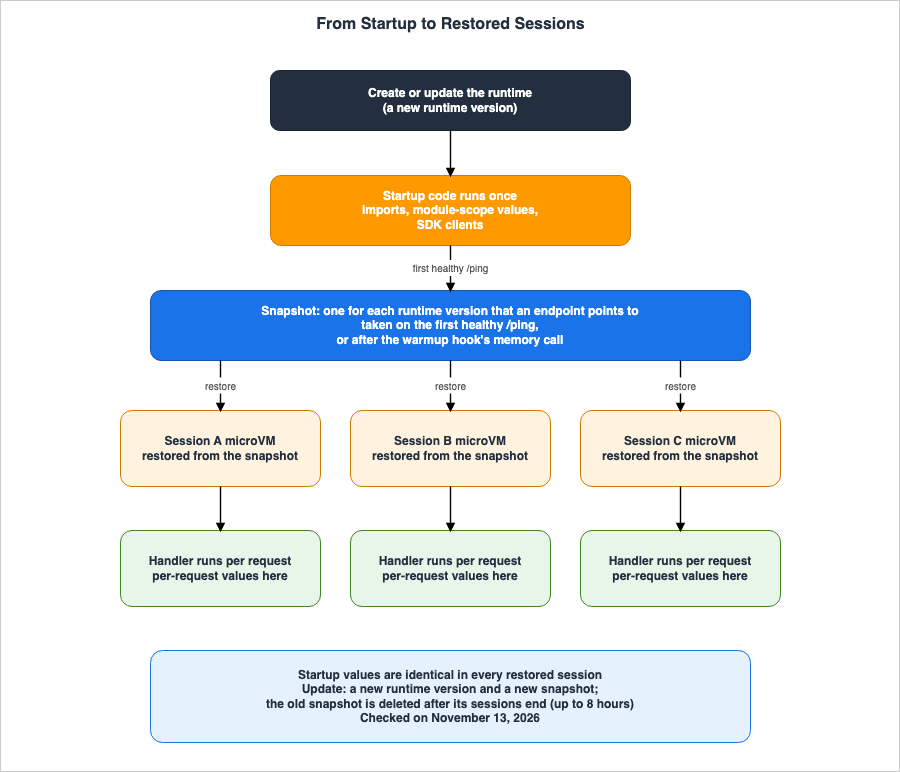
3.1 Startup and Handler
The Optimize page states that the agent's code runs in two contexts. One is during startup, which executes once when the process begins and completes before the AgentCore Runtime takes a snapshot. The other is the handler, which runs for every request across all instances.The Optimize page describes the startup code as follows:
AgentCore Runtime captures this code in the snapshot, and every instance inherits its results.In V1, the agent's process starts every time a session begins. In V2, the process only starts once when a snapshot is taken, and each session begins from a state after the startup process has completed. The How it works page explains that V2 prepares the environment once, takes a snapshot, and instead of initializing the environment for each new instance, it restores the snapshot.
3.2 When the Snapshot Is Taken
The How it works page describes the point at which a snapshot is taken as follows:AgentCore Runtime takes the snapshot on the first healthy `/ping` response, or, if you configure a build warmup hook, after the hook’s `memory` call.Specifically, the snapshot is the state of the system at the moment the agent responds with "healthy" to the
/ping endpoint. When a build warmup hook is configured, the snapshot reflects the state after the memory call within that hook (see Section 6.3).When you use the AgentCore Python SDK, the agent does not listen on port 8080 until after the
app.run() method is called. The Optimize page states that, therefore, the /ping endpoint will not return a successful response, and no snapshot will be taken, until the initial startup processes are complete. If you run your own HTTP server instead of the SDK, use one of the following two approaches:- Respond with "healthy" to the
/pingendpoint after initialization is complete. - Respond with "healthy" as soon as the server starts, and perform the initialization in the
memorycall of the build warmup hook.
The How it works page also states that if the runtime does not report healthy within 120 seconds of startup, the creation process will fail due to a health check error.
3.3 The Lifetime of a Snapshot
The How it works page, in the "Snapshot lifecycle" section, states that snapshots are associated with a runtime version and endpoint.On V2, AgentCore Runtime manages a snapshot for each runtime version that an endpoint points to.Users cannot directly create or delete snapshots. The same section describes the creation, update, and deletion of snapshots as follows:
- Creation: When an endpoint points to a runtime version, a snapshot for that version is prepared. When a runtime is created, the DEFAULT endpoint points to the initial version, and a snapshot is prepared accordingly. If a single runtime has multiple endpoints pointing to different versions, multiple snapshots will also exist concurrently.
- Update: When a runtime is updated, the DEFAULT endpoint points to the new version, and a new snapshot is prepared. Snapshots for the previous version will no longer be referenced and will be deleted after existing sessions using that snapshot have ended.
- Deletion: Snapshots that are no longer referenced by any endpoint are deleted. Deletion can take up to 8 hours. Eight hours is the maximum session lifetime, and sessions already running on that snapshot continue until they end.
The Optimize page describes the same concept more concisely:
AgentCore Runtime takes one snapshot per agent version and uses it until you create or update the agent, so the life of the snapshot is the life of that version.On the Optimize page, the agent version refers to the runtime version (Section 1.4). As an inference by this article, both pages convey the same meaning when using only the DEFAULT endpoint. However, when using custom endpoints, as described on the How it works page, a single runtime may have multiple snapshots.
The lifetime of a snapshot is the lifetime of the runtime version. Values created at startup stay the same in every session of that version until the runtime is next created or updated.
3.4 Sessions and Restoration
The How it works page explains that each session runs within a dedicated microVM, and sessions can last up to a maximum of 8 hours. A session ends when there is a period of inactivity (default: 15 minutes), when it reaches the maximum duration (default: 8 hours), or when it is determined to be unhealthy. These default settings can be modified using thelifecycleConfiguration. The Sessions page states that if a request is made with the same runtimeSessionId for a session that has ended, a new microVM will be provisioned.The Sessions page further explains the start of a session as follows:
When a session starts, AgentCore Runtime restores the session’s microVM from a snapshot that it took before any session existed.Within a single runtime session, requests are routed to the same microVM. As an inference by this article, when making a second request in the same session, the state of the process modified by the first request will persist. In separate sessions, each session begins from the same snapshot.
3.5 Creation and Updates Take Minutes
The How it works page states that the V1 runtime becomesREADY in a few seconds, while the V2 runtime takes several minutes for creation and updates. This is due to the preparation of snapshots. The FAQ also mentions that deployments and updates take minutes, not seconds.The
CreateAgentRuntime and UpdateAgentRuntime operations return while the runtime is still in the CREATING or UPDATING state. The How it works page explains that if an update or deletion is called before the process reaches a final state, a ConflictException will occur. It then provides an example demonstrating how to repeatedly call get_agent_runtime until the runtime reaches a READY or FAILED state.4. What the Snapshot Carries
This chapter lists the values that snapshots carry in a table and clarifies the distinction between values that can be created at startup and those that should be created within handlers, in the words of the documentation.4.1 The Rule on the Optimize Page
The Optimize page states that one rule decides where code belongs.Compute a value at startup if it stays the same for the life of the snapshot. Compute it in your handler if it varies per request or can expire.As described in Section 3.3, the snapshot lifetime is the lifetime of the runtime version. Therefore, this rule essentially means that only values that do not change until the version changes should be created at startup. Optimize page provides examples of actions performed at startup, such as importing dependent libraries, loading model weights, and loading static configurations included as part of the deployment process.
The FAQ describes the same concept in slightly different wording:
Each session starts from a snapshot taken after the agent finishes loading, so values your agent creates at startup, such as random seeds, credentials, timestamps, and open connections, are shared by every session restored from that snapshot. Create those values per session instead.The answer in the same FAQ also states that most agents do not require changes. As an inference by this article, these two statements can be reconciled by interpreting them as meaning that agents that do not create any of the four types of values mentioned at startup do not require modifications.
4.2 Table of Shared Values
Table 2 lists the values that are created at startup and shared across sessions. The sources are the Optimize page, specifically the "Keep per-request state fresh" table, the "Use snapshot-safe cryptographic libraries" section, the "Networking" section, and the FAQ. The verification date is November 13, 2026.| Value | Created at Startup | How to Create in a Handler | Source |
|---|---|---|---|
Random numbers, identifiers, and tokens generated by os.urandom(), secrets, and uuid.uuid4() | Persisted in the snapshot and will be the same across all instances. | Call os.urandom(), secrets, or uuid.uuid4() for each request. | Optimize page |
The sequence of the random module | The seed is determined at startup, and each restored instance will generate the same sequence. This is also true when called in a handler. | Use os.urandom() or secrets. | Optimize page |
| Random numbers from cryptographic libraries | Not reseeded after a restore. Values can repeat across instances even when called in a handler. | Obtain directly from the OS. Python uses secrets or os.urandom(), Go uses crypto/rand, and Node.js reads /dev/urandom. | Optimize page (Current limitation) |
| Current time | Fixed at the time of the snapshot. | Read for each request. | Optimize page, FAQ |
| Elapsed time baseline | time.monotonic() does not advance across restorations, so a duration measured from a startup reference is wrong. | Obtain the baseline time in the handler. | Optimize page |
| Credentials and tokens | Can expire before the instance starts. They also do not carry the session context keys. | Refresh when expired. Read in the handler if keys are required. | Optimize page, Sessions page, FAQ |
| Open sockets | Do not survive a restore. The setup that the client library caches survives. | Assume transparent reconnection occurs on the first call. | Optimize page, FAQ |
| Hostname and PID | All restored instances will return the hostname localhost and PID 1. | Do not use for instance identification; create a new ID for each request. | Optimize page |
| Fixed source port | Can collide, in the instance, with the connection re-established after a restore. | Avoid using a fixed source port. | Optimize page |
| Values that can be changed without redeployment | Fixed at the time of the snapshot. For example, a list of tools obtained from the AgentCore Gateway. | Do not cache at startup. | Optimize page |
Table 2 provides the following clarifications:
randommodule row: The Optimize page does not describe how to reseed therandommodule. The right-hand column givesos.urandom()andsecrets, which the Optimize page gives in other rows.- Cryptographic libraries row: The Optimize page calls this a Current limitation. It may change after the verification date. See Section 4.3 for details.
- Credentials: Session context keys are discussed in Chapter 5.
- Open sockets: The FAQ provides examples of shared values, including "open connections." The Optimize page states that the socket itself does not survive a restore and that the setup around it does. See Section 4.5 for more information.
4.3 Random Numbers and Cryptographic Libraries
The table on the Optimize page describesos.urandom() as follows:`os.urandom()` returns fresh entropy only each time you call it after a restore. A value read at startup is copied into the snapshot and is identical on every instance, however good the entropy source was when it was read.The same table describes the
random module as follows:The `random` module is likewise seeded at startup, so restored instances repeat the same sequence.In other words, the
random module determines its seed at startup, and even if random.random() is called within a handler, each restored instance will return the same sequence of numbers.Regarding cryptographic libraries, the "Use snapshot-safe cryptographic libraries" section of the Optimize page states the following as a Current limitation:
On AgentCore Runtime, snapshot-safe builds of cryptographic libraries don’t reseed after a restore. This applies to both direct code deployments and container deployments.The recommended workaround is to create secrets, keys, tokens, and session identifiers when processing a request, rather than at startup. Furthermore, when processing requests, use random numbers directly from the operating system. Random numbers from cryptographic libraries such as OpenSSL can repeat across instances. The Node.js
crypto module uses OpenSSL, so functions like crypto.randomBytes(), crypto.randomUUID(), crypto.randomInt(), and crypto.getRandomValues(), as well as packages built on top of them, such as uuid, may produce overlapping values even if called within a handler. To obtain unique values in Node.js, read from /dev/urandom.As an inference by this article, Python's
ssl.RAND_bytes() utilizes OpenSSL's random number generator, and therefore falls under the category of cryptographic library random numbers described in this section. The Optimize page does not name ssl.RAND_bytes(). Section 8.2 illustrates observations related to this value.4.4 Timestamps and Elapsed Time
The Optimize page states that the timestamp recorded at startup becomes fixed at the moment the snapshot is taken. Code that readstime.time() at startup and stores it as the "startup time" will return the timestamp of when the snapshot was taken, regardless of the session.Regarding elapsed time, the Optimize page states:
`time.monotonic()` does not advance across a restore, so a duration measured from a startup reference is wrong without looking wrong.Code that uses
time.monotonic() as a reference at startup and calculates the difference in the handler will not accurately measure the time before and after restoration. Even if the values are incorrect, they may appear valid. Optimize page recommends obtaining the reference time in the handler.4.5 Connections and Client Setup
The FAQ lists "open connections" as an example of shared values. The "Networking" section of the Optimize page separates the socket from the client setup, as follows:The socket you open at startup does not survive a restore, but the setup your client library caches around it — service-model parsing, endpoint resolution, credential resolution, and the connection pool — does.The same section says to build and exercise clients at startup, and to expect the first call after a restore to reconnect transparently. As an inference by this article, the "open connections" mentioned in the FAQ refer to objects that maintain a connection, along with the necessary preparations surrounding them, rather than the sockets themselves.
The Optimize page shows an example of creating a client at startup, illustrated by the following comment:
# Build reusable clients at startup, before the snapshot. Exercise them here too
# (for example, with a warm-up call) so the setup the client caches — endpoint and
# credential resolution, connection pool — is captured in the snapshot.
This comment says to capture credential resolution in the snapshot as well. Section 5.4 shows how this relates to the statement on the Sessions page.
4.6 Hostname and PID
The Optimize page states:Every restored instance reports the same hostname (`localhost`) and PID (`1`), so using either as an id collapses metrics, log streams, and lock owners across the fleet.In V2, the code that creates names for log streams, metric dimensions, and lock owners, based on the hostname and PID, generates the same name for all instances. The Optimize page says to generate an ID for each request.
4.7 What Freezes When Read at Startup
The Optimize page says not to compute at startup any value that you change without redeploying. An example is the list of tools obtained from the AgentCore Gateway. While it might be tempting to load this information during startup due to slow loading times, caching it at startup would fix the agent's tool list to the state it was in at the time of the snapshot.The Optimize page states the condition for values read at startup as follows:
Read only data at startup that is the same for every instance and does not expire. Handle time-sensitive values, such as short-lived credentials, in your handler.5. Session Credentials and Session Context Keys
This chapter outlines the credentials received by V2 sessions, along with the associated session context keys. It also specifies which client credentials each key is linked to, and indicates what the keys do not prove. Figure 2 shows the difference between the two clients.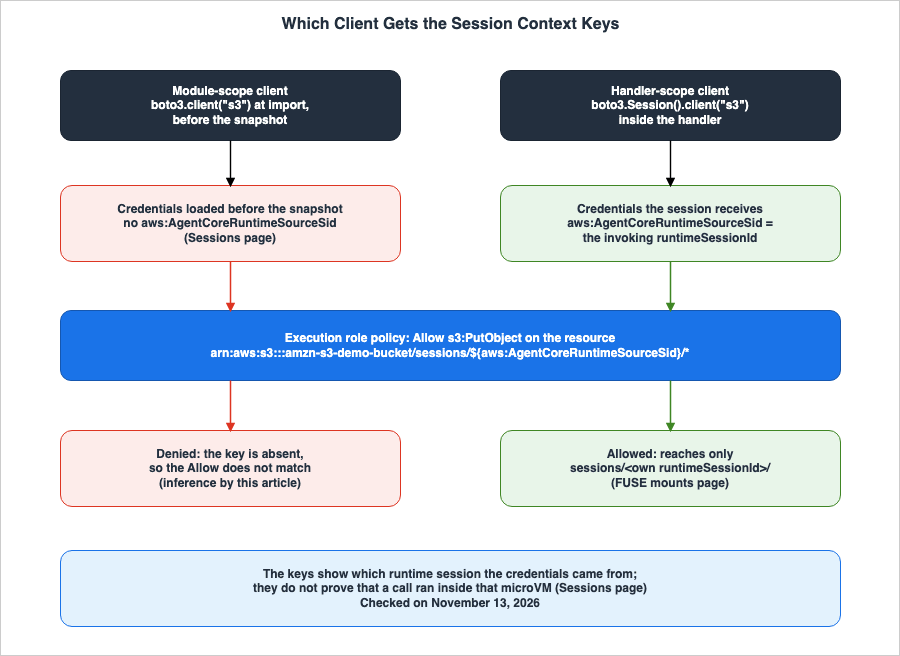
5.1 Two Keys
The Sessions page states that each runtime session operates using the credentials associated with the execution role configured for the runtime. Session context keys add theruntimeSessionId and the runtime ARN to those credentials. The Sessions page also indicates that session context keys are available only for V2 runtimes.Table 3 lists these two keys. The verification date is November 13, 2026.
| Key | Value | Across Sessions |
|---|---|---|
aws:AgentCoreRuntimeSourceSid | The runtimeSessionId of the invocation | Unique to each session |
aws:AgentCoreRuntimeSourceArn | The ARN of the runtime | Consistent across all sessions for the same runtime |
The Sessions page explains that because these two keys are present on every invocation, a single execution role policy applies to all sessions, eliminating the need to create a separate role for each session. These keys can be used as variables in the ARN of policy resources, and also within Condition statements.
5.2 Usage in Policies
The FUSE mounts page shows an example of the policy for an execution role that limits each session to its own S3 prefix.{
"Version": "2012-10-17",
"Statement": [
{
"Effect": "Allow",
"Action": "s3:ListBucket",
"Resource": "arn:aws:s3:::amzn-s3-demo-bucket",
"Condition": {
"StringLike": {
"s3:prefix": [
"sessions/${aws:AgentCoreRuntimeSourceSid}/*",
"sessions/${aws:AgentCoreRuntimeSourceSid}"
]
}
}
},
{
"Effect": "Allow",
"Action": ["s3:GetObject", "s3:PutObject"],
"Resource": "arn:aws:s3:::amzn-s3-demo-bucket/sessions/${aws:AgentCoreRuntimeSourceSid}/*"
}
]
}The FUSE mounts page states that a session whose
runtimeSessionId is A reaches only sessions/A/, and a request for sessions/B/ returns access denied. This applies whether the session directly calls the S3 API or mounts the prefix with Mountpoint. To scope by runtime, use aws:AgentCoreRuntimeSourceArn in the same way.The session ID goes into the IAM match and the S3 prefix as it is. The FUSE mounts page says to make the session ID a single segment that matches the pattern
^[A-Za-z0-9_-]{33,256}$. Avoid /, which an IAM * matches across, and . and .., which can walk out of the prefix. The FUSE mounts page also notes that the session ID is not a long-lasting, user-specific identifier.5.3 Module-Scope Clients Do Not Get the Keys
The Sessions page describes how session context keys are applied to credentials as follows:Session context keys are present only in the credentials that a session receives. When a session starts, AgentCore Runtime restores the session’s microVM from a snapshot that it took before any session existed. If your code creates an AWS SDK client at import or module scope, the client loads its credentials before the snapshot, and those credentials don’t include `aws:AgentCoreRuntimeSourceSid`. Create the client inside your invocation handler instead, so that it loads the session’s credentials. In Python, create the client from a new `boto3.Session()`, because `boto3.client()` reuses the credentials that the default session loaded first.In other words, a module-scope client reads its credentials before the snapshot. These credentials do not include the
aws:AgentCoreRuntimeSourceSid. As an inference by this article, a policy like the one in Section 5.2, with ${aws:AgentCoreRuntimeSourceSid} in the resource ARN, does not match requests from a module-scope client. Section 8.3 shows the observation.In Python, simply calling
boto3.client() within a handler is not sufficient. boto3.client() reuses the credentials that the default session loaded first. If the default session has already read credentials at startup, any client created in the handler will also use those same credentials. The Sessions page recommends creating a new boto3.Session() in the handler and then creating the client from that session.import boto3
# Module scope: runs before the snapshot. These credentials do not carry
# aws:AgentCoreRuntimeSourceSid.
shared_s3 = boto3.client("s3")
def handle(payload):
# Handler scope: a new boto3.Session() loads the session's credentials.
session_s3 = boto3.Session().client("s3")
...The code above is a representation of the text on the Sessions page and is not an example from the documentation.
5.4 The Apparent Conflict Between the Optimize Page and the Sessions Page
The Optimize page says to build and exercise reusable clients at startup (see Section 4.5), and its comment says to capture credential resolution in the snapshot as well. The Sessions page, on the other hand, says to create the client inside the handler when the session context keys are needed (see Section 5.3).It may appear that these two pages offer conflicting instructions regarding the same type of client. However, as an inference by this article, these two approaches can be reconciled depending on whether the client requires session context keys for credential resolution. Clients that rely on policies that use the keys should create a new
boto3.Session() in the handler. Clients that do not rely on the keys can be created at startup, as described in the Optimize page. However, as noted in the table on the Optimize page, credentials read at startup may expire before the instance begins. Neither page explicitly states this clarification in a single sentence.5.5 The Keys Do Not Prove Where a Call Ran
The Sessions page states what the session context keys do not prove:These keys attest that the request’s credentials originated from a given runtime session. They do not prove that a request was made from inside the corresponding microVM. Use them to scope access, not as evidence of where a call ran.In other words, credentials with the
aws:AgentCoreRuntimeSourceSid key still carry the same value even if they are taken outside the microVM associated with that session and used elsewhere. As an inference by this article, these keys serve to limit which session's data a request reaches, rather than to verify the origin of the call. The handling of credentials and the strength of session isolation are discussed in detail on this site's Agent Sandboxing and Blast-Radius Isolation on AWS page.6. Limits and Lifecycle Hooks
This chapter outlines the differences in limits between V1 and V2, as well as resource configurations and lifecycle hooks.6.1 Table of V1 and V2
Table 4 lists the differences between V1 and V2. The verification date is November 13, 2026.| Item | V1 | V2 | Source |
|---|---|---|---|
| Startup Method | Initializes the environment for each session. | Restores a snapshot. | How it works page |
| Maximum Container Image Size (Compressed) | 2 GB | 10 GB | Quotas page, How it works page |
| Allocation per Session | Documentation does not list | Default is 2 vCPU and 8 GB. Up to 8 vCPU and 32 GB with resource configurations. | Quotas page, How it works page |
| Creation and Update Time | A few seconds to reach READY state. | Several minutes. | How it works page |
| Session Context Keys | Stated as not supported | Stated | Sessions page |
| Lifecycle Hooks | Stated as not supported (ValidationException) | Stated | Lifecycle hooks page |
| Resource Configurations | Stated as not supported | Stated | Quotas page |
| Your Own Mount Clients (Such as FUSE) | Stated as not supported | Stated | FUSE mounts page |
| Total Environment Variables | 4 KB | 4 KB | Quotas page |
| Hostname and PID | Documentation does not list | localhost and 1. | Optimize page |
Additional notes regarding Table 4 are as follows.
- For the V1 column regarding session allocation: The Quotas page row states that resource configurations apply to V2, and does not give a separate allocation for V1.
- For the V1 column regarding session context keys, resource configurations, and your own mount clients: Each page states that these are available only for V2 runtimes. This article shows this as Stated as not supported.
- Regarding environment variables: The release notes state that in October 2026, the limit for V2 was increased to 4 KB, the same as V1. Previously, V2 had a limit of 1.5 KB for direct code deployments and 2.5 KB for containers.
6.2 The Default Allocation and Resource Configurations
The How it works page describes sessions in V2 that do not have resource configurations as follows:Each session uses the default allocation of 2 vCPU and 8 GB of memory, and you pay only for the resources that your agent actively uses. Sessions can’t burst above the default allocation.Specifically, runtime sessions without defined resource configurations are limited to a maximum of 2 vCPUs and 8 GB. 8 vCPUs and 32 GB are not the default values, but rather represent the maximum peak usage when resource configurations are defined.
When resource configurations are set, each session has a baseline allocation of vCPUs and memory, which can be increased to four times the baseline during peak usage. The
minimumMemoryInMiB value sets the baseline, and the number of vCPUs is one per 4 GB of memory. Table 5, found on the How it works page, lists the available resource configurations. The information was verified on November 13, 2026.minimumMemoryInMiB | Baseline | Peak | Disk |
|---|---|---|---|
1024 | 1 GB, 0.25 vCPU | 4 GB, 1 vCPU | 10 GB |
2048 | 2 GB, 0.5 vCPU | 8 GB, 2 vCPU | 10 GB |
4096 | 4 GB, 1 vCPU | 16 GB, 4 vCPU | 16 GB |
8192 | 8 GB, 2 vCPU | 32 GB, 8 vCPU | 32 GB |
Only the row with
minimumMemoryInMiB set to 8192 allows sessions to reach 8 vCPUs and 32 GB. The What's New post and the FAQ state that sessions can scale up to 8 vCPUs and 32 GB, but do not specify the resource configuration requirements. This article does not consider this a discrepancy in the documentation. The What's New post and the FAQ provide brief introductions, while the Quotas page and the How it works page provide the detailed conditions.The
resourceConfigurations setting can have at most one entry in both CreateAgentRuntime and UpdateAgentRuntime. The How it works page states that when updating, the existing resourceConfigurations value will be overwritten. To preserve the current size, ensure you input the same value even when updating only the container image. If you omit it, the runtime returns to the default allocation. Changes only apply to new sessions; existing sessions will continue to use their original configuration until they end.The How it works page also states the following regarding images larger than 2 GB:
For images larger than 2 GB, set a larger `minimumMemoryInMiB`.For images larger than 2 GB, the release notes say to set a resource configuration with a
minimumMemoryInMiB that provides enough build disk for the image. As an inference by this article, the Disk column of Table 5 is that disk size. Neither of these two pages states, as numbers, which value an image of a given size needs. The Troubleshoot page states that the build disk size is determined by the minimumMemoryInMiB, and gives a recommended value for each compressed image size: 1024 or higher for up to 2 GB, 4096 or higher for 2–4 GB, and 8192 for 4–10 GB. This article does not call minimumMemoryInMiB "required." The wording of the documentation is to set a larger value.6.3 Build Warmup Hook
The Lifecycle hooks page outlines the requirements for lifecycle hooks as follows:- The runtime uses platform version V2. On V1, the request fails with a
ValidationException. - The runtime uses microVMs for the compute type. Combining
hooksConfigurationwithcapacityProviderConfigurationmakes the request fail with aValidationException.
As of the verification date, the only hook that the Lifecycle hooks page lists is
warmup in the build phase. While it prepares the agent during CreateAgentRuntime and UpdateAgentRuntime, before the runtime reaches READY, AgentCore Runtime calls this hook twice.memory: Called first, after the agent passes the/pinghealth check. It loads into memory what every session needs (imports, models, caches). New instances begin with the data loaded during this process.disk: Called second. This hook reads files that are accessed when a session begins. AgentCore Runtime uses this read operation to ensure that new sessions can quickly access those files.
For HTTP actions, the
X-Amzn-Bedrock-AgentCore-Runtime-Warmup-Type header is used to indicate either memory or disk. These two calls share a combined time limit of 120 seconds. If the memory call takes 50 seconds, the disk call has 70 seconds. This time limit is not adjustable. AgentCore Runtime does not retry hook calls. If a call fails or does not complete in the allotted time, the runtime transitions to CREATE_FAILED or UPDATE_FAILED, and the failureReason field will provide details.UpdateAgentRuntime completely replaces the hook configuration. The Lifecycle hooks page says to include hooksConfiguration in every update that should keep the hooks, and to update without hooksConfiguration to remove them.As stated in Section 3.2, when a build warmup hook is configured, the state after the
memory call is captured as a snapshot. The rules outlined in Chapter 4 also apply to values created by the memory call.6.4 What You Can Write in CloudFormation
As of the verification date, the CloudFormationAWS::BedrockAgentCore::Runtime resource has a PlatformVersion property. The list of properties on that page does not include ResourceConfigurations or HooksConfiguration (Documentation does not list). The CreateAgentRuntime API does include resourceConfigurations and hooksConfiguration. This article does not state that these two cannot be specified in CloudFormation; it only notes that they are not in the property list on the verification date.7. The Same Pattern in Lambda SnapStart
This chapter addresses the uniqueness challenges associated with Lambda SnapStart and illustrates the commonalities and differences in V2 snapshots. The functionality of Lambda SnapStart is further explained in the following articles on this site: "How AWS Lambda Execution Environments Work" and "AWS Lambda Cold Start Mitigation Guide."7.1 Commonalities
The SnapStart uniqueness page states:When invocations scale up on a SnapStart function, Lambda uses a single initialized snapshot to resume multiple execution environments. If your initialization code generates unique content that is included in the snapshot, then the content might not be unique when it is reused across execution environments.The same page states that to maintain uniqueness, you generate unique content after initialization. This content consists of a unique ID, a unique secret, and entropy for generating pseudo-random numbers. This is the same kind of caution as the Optimize page rule in Chapter 4. Both methods involve performing initialization only once and then reusing the resulting data across multiple execution environments.
7.2 Differences
One difference lies in the hook that is called after restoration. The SnapStart uniqueness page states that Lambda provides runtime hooks, allowing code to be executed just before a snapshot is taken and immediately after resuming from a snapshot. Of the V2 lifecycle hooks, the Lifecycle hooks page lists, as of the verification date, only the build warmup hook, which is called before the snapshot. A hook called after a restore is not in the table on the Lifecycle hooks page (Documentation does not list). This article does not state that V2 has no hook after a restore; it only notes that the table on the verification date does not list one.Another difference concerns the cryptographic library. The Optimize page states, as a Current limitation, that on AgentCore Runtime the snapshot-safe builds of cryptographic libraries do not reseed after a restore (Section 4.3). This article does not compare how Lambda handles the cryptographic library. To make that comparison, it would be necessary to review Lambda's documentation with a similar level of detail.
8. Observations in us-east-1
This chapter details the results of running a small agent on the AgentCore Runtime in us-east-1, observed on November 13, 2026 (Japan Standard Time). All of these are observations, and do not represent guaranteed results. As this is a single observation, this article does not state that these results will always be consistent.8.1 Setup
The architecture consists of the following:- Three AgentCore Runtime runtimes. All use the microVMs compute type, direct code deployment, and Python 3.13, with the same code. The network mode is PUBLIC, the idle timeout is 5 minutes, and the maximum lifetime is 30 minutes.
- The first runtime was created with
platformVersionset toV2and will be used for the observations described in Sections 8.2 and 8.3. - The second runtime was created without
platformVersion. The third runtime was created withV1and then updated withoutplatformVersion, changing only an environment variable. These two were used for the observations described in Section 8.4. - A single execution role is used, granting write access to the S3 bucket, limited only to
sessions/${aws:AgentCoreRuntimeSourceSid}/*, consistent with Section 5.2. - The agent does not invoke any models. It operates solely using the standard library's HTTP server and boto3.
- A single account was used.
Upon startup, the agent records the following values:
random.random(), os.urandom(), secrets, uuid.uuid4(), ssl.RAND_bytes(), time.time(), time.monotonic(), hostname, and PID. During startup, a module-scope client is also created. Within the handler, the same values are recorded again. Additionally, using the module-scope client and a handler-scope client created from a new boto3.Session(), the agent sends an S3 PutObject request to both its own session prefix and the prefix of other sessions. The credentials used are recorded as the first 12 characters of the SHA-256 hash of the access key ID.The calls were made in the sequence A, B, A, C, targeting three sessions: A, B, and C.
8.2 Startup Values and Handler Values
Table 6 compares the values returned by the agent during the initial call to three different sessions. The second call to A is the second call in the same session.| Value | Value Created at Startup | Value Created by Handler |
|---|---|---|
random.random() | Same across A, B, and C | Same across A, B, and C. A's second call returns a different value. |
os.urandom() | Same across A, B, and C | Different across A, B, and C |
secrets | Same across A, B, and C | Different across A, B, and C |
uuid.uuid4() | Same across A, B, and C | Different across A, B, and C |
ssl.RAND_bytes() | Same across A, B, and C | Same across A, B, and C. A's second call returns a different value. |
time.time() | Same across A, B, and C | Time of the call |
| hostname | localhost | localhost |
| PID | 1 | 1 |
/proc/sys/kernel/random/boot_id | Same across A, B, and C | Same across A, B, and C |
The values created at startup were the same across all three sessions. The values of
os.urandom(), secrets, and uuid.uuid4() were also the same. This matches the statement on the Optimize page in Section 4.3.The initial call to
random.random() within the handler returned the same value across all three sessions. This aligns with the description in Section 4.3 regarding the random module. The second call to A returned a different value. Within the same session, the sequence progresses.The initial call to
ssl.RAND_bytes() within the handler also returned the same value across all three sessions. This observation supports the inference in Section 4.3, namely that ssl.RAND_bytes() is random numbers from a cryptographic library under the Current limitation. The handler's os.urandom() and secrets returned different values across the three sessions.The startup time was approximately 2 minutes after the request to create the runtime, and was the same across all three sessions. The initial call to the session occurred approximately 20 minutes later. The time elapsed since startup, measured within the handler, was approximately 1,190 to 1,222 seconds based on the difference in
time.time(). The difference in time.monotonic() was approximately 66 to 67 seconds. time.monotonic() did not account for approximately 19 minutes of that time. This matches the statement on the Optimize page in Section 4.4.The Linux
boot_id was the same across all three sessions. The Optimize page does not mention the boot_id.8.3 Module-Scope Client and Handler-Scope Client
Table 7 lists the results of S3PutObject operations. The execution role policy only permits writes to sessions/${aws:AgentCoreRuntimeSourceSid}/*.| Call | Module-Scope Client, Own Prefix | Handler-Scope Client, Own Prefix | Both Clients, Other Session Prefixes |
|---|---|---|---|
| A, First Call | AccessDenied | Success | AccessDenied |
| B, First Call | AccessDenied | Success | AccessDenied |
| A, Second Call | AccessDenied | Success | AccessDenied |
| C, First Call | AccessDenied | Success | AccessDenied |
Requests from the module-scope client were denied, even when attempting to write to their own session's prefix. Requests from the handler-scope client were successful only when writing to their own session's prefix. This observation matches the inference in Section 5.3, which states that requests from the module-scope client do not match the policy for
${aws:AgentCoreRuntimeSourceSid}.The credentials for the module-scope client had the same fingerprint and expiration date across all three sessions. The expiration date was November 13, 2026, at 02:43:09 (UTC), and had not yet expired at the time of the calls. The credentials for the handler-scope client, however, varied from session to session. They were the same for the two calls to A.
The role session names returned by STS's
GetCallerIdentity also differed. The module-scope client consistently reported snapstart-build-DEFAULT. The handler-scope client reported names in the format AgentCore-MicroVM-xxxxxxxx-DEFAULT, where xxxxxxxx is an 8-digit hexadecimal number that was different for each session. None of the documentation describes these role session names.8.4 The Default Platform Version, and the Platform Version After an Update
Table 8 lists theplatformVersion values for three runtimes, as read with the GetAgentRuntime operation.| Runtime | Creation/Update | platformVersion | Time to READY |
|---|---|---|---|
| First | Created, specifying V2 | V2 | Approximately 3.5 minutes from creation |
| Second | Created without specifying platformVersion | V1 | Approximately 11 seconds from creation |
| Third | Created, specifying V1 | V1 | Approximately 11 seconds from creation |
| Third | Updated without specifying platformVersion | Remained V1. The runtime version changed to 2. | Approximately 10 seconds from update |
In this instance in the us-east-1 Region, the runtime created without
platformVersion was V1. This matches the text on the How it works page; the What's New statement that the default for new runtimes is V2 was not observed in this instance.The runtime updated without
platformVersion stayed on V1. This matches the text of What's New and the How it works page; the FAQ statement that an update moves the runtime to V2 was not observed in this instance.This is a single observation, in one account. This article does not draw conclusions about which documentation is correct based on this single observation (see Section 9.1).
The first runtime was created with platform version
V2 using direct code deployment, and the creation was successful. However, the documentation reviewed for this article did not contain a statement that a V2 runtime can be created with direct code deployment. The release notes mention the earlier environment variable limit of V2 for direct code deployments, and the Current limitation statement on the Optimize page states that it applies to direct code deployments as well.8.5 What This Setup Does Not Show
This configuration does not demonstrate:- Behavior with container images, and snapshots when a build warmup hook is configured.
- Behavior after credentials expire. The maximum session lifetime was set to 30 minutes.
- The behavior of the Node.js
cryptomodule. - The number of snapshots taken when using custom endpoints.
- The allocation of sessions with resource configurations set.
- Defaults in Regions other than us-east-1.
9. Where the Sources Disagree, and Where No Statement Was Found
This chapter summarizes discrepancies found in the source materials and instances where information was not found.9.1 Where the Sources Disagree
This article found two points where the sources disagree. This article does not conclude that either source is incorrect.First, there is a discrepancy regarding the default platform version for the new runtime. The What's New post, dated November 12, 2026, states that the default platform version for the new runtime has been updated to V2 in 19 Regions. However, the How it works page states
V1 is the default. It also states that if the platformVersion is not specified during creation, it defaults to V1 (Section 2.2).Second, there is a discrepancy regarding the platform version when updating an existing runtime. The How it works page states that updating without specifying a
platformVersion will keep the runtime on its current platform version, and the What's New post states that existing runtimes stay on the current version until you move them. The FAQ states that updating without setting platformVersion to V1 moves the runtime to V2 (Section 2.3).This article does not consider the following three points to be discrepancies:
- The number of Regions: The How it works page's "Supported Regions" section lists 19 Regions, which is the same number mentioned in the What's New post. The release notes describe the progression from 10 to 19 Regions (Section 2.1).
- The method of counting snapshots: The Optimize page states that there is one snapshot per agent version, while the How it works page states that there is one for each runtime version that an endpoint points to. The latter provides more detail for the case of more than one endpoint (Section 3.3).
- 8 vCPU and 32 GB: Both the What's New post and the FAQ do not specify any conditions, whereas the Quotas page and the How it works page do (Section 6.2).
9.2 What the Documentation Does Not List, and Where No Statement Was Found
This section identifies instances where information was not found in the relevant documentation or was missing from a list in the documentation. These omissions do not necessarily indicate that the feature or functionality is absent or impossible.- FAQ validator and migration guide: The FAQ states that agents should be verified using the validator and migration guide before updates. However, this article was unable to locate those specific pages (No statement found).
- List of features present in V1 but not in V2: This article was unable to find such a list (No statement found). The differences in V2 behavior are described in the Optimize page, How it works page, and Sessions page.
- List of
platformVersionvalues: The API Reference forCreateAgentRuntimeandUpdateAgentRuntimedescribesplatformVersionas a string between 1 and 128 characters, but does not provide a list of valid values (Documentation does not list). The values for bothV1andV2are described in the How it works page and What's New post. - Hooks called after restoration: The table on the Lifecycle hooks page only lists the build warmup hook (Documentation does not list, Section 7.2).
- CloudFormation
ResourceConfigurationsandHooksConfiguration: These are not listed in the properties forAWS::BedrockAgentCore::Runtime(Documentation does not list, Section 6.4).
10. Failure Modes
This chapter outlines failures caused by code that does not account for V2 snapshots, presenting them in order of symptoms, causes, and relevant resources.- Symptoms: In separate sessions, the same "unique" ID or token is generated. Root cause: IDs were created using
uuid.uuid4()orsecretsat startup and stored in module variables. Reference: Row 1 of the table on the Optimize page (Section 4.2). - Symptoms: The handler calls
random.random(), but the same value is generated across sessions. Root cause: Therandommodule's seed is determined at startup, and each restored instance repeats the same sequence. Reference: Optimize page (Section 4.3). - Symptoms: In the Node.js agent, the values generated by the handler's
crypto.randomUUID()overlap between instances. Root cause: Thecryptomodule uses OpenSSL, which does not reseed after a restore on AgentCore Runtime. Reference: Optimize page, Current limitation (Section 4.3). - Symptoms: Elapsed time and timeout calculations come out shorter than the actual time. Root cause: The calculation was based on the
time.monotonic()value obtained at startup. Reference: Optimize page (Section 4.4). - Symptoms: The "startup time" log shows the same time in every session. Root cause: The code kept the time read at startup. Reference: Optimize page (Section 4.4).
- Symptoms: Log streams, metrics, and lock ownership are consolidated into a single entity across all instances. Root cause: The code built names from the hostname or PID. Reference: Optimize page (Section 4.6).
- Symptoms: Writing to an S3 prefix filtered by
${aws:AgentCoreRuntimeSourceSid}results in access denied errors. Root cause: The code used a module-scope client, or calledboto3.client()in the handler after the default session had read credentials at startup. Both send requests with credentials read before the snapshot. Reference: Sessions page (Section 5.3). - Symptoms: Policies that use session context keys do not function on the V1 runtime. Root cause: Session context keys are available only on V2 runtimes. Reference: Sessions page (Section 5.1).
- Symptoms: Tools added to the AgentCore Gateway are not used by the agent. Root cause: The code cached the tool list at startup, and the list froze at the time of the snapshot. Reference: Optimize page (Section 4.7).
- Symptoms: Runtime creation fails due to a health check error. Root cause: The
/pingendpoint did not return a healthy status within 120 seconds of startup. Reference: How it works page (Section 3.2). - Symptoms: Updates immediately after creation result in a
ConflictException. Root cause: V2 runtime creation takes several minutes, and the update was called before the runtime reached theREADYstate. Reference: How it works page (Section 3.5). - Symptoms: After an update, hooks and resource configurations disappear. Root cause:
UpdateAgentRuntimereplaces thehooksConfigurationandresourceConfigurationswith the requested values. Reference: Lifecycle hooks page, How it works page (Sections 6.2 and 6.3). - Symptoms: Runtimes intended to remain on V1 are running on V2 after an update. Root cause: The update omitted
platformVersion. Reference: The FAQ states that it moves to V2, while the How it works page states that it keeps its current platform version (Sections 2.3 and 9.1).
11. Frequently Asked Questions About AgentCore Runtime V2 Snapshots
Q1. Can the agent code stay unchanged when it moves to V2?
It depends on what the agent is creating at startup. The FAQ states that, for most agents, no changes are necessary. It also explains that the random seed, credentials, timestamp, and open connections generated at startup are shared across all sessions. Agents that create these elements at startup should be modified to create them within a handler (see Sections 4.1 and 4.2).Q2. Are the IDs created at startup different for each session?
No, they are not. The values created at startup are saved in a snapshot and remain the same across all restored sessions. This applies even to values generated from robust random number sources, such asos.urandom() or uuid.uuid4() (see Section 4.3).Q3. If you call random.random() within a handler, will it produce different values for each session?
According to the Optimize page, the answer is no. The random module is seeded at startup, and each restored instance will repeat the same sequence of numbers. The Optimize page gives os.urandom() and secrets in other rows of the same table (see Section 4.2).Q4. Does a boto3 client created at module scope use the session credentials?
According to the Sessions page, it does not. Clients created at module scope read credentials before taking a snapshot. These credentials do not include theaws:AgentCoreRuntimeSourceSid. If a key is required, create a new client using boto3.Session() in the handler (see Section 5.3).Q5. If session context keys are available, can it be verified that the request originates from a microVM within that session?
No, it cannot. The Sessions page states that the keys only indicate the session from which the credentials originated, and do not prove that the request came from within that microVM. The keys are used to narrow the scope of access (see Section 5.5).Q6. Can a V2 session use 8 vCPU and 32 GB by default?
No. The default allocation is 2 vCPU and 8 GB. Sessions that do not have resource configurations set will not exceed this allocation. 8 vCPUs and 32 GB represent a peak value achieved whenminimumMemoryInMiB is set to 8192 (see Section 6.2).Q7. From November 12, 2026, are new runtimes always V2?
The sources disagree. The What's New post states that the default for new runtimes has been changed to V2 in 19 Regions. However, the How it works page, as of the verification date, indicates that V1 is the default, and that it defaults to V1 if not specified during creation. As an inference by this article, specifyingplatformVersion avoids the effect of this disagreement (see Sections 2.2 and 8.4).Q8. Does updating an existing V1 runtime move it to V2?
The sources disagree. The How it works page states that updating without specifyingplatformVersion will keep the system on the current version, and the What's New post states that existing runtimes stay on the current version until you move them. The FAQ, however, states that updating without setting platformVersion to V1 will transition to V2. As an inference by this article, if you update while consistently including V1 in the platformVersion setting, the system will remain on V1, regardless of which documentation you follow (see Sections 2.3 and 8.4).Q9. When does V1 end?
The FAQ states that there is no announced end date for V1. This article does not state that V1 will not end (see Section 2.4).12. Summary
Read the V2 snapshots through the following five points:- Lifetime: Snapshots are specific to the runtime version that the endpoint points to and are recreated during runtime creation and updates. The snapshot lifetime corresponds to runtime version lifetime.
- Contents: Values generated at startup, including random numbers, identifiers, timestamps, the baseline for
time.monotonic(), credentials, client setup, hostname, and PID, remain consistent across all sessions. Random number sequences from therandommodule and cryptographic library randomness can repeat even when called in the handler. The sockets themselves are not retained. - Placement: The Optimize page says to create at startup only values that do not change during the lifetime of the snapshot, and to create in the handler values that vary per request or can expire.
- Credentials: Session context keys are present only in the credentials that a session receives, and are available only on V2. The credentials of a module-scope client do not carry them. The keys do not provide proof of the call location.
- State of the sources: The sources disagree on two points: the default platform version, and the platform version after an update. Tables 1 through 5 reflect the state as of November 13, 2026.
13. References
- microVMs - Amazon Bedrock AgentCore Developer Guide
- Optimize your agent for Amazon Bedrock AgentCore Runtime V2 - Amazon Bedrock AgentCore Developer Guide
- Use isolated sessions for agents - Amazon Bedrock AgentCore Developer Guide
- Configure lifecycle hooks for AgentCore Runtime - Amazon Bedrock AgentCore Developer Guide
- Mount your own file systems in your container - Amazon Bedrock AgentCore Developer Guide
- Quotas for Amazon Bedrock AgentCore - Amazon Bedrock AgentCore Developer Guide
- Troubleshoot AgentCore Runtime - Amazon Bedrock AgentCore Developer Guide
- HTTP protocol contract - Amazon Bedrock AgentCore Developer Guide
- Release notes for Amazon Bedrock AgentCore - Amazon Bedrock AgentCore Developer Guide
- CreateAgentRuntime - Amazon Bedrock AgentCore Control Plane API Reference
- UpdateAgentRuntime - Amazon Bedrock AgentCore Control Plane API Reference
- LifecycleConfiguration - Amazon Bedrock AgentCore Control Plane API Reference
- InvokeAgentRuntime - Amazon Bedrock AgentCore Data Plane API Reference
- AWS::BedrockAgentCore::Runtime - AWS CloudFormation Template Reference
- Amazon Bedrock AgentCore FAQs
- The new AgentCore Runtime is now available in Amazon Bedrock AgentCore - AWS What's New
- The next generation AgentCore runtime is now the default - AWS What's New
- Handling uniqueness with Lambda SnapStart - AWS Lambda Developer Guide
- Amazon Bedrock Agents Classic maintenance mode - Amazon Bedrock User Guide
References:
Tech Blog with curated related content
Written by Hidekazu Konishi