Scoping Each Session on AgentCore Runtime - Session Context Keys, Who Chooses the Session ID, and What the Keys Do Not Prove
First Published:
Last Updated:
In October 2026, session context keys were added to AgentCore Runtime platform version V2. These consist of two IAM keys:
aws:AgentCoreRuntimeSourceSid and aws:AgentCoreRuntimeSourceArn. By incorporating these two keys into the credentials assigned to each session, a single execution role policy can restrict each session to accessing only its own data. This article examines what these keys guarantee and what they do not, based on the language used in AWS documentation.According to the explicit information provided in the primary documentation, the value of
aws:AgentCoreRuntimeSourceSid is the runtimeSessionId of the invocation. This runtimeSessionId is a value passed by the application that calls the runtime. The Service Authorization Reference lists only aws:ResourceTag/${TagKey} as a condition key in the row for the InvokeAgentRuntime operation. No condition key that takes the session ID as its value appears in that row or on the IAM User Guide page of global condition keys. AgentCore does not enforce a mapping between sessions and users. The developer guide recommends that developers maintain this mapping in their client backend. Furthermore, the developer guide states that this key only indicates the origin of the credentials and does not prove that the invocation originated from within a microVM.In essence, the key guarantees which session the credentials were vended to. It does not specify which user is using that session, who selected the session ID, or where those credentials were used. This article outlines the chain of data flow from the user, breaking it down into links and indicating which layer is responsible for each link.
This article is neither an introduction to the AgentCore Runtime, nor a guide on how to build or deploy agents. It does not explain attack methods, nor does it discuss pricing. The mechanism that prevents keys from being included in clients created before a snapshot, and the observations made in us-east-1, are detailed in the existing article What a Snapshot Carries on AgentCore Runtime V2. This article summarizes those conclusions, focusing on how to define policies and addressing the links outside the keys. The information presented was verified on November 17, 2026.
Related articles on this site:
- What a Snapshot Carries on AgentCore Runtime V2 - Startup Work, Per-Request Values, and Session Credentials
- Agent Sandboxing and Blast-Radius Isolation on AWS - Choosing the Unit of Each Containment Boundary and What Each One Does Not Stop
- Stopping an AI Agent on AWS - What Each Control Stops, What Keeps Running, and Who Can Undo It
- What Fills an AWS STS Session Token - Session Policies, Session Tags, the Single Size Limit, and How to Measure and Test It
- IAM Policy Evaluation Logic Step-by-Step - Explicit Deny, RCP, SCP, Resource Policy, Identity Policy, Permission Boundary, and Session Policy
- Amazon Bedrock AgentCore Implementation Guide Part 2: Multi-Layer Security with Identity, Gateway, and Policy
Table of Contents
- 1. Scope and Assumptions
- 2. How to Read the Tables
- 3. One Execution Role for Many Sessions
- 4. The Two Keys and the Credentials That Carry Them
- 5. Writing the Policy
- 6. Who Chooses the Session ID
- 7. What the Keys Do Not Prove
- 8. Comparing the Ways to Scope Access
- 9. V1, V2, and the Platform Version You Get
- 10. Where the Sources Disagree and What They Do Not Say
- 11. Decisions This Design Leaves to You
- 12. Failure Modes
- 13. Frequently Asked Questions About Session Context Keys on AgentCore Runtime
- 14. Summary
- 15. References
1. Scope and Assumptions
This chapter defines the intended audience for this article, the scope of its content, the materials referenced, and the terminology used. The key conclusions are as follows:- All sessions in the same runtime environment operate using the same execution role credentials. While microVMs isolate compute environments, they do not isolate data stored on the shared storage accessible by the execution role.
- There are two session context keys:
aws:AgentCoreRuntimeSourceSid, which is theruntimeSessionIdof the invocation, andaws:AgentCoreRuntimeSourceArn, which is the ARN of the runtime. Both are only available with V2 runtimes. - These keys are only present in the credentials received by the session; they are not included in credentials loaded prior to taking a snapshot.
- When credentials lack these keys, variables within resource ARNs will not match any resource, and conditions like
StringEqualswill fail. Conversely, conditions likeStringNotEqualswill succeed. Therefore, Allow statements that use these keys with matching operators will not apply to requests lacking the keys. Allow statements that use these keys with negated operators will apply to requests lacking the keys. - The
runtimeSessionIdis a value provided by the caller of the runtime. IAM condition keys that restrict the session ID usable withInvokeAgentRuntimeare not documented. The application backend determines which users are authorized to use which session IDs. - The developer guide states that these keys only indicate the origin of the credentials and do not prove that the invocation originated from within a microVM. Code running within a microVM can access the credentials associated with the execution role.
- Session IDs are not persistent user identifiers. If you need to separate data on a per-user basis across sessions, you will need to use a mechanism separate from these keys.
- The decision of whether to isolate at the runtime level, or to restrict access using AssumeRole and session policies, or to use session tags in JWTs signed by the identity provider (IdP), should be based on the desired level of isolation and the entity responsible for defining the values.
1.1 Who This Article Is For
This article is intended for developers and security engineers who are building the foundational components for agents, and who need to manage multiple user sessions within a single execution role, while segregating data for S3 and DynamoDB based on session or user. Specifically, this article is aimed at readers who believe that at least one of the following statements is true:- Data is segregated between sessions because each session has its own microVM.
- By scoping a prefix with
aws:AgentCoreRuntimeSourceSid, data can be segregated by user. - If the credentials have a session context key, the call is being made from inside the microVM associated with that session.
- Even if a policy using keys is written for the V1 runtime, there is no harm if the key is missing.
Each of these holds only in part, or not at all, depending on which statement in which source you read.
1.2 What This Article Covers and What It Does Not
This article addresses the following topics:- What sessions that share an execution role share and do not share.
- The values of the two keys and the credentials that contain those keys.
- Two ways of writing the keys, as a resource ARN variable and in a Condition, and how policies are evaluated when a key is missing.
- Who selects the session ID and what IAM observes during the invocation process.
- What the keys do not prove.
- A comparison of three methods: separating runtimes, restricting with AssumeRole and session policies, and restricting with signed JWT session tags.
- The differences between V1 and V2, and the conditions under which this design can be used.
This article does not cover:
- An introduction to AgentCore Runtime, how to create agents, or deployment procedures.
- The entirety of what a snapshot contains, or the observation of clients created before a snapshot. The existing article What a Snapshot Carries on AgentCore Runtime V2 - Startup Work, Per-Request Values, and Session Credentials covers it. This article briefly summarizes the conclusions in Section 4.2.
- How to choose the unit of containment. The existing article Agent Sandboxing and Blast-Radius Isolation on AWS - Choosing the Unit of Each Containment Boundary and What Each One Does Not Stop covers it.
- How to stop agents and invalidate credentials. The existing article Stopping an AI Agent on AWS - What Each Control Stops, What Keeps Running, and Who Can Undo It covers it.
- The contents and size of AWS STS session tokens. The existing article What Fills an AWS STS Session Token - Session Policies, Session Tags, the Single Size Limit, and How to Measure and Test It covers it.
- OAuth tokens from external services and the consent required for agents to use them. A separate article on this site, Who Is Consenting - OAuth Session Binding and the Consent Portal in AgentCore Identity, covers it.
- Attack methods and pricing.
1.3 Confirmation Date and Sources
This article was verified on November 17, 2026, using the following materials. Throughout the text, these will be referred to by their short names, as indicated in parentheses.- The Use isolated sessions for agents page (Sessions page) in the Amazon Bedrock AgentCore Developer Guide, particularly the Session context keys section.
- The Mount your own file systems in your container page (FUSE page) in the same guide, particularly the Scope each session to its own S3 prefix section.
- The Security best practices for AgentCore Runtime page (Security best practices page) and the Understanding Credentials Management in Amazon Bedrock AgentCore page (Credentials Management page) in the same guide.
- The microVMs page (referred to as the How it works page based on the URL) and the Release notes for Amazon Bedrock AgentCore (Release notes) in the same guide.
- The
InvokeAgentRuntimepage in the Amazon Bedrock AgentCore API Reference. - The Actions, resources, and condition keys for Amazon Bedrock Agentcore (SAR) page in the Service Authorization Reference.
- The following pages from the IAM User Guide: AWS global condition context keys, How AWS enforcement code logic evaluates requests to allow or deny access (Evaluation page), IAM policy elements: Variables and tags (Variables page), IAM JSON policy elements: Condition operators (Condition operators page), Policies and permissions in AWS Identity and Access Management (Policies page), and Pass session tags in AWS STS (Session tags page).
- The Using IAM policy conditions for fine-grained access control page (DynamoDB conditions page) in the Amazon DynamoDB Developer Guide.
- The Get workload access token page (Workload access token page) in the Amazon Bedrock AgentCore Developer Guide.
- The Amazon Bedrock AgentCore FAQs (FAQ) and the What's New announcement from November 12, 2026: The next generation AgentCore runtime is now the default (V2 default What's New).
- Two posts from the AWS Security Blog: Secure AI agent access patterns to AWS resources using Model Context Protocol (April 14, 2026 – MCP post) and Propagate user authorization context in AI agents with Amazon Bedrock AgentCore (August 19, 2026 – propagation post).
- Two posts from the AWS Machine Learning Blog: The new AgentCore runtime: Elastic, optimized, and consistently fast starts (September 18, 2026 – V2 announcement post) and Run agents securely and efficiently with the next generation AgentCore runtime (November 12, 2026 – next-generation post).
No What's New post announcing session context keys was found on the confirmation date. The release notes include an entry under the "October 2026" heading, titled "Runtime: Scope access to a session or runtime."
1.4 Terms Used in This Article
This article uses the following terms with the following meanings:- Runtime Session: A session of the AgentCore Runtime. It is identified by the
runtimeSessionIdand runs within a dedicated microVM. The existing article What a Snapshot Carries on AgentCore Runtime V2 also refers to these as runtime sessions. - Role Session: A unit of temporary credentials for an IAM role, created using methods such as
sts:AssumeRole. Chapter 8, concerning AssumeRole and session policies, refers to these sessions. - Session ID: The value of the
runtimeSessionId. - Session Context Keys: These consist of two elements:
aws:AgentCoreRuntimeSourceSidandaws:AgentCoreRuntimeSourceArn. In this article, these are sometimes referred to as "keys" for brevity. - Execution Role: The IAM role configured for the runtime. All sessions operate using the credentials associated with this role.
- Caller: The entity that calls
InvokeAgentRuntime. In many configurations, this is the backend of an application that receives requests from end users. - Scope: The unit used to restrict permissions within a policy. This article distinguishes between three scopes: sessions, users, and runtimes.
AgentCore Identity also uses the term "session." This refers to the session URI issued during the OAuth consent flow, as well as the session associated with an application's login process. However, in this article, the term "session" refers only to runtime sessions and role sessions.
2. How to Read the Tables
This chapter defines the columns in the tables and how to describe the state of the sources. The terms for the state of the sources are shared with other articles on this site.2.1 Terms for the State of the Sources
This article uses four terms to describe the condition of the sources. This article uses these English spellings in table cells as well.- Stated: The source contains a statement regarding the matter in question.
- No statement found: Despite searching using different keywords and source categories, no relevant statement could be found in the sources in Section 1.3. This does not indicate that the matter is absent or impossible.
- Sources disagree: The statements from two different sources regarding the same matter are inconsistent. This includes cases where the statements directly contradict each other, as well as cases where the scope, intensity, or timing differ, and it is not possible to determine which statement is correct based on the text. This article will present both statements and their sources without designating either as incorrect.
- Inference: This represents an inference made by this article, and is not a statement found within any of the sources. This article will clearly indicate when a statement is an inference.
Dates referenced in this article will always be presented with the year. Pages may be rewritten after the confirmation date.
3. One Execution Role for Many Sessions
This chapter clarifies what is distinct and what is shared when there is no session context key.3.1 What the microVM Separates
The Sessions page states that each session receives a dedicated microVM, isolating its compute, memory, and file system. It emphasizes that the environment in which one session runs cannot access the data of other sessions. When a session ends, the microVM is terminated, and its memory is cleared. The same page also notes that this separation prevents credential sharing and permission escalation between sessions.Here, the resources being separated are those in the microVM. On the other hand, the Session context keys section on the Sessions page states:
Each runtime session runs with the execution role credentials configured on the agent runtime. Session context keys add the runtimeSessionId and runtimeArn to the credentials vended to each session. You can use this session context to scope access to per-session dependencies, such as Amazon S3 prefixes.Each session operates with the same execution role configured on the runtime. Observations in the existing article What a Snapshot Carries on AgentCore Runtime V2 indicate that the credentials of clients created within a handler differed between sessions. As an inference by this article, while the credentials vary from session to session, their permissions are determined by the policies associated with the same execution role. If the execution role's policy does not utilize keys, from the perspective of IAM, there is nothing to differentiate requests from one session versus another. If an execution role grants access to an entire S3 bucket, any agent within any session will be able to read objects written by other sessions.
3.2 What Every Session Can Reach
The Security best practices page and the Credentials Management page describe how code running within a microVM can access credentials associated with the execution role. The Security best practices page states:Understand credential exposure within the VM — Any code or actor running inside the microVM can access execution role credentials by calling the metadata endpoint (MMDS). Scope your execution role permissions carefully. For more information, see Credentials Management.Both code created by the agent and tools called by the agent, if running in the microVM, can access these credentials. The Credentials Management page emphasizes that when using these tools with an LLM capable of generating arbitrary code, it is crucial to restrict permissions to only those that are intentionally granted.
As an inference by this article, there are three methods for isolating data between sessions that share an execution role: defining keys in the execution role's policy to differentiate sessions (Chapter 5), separating runtimes to isolate the execution role itself, and invoking AssumeRole within a session to refine permissions within a separate role's session (Chapter 8).
4. The Two Keys and the Credentials That Carry Them
This chapter describes the values of two keys, and identifies the types of credentials that accommodate them and those that do not.4.1 The Values of the Two Keys
Table 1 shows the values of the two keys as the Sessions page describes them. The confirmation date is November 17, 2026.| Key | Value | Across sessions of one runtime |
|---|---|---|
aws:AgentCoreRuntimeSourceSid | The runtimeSessionId of the invocation | Different for each session |
aws:AgentCoreRuntimeSourceArn | The ARN of the agent runtime | The same for every session |
The Sessions page describes the usage of these two keys as follows:
Both keys are present on every invocation, so a single execution role policy works for every session and you don’t create a separate role per session. aws:AgentCoreRuntimeSourceSid resolves to the specific invoking session, while aws:AgentCoreRuntimeSourceArn is the ARN of the agent runtime and is the same for every session of that runtime. You can use either key as a resource ARN variable, or in a Condition block, in any policy for a service that supports IAM condition keys, such as Amazon S3 or Amazon DynamoDB.This sentence uses S3 and DynamoDB as examples. The two items following "such as" are examples only and do not represent a complete list of available services. No table listing which services and operations evaluate these keys was found (No statement found). This article only provides examples using S3 and DynamoDB.
4.2 Which Credentials Carry the Keys
The Sessions page limits the credentials that contain keys as follows:Session context keys are present only in the credentials that a session receives.The same paragraph states that credentials read by the client before a snapshot do not contain keys, and instructs users to create new clients using
boto3.Session() in the handler. This mechanism, along with observations made in the us-east-1 Region, is addressed in Chapter 5 and Section 8.3 of the existing article What a Snapshot Carries on AgentCore Runtime V2 - Startup Work, Per-Request Values, and Session Credentials. The observations detailed within indicate that requests made by clients created before a snapshot are also rejected, even when attempting to write to their own session's prefix.Section 5.4 of this article uses only this conclusion. Credentials that do not contain keys are not limited to those read before a snapshot. Credentials from the V1 runtime, as well as credentials of principals outside the runtime, also lack keys. The Sessions page restricts key inclusion to the V2 runtime only.
Session context keys are available only for agent runtimes on platform version V2.4.3 Where the Keys Are Documented
The documentation where the keys are described was organized as follows as of the confirmation date:- Developer Guide: Descriptions are found on the Sessions page and the FUSE page (Stated).
- Release notes: Under the "October 2026" heading, there is an entry titled "Runtime: Scope access to a session or runtime."
- IAM User Guide: Descriptions for the two keys were not found on the AWS global condition context keys page, nor on the Variables page (No statement found).
- What's New: No announcement post was found (No statement found).
The IAM User Guide's AWS global condition context keys page lists keys that represent the source of credentials for a role. For example,
aws:Ec2InstanceSourceVpc indicates the VPC to which credentials for an EC2 role were delivered, while aws:ChatbotSourceArn is the ARN of the chat configuration that initiated the role's session. The two session context keys also begin with aws:, but that page does not list them. As an inference by this article, as of the confirmation date it is not possible to determine the data type of these keys or the conditions under which they enter the request context, based on the format of the IAM User Guide. This article only describes what is written in the developer guide.5. Writing the Policy
This chapter describes how to use keys as variables representing the ARN of a resource, how to use them within Conditions, and how IAM evaluates requests when a key is not present.5.1 As a Resource ARN Variable: The S3 Example
The FUSE page illustrates an execution role policy that restricts each session to its own S3 prefix. The following is an example from that page.{
"Version": "2012-10-17",
"Statement": [
{
"Effect": "Allow",
"Action": "s3:ListBucket",
"Resource": "arn:aws:s3:::amzn-s3-demo-bucket",
"Condition": {
"StringLike": {
"s3:prefix": [
"sessions/${aws:AgentCoreRuntimeSourceSid}/*",
"sessions/${aws:AgentCoreRuntimeSourceSid}"
]
}
}
},
{
"Effect": "Allow",
"Action": ["s3:GetObject", "s3:PutObject"],
"Resource": "arn:aws:s3:::amzn-s3-demo-bucket/sessions/${aws:AgentCoreRuntimeSourceSid}/*"
}
]
}This example uses the key in two places. The second statement uses the key as a variable in the resource ARN, limiting object read and write operations to the session's own prefix. The first statement uses the key as a value for the
s3:prefix condition, limiting listing operations to the session's own prefix. According to the FUSE page, sessions with a runtimeSessionId of A will only reach sessions/A/, and requests to sessions/B/ will be rejected. This applies whether the session directly calls the S3 API or mounts the prefix with Mountpoint.The FUSE page also includes a note in the same section regarding the selection of session IDs.
The session ID goes into the IAM match and the storage prefix exactly as passed, so choose it carefully. Use a single opaque segment matching ^[A-Za-z0-9_-]{33,256}$: 33 to 256 characters, with only letters, digits, underscore, and hyphen. Avoid /, which an IAM * matches across, and . or .., which can walk out of the prefix. A session ID is not a durable per-user identity, so use a unique one for each user and maintain the user-to-session mapping in your backend.The session ID is directly incorporated into the IAM policy and the storage prefix. As an inference by this article, the prefix
sessions/x/* of a session with an ID of x would also encompass a session with an ID of x/y. This is because the IAM wildcard (*) matches across the / character. The method for creating session IDs will be discussed in Chapter 6.5.2 In a Condition Block: A DynamoDB Example
The Sessions page names DynamoDB as an example. However, no example of a DynamoDB policy was found (No statement found). The following example is constructed by this article based on the structure of the DynamoDB conditions page, and this article has not tested this example in a live environment.{
"Version": "2012-10-17",
"Statement": [
{
"Effect": "Allow",
"Action": [
"dynamodb:GetItem",
"dynamodb:PutItem",
"dynamodb:UpdateItem",
"dynamodb:DeleteItem",
"dynamodb:Query"
],
"Resource": "arn:aws:dynamodb:us-east-1:111122223333:table/AgentSessionState",
"Condition": {
"ForAllValues:StringEquals": {
"dynamodb:LeadingKeys": ["${aws:AgentCoreRuntimeSourceSid}"]
},
"Null": {
"dynamodb:LeadingKeys": "false"
}
}
}
]
}This example allows only reading and writing items where the partition key value matches the session ID. The DynamoDB conditions page recommends the use of a
Null condition and states:A ForAllValues condition evaluates to true when the condition key is not present in the request. Scan, for example, does not include dynamodb:LeadingKeys because it does not operate on a single partition key value.Without the
Null condition, requests lacking dynamodb:LeadingKeys satisfy the ForAllValues condition. For the same reason, this article's example does not include dynamodb:Scan in the allowed operations. The DynamoDB conditions page explains that Scan is excluded from the list of operations when demonstrating filtering by the partition key because Scan returns all items, regardless of the leading key.5.3 Scoping by Runtime
If you want to scope access based on the runtime rather than a session, you can useaws:AgentCoreRuntimeSourceArn in the same way. The ARN for the runtime is the same across any session associated with that runtime. As an inference by this article, this key is useful in scenarios where you are using a single execution role across multiple runtimes and want to separate data for each runtime.No example policy using the runtime ARN was found (No statement found). As mentioned in Section 4.3, the data type for this key is also not documented in the IAM User Guide. This article does not provide an example policy using the runtime ARN. Before implementing, it is necessary to verify that the operators used in your conditions work as intended with a test runtime.
5.4 When the Key Is Missing
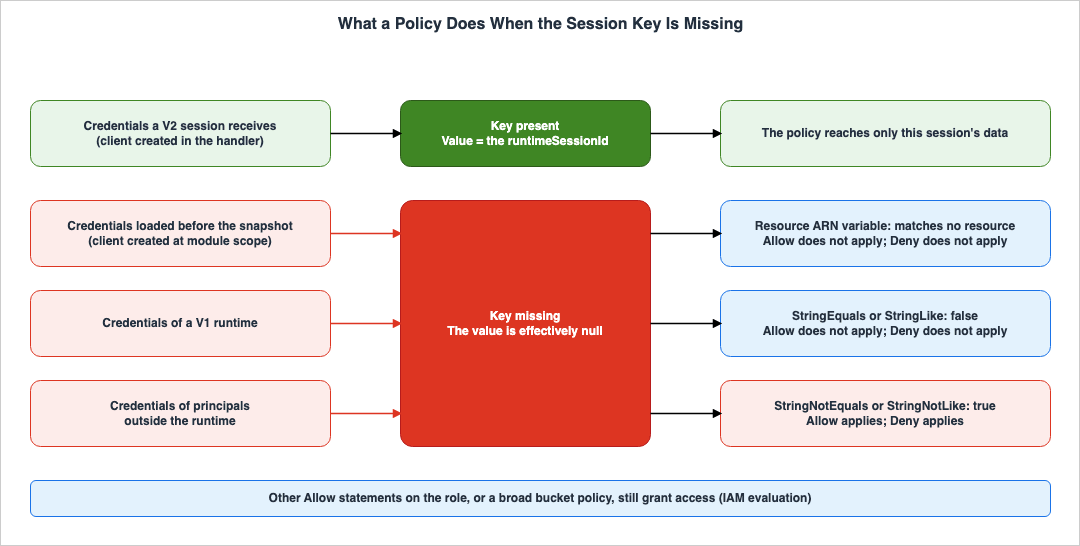
Requests without a key can arise through at least three different paths: credentials loaded before a snapshot, credentials from the V1 runtime, and credentials of principals outside the runtime. The IAM User Guide describes how requests without a key are evaluated. The Variables page states:If a variable that has no value in the authorization context is used as part of the Resource or NotResource element of a policy, the resource that includes a policy variable with no value will not match any resource.Inverted condition operators like StringNotEquals or StringNotLike do match against a null value, as the value of the condition key they are testing against is not equal to or like the effectively null value.The Condition operators page also describes the same principle.
If the key that you specify in a policy condition is not present in the request context, the values do not match and the condition is false. If the policy condition requires that the key is not matched, such as StringNotLike or ArnNotLike, and the right key is not present, the condition is true.Table 2 illustrates these principles as applied to policies that utilize keys. The two columns on the right are inferences by this article.
| Where the key appears | Without the key | Effect on an Allow statement | Effect on a Deny statement |
|---|---|---|---|
| Resource ARN variable | Matches no resource | The Allow does not apply (closed) | The Deny does not apply (open) |
StringEquals or StringLike | The condition is false | The Allow does not apply (closed) | The Deny does not apply (open) |
StringNotEquals or StringNotLike | The condition is true | The Allow applies (open) | The Deny applies (closed) |
The S3 example in Section 5.1 and the DynamoDB example in Section 5.2 both utilize keys within Allow statements using matching operators. As an inference by this article, these two examples fail closed when applied to requests without a key. Observations in the existing article What a Snapshot Carries on AgentCore Runtime V2 indicate that clients created before a snapshot were denied access even when attempting to write to their own prefixes, which aligns with this default behavior.
Conversely, using negation operators within an Allow statement permits requests without a key. For example, an Allow statement written with
StringNotLike in an attempt to exclude other sessions' prefixes will match requests that lack a key. Conversely, using negation operators within a Deny statement will deny requests without a key. This denial may also prevent requests from administrators outside the runtime. If a Deny statement includes a key, it is necessary to also include a condition that limits the principals to which the statement applies to the execution role. Both of these are inferences by this article.Figure 1 indicates, for each source of credentials, whether a key exists and to which row in Table 2 it corresponds.
5.5 Other Statements on the Same Role
Allow statements scoped with the key do not override other Allow statements that apply to the same request. The evaluation page of the IAM User Guide states that for most resources, access is granted if there is a single explicit permission, either identity-based or resource-based, for the principal. As an inference by this article, if a given execution role has another policy granting broad read access to the same bucket, or if the bucket's policy grants the execution role broad permissions, then any session can read the prefixes of other sessions, even if the example in Section 5.1 applies. The order of evaluation is covered in the existing article IAM Policy Evaluation Logic Step-by-Step - Explicit Deny, RCP, SCP, Resource Policy, Identity Policy, Permission Boundary, and Session Policy.The Security best practices page states that execution roles created by the AgentCore CLI, by default, allow calls to all foundation models and inference profiles in the account, and recommends creating execution roles with the principle of least privilege in production environments. As an inference by this article, when filtering data by key, it is necessary to review all policies attached to the execution role, as well as the resource-based policies on the data itself, to ensure that there are no other Allow statements that grant access to the same data.
6. Who Chooses the Session ID
This chapter explains who selects the session ID, which becomes the key value, and what IAM checks during the call. Figure 2 illustrates the chain from the user to the data, showing the layer responsible for each link.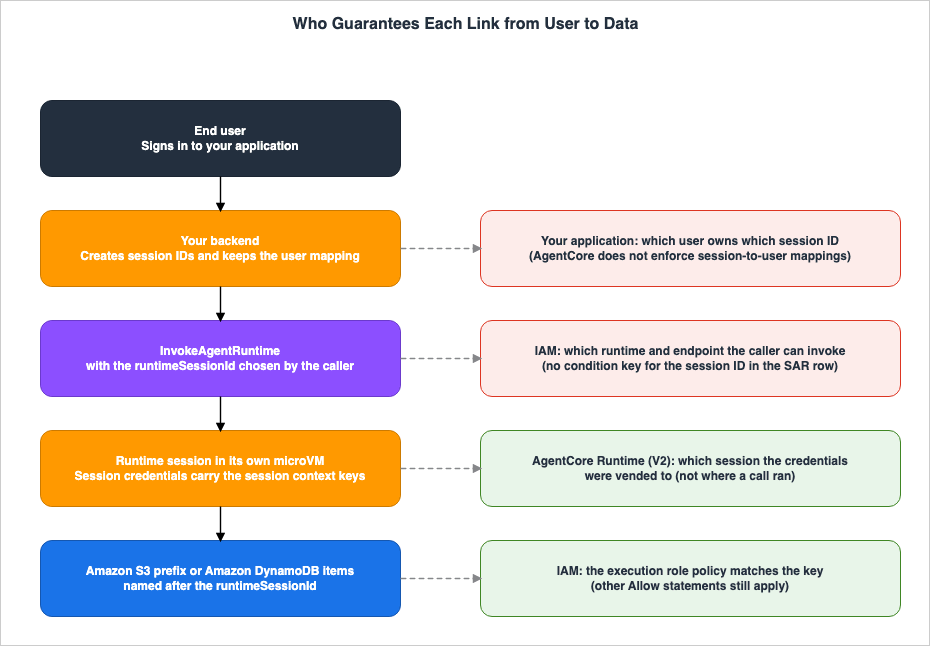
6.1 The Caller Passes the Session ID
The Sessions page describes the process for creating a session as follows:A new session is created on the first invoke with a unique runtimeSessionId provided by your application.The
InvokeAgentRuntime API Reference lists runtimeSessionId as a request parameter passed in the X-Amzn-Bedrock-AgentCore-Runtime-Session-Id header, with a length of 33 to 256 characters. The parameter is not marked as required. The Sessions page instructs you to capture the session ID returned in the response and include it in subsequent requests. Using the same session ID ensures that the context of the same session continues.As an inference by this article, the value of this key is simply the string provided by the caller. AgentCore guarantees that the string will be present in the credentials for the session identified by that string. Who selected that string does not go into the key.
6.2 What IAM Checks at Invocation
In the row for theInvokeAgentRuntime operation, the SAR lists the resource types runtime and runtime-endpoint and the condition key aws:ResourceTag/${TagKey}. The same applies to the InvokeAgentRuntimeForUser, InvokeAgentRuntimeCommand, and StopRuntimeSession operations. The rows of the SAR do not list global condition keys, which can be used with any operation. Furthermore, as described in Section 4.3, the IAM User Guide page listing these global condition keys does not include any keys with a session ID as a value.The list of condition keys in the SAR includes
bedrock-agentcore:runtimeSessionId, which filters by Runtime Session ID. However, in the table detailing SAR operations, this key only appears in the row for PutSystemLogEvents. This operation grants permission to collect system logs from the runtime instance and has a resource type of capacity-provider. Table 3 lists the rows in the SAR as of the confirmation date.| Action | Resource types | Condition keys in the row |
|---|---|---|
InvokeAgentRuntime | runtime, runtime-endpoint | aws:ResourceTag/${TagKey} |
InvokeAgentRuntimeForUser | runtime, runtime-endpoint | aws:ResourceTag/${TagKey} |
InvokeAgentRuntimeCommand | runtime, runtime-endpoint | aws:ResourceTag/${TagKey} |
StopRuntimeSession | runtime, runtime-endpoint | aws:ResourceTag/${TagKey} |
PutSystemLogEvents | capacity-provider | aws:ResourceTag/${TagKey}, bedrock-agentcore:runtimeSessionId |
As an inference by this article, IAM at invocation checks which runtimes and endpoints the caller can invoke. However, the conditions in the IAM policies that restrict access based on session ID are not documented in either the Service Authorization Reference (SAR) or the IAM User Guide. Any entity that can call a runtime can do so regardless of the session ID. If that session ID belongs to another user, the policies described in Chapter 5 will permit that entity to read and write data associated with that session. The strength of this restricted access depends on the session ID not leaking outside the caller and not being guessable.
The Security best practices page recommends that the permissions assigned to the execution role should be the same as or less than the permissions of the entity calling the runtime. As an inference by this article, this principle remains valid even when using execution roles with restricted access based on keys. Since the calling entity can choose a different session ID, from the perspective of the entity that can call the runtime, the combined scope of the policies applied to the execution role, when restricted by session ID, effectively represents the entire scope of the execution role itself.
6.3 The Backend Holds the Mapping
The Sessions page states the following:Use a unique session ID for each user. AgentCore does not enforce session-to-user mappings - your client backend should maintain the relationship between users and their session IDs.The Security best practices page also states the same point: that the backend must maintain this mapping. As mentioned in Section 5.1, the FUSE page clarifies that a session ID is not a long-lasting user identifier.
As an inference by this article, a design that passes a session ID received from the end-user's device directly to
runtimeSessionId does not properly separate users. To achieve proper separation, the backend must handle the following three tasks:- Authenticate the user and only use session IDs associated with that user.
- Generate session IDs on the server-side using values that are difficult to predict.
- Store the mapping between generated session IDs and users, and verify this mapping with each request.
The following Python example demonstrates how the backend can generate session IDs on the server-side, adhering to the format described on the FUSE page, and how it can verify these mappings. This example was created for this article, and the specific storage mechanism is left to the user's design.
import secrets

# 32 random bytes encoded as URL-safe Base64 without padding: 43 characters
# from [A-Za-z0-9_-], which matches the pattern on the FUSE page.
def new_runtime_session_id() -> str:
    return secrets.token_urlsafe(32)

def session_id_for(user_id: str, conversation_id: str, store) -> str:
    # store is your backend's mapping from (user, conversation) to session ID.
    # Never accept a session ID chosen by the end user's client.
    key = (user_id, conversation_id)
    sid = store.get(key)
    if sid is None:
        sid = new_runtime_session_id()
        store.put(key, sid)
    return sid
According to the Sessions page, a session remains valid until the ARN (Amazon Resource Name) associated with its runtime is deleted. Even if a session has ended, calling it again with the same session ID restarts it in a new microVM. As an inference by this article, reusing a session ID and passing it to a new user could result in the new user's session being associated with the previous user's prefix. Therefore, session IDs should not be reused.
6.4 User IDs Are a Separate Value
InvokeAgentRuntime includes a runtimeUserId argument, separate from the runtimeSessionId. According to the InvokeAgentRuntime API Reference, to call the API with the user ID via the X-Amzn-Bedrock-AgentCore-Runtime-User-Id header, you must also have the bedrock-agentcore:InvokeAgentRuntimeForUser permission. The Security best practices page describes this header as part of the UserId path used when the agent obtains OAuth tokens on behalf of end users, and says that this path treats the user identifier as an opaque string without IdP validation.The Sessions page only lists two keys:
aws:AgentCoreRuntimeSourceSid and aws:AgentCoreRuntimeSourceArn. No statement about a key that puts the user ID into the execution role credentials was found (No statement found). The Security best practices page recommends that the value for this header should be derived from the context of the authenticated principal, and advises against using arbitrary values provided by the client. Furthermore, it recommends prioritizing JWT pathways in production environments. The handling of tokens and consent from external services is covered in another article on this site, Who Is Consenting - OAuth Session Binding and the Consent Portal in AgentCore Identity.7. What the Keys Do Not Prove
This chapter outlines what the keys do not guarantee, alongside excerpts from the developer guide.7.1 Where the Call Ran
The Sessions page reads as follows:These keys attest that the request’s credentials originated from a given runtime session. They do not prove that a request was made from inside the corresponding microVM. Use them to scope access, not as evidence of where a call ran.This key indicates which session the credentials were vended to. As described in Section 3.2, any code running in the microVM can extract the execution role credentials. As an inference by this article, if credentials are extracted from the microVM, they retain the same key value when used outside the microVM. Policies restricted by this key limit the scope of the credentials to data within a single session. The key does not reveal whether the credentials have been exported outside the microVM.
The IAM User Guide describes the
aws:Ec2InstanceSourceVpc key, which is the VPC to which the EC2 role credentials were delivered. It explains how to combine this with aws:SourceVpc to verify that the VPC where the credentials were delivered and the calling VPC are the same. For the AgentCore Runtime keys, no corresponding combination was found on the confirmation date (No statement found).7.2 Which User Is Behind the Session
As described in Chapter 6, the session ID is a value passed by the caller, and AgentCore does not enforce a direct association between sessions and users. A key value ofA simply indicates that the session was initiated with the string A; it does not reveal which user is currently using that session.7.3 What the Agent Does Inside Its Own Scope
Keys define the scope of data a session can access. Within that scope, the agent's actions are not restricted. As an inference by this article, even if an agent performs unintended actions following the prompt's instructions, it can still read and write data within its own session's prefix.The V2 announcement post stated the following regarding keys. The post is dated September 18, 2026, before the keys were added.
Session context keys will give each session its own scoped identity, so an unattended agent, tool, or environment acts with exactly the permissions defined for it and nothing more.As an inference by this article, the permissions defined here refer to the scope of actions permitted by the execution role's policy, which is constrained by the key. The backend, as described in Chapter 6, determines whose scope that is.
8. Comparing the Ways to Scope Access
This chapter compares different methods for scoping access.8.1 Three Scopes: Session, User, and Runtime
This article divides the scope of data filtering into three categories:- Session: Data pertaining to a single runtime's session. This scope is suitable for data associated with a conversation or task, which becomes obsolete when the session ends. The key
aws:AgentCoreRuntimeSourceSididentifies data within this scope. - User: Data that spans multiple sessions for the same user. This scope includes data that persists beyond a single session, such as conversation history and settings. As the FUSE page notes, the session ID is not an identifier for data within this scope.
- Runtime: Data shared across all sessions in the same runtime. The key
aws:AgentCoreRuntimeSourceArnor the separation of runtimes defines this scope.
8.2 Four Mechanisms
Table 4 lists four mechanisms, categorized by the scope they define, the entity responsible for setting the value, and whether agent code can modify the value. The "Who sets the value" and "Can agent code change it" columns are based on both the original source materials and the inferences drawn in this article.| Mechanism | Scope it gives | Who sets the value | Can agent code change it | Source |
|---|---|---|---|---|
| Session context keys in the execution role policy | Session | The caller of InvokeAgentRuntime | No | Sessions page (Stated) |
| A separate runtime and execution role | Runtime | The administrator who creates the runtime | No | Sessions page (Stated) |
AssumeRole with a session policy in the handler | Whatever the code requests | The agent code | Yes | MCP post, Policies page (Stated) |
AssumeRoleWithWebIdentity with session tags from a signed JWT | User | The identity provider that signs the JWT | No | Propagation post (Stated) |
Regarding the second row, the release notes indicate that it is no longer necessary to create a separate role for each session. This article does not consider configurations that create roles on a per-session basis. When runtimes are separated, the execution roles can also be separated.
Concerning the third row, the MCP post states that the execution role's permissions apply to all actions performed by the agent, and that at the runtime configuration level, these permissions cannot be restricted on a per-invocation basis. Furthermore, it illustrates a scenario where the agent calls
AssumeRole and further restricts permissions using a session policy. The Policies page states that the session permissions for a role are the intersection of the role's identity-based policies and the session policy. As an inference by this article, since the agent's code writes the session policy, any unintended behavior in that code could potentially alter the restrictions.Regarding the fourth row, the propagation post describes how an Amazon Cognito pre token generation Lambda trigger adds session tag claims to the JWT, and how the agent then calls
AssumeRoleWithWebIdentity using that ID token. The post states:These credentials are user-scoped and tamper-proof because the session tags are derived from the cryptographically signed JWT, not from agent code.The same post also indicates that if the trust policy does not grant permission for
sts:TagSession, STS will silently drop the session tags, resulting in subsequent access being denied. The impact of session tags on the size of the token is discussed in the existing article What Fills an AWS STS Session Token - Session Policies, Session Tags, the Single Size Limit, and How to Measure and Test It.8.3 When the Keys Are Enough
As an inference by this article, keys alone are sufficient when the following conditions are met:- The data to be segmented is data associated with a session.
- The backend system generates the session ID on the server side and maintains a mapping to the user.
- There are no other Allow statements in the execution role that grant access to the same data.
- The runtime environment is V2, and the clients that access the data are created in the handler.
If you need to segment data associated with a user, keys alone are not sufficient. As an inference by this article, you should also use a mechanism that incorporates the user identifier in the role's session. That path should be one whose value the agent's code cannot modify. In the propagation post, a JWT signed by the identity provider (IdP) carries this value. It is also possible to combine keys for session-specific data with a signed JWT's session tag to filter user history.
9. V1, V2, and the Platform Version You Get
This chapter explains how to verify the platform version as a condition for using keys.The Sessions page, the FUSE page, and the Release notes all specify that keys are limited to the V2 runtime. The How it works page lists 19 Regions where V2 is available.
The documentation contains conflicting information regarding whether V2 is the default for new runtimes (Sources disagree). The How it works page states that if the
platformVersion is omitted during runtime creation, it defaults to V1. The V2 default What's New states that from November 12, 2026, new runtimes use the next-generation runtime by default. This discrepancy, along with the version used when updating existing runtimes, is addressed in Chapter 2 of the existing article What a Snapshot Carries on AgentCore Runtime V2 - Startup Work, Per-Request Values, and Session Credentials.As an inference by this article, it is safe to explicitly specify V2 for the
platformVersion when creating or updating runtimes that rely on keys. If the policies outlined in Chapter 5 are used on a V1 runtime, Allow statements fail closed as described in Section 5.4, and the agent cannot access even its own data. If Allow statements use negated operators, they fail open. The FAQ states that no deprecation date for V1 has been announced.10. Where the Sources Disagree and What They Do Not Say
This chapter summarizes the discrepancies among the sources and the matters that the sources do not address, as discussed in Chapters 3 through 9.10.1 Where the Sources Differ
Table 5 lists instances where the sources provide differing information. This article does not definitively identify either source as incorrect.| Topic | One source | The other source |
|---|---|---|
| Default platform version for new runtimes | How it works page: omitting platformVersion at creation gives V1 | What's New (November 12, 2026): new runtimes use the next generation by default |
| Scoping the execution role per session | MCP post (April 14, 2026): permissions cannot be scoped down per invocation at the runtime configuration level | Release notes (October 2026): sessions that share an execution role can each be restricted with a single policy |
| When per-session scoping is available | Release notes (October 2026): available on V2 | Next-generation post (November 12, 2026): by re:Invent, per-session scoping will bind each session to its own storage folder |
Regarding the second row, the MCP post from April 14, 2026, predates the addition of the session context key. The statement that permissions cannot be scoped down at the runtime configuration level may still be valid even after the key was added, pertaining to the configuration settings themselves. As an inference by this article, the key distinguishes sessions in the execution role policy, rather than in the runtime configuration settings.
Regarding the third row, the text from the next-generation post reads:
By re:Invent, per-session scoping will bind each session to its own storage folder through session-labeled credentials, and we will keep building from there.It is unclear from this text alone whether this statement refers to the same functionality described in the October 2026 release notes, or to a different feature that associates sessions with their own storage folders. This article focuses solely on features documented in the release notes and developer guides, and only those that are available on the confirmation date.
10.2 What the Sources Do Not Say
The materials reviewed for this article did not contain any statements regarding the following (No statement found):- A list of services and operations that evaluate keys. The developer guide only provides examples using S3 and DynamoDB.
- The data types of keys, nor a listing of them on the AWS global condition context keys page in the IAM User Guide.
- Whether keys are inherited in the session when
sts:AssumeRoleis called with session credentials. - Whether key values are recorded in AWS CloudTrail logs.
- A method, within IAM, to restrict the session ID that can be used by the caller when using
InvokeAgentRuntime. - A key that allows a user ID to be included in the credentials of the execution role.
- A combination that verifies whether credentials containing a key are being used outside of the assigned microVM.
- Examples of policies that restrict based on the runtime ARN.
11. Decisions This Design Leaves to You
This chapter outlines decisions in this design that the sources leave to the user.- Which data should be categorized by session, which by user, and which by runtime (Section 8.1).
- Where should the session ID be created, where should the association with the user be stored, and how should it be verified with each call? How should used session IDs be handled (Section 6.3)?
- Can the policies applied to the execution role consist only of statements scoped with the keys? Who will review other Allow statements (Section 5.5)?
- Should keys be used in Deny statements? If so, how should the principals to which those statements apply be limited (Section 5.4)?
- What methods should be used to filter data associated with a user? Can session tags from a signed JWT be used (Section 8.2)?
- How should the
platformVersionbe fixed during runtime creation and updates (Chapter 9)? - Prior to deployment, which requests should be used to verify permissions for your own data and denials for other sessions?
12. Failure Modes
This chapter lists potential failure scenarios in the system's design, accompanied by relevant documentation.- Since a new microVM is created for each session, data is also considered to be isolated per session. All sessions operate with the same execution role (see Section 3.1).
- Clients created before a snapshot attempt to read data filtered by a key. These requests will be denied because the credentials do not include the key, and requests for the client's own data will also be rejected (see Section 4.2).
- An Allow statement uses a key with a negated operator. This statement applies to requests that do not include the key (see Section 5.4).
- A Deny statement includes a key but does not limit the principals it applies to. Requests from entities outside the runtime will also be rejected (see Section 5.4).
- Alongside policies that filter by key, another policy is retained that broadly permits access to the same data. This allows sessions to read data from other sessions (see Section 5.5).
- A DynamoDB policy uses the
ForAllValuescondition without aNullcondition. Requests that do not includedynamodb:LeadingKeyswill be permitted (see Section 5.2). - The session ID received from the end-user's device is passed directly to
runtimeSessionId. AgentCore does not enforce a mapping between sessions and users (see Section 6.3). - Session IDs that include
/are used. IAM's*wildcard can match across/characters (see Section 5.1). - Session IDs are treated as user identifiers. However, a session ID is not a long-lasting user identifier (see Section 6.3).
- Credentials that include a key are treated as evidence that the request originated from inside the microVM associated with that session. The developer guide discourages this usage (see Section 7.1).
- Runtimes are created without specifying
platformVersion, and policies that rely on keys are applied. In some cases, these runtimes may be designated as version V1 (see Chapter 9).
13. Frequently Asked Questions About Session Context Keys on AgentCore Runtime
This chapter briefly summarizes the content of this article in response to six common questions.Do AgentCore Runtime sessions that share an execution role keep each other's data apart?
While each compute environment is separate, the data within shared storage is not isolated. Amazon Bedrock AgentCore Runtime provides a dedicated microVM for each session. However, all sessions operate using the same credentials configured for the runtime's execution role. If the execution role's policy does not utilize session context keys, agents in any session can read data of other sessions that the role can reach.What values do aws:AgentCoreRuntimeSourceSid and aws:AgentCoreRuntimeSourceArn carry?
Theaws:AgentCoreRuntimeSourceSid key carries the runtimeSessionId for the call, while the aws:AgentCoreRuntimeSourceArn key carries the ARN of the runtime. According to the Amazon Bedrock AgentCore Developer Guide, both keys are included only in the credentials received by the runtime session for platform version V2. They can also be used as variables for resource ARNs and within Condition statements.Does scoping an S3 prefix with aws:AgentCoreRuntimeSourceSid separate users?
Using only the S3 prefix withaws:AgentCoreRuntimeSourceSid does not separate users. The key value is the runtimeSessionId provided by the caller. Amazon Bedrock AgentCore does not enforce a mapping between sessions and users, and the Amazon Bedrock AgentCore Developer Guide recommends that developers manage this mapping within their own backend systems. The Service Authorization Reference lists only aws:ResourceTag/${TagKey} as a condition key in the row for InvokeAgentRuntime, and no IAM condition key that restricts usable session IDs was found.Do session context keys prove that a request came from inside the session's microVM?
No. The Amazon Bedrock AgentCore Developer Guide states that keys only indicate the origin of the credentials and do not prove that the call originated from inside the session's microVM. It advises against using them as evidence of where the execution took place. Any code running in the microVM can retrieve the execution role credentials from the metadata endpoint.What happens to a policy that uses the keys when the credentials do not carry them?
The behavior depends on the operators and statements used. According to the IAM User Guide, a resource ARN that includes a variable without a value matches no resource, a condition likeStringEquals is not satisfied, and a negated condition like StringNotEquals is satisfied. Therefore, Allow statements that use keys with matching operators fail closed, while Allow statements that use keys with negated operators fail open.Can session context keys separate data that a user keeps across sessions?
The keys alone cannot separate that data. The Amazon Bedrock AgentCore Developer Guide states that a session ID is not a persistent user identifier. To associate user data with a specific user across sessions, you need to combine the keys with a means of putting the user identifier into a role session. That path should be one whose identifier the agent's code cannot modify. An example of this is using session tags from a JWT signed by an identity provider (IdP) withAssumeRoleWithWebIdentity.14. Summary
This article details what is and is not guaranteed in the Amazon Bedrock AgentCore Runtime session context keys, broken down by link along the chain from the user to the data. Each session operates using the same execution role credentials. In the V2 runtime, sessions receive credentials that includeaws:AgentCoreRuntimeSourceSid and aws:AgentCoreRuntimeSourceArn, allowing each session to be restricted to its own data with a single execution role policy.When credentials lack the keys, IAM evaluates as follows: Variables in the resource ARN will not match any resource. Conditions like
StringEquals will not evaluate to a match. Conversely, conditions like StringNotEquals will evaluate to a match. Therefore, Allow statements that use keys with matching operators will not apply to credentials loaded before a snapshot, nor to credentials used by the V1 runtime. If Allow statements remain that broadly grant access to the same data in the same execution role, the effect of key-based restrictions will be lost.The value of the key is the session ID passed by the caller. IAM condition keys that can be used to restrict the session ID used with
InvokeAgentRuntime were not found in the materials reviewed for this article. AgentCore does not enforce a mapping between sessions and users; that responsibility lies with the application's backend. The developer guide states that the key does not prove where the call ran. To restrict user data that persists across sessions, use a path whose value the agent's code cannot modify. An example of this is a session tag on a JWT signed by an identity provider (IdP). The information presented in this article is current as of November 17, 2026.15. References
- Amazon Bedrock AgentCore Developer Guide: Use isolated sessions for agents
- Amazon Bedrock AgentCore Developer Guide: Mount your own file systems in your container
- Amazon Bedrock AgentCore Developer Guide: Security best practices for AgentCore Runtime
- Amazon Bedrock AgentCore Developer Guide: Understanding Credentials Management in Amazon Bedrock AgentCore
- Amazon Bedrock AgentCore Developer Guide: microVMs
- Amazon Bedrock AgentCore Developer Guide: Release notes for Amazon Bedrock AgentCore
- Amazon Bedrock AgentCore API Reference: InvokeAgentRuntime
- Service Authorization Reference: Actions, resources, and condition keys for Amazon Bedrock Agentcore
- IAM User Guide: AWS global condition context keys
- IAM User Guide: How AWS enforcement code logic evaluates requests to allow or deny access
- IAM User Guide: IAM policy elements: Variables and tags
- IAM User Guide: IAM JSON policy elements: Condition operators
- IAM User Guide: Policies and permissions in AWS Identity and Access Management
- IAM User Guide: Pass session tags in AWS STS
- Amazon DynamoDB Developer Guide: Using IAM policy conditions for fine-grained access control
- Amazon Bedrock AgentCore Developer Guide: Get workload access token
- AWS: Amazon Bedrock AgentCore FAQs
- What's New: The next generation AgentCore runtime is now the default
- AWS Security Blog: Secure AI agent access patterns to AWS resources using Model Context Protocol
- AWS Security Blog: Propagate user authorization context in AI agents with Amazon Bedrock AgentCore
- AWS Machine Learning Blog: The new AgentCore runtime: Elastic, optimized, and consistently fast starts
- AWS Machine Learning Blog: Run agents securely and efficiently with the next generation AgentCore runtime
References:
Tech Blog with curated related content
Written by Hidekazu Konishi