What a Deny Stops in AgentCore Harness Lifecycle Hooks - Per-Event Effects, Non-Blocking Targets, and failureMode
First Published:
Last Updated:
allow or deny decision.When you want to stop tool calls through internal approval or auditing processes, the first thought is often to have the hook return deny. However, the effect of a deny varies depending on the event. A deny before a tool is called simply skips that call, and the loop continues. A deny after a tool has been called keeps the result already obtained while stopping the invocation. A deny after the invocation cannot retract the output that has already streamed. Events sent to SNS and EventBridge are purely notifications and do not alter the loop's behavior.
This article answers the question: what stops, what does not stop, and what cannot be undone when a harness hook returns deny. Drawing on the Lifecycle hooks page of the AgentCore developer guide, and cross-referencing the API reference and release notes, this article provides answers. It does not cover how to build a harness, configuring models and tools, general principles of guardrails, or pricing. This article did not test the hooks on a live system. The information presented was verified on November 18, 2026.
Related articles on this site:
- Amazon Bedrock AgentCore Harness - The Managed Agent Loop and the Export-to-Code Boundary
- Stopping an AI Agent on AWS - What Each Control Stops, What Keeps Running, and Who Can Undo It
- What a Snapshot Carries on AgentCore Runtime V2 - Startup Work, Per-Request Values, and Session Credentials
- Agent Sandboxing and Blast-Radius Isolation on AWS - Choosing the Unit of Each Containment Boundary and What Each One Does Not Stop
- Scoping Each Session on AgentCore Runtime - Session Context Keys, Who Chooses the Session ID, and What the Keys Do Not Prove
- Amazon Bedrock AgentCore Master Index - A Hub for AgentCore Articles and Decision Patterns
Table of Contents
- 1. Scope and Assumptions
- 2. What Lifecycle Hooks Are For
- 3. The Four Events and What a Deny Does
- 4. Targets - Only Lambda Returns a Decision
- 5. When No Decision Comes Back - timeoutSeconds and failureMode
- 6. When the Context Is Too Large - The 64 KiB Limit
- 7. Several Hooks on the Same Event
- 8. Hooks on Inline Functions
- 9. Where to Put Each Check
- 10. Where the Sources Disagree and What They Do Not Say
- 11. Failure Modes
- 12. Frequently Asked Questions About AgentCore Harness Lifecycle Hooks
- 13. Summary
- 14. References
1. Scope and Assumptions
This chapter defines the intended audience for this article, the terminology used, and the sources it read. The following seven points represent key conclusions:- Only Lambda targets can return a decision. SNS and EventBridge targets only provide notifications and do not alter the agent's loop.
- A
before_invocationdeny stops the invocation before the agent starts. - A
before_tool_calldeny will skip the tool call. The agent's loop will continue. - An
after_tool_calldeny keeps the completed tool result and stops the invocation. The tool has already executed. - An
after_invocationdeny only reports the decision in the response stream and cannot retract output that has already streamed. - When a Lambda function fails to respond in time, returns an error, or provides an invalid response, the
failureMode(default isdeny) will determine the outcome. When the context exceeds 64 KiB and is truncated,failureModedoes not apply. - An
after_tool_callevent for an inline function simply indicates that the harness has processed the result returned by the client; it does not provide proof that the client performed any external action.
1.1 Who This Article Is For
This article is intended for developers who are using AgentCore's harness to run agents and want to stop tool calls through internal approval and auditing systems, as well as security engineers responsible for maintaining the agent's underlying infrastructure. This article is particularly relevant for readers who believe any of the following statements to be true:- Returning deny from a hook stops the agent's risky actions.
- Returning deny after a tool has run undoes that execution.
- Routing events to SNS or EventBridge will ensure that all hook events are recorded for auditing purposes.
- Even if a Lambda function fails, the agent will continue to operate as normal.
1.2 Five Things Called a Hook
AWS documentation uses the word hook for several mechanisms. This article covers only the harness lifecycle hooks in the first row.| Term | Description | Focus of this Article |
|---|---|---|
| Harness Lifecycle Hooks | Configured in the hooks field of CreateHarness / UpdateHarness, these hooks send events at four specific points in the harness agent loop. | The primary subject of this article. |
| AgentCore Runtime Lifecycle Hooks | Configured in the hooksConfiguration field of CreateAgentRuntime / UpdateAgentRuntime; AgentCore Runtime calls an endpoint in the container (as of November 18, 2026, only the build warmup hook). | Not covered. This site's existing Runtime V2 article covers them. |
| AWS CloudFormation Hooks | These hooks inspect the configuration before a resource is created. The handling of non-compliant resources (failure mode) can be set to FAIL or WARN. | Not covered. Only the name resembles failureMode. |
| Amazon EC2 Auto Scaling Lifecycle Hooks | These hooks create a waiting state during the instance's startup and shutdown processes. | Not covered. |
| Claude Code Hooks | These are hooks associated with a different product. | Not covered. No comparison is made. |
Event names have two different notations. The payload of a hook, the
hookEvent in the response stream, and the tables in the developer guide use lowercase letters and underscores, such as before_tool_call. The JSON configuration and API types use camel case, such as beforeToolCall. This article uses the former notation when referring to events and the latter when referring to configuration keys.The word deny also needs care. An explicit deny in an IAM policy (
"Effect": "Deny") is the result of an IAM evaluation. In this article, deny refers to the decision returned by the hook's Lambda function ("decision": "deny"), and is not an IAM evaluation. This article calls the former an explicit deny (Deny) and the latter a deny decision.1.3 Sources and the Date Checked
This article is based on the following materials. The information contained within these materials was verified on November 18, 2026.- AgentCore Developer Guide, Lifecycle hooks page (including the table of the per-event effects of a deny decision, targets,
timeoutSeconds,failureMode, 64 KiB truncation, inline functions, and the transition offile_operationsevents). - The same guide, Security and access controls page (execution role permissions and caller permissions) and Tools page (the inline function flow).
- AgentCore Control Plane and Data Plane API Reference (including
CreateHarness,UpdateHarness,HarnessHook,HarnessHookLambdaTarget,InvokeHarness,HarnessHookEvent,HarnessMessageStopEvent). - AgentCore release notes (September 2026: Harness: Lifecycle hooks; November 2026: managed built-in tools).
A What's New post on June 17, 2026 announced the general availability (GA) of the harness. The developer guide states that the harness is GA in the Regions shown in its table. Check the Supported AWS Regions table in the developer guide for the Regions where you can use the harness.
2. What Lifecycle Hooks Are For
This chapter covers what hooks are for, where they are configured, and who can change or remove them.2.1 Decisions and Notifications
The developer guide lists three uses for hooks: validating an invocation or a tool call, logging activity to another system, and initiating asynchronous workflows.These three uses can be categorized into two functions: decision-making and notification. Validation requires a decision on whether to stop or continue the loop. Logging and asynchronous workflows, on the other hand, only require notifications to be sent. Only Lambda targets can return decisions; SNS and EventBridge targets handle notifications only.
2.2 Where Hooks Are Configured
Hooks are configured within a harness using eitherCreateHarness or UpdateHarness. The developer guide states that hook configuration is not available as an InvokeHarness override. Callers can override tools or models on each invocation, but they cannot add or remove hooks.A harness can accommodate a maximum of 20 hooks, and each hook name must be unique in the harness. The API reference confirms that
hooks is an array containing between 0 and 20 entries. Each hook is associated with exactly one of four events and targets one of Lambda, SNS, or EventBridge.When passing
hooks to UpdateHarness, the provided list overwrites any existing hook configurations. Passing an empty list will remove all hooks. Omitting the hooks parameter will preserve the existing configuration.The developer guide provides an example that defines three hooks: a Lambda decision before the invocation, an SNS notification after the tool is invoked, and an EventBridge notification after the invocation.
[
  {
    "beforeInvocation": {
      "name": "validate_request",
      "target": {
        "lambda": {
          "arn": "arn:aws:lambda:us-west-2:123456789012:function:validate-harness-request",
          "timeoutSeconds": 5,
          "failureMode": "deny"
        }
      }
    }
  },
  {
    "afterToolCall": {
      "name": "record_tool_result",
      "target": {
        "sns": {
          "arn": "arn:aws:sns:us-west-2:123456789012:harness-tool-events"
        }
      }
    }
  },
  {
    "afterInvocation": {
      "name": "record_invocation",
      "target": {
        "eventBridge": {
          "arn": "arn:aws:events:us-west-2:123456789012:event-bus/harness-events"
        }
      }
    }
  }
]
2.3 Who Can Change or Remove Hooks
Because hooks return decisions, anyone who can remove a hook can also remove the decision it makes. According to the Security and access controls page, callingUpdateHarness requires the bedrock-agentcore:UpdateHarness and bedrock-agentcore:UpdateAgentRuntime permissions (and bedrock-agentcore:UpdateMemory when using memory). Principals with these permissions can remove all hooks by passing an empty list (this article's inference).The code in the Lambda function makes the decision. Therefore, anyone who can modify the function's code or configuration can also change the decision (this article's inference). If hooks are used to implement an approval process, give the
UpdateHarness permission and the permission to modify the hook's Lambda function to people other than those who use the agent.3. The Four Events and What a Deny Does
This chapter shows, for each of the four events, what a Lambda deny decision stops, what it does not stop, and what it cannot undo.3.1 The Effect Table in the Developer Guide
The developer guide states that the event type determines when the hook runs, the context sent to the target, and the effect of a Lambda deny decision. The effects of a deny decision for each event are detailed in the table in the developer guide. The following excerpt reproduces the "Event" and "Effect of a Lambda deny decision" columns from the table, omitting the "Context" column.| Event | Effect of a Lambda deny decision |
| before_invocation | Stops the invocation before the agent starts. The response stream emits a messageStop event with stopReason set to hook_stopped. |
| before_tool_call | Skips the tool call. The agent loop continues. |
| after_tool_call | Keeps the completed tool result, then stops the invocation. The response stream emits a messageStop event with stopReason set to hook_stopped. |
| after_invocation | Reports the decision in the response stream. The invocation has already completed, so the hook cannot retract streamed output. |The API reference also lists
hook_stopped among the stopReason values of HarnessMessageStopEvent.3.2 What Stops, What Keeps Going, and What Cannot Be Undone
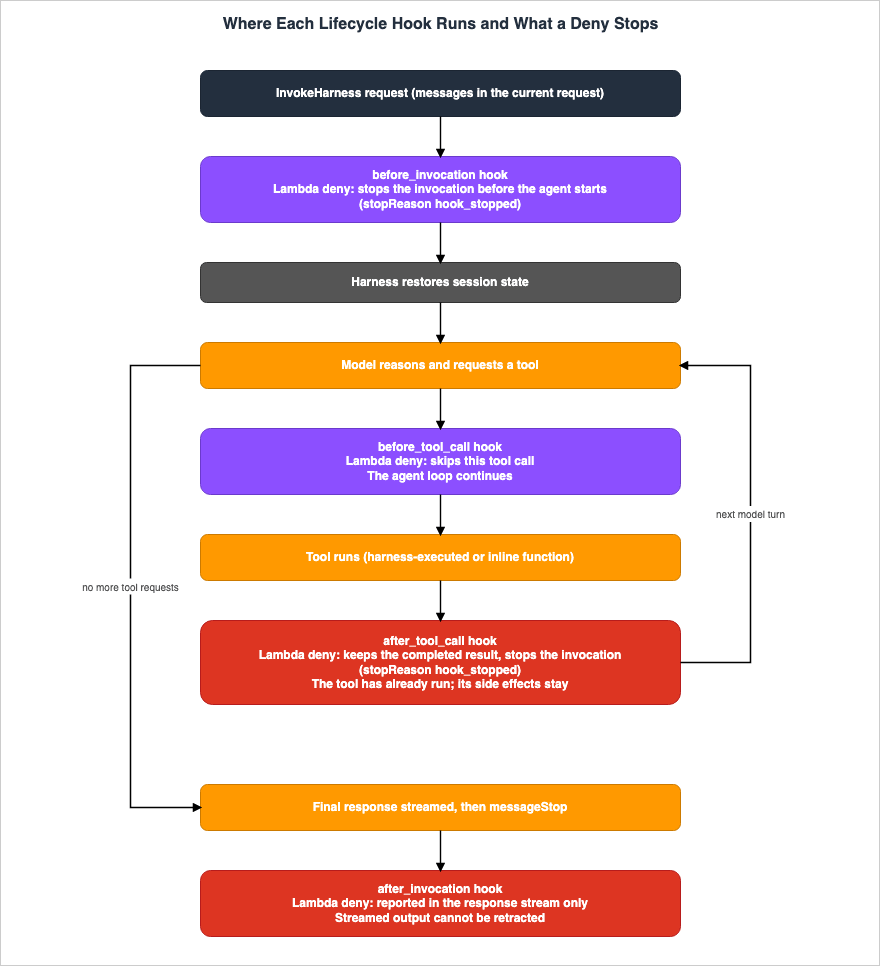
| Event | Stopped by a Deny | Not Stopped by a Deny | Not Undone by a Deny |
|---|---|---|---|
before_invocation | The entire invocation. The agent does not begin. | The next InvokeHarness invocation (each invocation is decided again). | None (nothing has been executed yet). |
before_tool_call | A single tool call. | The agent's loop. The model continues to reason and may call other tools. | None (the tool has not yet been executed). |
after_tool_call | The rest of the invocation (the next tool and subsequent model responses). | None (the invocation stops). | The tool's execution and its external effects. Completed results also remain. |
after_invocation | None (the invocation has already completed). | None | All streamed output and the effects of the tools run during the invocation. |
As this table shows, anything you want to stop before it runs must go in a Lambda hook on
before_invocation or before_tool_call. A deny on after_tool_call or after_invocation is not a mechanism for undoing what has already happened.3.3 before_invocation Sees Only the Current Request
The context received by thebefore_invocation hook consists only of the messages in the current InvokeHarness request, taken before the harness restores session state. The developer guide specifies that messages restored from the session state by the harness after the hook runs are not included in the before_invocation context.Therefore, the Lambda function associated with
before_invocation makes its decision without access to previous interactions in the same session (this article's inference). If the Lambda function needs to evaluate the entire conversation, it must retrieve past interactions from its own storage.When the decision is deny, the agent does not start, and a
messageStop is sent to the response stream, with the stopReason set to hook_stopped. The calling application can use this value to tell an invocation that a hook stopped from one that the model or a tool ended.3.4 after_tool_call Runs After the Tool Has Run
Theafter_tool_call hook receives the tool's name, type, tool-use ID, and the tool's result. If the tool executed by the harness throws an exception, it also receives the error string.When the decision is deny, the harness keeps the completed tool result and then stops the invocation. The developer guide states that an
after_tool_call Lambda deny decision does not remove the completed tool result.At this point, the tool has already executed. If the tool wrote a file, the file has already been written. If the tool called an external API, that API call has already been completed. A deny on
after_tool_call does not undo the tool's action (this article's inference; the sources state only that the result is not removed). What after_tool_call can do is look at the result and keep the rest of that invocation from continuing. For example, if the tool's result contains a value that should not leave, the hook can stop the model, within that invocation, from using that result to move to its next action.However, the result remains. If another invocation runs in the same session, the model may read that result (this article's inference; the sources this article read do not say how a kept result is handled in later invocations). If you do not want the model to see the result, do not rely only on the
after_tool_call deny; combine it with an operating practice of not continuing that session.3.5 after_invocation Arrives After the Output
Theafter_invocation hook receives the invocation stop reason and the input and output token counts. At this point, the invocation has already completed, so a deny decision is only reported in the response stream, and output that has already streamed cannot be retracted.When a final
messageStop is present in the response stream, the hookEvent with type set to after_invocation will follow. The developer guide notes that, depending on the error path, after_invocation may be triggered without a messageStop. Callers should not stop reading at messageStop; read until the event stream closes.after_invocation is naturally suited for use as a logging point, rather than for making decisions. By sending the stop reason and the token counts to EventBridge, you can collect usage and abnormal endings without making the invocation wait (this article's inference).4. Targets - Only Lambda Returns a Decision
This chapter outlines the differences between the three targets (Lambda, SNS, and EventBridge) and shows what a notification does not confirm, the order of events, and the permissions required to invoke the targets.4.1 Lambda, SNS, and EventBridge
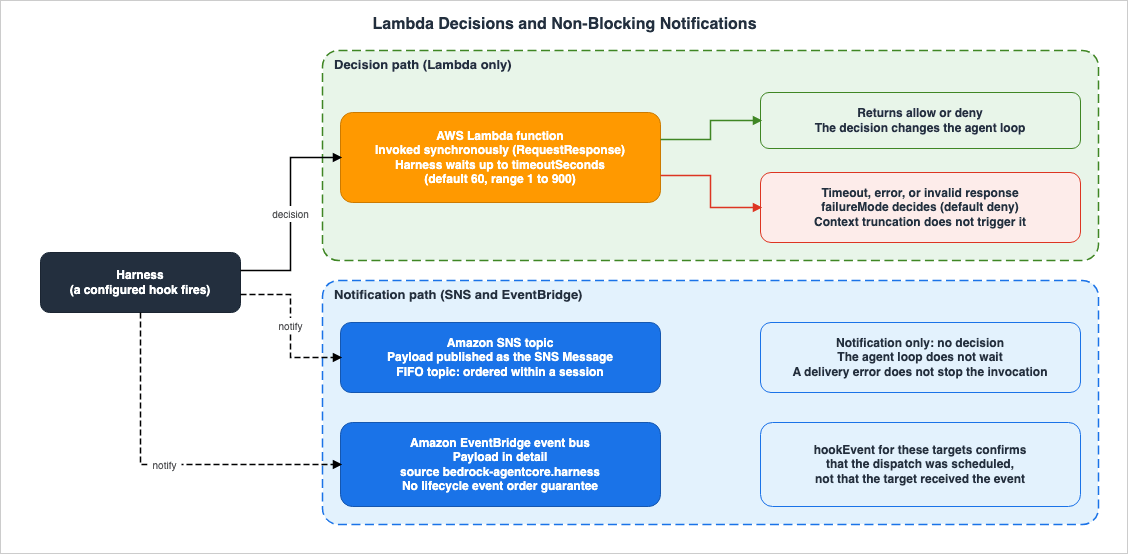
| Target | Delivery Method | Decision |
|---|---|---|
| AWS Lambda | The harness synchronously calls the function using RequestResponse and waits for up to timeoutSeconds. | The function returns allow or deny. Lambda is the only target type that can change the agent loop's behavior. |
| Amazon SNS | The harness publishes the hook's payload as the SNS Message. Publishing does not block the agent loop. | Notification only. SNS does not return a decision. |
| Amazon EventBridge | The harness sends the hook's payload in the detail field. The source is bedrock-agentcore.harness, and the detail type is Harness Lifecycle Hook. Sending does not block the agent loop. | Notification only. EventBridge does not return a decision. |
The Lambda function receives the hook's payload directly and returns a JSON object with a
decision value of either allow or deny. It can also return a reason. The harness includes this reason in the hookEvent of the response stream, subject to a 1,024-character limit. The developer guide provides the following example, which denies before_invocation when the function cannot evaluate the complete context.def lambda_handler(event, _context):
hook_context = event["context"]
if event["event"] == "before_invocation" and hook_context.get("truncated"):
return {
"decision": "deny",
"reason": "The request context exceeded the evaluation limit.",
}
return {"decision": "allow"}4.2 What a Notification Does Not Confirm
The harness schedules delivery to SNS and EventBridge without waiting for a response. The developer guide states that a delivery error does not stop the invocation.The
hookEvent in the response stream also does not confirm delivery. For SNS and EventBridge targets, the hookEvent does not include decision or reason. The developer guide clarifies that this hookEvent only confirms that the harness scheduled the dispatch; it does not confirm that the target has received the event. The API reference also states that decision is present only for blocking Lambda targets.Therefore, records sent to SNS or EventBridge do not, on their own, form an audit trail with every event (this article's inference). Either monitor for delivery failures on the topic or event bus, or implement a mechanism to match the
hookEventId from the response stream with records on the receiving end.4.3 Event Order
For an SNS FIFO topic, the harness derives the message group ID from the harness ARN and session ID. This preserves publish order within that session. Standard SNS topics and EventBridge do not guarantee the order of lifecycle events.If you rely on the order of events to assemble records (for example, pairing
before_tool_call and after_tool_call to measure execution time), you should use SNS FIFO topics or pair events using the toolUseId (this article's inference).4.4 Permissions for Each Target
The harness execution role needs permission to call each target. The Lifecycle hook targets example on the Security and access controls page allowslambda:InvokeFunction for Lambda, sns:Publish for SNS, and events:PutEvents for EventBridge. For each resource, use the exact ARN from the hook configuration, including a Lambda version or alias qualifier when present. Remove any statements for target types that are not being used.When using targets in a different account, also allow the harness execution role in the target's resource-based policy. If you put the hook's Lambda function in a different account from the one the agent team uses, you separate the people who can change the decision code (this article's inference).
5. When No Decision Comes Back - timeoutSeconds and failureMode
This chapter describes what happens when a Lambda function fails to return a response, and outlines two settings that determine how such failures are handled.5.1 The Two Settings
Lambda targets have two settings.timeoutSeconds specifies the maximum number of seconds the harness will wait for a function's response, with a default value of 60 seconds, and a valid range of 1 to 900 seconds. failureMode determines the decision when the function times out, returns an error, or returns an invalid response.deny: Applies a deny decision. This is the default.allow: Applies an allow decision.
When
failureMode is set to deny, a function that does not answer has the same effect as a deny decision. If the hook is before_invocation, the invocation is stopped. If the hook is before_tool_call, the tool call is skipped.The
InvokeHarness request also includes a timeoutSeconds setting. This setting specifies the maximum number of seconds for the agent's loop execution and is separate from the timeoutSeconds setting for hooks.5.2 Choosing deny or allow
The default setting ofdeny causes the system to fail closed if a decision cannot be reached. If a Lambda function fails, the agent stops working or cannot use its tools. allow causes the system to fail open if a decision cannot be reached. Even if a Lambda function fails, the agent will continue to operate, although it will not be subject to any checks during that time (this article's inference).This article recommends retaining the
deny setting for hooks that rely on decisions, such as approval processes or tool restrictions. Hooks that only record events should target SNS or EventBridge rather than Lambda in the first place. This way, failures in the logging functions will not prevent the agent from continuing to operate (this article's inference).5.3 Keeping the Stream Open While a Hook Waits
A synchronous hook may keep theInvokeHarness stream idle until the hook returns or the timeoutSeconds value is reached. The developer guide recommends setting the SDK read timeout to be longer than the expected maximum idle time. For a 900-second hook, the guide's example uses a 1,000-second read timeout.When connections pass through a NAT gateway, an interface VPC endpoint, or a Network Load Balancer, also configure the OS TCP keepalive idle time to less than 350 seconds. On Linux, this is configured using
net.ipv4.tcp_keepalive_time, which corresponds to TCP_KEEPIDLE. The developer guide notes that simply setting tcp_keepalive=True only enables keepalive and does not shorten the OS default idle time.You could also lengthen
timeoutSeconds and wait for human approval inside the Lambda function. However, the maximum wait time is 900 seconds, during which the stream will remain idle. The Tools page names inline functions as the pattern for human-in-the-loop approvals. For human approval, the inline function flow in Section 8 is a better fit (this article's inference).6. When the Context Is Too Large - The 64 KiB Limit
This chapter shows how the harness truncates context that is too large for a hook, and thatfailureMode does not apply then.6.1 How Each Event Is Truncated
The harness limits each hook'scontext object to 64 KiB. Truncation works in one of two ways, depending on the event.before_invocation: Only the newest contiguous sequence of complete messages that fits in the limit is kept.messageCountkeeps the count from before truncation, andmessagesstays a list. The context will include"truncated": true. If the most recent single message exceeds the limit, themessageslist will be empty.- Other events: Fields are replaced, starting with the largest, until the context fits in the limit. The replaced fields become objects containing both a
truncatedflag and apreview(the beginning of the serialized field).
The developer guide says to check for truncation markers before using a field. A Lambda target that requires the complete context can return
deny when it receives a truncation marker. SNS and EventBridge receivers can log the event and retrieve any missing data from their own records.6.2 Truncation Does Not Trigger failureMode
The developer guide states thatfailureMode is not triggered by context truncation. The Lambda function receives the truncated context and must return a decision.Even if
failureMode is set to deny, if the function returns allow with a truncated context, the harness applies allow (this article's inference). For example, a function that examines the contents of a tool's input to identify potentially dangerous operations might return allow without detecting the dangerous parts if the toolInput is replaced with a preview. Functions should be written to return deny without examining the content if they see a truncation marker. The example in Section 9.2 follows this pattern.7. Several Hooks on the Same Event
When several Lambda hooks use the same event, the harness invokes them concurrently. If any one of them returnsdeny, the event's deny effect applies. If more than one hook returns deny, the first denying hook in the configured list supplies the reason.Due to this behavior, it is not necessary to consolidate validation logic into a single function (this article's inference). For example, you can place functions for tool permission validation and input value validation as separate hooks on the same
before_tool_call event. Since they are invoked concurrently, the slower of the two functions sets the overall latency (this article's inference). However, a harness can only accommodate up to 20 hooks.Because these functions are invoked concurrently, they cannot rely on each other's decisions (this article's inference). Avoid designing functions that depend on the output of other functions.
8. Hooks on Inline Functions
This chapter shows how tool-call hooks run for inline functions, which execute on the client side, and what those hooks do not prove.8.1 Where the Hooks Run in the Handoff
Inline functions are tools that execute on the client side, rather than on the harness VM. When the model calls an inline function, the harness pauses and returns the call to the client's code. The client then returns the result in a subsequentInvokeHarness request with the same runtimeSessionId.Tool-call hooks also run for inline functions.
before_tool_call: This hook runs after the model creates a tool request, but before the harness passes the call to the client.after_tool_call: This hook runs after the client returns the result, when the harness resumes the pending call. If the hook allows the result, the agent loop continues.
The follow-up request is a new invocation, so the invocation hooks (
before_invocation and after_invocation) run again. The pending inline function's before_tool_call is not repeated, while after_tool_call runs once with the returned result.Tools in one model response keep their sequential order. As shown in the developer guide examples, when the order is harness-executed tool A, inline function B, and harness-executed tool C, the harness will execute A, then pass B, and wait for B's result before executing C. If
before_tool_call denies B, the harness will skip B and proceed directly to C, without passing B to the client. If after_tool_call denies B, the harness will retain B's result and stop before proceeding to C.8.2 before_tool_call Controls Execution, Not Visibility
The developer guide states that tool requests generated by the model may appear in the stream's events before the hook is evaluated.before_tool_call controls execution, but does not control how the tool request is displayed in the stream.Therefore, clients must not run an inline function as soon as its tool request appears in the stream. The developer guide specifies that the client should read the entire response stream and only process inline calls when the
stopReason in the final messageStop is tool_use. If the client executes a tool request that before_tool_call has denied, the hook will effectively have done nothing to prevent it (this article's inference).8.3 after_tool_call Is Not Proof of the External Action
For an inline function, thetoolResult in the after_tool_call event is the result that the client returned. The developer guide states that this event confirms that the harness has processed the client's result, but it does not prove that the client performed the external action the result represents.The guide advises that before using this event as a basis for authorization or auditing, the caller should be authenticated, and the result should be verified. For example, even if the result says that a payment was made, it simply means that the client wrote and returned that. To confirm whether the payment actually happened, check the records in the payment system (this article's inference).
8.4 Returning One Result per Handoff
You can return the pending result and any immediately following inline results together in one follow-up request. The harness processes thebefore_tool_call and after_tool_call hooks sequentially.However, the developer guide states that if the client requires an
allow decision before each external action, it should return only one inline result per handoff. Returning results in a batch could cause subsequent requests to appear in the stream before the hooks are executed. If you need a decision before every external action, return the results one at a time, verifying the final messageStop after each return (this article's inference).9. Where to Put Each Check
This chapter maps the earlier chapters to an event and a target for each purpose, then covers thefile_operations event transition and what to leave to other controls.9.1 A Placement Table
By purpose, the placement looks like this (this article's inference).| Purpose | Event | Target | Limitations |
|---|---|---|---|
| Inspecting requests before invocation | before_invocation | Lambda (with failureMode set to deny) | Messages restored from the session are not visible. Above 64 KiB, the oldest messages are dropped first. |
| Stopping a risky tool call before it runs | before_tool_call | Lambda (with failureMode set to deny) | The loop continues. For inline functions, the request can appear in the stream. |
| Stopping what follows, based on the tool result | after_tool_call | Lambda | The tool has already executed, and its results remain. |
| Logging tool calls | before_tool_call, after_tool_call | SNS FIFO topic | Does not verify receipt. A delivery failure does not stop the invocation. |
| Logging invocation completion and usage | after_invocation | EventBridge | Does not guarantee order. messageStop may not be present in error paths. |
| Waiting for human approval | (Not a hook, but an inline function) | Client code | after_tool_call does not prove the result returned after approval. |
Tool-call hooks also apply to subagents. The Tools page states that a child agent created with
subagent shares the invocation's limits and your tool-call lifecycle hooks. This reads as meaning that the child agent's tool calls also go through the same before_tool_call and after_tool_call hooks (this article's inference).9.2 An Example before_tool_call Function
The following example is constructed from the payload descriptions in the developer guide, and is not an example from AWS documentation. This article has not run it. It denies both a tool that is not on the allow list and a truncated context.ALLOWED_TOOLS = {"read", "web_fetch", "todo_write"}
def lambda_handler(event, _context):
if event["event"] != "before_tool_call":
return {"decision": "allow"}
tool_context = event["context"]
# A field that the harness truncated is replaced by an object
# with "truncated" and "preview". Deny instead of guessing.
for value in tool_context.values():
if isinstance(value, dict) and value.get("truncated"):
return {"decision": "deny", "reason": "Tool context was truncated."}
if tool_context.get("toolName") not in ALLOWED_TOOLS:
return {"decision": "deny", "reason": "Tool is not on the allow list."}
return {"decision": "allow"}The
toolName is the name of the tool presented to the model. The sources this article read could not confirm whether a built-in tool's name is the same string as its allowedTools selector. Check the names in your own harness's payload.This function is written as an allow list. If you write it as a deny list that denies only specific tool names, it stops nothing when new tool names appear. The Tools page notes that when
allowedTools is ["*"], the recommended set of built-in tools can gain new tools as the harness improves.This function makes decisions based on the tool's name. Therefore, it will not prevent the model from attempting the same action using a different, permitted tool (this article's inference). For example, if
shell is on the allow list, the model can also write files through the shell tool. Combine the name check with narrowing the available tools through allowedTools.9.3 The file_operations Events Until December 12, 2026
The managed built-in tools have replacedfile_operations with separate read, write, and edit tools. The developer guide describes the transition as follows:- For harnesses created before November 12, 2026 (00:00 UTC) that have
beforeToolCallorafterToolCallhooks, until December 12, 2026 (00:00 UTC), two events will be sent for each call toread,write, andedit. One event will indicate the name of the new tool, and the other will be a deprecatedfile_operationsevent. - The deprecated event will share the same
toolUseId. Onbefore_tool_callevents, it translatestoolInputto thefile_operationsschema. It includes adeprecationobject containing the fieldsreplacedBy,message, andremovalDate. - A Lambda deny decision from either event takes effect as described in the table in Section 3.
- Update hook targets to match
read,write, andeditbefore December 12, 2026. After that date, and for harnesses created on or after November 12, 2026, the harness sends only the new events.
This transition can lead to two types of errors (this article's inference).
- Functions that deny access based solely on the name
file_operationswill no longer block any requests after December 12, 2026. Only events with the namesread,write, andeditwill be received. - An allow-list function on an older harness can deny the
file_operationsevents during the transition. Because a deny from either event takes effect, even areadcall that the function meant to allow is stopped.
Note that the
file_operations selector within allowedTools remains, serving as a compatibility selector that allows read, write, and edit. This is a configuration setting that allows specific tools, and is separate from the names of the hook events.9.4 What Hooks Leave to Other Controls
Hooks make decisions and send notifications at four points in the harness loop. Other controls handle what remains.allowedToolsrestricts the range of usable tools. The Tools page advises listing individual selectors to keep a fixed, least-privilege tool surface.- Tools that pass through the AgentCore Gateway can have their callable operations, conditions, and arguments restricted by AgentCore Policy policies.
- The individuals who can invoke the harness, and the AWS resources the harness can access, are restricted through IAM and execution roles. The Security and access controls page lists validating
InvokeHarnessinput among the customer's responsibilities. - The complete set of methods for externally stopping the agent is covered in the existing article Stopping an AI Agent on AWS.
10. Where the Sources Disagree and What They Do Not Say
This chapter highlights areas where the sources present differing accounts and identifies information that was not included in the materials consulted for this article.10.1 Where the Sources Disagree
- Regarding the
failureModevalue: The API reference forHarnessHookLambdaTargetlists the valid values asallowanddeny, and uses uppercaseDENYto indicate the default in the same section. The developer guide examples and descriptions use lowercasedeny. This article will use lowercasedenyto align with the valid values. - GA timing: A What's New post announced the general availability (GA) of the harness on June 17, 2026. The release notes place the harness GA entry under the July 2026 heading. However, the same page has a line reading "== June 2026", not rendered as a heading, just before that entry. This reads as a June 2026 heading that did not render, which left the entry under July (this article's inference). This article uses the What's New date.
10.2 What the Sources Do Not Say
The materials reviewed for this article did not contain information on the following. The absence of information in these materials is not proof that these mechanisms do not exist.- What is returned to the model for a tool call skipped by a
before_tool_calldeny. - How a result kept after an
after_tool_calldeny is handled in later invocations in the same session. - Whether the inability to call Lambda due to a lack of execution role permissions counts as a function error that triggers
failureMode. - A What's New post just for lifecycle hooks (the release notes have a September 2026 entry).
11. Failure Modes
| Failure Mode | What Happens | How to Prevent |
|---|---|---|
Assuming that an after_tool_call deny prevents a dangerous operation | The tool has already been executed, and results remain. | Put anything that must stop before execution in before_tool_call. |
| Hooks are placed on SNS or EventBridge, assuming they can stop the agent. | Notifications alone do not change the loop. | Use Lambda targets for decisions. |
It is assumed that because a hookEvent exists, the notification was received. | hookEvent only shows a scheduled dispatch; it does not confirm receipt. | Monitor for delivery failures on the recipient's side. Match using hookEventId. |
A decision hook's failureMode is set to allow. | If the function fails, the agent keeps running without checks during that period. | Keep a decision hook's failureMode set to deny. |
| Hooks for logging are placed in Lambda. | Under the default deny setting, a function failure can stop the agent. | Place logging in SNS or EventBridge. |
allow is returned with a truncated context. | The failureMode is not triggered, and unseen portions may pass through. | If a truncation marker is present, return deny. |
| Requests for inline functions are executed as soon as they are detected in the stream. | before_tool_call denies are ineffective. | Only execute if the final messageStop is tool_use. |
The inline function's after_tool_call is used for auditing as proof of action. | It only records the results written by the client. | Authenticate the caller and verify the results against external system logs. |
file_operations is denied based solely on its name. | After December 12, 2026, nothing will be blocked. | Align with read, write, and edit. |
| Leaving the SDK read timeout at its default with a 900-second hook | Connections can be lost while waiting for the hook. | Increase the read timeout and keep the TCP keepalive idle time below 350 seconds. |
12. Frequently Asked Questions About AgentCore Harness Lifecycle Hooks
This chapter summarizes the key points in the form of frequently asked questions.Does a deny from an after_tool_call hook undo the tool call?
It does not undo the tool call. The developer guide states that anafter_tool_call Lambda deny decision keeps the completed tool result and then stops the invocation. At this point, the tool has already executed. If you want to stop the execution before it begins, put a Lambda hook on before_tool_call.Can an SNS or EventBridge hook stop the agent?
No, it cannot. Only the Lambda target can modify the behavior of the loop. SNS and EventBridge only provide notifications, and a delivery error does not stop the invocation either.What happens when the hook Lambda function times out?
failureMode decides the outcome. The default is deny. If the hook is configured for before_tool_call, the tool call will be skipped. If the hook is configured for before_invocation, the invocation will be stopped. The default value for timeoutSeconds is 60 seconds, and you can specify a value between 1 and 900 seconds.Does truncating the context to 64 KiB trigger failureMode?
No, it does not triggerfailureMode. The Lambda function receives the truncated context and must return a decision. Functions that require the complete context should return deny when they see a truncation marker.Can a caller remove the hooks when invoking the harness?
It is not possible through anInvokeHarness override. Hooks are configured through CreateHarness or UpdateHarness. A principal that can call UpdateHarness can remove all hooks by passing an empty list.Does an after_tool_call event for an inline function prove that the client performed the action?
It does not prove that the client performed the action. That event simply confirms that the harness has processed the result returned by the client. The developer guide states that before using the event as a sign of authorization or auditing, you should authenticate the caller and inspect the result.13. Summary
- Harness lifecycle hooks send events to Lambda, SNS, and EventBridge at four points:
before_invocation,before_tool_call,after_tool_call, andafter_invocation. Only Lambda can return a decision. - A deny on
before_invocationstops the invocation before it starts. A deny onbefore_tool_callskips only the specific tool call, allowing the loop to continue. - A deny on
after_tool_callkeeps the completed result and stops the invocation. It does not undo the tool's effects. A deny onafter_invocationcannot retract output that has already streamed. - SNS and EventBridge only provide notifications and do not stop the invocation even if delivery fails.
hookEventonly shows a scheduled dispatch, and does not confirm receipt. Order is maintained only within an SNS FIFO topic and within a single session. - If Lambda does not answer,
failureMode(defaultdeny) decides the outcome.timeoutSecondsdefaults to 60 seconds, with a range of 1 to 900 seconds. Truncation to 64 KiB does not triggerfailureMode, so the function itself must returndenywhen it sees a truncation marker. - Lambda hooks on the same event are invoked concurrently. If any one returns deny, the result is deny.
- Within inline functions,
before_tool_callstops execution but does not control visibility in the stream.after_tool_calldoes not prove that the client acted outside the harness. - Until December 12, 2026,
file_operationsevents also reach harnesses created before November 12, 2026. Align hooks withread,write, andedit.
14. References
- Amazon Bedrock AgentCore Developer Guide: Lifecycle hooks
- Amazon Bedrock AgentCore Developer Guide: Security and access controls
- Amazon Bedrock AgentCore Developer Guide: Tools
- Amazon Bedrock AgentCore Developer Guide: AgentCore harness
- Amazon Bedrock AgentCore Developer Guide: AgentCore harness vs. Runtime
- Amazon Bedrock AgentCore Developer Guide: Configure lifecycle hooks for AgentCore Runtime
- Amazon Bedrock AgentCore Developer Guide: Supported AWS Regions
- Amazon Bedrock AgentCore Developer Guide: Release notes for Amazon Bedrock AgentCore
- Amazon Bedrock AgentCore Control Plane API Reference: CreateHarness
- Amazon Bedrock AgentCore Control Plane API Reference: UpdateHarness
- Amazon Bedrock AgentCore Control Plane API Reference: HarnessHook
- Amazon Bedrock AgentCore Control Plane API Reference: HarnessHookLambdaTarget
- Amazon Bedrock AgentCore Data Plane API Reference: InvokeHarness
- Amazon Bedrock AgentCore Data Plane API Reference: HarnessHookEvent
- Amazon Bedrock AgentCore Data Plane API Reference: HarnessMessageStopEvent
- AWS CloudFormation Hooks User Guide: AWS CloudFormation Hooks concepts
- Amazon EC2 Auto Scaling User Guide: Amazon EC2 Auto Scaling lifecycle hooks
- What's New: AgentCore harness is now generally available
References:
Tech Blog with curated related content
Written by Hidekazu Konishi