Metadata Endpoints Across AWS Compute - What Code on EC2, ECS, EKS, and Lambda Can Ask the Platform, How Each Endpoint Checks the Caller, and Where Location and Credentials Come From
First Published:
Last Updated:
On March 19, 2026, AWS Lambda gained a metadata endpoint. The Lambda Developer Guide describes this endpoint as:
With the Lambda metadata endpoint, your functions can discover which Availability Zone (AZ) they are running in.The same page explains the reason for requesting a token in the call as:
This token-based authentication provides defense in depth protection against Server-Side Request Forgery (SSRF) vulnerabilities.Amazon EC2's Instance Metadata Service (IMDS) also requires a session token in version 2 (IMDSv2). The EC2 User Guide describes the length of these sessions as:
which can be a minimum of one second and a maximum of six hours.This article provides a side-by-side comparison of EC2's IMDS, the ECS task metadata endpoint version 4 and task role credential endpoint, the EKS Pod Identity Agent, and Lambda's metadata endpoint, detailing their addresses, how to locate them, how the caller is checked, what information is returned, whether they return credentials, caching behavior, default state, and how to close them. It also shows on which compute services the endpoint that returns location information and the endpoint that returns credentials are the same, and on which they are separate. Where the sources disagree, and where no statement was found after searching, this article shows both statements with the verification date. This article does not recommend specific compute services or configurations. This article does not create any AWS resources or call any endpoints.
Related articles on this site:
- How AWS Lambda Authenticates to Apache Kafka - Where Each Event Source Mapping Method Keeps the Credential, Who Refreshes the Token, and What the Brokers Must Trust
- Running Claude Apps Gateway on AWS - What the Gateway Holds and Enforces, What Stays on Developer Machines, and Where the Worked Example Stops
- The AWS Credential Provider Chain Across SDKs and the CLI - What Each Link Supplies, Where the Order Differs by Language, and Why Precedence Is a Separate Mechanism
- Amazon EKS Pod Identity and IRSA Decision Guide - Workload Identity Design, Trade-offs, and Migration Paths
- AWS Security Defaults History - Block Public Access, Default Encryption, IMDSv2, and How Far Each Changed Default Reached
- Falsehoods AWS Architects Believe About Regions and Availability Zones - What the Names Do Not Tell You, What Opting In Changes, and Which Zones Are Not Availability Zones
Table of Contents
- 1. Introduction — Scope, Verification Date, and Sources Read
- 2. Vocabulary and Table Columns
- 3. Amazon EC2 — The Instance Metadata Service
- 4. Amazon ECS — Task Metadata Endpoint Version 4 and the Task Role Credential Endpoint
- 5. Amazon EKS — The EKS Pod Identity Agent
- 6. AWS Lambda — The Metadata Endpoint
- 7. The Four Compute Services Side by Side
- 8. Where the Sources Disagree and Where No Statement Was Found
- 9. Frequently Asked Questions about Metadata Endpoints Across AWS Compute
- 10. Summary
- 11. References
1. Introduction — Scope, Verification Date, and Sources Read
This chapter sets the scope of this article, the verification date, and the sources read. It then separates words that refer to different things under the same spelling.1.1 Scope of This Article
This article covers the following endpoints:- The Amazon EC2 Instance Metadata Service (IMDS) (Section 3)
- The Amazon ECS task metadata endpoint version 4, and the ECS task role credential endpoint (Section 4)
- The EKS Pod Identity Agent of Amazon EKS (Section 5)
- The AWS Lambda metadata endpoint, and how Lambda passes credentials to functions (Section 6)
This article lines up the four compute services by the contract on the endpoint side (Section 7). Places where the sources disagree, and statements that were not found, are collected in Section 8.
This article does not cover the following.
- How the AWS SDK searches for credentials, whether it falls back to IMDSv1 when IMDSv2 fails, and how to disable IMDS in the SDK configuration. Sections 3.4 and 3.6 of the existing article The AWS Credential Provider Chain Across SDKs and the CLI cover this.
- The history of IMDSv2 becoming the default. The existing article AWS Security Defaults History covers this. Section 4.1 of that article covers the general rule of precedence among settings.
- Choosing between IAM Roles for Service Accounts (IRSA) and EKS Pod Identity, and designing to block node IMDS from pods. The existing article Amazon EKS Pod Identity and IRSA Decision Guide covers this. Section 2.2 of that article covers the design that blocks the node IMDS.
- A detailed explanation of the differences between Availability Zone names and Availability Zone IDs. The existing article Falsehoods AWS Architects Believe About Regions and Availability Zones covers this.
- How AWS Lambda SnapStart works. The existing article How AWS Lambda Execution Environments Work covers this.
- Details regarding the IPv6 endpoints for IMDS. Section 3.2 of the existing article IPv6-First VPC Design on AWS covers this.
- Metadata for AWS App Runner, AWS Batch, Amazon Bedrock AgentCore Runtime, AWS Lambda Managed Instances, and Amazon ECS Managed Instances. This article has not checked these against primary sources. For AgentCore Runtime, Section 4.1 of the existing article Agent Sandboxing and Blast-Radius Isolation on AWS states that code within a microVM can read the execution role credentials from the metadata endpoint.
- Kubernetes Downward API and node labels. Section 5.4 mentions them in one sentence.
- Amounts of money. This article does not discuss amounts of money.
- Methods for attacking endpoints. This article only describes how endpoints can check the caller.
1.2 Verification Date and Sources Read
The information presented in this article was verified on October 13, 2026, using the following materials. Since the user guide and developer guide pages do not have version numbers, this article gives them with the verification date.- Amazon EC2 User Guide: Pages on using the Instance Metadata Service, options for instance metadata, options for new and existing instances, accessing instance metadata, a table of instance metadata items, retrieving credentials from instance metadata, and instance identity documents.
- Amazon EC2 API Reference:
InstanceMetadataOptionsRequestandInstanceMetadataDefaultsResponse. - Amazon Linux 2023 User Guide: Page on IMDSv2.
- Amazon ECS Developer Guide: Pages on EC2 and Fargate for Task Metadata Endpoint version 4, their respective responses, response examples, versions 3 and 2, the metadata entry page, task IAM roles, and best practices for IAM roles.
- Amazon EKS User Guide: The EKS Pod Identity entry page, and pages on how it works, agent configuration, and target IAM roles.
- Amazon EKS Best Practices Guide: Page on Identity and Access Management.
- AWS Lambda Developer Guide: Pages on the metadata endpoint, the metadata endpoint for Web Functions, environment variables, and the SnapStart introduction, activation, best practices, uniqueness, and runtime hooks pages.
- AWS SDK and Tools Reference Guide: Pages on container credential providers and IMDS credential providers.
- AWS Whitepaper: Appendix A of Advanced Multi-AZ Resilience Patterns.
- What's New: Announcements for the Lambda metadata endpoint (
postDateTimeis2026-03-19T16:36:00Z) and Lambda Web Functions (postDateTimeis2026-10-12T19:30:00Z). - AWS Blog: Article on the Lambda metadata endpoint on the AWS Compute Blog (October 9, 2026), and two articles on IMDSv2 on the AWS Security Blog (November 19, 2019 and September 28, 2023).
- Powertools for AWS Lambda: Pages on Metadata for Python and TypeScript.
This article gives the date of a What's New entry by
postDateTime, and the date of a blog post by its publication date. Statements in user guides and developer guides are given with the verification date.1.3 Words That Share a Spelling but Refer to Different Things
In this article, the same word sometimes refers to different things. To avoid misreading, this article separates them first.- Endpoint (three meanings that this article separates): (1) A local HTTP endpoint in the execution environment, which is the primary subject of this article. When this article uses the term "endpoint," it refers to this. (2) An endpoint for AWS APIs. This article uses the term "API endpoint" to refer to this. (3) A VPC endpoint. This article does not cover this.
- Metadata (four meanings that this article separates): (1) EC2 instance metadata, which is the information returned by IMDS. (2) ECS task metadata, which is the JSON returned by the task metadata endpoint. (3) Metadata for the Lambda execution environment, which is the JSON returned by the Lambda metadata endpoint. (4) The ECS container metadata file, a file that the ECS container agent creates on the host and mounts in the container. Section 4.3 mentions it once. When this article uses the term "metadata," it will always specify which type of metadata is being referenced.
- Token (four meanings that this article separates): (1) A session token for IMDSv2, a value that code requests from IMDS using a
PUTrequest and subsequently includes in the header of subsequent requests. (2) A token for Lambda metadata, a value placed in the environment variableAWS_LAMBDA_METADATA_TOKENby Lambda. (3) A service account token for EKS Pod Identity, a Kubernetes projected service account token that EKS provides to the pod as a file. (4) The value ofAWS_CONTAINER_AUTHORIZATION_TOKEN, an authorization value used by Lambda in SnapStart functions to access credential endpoints. When this article uses the term "token," it will always specify which type of token is being referenced. The ECS Developer Guide also calls the credential ID of a task role a token. This article calls it the credential ID. - AZ (two meanings that this article separates): (1) An AZ name, such as
us-east-1a, which can refer to a different location in each account. (2) An AZ ID, such asuse1-az1, which represents a location that is consistent across all accounts. When this article uses the term "AZ," it will always specify whether it is referring to an AZ name or an AZ ID. - Location Information: In this article, "location information" is used to collectively refer to information about the AZ, Region, task, and instance where the code is running.
2. Vocabulary and Table Columns
This chapter defines the columns and values used in the tables presented in this article. The columns and values of the credential table are borrowed from Sections 2.3 and 2.4 of the existing article How AWS Lambda Authenticates to Apache Kafka. This chapter defines the columns and values that this article adds.2.1 Location Endpoints and Credential Endpoints
This article divides endpoints into two categories:- Location endpoint: An endpoint that returns location information for where the code is running.
- Credential endpoint: An endpoint that returns temporary credentials that the code uses to call AWS APIs.
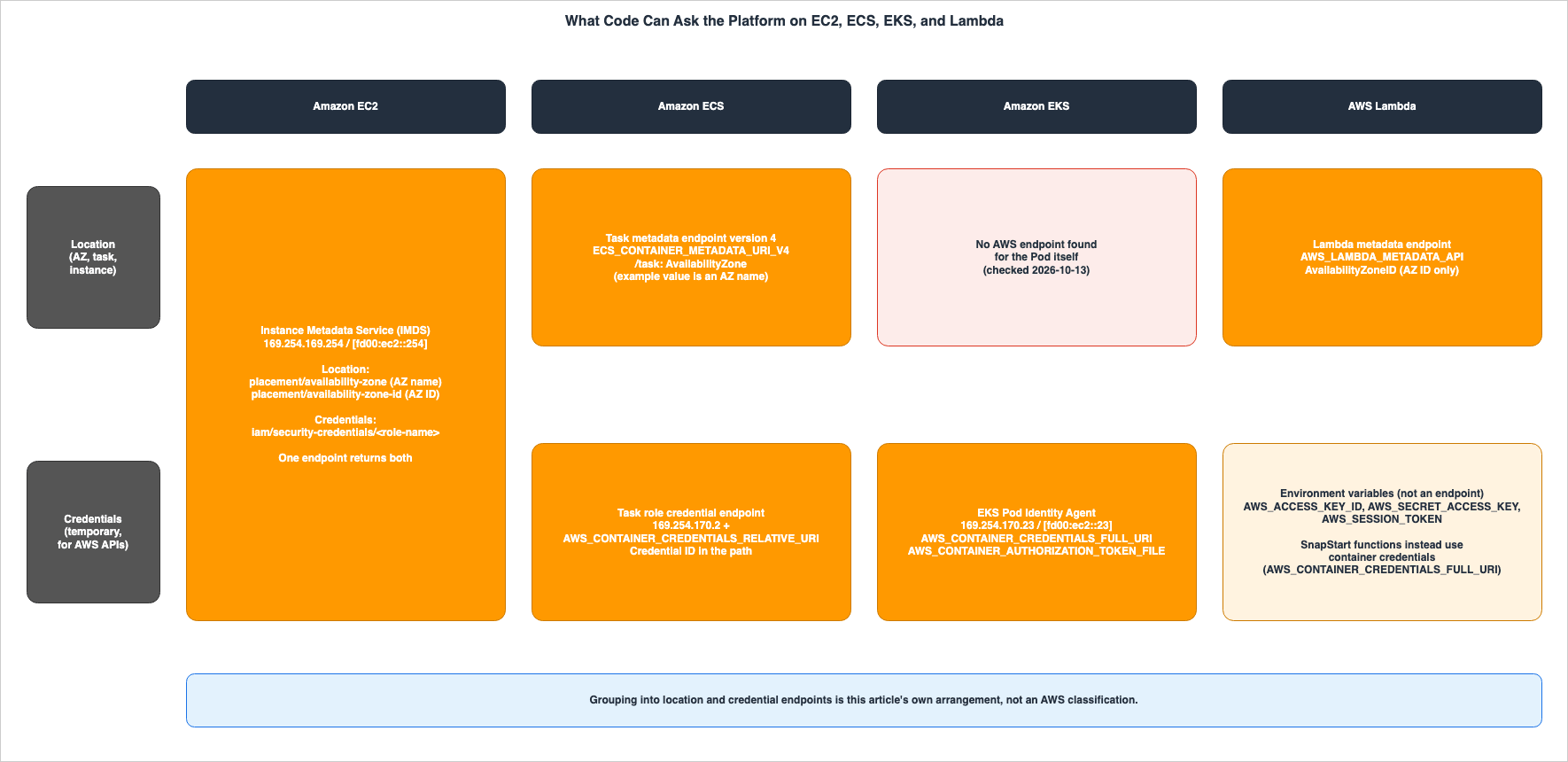
This split into two kinds is this article's own arrangement and is not taken from the AWS sources. On EC2, a single IMDS returns both. On ECS, EKS, and Lambda, the two kinds are separate endpoints, or only one of them exists. The mapping table is in Section 7.5.
2.2 Table Columns for Endpoints
The three tables in Section 7 have the first column labeledEndpoint and include the following columns:Endpoint: The name of the endpoint.Address: The address of the endpoint.Discovered Through: How the code finds the endpoint: an environment variable or a fixed address.Caller Check: How the endpoint checks the caller.Returns Location: Information about the location returned.Returns Credentials: Whether the endpoint returns temporary credentials.Cached For: What the sources say about how long responses and credentials are valid, and about caching.Default State: Whether the endpoint is enabled by default, and under what conditions it is enabled.How to Close It: What the sources say about making the endpoint unavailable.Where the Source Says So: The source for the row, given as the page title and section name.
2.3 Columns and Values of the Credential Table
The credential table in Section 7.4 shares the following five columns with the existing article:Held By: The entity that holds the long-lived credential.Refreshed By: The entity that refreshes the short-lived credential.Presented As: How the credential is presented to the recipient. In this article, it describes what the code presents to the credential endpoint.What You Configure: What the user configures.Where the Source Says So: The source document that supports this row.
The first column of the table is
Credential Path. Credential Path gives the path by which the credentials reach the code.Values with the same meaning use the spelling of the existing article as is. The values borrowed from the existing article are
Not stored (the execution role), Lambda, Not presented, and The source does not say. The following values are added in this article:Four new values are added for
Held By:Not stored (the instance's IAM role): The long-lived credential is not stored; instead, an IAM role associated with an EC2 instance is used.Not stored (the ECS task role): An ECS task role is used.Not stored (the role in the EKS Pod Identity association): An IAM role specified in the EKS Pod Identity association is used.Not stored (the execution role): The value of the existing article. The execution role of the Lambda function is used.
Three new values are added for
Refreshed By:Amazon EC2: Amazon EC2 rotates the credentials automatically.The Amazon ECS container agent: The Amazon ECS container agent rotates the credentials automatically.The EKS Pod Identity Agent: The EKS Pod Identity Agent refreshes and caches the credentials.
Three new values are added for
Presented As:IMDSv2 session token (X-aws-ec2-metadata-token header): The code presents the IMDSv2 session token in a header.Credential ID in the URI path: The code calls a path that contains the credential ID. The sources do not say that a token is presented in a header.Authorization token (Authorization header): The code presents an authorization token in theAuthorizationheader, either from a file or an environment variable.
2.4 When the Source Does Not Say, and When the Sources Disagree
In each table cell, this article writes only what the source says, or a summary of it. Where the source does not say something, the cell readsThe source does not say. Before writing that, this article searches the full text of the source, the pages its links point to, and other pages from the same provider. These other pages are the EC2 page and the Fargate page within ECS, the responses page, the IAM roles best practices page, the SDK reference, What's New, and the blogs. The searches use the words of the row's subject and the terms metadata, token, hop, disable, and AvailabilityZone.When the sources disagree, this article lines up both statements with their sources and leans toward neither. The English for this is always
the sources disagree. Section 8.1 collects where the sources disagree in this article. Statements that were not found after searching are collected in Section 8.2, with where and how they were looked for. That a statement was not found does not mean that the mechanism does not exist.3. Amazon EC2 — The Instance Metadata Service
This chapter shows the contract of the EC2 IMDS. In EC2, a single IMDS provides both location information and credentials.3.1 Addresses, and Two Versions
The IMDS address is169.254.169.254 for IPv4 and [fd00:ec2::254] for IPv6. The EC2 User Guide states that both are link-local addresses, valid only in the instance. The code locates the endpoint using these fixed addresses, rather than environment variables.The IPv6 endpoint is disabled by default. The EC2 User Guide states:
The IPv6 endpoint remains disabled even if you launch an instance into an IPv6-only subnet.The
InstanceMetadataOptionsRequest in the API reference also indicates that the default for HttpProtocolIpv6 is disabled. The IPv6 endpoint is only available on Nitro instances when they are located in a subnet that supports IPv6. Section 3.2 of the existing article IPv6-First VPC Design on AWS covers it in detail.IMDS can be used in two ways: IMDSv1 and IMDSv2. The EC2 User Guide states the following regarding the default behavior:
By default, you can use either IMDSv1 or IMDSv2, or both.This default behavior is conditional. The API reference states that when the AMI's
ImdsSupport is set to v2.0 and the account's default is set to no-preference, the default for HttpTokens is required (see Section 3.4).3.2 How IMDSv2 Checks the Caller
IMDSv2 requires code to first request an IMDSv2 session token via aPUT request. The path for requesting the token is /latest/api/token, and the PUT request must include a header, X-aws-ec2-metadata-token-ttl-seconds, indicating the token's validity period in seconds. Subsequent requests must include the token in the X-aws-ec2-metadata-token header. The validity period can range from 1 second to 6 hours (21,600 seconds).In addition to the token, IMDSv2 has two mechanisms, as described in the EC2 User Guide, to check the caller. The first is to reject
PUT requests that include the X-Forwarded-For header. The EC2 User Guide states:PUT requests are rejected if they contain an X-Forwarded-For header.The second mechanism is the hop limit in the
PUT response. The EC2 User Guide states:By default, the response to PUT requests has a response hop limit (time to live) of 1 at the IP protocol level.The hop limit can be set from 1 to 64. Its name in the EC2 API and settings is
HttpPutResponseHopLimit. The default hop limit has conditions, shown in Section 3.4. For the hop limit with containers, the sources disagree (Section 8.1, item 1).An AWS Security Blog post from November 19, 2019, explains what the token and the hop limit defend against. This article refers only to the defense that the post explains, and does not describe how to attack.
IMDSv1 does not require a token. The EC2 User Guide states that a request without the headers is treated as an IMDSv1 request.
3.3 Location Information and Credentials
IMDS returns both the AZ name and AZ ID as location information. The table of instance metadata items includes the following two:placement/availability-zone: The AZ in which the instance was launched. This is the AZ name.placement/availability-zone-id: The AZ ID of the AZ in which the instance was launched. The table states that the AZ ID is consistent across accounts.
IMDS also returns an instance identity document. This document is a JSON document that provides information about the instance in plain text. The path is
/latest/dynamic/instance-identity/document. The availabilityZone field in the instance identity document is the AZ name, and the description indicates that AZ names may differ between accounts.When an IAM role is associated with the instance, IMDS also returns credentials. The table includes the
iam/security-credentials/<role-name> entry, which provides the temporary credentials for that role. The EC2 User Guide states the following about rotating the credentials.We make new credentials available at least five minutes before the expiration of the old credentials.In the same user guide, the Query throttling section states that IMDS limits queries on a per-instance basis. That section recommends not querying for credentials on every transaction, and caching them until they start approaching their expiry. Services that use link-local addresses have a total limit of 1,024 packets per second. This limit includes requests to IMDS, as well as DNS queries to Route 53 Resolver.
3.4 Default Values and Their Order of Precedence
IMDS options are determined in three places: instance settings at launch, account defaults, and AMI settings. The EC2 User Guide gives the order of precedence as follows:- Precedence 1: Instance configuration at launch
- Precedence 2: Account settings (per Region)
- Precedence 3: AMI configuration. This applies only to
HttpTokensandHttpPutResponseHopLimit.
The default hop limit of 1 has two conditions. The first is the AMI's
ImdsSupport setting. The EC2 User Guide, when describing how to set account defaults, states:When no preference is specified, at launch, the value defaults to 2 if the AMI has the setting ImdsSupport: v2.0; otherwise it defaults to 1.The second condition is the account default. An example on the instance metadata options page states that when the account default hop limit is 1 and the AMI's
ImdsSupport is v2.0, the instance's hop limit is 1. This is because the account default takes precedence over the AMI setting. The Amazon Linux 2023 User Guide states that instances launched from the Amazon Linux 2023 AMI require IMDSv2 only, and their default hop limit is 2.Account defaults can be set directly in the account or configured through AWS Organizations declarative policies. If the output of the AWS CLI command
get-instance-metadata-defaults shows ManagedBy as declarative-policy, a declarative policy set the default, and the account cannot change it. If the account enforces IMDSv2, instances that are not configured to require IMDSv2 fail to launch.Setting an account default does not change existing instances.
3.5 How to Close It
To make IMDS unavailable, set the instance optionHttpEndpoint to disabled. The EC2 User Guide states that when disabled, neither users nor code can access the instance metadata.There are also ways to prevent containers running on an instance from accessing IMDS while keeping IMDS enabled on the instance itself. For ECS tasks, see Section 4.5; for EKS pods, see Section 5.3. The EKS Best Practices Guide says not to disable the node's IMDS, because components that rely on instance metadata, such as the node termination handler, stop working.
By default, the ability to read instance tags via IMDS is disabled (see the
InstanceMetadataTags API reference).4. Amazon ECS — Task Metadata Endpoint Version 4 and the Task Role Credential Endpoint
This chapter shows the two endpoints of Amazon ECS. In ECS, location information and credentials are provided through separate endpoints.4.1 Conditions for Task Metadata Endpoint Version 4
The EC2 page of the ECS Developer Guide states that the ECS container agent injects the environment variableECS_CONTAINER_METADATA_URI_V4 into containers. The Fargate page states that this environment variable is injected into each container in a task. The code uses the value of this environment variable to locate the task metadata endpoint. Every version 4 page of the ECS Developer Guide writes the paths relative to this environment variable and does not state the address in its value.The conditions for the environment variable's presence vary depending on the launch environment:
- AWS Fargate: Platform version
1.4.0or later. The Fargate page states:
The task metadata endpoint is on by default for all Amazon ECS tasks run on AWS Fargate that use platform version 1.4.0 or later.- EC2 Linux instances: ECS container agent version
1.39.0or later. - EC2 Windows instances with the
awsvpcnetwork mode: ECS container agent version1.54.0or later.
Both version 4 pages state that fields may be added but not removed.
We will not remove any existing metadata or change the metadata field names.At the top of the version 3 page, the ECS Developer Guide states:
The task metadata version 3 endpoint is no longer being actively maintained.The version 2 page has a sentence of the same form. This article covers version 4 only. Neither page gives an end date.
4.2 Paths
Version 4 has the following five paths. The EC2 page lists all five, and the Fargate page does not list/taskWithTags (see item 5 in Section 8.2).${ECS_CONTAINER_METADATA_URI_V4}: Container metadata.${ECS_CONTAINER_METADATA_URI_V4}/task: Task metadata. Includes the IDs and names of all containers in the task.${ECS_CONTAINER_METADATA_URI_V4}/taskWithTags: Includes the contents of/taskalong with tags for both the task and container instances.${ECS_CONTAINER_METADATA_URI_V4}/stats: Container Docker statistics.${ECS_CONTAINER_METADATA_URI_V4}/task/stats: Docker statistics for all containers in the task.
/taskWithTags requires a permission. The EC2 page states:This endpoint requires the ecs.ListTagsForResource permission.The same page states that a single call to
/taskWithTags may invoke the ecs:ListTagsForResource API up to two times. One call retrieves tags for the container instance, and the other retrieves tags for the task. Sidecar containers associated with the task may also make similar calls. The page continues:Frequent endpoint calls can result in API throttling.The page says to consider caching or batching to reduce the number of calls.
4.3 Location Information Returned in Task Metadata
The/task response includes an AvailabilityZone field. Both the EC2 response page and the Fargate response page describe this field as The Availability Zone the task is in. The description does not specify whether it returns the AZ name or the AZ ID. The example value on the response examples page is us-west-2d, which is in the form of an AZ name.On where
AvailabilityZone is available, the sources disagree (Section 8.1, item 4). Both response pages describe AvailabilityZone as a field specific to Fargate tasks. However, the response examples page includes AvailabilityZone in the example response for LaunchType set to EC2.To obtain the AZ ID from the AZ name, you can use the EC2
DescribeAvailabilityZones API. Appendix A of the whitepaper provides an example of reading the AvailabilityZone for Fargate tasks and converting it to the AZ ID using describe-availability-zones. The same appendix also states that for ECS tasks running on EC2 instances, the container metadata file can be used if the host is blocking access to IMDS. The ECS metadata entry page describes the container metadata file as a file created on the host when the feature is enabled, and notes that it is not available for Fargate tasks.The task metadata endpoint does not return any credentials.
4.4 The Task Role Credential Endpoint
A separate endpoint passes credentials to ECS tasks. The IAM roles best practices page notes that when a task role is added to the task definition, the ECS container agent creates a unique credential ID for the task and places it in the container's environment variableAWS_CONTAINER_CREDENTIALS_RELATIVE_URI. The value of this environment variable is a path that follows /v2/credentials/ with the credential ID. The code then calls this path, appending it to the ECS container agent's address, 169.254.170.2. The SDK and Tools Reference Guide also states this.The value is appended to the default Amazon ECS hostname of 169.254.170.2.This endpoint includes the credential ID in the path. No statement that a token is attached to the request headers was found in the ECS documentation or in the description of
AWS_CONTAINER_CREDENTIALS_RELATIVE_URI in the SDK and Tools Reference Guide.Regarding the validity period of the credentials, the IAM roles best practices page states:
By default, credentials assigned to tasks using task roles are valid for six hours. After that, they are automatically rotated by the Amazon ECS container agent.The task IAM role page states that EC2 instance profiles are not available to the containers of Fargate tasks. The same page also notes that container instances on EC2, ECS Managed Instances, and ECS Anywhere do not have task isolation, meaning that containers may be able to access the credentials and IMDS of other tasks on the same instance.
The existing article Running Claude Apps Gateway on AWS covers in Section 6.5 the worked example in which the gateway calls the upstream with the task role credentials.
4.5 Preventing Tasks from Reaching IMDS on EC2 Instances
When tasks run on EC2 instances, the IAM roles best practices page strongly recommends blocking container access to IMDS. The page outlines the following methods, depending on the network mode:bridgenetwork mode: Addiptablesrules on the instance to block traffic to169.254.169.254.awsvpcnetwork mode: Set theECS_AWSVPC_BLOCK_IMDSsetting totruein the agent configuration file/etc/ecs/ecs.config.hostnetwork mode: Set theECS_ENABLE_TASK_IAM_ROLE_NETWORK_HOSTsetting tofalsein the agent configuration.
For the variable in the
host item, the sources disagree (Section 8.1, item 5). The task IAM role page states that for container instances whose AMI is not ECS-optimized, setting the same variable to true allows the task's IAM role to be used with containers running in host network mode.These three options are configurations that prevent tasks from reaching the EC2 IMDS. They are not settings for blocking the task metadata endpoint or the task role credential endpoint. These configurations do not apply to Fargate tasks. No setting that makes the task metadata endpoint unavailable was found (Section 8.2, item 2).
5. Amazon EKS — The EKS Pod Identity Agent
This chapter shows the contract of the EKS Pod Identity Agent. The EKS Pod Identity Agent is an endpoint that provides only credentials.5.1 Address and How to Find It
The EKS Pod Identity Agent runs as a Kubernetes DaemonSet on each node, providing credentials only to pods on the same node. The EKS User Guide describes the agent's address and port as follows:It uses the node’s hostNetwork, occupying ports 80 and 2703 on the link-local address (169.254.170.23 for IPv4, [fd00:ec2::23] for IPv6).The sources call the kind of address by different names. The entry page quoted above calls it a link-local address, while the agent configuration page refers to a loopback (localhost) address. This article uses only the address values.
When a pod uses a service account that has an association, EKS adds two environment variables to the pod manifest:
AWS_CONTAINER_CREDENTIALS_FULL_URI: The value ishttp://169.254.170.23/v1/credentialsAWS_CONTAINER_AUTHORIZATION_TOKEN_FILE: The value is/var/run/secrets/pods.eks.amazonaws.com/serviceaccount/eks-pod-identity-token
The code uses these two environment variables to locate the endpoint. If the pod uses a proxy, the EKS User Guide recommends adding
169.254.170.23 and [fd00:ec2::23] to the no_proxy environment variable.5.2 How the Caller Is Checked, and the Credentials
EKS passes the EKS Pod Identity service account token to the pod as a file. The example manifest on the how-it-works page gives the token's audience aspods.eks.amazonaws.com and a validity period of expirationSeconds: 86400 (24 hours). The SDK and Tools Reference Guide describes AWS_CONTAINER_AUTHORIZATION_TOKEN_FILE as the absolute path to a file containing the authorization token in plain text. The same guide states that if the AWS_CONTAINER_AUTHORIZATION_TOKEN variable is set, the SDK will include its value in the Authorization header of HTTP requests, and that AWS_CONTAINER_AUTHORIZATION_TOKEN can be used as an alternative to AWS_CONTAINER_AUTHORIZATION_TOKEN_FILE.The EKS Pod Identity Agent obtains temporary credentials by calling the
AssumeRoleForPodIdentity API of EKS Auth, and then passes these credentials to the pod's SDK.On the agent's cache, the target IAM role page states that if the association has only the EKS Pod Identity role and no target IAM role, cached credentials last 6 hours. If the association has both, cached credentials last 59 minutes. Changing the association does not reset the existing cache. The page says to recreate the pods to apply changes sooner. Section 10.3 of the existing article Amazon EKS Pod Identity and IRSA Decision Guide covers this timing in detail.
The EKS User Guide describes the SDK's credential chain as follows:
If your workloads currently use credentials that are earlier in the chain of credentials, those credentials will continue to be used even if you configure an EKS Pod Identity association for the same workload.Section 3.4 of the existing article The AWS Credential Provider Chain Across SDKs and the CLI covers the order in which the SDK searches.
5.3 Scope and Node IMDS
EKS Pod Identity covers only pods that run on Linux EC2 instances. The EKS User Guide states:Linux and Windows pods that run on AWS Fargate (Fargate) aren’t supported.The same section also specifies that pods running on EC2 instances using Windows are excluded.
Even when using EKS Pod Identity, pods may still be able to access the node's IMDS. The EKS User Guide explains that by restricting IMDS access, pod containers can only obtain credentials associated with their service account. If IMDS is not restricted, containers may reach the node's IAM role credentials. Pods configured with
hostNetwork: true will always be able to access the IMDS.As a way to block pods from the node's IMDS, the EKS Best Practices Guide gives an example that requires IMDSv2 and sets the hop limit to 1. The same guide says to raise the hop limit to 2 when the application needs IMDS. Section 8.1, item 1 shows how these two statements are treated. Section 2.2 of the existing article Amazon EKS Pod Identity and IRSA Decision Guide covers the design for blocking.
5.4 How a Pod Learns Its Own AZ
The EKS Pod Identity Agent does not return location information. No AWS endpoint for a pod to learn its own AZ was found (Section 8.2, item 1).Appendix A of the whitepaper states that in systems running on EC2 instances, including both Amazon ECS and Amazon EKS, the AZ ID can be obtained directly from IMDS. However, the whitepaper does not address whether requests from pods reach the node's IMDS. As described in Section 5.3, the EKS Best Practices Guide provides examples of how to block pod access to the node's IMDS. The whitepaper page explicitly states, at the beginning, that it is a document for historical reference only (see Section 8.1, item 2).
Kubernetes assigns a label named
topology.kubernetes.io/zone to nodes. This label is a Kubernetes mechanism, and this article does not cover it.6. AWS Lambda — The Metadata Endpoint
This chapter explains the Lambda metadata endpoint and how Lambda provides credentials to functions. The Lambda metadata endpoint only returns location information. Credentials are delivered to functions through environment variables, rather than the endpoint itself. SnapStart functions are an exception (see Section 6.7).6.1 Launch and Scope
The What's New announcement of the Lambda metadata endpoint has apostDateTime of 2026-03-19T16:36:00Z. The developer guide specifies the scope as follows:All Lambda runtimes support the metadata endpoint, including custom runtimes and container images.The developer guide states that the endpoint is accessible from both runtimes and extensions.
6.2 Address and How to Find It
Lambda provides the following two environment variables in all execution environments:AWS_LAMBDA_METADATA_API: The address of the metadata server. It is formatted as{ipv4_address}:{port}, with an example in the developer guide being169.254.100.1:9001.AWS_LAMBDA_METADATA_TOKEN: The Lambda metadata token specific to each execution environment. The developer guide describes it as follows:
A unique authentication token for the current execution environment.The address provided in the developer guide is an example. This article does not write the address as a fixed value. The code finds the endpoint by the value of the environment variable. The developer guide refers to the endpoint as an HTTP API on localhost, while the AWS Compute Blog describes it as a loopback HTTP API.
A request has the following form. The
2026-01-15 in the path is a version of the API in the form of a date.GET http://${AWS_LAMBDA_METADATA_API}/2026-01-15/metadata/execution-environment6.3 How the Caller Is Checked
A request requires theAuthorization header. Its value is the Lambda metadata token with the Bearer scheme. The developer guide states that this token-based authentication is defense in depth against SSRF vulnerabilities, and that each execution environment receives a randomly generated token at initialization.The developer guide lists the following three error responses:
401 Unauthorized: TheAuthorizationheader is missing, or the token is invalid.405 Method Not Allowed: The request method is notGET.500 Internal Server Error: An error occurred on the server-side processing.
The AWS Compute Blog recommends against logging the Lambda metadata token or passing it outside the function. This is a recommendation from the blog, and not a specification in the developer guide.
6.4 What It Returns, and Caching
The response body returns the AZ ID. An example in the developer guide is as follows:{
"AvailabilityZoneID": "use1-az1"
}The response does not return the AZ name. The developer guide instructs developers to use the EC2
DescribeAvailabilityZones API to convert the AZ ID to an AZ name, and to add the ec2:DescribeAvailabilityZones permission to the function's execution role. The difference between an AZ name and an AZ ID is discussed in the existing article Falsehoods AWS Architects Believe About Regions and Availability Zones.The developer guide states that the response may contain additional fields, and instructs users to ignore any unknown fields. The only field of the response body that the developer guide shows on October 13, 2026, is
AvailabilityZoneID. There are no credential-related fields.The response header is
Cache-Control: private, max-age=43200, immutable. 43,200 seconds is equivalent to 12 hours. The developer guide states:The response is immutable within an execution environment. Clients should cache the response and respect the Cache-Control TTL.The developer guide also indicates that Powertools for AWS Lambda's metadata utility caches the response after the initial call and automatically handles SnapStart cache invalidation. This utility is available for Python, TypeScript, Java, and .NET.
6.5 SnapStart Functions
For SnapStart functions, caching works differently. The developer guide states:For SnapStart functions, the TTL is reduced during initialization so that clients refresh metadata after restore when the execution environment might be in a different AZ.The developer guide does not give the reduced value (Section 8.2, item 4). It only states that the restored execution environment might be in a different AZ, and does not state that the AZ changes with every restore. Sections 4.2 and 6 of the existing article How AWS Lambda Execution Environments Work cover how SnapStart works.
6.6 Lambda Web Functions
The What's New announcement of Lambda Web Functions has apostDateTime of 2026-10-12T19:30:00Z, and the announcement says they support the Node.js runtime in select Regions. The page for the Web Functions metadata endpoint states that it uses the same environment variables and path. The page also adds the following two points regarding Web Functions:- Web Functions operate as persistent web servers, rather than handlers invoked on a per-call basis. The page explains that applications should either read the metadata endpoint once during startup and cache it, or read it on a per-request basis if needed in the request context.
- For Web Functions in multiple Regions, the page states:
For a multi-Region Web Function, the endpoint reports the AZ within the AWS Region that is serving the request.What a Web Functions endpoint fixes at creation, how it authenticates requests, and what it returns when a limit is hit are covered in AWS Lambda Web Functions as a Contract.
6.7 How Lambda Passes Credentials to Functions
Lambda places the temporary credentials associated with the function's execution role into the reserved environment variablesAWS_ACCESS_KEY_ID, AWS_SECRET_ACCESS_KEY, and AWS_SESSION_TOKEN. These credentials are not returned from the metadata endpoint.For functions using SnapStart, the method of passing credentials differs. The SnapStart activation page states:
When SnapStart is activated, the Lambda runtime automatically uses the container credentials (AWS_CONTAINER_CREDENTIALS_FULL_URI and AWS_CONTAINER_AUTHORIZATION_TOKEN) instead of the access key environment variables.The same page states that this prevents the credentials from expiring before the function is restored. The page does not state the address in the value of
AWS_CONTAINER_CREDENTIALS_FULL_URI. AWS_CONTAINER_AUTHORIZATION_TOKEN is a mechanism that directly uses the environment variable's value as the Authorization header (as described in Section 5.2, the SDK and Tools Reference Guide).6.8 How to Close It
No setting that makes the Lambda metadata endpoint unavailable was found (Section 8.2, item 3). The developer guide states that Lambda sets the two environment variables in every execution environment.7. The Four Compute Services Side by Side
This chapter lines up the contracts from Sections 3 to 6 in tables. Each cell summarizes what the chapter says.7.1 Address, Discovery, and Caller Check
The following table lists the addresses for each endpoint, how the code can locate them, and how the endpoints check the caller.| Endpoint | Address | Discovered Through | Caller Check | Where the Source Says So |
|---|---|---|---|---|
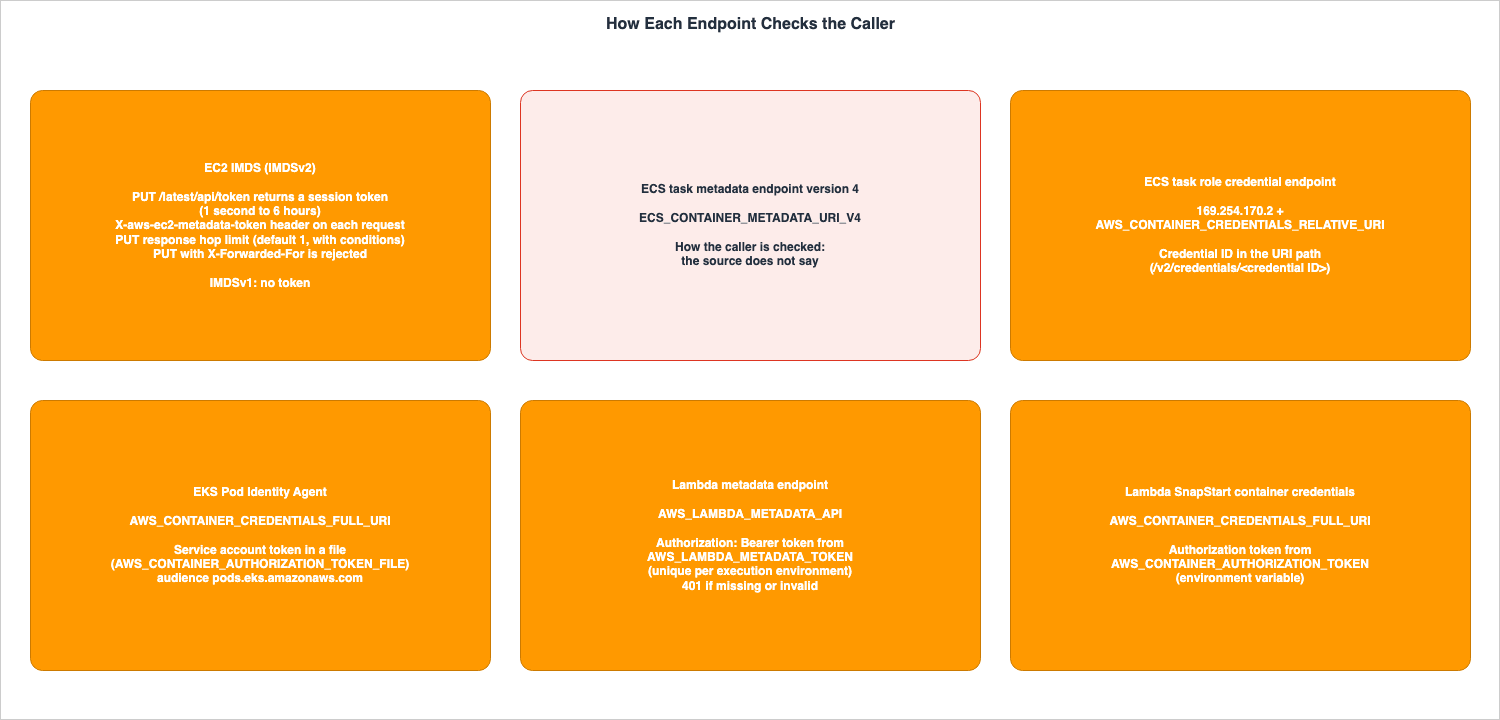
| EC2 IMDS | 169.254.169.254, [fd00:ec2::254] (IPv6 is disabled by default) | Fixed address | IMDSv2: Session token obtained via PUT, hop limit in the PUT response, rejection of PUT requests including X-Forwarded-For. IMDSv1: not checked. | EC2 User Guide, Use the Instance Metadata Service to access instance metadata (How Instance Metadata Service Version 2 works). |
| ECS task metadata endpoint version 4 | The source does not say. | ECS_CONTAINER_METADATA_URI_V4 | The source does not say. | ECS Developer Guide, Amazon ECS task metadata endpoint version 4. |
| ECS task role credential endpoint | 169.254.170.2 | AWS_CONTAINER_CREDENTIALS_RELATIVE_URI | Credential ID in the path. | ECS Developer Guide, Best practices for IAM roles in Amazon ECS (Task role). SDK and Tools Reference Guide, Container credential provider. |
| EKS Pod Identity Agent | 169.254.170.23, [fd00:ec2::23] (ports 80 and 2703) | AWS_CONTAINER_CREDENTIALS_FULL_URI, AWS_CONTAINER_AUTHORIZATION_TOKEN_FILE | Service account token for EKS Pod Identity, passed via file. | EKS User Guide, Learn how EKS Pod Identity grants pods access to AWS services (Considerations). Understand how EKS Pod Identity works. |
| Lambda metadata endpoint | Environment variable value (example: 169.254.100.1:9001) | AWS_LAMBDA_METADATA_API | The value of AWS_LAMBDA_METADATA_TOKEN with Bearer | Lambda Developer Guide, Using the Lambda metadata endpoint (API reference). |
| Container credentials of Lambda SnapStart functions | The source does not say. | AWS_CONTAINER_CREDENTIALS_FULL_URI | Value of AWS_CONTAINER_AUTHORIZATION_TOKEN. | Lambda Developer Guide, Activating and managing Lambda SnapStart (Using SnapStart with AWS SDKs). |
Figure 2 lists the methods by which each endpoint checks the caller.
7.2 What Each Returns, and Caching
The following table lists the location information and credentials returned by each endpoint, and the times that the sources give.| Endpoint | Returns Location | Returns Credentials | Cached For | Where the Source Says So |
|---|---|---|---|---|
| EC2 IMDS | AZ name (placement/availability-zone) and AZ ID (placement/availability-zone-id). Instance identity document | Returns (iam/security-credentials/<role-name>). | IMDSv2 session tokens are valid for 1 second to 6 hours. The user guide recommends caching credentials until they approach their expiry. New credentials are issued at least 5 minutes before the expiration of old credentials. | EC2 User Guide, Use instance metadata to manage your EC2 instance (Instance metadata categories), Access instance metadata for an EC2 instance (Query throttling), Retrieve security credentials from instance metadata |
| ECS task metadata endpoint version 4 | AvailabilityZone (example value is in the format of an AZ name. The sources disagree on where it is available). Task and container metadata. | Does not return. | The source does not say. (for /taskWithTags, the page says to consider caching or batching) | ECS Developer Guide, Amazon ECS task metadata endpoint version 4 and Amazon ECS task metadata V4 JSON response |
| ECS task role credential endpoint | Does not return. | Returns. | Credentials are valid by default for 6 hours. The ECS container agent rotates them. | ECS Developer Guide, Best practices for IAM roles in Amazon ECS (Task role) |
| EKS Pod Identity Agent | Does not return. | Returns. | The agent's cache lasts 6 hours (without a target IAM role) or 59 minutes (with one). The example service account token lasts 24 hours. | EKS User Guide, Access AWS Resources using EKS Pod Identity Target IAM Roles (Caching considerations). Understand how EKS Pod Identity works |
| Lambda metadata endpoint | AZ ID (AvailabilityZoneID). | Does not return. | max-age=43200 (12 hours), immutable. For SnapStart functions, reduced during initialization. | Lambda Developer Guide, Using the Lambda metadata endpoint (API reference) |
| Container credentials of Lambda SnapStart functions | Does not return. | Returns. | The source does not say. | Lambda Developer Guide, Activating and managing Lambda SnapStart (Using SnapStart with AWS SDKs) |
7.3 Default State, and How to Close It
The following table lists whether each endpoint is on by default, and how the sources say to close it.| Endpoint | Default State | How to Close It | Where the Source Says So |
|---|---|---|---|
| EC2 IMDS | The default for HttpEndpoint is enabled. Both IMDSv1 and IMDSv2 are accessible (defaults vary depending on the AMI and account). The hop limit is 1 (defaults vary depending on the AMI and account). | Set HttpEndpoint to disabled. Narrow access from containers with the three ECS settings (Section 4.5) or an EKS hop limit of 1 (Section 5.3). | EC2 User Guide, Configure the Instance Metadata Service options. EC2 API Reference, InstanceMetadataOptionsRequest |
| ECS task metadata endpoint version 4 | Enabled by default on Fargate with version 1.4.0 or later. On EC2 Linux instances, requires agent version 1.39.0 or later. On EC2 Windows instances using awsvpc, requires version 1.54.0 or later. | The source does not say. | ECS Developer Guide, Amazon ECS task metadata endpoint version 4, and the page of the same title for tasks on Fargate |
| ECS task role credential endpoint | When a task role is added to the task definition | The source does not say. | ECS Developer Guide, Best practices for IAM roles in Amazon ECS (Task role). |
| EKS Pod Identity Agent | For clusters where the agent is configured (not required in EKS Auto Mode), pods whose service account has an association. Only pods on Linux EC2 instances. | The source does not say. | EKS User Guide, Learn how EKS Pod Identity grants pods access to AWS services (EKS Pod Identity restrictions). |
| Lambda metadata endpoint | The environment variables are set in every execution environment. All runtimes | The source does not say. | Lambda Developer Guide, Using the Lambda metadata endpoint (API reference). |
For every
The source does not say. in How to Close It, Section 8.2, items 2, 3, and 7 give where and how the statement was looked for. For the ECS task role credential endpoint and the EKS Pod Identity Agent, the sources state the conditions under which the endpoint is given (the Default State column), and no statement of a setting that makes it unavailable was found.7.4 The Credential Table
The following table lists the paths by which credentials reach the code, in the five columns shared with the existing article.| Credential Path | Held By | Refreshed By | Presented As | What You Configure | Where the Source Says So |
|---|---|---|---|---|---|
EC2 IMDS iam/security-credentials/<role-name> | Not stored (the instance's IAM role) | Amazon EC2 | IMDSv2 session token (X-aws-ec2-metadata-token header) (when using IMDSv2) | The instance's IAM role. IMDS options | EC2 User Guide, Retrieve security credentials from instance metadata |
ECS 169.254.170.2 and AWS_CONTAINER_CREDENTIALS_RELATIVE_URI | Not stored (the ECS task role) | The Amazon ECS container agent | Credential ID in the URI path | The task role defined in the task definition | ECS Developer Guide, Best practices for IAM roles in Amazon ECS (Task role) |
| EKS Pod Identity Agent | Not stored (the role in the EKS Pod Identity association) | The EKS Pod Identity Agent | Authorization token (Authorization header) | The EKS Pod Identity association. The agent | EKS User Guide, Understand how EKS Pod Identity works |
| Lambda reserved environment variables | Not stored (the execution role) | Lambda | Not presented | The function's execution role | Lambda Developer Guide, Working with Lambda environment variables (Defined runtime environment variables) |
| Lambda SnapStart function container credentials | Not stored (the execution role) | Lambda | Authorization token (Authorization header) | The function's execution role. SnapStart | Lambda Developer Guide, Activating and managing Lambda SnapStart (Using SnapStart with AWS SDKs) |
The two lines under
Refreshed By that display Lambda are based on the developer guide's statement that Lambda assumes the execution role and generates the credentials.7.5 How Location Endpoints and Credential Endpoints Line Up
The following table lines up the four compute services by this article's arrangement in Section 2.1.| Compute | Location Endpoint | Credential Endpoint | Same Endpoint? |
|---|---|---|---|
| Amazon EC2 | IMDS | IMDS | Same |
| Amazon ECS | Task metadata endpoint version 4 | Task role credential endpoint (169.254.170.2) | Separate |
| Amazon EKS | No AWS endpoint found for pods | EKS Pod Identity Agent | Credential endpoint only |
| AWS Lambda | Metadata endpoint | No endpoint; provided through environment variables. SnapStart functions receive container credentials | Separate |
On EC2, a single endpoint provides both location information and credentials. Therefore, blocking IMDS will cause code in the instance to lose access to both. In ECS, the task metadata endpoint and the task role credential endpoint are separate. The three ECS settings that block EC2's IMDS are not settings for blocking either of them. In EKS, the EKS Pod Identity Agent only provides credentials. For Lambda, the metadata endpoint returns only the AZ ID, while credentials are provided through environment variables.
Figure 1 lines up, for the four compute services, which endpoint the code asks for location information and for credentials.
8. Where the Sources Disagree and Where No Statement Was Found
This chapter collects the places where the sources disagree, and the statements that were not found, that Sections 3 to 7 mention. This article does not call either source wrong. Every verification date is October 13, 2026.8.1 Where the Sources Disagree
The following table lists where the sources disagree.| # | Topic | One Source Says | Another Source Says | Section |
|---|---|---|---|---|
| 1 | Hop limit on EC2 instances that run containers | The EC2 User Guide recommends a hop limit of 2 in a container environment that requires IMDSv2, and another page states that a hop limit of 1 can cause issues | An AWS Security Blog post of September 28, 2023, recommends testing with a hop limit of 3 in container environments. The EKS Best Practices Guide sets the hop limit to 1 in its example of blocking pods, and says to raise it to 2 when the application needs IMDS | Section 3.2, Section 5.3 |
| 2 | Whether Lambda can get the AZ directly | Whitepaper Appendix A states that Lambda does not directly expose the Availability Zone to the function. The top of the page states that it is for historical reference only | The Lambda Developer Guide's metadata endpoint page (the What's New announcement has the postDateTime 2026-03-19T16:36:00Z) | Section 6.1 |
| 3 | Python import for Powertools for AWS Lambda | The Lambda Developer Guide's examples import from aws_lambda_powertools.utilities.lambda_metadata. | The Powertools for AWS Lambda Python Metadata page and an AWS Compute Blog post from October 9, 2026, import from aws_lambda_powertools.utilities.metadata. | Section 6.4 |
| 4 | Where the AvailabilityZone of ECS task metadata is available | The EC2 response page and the Fargate response page list AvailabilityZone as a field specific to Fargate tasks. | The response examples page includes AvailabilityZone in the response example when LaunchType is EC2. | Section 4.3 |
| 5 | Effect of the ECS agent variable ECS_ENABLE_TASK_IAM_ROLE_NETWORK_HOST | The IAM roles best practices page states that setting it to false prevents containers running on the host network from accessing EC2 metadata. | The task IAM role page states that setting it to true allows the task IAM role to be used with containers running in host network mode. | Section 4.5 |
For item 1, the two statements in the EC2 User Guide are as follows.
In a container environment, when IMDSv2 is required, we recommend setting the hop limit to 2.In a container environment, a hop limit of 1 can cause issues.An article on the AWS Security Blog, published on September 28, 2023, states:
We recommend testing with a hop limit of three in container environments.Item 1 lines up recommendations with different purposes. The EC2 User Guide and the AWS Security Blog give 2 or 3 for letting containers use IMDS. The EKS Best Practices Guide gives 1 for blocking pods from IMDS, and 2 for letting them use it. This article does not say which value to use.
For item 2, the two statements in Appendix A of the whitepaper are as follows.
The Availability Zone is not exposed directly to the function.This whitepaper is for historical reference only. Some content might be outdated and some links might not be available.For item 3, this article does not include Powertools code. If you use Powertools, read the current version of the Powertools documentation.
For item 4, the statement on the two response pages is as follows.
The Availability Zone metadata is only available for Fargate tasks using platform version 1.4 or later (Linux) or 1.0.0 (Windows).The
/task example on the response examples page includes "AvailabilityZone": "us-west-2d" in the response for "LaunchType": "EC2". This article does not say whether AvailabilityZone is returned for tasks of the EC2 launch type. This article did not call the endpoint.For item 5, the statements on the two pages are as follows. The first is from the IAM roles best practices page, and the second is from the task IAM role page.
You should set the ECS_ENABLE_TASK_IAM_ROLE_NETWORK_HOST variable to false in the ecs-agent config file to prevent the containers that are running within the host network from accessing the Amazon EC2 metadata.Uses IAM roles for tasks for containers with the host network mode.The two statements describe the effect of the same variable in different words. This article does not say what a container in the
host network mode can no longer reach when the variable is false.8.2 Statements That Were Not Found
The following table lists the statements that were looked for on October 13, 2026, and not found, with where and how they were looked for. That a statement was not found does not mean that the mechanism does not exist.| # | What Was Looked For | Where and How It Was Looked For | Result |
|---|---|---|---|
| 1 | A way for pods to discover their own Availability Zone using AWS endpoints | Searched AWS documentation using a combination of terms: Availability Zone, pod, metadata, and topology.kubernetes.io/zone in the EKS User Guide, EKS Best Practices Guide, and AWS blogs. | Not found. Found Kubernetes node labels topology.kubernetes.io/zone and a description of IMDS in a whitepaper (Section 5.4) |
| 2 | Configuration to disable ECS task metadata endpoint version 4, and how version 4 checks the caller. | Searched two pages from the ECS Developer Guide (version 4), two response pages, the examples page, the metadata entry page, the task IAM role page, and an IAM roles best practices page, using the terms disable, token, auth, and ECS_CONTAINER_METADATA_URI_V4, and also searched with the AWS documentation search. | Not found. The version 2 page states that the agent tells which task a container belongs to by its IP address. This is a description of version 2, and this article does not apply it to version 4. |
| 3 | Configuration to disable the Lambda metadata endpoint. | Searched the metadata endpoint page, the Web Functions page, and the environment variables page of the Lambda Developer Guide, What's New, and the AWS Compute Blog, using the terms disable, block, and AWS_LAMBDA_METADATA_API. | Not found. |
| 4 | The Cache-Control value after it is reduced during initialization for SnapStart functions | Searched the Lambda Developer Guide (metadata endpoint page) and five SnapStart pages (introduction, enabling, best practices, uniqueness, runtime hooks), the AWS Compute Blog, and Powertools pages (Python and TypeScript metadata) using the terms SnapStart, TTL, max-age, and metadata. | Not found. The sources only say that it is reduced |
| 5 | /taskWithTags on the Fargate page | Searched the Fargate pages in the ECS Developer Guide (version 4) and Fargate response pages using the term taskWithTags. | Not found (0 results). The EC2 page has 2 |
| 6 | A common page in the SDK and tools reference guides that lists the hosts allowed by AWS_CONTAINER_CREDENTIALS_FULL_URI. | Searched container credentials provider pages using the terms host, loopback, and 169.254. | Not found. Pages refer to the value as Valid URI. |
| 7 | A setting that makes the ECS task role credential endpoint and the EKS Pod Identity Agent unavailable to tasks or pods that meet the conditions | Searched the ECS task IAM roles page, IAM roles best practices page, and the EKS Pod Identity entry page, how-it-works page, and agent setup page using the terms disable and block. | Not found. On the EKS pages, disable refers to steps to disable IPv6 for the agent and a description of nodes that cannot use IPv6. |
8.3 What Changes When the Sources Are Updated
The following statements in this article change when the sources are updated. When you read this article, reread the following pages.- The Lambda metadata endpoint page (Section 6. The page itself says that fields may be added to the response. The path version
2026-01-15may change) - The Lambda Web Functions page (Section 6.6, recently announced on October 12, 2026.)
- The pages describing ECS task metadata responses and examples (Item 4 in Section 8.1).
- The pages describing EC2 account defaults and AMI settings (Section 3.4. Defaults may vary depending on conditions.)
- The Powertools for AWS Lambda documentation (Item 3 in Section 8.1).
9. Frequently Asked Questions about Metadata Endpoints Across AWS Compute
Q1. Is there a way to learn your own AZ from inside a Lambda function?
Yes. Since March 19, 2026, the Lambda metadata endpoint returns the AZ ID. To access this, send aGET request to the address specified in the environment variable AWS_LAMBDA_METADATA_API, including the value of the AWS_LAMBDA_METADATA_TOKEN environment variable prefixed with Bearer. The response gives the AZ ID, not the AZ name. If you need the AZ name, convert it with the DescribeAvailabilityZones API (Section 6).Q2. Can you get the execution role credentials from the Lambda metadata endpoint?
On October 13, 2026, the only field of the response body that the developer guide shows isAvailabilityZoneID, and the body contains no credentials. Lambda passes the execution role credentials to the function through reserved environment variables. SnapStart functions use container credentials, specifically AWS_CONTAINER_CREDENTIALS_FULL_URI and AWS_CONTAINER_AUTHORIZATION_TOKEN (see Section 6.7).Q3. Can tasks running on ECS Fargate access credentials from EC2 IMDS?
The ECS task IAM role page states that Fargate tasks cannot use EC2 instance profiles. When a task role is added to the task definition, the credentials of Fargate tasks come from the task role credential endpoint at169.254.170.2. Information about the location of Fargate tasks is provided through the task metadata endpoint version 4, specifically the AvailabilityZone value (see Section 4).Q4. What hop limit should EC2 instances that run containers use?
This article does not recommend a value. The sources give different values for different purposes. The EC2 User Guide recommends 2 for using IMDSv2 from containers, and an AWS Security Blog post from September 28, 2023, recommends testing with 3. The EKS Best Practices Guide gives 1 for blocking pods from IMDS (Section 8.1, item 1). The default hop limit is subject to change based on the AMI'sImdsSupport setting and the account's default configuration (as detailed in Section 3.4).Q5. Is there an AWS endpoint for an EKS pod to learn its own AZ?
Within what was searched on October 13, 2026, none was found. The EKS Pod Identity Agent only returns credentials. Appendix A of the whitepaper states that it is possible to retrieve the AZ ID from the Instance Metadata Service (IMDS) on EC2 instances, including those running EKS, but it does not say whether a pod can reach the node's IMDS. The page states that it is for historical reference only (Section 5.4, and Section 8.2, item 1).Q6. Can you block the ECS task metadata endpoint?
No setting to close it was found. The three ECS settings (iptables, ECS_AWSVPC_BLOCK_IMDS, and ECS_ENABLE_TASK_IAM_ROLE_NETWORK_HOST) are designed to prevent tasks on EC2 instances from accessing the EC2 IMDS, not to block the task metadata endpoint (Section 4.5, and Section 8.2, item 2).Q7. To compare whether EC2, ECS, and Lambda are in the same AZ, what do you need to line up?
The forms of the AZ that the endpoints return do not line up. EC2's IMDS returns both the AZ name and the AZ ID. The example value ofAvailabilityZone in ECS task metadata is in the form of an AZ name. Lambda's metadata endpoint only returns the AZ ID. Since AZ names can refer to different locations depending on the account, to line them up in one form, convert with the DescribeAvailabilityZones API (Section 7.2).10. Summary
- All four compute services have local HTTP endpoints: EC2 has IMDS; ECS has the task metadata endpoint version 4 and the task role credential endpoint; EKS has the EKS Pod Identity Agent; and Lambda has the metadata endpoint.
- Only EC2 returns location information and credentials from the same endpoint: If you block IMDS, the code in the instance will lose access to both. ECS uses two separate endpoints; the EKS Pod Identity Agent provides only credentials, while the Lambda metadata endpoint returns only the AZ ID.
- How the caller is checked differs by endpoint: IMDSv2 uses the session token obtained with
PUT, and the hop limit. The Lambda metadata endpoint uses aBearertoken from an environment variable. The ECS task role credential endpoint uses the credential ID in the path. The EKS Pod Identity Agent uses the service account token passed via a file. The container credentials of Lambda SnapStart functions use the value of the environment variableAWS_CONTAINER_AUTHORIZATION_TOKEN. No statement on how the ECS task metadata endpoint version 4 checks the caller was found. - The returned AZ forms do not line up: EC2 returns AZ names and AZ IDs, the ECS example value is an AZ name, and Lambda returns AZ IDs. No AWS endpoint for EKS pods was found.
- Cache durations vary for each endpoint: The Lambda metadata endpoint gives 12 hours, and for SnapStart functions the TTL is reduced during initialization. ECS task role credentials are valid for 6 hours by default, and the EKS Pod Identity Agent cache lasts either 6 hours or 59 minutes.
- A way to close it was found only for EC2's IMDS: Set
HttpEndpointtodisabled, or narrow access from containers with the three ECS settings or the EKS hop limit. No setting that makes the endpoints of ECS, EKS, and Lambda unavailable was found. - The sources disagree: This article lined up five places: the hop limit with containers (1, 2, and 3), the whitepaper's statement on Lambda, the Powertools import, where ECS
AvailabilityZoneis available, and the effect of the ECS agent variableECS_ENABLE_TASK_IAM_ROLE_NETWORK_HOST. Seven statements were not found: the pod AZ, disabling ECS version 4 and how it checks the caller, how to close the Lambda endpoint, the reduced SnapStart value,/taskWithTagson the Fargate page, the allowed hosts on the shared SDK page, and how to close the ECS task role credential endpoint and the EKS Pod Identity Agent.
11. References
- Use the Instance Metadata Service to access instance metadata - Amazon Elastic Compute Cloud
- Configure the Instance Metadata Service options - Amazon Elastic Compute Cloud
- Configure instance metadata options for new instances - Amazon Elastic Compute Cloud
- Modify instance metadata options for existing instances - Amazon Elastic Compute Cloud
- Access instance metadata for an EC2 instance - Amazon Elastic Compute Cloud
- Use instance metadata to manage your EC2 instance - Amazon Elastic Compute Cloud
- Retrieve security credentials from instance metadata - Amazon Elastic Compute Cloud
- Instance identity documents for Amazon EC2 instances - Amazon Elastic Compute Cloud
- InstanceMetadataOptionsRequest - Amazon Elastic Compute Cloud API Reference
- InstanceMetadataDefaultsResponse - Amazon Elastic Compute Cloud API Reference
- IMDSv2 - Amazon Linux 2023
- Amazon ECS task metadata endpoint version 4 - Amazon Elastic Container Service
- Amazon ECS task metadata endpoint version 4 for tasks on Fargate - Amazon Elastic Container Service
- Amazon ECS task metadata V4 JSON response - Amazon Elastic Container Service
- Amazon ECS task metadata v4 JSON response for tasks on Fargate - Amazon Elastic Container Service
- Amazon ECS task metadata v4 examples - Amazon Elastic Container Service
- Amazon ECS task metadata endpoint version 3 - Amazon Elastic Container Service
- Amazon ECS task IAM role - Amazon Elastic Container Service
- Best practices for IAM roles in Amazon ECS - Amazon Elastic Container Service
- Learn how EKS Pod Identity grants pods access to AWS services - Amazon EKS
- Understand how EKS Pod Identity works - Amazon EKS
- Set up the Amazon EKS Pod Identity Agent - Amazon EKS
- Access AWS Resources using EKS Pod Identity Target IAM Roles - Amazon EKS
- Identity and Access Management - Amazon EKS Best Practices Guide
- Using the Lambda metadata endpoint - AWS Lambda
- Using the metadata endpoint (Lambda Web Functions) - AWS Lambda
- Working with Lambda environment variables - AWS Lambda
- Activating and managing Lambda SnapStart - AWS Lambda
- Container credential provider - AWS SDKs and Tools Reference Guide
- IMDS credential provider - AWS SDKs and Tools Reference Guide
- Appendix A - Getting the Availability Zone ID - Advanced Multi-AZ Resilience Patterns
- AWS Lambda now supports Availability Zone metadata - AWS What's New
- AWS Lambda announces Lambda Web Functions - AWS What's New
- Reducing cross-AZ latency with the AWS Lambda metadata endpoint - AWS Compute Blog
- Add defense in depth against open firewalls, reverse proxies, and SSRF vulnerabilities with enhancements to the EC2 Instance Metadata Service - AWS Security Blog
- Get the full benefits of IMDSv2 and disable IMDSv1 across your AWS infrastructure - AWS Security Blog
- Metadata - Powertools for AWS Lambda (Python)
- Metadata - Powertools for AWS Lambda (TypeScript)
- How AWS Lambda Authenticates to Apache Kafka - Where Each Event Source Mapping Method Keeps the Credential, Who Refreshes the Token, and What the Brokers Must Trust
- Running Claude Apps Gateway on AWS - What the Gateway Holds and Enforces, What Stays on Developer Machines, and Where the Worked Example Stops
- The AWS Credential Provider Chain Across SDKs and the CLI - What Each Link Supplies, Where the Order Differs by Language, and Why Precedence Is a Separate Mechanism
- Amazon EKS Pod Identity and IRSA Decision Guide - Workload Identity Design, Trade-offs, and Migration Paths
- AWS Security Defaults History - Block Public Access, Default Encryption, IMDSv2, and How Far Each Changed Default Reached
- Falsehoods AWS Architects Believe About Regions and Availability Zones - What the Names Do Not Tell You, What Opting In Changes, and Which Zones Are Not Availability Zones
- How AWS Lambda Execution Environments Work - Firecracker MicroVMs, Lifecycle Phases, and SnapStart Internals
- IPv6-First VPC Design on AWS - IPv6-Only Subnets, DNS64 and NAT64, and Dual-Stack Migration
- Agent Sandboxing and Blast-Radius Isolation on AWS - Choosing the Unit of Each Containment Boundary and What Each One Does Not Stop
References:
Tech Blog with curated related content
Written by Hidekazu Konishi