Which Key Protects Which AgentCore Data - Customer Managed Keys by Component, When You Choose Them, and Who Calls AWS KMS
First Published:
Last Updated:
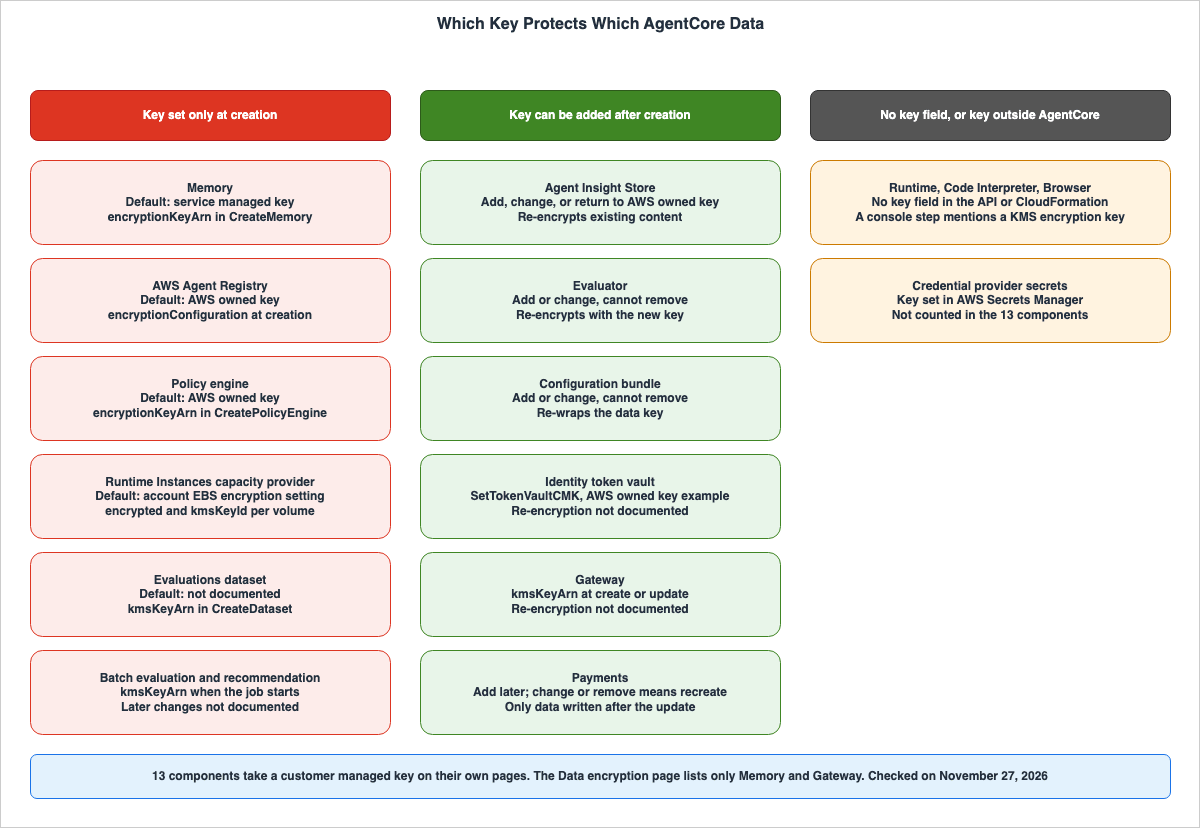
To begin with the conclusion, counting the pages dedicated to each component in the developer guide shows that 13 components allow you to specify a customer managed key (hereafter referred to as CMK). In contrast, the cross-cutting Data encryption page lists only Memory and Gateway. A significant difference lies in the timing when keys can be selected. For Memory, Registry, Policy, Runtime Instances capacity provider, and Evaluations datasets, keys can only be specified during creation. For Gateway, Payments, evaluator, configuration bundle, token vault, and Agent Insight Store, keys can be added after creation. However, within these six components, the ability to switch to a different key, remove a key, or re-encrypt existing data varies from component to component. For batch evaluations and recommendations, the key is specified in the API call that starts the job. The APIs and AWS CloudFormation resources for Runtime, Code Interpreter, and Browser do not have a key field. Even when specifying a CMK, certain data, such as name, description, metadata, and portions of logs, remain outside of key protection. Among the AWS Security Hub CSPM controls, only the ones for Memory and Gateway concern CMKs.
This article is based on documents read on November 27, 2026 (Japan Standard Time). This article does not include hands-on testing. Pricing information is not provided. This article was written prior to AWS re:Invent 2026 (November 30 – December 4, 2026) and does not cover any announcements made at that event.
Related articles on this site:
- Encryption Controls by Service on AWS Storage - What Is On by Default, Which Key You Can Choose, and What Turning It On Does Not Re-encrypt
- Who Can Change the Restrictions on an AgentCore Agent - Gateway Targets, Policies, Credential Providers, and Registry Approvals
- Whose Identity Is in the Audit Record for an AgentCore Tool Call - Users, Agents, and Tools in Gateway, Identity, and Runtime
- Amazon Bedrock AgentCore Implementation Guide Part 2: Multi-Layer Security with Identity, Gateway, and Policy
- AWS Agent Registry and the Agentic Resource Discovery Specification - Governance Before Discovery
- Agentic Payments on AWS - Where the Spending Limit Is Enforced, and What It Does Not Stop
- Privilege Mode on AgentCore Runtime Instances - What Changes Inside the Instance, What the Boundary Keeps, and the Update That Resets It
- Agent Sandboxing and Blast-Radius Isolation on AWS - Choosing the Unit of Each Containment Boundary and What Each One Does Not Stop
Table of Contents
- 1. Scope and Assumptions
- 2. A Map of Components and Data
- 3. When the Key Is Decided
- 4. Key Constraints and What Remains Outside the Key
- 5. Who Calls AWS KMS, and How It Appears in CloudTrail
- 6. When the Key Is Lost, and What Controls Can Detect
- 7. Decision Table
- 8. Frequently Asked Questions About AgentCore Data Keys
- 9. Summary
- 10. References
1. Scope and Assumptions
This chapter first defines the intended audience, the scope of this article, the referenced materials, the terminology used for keys, and the notation used in this article. The conclusions of this article are as follows:- Counting the pages dedicated to individual components in the developer guide, there are 13 components for which a CMK (Customer Managed Key) can be specified. The cross-cutting page lists only two (Chapter 2).
- The point at which a key is determined can be categorized into three groups: components whose key is set only at creation, components for which the key can be added after creation, and components that do not have a key field. Even within components that can have keys added, the handling of operations such as replacing, removing, and re-encrypting varies depending on the component (Chapter 3).
- Keys have limitations, such as being restricted to symmetric keys, keys specific to a single region, or using only ARNs (Amazon Resource Names). Certain elements, such as names, descriptions, metadata, and portions of logs, remain outside the key even when a CMK is specified (Chapter 4).
- The entity that invokes AWS KMS varies by component, including service roles, caller credentials, service principals, execution roles, service-linked roles, and grants for Amazon EBS and Amazon S3. No pages were found that explicitly state which account's CloudTrail logs will contain KMS events (Chapter 5).
- Some components describe the behavior when a key is disabled, while others do not. Security Hub CSPM controls and the AWS Config rules behind them can only detect CMKs for Memory and Gateway (Chapter 6).
- A decision table shows which components meet each requirement and which do not (Chapter 7).
1.1 Intended Audience
This article is intended for:- Security engineers and platform engineers who are deploying agents using AgentCore (Runtime, Memory, Gateway, Identity, Registry, Policy) in production environments.
- Individuals who need to explain in a review whether they can meet data protection requirements – such as encrypting data with their own keys, rendering data inaccessible when keys are disabled, and monitoring key usage through CloudTrail – on a component-by-component basis.
1.2 Scope and Exclusions
This article addresses the following topics:- Stored data for individual components and the default keys.
- Whether a CMK can be specified, when it can be specified, and how to change it.
- Key restrictions and what remains outside of the key.
- The entities that call AWS KMS and whether the pages describe CloudTrail records.
- Behavior when a key is lost and the controls provided by Security Hub CSPM.
This article does not cover the following topics:
- Methods for enforcing CMK specification using condition keys.
- Who can change a key (change permissions). This is covered in Who Can Change the Restrictions on an AgentCore Agent.
- General interpretation of the
userIdentityin CloudTrail. This is covered in Whose Identity Is in the Audit Record for an AgentCore Tool Call. - A detailed explanation of AWS KMS itself. This article provides only a brief definition: an encryption context is a key-value pair associated with encryption and decryption requests and can be matched in key policies. A grant is a mechanism that allows specific entities to use a key without modifying the key policy.
- General encryption for S3 and EBS. This is covered in Encryption Controls by Service on AWS Storage, while this article focuses on applying the same concepts (defaults, selectable keys, and data that is not re-encrypted) to AgentCore.
- Keys for Amazon Bedrock inference and Guardrails.
- Pricing.
1.3 Materials Reviewed
This article is based on a review of the following materials:- Amazon Bedrock AgentCore Developer Guide pages on encryption, including the cross-cutting Data encryption page and the encryption page for each component (Identity, Memory, Gateway, Registry, Policy, Payments, Runtime Instances, Evaluations, configuration bundle, and Agent Insights).
- Amazon Bedrock AgentCore Control Plane API Reference (specifically:
SetTokenVaultCMK,CreateMemory,UpdateMemory,CreateGateway,UpdateGateway,CreatePolicyEngine,UpdatePolicyEngine,CreateCapacityProvider,UpdateCapacityProvider,CreateEvaluator,UpdateEvaluator,CreateConfigurationBundle,UpdateConfigurationBundle,CreatePaymentManager,CreateDataset,CreateAgentRuntime,CreateCodeInterpreter,CreateBrowser). - AWS CloudFormation resource reference (specifically:
AWS::BedrockAgentCore::Memory,AWS::BedrockAgentCore::Gateway,AWS::BedrockAgentCore::PolicyEngine,AWS::BedrockAgentCore::Evaluator,AWS::BedrockAgentCore::ConfigurationBundle,AWS::BedrockAgentCore::CapacityProvider,AWS::AgentRegistry::Registry,AWS::BedrockAgentCore::Runtime,AWS::BedrockAgentCore::CodeInterpreterCustom,AWS::BedrockAgentCore::BrowserCustom). - AWS Security Hub user guide sections on AgentCore controls, and two managed rule sections in the AWS Config developer guide.
- AgentCore release notes, and AWS What's New.
For the IAM namespace of AWS Agent Registry, this article covers only the current
agent-registry. The developer guide stated that the bedrock-agentcore namespace from the public preview would be discontinued on October 30, 2026.Support for the public preview bedrock-agentcore namespace will be discontinued on October 30, 2026.As of the verification date, the status of component availability is as follows: The Registry became generally available in the August 2026 release notes. AgentCore payments were announced as generally available in the "What's New" publication on August 18, 2026. The release notes only reference the preview offered in May 2026. Evaluation and generation that use Evaluations datasets are in public preview in the November 2026 release notes.
1.4 Names for the Default Key
The names for the default key differ from page to page. This article does not consolidate these names; instead, it uses the page's terminology directly in each component's row. For example, the cross-cutting Data encryption page uses two names in the same paragraph.AgentCore encrypts your data using AWS owned encryption keys from AWS Key Management Service. You don’t have to take any action to protect the AWS managed keys that encrypt your data.The key names used on each component are as follows:
| Name | Relevant Pages |
|---|---|
| AWS owned key | Identity, Registry, Policy, Payments, Evaluations, Agent Insights, configuration bundle, recommendation, Security Best Practices for Runtime |
| Service-managed key | Encryption page for Gateway |
| Service managed key | Encryption page for Memory, and the Memory creation page |
| AWS-owned and managed KMS key | Security Best Practices for Memory |
| AWS managed keys | Security Hub CSPM, BedrockAgentCore.4 (Gateway) |
| Default service managed key | Security Hub CSPM, BedrockAgentCore.3 (Memory) |
| Account EBS encryption settings | Encryption page for Runtime Instances |
According to the classification in the AWS KMS Developer Guide, AWS owned keys and AWS managed keys are considered separate types. AWS managed keys are created in the user's account, while AWS owned keys reside in a service account. A table on the same page states that users cannot access logs related to the use of AWS owned keys. Due to the inconsistent naming conventions used across pages, it is not possible to determine from the text of those pages which of the two types the default keys for Gateway and Memory are.
1.5 Notations for Descriptions
This article uses the following three notations:- Stated: Information directly stated in the primary source.
- Not documented: No description was found on the page as of the verification date. This does not constitute proof of non-existence.
- Inference: Information derived from the descriptions in the primary source.
2. A Map of Components and Data
This chapter lists, for each component within AgentCore, what data is stored, the default keys that protect it, and whether a CMK can be specified. The number of components differs between the cross-cutting page and the component pages. This article counts by the component pages.2.1 The 13 Components That Accept a CMK
This article counts the components for which the developer guide indicates that an AWS KMS key can be specified for their resources. A count reveals that there are 13 such components.| # | Component | Protected Data (Page Description) | Default Key (Page Description) | Key Field |
|---|---|---|---|---|
| 1 | Identity Token Vault | Tokens (access tokens) | AWS owned key | SetTokenVaultCMK's kmsConfiguration (keyType, kmsKeyArn) |
| 2 | Memory | Data stored in Memory | service managed key | CreateMemory's encryptionKeyArn |
| 3 | Gateway | Customer data and metadata | Service-managed key | CreateGateway, UpdateGateway's kmsKeyArn |
| 4 | Registry | Record descriptors, custom metadata, skill packages, search index | AWS owned key | encryptionConfiguration's kmsKeyArn |
| 5 | Policy | Policy engine and its associated resources (policies, policy generation) | AWS owned key | CreatePolicyEngine's encryptionKeyArn |
| 6 | Payments | Names and descriptions of payment manager and payment connector | AWS owned key | CreatePaymentManager's kmsKeyArn |
| 7 | Runtime Instances Capacity Provider | EBS volumes associated with sessions | Account-level EBS encryption settings | Volume settings' encrypted and kmsKeyId |
| 8 | Evaluations Evaluator | Evaluator instructions and rating scale | AWS owned key | CreateEvaluator, UpdateEvaluator's kmsKeyArn |
| 9 | Evaluations Dataset | Stored examples (draft and published versions) | Not documented | CreateDataset's kmsKeyArn |
| 10 | Batch Evaluation | Output stored in S3 (data source configuration, session metadata, evaluation results, insight results) | Not documented | StartBatchEvaluation's kmsKeyArn |
| 11 | Recommendation | Recommendation settings and results | AWS owned key | StartRecommendation's kmsKeyArn |
| 12 | Configuration Bundle | Component settings (system prompt, tool descriptions, etc.) | AWS owned key | CreateConfigurationBundle, UpdateConfigurationBundle's kmsKeyArn |
| 13 | Agent Insight Store | Agent Insight name, description, sample session references, insight details | AWS owned key | UpdateAgentInsightStore's encryptionConfiguration (mode, kmsKeyArn) |
The field names in row 7 are the terms of the Runtime Instances encryption page. In the API reference for
CreateCapacityProvider, this field is folded into a nested structure, and this article was unable to verify the field names against the API documentation. The APIs listed in rows 4, 10, 11, and 13 were also not verified against the API reference. Their field names are the terms of the developer guide pages.Regarding the default key for Memory, the Memory encryption page also describes choosing an AWS managed key.
Alternatively, you can also use an AWS-managed KMS key.The managed memory created by the harness also accepts the same
encryptionKeyArn as Memory (Stated). This article includes managed memory when counting the entries in the Memory row.2.2 The Cross-Cutting Page Lists Only Two
The cross-cutting Data encryption page has two lists of resources that can use a CMK. The list in the "Encryption at rest" section only mentions the Gateway. The list in the "Key management" section lists both Memory and Gateway.You can use AWS KMS customer managed keys for the following Amazon Bedrock AgentCore resources:Only Memories and Gateways appear in the subsequent text. If you add up the individual pages, the total is 13. If you read only the cross-cutting page and conclude that only Memory and Gateway are compatible with CMK, you will overlook the remaining 11 components.
2.3 Components Without a Key Field
Runtime, Code Interpreter, and Browser do not have dedicated encryption pages. The API reference forCreateAgentRuntime, UpdateAgentRuntime, CreateCodeInterpreter, and CreateBrowser, as well as the CloudFormation resources AWS::BedrockAgentCore::Runtime, AWS::BedrockAgentCore::CodeInterpreterCustom, and AWS::BedrockAgentCore::BrowserCustom, do not contain the words kms or encrypt at all. The security best practices for Runtime specify a default key as follows:Encryption at rest — Data at rest is encrypted using AWS owned encryption keys from AWS Key Management Service (AWS KMS) by default.However, the page describing how to create a Runtime includes the following sentence in the console instructions:
(Optional) Configure Inbound auth, Advanced configurations, and Permissions, such as the IAM execution role and KMS encryption key.The page does not specify what this key encrypts. Neither the API nor CloudFormation provide corresponding fields. This article does not state that Runtime has no key field; it states that the page, the API, and CloudFormation disagree. Regarding how Runtime handles S3 objects containing the agent's code when those objects are encrypted with a CMK, see the troubleshooting page. This key refers to the user's S3 key, and is not the key that AgentCore uses to store data. The handling of data stored by the Browser, such as browser profiles, is addressed in What AgentCore Browser Keeps and Where Its Traffic Goes.
2.4 Data Protected by Keys Outside AgentCore
Secrets used by the Identity credential provider (API keys and OAuth client secrets) are not protected by the token vault key. The Identity encryption page treats their key as a key on the AWS Secrets Manager side.You can configure CMK for credential provider secrets using AWS Secrets Manager.The
CreateApiKeyCredentialProvider's apiKeySecretSource differentiates between MANAGED, where the service manages the secret, and EXTERNAL, where the user manages the secret within Secrets Manager. The Secrets Manager secret configuration determines the key for EXTERNAL secrets (Inference). Which key protects MANAGED secrets is not documented on the page. This article does not count these secrets among the 13 components.Similarly, the keys used for Runtime Instances volumes are utilized through the EBS mechanism. Registry skill packages are protected using server-side encryption (SSE-KMS) on S3. In both cases, key selection is performed through the AgentCore API, but EBS and S3 are the systems that actually utilize the keys.
Figure 1 groups the components, using three different colors, by the point at which their keys are determined.
3. When the Key Is Decided
This chapter divides components by when the key is decided. Simply checking for CMK compatibility does not reveal the differences between components; those differences lie in when the key must be decided. This article examines the subsequent handling of created resources across four points:- Addability: Can CMK be assigned to resources that were initially created without a specified key?
- Replaceability: Can the existing CMK be changed to a different CMK?
- Removability: Can the CMK be removed, reverting to a default key?
- Re-encryption: When a key is added or changed, will existing data be re-encrypted using the new key?
3.1 Components Whose Key Is Set Only at Creation
For the following components, the key can be set only at creation. If a CMK becomes a requirement later, you need to recreate the resources.| Component | Page Description | API Update Field | CloudFormation Update Requires |
|---|---|---|---|
| Memory | Specified at creation (best practices page). The key of managed memory from harness cannot be changed after creation. | No key field in UpdateMemory. | Replacement |
| Registry | Only during creation. Cannot add, change, or remove. | Not checked in this article. | Replacement |
| Policy | Cannot be added, changed, or removed after creation. | UpdatePolicyEngine only allows changes to the description. | Replacement |
| Runtime Instances Capacity Provider | Only the description can be changed after creation. | UpdateCapacityProvider only allows changes to the description. | ComputeConfiguration requires Replacement. |
| Evaluations Dataset | Cannot be changed or removed after creation. | Not checked in this article. | Not checked in this article. |
Regarding Memory, the page describing the best practices for Memory states that you specify the key when you create the memory.
You can optionally configure a customer-managed KMS key from your own AWS account for additional control over encryption by specifying encryptionKeyArn when creating memory.A statement explicitly stating that the key cannot be added after creation was not found on the Memory page. Since there is no key field in
UpdateMemory and CloudFormation's EncryptionKeyArn requires Replacement, this article places Memory in the creation-only group (Inference). For managed memory created by harness, the harness documentation explicitly states that the key cannot be changed after creation.Managed memory already accepts encryptionKeyArn for a customer managed key in AWS Key Management Service (AWS KMS). You cannot change the key after creation.Regarding Registry, the page describing Registry encryption states:
You can only specify a customer managed key at registry creation. You cannot add, change, or remove encryption configuration after the registry is created.This statement is not found on the page outlining the steps to configure a KMS key for a registry. It is found on the Registry encryption page, which also discusses skill packages.
Skill packages stay encrypted under the key that the registry was created with. You can’t move a registry’s skill packages to a different key.CloudFormation's
AWS::AgentRegistry::Registry states that changing the EncryptionConfiguration will replace the Registry. This replacement process deletes the original Registry and its records. If records managed outside of the stack remain associated with the original Registry, the original Registry cannot be deleted.If you specify a different KMS key, add this property to an existing registry, or remove it, CloudFormation replaces the registry.Regarding Policies, the Policy encryption page describes adding and changing encryption settings in separate sentences.
After you create a policy engine without encryption, you cannot update the policy engine to be encrypted by a customer managed key.After you create a policy engine with a customer managed key, you cannot change the key or remove it from that policy engine. You must create a new policy engine to use a different key.Concerning Runtime Instances, the encryption page states:
After a capacity provider is created, only its description can be edited.The same page also indicates that existing volumes will retain their original creation settings.
Existing volumes keep the encryption configuration they were created with.The default settings for Runtime Instances depend on the account's EBS configuration.
By default, Instances relies on the Amazon EBS encryption setting of your AWS account.Therefore, the default key used by Runtime Instances will vary depending on whether the account's default EBS encryption is enabled (Stated). The page does not describe how volumes are handled when the account's default EBS encryption is disabled.
Regarding the dataset for Evaluations, the dataset encryption page states:
The kmsKeyArn is immutable after dataset creation — you cannot change or remove it.For batch evaluations and recommendations, the keys are specified in the API calls that start the jobs (
StartBatchEvaluation and StartRecommendation) (Stated). The documentation does not describe the ability to add, change, or remove keys after the job has started. This article categorizes these two as belonging to the group whose key is set at creation (Inference).3.2 Components Where Keys Can Be Added After Creation
The following six components allow you to add a CMK after they have been created. However, the handling of the four points varies for each component.| Component | Can Add | Can Replace | Can Remove | Re-encrypt Existing Data |
|---|---|---|---|---|
| Agent Insight Store | Yes (Stated) | Yes (Stated) | Can return to the AWS owned key (Stated) | Re-encrypts in the background (Stated) |
| Evaluator | Yes (Stated) | Yes (Stated) | Cannot remove (Stated) | Decrypts data with the old key and re-encrypts it with the new key (Stated) |
| Configuration Bundle | Yes (Stated) | Yes (Stated) | Cannot remove (Stated) | Re-wraps the data key with the new key (Stated) |
| Token Vault | Configured with SetTokenVaultCMK (Stated) | Not stated | An example returns it to the AWS owned key (Stated) | Not documented |
| Gateway | Can be specified in an update (Stated) | UpdateGateway has the field; not stated | Not documented | Not documented |
| Payments | Yes (Stated) | Recreate (Stated) | Recreate (Stated) | Only data written after the update uses the new key (Stated) |
The Agent Insight Store is the only component whose page states that all four are possible.
You can change from the AWS owned key to a customer managed key, from one customer managed key to another, or from a customer managed key back to the AWS owned key.AgentCore re-encrypts existing Agent Insight content and grouping data in the background.While re-encryption is in progress, both the old and new keys must remain active. Older storage versions and backups can remain encrypted under the previous key until their normal retention periods end (Stated).
For the evaluator and the configuration bundle, a key can be added and changed but not removed.
You cannot remove customer managed key encryption from an evaluator once it has been added.You cannot remove customer managed key encryption from a configuration bundle once it has been added.What a change does differs between the two. For the evaluator, the service decrypts data with the old key and re-encrypts it with the new key. The caller needs permissions on both keys. Updates will fail if the old key is unavailable.
The service decrypts the data with the old key and re-encrypts it with the new key.For the configuration bundle, the service does not re-encrypt the data itself; instead, it re-wraps the data key with the new key.
The service re-wraps the existing DEK from the old key to the new key using kms:ReEncrypt.The token vault's key type is configured using
SetTokenVaultCMK. An example on the API page shows a request that returns the token vault to the AWS owned key.The following partial example request body sets a token vault to use an AWS owned key.When changing the token vault's key to a different CMK, whether existing tokens are re-encrypted is not documented.
The Gateway allows you to specify a CMK during both creation and updates.
By default, Gateway encrypts your data at rest using a service-managed AWS Key Management Service key. However, you can optionally provide your own customer managed KMS key for encrypting data at rest when you:
Create a gateway.
Update a gateway’s configurations.
In CloudFormation,
KmsKeyArn of AWS::BedrockAgentCore::Gateway is No interruption. However, while specifying a new key during an update, it is not documented whether existing data will be re-encrypted with the new key. Furthermore, the documentation does not state which key protects existing data after an update.For Payments, adding a key is possible, but changing or removing a key requires re-creation.
The service encrypts new data written after the update. Existing unencrypted data remains readable.To use a different customer managed key or an AWS owned key, delete the existing payment manager and create a new one with the desired key.Even after a key is added in Payments, data written before the update is not encrypted with the CMK (Inference from the stated sentences). It is necessary to verify that any data that you want to make unreadable by disabling the key is not included in the data written before the update.
3.3 Why This Article Compares the Page, the API, and CloudFormation
The presence of a key field in API requests, and the fact that CloudFormation's "Update requires" status is "No interruption," are not, on their own, evidence that the key can be changed. The former simply describes the structure of the API, while the latter is merely a classification used during stack updates. This article first read the component pages of the developer guide, and then compared them with the API and CloudFormation. As of the verification date, within the scope of this article's comparisons, only Runtime (Section 2.3) showed a discrepancy.| Component | Page | API Update | CloudFormation |
|---|---|---|---|
| Memory | Specified at creation (managed memory cannot be changed after creation) | No field | Replacement |
| Registry | Only at creation | Not checked in this article | Replacement |
| Policy | Only at creation | No field | Replacement |
| Capacity Provider | Only the description can be changed | Only the description | Replacement |
| Gateway | Creation and update | Field available | No interruption |
| Evaluator | Can be added or changed | Field available | No interruption |
| Configuration Bundle | Can be added or changed | Field available | No interruption |
| Runtime | Console instructions mention a KMS key | No field | No field |
4. Key Constraints and What Remains Outside the Key
This chapter outlines the constraints when specifying a CMK, as well as what remains outside the key even when a CMK is specified. Specifying a CMK does not mean that all data for that component is protected by the CMK.4.1 Key Constraints
The constraints that each component's page states are as follows:| Component | Key Type | Region | How the Key Is Specified |
|---|---|---|---|
| Token Vault | Symmetric Key Only | Single-Region Key Only | ARN Only (Aliases Not Permitted) |
| Registry | Symmetric Key Only | Multi-Region Keys Not Permitted. Same Region as the Registry. | Not documented |
| Policy | Symmetric Key Only (ENCRYPT_DECRYPT) | Not documented | Not documented |
| Payments | Symmetric Key Only (SYMMETRIC_DEFAULT, ENCRYPT_DECRYPT) | Single-Region Key Only | Not documented |
| Evaluator, Dataset, Batch Evaluation | Symmetric Key Only | Same Region as the resource. | Not documented |
| Recommendation, Configuration Bundle | Symmetric Key Only | Same Region as the resource. | Not documented |
| Agent Insight Store | Symmetric Key Only (SYMMETRIC_DEFAULT, ENCRYPT_DECRYPT) | Same Region as the Store. | ARN Only (key IDs and alias ARNs are not permitted) |
| Capacity Provider | Symmetric Key | Not documented | Not documented |
| Memory, Gateway | Not documented | Not documented | Not documented |
The token vault has the following two constraints:
You can’t configure token vault encryption at rest with multi-Region keys or asymmetric keys . Amazon Bedrock AgentCore Identity supports only single-region symmetric KMS keys for token vault encryption at rest.
You can configure token vault encryption only with a KMS key ARN, not an alias.
The Registry has the following two constraints:
AWS Agent Registry supports only symmetric encryption KMS keys. You cannot use an asymmetric KMS key or a multi-Region key.The KMS key must be in the same AWS Region as the registry.The Memory and Gateway pages do not specify the key type or Region. The absence of such information does not mean that any key type can be used.
4.2 Items Remaining Outside the Key
For each component, the following lists the descriptions on the pages regarding items that remain outside the key even when a CMK is specified. Rows where the page does not state whether an item is included in the key when a CMK is specified say so in the table.| Component | Items Remaining Outside the Key | Note |
|---|---|---|
| Gateway | The Gateway name, target name, tool name, and Gateway CloudWatch Logs are not encrypted by default. | Stated (whether a CMK covers them is not documented) |
| Memory | Metadata for short-term memory events is not encrypted by the CMK. | Stated |
| Registry | The Registry name and description, record name and description, protocol, external version, identifiers (ID, ARN), and the SHA-256 checksum of the skill package remain encrypted with the AWS owned key. | Stated |
| Evaluator | Name, level, model configuration, and status remain encrypted with the AWS owned key. | Stated |
| Configuration Bundle | Name, description, version ID, and timestamp remain encrypted with the AWS owned key. | Stated |
| Recommendation | Name, type, and status remain encrypted with the AWS owned key. | Stated |
| Agent Insight Store | The Store setting does not configure encryption for online evaluation logs and batch evaluation results. | Stated |
| Payments | The documentation lists the manager and connector names and descriptions as items to be encrypted with the CMK. The handling of other fields is not documented. | Stated |
Regarding Gateway, the cross-cutting page states the following. The page shows it as a bulleted list.
The following data is not encrypted by default:
Gateway names
Gateway target names
Gateway tool names
Gateway CloudWatch logs
This list outlines items that are not encrypted by default. It is not documented whether these items are encrypted when a CMK is specified for the Gateway. The Gateway encryption page provides an example key policy statement that allows the CloudWatch Logs service to use the key for decryption when CloudWatch Logs is enabled.
Regarding Memory, the Memory types page states the following:
Event metadata is not meant to store sensitive content, as it is not encrypted with customer managed key.Event metadata consists of key-value pairs used to filter
ListEvents. If sensitive values are included in the metadata, they will remain outside the CMK, even when a CMK is specified for Memory (Inference from a stated sentence).Regarding Registry, the Registry encryption page begins listing items that remain outside the CMK with the following statement:
The following data is not encrypted with your customer managed key (it remains encrypted with the AWS owned key):Reviewing the items that remain outside the key reveals that a design rule, which dictates avoiding the inclusion of sensitive information in names and descriptions, is necessary across components (Inference).
4.3 A Discrepancy Within the Gateway Page
The Gateway encryption page provides a JSON example for key policies, which useskms:EncryptionContext:aws:bedrock-agentcore-gateway:arn as the condition key for the encryption context. The descriptive text on the same page uses kmsEncryptionContext:aws:bedrock-agentcore-gateway-arn. These two entries have different spellings. This article will refer to the JSON example. When writing key policies, verify the key name against the actual encryption context in the KMS event.5. Who Calls AWS KMS, and How It Appears in CloudTrail
This chapter lists, for each component, which credentials are used to call AWS KMS. Once the entity calling KMS is identified, it becomes possible to determine who is granted what permissions through the key policy, and who appears in the KMS events recorded in CloudTrail.5.1 Six Principal Types
The principals that the pages describe fall into six types:- Service Role: The service role of the Gateway becomes the principal for key policies.
- Caller Credentials: In Forward Access Sessions (FAS), the credentials of the user who called the API are passed to AWS KMS. This applies to Registry, Policy, the key check in Payments, the evaluator, the configuration bundle, the dry-run check for the dataset, batch evaluation, and recommendation, and the configuration of the Agent Insight Store.
- Service Principal:
bedrock-agentcore.amazonaws.comuses keys in asynchronous processing. This includes the evaluator in online evaluation, the dataset, batch evaluation, recommendation, and the Agent Insight Store. While the token vault is configured to trust a service principal from Identity, its name is not documented on the page. - Execution Role: Payments uses the execution role provided by the user to encrypt and decrypt data.
- Service-linked role: Registry uses
AWSServiceRoleForAgentRegistryas the principal for key policies. - Other Services and Grants: EBS uses the key for Runtime Instances volumes, and S3 uses the key for Registry skill packages.
5.2 Principals and Key Policy Points by Component
| Component | Entity Calling KMS | Grant | Key Policy Conditions (Key Points) |
|---|---|---|---|
| Token Vault | Identity's service principal (name not documented) | Not documented | kms:ViaService with bedrock-agentcore-identity.*.amazonaws.com, encryption context with the Token Vault ARN. |
| Memory | Not documented | An example allows kms:CreateGrant to the principal that sets up Memory. | kms:ViaService with the regional name of bedrock-agentcore. |
| Gateway | Gateway's service role. When using CloudWatch Logs, delivery.logs.amazonaws.com. | Permits kms:CreateGrant to the service role. | kms:ViaService, encryption context with the Gateway ARN. |
| Registry | Caller (FAS), service-linked role, S3. | Registry creates the grant at creation time. | kms:ViaService with the regional name of agent-registry, encryption context with the Registry ARN. |
| Policy | Caller (FAS) creates the grant. | Two grants: management and evaluation. | kms:ViaService, encryption context with the policy engine ARN. |
| Payments | Caller (FAS) confirms and the execution role performs encryption and decryption. | Not used (Stated). | kms:ViaService only for the caller. |
| Capacity Provider | The caller of creation calls kms:DescribeKey; the operator role and EBS create the volumes. | Refer to the EBS user guide. | Not documented. |
| Evaluator | Caller (FAS), service principal for online evaluation. | Not used (Stated). | kms:ViaService for the caller, aws:SourceAccount and aws:SourceArn for the service principal. |
| Dataset, Batch Evaluation, Recommendation | Caller (FAS dry-run check) and service principal. | Not documented. | aws:SourceAccount and aws:SourceArn for the service principal. kms:ViaService is not used in the example. |
| Configuration Bundle | Caller (FAS) only. | Not documented. | Encryption context with the configuration bundle ARN. |
| Agent Insight Store | The caller that configures the Store, and the service principal. | Not used (Stated). | kms:ViaService for the caller, aws:SourceAccount and aws:SourceArn for the service principal. |
The key policy points in this table come from the examples on the pages. The
kms:ViaService values in those examples include Region names such as us-east-1, so you need to replace them with your own Region.The Policy page states that the caller creates the grant, and states whom the key policy must allow as follows:
your AWS KMS key policy must grant kms:CreateGrant permission to your AWS account principal (not to a service principal).The Payments page states that, because the execution role directly calls KMS, the
kms:ViaService condition will not apply to the execution role's statement.The kms:ViaService condition applies only to the FAS authorization checkRegistry does not create its service-linked role. The user must create it before adding the key policy statement (Stated).
5.3 How the Events Appear in CloudTrail
The components whose pages state who appears in KMS events are Payments and the evaluator.- Payments: Events initiated in FAS will show the caller in
userIdentity.invokedBy, while events initiated by an execution role will display the execution role's ARN inuserIdentity.arn(Stated). - Evaluator: Requests made by a service principal during online evaluation will show
bedrock-agentcore.amazonaws.cominuserIdentity.invokedBy(Stated).
The Registry page states that requests from Registry and S3 to KMS can be seen in CloudTrail, and that every event includes the Registry's ARN in the encryption context.
You can use AWS CloudTrail to see the requests that AWS Agent Registry and Amazon S3 make to AWS KMS for your registry.The Registry, dataset, batch evaluation, recommendation, configuration bundle, and Agent Insight Store pages list the names of the events (e.g.,
GenerateDataKey, Decrypt, DescribeKey) and the keys within requestParameters.encryptionContext. For example, the evaluator uses aws:bedrock-agentcore:evaluatorArn, and the Agent Insight Store uses aws:bedrock-agentcore:agentInsightStoreArn. When differentiating components in CloudTrail, you can distinguish them by the key names and values in the encryption context (Inference). The Policy page states that the encryption context for AWS KMS invocations can be verified in CloudTrail logs.The token vault, Memory, and Gateway pages do not describe the contents of KMS events. The Runtime Instances page states that CloudTrail records KMS invocations made by EBS when creating and attaching volumes, but it does not specify the
userIdentity.5.4 Which Account's CloudTrail Records the Events
No page was found that states whether KMS events are logged in the CloudTrail of the account holding the key, or the account containing the AgentCore resources (Not documented). This article searched for pages using the terms "CloudTrail," "account's CloudTrail," "key owner," "cross-account," and "different account." In configurations where the key and resources reside within the same account, this distinction is not relevant. However, in configurations where the key is located in a different account, you need to verify which account's CloudTrail logs the KMS events by examining actual events. This article did not test this on real resources, so this point is not confirmed.5.5 Using KMS (Not as an Encryption Key)
The Identity private key JWT is used to sign authentication claims with an AWS KMS key. The July 2026 section of the release notes states:AgentCore Identity calls AWS KMS to sign each assertion, so the private key never leaves KMS and every signing operation is recorded in AWS CloudTrail.This key is used for signing, not for encrypting stored data. It is a separate key from the one used in the token vault and is not included in the tables of this article.
6. When the Key Is Lost, and What Controls Can Detect
This chapter details what happens when a key is disabled, deleted, or when its permissions are revoked, and what controls can detect. The requirement to make data unreadable by disabling a key can be explained only for components whose pages describe the behavior of each operation.6.1 Behavior the Pages Describe
The components whose pages list success or failure for each operation in a table are as follows:| Component | Operations that Fail When the Key is Unavailable | Operations that Succeed Even When the Key is Unavailable |
|---|---|---|
| Registry | CreateRegistryRecord, GetRegistryRecord | ListRegistryRecords (with degraded compliance status), DeleteRegistry, DeleteRegistryRecord |
| Payments | GetPaymentManager, CreatePaymentConnector | ListPaymentManagers (encrypted fields display as [UNAVAILABLE]), DeletePaymentManager, DeletePaymentConnector |
| Evaluator | GetEvaluator for ALL_DATA, on-demand evaluation, online evaluation | GetEvaluator for METADATA_ONLY, DeleteEvaluator |
| Dataset | CreateDataset, GetDataset, ListDatasetExamples | DeleteDataset |
| Batch Evaluation | StartBatchEvaluation, reading encrypted results | ListBatchEvaluations, StopBatchEvaluation, DeleteBatchEvaluation |
| Recommendation | StartRecommendation, GetRecommendation | ListRecommendations, DeleteRecommendation |
| Configuration Bundle | Creation, update, retrieval | Listing, deletion |
A common characteristic across the components in this table is that deletion operations are successful. The page states that this is because deletion does not require decryption. Even if a key is disabled, principals with permission to delete the resources can still delete them (Inference from the stated sentences).
The Registry page also describes how skill packages are handled after the key is disabled. Download URLs that were already returned may keep working until they expire, within 5 minutes. Because of S3 Bucket Keys, Amazon S3 may continue to serve packages for a period even after the key is disabled (Stated).
The Policy page states that when a key is unavailable, all authorization decisions are denied.
If Policy in AgentCore is unable to access the key, any authorization decisions that involve resources encrypted by that key will be denied.The Policy page also describes that when a key is unavailable, a policy engine that still contains policies cannot be deleted, and that a key whose deletion has completed cannot be recovered, nor can the policy definitions encrypted under it.
The Gateway page states that when the key is disabled or deleted, or when Gateway loses permission to use the key, access to encrypted data is lost.
If the key is disabled or deleted, or if Gateway loses permission to use the key, you will lose access to the encrypted data.The Agent Insight Store page describes situations where the
customerMetadataStatus may become CUSTOMER_KEY_UNAVAILABLE, and that new writes or encryption updates may fail.The pages for the token vault, Memory, and capacity provider do not describe the behavior when a key is unavailable (Not documented).
6.2 Security Hub CSPM and AWS Config Controls
Security Hub CSPM has seven AgentCore controls, fromBedrockAgentCore.1 to BedrockAgentCore.7. Of these, only two concern CMKs.| Control | Target | AWS Config Rule | Inspection Details |
|---|---|---|---|
BedrockAgentCore.3 | Memory | bedrock-agentcore-memory-encryption-enabled | Checks if Memory is encrypted with a CMK. |
BedrockAgentCore.4 | Gateway | bedrockagentcore-gateway-encryption-enabled | Checks if the Gateway is encrypted with a CMK. |
The names of these two AWS Config rules have slightly different spellings (
bedrock-agentcore and bedrockagentcore). According to the AWS Config rules documentation, both rules are NON_COMPLIANT if a key ARN is not configured. Both rules are also available only in some Regions (Stated).The page for
BedrockAgentCore.4 states that the control does not evaluate whether the key is disabled or deleted.The control doesn't evaluate whether the configured customer managed KMS key is disabled or deleted.The page for
BedrockAgentCore.3 does not contain this statement. Whether the Memory control evaluates the key state is not documented. This article does not state that .3 evaluates the key state, nor that it does not.6.3 How to Verify Other Components
The other 11 components do not have Security Hub CSPM controls to detect CMK specifications. To check them, look for a key field in the response of the component's Get API (Inference). The token vault page states this approach.If your GetTokenVault response doesn’t include a KmsConfiguration parameter, your token vault is configured to encrypt data at rest with an AWS owned key.For example, the response from
GetGateway includes a kmsKeyArn field. Among the developer guide pages, only the token vault page states that a response without a key field means the default key. The CloudFormation page for AWS::BedrockAgentCore::Evaluator describes KmsKeyArn as a field that is present only for evaluators encrypted with a CMK.7. Decision Table
This chapter lists, for each of the four data protection requirements, which components are capable of meeting them. The four requirements are: encrypting with your own key, changing keys later, observing key usage in CloudTrail, and detection through controls. The table omits the labels used in the main text. Memory's "Only at creation" and "No," and the "Only at start" of Batch Evaluation and Recommendation, are inferences by this article (Section 3.1).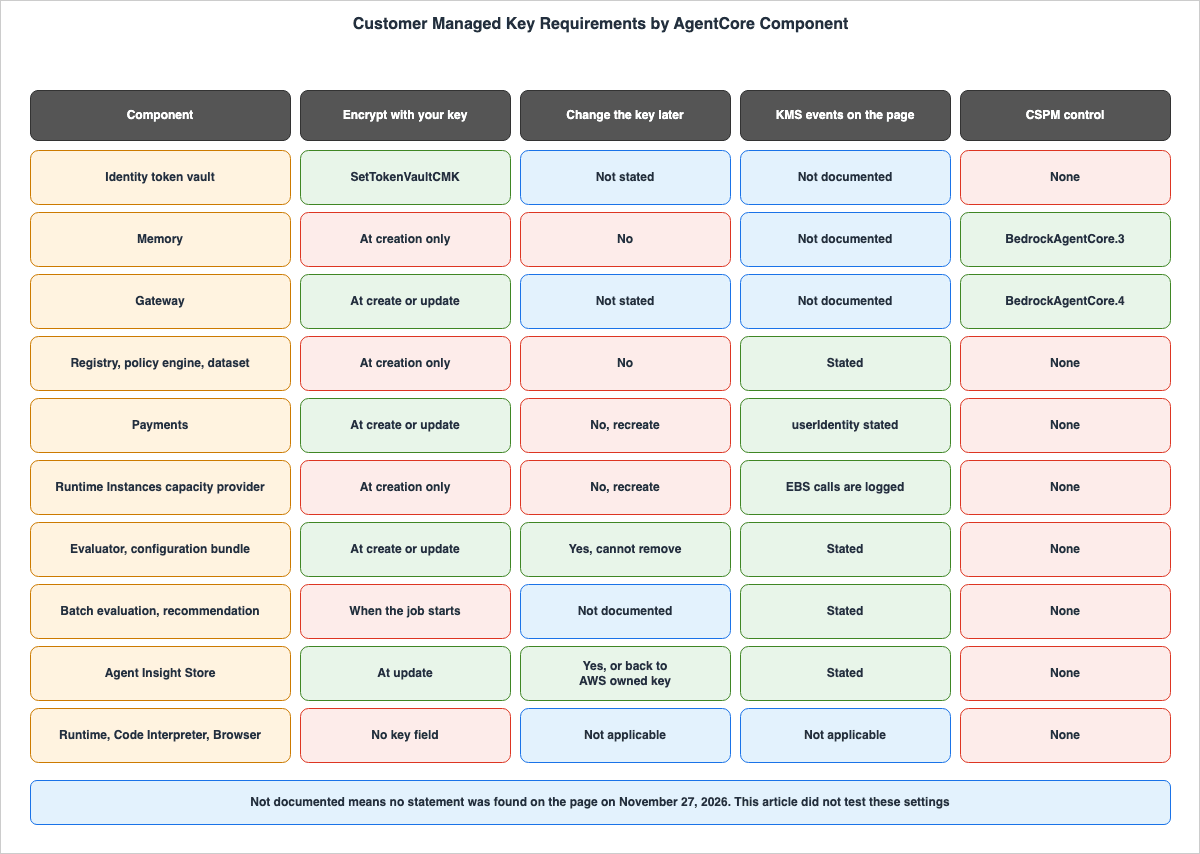
| Component | Encrypts with Your Own Key | Can Change Keys Later | KMS Events Described on the Page | Detectable Through Controls |
|---|---|---|---|---|
| Token Vault | Yes (configurable with SetTokenVaultCMK) | Not stated | Content of the event is not described on the page | No controls |
| Memory | Only at creation | No | Content of the event is not described on the page | BedrockAgentCore.3 |
| Gateway | At creation and update | Not stated | Content of the event is not described on the page | BedrockAgentCore.4 |
| Registry | Only at creation | No | Event and encryption context are documented | No controls |
| Policy | Only at creation | No | Encryption context can be verified in CloudTrail | No controls |
| Payments | At creation and update | No (requires re-creation) | userIdentity is documented | No controls |
| Capacity Provider | Only at creation | No (requires re-creation) | States that EBS calls are logged | No controls |
| Evaluator | At creation and update | Yes | userIdentity is documented | No controls |
| Dataset | Only at creation | No | Event and encryption context are documented | No controls |
| Batch Evaluation, Recommendation | Only at start | Not documented | Event and encryption context are documented | No controls |
| Configuration Bundle | At creation and update | Yes | Event and encryption context are documented | No controls |
| Agent Insight Store | At update | Yes (can also return to the AWS owned key) | Event and encryption context are documented | No controls |
| Runtime, Code Interpreter, Browser | No key field in the API or CloudFormation | — | — | No controls |
Read this table in the following order.
- For components whose key cannot be decided after creation (Memory, Registry, Policy, capacity provider, dataset), decide whether to use a CMK before you create them. If a CMK becomes a requirement later, it means re-creation and migration.
- Even for components where keys can be added later, Payments does not re-encrypt data written before the update. The handling of existing data for Gateway and token vault is not documented. If the requirement is to disable keys and prevent access to data, create the resource with a CMK from the beginning (Inference).
- Do not include sensitive information in names, descriptions, or metadata (Section 4.2).
- Only Memory and Gateway can be detected through controls. Therefore, for other components, check the response of the Get API (Section 6.3).
- If the requirement is to monitor key usage through CloudTrail, use a CMK. The AWS KMS Developer Guide states that users cannot view logs for AWS owned keys (Section 1.4).
- If keys are placed in a separate account, verify in which account the KMS events appear by examining actual events (Section 5.4).
Who can change the keys using
SetTokenVaultCMK or UpdateGateway is a matter of change permissions. This is addressed in Who Can Change the Restrictions on an AgentCore Agent.8. Frequently Asked Questions About AgentCore Data Keys
This chapter answers the questions of the readers in Section 1.1 with the content of Chapters 2 to 7.Q1. Can AgentCore data be encrypted with a CMK?
It depends on the component. According to the developer guide, there are 13 components for which a CMK can be specified (Section 2.1). The APIs and CloudFormation resources for Runtime, Code Interpreter, and Browser do not have a field for specifying keys (Section 2.3). The cross-cutting Data encryption page lists only Memory and Gateway, so reading only that page could lead to overlooking other components (Section 2.2).Q2. Can you specify a CMK after creating a memory?
As of the current API and CloudFormation, it is not possible (Inference).UpdateMemory does not have a field for specifying a key, and EncryptionKeyArn in CloudFormation requires Replacement. The Memory best practices page says to specify the key at the time of creation, and the harness page states that managed memory keys cannot be changed after creation (Section 3.1). If a CMK is required, specify the encryptionKeyArn during creation.Q3. If you update the Gateway key, will the existing data also be protected with the new key?
The documentation does not specify this. While Gateway updates allow you to specify a CMK, the page does not state whether existing data will be re-encrypted with the new key (Section 3.2).Q4. If a CMK is specified, will all data for that component be protected by that CMK?
No. The names of Gateways, targets, tools, and CloudWatch Logs are not encrypted by default, and it is not stated whether specifying a CMK will enable encryption. Metadata for Memory events is also not encrypted by the CMK. Some fields of Registry, evaluator, configuration bundle, and recommendation, such as names, remain encrypted with the AWS owned key (Section 4.2).Q5. Are there components where you can remove the CMK and return to the default key?
Yes. The Agent Insight Store can return to the AWS owned key (Stated). There are examples of requests to configure the token vault to use the AWS owned key. The CMK cannot be removed from the evaluator or the configuration bundle. Payments requires re-creation (Section 3.2).Q6. Will disabling the key prevent the deletion of AgentCore resources?
For most components whose pages describe the behavior, deletion still succeeds. The Registry, Payments, evaluator, dataset, batch evaluation, recommendation, and configuration bundle pages state that deletion will succeed even when the key is disabled. Policy is the exception: while the key is unusable, a policy engine that still contains policies cannot be deleted (Section 6.1).Q7. Which account's CloudTrail will record KMS events?
No specific page was found that addresses this. If the key is placed in a different account, verify this through actual events (Section 5.4).Q8. Does Security Hub CSPM detect the CMK (Customer Managed Key) for AgentCore?
Only Memory (BedrockAgentCore.3) and Gateway (BedrockAgentCore.4) are detected. The BedrockAgentCore.4 page states that the control does not evaluate whether the key is disabled or deleted. For other components, check the responses of the Get APIs (Sections 6.2 and 6.3).9. Summary
Whether AgentCore data can be protected with your own keys depends on the specific components and timing. Counting the individual component pages in the developer guide, there are 13 components for which you can specify a CMK. For Memory, Registry, Policy, capacity provider, and dataset, keys can be set only at creation. For Gateway, Payments, evaluator, configuration bundle, token vault, and Agent Insight Store, keys can be added after creation, although the procedures for changing, removing, or re-encrypting them vary by component. For batch evaluations and recommendations, the key is specified in the API call that starts the job. The APIs and CloudFormation resources for Runtime, Code Interpreter, and Browser have no key field.Even when a CMK is specified, certain data, such as names, descriptions, and event metadata, may remain outside the key's protection. The entities that can invoke AWS KMS include service roles, caller credentials, service principals, execution roles, service-linked roles, as well as EBS and S3. No page was found that states which account's CloudTrail records KMS events. Security Hub CSPM can only detect CMKs for Memory and Gateway.
The information presented in this article is based on materials current as of November 27, 2026 (Japan Standard Time). The number of components and the timing may change as components are added or pages are revised. Be sure to review the individual component encryption pages before use.
10. References
- Data encryption - Amazon Bedrock AgentCore
- Data encryption - Amazon Bedrock AgentCore
- Set customer managed key policy - Amazon Bedrock AgentCore
- Configure with API operations or an AWS SDK - Amazon Bedrock AgentCore
- Encrypt your Amazon Bedrock AgentCore Memory - Amazon Bedrock AgentCore
- Memory types - Amazon Bedrock AgentCore
- Memory - Amazon Bedrock AgentCore
- Encrypt your AgentCore gateway with a customer-managed KMS key - Amazon Bedrock AgentCore
- Data encryption - Amazon Bedrock AgentCore
- Configure KMS key for a registry - Amazon Bedrock AgentCore
- Set customer managed key policy - Amazon Bedrock AgentCore
- AWS CloudTrail integration - Amazon Bedrock AgentCore
- Customize your policy engine’s encryption - Amazon Bedrock AgentCore
- Encryption at rest for AgentCore payments - Amazon Bedrock AgentCore
- Encryption at rest for Runtime Instances - Amazon Bedrock AgentCore
- Encryption at rest for AgentCore Evaluations - Amazon Bedrock AgentCore
- Dataset encryption - Amazon Bedrock AgentCore
- Batch evaluation encryption - Amazon Bedrock AgentCore
- Recommendation encryption - Amazon Bedrock AgentCore
- Configuration bundle encryption - Amazon Bedrock AgentCore
- Encryption at rest for Agent Insights - Amazon Bedrock AgentCore
- Manage the Agent Insight Store - Amazon Bedrock AgentCore
- Security best practices for AgentCore Runtime - Amazon Bedrock AgentCore
- microVMs - Amazon Bedrock AgentCore
- Release notes for Amazon Bedrock AgentCore - Amazon Bedrock AgentCore
- SetTokenVaultCMK - Amazon Bedrock AgentCore Control Plane
- UpdateMemory - Amazon Bedrock AgentCore Control Plane
- UpdateGateway - Amazon Bedrock AgentCore Control Plane
- UpdateCapacityProvider - Amazon Bedrock AgentCore Control Plane
- UpdateEvaluator - Amazon Bedrock AgentCore Control Plane
- AWS::AgentRegistry::Registry - AWS CloudFormation
- AWS::BedrockAgentCore::Memory - AWS CloudFormation
- AWS::BedrockAgentCore::Gateway - AWS CloudFormation
- AWS::BedrockAgentCore::Evaluator - AWS CloudFormation
- Security Hub CSPM controls for Amazon Bedrock AgentCore - AWS Security Hub
- bedrock-agentcore-memory-encryption-enabled - AWS Config
- bedrockagentcore-gateway-encryption-enabled - AWS Config
- AgentCore payments is now generally available in Amazon Bedrock AgentCore
- AWS KMS keys - AWS Key Management Service
- Encryption Controls by Service on AWS Storage - What Is On by Default, Which Key You Can Choose, and What Turning It On Does Not Re-encrypt
- Who Can Change the Restrictions on an AgentCore Agent - Gateway Targets, Policies, Credential Providers, and Registry Approvals
- Whose Identity Is in the Audit Record for an AgentCore Tool Call - Users, Agents, and Tools in Gateway, Identity, and Runtime
- What AgentCore Browser Keeps and Where Its Traffic Goes - Profiles, Recordings, Proxies, and VPC Egress
References:
Tech Blog with curated related content
Written by Hidekazu Konishi