Whose Identity Is in the Audit Record for an AgentCore Tool Call - Users, Agents, and Tools in Gateway, Identity, and Runtime
First Published:
Last Updated:
To begin with, the Gateway's
InvokeGateway is a CloudTrail data event and is not logged by default. In the two examples provided in the developer guide, both successful and failed (401) calls show userIdentity as AWSAccount and anonymous. Information about the caller is only included in the additionalEventData.jwt field in the successful example, as a JWT header and claims. The claims in the example belong to a client's access token. The end user of a Runtime session is the validated sub when the Runtime is called with a JWT, and the value of the X-Amzn-Bedrock-AgentCore-Runtime-User-Id header when it is called with SigV4. Note that the latter is not validated by an Identity Provider (IdP). There are no examples in the developer guide detailing how userIdentity appears in CloudTrail events for InvokeAgentRuntime. Identity requests that AgentCore makes for you are recorded as management events for the resource-owning account. In the AI Blog examples, the token is hidden. Based on the available documentation as of the verification date, no single record is enough on its own to tell for whom the operation was performed.This article was written based on the documentation reviewed on November 26, 2026 (Japan Standard Time). It was not tested on actual resources. Pricing information is not included. This article was written prior to AWS re:Invent 2026 (November 30 – December 4, 2026) and does not include any information that will be presented at that event.
Related articles on this site:
- Identity Lifecycle for AI Agents - Registration, Delegated Authorization, Access Review, and What Retirement Leaves Behind
- Who Is Consenting - OAuth Session Binding and the Consent Portal in AgentCore Identity
- Agent Interoperability Architecture on AWS - Cross-Runtime Agents with A2A, MCP, and Amazon Bedrock AgentCore Gateway
- Impersonation or Delegation - Amazon Cognito Token Exchange, the act Claim, and Down-Scoping
- Scoping Each Session on AgentCore Runtime - Session Context Keys, Who Chooses the Session ID, and What the Keys Do Not Prove
- OWASP Top 10 for Agentic Applications Mapped to AWS Controls - What Each Control Mitigates and What Residual Risk Remains
Table of Contents
- 1. Scope and Assumptions
- 2. Map of Records for a Single Tool Call
- 3. Gateway Records
- 4. Runtime Records
- 5. Identity Records
- 6. A Decision Table for the ID to Report in an Audit
- 7. What the Sources Do Not Show, and Variations from Page to Page
- 8. Frequently Asked Questions Regarding AgentCore Audit Record IDs
- 9. Summary
- 10. References
1. Scope and Assumptions
This chapter first defines the intended audience, the scope of this article, the materials reviewed, and the terminology used. The key conclusions are as follows:- Both
InvokeGatewayfrom the Gateway andInvokeAgentRuntimefrom the Runtime generate CloudTrail data events, but by default, these are not logged (see Section 3.1 and Section 4.1). - For Gateway data events, the
userIdentityisanonymousin both the successful and the failed example in the developer guide. Information about the caller is only included inadditionalEventData.jwtin the successful example, and the example claims belong to a client's access token (see Chapter 3). - For the Runtime, the end user's session identity is either a validated
subwith a JWT, or the header value with SigV4, which is self-asserted. The format ofuserIdentityforInvokeAgentRuntimeis not illustrated in the developer guide (see Chapter 4). - Identity calls that AgentCore makes for you are logged as management events. The
userIdentitytakes three different forms, and tokens are hidden (see Chapter 5). - When auditing, the end-user ID is provided with a mark of whether it was validated. Values that are self-asserted are provided in conjunction with the IAM principal that provided them (see Chapter 6).
- There are instances not illustrated in the developer guide, and some descriptions vary from page to page. This article treats these as representing the state as of the date of verification (see Chapter 7).
1.1 Intended Audience
This article is intended for:- Security engineers and platform engineers who are deploying agents using AgentCore's Runtime, Identity, and Gateway components in production environments.
- Individuals who need to determine, using CloudTrail and CloudWatch, for whom a particular tool call was made during incident response or audits.
- Those who want to understand what data is and is not captured in AgentCore logs before designing CloudTrail trails.
1.2 Scope: What This Article Covers, and What It Does Not
This article addresses the following topics:- Records related to Gateway, Runtime, and Identity, including the IDs listed within them.
- Whether those IDs represent validated values or self-asserted values.
- Whether those records are retained by default.
- The process for determining which IDs are included in audit logs, and how to handle situations where records are missing.
- Items not covered in the developer guide, inconsistencies between pages, and discrepancies with Well-Architected goals.
This article does not cover:
- Token exchange for on-behalf-of and the mechanics of the act chain. Agent Interoperability Architecture on AWS, Section 5.2, and Identity Lifecycle for AI Agents, Chapter 4, address these topics.
- The OAuth consent flow. Who Is Consenting covers this.
- IAM condition keys and how to write Resource Control Policies (RCPs).
- Records within the AWS Agent Registry.
- Permissions to modify AgentCore configurations. A separate article in this series, Who Can Change the Restrictions on an AgentCore Agent - Gateway Targets, Policies, Credential Providers, and Registry Approvals, covers this.
- Pricing.
- Procedures for impersonating others.
1.3 Materials Reviewed
This article is based on materials reviewed on November 26, 2026 (Japan Standard Time). Within this text, these materials are referred to by their short English names in parentheses. The original source material was obtained usingcurl, and its accuracy was also verified through searches of AWS documentation.- AgentCore Developer Guide – Gateway section: Understanding Amazon Bedrock AgentCore Gateway CloudTrail events (Gateway events page), Amazon Bedrock AgentCore Gateway event types (Gateway event types page), Enable CloudTrail data event logging for Amazon Bedrock AgentCore Gateway resources (data event logging page), Set up inbound authorization for your gateway (Gateway inbound page), Set up outbound authorization for your gateway (Gateway outbound page), Log Amazon Bedrock AgentCore Gateway API calls with CloudTrail.
- AgentCore Developer Guide – Runtime section: Authenticate and authorize with Inbound Auth and Outbound Auth (Runtime OAuth page), Use isolated sessions for agents (sessions page), Security best practices for AgentCore Runtime (Runtime security page), Security model and permissions for Runtime Instances (Instances security page), Connect to runtime sessions through a session endpoint (session endpoints page), Observability and cost controls (harness page).
- AgentCore Developer Guide – Identity section: On-behalf-of token exchange with AgentCore Identity (OBO page), Get workload access token (workload token page), Resource control policies for Amazon Bedrock AgentCore (RCP page), Client authentication methods (client auth page, read on November 27, 2026).
- AgentCore Developer Guide – Observability section: Observability, audit logging, and tracing for your agents (observability page), AgentCore generated runtime observability data (Runtime metrics page), AgentCore generated identity observability data (Identity metrics page).
- AgentCore API Reference –
InvokeAgentRuntime(InvokeAgentRuntime reference). - CloudTrail User Guide – Logging data events (CloudTrail data events page).
- AWS Well-Architected Framework – Agentic AI Lens – AGENTSEC03-BP02 and AGENTSEC05 (Agentic AI Lens).
- AWS Security Blog – “Propagate user authorization context in AI agents with Amazon Bedrock AgentCore” (August 19, 2026, Security Blog).
- AWS Artificial Intelligence Blog – “Authenticate with Private Key JWT using Amazon Bedrock AgentCore Identity” (July 29, 2026, AI Blog).
- RFC 8693 – “OAuth 2.0 Token Exchange.”
1.4 Usage of Terms
This article uses the following terms consistently:- End User: The individual who requests tasks from an agent. This article uses this term to differentiate it from an IAM principal.
- Agent: Code running in the runtime environment, along with the workload identity provided to it by AgentCore.
- Tool: The target of the Gateway, or external services that an agent calls directly, bypassing the Gateway.
- IAM Principal: Includes IAM users and, for example, sessions associated with roles that call APIs with AWS credentials.
userIdentityField: The field in CloudTrail events that represents the entity making the call. Although the name includes "user," it is not a field for the end user.- Record: A CloudTrail event, a CloudWatch Logs log, or a span and metrics.
- Data Event and Management Event: Types of events within CloudTrail. Management events are retained by default in the CloudTrail event history, which keeps only the past 90 days. Data events are only retained when selected in a trail or event data store.
1.5 Identity Marks
This article uses the following three marks to represent IDs that are recorded:- Verified: Values that have passed verification through AWS authentication or signature and issuer/expiration validation from an Identity Provider (IdP).
- Self-asserted: Values provided by the calling party that AgentCore accepts without verification.
- Not documented: Neither examples of the record format nor descriptions of that format can be found in the materials in Section 1.3. This does not indicate that the record is missing.
This article marks its own inferences with (Inference) in the same sentence. An inference is not a statement from any source.
This article was reviewed on November 26, 2026 (Japan Standard Time). On the review date, the developer guide returned a
Last-Modified timestamp around November 26, 2026, 00:00 GMT. This is likely the build time for the entire guide and is not evidence that the page content was revised (Inference). This article uses the full year format for all dates.2. Map of Records for a Single Tool Call
This chapter presents a consolidated view, mapping the APIs invoked during a single tool call and detailing the records each API generates. Figure 1 summarizes the content of this chapter.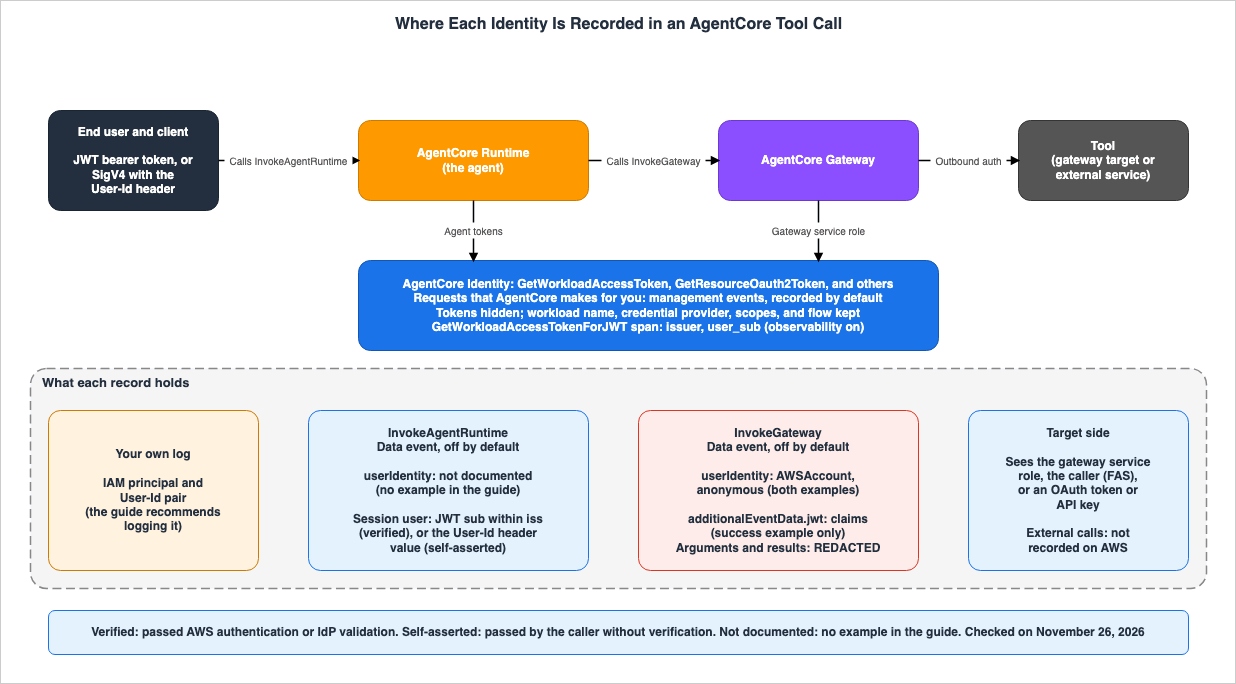
2.1 Route
The route illustrated in this article is as follows:- The client invokes the agent using
InvokeAgentRuntime, using either a JWT bearer token or SigV4 authentication. - When invoked with a JWT, the Runtime verifies the issuer and signature of the token, extracts the
issandsubclaims, and callsGetWorkloadAccessTokenForJWT, passing both the end-user ID and the agent's workload identity. The workload token page describes this flow (Section 4.3). - The agent obtains tokens for external tools using
GetResourceOauth2Tokenwithin the AgentCore Identity. - The agent invokes a Gateway tool using
InvokeGateway. - The Gateway calls the target, based on the outbound authorization type (Section 5.4).
This is not the only possible route. It is also possible to place the Gateway in front of the Runtime, in which case the Gateway will invoke the Runtime. When the Gateway signs its requests to the Runtime with its own role, the Gateway role will be the entity making the call to the Runtime (Section 4.5).
2.2 Records by Step
The records for each step are listed in the following table:| Step | Record | Type | Retained by Default |
|---|---|---|---|
InvokeAgentRuntime | Events from CloudTrail related to AWS::BedrockAgentCore::Runtime | Data event | Not retained |
| Identity calls that AgentCore makes for you | Events from CloudTrail related to the account that owns the resource | Management event | Retained |
| Identity calls made directly by the agent's code | CloudTrail | Not documented | Not documented |
InvokeGateway | Events from CloudTrail related to AWS::BedrockAgentCore::Gateway | Data event | Not retained |
| Calls from the Gateway to the target | Records on the target's side | Target-specific | Target-specific |
| Changes to the Gateway configuration | CloudTrail | Management event | Retained |
| Processing by Runtime and Gateway | CloudWatch metrics, logs, and spans | Observability data | Dependent on configuration |
The CloudTrail data events page lists 26 resource types that begin with
AWS::BedrockAgentCore:: as of the date of review. This includes five related to Identity: WorkloadIdentity, WorkloadIdentityDirectory, OAuth2CredentialProvider, TokenVault, and APIKeyCredentialProvider. However, the table does not specify which APIs correspond to each data event. The RCP page describes Identity calls that AgentCore makes for you as management events (see Section 5.1). Therefore, the third row in the table indicates the type for calls made directly by the agent's code as "Not documented."3. Gateway Records
This section details whose ID appears in which field of theInvokeGateway records.3.1 InvokeGateway Is a Data Event and Is Not Logged by Default
The data event logging page states that data events must be explicitly enabled.You must explicitly enable data events as they are not captured by default.The Gateway event types page states the same, adding that these events will not be found in the event history.
You must explicitly enable data events because they are not logged by default. The CloudTrail Event history doesn’t record data events.The data event logging page explains that to retain Gateway data events, you must create a trail that delivers to an Amazon S3 bucket and select
AWS::BedrockAgentCore::Gateway in the advanced event selectors under resources.type. The Gateway event types page clarifies that Gateway data events are only delivered to the account that owns the resource.Because Amazon Bedrock AgentCore Gateway uses JWT tokens for authentication rather than SigV4 credentials, data events are only routed to the resource owner account.If data events are not enabled, no
InvokeGateway events will be recorded in CloudTrail. They will not appear in the CloudTrail event history. Even if you enable data events after an incident occurs, previous invocations will not be recorded (Inference).3.2 userIdentity Is anonymous in Both Examples
The Gateway events page provides two examples ofInvokeGateway data events. One illustrates an authentication failure, with responseElements containing "statusCode": 401 and "message": "Invalid Bearer token". The other example shows a successful call. In both examples, the userIdentity takes the following format: "userIdentity": {
"type": "AWSAccount",
"principalId": "",
"accountId": "anonymous"
},The
principalId is an empty string, and the accountId is set to anonymous. Since this same format appears in both the failure and success examples, within the scope of these examples, anonymous does not indicate an authentication failure, nor does it signify a call authorized via JWT, because the failure example also exhibits the same format.The Gateway event types page explains why the Gateway data event takes this form.
Because the Data API follows the MCP protocol and uses JSON Web Token (JWT)-based authentication rather than SigV4, Amazon Bedrock AgentCore Gateway data events don’t have standard AWS identity information. Instead, identity is captured by logging specific JWT claims, including the "sub" claim.This text assumes a Gateway that authorizes calls via JWT. The Gateway inbound page lists, in addition to JWT, types that authorize using IAM (credentials), as well as
AUTHENTICATE_ONLY (which only authenticates using SigV4) and NONE (which performs no authentication). The format of userIdentity for these three types is not documented (Not documented). This article does not attempt to extrapolate the userIdentity for Gateways authorized via IAM based on the JWT examples.3.3 Caller Information Appears Only in additionalEventData.jwt of the Successful Example
The successful example includes the JWT header and claims in a separate field calledadditionalEventData, distinct from the userIdentity. In the successful example on the Gateway events page, this field contains the following: "additionalEventData": {
"targetId": "0JTXXX4YMA",
"jwt": {
"headers": {
"kid": "hGrcJwz5MX6hNeuL6jdXE4hjK7sT6oj+yN7kN+arRv4=",
"alg": "RS256"
},
"claims": {
"sub": "4ammgxxxxxxxxxxxm3b8c",
"token_use": "access",
"scope": "python-cognito-resource-server-id/write python-cognito-resource-server-id/read",
"auth_time": 1752459276,
"iss": "https://cognito-idp.us-west-2.amazonaws.com/us-west-2_Fxxxxxhtq",
"exp": 1752462876,
"iat": 1752459276,
"version": 2,
"jti": "1234abcd-12ab-34cd-56ef-1234567890ab"
},
"type": "JWS"
},
"downstreamRequestIds": [
"H3RDH6T03DG10996U0M2P1V1IFVV4KQNSO5AEMVJF66Q9ASUAAJG"
]
},In the case of failed examples, the
additionalEventData field is not present. For failed examples, the fields that indicate the calling party are limited to sourceIPAddress, userAgent, and tlsDetails. Therefore, within the scope of these examples, the record of a call that did not get into the Gateway does not show who attempted it by ID (Inference).The Gateway events page includes the following note regarding the claims within the JWT for data events:
The contents of the requests and responses for data events are redacted, and the JSON Web Token (JWT) claims have HTML entities sanitized for security purposes.The claims are included in a sanitized format, having undergone HTML entity processing. When comparing the claims in the logs with values from the Identity Provider (IdP), it is important to account for this processing (Inference).
3.4 The Example Claims Belong to a Client's Access Token
The claims in the successful example havetoken_use set to access and a scope value that includes the identifier of the resource server. This represents an access token obtained by an Amazon Cognito client using client credentials (Inference). The Gateway events page does not describe this example as an end-user JWT.The Gateway event types page states that identity is captured by logging JWT claims, including
sub. The identity that sub refers to is determined by the JWT used to call the Gateway. If the Gateway is called using an end-user access token, sub refers to the end user. If the Gateway is called using a token obtained with client credentials, sub refers to the client (Inference). Therefore, before auditing additionalEventData.jwt.claims.sub as the end user's ID, it is essential to verify which type of token is being used to call the Gateway.The value of
sub can be treated as Verified because it is the value recorded after the Gateway validates the JWT's signature and authorizes it (Inference). However, verification only confirms that the holder of the JWT is the entity identified by sub. Whether that entity is an end user is a separate question.The Gateway event types page recommends against including personally identifiable information in this field.
We recommend that you avoid using any personally identifiable information (PII) in this field. For example, you could use a GUID or a pairwise identifier, as suggested in the OIDC specification instead of PII data like email.3.5 Tool Names and Targets Remain, While Arguments and Results Are Hidden
In the successful example, therequestParameters contain the body of the MCP's JSON-RPC. The method is tools/call, and params.name is the tool name, SmithyTarget___ListTables. params.arguments is REDACTED, and responseElements's result.content is also REDACTED. additionalEventData includes targetId and downstreamRequestIds.Therefore, within the scope of these examples, the Gateway logs reveal which tool was called and on which target. However, it's not possible to determine what arguments were passed to the tool or what the tool returned (Inference). The page detailing Gateway events does not specify which records on the target side correspond to the
downstreamRequestIds (Not documented).The location of failure information also differs from other services. The Gateway event types page states:
Amazon Bedrock AgentCore Gateway provides error information as part of the responseElements field rather than as top-level errorCode and errorMessage fields.When searching for authorization failures, look within
responseElements rather than the errorCode.3.6 Gateway Management Events Include IAM Identity Information
The Gateway events page providesCreateGateway as an example of a management event. In this example, the type of the userIdentity field is AssumedRole, with the arn and sessionContext fields providing details about the role's session. In the example, the invokedBy field shows bedrock-agentcore.amazonaws.com. The Gateway event types page notes that all management events include information about the identity that initiated the request.Management events serve as a record of who made changes to the Gateway configuration. The process for defining permissions to make these changes is discussed in a separate article in this series: Who Can Change the Restrictions on an AgentCore Agent - Gateway Targets, Policies, Credential Providers, and Registry Approvals.
4. Runtime Records
This chapter describes howInvokeAgentRuntime is logged, and explains how the end user of a Runtime session is determined.4.1 InvokeAgentRuntime Is Also a Data Event
As the records of Harness operations, the harness page specifiesInvokeAgentRuntime, InvokeAgentRuntimeCommand, and InvokeAgentRuntimeCommandShell as data events, and gives AWS::BedrockAgentCore::Runtime as the resource type. The session endpoints page describes requests to the session endpoints as a data event called InvokeAgentRuntimeProxy, and states that it uses the same resource type as the InvokeAgentRuntime event. Furthermore, it states:Data events aren’t logged by default, and they don’t appear in CloudTrail Event history.The session endpoints page indicates that to record data, a trail or event data store must be created, and an advanced event selector must be added using the
AWS::BedrockAgentCore::Runtime resource type. Similar to the Gateway, recording will not persist unless it is enabled. The data event logging page for the Gateway only mentions trails, and does not reference the event data store.4.2 The Developer Guide Has No Example of the userIdentity Format
This article was unable to find examples of the JSON forInvokeAgentRuntime events in the CloudTrail logs within the developer guide. On the review date, it searched all 630 pages listed in the developer guide's table of contents for the term userIdentity. The pages that contained this term were limited to five areas: Gateway, Registry, Evaluations, Payments, and RCP. There were no pages related to Runtime. Furthermore, the documentation does not explain how userIdentity differs when invoked using JWT versus SigV4 (Not documented).However, three statements refer to the contents of the logs. The Runtime security page states:
AWS CloudTrail records API calls including InvokeAgentRuntime, InvokeAgentRuntimeCommand, InvokeAgentRuntimeCommandShell, and control plane operations. Each record includes caller identity, timestamp, source IP address, and response status.The Instances security page, which is a Runtime Instances page, states:
AWS CloudTrail records both the authenticated principal and the target sessionId in the same InvokeAgentRuntime event.The Runtime OAuth page states:
Use AWS CloudTrail to monitor InvokeAgentRuntime calls that include the runtimeUserId parameter.Based on these three statements, it can be inferred that when invoked using SigV4, the authenticated IAM principal, session ID, and
runtimeUserId are included somewhere within the same event (Inference). However, the specific field where this information appears is not documented (Not documented). It is also not documented whether, when invoked using JWT, it will behave the same as it does with Gateway and display as anonymous. This article does not attempt to extrapolate the format for Runtime based on the Gateway examples.4.3 The End User of a Session Depends on the Authentication Method
The sessions page lists the end user ID that the Runtime associates with a session, categorized by authentication method.| Inbound Authentication | End User ID Associated with Session | Mark |
|---|---|---|
| JWT Bearer Token | The sub claim from the validated token, unique within the iss claim. | Verified |
SigV4 with X-Amzn-Bedrock-AgentCore-Runtime-User-Id header | The value of the header. | Self-asserted |
| SigV4 without header | None. The session is not associated. | — |
Regarding the JWT row, the sessions page states:
The sub claim of the validated token, within the token’s issuer (iss claim). The same sub value from a different issuer is a different user.This table is located in the Session pinning section of the sessions page. Session pinning is a mechanism that associates a session with the end user who created it and rejects requests from other end users using the same session ID. The sessions page limits this scope as follows:
Session pinning is available only for agent runtimes that use platform version V2 on microVMs.For platform version V1 and Runtime Instances, AgentCore does not enforce the association between a session and an end user. The sessions page states that this association is managed by the client's backend. When using the end user ID for auditing, first verify whether the agent runtime is a V2 microVM (Inference).
In the JWT path, the Runtime passes the end user ID to Identity. The workload token page states that the Runtime validates the token issuer and signature, extracts the
iss and sub claims that represent the end user, and calls GetWorkloadAccessTokenForJWT, passing both the end user ID and the agent's workload identity.4.4 The Header Value Is Self-Asserted
The Identity Provider (IdP) does not validate the value of theX-Amzn-Bedrock-AgentCore-Runtime-User-Id header. The Runtime OAuth page states:The X-Amzn-Bedrock-AgentCore-Runtime-User-Id header path does not verify the userId against an authenticated end-user identity — it relies on the calling workload to pass the correct value and on your IAM policies to restrict who can supply it.To call
InvokeAgentRuntime with this header, you need both the bedrock-agentcore:InvokeAgentRuntime and bedrock-agentcore:InvokeAgentRuntimeForUser permissions. The InvokeAgentRuntime reference refers to the header value as runtimeUserId.Whether the header value is correct depends on whether the IAM principal that provided the value is behaving correctly. Therefore, the Runtime OAuth page recommends recording pairs of the IAM principal and the header value for auditing purposes.
Log the relationship between the authenticated IAM principal (from SigV4 context) and the user-id value being passed.The Runtime OAuth page and the Runtime security page jointly recommend the following:
- Derive the header value from the context of an authenticated principal, rather than treating it as arbitrary client input.
- Grant
InvokeAgentRuntimeForUseronly to trusted principals, and restrict it to specific Runtime resources. - For Runtimes that do not require the header, explicitly deny
InvokeAgentRuntimeForUser. - In production environments, choose the JWT path, which validates the IdP token.
During audits, do not treat the header value as the end user's ID in isolation. Instead, present it alongside the IAM principal that holds the
InvokeAgentRuntimeForUser permission, with the Self-asserted mark (Inference).4.5 With a Gateway in Front That Signs with Its Own Role, the Gateway Role Invokes the Runtime
The Runtime OAuth page describes a configuration where a Gateway is placed in front of a Runtime that authorizes with SigV4:The gateway assumes its service role to sign requests to the runtime, so the gateway role is the principal that invokes the runtime.In this configuration, the principal that calls the Runtime in the Runtime's records is neither the end user nor the client that invoked the Gateway; it is the Gateway role (Inference). To determine which entity invoked the Gateway, you can examine the Gateway's data events.
The Gateway inbound page also describes alternative configurations. Combining an
AUTHENTICATE_ONLY inbound setting with a CALLER_IAM_CREDENTIALS outbound setting allows the Gateway to authenticate the SigV4 caller and sign requests to the Runtime using the same caller's ID. When using a NONE inbound setting and a JWT_PASSTHROUGH outbound setting, the Gateway forwards the received JWT to the Runtime without modification. The Gateway inbound page describes both of these configurations as suitable for testing, experimentation, and low-disruption onboarding.4.6 Spans and Metrics
The Runtime metrics page lists attributes ofInvokeAgentRuntime spans, including aws.agent.id, session.id, aws.request_id, and aws.operation.name. aws.agent.id is the identifier for the agent runtime. This list does not include any attributes that represent end users (Not documented). The absence of these attributes does not mean that the agent's code cannot add its own attributes to the spans (Inference).The Runtime security page recommends linking CloudTrail logs and CloudWatch Logs using the request ID.
Correlate logs using request IDs — Use the request ID to correlate CloudTrail records (who called the API) with CloudWatch Logs (what command was executed).5. Identity Records
This chapter documents the calls to AgentCore Identity and details the IDs carried by the tokens.5.1 Requests That AgentCore Makes for You Are Management Events
The RCP page states that when AgentCore initiates calls related to Identity, these requests are recorded as management events in the account that owns the resource.CloudTrail logs the AgentCore Identity requests that AgentCore makes for you, such as GetWorkloadAccessToken, GetResourceOauth2Token, and GetResourceApiKey, as management events in the account that owns the resource.The three calls after
such as are examples. They are not a list of all calls.The RCP page indicates that the
userIdentity field in these records can take three different values, depending on the type of request:| Request Type | userIdentity | ID Recorded |
|---|---|---|
| Requests via a forward access session (FAS) | The arn identifies your IAM principal, and invokedBy indicates the AWS service that initiated the request. | The IAM principal that made the original request. |
| Requests from a service principal | The type field is AWSService. | An AWS service. |
| Requests from AgentCore's service role | The arn identifies the service role's session. | The service role. |
The RCP page also notes that even when the request originates from a service role, the
invokedBy field may indicate an AWS service. Therefore, to differentiate it from an FAS request, the RCP page recommends examining the arn field. As an example of a service role, the RCP page mentions Gateway.AgentCore Gateway uses the gateway service role to invoke gateway targets. It also uses the role to get OAuth tokens and API keys for targets from AgentCore Identity.In other words, records indicating that Gateway obtained a token for a target will show the service role associated with Gateway (Inference), rather than an end user or agent.
5.2 Names That Are Recorded, and Tokens That Are Hidden
The developer guide does not provide CloudTrail JSON examples for Identity calls. Examples can be found in the AI Blog. The AI Blog illustrates two records logged when an agent obtains a token from a credential provider. Both examples are excerpts and do not include theuserIdentity.An example of
GetWorkloadAccessToken is as follows:{
"eventSource":"bedrock-agentcore.amazonaws.com",
"eventName":"GetWorkloadAccessToken",
"requestParameters":{
"workloadName":"my-agent-workload"
},
"responseElements":{
"workloadAccessToken":"HIDDEN_DUE_TO_SECURITY_REASONS"
},
"resources":[
{
"accountId":"111122223333",
"type":"AWS::BedrockAgentCore::WorkloadIdentity",
"ARN":"arn:aws:bedrock-agentcore:us-east-1:111122223333:workload-identity-directory/default/workload-identity/my-agent-workload"
}
]
}An example of
GetResourceOauth2Token is as follows:{
"eventSource":"bedrock-agentcore.amazonaws.com",
"eventName":"GetResourceOauth2Token",
"requestParameters":{
"workloadIdentityToken":"HIDDEN_DUE_TO_SECURITY_REASONS",
"resourceCredentialProviderName":"my-private-key-jwt-provider",
"scopes":[
"https://graph.microsoft.com/.default"
],
"oauth2Flow":"M2M"
},
"resources":[
{
"accountId":"111122223333",
"type":"AWS::BedrockAgentCore::OAuth2CredentialProvider",
"ARN":"arn:aws:bedrock-agentcore:us-east-1:111122223333:token-vault/default/oauth2credentialprovider/my-private-key-jwt-provider"
}
]
}Based on these two examples, it can be determined that the record for
GetWorkloadAccessToken retains the name of the agent's workload while hiding the returned token. The record for GetResourceOauth2Token retains the name of the credential provider, the scope, and the OAuth flow, while hiding the workload access token that was passed. The flow in the examples is M2M and is not an on-behalf-of example.The workload token page states that a workload access token includes both the agent's and the end user's ID.
User and agent identity binding – Tokens contain both user identity and agent identity information for secure credential accessIn the examples provided, the tokens are hidden. Therefore, within the scope of these examples, the agent's name can be read from the Identity record, but the end user's ID cannot (Inference). What information might be present in fields that have been omitted from the excerpts is unknown (Not documented).
The Identity metrics page lists the requested workload identity (
WorkloadIdentity) and the type of OAuth flow (FlowType) as dimensions for the Identity metrics. The metrics show the agent's side.The same page also lists the attributes of the Identity spans for each operation. The
GetWorkloadAccessTokenForJWT span includes the attributes issuer and user_sub. The spans for GetWorkloadAccessToken and GetWorkloadAccessTokenForUserId do not include any attributes that represent the user. Spans are emitted to the aws/spans log group in CloudWatch Logs when observability is enabled for the workload identity or credential provider. Therefore, on the path where the Runtime is called with a JWT, this article reads that, if observability is enabled, the Identity span will retain the end user's iss and sub (Inference). However, this span is not a CloudTrail record, and it does not indicate which tool call it was for (Inference).Identity events that remain as part of the consent flow are covered in Section 7.3 of Who Is Consenting.
5.3 The Two IDs Carried by the on-behalf-of Token
In an on-behalf-of token exchange, the agent receives the end user's token and exchanges it for a token used to access downstream resources. The OBO page states that the exchanged token carries two IDs.The exchanged token carries both the agent’s own identity and the original caller’s identity, giving resource servers the signals they need to enforce fine-grained, zero-trust authorization at every hop.However, the specific ID on the agent's side varies depending on the configuration. The OBO page lists two grant types.
TOKEN_EXCHANGE follows RFC 8693 and lets you choose one of three options for the content of the actor token using the actor_token_content field. JWT_AUTHORIZATION_GRANT follows Section 2.1 of RFC 7523 and does not use an actor token.| Grant Type | actor_token_content | Actor Token | Agent-Side ID |
|---|---|---|---|
TOKEN_EXCHANGE | M2M | Access token obtained using client credentials from the credential provider | OAuth client (Inference) |
TOKEN_EXCHANGE | AWS_IAM_ID_TOKEN_JWT | JWT obtained using sts:GetWebIdentityToken | AWS IAM ID. Which principal it belongs to is Not documented |
TOKEN_EXCHANGE | NONE | Not sent | Derived from client authentication by the IdP |
JWT_AUTHORIZATION_GRANT | Not configured | Not sent | Provided by the IdP (Inference) |
Regarding
AWS_IAM_ID_TOKEN_JWT, the OBO page states that AgentCore Identity calls sts:GetWebIdentityToken to obtain the JWT. It does not state whose credentials are used for that call (Not documented). For the case where the same value is selected as the client authentication method, the client auth page states that a JWT for the agent's execution role is sent. Neither page states whether the actor token belongs to the same principal (Not documented).The
M2M actor token belongs to the OAuth client of the credential provider. If multiple agents use the same credential provider, the actor cannot be distinguished on a per-agent basis (Inference). Regarding NONE, the OBO page states:No actor_token or actor_token_type is included in the token exchange request. Use this mode with identity providers that derive the actor identity from client authentication alone.The Security Blog provides an example where Salesforce is the downstream resource, using an OAuth client with the Grant Type set to Token Exchange and the Actor Token set to None.
The exchanged token is issued by the customer's Identity Provider (IdP) or authorization server. The OBO page describes how the authorization server makes the final authorization decision. Records of the claims within the exchanged token are stored on the servers of the downstream resources that receive the token and on the IdP's side. On the AWS side, what remains is the
GetResourceOauth2Token record in Section 5.2 (Inference). The interpretation of the act claim, as defined in RFC 8693, is handled by Impersonation or Delegation.5.4 The ID That Reaches a Tool Depends on the Gateway Outbound Type
When a Gateway calls a target, the ID delivered to the target's side is determined by the outbound authorization type. The Gateway outbound page lists the types as follows:| Outbound Type | ID Delivered to Target | AWS-Side Logging |
|---|---|---|
| No authorization (not recommended by the page) | None (Inference) | None (Inference) |
| IAM (Gateway's Service Role) | Gateway's Service Role | If the target is an AWS service, its record shows the Gateway's service role (Inference). |
| Caller IAM Credentials | The caller's ID from the Gateway, passed through FAS. | If the target is an AWS service, its record shows the caller (Inference). |
| OAuth Client Credentials | Token obtained from the credential provider. | Log of GetResourceOauth2Token from Identity. |
| OAuth Authorization Code | Token obtained on behalf of the end user after the end user's consent. | Log of GetResourceOauth2Token from Identity (Inference). |
| OAuth Token Exchange (On-Behalf-Of) | The exchanged token. The agent-side ID depends on the configuration, as shown in the table in section 5.3. | Log of GetResourceOauth2Token from Identity (section 5.3, Inference). |
| Token Passthrough | The token that the Gateway received, unchanged. Its owner is not necessarily the end user. | The JWT claims in the Gateway data event, when data events are enabled (Inference). |
| API Key | API key from the credential provider. | Log of GetResourceApiKey from Identity (Inference). |
Regarding Caller IAM Credentials, the Gateway outbound page states:
Caller IAM credentials – The gateway uses the caller’s IAM credentials to sign requests to the target. The gateway assumes a role on behalf of the caller using the Federated Access Service (FAS) and signs the outbound request with the caller’s identity.Section 4.5 of Identity Lifecycle for AI Agents states that when an agent calls an external service, nothing is retained on the AWS side. Combining this with the table above, while the external call itself is not retained on AWS, when AgentCore obtains the necessary tokens from Identity on your behalf, those records are retained as management events (Inference). The event type when the agent's code calls Identity directly is Not documented (section 2.2). To verify what actions were performed externally, consult the logs of the external service.
6. A Decision Table for the ID to Report in an Audit
This chapter consolidates information from Chapters 3 through 5, organizing it by the questions to be addressed during the audit. Figure 2 presents this information in a single table.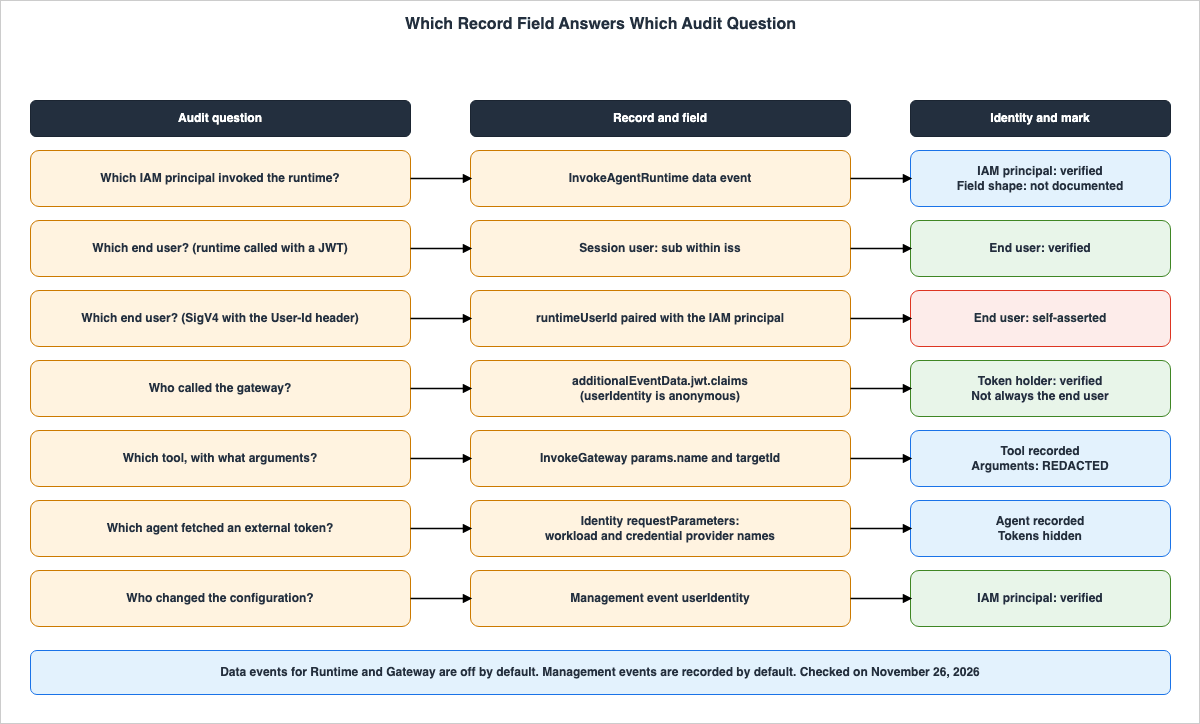
6.1 Records and Fields for Each Question
| Audit Question | Record and Field to Examine | ID and Mark | Retained by Default? | Remediation When Missing |
|---|---|---|---|---|
| Which IAM principal invoked the Runtime? | InvokeAgentRuntime data event | IAM principal. Field format: Not documented | No | Enable the Runtime's resource type data event. |
| For which end user was the operation performed (Runtime invoked via JWT)? | Runtime session end user (iss and sub). Identity's GetWorkloadAccessTokenForJWT span's issuer and user_sub | End user. Verified (session pinning only on V2 microVMs, section 4.3) | CloudTrail field: Not documented. Span only when observability is enabled | Record the session ID and end user pair in the backend. |
| For which end user was the operation performed (Runtime invoked via SigV4 and headers)? | runtimeUserId | End user. Self-asserted | No | Record the IAM principal and header values pair. |
| Which principal invoked the Gateway? | InvokeGateway's additionalEventData.jwt.claims | JWT holder. Verified. May or may not be an end user. | No | Enable the Gateway data event and verify the type of token used to invoke the Gateway. |
| Which tool was invoked? | InvokeGateway's requestParameters and additionalEventData.targetId | Tool | No | Enable the Gateway data event. |
| What was passed to the tool? | InvokeGateway's arguments | Not recorded (REDACTED) | — | Record on the target side. |
| Which agent obtained an external token? | Identity's requestParameters workload name and credential provider name | Agent | Yes for calls AgentCore makes for you (management event). Not documented for direct calls (Section 2.2) | — |
| What was done with the external service? | External service logs | Depends on the external service | Not retained by AWS | Record in the external service. |
| Who attempted a call that the Gateway rejected? | InvokeGateway failure examples | Examples lack an ID. Only sourceIPAddress, userAgent, and tlsDetails are present. | No | Enable the Gateway data event. |
| Who modified the configuration? | Gateway management event's userIdentity | IAM principal. Verified | Yes (management event) | Addressed in a separate article. |
The configuration changes in the last row are covered in another article within this series: Who Can Change the Restrictions on an AgentCore Agent - Gateway Targets, Policies, Credential Providers, and Registry Approvals.
6.2 Selecting Fields for End Users
From the table, select the fields to include in the audit log for end users, in the following order (Inference).- If the Runtime is called with a JWT, output the validated
issandsubpair. Mark as Verified. Note that there are no examples of which fields appear in CloudTrail, so it's best to retain this information in backend logs as well. If Identity observability is enabled, you can also match it with theissueranduser_subfrom theGetWorkloadAccessTokenForJWTspan (Section 5.2). - If the Runtime is called with SigV4 and the header, output the header value and the IAM principal that provided it. Mark as Self-asserted.
- Only output
additionalEventData.jwt.claims.subfrom the Gateway as an end-user field after confirming that the Gateway is being called with an end-user token. Verify the token type using claims such astoken_use,scope, andclient_id. - Do not output the Gateway's
userIdentity. In both the successful and the failed example, it showsanonymous, which does not identify the caller.
In your audit report, clearly document which fields were used and their corresponding marks.
6.3 Connecting One Operation
The records of a single tool call are divided among Runtime, Identity, Gateway, and the target. The key identifiers for connecting events are the Runtime's request ID, the session ID, and the Gateway'stargetId. The Runtime security page recommends connecting events using the request ID (see Section 4.6). However, it is not documented in which field of the Gateway's data event the Runtime's request ID appears (Not documented).Therefore, it is most reliable to create connections on the agent's code side. Each time the agent calls the Gateway, it should record a single log entry containing the session ID, the end user's ID and its mark, and the name of the tool being called (Inference).
7. What the Sources Do Not Show, and Variations from Page to Page
This chapter lists items not documented in the materials and discrepancies in wording found on different pages.7.1 What Has No Example
As of the verification date, the following items have no example in the developer guide (Not documented).- The JSON format of the CloudTrail events for
InvokeAgentRuntime, including the structure of theuserIdentity. - The differences in the
userIdentitywhen calling the runtime using JWT versus SigV4. - Which field in the CloudTrail event contains the
runtimeUserId. - The
userIdentityformat for Gateways with inbound types of IAM,AUTHENTICATE_ONLY, andNONE. - The type of CloudTrail event generated when the agent's code directly calls Identity.
- A complete example, including the
userIdentity, for Identity calls (the AI Blog example was an excerpt).
This article was unable to find an AWS What's New post announcing AgentCore's support for CloudTrail data events.
7.2 Page-Specific Variations
The following three points highlight differences in wording across different pages.| Item | One Page | The Other Page |
|---|---|---|
| CloudTrail Targets | The observability page lists Gateway and Agent Registry as CloudTrail targets, but does not mention Runtime. | The Runtime security page and harness page state that CloudTrail logs the InvokeAgentRuntime event. |
| Gateway Authentication Prerequisites | The Gateway event types page states that the Gateway authenticates using JWT, not SigV4. | The Gateway inbound page lists the types authorized by IAM, as well as AUTHENTICATE_ONLY which authenticates using SigV4. |
| Identity Invocation Types | The CloudTrail data events page lists five types related to Identity as resource types for data events. | The RCP page describes Identity requests that AgentCore makes for you as management events. |
The text on the observability page reads:
CloudTrail coverage is currently available for certain AgentCore capabilities. The AgentCore Gateway and Agent Registry capabilities each record their API activity in CloudTrail.The two pages in the last row may describe scenarios where different entities initiate the calls. It is not possible to determine whether these are discrepancies based on the available documentation (Inference).
7.3 The Gap from the Well-Architected Goals
The Agentic AI Lens, AGENTSEC03-BP02, lists the following as desired outcomes:Agent actions and human actions are distinguishable in audit logs, with separate identities that help prevent agents from inheriting or assuming human user permissions.AGENTSEC05 lists the requirement that each record should have a trigger that initiated the agent's action.
Every logged action carries the initiating source that caused the agent to act, whether a human user session, an upstream event, a schedule, or another agent, so logged actions can typically be traced back to what triggered them.AgentCore records separate the agent's ID and the IAM principal. Gateway management events include the IAM principal, while Identity records include the workload name. In this regard, there is some alignment with the goals outlined in AGENTSEC03-BP02 (Inference). However, within the examples available as of the review date, not every record is associated with an end user. The Gateway's
userIdentity is set to anonymous, and the Identity examples hide the token that carries the end user's ID. To meet the goals of AGENTSEC05, it is necessary to record connection points on the agent's side, as described in Section 6.3 (Inference).8. Frequently Asked Questions Regarding AgentCore Audit Record IDs
This chapter answers questions from readers related to Section 1.1, using information from Chapters 2 through 7.Q1. If the userIdentity of a Gateway data event is anonymous, is the call unauthenticated?
Not necessarily. As shown in the examples on the Gateway events page, both failed (401) and successful calls have auserIdentity of AWSAccount and anonymous. The Gateway event types page states that authentication is performed using JWT, so it does not include standard AWS identity information; instead, the identity is maintained within the JWT claim. Information about the caller is available in the additionalEventData.jwt field in the successful example (see Sections 3.2 and 3.3).Q2. Is additionalEventData.jwt.claims.sub the end user's ID?
It depends on the token used to call the Gateway. In the example on the Gateway events page, the claim is for a client access token, withtoken_use set to access and scope containing the value for the resource server. If the token was obtained using client credentials, then the sub claim refers to the client (see Section 3.4).Q3. If you enable data events, can you tell who called a tool?
Partly. Enabling the data event forInvokeGateway will retain information about successful calls, including the JWT claims, the tool's name, and the target. However, the identity represented by the sub claim will vary depending on the token. The arguments passed to the tool will not be retained; they are displayed as REDACTED. Failed calls do not retain an ID in the example (Sections 3.3 through 3.5).Q4. Can the X-Amzn-Bedrock-AgentCore-Runtime-User-Id value be treated as the end user in audit logs?
Not on its own. The Runtime OAuth page states that this header's path does not validate the value with the Identity Provider (IdP). Instead, record it in conjunction with the IAM principal that provided the header, and mark it as Self-asserted. In production, select the JWT path (see Section 4.4).Q5. What information is included in the CloudTrail events for InvokeAgentRuntime?
The developer guide does not provide a JSON example. The Runtime security page states that the logs include the ID of the entity that initiated the call, the time, the source IP address, and the response status. The Instances security page states that the authenticated entity and session ID are included in the same event. There are no examples provided (Section 4.2) detailing which fields are included and what the format looks like when accessed via JWT.Q6. Are records of agents calling external services retained on AWS?
The calls themselves are not recorded. However, when AgentCore obtains tokens for external services from AgentCore Identity on your behalf, those records are retained as management events such asGetResourceOauth2Token. The event type when the agent's code calls Identity directly is Not documented (section 2.2). For example, in the AI Blog case, these records include the credential provider's name, scope, and OAuth flow, while concealing the token itself (see Sections 5.2 and 5.4).Q7. In on-behalf-of token exchange, is the actor always the agent?
Not necessarily. In theTOKEN_EXCHANGE flow using M2M, the actor token is the access token of the credential provider's OAuth client. With NONE, no actor token is sent, and the Identity Provider (IdP) derives the actor from the client authentication. JWT_AUTHORIZATION_GRANT does not use an actor token (see Section 5.3).9. Summary
Before enabling auditing of AgentCore tool invocations, and before generating audit reports, ensure the following:AWS::BedrockAgentCore::GatewayandAWS::BedrockAgentCore::Runtimedata events are enabled. Gateway data events are enabled with a trail, as the data event logging page says, and Runtime data events with a trail or an event data store (Sections 3.1 and 4.1).anonymousin the GatewayuserIdentityfield is not being read as a sign of an unauthenticated call or as an end user (Section 3.2).- Before using
additionalEventData.jwt.claims.sub, verify the type of token being used to call the Gateway (Section 3.4). - Assuming that tool arguments and results are not retained in the Gateway logs, ensure that logging is implemented on the target side if necessary (Section 3.5).
- For Runtime sessions, ensure that the end user is distinguished as Verified (if using JWT) or Self-asserted (if using headers). Be aware that session pinning is currently only supported for V2 microVMs (Section 4.3).
- If using headers, log the pairs of IAM principals and header values, and restrict the
InvokeAgentRuntimeForUserpermission (Section 4.4). - In configurations where the Gateway sits in front of the Runtime and signs with its own role, understand that the principal in the Runtime logs will be the Gateway's role (Section 4.5).
- In Identity CloudTrail records, the agent's name is retained, but tokens containing end-user IDs are hidden. When observability is enabled, Identity spans show the
issueranduser_subfromGetWorkloadAccessTokenForJWT(Section 5.2). - Understand that the "on-behalf-of" actor may be a client, an AWS IAM ID, or an IdP-derived ID, depending on the configuration (Section 5.3).
- Within the agent's code, ensure that session IDs, end-user IDs (and their marks), and tool names are being logged in a single line (Section 6.3).
- Starting from the verification date of November 26, 2026, reopen the pages to check whether a Runtime CloudTrail example has been added and whether the page-to-page variations have been resolved (Chapter 7).
10. References
- Understanding Amazon Bedrock AgentCore Gateway CloudTrail events - Amazon Bedrock AgentCore
- Amazon Bedrock AgentCore Gateway event types - Amazon Bedrock AgentCore
- Enable CloudTrail data event logging for Amazon Bedrock AgentCore Gateway resources - Amazon Bedrock AgentCore
- Log Amazon Bedrock AgentCore Gateway API calls with CloudTrail - Amazon Bedrock AgentCore
- Set up inbound authorization for your gateway - Amazon Bedrock AgentCore
- Set up outbound authorization for your gateway - Amazon Bedrock AgentCore
- Authenticate and authorize with Inbound Auth and Outbound Auth - Amazon Bedrock AgentCore
- Use isolated sessions for agents - Amazon Bedrock AgentCore
- Security best practices for AgentCore Runtime - Amazon Bedrock AgentCore
- Security model and permissions for Runtime Instances - Amazon Bedrock AgentCore
- Connect to runtime sessions through a session endpoint - Amazon Bedrock AgentCore
- Observability and cost controls - Amazon Bedrock AgentCore
- On-behalf-of token exchange with AgentCore Identity - Amazon Bedrock AgentCore
- Get workload access token - Amazon Bedrock AgentCore
- Resource control policies for Amazon Bedrock AgentCore - Amazon Bedrock AgentCore
- Client authentication methods - Amazon Bedrock AgentCore
- Observability, audit logging, and tracing for your agents - Amazon Bedrock AgentCore
- AgentCore generated runtime observability data - Amazon Bedrock AgentCore
- AgentCore generated identity observability data - Amazon Bedrock AgentCore
- InvokeAgentRuntime - Amazon Bedrock AgentCore Data Plane
- Logging data events - AWS CloudTrail
- AGENTSEC03-BP02 Separate agent and human user permission - Agentic AI Lens
- Agent observability and non-repudiation - Agentic AI Lens
- Propagate user authorization context in AI agents with Amazon Bedrock AgentCore - AWS Security Blog
- Authenticate with Private Key JWT using Amazon Bedrock AgentCore Identity - AWS Artificial Intelligence Blog
- RFC 8693: OAuth 2.0 Token Exchange
- Identity Lifecycle for AI Agents - Registration, Delegated Authorization, Access Review, and What Retirement Leaves Behind
- Who Is Consenting - OAuth Session Binding and the Consent Portal in AgentCore Identity
- Agent Interoperability Architecture on AWS - Cross-Runtime Agents with A2A, MCP, and Amazon Bedrock AgentCore Gateway
- Impersonation or Delegation - Amazon Cognito Token Exchange, the act Claim, and Down-Scoping
- Scoping Each Session on AgentCore Runtime - Session Context Keys, Who Chooses the Session ID, and What the Keys Do Not Prove
- OWASP Top 10 for Agentic Applications Mapped to AWS Controls - What Each Control Mitigates and What Residual Risk Remains
References:
Tech Blog with curated related content
Written by Hidekazu Konishi