What AgentCore Browser Keeps and Where Its Traffic Goes - Profiles, Recordings, Proxies, and VPC Egress
First Published:
Last Updated:
This article focuses on proxy handling. The Browser proxies page states that proxy settings do not represent a network-level control and do not guarantee that all traffic passes through a proxy. To enforce control at the network level, the page asks for sessions to be placed within a VPC. IAM condition keys restrict the subnets and security groups used when creating the browser. Condition keys that specify destination domains for traffic are not found in the Service Authorization Reference.
This article serves as a guide to organizing information about which components should be placed in which layers when operating the browser. It differentiates between what the documentation states, what is missing from the documentation, and any inconsistencies in the documentation itself. This article did not test these behaviors in a live environment. It does not cover pricing, a list of regions, or implementation code. It also does not discuss methods for avoiding bot detection or CAPTCHAs.
Related articles on this site:
- Where a Web Search Domain Filter Is Enforced - Who Can Override It and What Comes Back in Amazon Bedrock, AgentCore Gateway, and Claude's Web Tools
- Amazon Bedrock AgentCore Implementation Guide Part 4: Multi-Agent Orchestration
- Agent Sandboxing and Blast-Radius Isolation on AWS - Choosing the Unit of Each Containment Boundary and What Each One Does Not Stop
- Amazon Bedrock AgentCore Beginner's Guide - AI Agent Development from Basics with Detailed Term Explanations
- What a Domain Rule Matches in AWS Network Firewall - SNI, the Host Header, and Whether the Resolver Returned the Destination IP
- Identity Lifecycle for AI Agents - Registration, Delegated Authorization, Access Review, and What Retirement Leaves Behind
- Network Egress in Claude Managed Agents - allowed_hosts, the Package Manager and MCP Switches, and the Two Rules That Stop web_fetch
- Amazon Bedrock AgentCore Master Index - A Hub for AgentCore Articles and Decision Patterns
Table of Contents
- 1. Scope and Assumptions
- 2. How to Read the Tables
- 3. What Is Set at Create Time and What Is Set at Session Start
- 4. What a Session Holds
- 5. What Becomes a Reusable Asset
- 6. Recordings and Live View
- 7. Which Layer Controls Where Traffic Goes
- 8. When You Do Not Need a Browser
- 9. Where the Sources Disagree and What They Do Not Say
- 10. Failure Modes
- 11. Frequently Asked Questions About What AgentCore Browser Keeps and Where Its Traffic Goes
- 12. Summary
- 13. References
1. Scope and Assumptions
This chapter will first define the intended audience, the scope of this article, the relevant source materials, and the terminology used. The following ten points will outline the key conclusions.- Browser settings can be divided into those determined when creating the browser and those determined when starting a session. Network mode, recording, managed Chrome policies, and signing are set during browser creation. Proxy settings, recommended Chrome policies, extensions, profiles, and timeouts are set when starting a session (Chapter 3).
- The Service Authorization Reference does not list an Update action that changes browser settings. The Security Hub CSPM controls state that browsers in public network mode should be deleted and recreated (Section 3.4).
- The default session timeout is stated as 900 seconds in the developer guide and 3600 seconds in the API reference. Both specify a maximum of 8 hours (Section 4.2).
- Profiles store cookies and local storage, allowing users to resume their login status in subsequent sessions. The developer guide notes that profiles may contain sensitive information, such as authentication cookies. The profiles page does not specify storage locations, profile-specific encryption, or retention periods (Chapter 5).
- Recording captures changes to the DOM, clicks, form interactions, console logs, CDP events, and network events, storing them in the user's S3 bucket. Recording is enabled on a custom browser. No statement was found about a setting that masks input values (Chapter 6).
- Proxies are configured through the Chromium
--proxy-serverflag, representing a browser-level setting. The proxies page states that this is not a network-level control (Section 7.1). - Managed Chrome policies take precedence over recommended policies and cannot be overridden. This is also a browser-level setting (Section 7.2).
- At the network level, communication is controlled through VPC mode. For a browser in VPC mode to access the internet, it requires a private subnet with a route to a NAT gateway (Section 7.3).
- The IAM condition keys
bedrock-agentcore:subnetsandbedrock-agentcore:securityGroupsapply to theCreateBrowseraction. The SAR does not list condition keys specific to theStartBrowserSessionaction. No condition keys were found to specify destination domains (Section 7.4). - Web Bot Auth is currently in Preview. It is a mechanism for signing requests and identifying the sender, and does not represent a layer for blocking communication. The target website determines how it is handled (Section 7.5).
1.1 Intended Audience
This article is intended for the following audiences:- Individuals responsible for designing communication controls and storage locations for recordings before deploying AgentCore Browser in a production environment.
- Developers who have agents operate websites requiring login and need to determine how login states will be managed.
- Operations personnel who will manage AgentCore resources using IAM policies, SCPs, and Security Hub CSPM.
This article assumes that readers hold the following beliefs, and checks each one against the documentation:
- Configuring a proxy will ensure that all browser traffic is routed through the proxy.
- Restricting URLs using managed Chrome policies will enforce egress.
- IAM policies can be used to restrict the domains that the browser can access.
- Profiles are a mechanism to simplify the login process and do not contain sensitive information.
- A recording is a video of the screen.
- The default session timeout is 15 minutes.
1.2 What This Article Covers and What It Does Not
This article addresses settings determined at create time and session start, what a session holds, profiles, extensions, root CAs, proxy credentials, recording and live view, how strongly each egress layer enforces, the boundary of cases where Browser is not needed, and where the sources disagree.This article does not cover:
- The layer where domain filters for web search and web fetch apply, their matching rules, and what is returned to the caller. This site's Where a Web Search Domain Filter Is Enforced covers this.
- Playwright connections, session initiation, and the implementation of form input. This site's Amazon Bedrock AgentCore Implementation Guide Part 4: Multi-Agent Orchestration covers this.
- An introduction to Browser. This site's Amazon Bedrock AgentCore Beginner's Guide covers this.
- General principles regarding isolation units and network boundaries. This site's Agent Sandboxing and Blast-Radius Isolation on AWS covers this. This article applies those general principles to AgentCore Browser.
- What AWS Network Firewall domain rules match. This site's What a Domain Rule Matches in AWS Network Firewall covers this.
- Egress control for Claude Managed Agents. This site's Network Egress in Claude Managed Agents covers this. Managed Agents is a different platform from Browser.
- Operating system manipulation, file system mounting, and detailed information about the Code Interpreter.
- Methods for avoiding bot defenses or CAPTCHAs, pricing, a list of regions, and product comparisons.
1.3 Date of Review and Materials Reviewed
This article was written after reviewing the following materials on November 10, 2026 (Japan Standard Time). This article uses the name at the start of each line.- Fundamentals page: The Fundamentals section of the Amazon Bedrock AgentCore Developer Guide.
- Profiles page: The "Using browser profiles" section of the same guide.
- Proxies page: The "Using browser proxies" section of the same guide.
- Policies page: The "Using browser enterprise policies" section of the same guide.
- Root CA page: The "Root Certificate Authority" section of the same guide.
- Extensions page: The "Using browser extensions" section of the same guide.
- Recording page: The "Session Recording and Replay" section of the same guide.
- Web Bot Auth page: The "Reducing CAPTCHAs with Web Bot Auth" section of the same guide.
- Live view page: The "Live View" section of the same guide.
- VPC page: The "Configure Amazon Bedrock AgentCore Runtime and tools for VPC" section of the same guide.
- Condition keys page: The "Use IAM condition keys with AgentCore VPC settings" section of the same guide.
- Data encryption page: The "Data encryption" section of the same guide.
- Quotas page: The "Quotas for Amazon Bedrock AgentCore" section of the same guide.
- Release notes: Release notes for the same guide.
- API reference: API reference for AgentCore, including
StartBrowserSession,CreateBrowser,CreateBrowserProfile,BrowserProfileConfiguration,BrowserNetworkConfiguration, andVpcConfig. - SAR: The Amazon Bedrock AgentCore section of the Service Authorization Reference.
- Security Hub CSPM page: The "Security Hub CSPM controls for Amazon Bedrock AgentCore" section of the AWS Security Hub User Guide.
- What's New: Announcements for the Browser, from January to March 2026.
- AWS blog: Three articles about the Browser on the AWS Machine Learning Blog.
- AgentCore FAQ: The Amazon Bedrock AgentCore FAQs page.
1.4 Terms, and Different Things with the Same Spelling
This article uses the following terms consistently:- Layer: A location where mechanisms for controlling communication operate. This article distinguishes between the browser level, the network level, and the create API.
- Browser level: Settings within Chromium, including proxy settings and Chrome policies.
- Network level: Network configurations outside the browser, such as VPC settings, security groups, network ACLs, and NAT gateways.
- Create time: The moment a browser is created using
CreateBrowser. - Session start: The moment a session is initiated using
StartBrowserSession. - Enforce: A setting that cannot be overridden by actions in the browser. This article differentiates between instances where the term is used in documentation and instances where it is used in the reasoning presented in this article.
- Custom browser: A browser created by the user using
CreateBrowser. This article uses this term to encompass both "custom browser" and "custom browser tool" as used in the documentation. - Default browser: The pre-configured
aws.browser.v1browser provided by AWS, which the fundamentals page calls a System ARN.
The word profile has other meanings with the same spelling: IAM instance profiles and AWS CLI named profiles. In this article, the term "profile" refers only to the browser profile.
Similarly, the term "policy" also has different meanings. This article uses "Chrome policies" to refer to Chromium enterprise policies, distinguishing them from IAM policies.
The term "recording" also has different meanings. In this article, "recording" refers only to browser session recording, and is distinct from CloudTrail logs.
2. How to Read the Tables
This chapter defines the terms for the state of the sources used in this article's tables, and how values and dates are written.2.1 Terms for the State of the Sources
This article uses six terms to describe the state of the documentation. These terms, including their English spellings, will also be used in the tables.- Stated: The documentation contains a statement regarding the matter.
- Stated as not supported: The documentation explicitly states that the matter is not supported or cannot be used.
- Documentation does not list: While a list or table exists, the specific item is not included. This does not necessarily indicate that the matter is unsupported or unavailable.
- No statement found: Despite searching using different keywords and categories of the sources in Section 1.3, no relevant statement could be found. This does not indicate that the matter is absent or does not occur.
- Sources disagree: The documentation from two different sources provides conflicting statements regarding the same matter. This includes cases where the statements directly contradict each other, as well as cases where the scope, strength, or subject matter differs, and the text alone does not settle which one applies. This article presents both statements and their sources without designating either as incorrect.
- Inference: This represents an inference made by this article, and is not a statement found in any of the documentation. This article says in the same sentence that it is an inference.
This article distinguishes between "Stated as not supported" and "No statement found." The former refers to a statement in the documentation, while the latter indicates that this article was unable to find a relevant statement.
2.2 How This Article Writes Values and Dates
The default values, limits, and statuses in this article are the values in the sources read on November 10, 2026. According to the release notes, between January and April of 2026, Browser received sequential additions including IAM condition keys, proxies, profiles, extensions, Chrome policies, root CAs, and OS operations. Readers need to recheck these values in the sources at the time they use them.3. What Is Set at Create Time and What Is Set at Session Start
This chapter divides Browser settings into two categories, based on when they are determined. What can be enforced at each layer follows this distinction.| Setting | Determined At | API Field | Can Be Changed Afterwards? |
|---|---|---|---|
| Network mode, subnet, security group | Create time | CreateBrowser's networkConfiguration | Documentation does not list (no update action listed). |
| Recording enabled and S3 location | Create time | CreateBrowser's recording | Documentation does not list. |
| Web Bot Auth signature | Create time | CreateBrowser's browserSigning | Documentation does not list. |
| Execution role | Create time | CreateBrowser's executionRoleArn | Documentation does not list. |
| Managed Chrome policies | Create time | CreateBrowser's enterprisePolicies | Stated (changes to the S3 file are not reflected). |
| Per-browser root CA | Create time | CreateBrowser's certificates | Documentation does not list. |
| Timeout | Session start | StartBrowserSession's sessionTimeoutSeconds | Documentation does not list. |
| Proxy | Session start | StartBrowserSession's proxyConfiguration | Stated (requires creating a new session). |
| Recommended Chrome policies | Session start | StartBrowserSession's enterprisePolicies | Stated (changes to the S3 file are not reflected). |
| Per-session root CA | Session start | StartBrowserSession's certificates | Stated (cannot be changed during the session). |
| Extensions | Session start | StartBrowserSession's extensions | Documentation does not list. |
| Profile | Session start | StartBrowserSession's profileConfiguration | Stated (saves after a session starts are not reflected in that session). |
The
filesystemConfigurations, which specify file system mounts, are present in both CreateBrowser and StartBrowserSession. This article will not cover the details of these mount configurations.3.1 What Is Set at Create Time
Network mode, recording, signing, and execution role are items ofCreateBrowser. The StartBrowserSession API request does not include these items. When initiating a session, the caller can only select an existing custom browser.Chrome policies and root CAs have items defined for both creation and session start. Chrome policies during creation are written as "managed," while those during session start are written as "recommended" (see Section 7.2). For root CAs, the certificates from create time and session start are combined (see Section 5.7).
3.2 What Is Set at Session Start
Proxy settings, extensions, profiles, and timeouts are all configured as part of theStartBrowserSession process. The CreateBrowser action does not include options for proxies, extensions, or profiles.The user or agent initiating the session determines these settings and selects them each time a new session is started. The proxies page states that proxy settings are set only once when a session is created, and that changing these settings requires creating a new session. Browser reads files related to proxy credentials, root CA, extensions, and Chrome policies, using the permissions of the caller (see Section 5.8).
3.3 The Default Browser aws.browser.v1
The fundamentals page refers to the default browser as a "System ARN," a resource with the most restrictive default settings that is pre-configured for all regions where AgentCore is available. A custom browser, on the other hand, is a browser created by the user, allowing them to select network, recording, security, and IAM role configurations.No statement was found that gives the network mode of the default browser (No statement found). The recording page lists custom browsers with recording enabled as a prerequisite for recording functionality. The policies page indicates that recommended Chrome policies can also be applied to the default browser.
The SAR lists both the default browser and the custom browser as separate resource types. The ARN for the
browser type has an account field of aws, while the ARN for the browser-custom type belongs to the user's account. The StartBrowserSession action targets these two types, as well as the browser-profile type. This article infers that to restrict session initiation to only custom browsers, this distinction can be leveraged through IAM policies (Inference). Security Hub CSPM includes two controls that specifically target the resource type for custom browsers (Section 6.5).3.4 Changes That Require Re-creating the Browser
SAR lists the following actions for the browser: creation, deletion, retrieval, listing, session start and stop, profile saving, stream updates, and connection to streams. It does not list an "Update" action for changing browser settings (Documentation does not list).The Security Hub CSPM page,
[BedrockAgentCore.5], says that as a corrective measure, any custom browser that does not comply with the controls should be deleted and rebuilt in VPC network mode. This article infers that it is safer to design with the assumption that changing the network mode requires a rebuild (Inference).4. What a Session Holds
This chapter outlines what a session holds, where it runs, when it ends, and what it leaves behind.4.1 The microVM and What Is Erased at the End
The fundamentals page describes the execution environment for each session as follows:Each tool session runs in a dedicated microVM with isolated CPU, memory, and filesystem resources.
Upon session completion, the microVM is fully terminated, and its memory is sanitized, thereby eliminating any risk of cross-session data leakage.The same page also includes the following sentence regarding the retention of session data:
The time to live (TTL) retention policy for the session data is 30 days.There is no statement defining what "session data" refers to in this context (No statement found). It is necessary to understand that the microVM's memory, which is erased upon termination, and the session data, which is retained for 30 days, are distinct entities.
4.2 Session Timeout
Sources disagree on the default session timeout duration. The fundamentals page states the timeout is 15 minutes in two different sections.Default: 900 seconds (15 minutes)
Configurable: Can be adjusted when creating sessions, up to 8 hoursThe API reference for
StartBrowserSession describes sessionTimeoutSeconds as follows.Defaults to 3600 seconds (1 hour). Recommended minimum: 60 seconds. Maximum allowed: 28,800 seconds (8 hours).A maximum of 8 hours is consistent across two different documentation sources. The developer guide provides examples using
sessionTimeoutSeconds values of 300, 900, 1800, and 3600.The timeout is the length after which a session ends, regardless of whether the session is active. If you always specify the
sessionTimeoutSeconds value when using StartBrowserSession, rather than relying on the default setting, this disagreement does not affect you.4.3 Concurrent Sessions and Session Size
The number of concurrent sessions is documented in two places. In the paragraph that says a single browser can run multiple sessions simultaneously, the fundamentals page gives a maximum of 500. The quotas page, on the other hand, specifies a limit of 1000 concurrent sessions per account, a value that can be adjusted. This article interprets the former as referring to the limit within a single browser, and the latter as referring to the limit per account, and does not consider this a discrepancy. This interpretation is an inference (Inference).The quotas page also describes the size of a single session. It specifies 1 vCPU and 4 GB of memory, and 10 GB of disk space. There is one automation stream and one live view stream per session.
5. What Becomes a Reusable Asset
This chapter addresses items that are used across sessions. These include profiles, extensions, root CAs, and proxy credentials. All of these are stored outside of the session and brought into the session at its start.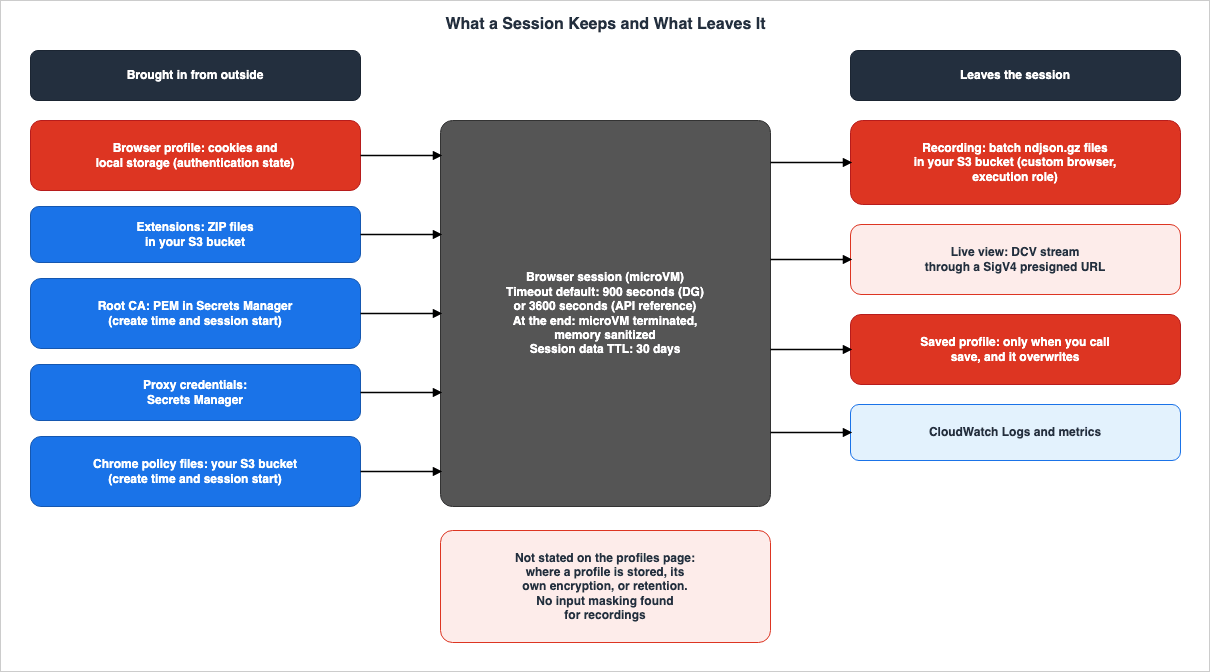
| Item Brought In | Storage Location | Access Permissions | Set at |
|---|---|---|---|
| Profile | Browser profile resource | Caller of StartBrowserSession | Session start |
| Extension | User's S3 bucket | Caller's credentials | Session start |
| Root CA | Secrets Manager | Caller's credentials | Create time and session start |
| Proxy credentials | Secrets Manager | Caller of StartBrowserSession | Session start |
| Chrome Policy File | User's S3 bucket | Caller's IAM policy, with S3 permissions | Create time and session start |
5.1 What a Profile Contains
The profiles page states that profiles store session information, including cookies and local storage. The API reference forBrowserProfileConfiguration also lists cookies and local storage as examples. The quotas page indicates that the profile size limit of 50 MB applies to the combined total of cookies and local storage.On the other hand, the API reference for
CreateBrowserProfile lists the following as items to be saved:A browser profile stores persistent browser data such as cookies, local storage, session storage, and browsing history that can be saved from browser sessions and reused in subsequent sessions.The documentation contains conflicting information regarding whether session storage and browsing history are saved (Sources disagree). Both documents use "such as" to provide examples, so it is not clear from the text whether these examples constitute a complete list.
The quotas page states that the number of profiles per account is limited to 100.
5.2 Saving and Loading Behavior
The profiles page describes the flow for creating, saving, loading, and deleting profiles. Regarding saving and loading, the same page says the following:- Saving only occurs when the save action is explicitly triggered. Save the profile before you end the session.
- Saving overwrites the data of the previous profile.
- Saved profiles are only reflected in new sessions. Existing sessions continue to use the state they were initialized with.
- Multiple sessions using the same profile operate independently of each other. Changes made in one session are not visible to other concurrently running sessions.
- The website determines the expiration date for cookies. When a cookie expires, the browser deletes it.
The February 2026 What's New post states that profiles can be used in two modes: read-only and with saving enabled. However, no field for choosing between these two modes can be found on the profiles page or in the API reference for
BrowserProfileConfiguration (No statement found). The BrowserProfileConfiguration section only includes a single item: profileIdentifier.5.3 A Profile Is Authentication State
The profiles page lists the following as a consideration for profiles:Security : Browser profiles may contain sensitive data such as authentication cookies. Ensure proper IAM policies are in place to restrict access to profile resources.A profile serves as a mechanism to eliminate the need for repeated logins, and is also the user's authentication state on the site. An agent that can load a profile is logged in to that site as the person or agent who saved the profile.
SAR lists profiles as a resource type called
browser-profile and uses the aws:ResourceTag condition key. StartBrowserSession includes browser-profile as a resource type. This article infers that IAM policies can be used to define which principals are able to load which profiles (Inference).5.4 What the Sources Do Not Say About Profiles
The profiles page does not state where profile data is stored, how it is encrypted, or for how long it is retained (No statement found).The data encryption page states that, as a whole, AgentCore stores data in Amazon DynamoDB and Amazon S3, and encrypts it using keys owned by AWS. This statement does not provide details specific to individual resources. This article infers that profiles fall in the scope of this statement (Inference). The same page lists Memory and Gateway as resources that can be encrypted using customer-managed keys. Profiles are not listed among these resources (Documentation does not list). The API reference for
CreateBrowserProfile also does not include an option to specify a KMS key.5.5 What to Delete at Retirement
Once you have finished using a profile, delete it usingDeleteBrowserProfile. The profiles page explains that deleting unused profiles frees up resources.This article infers that even after deleting a profile, a website's login session may still be active (Inference). Since websites determine cookie expiration dates (see Section 5.2), if a cookie has been copied to a different location after the profile was saved, that cookie may remain valid until its expiration. When retiring an agent, include both profile deletion and logging out of the website, as well as revoking credentials, in the same process. This site's Identity Lifecycle for AI Agents covers what remains after an agent identity is retired.
5.6 Extensions
The extensions page describes how Chrome extensions are stored as ZIP files in the user's S3 bucket and loaded at the start of each session. The bucket must be located in the same account as the browser session. The quotas page specifies a maximum size of 10 MB per extension and a limit of 10 extensions per session.Extensions modify browser behavior. The release notes provide examples of extension usage, such as ad blocking, authentication assistance, and custom routing control. There is no statement found regarding the priority relationship between extensions and proxies, or Chrome policies (No statement found).
5.7 Root CAs
The Root CA page describes how the default session is configured to trust only widely recognized certificate authorities. To access sites using certificates signed by internal certificate authorities, or to pass through proxies that decrypt TLS traffic, you must provide the root CA.Browser retrieves PEM-formatted certificates from Secrets Manager, using the credentials of the calling application. After verifying the format and expiration date, it adds these certificates to the session's OS trust store. The same page states that the certificates added are accessible by the browser and by other network clients in the sandbox.
Both the certificate specified during creation and the certificate specified at session start are combined, with a limit of 10 for each, totaling 20. The page further describes the certificate configuration as follows:
Certificate configuration is a one-time operation per session. Once certificates are installed, they cannot be modified for the duration of that session.Adding a root CA effectively expands the range of entities the session trusts. This article infers that the ability to write to the secret containing the certificates should be treated as a privilege that controls the scope of trust (Inference).
5.8 Proxy Credentials and Who Reads Them
The proxies page describes how to store the proxy credentials as JSON containing a username and a password within Secrets Manager. The IAM identity used to callStartBrowserSession must have the secretsmanager:GetSecretValue permission for that secret. The same page also states that credentials are never returned in API responses, GetBrowserSession returns only the secretArn, and credentials are not written to logs.The proxies page, root CA page, and extensions page indicate that the proxy credentials, root CA, and extensions are read using the credentials of the caller. The policies page instructs users to add permissions to their IAM policies that allow access to the S3 bucket where the policy files are stored. The execution role specified during creation writes recordings to S3 (see Section 6.2). Design the permissions on the premise that read and write permissions are held by different principals.
6. Recordings and Live View
This chapter covers recording and live view, two of the things that leave the session.6.1 What a Recording Contains
The recording page lists the following five items as the information in a recording:Session DOM changes and mutations
User actions including clicks, scrolls, and form interactions
Console logs and error messages
Chrome DevTools Protocol (CDP) events
Network events and HTTP requestsThe fundamentals page states that recordings include network traffic and console logs.
6.2 Conditions for Enabling Recording
The recording page lists three prerequisites for recording: an S3 bucket, an execution role that can write to that bucket, and a custom browser with recording enabled. The execution role must have permissions to write to both the S3 bucket and CloudWatch Logs.Recording can be enabled through the
recording field in the CreateBrowser settings. No statement was found describing how to enable recording with the default browser (No statement found).6.3 What Lands in S3
In the example for the recording page, the split files, such asbatch_1.ndjson.gz, are placed in folders organized by session ID. The playback screen in the console displays sections for the Video Player, a list of pages, a list of operations, the DOM, console logs, CDP events, and network events.On when data is uploaded to S3, the page disagrees with itself (Sources disagree).
All interactions during this session will be automatically recorded and uploaded to your Amazon S3 bucket when the session ends.
Each session creates a folder with the session ID, and recording data is uploaded in chunks as the session progresses.
The first sentence states that the data is uploaded at the end of the session, while the second sentence indicates that it is uploaded as the session progresses. If you plan to implement a mechanism to read the recording mid-session, you will need to verify the upload point in your own environment.
6.4 Secrets a Recording Can Hold
The five recording items include form interactions, DOM changes, and network requests. This article infers that the values entered into login forms, and cookies associated with those requests, may be recorded. No statement was found about a setting that masks input values in recordings (No statement found).The S3 bucket where the recordings are stored should be treated as a repository that can hold secrets at the same level as profiles. The user's S3 configuration determines access controls, encryption, and lifecycle settings for the bucket. No statement was found indicating that Browser automatically deletes recordings (No statement found). This site's Amazon S3 Security and Access Control Guide covers access control for S3.
6.5 Security Hub CSPM Controls
The Security Hub CSPM page lists the following two controls for Browsers:| Control | Description | Severity | Resource Type | AWS Config Rule |
|---|---|---|---|---|
[BedrockAgentCore.5] | Custom browsers should not use the public network mode. | High | AWS::BedrockAgentCore::BrowserCustom | bedrockagentcore-browsercustom-network-mode-not-public |
[BedrockAgentCore.6] | Custom browsers should have recording enabled. | Medium | AWS::BedrockAgentCore::BrowserCustom | bedrockagentcore-browsercustom-recording-enabled |
The description for
[BedrockAgentCore.5] details the VPC network mode.Configuring browsers with VPC network mode ensures that browser traffic is confined within your private network, enabling you to apply network-level security controls such as security groups, network ACLs, and VPC flow logs.Both controls apply to custom browsers. This article infers that default browser sessions do not fall under the resource types covered by these two controls (Inference).
6.6 Live View
Live View is a mechanism that allows a person to view the browser screen of a session in real-time. The live view page describes how Live View runs on AWS DCV and connects using a URL signed with SigV4. The recording page explains that, in the live view, you can take over control from the automation and release it again.According to the AWS blog, the video stream for live view flows directly from AgentCore to the user's browser, bypassing the user's application server. The same article states that the default expiration time for a signed URL is 300 seconds. These two points are based on the blog's description.
This article infers that anyone possessing a signed URL can view the session within its validity period, and, when taking over control is possible, operate it (Inference). The URL should be treated similarly to credentials. The SAR lists the connection to the live view stream as an action called
ConnectBrowserLiveViewStream.6.7 CloudWatch and CloudTrail
The release notes state that the number of AgentCore sessions, including the Browser, is published to CloudWatch as theActiveSessionCount metric. The execution role of a browser with recording enabled writes to CloudWatch Logs (see Section 6.2).The table of contents for the developer guide includes sections for CloudTrail related to Gateway, Web Search APIs, and Registry. However, a section detailing which Browser actions are recorded as management events and which as data events in CloudTrail could not be found (No statement found). The AgentCore FAQ lists CloudTrail logging as a feature of the Browser. The absence of a specific statement does not necessarily mean that they are not logged.
7. Which Layer Controls Where Traffic Goes
This chapter is central to this article. It lists the layers involved in browser communication, specifying what each layer enforces and what it does not, based on the available documentation.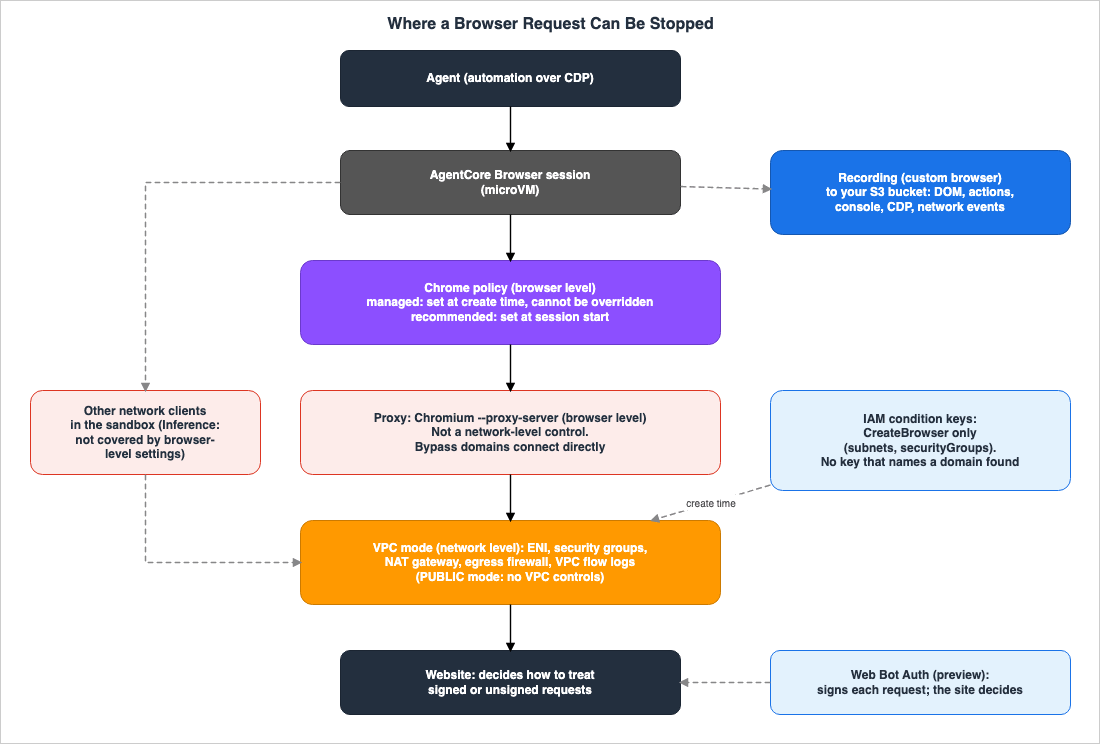
| Layer | Where It Works | Set at | Strength Stated in the Sources | Override Relationship | What Remains |
|---|---|---|---|---|---|
| Managed Chrome Policies | Browser | Create time | Stated: cannot be overridden | Takes precedence over recommended | No statement found |
| Recommended Chrome Policies | Browser | Session start | Stated: Lower priority than managed | Managed policies take precedence | No statement found |
| Proxy | Browser | Session start | Stated: not a network-level control | Domains listed in the bypass list are directly connected | User's proxy logs (Inference) |
| VPC, Security Groups, NAT Gateway | Network | Create time | Stated: Network-layer enforcement | Changes only by recreating (Inference, Section 3.4) | VPC flow logs |
| IAM Condition Keys | Create API | Create time | Stated: Applies to the subnet and security group specified in CreateBrowser | No statement found (domain key) | No statement found |
| Web Bot Auth | Request Header | Create time | Stated: The target site determines the policy | Determined by the target site | No statement found |
The "Strength Stated in the Sources" column in this table reflects the wording in the documentation. For the proxy, the proxies page states that this browser-level mechanism does not enforce at the network level. For Chrome policies, the same point is this article's inference (Section 7.2).
7.1 The Proxy
The proxies page describes the proxy mechanism as follows:Proxy configuration applies the Chromium --proxy-server flag to the browser instance at startup, directing traffic through the specified proxy at the browser level.
For scenarios that require network-layer enforcement—for example, when browser-level settings could be modified during runtime—deploy browser sessions within your own VPC.The limitations table on the same page describes traffic routing as follows:
Proxy configuration is a browser-level setting applied at session startup. It is not a network-level control and does not guarantee that all traffic will transit the proxy. For network-layer enforcement, use Configure Amazon Bedrock AgentCore Runtime and tools for VPC.Proxies are configurations that inform the browser about the destination of communications. They are not a mechanism to block communications outside of the browser. As an example of why to place sessions within a VPC, the documentation gives the case where browser-level settings could be modified during runtime. The root CA page states that, in addition to the browser, there are also network clients in the session's sandbox. This article infers that Chromium flags do not apply to the traffic of clients outside of Chromium (Inference).
The proxies page describes the behavior of proxies as follows:
- Communication paths are determined in the following order: bypass lists, domain patterns for each proxy, and default proxy settings. Domains that match the bypass list are connected directly, without going through a proxy.
- Only HTTP and HTTPS proxies are supported; SOCKS4 and SOCKS5 are not supported.
- Authentication methods are either HTTP Basic authentication or a system that permits connections from a specified source IP address. NTLM, Kerberos, and certificate-based authentication are not supported.
- Proxy settings are determined only once, when a session is created.
- Connections to proxies are not verified when a session is created.
Regarding the last point, the same page states:
Fail-open – Proxy connectivity is not validated at session creation. Sessions configured with unavailable proxies will show errors when loading pages.The documentation contains conflicting information regarding the maximum number of proxies and domain patterns (Sources disagree). The proxies page states that a single session can use up to 5 proxies, a single proxy can have up to 100 domain patterns, and bypass patterns can also reach 100, all of which are values that can be increased. The quotas page states that a single session can use up to 5 proxies, a single proxy can have up to 50 domain patterns, and the total number of all patterns is limited to 100, none of which are values that can be increased.
As uses for proxies, the proxies page mentions the ability to connect from a specific source IP address and the ability to route traffic through an internal proxy. The page also states that the browser's default source IP address changes when the AWS IP address changes. If you need to access sites that only allow connections from a specific source IP address, proxies can be used as a means to fix the source IP.
7.2 Chrome Policies
The policies page describes how Chromium enterprise policies can be applied with two levels of strength.Managed – Required and mandated by an administrator. These cannot be overridden.
Recommended – Set at user level and take lower precedence to managed policies in the event of a conflict.Managed policies are configured using
CreateBrowser and apply to all sessions of that browser. Recommended policies are configured using StartBrowserSession and apply only to that specific session. The policy files should be placed in an S3 bucket in the same region as the browser, with a maximum of 10 files, each no larger than 5 MB. The page describes when these files are read.Policy files are read from Amazon S3 at the time of the API call. Changes to policy files in Amazon S3 after calling CreateBrowser or StartBrowserSession are not reflected.The AWS blog provides examples using
URLBlocklist and URLAllowlist to restrict the URLs a browser can access. The blog also notes that the pattern format for URLAllowlist is Chrome's URL filter format, which differs from the general wildcard format.The
cannot be overridden for managed policies refers to the priority system within Chromium. The policies page does not state that managed policies are a form of network-level control. This article infers that Chrome's policies, like proxies, are browser-level settings and do not enforce network-level restrictions (Inference). No statement was found about the precedence between policies and extensions (see Section 5.6).The AWS blog states that setting
DeveloperToolsAvailability to 2 disables CDP at the Chrome level, which will silently break automation. Disabling developer tools through managed policies will halt agent-based automation.7.3 VPC
The API reference'sBrowserNetworkConfiguration specifies two possible values for networkMode: PUBLIC and VPC. The VPC page details how to connect the Runtime, as well as the built-in tools Code Interpreter and Browser, to the user's VPC.In VPC mode, AgentCore utilizes the service-linked role
AWSServiceRoleForBedrockAgentCoreNetwork to create an Elastic Network Interface (ENI) in the user's VPC. This ENI is assigned a private IP address from the specified subnet and is associated with the specified security group. The VPC page describes the internet egress as follows:If you need to use Browser tool which requires internet access, then your VPC should have internet access through NAT Gateway.
Using a public subnet does not provide internet connectivity. To enable internet access, place it in private subnets with a route to a NAT Gateway.When the Browser is in VPC mode, its communication traverses the user's VPC routing, security groups, network ACLs, and NAT gateway. The VPC page recommends enabling VPC Flow Logs for auditing purposes. This article infers that if you want to restrict egress to specific domains, you can utilize a firewall mechanism at the VPC egress (Inference). This site's What a Domain Rule Matches in AWS Network Firewall covers how AWS Network Firewall domain rules are matched.
Regarding network mode, the documentation contains conflicting information (Sources disagree). The fundamentals page includes only one sentence and does not mention VPC mode.
The AgentCore Browser supports the public network mode.Both the API reference and the VPC page describe VPC mode. The Security Hub CSPM page's
[BedrockAgentCore.5] also encourages the use of VPC mode with custom browsers. This article utilizes the values described in the API reference and the VPC page.7.4 IAM
The condition keys page and SAR give the following two condition keys to restrict network settings:bedrock-agentcore:subnets
bedrock-agentcore:securityGroupsThe condition keys page lists
CreateBrowser as the Browser operation that can utilize these condition keys. The same page provides an example that rejects creation and update requests that do not include subnets and security groups, allowing only the creation of VPC-connected Runtime and built-in tools. The release notes write the two condition keys with initial capital letters. The IAM user guide states that condition key names are case-insensitive.IAM condition keys restrict creation requests. SAR does not include any condition keys specific to
StartBrowserSession (Documentation does not list). Methods for restricting proxies, recommended Chrome policies, root CAs, extensions, and timeouts using condition keys are not documented.No condition key for Amazon Bedrock AgentCore in SAR that specifies the domains to which communication is directed was found (No statement found). The absence of such a statement does not indicate that IAM cannot control anything. IAM can control the VPC settings for creation requests. This article infers that IAM can also control the browsers and profiles on which sessions can be started (Inference, see Sections 3.3 and 5.3). If you need to apply the same restrictions across the entire organization, you should specify the same conditions in an SCP. Information on writing SCPs can be found on this site under AWS Organization Guardrails and AWS SCP Builder and Simulator.
7.5 Web Bot Auth
Web Bot Auth is currently in Preview as of November 10, 2026. The Web Bot Auth page notes that this feature is based on an IETF draft and may change to align with evolving specifications.When Web Bot Auth is enabled, the browser signs each HTTP request and adds three headers:
Signature, Signature-Agent, and Signature-Input. This feature is enabled through the browserSigning setting within CreateBrowser and is disabled by default.Web Bot Auth is a mechanism for a requesting party to identify themselves to a website; it is not a layer designed to block communication destinations. The Web Bot Auth page states the following regarding how websites handle this:
Domain owners retain full control over their bot policies and may block, monitor, or rate-limit agent traffic regardless of cryptographic signaturesThe same page also lists supported bot control vendors. The three companies after "such as" in the body are examples, and the list section names five vendors. This article does not treat the two as a disagreement. This site's Identity Lifecycle for AI Agents covers where Web Bot Auth stands as a specification.
7.6 The Order for Combining the Layers
Based on the source statements, this article recommends combining layers in the following order. This order itself is this article's inference (Inference).- If it is necessary to enforce egress, create a custom browser in VPC mode and restrict communication using security groups, a NAT gateway, and an egress firewall.
- Using IAM and SCP, deny
CreateBrowserrequests that do not include subnets and security groups. Limit the browsers on which sessions can be started to only approved custom browsers. - Use managed Chrome policies to restrict the URLs that can be accessed. Use them as a browser-level mechanism to keep agents within their designated scope.
- Use proxies to fix the source IP address and route traffic through internal proxies. Do not consider this a means of enforcing egress.
- Implement recording, VPC flow logs, and proxy logs to enable retrospective verification of events. Monitor custom browser configurations using Security Hub CSPM's
[BedrockAgentCore.5]and[BedrockAgentCore.6].
8. When You Do Not Need a Browser
This chapter provides a table outlining the distinctions between using a browser and alternative methods for accessing web information. Domain filtering layers, matching rules, and availability are left to this site's Where a Web Search Domain Filter Is Enforced and individual documentation.| Method | Output |
|---|---|
| AgentCore Browser | Browser session operated by the agent |
| Web Answer (Connector for AgentCore Gateway) | Summarized answers with citations |
| Web Search Tool (Connector for AgentCore Gateway) | Ranked search results, including titles, URLs, excerpts, and publication dates |
InvokeWebSearch API (AgentCore Web Search, generally available on November 10, 2026) | Ranked search results, including excerpts and, when available, titles, URLs, and publication times |
| Amazon Nova Web Grounding | Responses with citations based on search results |
| Claude's web search tool | Responses with citations based on search results |
| Claude's web fetch tool | Full text of specified web pages and PDFs |
A browser is only required when the agent needs to interact with a page. This includes actions such as logging in, filling out forms, and navigating by clicking. This article infers that if only answers or search results are needed, a browser session is not necessary, and therefore, the design of where profiles and recordings are stored is not required (Inference). The Web Answer page says to use Web Answer when only a finished answer is needed, and to use the Web Search Tool when your own model should reason over the search results. The Web Search API page says to use the
InvokeWebSearch API when your own code, rather than an MCP client, consumes the results, and to use the connector when agents call tools over MCP.9. Where the Sources Disagree and What They Do Not Say
This chapter collects the items in this article that carry a term for the state of the sources.9.1 Where the Sources Disagree
- Session timeout defaults: The fundamentals page states 900 seconds, while the API reference for
StartBrowserSessionstates 3600 seconds (Sources disagree - Section 4.2). - Profile data storage: The profiles page and
BrowserProfileConfigurationmention cookies and local storage.CreateBrowserProfilealso mentions session storage and browsing history (Sources disagree - Section 5.1). - Proxy domain pattern limit: The proxies page indicates that a single proxy can have up to 100 patterns, while the quotas page states that this limit is 50 and cannot be increased (Sources disagree - Section 7.1).
- Timing of recording uploads to S3: In the recording page, there are two statements: one regarding the end of a session, and another regarding uploads in chunks as the session progresses (Sources disagree - Section 6.3).
- Network modes: The fundamentals page only mentions the public network mode, while the API reference and VPC page describe VPC mode (Sources disagree - Section 7.3).
This article does not treat the following four as disagreements.
- Concurrent session limits (500 and 1000): This article interprets these values as the value for a single browser and the value for an account (Inference - Section 4.3).
- Case sensitivity of condition keys: IAM does not differentiate between uppercase and lowercase letters in condition key names (Section 7.4).
- Number of Chrome policies: A March 2026 What's New post states that there are over 100 settings, while an AWS blog post states that the list of Chrome enterprise policies includes over 450 settings. The counts are based on different criteria. This article does not specify a number.
- Web Bot Auth vendors: The Web Bot Auth page lists three vendors as examples in the main body, while a separate section lists five vendors (Section 7.5).
9.2 What the Documentation Does Not List
- An Update action that changes browser settings (Documentation does not list – Section 3.4)
- Specific condition keys unique to
StartBrowserSession(Documentation does not list – Section 7.4) - Profiles in the list of resources that can be encrypted using customer managed keys (Documentation does not list – Section 5.4)
- A Region table for Browser alone. The table on the Regions page has a row that groups the built-in tools.
9.3 Items with No Statement Found
- The location where profiles are saved, profile-specific encryption, and the retention period (Section 5.4).
- A field for choosing between the two modes in the What's New post: read-only and with saving enabled (Section 5.2).
- What the 30-day retention period applies to regarding session data (Section 4.1).
- The network mode for the default browser (Section 3.3).
- How to enable recording in the default browser (Section 6.2).
- Settings for masking input values in recordings and automatically deleting recordings (Section 6.4).
- The priority relationship between extensions and proxy settings, as well as Chrome policies (Section 5.6).
- IAM condition keys that specifically identify the domains to which communication is directed (Section 7.4).
- A list of browser actions that are recorded in CloudTrail (Section 6.7).
The fact that an item is not found does not necessarily mean that the feature itself is absent.
9.4 Important Notes When Reading
- The default values, limits, and statuses mentioned in this article are based on sources read on November 10, 2026. Browser functionality is being updated monthly, and these values may change.
- Web Bot Auth is currently in Preview, and specifications and API details are subject to change.
- The Live View stream path and the default expiry of its URL are from the AWS blog.
- This article did not test these behaviors in a real-world environment.
- Sentences marked with "Inference" are not directly taken from the source material.
10. Failure Modes
This chapter gathers common failures from the source statements in Chapters 3 through 8.- The assumption that setting a proxy ensures all traffic flows through it: The proxies page clarifies that a proxy is not a network-level control and does not guarantee that all traffic will pass through the proxy (Section 7.1).
- The assumption that managed Chrome policies can be considered a form of enforced egress: That managed policies cannot be overridden is a priority relationship within Chromium. Enforcing egress is achieved through the VPC mode (Sections 7.2 and 7.3).
- The assumption that IAM allows you to restrict a browser's destination domains: The condition key restricts the subnets and security groups in
CreateBrowser. No condition key is found that allows you to specify domains (Section 7.4). - The interpretation that "no domain condition key found" means IAM offers no control: IAM controls the VPC settings for the creation request, and this article infers that it can also limit the browsers and profiles on which a session can be started (Section 7.4).
- The assumption that a browser in VPC mode, when placed in a public subnet, can access the internet: The VPC page states that a public subnet does not provide internet access. A private subnet with a route to a NAT gateway is required (Section 7.3).
- The assumption that you can change the network mode of a custom browser after it is created: SAR does not list an Update action, and remediation through Security Hub CSPM requires recreating the resource (Section 3.4).
- The assumption that a default browser session falls in the controls for custom browsers: Security Hub CSPM's two controls target the resource type associated with custom browsers (Sections 3.3 and 6.5).
- The assumption that profiles are treated as non-sensitive configurations: The profiles page indicates that profiles may contain authentication cookies (Section 5.3).
- The assumption that deleting a profile will also end all site logins: The site determines the expiration of cookies. Site-specific logout procedures and credential revocation belong in the same procedure (Section 5.5).
- The assumption that profile saving is automatically performed when a session ends: Saving only occurs when explicitly called, and saving overwrites existing data (Section 5.2).
- The assumption that recordings are simply video captures, allowing for casual handling of storage: Recordings include form interactions, DOM changes, and network requests. No statement was found about a setting that masks input values (Sections 6.1 and 6.4).
- The assumption that the default session timeout is a single, fixed value: The documentation provides conflicting values (900 seconds and 3600 seconds). Specify
sessionTimeoutSecondsevery time (Section 4.2). - The assumption that proxy configuration errors are detected during session creation: Proxy connection verification is not performed during session creation (Section 7.1).
- Adding a managed policy that sets
DeveloperToolsAvailabilityto 2: An AWS blog post states that CDP stops working and automation silently breaks (Section 7.2). - The assumption that signed URLs for live view are simply links: Individuals with the URL can view the session and potentially take over control during the validity period (Section 6.6).
- The assumption that Web Bot Auth is a layer of communication control or a permission granted by the target site: Web Bot Auth is a request-signing mechanism in Preview, and the target site determines its handling (Section 7.5).
- Writing "does not exist" or "cannot" when no statement was found: The absence of a statement does not necessarily indicate that a feature is non-existent (Section 9.3).
11. Frequently Asked Questions About What AgentCore Browser Keeps and Where Its Traffic Goes
This chapter answers the reader assumptions in Section 1.1 with the statements in Chapters 3 through 8.Q1. If you configure a proxy, will all of your browser's communication go through the proxy?
Not guaranteed. The proxies page states that a proxy, configured through Chromium's--proxy-server flag, is a browser-level setting, is not a network-level control, and does not guarantee that all communication will pass through the proxy. To enforce this at the network level, the same page recommends placing the session within a VPC (Section 7.1).Q2. If you restrict URLs with a managed Chrome policy, is egress enforced?
This article infers that egress traffic is not enforced at the network level (Inference). The documentation states that managed policies take precedence over recommended policies and cannot be overridden. This reflects the priority system within Chromium and pertains to browser-level settings. Egress traffic enforcement is implemented in VPC mode (see Section 7.2).Q3. Can IAM policies restrict the domains that a browser can access?
No condition key specifying domains was found in the SAR (No statement found). IAM condition keys restrict the subnets and security groups inCreateBrowser. IAM can prevent the creation of browsers that are not connected to a VPC, and this article infers that it can also be used to limit the browsers and profiles on which sessions can be started (Inference, see Section 7.4).Q4. Should profiles be treated as confidential information?
Yes, they should. The profiles page indicates that profiles may contain sensitive information, such as authentication cookies, and recommends restricting access to profiles through IAM policies. The profiles page does not specify where profiles are stored, profile-specific encryption, or retention periods (see Sections 5.3 and 5.4).Q5. Is the recording a video of the screen?
The data stored in S3 comprises segmented files, including changes to the DOM, user interactions, console logs, CDP events, and network events. The screen displaying the console playback includes a video player. The recording includes form interactions, but no statement was found about a setting that masks input values (see Sections 6.1, 6.3, and 6.4).Q6. Is the default session timeout 15 minutes?
The documentation contains conflicting information (Sources disagree). The fundamentals page states 900 seconds (15 minutes), while the API reference forStartBrowserSession states 3600 seconds (1 hour). Both specify a maximum of 8 hours. If you explicitly set the sessionTimeoutSeconds value, the default setting does not affect you (see Section 4.2).Q7. If you switch to VPC mode, will the browser lose its access to the internet?
When using VPC mode, the browser's communication routes through the user's VPC. According to the VPC page, to access the internet, you need a private subnet that has a route to the NAT gateway. Even if the browser is placed in a public subnet, it will not connect to the internet (see Section 7.3).Q8. Will sites accept requests once Web Bot Auth is enabled?
It does not guarantee access. Web Bot Auth is a feature in Preview that signs requests to identify the sender. The Web Bot Auth page states that site owners can block, monitor, or throttle requests, regardless of the signature (see Section 7.5).12. Summary
Before deploying AgentCore Browser in a production environment, check the following:- If forced egress is required, ensure a custom browser is created in VPC mode, with communication restricted through a NAT gateway, security groups, and an egress firewall.
- Proxies should be used solely for fixing the source IP address and routing through internal proxies; do not consider them a means of enforcing egress.
- Managed Chrome policies should be used as a browser-level mechanism, and developer tools should not be disabled.
- Using IAM and SCP, deny the
CreateBrowseraction without subnet and security group specifications, limiting the browsers and profiles on which sessions can be started (the second half is Inference, Section 7.4). - When changing network modes, a process is in place to recreate the custom browser.
- Treat profiles as sensitive information, limiting the principals that can load them. When decommissioning, ensure profiles are deleted and users are logged out on the website.
- The S3 bucket used for recordings is configured as a storage location that can hold secrets, with access controls, encryption, and lifecycle management in place.
- Signed URLs for live view are treated with the same level of security as credentials.
sessionTimeoutSecondsis specified each time.- A process exists to re-evaluate default values, limits, and Web Bot Auth status after the verification date.
13. References
- Fundamentals - Amazon Bedrock AgentCore
- Using browser profiles - Amazon Bedrock AgentCore
- Using browser proxies - Amazon Bedrock AgentCore
- Using browser enterprise policies - Amazon Bedrock AgentCore
- Configure Root Certificate Authority for Amazon Bedrock AgentCore Browser - Amazon Bedrock AgentCore
- Using browser extensions - Amazon Bedrock AgentCore
- Session Recording and Replay - Amazon Bedrock AgentCore
- Reducing CAPTCHAs with Web Bot Auth - Amazon Bedrock AgentCore
- Live View - Amazon Bedrock AgentCore
- Configure Amazon Bedrock AgentCore Runtime and tools for VPC - Amazon Bedrock AgentCore
- Use IAM condition keys with AgentCore VPC settings - Amazon Bedrock AgentCore
- Data encryption - Amazon Bedrock AgentCore
- Quotas for Amazon Bedrock AgentCore - Amazon Bedrock AgentCore
- Release notes for Amazon Bedrock AgentCore - Amazon Bedrock AgentCore
- StartBrowserSession - Amazon Bedrock AgentCore Data Plane
- BrowserProfileConfiguration - Amazon Bedrock AgentCore Data Plane
- CreateBrowser - Amazon Bedrock AgentCore Control Plane
- CreateBrowserProfile - Amazon Bedrock AgentCore Control Plane
- BrowserNetworkConfiguration - Amazon Bedrock AgentCore Control Plane
- Actions, resources, and condition keys for Amazon Bedrock Agentcore - Service Authorization Reference
- IAM JSON policy elements: Condition - AWS Identity and Access Management
- Security Hub CSPM controls for Amazon Bedrock AgentCore - AWS Security Hub
- Amazon Bedrock AgentCore Browser now supports custom browser extensions
- Amazon Bedrock AgentCore Browser now supports browser profiles
- Amazon Bedrock AgentCore adds support for Chrome policies and custom root CA
- Customize AI agent browsing with proxies, profiles, and extensions in Amazon Bedrock AgentCore Browser
- Control where your AI agents can browse with Chrome enterprise policies on Amazon Bedrock AgentCore
- Embed a live AI browser agent in your React app with Amazon Bedrock AgentCore
- Amazon Bedrock AgentCore FAQs
- Web Answer - Amazon Bedrock AgentCore
- Web Search Tool - Amazon Bedrock AgentCore
- Search the web using Amazon Bedrock AgentCore Web Search - Amazon Bedrock AgentCore
- Web Grounding - Amazon Nova
- Web search tool - Claude Docs
- Web fetch tool - Claude Docs
- Where a Web Search Domain Filter Is Enforced - Who Can Override It and What Comes Back in Amazon Bedrock, AgentCore Gateway, and Claude's Web Tools
- Amazon Bedrock AgentCore Implementation Guide Part 4: Multi-Agent Orchestration
- Agent Sandboxing and Blast-Radius Isolation on AWS - Choosing the Unit of Each Containment Boundary and What Each One Does Not Stop
- Amazon Bedrock AgentCore Beginner's Guide - AI Agent Development from Basics with Detailed Term Explanations
- What a Domain Rule Matches in AWS Network Firewall - SNI, the Host Header, and Whether the Resolver Returned the Destination IP
- Identity Lifecycle for AI Agents - Registration, Delegated Authorization, Access Review, and What Retirement Leaves Behind
- Network Egress in Claude Managed Agents - allowed_hosts, the Package Manager and MCP Switches, and the Two Rules That Stop web_fetch
- Amazon S3 Security and Access Control Guide - Bucket Policies, IAM, Access Points, Block Public Access, and Encryption
- AWS Organization Guardrails - Service Control Policies, Resource Control Policies, and Data Perimeter Design
- Amazon Bedrock AgentCore Master Index - A Hub for AgentCore Articles and Decision Patterns
References:
Tech Blog with curated related content
Written by Hidekazu Konishi