Network Egress in Claude Managed Agents - allowed_hosts, the Package Manager and MCP Switches, and the Two Rules That Stop web_fetch
First Published:
Last Updated:
networking section within each environment determines the sandbox's outbound communication. There are two networking types: limited and unrestricted. When using the limited type, the sandbox can only access hosts specified in the allowed_hosts list, plus the package manager hosts when allow_package_managers is true. According to Anthropic's "Cloud environment setup" page, the allowed_hosts setting for a limited environment also applies to web tools that operate outside the sandbox.With `limited` networking, `allowed_hosts` also applies to the `web_search` and `web_fetch` tools, which run on Anthropic's servers.The same page states that if the
networking parameter is omitted when creating an environment via the API, it gets unrestricted.Set `networking` explicitly in API requests; a create request that omits it gets `unrestricted`.Under its October 7, 2026 heading, the "Claude Platform release notes" page states that the
web_fetch tool now fetches only URLs that have already appeared in the session.the `web_fetch` tool now fetches only URLs that have already appeared in the sessionThe communication of Managed Agents agents does not follow a single path. Tools like
bash run in the sandbox, while web_search and web_fetch operate on Anthropic's servers. The MCP connector connects from Anthropic's servers to the user's MCP server. The allowed_hosts setting affects these three paths in different ways. What is returned when a rule is crossed also varies by path. The sandbox returns a 403 error for a request on port 80 or 443, web_fetch returns an error tool result, web_search omits the results, and in a limited environment where allow_mcp_servers is false, session creation fails with a 400 error if the MCP server's host is not permitted.This article provides a line-by-line correspondence for each of three paths, detailing the settings that apply, the defaults, and what is returned when a rule is crossed, as well as the items users can configure, all based on statements in the sources. It outlines two rules for stopping
web_fetch, noting that each rule has a different error code, and also indicates on which pages the second rule is written. Where the sources disagree, and where no statement was found after searching, this article shows both statements with the verification date. This article is not a guide on how to configure the environment, nor does it recommend whether to use limited or unrestricted. This article has not run Managed Agents, and all descriptions are based solely on cross-referencing the sources.Related articles on this site:
- Managed Agent Runtimes - What Claude Managed Agents, the OpenAI Agents API, Amazon Bedrock, and GKE Agent Substrate Each Run for You, and What Stays With You
- Where the Orchestration Program Runs - Programmatic Tool Calling in the Claude and OpenAI APIs, and Code Mode in Agent Harnesses
- Hardening and Governance Guide for Claude Code and Claude Desktop - Containerized Containment and Why Code and Desktop Govern Differently
- Agent Sandboxing and Blast-Radius Isolation on AWS - Choosing the Unit of Each Containment Boundary and What Each One Does Not Stop
- What the MCP TypeScript and Python SDKs Ask of Server Authors - One Server per Request, Token Audience Checks That Are Off by Default, and Tool Input Limits
- Where a Web Search Domain Filter Is Enforced - Who Can Override It and What Comes Back in Amazon Bedrock, AgentCore Gateway, and Claude's Web Tools
Table of Contents
- 1. Introduction — Scope, Verification Date, and Status
- 2. The Three Paths and How to Read the Tables
- 3. The
networkingTypes and Their Defaults - 4. The Sandbox Path
- 5. The Web Tools Path — Anthropic's Servers
- 6. The MCP Connector Path
- 7. Separate Layers — Vault Credentials and Self-Hosted Sandboxes
- 8. The Three Paths on One Page
- 9. Where the Sources Disagree and Where No Statement Was Found
- 10. Frequently Asked Questions about Network Egress in Claude Managed Agents
- 11. Summary
- 12. References
1. Introduction — Scope, Verification Date, and Status
This chapter defines the scope covered by this article, details the changes on October 7, 2026, outlines the status of Managed Agents, and specifies the dates of verification and the documents consulted.1.1 Scope of This Article
This article addresses the outbound communication rules oftype: cloud environments in Claude Managed Agents. Specifically, it covers the following:- The two
networkingtypes (limitedandunrestricted) available for the environment, and their default settings (Section 3). - How the
allowed_hosts,allow_package_managers, andallow_mcp_serverssettings in the sandbox path function (Section 4). - How the
allowed_hostssetting for the environment and theallowed_domainsandblocked_domainssettings for web tools function in the web tools path (Section 5). - The two rules that stop
web_fetch, and the difference from a similar rule of the Messages API web fetch tool (Sections 5.5 and 5.6). - What is verified during session creation in the MCP connector path (Section 6).
- The
allowed_hostssetting for vault credentials, and how self-hosted sandboxes are handled (Section 7).
This article does not cover the following.
- What the Managed Agents execution platform encompasses (agents, environments, sessions, versions, vault mechanisms, memory, and permission policies). The previously published Managed Agent Runtimes covers this.
- The mechanism for replacing vault credential placeholders with actual values in outbound requests. The previously published Managed Agent Runtimes covers this. This article only writes that the
allowed_hostsof a vault credential is a separate layer from theallowed_hostsin the environment (Section 7.1). - The network settings and firewall in the Claude Code sandbox, specifically
network.allowedDomains. The previously published Hardening and Governance Guide for Claude Code and Claude Desktop covers this. This is a separate mechanism from Managed Agents (Section 2.3). - Selecting the appropriate unit for isolating agents within AWS. The previously published Agent Sandboxing and Blast-Radius Isolation on AWS covers this.
- The container of the Messages API code execution tool, and the Programmatic tool calling that runs in that container. Where the Orchestration Program Runs, a companion article published alongside this one, covers this.
- What the MCP server accepts. What the MCP TypeScript and Python SDKs Ask of Server Authors, a companion article published alongside this one, covers this.
- MCP tunnels – a separate feature that determines how Anthropic reaches MCP servers in a user's network. The Managed Agents overview page notes this is a limited research preview.
- The network configuration for environments in the OpenAI Agents API. This article does not compare it to other products.
- Web search domain lists outside Managed Agents (Web Search on Amazon Bedrock, the AgentCore Web Search tool, and the
allowed_domainsandblocked_domainsof tool definitions in the Claude API), who can override each list, and what the caller receives when a domain is not allowed. Where a Web Search Domain Filter Is Enforced, an article published after this one, compares these layer by layer and includes Managed Agents as one of the layers. - The contents of the safety blocklist that the
unrestrictedtype excludes. No description of its contents was found in the sources this article read (Section 9.2). - Pricing information. This article does not discuss pricing.
- Which type to use:
limitedorunrestricted. This article only quotes the recommendations that the sources themselves make (Section 3.4). - Methods for exfiltrating data using allowed hosts, and how to avoid the second rule of
web_fetch. This article only describes where the rule takes effect, what is returned when it is crossed, and what users configure.
1.2 What Changed on October 7, 2026
The "Claude Platform release notes" page lists three items under the heading "October 7, 2026," regarding outbound communication for Managed Agents.The first item states that in a
limited environment, the allowed_hosts setting now applies to both web_search and web_fetch.In Claude Managed Agents, a cloud environment with `limited` networking now also applies its `allowed_hosts` to the `web_search` and `web_fetch` tools.The second item indicates that if an enabled web tool's
allowed_domains list includes entries outside the allowed_hosts list, session creation will now fail with a 400 error.With `limited` networking, creating a session fails with a 400 error when an enabled web tool's `allowed_domains` has an entry not within `allowed_hosts`.The third item explains that
web_fetch will now only retrieve URLs that have already appeared in the session. This item also notes that it will return a url_not_in_prior_context error for a URL that it does not fetch.a `web_fetch` call for it returns a `url_not_in_prior_context` error result to the agent.The functionality to configure a list of domains for web tools has been available previously. The same release notes, under the heading "August 19, 2026," state that it became possible to restrict the sites accessible to
web_search and web_fetch.The previously published Managed Agent Runtimes states that
web_search and web_fetch operate on Anthropic's servers. This description is consistent with the sources on this article's verification date. The change introduced on October 7, 2026, is that the allowed_hosts setting in a limited environment now applies to those two tools as well.1.3 Status and Available Locations
The overview page for Claude Managed Agents states that Managed Agents is in beta.Claude Managed Agents is in beta. All Managed Agents endpoints require the `managed-agents-2026-04-01` beta header. The SDK sets the beta header automatically. Behaviors may be refined between releases to improve outputs.On this article's verification date, the Managed Agents pages referenced in this article, which provide the basis for its descriptions, also included the metadata
status: beta. On October 31, 2026, six of the twelve Managed Agents pages that this article links to, including the overview page, still include it, while the other six no longer do, among them the "Cloud environment setup" and "Restrict web search and web fetch domains" pages; the "Availability" section of the latter lists the status of Managed Agents as Beta. The same overview page indicates that access to Claude Managed Agents is enabled by default for all API accounts (Access to Claude Managed Agents (enabled by default for all API accounts)). Furthermore, it states that Managed Agents is not eligible for Zero Data Retention (ZDR) or HIPAA Business Associate Agreement (BAA) coverage.Managed Agents is not currently eligible for Zero Data Retention or HIPAA Business Associate Agreement (BAA) coverage.Regarding where Managed Agents can be used, the platform pages reviewed for this article state the following:
- The pages for Claude in Amazon Bedrock, Claude on Google Cloud, and Claude in Microsoft Foundry all list
Claude Managed Agentsamong the features that are not supported. - The page for Claude Platform on AWS states that Managed Agents is available within Claude Platform on AWS, and that the environment is included in this availability. The same page also notes that there are two differences in session behavior compared to Managed Agents provided directly by Anthropic. These differences are related to the re-authentication of autonomous sessions and the use of a memory store within self-hosted environments.
The page for Claude Platform on AWS contains no statement of whether the outbound communication rules of environments apply in the same way on Claude Platform on AWS (Section 9.2). This article does not state whether the rules are different or the same for Claude Platform on AWS.
1.4 Verification Date and Sources Read
The information presented in this article was verified against Anthropic's Claude documentation on October 15, 2026. The following pages served as the basis for this article:- Managed Agents pages: Cloud environment setup, Restrict web search and web fetch domains, Secure your Managed Agents deployment, Security risks and sandbox boundaries, Cloud sandbox reference, MCP connector, Multiagent orchestration, Authenticate with vaults, Tools, Self-hosted sandboxes, Security model (for self-hosted sandboxes), Claude Managed Agents overview.
- Messages API Tools pages: Web fetch tool, Server tools.
- Release Notes: Claude Platform release notes.
- Platform pages: Claude in Amazon Bedrock (Opus 4.7 and later), Claude on Google Cloud, Claude in Microsoft Foundry, Claude Platform on AWS.
- API reference pages: Create Environment, Update Environment.
Before writing that a statement could not be found, this article searched all 40 pages of the Managed Agents documentation, as well as the Messages API tool pages, the release notes, and the platform pages listed above, using the words of each row's subject. The search terms used are detailed in Section 9.2.
Of the pages referenced in this article, two URLs are redirected. The URL for Managed Agents' Cloud containers redirects to the "Cloud sandbox reference" page, and the URL for Claude API release notes redirects to the "Claude Platform release notes" page. This article gives the destination URLs.
For the organization's web search and web fetch settings (Sections 2.1, 5.1, 5.7, 5.8, and 9.1), this article also checked the same pages on October 30, 2026, and gives what they say next to the statements of the verification date. The page metadata that Section 1.3 describes was checked again on October 31, 2026.
2. The Three Paths and How to Read the Tables
This chapter defines the three paths discussed in this article, establishes the columns and values in the table, and clarifies distinctions between words with the same spelling that refer to different things.2.1 The Three Paths
The "Security risks and sandbox boundaries" page has a table that shows, for each part of Managed Agents, where it runs and what limits it. The following three rows are the rows of that table in the scope of this article.| `bash` and file tools | The sandbox. In a cloud environment, each session gets its own isolated Linux container | Environment networking, the tool set, and permission policies |
| `web_search` and `web_fetch` | Anthropic's servers | The tool's own domain list and, in a `limited` cloud environment, the environment's allowed hosts. `web_fetch` also opens only URLs that have already appeared in the session |
| Vault secret | Outside the sandbox. MCP credentials never enter it. For an environment variable credential, code sees a placeholder | For an MCP credential, the MCP server URL it is for. For an environment variable credential, the hosts the credential allows, its injection location, and the environment's allowed hosts |These three rows are the table on this article's verification date. On October 30, 2026, the
web_search and web_fetch row of the same table also lists the organization's settings (Section 5.1).The tool's own domain list, your organization's web search and web fetch settings in the Claude Console, and, in a `limited` cloud environment, the environment's allowed hosts.This table does not include a row for the MCP connector. The
allow_mcp_servers entry on the "Secure your Managed Agents deployment" page specifies from where the MCP connector connects.No host. Managed Agents connects to MCP servers from Anthropic's serversBased on these descriptions, this article divides the outbound communication paths into three:
- Sandbox Path: The path through which sandbox tools, such as
bash, send requests from the sandbox to external hosts. In a cloud environment, an isolated Linux container for each session becomes the sandbox (Section 4). - Web Tools Path: The path through which
web_searchandweb_fetchconnect from Anthropic's servers to external websites. These two tools do not operate in the sandbox (Section 5). - MCP Connector Path: The path through which Managed Agents connects from Anthropic's servers to MCP servers declared by the agent (Section 6).
Figure 1 lists these three paths, along with the settings that apply to each and what is returned when each is crossed. Figure 1 states in its bottom note that
allow_package_managers and allow_mcp_servers add no hosts for the web tools, and lists the two switches only inside the sandbox and MCP connector boxes. Figure 1 shows the settings on this article's verification date, and does not show the organization's web search and web fetch settings in the Claude Console (Section 5.1).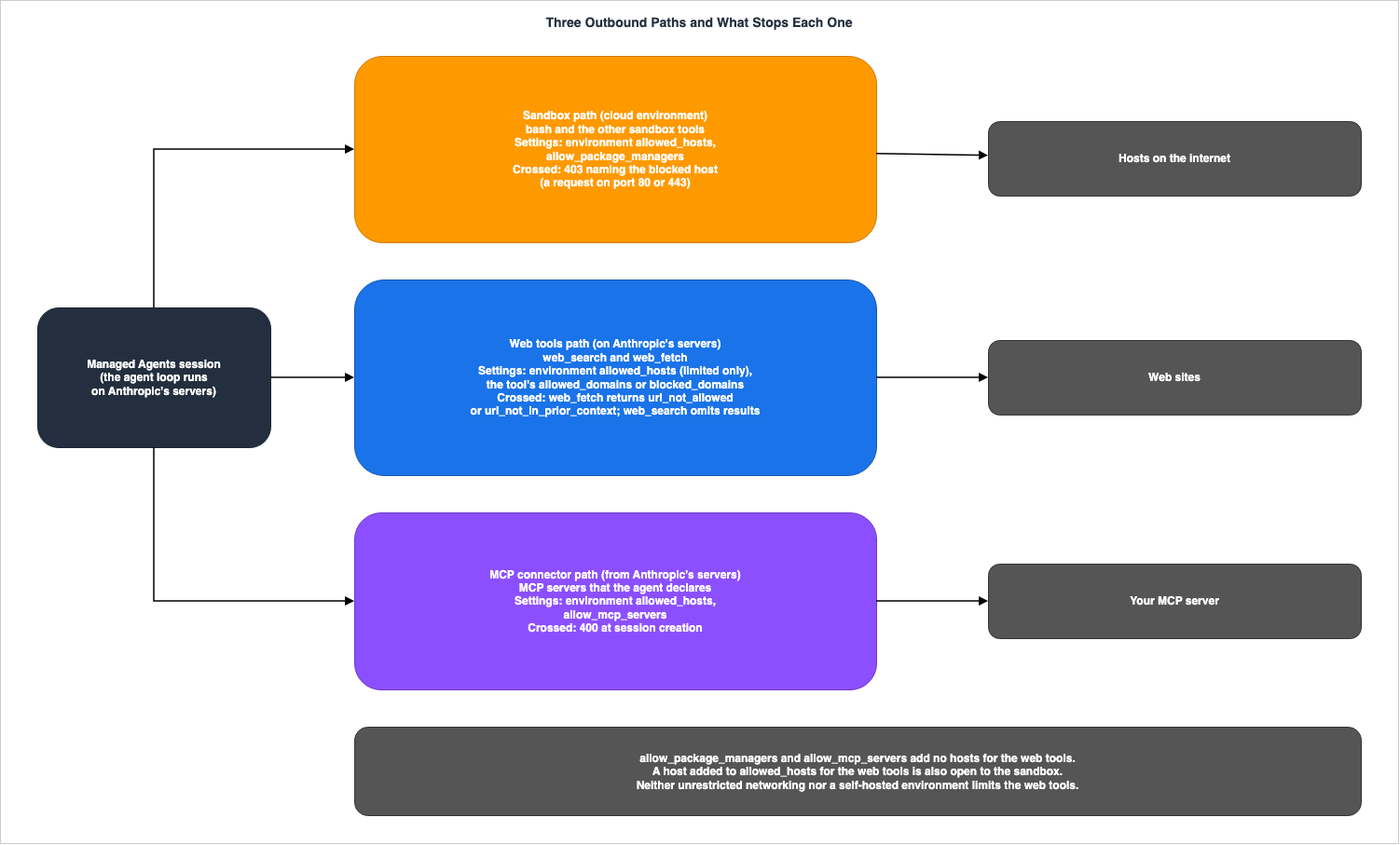
2.2 Table Columns
The tables in this article use five columns shared by three articles published together. The five columns have the same meaning in the three articles.Enforced Where: The location where the rule is enforced. In other words, who is responsible for enforcing it.Default: Whether the rule is on or off by default, or the default value.When It Is Crossed: What is returned when the rule is crossed.Your Setting: The item that the user can configure. If the source does not list a setting, this article writesNone stated.Stated In: The source document for the information in this row, indicated by the page title and section name.
In addition to these, this article uses two more columns:
Rule: The rule that the row addresses. This column has the same name as the column in Where the Orchestration Program Runs, a companion article published alongside this one.Path: The path to which the row belongs. This is a column added in this article, with values ofSandbox,Web tools (on Anthropic's servers), andMCP connector. Only the table in Section 8, which summarizes the three paths, includes thePathcolumn.
This article uses the following values for
Enforced Where:Anthropic's egress controls (sandbox): Applies where Anthropic controls the outbound communication of the sandbox in a cloud environment. The comparison table on the "Self-hosted sandboxes" page refers to theNetwork reachof the cloud environment asAnthropic's egress controls.Anthropic's servers (web tools): Applies on Anthropic's servers whereweb_searchandweb_fetchare running.The Claude API (request validation): Applies when the Claude API validates requests for environments, agents, and sessions.The session (at run time): Applies in the session while the session is running.The source does not say.: The source does not state where the rule applies.
This article uses the following values for
When It Is Crossed:403 naming the blocked host: A request from the sandbox receives a 403 that names the blocked host.400 on the environment request: The environment creation request is rejected with a 400 error.400 at session creation or update: Session creation or update fails with a 400 error.400 at session creation: Session creation fails with a 400 error.400 invalid_request_error: The request is rejected with a 400 error and theinvalid_request_error.Request rejected (status not stated): The request is rejected, but the source does not state the status code.Error tool result: url_not_allowed: Theweb_fetchtool returns an error result:url_not_allowed.Error tool result: url_not_in_prior_context: Theweb_fetchtool returns an error result:url_not_in_prior_context.Results omitted: Theweb_searchtool omits the results.session.error event: The session emits asession.errorevent.The source does not say.: The source does not state what is returned.
The
Default column gives the default value stated in the source. If the source does not state a default, this article writes The source does not say. If the idea of a default does not apply to a rule, this article writes Not applicable. In the Enforced Where and When It Is Crossed columns as well, if the rule in a row does not stop anything, this article writes Not applicable and gives the source's statement in parentheses.2.3 Words That Share the Same Spelling but Refer to Different Things
In this article, the same or similar words sometimes refer to different things. To avoid misreading, this article distinguishes them first.allowed_hosts(2 kinds distinguished in this article): (1) Theallowed_hostsin the environment'snetworkingsettings. This determines which hosts the sandbox can reach, and which hosts the web tools in alimitedenvironment can reach. (2) Theallowed_hostsin thenetworkingof a vault environment variable credential, which determines which requests will have secret values replaced. When this article simply refers toallowed_hosts, it refers to (1). When it refers to (2), it writes "theallowed_hostsof a vault credential" (see Section 7.1).- Sandbox (3 kinds distinguished in this article): (1) The sandbox for Managed Agents' sessions. In cloud environments, this is an isolated Linux container for each session. When this article writes "sandbox," it refers to this. (2) The container for the code execution tool used by the Messages API. Where the Orchestration Program Runs, a companion article published alongside this one, covers it. Anthropic's page on the Code execution tool states that this container does not have access to the internet. (3) The sandbox for Claude Code. This is covered in the previously published Hardening and Governance Guide for Claude Code and Claude Desktop, which uses
network.allowedDomainsto define outbound communication. - Domain List (3 kinds distinguished in this article): (1) The
allowed_domainsandblocked_domainsin theweb_searchandweb_fetchitems of the toolset for Managed Agents. When this article writes "tool domain list," it refers to this. (2) The fields with the same names on the Messages API server tools. (3) The organization's web search and web fetch settings in the Claude Console. - Server: When this article writes "Anthropic's servers," it refers to Anthropic's side where the web tools and MCP connectors operate. When it refers to "MCP server," it refers to an MCP server that the user operates or trusts.
- Claude Console and Claude Studio: The "Cloud environment setup" page refers to the environment creation form as
The Claude Console's form. The "Cloud sandbox reference" page refers to sandboxes provisioned throughClaude Studio. This article uses the terms as they appear in the sources (see Section 9.1).
2.4 When the Source Does Not Say, and When the Sources Disagree
Each cell of a table holds only a statement from the source, or a summary of it. For a cell that the source does not cover, this article writesThe source does not say. Before writing it, this article searches the full text of the source that the row cites, the pages that source links to, and the other pages of the Managed Agents documentation and the release notes, using the words of the row's subject.If the source describes a general rule but does not specifically refer to the subject of that row, this article does not write
The source does not say. Instead, it writes the general rule and the fact that the subject is not named.When the sources disagree, this article lists both statements, each with its source, without favoring either. This article always writes a disagreement as
the sources disagree. The disagreements in this article are summarized in Section 9.1. Statements that were looked for and not found are summarized in Section 9.2, with where and how they were looked for. Not finding a statement does not mean that the behavior does not exist.This article distinguishes two kinds of dates. A release note date is given by the date heading on the release notes page. A documentation page is given by its page title and this article's verification date, October 15, 2026.
3. The networking Types and Their Defaults
This chapter describes two networking types for the environment, the default behavior when a type is not specified, and how to configure allowed_hosts.3.1 Two Types
The "Networking" section on the "Cloud environment setup" page states thatnetworking determines outbound communication for the sandbox. The same section's table describes two types as follows:| `limited` | Restricts sandbox network access to the hosts in `allowed_hosts`. Set `allow_package_managers` and `allow_mcp_servers` to `true` to allow additional access. Use this mode unless the agent must reach sites you cannot list in advance. |
| `unrestricted` | Full outbound network access, except for a general safety blocklist. Before you use it, read Risks of unrestricted networking. |The
limited type has three settings: allowed_hosts, allow_package_managers, and allow_mcp_servers. The "Limit the network" section on the "Secure your Managed Agents deployment" page has a table of what these three settings open to code in the sandbox. The following table summarizes that table. The Default column comes from the "Cloud environment setup" page:| Setting | What It Opens to Code in the Sandbox | Default |
|---|---|---|
allowed_hosts | The hosts you list, for any request. | The source states that with limited and no other fields set, no hosts are allowed. |
allow_package_managers | Hosts for package managers. Includes all repositories and paths for github.com, gitlab.com, and bitbucket.org. | false |
allow_mcp_servers | Does not open any hosts. Managed Agents connects from Anthropic's servers to MCP servers. | false |
Regarding the
unrestricted type, the "Cloud environment setup" page states that the sandbox's code can send requests to any host on the internet, except for those listed on the safety blocklist. No statement of the contents of the blocklist was found in the sources this article read. The same page clarifies that the blocklist is not a list of approved hosts.The safety blocklist is not an allowlist: It does not limit which other sites the agent reaches, or what the agent does on them.3.2 Defaults When No Configuration Is Provided
The default settings fornetworking depend on how the environment is created. The sources this article read state the default in the following four places.| Where the Environment Is Created | What the Source Says | Stated In |
|---|---|---|
When the networking configuration is omitted in an API creation request | a create request that omits it gets unrestricted. | Note on the Networking section of the Cloud environment setup page |
When the networking configuration is omitted in an API creation request | An environment create request that omits networking might get unrestricted, so set networking in every create request. | The Limit the network section of the Secure your Managed Agents deployment page |
| Environments created via API | API-created environments default to unrestricted networking | Table in the Sandbox specifications section of the Cloud sandbox reference page |
| Claude Console form, Claude Studio | The Cloud environment setup page states that the Console form begins with Limited selected and nothing else allowed. The Cloud sandbox reference page states that sandboxes provisioned through Claude Studio default to limited. | Note on the Networking section of the Cloud environment setup page, Table in the Sandbox specifications section of the Cloud sandbox reference page |
For an API request that omits
networking, two pages state the result without qualification (gets and default to), and one page writes might get. This article lists this difference as a disagreement in Section 9.1. None of the three pages states that an API request that omits networking gets limited. This article does not attempt to consolidate these defaults into a single statement. Instead, it addresses the behavior of API requests, the Console form, and Claude Studio separately.The "Cloud environment setup" page gives
false as the default for both allow_package_managers and allow_mcp_servers.3.3 How to Write allowed_hosts and Matching Rules
The "Cloud environment setup" page describes how to write the allowed_hosts setting as follows:Specify bare hostnames or wildcard patterns (such as `*.example.com`). Do not include a URL scheme, port, or path. A bare hostname matches that exact host: `example.com` does not match `www.example.com`. `*.example.com` matches every subdomain of `example.com`, but not `example.com` itself.In other words, unless it begins with
*., an allowed_hosts entry matches only one host. *.example.com matches all subdomains of example.com, but does not match example.com itself. The "Secure your Managed Agents deployment" page states that when a site and all of its subdomains are needed, you should list both example.com and *.example.com in the allowed_hosts setting.This rule differs from the matching rule of the tool domain lists. The differences between the two rules are explained in Section 5.3.
The "Secure your Managed Agents deployment" page also lists the following two rules for selecting hosts in the
allowed_hosts setting:List only hosts you operate or trust.
Avoid `*.` wildcards and shared-hosting domains where anyone can publish content.3.4 Recommendations the Sources Themselves Make
This article does not specify whether to uselimited or unrestricted. However, the sources themselves make recommendations. This article quotes those recommendations, as the sources' own words, from the following three places:- In the table in the "Networking" section of the "Cloud environment setup" page, the row for
limitedstates:Use this mode unless the agent must reach sites you cannot list in advance. - In the same section, the note reads:
Use limited networking with an explicit allowed_hosts list. - In the table at the beginning of the "Secure your Managed Agents deployment" page, the recommendation for
networking.typestates:limited, with only the hosts the agent needs.
3.5 Items the Source Lists for unrestricted
The "Risks of unrestricted networking" section on the "Cloud environment setup" page lists seven items to consider before choosing the unrestricted option. The headings for these items are as follows:The agent can change things on external sites, not only read them
Nothing pauses these requests by default
Anything in the sandbox can leave it
Fetched content can steer the agent
The agent acts on your behalf
Model behavior is not a security control
The safety blocklist is not an allowlistThis article only extracts the headings for these seven items. For the body of each item, read the same section.
3.6 Changing an Environment, and Sessions Already Running
The Environment lifecycle section on the "Cloud environment setup" page states that environments do not have versions.Environments are not versioned. If you update an environment frequently, keep your own record of the changes so you can tell which configuration each session used.The "Limit the network" section on the "Secure your Managed Agents deployment" page describes sessions that are already running after an environment is tightened:
After you tighten an environment, start new sessions and stop the ones that were already running. A session that is already running can keep the old limits until it ends.This article quotes the statement with the strength it is written in. The statement says that a session already running can keep the old limits. This article does not write that tightening an environment has no effect on running sessions.
The list of domains for web tools is a setting for the agent's tools, not the environment itself. The Change the lists mid-session section on the "Restrict web search and web fetch domains" page states that the lists can be changed by updating the tools of an idle session, and that the new lists apply to the rest of the session (
The new lists apply to the rest of the session.).4. The Sandbox Path
This chapter demonstrates how environment configurations affect requests from the sandbox to external hosts.4.1 Sandbox for the limited Environment
The "Cloud environment setup" page states that in a limited environment with no configuration, access to any host is denied. However, it also states that files, memory stores, and GitHub repositories attached to the session remain available.With `limited` networking and no other fields set, no hosts are allowed. Files, memory stores, and GitHub repositories that you attach to the session stay available. When a request from the sandbox on port 80 or 443 is refused because its host is not allowed, the response is a 403 that names the blocked host.The 403 error mentioned in this passage refers to requests for ports 80 or 443 from the sandbox. No statement was found in the sources of what is returned when requests to ports other than 80 and 443 are rejected (see Section 9.2). The web tools path returns an error tool result or omits results, not a 403 (Section 5).
4.2 Host-Based Permissions
The "Cloud environment setup" page specifies that permissions are granted on a per-host basis, rather than per operation.Network access is granted per host, not per operation. The sandbox can send any request to an allowed host, including uploads such as `git push` and package publishing, with any credential the command supplies.The "Secure your Managed Agents deployment" page also includes a similar warning. Following this warning, the same page says that if the agent keeps
bash, the permission policy for the bash tool should be set as the "Approve risky actions" section describes. The functionality of permission policies is covered in the previously published Managed Agent Runtimes.4.3 Package Manager Hosts
Whenallow_package_managers is set to true, the sandbox can reach hosts associated with package managers, in addition to those listed in allowed_hosts. The "Package manager hosts" section on the "Cloud environment setup" page lists hosts categorized into ten areas: code hosting, Node.js, Python, Rust, Go, Java, Ruby, PHP, Ubuntu (apt), and containers. That section notes that Anthropic maintains this list and can change it.Anthropic maintains this list and can change it.This article does not reproduce that list. Read that section for the list.
The
packages setting in the environment allows packages to be pre-installed in the sandbox. The "Packages" section on the "Cloud environment setup" page states that when specifying packages in a limited environment, allow_package_managers must also be set to true; otherwise, requests will be rejected with a 400 error. The "Networking" section indicates that even if the registry host is listed in allowed_hosts, the request is still rejected with a 400 error.Set it to `true` whenever the environment specifies `packages`; otherwise the request is rejected with a 400 error, even if the registry hosts are listed in `allowed_hosts`.4.4 Rules on the Sandbox Path
The following table outlines the sandbox path rules, using the columns in Section 2.2.| Rule | Enforced Where | Default | When It Is Crossed | Your Setting | Stated In |
|---|---|---|---|---|---|
limited, with nothing set in allowed_hosts or either switch. | Anthropic's egress controls (sandbox) | No host is permitted. | 403 naming the blocked host (request on port 80 or 443). | allowed_hosts | Networking section of the Cloud environment setup page. |
| Requests to disallowed hosts on ports other than 80 and 443. | Anthropic's egress controls (sandbox) | The source does not say. | The source does not say. | allowed_hosts | Networking section of the Cloud environment setup page. |
| Files, memory stores, and GitHub repositories attached to the session. | The source does not say. | Usable regardless of allowed_hosts. | Not applicable. | None stated. | Networking section of the Cloud environment setup page, Limit the network section of the Secure your Managed Agents deployment page. |
Requests to hosts listed in allowed_hosts. | Anthropic's egress controls (sandbox) | Not applicable. | Any request can be sent. The source states that permissions are granted on a per-host basis, not per operation. | allowed_hosts | Warning in the Package manager hosts section of the Cloud environment setup page. |
allow_package_managers | Anthropic's egress controls (sandbox) | false | When true, the sandbox can reach the package manager hosts. Anthropic can change the list. | allow_package_managers | Package manager hosts section of the Cloud environment setup page. |
In a limited environment, if packages is written and allow_package_managers is not set to true. | The Claude API (request validation) | Not applicable. | 400 on the environment request. | allow_package_managers, packages | Packages section and Networking section of the Cloud environment setup page. |
allow_mcp_servers | Not applicable (does not open hosts in the sandbox). | false | Not applicable. | allow_mcp_servers | Limit the network section of the Secure your Managed Agents deployment page. |
Requests to hosts on the safety blocklist from an unrestricted environment. | The source does not say. | The source does not say. | The source does not say. | None stated. | Networking section and Risks of unrestricted networking section of the Cloud environment setup page. |
The web_fetch tool domain list and requests from bash. | Not applicable (the tool domain list does not limit bash). | Not applicable. | Not applicable. | Environment's networking settings. | Restrict web search and web fetch section of the Secure your Managed Agents deployment page. |
Requests from sandbox code to api.anthropic.com. | Anthropic's egress controls (sandbox) | In a limited environment, requests reach it only if allowed_hosts lets the sandbox reach api.anthropic.com. | The source does not say. | allowed_hosts | Keep credentials in vaults section of the Secure your Managed Agents deployment page. |
Regarding the final row of the table, the "Secure your Managed Agents deployment" page states that you should not give the agent a Claude API key. This is because code in the sandbox can call the Claude API directly with that key. The source states that the agent's tool settings, approvals, and budget do not apply to those calls.
5. The Web Tools Path — Anthropic's Servers
This chapter explains how the environment'sallowed_hosts setting and the tool domain lists apply to web_search and web_fetch. It then gives the two rules that stop web_fetch.5.1 Conditions Under Which the Environment's allowed_hosts Applies to the Web Tools
The opening note on the "Restrict web search and web fetch domains" page states that the two tools operate on Anthropic's servers, not in the sandbox.`web_search` and `web_fetch` run on Anthropic's servers, not in the sandbox. A cloud environment with `limited` networking also applies its `allowed_hosts` to them; see Set domain lists on an agent. `unrestricted` networking and self-hosted environments do not limit them.The "Networking" section of the "Cloud environment setup" page describes how
allowed_hosts affects the two tools within a limited environment, as follows:A `web_fetch` call for a URL on a host that `allowed_hosts` does not match returns an error result to the agent. `web_search` omits results from hosts that `allowed_hosts` does not match. `allow_package_managers` and `allow_mcp_servers` add no hosts for these tools. When `allowed_hosts` lists no hosts, no `web_fetch` or `web_search` call returns a page or a search result. A host that you add to `allowed_hosts` for these tools is also open to the sandbox.The following four points follow from this text:
- The
allowed_hostssetting in the environment only affects the web tools when the cloud environment'snetworkingislimited. Environments withunrestrictednetworking and self-hosted environments do not restrict the web tools. allow_package_managersandallow_mcp_serversdo not add any hosts to the web tools' accessible list. Even ifallow_package_managersis set totruein alimitedenvironment, the web tools will not be able to reach package manager hosts unless those hosts are explicitly listed inallowed_hosts.- If
allowed_hostsis empty in alimitedenvironment, neither tool will return any search results or display any pages. - When adding hosts to
allowed_hostsfor the web tools, those hosts will also become accessible in the sandbox.
On this article's verification date, the "Server tools" page also stated that the tool domain lists restrict these tools further, within the hosts that
allowed_hosts allows.The per-tool lists restrict these tools further, within the hosts that `allowed_hosts` allows.On October 30, 2026, this sentence is not on the "Server tools" page. For Managed Agents sessions, that page refers to the "Restrict web search and web fetch domains" page. The opening note on the "Restrict web search and web fetch domains" page states the following on both dates:
The per-tool lists restrict these tools further.On this article's verification date, the "Restrict web search and web fetch domains" page stated that the organization-level web search and web fetch settings in the Claude Console do not apply to sessions for Managed Agents. The copies of this page that the Internet Archive saved on October 8, 2026, and October 10, 2026, also have the same sentence.
Organization-level web search and web fetch settings in the Claude Console apply to the Messages API. They do not apply to Managed Agents sessions.On October 30, 2026, the same page states that the organization's settings on the Capabilities page of the Claude Console also apply to
web_search and web_fetch in a session.Your organization's web search settings on the Capabilities page of the Claude Console also apply to `web_search` in a session.
Your organization's web fetch settings on the same page also apply to `web_fetch` in a session.The same page states that when an administrator turns off a tool, calls to that tool return an error result to the agent, and the session continues. When the organization restricts domains, the agent receives only the search results that both the organization's restrictions and the tool domain list allow. A
web_fetch URL must pass both the organization's list and the tool domain list, and so must the URL that a redirect leads to. For a tool that is turned off, and for a web_fetch URL that the organization's list excludes, the page writes an error result and does not name an error code.Under the heading "October 20, 2026," the "Claude Platform release notes" page gives dates for this change. For
web_search, it states when sessions follow the organization's settings, as follows:the Allow web search setting since October 6, and its web search domain restrictions since October 14.For
web_fetch, the same heading states that the tool now follows the organization's web fetch domain restrictions, and gives no start date.In Claude Managed Agents, the `web_fetch` tool now follows your organization's web fetch domain restrictions set on the Capabilities page of the Claude Console.The same heading also states that organization admins can now turn off web fetch on the Capabilities page, and that in a Managed Agents session,
web_fetch calls then return an error result to the agent.October 6, 2026, and October 14, 2026, are earlier than this article's verification date. This article does not write when the page text changed, or whether the page and the product's behavior matched until then (Section 9.1).
5.2 allowed_domains and blocked_domains for Tools
The tool domain lists are set on the web_search and web_fetch entries of the configs array of the agent toolset (agent_toolset_20260401). The "Restrict web search and web fetch domains" page indicates that each entry takes one of the following two lists.allowed_domains: The tool is only able to access hosts listed here.blocked_domains: The tool is unable to access hosts listed here.
The "Domain list rules" section on the same page outlines the rules for these lists as follows:
- An entry cannot contain both
allowed_domainsandblocked_domains. - A list can contain between 1 and 64 domains, with each domain 1 to 255 characters long.
- Empty lists are not permitted. To apply no restrictions, omit the field or send
null. - A list cannot contain the same domain twice.
www.example.comandexample.comare considered distinct domains.
Domains listed in the list match the specified host and all of its subdomains. Hostnames are compared in a case-insensitive manner. The "Domain format" section on the same page states that the API does not accept domains that include a scheme, a port, a wildcard, or an IP address, or names that are only a top-level domain, a single label, or contain non-ASCII characters. A domain with non-ASCII characters is written in the
xn-- (Punycode) form. Domains for web_fetch cannot include paths. Domains for web_search can include paths, such as example.com/blog.The "Restrict web search and web fetch" section of the "Secure your Managed Agents deployment" page states the following about the two lists:
Do not rely on `blocked_domains` for security. Use `allowed_domains` and name the hosts you trust.The same section also states that for
web_search's allowed_domains, The list does not stop the search query from reaching the search provider.5.3 Two Matching Rules
The environment'sallowed_hosts and the tool domain lists match hosts differently. The "Restrict web search and web fetch" section on the "Secure your Managed Agents deployment" page illustrates these differences in the table below.| List | Entry | Matches | Does Not Match |
|---|---|---|---|
allowed_hosts (Environment) | example.com | example.com | www.example.com |
allowed_hosts (Environment) | *.example.com | All subdomains | example.com |
allowed_domains (Web Tools) | example.com | example.com and all of its subdomains | Other domains |
The "Restrict web search and web fetch domains" page gives an example of this difference: the tool entry
docs.example.com is not within an allowed_hosts of ["example.com"], but is within ["docs.example.com"] or ["*.example.com"].The "Secure your Managed Agents deployment" page describes one scenario resulting from the difference between these two rules. If a tool lists
example.com and the allowed_hosts lists only *.example.com, a session will be created. This is because during session creation, example.com is counted as being within *.example.com. However, the tool returns nothing from example.com itself.If a tool lists `example.com` and `allowed_hosts` lists only `*.example.com`, the session is created. The check at session creation counts `example.com` as within `*.example.com`, but the tool returns nothing from `example.com` itself.5.4 The 400 at Session Creation and Update, and Sessions That a Deployment Starts
The "Restrict web search and web fetch domains" page states that, in alimited environment, creating a session fails with a 400 error when an enabled web tool's allowed_domains has an entry that is not within allowed_hosts. A session update that adds such an entry also fails with a 400 error.Creating a session fails with a 400 error when an enabled web tool's `allowed_domains` has an entry that is not within `allowed_hosts`. So does a session update that adds such an entry.The "Secure your Managed Agents deployment" page describes a case that this 400 does not cover. A session that a deployment starts, on its schedule or by a manual run, is still created. In that case, the tool returns nothing from hosts outside
allowed_hosts.A session that a deployment starts, on its schedule or by a manual run, is created anyway. The tool then returns nothing from hosts outside `allowed_hosts`Format and count violations in the tool domain lists are a separate check. The "Validation errors" section of the "Restrict web search and web fetch domains" page states that when creating or updating agents, or when creating or updating sessions that include the
tools parameter, format and limit violations are rejected with a 400 invalid_request_error. This same section also indicates that requests containing domains in the allowed_domains list that the Anthropic crawler is not permitted to access will also be rejected. The source does not state the status code of this rejection.The "When an accepted setting is no longer valid" section of the same page describes a scenario where a previously accepted setting is no longer valid when the session first initializes a tool. In this case, the session will emit a
session.error event and return to an idle state without attempting a retry.5.5 The Two Rules That Stop web_fetch
There are two rules that stop web_fetch calls. These rules differ in the error codes they produce.The first rule is the host rule. For a URL on a host that the
allowed_hosts of a limited environment does not match, and for a URL that the tool domain list does not permit, web_fetch returns a url_not_allowed error result. The section "When a domain is not permitted" on the "Restrict web search and web fetch domains" page describes the format of this error.The `agent.tool_result` event has `is_error: true`, and its content names the error code `url_not_allowed`.The same page, in the "Set domain lists on an agent" section, also states that
web_fetch returns a url_not_allowed error result for a URL on a host that allowed_hosts does not match.The second rule concerns URLs that have already appeared in the session.
web_fetch only retrieves URLs that have already appeared in the session. This rule is described in the following three locations:- The entry for October 7, 2026, on the "Claude Platform release notes" page. This entry describes the rule, the error code
url_not_in_prior_context, and the purpose of the rule. - The "Restrict web search and web fetch" section on the "Secure your Managed Agents deployment" page. This section describes the rule and provides a table indicating whether a URL can be retrieved based on where it appeared.
- The table on the "Security risks and sandbox boundaries" page, in the "What the sandbox can and cannot do" section. This table describes the rule in a single sentence in the row for
web_fetch.
The rule is not found on the "Cloud environment setup" page, the "Tools" page, or the "Restrict web search and web fetch domains" page. Furthermore, the name of the error code
url_not_in_prior_context is only found in the scope of Managed Agents in the release notes entry. The "Secure your Managed Agents deployment" page and the "Security risks and sandbox boundaries" page describe the rule, but do not mention the name of the error code.The release notes describe the purpose of the rule as follows:
This reduces the risk of data exfiltration.The "Secure your Managed Agents deployment" page says to keep setting the tool domain lists even with this rule in place, because end-user text, search results, fetched pages, and custom tool results can still add URLs.
End-user text, search results, fetched pages, and custom tool results can still add URLs, so keep `allowed_domains` set.To let the agent fetch a URL that has not yet appeared, send that URL in a user message. The release notes state:
To let the agent fetch a URL, send it in the text of a `user.message` event.This article does not write the order in which the two rules are checked. No statement of the order was found in the sources this article read (Section 9.2). Figure 2 lists the two rules without any specific order. Figure 2 also shows the rules on this article's verification date, and does not show the organization's web fetch settings (Section 5.1).
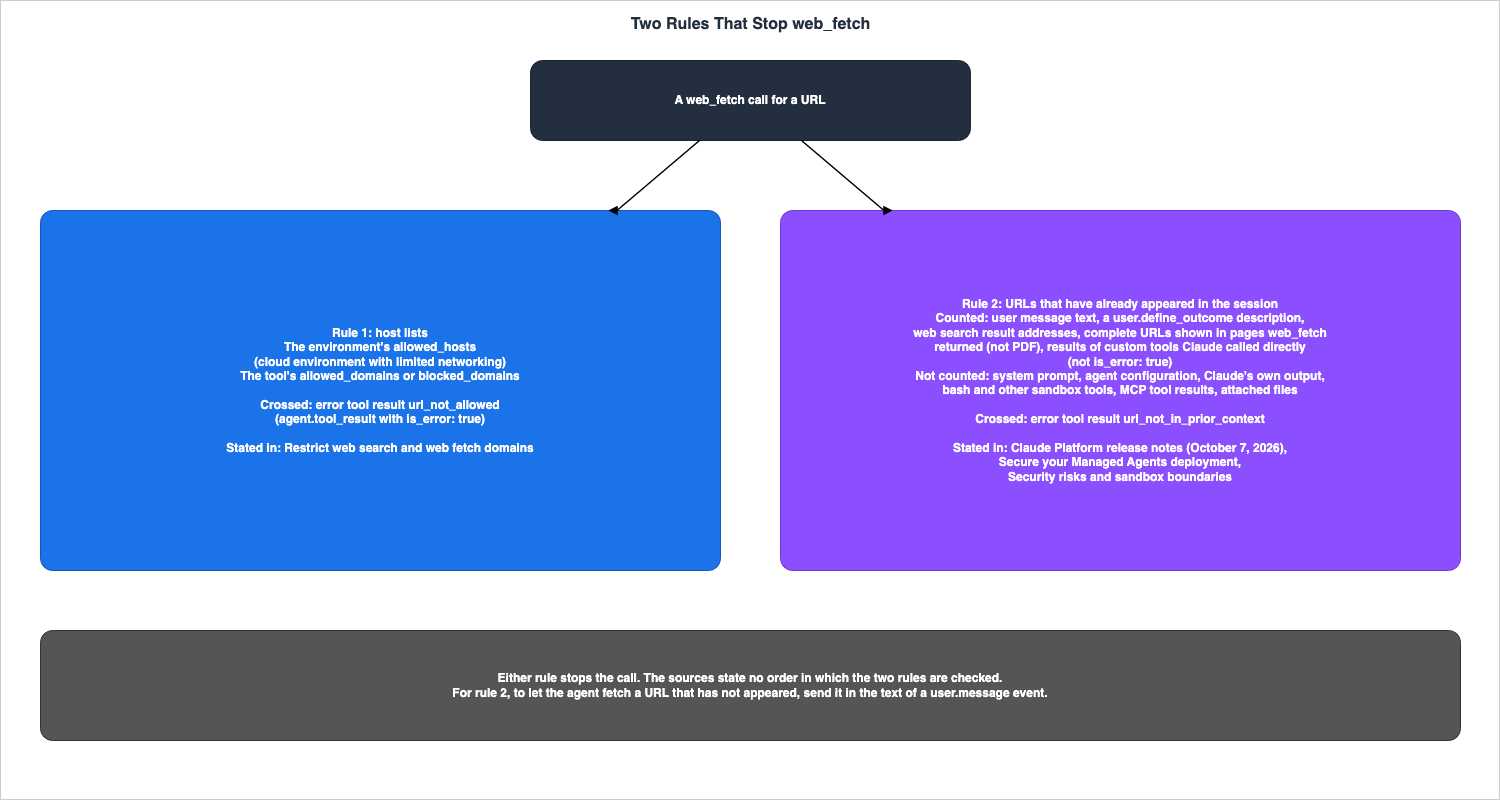
web_fetch can open it.| Where the URL Appears | Can web_fetch Open It |
|---|---|
| In the body of the user's message, including messages relayed from end-users | Yes |
In the description of the user.define_outcome event | Yes |
| In the address of a web search result | Yes |
In the body of a page previously returned by web_fetch (excluding PDFs), where a complete URL is displayed | Yes |
| In the body of the results from a custom tool called directly by Claude | Yes, except when the result indicates is_error: true. |
| System prompt | No |
Agent configuration, including the allowed_domains section | No |
| Claude's own output | No |
Output from bash and other sandbox tools | No |
| Results from MCP tools | No |
| Files attached to the user's message | No |
The same section also states that, in addition to the table,
web_fetch will only open URLs from other agents if those URLs have reached that agent through a source listed as "Yes" in the table. A URL can count even when it is written without https://. When a link is represented by text rather than a URL, web_fetch may not always be able to open it.The release notes item also lists sources that count and sources that do not. It gives the sources that count with
for example, and lists the sources that do not count when a URL appears only there: Claude's own output, the agent's system prompt, an attached document, and the output of bash, read, and MCP tools. This article uses the table on the "Secure your Managed Agents deployment" page as the list of sources.5.6 Differences from the Messages API Web Fetch Tool
The "Secure your Managed Agents deployment" page states that the Messages API has a similar rule with a different list of sources.The Messages API applies a similar rule with a different list of sources.The section on URL validation for the Messages API's "Web fetch tool" page details the rules for the Messages API. The following table compares the two lists of sources. The two products have different types of tools. A client-side tool of the Messages API is a tool that the user's application runs. Managed Agents'
bash is a tool that runs within a sandbox. In Managed Agents, the tool that the user's application runs is the custom tool.| Source | Managed Agents | Messages API |
|---|---|---|
| User messages | Yes | Yes |
| Results from the user's application's tool | Yes for custom tool results (when Claude called the tool directly and the result is not is_error: true), even if Claude wrote the text, for example when the tool repeats its input | Yes for client-side tool results, even when the result repeats text that Claude produced |
| Results from previous web searches and retrievals | Yes (fetched pages exclude PDFs) | Yes |
| System prompt | No | No. To make a URL in the system prompt fetchable, also include it in a user message. |
| Claude's output | No | No |
| Results from tools running on the server or within a sandbox | No (for bash and other sandbox tools). No (for MCP tool results). | No (for results from other server-side tools such as code execution, MCP connector, and tool search). |
| Agent configuration, attached files | No | The source does not list this item. |
The Messages API's "Web fetch tool" page states that it also refuses a URL that appears to contain a credential. However, it does not refuse the URL when that credential appears in the system prompt or in the text of a user message. When it refuses a URL, the result is
url_not_allowed. No statement of the same rule was found on the Managed Agents pages (Section 9.2). This article does not apply this rule to Managed Agents. The Messages API's "Web fetch tool" page lists errors, stating that url_not_in_prior_context indicates the URL did not appear in the previous part of the conversation.Regarding differences in domain lists, the "Differences from the Messages API tools" section on the "Restrict web search and web fetch domains" page states that Managed Agents differs from the Messages API's server tools in four ways:
- One list supports up to 64 domains.
- A
web_fetchdomain cannot include a path. - Domains must be in ASCII format. The Messages API accepts Unicode entries but recommends against them.
max_uses,citations, andcache_controlare not supported in the toolset.
5.7 Multiagent Sessions
The section "Multiagent and outcome-driven sessions" on the "Restrict web search and web fetch domains" page states that in a multiagent session, every domain list that applies to a thread is enforced at the same time. An agent in thepredefined_agents list of subagents is bound by three sets of tool domain lists: its own lists, those of the agent that called it, and the current lists of the agent that the session runs. The following table summarizes the information from that section:| Setting | How It Combines |
|---|---|
allowed_domains | The tool reaches only hosts that every list covers. |
blocked_domains | Lists are combined. |
max_content_tokens, user_location | Not combined. The thread uses the values from its own tool's configuration, then the configuration of the agent that called it, and if neither is available, it uses the current configuration of the agent that the session runs. |
The same section states that if the combined
allowed_domains lists have no domain in common, the tool remains usable for that agent, but all calls will fail. Each call returns a url_not_allowed error stating that no domain is permitted. The section also states that the grader in outcome-driven sessions runs without web_search and web_fetch, regardless of these settings.The section "Change the lists mid-session" states that when the lists are changed during a session, the own lists of an agent in the
predefined_agents list do not change and stay as the agent's definition set them when the session was created.5.8 Rules on the Web Tools Path
The following table lists the rules on the web tools path, using the columns in Section 2.2.| Rule | Enforced Where | Default | When It Is Crossed | Your Setting | Stated In |
|---|---|---|---|---|---|
In a limited environment, the tool fetches a URL on a host that allowed_hosts does not match. | Anthropic's servers (web tools) | Not applicable | Error tool result: url_not_allowed | allowed_hosts | Set domain lists on an agent section of the Restrict web search and web fetch domains page. |
In a limited environment, the search results from a host that does not match the allowed_hosts. | Anthropic's servers (web tools) | Not applicable | Results omitted | allowed_hosts | Networking section of the Cloud environment setup page. |
In a limited environment, the allowed_hosts list is empty. | Anthropic's servers (web tools) | Not applicable | Both tools return no pages and no search results. | allowed_hosts | Networking section of the Cloud environment setup page. |
For allow_package_managers and allow_mcp_servers. | Not applicable (does not add hosts to web tools) | false | Not applicable | Specify hosts in allowed_hosts. | Networking section of the Cloud environment setup page. |
In an unrestricted environment or a self-hosted environment. | Not applicable (environment does not restrict web tools) | Not applicable | Not applicable | Tool's allowed_domains and blocked_domains. | Opening note on the Restrict web search and web fetch domains page. |
| The tool fetches a URL that the tool domain list does not permit. | Anthropic's servers (web tools) | No list (no restriction) | Error tool result: url_not_allowed | allowed_domains, blocked_domains | When a domain is not permitted section of the Restrict web search and web fetch domains page. |
| Search results from hosts that the tool domain list does not permit. | Anthropic's servers (web tools) | No list (no restriction) | Results omitted | allowed_domains, blocked_domains | Same as above. |
| The tool fetches a URL that has not yet appeared in the session. | The source does not say. | The source states no condition based on the environment type and no setting that turns the rule off. | Error tool result: url_not_in_prior_context | Send the URL in the body of a user.message event. | Item for October 7, 2026, in the Claude Platform release notes; section on Restrict web search and web fetch in the Secure your Managed Agents deployment page. |
In a limited environment, an enabled tool's allowed_domains has an entry outside allowed_hosts. | The Claude API (request validation) | Not applicable | 400 at session creation or update. A session that a deployment starts is created. | allowed_hosts, allowed_domains | Restrict web search and web fetch domains page; Secure your Managed Agents deployment page. |
| Format or count violations in the tool domain lists. | The Claude API (request validation) | Not applicable | 400 invalid_request_error | allowed_domains, blocked_domains | Validation errors section of the Restrict web search and web fetch domains page. |
allowed_domains contains a domain that Anthropic's crawler is not permitted to access. | The Claude API (request validation) | Not applicable | Request rejected (status not stated) | allowed_domains | Same as above. |
| Accepted settings are invalid at the tool's initialization. | The session (at run time) | Not applicable | session.error event. The session returns to idle without retrying. | Update the session's tools. | When an accepted setting is no longer valid section of the Restrict web search and web fetch domains page. |
| Organization-level web search and web fetch settings on the Capabilities page of the Claude Console (October 30, 2026). | The source does not say. | The source does not say. | When a tool is turned off, an error result is returned to the agent, and the session continues. When domains are restricted, web_search returns only results that both lists allow, and web_fetch returns an error result. | Capabilities page of the Claude Console (an administrator). | Restrict web search and web fetch domains page (October 30, 2026); item for October 20, 2026, in the Claude Platform release notes. On this article's verification date, the opening note on the same page stated that these settings do not apply to Managed Agents sessions (Section 5.1). |
Regarding the
Enforced Where cell of the row for URLs that have not yet appeared in the session, the release notes state that the web_fetch tool follows this rule, but do not state where the rule is checked.6. The MCP Connector Path
This chapter explains how the environment settings apply to connections to the MCP servers that an agent declares.6.1 Where the MCP Connector Connects
As mentioned in Section 2.1, the "Secure your Managed Agents deployment" page states that Managed Agents connects from Anthropic's servers to the MCP servers. The same page recommends settingallow_mcp_servers as follows:`false`, with the host of each MCP server you operate or trust listed in `allowed_hosts`That same section also states that the MCP server hosts listed in
allowed_hosts are also open to code in the sandbox (Each host you list is also open to code in the sandbox.).What the MCP server accepts after the MCP connector connects to it is covered in What the MCP TypeScript and Python SDKs Ask of Server Authors, a companion article published alongside this one.
6.2 The Check at Session Creation
The section "Provide authentication at session creation" on the "MCP connector" page states that in alimited environment, if an agent declares an MCP server whose host is not in allowed_hosts, session creation will fail with a 400 error.With a `limited` environment, session creation fails with a 400 error when the agent declares an MCP server whose host is not in `allowed_hosts`. Setting `allow_mcp_servers` to `true` in the environment's networking turns this check off.This check applies not only to the agent that the session runs. The Multiagent orchestration page states that the same check applies to the MCP servers declared by agents listed in the
predefined_agents list of subagents or workflows. Furthermore, the "Secure your Managed Agents deployment" page indicates that the same check runs when a session update changes mcp_servers (The same check runs when a session update changes mcp_servers.).Regarding
allow_mcp_servers, the three pages reviewed each describe it using a different subject. This article reads these descriptions as not contradicting each other.| Stated In | What the Source Says |
|---|---|
| The Networking section of the Cloud environment setup page | allow_mcp_servers allows outbound access to the MCP server endpoints configured for the agent, in addition to the entries in the allowed_hosts list. |
| The Provide authentication at session creation section of the MCP connector page | When allow_mcp_servers is set to true, the check at session creation is turned off. |
| The Limit the network section of the Secure your Managed Agents deployment page | allow_mcp_servers opens no host to code in the sandbox. |
6.3 Connections and Credentials Are Not Checked
The "Handle connection and authentication failures" section on the "MCP connector" page states that session creation does not check the connection to the MCP server or the credentials.Session creation does not validate MCP connectivity or credentials.The same section also states that even if the MCP server is unreachable or rejects the credentials, the session will still begin, and communication can continue. In such cases, the session will emit a
session.error event. The event type will be mcp_connection_failed_error if the connection fails, and mcp_authentication_failed_error if authentication fails. The connection will be retried when the session transitions from session.status_idle to session.status_running.6.4 Rules on the MCP Connector Path
The following table lists the rules on the MCP connector path, using the columns in Section 2.2.| Rule | Enforced Where | Default | When It Is Crossed | Your Setting | Stated In |
|---|---|---|---|---|---|
In a limited environment, an agent declares an MCP server whose host is not in allowed_hosts. | The Claude API (request validation) | allow_mcp_servers is false. | 400 at session creation | allowed_hosts, allow_mcp_servers. | The Provide authentication at session creation section of the MCP connector page. |
An agent listed in predefined_agents declares such an MCP server. | The Claude API (request validation) | Same as above. | 400 at session creation | Same as above. | The Connect agents to MCP servers section of the Multiagent orchestration page, and the Networking section of the Cloud environment setup page. |
Updating a session modifies the mcp_servers setting. | The Claude API (request validation) | Same as above. | Request rejected (status not stated) | Same as above. | The Limit the network section of the Secure your Managed Agents deployment page. |
Setting allow_mcp_servers to true. | Not applicable | false | The check is turned off. No host is opened to the sandbox. | allow_mcp_servers. | The MCP connector page and the Secure your Managed Agents deployment page. |
| Unable to reach the MCP server. | The session (at run time) | Not applicable | session.error event (mcp_connection_failed_error). The session begins. | None stated | The Handle connection and authentication failures section of the MCP connector page. |
| The MCP server rejects credentials. | The session (at run time) | Not applicable | session.error event (mcp_authentication_failed_error). The session begins. | Vault MCP credentials | Same as above. |
| Web tool settings on MCP tools. | Not applicable (web configurations do not apply to MCP tools). | Not applicable | Not applicable | None stated | The Configure which MCP tools are available section of the MCP connector page. |
| Self-hosted sandbox firewall and MCP server. | Not applicable (the firewall does not restrict MCP servers declared by agents). | Not applicable | Not applicable | Review the MCP servers being declared. | The Choose where the agent runs section of the Secure your Managed Agents deployment page. |
7. Separate Layers — Vault Credentials and Self-Hosted Sandboxes
This chapter describes settings whose names are similar to the environment'snetworking but that apply in a different layer, and how self-hosted sandboxes are treated.7.1 Vault Credentials and the allowed_hosts Setting
Vault environment variable credentials also have networking and allowed_hosts. The "Authenticate with vaults" page clarifies that the allowed_hosts setting for vault credentials determines which requests utilize secret values, but does not dictate which requests are permitted.`allowed_hosts` in `networking` on a vault credential controls which requests use the secret, not which requests are allowed. For the agent to actually reach a domain, it must also be allowed at the environment level.The "Secure your Managed Agents deployment" page, in the "Keep credentials in vaults" section, makes the same point regarding the
networking setting for credentials.It does not open the host. The environment must also allow itThat same section explains that when a credential's
networking setting is unrestricted, Managed Agents swaps in the real secret in requests to any host that the environment lets the sandbox reach.In other words, listing hosts in a vault credential's
allowed_hosts setting does not, by itself, let the sandbox reach those hosts. The "Authenticate with vaults" page states that for a request using a replaced secret value to succeed, both layers must include the domain. The environment layer is either unrestricted or must have the domain listed in its own allowed_hosts setting. The mechanism for replacing placeholders with genuine values is covered in the previously published Managed Agent Runtimes.7.2 Self-Hosted Sandbox
In a self-hosted sandbox, tools operate on the user's infrastructure. The comparison table on the "Self-hosted sandboxes" page gives theNetwork reach row as Anthropic's egress controls for cloud environments and Your network policy for self-hosted sandboxes. The Security model page states that network access within a self-hosted sandbox is determined by the user's VPC and firewall rules.Your sandbox's network access is determined by your VPC and firewall rules.The "Choose where the agent runs" section on the "Secure your Managed Agents deployment" page lists four points about self-hosted sandboxes. This article covers the network, web tools, and credentials points:
- The "Limit the network" setting applies to cloud environments. In a self-hosted sandbox, the same restrictions should be configured in the user's firewall.
- The user's firewall does not limit the MCP servers that the agent declares.
- Because the web tools run on Anthropic's servers, the user's firewall does not limit them. The web tools are limited with their domain lists.
This same section also states that environment variable credentials are not yet supported in self-hosted sandboxes.
The "Create Environment" and "Update Environment" pages of the Environments API reference separate the environment configuration,
config, into cloud settings and self-hosted settings. Cloud settings (type: "cloud") include networking and packages, while self-hosted settings (type: "self_hosted") have only the type field. No prose page describing the relationship between self-hosted sandboxes and the environment's networking was found (Section 9.2). What the sources state are two things: that self-hosted environments do not restrict web tools, and that network access within a self-hosted sandbox is determined by the user's VPC and firewall.7.3 Separate Mechanisms with Similar Names
Outside the scope of this article, there are two mechanisms with similar names.- The Claude Code sandbox's
network.allowedDomains: This setting restricts the destinations ofbashcommands in the Claude Code sandbox to an allowlist. It is covered in the previously published Hardening and Governance Guide for Claude Code and Claude Desktop. It is a separate setting for a different product than theallowed_hostssetting within Managed Agents environments. - Messages API Code Execution Container: Where the Orchestration Program Runs, a companion article published alongside this one, covers it. Anthropic's page on the Code execution tool states that this container does not have access to the internet. In contrast, the Managed Agents sandbox allows for opening and closing outbound communication through its
networkingsettings. The two are distinct systems.
8. The Three Paths on One Page
The following table lists the key rules from Sections 4 through 7, organized by path. The source of each row is in the table of each chapter.| Path | Rule | Enforced Where | Default | When It Is Crossed | Your Setting |
|---|---|---|---|---|---|
Sandbox | limited: Requests to ports 80 or 443 on hosts that are not permitted. | Anthropic's egress controls (sandbox) | With nothing set, no host is permitted. | 403 naming the blocked host | allowed_hosts |
Sandbox | Requests to hosts listed in allowed_hosts. | Anthropic's egress controls (sandbox) | Not applicable | Any request can be sent (per-host permission). | allowed_hosts |
Sandbox | allow_package_managers | Anthropic's egress controls (sandbox) | false | When true, requests reach hosts associated with package managers. | allow_package_managers |
Sandbox | limited and packages is specified, but allow_package_managers is not true. | The Claude API (request validation) | Not applicable | 400 on the environment request | allow_package_managers, packages |
Sandbox | unrestricted | The source does not say. | When an API create request omits networking (Section 3.2). | Not applicable (requests reach all hosts except those on the safety blocklist) | networking |
Web tools (on Anthropic's servers) | limited: A host that allowed_hosts does not match. | Anthropic's servers (web tools) | Not applicable | web_fetch: Error tool result: url_not_allowed; web_search: Results omitted. | allowed_hosts |
Web tools (on Anthropic's servers) | allow_package_managers and allow_mcp_servers | Not applicable | false | They add no hosts for the web tools. | allowed_hosts |
Web tools (on Anthropic's servers) | unrestricted environments, self-hosted environments. | Not applicable | Not applicable | The environment does not restrict web tools. | Tool domain lists |
Web tools (on Anthropic's servers) | A host that the tool domain list does not permit. | Anthropic's servers (web tools) | No list (no restriction). | web_fetch: Error tool result: url_not_allowed; web_search: Results omitted. | allowed_domains, blocked_domains |
Web tools (on Anthropic's servers) | URLs not yet present in the session. | The source does not say. | The source states no condition based on the environment type. | Error tool result: url_not_in_prior_context | Send the URL in user.message. |
Web tools (on Anthropic's servers) | allowed_domains has an entry outside allowed_hosts. | The Claude API (request validation) | Not applicable | 400 at session creation or update. A session that a deployment starts is created. | allowed_hosts, allowed_domains |
MCP connector | Declaring an MCP server whose host is not in allowed_hosts. | The Claude API (request validation) | allow_mcp_servers is false. | 400 at session creation. A session update that changes mcp_servers runs the same check (status not stated). | allowed_hosts, allow_mcp_servers |
MCP connector | The MCP server cannot be reached, or rejects the credential. | The session (at run time) | Not applicable | session.error event. The session begins. | MCP credentials from the vault. |
MCP connector | Firewall for self-hosted sandbox environments. | Not applicable | Not applicable | The firewall does not restrict MCP servers. | Declared MCP servers. |
9. Where the Sources Disagree and Where No Statement Was Found
This chapter collects the disagreements between sources, and the statements not found, that Sections 1 through 8 of this article mention. This article does not call either source wrong. All verification dates are October 15, 2026, except where a row gives October 30, 2026.9.1 Where the Sources Disagree
The following table lists where the sources disagree, and where they appear to disagree but differ in subject or place.| # | Topic | One Source Says | Another Source Says | Section |
|---|---|---|---|---|
| 1 | The default when an API create request omits networking | The Cloud environment setup page states gets unrestricted, while the Cloud sandbox reference page describes the default behavior of the environment created via API as unrestricted. | The Secure your Managed Agents deployment page states might get unrestricted. The sources disagree (the strength of the wording differs). | 3.2 |
| 2 | Terminology for the environment creation screen | The Cloud environment setup page refers to it as The Claude Console's form. | The Cloud sandbox reference page refers to it as Claude Studio. | 2.3, 3.2 |
| 3 | What allow_mcp_servers does (not a disagreement) | The Cloud environment setup page states that it allows outbound access to MCP server endpoints. The MCP connector page states that it turns off the check at session creation. | The Secure your Managed Agents deployment page states that it opens no host to code in the sandbox. This article reads the three sources as having different subjects. | 6.2 |
| 4 | Where the web_fetch rule for URLs that have already appeared is written (not a disagreement) | The following sources state the rule: the October 7, 2026 entry in the release notes, the Secure your Managed Agents deployment page, and the Security risks and sandbox boundaries page. | It is not found on the Cloud environment setup page, the Tools page, or the Restrict web search and web fetch domains page. The name of the error code is only found in the release notes in the Managed Agents context. | 5.5 |
| 5 | Sources of URLs that have already appeared (not a disagreement) | Managed Agents counts the sources in the table on the Secure your Managed Agents deployment page. | The Messages API counts the sources in the URL validation section of the Web fetch tool page. The Secure your Managed Agents deployment page states that the rule is similar and the list of sources is different. | 5.6 |
| 6 | Whether the organization's web search and web fetch settings in the Claude Console apply to Managed Agents sessions | On this article's verification date, the Restrict web search and web fetch domains page and the Server tools page stated that they do not apply. The copies that the Internet Archive saved also have the same sentence as each page on the verification date (the Restrict web search and web fetch domains page on October 8, 2026, and October 10, 2026; the Server tools page on October 21, 2026). | On October 30, 2026, the Restrict web search and web fetch domains page and the Secure your Managed Agents deployment page state that they also apply in a session. The item for October 20, 2026, in the release notes states that for web_search, sessions follow the Allow web search setting since October 6, 2026, and the domain restrictions since October 14, 2026, and gives no start date for web_fetch. The sources disagree (between sources of different dates). | 5.1, 5.8 |
For row 1, this article does not write which wording is correct. None of the three pages states that an API request that omits
networking gets limited.9.2 Where No Statement Was Found
The following table lists statements that were looked for on October 15, 2026, and not found, with where they were looked for and the words used. Not finding a statement does not mean that the behavior does not exist.| What Was Looked For | Where and How It Was Looked For | Result |
|---|---|---|
| Whether the outbound communication rules of environments apply in the same way on Claude Platform on AWS | Searched the Claude Platform on AWS page using allowed_hosts, networking, egress, and network. | No statement was found. The page lists two differences in Managed Agents but does not list networking (Section 1.3). |
The contents of the safety blocklist that the unrestricted type excludes | Searched the 40 Managed Agents pages and the Messages API tools page using blocklist, block list, and blocked host. | No statement was found. The source states that the blocklist is not a list of allowed hosts (Section 3.1). |
Whether outbound communication in a self-hosted environment can be restricted with the environment's networking | Searched seven pages related to self-hosted Managed Agents using networking, allowed_hosts, and limited, and read the Create Environment and Update Environment pages. | No prose statement was found. In the API reference, the only field of the self-hosted settings is type, and networking is in the cloud settings. The source states that network access is determined by the VPC and firewall (Section 7.2). |
Whether the web_fetch of Managed Agents refuses URLs that appear to contain a credential | Searched the 40 Managed Agents pages using appears to contain a credential, private address, and robots. | No statement was found. This rule is described on the Messages API Web fetch tool page (Section 5.6). |
The order in which the two web_fetch rules are checked | Searched the 40 Managed Agents pages, release notes, and the Web fetch tool page using before, checked first, in this order, and evaluated. | No statement was found (Section 5.5). |
| What is returned when a request to a port other than 80 or 443 is refused | Searched the 40 Managed Agents pages using the term port. | No statement was found. The description of a 403 error applies specifically to requests on ports 80 or 443 (Section 4.1). |
What is returned for a request to a host on the safety blocklist in an unrestricted environment | Reviewed the Cloud environment setup page and searched the 40 Managed Agents pages using the term blocklist. | No statement was found (Section 4.4). |
9.3 What Changes When the Sources Are Updated
The following statements in this article change when the sources are updated. Read the following pages again when you read this article.- Status of Managed Agents (Section 1.3. On this article's verification date it is in beta, and the overview page states that behaviors may be refined between releases.)
- Where the
web_fetchrule for URLs that have already appeared is written (Section 5.5. The rule may later be added to the "Cloud environment setup" page, the "Tools" page, and the "Restrict web search and web fetch domains" page.) - The package manager host list (Section 4.3. The source states that Anthropic can change this list.)
- How the default is written for an API request that omits
networking(Section 3.2) - Platforms on which Managed Agents are available (Section 1.3)
10. Frequently Asked Questions about Network Egress in Claude Managed Agents
This chapter answers frequently asked questions about the content of this article. The section in parentheses gives the basis for each answer.Q1. If allow_package_managers or allow_mcp_servers is set to true, do the web tools also reach those hosts?
No. The "Cloud environment setup" page states that allow_package_managers and allow_mcp_servers add no hosts for the web tools. To allow the web tools to access a host in a limited environment, you must list that host in allowed_hosts. That host is also open to the sandbox (see Section 5.1).Q2. Is the default networking of an environment limited?
It depends on how the environment is created. For an API create request that omits networking, the "Cloud environment setup" page states that it gets unrestricted, and the "Secure your Managed Agents deployment" page states that it might get unrestricted. The Claude Console form begins with Limited selected. The "Cloud sandbox reference" page states that the default setting for sandboxes provisioned through Claude Studio is limited. The sources say to set networking explicitly in API requests (Section 3.2).Q3. If allowed_hosts is left empty in a limited environment, will the agent be prevented from accessing external resources?
For the sandbox and the web tools, the sources say so, as long as no other field is set. The sandbox reaches no host, and the web tools return no page or search result. However, files, memory stores, and GitHub repositories attached to the session remain available. The MCP connector connects from Anthropic's servers. If allow_mcp_servers is set to true, session creation does not fail even if you declare MCP servers that are not listed in allowed_hosts (see Sections 4.1, 5.1, and 6.2).Q4. What is the difference between url_not_allowed and url_not_in_prior_context in web_fetch?
url_not_allowed indicates an error related to host restrictions. It is returned when the host does not match the allowed_hosts in a limited environment, or for a URL on a host that the tool domain list does not permit. url_not_in_prior_context indicates an error related to the origin of the URL, and is returned for URLs that have not yet appeared in the session. This second rule is described in the release notes item under October 7, 2026, as well as on the "Secure your Managed Agents deployment" page and the "Security risks and sandbox boundaries" page (Section 5.5).Q5. If you list a host in the allowed_hosts of a vault credential, does the agent reach that host?
No. The "Authenticate with vaults" page states that the allowed_hosts of a vault credential determines which requests use secret values, but does not determine which requests are permitted. To reach a host, you must also configure the environment's networking settings to allow that host. This can be achieved by setting the environment to unrestricted or by listing the host in the environment's allowed_hosts (see Section 7.1).Q6. If an environment is tightened, does the change also apply to sessions already running?
The "Secure your Managed Agents deployment" page states that a session that is already running can keep the old limits until it ends. The same page says that after you tighten an environment, you should start new sessions and stop the ones that were already running (Section 3.6).Q7. Does the allowed_hosts setting work even with a self-hosted sandbox?
The sources state that the network for a self-hosted sandbox is determined by the user's VPC and firewall. They also state that self-hosted environments do not restrict web tools, and that the user's firewall does not restrict web tools or the MCP server. In the Environments API reference, the settings of a self-hosted environment have only the type field and do not have networking (Section 7.2).11. Summary
- The behavior of
allowed_hostsvaries across three different paths: In the sandbox, theallowed_hostssetting for thelimitedenvironment determines which hosts are accessible. Web tools operate on Anthropic's servers, andallowed_hostsapplies only in a cloud environment withlimitednetworking. The MCP connector connects from Anthropic's servers, andallowed_hostsis used in the check at session creation. - What is returned when a rule is crossed differs by path: The sandbox returns a 403 that names the blocked host for a request on port 80 or 443.
web_fetchreturns an error tool result, whileweb_searchomits the results. In alimitedenvironment whereallow_mcp_serversisfalse, if the MCP server's host is not allowed, session creation fails with a 400 error. The same check runs when a session update changesmcp_servers. - Two switches do not add hosts to the web tools:
allow_package_managersopens access to package manager hosts in the sandbox. According to the Secure your Managed Agents deployment page,allow_mcp_serversdoes not open any hosts in the sandbox. It also turns off the check at session creation. - There are two rules for stopping
web_fetch: The host rule returnsurl_not_allowed, and the rule for URLs that have already appeared returnsurl_not_in_prior_context. The second rule is written in the release notes item under October 7, 2026, and on two security pages, but is not found on the three feature pages. - There are two matching rules: The environment's
allowed_hostssetting matches only one host, unless it begins with*.. A tool domain list matches the host and all of its subdomains. - The default settings differ based on how the environment is created: An API create request that omits
networkinggetsunrestricted(one page writes that it might). The Claude Console form starts with Limited selected. - The
allowed_hostssetting for vault credentials is a separate layer: It determines which requests use secret values, but does not determine which requests are allowed. - The sources disagree, and some statements were not found: The wording differs on how strongly the default is stated and on what the environment creation screen is called. No statements were found on how the rules apply on Claude Platform on AWS or on the contents of the safety blocklist (other items are in Section 9.2).
12. References
- Cloud environment setup - Claude Docs
- Restrict web search and web fetch domains - Claude Docs
- Secure your Managed Agents deployment - Claude Docs
- Security risks and sandbox boundaries - Claude Docs
- Cloud sandbox reference - Claude Docs
- MCP connector - Claude Managed Agents - Claude Docs
- Multiagent orchestration - Claude Docs
- Authenticate with vaults - Claude Docs
- Tools - Claude Managed Agents - Claude Docs
- Self-hosted sandboxes - Claude Docs
- Security model - Self-hosted sandboxes - Claude Docs
- Claude Managed Agents overview - Claude Docs
- Web fetch tool - Claude Docs
- Server tools - Claude Docs
- Claude Platform release notes - Claude Docs
- Claude in Amazon Bedrock (Opus 4.7 and later) - Claude Docs
- Claude on Google Cloud - Claude Docs
- Claude in Microsoft Foundry - Claude Docs
- Claude Platform on AWS - Claude Docs
- Create Environment - Claude API Reference
- Update Environment - Claude API Reference
- Managed Agent Runtimes - What Claude Managed Agents, the OpenAI Agents API, Amazon Bedrock, and GKE Agent Substrate Each Run for You, and What Stays With You
- Where the Orchestration Program Runs - Programmatic Tool Calling in the Claude and OpenAI APIs, and Code Mode in Agent Harnesses
- Hardening and Governance Guide for Claude Code and Claude Desktop - Containerized Containment and Why Code and Desktop Govern Differently
- Agent Sandboxing and Blast-Radius Isolation on AWS - Choosing the Unit of Each Containment Boundary and What Each One Does Not Stop
- What the MCP TypeScript and Python SDKs Ask of Server Authors - One Server per Request, Token Audience Checks That Are Off by Default, and Tool Input Limits
- Where a Web Search Domain Filter Is Enforced - Who Can Override It and What Comes Back in Amazon Bedrock, AgentCore Gateway, and Claude's Web Tools
References:
Tech Blog with curated related content
Written by Hidekazu Konishi