Claude Managed Agents Events and Stop Reasons - What Each Means, and Where the Documentation Says What to Do Next
First Published:
Last Updated:
session.status_idle event is received, and the stop_reason indicates why the session stopped. Errors are reported via the session.error event, and the retry_status indicates whether the server is retrying, the turn has ended, or the session is terminating. When using dynamic workflows, the workflow_run.* events indicate the beginning and end of a run.This article serves as a reference to the meaning of these events and values. For each value, it indicates whether the documentation specifies what the client should do next, or if it does not. For values where the documentation does not say what to do next, this article does not add a next action. The statements in the sources were checked on November 9, 2026. Managed Agents is in beta, and event types and values may be added.
This article distinguishes between what the documentation states, what is not found in the documentation, and where the sources disagree. This article has not been tested in a real environment. Pricing information is not included.
Related articles on this site:
- Anthropic Claude API Errors Reference - HTTP Status Codes, Error Types, Causes, and Official Solutions
- Network Egress in Claude Managed Agents - allowed_hosts, the Package Manager and MCP Switches, and the Two Rules That Stop web_fetch
- Managed Agent Runtimes - What Claude Managed Agents, the OpenAI Agents API, Amazon Bedrock, and GKE Agent Substrate Each Run for You, and What Stays With You
- Agent Reliability Engineering Design Guide - Retries, Loop Detection, Timeout Budgets, and Human Escalation for AI Agents
- Claude Structured Outputs on Amazon Bedrock - Where the Schema Goes, What the Grammar Cache Keeps, and Why stop_reason Comes First
- Subagents, an Advisor, or a Dynamic Workflow in Claude Managed Agents - What They Share, Where They Stop, and What Resets
Table of Contents
- 1. Scope and Assumptions
- 2. How to Read the Tables
- 3. What a Client Reads First
- 4. The stop_reason on session.status_idle
- 5. session.error and retry_status
- 6. Workflow Run Events and Results
- 7. HTTP 400s and Different Things with the Same Name
- 8. List of Events
- 9. Where the Sources Disagree and What They Do Not Say
- 10. Failure Modes
- 11. Frequently Asked Questions about Claude Managed Agents Events and Stop Reasons
- 12. Summary
- 13. References
1. Scope and Assumptions
This chapter first defines the intended audience, the scope of this article, the consulted materials, and the terminology used. The following ten points represent key conclusions:- In the documentation as of November 9, 2026, there are 42 event types that leave a record in the session history, with an additional 2 event types that only flow through the stream. The names of the webhook events differ in part from the names of the stream events (see Chapters 3 and 8).
- The
stop_reasonofsession.status_idlehas 3 values in the guide's table and 5 in the API reference. Of those 5, onlyrefusallacks a description of what the client should do next (see Chapter 4). - When two threads are stopped, one with
requires_actionand the other withbudget_reached, the session reportsrequires_action. Even if a child thread of a session stopped due to reaching the budget reportsend_turn, treat the session'sstop_reasonas the signal (see Section 4.3). - The
session.errorevent has 15 different types. Every one of the 15 types carries aretry_status, and the API reference says that a client that does not recognize a new type can match onretry_statusandmessagealone. Eleven of the error types also have a next action written for the type itself (see Chapter 5). - Even if a run ends with the result
completed, it does not necessarily mean the work passed. The resultstoppeddoes not indicate whether the agent stopped the run or if the session was archived (see Section 6.2). max_workflow_runs_erroris not a result of a run. It is a refused start of a run and only appears inworkflow_run.error; no run is created in this case (see Section 6.2).- An idle alone does not mean that the work is done. The work is done after all runs have ended, followed by an idle with
end_turnthat the client's own action did not cause (see Section 6.3). - While a run is open, updates to the session's agent return a 400 error. Archiving and deleting a session may also return a 400 error, or it may succeed (see Section 7.1).
- The terms
timeout_errorandbilling_erroralso exist as HTTP error types in the Messages API. In Managed Agents, they are different values, in different places, with different meanings (see Section 7.2). - The documentation describes how to handle unknown result types and unknown error types. The counts are those of the date of review, and values may be added (see Section 2.2).
1.1 Intended Audience
This article is intended for the following readers:- Developers writing clients that read the event stream for Claude Managed Agents sessions and send the next event based on the session's status.
- Individuals responsible for tracking the runs of agents with dynamic workflows enabled, and determining when the work is done.
- Personnel responsible for documenting Managed Agents errors for operational monitoring and procedures.
This article assumes that readers may think the following, and checks each against the text of the sources:
- A
session.status_idleevent indicates that the work is done. - A run result of
completedsignifies that the work succeeded. - Upon receiving a
session.errorevent, the same event should be resent. - Webhook names and stream event names are identical.
- The
timeout_errorfrom the Messages API and thetimeout_errorfrom Managed Agents have the same meaning.
1.2 What This Article Covers and What It Does Not
This article addresses the meaning of session events, including the five possible values ofstop_reason and stop_details, the fifteen types within session.error and retry_status, the seven run events and results, the causes of HTTP 400 errors, differences in webhook names, distinctions between identically named types in the Messages API, the results of outcome evaluations, and the status and dates of materials.This article does not cover:
- The selection of subagents, advisors, and dynamic workflows, the design of limit values, budget design, and migration from the
coordinatortype. The design article published alongside this one (Subagents, an Advisor, or a Dynamic Workflow in Claude Managed Agents) covers these topics. - The causes and solutions for HTTP errors in the Messages API. This is addressed in the Anthropic Claude API Errors Reference on this site.
- Details regarding outbound communication from the sandbox and failures in MCP connections. This is covered in the Network Egress in Claude Managed Agents on this site.
- Comparisons between Claude Managed Agents and runtime platforms from other vendors. This is covered in the Managed Agent Runtimes on this site.
- General principles regarding retries and timeouts. This is addressed in the Agent Reliability Engineering Design Guide on this site.
- SDK and CLI code, the process of subscribing to and verifying webhook signatures, methods for altering the classification decisions of safety classifiers, and pricing and unit costs.
1.3 Date of Review and Materials Reviewed
This article reviewed the following materials on November 9, 2026. All of these are Claude documentation on platform.claude.com. In the body, this article uses the English names in parentheses.- Reference page of Managed Agents (reference page)
- Session event stream page (event stream page)
- Preview responses with event deltas page (event deltas page)
- Workflow runs page (workflow runs page)
- Session threads page (session threads page)
- Session budgets page (budgets page)
- Session operations page (session operations page)
- Define outcomes page (outcomes page)
- Subscribe to webhooks page (webhooks page)
- MCP connector page (MCP connector page)
- List Events page in the API reference (API reference)
- Errors page of the Messages API (API errors page)
- Claude Platform release notes (release notes)
The event stream page is one of the pages this article calls the guide. This article refers to the Managed Agents pages other than the reference page collectively as the guide. The API reference provides a list of types and values.
1.4 Terms, and Different Things with the Same Spelling
This article uses the following terms consistently:- Event: An event that is recorded in the session history. The documentation calls it a persisted event. The name follows the format
{domain}.{action}. - Stream-only events:
event_startandevent_delta. These events are not recorded in the history. - Webhook events: Notifications received via webhook. Some of the names differ from those of the stream events.
- Primary thread: The session-level flow of events. Threads other than the primary thread are referred to as child threads.
- Run: One execution of a workflow in dynamic workflows. The documentation calls it a workflow run.
- Stop reason: The
stop_reasonfield withinsession.status_idleandsession.thread_status_idle. - Error type: The
error.typefield withinsession.error, or theerror.typeofworkflow_run.errorand of a run's result. - Result: The
resultfield withinworkflow_run.status_ended, or theresultof an outcome evaluation. This article will always specify which result is being referenced.
The term
stop_reason has counterparts with the same name but different meanings. The Messages API also uses stop_reason and stop_details, but these refer to fields within a single model response. In this article, stop_reason and stop_details refer to fields in the session.status_idle event for Managed Agents, and the lists of possible values differ. The stop_reason used by the Messages API is documented on this site in Claude Structured Outputs on Amazon Bedrock and Anthropic Claude API Errors Reference.2. How to Read the Tables
This chapter defines the terms for the state of the sources used in this article's tables, and the columns of the tables.2.1 Terms for the State of the Sources
This article uses the following five terms to describe the state of the sources. This same English terminology will be used in the tables.- Stated: The documentation contains a statement regarding the matter.
- Documentation does not list: While a list or table exists, the specific item is not included. This does not necessarily indicate that the matter is unsupported or unavailable.
- No statement found: Despite searching using different search terms and examining different categories of documentation (as described in Section 1.3), no relevant statement could be found. This does not necessarily indicate that the matter is absent or does not occur.
- Sources disagree: The documentation from two different sources provides conflicting statements regarding the same matter. This includes cases where the statements directly contradict each other, as well as cases where the scope, strength, or subject matter differs, and the text does not settle which one applies. This article presents both statements and their sources without designating either as incorrect.
- Inference: This is an inference made by this article, and is not a statement found in any of the documentation. This article says in the same sentence that it is an inference.
2.2 Table Columns and How Counts Are Written
The tables in this article use the following columns:- Event or Value: The type of event or the value itself.
- What It Means: The meaning described in the documentation.
- What the Client Does Next: What the documentation indicates the client should do next. If the documentation does not provide a statement, this article does not fill this column with speculation and writes No statement found.
- Where It Is Written: The page where the statement is found.
- State: The state of the sources for the What the Client Does Next column.
The counts in this article are those of the documentation as of November 9, 2026. The API reference describes the
category within stop_details as follows:New values can be added over time.The workflow runs page describes how to handle unknown values as follows:
Treat an unrecognized result.type as a run that ended some other way, and an unrecognized error.type as an error.Regarding the
unknown_error type of session.error, the API reference states:A fallback variant; clients that don't recognize a new error code can match on retry_status and message alone.This article does not describe the counts as "all." The client needs a branch for values not listed in this article's tables.
3. What a Client Reads First
This chapter outlines the session states and the three routes through which events are received.3.1 Four Session States
The session operations page describes four states for a session:idle: The agent is waiting for input. This includes waiting for user messages or tool confirmations. Sessions created withoutinitial_eventsbegin in theidlestate.running: The agent is active.rescheduling: A temporary error occurred, and the system is automatically attempting to retry.terminated: The session has ended due to an unrecoverable error or due to archiving.
The same page also states the following regarding the
idle state:A session can be idle while a workflow run is still open, so idle alone doesn’t mean that the work is done.When the session state changes, the stream will emit
session.status_running, session.status_idle, session.status_rescheduled, and session.status_terminated. For sessions that have completed their work, the session operations page states that they go idle, rather than terminated.3.2 The Stream, the List, and Webhooks
Events can be accessed through three different routes:- Stream: The event stream page states that the stream only delivers events that occur after the stream is opened. Therefore, you should open the stream before sending events. When reconnecting, open a new stream, collect the IDs of the events in the history list, then skip those IDs on the stream.
- List: The
GET /v1/sessions/{session_id}/eventsendpoint returns events that are stored in the history. You can filter by type using thetypesparameter. This endpoint does not return events that are stream-only. - Webhook: The webhooks page indicates that webhooks only deliver the event type and ID, not the full object. After receiving a webhook, you should retrieve the object using a GET request.
Webhooks have other differences compared to the stream. The webhooks page notes that the order in which webhooks are delivered may not correspond to the order in which the events occurred. You will only receive webhooks for event types you are subscribed to, and subscribing later does not deliver events emitted before it. The workflow runs page states that run events do not trigger webhooks.
3.3 Webhook Names
The webhooks page notes that some webhook events have different names than their corresponding stream events. For example:- The stream event
session.status_idlecorresponds to the webhook eventsession.status_idled. - The stream event
session.status_runningcorresponds to the webhook eventsession.status_run_started.
The following table lists the 11 webhook types in the Session tab on the webhooks page, indicating whether the reference page has an event with the same name. This article does not define which stream events correspond to any other webhooks, beyond the two examples provided above.
| Webhook Event Type | What It Means | Same Name in the Stream |
|---|---|---|
session.status_run_started | The agent has begun running. This event occurs each time the session transitions to running. | No |
session.status_idled | The agent is waiting for input. | No |
session.budget_reached | The session has reached its budget and has paused. This event occurs at most once for each budget value you set, and may occur again if the budget is changed. | No |
session.status_rescheduled | A temporary error occurred, and the system is automatically retrying. | Yes |
session.status_terminated | A non-recoverable error occurred, or the session has been archived. | Yes |
session.thread_created | A multiagent thread has been opened. This event also occurs for the threads of a run. | Yes |
session.thread_idled | An agent in a multiagent interaction is waiting for input. | No |
session.thread_terminated | A multiagent thread has ended. This event only occurs for child threads. | No |
session.outcome_evaluation_ended | One evaluation of an outcome has concluded. | No |
session.updated | A property of the session has changed. Examples include updating the name or settings. | Yes |
session.deleted | The session has been deleted. The associated object is no longer available. | Yes |
The webhooks page describes the
session.deleted event, noting that the associated object is no longer available, and says to treat the event itself as final.4. The stop_reason on session.status_idle
This chapter describes the values ofsession.status_idle's stop_reason and indicates the next action the client should take.4.1 The Five Values
The table on the event stream page lists three values forstop_reason.type, with a description of what to do next for each. The API reference lists five values in total, adding retries_exhausted and refusal to those three. The following table summarizes these five values.| Event or Value | What It Means | What the Client Does Next | Where It Is Written | State |
|---|---|---|---|---|
end_turn | The agent has completed its turn. This value also appears when the client interrupts. | If you have more work for the agent, send a user.message. While a run is open, end_turn does not signify the end of the work (see Section 6.3). | event stream page, workflow runs page | Stated |
requires_action | One or more tool calls are waiting for the client's response. This includes calls to custom tools and requests for confirmation. | For each ID in stop_reason.event_ids, send a user.custom_tool_result or user.tool_confirmation. Responding to all calls returns the session to running. Responding to only some calls will result in another session.status_idle event containing the remaining items. | event stream page, API reference | Stated |
budget_reached | The session's list cost has reached the budget, or usage includes models without a list price, making it impossible to measure against the budget. | Adjust or remove the budget. The new value must be strictly greater than the consumed list cost. If the budget cannot be increased due to models without a list price, remove the budget. No event you send resumes the session. | event stream page, budgets page, API reference | Stated |
retries_exhausted | Repeated errors used up the retry budget, or an error escalated to retry_status exhausted, and the turn has ended. | If a run has ended and the agent has not yet read its result, the server will start a new turn without input, so wait for the next idle. If the session remains idle, review the previously received session.error message to identify and correct the cause, then either send a user.message or manually review the results for each run. | workflow runs page, API reference | Stated |
refusal | The model's response was refused, and the turn has ended (e.g., due to a safety classifier). | No statement found | API reference | No statement found |
For
budget_reached, the next action is worded differently depending on the page. The event stream page says to adjust or remove the budget. The API reference says to raise the budget to continue, or, if raising is rejected because a model has no list price, to remove the budget. The budgets page explains that if a budget adjustment is accepted, the work that the budget paused will automatically resume, and the client will not need to take any further action. However, runs that an interrupt paused will not resume even if the budget is adjusted. The same page also states that to continue them, you send a user.message instructing the agent to continue its runs. The design article published alongside this one (Subagents, an Advisor, or a Dynamic Workflow in Claude Managed Agents) covers how to set budgets and determine amounts.Regarding
retries_exhausted, the workflow runs page describes the cause as follows:retries ran out, or the error can’t be retried, such as a billing failure.Concerning
refusal, this article searched the materials in Section 1.3 using the following terms: refusal, stop_details, category, and explanation. The only relevant text found was in the API reference, which explained the meaning and stop_details, and in the workflow runs page, which described an example. The example on the workflow runs page prints the reason and stops on an idle with budget_reached, retries_exhausted, refusal, and so on, and its description says to handle those in your own code. What the client should do next is not stated (No statement found).4.2 stop_details
In the API reference,session.status_idle includes stop_details. stop_details provides structured information about the reason the session stopped, and is null when there is nothing more to report. The type is limited to refusal and includes the following two fields:category: The classification of the policy that triggered the refusal. As of November 9, 2026, the possible values arecyber,bio,frontier_llm,reasoning_extraction, andgeneral_harms. If no specific classification applies, the value isnull. As described in Section 2.2, this list of possible values may expand.explanation: A human-readable explanation. This field isnullif no explanation is available.
Regarding
explanation, the API reference states:The wording can change, so do not parse it.This article does not describe how to branch on the text of the
explanation. Similarly, session.thread_status_idle also includes a stop_details field with the same structure.4.3 When There Are Multiple Threads
In multiagent sessions, each thread also has asession.thread_status_idle with a stop_reason. The session's stop_reason may not be the same as the value for a particular thread.The budgets page states the value as follows when two threads are stopped for different reasons:
A pending ask outranks the cap: a session with one thread waiting on requires_action and another paused at budget_reached reports requires_action at the session level.The same page states the following about a thread that crosses the budget with its final request and ends its turn.
A thread whose final request both crosses the cap and completes its turn reports end_turn on its own session.thread_status_idle event while the session still reports budget_reached; treat the session-level stop_reason as the signal that the session paused at its budget.Regarding the value when stopped by an interrupt, the event stream page states:
The idle event’s stop_reason.type is end_turn, the same value as a turn that completes on its own.The
requires_action idle event is only received when no threads are working. The session threads page notes that tool calls that a subagent waits on are cross-posted to the primary thread, and that the session.status_idle event may be received significantly later, after the subagent's call. The event stream page and session threads page state that results can be sent as soon as a custom tool call is received, without waiting for an idle state. When a run is open, they say to respond to an agent.tool_use or agent.mcp_tool_use whose evaluated_permission is ask as soon as it is received.4.4 Idle and the End of the Work
session.status_idle indicates that the agent is idle, waiting for input. It does not indicate that the work is done. In sessions utilizing dynamic workflows, the session may transition to an idle state while a run remains open. Determining whether the work is done is described in Section 6.3.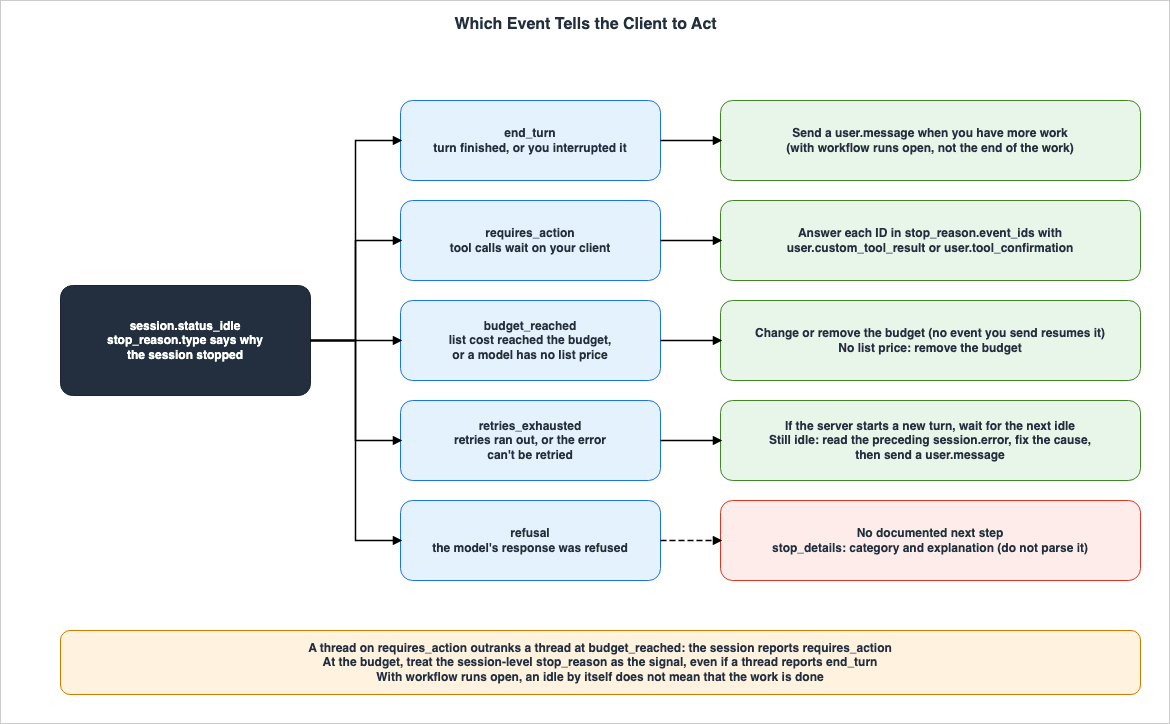
5. session.error and retry_status
This chapter describes thesession.error types and the possible values for retry_status.5.1 The Three Values of retry_status
The API reference indicates that every type withinsession.error includes a retry_status. The possible values for retry_status are retrying, exhausted, and terminal, and the API reference describes them in the following order:The server is retrying automatically. Client should wait; the same error type may fire again as retrying, then once as exhausted when the retry budget runs out.
This turn is dead; queued inputs are flushed and the session returns to idle. Client may send a new prompt.
The session encountered a terminal error and will transition to terminated state.| Event or Value | What It Means | What the Client Does Next | Where It Is Written | State |
|---|---|---|---|---|
retrying | The server is automatically retrying. The same type may be delivered again as retrying, and once the retry limit is reached, it may be delivered once as exhausted. | Wait. | API reference | Stated |
exhausted | The turn has ended. Any input in the queue is discarded, and the session returns to an idle state. | The client may send a new prompt. | API reference | Stated |
terminal | The session has encountered a terminal error and transitions to a terminated state. | No statement found | API reference | No statement found |
Regarding what the client should do after receiving a
terminal status, no relevant statement was found in the scope this article searched (No statement found). The terms searched for were terminal, terminated, and status_terminated.5.2 The 15 Types
The API reference lists 15 values forsession.error's error.type. The What the Client Does Next column in the following table describes the subsequent action written for that specific error type. Statements are provided for eleven of the types, while the remaining four are marked as "No statement found." All of these types include a retry_status as defined in Section 5.1.| Event or Value | What It Means | What the Client Does Next | State |
|---|---|---|---|
unknown_error | An unknown, unexpected error occurred during session execution. | A client that does not recognize a new error code can match based solely on the retry_status and message. | Stated |
model_overloaded_error | The model is overloaded. This occurs after exhausting automatic retries. | No statement found | No statement found |
model_rate_limited_error | The model request was rate-limited. | No statement found | No statement found |
model_request_failed_error | The model request failed for a reason other than overload or rate limiting. | No statement found | No statement found |
mcp_connection_failed_error | Failed to connect to the MCP server. | The session still starts and interaction remains possible. The client can block further interaction, trigger a credential rotation, or let the session continue without the server's tools. The connection is retried on the next transition from session.status_idle to session.status_running. | Stated |
mcp_authentication_failed_error | Authentication to the MCP server failed. | The session still starts and interaction remains possible. The client can block further interaction, trigger a credential rotation, or let the session continue without the server's tools. The connection is retried on the next transition from session.status_idle to session.status_running. | Stated |
billing_error | The calling organization or workspace is unable to submit model requests. This is due to insufficient credit or reaching the spending limit. | Retrying with the same credentials will not succeed. The caller must resolve the billing status. | Stated |
credential_host_unreachable_error | An environment_variable credential's auth.networking.allowed_hosts includes a host that the environment's network policy does not permit. | No statement found | No statement found |
tool_use_limit_reached_error | The agent's loop reached its limit on tool-use rounds, and the turn stopped. This is not a request failure. | The thread becomes idle with retries_exhausted, and if it is a child thread, it then terminates. A subsequent user.message will initiate a new turn. | Stated |
compaction_limit_reached_error | The context was compacted the maximum number of times in a row without the model producing a message or a tool call, stopping the turn. This is not a request failure. | The thread becomes idle with retries_exhausted, and if it is a child thread, it then terminates. A subsequent user.message will initiate a new turn. | Stated |
repository_authentication_error | The repository host rejected the credentials, or the credentials were required but not provided. | retry_status is always retrying. The session keeps running without the repository. | Stated |
repository_forbidden_error | The repository host denied access to the repository. | retry_status is always retrying. The session keeps running without the repository. | Stated |
repository_not_found_error | The repository host reported that the repository could not be found. | retry_status is always retrying. The session keeps running without the repository. | Stated |
repository_checkout_error | The specified branch or commit does not exist in the repository. | retry_status is always retrying. The session keeps running without the repository. | Stated |
repository_clone_error | Failed to clone the repository. | retry_status is always retrying. The session keeps running without the repository. | Stated |
The source for this table is the API reference, except for the next action of the two MCP types, which comes from the MCP connector page. For
model_overloaded_error and model_rate_limited_error on a run's thread, see Section 5.3. For tool_use_limit_reached_error, the documentation counts tool-use rounds, where one model response that calls tools, along with running those tools, is counted as one round.The scenarios where the two MCP types occur are covered on this site in the Network Egress in Claude Managed Agents.
5.3 session.error on a Run's Threads
The workflow runs page states that thesession.error event is delivered to the run's thread when dependencies of the session (e.g., models, MCP servers, credentials, billing) fail. However, this event alone does not end the run. But if it makes the thread fail, and the workflow ends the run due to this failure, the run will conclude with a program_error.The same page also describes the
retry_status for model requests in the run's thread, particularly when rate limits are encountered or the model is overloaded:- If the status is
retrying, the server is attempting to retry the request, and the thread is still running. - If the status is
exhausted, the thread has failed. If the workflow ends the run due to this failure, the run will conclude with aprogram_error, which does not indicate the root cause. The cause of the failure can be found by examining the events from the failed thread.
The same page also says that the server limits how much all of an organization's sessions do each minute. A thread that meets this limit stops with a
session.error whose message names a rate limit, and the page says to wait a minute before asking the agent to continue.6. Workflow Run Events and Results
This chapter describes the events associated with dynamic workflow runs and presents the results of those runs.6.1 The Seven Events
The reference page states that when dynamic workflows are enabled for an agent,workflow_run.* events are delivered to the session's stream. The workflow runs page indicates that run events are delivered to the primary thread stream, are also returned in the list of the session's events, and do not trigger webhooks. The following table summarizes the run event table on the workflow runs page, which includes a column indicating the next action for the client for each of the seven events.| Event or Value | When It Arrives | What the Client Does Next | State |
|---|---|---|---|
workflow_run.created | An agent started a run. Includes workflow_run_id, the run's name and description, and phases. | Track the run as open. Show the name and the progress against phases. | Stated |
workflow_run.status_running | The run began execution. Also received each time the run resumes after a pause at the budget. May not be received on a resume after an interrupt. | Indicate that the run is currently running. | Stated |
workflow_run.status_idle | The run has paused. For example, at the budget. This event does not indicate the reason for the pause. May not be received for a pause after an interrupt. | To continue, refer to the "Cost and budgets" section of the workflow runs page, or the "Interrupt a session with runs open" section. | Stated |
workflow_run.phase_started | The workflow entered a phase. | Update the progress. Match the end of a phase to its start by the end event's phase_started_id. | Stated |
workflow_run.phase_ended | The workflow exited a phase, or the end of the run closed a phase that was still open. Does not indicate whether the work within the phase is complete. | Update the progress. | Stated |
workflow_run.status_ended | The run has ended. This event is always the last of the workflow_run.* events for that run, and includes a result. | Read the result (see Section 6.2). | Stated |
workflow_run.error | The server reported an error with the run, or rejected the start of a run. For runs that end in an error, this event is received, with the same error, before workflow_run.status_ended. | Record the error. Do not treat this as the end of the run. If workflow_run_id is null, the run did not start. Otherwise, continue tracking the run until workflow_run.status_ended. | Stated |
The source of the information in this table is the workflow runs page. Regarding the next action for
workflow_run.error, the workflow runs page states:Log it, and don’t take it as the run’s end.Concerning phases, the workflow runs page explains that phases proceed one at a time in the order of
phases, with each phase executing at most once, although the API does not guarantee this. The same page also says to handle two or more open phases, phases that are not listed in the phases array, and listed phases that never start, even in completed runs.6.2 Run Results
Theresult.type field within workflow_run.status_ended has three possible values, as documented on November 9, 2026. These are completed, stopped, and error. When the result is error, the error.type field can take on one of four possible values. The following table lists these six possibilities, along with max_workflow_runs_error, which does not represent a run result.| Event or Value | What It Means | What the Client Does Next | State |
|---|---|---|---|
completed | The workflow has finished executing. The result does not indicate whether the work passed. It can end with completed even if work on a thread fails or a thread cannot be created. | To find failed work, review the events for each of the run's threads. | Stated |
stopped | The agent stopped the run, or the session was archived. The event does not indicate which of these occurred. Do not treat these two as the only causes. | No statement found | No statement found |
error with timeout_error | The run reached its lifetime, which the agent can configure. | No statement found | No statement found |
error with program_error | The workflow failed. Its code failed, or it broke a rule for workflows other than a limit. Or a run's thread failed or could not be created, and the workflow let that end the run. | To investigate the cause, review the events for the failed thread. | Stated |
error with thread_limit_error | The run exceeded the maximum number of agents that the workflow can launch. | No statement found | No statement found |
error with unknown_error | The server was unable to continue the run, or the run exceeded other server limits. | No statement found | No statement found |
max_workflow_runs_error | This is not a result of a run. The number of open runs within the session was at the limit, and no run was created. Only workflow_run.error has this type. | Follow the row for workflow_run.error in Section 6.1. The workflow_run_id will be null, indicating that the run did not start. | Stated |
This table originates from the workflow runs page, and the API reference also covers the row for
max_workflow_runs_error. The API reference states that only workflow_run.error has this type. Regarding completed and stopped, the workflow runs page states the following:The workflow finished running. The result doesn’t say whether the work passed.
The agent stopped the run, or the session was archived. The event doesn’t say which.Error results are formatted as
{"type": "error", "error": {"type": "timeout_error", "message": "..."}}. The workflow runs page indicates that the message field is safe to log.The limit values that lead to
timeout_error, thread_limit_error, and max_workflow_runs_error, as well as how these limits are designed, are covered in the design article published alongside this one (Subagents, an Advisor, or a Dynamic Workflow in Claude Managed Agents). This article only describes the meaning of these error types and the subsequent actions documented. The workflow runs page notes that even while a run is paused, its lifetime keeps passing, so a paused run may end with a timeout_error.6.3 Deciding That the Work Is Done
The workflow runs page states that, while a run is running, the session remains running even if no threads are currently working. It further states that the work is done when both of the following conditions are met:- Every run you have seen created has its
workflow_run.status_ended. - After that, a
session.status_idlewith thestop_reasonend_turnis received, and your own request, such as an interrupt, did not cause it. After an interrupt, only idles received after the subsequentuser.messageoruser.define_outcomeare counted.
The same page also includes the following notes:
- Paused runs do not keep the session running. At the budget, for example, the run remains open, and the session transitions to idle with
budget_reached. The work is not done until the run has ended. - The agent may read the results and initiate a new run. Therefore, it is important to verify again.
- If you defined an outcome, no evaluation begins while a run is open.
- When the
retries_exhaustedidle is received, the run may still be running.
6.4 When Events Might Not Arrive
The workflow runs page describes situations where events may not be received.- After an interrupt, the
workflow_run.status_idleevent and the resumption eventworkflow_run.status_runningmay not be received. Runs that have been paused by an interrupt may appear to be running even when reconstructing their state from the list of events. - Following the
workflow_run.createdevent, subsequent status events may not be received after an interrupt. - After archiving a session, the
workflow_run.status_endedevent for the run, and theworkflow_run.phase_endedevents for any still-open phases, are not received in the stream. Read them by examining the list of events. - After a session deletion is successful, no
workflow_runevents report the end of the run. - Following the
workflow_run.status_endedevent, the agent receives a turn to read the results. If the session is paused at the budget or if the primary thread is waiting for the client, that turn comes later. It may not arrive after an interrupt, and it will not arrive after archiving or termination.
The stream does not resend missed events. The workflow runs page says to reconstruct the state of each run from a list of events filtered with the
types parameter.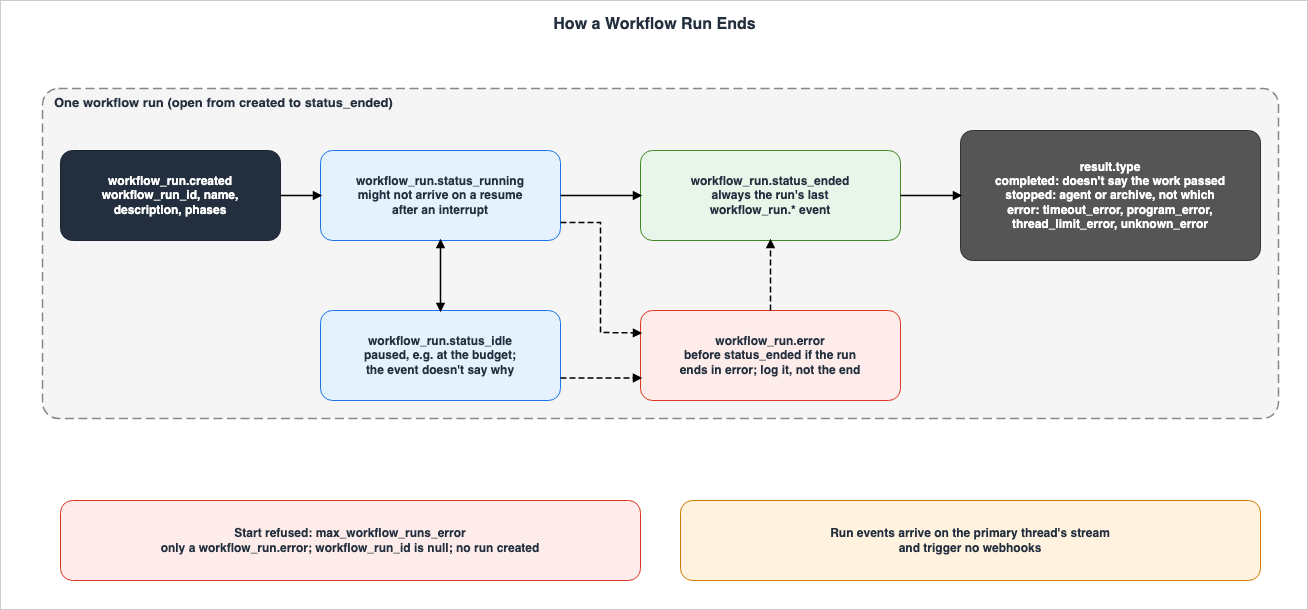
7. HTTP 400s and Different Things with the Same Name
This chapter clarifies the scenarios in which Managed Agents returns a 400 error, and how the types with the same names in the Messages API differ.7.1 Rejected Requests and Events
The following table shows instances where the materials reviewed indicate that requests or events are rejected. For the twosystem.message rows, the materials say rejected without specifying a status code. For the remaining rows, the materials state that 400 is returned or can be returned. The value workflow_run_open is the value of the error's error.details.error_code.| Request or Event | When It Is Rejected | What the Client Does Next | Where It Is Written | State |
|---|---|---|---|---|
An event that starts new work (e.g., user.message) | The session has reached or exceeded its budget. The error names the events that are accepted. | Modify the budget or remove it. | budgets page | Stated |
| Budget modification | The new value is less than or equal to the consumed list cost. | Base the value on usage.list_cost, one cent or more greater than it. | budgets page | Stated |
| Adding a budget | Attaching a budget to a session created without one, or re-attaching a previously removed budget. | No statement found | budgets page | No statement found |
| Creating a session with a budget | The amount is not an integer in cents, is zero or below, the currency is not USD, or the session references a model without a list price. | No statement found | budgets page | No statement found |
user.message | The session is idle while requires_action is set. | First, respond to any pending calls. | workflow runs page | Stated |
system.message | While the session is idle with requires_action, the message is sent without a tool result event before it in the same request. | Resolve any pending tool events. | event stream page | Stated |
system.message | The agent's primary model does not support it. The error is model_does_not_support_mid_conversation_system. | For the models that accept it, see the list on the event stream page. | event stream page, reference page | Stated |
user.tool_confirmation | The event for the target call has not yet been received. | If evaluated_permission is set to ask, respond once the event is received. | session threads page | Stated |
user.interrupt | It names a terminated thread. | No statement found | session threads page | No statement found |
| Updating a session's agent | A run is open. This also occurs if the run is paused, or the session is idle. The error code is workflow_run_open. | Wait for all runs to reach workflow_run.status_ended, or ask the agent to stop its runs. | workflow runs page, session operations page | Stated |
| Archiving and deleting a session | While a run is open, a 400 error may be returned regardless of the session's state. The error code can be workflow_run_open. It may also succeed. | Ask the agent to stop its runs, or wait for each run to end and send the request once the session is idle. | workflow runs page | Stated |
| Archiving a run's thread | A run is open, unless the server has already archived the thread. The error code is workflow_run_open. | Do nothing. The server will archive the run's thread. | workflow runs page | Stated |
| Tool result for a run's thread | The server has already archived the thread. | Search for the thread in the list and, if it is terminated, discard the result. | workflow runs page | Stated |
event_deltas[] in the stream | Passing values other than agent.message and agent.thinking, or passing more than 100 values. | No statement found | event deltas page | No statement found |
User event containing a redacted block | The event contains a block with the type {"type": "redacted"}. | No statement found | reference page | No statement found |
The rows for adding a budget and creating a session with a budget represent mistakes in budget design. The design article published alongside this one (Subagents, an Advisor, or a Dynamic Workflow in Claude Managed Agents) details the method for assigning budgets.
Regarding the row on archiving and deletion, the workflow runs page states the following:
Might return 400 while a run is open, whatever the session’s status. The error’s error.details.error_code can be "workflow_run_open". Might also succeed.This article does not state that this row "must always be 400." The workflow runs page also explains that if you send a budget or other fields in the same request as an update to a session agent, the entire request will be rejected. It also notes that updates to the agent's original definition are accepted, and the session retains its own copy.
Concerning instances where a tool confirmation for a call on a run's thread comes too late, the workflow runs page indicates that a 200 status code is returned, but this does not mean the tool has run. The same page clarifies that because rejecting a single event leads to the rejection of the entire request, each tool result should be sent in a separate request.
7.2 Different Things with the Same Name
The following names appear in both Managed Agents and the Messages API.timeout_error: In the Messages API, this represents an HTTP error response type. The API errors page lists this type under the "504" entry, noting that it can also be returned with other HTTP status codes, such as 500. In Managed Agents,timeout_errorappears withinworkflow_run.status_endedunderresult.error.type, indicating that the run reached its lifetime. It is not an HTTP status code.billing_error: In the Messages API, this is an HTTP error type, specifically "402." In Managed Agents,billing_erroris a type withinsession.errorand includes aretry_status.unknown_error: This name appears in two places within Managed Agents: as a type withinsession.errorand aserror.typein the results of a run. While the name is the same, the meaning differs; the former indicates an unknown error during a session's execution, while the latter signifies that the server was unable to continue the run.stop_reasonandstop_details: As described in Section 1.4, these fields are distinct between the Messages API's response and thesession.status_idleevent within Managed Agents. Both contain the valuesend_turnandrefusal.
The causes and solutions for HTTP errors in the Messages API are covered in the Anthropic Claude API Errors Reference on this site. This article does not apply the solutions for Messages API errors, such as 504 or 402, to the values within Managed Agents.
8. List of Events
This chapter lists 35 of the 42 events on the reference page (the 7workflow_run events are in Section 6.1), along with the 2 stream-only events, categorized by domain. The reference page explains that event names follow the format {domain}.{action}, with stream-only events being the exception.8.1 User Events
User events are events sent by the client. While the session is at its budget, only four events are accepted, as listed on the budgets page. In the following table, the State column is for the When It Is Not Accepted column.| Event or Value | What It Means | When It Is Not Accepted | State |
|---|---|---|---|
user.message | A message from the user, including text, images, and documents. | While the session is at its budget. Also, when idle with requires_action. | Stated |
user.interrupt | Stops a running agent. It ends no workflow run. | Returns a 400 error when it names a terminated thread. | Stated |
user.custom_tool_result | The response to the agent's call to a custom tool. | May return a 400 error if the response is for a call on a run's thread that the server has already archived. | Stated |
user.tool_confirmation | Confirms or denies a call to a tool that requires confirmation, based on the established policy. The value is either allow or deny. | May return a 400 error if the event for the targeted call has not yet been received. | Stated |
user.define_outcome | Defines the outcome the agent is aiming to achieve. | It is not listed among the four events accepted at the budget. | Documentation does not list |
user.tool_result | Used exclusively in self_hosted environments. The client returns the result of the agent_toolset. The SDK and CLI handle this automatically. | No statement found. The reference page describes its use only for sessions in self_hosted environments. | No statement found |
The four events accepted while the session is at its budget are
user.tool_confirmation, user.tool_result, user.custom_tool_result, and user.interrupt. The budgets page indicates that accepted results are recorded without triggering new model requests, and the session remains paused due to the budget. It also states that a user.interrupt event sent while the session is paused at its budget is accepted and does not appear in the event list.The event stream page indicates that the
processed_at field for events being sent will show no value while they are queued behind previous events. However, user.define_outcome, user.custom_tool_result, and user.tool_result are exceptions; they are processed upon receipt, and the processed_at field is populated before they are returned.8.2 Agent Events
| Event or Value | What It Means | What the Client Does Next | State |
|---|---|---|---|
agent.message | The content block of the agent's response. Received after the model's request for it has completed. | When previews are opted into, match it to the preview by ID, discard the accumulated preview, and render this event's content. | Stated |
agent.thinking | An indication that the agent is progressing with extended thinking. It does not contain the content of the thought itself. | No statement found | No statement found |
agent.tool_use | The agent is calling a built-in tool. It includes evaluated_permission and, in most cases, evaluation. | If a run is open, and evaluated_permission is ask, respond as soon as this event is received. | Stated |
agent.tool_result | The result of executing a built-in tool. | No statement found | No statement found |
agent.mcp_tool_use | The agent is calling an MCP server tool. It includes evaluated_permission and, in most cases, evaluation. | If a run is open, and evaluated_permission is ask, respond as soon as this event is received. | Stated |
agent.mcp_tool_result | The result of executing an MCP tool. | No statement found | No statement found |
agent.custom_tool_use | The agent is calling a client-provided custom tool. | Respond with user.custom_tool_result. It is acceptable to send this without waiting for idle. A second result for the same call will be accepted, but will have no effect. | Stated |
agent.thread_context_compacted | The conversation history has been compressed to fit within the context window. | No statement found | No statement found |
agent.thread_message_received | In a multiagent session, a message has been received from another thread. In the primary thread, an agent reports or asks the session's agent. | On each of a run's threads, the first one is the prompt that the workflow wrote. The API does not guarantee its text, so do not parse it. | Stated |
agent.thread_message_sent | In a multiagent session, this thread has sent a message to another thread. In the primary thread, the session's agent sends a task or additional message to another agent. | No statement found | No statement found |
The source of the next action for
agent.tool_use, agent.mcp_tool_use, and agent.custom_tool_use is the event stream page. The reference page notes that the message content of agent events may contain a block with the format {"type": "redacted"}, which is a placeholder for content withheld by Anthropic model policy. This block contains no other fields. The source of the next action for agent.message is the event deltas page, and for agent.thread_message_received it is the session threads page.8.3 Session Events
| Event or Value | What It Means | What the Client Does Next | State |
|---|---|---|---|
session.status_running | The agent is active. | No statement found | No statement found |
session.status_idle | The agent has completed its current task and is waiting for input. Includes a stop_reason. | By value, as in the table in Chapter 4. | Stated |
session.status_rescheduled | A temporary error occurred, and the session is automatically retrying. | No statement found | No statement found |
session.status_terminated | An unrecoverable error occurred, or the session has been archived (the sources differ on what ends a session this way; see Section 9.1). | No statement found | No statement found |
session.deleted | The session has been deleted. Existing streams are closed, and no further events for this session will be emitted. | No statement found | No statement found |
session.updated | The session has been updated, modifying one or more fields. Includes only the modified fields. The update takes effect from the next turn. | No statement found | No statement found |
session.error | An error occurred during processing. Includes a typed error and retry_status. | See the retry_status values and the type rows in Chapter 5. | Stated |
session.usage | A snapshot of the session's total usage and list cost. If a budget is in place, it also includes that budget information. | No statement found | No statement found |
session.thread_created | A multiagent thread has been created. If it is a run's thread, it includes the workflow_run_id; otherwise, it has no value. | No statement found | No statement found |
session.thread_status_running | The thread has started. Every session emits this for its primary thread. In multiagent sessions, changes in child threads are also cross-posted to the primary stream. | No statement found | No statement found |
session.thread_status_idle | The thread has completed its turn and is waiting for input. Includes a stop_reason. | When stopped by a budget, treat the session's stop_reason as a signal (see Section 4.3). | Stated |
session.thread_status_rescheduled | The thread encountered a temporary error and is automatically retrying. | No statement found | No statement found |
session.thread_status_terminated | The thread has ended and will no longer accept input. Advisor threads end when the consultation is complete. Run threads are archived by the server. | No statement found | No statement found |
The budgets page states that when a budget is reached,
session.usage will always be received immediately before the session.status_idle with budget_reached. The design article published alongside this one (Subagents, an Advisor, or a Dynamic Workflow in Claude Managed Agents) illustrates the order of events when a budget is reached.8.4 Span and System Events
The reference page describes Span events as markers for observation, wrapping activity to track time and usage.| Event or Value | What It Means | What the Client Does Next | State |
|---|---|---|---|
span.model_request_start | The model inference request has begun. | No statement found | No statement found |
span.model_request_end | The model inference request has ended. Includes model_usage with token count. | When previews are opted into, close any preview that its persisted event has not reconciled. No more deltas come for it. | Stated |
span.outcome_evaluation_start | Outcome evaluation has begun. | No statement found | No statement found |
span.outcome_evaluation_ongoing | A signal indicating that evaluation is in progress. | No statement found | No statement found |
span.outcome_evaluation_end | One round of outcome evaluation has concluded. Includes a result. | Based on the result in the following table. | Stated |
system.message | Adds a privileged system context, which applies to this turn and all subsequent turns. | For the models that accept it, see the list on the event stream page. | Stated |
The source of the next action for
span.model_request_end is the event deltas page. The result associated with span.outcome_evaluation_end has five values. The outcomes page details what happens after each one.| Event or Value | What Happens Next | State |
|---|---|---|
satisfied | The session transitions to idle. | Stated |
needs_revision | The agent begins the next iteration. | Stated |
max_iterations_reached | One final acknowledgment turn follows, and the session transitions to idle. No further evaluations will be run. | Stated |
failed | The session transitions to idle. This occurs when the rubric does not apply to the output. For example, when the description and rubric are inconsistent. | Stated |
interrupted | This occurs when the session is interrupted while an outcome is active. It can also appear before the evaluation begins. | Stated |
The reference page indicates that
needs_revision signifies that another iteration will follow, while the other four values are terminal.The content of
system.message is added as a role: "system" turn in the session's system context, without replacing the top-level system prompt that defines the agent. Mid-conversation system messages in the Messages API are covered on this site in Mid-Conversation Changes in the Claude API.8.5 Stream-Only Events
| Event or Value | What It Means | What the Client Does Next | State |
|---|---|---|---|
event_start | A previewed event has started generating. It includes the upcoming event's type and ID. | Note the announced ID. It matches the event_id of each event_delta and the ID of the persisted agent.message. | Stated |
event_delta | An incremental portion of a previewed event. It is identified by the event_id. | When using manual methods, the previewed text is temporarily held, and the persisted event is treated as the record. | Stated |
The event deltas page states that previews are opted into for each stream connection using
event_deltas[]. The accepted values are agent.message and agent.thinking. With agent.thinking, only event_start is received; event_delta does not follow. These two events do not have their own IDs or processed_at timestamps, and are not saved in the history. The source of the next action for event_delta is the event deltas page.9. Where the Sources Disagree and What They Do Not Say
This chapter summarizes the main matters in this article that carry a term for the state of the sources.9.1 Where the Sources Disagree
- Cause of
session.status_terminated: The API reference states that the event indicates that the session terminated due to an error or completion. The session operations page, however, states that a completed session becomes "idle" rather than "terminated," while the reference page indicates that a session ends due to an unrecoverable error or is archived. This article presents all three statements without determining which is incorrect (Sources disagree).
The difference in the number of values listed in the guide's table compared to the API reference is not considered a discrepancy. The event stream page's table lists three values for
stop_reason.type, while the API reference lists five. The workflow runs page also mentions retries_exhausted. This article presents them as a difference in scope between the two sources.9.2 What the Documentation Does Not List
- The list of values for the
typesfield in the API reference forGET /v1/sessions/{session_id}/eventsincluded 41 values on November 9, 2026, and does not listsession.deleted. The reference page mentionssession.deletedas an event type (Documentation does not list). - The table on the event stream page for
stop_reason.typedoes not listretries_exhaustedorrefusal(Documentation does not list). - The list of events accepted while a budget is reached, found on the budgets page, does not list
user.define_outcome(Documentation does not list). - The webhooks page does not specify, beyond those listed in Section 3.3, which webhooks correspond to which stream events (Documentation does not list).
9.3 Items with No Statement Found
- What the client should do after the
refusalstop_reason(Section 4.1). - What the client should do when
retry_statusisterminal(Section 5.1). - For 4 out of 15 error types within
session.error, what the client should do next, based on the specific error type (Section 5.2). - What the client should do after a
stopped,timeout_error,thread_limit_error, orunknown_errorresult from a run (Section 6.2). - What the client should do after
session.status_rescheduledandsession.status_terminated(Section 8.3).
That no statement was found does not indicate that the matter does not exist.
9.4 Important Notes When Reading
- The counts and values presented in this article are those of the documentation on November 9, 2026. Managed Agents is currently in beta, and the documentation may add types and values.
- This article has not been tested in a real-world environment. The sequence of events described is based on the content of the documents.
- Sentences marked with "Inference" are not directly derived from the source documents.
10. Failure Modes
This chapter gathers common failures identified from the statements in the sources presented in Chapters 3 through 8.- Interpreting
session.status_idleas the end of the work: A session can become idle while a run remains open. Once all runs have ended, and subsequently an idle withend_turnis received without client interaction, the work is done (Section 6.3). - Interpreting
end_turnafter an interrupt as the end of the work: Even a turn interrupted by an interrupt will end withend_turn. Following an interrupt, only count an idle after the nextuser.messageoruser.define_outcome(Sections 4.3 and 6.3). - Reading the
end_turnof child threads as a sign that a session that stopped at its budget can resume: Treat the session'sstop_reasonas a signal (Section 4.3). - Interpreting
completedas the work passing: A run can endcompletedeven if work on its threads failed. Failed work should be searched for in the run's thread events (Section 6.2). - Interpreting
stoppedas the agent stopping the run: An archive of the session also ends a run withstopped, and the event does not indicate which action caused it (Section 6.2). - Waiting for
workflow_run.status_endedafter amax_workflow_runs_error: The run has not been created, andworkflow_run_idisnull(Section 6.2). - Treating
workflow_run.erroras the end of the run: The documentation says to log it and track the run untilworkflow_run.status_ended(Section 6.1). - Resending events without checking
retry_status: If the status isretrying, wait. If it isexhausted, a new prompt can be sent. If it isterminal, the session transitions toterminated(Section 5.1). - Retrying with the same credentials after a
billing_error: The documentation states that this approach will not succeed (Section 5.2). - Branching based on the
explanationin thestop_details: The documentation says not to parse the text, as it may change (Section 4.2). - Branching on stream events by the name of the webhook type: In webhooks,
session.status_idleis represented assession.status_idled(Section 3.3). - Applying the Messages API's 504 handling to Managed Agents'
timeout_error: Managed Agents'timeout_erroris a run result that indicates that the run has reached its lifetime (Section 7.2). - Treating the counts as "all" and having no branch for unknown values: The documentation may add values. An unknown
result.typeshould be treated as a run that ended in a different way; an unknownerror.typeshould be treated as an error (Section 2.2).
11. Frequently Asked Questions about Claude Managed Agents Events and Stop Reasons
Q1. If session.status_idle is received, is the work done?
Not necessarily. The session operations page notes that a session can become idle while a run is still open, so simply receiving session.status_idle does not guarantee the work is done. For sessions using dynamic workflows, the work is done when all runs receive workflow_run.status_ended, followed by an idle with end_turn that is not triggered by client actions.Q2. If the result of the run is completed, does that mean the work was successful?
It does not necessarily mean that. The workflow runs page states that completed does not indicate whether the work passed, and that even if work on a thread fails, the run can still end completed. Failed work can be found by examining the events for each thread in the run.Q3. If you receive a session.error, should you resend the same event?
If a session.error is received, whether to resend the same event depends on the retry_status. If the status is retrying, wait as the server is already retrying. If the status is exhausted, the turn has ended and the session will return to an idle state, so you can send a new prompt. If the status is terminal, the session will transition to a terminated state. For billing_error, the documentation states that retrying with the same credentials will not succeed.Q4. If the session stops with refusal, what does the client do?
Within the scope this article searched, the documentation does not specify what the client should do next (No statement found). The API reference describes the meaning and stop_details, and says not to parse explanation. The example on the workflow runs page says to handle idle states, such as refusal, within your own code.Q5. Are webhook names and stream event names the same?
They are partially different. The webhooks page states that the stream'ssession.status_idle and session.status_running correspond to the webhook's session.status_idled and session.status_run_started, respectively. Run events do not trigger webhooks.Q6. Do the timeout_error in the Messages API and the timeout_error in Managed Agents have the same meaning?
No, they do not. The timeout_error in the Messages API refers to a type of HTTP error response. In Managed Agents, the timeout_error appears within workflow_run.status_ended under result.error.type, and indicates that the run reached its lifetime.Q7. Can you send a user.message to a session that has reached its budget?
No. The budgets page states that while a session is at its budget limit, it only accepts four events that settle work already in progress, and rejects events that start new work, such as a user.message, with a 400 error. To continue, you must either adjust the budget or remove the budget.12. Summary
Before writing a client that reads events for Claude Managed Agents, ensure the following:- Before sending an event, open the stream and, when reconnecting, filter out duplicates based on the history list and ID.
- Ensure proper handling for the 5 possible values of
session.status_idle'sstop_reason, as well as for values not listed in the table. - In
requires_action, respond to each ID instop_reason.event_ids. If a run is open, answer each call when its event is received. - In
budget_reached, either adjust or remove the budget without sending an event. A run that an interrupt paused also needs auser.message(Section 4.1). - Know that no statement on what to do after a
refusalwas found in the materials listed in Section 1.3 as of November 9, 2026. - In
session.error, checkretry_status, and for the 11 types that have a next action of their own, also follow that action. - Track a run from
workflow_run.createdtoworkflow_run.status_ended, and do not treatworkflow_run.erroras the end of the run. - Do not interpret
completedas a success, and avoid prematurely determining the cause of astoppedstate. - Determine if the work is done based on the two conditions outlined in Section 6.3.
- Write separate procedures for a request that may return 400 while a run is open and for the case in which it succeeds instead (
Might also succeed). - Avoid mixing webhook names and the types with the same names from the Messages API with stream events.
- Ensure that there is a procedure to recheck the counts and values after the date of review.
13. References
- Reference - Claude Platform Docs
- Session event stream - Claude Platform Docs
- Preview responses with event deltas - Claude Platform Docs
- Workflow runs - Claude Platform Docs
- Session threads - Claude Platform Docs
- Session budgets - Claude Platform Docs
- Session operations - Claude Platform Docs
- Define outcomes - Claude Platform Docs
- Subscribe to webhooks - Claude Platform Docs
- MCP connector - Claude Platform Docs
- List Events - Claude API Reference
- Errors - Claude Platform Docs
- Claude Platform release notes - Claude Platform Docs
- Anthropic Claude API Errors Reference - HTTP Status Codes, Error Types, Causes, and Official Solutions
- Network Egress in Claude Managed Agents - allowed_hosts, the Package Manager and MCP Switches, and the Two Rules That Stop web_fetch
- Managed Agent Runtimes - What Claude Managed Agents, the OpenAI Agents API, Amazon Bedrock, and GKE Agent Substrate Each Run for You, and What Stays With You
- Agent Reliability Engineering Design Guide - Retries, Loop Detection, Timeout Budgets, and Human Escalation for AI Agents
- Claude Structured Outputs on Amazon Bedrock - Where the Schema Goes, What the Grammar Cache Keeps, and Why stop_reason Comes First
- Subagents, an Advisor, or a Dynamic Workflow in Claude Managed Agents - What They Share, Where They Stop, and What Resets
- Mid-Conversation Changes in the Claude API - System Messages, Tool Changes, Per-Message Effort, and What the Prompt Cache and Preserved Thinking Keep
References:
Tech Blog with curated related content
Written by Hidekazu Konishi