Mid-Conversation Changes in the Claude API - System Messages, Tool Changes, Per-Message Effort, and What the Prompt Cache and Preserved Thinking Keep
First Published:
Last Updated:
system, tools, and output_config.effort. Because these elements are included in the prompt cache prefix, modifying them would often trigger a rebuild of portions or all of the cache.Between May 28, 2026, and September 22, 2026, there was a shift towards making changes in the
messages[] array, rather than at the top level. This often involved appending new elements to the end of the messages[] array. These changes included mid-conversation role: "system" messages, turn-scoped system messages, per-message effort, tool_addition and tool_removal blocks, tool definitions within messages, and on-demand compaction. Starting on September 1, 2026, with Claude Fable 5.1, and continuing through Claude Opus 5.5 (September 22, 2026) and Claude Sonnet 5.5 (September 28, 2026), the preserved thinking check was introduced. This check invalidates a returned thinking block if anything before it has changed. For accounts created on or after August 31, 2026, 00:00 UTC, this check is enforced by default.This article pairs two approaches for modifying elements (one that rewrites the top-level content, and another that modifies elements in the
messages[] array) and compares them using two checks. The first check identifies which layer of the prompt cache requires a rebuild. The second is whether the preserved thinking check treats subsequent thinking blocks as Valid or Invalid. These two checks do not agree in reverse. The Preserved thinking page states that the edits that invalidate thinking also restart the cache. However, the reverse is not true. Modifying a top-level effort does trigger a cache rebuild, but the thinking remains Valid. Server-side context editing invalidates cached prefixes when it clears content, but the preserved thinking check does not count it as an edit.Furthermore, the forms said to maintain the cache also have a cost, as documented in the materials. On the request that clears a turn-scoped system message, a single assistant turn is reprocessed. In conversations where there are no non-deferred tools listed in the
tools section, a request that first defines a tool by value will completely invalidate the cache once. Mid-conversation system messages that fall within the scope of on-demand compaction will be included in the summary and cease to function as instructions. Modifying a mid-conversation system message after it has been sent will trigger a cache rebuild from that point onward. This article quotes these points verbatim, following the descriptions in the platform.claude.com documentation, without discussing pricing.Related articles on this site:
- Anthropic Claude API Prompt Caching and Token Efficiency Guide - Cache Breakpoints, Batch Processing, and Context Engineering
- Controlling How Much a Model Thinks - Why the Same Request Means Different Things Across Model Generations, and What the Output Cap Actually Counts
- Anthropic Claude API Errors Reference - HTTP Status Codes, Error Types, Causes, and Official Solutions
- Anthropic Claude Model Release Timeline - Model Family Tree, Capability Evolution, and Platform Availability
- Anthropic Claude Model Migration Guide - Upgrading Prompts and Workloads Across Model Generations
- Claude Code Compaction and Long-Session Operations Guide - Managing Context Across Long and Multi-Session Work
Table of Contents
- 1. The Scope of This Article and the Date It Was Verified
- 2. Two Checks and the Effect Timing Table
- 3. Changing the System Instructions
- 4. Changing Effort
- 5. Changing the Tool Set and Tool Definitions
- 6. Condensing a Long History
- 7. Where the Two Checks Disagree, and How to Confirm It
- 8. Frequently Asked Questions about Mid-Conversation Changes
- 9. Summary
- 10. References
1. The Scope of This Article and the Date It Was Verified
This article will first define the scope of changes it addresses and clarify the usage of the termsystem within this article. Following that, it will detail the dates of verification, the consulted materials, the current status of each feature, and explicitly state what is not covered.1.1 Six Things You May Want to Change Midway
This article divides the things you may want to change midway into the following six. The six are a division this article chose for explanation. They are not a classification in Anthropic's documentation.- System Instructions: Add or change instructions and constraints as the operator, partway through the conversation.
- Per-Turn Reminders: Add the same short reminder each time tool results are returned.
- Effort Level: Adjust the level of effort used to continue the conversation, particularly in the later stages.
- Tool Set: Change which tools are presented to the model during the conversation.
- Tool Definitions: Add a tool that was not known at the start of the conversation, or modify the schema of existing tools.
- Conversation History: Summarize older turns or clear the results of older tools.
Each of these elements can be modified either by changing top-level parameters or by making changes in the
messages[] array. Sections 3 through 6 address them in that order. Changes to the top-level tool_choice and model switching are not included in these six elements. However, as examples where the two checks disagree, they appear in the tables in Section 2 and in Section 7.1.2 Three Meanings of system in This Article
In this article, the word system refers to three different things. To keep them apart, this article fixes the following names.- System prompt: This refers to the top-level
systemfield within a request. This article calls it the system prompt. - Mid-conversation system message: This refers to messages placed in the
messages[]array, specifically those with therole: "system"designation. This article calls each one a mid-conversation system message. - System layer: This is one of the three layers of the prompt cache (Tools layer, System layer, and Messages layer). This is this article's own term; the sources use the term "level," and the table uses the column name "System cache." The system prompt falls within the System layer, while mid-conversation system messages, located in the
messages[]array, belong to the Messages layer.
1.3 The Verification Date and the Sources Read
This article's information was verified by reviewing the documentation on platform.claude.com on October 2, 2026. Since the live pages do not display an update date, this retrieval date is considered the verification date. This article is based solely on the documentation and does not involve sending actual requests. Claude Haiku 5.5, released on October 7, 2026, after this verification date, is not covered in this article.The primary documentation reviewed includes the following pages (URLs listed in Section 10):
- Mid-conversation system messages and tool changes (mid-conversation system messages, turn-scoped system messages, and tool changes)
- Prompt caching and Tool use with prompt caching (the three layers of caching and what invalidates the cache)
- Preserved thinking and Thinking (what counts as an edit, and where the check is enforced)
- Effort (per-message effort)
- The four pages on Compaction (overview, on-demand, threshold, and compaction in relation to preserved thinking) and Context editing
- Cache diagnostics
- Release notes (publication dates for each feature) and Beta headers
The dates appearing in the names of the Beta headers may not correspond to the dates listed in the Release notes. The Beta headers page explains that the dates in the header names indicate when the beta version was released. However, the headers discussed in this article all have dates that differ from the dates in the Release notes, wherever the Release notes give one. For example, the functionality associated with the
inline-tools-2026-09-15 header was released on September 22, 2026, according to the Release notes. This article will refer to the publication dates as listed in the Release notes. When a header-name date appears next to a Release notes date, this article states which is which.1.4 Feature Availability (as of October 2, 2026)
The following table lists the models and platforms that each feature's page names. The absence of a platform listed for a particular feature does not necessarily mean that the feature is unavailable on that platform. This article does not include speculative entries or assumptions where information is missing.| Feature | Beta Header | Supported Models | Platforms Listed on Feature Page | Release Date (Release Notes) |
|---|---|---|---|---|
| Mid-conversation system messages | Not required | Claude Fable 5.1, Claude Mythos 5.1, Claude Fable 5, Claude Mythos 5, Claude Opus 5.5, Claude Opus 4.8, Claude Opus 5, Claude Sonnet 5.5. Claude Sonnet 5 is not supported. | Claude API, Claude in Amazon Bedrock, Google Cloud | 2026-05-28 (Claude Opus 4.8). Availability corrected on 2026-07-15. |
Turn-scoped system messages (clear_at) | mid-conversation-system-clear-at-2026-08-21 | Same as mid-conversation system messages | Same as mid-conversation system messages | 2026-09-01 |
| Per-message effort | mid-conversation-output-config-2026-07-01 | Claude Fable 5.1, Claude Mythos 5.1, Claude Opus 5.5, Claude Opus 5, Claude Sonnet 5.5 | Claude API, Google Cloud (named on the Mid-conversation system messages and tool changes page) | 2026-09-01 (Claude API), 2026-09-03 (Google Cloud) |
| Adding and removing tools by reference | inline-tools-2026-09-15 or mid-conversation-tool-changes-2026-07-01 | Same as mid-conversation system messages | inline-tools-2026-09-15 is for Claude API. mid-conversation-tool-changes-2026-07-01 is for Claude API, Amazon Bedrock, and Google Cloud | 2026-07-24 (mid-conversation-tool-changes-2026-07-01) |
| Defining tools within a message | inline-tools-2026-09-15 | Same as mid-conversation system messages | Claude API | 2026-09-22 |
| Adding an MCP toolset mid-conversation | mcp-client-2026-09-15 and inline-tools-2026-09-15 | Same as mid-conversation system messages | Claude API | 2026-09-22 |
| On-demand compaction | compact-2026-09-04 | 13 models listed on the feature page (including Claude Fable 5.1, Claude Opus 5.5, and Claude Sonnet 5.5) | Beta on Claude API, Claude Platform on AWS, Google Cloud, and Microsoft Foundry. Not available on Amazon Bedrock. | 2026-09-14 (Claude API) |
| Threshold compaction | compact-2026-01-12 | 13 models listed on the feature page (same as on-demand compaction) | All five platforms (beta) | 2026-02-05 (Claude Opus 4.6) |
| Cache diagnostics | Not required | — | Generally Available (GA) on Claude API. Not available on the other four. | 2026-09-23 (GA) |
Among the mid-conversation features, only mid-conversation system messages need no beta header. The other mid-conversation features are in beta. Cache diagnostics came out of beta on the Claude API on September 23, 2026.
For mid-conversation system messages, the feature page does not name Claude Platform on AWS or Microsoft Foundry. This article does not state whether the feature is available or unavailable on either platform. Verify compatibility with each platform's documentation before use. The announcement regarding on-demand compaction, dated September 14, 2026, only mentions the Claude API. No date for its expansion to other platforms appears in the Release notes.
The status of the models can be verified on the Model deprecations page. Claude Fable 5.1, Claude Opus 5.5, Claude Sonnet 5.5, Claude Opus 5, and Claude Opus 4.8 are currently Active.
1.5 What This Article Does Not Cover, and Related Articles
This article focuses solely on determining which cache layer is rebuilt for each mid-conversation change, and whether thinking is Valid or Invalid. The following topics are outside the scope of this article:- The fundamentals of prompt caching, placement of breakpoints, TTL (Time-to-Live), and pre-warming. These topics are covered in Anthropic Claude API Prompt Caching and Token Efficiency Guide.
- What each effort level means. This is addressed in Controlling How Much a Model Thinks. Section 8 of that article also discusses how changing effort mid-conversation loses the cache.
- The overall handling of 400 errors. This is covered in Anthropic Claude API Errors Reference.
- The full migration procedure for preserved thinking (such as measuring with
drop_block). This article uses only the rows its tables need. - Compaction for Claude Code. This operates on a different layer than API compaction and is covered in Claude Code Compaction and Long-Session Operations Guide.
- Configuration changes on execution platforms that providers use to manage agent loops, such as with Claude Managed Agents. This is covered in Managed Agent Runtimes.
- What a gateway that converts requests between API formats carries, converts, drops, or rejects on each route, including thinking blocks, their signatures, and cache breakpoints. This is covered in What a Translating LLM Gateway Drops.
- Pricing and per-unit costs.
2. Two Checks and the Effect Timing Table
This section first describes two checks: prompt cache and preserved thinking. Next, it demonstrates that these two checks do not agree in reverse. Finally, it defines the columns and values for a table that will list mid-conversation changes, and then presents the table.2.1 The First Check — The Three Layers of the Prompt Cache
The prompt cache reads a portion (prefix) of a request, starting from the beginning, when it matches recent requests byte-by-byte. The prompt caching page describes how this prefix is constructed usingtools, system, and messages, and details which layers are affected as follows:the cache follows the hierarchy: `tools` → `system` → `messages`. Changes at each level invalidate that level and all subsequent levels.From the "What invalidates the cache" table on the same page, the relevant rows for this article are extracted below. A "✘" indicates that the cache for that layer is invalidated, while a "✓" indicates that it remains valid.
| What changes | Tools cache | System cache | Messages cache |
|---|---|---|---|
| Tool definitions | ✘ | ✘ | ✘ |
| Tool choice | ✓ | ✓ | ✘ |
| Thinking parameters | Model-specific | Model-specific | ✘ |
| Effort setting | Model-specific | Model-specific | ✘ |
| Dropped thinking blocks | ✓ | ✓ | ✘ |
For the Model-specific rows, the Thinking page explains that thinking settings and effort values are rendered into the prompt. Whether the breakpoints for the Tools and System layers are invalidated depends on where the model renders these settings. It does not name which model renders it where. The same paragraph says that any change to the thinking settings or the top-level effort should be treated as requiring a complete cache refresh.
This table does not include rows related to model changes. The Cache diagnostics page, in its explanation of
model_changed, states:The cache is per-model.The cache only functions when a request includes
cache_control. This can be a top-level cache_control (automatic caching) or an explicit breakpoint placed within a block. The Mid-conversation system messages and tool changes page says the following about mid-conversation system messages.A mid-conversation system message does not create a cache entry on its own, and without caching enabled there are no savings to preserve.Therefore, any row in this article's tables where the cache column is
Kept assumes that caching is enabled. Prompts that do not meet a model-specific minimum length are also not cached. Whether a layer that remains valid is actually read from the cache also depends on the breakpoint location. The prompt caching page states that cache writes only occur at a breakpoint, and no entries are written for any earlier position.2.2 The Second Check — The Preserved Thinking Check
Preserved thinking is a mechanism where the API checks whether the model is permitted to use the thinking block returned from the previous turn. The Preserved thinking page states that it checksthinking or redacted_thinking blocks for the following two aspects:- Whether the model can read the block (the model check). Blocks the model cannot read will be dropped from that request without generating an error.
- Whether the content preceding the block has remained unchanged (the prefix check).
The prefix check examines three elements: the top-level
system, the set of tools, and all messages preceding the block. Other request parameters, such as effort, max_tokens, output_config, tool_choice, and metadata, and cache_control markers are not subject to this check.The models that run the prefix check are Claude Fable 5.1, Claude Opus 5.5, and Claude Sonnet 5.5. Claude Mythos 5.1 and models prior to Claude Fable 5.1 do not run the prefix check. Where the check is enforced depends on the account creation date.
Accounts created on or after August 31, 2026, 00:00 UTC: the API checks Claude Fable 5.1, Claude Opus 5.5, and Claude Sonnet 5.5 requests and applies `"error"` unless you set `"drop_block"`. The same definition of a new account applies to the Claude API and to cloud platforms.On older accounts, the check is enforced only on requests that set
thinking.block_binding.prefix_mismatch_behavior. Whatever the account's age, the Preserved thinking page recommends making the integration append-only.Failed blocks are handled according to the
prefix_mismatch_behavior setting. If set to "error" (the default), the API will reject the request with a 400 invalid_request_error. However, with the Message Batches API, items without this field will not fail. On accounts where the check is enforced by default, the failing blocks in those batch items are dropped instead. If set to "drop_block", the failed block and every later thinking block are dropped, and the request will proceed. In this case, the prompt cache will be rebuilt from the edited position. To use this field, the thinking-binding-controls-2026-08-01 beta header is required. Additionally, with Claude Sonnet 5.5, block_binding works only with thinking: {"type": "adaptive"}. Sending it with between_tools will result in a 400 error.Regarding Claude Code, claude.ai, Claude Managed Agents, and Claude Agent SDK, the Preserved thinking page states that users should not need to make any changes on their end. The same applies to code where
system and tools are fixed throughout the session, and only the messages are appended.2.3 The Two Checks Do Not Agree in Reverse
The Preserved thinking page describes the discipline of not changing the prefix as follows.Keep `system` and `tools` fixed for the session and treat `messages` as append-only. The same discipline keeps the prefix stable for prompt caching: the edits that invalidate thinking are the edits that restart the cache.This sentence says that edits that invalidate thinking also rebuild the cache. The reverse, that a change which rebuilds the cache also invalidates thinking, does not hold. The sources have several rows where the cache is rebuilt but thinking stays Valid.
The first is the top-level effort. The Preserved thinking page's table of ways to make a change without editing the prefix lists this row as follows.
Changing top-level `output_config.effort` (restarts the cache, doesn't affect thinking)The second example is
tool_choice. In the Prompt caching table, the Messages layer is ✘. In the Preserved thinking table, a change to tool_choice is Valid.The third example concerns server-side context editing. The Context editing page says that tool result clearing invalidates the cached prefix. About thinking, it says the following.
On Claude Fable 5.1, Claude Opus 5.5, and Claude Sonnet 5.5, server-side context management never invalidates thinking blocks.The Preserved thinking table also lists both server-side compaction and context editing as Valid, explaining that this is because the check compares what the caller sent, not the server's edited copy.
Switching models is separate again. The cache is per-model, so it is not carried over. For thinking, blocks that the new model cannot read are dropped. This comes from the model check, not the prefix check (Section 7.2).
Therefore, the tables in this article separate the cache and thinking into different columns. Combining them into one column that says only whether something remains would make the three rows above read wrongly.
2.4 Effect Timing Table: Columns and Values
This article will outline the various changes and when they take effect, presenting them in an Effect Timing Table. This table uses the same columns as those used in Managed Agent Runtimes and AGENTS.md Across Coding Agents. The table uses five common columns:What You Give It: This refers to the data being passed. In this article, this includes parameters, messages, and blocks.Where It Is Set: This indicates the location where the data is placed. In this article, this refers to the top-level fields of a request or a position in themessages[]array.When It Takes Effect: This describes the point at which the change becomes active, as documented in the materials. The values are selected from the vocabulary listed below.What a Running Session Keeps: This specifies what is retained from an ongoing conversation or session when a change is made. Write it only when the source states it explicitly.Where the Source Says So: This indicates the source document that supports the information in that row.
In this article, the
What a Running Session Keeps column will be split into two separate columns. What a Running Session Keeps - Prompt Cache will document from which layer the cache is rebuilt. What a Running Session Keeps - Preserved Thinking will indicate whether subsequent thinking blocks are Valid or Invalid. This split is necessary because, as described in Section 2.3, these two aspects do not agree in reverse. In this article, the running session is the conversation history that the caller sends again on every request.The values for
When It Takes Effect are selected from the following vocabulary.On the next request: The effect applies from the next request sent. This corresponds to changes in top-level parameters and to rewriting messages that were already sent.From that point on: Withinmessages[], the effect applies from the position of that message onward. This is equivalent to "from that point in the conversation onward."From the next user turn on: The effect applies from the nextuserturn following that message.For one turn: The effect is only active for one turn, lasting until the nextusermessage is received.When a threshold is reached: The effect is triggered on the server when the input reaches the configured threshold.
The cache column will begin with one of the following terms.
Kept indicates that the cached portion preceding the addition remains intact. Rebuilt from the Tools layer, Rebuilt from the System layer, and Rebuilt from the Messages layer indicate a rebuild starting from that layer, as described in Section 2.1. Rebuilt from the changed position indicates a rebuild starting from the modified position within messages[]. Not shared across models applies when switching models. Cache cells that only describe a general rule or a related sentence do not begin with these terms. The thinking column will begin with either Valid or Invalid. Only the row decided by the model check rather than the prefix check (switching models) will begin with Not a prefix edit. The thinking column describes Claude Fable 5.1, Claude Opus 5.5, and Claude Sonnet 5.5, which run the prefix check.For cells where the source material does not provide information, write
The source does not say. Before writing it, search the full text of the sources the row cites, and the pages they link to, using the words not, does not, cannot, only, invalidat, cache, and the subject of the row. If the source material only describes general principles and does not specifically mention the subject of the row, do not write The source does not say.; write that fact in the cell instead.2.5 Effect Timing Table, Part 1 — Rewriting Top-Level Parameters
| What You Give It | Where It Is Set | When It Takes Effect | What a Running Session Keeps - Prompt Cache | What a Running Session Keeps - Preserved Thinking | Where the Source Says So |
|---|---|---|---|---|---|
| Modified system prompt | Top-level system | On the next request | Rebuilt from the System layer. The Tools layer is retained (general hierarchy rule). | Invalid. All thinking blocks within the conversation. | Mid-conversation system messages and tool changes, Prompt caching, Preserved thinking |
Changed effort | Top-level output_config.effort | On the next request | Rebuilt from the Messages layer. The Tools and System layers are Model-specific. Setting the model's default explicitly does not count as a change. | Valid. effort is not included in the prefix. | Effort, Prompt caching, Thinking, Preserved thinking |
Added, deleted, renamed, or edited tools | Top-level tools | On the next request | Rebuilt from the Tools layer. All three layers. | Invalid. All thinking blocks within the conversation. | Prompt caching, Preserved thinking |
A tool added to tools with defer_loading: true that nothing references yet | Top-level tools | On the next request. The model is offered it from the point where a tool_addition names it. | The source states only the general rule that deferred tools are not included in the system-prompt prefix. It does not name the case of adding a tool to tools mid-conversation. | Valid (if no tool_addition references the tool when it is added). The source says that offering it later with a tool_addition is safe. | Preserved thinking, Tool use with prompt caching, Tool search tool |
Changed tool_choice | Top-level tool_choice | On the next request | Rebuilt from the Messages layer | Valid | Prompt caching, Tool use with prompt caching, Preserved thinking |
| Switched models | Top-level model | On the next request | Not shared across models. The cache is per-model. | Not a prefix edit. Only thinking blocks that the new model cannot read are dropped. | Cache diagnostics, Preserved thinking |
Tool result clearing (clear_tool_uses_20250919) | Top-level context_management | When a threshold is reached (trigger) | The source states only that clearing the content invalidates the cached prefix. It does not name the position from which it is rebuilt. | Valid. Server-side context management does not invalidate thinking blocks. | Context editing, Preserved thinking |
Threshold compaction (compact_20260112) | Top-level context_management | When a threshold is reached (during a request) | Rebuilt from the Messages layer. If there is no breakpoint at the end of the system prompt, the System layer is rebuilt too. | Valid (server-side compaction is not considered an edit). However, thinking blocks preceding the compaction block are not carried over. Thinking blocks in turns re-inserted after the block must be removed or dropped with drop_block. | Compaction overview, Compaction at a token threshold, Preserved thinking |
This table does not contain any cells labeled
The source does not say. The cache column on row 4 reflects the fact that the documentation only mentions general principles and does not specifically address the subject of that row. The cache column on row 7 states what the documentation says about clearing, along with the fact that it does not name the position.2.6 Effect Timing Table, Part 2 — Changing Inside messages[]
Most of the rows in this table represent additions to the end of the messages[] array. Only the final row, concerning on-demand compaction, replaces the beginning portion of the messages[] array.| What You Give It | Where It Is Set | When It Takes Effect | What a Running Session Keeps - Prompt Cache | What a Running Session Keeps - Preserved Thinking | Where the Source Says So |
|---|---|---|---|---|---|
A mid-conversation system message (role: "system" with text) | In messages[], immediately after a user turn or an assistant turn ending in a server tool result. At the end of the array, or followed by an assistant turn. | From that point on | Kept, but only when caching is enabled. This message alone does not create a cache entry. | Valid. Once sent, it becomes part of the prefix for later thinking blocks. | Mid-conversation system messages and tool changes, Preserved thinking |
| A mid-conversation system message rewritten or deleted after it was sent | In the middle of messages[] | On the next request | Rebuilt from the changed position | Invalid. Every thinking block in later assistant turns | Mid-conversation system messages and tool changes, Preserved thinking |
A turn-scoped system message (clear_at: "next_user_message") | The same position as a mid-conversation system message | For one turn | Kept. However, on the request that clears the message, the one assistant turn between the message and the new user message is reprocessed. Deleting it, rewording it, or changing clear_at later rebuilds the cache from that position. | Valid (if the cleared message is left in place). Deleting, rewording, or changing clear_at afterward makes later thinking blocks Invalid. | Mid-conversation system messages and tool changes, Preserved thinking |
Per-message effort (content: [] and output_config.effort) | Anywhere in messages[]. Exempt from the placement rules. However, next to a system message that carries text, the whole group follows the placement rules. | From the next user turn on | Kept | Valid. Leave it in place once sent. | Effort, Mid-conversation system messages and tool changes, Preserved thinking |
Adding and removing tools by reference (tool_addition and tool_removal with tool_reference) | In the content of a mid-conversation system message | From that point on | Kept. The tools array does not change. | Valid. The message becomes part of the prefix for later thinking blocks. | Mid-conversation system messages and tool changes, Preserved thinking |
A tool defined by value (tool_addition with tool_definition) | In the content of a mid-conversation system message | From that point on | Kept. However, in a conversation whose tools array has no non-deferred tool, the request that first defines a tool by value misses the cache entirely, once. | Valid | Mid-conversation system messages and tool changes, Prompt caching, Preserved thinking |
The compaction block returned by on-demand compaction | The start of messages[], in place of the summarized messages | On the next request | The source says only that cache_control on the block places a breakpoint after the summary. It does not name what happens to the cache on the request that swaps in the block. Under the general hierarchy rule, the start of messages[] changes. | Valid (conditionally). Thinking blocks in turns kept after the block stay Valid while the three conditions in Section 6.2 hold. Mid-conversation system messages within the summarization range will no longer function as instructions. | Compaction on demand, Compaction and preserved thinking, Preserved thinking |
This table also does not contain any cells labeled
The source does not say. The cache column on row 7 simply states that the documentation only describes the general rules and does not explicitly mention the subject of that row.The following figure displays the differences between two tables, arranged side-by-side. The left side shows which layers need to be rebuilt if the top level is rewritten. The right side illustrates that adding to the end of
messages[] leaves the preceding prefix intact. There is a cost associated with the configuration shown on the right, which is indicated in the box at the bottom of the figure.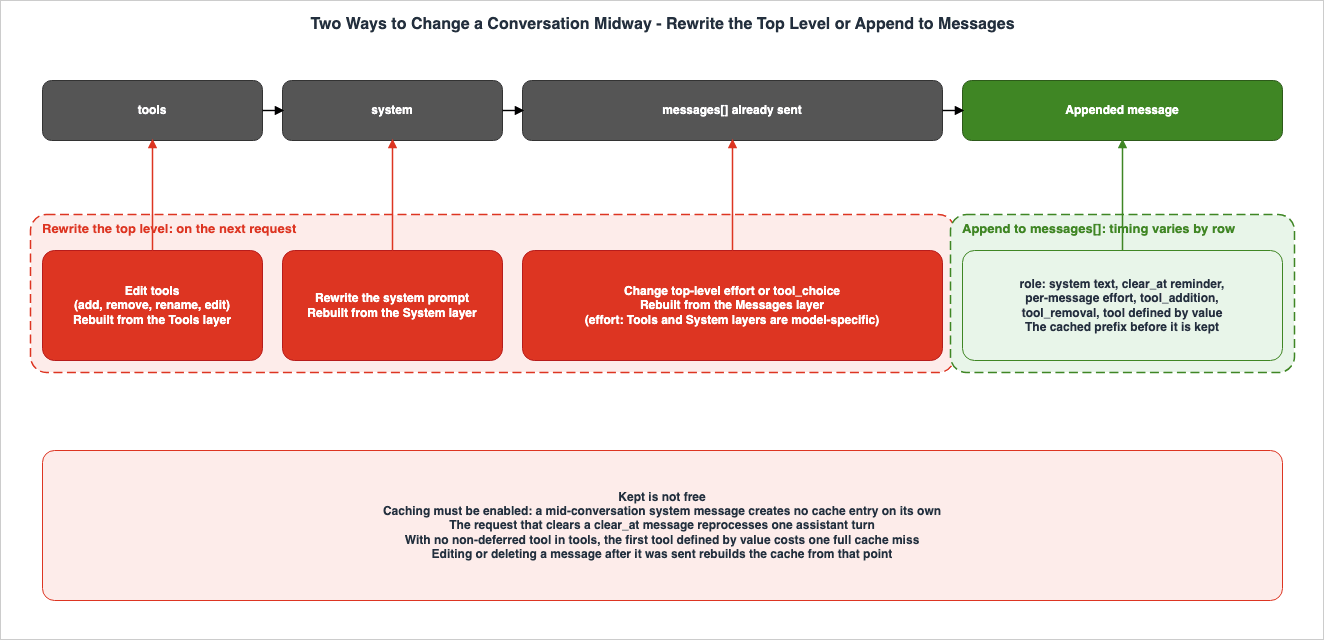
3. Changing the System Instructions
This section describes how to change the system instructions during a conversation. There are three methods: rewriting the system prompt, appending a mid-conversation system message, and sending per-turn reminders as turn-scoped system messages.3.1 Rewriting the System Prompt
The system prompt is located near the beginning of the cache prefix. The Mid-conversation system messages and tool changes page says the following about putting instructions you discover partway through a conversation into the system prompt.It is a poor position for instructions you only discover you need partway through a session, because editing the top-level `system` field changes the very beginning of the prompt and invalidates the cache for everything that follows.On the preserved thinking side, too, modifying the system prompt is Invalid. Because the system prompt precedes all thinking blocks, changing it will cause all thinking blocks in the conversation to fail the check. As examples of rebuilding the system prompt each time, the Preserved thinking page lists elements such as the date, mode flags, re-read project instructions, and plugins or MCP servers connected after the initial turn. The Cache diagnostics page also lists timestamps and request IDs embedded in the system prompt as typical examples of
system_changed.3.2 Appending a Mid-Conversation System Message
A mid-conversation system message means appending a message withrole: "system" to the messages[] array. As with user and assistant turns, content is a string or content blocks. Instructions provided in these messages take effect from their position in the conversation onward. The Preserved thinking page gives the following message as an example.{
"role": "system",
"content": "The user switched the workspace to read-only mode. Do not write files until told otherwise."
}In cases of conflicting instructions, the later system message takes precedence over earlier system messages. A mid-conversation system message takes precedence over the system prompt for the turns that follow it. The difference between these messages and
user messages lies in their priority. The Mid-conversation system messages and tool changes page states that user messages are treated as coming from the end user, while system messages are treated as coming from the application's operator.There are rules governing where these messages can be placed.
A mid-conversation system message must immediately follow a `user` turn (or an `assistant` turn ending in a server tool result), and must either be the last entry in `messages` or be immediately followed by an `assistant` turn. A `user` message that carries `tool_result` blocks counts: in an agentic loop you can place the system message right after the tool results, before Claude's next turn. Any other position, including between an `assistant` `tool_use` block and the `tool_result` that answers it, returns a 400 error.A system message that carries content cannot be the first entry in
messages. Instructions intended to take effect from the beginning of the conversation should be placed in the system prompt. Consecutive system messages are accepted and treated as a single system section. The whole section follows the same placement rules.Within an agent's loop, these messages can be placed immediately after a
user message that returns the result of a tool. The Mid-conversation system messages and tool changes page also mentions the possibility of using this location to relay input that the end user typed while Claude was running tools. In that case it recommends stating what changed as a fact, rather than as a command that overrides the end user.This location is not intended for placing content originating from outside the conversation.
Do not place text from outside the conversation, such as raw tool output, retrieved documents, or web content, directly in a system message; doing so gives that text operator-level authority.Tool outputs and retrieved documents should be placed within a
tool_result block. The MCP Tool Poisoning Defense Guide - Client-Side Defense in Depth for AI Agents covers defenses against injection that arrives through tool descriptions and tool results.Regarding caching, a mid-conversation system message is placed after the cached prefix, so the prefix's hash remains unchanged. As described in Section 2.1, the part before it is read from the cache only when caching is enabled. Once a newly added system message becomes part of the conversation, it too can be cached. On the next turn, move the breakpoint past it. With automatic caching, the breakpoint will move automatically.
3.3 Once Sent, Leave the Message in Place
Once sent, a mid-conversation system message is part of the conversation history. The Mid-conversation system messages and tool changes page says the following.Avoid editing or removing a mid-conversation system message that has already been sent. Like any other change to earlier messages, that invalidates the cache from that point forward. On Claude Fable 5.1, Claude Opus 5.5, and Claude Sonnet 5.5 it also invalidates the thinking blocks in every later assistant turn.When you need to modify instructions, do not rewrite previous system messages; instead, add new system messages. For instructions that apply for only one turn, use a turn-scoped system message (Section 3.4).
The same principle applies when a library or proxy sits between the caller's conversation history and the API. The Preserved thinking page asks it to leave a
role: "system" message where the caller put it. Moving it into the system prompt changes system on that request, invalidating all thinking blocks in the conversation.3.4 Per-Turn Reminders — clear_at: "next_user_message"
There are times when you may want to add a brief reminder each time a tool returns a result within a tool loop. These reminders might ask the model to request independent reads together, or note that it hasn't updated the user in a while. Reminders added every time can quickly accumulate in the conversation history. If you delete a previous request's reminder in a subsequent request, it will be interpreted as an edit to the previous message.Turn-scoped system messages are for this. Set
clear_at on a mid-conversation system message. The beta header for this feature is mid-conversation-system-clear-at-2026-08-21. While the date in the header name is August 21, 2026, the Release notes date it September 1, 2026. Without this header, the clear_at field will be rejected as an unknown field.The
clear_at attribute can have two values. The default value is "never", which means the message renders at that position on every request that includes it. Setting the value to "next_user_message" will cause the text to render only as long as there is no message with role: "user" following it. Even a user message consisting solely of a tool_result block is considered a user message in this context. Once a later user message exists, the message is cleared. It will remain in the array but will not render and will not consume any input tokens. This applies to that request and all subsequent requests.{
"role": "system",
"clear_at": "next_user_message",
"content": "First privately list what you need next; then request every item that doesn't depend on another's result in this one response."
}Regarding caching, previous messages will not change, so the prefix will continue to match. However, the request that clears the message has the following cost.
On the request that clears a message, the reusable cached prefix ends at the user turn before it, so only the one assistant turn between that message and the new user message is reprocessed.Turn-scoped system messages have other rules as well.
- Resend cleared messages unchanged with subsequent requests. Any action that modifies the previous message – such as reassembling from the current state, removing it as redundant, or changing the value of
clear_at– constitutes an edit. The cache misses from that point, and in Claude Fable 5.1, Claude Opus 5.5, and Claude Sonnet 5.5, every thinking block produced after the message fails the check. - The
contentfield only accepts text. Includingtool_additionortool_removalblocks returns a 400 error, and so doesoutput_config. These should be sent with a separate system message that does not includeclear_at. - A turn-scoped message's blocks cannot carry
cache_control. Because cleared messages do not serve as cache keys, breakpoints placed within them cannot be matched. Breakpoints should be placed in the last block of the precedinguserturn. Automatic caching skips turn-scoped messages when it picks a breakpoint. - Placement rules apply regardless of whether a message is cleared or not. One that ends the array always renders. One followed directly by another
usermessage is a 400 error, not a cleared message. assistantturns do not clear a turn-scoped message. A prefilled or pausedassistantturn, or a server-side tool loop, adds nousermessage.
The validation errors that occur when the beta header is not sent, or when these rules are violated, are as follows. The first line indicates the error that occurs when the beta header is not sent.
messages.3.clear_at: Extra inputs are not permitted
messages.3.clear_at: clear_at is only permitted on role 'system' messages
messages.3.clear_at: Input should be 'next_user_message' or 'never'
messages.3: a turn-scoped system message supports text blocks only (clear_at: 'next_user_message')
messages.3: output_config is not permitted on a turn-scoped system message (clear_at: 'next_user_message')
messages.3.content.0: cache_control is not permitted on a turn-scoped system message (clear_at: 'next_user_message')
On the preserved thinking side, leaving a cleared message in place is Valid. Deleting or rewording the same message on a later request is Invalid.
4. Changing Effort
This section discusses two methods for operating the latter half of the conversation with different effort levels. These methods are: modifying the top-leveloutput_config.effort setting, and appending a per-message effort. This section does not detail what each effort level represents.4.1 Changing the Top-Level output_config.effort
The Effort page describes the top-level effort as follows.The top-level `output_config.effort` applies to the whole request. To run a later part of a conversation at a different level, set the new value on the next request. Because top-level effort shapes the rendered prompt, changing it between requests doesn't preserve cached prefixes from earlier turns.In the prompt caching table, the Messages layer is always ✘, and the Tools and System layers are Model-specific. Setting the model's default explicitly is the same as omitting it and does not invalidate the cache. The default value is
medium for Claude Opus 5.5 and high for other models.On the preserved thinking side, changing the top-level effort is Valid, because effort is not part of the prefix. The Preserved thinking page says the following.
Changing top-level `output_config.effort` between requests doesn't invalidate thinking, because effort isn't part of the prefix. Changing top-level effort does restart the prompt cache.The Effort page notes that for Claude Fable 5.1, it recommends adjusting the effort setting per message rather than at the top level. It states that changing the top-level setting rebuilds the cache and also steers the model less reliably. This is because the model's previous responses were generated at a previous level, and the model tends to maintain consistency with those previous outputs.
4.2 Per-Message Effort
Per-message effort means appending arole: "system" message with empty content that carries the new level in output_config.effort. The beta header is mid-conversation-output-config-2026-07-01. While the header name indicates a date of July 1, 2026, the Release notes date it September 1, 2026, for the Claude API and September 3, 2026, for Google Cloud.{ "role": "system", "content": [], "output_config": { "effort": "low" } }The Effort page describes when it takes effect as follows.
Add a `role: "system"` message with empty `content` and the new level in `output_config.effort`. The new level takes effect from the next `user` turn and holds until a later message changes it.In the Effort page's example, this message is placed between an
assistant turn and the subsequent user turn. Because an effort-only message does not contain text, the placement rules outlined in Section 3.2 do not apply. It can be the first entry in messages, or sit between an assistant turn and the next user turn. However, next to a system message that carries text, the whole group follows the rules for messages with content.The supported models are Claude Fable 5.1, Claude Mythos 5.1, Claude Opus 5.5, Claude Opus 5, and Claude Sonnet 5.5. The Mid-conversation system messages and tool changes page names the Claude API and Google Cloud as platforms for per-message effort. Models without per-message effort (including Claude Fable 5) will return a 400 error with the following message.
output_config.effort requires a model that supports per-turn effort; this model does notWhen using
thinking: {"type": "between_tools"} with Claude Sonnet 5.5, it is not possible to change the effort mid-conversation. A per-message effort with a value different from the current level will result in a 400 error. If you need to change the effort on a per-turn basis, use adaptive thinking. Additionally, as described in Section 3.4, a turn-scoped system message cannot carry output_config.From the caching perspective, previous messages will remain unchanged, so the prefix will continue to match. On the preserved thinking side, it is also Valid. However, once sent, this message is part of
messages and enters the prefix for later thinking blocks. After sending, it should be left as is, and when you need to change the effort again, a new message should be added.4.3 What Each Effort Level Means Is Covered in an Earlier Article
The meaning of each level of effort and how it differs across model generations is covered in Controlling How Much a Model Thinks. Section 8 of that article addresses how the effort value is reflected in the prompt and incorporated into the cache prefix, as well as the per-message effort header and the wording of its error. This article expands on that by adding four points: presenting these details in the same table as other mid-conversation changes, extending the analysis to include Claude Opus 5.5 and Claude Sonnet 5.5, specifying thebetween_tools constraint for Claude Sonnet 5.5, and noting that even with top-level changes, thinking remains Valid.5. Changing the Tool Set and Tool Definitions
This section discusses how to change the tools presented to the model during a conversation. It covers three methods: modifying thetools array, adding and removing tools by reference, and defining tools within messages by value. For MCP toolsets, it covers only the scope.5.1 Rewriting the tools Array
The tools array is located before the system prompt. The Mid-conversation system messages and tool changes page describes the following.The `tools` array sits even earlier in the hashed request prefix than the top-level `system` field, so editing it invalidates the prompt cache for the entire conversation.In the Prompt caching table, the "Tool definitions" row indicates "✘" for all three layers. The Cache diagnostics page lists the cases that
tools_changed reports: when tools are added, removed, or reordered, and when the input_schema JSON is output in a non-deterministic order. On the preserved thinking side, adding, removing, renaming, or editing a tool in tools is Invalid. tools comes before every thinking block, so every thinking block in the conversation fails the check.There is one exception. If a tool with
defer_loading: true is added to the tools array and no tool_addition has yet referenced it, the Preserved thinking table treats this as Valid. The prefix check ignores deferred tools until a tool_addition references them. Regarding caching, the Tool use with prompt caching page outlines the following general rule.Deferred tools are not included in the system-prompt prefix.The Tool search tool page states the same principle: the API excludes deferred tools from the system-prompt prefix. However, this general rule appears within a description of how the tool search process identifies deferred tools. Neither page explicitly addresses what happens to the cache when a deferred tool is added to the
tools array during a conversation.For a request in which the model should not use tools, it's not necessary to remove tools from the
tools list. The Preserved thinking page, in its notes for proxies and gateways, says to send tool_choice: {"type": "none"}. Changing the tool_choice setting invalidates only the Messages layer of the cache, and is Valid for thinking. According to the Thinking page, Claude Opus 5.5, Claude Sonnet 5.5, Claude Fable 5.1, and Claude Mythos 5.1 all reject any requests that attempt to force tool usage (using tool_choice with values of any or tool) with a 400 error. The release notes indicate that for Claude Fable 5.1 and Claude Mythos 5.1, auto and none are unchanged.5.2 Adding and Removing by Reference — tool_addition and tool_removal
When making changes through references, all tools that might be used during the session should be declared in the tools list in the initial request. Tools that should not be shown to the model yet should have the defer_loading: true property set. Subsequently, include tool_addition and tool_removal blocks in the role: "system" message to present or remove tools. The tool_addition block can also re-present tools that a tool_removal block previously removed.Both
tool_addition and tool_removal are content blocks placed in the content of a mid-conversation system message, and can be mixed with text blocks. Each block's tool field does not define a tool, but rather references it. {"type": "tool_reference", "name": "..."} refers to a tool declared in the tools list by its name. Tools for the MCP connector can be referenced individually using mcp_tool_reference (with server_name and name) or as a toolset using mcp_toolset_reference (with server_name). Attempting to reference a name that is not in the tools list will result in a 400 error. In the Claude API, the error.details.error_code will be tool_reference_unresolved.Here's an example of removing potentially dangerous tools after switching modes:
{
  "role": "system",
  "content": [
    { "type": "tool_removal", "tool": { "type": "tool_reference", "name": "delete_branch" } },
    { "type": "text", "text": "Branch deletion is disabled for the rest of this session." }
  ]
}
Here's an example of presenting tools that were previously declared with
defer_loading: true:{
"role": "system",
"content": [
{ "type": "tool_addition", "tool": { "type": "tool_reference", "name": "deploy" } },
{ "type": "text", "text": "Authentication succeeded. Deployment is now available." }
]
}These changes take effect from the point in the conversation onward. The placement rules are the same as those for mid-conversation system messages, as described in Section 3.2. There is one additional restriction: you cannot place
tool_addition or tool_removal blocks immediately after a paused assistant turn (one that ends with the result of a server tool). text blocks are accepted. Resume the paused turn first, then send the tool change in the next system message.Regarding caching, the page on Mid-conversation system messages and tool changes states:
The `tools` array itself never changes, so the cached prefix stays intact.On the preserved thinking side, too, the
tools array remains unchanged, so previous thinking remains Valid. However, messages containing these blocks, identified by role: "system", will be included in the prefix for subsequent thinking. These messages should not be moved, rephrased, or deleted.There are two beta headers. On the Claude API, send
inline-tools-2026-09-15. This header also covers defining a tool by value (Section 5.3). mid-conversation-tool-changes-2026-07-01 works for changes that name a tool by reference, and the page names the Claude API, Amazon Bedrock, and Google Cloud for it. The date in the name of the latter header is July 1, 2026, but its Release notes date is July 24, 2026. The date in the name of the former is September 15, 2026, but its Release notes date is September 22, 2026.5.3 Defining Tools by Value — inline-tools-2026-09-15
Sending the inline-tools-2026-09-15 header allows the tool_addition block to contain the tool's definition directly, rather than simply referencing it by name. This allows you to add tools that were not initially known at the start of the conversation, or tools whose schema may change later, by appending a role: "system" message. The Mid-conversation system messages and tool changes page describes this functionality in relation to the Claude API. The definition is wrapped within a tool object of type tool_definition. The definition is the same entry you would put in tools.{
"role": "system",
"content": [
{
"type": "tool_addition",
"tool": {
"type": "tool_definition",
"definition": {
"name": "db_query",
"description": "Run a read-only SQL query against the analytics database.",
"input_schema": {
"type": "object",
"properties": { "sql": { "type": "string" } },
"required": ["sql"]
}
}
}
}
]
}From that point forward, the model can call this tool in the same way it would call tools declared in the
tools section. Sending the same definition again will not cause any changes, so you can safely resend it, for example on a retry. When changing the schema or migrating a server tool to a new version, send a different definition using the same name. The new definition will replace the previous definition from that point forward. If you use a definition with a name that belongs to a different type of tool, you will receive a 400 error with error.details.error_code set to tool_name_conflict. New versions of the same tool are not considered a different type. tool_removal continues to use references.During the beta period, some tool types (including those for computer use) cannot be defined within messages; attempting to do so will return a 400 error. These tools must be declared in the
tools section and added using references.Regarding caching, since the
tools array and all preceding messages are sent as they were, the prefix will match, and only the added messages will be processed as new input. However, there is one exception.A conversation whose `tools` array has no non-deferred tool is accepted, but the first tool it defines by value changes the start of the rendered prompt, which costs one full cache miss on that request. A tool search tool counts as non-deferred.Therefore, the page recommends the following.
- Declare the tools known at the initial request in the
toolssection. For tools that the model should not see yet, adddefer_loading: trueand reference them later usingtool_addition. Define by value only what is unknown at the first request or changes later. - Ensure that the
toolssection includes at least one non-deferred tool. - If a server tool defined with a value requires a specific beta header, include that header in all subsequent requests for that conversation.
- Place the
cache_controlsetting in either the blocks or the definitions, but not in both. You cannot applycache_controlto deferred definitions.
There are limits. If any of the following is exceeded, the request returns a 400 error with
error.details.error_code set to available_tools_limit_exceeded.- The number of available deferred tools exceeds 10,000 at any point after a message.
- The total number of available tools (defined after the initial
usermessage) exceeds 10,000 at any point after a message. - The combined size of tools defined after the initial
usermessage, which are available at any point, exceeds 4 MB (4,194,304 bytes). - The rendered tool text exceeds 4 MB (4,194,304 bytes).
On the preserved thinking side, the new tool goes into
messages and tools does not change, so earlier thinking stays Valid.5.4 Adding an MCP Toolset Mid-Conversation
This article covers only the scope of MCP toolsets. By sending the header withmcp-client-2026-09-15 alongside inline-tools-2026-09-15, the definition in a tool_addition can be an mcp_toolset. Server connection information should continue to be placed in mcp_servers as before. Do not include the server URL or token in the tool_addition block. Since mcp-client-2026-09-15 includes all the functionality of mcp-client-2025-11-20, there is no need to send both. These features are documented for the Claude API.With
mcp-client-2026-09-15, the API response containing the server's tool list will begin with a server-specific mcp_tool_listing block. This entire assistant message, including this block, should be sent back verbatim, and mcp-client-2026-09-15 should be sent on every request that carries it. Subsequent requests then use the recorded list instead of querying the server again. The overall implementation of the MCP server and the MCP connector is detailed in MCP Server Implementation Reference - Anthropic, OpenAI, Google, Cloudflare, and AWS.6. Condensing a Long History
This section covers four ways to condense a long history, in relation to mid-conversation changes: on-demand compaction, threshold compaction, context editing, and summarizing on the client.6.1 Four Methods
The Compaction overview page lists on-demand compaction and threshold compaction, as well as client-side summarization. With on-demand compaction, the caller submits a request to generate a summary, and the returned block is placed at the beginning of themessages list, replacing the summarized messages. With threshold compaction, the API automatically generates a summary partway through a request when the input tokens reach a specified threshold. Context editing does not generate summaries; instead, it clears older tool results and old thinking blocks according to established rules. Client-side summarization involves the caller's code generating the summary and rewriting the history.The overview page recommends using on-demand compaction wherever it is available. It is not possible to send both
compaction and context_management within a single request.6.2 On-Demand Compaction, Mid-Conversation System Messages, and Tool Changes
With on-demand compaction, the conversation is sent as is, along with the"compaction": {"type": "summarize"} parameter. If a summary is successfully generated, the API generates no reply; instead, it will return only the compaction block within a response with stop_reason set to "compaction". Even if a summary cannot be generated, the response will still return a 200 status code, with an empty content field. Before searching for a block, verify the stop_reason. The caller replaces the messages it sent with this returned assistant message. The block should be retained exactly as it was returned, including the signature. The beta header compact-2026-09-04 is sent on the request that asks for the summary and on every later request that carries the block. The date in the header name is September 4, 2026, but the Release notes date it September 14, 2026.Requests for a summary should include the same
system and tools that will be used for the remainder of the conversation. The model that generates the summary will read these. If turns are kept after the block, the thinking in those turns stays Valid only if system and tools match.About mid-conversation system messages, the Compaction on demand page says the following.
`role: "system"` messages inside the summarized range are summarized too, so their text instructions stop applying once the block replaces them. If an instruction still matters, state it again in a `role: "system"` message. Send that message right after your next new `user` turn, and leave it in your history from then on.In other words, any instructions added through mid-conversation system messages that fall within the scope of the summary will become part of the summary itself, and will no longer function as instructions. Any remaining necessary instructions should be restated using a mid-conversation system message immediately after the next new
user turn. If turns are kept after the block, place the restated system message immediately after the first new user turn that follows the kept turns. This is further described in the Compaction and preserved thinking page.About tool changes, the Compaction and preserved thinking page says the following.
Tool changes inside those turns carry over on their own when the compaction request also carries `inline-tools-2026-09-15`: the returned block records their net effect in its `tool_changes` field, so send the block back unmodified. If the block has no `tool_changes` field, restate those tool changes the same way. A system message placed between the block and the kept turns breaks their thinking.Thinking blocks in turns kept after the block stay Valid while all three of the following conditions hold.
- Compaction requests are made using models with preserved thinking. All compaction requests made after the thinking block was produced are subject to this rule.
- Kept turns follow the summarized messages immediately and are sent without modification. The first kept message must have a different role from the final summarized message and cannot be a mid-conversation
role: "system"message. systemand thetoolsthat do not havedefer_loading: trueremain unchanged.
Regarding caching, the Compaction on demand page only states that placing
cache_control on the block will result in a breakpoint being inserted after the summary. It does not specify what happens to the cache on the request that swaps in the block. Under the general hierarchy rule in Section 2.1, the beginning of the messages[] array changes.The platforms are as in Section 1.4; it is not available on Amazon Bedrock.
6.3 Threshold Compaction
Threshold compaction is enabled by addingcompact_20260112 to context_management.edits. The beta header is compact-2026-01-12. When the input tokens reach the trigger threshold, the API creates a summary mid-request and returns the compaction block at the beginning of the assistant response. The caller appends the response to messages as is. On later requests, the API drops the content before the compaction block. The basic usage is described in Section 7.3 of the Anthropic Claude API Prompt Caching and Token Efficiency Guide.Regarding caching, the Compaction at a token threshold page states:
When compaction occurs, the summary becomes new content that needs to be written to the cache. Without additional cache breakpoints, this would also invalidate any cached system prompt, requiring it to be re-cached along with the compaction summary.The same page also indicates that if a
cache_control breakpoint is placed at the end of the system prompt, even if compaction occurs, the system prompt can be read from the cache, and only the summary needs to be newly written.On the preserved thinking side, server-side compaction does not count as an edit. However, thinking blocks preceding the
compaction block are not carried over.On Claude Fable 5.1, Claude Mythos 5.1, Claude Opus 5.5, and Claude Sonnet 5.5, thinking blocks from before a `compaction` block aren't carried forward, so the summary is all the model has of that earlier work.To preserve the most recent turns during threshold compaction, pause after compaction and then re-insert the turns. For Claude Fable 5.1, Claude Opus 5.5, and Claude Sonnet 5.5, remove the
thinking and redacted_thinking blocks from the re-inserted assistant turns, or send prefix_mismatch_behavior: "drop_block". Otherwise, where the check is enforced, the continuation request is rejected with a 400 error. If using between_tools with Claude Sonnet 5.5, you cannot use block_binding, so you must remove the blocks. The comparison table on the Compaction overview page indicates that, for whether kept turns keep their thinking, on-demand compaction is listed as Yes (conditional), while threshold compaction and client-side summarization are listed as No.6.4 Context Editing
Context editing is utilized with the beta headercontext-management-2025-06-27. There are two strategies. clear_tool_uses_20250919 clears older tool results sequentially when the context exceeds the trigger threshold (the default is 100,000 input tokens). clear_thinking_20251015 clears thinking blocks according to the keep setting. Both strategies are applied on the server side, before the prompt reaches Claude. The caller's application continues to maintain a complete, unedited history.Regarding caching, the Context editing page describes tool result clearing as follows:
Tool result clearing: Invalidates cached prompt prefixes when content is cleared.It describes thinking block clearing as follows:
When thinking blocks are cleared, the cache is invalidated at the point where clearing occurs.Only the description for thinking block clearing names a position. It does not specify from which point the cache is rebuilt when clearing tool results.
The
clear_at_least setting controls whether a strategy is applied only when a certain number of tokens can be cleared at once. It is used to determine whether it is worthwhile to invalidate the cache. When configured to keep all thinking blocks (keep: "all"), the cache is preserved.On the preserved thinking side, as described in Section 2.3, server-side context management does not invalidate thinking blocks. However, shortening or clearing old tool results on the client side is an edit to earlier messages. The Preserved thinking table marks clearing or shortening an earlier
tool_result as Invalid for every later thinking block. If you wish to clear older tool results later, you should use the server-side context editing.6.5 Summarizing on the Client Side
When summarizing on the client side, the Preserved thinking page recommends summarizing the whole session into oneuser message and sending only that message plus the next instruction. No earlier turns are resent, so no thinking is left to fail the check.If you choose to summarize older turns yourself while keeping the most recent turn as is, the thinking blocks associated with the retained turns fail the check. This is because those blocks were created when the original turns, not the summary, were present. To resolve this, either remove the
thinking and redacted_thinking blocks from the retained turn, or send prefix_mismatch_behavior: "drop_block". (Since Claude Sonnet 5.5 does not support block_binding in the between_tools context, you must remove the blocks). If you want to preserve the thinking from the most recent turns, use on-demand compaction to have the API generate a summary. Cutting out turns in the middle of a conversation will invalidate all subsequent thinking blocks, whatever the compaction scheme.The AI Agent Memory Design Guide - Working, Long-Term, and Procedural Memory with Forgetting and Staleness Management discusses how to effectively use both summarization and pruning as part of agent memory design.
7. Where the Two Checks Disagree, and How to Confirm It
This section first gathers the rows from the Section 2 tables where the cache and thinking checks diverge. Next, it collects what the forms said to maintain the cache still cost. Finally, it describes how to verify these two checks using the API responses.7.1 The Cache Is Rebuilt, but Thinking Stays Valid
In the Section 2 tables, the following four rows rebuild the cache while thinking stays Valid.- Changes to the top-level
output_config.effort. The Messages layer is rebuilt, and the Tools and System layers are Model-specific. Thinking stays Valid. - Changes to
tool_choice. The Messages layer is rebuilt. Thinking stays Valid. - Tool result clearing. Clearing the content invalidates the cached prefix (the position is not named). Thinking stays Valid.
- Threshold compaction. The Messages layer is rebuilt. Thinking stays Valid, but thinking blocks before the compaction block are not carried forward.
The preserved thinking prefix check covers none of these four. The top-level effort and
tool_choice are parameters outside system, tools, and messages. Context editing and threshold compaction involve edits on the server side, and the check compares what the caller sent.Conversely, rows where thinking becomes Invalid always involve cache rebuilding too. This includes rewriting the system prompt, editing the
tools, rewriting or deleting mid-conversation system messages after they were sent, and deleting or rewording a cleared turn-scoped system message. This aligns with the statement on the Preserved thinking page, as described in Section 2.3. The following diagram illustrates these changes, divided into four categories using two axes.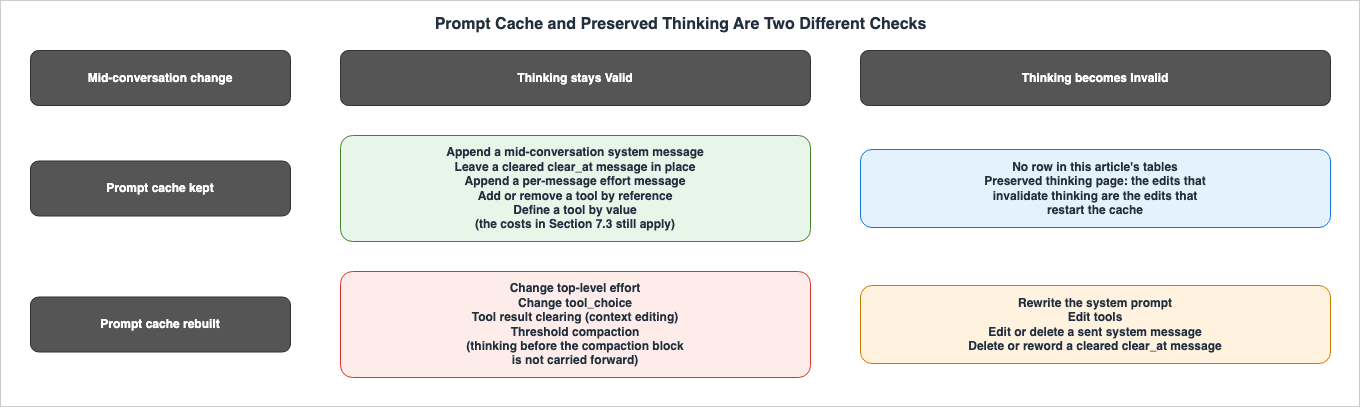
7.2 Not a Prefix Edit, but Thinking Can Be Lost — Switching Models
When switching models, the cache is not retained. During the switch, only blocks that the new model cannot read are dropped. The model check drops them, not the prefix check.The cache, as described on the Cache diagnostics page, is organized on a per-model basis, so it is not carried over when switching models. According to the Preserved thinking page, each model has a defined set of thinking blocks it can read.
Claude Fable 5.1 and Claude Mythos 5.1 can read blocks from each other, as well as blocks from previous Claude models. With the Claude API, they can also read Claude Opus 5.5 blocks. Claude Opus 5.5 can read blocks from Claude Opus 5, as well as blocks from previous Opus, Sonnet, and Haiku models. It also reads blocks from Claude Sonnet 5.5 on the Claude API and Google Cloud. It does not read blocks from Claude Fable or Claude Mythos models.
Claude Sonnet 5.5 reads blocks from Claude Sonnet 5, Claude Opus 4.8, Claude Haiku 4.5, and earlier models. It does not read blocks from Claude Opus 5, Claude Opus 5.5, Claude Fable, or Claude Mythos models.
Therefore, conversations transitioning from Claude Opus 5 to Claude Opus 5.5 will retain their thinking. Similarly, conversations moving from Claude Opus 5.5 to Claude Fable 5.1 or Claude Mythos 5.1 on the Claude API will also retain it. Unreadable blocks are dropped without being rejected. When the
thinking-binding-controls-2026-08-01 header is sent, they appear in input_transformations with reason: "model_binding_mismatch". This dropping behavior is independent of the prefix_mismatch_behavior setting. The Preserved thinking page recommends consistently sending the complete history, including the thinking blocks, and letting the API drop unreadable blocks. Because the API does not modify the caller's messages array, if the same history is sent back to the original model, those blocks will once again be readable.Note that thinking blocks produced by Claude Sonnet 5.5 work only in the account that created them, or an account associated with that account. If sent from a different account, the block will be dropped, although the request will still succeed. The overall process of model migration is detailed in the Anthropic Claude Model Migration Guide.
7.3 What the Cache-Keeping Forms Still Cost
In the Section 2 tables, rows whose cache column isKept also have conditions and costs associated with maintaining cached data.- Caching must be enabled: Mid-conversation system messages do not, on their own, create cache entries. Requests without
cache_controlhave no cached data to retain. - Requests that clear turn-scoped system messages: A single assistant turn between the message and a new
usermessage will be reprocessed. - The first request that defines a tool by value in a conversation with no non-deferred tool: The cache is completely invalidated once.
- Modifications and deletions after sending: Mid-conversation system messages, turn-scoped system messages, per-message effort, and messages related to tool changes become part of the conversation history once sent. The Preserved thinking page emphasizes retaining these elements in their original positions. According to the documentation, modifying or deleting mid-conversation system messages or turn-scoped system messages will trigger the cache to be rebuilt from that point. An effort-only message renders nothing at its position, and the documentation does not explicitly state how modifying it affects the cache (under the general hierarchy rule, it is a change in the middle of
messages[]). In Claude Fable 5.1, Claude Opus 5.5, and Claude Sonnet 5.5, any such modifications will invalidate subsequent thinking blocks. - Summary range for on-demand compaction: Mid-conversation system messages in the compaction range will cease to function as instructions. If compaction is performed with the
inline-tools-2026-09-15header, tool changes carry over intool_changesas long as the block is sent back without altering it. If the block does not have atool_changesfield, tool changes will also need to be restated.
7.4 Confirming with Cache Diagnostics and input_transformations
The cache check can be confirmed with cache diagnostics. It came out of beta on the Claude API on September 23, 2026, and the cache-diagnosis-2026-04-07 header is no longer necessary. It is not available on the other platforms. For each request, include a diagnostics object. On the initial turn, pass "previous_message_id": null; on subsequent turns, pass the id from the previous response. The API compares two requests and reports the first point of divergence in cache_miss_reason.The
cache_miss_reason object has the following type values: model_changed, system_changed, tools_changed, messages_changed, previous_message_not_found, and unavailable. The messages_changed type indicates that a previous entry in the messages list has been modified, reordered, or deleted, rather than simply appended. Only the first discrepancy is reported, so address that issue first. The *_changed types also include an estimate of the input tokens after the divergence point, cache_missed_input_tokens.Some of the rows in Section 7.1 get no location back. Regarding
unavailable, the Cache diagnostics page states:This includes the case where `model`, `system`, and `tools` match but another prompt-affecting request parameter (`tool_choice`, `thinking`, `context_management`, `output_config`, `output_format`, or the set of active `anthropic-beta` headers) differs, and very long conversations where the divergence is beyond the comparison horizon.In other words, for a request that changes the top-level effort or
tool_choice, cache diagnostics returns unavailable instead of the location of the divergence. The same applies when changing combinations of beta headers. If you are designing a system that adds beta headers mid-conversation, be mindful of this limitation.The thinking check can be confirmed in the response's
input_transformations when you send the thinking-binding-controls-2026-08-01 header. A thinking_dropped entry points to the dropped block by path and carries a reason. Possible reason values include prefix_binding_mismatch, model_binding_mismatch, and organization_binding_mismatch (reported on the Claude API and Google Cloud). The Preserved thinking page says to ignore entries whose type or reason you do not recognize, because later checks add values. A block dropped because of a prefix edit appears as an entry like the following.{
"input_transformations": [
{
"type": "thinking_dropped",
"path": "messages.1.content.0",
"reason": "prefix_binding_mismatch"
}
]
}For older accounts, if a header is sent without the
prefix_mismatch_behavior setting, the blocks that fail the check will be delivered to the model and listed as thinking_mismatch_allowed entries (an entry type added on September 14, 2026). This can be used to search for prefix edits in live traffic before enforcement. Noting that two plain turns rarely show the problem, the Preserved thinking page recommends running sessions with "error" set that include the following scenarios: initial client-side compaction or truncation, tools, plugins, or MCP servers connected after the initial turn, changes to mode or instructions, lengthy tool loops that add reminders or shorten results from older tools, switching to and from different models, saving and restarting, and resuming at a later date. Handling 400 errors is covered in the Anthropic Claude API Errors Reference.8. Frequently Asked Questions about Mid-Conversation Changes
Q1. Does using a mid-conversation system message always keep the cache?
No. The cached part before it is read only when caching is enabled for the request (when it hascache_control). A mid-conversation system message does not create a cache entry on its own. Also, if you rewrite or delete the message after sending it, the cache is rebuilt from that point. On the request that clears a turn-scoped system message, one assistant turn is reprocessed.Q2. Does changing the top-level effort cause a 400 from the preserved thinking check?
No. Effort is not amongsystem, tools, and messages, which the prefix check looks at, so thinking stays Valid. However, the prompt cache is rebuilt from the Messages layer, and the Tools and System layers depend on the model. To keep the cache as well, use per-message effort on the models and platforms that support it. However, if you are using thinking: {"type": "between_tools"} with Claude Sonnet 5.5, you cannot change the effort mid-conversation.Q3. Can a per-turn reminder be deleted on the next request?
No. Deleting the reminder you sent on the previous request is an edit to an earlier message. The cache misses from that point, and in Claude Fable 5.1, Claude Opus 5.5, and Claude Sonnet 5.5, every later thinking block becomes Invalid. Send the reminder as a turn-scoped system message (clear_at: "next_user_message") and leave it in place after it has been cleared.Q4. To make a new tool available mid-conversation, can it be added to tools?
Adding tools that are not deferred should be avoided, as doing so would require rebuilding the cache across all three layers. On Claude Fable 5.1, Claude Opus 5.5, and Claude Sonnet 5.5, this would invalidate all thinking blocks in the conversation. The Preserved thinking page explicitly states that the tools list should not be modified. Tools that are known from the outset should be declared in the tools list using defer_loading: true and then referenced in tool_addition. For tools that are not initially known, they should be defined directly within tool_addition with the inline-tools-2026-09-15 header on the Claude API. When using only mid-conversation-tool-changes-2026-07-01 (the header the page names for Amazon Bedrock and Google Cloud), the Preserved thinking page indicates that, for thinking, it is safe to add tools discovered during the conversation to the tools list with defer_loading: true and present them through tool_addition. However, the documentation does not specify the impact on the cache for this method (see row 4 of the table in Section 2.5).Q5. Can the same thing be done with Amazon Bedrock?
Partly; the pages for some of these features also name Amazon Bedrock. The features whose pages name Amazon Bedrock include mid-conversation system messages and turn-scoped system messages (the page calls the platform Claude in Amazon Bedrock), tool changes by reference withmid-conversation-tool-changes-2026-07-01, and threshold compaction (beta, compact-2026-01-12). Defining tools within messages is documented in relation to the Claude API, while per-message effort is documented for the Claude API and Google Cloud. On-demand compaction and cache diagnostics are not available on Amazon Bedrock. All of the information above is current as of October 2, 2026.Q6. After on-demand compaction, do instructions added mid-conversation still apply?
Mid-conversation system messages that fall within the summarization range will no longer function as instructions; they will be included in the summary. Restate any instruction that still matters in a mid-conversation system message right after the next newuser turn. If the compaction request carries inline-tools-2026-09-15 and you send the block back unmodified, tool changes carry over in the block's tool_changes field. If the block has no tool_changes field, restate the tool changes too.Q7. Can the API tell you why the cache missed?
On the Claude API, yes, with cache diagnostics. By includingdiagnostics in each request, you'll receive a cache_miss_reason indicating the initial discrepancy from the previous request. However, if model, system, and tools match but the parameters (such as tool_choice, thinking, or output_config) or combinations of beta headers are different, it returns unavailable instead of a location. For thinking, send the thinking-binding-controls-2026-08-01 header and check input_transformations.Q8. With an older account, can preserved thinking be ignored?
No. While older accounts do not have the prefix check enforced by default for Claude Fable 5.1, Claude Opus 5.5, and Claude Sonnet 5.5, the check is still being performed. If the integration modifies the prefix, users accessing the API with keys from accounts created on or after August 31, 2026, at 00:00 UTC will receive a 400 error (in the Message Batches API, items that do not setprefix_mismatch_behavior do not fail, and their failing blocks are dropped instead). The Preserved thinking page recommends making the integration append-only for both new and existing accounts. Even with older accounts, sending the thinking-binding-controls-2026-08-01 header will allow you to identify prefix modifications through thinking_mismatch_allowed entries.9. Summary
Modifying a conversation with the Claude API can be done by changing top-level parameters or by making changes in themessages[] array. The latter often involves adding new messages to the end of the messages[] array. This article outlines six areas that can be modified – system instructions, per-turn reminders, effort, the tool set, tool definitions, and a long history – and compares the two methods using two checks: the prompt cache and preserved thinking.The prompt cache is structured hierarchically, with
tools, system, and messages. Changes to any of these levels trigger a rebuild of that level and all subsequent levels. The preserved thinking prefix check examines the top-level system, tools, and the messages preceding the thinking block. This applies to Claude Fable 5.1, Claude Opus 5.5, and Claude Sonnet 5.5, and is enforced by default for accounts created on or after August 31, 2026, at 00:00 UTC.The two checks do not agree in reverse. Changes that invalidate thinking also rebuild the cache. Conversely, even when the cache is rebuilt, thinking may still be Valid. This occurs with changes related to the top-level effort,
tool_choice, tool result clearing, and threshold compaction (with threshold compaction, thinking blocks before the compaction block are not carried forward). Switching models does not carry over the cache. When switching models, only blocks that the new model cannot read are dropped. This drop is due to the model check.Appending to the
messages[] array preserves the preceding prefix. However, there are associated costs and conditions, including caching being enabled. The request that clears a turn-scoped system message reprocesses a single assistant turn. In conversations without non-deferred tools, the first definition by value invalidates the cache completely, once. It is crucial not to alter messages after they have been sent. Instructions in mid-conversation system messages within the scope of on-demand compaction must be restated if they still matter.Many of these features are in beta, and their pages name different sets of platforms. Among the mid-conversation features, the only one that does not require a beta header is mid-conversation system messages. Cache diagnostics is generally available (GA) on the Claude API. The information provided in this article reflects the status of features as described on each feature's page as of October 2, 2026.
10. References
- Mid-conversation system messages and tool changes - Claude API
- Prompt caching - Claude API
- Tool use with prompt caching - Claude API
- Tool search tool - Claude API
- Preserved thinking - Claude API
- Thinking - Claude API
- Effort - Claude API
- Compaction overview - Claude API
- Compaction on demand - Claude API
- Compaction and preserved thinking - Claude API
- Compaction at a token threshold - Claude API
- Context editing - Claude API
- Cache diagnostics - Claude API
- Model deprecations - Claude API
- Release notes - Claude API
- Beta headers - Claude API
References:
Tech Blog with curated related content
Written by Hidekazu Konishi