Controlling How Much a Model Thinks - Why the Same Request Means Different Things Across Model Generations, and What the Output Cap Actually Counts
First Published:
Last Updated:
max_tokens. The answers did not improve.(b) I raised the effort. This time only the token count went up, and the quality of the answer did not change.
(c) I tried to see the content of the model's thinking by accessing the
thinking block. The block existed, but it was empty.(d) The agent's loop terminated prematurely. It should not have reached the limit.
These four issues appear to be separate bugs, but they share a common root cause.
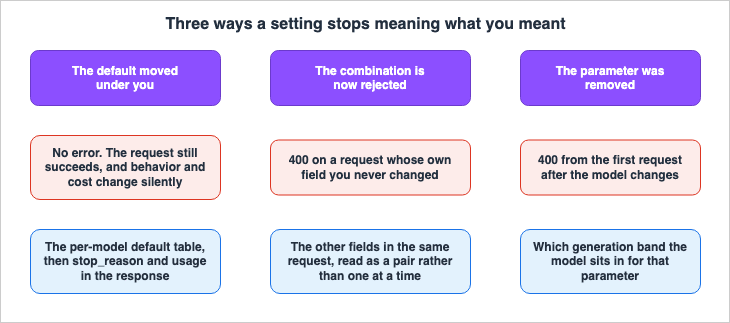
thinking and effort have different default values and accepted values depending on the model. Therefore, simply looking at the request body does not tell you what the request will actually do. The same JSON might cause the model to think in one instance, but not in another. It might succeed on one model, but return a 400 error on another.Put the axis first. What you sent is a value, not a meaning. The meaning is decided on the model side. And when the value stays the same while only the meaning changes, the API returns no error.
This article will address this in two parts. The first part will focus on what cannot be determined just by looking at the request body: what the output cap is counting, what happens when parameters are omitted, which combinations result in a 400 error, and what the remaining amount the model sees actually counts. The second part separates the axes that get conflated. The depth setting is not a cap. Visibility is separate from spend. And changing either of them mid-conversation costs you the cache.
The technical details in this article have been verified against the Claude API documentation (as of September 8, 2026), specifically the "Thinking," "Troubleshooting thinking," "Steering thinking," "Effort," "Task budgets," and "Prompt caching" pages, as well as OpenAI's Reasoning guide and Google's Gemini API Thinking page. This area is constantly evolving with each model release. Default values, accepted levels, and supported model ranges must be re-verified at the time of reading. This article does not discuss pricing, nor does it compare the merits of different models, and it does not include any benchmark values measured by the author.
Table of Contents
- 1. The Same Request Means Different Things on Different Models
- 2. What the Output Cap Counts
- 3. Omitting a Parameter Is Not a Choice You Did Not Make
- 4. The Boundary Between Accepted and 400
- 5. Specifying Depth Is Not Setting a Cap
- 6. The Remaining Amount the Model Sees
- 7. Visibility Is a Separate Axis from Spend
- 8. Changing These Mid-Conversation Costs You the Cache
- 9. Failure Modes
- 10. Frequently Asked Questions
- 11. Summary
- 12. References
1. The Same Request Means Different Things on Different Models
1.1 Who This Article Is For
This article assumes the perspective of someone calling an LLM from their own application. It is intended for readers who are using a provider's SDK or constructing HTTP requests directly and processing the responses within their own code.Specifically, imagine an application that is already running. You are upgrading the model to a new generation, or planning to. Your code remains unchanged. Despite this, the behavior has changed. Alternatively, you are adding parameters as described in the documentation, but receiving a 400 error.
This article addresses that specific area. It does not aim to answer the question of which values to choose. Instead, its purpose is to help you verify what the values you are sending actually mean within that particular model.
1.2 Division of Responsibilities with Existing Articles
This site already contains articles on the LLM API. The boundaries are drawn first, to avoid overlap.| Existing article | What it already covers | Where this article picks up |
|---|---|---|
| LLM API Parameter Compatibility Reference | A table of parameter compatibility for 4 providers. Section 9 lists "Reasoning Controls," detailing three aspects: enabling reasoning, controlling depth, and exposing the thinking, with columns for each of the 4 providers. | This article does not recreate the compatibility table. That article says in Section 9 that for current level names, budgets, and which models support them, the official reference is the only reliable source. This article is the receiving end of that delegation. |
| Agent Reliability Engineering Design Guide | Section 3.3 covers budgets as three currencies, Section 3.4 differentiates between the ceiling enforced by the runtime and the remaining amount the model is told about, and Section 3.6 details how values are determined. | This article does not rewrite the distinctions themselves or the design principles. This article builds on those distinctions and covers only what specific values mean for that model generation. |
| Anthropic Claude API Prompt Caching and Token Efficiency Guide | Section 8.2 discusses tuning cost with the depth setting, Section 8.3 provides an overview of adaptive thinking and task budget, and the entire article covers the mechanisms of prompt caching. | This article does not describe cost-reduction procedures or the caching mechanisms themselves. Section 8 delegates to it and covers only what happens on the caching side when the thinking settings are changed. |
| Anthropic Claude Model Migration Guide | Procedures for migrating between model generations, areas to review, and a migration checklist. | This article does not describe the migration procedures. It describes only the differences in behavior and delegates the procedure. |
| Anthropic Claude Model Release Timeline | A timeline indicating when each model was released and when specific features became available. | This article will not list dates. |
The boundaries come down to one thing. The published articles describe how these things work and how to design with them. This article will focus on the fact that those mechanisms have default values specific to each model, and those values are not visible to the caller.
1.3 What thinking Refers to in This Article
While thinking appears as a common noun, it is also a field name within requests. To avoid confusion, this article uses the notation itself to distinguish the two.- When
thinkingis written in a code span, it refers to the request field itself. - When thinking is written as the plain word, it refers to the internal reasoning the model performs before generating a response.
The same convention applies to effort.
output_config.effort is the name of a field, while depth is the name of the property that setting changes.The same applies to level names.
low, medium, high, xhigh, and max are always written within code spans. These are the exact strings the API receives and are not ordinary adjectives describing a degree.2. What the Output Cap Counts
2.1 The Cap Applies to Thinking and Response Text Combined
The first key fact to understand is this: the output cap applies not only to the main text the model returns, but also to the reasoning process it undertakes. The Claude API documentation states this explicitly.`max_tokens` is a hard cap on total output for the request, thinking and response text
combined. Claude never generates past it.If the reasoning process takes longer, it leaves less room for the response text. Once the limit is reached, generation will stop.
Because thinking counts toward `max_tokens`, set it high enough to leave room for both the
reasoning and the answer. A `max_tokens` sized for a response with no thinking is often too
small once Claude starts thinking on hard requests.
This approach is not unique to one company. OpenAI's Reasoning Guide also clearly states that the output cap includes reasoning tokens.
limit the total number of tokens the model generates, including reasoning tokens, visible
output tokens, and non-visible formatting tokens
Google also states that billing applies to the full amount of reasoning tokens, even if only a summary is returned.
Pricing is based on the full thought tokens the model needs to generate, despite only the
summary being output from the API.
The common thread across all three companies is that what you are counting and what the limit is counting are different. You are looking at the main text of the response. The limit, however, counts the tokens used even before the main text is generated.
2.2 Why Raising the Cap Does Not Improve the Answer
The initial symptom (a) can now be explained. Increasingmax_tokens increases the total amount of output the model can produce. It increases the total amount, not the depth.Raising the cap improves the output in exactly one case: when the answer was being cut off. If it was not being cut off, raising the cap changes nothing. The documentation specifically lists the symptoms that occur when the limit is reached.
The response ends with `stop_reason: "max_tokens"`, often with a truncated or missing text
block.
First, check the
stop_reason. If it is not max_tokens, the cap is not the cause. If it is, there are two moves. You can raise the cap to leave room for both the thinking and the response text, or you can lower the depth setting, reducing the share of tokens that goes to thinking. Which approach is correct depends on whether the previously cut-off request needed that thinking in the first place.2.3 In a Loop, the Cap Does Not Bound the Whole Turn
There is one more property here that is easy to miss.In a tool-use loop, each request in the turn has its own `max_tokens`, so it doesn't bound
the whole turn's spend.Tools used within loops send multiple requests for each user input.
max_tokens applies to each request on its own. max_tokens does not bound the total spent across the loop.Some of the symptoms described in (d) above fall under this category. When a loop terminates prematurely, the cause might be
max_tokens, but it might not be. Since max_tokens only sees one request, stopping the whole loop takes a separate mechanism. That mechanism is the remaining amount covered in Section 6.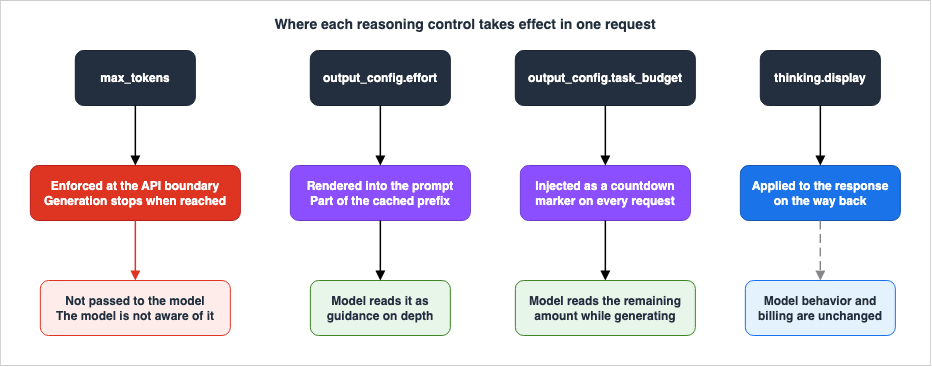
3. Omitting a Parameter Is Not a Choice You Did Not Make
3.1 The Default Is Inverted Across Generations
Leaving a parameter out usually falls on the safe side. However, in this case, it does not.For Claude, the behavior when omitting
thinking varies depending on the model. The documentation provides a per-model table of these defaults, indicating them as Always on, On, or Off.| Model | Thinking Mode | Default |
|---|---|---|
| Claude Fable 5.1 / Mythos 5.1 / Fable 5 / Mythos 5 | Adaptive only | Always on |
| Claude Opus 5 | Adaptive only | On |
| Claude Sonnet 5 | Adaptive only | On |
| Claude Opus 4.8 / Opus 4.7 | Adaptive only | Off |
| Claude Opus 4.6 / Sonnet 4.6 | Adaptive and extended (extended is deprecated) | Off |
| Claude Opus 4.5 / Sonnet 4.5 / Haiku 4.5 | Extended only | Off |
The verification date is September 8, 2026. This table is not exhaustive; it is an extract, included to show that the default splits by generation. Models keep being added, so always take the actual values from the official table.
The table's meaning is straightforward. When using the same code without specifying
thinking, Claude Opus 4.8 will not engage in thinking, while Claude Opus 5 will. The documentation distinguishes between these two behaviors.Models marked `Always on` cannot turn thinking off. Models marked `On` default to thinking
but accept `thinking: {type: "disabled"}`.Always on and On represent the same default setting, but with different methods of disabling the behavior. With Always on, there is no way to stop thinking at all. With On, you can stop it explicitly.3.2 What Breaks
If only the configuration changes, only the behavior changes. In reality, something breaks one step further along.As mentioned in Section 2, the output cap covers thinking and response text together. A cap that was big enough when the model did not think is too small on a generation that does. The migration guide describes this as a change in cost and limitations, rather than a change in behavior.
Specifically, the following will break, in this order:
- Code that never set
thinking. - You upgrade the model to a new generation.
- The model starts thinking.
- Thinking eats into
max_tokens. - The main text is cut off mid-sentence, or the main text is not generated at all.
Nothing in this sequence raises an error. The response will return an HTTP 200 status, and only the
stop_reason will indicate max_tokens. Code that does not check the stop_reason will accept the shorter response as a valid answer.3.3 Defaults Differ Across Providers
The issue is not limited to Claude alone.OpenAI's Reasoning guide says the same thing about its own reasoning-strength parameter, and says it plainly.
Defaults are also model-dependent rather than universal.The set of accepted values is model-dependent as well: some models accept values that others reject.
Google's Gemini has different default settings for each model. The "Thinking" page provides a model-specific list, showing models with default settings at the lowest level, those with mid-level defaults, those with high-level defaults, and models where thinking is disabled by default. Only a limited number of models allow thinking to be completely disabled.
All three companies share one common characteristic: the default settings are not standardized across their entire product range. Choosing a model also chooses its default. This information is not exposed in the calling code.
4. The Boundary Between Accepted and 400
4.1 Three Modes
Claude'sthinking feature has three modes.thinking.type | Function |
|---|---|
adaptive | The model decides, for each request, whether to engage in thinking and to what extent. |
enabled | Uses a fixed token budget specified by budget_tokens. This is the legacy method. |
disabled | Does not engage in thinking. |
The
enabled mode is being phased out. The documentation splits this across three generation bands.Extended thinking (`thinking.type: "enabled"` with `budget_tokens`) is deprecated on the
Claude 4.6 models (requests using it still succeed). Claude 4.7 and later models do not
support it and reject requests that use it, returning a 400 error. On Claude 4.5 and earlier
models that support thinking, extended thinking is the only available thinking mode.The same
budget_tokens value has three different meanings depending on the generation. On 4.5 and earlier it was the only way to ask for thinking. On 4.6 it still works but is deprecated. On 4.7 and later it returns a 400.When swapping models without modifying the code, you cross these three bands. The error messages provide guidance on which setting to use.
"thinking.type.enabled" is not supported for this model. Use "thinking.type.adaptive" and
"output_config.effort" to control thinking behavior.
4.2 Rejection Varies by Generation
Models can reject bothenabled and disabled options. Models that constantly perform reasoning lack a means to stop that process."thinking.type.disabled" is not supported for this model. Thinking defaults to adaptive mode
when not specified; use "thinking.type.enabled" with "budget_tokens" for extended thinking.Important Note Regarding This Error Message: The message suggests using
enabled as an alternative, but many of the models it applies to actually reject enabled as well. The documentation clearly states this. Following the message's suggestion and making the change will result in a different 400 error.If you chose
disabled because you did not want the model to produce reasoning output, the solution is not to stop the reasoning itself, but rather to prevent the output from being displayed. This is addressed in Section 7.4.3 Conditional Rejection - The Check Runs on Every Request
This type is the most difficult to detect. In some models, whether thedisabled parameter is accepted depends on the value of another field in the same request.Claude Opus 5 accepts `"disabled"` at effort `high` or below; combining it with effort
`xhigh` or `max` returns a 400 error. This restriction applies to Claude Opus 5 and later
models and is enforced on each request.Even examining the
thinking parameter alone does not guarantee acceptance. Only its combination with output_config.effort settles the matter.The final sentence is particularly important in practical terms. The API runs the check on every request. If you increase the depth setting during a conversation, the same
thinking configuration that previously passed may now be rejected for that specific request. The success of an initial request does not guarantee the success of subsequent requests.If you are designing a system that dynamically adjusts depth on a per-request basis, this type of issue can arise. This is the kind of scenario that can occur in production environments despite not being caught during testing.
4.4 Do Not Keep an Exhaustive Table of Your Own
Model names have appeared throughout this article, but copying these correspondences into your own documentation or code is not recommended.There are two reasons for this. First, the table grows a row every time a new model ships. Second, existing rows can change as well. In reality, depth levels are often added later.
xhigh arrived later and sits between high and max.Instead, you should focus on the underlying principles that guide your decisions.
| What to Verify | Where to Look |
|---|---|
| Does thinking run by default on that model? | The official per-model table |
Is disabled accepted? | The same table, plus any condition attached to the combination with the depth setting |
Can budget_tokens be used? | The same table. Work out which of the three bands the model sits in |
| Is that level name accepted? | The official per-level availability table |
And whenever you change models, re-check all four. If one changes, there is a high probability that others will have changed as well.
5. Specifying Depth Is Not Setting a Cap
5.1 Where It Goes
The depth setting goes insideoutput_config. It does not belong at the top level, nor inside the thinking object.Effort is set at `output_config.effort`, not inside the `thinking` objectWhat is returned when the placement is incorrect depends on the SDK being used and how that SDK handles unknown keys. Therefore, a successful request does not guarantee that the depth setting was received. You should verify receipt using indicators on the response side, as discussed in Section 7.
One more pair is easy to confuse.
Don't pass `adaptive` as an `effort` value: `adaptive` is a thinking mode, not an effort
level.
adaptive is a value for thinking.type, and is not a name for a depth level. Because both fields are located nearby and both relate to the thinking process, it is easy to mistakenly place them in the wrong location.5.2 What It Affects
The depth setting does not just affect the model's thinking process.The effort parameter affects all tokens in the responseThe target includes the main text, tool calls and their arguments, and the model's thinking. At lower levels, tool calls are summarized, introductory phrases are reduced, and confirmation statements become shorter. Conversely, at higher levels, these elements increase.
Therefore, the depth setting still applies even if the model's thinking is disabled. It is not simply a control for the amount of thinking.
And this is not a limit.
Effort is a behavioral signal, not a strict token budget.Even when the level is lowered, the model will still engage in thinking when faced with sufficiently complex problems. It simply thinks less than it would at a higher level. The depth setting does not modify
max_tokens. The two are on separate axes; adjusting one does not affect the other.The symptom (b) mentioned earlier can now be explained. Increasing the depth results in more tokens being used. Whether those additional tokens translate to improved answer quality depends on whether the task required deep reasoning. For tasks that did not require deep reasoning, the only change is an increase in cost.
5.3 Writing the Default Explicitly Changes Nothing
While subtle, this property can impact caching. As of October 3, 2026, the Effort page states:Setting `effort` to the model's default (`"medium"` on Claude Opus 5.5, `"high"` on other
models) produces exactly the same behavior as omitting the `effort` parameter entirely.Explicitly writing a value that matches the default is equivalent to omitting it. The behavior remains unchanged, and no caching invalidation will occur. There is no downside to explicitly stating the default value in your code, even if your intention is to clarify the intended behavior.
5.4 Level Availability Varies by Model
While there are five level names, not all models support all five.Not every model that supports `max` supports `xhigh`.This can feel counterintuitive.
xhigh falls between high and max, so one might assume that if a model supports max, it would also support xhigh. In reality, there are models that accept max but do not accept xhigh. This is because xhigh is a level that was added later.Order and availability are separate considerations. Do not assume a model supports a level based solely on its name in the list.
6. The Remaining Amount the Model Sees
6.1 What You Pass
Of the settings covered so far,max_tokens is the one that is never communicated to the model. It acts as a boundary determined outside the model, and the model generates content without being aware of its existence. The depth setting is different: its resolved value is rendered into the prompt. That is why Section 8 discusses caching at all.Conversely, there is a mechanism for passing values that the model itself reads during generation. In the Claude API, this is
task_budget inside output_config. It requires the beta header task-budgets-2026-03-13.Task budgets let you tell Claude how many tokens it has for a full agentic loop, including
thinking, tool calls, tool results, and output. The model sees a running countdown and uses
it to prioritize work and finish gracefully as the budget is consumed.The migration guide succinctly describes this difference in a single line.
A task budget is not a hard cap; it's a suggestion that the model is aware of.`max_tokens`: a hard per-request ceiling on generated tokens. It is not passed to the model,
so the model is not aware of it.One is passed to the model, and the other is not. The distinction itself, and the design principles that stem from it, are covered in Section 3.4 of the published Agent Reliability Engineering Design Guide. This article does not repeat it. What follows is what that remaining amount actually counts.
There are three fields.
type is always tokens, total is the total remaining amount, and remaining is optional; if omitted, it takes on the same value as total. The handling of minimum values is clearly defined.The minimum accepted `task_budget.total` is model-specific. On every model that supports
task budgets (see Feature support) it is 20,000 tokens, and smaller values return a 400 error.Support is narrow, and it is split even inside one model generation. On the verification date above, Claude Sonnet 5 is not supported, and neither the Claude Code nor the Cowork surface can use it. It must be called directly from the Messages API.
6.2 What It Does Not Count - The History You Resend
This section gets to the core of the matter. The budget counts only what the model has newly seen. It does not count the history you resend on every request.The task budget counts what Claude sees (thinking, tool calls and results, and text),
not what's in your request payload.Inside an agent loop, your client resends the entire conversation on every request. The payload grows with each iteration. However, the remaining amount only decreases based on the newly generated content and the content the model has not seen before.
The calculation example in the official documentation demonstrates this difference with numbers. In a single loop consisting of three requests, the total number of tokens sent was approximately 20,820, while the remaining amount decreased by only 19,000. Even if the same content is sent three times, it is only counted once.
This asymmetry causes trouble the moment you try to track the remaining amount yourself.
If you also decrement `remaining` while resending full history, the model sees an
under-reported budget and the countdown drops faster than it should, causing Claude to wrap
up earlier than the budget actually allows.
In other words, a straightforward implementation that involves counting the number of tokens sent and subtracting them from the
remaining value is incorrect. The model perceives a smaller remaining amount than the actual amount, which makes it wind down early even when it still has room to work.6.3 When to Pass remaining
The general principle is to avoid sending it. If you are simply forwarding the history as is, the server is counting it itself.There is only one situation where you need to send it: when your code summarizes or modifies the history, and the server no longer has a way to know what has been lost. In such cases, you should calculate the amount of history that has been removed and reflect that value in
remaining. Do not include the amount corresponding to messages that are still being sent; the server will count those.There are two crucial conditions regarding the handling of this value. Failing to adhere to these will result in an incorrect implementation. First, it should only be updated when you replace a portion of the history; it should not be reduced with each request. Second, once you begin sending this value, you must continue to send it with all subsequent requests, not just the requests that involve replacing history.
Furthermore, this value impacts caching. Because the remaining amount goes into the prompt, changing
remaining with each request will cause the cache prefixes that include this value to change repeatedly.6.4 Advisory, Not Enforced
One last sentence keeps the role of this mechanism straight.Task budgets are a soft hint, not a hard cap. Claude may occasionally exceed the budget
if it is in the middle of an action that would be more disruptive to interrupt than to
finish.Even if you provide a remaining amount, it does not guarantee that the limit will not be exceeded. The enforced upper limit remains
max_tokens.Furthermore, there are no constraints on the order of these two values.
Because `task_budget` spans the full agentic loop (potentially many requests) while
`max_tokens` caps each individual request, the two values are independent; one is not
required to be at or below the other.
There is no rule stating that one value must be smaller than the other. One applies to a single request and the other to the whole loop, so there is nothing to compare in the first place. Where to place the two values as a matter of design belongs to the published article named above, but it is worth noting that the API's own validation does not require either order.
There is also a potential side effect when setting a low remaining amount.
A budget that is too small for the task can cause refusal-like behavior.If you provide a remaining amount that is clearly insufficient for the task, the model may significantly reduce its work, stop prematurely with partial results, or simply refuse to begin. The value you set to control costs may result in responses that appear as outright rejections. If you observe unexpected rejections or premature stops, it is advisable to increase the remaining amount before investigating other parameters.
7. Visibility Is a Separate Axis from Spend
7.1 Three Values
thinking.display decides how thinking comes back.| Value | What comes back |
|---|---|
summarized | A summary of the thinking. |
omitted | The thinking block is returned, but the text is an empty string. |
updates | Only the short progress notes written between tool calls (beta, header thinking-display-updates-2026-08-18). |
Symptom (c) from the opening has its answer here. The state where a block exists but contains no content is not a malfunction; it is the default behavior.
This happens because `display` defaults to `"omitted"` on newer models, which returns
thinking blocks without their text.
And this default behavior has changed over time. There were generations where a summary was the default, and those have transitioned to generations where an empty string is the default. The migration guide treats this as a behavioral change without errors.
The impact is most noticeable in the streaming UI. Implementations that stream thinking to the screen may appear to have a long period of silence before any output begins if using the default behavior. The necessary correction lies not in how the response is processed, but in the parameters of the request.
7.2 Billing Does Not Change
Incorrectly configuring this setting can lead to misjudgments regarding costs.What you're billed for is the same regardless of the `display` setting; only what you see
changesomitted does not stop the thinking. The process continues, and the tokens used are billed as output tokens. The only factor that changes is whether or not a response is returned. The documentation repeatedly emphasizes this point.The billed output token count does not match the visible token count in the response.
You are billed for the full thinking process, not the thinking content visible in the
response.Similarly, choosing the summary still bills you for the full thinking generated internally, not just the summarized text. There is no additional charge specifically for generating the summary itself.
Other companies operate in a similar way. OpenAI states that while inference tokens may not be visible through the API, they still occupy the context window and are billed as output tokens. Google states the same: even when only a summary comes out, the pricing covers the full thinking.
All three companies are billing for processes that may not be directly visible to the user. Simply reducing the display will not address cost concerns.
However, there are still benefits to be gained. Disabling the display can speed up the time it takes to receive the initial text. The server does not stream the thinking tokens at all; it returns only the signature and moves straight on to the response text. It is more accurate to position this as a benefit related to perceived waiting time, rather than a cost-saving measure.
Note that when thinking itself is disabled, the display setting is not valid. With nothing to return, the API rejects the combination as invalid.
7.3 Seeing How Much Was Actually Spent
If you cannot see it, does that mean you cannot determine the amount? Not necessarily. The valueusage.output_tokens_details.thinking_tokens indicates the number of tokens used for reasoning.{
"usage": {
"input_tokens": 25,
"output_tokens": 348,
"output_tokens_details": {
"thinking_tokens": 312
}
}
}This value is the raw reasoning the model generated internally, rather than the text of the summary returned. By subtracting this value from
output_tokens, you can get an approximate idea of the tokens used for other purposes. In streaming mode, this breakdown is only available in the final message_delta event.This value is what lets you check the case raised in Section 5, where a setting looks applied but is not. If this number does not move when you change the depth setting, the setting is not reaching the model.
8. Changing These Mid-Conversation Costs You the Cache
8.1 What Goes into the Prefix
The server renders the thinking configuration and the depth setting into the prompt, so both sit inside the prompt cache's prefix.The resolved effort value is rendered into the prompt, so changing it between requests
invalidates cache breakpoints, just as changing the legacy `budget_tokens` parameter does on
models that use it.The troubleshooting page mentions the same thing from the symptom side. Switching the thinking mode, changing the depth value, and changing the legacy fixed budget all invalidate the messages cache. Depending on where the model renders these settings, the cache for tools and system prompts may also become invalid.
The
remaining value, mentioned in the previous section, operates on the same principle. Since the value is included in the prompt, the prefix changes every time you rewrite it.The practical implication is this: within conversations where you want to leverage caching, it is important to pin the thinking configuration and the depth setting. If you need to change them, do so across conversations. Changing them with each request within a single conversation will prevent the cache from being effective.
Note that explicitly specifying default values is not considered a change. As described in Section 5.3, omitting a value is equivalent to using the default value.
8.2 When You Need to Change It Mid-Conversation
There is a way out if the level must change mid-conversation. Instead of altering the top-level settings, you insert a system message into themessages array. This feature is in beta and requires the beta header mid-conversation-output-config-2026-07-01, and is only supported by a limited number of models.The error message provided when using this method with unsupported models is specific and informative.
output_config.effort requires a model that supports per-turn effort; this model does notThis works because the change is inserted at the end of the conversation. Everything before it is unchanged, so the cached prefix still matches. The new settings will take effect from the next user turn. How this route compares with the other changes you can make partway through a conversation - mid-conversation system messages that carry text, tool changes, and on-demand compaction - and why changing the top-level effort restarts the prompt cache yet leaves preserved thinking valid, is worked through in Mid-Conversation Changes in the Claude API.
Detailed information regarding the prompt cache mechanism, how to place breakpoints, and the hierarchy of invalidation all live in the published Anthropic Claude API Prompt Caching and Token Efficiency Guide. This article goes no further into them.
9. Failure Modes
Below, the same material appears in the shape it actually takes.9.1 Assuming a Higher Cap Produces a Better Answer
Symptom: You raisedmax_tokens. Costs went up. The quality of the responses remained unchanged.What is happening: The limit represents a total amount, not a depth. If the limit was not being reached, increasing it will not produce any noticeable change.
How to check: Check the
stop_reason. If it is not due to max_tokens, then the limit is not the cause. Consider whether the depth setting is appropriate, and whether the task itself sits inside the model's reach.9.2 Disabling Thinking to Save Money
Symptom: You disabled thinking to cut cost. In tool-using workloads, calls may not be executed.What is happening: On some models, with thinking disabled, the model occasionally writes a tool call into its user-facing text instead of emitting a structured block.
A leaked tool call never runs, and in agentic loops the leaked text stays in the
conversation history, so later turns are affected as well.
This failure is silent. The turn completes normally, without errors, and there are no blocks to catch. From the caller's perspective, it appears as a successful turn where nothing happened. That bogus text then stays in the history and skews later turns.
Under the same conditions, internal XML tags may also sometimes appear in the output presented to the user.
How to fix it: Re-enable reasoning and reduce the depth setting. The documentation recommends this approach, and explicitly states that it is cost-effective.
for most tasks, thinking enabled at `low` effort performs better than thinking disabled at
similar cost
If it is absolutely necessary to keep reasoning disabled, adhere to the mitigation strategies provided on the official prompt side.
⚠ There are two counterintuitive points to note here. Both involve situations where instructions, even those written with good intentions, can have the opposite effect.
If your system prompt contains a rule instructing the model not to think or not to reason,
remove it; that kind of instruction increases tag leakage.
Instructions that call out thinking tags by name are less effective than the general form,
so avoid naming them specifically.An instruction telling the model not to think actually increases the likelihood of tag leakage. Furthermore, it is more effective to prohibit all internal tags rather than specifically banning leaked tags.
9.3 Assuming That Hiding the Reasoning Makes It Cheaper
Symptom: You switched the display of thinking off. However, the charges remained unchanged.What is happening: Changing the display settings only affects visibility. Thinking still happens and is still billed, as described in Section 7.2.
How to check: Check the
usage.output_tokens_details.thinking_tokens value. This value will not change even when the display is modified.9.4 Varying Depth Per Request
Symptom: You built a path that adjusts the depth based on task difficulty, but this has resulted in a decrease in cache hit rates.What is happening: The depth value goes into the prompt's prefix. When the depth is changed during a conversation, the cache becomes ineffective for any subsequent interactions.
How to fix it: Set the depth value for each conversation and avoid changing it across different workloads. If it is necessary to change the depth during a conversation, use the method described in Section 8.2.
9.5 Treating the First Request's Success as Proof the Next Will Pass
Symptom: The system suddenly began returning a 400 mid-conversation, even though it kept sending the samethinking configuration.What is happening: The API validates the combination on every request. On some models, raising the depth setting while thinking stays disabled makes that combination invalid. The rejection comes from a field you did change, not from the one you are looking at.
How to check: Examine the
thinking and output_config.effort settings for that specific request, considering them as a pair. You will not understand the issue by looking at just one setting individually.9.6 Counting the Remaining Amount Yourself
Symptom: After providing the remaining value, the model began terminating sessions prematurely.What is happening: Your client resends the full history while decrementing
remaining. The budget does not count the resent portion, so you deduct it twice.How to fix it: Do not send the
remaining value. Let the server-side handle the count. Only if you are modifying the history yourself, send the amount you removed.9.7 Carrying Values Across Generations Unchanged
Symptom: After migrating, the measured token counts no longer match, and the output cap is too small.What is happening: Depending on the generation, the tokenizer may differ. The same text can result in a different number of tokens. Everything you measured or sized in tokens shifts.
How to fix it: Do not adjust by applying a uniform factor. Instead, measure the token count in the target model using a representative sample.
10. Frequently Asked Questions
Q. Will increasingmax_tokens make the model think more deeply?A. No.
max_tokens caps the total amount that can be generated; it does not control the depth of thinking. Increasing it only improves results if the process was being cut off prematurely. To adjust the depth, use output_config.effort.Q. If I increase the depth setting, will the maximum number of tokens I can use also increase?
A. No. The two are separate parameters. Increasing the depth setting does not modify
max_tokens. Raising the depth tends to lengthen the thinking, so the same max_tokens is more likely to cut the answer off.Q. If I disable the display of the model's thinking, will it be cheaper?
A. No. The display setting only controls visibility. The model still thinks, and the full amount counts as output tokens. The documentation states plainly that the billed output token count does not match the count visible in the response.
Q. If I do not include
thinking in the request, will the model not think at all?A. It depends on the model. Some models will still think even when the parameter is omitted, while others will not. Furthermore, some models have no way to stop thinking at all. The official per-model table is the place to check.
Q. Is
budget_tokens no longer usable?A. It varies by model. In older generations, it was the only way to ask for thinking. In the next generation, it is deprecated but still works. In later generations it returns a 400. Which band a given model falls in differs from model to model.
Q. I set
thinking to disabled and the request returns a 400. The setting looks correct.A. There are two possibilities. One is that the model always thinks by design and does not accept
disabled at all. The other is that the depth setting for the same request is too high. In the latter case, the thinking value is correct, and the reason for the rejection is a conflict in the combination of settings.Q. If I set
task_budget, is it guaranteed that the model will not exceed that value?A. No. It is a recommendation, not a strict limit. In the middle of an action that would be more disruptive to interrupt than to finish, the model may exceed it. The hard limit remains
max_tokens.Q. Does
task_budget count the entire conversation history that is sent with each request?A. No. It only counts the new information the model processes. Even if you send the same content multiple times, it is only counted once.
Q. Should I reduce the
remaining value with each request?A. No. Normally you omit it and let the server track the countdown. You send an adjusted figure only when your own code has summarized or rewritten the history. Deducting it on every request makes the model see less remaining than it actually has, which is what causes it to wind down early.
Q. Does specifying a depth value that matches the default value cause the cache to be invalidated?
A. No. Explicitly specifying the default value is equivalent to omitting it, and neither will affect the cache's behavior.
Q. Is a beta header required to use interleaved thinking?
A. It depends on the mode you are using. In modes where the model determines the process itself, it is automatically enabled and requires no beta header or additional configuration. In the older mode, where you set a fixed thinking budget with
budget_tokens, you need a beta header, and the way that budget is counted changes as well. Note also that some models do not support it at all.Q. Can I copy the model-specific table from this article and include it in my own documentation?
A. That is not recommended. The list of models is likely to grow, and existing entries may change. Instead of copying the table itself, document the steps to re-check when switching models. Section 4.4 lists them.
11. Summary
The request body is not self-descriptive. The same JSON can have different meanings depending on the model.What this article covered is set out once more. The first four are the things you cannot determine from the request body alone.
| How it is decided | What the caller sees | Where to check |
|---|---|---|
| The output cap applies to thinking and response text combined. | The answer is cut off partway. Raising the cap does not improve quality. | stop_reason and usage.output_tokens_details.thinking_tokens |
| The default for an omitted parameter differs by generation. | No error is returned. Only the behavior and the cost change. | The official per-model table |
| The boundary between accepted and 400 differs by generation. | A 400 the moment you migrate, or a 400 partway through a conversation. | The same table, including the conditions on combinations |
| The remaining amount the model sees does not count what you resend. | Your own figure does not match, and the model winds down early. | Do not pass the remaining amount; let the server track it |
The last three separate axes that are easily conflated.
| The axis to separate | What happens if you conflate them |
|---|---|
| Specifying depth is not setting a cap. | You assume a higher depth raises the usable cap, and keep running with a max_tokens you trimmed. The depth setting does not modify max_tokens. |
| Visibility is separate from spend. | You assume that switching the display off makes it cheaper. Hiding the thinking neither stops the model from thinking nor reduces the bill. |
| These settings are part of the cached prefix. | You vary the depth per request and lose your cache hits. |
Finally, to summarize the main point of this article: Do not solely rely on the request side to determine if your settings are taking effect. The response's
stop_reason and usage fields record what actually happened. This is the first place you should check when switching models.The same gap turns up a layer down, in hardware. A Pod that asks for one GPU can be handed a slice that, in the user guide's own words, isolates neither memory nor compute, and the line that requests it reads the same either way: Sharing One GPU on Amazon EKS. Declaring a split and being protected by it are settled in two different places there as well.
12. References
- Thinking - Claude API
- Troubleshooting thinking - Claude API
- Steering thinking - Claude API
- Effort - Claude API
- Task budgets - Claude API
- Extended thinking - Claude API
- Prompt caching - Claude API
- Mid-conversation system messages - Claude API
- Migrating to Claude Opus 5 - Claude API
- Beta headers - Claude API
- Prompting Claude Opus 5 - Claude API
- Reasoning - OpenAI API
- Thinking - Gemini API
References:
Tech Blog with curated related content
Written by Hidekazu Konishi