AGENTS.md Across Coding Agents - Which Instruction Files Codex, GitHub Copilot, Claude Code, and Others Read, From Where, and Whether One Takes Precedence
First Published:
Last Updated:
AGENTS.md file. The AGENTS.md specification site (agents.md) recommends placing an AGENTS.md file within each package in large monorepos. The same site states that agents automatically read the nearest file in the directory structure, and the closest file takes precedence. The FAQ indicates that in cases of conflicting instructions, the AGENTS.md file closest to the edited file wins.However, the rules described in the documentation for each agent are not all consistent with this principle. The Codex CLI concatenates the files from the project root down to the working directory. Files closer to the working directory come later and override earlier instructions. The Codex CLI's search stops at the working directory. The Copilot CLI combines the files it finds, but says it does not define a general precedence order between them. Claude Code concatenates the
CLAUDE.md files it finds rather than letting them override one another. The Claude Code documentation states that if two instructions conflict, Claude may arbitrarily choose one. The VS Code documentation states that matching instructions are combined, and tells readers not to rely on file order or precedence rules to resolve conflicts.Even within the same vendor, the rules differ. The Codex CLI searches based on the working directory, while Codex code review applies the guidance that covers each changed file. The GitHub documentation, specifically the page for Copilot on GitHub, states that the nearest
AGENTS.md file takes precedence. In contrast, the Copilot CLI page states that no general precedence order is defined. Placing a single CLAUDE.md file in the root directory leads to diverging behavior. Claude Code, by default, reads this CLAUDE.md file and no longer reads AGENTS.md. In contrast, the documentation for the Copilot cloud agent, Copilot CLI, and Cursor lists the root CLAUDE.md file as one of the files to be read. Cursor always applies CLAUDE.md to every conversation.This article divides seven products into eleven features, aligning descriptions from each company's official documentation under a consistent perspective. The aspects are where an agent looks, when it reads, how it combines files, where it stops reading, what it does not read, and how it imports other files. Based solely on the text of the documentation, the article then reconstructs how the same tree of instruction files becomes a different context for each agent. If a particular description is not found in the documentation, the article states that it is not found, rather than making assumptions. This article does not rank the agents and does not cover pricing or performance. This article is based solely on materials reviewed on October 3, 2026, and has not been verified through practical testing.
Related articles on this site:
- CLI Coding Agents Comparison - Claude Code, Codex CLI, Gemini CLI, and More
- Claude Code Extension Layer Decision Guide - Choosing Among Skills, Subagents, Hooks, and Plugins
- Mid-Conversation Changes in the Claude API - System Messages, Tool Changes, Per-Message Effort, and What the Prompt Cache and Preserved Thinking Keep
- Managed Agent Runtimes - What Claude Managed Agents, the OpenAI Agents API, Amazon Bedrock, and GKE Agent Substrate Each Run for You, and What Stays With You
- Claude Code Operator's Handbook
- Claude Code Hooks Complete Guide - Deterministic Enforcement Across the Tool Lifecycle
Table of Contents
- 1. What This Article Compares, and the Verification Date
- 2. The Same Aspects, Side by Side
- 3. When an Instruction File Takes Effect — The Effect Timing Table
- 4. Rules for Each Agent
- 5. Where the Same Tree Diverges
- 6. Keeping One Source
- 7. Where the Sources Disagree
- 8. Frequently Asked Questions about Coding Agent Instruction Files
- 9. Summary
- 10. References
1. What This Article Compares, and the Verification Date
This section first defines how this article counts the products and features mentioned in this article, and clarifies the distinctions in terminology used to refer to different items. It then documents the dates of verification, the consulted materials, any observed changes in condition, and items that will not be included.1.1 Seven Products and Eleven Features, and How They Were Counted
This article compares eleven features of seven products. Even within the same product, the way instruction files are read can vary depending on the specific feature. Therefore, this article is structured with each row representing a feature.- OpenAI's Codex: 2 rows, covering the Codex CLI and Codex code review (GitHub pull request reviews).
- GitHub Copilot: 4 rows, covering the Copilot cloud agent, Copilot code review (on GitHub.com), Copilot CLI, and the VS Code Local agent.
- Anthropic's Claude Code: 1 row.
- Google's Gemini CLI: 1 row.
- Google's Antigravity: 1 row (the Rules page lists Antigravity 2.0, Antigravity CLI, and Antigravity IDE as covered).
- Cursor: 1 row (covering the editor's Agent and Cursor CLI; the differences are explained in detail within this article).
- Kiro: 1 row (the Steering page has a table for IDE, CLI, Web, and Mobile).
The VS Code row cites Use custom instructions in VS Code on code.visualstudio.com, not the GitHub documentation. GitHub's Support for different types of custom instructions lists VS Code's Copilot Chat as a feature of Copilot. This article places the VS Code row under GitHub Copilot, but the sentences it cites come from the VS Code documentation. The Copilot code review row means Copilot code review on GitHub.com. In the same support table, the rows for Copilot code review used from an IDE do not list Agent instructions.
These seven products do not represent a comprehensive list. The selection was based on products whose official documentation mentions reading
AGENTS.md (Gemini CLI includes instructions on how to configure this) and that also address nested configurations, instruction files for other agents (CLAUDE.md and GEMINI.md), or size limits, and whose documentation this article read. Other products (such as Aider and OpenCode) are not covered. They are left out only because this article did not read their documentation, not because they were checked against the criteria.1.2 Words That Name Different Things
This article deals with materials that frequently use the same term to refer to different things. To avoid confusion, this article will use the following distinctions.- Override: In Codex, an "override" means that the file listed later takes precedence over previous instructions. The file name
AGENTS.override.mdin Codex will be read instead ofAGENTS.md, which is located in the same directory. Conversely, the documentation for Claude Code states that theCLAUDE.mdfiles it finds are concatenated rather than overriding one another. In this article, the term "override" is used only in the sense Codex uses it (a later or more specific file taking precedence), while regarding Claude Code, this article says the files do not override one another.
- Nearest: agents.md refers to the
AGENTS.mdthat is "nearest" to the file being edited, while the Codex CLI documentation refers to files closest to the working directory. The page for Copilot on GitHub does not specify what constitutes "nearest." In this article, whenever the term "nearest" is used, the reference point is always clearly stated.
- Copilot: GitHub Copilot includes various features that handle instruction files differently. This article will consistently refer to specific features, such as the Copilot cloud agent, Copilot code review, Copilot CLI, and VS Code's Local agent. When the term "Copilot" is used alone in GitHub's documentation, this article adds a clarifying reference to the page on which the statement appears.
- Codex: In this article, "Codex" refers to both the Codex CLI, OpenAI's coding agent, and the Codex code review, which reviews GitHub pull requests. It is separate from the Codex harness of the OpenAI Agents API, which this site's Managed Agent Runtimes article covers.
- Harness: The VS Code documentation uses the term "harness" to describe the implementation of an agent selected within a session. Sessions that run with Copilot, Anthropic Claude, and OpenAI Codex are referred to as Agent Host sessions. Agents that run with VS Code's own settings are called Local agents (and a row for Local is also included in the harness table). In this article, the VS Code row pertains to the Local agent.
- Rules: The Rules in Cursor and the Rules in Antigravity refer to mechanisms for providing instructions. The Codex Rules page describes a system for determining which commands can be executed outside of a sandbox, and is not the focus of this article.
- Import: In this article, "import" refers to a mechanism within an instruction file (such as
@path) that allows the content of another file to be read. Mechanisms for importing settings from other agents (such as Claude Code's/importand Codex's Import from another agent) are called migration flows to distinguish them.
1.3 The Verification Date and the Sources Read
The date on which the materials were reviewed for this article was October 3, 2026. The materials reviewed included official documentation from various companies, as well as the AGENTS.md specification site.- Codex: Custom instructions with AGENTS.md, the Project instructions discovery section of Advanced Configuration, Configuration Reference, Review GitHub pull requests with Codex, Import from another agent, and Customization (all available at learn.chatgpt.com. The previous developers.openai.com URLs of these pages redirect to learn.chatgpt.com).
- GitHub Copilot: Adding repository custom instructions for GitHub Copilot, Support for different types of custom instructions, Adding custom instructions for GitHub Copilot CLI, About customizing GitHub Copilot responses, About GitHub Copilot code review, and GitHub Copilot CLI command reference (all available at docs.github.com). Also, Use custom instructions in VS Code (code.visualstudio.com).
- Claude Code: How Claude remembers your project (code.claude.com) and CHANGELOG.
- Gemini CLI: Provide context with GEMINI.md files, Gemini CLI configuration, and Memory Import Processor (all available at geminicli.com).
- Antigravity: Rules and Migration - Antigravity CLI (both available at antigravity.google).
- Cursor: Rules (available at cursor.com/docs), Rules (available at cursor.com/help), and Using Agent in CLI (available at cursor.com/docs).
- Kiro: Steering (kiro.dev).
- Specifications: AGENTS.md (agents.md).
Few pages display update dates. The three Gemini CLI pages indicate updates on June 18, 2026 (Provide context with GEMINI.md files), September 22, 2026 (Gemini CLI configuration), and April 10, 2026 (Memory Import Processor). The VS Code page shows an update date of September 30, 2026. The Kiro Steering page indicates an update on October 2, 2026. The remaining pages do not display update dates.
As of the date the sources were read, the versions are as follows. For Codex CLI, Copilot CLI, and Gemini CLI, they are the latest releases on GitHub, excluding pre-releases. Codex CLI is
rust-v0.160.0 (released on October 1, 2026), Copilot CLI is v1.0.91 (released on October 1, 2026), and Gemini CLI is v0.62.0 (released on September 29, 2026). Claude Code is version 2.1.288 (released on October 2, 2026), which corresponds to the latest tag on npm. The stable tag on npm points to version 2.1.285. The versions of Cursor, Kiro, and Antigravity were not investigated for this article. Many of the documents do not specify which version the information pertains to. The information presented in this article reflects the content of each page as it was read, and has not been verified against specific versions.1.4 Status Changes (as of October 3, 2026)
This section lists items that have undergone changes in status or name. None of these represent the end of the subject formats described in this article (AGENTS.md, CLAUDE.md, GEMINI.md, .github/copilot-instructions.md).First, there is Gemini CLI. The three pages of geminicli.com that this article reviewed all feature the following notice at the beginning:
Unpaid tier and Google One users: Gemini CLI was replaced by Antigravity CLI on June 18th, 2026.The notice identifies unpaid tier and Google One users as being subject to the replacement. The Gemini CLI documentation is continuously being updated, and the repository released version
v0.62.0 on September 29, 2026. The background of the replacement is discussed in the Product Status and Transitions section of CLI Coding Agents Comparison. The following are other products that have experienced changes in status or name.- Antigravity: The Rules page calls
.agent/rules/(with the singular.agent) a legacy location. The current location is.agents/rules/. - Cursor: The Cursor help page mentions that the
.cursorrulesfile, located in the project's root directory, is considered legacy and will be deprecated. - VS Code: The nested
AGENTS.mdfeature is marked as experimental and may be subject to change or removal. The Local agent settingchat.useNestedAgentsMdFilesis disabled by default. - Codex: The setting key
experimental_instructions_filehas been renamed tomodel_instructions_file, and the old key is deprecated. - Claude Code: Claude Code's ability to directly read
AGENTS.mdwas introduced in versionv2.1.277, and that version was published on npm on September 18, 2026. In versionv2.1.281(released on September 23, 2026), support was expanded to include Amazon Bedrock, Google Vertex AI, Microsoft Foundry, LLM gateways, and sessions with telemetry disabled. Detailed information can be found in Section 3.1 of the Claude Code Extension Layer Decision Guide. - Kiro: The relationship between the Kiro CLI and the Amazon Q Developer CLI is discussed in the same section of the CLI Coding Agents Comparison, as well as in the AWS History and Timeline regarding Amazon Q.
1.5 What This Article Does Not Cover, and Related Articles
This article covers only the rules for how instruction files are read across agents. It leaves the following to existing articles.- Claude Code Details: The four scopes, the concatenation of files above the working directory and the on-demand loading of subdirectories,
claudeMdExcludes,.claude/rules/, and the four values of Project instructions in/configare covered in Section 3.1 of Claude Code Extension Layer Decision Guide. The basics of imports are detailed in Section 4.2 of Claude Code Operator's Handbook, the hierarchical overview is in Section 4.6 of Claude Code Features and Settings Reference 2026, and the positioning of instructions on a directory level is covered in Section 6.1 of Claude Code Harness and Environment Engineering. This article keeps Claude Code to one row at the same granularity as the other agents. - List of File Names and the History of Product Renaming: The Configuration and Memory Files and Product Status and Transitions sections of CLI Coding Agents Comparison address this.
- Mid-Conversation System Messages in the Claude API: The documentation for Claude Code states that the content of
CLAUDE.mdis delivered as a user message following the system prompt. This is distinct from therole: "system"message in themessages[]array in the Claude API, as described in Mid-Conversation Changes in the Claude API. - Configuration of the Managed Agent Runtime Environment: This is covered in Managed Agent Runtimes.
- Mechanisms for Enforcing Instruction Files: The documentation for Claude Code, Codex code review, Copilot on GitHub, and Cursor each describe, in their own way, that instruction files and rules alone are not sufficient to guarantee compliance (Section 6.3). Mechanisms that stop actions deterministically are detailed in Section 8 of Claude Code Hooks Complete Guide, which compares hooks, permissions, and
CLAUDE.md. - Details of Mechanisms for Restricting Scope by Path: This article only names the triggers for Copilot (
.github/instructions/**/*.instructions.mdandapplyTo), Cursor (.cursor/rules/*.mdc), Kiro (fileMatch), and Antigravity (.agents/rules/) here. - Writing Instruction Files: This article does not provide guidance or templates on what to write.
2. The Same Aspects, Side by Side
This section organizes 11 features into five tables, each representing a different perspective. The cells in the tables contain concise summaries of the descriptions found in each company's documentation. The main supporting sentences are quoted in Section 4. If a particular description is not found in the materials, the cell will indicate "not found," and the search terms used are listed in Section 2.6. The perspective related to when these features take effect is separated into the Effect Timing Table in Section 3.2.1 Where an Agent Looks — Where Discovery Starts and How Far It Goes
| Feature | Where discovery starts and how far it goes |
|---|---|
| Codex CLI | Codex's home (default ~/.codex), and each directory from the project root (typically the Git root) to the working directory. The search stops at the working directory. Reads up to one file per directory. |
| Codex code review | Searches the repository for AGENTS.md files and applies the root guidance and the more specific guidance that covers each changed file. |
| Copilot cloud agent | AGENTS.md files placed anywhere in the repository, a root CLAUDE.md or GEMINI.md, .github/copilot-instructions.md, and .github/instructions/**/*.instructions.md. The page for Copilot on GitHub says the nearest AGENTS.md takes precedence (a general rule that does not name Copilot cloud agent), but does not say nearest to what. |
| Copilot code review | Same types as the Copilot cloud agent, plus REVIEW.md. Reads from the head branch of the pull request. For AGENTS.md, see Section 7. |
| Copilot CLI | The repository root, the working directory, directories in between, and any directories in the path of a file it is working on (the documentation calls these the standard locations). Also reads $HOME/.copilot/ and directories listed in COPILOT_CUSTOM_INSTRUCTIONS_DIRS. The CLI command reference gives a different list (Section 7). |
| VS Code Local agent | The workspace AGENTS.md (setting chat.useAgentsMdFile). Nested AGENTS.md files are Experimental, and the setting chat.useNestedAgentsMdFiles is disabled by default. Agent Host sessions follow the rules of the selected harness. |
| Claude Code | The working directory and the directories above it. Files in subdirectories below the working directory are loaded when a file there is read (for CLAUDE.md, see Section 7). |
| Gemini CLI | ~/.gemini/GEMINI.md, workspace directories and their parents, the directories a tool accesses and their ancestors (up to a trusted root). The upward traversal stops at context.memoryBoundaryMarkers (default [".git"]). The configuration page says it scans below the working directory, up to 200 directories by default (configurable) (Section 7). |
| Antigravity | Global files such as ~/.gemini/AGENTS.md, and each level of hierarchy from the folder containing the file being read or edited to the workspace root. |
| Cursor | AGENTS.md at the project root and in subdirectories, and CLAUDE.md at the root. The Cursor CLI page names only AGENTS.md and CLAUDE.md at the project root. |
| Kiro | ~/.kiro/steering/ (IDE and CLI only), the workspace root, and AGENTS.md within subdirectories of the workspace. |
There are mainly four types of starting point for discovery. The first is the working directory, which applies to the Codex CLI and to the directories above it for Claude Code. The second is a changed file, as used by Codex code review. The third is the path of a file currently being worked on, as used by Copilot CLI. Copilot CLI also searches the repository root and the working directory. The CLI command reference lists only the Git root and the working directory (Section 7). The fourth is a file that the agent has touched. This applies to subdirectories in Claude Code, JIT files in Gemini CLI, Antigravity, and the nested
AGENTS.md in Cursor.Some features fall outside these four types. Kiro, for example, says it finds
AGENTS.md within workspace subdirectories, but it does not specify the starting point. The Gemini CLI configuration page says it searches below the working directory. The VS Code page says it lists nested AGENTS.md files so that the Local agent can read instructions related to tasks. The page for Copilot on GitHub states that the nearest AGENTS.md takes precedence, but does not say what nearest is measured from.2.2 How Files Are Combined — Combination and What the Sources Say About Conflicts
| Feature | How files are combined, and what the source says about conflicts |
|---|---|
| Codex CLI | Concatenates from the root down, joined with blank lines. Files closer to the working directory come later and override earlier guidance. |
| Codex code review | Applies the root guidance and the more specific guidance that covers each changed file. The order and precedence between them were not found in the sources. |
| Copilot cloud agent | The nearest AGENTS.md takes precedence. Among the types of instructions on GitHub.com, Path-specific, Repository-wide, and Agent take precedence in that order, and all relevant instructions are provided. The first is a general rule on the page for Copilot on GitHub, the second comes from About customizing GitHub Copilot responses, and neither names Copilot cloud agent. |
| Copilot code review | The same general rules as the Copilot cloud agent row. Neither rule names Copilot code review. For AGENTS.md, see Section 7. |
| Copilot CLI | Combines the instructions and removes duplicate copies of identical user-level copilot-instructions.md, repository-wide, and agent instructions. It does not define a general precedence order between the files. The page tells readers to avoid conflicting instructions. |
| VS Code Local agent | Applicable instructions are additive. Because discovery and merge behavior can differ by harness, the page tells readers not to depend on file order or precedence rules to resolve conflicts. |
| Claude Code | Concatenates the CLAUDE.md files it finds rather than letting them override one another, ordered from the filesystem root down to the working directory. If two instructions contradict each other, Claude may pick one arbitrarily. The source does not name how AGENTS.md files are combined with one another. |
| Gemini CLI | Concatenates all the files it finds. The configuration page says content from more specific files typically overrides or supplements content from more general files. |
| Antigravity | Cumulative rather than replacement-based: combines all global, workspace, and directory rules. In the event of a conflict, more specific directory rules take precedence. |
| Cursor | Nested AGENTS.md files are combined with the parent directories' instructions, with more specific instructions taking precedence. Among the types of rules, Team Rules, Project Rules, and User Rules take precedence in that order. |
| Kiro | If global and workspace steering instructions conflict, workspace steering takes precedence. Precedence between the root and subdirectory AGENTS.md files was not found in the sources. |
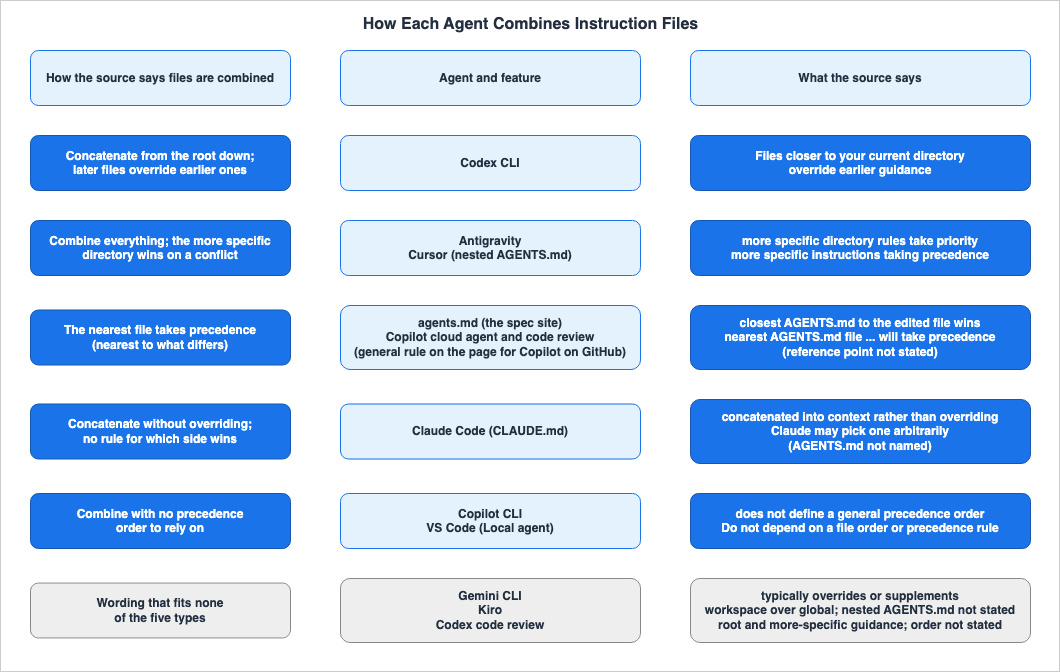
AGENTS.md within Cursor. The third type simply states that the nearest file takes precedence; this includes agents.md and the page for Copilot on GitHub. The fourth type concatenates everything without overriding, and does not specify which file to follow in case of contradictions; Claude Code's CLAUDE.md is an example of this. The fifth type combines files but does not provide a reliable precedence order. Copilot CLI says it does not define a general precedence order, while VS Code tells readers not to rely on order or precedence rules. The sixth type encompasses features that do not fit into any of the previous five categories. Gemini CLI says more specific content typically overrides or supplements more general content. Kiro gives only the precedence between global and workspace steering. Codex code review indicates which instructions it applies, but does not specify the order.In the GitHub documentation, the page for Copilot on GitHub is categorized as the third type, while the Copilot CLI page is the fifth type. The VS Code documentation is also categorized as the fifth type. Even within OpenAI's Codex, Codex CLI is the first type, while Codex code review is the sixth type.
2.3 Where Reading Stops — Size Limits
| Feature | Size limit |
|---|---|
| Codex CLI | project_doc_max_bytes (default: 32 KiB). Whether it caps the combined size or each file is split across the sources (Section 7). Empty files are skipped. |
| Codex code review | Not found in the sources. |
| Copilot cloud agent | Not found in the sources. |
| Copilot code review | Not found in the sources. |
| Copilot CLI | Not found in the sources. GitHub Copilot CLI command reference says that imports are resolved recursively up to a depth limit, with cycle and size guards, but does not give the values. |
| VS Code Local agent | Not found in the sources. |
| Claude Code | Loads a CLAUDE.md of up to 4 MiB in full and skips a larger file. The page recommends a target of under 200 lines per file. |
| Gemini CLI | A size limit for instruction files was not found in the sources. The breadth of the subdirectory scan is 200 directories by default (context.discoveryMaxDirs). The import depth is 5 levels by default. |
| Antigravity | A rule file over 24,000 bytes is truncated (measured after expanding includes). Active global rules and always_on rules share a combined budget of 20,000 tokens. If this limit is exceeded, the largest rule files are demoted to pointers that show only the path and description instead of the full content. |
| Cursor | Not found in the sources. The page recommends keeping rules under 500 lines. |
| Kiro | Not found in the sources. |
The size of the limit and what happens when it is reached vary by agent. Custom instructions with AGENTS.md says that when the combined size reaches the limit, the Codex CLI stops adding files (as Section 7 shows, the sources disagree). Claude Code skips entire
CLAUDE.md files that exceed 4 MiB. Antigravity truncates files exceeding 24,000 bytes, and if the total exceeds the token budget, it demotes the largest rule files to pointers. Gemini CLI's 200 is the number of directories scanned, not the size of a file. The recommended guidelines of 200 lines for Claude Code and 500 lines for Cursor are suggestions, not strict limits. Adding repository custom instructions for GitHub Copilot includes an example prompt for instructing the Copilot cloud agent to generate instruction files, which mentions a limit of two pages. However, this is a directive in the prompt itself and does not represent a general limit.2.4 Other Agents' Files, and Files That Are Not Read
| Feature | Other agents' files, fallback file names, and files not read |
|---|---|
| Codex CLI | In each directory, checks AGENTS.override.md, then AGENTS.md, then the names listed in project_doc_fallback_filenames. If AGENTS.override.md exists, the AGENTS.md in the same directory is ignored. File names not listed in this list are ignored. |
| Codex code review | Follows the ## Code Review Rules section of AGENTS.md. Other file names were not found in the sources. |
| Copilot cloud agent | Instead of AGENTS.md, a single CLAUDE.md or GEMINI.md in the root can be used (a general rule on the page for Copilot on GitHub). |
| Copilot code review | AGENTS.md, CLAUDE.md, GEMINI.md, REVIEW.md. |
| Copilot CLI | Searches for CLAUDE.md (including .claude/CLAUDE.md) and GEMINI.md in the same standard locations as AGENTS.md. |
| VS Code Local agent | When the setting chat.useClaudeMdFile is enabled, it searches for CLAUDE.md in the root directory, .claude/CLAUDE.md, ~/.claude/CLAUDE.md, and CLAUDE.local.md. |
| Claude Code | By default, if CLAUDE.md, .claude/CLAUDE.md, or CLAUDE.local.md is in the working directory or any directory above it, AGENTS.md is not read. It explicitly states that it does not read AGENTS.local.md, AGENTS.override.md, or files located under the .agents/ directory. |
| Gemini CLI | The default name is GEMINI.md. You can specify one or an array of names, such as AGENTS.md, in context.fileName. |
| Antigravity | Reads AGENTS.md or GEMINI.md, .agents/AGENTS.md or .agents/GEMINI.md, and .agents/rules/*.md. AGENTS.override.md was not found in the sources. |
| Cursor | Reads CLAUDE.md the same way as AGENTS.md and always applies it to every conversation. It ignores plain .md files within the .cursor/rules directory. |
| Kiro | Reads AGENTS.md as steering. File names of other agents were not found in the sources. |
The handling of a root
CLAUDE.md splits three ways. In Claude Code, if CLAUDE.md exists, it stops reading AGENTS.md by default. The Copilot cloud agent, Copilot code review, Copilot CLI, VS Code's Local agent (when enabled), and Cursor documentation list CLAUDE.md as a file to be read. Codex CLI, Antigravity, and Kiro documentation do not list CLAUDE.md as a file to be read. In Codex CLI, if you add it to project_doc_fallback_filenames, it will be read as a fallback name. However, a fallback name is only tried when there is no AGENTS.md in that directory.Both
AGENTS.override.md and the .agents/ directory are handled differently by agents. Codex CLI's documentation says it reads AGENTS.override.md, while Claude Code explicitly states that it does not read it. Antigravity's documentation says it reads instruction files in the .agents/ directory, while Claude Code explicitly states that it does not. Neither behavior was found in the documentation for other features.2.5 Syntax for Importing Other Files
| Feature | Import syntax and depth |
|---|---|
| Codex CLI | Not found in the sources |
| Codex code review | Not found in the sources |
| Copilot cloud agent | Not found in the sources |
| Copilot code review | Not found in the sources |
| Copilot CLI | Within .github/copilot-instructions.md, AGENTS.md, and CLAUDE.md, use a relative path following the @ symbol. It reads references within the referenced files. Referenced files must stay within the repository (or the custom instructions directory for local instructions), and absolute paths and paths starting with ~/ are not loaded (the CLI command reference differs; Section 7). References within GEMINI.md and *.instructions.md are not expanded. |
| VS Code Local agent | The page says to use Markdown links to reference files or URLs (a general rule of the page). Relative paths resolve from the instructions file. It does not say whether the content is expanded. For the Local agent, chat.includeReferencedInstructions is listed as a setting for linked instructions. |
| Claude Code | @path. Supports both relative and absolute paths, and relative paths resolve from the importing file. Nesting goes at most four levels deep (four hops). References within AGENTS.md using @path are also expanded. |
| Gemini CLI | @file.md. Supports both relative and absolute paths. The default depth is 5 levels. |
| Antigravity | @[label](path) expands the content of the referenced file. @filename rewrites the path as an absolute path and leaves it as a reference without expanding the content. |
| Cursor | Within rules, @filename.ts includes the file within the rule's context. The documentation does not specifically mention AGENTS.md. |
| Kiro | #[[file:<relative_file_name>]]. Line ranges and folder references are available in Kiro CLI V3. Within AGENTS.md, relative paths are resolved from the folder containing AGENTS.md when using Kiro CLI V3. |
Even lines that begin with the same
@ are handled differently. Claude Code and Copilot CLI expand the @ reference within AGENTS.md. Antigravity does not expand @filename. Gemini CLI expands the @file.md within GEMINI.md. Kiro uses a syntax of #[[file:...]] instead of @.2.6 How to Read the Empty Cells
In the tables in this section, when a cell indicates that data could not be found, this means that the information was not present on the pages reviewed for this article. It does not mean that the feature is unavailable. The terms searched for are as follows.- Imports in Codex CLI and Codex code review: Across four pages – Custom instructions with AGENTS.md, Advanced Configuration, Review GitHub pull requests with Codex, and Customization – the search terms
@,import,include, andinlinewere used. The results for@indicated comments that call the Codex code review (e.g.,@codex review). The results forimportincluded the names of telemetry metrics and Python import statements from code examples. The results forincludeandinlinewere not descriptions of importing instruction files.
- Order, precedence, and limits of Codex code review: On Review GitHub pull requests with Codex, the search terms
order,precedence,priority,override,conflict,size,limit,bytes,KiB, andtruncatwere used. One instance ofprioritywas a sentence saying Codex flags only P0 and P1 issues, not a description of precedence between instructions. All other search terms yielded zero results.
- Limits of Copilot's four features: Across four GitHub pages (Adding repository custom instructions for GitHub Copilot, Support for different types of custom instructions, Adding custom instructions for GitHub Copilot CLI, and About customizing GitHub Copilot responses) and the VS Code page, the search terms
size,limit,characters,bytes,truncat,KiB, andmaximumwere used. The results were limited to a single sentence from Section 2.3 regarding prompts for generation, and a few examples of how to write instructions.
- Imports in Copilot cloud agent and Copilot code review: On Adding repository custom instructions for GitHub Copilot, the search terms
@,reference,include, andimportwere used. The results forreferenceincluded a list of references for Copilot Chat responses, as well as links. The results forincludeandimportincluded sentences from generation prompts and descriptions of front matter.
- File size limits for Gemini CLI instruction files: On Provide context with GEMINI.md files and Gemini CLI configuration, the search terms
file size,bytes,truncat, andmax sizewere used. The results fortruncatwere limited to settings for truncating tool output and conversation messages.
- Limits for Cursor and Kiro: Across the Rules pages of the Cursor docs and help, and the Kiro Steering page, the search terms
size,limit,characters,bytes,truncat,maximum, andtokenswere used. The results were zero. The results forlinesincluded a guideline of 500 lines for Cursor, examples of component line counts, a portion of a filename (api-guidelines.md), and a note advising against placing blank lines before the front matter in Kiro.
- Precedence between root and subdirectory
AGENTS.mdin Kiro: On the Kiro Steering page, the search termsprecedence,priority,conflict,nested,closest, andnearestwere used. One instance ofconflictreferred to a statement describing the precedence between global and workspace steering.
- Other filenames and
AGENTS.override.md: The termsCLAUDE.mdandGEMINI.mdwere searched for on Review GitHub pull requests with Codex and the Kiro Steering page, yielding zero results. The termoverridewas searched for on Antigravity's Rules page and Migration - Antigravity CLI, also yielding zero results. One instance ofoverrideon the Kiro Steering page referred to a statement indicating that workspace steering can override global instructions, but it did not discussAGENTS.override.md.
3. When an Instruction File Takes Effect — The Effect Timing Table
This section outlines when instruction files are incorporated into an agent's context and what a running session keeps when they are edited. The information is presented in an Effect Timing Table, using the same columns as found in Mid-Conversation Changes in the Claude API and Managed Agent Runtimes.3.1 Columns and Values
The common columns are as follows:What You Give It: This refers to the data being passed. In this article, this is an instruction file placed at a given location.Where It Is Set: This indicates the location where the data is placed. In this article, this refers to a location in a repository or a home directory.When It Takes Effect: This describes the point at which the change becomes active, as documented in the materials. The values are selected from the vocabulary listed below.What a Running Session Keeps: This specifies what is retained from an ongoing conversation or session when a change is made. Write it only when the source states it explicitly.Where the Source Says So: This indicates the source document that supports the information in that row.
The running session referenced in this article is the instruction context that an agent's session has already loaded.
The values for
When It Takes Effect are selected from the following vocabulary. All seven values have been added in this article. Where the sources describe different triggers, they are not folded into one value.At launch: The instruction is loaded when the agent is launched or the session begins. The source material uses one of the wordings "at launch," "at session start," or "when it starts."When a file there is read: The instruction is loaded when a file within that directory is read.When a tool accesses a file or directory there: The instruction is loaded when a tool accesses a file or directory within that directory.When a file there is read or edited: The instruction is loaded when a file within that directory is read or edited.When working with a file there: The instruction applies when working with a file within that directory or any of its subdirectories.As soon as the file is saved: The instruction is used from the moment the file is saved.When a review runs: The instruction is loaded when a pull request review is performed.
In the
What a Running Session Keeps column, each entry begins with one of the following terms. Unchanged indicates that the running session retains the state of the files as they were when they were initially loaded. Re-read at compaction indicates that the files are re-read during a compaction process. Rows that only describe a general rule or a related sentence, and cells that state The source does not say., do not begin with either of these terms.For cells where the source material does not provide information, write
The source does not say. Before doing so, search the full text of the sources that row cites for the following terms: running, existing, active, session, restart, reload, immediately, as soon as, already, new session, new chat, change, edit, update, stale. If the source material only describes general principles and does not specifically name the subject of that row, do not write The source does not say. Instead, note that fact in the cell. If the source material does not specifically mention a point, but includes relevant text, include that text in the cell.3.2 Effect Timing Table, Part 1 — Codex and GitHub Copilot
| What You Give It | Where It Is Set | When It Takes Effect | What a Running Session Keeps | Where the Source Says So |
|---|---|---|---|---|
Codex CLI's AGENTS.override.md, AGENTS.md, and fallback file names | The Codex home, and each directory from the project root to the working directory | At launch | Unchanged. Codex CLI rebuilds the instruction chain on every run (in the TUI, at the start of each session). The page says to restart Codex CLI in the target directory if the instructions look stale. | Custom instructions with AGENTS.md |
The ## Code Review Rules section of AGENTS.md that Codex code review follows | The root AGENTS.md, and the AGENTS.md in more specific locations that cover each changed file | When a review runs | The source does not say. | Review GitHub pull requests with Codex |
Copilot cloud agent's AGENTS.md, a root CLAUDE.md or GEMINI.md, and .github/copilot-instructions.md | Repository | As soon as the file is saved (a general rule on the page for Copilot on GitHub; it does not name Copilot cloud agent) | The source does not say. | Adding repository custom instructions for GitHub Copilot, Support for different types of custom instructions |
Copilot code review's AGENTS.md, CLAUDE.md, GEMINI.md, REVIEW.md, and .github/copilot-instructions.md | The head branch of a pull request | When a review runs | The source says instructions are read from the head branch, so you can test changes to them in the same pull request without merging them first. It does not name edits made during a review. | Adding repository custom instructions for GitHub Copilot, Support for different types of custom instructions |
Copilot CLI's AGENTS.md, CLAUDE.md, GEMINI.md, and .github/copilot-instructions.md | Standard locations (the repository root, the working directory, the directories between them, and directories in the path of the file being worked on) | The source does not give the point at which files are loaded. It says changes become available when you exit the session and resume it, or start a new session. It does not name when files found in the path of the file being worked on are read. | The source says changes to instructions files are not immediately available for use in active CLI sessions. | Adding custom instructions for GitHub Copilot CLI |
The VS Code Local agent's root AGENTS.md and nested AGENTS.md files (Experimental) | Workspace (settings chat.useAgentsMdFile and chat.useNestedAgentsMdFiles) | The source does not name the point at which these are loaded. The source indicates that project instructions are automatically included based on the selected harness. It also states that VS Code lists nested AGENTS.md files along with their folder locations, allowing the Local agent to read instructions relevant to the task. | The source tells readers to start a new chat with the same harness to test whether instructions are used, and after resolving conflicts. It does not name whether a running chat picks up edits. | Use custom instructions in VS Code |
This table contains two cells that state
The source does not say. These are located in row 2 (Codex code review - Keeps) and row 3 (Copilot cloud agent - Keeps). A search using the terms from Section 3.1 yielded no relevant descriptions on any of the corresponding pages. Review GitHub pull requests with Codex describes the process in terms of individual reviews, but does not mention "sessions." The When cell in row 3 is a cell that only describes general principles. The statement that the files are used as soon as they are saved is a general rule on the page for Copilot on GitHub, but it does not specifically mention the Copilot cloud agent. The Keeps cell in row 4, the two cells in row 5, and the two cells in row 6, do not correspond to any predetermined values or opening terms; instead, the sources' statements were written into the cells. The Keeps cell in row 5 does not begin with Unchanged because the document only states that changes are not immediately available.3.3 Effect Timing Table, Part 2 — Claude Code, Gemini CLI, Antigravity, Cursor, and Kiro
| What You Give It | Where It Is Set | When It Takes Effect | What a Running Session Keeps | Where the Source Says So |
|---|---|---|---|---|
Claude Code's CLAUDE.md, .claude/CLAUDE.md, CLAUDE.local.md (AGENTS.md and .claude/AGENTS.md when none of these exist) | The working directory and the directories above it | At launch | Re-read at compaction (the project-root CLAUDE.md). After /compact, the project-root CLAUDE.md is re-read from disk. CLAUDE.local.md, files in the directories above, and AGENTS.md are not named. | How Claude remembers your project |
Claude Code's subdirectory CLAUDE.md (AGENTS.md when there is no CLAUDE.md in the working directory, the directories above it, or that subdirectory) | Below the working directory | When a file there is read (for CLAUDE.md, see Section 7) | The source says that after compaction, nested CLAUDE.md files reload as Claude reads files they apply to. This sentence does not name AGENTS.md. | How Claude remembers your project |
Gemini CLI's GEMINI.md (or the names set in context.fileName) | ~/.gemini/, workspace directories and their parents | The sources do not give the point at which the scan runs. They say the concatenated content is sent to the model with every prompt, and name the re-scan command /memory reload (Provide context with GEMINI.md files) and /memory refresh (Gemini CLI configuration). | The source says the re-scan command reloads from all locations and updates the AI's instructional context (Gemini CLI configuration). It does not name whether a running session picks up edits when the command is not used. | Provide context with GEMINI.md files, Gemini CLI configuration |
Gemini CLI's JIT GEMINI.md | The file or directory a tool accesses, and its ancestors (up to a trusted root) | When a tool accesses a file or directory there | The source does not say. | Provide context with GEMINI.md files |
Antigravity's AGENTS.md and GEMINI.md (rules in .agents/rules/ vary by trigger) | Each level from the folder of the file being read or edited, up to the workspace root | When a file there is read or edited | The source says always_on rules (including AGENTS.md and GEMINI.md) inject their full content into the system prompt on every turn. It does not name whether an edited file is re-read from disk. | Rules |
Cursor's root AGENTS.md and CLAUDE.md | The project's root directory | The source does not name the point at which these are loaded. It says CLAUDE.md is applied to every conversation and that the contents of applied rules are included at the start of the model context. | The source does not say. | Rules (docs), Rules (help), Using Agent in CLI |
Cursor's nested AGENTS.md | Subdirectories | When working with a file there | The source does not say. | Rules (docs) |
Kiro's AGENTS.md | ~/.kiro/steering/ (IDE and CLI only), the workspace root, and subdirectories | The source states that newly created steering files are available immediately in the IDE, immediately in all chat sessions with the Kiro CLI, and in the next session on the web. This does not explicitly mention AGENTS.md. | Only the same general rule. It does not name running sessions. | Steering |
This table contains three cells that state
The source does not say. These correspond to the JIT Keeps for Gemini CLI in row 4, the root file Keeps for Cursor in row 6, and the nested AGENTS.md Keeps for Cursor in row 7. A search for the terms in Section 3.1 found no mention. Cursor's documentation page states that rules can be activated immediately, but this refers to settings when creating Team Rules on the dashboard, and is not related to AGENTS.md. The Keeps cell for Claude Code in row 2, the two cells for Gemini CLI in row 3, the Keeps cell for Antigravity in row 5, and the When cell for Cursor in row 6 are cells where the source does not name the point and gives only related sentences. Row 8 (Kiro) is a row where the source gives only a general rule. Global files such as ~/.gemini/AGENTS.md in Antigravity (Section 2.1) do not have a row in this table. The Rules page states that standalone global files are always active, without specifying the point at which they are loaded.3.4 What the Tables Show
There are three main scenarios for when files are loaded. The first is during startup, which applies to the Codex CLI and to the working directory and above in Claude Code. Adding custom instructions for GitHub Copilot CLI does not give the point at which files are loaded; it states that changes are only available after exiting and resuming the session, or by starting a new session. The second scenario involves loading files when an agent touches a file. There are four described ways of touching: Claude Code loads files when it reads a file (forCLAUDE.md, see Section 7); Gemini CLI loads files when a tool accesses a file or directory; Antigravity loads files when a file is read or edited; and Cursor applies them while it is working with a file there. The third scenario relates to features that run on GitHub: Copilot cloud agent uses the files as soon as they are saved (a general rule); Codex code review and Copilot code review read them when a review runs.There is limited documentation clearly stating what remains in an active session after editing an instruction file. The Codex CLI documentation indicates that it rebuilds the instruction chain with each execution, recommending a restart. Copilot CLI documentation states that changes are not immediately available within an ongoing session. Claude Code documentation says the project-root
CLAUDE.md is re-read at compaction. Some features give only related sentences. Gemini CLI documentation states that the instruction context is updated by using the rescan command. Copilot code review documentation indicates that it reads from the head branch, allowing users to test instruction changes in the same pull request. VS Code documentation suggests trying changes in a new chat. Antigravity documentation says always_on rules are injected into the system prompt on every turn. Kiro documentation only provides general information about steering files. No relevant description was found in the documentation for Codex code review, Copilot cloud agent, and Cursor.4. Rules for Each Agent
This section quotes the main supporting sentences for each agent, outlining the basis for the information presented in the tables in Sections 2 and 3.4.1 OpenAI Codex — Codex CLI and Codex code review
Codex CLI discovery and merging: The Custom instructions with AGENTS.md page describes discovery in three steps.Project scope: Starting at the project root (typically the Git root), Codex walks down to your current working directory. If Codex cannot find a project root, it only checks the current directory. In each directory along the path, it checks for AGENTS.override.md, then AGENTS.md, then any fallback names in project_doc_fallback_filenames. Codex includes at most one file per directory.Merge order: Codex concatenates files from the root down, joining them with blank lines. Files closer to your current directory override earlier guidance because they appear later in the combined prompt.At the global step, Codex CLI looks in the Codex home (the default is
~/.codex). If an AGENTS.override.md file exists, it reads that file; otherwise, it reads AGENTS.md. At this step it uses only the first non-empty file. The same page states that the search stops at the working directory.Codex stops searching once it reaches your current directoryTherefore,
AGENTS.md files located in subdirectories below the working directory are not included in the search scope for Codex CLI. The page provides an example where an AGENTS.override.md file is placed in the payments service directory, and Codex CLI is launched from that directory using codex --cd services/payments. The expected behavior is that Codex CLI reads the global file, then the AGENTS.md file in the repository root, and finally the override file in the payments directory. The page includes a diagram of the file tree, noting that the AGENTS.md file in the payments directory is ignored because an override file exists.Codex CLI limits: The same page describes limits as follows:
Codex skips empty files and stops adding files once the combined size reaches the limit defined by project_doc_max_bytes (32 KiB by default).In the same Codex documentation, the description of
project_doc_max_bytes is split (Section 7).Codex CLI fallback file names: By adding names to
project_doc_fallback_filenames, Codex CLI will search for files in each directory in the order: AGENTS.override.md, AGENTS.md, and then the names you added. The page states that file names not included in this list are ignored for instruction discovery. After making changes to the configuration, restart Codex CLI or execute a new command.When Codex CLI reads files: The page says the instruction chain is built when Codex CLI starts.
Codex builds an instruction chain when it starts (once per run; in the TUI this usually means once per launched session).The same page advises that if the instructions appear outdated, restart Codex CLI in the target directory. It also notes that because Codex CLI rebuilds the instruction chain each time it runs (or at the start of each session in the TUI), there is no manual cache to clear. To verify the files that were loaded, the page suggests enabling text logging with
codex -c log_dir=./.codex-log and examining the codex-tui.log file.Codex code review: The Review GitHub pull requests with Codex page says Codex code review follows the
## Code Review Rules section of AGENTS.md.Codex searches your repository for AGENTS.md files and follows the applicable code review rules.Codex applies the root and more-specific guidance that covers each changed file, so unrelated changes don't have to carry service-specific context.The criteria for Codex code review focus on each individual file modified in the pull request, rather than the working directory. Within Codex itself, the Codex CLI search stops at the working directory, while Codex code review applies the guidance that covers the changed files. The page also clarifies that these review rules serve as a guide for Codex and do not substitute for testing, branch protection, or required approvals.
4.2 GitHub Copilot — Copilot cloud agent, Copilot code review, Copilot CLI, and VS Code
Copilot on GitHub: Adding repository custom instructions for GitHub Copilot is the page about instructions for Copilot on GitHub. This page describes Agent instructions as follows:You can create one or more AGENTS.md files, stored anywhere within the repository. When Copilot is working, the nearest AGENTS.md file in the directory tree will take precedence.The subject of this sentence is Copilot, and it does not explicitly mention a feature. It also does not specify what is being evaluated to determine the closest match. According to the table on GitHub.com in the Support for different types of custom instructions page, Agent instructions are used with the Copilot cloud agent (
AGENTS.md, CLAUDE.md, GEMINI.md) and Copilot code review (AGENTS.md, CLAUDE.md, GEMINI.md, REVIEW.md). In the same table, the GitHub.com Copilot Chat row does not list Agent instructions. Adding repository custom instructions for GitHub Copilot also says that, instead of AGENTS.md, you can use a single CLAUDE.md or GEMINI.md stored in the root of the repository.The GitHub.com section of About customizing GitHub Copilot responses gives the precedence between types of instructions. From highest to lowest, it is Personal, Repository (Path-specific, Repository-wide, then Agent), and Organization. This section also states that all relevant instructions are passed to Copilot and tells readers to avoid providing conflicting instructions whenever possible. In this list, the Agent instructions (
AGENTS.md) have the lowest precedence in the Repository group.Regarding Copilot code review, the same Adding repository custom instructions for GitHub Copilot page states that, during pull request reviews, instructions are read from the head branch.
When reviewing a pull request, Copilot reads repository custom instructions, agent instructions, and agent skills from the head branch (the branch with your changes), not the base branch.The same note continues, stating that this allows you to test instruction changes without merging them, effectively in the same pull request. Regarding when these instructions become available, the same page states that they are available for use by Copilot as soon as the files are saved (row 3 of Section 3.2).
Copilot CLI: Adding custom instructions for GitHub Copilot CLI states the search locations as follows:
Unless noted in the table below, Copilot CLI discovers repository and agent instruction files in the standard locations: the repository root, the current working directory, intermediate directories between them, and any directories nested in the path of a file it is working on.According to the table on the same page, Copilot CLI searches for
CLAUDE.md in the standard locations and also uses .claude/CLAUDE.md. It also searches for GEMINI.md in the standard locations. While it searches for files in .github/instructions/**/*.instructions.md in the standard locations, it does not search within intermediate directories. Regarding merging, it states:When multiple applicable user-level and repository instruction files exist, Copilot CLI combines their instructions. It removes duplicate copies of identical user-level copilot-instructions.md, repository-wide, and agent instructions, but does not define a general precedence order between these files. Avoid conflicting instructions.On timing, it says changes do not reach active sessions immediately.
Changes you make to custom instructions files are not immediately available for use in active CLI sessions. To apply your changes, exit the current session and then either resume it (for example, run copilot --continue), or start a new session (for example, use /new from within an interactive session).The
/instructions command allows you to list the instruction files found in the current session and toggle their status (enabled or disabled) on a file-by-file basis.VS Code: Use custom instructions in VS Code on code.visualstudio.com states that how instructions are handled is determined by the harness selected in the session.
Instruction support depends on the agent harness selected for your session. Agent Host sessions use the discovery rules and file formats of the selected harness. The Local agent uses the VS Code instruction settings described in this article.For the Local agent, you enable
AGENTS.md with the setting chat.useAgentsMdFile and nested AGENTS.md files with the setting chat.useNestedAgentsMdFiles. Nested AGENTS.md files are Experimental, and the setting is disabled by default. Regarding conflicts, it states:Applicable instruction sources are additive. Do not depend on a file order or precedence rule to resolve conflicts because discovery and merge behavior can differ by harness.The same page recommends that teams using multiple harnesses should, as much as possible, use a common format that all harnesses support. When splitting files, they should ensure consistent requirements and avoid creating conflicting copies. In the VS Code table of Support for different types of custom instructions, the row for VS Code's Copilot Chat lists
AGENTS.md. The only file listed in the row for Copilot code review used from VS Code is .github/copilot-instructions.md.4.3 Claude Code
The detailed rules for how Claude Code loads instruction files are covered in Section 3.1 of the Claude Code Extension Layer Decision Guide. Here, only the text necessary for comparison with other agents is quoted. In its How CLAUDE.md files load section, How Claude remembers your project describes how found files are organized.All discovered files are concatenated into context rather than overriding each other.The order in which files are processed is from the file system root to the working directory, with instructions closer to where Claude was launched being read later. In its section on writing
CLAUDE.md, the same page notes that if two instructions conflict, Claude may arbitrarily choose one. Files in the working directory and the directories above it are loaded at startup, while files in subdirectories are loaded when Claude reads files there (for CLAUDE.md, the CHANGELOG for 2.1.288 differs; Section 7).Regarding
AGENTS.md, the same page states that by default, Claude only reads AGENTS.md files if CLAUDE.md, .claude/CLAUDE.md, and CLAUDE.local.md files are not present in the working directory or any directory above it. Your ~/.claude/CLAUDE.md, your organization's managed CLAUDE.md, and files in .claude/rules/ are not considered in this determination. Furthermore, the text explicitly lists files that are not read.Not read: AGENTS.local.md, AGENTS.override.md, or anything under a .agents/ directoryHow
AGENTS.md files are combined when read under the default setting is not described in the AGENTS.md section. The limit for CLAUDE.md is 4 MiB per file, and a larger file is skipped. This size limitation does not specifically mention AGENTS.md. The Where AGENTS.md differs from CLAUDE.md section of the same page lists three differences between an AGENTS.md read through the Project instructions setting and a CLAUDE.md: InstructionsLoaded hooks, directories added with --add-dir while CLAUDE_CODE_ADDITIONAL_DIRECTORIES_CLAUDE_MD is set, and approval of @path imports of files outside the working directory. Concatenation, the 4 MiB limit, and re-reading after compaction are not among these three. The same page also states that the contents of CLAUDE.md are not part of the system prompt but are passed as a user message following the system prompt.4.4 Gemini CLI and Antigravity
Gemini CLI: Provide context with GEMINI.md files says the CLI concatenates the files it finds and sends them with every prompt, and lists three locations: the global file, workspace directories and their parents, and JIT files. Regarding the JIT file, it states:When a tool accesses a file or directory, the CLI automatically scans for GEMINI.md files in that directory and its ancestors up to a trusted root.In contrast, the section on the same topic in Gemini CLI configuration says it scans subdirectories below the working directory, up to 200 directories by default, and describes how files combine:
Content from files lower in this list (more specific) typically overrides or supplements content from files higher up (more general).These two pages disagree on how subdirectories are handled, the name of the re-scan command, and how content is passed to the model (Section 7). The filename can be modified using
context.fileName. The example in Provide context with GEMINI.md files is this array:{
"context": {
"fileName": ["AGENTS.md", "CONTEXT.md", "GEMINI.md"]
}
}The upward scan stops at the first directory containing the names listed in
context.memoryBoundaryMarkers (the default is [".git"]). An empty array prevents scanning parent directories. This setting requires a restart if changed. Loaded content can be verified using /memory show.Antigravity: The Rules page describes how rules are combined:
Rules are cumulative rather than replacement-based: Antigravity combines all discovered rules across global, workspace, and directory scopes into the prompt. When instructions conflict, more specific directory rules take priority.Directory rules are loaded when Antigravity reads or edits a file, walking up the tree:
Whenever Antigravity reads or edits a file, it walks up the directory tree from that file’s folder to the workspace root, loading rules at each levelAt each level, it reads
AGENTS.md or GEMINI.md, .agents/AGENTS.md or .agents/GEMINI.md, and .agents/rules/*.md. AGENTS.md and GEMINI.md do not use frontmatter and are always active within that directory (always_on). always_on rules are included in full in the system prompt every turn. .agents/rules/*.md uses frontmatter, allowing a choice between always_on, model_decision, glob, and manual. There are two limits.24 KB (24,000 bytes) per-file limit: Antigravity truncates any single rule file that exceeds 24,000 bytes (after expanding @[label](path) includes).There is also a shared budget of 20,000 tokens for both active global rules and
always_on rules. If this limit is exceeded, Antigravity demotes the largest rule files to pointers that show only the path and description instead of the full content, so the agent can read them on demand. There are two include syntaxes: @[label](path) expands the content, while @filename does not.@filename: Does not inline file contents.The Migration - Antigravity CLI page states that the rules governing the workspace context for both Gemini CLI and Antigravity CLI are the same, and that existing rule documents need no changes. However, the import syntax differs between the two products' sources (Section 7).
4.5 Cursor
The Rules page in the Cursor docs states thatAGENTS.md can be used in the project root and subdirectories. Regarding nested AGENTS.md, the documentation says:Instructions from nested AGENTS.md files are combined with parent directories, with more specific instructions taking precedence.Nested
AGENTS.md files are automatically applied when working with files within that directory or its subdirectories. The project rules within .cursor/rules must be files with the .mdc extension; plain .md files are ignored because they lack frontmatter.For
CLAUDE.md, the Rules page in Cursor's help says:CLAUDE.md files are always applied to every conversation, regardless of any alwaysApply frontmatter setting.The same help page states that Cursor reads
CLAUDE.md in the same way it reads AGENTS.md. It says the file is always applied to keep compatibility with projects that also use Claude Code. Rules apply only to Agent (Chat), not to Tab completion, Inline Edit, or Bugbot pull request reviews. For the Cursor CLI, the Using Agent in CLI page says it reads AGENTS.md and CLAUDE.md at the project root and applies them as rules alongside .cursor/rules. This page does not mention AGENTS.md in subdirectories.4.6 Kiro
The Kiro Steering page says Kiro readsAGENTS.md as steering. AGENTS.md does not support inclusion modes and is always included.AGENTS.md files are also discovered in subdirectories throughout your workspace.The same page says each
AGENTS.md in a subdirectory is loaded as steering context alongside the other steering files. On precedence, it gives only the precedence between global and workspace steering.In case of conflicting instructions between global and workspace steering, Kiro will prioritize the workspace steering instructions.Precedence between the root
AGENTS.md and subdirectory AGENTS.md files was not found in the sources. Other files are referenced using #[[file:<relative_file_name>]]. In Kiro CLI V3, relative paths within AGENTS.md are resolved from the folder containing AGENTS.md.5. Where the Same Tree Diverges
This section describes scenarios where, even when using the same instruction file structure, the context differs for each agent, based solely on the information provided in the documentation. This section explicitly states what the documentation does not mention.The file structure consists of an
AGENTS.md file in the root directory (repo/), plus an AGENTS.md file and the handler.ts file to be edited, both located within repo/packages/api/. Only in Section 5.2 is a CLAUDE.md file added to the root directory. Each agent starts in the repo/ directory (with a working directory of repo/) and modifies the packages/api/handler.ts file. The following diagram shows this tree and the files each feature reads in Sections 5.1 and 5.2. In the diagram, blue cells represent files that the documentation states are read. Navy cells include files that the documentation says are not read or not searched. Gray cells are items the documentation does not mention or does not list among the files it reads.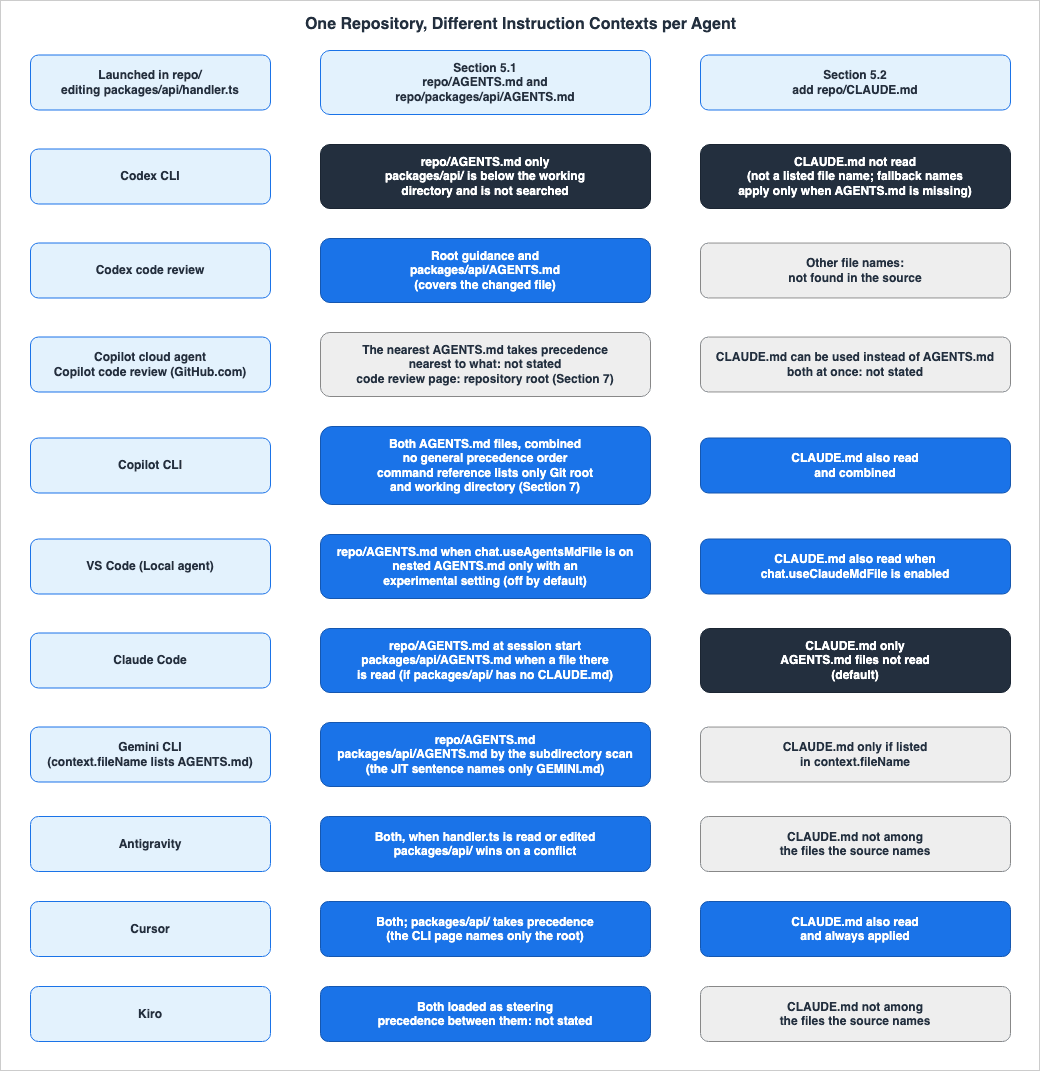
5.1 Root and Subdirectory AGENTS.md Files
Without aCLAUDE.md, the documentation of each feature supports the following.- Codex CLI: Reads the root
AGENTS.md. Thepackages/api/AGENTS.mdfile is located below the working directory and therefore is not within the search scope. To use the instructions forpackages/api/, launch the Codex CLI within that directory (see example in Section 4.1). - Codex code review: For a pull request that changes
handler.ts, it applies the root guidance and the guidance inpackages/api/AGENTS.md, which covershandler.ts. - Copilot cloud agent and Copilot code review: The page for Copilot on GitHub says the nearest
AGENTS.mdtakes precedence (a general rule that names neither feature). It does not say nearest to what. Applying the criterion in the agents.md FAQ (the file closest to the edited file) would givepackages/api/AGENTS.md, but the page for Copilot on GitHub does not say so. About GitHub Copilot code review gives the repository root forAGENTS.md(Section 7). - Copilot CLI: Searches for both the root
AGENTS.md(the repository root, which is the working directory) andpackages/api/AGENTS.md(a directory in the path to the file being worked on). It combines these two without defining a general precedence order. The CLI command reference lists only the Git root and the working directory (Section 7). - VS Code Local agent: Reads the root
AGENTS.md(if thechat.useAgentsMdFilesetting is enabled).packages/api/AGENTS.mdwill only be listed if the Experimental settingchat.useNestedAgentsMdFilesis enabled. This setting is disabled by default. - Claude Code: Reads the root
AGENTS.mdat the start of the session. If Claude opens files in thepackages/api/directory using the Read tool, it will readpackages/api/AGENTS.mdifpackages/api/has noCLAUDE.md. The How CLAUDE.md files load section says theCLAUDE.mdfiles it finds are concatenated rather than overriding one another, but does not name howAGENTS.mdfiles are combined. - Gemini CLI (when
AGENTS.mdis specified incontext.fileName): Reads the rootAGENTS.mdas a file in the workspace. According to the Gemini CLI configuration,packages/api/AGENTS.mdcan be found by scanning below the working directory (this page says it searches for the configured file name). The JIT sentence in Provide context with GEMINI.md files namesGEMINI.md, but it does not specify whether this applies to the name specified incontext.fileName. - Antigravity: When reading or editing
handler.ts, it traverses frompackages/api/to the root, reading twoAGENTS.mdfiles. In case of conflicts,packages/api/AGENTS.mdtakes precedence. - Cursor: Combines the root
AGENTS.mdwithpackages/api/AGENTS.md, which applies while working with files inpackages/api/, and the more specificpackages/api/AGENTS.mdtakes precedence. The Cursor CLI page only mentions the rootAGENTS.md. - Kiro: Finds the two
AGENTS.mdfiles and loads each as steering context. Precedence between the two was not found.
The same
packages/api/AGENTS.md is outside the search scope of Codex CLI, but it is read when the Read tool opens a file there in Claude Code, and it is also read even when a file there is edited in Antigravity. The outcome when conflicts arise, and which instruction remains, varies depending on the tool: Antigravity and Cursor (with the more specific instruction taking precedence), and Copilot CLI (which defines no general precedence order). When Codex CLI is launched in packages/api/, the later file, packages/api/AGENTS.md, overrides the earlier guidance. The documentation for Claude Code does not specify how AGENTS.md files are combined with one another.5.2 Adding One CLAUDE.md at the Root
When aCLAUDE.md is added at the root of the tree in Section 5.1, the documentation of each feature supports the following:- Claude Code: By default, it reads
CLAUDE.mdand does not read theAGENTS.mdfiles at the root or inpackages/api/. It reads a subdirectory'sAGENTS.mdonly when there is noCLAUDE.mdin the working directory or above it. The/configProject instructions values that change this default are covered in Section 3.1 of the Claude Code Extension Layer Decision Guide. - Copilot cloud agent and Copilot code review: The page for Copilot on GitHub states that a single root
CLAUDE.mdcan be used instead ofAGENTS.md. It does not specify whether to use both when bothAGENTS.mdandCLAUDE.mdare present. - Copilot CLI: It also finds
CLAUDE.mdin the standard locations and combines it withAGENTS.md. No general precedence order is defined. - VS Code Local agent: When the setting
chat.useClaudeMdFileis enabled, it also reads the rootCLAUDE.md. Instructions are additive. - Cursor: It reads
CLAUDE.mdthe same way asAGENTS.mdand always applies it to every conversation. - Codex CLI: It ignores
CLAUDE.mdunless it is added toproject_doc_fallback_filenames. Even if it is added, fallback names are only tried when there is noAGENTS.mdin that directory. Therefore, it is not used in trees whereAGENTS.mdexists at the root. The Codex CLI only reads a maximum of one file from any given directory. - Codex code review: No file names other than
AGENTS.mdwere found in the sources. - Gemini CLI: It only reads
CLAUDE.mdif it is listed incontext.fileName. - Antigravity and Kiro: The files their documentation lists as read do not include
CLAUDE.md.
The same single
CLAUDE.md splits the agents three ways. Claude Code no longer reads AGENTS.md. Copilot CLI, the Local agent in VS Code (when enabled), and Cursor will read both AGENTS.md and CLAUDE.md. The documentation for Codex CLI, Antigravity, and Kiro does not list CLAUDE.md among the files they read. For example, if you write instructions specifically for Claude Code in CLAUDE.md, those instructions will also reach Cursor and Copilot CLI. Conversely, if you write instructions intended for all agents in AGENTS.md, they do not reach Claude Code by default as long as a CLAUDE.md exists at the root.5.3 AGENTS.override.md and .agents/
As with the examples in the Codex documentation, whenpackages/api/AGENTS.override.md is added, the Codex CLI (when launched from packages/api/) reads AGENTS.override.md and ignores AGENTS.md in the same directory. Claude Code explicitly states that it does not read AGENTS.override.md. If Claude Code is also launched in packages/api/, it reads packages/api/AGENTS.md and the root AGENTS.md at session start, as long as there is no CLAUDE.md. When launched from the same directory, the Codex CLI and Claude Code will read different files.Antigravity will read instructions placed in
.agents/AGENTS.md or .agents/rules/, but Claude Code explicitly states that it does not read anything under the .agents/ directory. While .agents/ appears in the Codex documentation as a location for skills and plugins, no mention of it as a place to read instruction files was found. Neither AGENTS.override.md nor .agents/ as a location for instruction files was found in the documentation this article read for Copilot's four features, Cursor, Kiro, or Gemini CLI.5.4 A Single @path Line
Suppose anAGENTS.md contains a line such as @docs/api-guidelines.md.- Claude Code: Expands the
@pathwithinAGENTS.md. Nesting goes at most four levels deep. - Copilot CLI: Reads the relative path following the
@symbol withinAGENTS.md, and also reads references in the target file. Referenced files must stay in the repository (the CLI command reference also allows absolute paths; Section 7). - Antigravity: If the format is
@filename, it rewrites the path to an absolute path and retains it as a reference, without expanding the content. To expand the content, use the format@[label](path). - Gemini CLI: Imports with the
@file.mdsyntax. Provide context with GEMINI.md files describes this as imports insideGEMINI.md. It does not name whether imports insideAGENTS.mdare handled the same way whenAGENTS.mdis set incontext.fileName. - Kiro: The import syntax is
#[[file:...]], and no description was found regarding lines starting with@. - Codex CLI, Codex code review, Copilot cloud agent, Copilot code review: No import syntax was found in the sources.
- Cursor: It states that including a file with
@filename.tswithin a rule is possible, but it does not explicitly mentionAGENTS.md.
The same line results in the referenced file's content when used with Claude Code and Copilot CLI, while with Antigravity, it becomes a reference to a path without any content. The Migration - Antigravity CLI page states that it follows the same rules as Gemini CLI, but Gemini CLI's
@file.md imports the content, while Antigravity's @filename does not.6. Keeping One Source
This section lists the mechanisms that the official documentation describes for keeping instructions in one file. It does not say which mechanism to choose.6.1 Mechanisms the Official Documentation Describes
- Agents that directly read
AGENTS.md: Codex CLI, Codex code review, Copilot cloud agent, Copilot code review, Copilot CLI, VS Code's Local agent (settingchat.useAgentsMdFile), Claude Code (when there is noCLAUDE.md), Antigravity, Cursor, and Kiro: their documentation says they readAGENTS.md. - Fallback file names for Codex CLI: By adding existing file names (for example,
TEAM_GUIDE.md) toproject_doc_fallback_filenames, they are treated as instruction files.
project_doc_fallback_filenames = ["TEAM_GUIDE.md", ".agents.md"]
project_doc_max_bytes = 65536- Gemini CLI's
context.fileName: Specify an array of names that includeAGENTS.md(see example in Section 4.4). The agents.md FAQ also lists the same key as the setting that makes Gemini CLI useAGENTS.md. - Claude Code's
@AGENTS.md: Write a single line with@AGENTS.mdinCLAUDE.md. How Claude remembers your project states that even if this import is kept,AGENTS.mdwill not be read twice. The document also mentions the option of creating a symbolic link fromCLAUDE.mdtoAGENTS.md, but advises using the import if anyone works on Windows. - Symbolic Links: The agents.md FAQ lists a method for renaming an existing file to
AGENTS.mdand then creating a symbolic link for backward compatibility.
This is where the split in Section 5.2 matters. If you place only
@AGENTS.md in CLAUDE.md at the root, Claude Code will read the contents of AGENTS.md. Copilot CLI reads AGENTS.md and also expands the @ reference inside CLAUDE.md. Cursor also reads CLAUDE.md and always applies it, but its documentation does not say whether it expands that @ line. Claude Code states that it will not read AGENTS.md twice. The documentation does not explicitly state whether Copilot CLI and Cursor receive duplicate content. Copilot CLI states that it removes duplicate instructions, but it does not say whether content expanded through an import counts as identical to the content of a separate file.6.2 Migration Flows Do Not Merge Files into One
A migration flow that imports another agent's setup is not a mechanism for merging files into one. How Claude remembers your project describes the/import command as follows:which appends a one-time copy of instruction files such as AGENTS.md to the matching CLAUDE.mdIn the source's words, Claude Code's
/import appends a one-time copy to CLAUDE.md. Codex's Import from another agent page says that the destination of imported instruction files is AGENTS.md, and clarifies that the import process neither modifies nor deletes existing agent settings. The same page also says that, in the ChatGPT desktop app, turning on automatic updates keeps imported work in sync with the original agent. However, it does not explicitly state whether instruction files are included in the synchronization. With either flow, two files remain after the import: the original file and the file on the importing side.6.3 What the Official Documentation Recommends
The documents that make a recommendation about conflicts all advise against conflicting instructions. The Copilot CLI page tells readers to avoid conflicting instructions. GitHub.com's About customizing GitHub Copilot responses tells readers to avoid providing conflicting sets of instructions whenever possible. The VS Code page suggests resolving inconsistencies at the source. How Claude remembers your project recommends periodically reviewingCLAUDE.md, nested CLAUDE.md files in subdirectories, and .claude/rules/ to remove outdated or conflicting instructions.Four documents, each in their own way, acknowledge limitations regarding what can be enforced solely through instruction files or rules. How Claude remembers your project states that while Claude will attempt to read and follow
CLAUDE.md, there is no guarantee of strict compliance, especially for ambiguous or conflicting instructions. Review GitHub pull requests with Codex clarifies that review rules cannot replace testing, branch protection, or required approvals. About customizing GitHub Copilot responses notes that, due to the non-deterministic nature of AI, Copilot may not always follow custom instructions in exactly the same way every time. The Rules page in the Cursor docs advises against relying solely on AI guidance as a security control when enforcing Team Rules. Mechanisms that stop actions deterministically are covered in Section 8 of Claude Code Hooks Complete Guide.7. Where the Sources Disagree
This section lists places where the descriptions disagree within one product's sources, between a product and its successor, or between products and the specification. No determination is made as to which description is correct.- Codex's
project_doc_max_bytes: In the same Codex documentation, there are three different explanations. Custom instructions with AGENTS.md says Codex stops adding files when the combined size reaches the limit. Advanced Configuration says it is how much to read from eachAGENTS.md. Configuration Reference says that it refers to the maximum number of bytes read fromAGENTS.mdwhen creating project instructions.
stops adding files once the combined size reaches the limit defined by project_doc_max_bytes (32 KiB by default)project_doc_max_bytes: how much to read from each AGENTS.md fileMaximum bytes read from AGENTS.md when building project instructions.The same Custom instructions with AGENTS.md also states that increasing the limit allows for more instructions to be included before truncation occurs. The troubleshooting section advises that if instructions are truncated, the limit should be increased, or larger files should be divided into nested directories.
- Two Pages for Gemini CLI: Provide context with GEMINI.md files (updated June 18, 2026) and Gemini CLI configuration (updated September 22, 2026) disagree on three points. In the former, subdirectory files are read just in time (JIT) when a tool accesses them. In the latter, it scans directories below the working directory, by default up to 200 directories (configurable). The command to re-scan is
/memory reloadfor the former and/memory refreshfor the latter. However, later in the same section, the latter also lists the subcommands asshowandreload. Regarding how to pass information to the model, the former states that the content is sent with each prompt, while the latter states that it is passed as part of the system prompt. Whether the two wordings are compatible cannot be decided from the sources. - The AGENTS.md Specification Site and Each Agent's Reference Point: The agents.md FAQ states that the
AGENTS.mdclosest to the edited file wins. The Codex CLI documentation states that files closer to the working directory override earlier guidance, and that the search stops at the working directory. The page for Copilot on GitHub states that the nearest file takes precedence but does not name the reference point. The specification site's reference point is not every agent's reference point. - The Antigravity Migration Page and Import Syntax: Migration - Antigravity CLI states that the rules for workspace context are the same for both Gemini CLI and Antigravity CLI, and that existing rule documents need no changes. However, in Gemini CLI,
@file.mdimports content, while in Antigravity,@filenamedoes not (Section 5.4). - The
AGENTS.mdRead by Copilot code review: About GitHub Copilot code review, in a table of customization methods, gives the repository root as whereAGENTS.mdis stored and says it is read automatically from the repository root. The page for Copilot on GitHub, by contrast, saysAGENTS.mdfiles can be stored anywhere in the repository and the nearest one takes precedence (Sections 2.1 and 5.1). - Two Pages for Copilot CLI: Adding custom instructions for GitHub Copilot CLI gives the search locations as the repository root, the working directory, the directories between them, and the directories in the path of a file Copilot CLI is working on, and says that imports of absolute paths and paths beginning with
~/are not loaded. GitHub Copilot CLI command reference gives the locations ofAGENTS.md,CLAUDE.md, andGEMINI.mdas the Git root and the working directory. It says paths in@pathimports can be relative to the instruction file's directory or absolute. - Claude Code's Documentation and CHANGELOG: How Claude remembers your project says a
CLAUDE.mdin a subdirectory is loaded when Claude reads files there. The CHANGELOG for2.1.288, the version the npmlatesttag pointed to (Section 1.3), says it fixed path-scoped.claude/rulesand nestedCLAUDE.mdfiles not loading when Write or Edit creates or changes a file in their scope, and that previously only Read loaded them. For a subdirectory'sAGENTS.md, How Claude remembers your project says it is read when Claude opens a file there with the Read tool, and this CHANGELOG entry does not nameAGENTS.md.
There are two points to note regarding how to interpret the documentation. First, the Rules page in the Cursor docs states that
AGENTS.md can be used at the project root and in subdirectories, while Using Agent in CLI names only AGENTS.md and CLAUDE.md at the project root. The CLI documentation does not explicitly state that it ignores subdirectories; rather, the difference lies in the scope of what is described. Second, GitHub.com's About customizing GitHub Copilot responses lists the precedence order for different types of instructions, while the Copilot CLI documentation states that it does not define a general precedence order between files. These two pages describe different features and do not contradict each other. When reading the GitHub Copilot documentation, be sure to apply precedence statements to the specific feature they describe, and avoid applying them to other features.8. Frequently Asked Questions about Coding Agent Instruction Files
Q1. If you place an AGENTS.md, does every agent receive the same instructions?
Not necessarily. The documentation for the 11 features described in this article says that each either reads theAGENTS.md file or can be set to read it. Gemini CLI reads the file if AGENTS.md is specified using context.fileName. However, the location where it searches, when it reads, and how it combines files can vary (Section 2). For example, an AGENTS.md file located below the working directory is not within the search scope of the Codex CLI. In the VS Code Local agent, nested AGENTS.md files sit behind an Experimental setting that is disabled by default. Claude Code will not read AGENTS.md by default if a CLAUDE.md file is located in the working directory or above it.Q2. Does a subdirectory AGENTS.md override the root AGENTS.md?
It depends on the agent. In Codex CLI, files closer to the working directory come later and override earlier guidance, but files below the working directory are outside the search scope. In Antigravity and Cursor, in the event of a conflict, the instructions for the more specific directory take precedence. Claude Code concatenatesCLAUDE.md without overriding, and states that Claude may arbitrarily choose one in case of conflict; it does not specify how AGENTS.md files are combined with one another. Copilot CLI does not define a general precedence order. The precedence between the root and subdirectory AGENTS.md files was not found in Kiro's documentation.Q3. What happens when the root has both CLAUDE.md and AGENTS.md?
The agents split three ways (Section 5.2). By default, Claude Code only readsCLAUDE.md. Copilot CLI, VS Code's Local agent (when enabled), and Cursor read both. Cursor always applies CLAUDE.md to all conversations. The documentation for Codex CLI, Antigravity, and Kiro does not list CLAUDE.md among the files they read. The page for Copilot on GitHub mentions that CLAUDE.md can be used instead of AGENTS.md, but it does not describe how both are handled when they are present.Q4. Which agents read AGENTS.override.md?
In the documentation this article read, the feature documented as readingAGENTS.override.md is Codex CLI. The Codex CLI searches for AGENTS.override.md in each directory before looking for AGENTS.md, and if it finds AGENTS.override.md, it ignores the AGENTS.md in the same directory. Claude Code explicitly states that it does not read AGENTS.override.md. Nothing about it was found in the documentation for the other features.Q5. Does editing an instruction file affect a running session?
Few features explicitly state this (Section 3.4). The Codex CLI documentation indicates that it rebuilds the instruction chain for each run, so it advises restarting Codex CLI. The Copilot CLI documentation states that changes will not immediately apply to active sessions and recommends either exiting and resuming the session or starting a new one. Claude Code states that it re-reads the project-rootCLAUDE.md after the /compact command. Some features give only related sentences. The Gemini CLI documentation mentions updating the instruction context using a rescan command. Copilot code review suggests trying instruction changes in the same pull request, while VS Code advises testing them in a new chat. Antigravity says it includes always_on rules in the system prompt on every turn. Kiro's documentation only provides general guidelines regarding steering files. No such information was found in the documentation for Codex code review, Copilot cloud agent, or Cursor.Q6. Is there a size limit on instruction files?
The size limits are specified for Codex CLI (project_doc_max_bytes, default is 32 KiB), Claude Code (CLAUDE.md allows up to 4 MiB per file), and Antigravity (allows 24,000 bytes per file, with a total budget of 20,000 tokens). The size limits and how files are handled when those limits are reached differ (see Section 2.3). The sources disagree on whether the limit for Codex CLI applies to the total size or to individual files. Gemini CLI specifies limits not on file size, but on the number of directories scanned (default: 200) and the import depth (default: 5 levels). No size limits were found in the documentation for Codex code review, Copilot's four features, Cursor, or Kiro.Q7. Has Gemini CLI been discontinued?
The notice on the geminicli.com pages this article read names unpaid-tier users and Google One users as the users for whom Gemini CLI was replaced. For these users, Gemini CLI was replaced with Antigravity CLI on June 18, 2026. The Gemini CLI documentation continues to be updated, and the repository released versionv0.62.0 on September 29, 2026. The Antigravity migration page states that the rules for workspace context remain the same, but the import syntax is different (Section 7).Q8. Are instruction files a mechanism that makes agents comply?
Four documents state that compliance cannot be guaranteed solely through instruction files or rules (Section 6.3). The Claude Code documentation states that there is no guarantee that the instructions will be strictly followed. The Codex code review documentation says review rules do not replace tests or required approvals. The GitHub documentation on customizing GitHub Copilot responses notes that Copilot may not consistently follow custom instructions. Finally, the Rules page in the Cursor docs advises against relying on AI guidance as the sole means of security control. Mechanisms that stop actions deterministically are discussed in the Claude Code Hooks Complete Guide.9. Summary
This article details 11 features across seven products, outlining how each company describes the process of reading instruction files. The AGENTS.md specification site states that theAGENTS.md closest to the edited file takes precedence. However, the rules described in each agent's documentation are not consistently aligned with this statement.The starting points for discovery typically fall into four categories: the working directory, modified files, the path of the file being worked on, and files accessed by the agent. The methods of combining files vary: some, like Codex CLI, concatenate from the root, with later files overriding earlier ones; others, such as Antigravity and Cursor's nested
AGENTS.md, combine everything, with the more specific file taking precedence; some simply state that the nearest file takes precedence (agents.md, and the page for Copilot on GitHub); and others, like Claude Code's CLAUDE.md, concatenate without overriding and do not specify which file to follow when there are contradictions. Still others, such as Copilot CLI and VS Code, give no precedence order to rely on, and some fit none of these types (Section 2.2). The size limits differ in size and handling: Codex CLI has a default limit of 32 KiB, Claude Code's CLAUDE.md has a limit of 4 MiB, and Antigravity has a limit of 24,000 bytes.Even within the same vendor, discrepancies exist. Codex CLI bases its operation on the working directory, while Codex code review uses the modified file as its reference. The page for Copilot on GitHub states that the nearest file takes precedence, while the Copilot CLI page states that no general precedence order is defined. With a single root
CLAUDE.md, Claude Code stops reading AGENTS.md by default, while Copilot CLI and Cursor also read CLAUDE.md. Codex CLI reads AGENTS.override.md, and Claude Code states explicitly that it does not. Claude Code and Copilot CLI expand lines beginning with @, but Antigravity does not expand @filename.Any items not found in the documentation are explicitly noted as not found. This includes the import syntax for Codex CLI, Codex code review, Copilot cloud agent, and Copilot code review; the limits for Codex code review, Copilot's four features, Cursor, and Kiro; the reference point of nearest on the page for Copilot on GitHub; the precedence between Kiro's
AGENTS.md files; and, for many features, whether edits reach a running session. Where the documentation is inconsistent (e.g., Codex's limits, and the two pages for Gemini CLI), each version is presented. This article reflects the descriptions found in each company's documentation as of October 3, 2026.10. References
- AGENTS.md
- Custom instructions with AGENTS.md - Codex
- Advanced Configuration - Codex
- Configuration Reference - Codex
- Review GitHub pull requests with Codex
- Import from another agent - Codex
- Customization - Codex
- Adding repository custom instructions for GitHub Copilot - GitHub Docs
- Support for different types of custom instructions - GitHub Docs
- Adding custom instructions for GitHub Copilot CLI - GitHub Docs
- About customizing GitHub Copilot responses - GitHub Docs
- About GitHub Copilot code review - GitHub Docs
- GitHub Copilot CLI command reference - GitHub Docs
- Use custom instructions in VS Code
- How Claude remembers your project - Claude Code Docs
- Claude Code CHANGELOG
- Provide context with GEMINI.md files - Gemini CLI
- Gemini CLI configuration - Gemini CLI
- Memory Import Processor - Gemini CLI
- Rules - Google Antigravity Docs
- Migration - Antigravity CLI - Google Antigravity Docs
- Rules - Cursor Docs
- Rules - Cursor Help
- Using Agent in CLI - Cursor Docs
- Steering - Kiro
- Releases - openai/codex
- Releases - github/copilot-cli
- Releases - google-gemini/gemini-cli
- @anthropic-ai/claude-code - npm
- CLI Coding Agents Comparison - Claude Code, Codex CLI, Gemini CLI, and More
- Claude Code Extension Layer Decision Guide - Choosing Among Skills, Subagents, Hooks, and Plugins
- Claude Code Operator's Handbook
- Claude Code Features and Settings Reference 2026
- Claude Code Harness and Environment Engineering: Designing the Frontline Where Local AI Agents Actually Live
- Claude Code Hooks Complete Guide - Deterministic Enforcement Across the Tool Lifecycle
- Mid-Conversation Changes in the Claude API - System Messages, Tool Changes, Per-Message Effort, and What the Prompt Cache and Preserved Thinking Keep
- Managed Agent Runtimes - What Claude Managed Agents, the OpenAI Agents API, Amazon Bedrock, and GKE Agent Substrate Each Run for You, and What Stays With You
- AWS History and Timeline regarding Amazon Q - Overview, Functions, Features, Summary of Updates, and Introduction
References:
Tech Blog with curated related content
Written by Hidekazu Konishi