Claude Code Compaction and Long-Session Operations Guide - Managing Context Across Long and Multi-Session Work
First Published:
Last Updated:
It deliberately stays narrow. The always-on layers that shape every session — the
CLAUDE.md hierarchy and the auto-memory system — are explained in depth in the Claude Code Extension Layer Decision Guide and the Claude Code Operator's Handbook, and this guide does not re-explain them. What it adds is the missing lifecycle view: the path from context filling up, to compaction, to resuming tomorrow, treated as one continuous operational concern.1. Introduction
Most guidance about Claude Code's memory talks about durable knowledge: what to put inCLAUDE.md, how the auto-memory MEMORY.md index works, where skills live. That knowledge is real and important, but it is not the thing that bites you at hour three of a refactor. What bites you is the working context — the live transcript of file reads, tool outputs, and back-and-forth that grows monotonically until Claude Code has to do something about it. When it does, earlier turns get summarized, and the model that confidently described your architecture an hour ago now asks you which file the config lives in.This guide answers three questions, in order:
- How is context consumed and reclaimed during a session? What occupies the window, what grows fastest, and how you observe it before it becomes a problem.
- What happens during compaction, and what should you do before it hits? What survives the summary, what is lost, and how to make sure the load-bearing state survives by design rather than by luck.
- How do you split and continue a task across sessions? When to stop, how to resume, and what minimum context to hand the next session so it picks up where the last one left off.
The scope boundary is deliberate. Where a topic belongs to a neighboring layer, this guide states the connection in a sentence or two and links out. The decision of what to put in
CLAUDE.md versus memory versus a skill is a layer-selection question answered in the Extension Layer Decision Guide. The exhaustive list of settings keys lives in the Features and Settings Reference. Environment and permission design lives in the Harness and Environment Engineering Guide. This guide owns the lifecycle in between.One note on freshness: the commands, flags, and behaviors described here were verified against the official Claude Code documentation at the time of writing, and the References section lists the exact pages. Compaction and session features evolve quickly; where the official docs describe a behavior qualitatively rather than with a fixed number, this guide does the same rather than inventing a threshold.
2. The Context Lifecycle in a Claude Code Session
A Claude Code session has a single budget — the model's context window — and everything the model can "see" at any moment has to fit inside it. Understanding what fills that budget, and how it grows, is the prerequisite for everything else in this guide.2.1 What occupies the context window
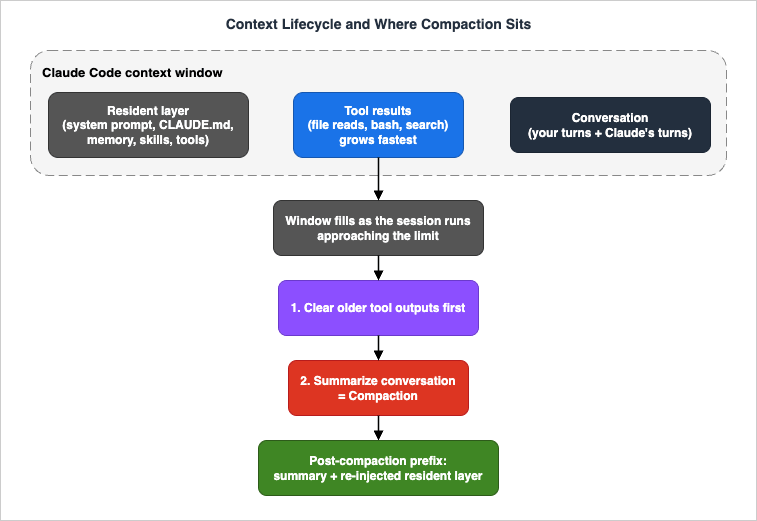
The window holds three broad categories of content, with very different growth behaviors:- The resident layer. This is loaded near the start of the session and tends to stay: the system prompt, your project and user
CLAUDE.mdfiles and any unscoped rules, the auto-memoryMEMORY.mdindex, the descriptions of available skills, and the definitions of the tools Claude can call. It is largely fixed in size for a given project. The mechanics of how these files load and in what order are covered in the Extension Layer Decision Guide; for this guide, the point is that the resident layer is the floor your working context sits on top of. - Tool results. Every file Claude reads, every
bashcommand's output, every search result is appended to the transcript. This is almost always the fastest-growing category and the one most worth managing. A handful of large file reads or a verbose test run can consume a surprising fraction of the window in a single turn. - The conversation. Your messages and Claude's replies — including its reasoning and the tool-call requests themselves — accumulate turn by turn. Individually small, collectively significant over a long session.
The model uses prompt caching to keep this efficient on the cost and latency side, but caching does not change the fundamental fact: all of it counts against the window, and the window is finite.
2.2 How the window fills, and what the limit is
By default, Claude Code operates against a 200,000-token context window. Models that support an extended window — Claude Fable 5, Claude Opus 4.6 and later, and Claude Sonnet 4.6 — can run with a 1,000,000-token window, which Claude Code exposes through the[1m] model variant (for example opus[1m] and sonnet[1m], or appending [1m] to a full model name via /model). The extended window can be disabled with the environment variable CLAUDE_CODE_DISABLE_1M_CONTEXT=1. Availability of the 1M window depends on your plan and account; consult the official documentation for the current terms rather than assuming.A larger window buys headroom, not a different lifecycle. As the official documentation puts it, compaction works the same way at the larger limit — you reach the ceiling later, but you still reach it, and everything in this guide still applies. Treating the 1M window as "infinite context" is the single most common way teams walk into a context-loss surprise.
2.3 Observing context usage before it becomes a problem
You cannot manage what you cannot see. Claude Code gives you several ways to watch the window, and using them proactively — not after the model has already forgotten something — is the habit that separates smooth long sessions from frustrating ones./contextvisualizes current context usage as a colored grid, with a per-category breakdown and optimization suggestions for context-heavy tools, memory bloat, and capacity warnings. Run/context allto expand the per-item breakdown when the display is collapsed. This is the single most useful command for answering "where did my window go?" — it shows you whether the pressure is coming from tool results, resident files, or the conversation./usage(with aliases/costand/stats) reports token usage for the session.- The status line can surface context continuously. The data Claude Code passes to a status-line script includes the percentage of the window used, the percentage remaining, the configured context window size (200,000 by default, or 1,000,000 for extended-context models), and a flag for whether the total exceeds 200,000 tokens. The status line is re-evaluated after a compaction finishes, so it reflects the post-compaction state. The Features and Settings Reference covers status-line configuration in detail.
The practical rule: glance at
/context whenever a session starts feeling long, and especially before kicking off a large operation (a broad search, a big file read, a long-running build). Seeing 80% used before you start a 30,000-token operation tells you to clear or compact first, instead of being surprised by an automatic compaction mid-task.3. Compaction: What Actually Happens
Compaction is the mechanism by which Claude Code keeps a long conversation inside a finite window. Understanding precisely what it does — and what it cannot do — is what lets you work with it instead of being caught off guard by it.3.1 Automatic compaction
As a session approaches the context-window limit, Claude Code manages the window automatically by compacting the conversation: it replaces the earlier history with a structured summary so that work can continue. The official documentation describes the trigger qualitatively, as "approaching the limit," and does not publish a fixed percentage or token threshold; this guide follows that and does not invent one.The summary keeps your requests and intent, the key technical concepts in play, the files you examined or modified along with important code snippets, the errors encountered and how they were fixed, pending tasks, and the current state of work. What it drops are the full tool outputs and the intermediate reasoning — the bulk that made the window fill in the first place. In the official phrasing: your requests and key code snippets are preserved; detailed instructions from early in the conversation may be lost.
There is a failure mode worth knowing about. If the context refills almost immediately after each compaction — for example because a single tool keeps producing more output than the summary reclaims — compaction reclaims little and the session can stall, repeatedly compacting without making forward progress. Treat that "thrashing" as a signal, not something to push through: it means the working pattern itself needs to change (smaller reads, delegation to a subagent, a fresh session), rather than continuing to compact.
Automatic compaction is enabled by default. It can be turned off through Claude Code's interactive configuration if you prefer to manage the window entirely by hand; the Operator's Handbook covers that toggle among the day-one settings. Leaving it on is the right default for most work — the failure mode of disabling it is hitting a hard wall mid-task with no summary at all.
3.2 What survives, in mechanical detail
Beyond the conversation summary, it helps to know exactly how the resident layer behaves across a compaction, because this is where the "Claude forgot the project rules" surprises come from:- The system prompt and output style are unchanged — they are not part of the message history that gets summarized.
- The project-root
CLAUDE.md, unscoped rules, and auto memory are re-injected from disk after compaction. They survive because they are reloaded, not because they were in the summary. - Rules scoped with
paths:frontmatter and nestedCLAUDE.mdfiles are lost until a matching file is read again. If a deep directory'sCLAUDE.mdshaped Claude's behavior earlier, that influence is gone after compaction until Claude next touches a file in that directory. - Invoked skill bodies are re-injected, but capped — the official docs put the limit at 5,000 tokens per skill within a 25,000-token total budget across all skills, with the oldest dropped first when the budget is exceeded. A skill you relied on early may quietly fall out of context after heavy compaction.
The actionable consequence: anything important that lives only in a path-scoped rule, a nested
CLAUDE.md, or a long-since-invoked skill is at risk across a compaction. If it must persist, either keep it in the always-on project-root layer or — as Section 4 argues — write it to a file you can re-read deterministically.3.3 Manual compaction: /compact
You do not have to wait for the automatic trigger. The/compact command summarizes the conversation so far on demand, freeing context while keeping you in the same conversation. Its real power is the optional focus instruction: /compact [instructions] lets you steer what the summary prioritizes. For example:/compact focus on the auth bug fix and the failing tests/compact keep the open TODOs, the files already changed, and the repro stepsIf you find yourself giving the same focus instruction repeatedly in a project, you can set standing compaction guidance in
CLAUDE.md so it applies automatically. The mechanics of CLAUDE.md itself are covered in the Extension Layer Decision Guide; the point here is simply that the compaction summary is steerable both per-invocation and as a standing default.3.4 /clear versus /compact
These two commands are easy to confuse and serve opposite purposes:/compactsummarizes and continues. The conversation thread is preserved as a compressed prefix; Claude still "remembers" the task, minus the dropped detail. Use it when you want to keep working on the same thing but have run low on window./clearstarts a new conversation with empty context. The previous conversation is not deleted — it stays available through/resume— but the current window is wiped clean. (/clearaccepts an optional name to label the previous conversation in the resume picker, and has the aliases/resetand/new.) Use it when you are switching to unrelated work.
The decision rule is about continuity of task, not about how full the window is:
| Situation | Command |
|---|---|
| Same task, window getting full, want to keep going | /compact (with a focus instruction) |
| Switching to a different, unrelated task | /clear |
| Same task, but you want a clean slate and you have externalized your state to a file (Section 4) | /clear, then re-read the state file |
That last row is the bridge to the heart of this guide: once your task state lives in a file rather than only in the transcript,
/clear stops being scary. You are no longer trusting the summary to carry your state — you are reloading it deterministically.A related capability worth naming here: the checkpoint and rewind feature (
/rewind, also reachable by pressing Escape twice on an empty prompt) offers targeted "summarize from here" and "summarize up to here" options that compress one side of a chosen message. These are like a surgical /compact — useful when you want to compress a specific stretch of the conversation rather than the whole thing. Section 7 returns to checkpoints in the context of long autonomous runs.4. Before Compaction Hits: State Externalization
This is the central technique of the guide, and the one least covered elsewhere. The idea is simple to state and powerful in practice: the durable state of a long task should live in files, not only in the conversation transcript. Compaction summarizes the transcript and a session ends entirely — but files on disk survive both, unchanged and re-readable on demand.This is a different thing from
CLAUDE.md and auto-memory, which is why it is not a duplicate of those topics. CLAUDE.md and memory hold durable, standing knowledge — project conventions, lessons learned, things true across many tasks. State externalization is about task-scoped working state — the plan, the decisions, and the progress of the specific multi-hour job you are doing right now. It is ephemeral relative to the project, but it must outlive a compaction or a session boundary. The right home for it is an ordinary file in the working tree (or a scratch directory), not the memory layer. For the conceptual background on how agents use memory at large, see the AI Agent Memory Design Guide.4.1 The three things worth externalizing
Not everything needs to be written down. Three categories repay the effort:- The plan. A short, ordered list of the steps the task breaks into, with each step marked done / in-progress / not-started. This is the spine the work hangs on, and the thing most worth surviving a reset.
- The decisions. The non-obvious choices already made and why — "we are using the existing
RetryPolicyclass instead of writing a new one," "the migration runs table-by-table, not all at once." Decisions are expensive to reconstruct and easy to lose in a summary; the model may otherwise re-litigate a settled question after compaction. - The progress log. What has actually been done and verified — which files changed, which tests pass, what the current failing state is. This is what lets a resumed session (or a post-compaction model) tell done from not yet.
A single Markdown file often holds all three. Something as plain as:
# Task: migrate billing service to the new retry policy

## Plan
- [x] Inventory all call sites of the old RetryPolicy
- [x] Add the new BackoffRetryPolicy alongside the old one
- [ ] Migrate call sites table-by-table  <-- IN PROGRESS (3 of 7 done)
- [ ] Remove the old RetryPolicy
- [ ] Run the full integration suite

## Decisions
- Reuse existing BackoffRetryPolicy in src/retry/ -- do NOT write a new one
- Migrate one module at a time; keep both policies until the last one is done

## Progress
- Done: orders/, invoices/, refunds/ migrated and unit-tested
- Next: subscriptions/ (has a custom timeout -- check before changing)
- Failing: none currently; integration suite not yet run4.2 Designing state to survive compaction
Externalizing state changes how you treat compaction. Instead of fearing it, you make it cheap:- Write the plan and decisions to a file early — before the window gets tight, while the context is still rich. A plan captured at 30% window usage is far better than one reconstructed from a summary at 95%.
- Keep the file updated at natural checkpoints — after finishing a step, after making a decision, after a test run changes the failing set. The cost is a few tokens; the payoff is that the file is never stale when you need it.
- When you compact, point the summary at the file. A focus instruction like
/compact keep the contents of PLAN.md in mind; we are on step 4ties the compressed prefix to the durable record. Even if the summary loses detail, the file has it. - After compaction, have Claude re-read the file. Because the file is on disk, re-reading it is deterministic — unlike the summary, it does not "mostly" remember the plan; it reads the exact current state. A single
read PLAN.mdrehydrates the working state precisely.
The mental model is that the transcript is volatile cache and the file is durable storage. Compaction evicts the cache; the file is your write-through copy.
4.3 Using the PreCompact hook to snapshot state automatically
For teams that want this to happen without relying on anyone remembering, Claude Code fires aPreCompact hook event immediately before a compaction occurs. The hook's matcher distinguishes the two triggers — manual (you ran /compact) and auto (Claude Code triggered it on context pressure) — so you can run logic on either or both. A natural use is to snapshot the current plan/progress file, or to append a timestamped marker to it, so that every compaction leaves a durable trace of the state at that moment. The hook system as a whole — event names, matchers, and how to register handlers — is documented in the Features and Settings Reference; the point here is only that compaction has a deterministic hook point you can attach state-preservation to.4.4 The TODO discipline
Claude Code maintains an internal task list during complex work, but that list lives in the transcript and is therefore subject to the same compaction it is meant to survive. Externalizing the TODO list — keeping the canonical version in your plan file, with the in-session list as a working copy — gives you a version that does not evaporate. When you compact,/compact keep the open TODOs preserves the in-session list; the file preserves it regardless. The two together are belt and suspenders, and for any task spanning more than an hour, both are worth having.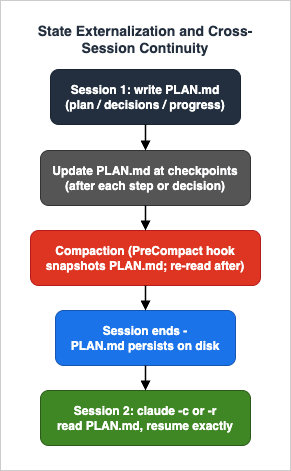
5. Context-Efficient Working Patterns
State externalization protects you when context runs out. The patterns in this section delay that moment — they slow the rate at which the window fills, so you compact less often and lose less.5.1 Delegate investigation to subagents
The most effective context-saver is to push high-volume, low-retention work into a subagent. A subagent runs in its own separate context window; it does the noisy work — reading forty files to find one function, scanning logs, mapping a naming convention — and returns only its conclusion to the main conversation. The bulk never touches your window. This is precisely why subagents help with long sessions: the work that would have filled your context fills theirs instead, and theirs is discarded when they finish.A subagent also has a finite context and supports the same automatic compaction as the main conversation, and its transcript is independent — a subagent that compacts does not disturb your main window, and vice versa. The full mechanics of delegation, isolation, and orchestration — including when delegation pays off and when it does not — are covered in the Claude Code Subagents and Multi-Agent Orchestration Guide. For long-session purposes, the rule of thumb is: if a piece of work will generate a lot of tool output but you only need the conclusion, delegate it.
5.2 Control large tool outputs
Tool results are the fastest-growing category of context (Section 2.1), so disciplining them pays off directly:- Read narrowly. Prefer reading the specific region of a large file over the whole file; prefer a targeted search over a broad one. Every line that enters the window stays until it is compacted away.
- Filter command output before it lands. Piping a verbose command through
head,grep, or a count, rather than letting thousands of lines into the transcript, can be the difference between one compaction and none. A test run that prints only failures is far cheaper than one that prints every passing case. - Avoid pasting large blobs. Pasting a long log or an entire file into the conversation is the manual equivalent of an unfiltered tool result — it consumes the same window. If Claude needs a large artifact, point it at the file so it can read what it needs, rather than pasting the whole thing.
5.3 Reduce unnecessary round-trips
Each exchange adds to the conversation category. Specifying the task, intent, and relevant constraints up front — in one well-formed instruction rather than dribbled out across many turns — both improves results and keeps the conversation compact. Long, ambiguous, multi-turn negotiations are expensive in context as well as in wall-clock time.5.4 Clear between unrelated tasks
The cheapest context you will ever reclaim is the context you never needed to keep. When you finish one task and move to an unrelated one,/clear (Section 3.4) resets the window to its resident floor. Carrying the residue of a finished task into the next one is pure overhead — it fills the window with content that will only ever be compacted away. Clearing between tasks is the long-session equivalent of closing files you are done with.6. Splitting and Resuming Work Across Sessions
Some tasks are simply larger than one sitting — or larger than one context window, even at 1M tokens. The skill that makes this tractable is treating session boundaries as planned waypoints rather than failures, and knowing exactly how to cross them.6.1 When to split
A few signals indicate it is time to end a session deliberately rather than push on:- You are compacting repeatedly and each compaction is costing you context you wanted to keep. Repeated compaction within a single task is a sign the task wants to be split.
- The task has a natural seam — a phase boundary, a "this part is done and verified" point — where the state is clean and easy to capture.
- You are stopping for the day. An overnight gap is a session boundary whether you plan for it or not; planning for it is strictly better.
The precondition for a clean split is the externalized state from Section 4. If your plan, decisions, and progress are in a file, ending a session costs nothing — the next one reads the file and continues. If they live only in the transcript, ending a session means trusting your memory and the model's to reconstruct everything tomorrow.
6.2 Resuming a session
Claude Code persists every session and gives you two primary ways to pick one back up:claude --continue(or-c) loads the most recent conversation in the current directory and continues it. This is the "carry on from where I just was" command — ideal for resuming yesterday's work from the same project directory. It also works in non-interactive print mode (claude -c -p "..."), which matters for scripted and headless workflows.claude --resume(or-r) resumes a specific session by ID or name, or — with no argument — opens an interactive picker to choose among the project's sessions. You can name a session and resume it directly with a fresh instruction in one line, for exampleclaude -r "auth-refactor" "finish the remaining call sites". Inside a session, the/resumecommand (alias/continue) opens the same picker.
Sessions are stored as plaintext JSONL transcripts under
~/.claude/projects/, organized per project directory. They are retained according to the cleanupPeriodDays setting, which defaults to 30 days (minimum 1) and removes older session files at startup. If you intend to resume a task after a long gap, be aware of that retention window — and of the fact that the Features and Settings Reference documents how to adjust it. A resumed session keeps the model it was using when it was saved, so you do not silently change models by resuming.If you want to continue from a session without mutating it — to try an alternative path while keeping the original intact —
--fork-session (and the in-session /branch) creates a divergent copy rather than continuing in place.6.3 The minimum context to hand a resumed session
Resuming loads the prior transcript, but a transcript that was heavily compacted before the session ended is a lossy starting point. This is where externalized state closes the loop: the first thing to do in a resumed session is have Claude read the plan/progress file. That single read reconnects the precise current state — what is done, what is next, what was decided — in a way the summarized transcript cannot guarantee.A reliable resume ritual looks like this:
# From the project directory, continue the most recent session
claude -c
# ...then, as the first instruction:
Read PLAN.md and summarize where we are and what the next step is before doing anything.claude -c from its own directory) over trying to hold several projects in one window; the Operator's Handbook covers the multi-directory workflow and the /add-dir mechanics.6.4 Recovering a session you think you lost
If a session seems to have vanished, it usually has not.claude -c reloads the most recent conversation in the directory; claude -r with no argument opens the picker showing the project's sessions; and claude -r "<name>" finds one by the name you gave it. Because transcripts live on disk under ~/.claude/projects/, "I lost my session" is almost always "I am in the wrong directory" or "I have not opened the picker." The Operator's Handbook treats lost-session recovery as a dedicated playbook.7. Long-Horizon Autonomous Runs
A special case of long-session work is the autonomous run — a task you set Claude Code working on and let it execute over an extended stretch with minimal supervision: an overnight refactor, a broad migration, a large test-fixing pass. The context lifecycle still applies, but the stakes of losing state are higher because no one is watching to catch a bad compaction in real time.7.1 Checkpoints as recovery points
Claude Code automatically tracks its own file edits and creates a checkpoint at each user prompt, letting you rewind to a previous state with/rewind (aliases /checkpoint and /undo, or Escape twice on an empty prompt). The rewind menu offers three restore modes — restore both code and conversation, restore only the conversation (rewind the discussion but keep the current code), or restore only the code (revert files but keep the conversation) — plus the targeted summarize options noted in Section 3.4. Checkpoints persist across sessions and are cleaned up on the same schedule as session files.Two limits matter for autonomous runs. Checkpoints track Claude's own edits through its file tools — they do not capture files changed by
bash commands (a mv, rm, or generated artifact), nor changes made by an external process or a concurrent session. And checkpointing is explicitly not a replacement for version control. For an autonomous run that will touch many files over hours, the cheapest and most complete recovery point is a clean git state: commit before you start, and the working tree itself becomes a checkpoint that covers everything, including bash-driven changes. The Harness and Environment Engineering Guide treats commit-before-risky-work and worktree isolation as first-class reversibility practices.7.2 Designing the run to survive its own compactions
A long autonomous run will compact — possibly several times — without you there to steer it. Design for that:- Externalize the plan and progress before the run starts (Section 4), and instruct Claude to update the progress file after each completed step. Then a compaction mid-run is harmless: the next stretch re-reads the file and continues.
- Define explicit resumption points. Structure the task so that "where to pick up after a failure" is always recorded in the progress file, not inferred. "Step 4 of 7, subscriptions module, custom timeout still to verify" is a resumption point; "somewhere in the migration" is not.
- Make verification part of the loop. Have the run record what it has verified — tests passing, builds green — into the progress file as it goes. This is what lets you trust the state you find when you return, and what lets the run itself distinguish finished-and-checked from merely attempted.
- Watch for compaction thrashing. If a run's working pattern causes context to refill almost immediately after each compaction, the session reclaims little and stalls, repeatedly compacting without making progress (Section 3.1). For an unattended run, that can mean the run effectively halts — another reason to keep individual operations from flooding the window, and to delegate high-volume work to subagents whose context is separate.
7.3 Knowing when a single run has outgrown one session
When a task is genuinely too large for sustained single-session autonomy — when it wants parallelism, or spans far more than one window's worth of work even with diligent externalization — the answer is orchestration rather than a heroically long session. Forking, background sessions, and multi-agent patterns are the tools for that, and they are covered in the Subagents and Orchestration Guide. The signal to reach for them is the same one from Section 6.1, amplified: if you are fighting the context window continuously, stop fighting it and split the work.8. Common Pitfalls
Most long-session pain traces back to a handful of recurring mistakes. Each is presented as symptom, cause, and fix.8.1 Trusting compaction to remember everything
- Symptom. After a compaction, Claude re-asks something it clearly knew, re-litigates a settled decision, or "forgets" a project rule it was following.
- Cause. The lost information lived only in the transcript — in detailed early instructions, a path-scoped rule, or a long-since-invoked skill — all of which are exactly what compaction discards or fails to re-inject (Section 3.2).
- Fix. Externalize the load-bearing state to a file (Section 4) and re-read it after compaction. Do not rely on the summary to carry decisions and plans.
8.2 Pasting or generating huge tool outputs
- Symptom. The window jumps from comfortable to nearly full in one or two turns, triggering an unexpected compaction.
- Cause. A whole-file read, an unfiltered verbose command, or a large pasted blob dumped thousands of tokens into the transcript at once (Section 5.2).
- Fix. Read narrowly, filter command output before it lands, and delegate high-volume investigation to a subagent so the bulk never touches the main window.
8.3 Insisting on "one session for everything"
- Symptom. Repeated compaction within a single task, each one costing context you wanted to keep, and a creeping sense the model is getting less reliable as the session drags on.
- Cause. Treating the session as something that must not end, rather than as a resource with a natural lifespan.
- Fix. Split at a clean seam (Section 6.1). With externalized state, ending and resuming a session is cheap and lossless; pushing a single window past its useful limit is not.
8.4 Resuming without rehydrating
- Symptom. A resumed session starts confidently but on slightly wrong assumptions, or has to rediscover what was already established.
- Cause. The session was resumed from a transcript that had been compacted before it ended, and no deterministic state was reloaded.
- Fix. Make "read the plan/progress file first" the standing opening move of every resumed session (Section 6.3). One file read converts a lossy resume into a precise one.
8.5 Treating the 1M window as infinite
- Symptom. A long run on an extended-context model hits compaction anyway, surprising a team that assumed 1M tokens meant they never had to think about context.
- Cause. A larger window raises the ceiling but does not remove it; compaction works the same way at the larger limit (Section 2.2).
- Fix. Apply the same lifecycle discipline regardless of window size. The 1M window buys you a longer runway, not a different set of rules.
8.6 Mistaking checkpoints for backups
- Symptom. A rewind fails to undo something — a file a
bashcommand deleted, or a change made by another process — leaving the workspace in an unexpected state. - Cause. Checkpoints track only Claude's own file-tool edits and are explicitly not a version-control replacement (Section 7.1).
- Fix. Commit to git before risky or long autonomous runs. The clean git state is the complete checkpoint;
/rewindis a convenience layered on top, not a substitute.
9. Frequently Asked Questions
What exactly survives a /compact?
The conversation summary keeps your requests and intent, key technical concepts, the files examined or modified with important snippets, errors and their fixes, pending tasks, and the current state of work; it drops full tool outputs and intermediate reasoning. Separately, the system prompt is untouched, and the project-rootCLAUDE.md, unscoped rules, and auto memory are re-injected from disk — while path-scoped rules, nested CLAUDE.md files, and older invoked-skill bodies may be lost until re-read. Anything you cannot afford to lose should be in a file you can re-read deterministically (Section 4), not left to the summary.When should I use /clear instead of /compact?
Use/compact when you want to keep working on the same task but are low on window — it summarizes and continues. Use /clear when you are switching to unrelated work — it starts a fresh conversation with empty context while leaving the previous one available via /resume. The decision is about whether you are continuing the same task, not about how full the window is (Section 3.4).How do I resume yesterday's session?
From the project directory,claude -c (or claude --continue) loads and continues the most recent conversation there. To pick a specific older session, claude -r opens an interactive picker, or claude -r "<name>" resumes one by name. Then make your first instruction "read the plan/progress file and tell me where we are," so the resume is grounded in deterministic state rather than a possibly-compacted transcript (Section 6).Where are my sessions stored, and how long do they last?
As plaintext JSONL transcripts under~/.claude/projects/, organized per project directory. They are retained for cleanupPeriodDays days — 30 by default, minimum 1 — after which older files are removed at startup. If you need to resume after a long gap, account for that window (Section 6.2).How do I keep an overnight autonomous run on track?
Externalize the plan and progress to a file before starting and have the run update it after each step; commit to git first so the working tree is a complete recovery point; record verifications (tests, builds) into the progress file as the run goes; and keep individual operations from flooding the window so the run does not thrash on repeated compaction. Then a mid-run compaction is harmless, because the next stretch re-reads the file and continues (Section 7).Does a 1M-token context window mean I can stop worrying about compaction?
No. The extended window — available on Claude Fable 5, Claude Opus 4.6 and later, and Claude Sonnet 4.6, exposed through the[1m] variant — raises the ceiling but does not remove it, and compaction works the same way at the larger limit. You reach the wall later, not never (Section 2.2).Can I see how full my context is before it becomes a problem?
Yes — run/context (or /context all) for a colored, per-category breakdown with optimization suggestions and capacity warnings, use /usage for token totals, and configure the status line to show used/remaining percentage continuously. Glancing at /context before a large operation is the habit that prevents most mid-task compaction surprises (Section 2.3).Is there a way to capture state automatically when compaction happens?
Yes — thePreCompact hook fires immediately before a compaction, with a matcher that distinguishes manual (/compact) from automatic triggers. Attach a handler that snapshots or timestamps your plan/progress file, and every compaction leaves a durable trace (Section 4.3). The hook system is documented in the Features and Settings Reference.10. Summary
Context is the one resource a long Claude Code task is guaranteed to run out of, so the durable skill is not avoiding that moment but designing for it. Three habits do most of the work. Watch the window with/context, /usage, and the status line, so compaction never surprises you. Externalize task state — plan, decisions, progress — to a file, so the things you cannot afford to lose survive a compaction or a session boundary by design rather than by luck. And treat session boundaries as planned waypoints, resuming with claude -c or claude -r and rehydrating from the state file as the first move. Compaction stops being a threat the moment your real state lives somewhere compaction cannot touch.For the layers this guide deliberately left to others: the
CLAUDE.md hierarchy and auto-memory are covered in the Extension Layer Decision Guide; the broad day-to-day command and recovery playbook is the Operator's Handbook; context isolation through delegation is the Subagents and Orchestration Guide; the exhaustive settings catalog is the Features and Settings Reference; environment, permissions, and git-based reversibility are in the Harness and Environment Engineering Guide; and the conceptual underpinnings of agent memory are in the AI Agent Memory Design Guide.11. References
Official Claude Code and Claude documentation (verified at the time of writing):- Manage Claude's context window — Claude Code documentation
- How Claude Code works — Claude Code documentation
- Slash commands — Claude Code documentation
- CLI reference — Claude Code documentation
- Checkpointing — Claude Code documentation
- Hooks reference — Claude Code documentation
- Subagents — Claude Code documentation
- Status line — Claude Code documentation
- Settings — Claude Code documentation
- Model configuration — Claude Code documentation
- Manage costs effectively — Claude Code documentation
- Models overview — Claude documentation
Related Articles
- Claude Code Extension Layer Decision Guide — choosing among CLAUDE.md, skills, subagents, hooks, and plugins (the home for the CLAUDE.md hierarchy and auto-memory mechanics)
- Claude Code Operator's Handbook — the broad day-to-day command, settings, and recovery playbook
- Claude Code Subagents and Multi-Agent Orchestration Guide — context isolation through delegation and parallel fan-out
- Claude Code Features and Settings Reference 2026 — the exhaustive settings and hook-event catalog
- Claude Code Harness and Environment Engineering Guide — environment, permissions, and git-based reversibility
- AI Agent Memory Design Guide — the conceptual underpinnings of agent memory
References:
Tech Blog with curated related content
Written by Hidekazu Konishi