Subagents, an Advisor, or a Dynamic Workflow in Claude Managed Agents - What They Share, Where They Stop, and What Resets
First Published:
Last Updated:
multiagent_20261001 type in the multiagent block of an agent's definition. In this type, if no settings are specified, subagents and dynamic workflows are enabled by default, while the advisor is disabled.Subagents and the threads of a workflow run share the same session sandbox and file system. However, they differ in terms of conversation history, where results are returned, limitations, and how they can be stopped. A session has one budget for all of its threads, and even if the budget is reached, any model requests already initiated by individual threads will continue to run until completion. When migrating from the
coordinator type to the multiagent_20261001 type, any settings that the update leaves out take their default values. Consequently, simply migrating can enable dynamic workflows and subagents that the agent defines independently.This article serves as a design guide, comparing these three approaches by examining what they share, what they keep separate, where limitations exist, what stops and continues when the budget is reached, and what returns to its default during migration. It is not an introduction to the features themselves. The dictionary article published alongside this one (Claude Managed Agents Events and Stop Reasons) covers the meaning of each event and the reasons for stopping. The information presented here was verified on November 9, 2026, and checked again on November 11, 2026. Managed Agents is in beta, and limitations and default values are subject to change.
This article aims to distinguish between what the documentation states, what is not found in the documentation, and where the sources disagree. This article was not tested in a real environment. Pricing is not included.
Related articles on this site:
- Managed Agent Runtimes - What Claude Managed Agents, the OpenAI Agents API, Amazon Bedrock, and GKE Agent Substrate Each Run for You, and What Stays With You
- Network Egress in Claude Managed Agents - allowed_hosts, the Package Manager and MCP Switches, and the Two Rules That Stop web_fetch
- Where the Orchestration Program Runs - Programmatic Tool Calling in the Claude and OpenAI APIs, and Code Mode in Agent Harnesses
- Claude Code Subagents and Multi-Agent Orchestration Guide - Delegation, Parallel Fan-Out, and Custom Agent Definitions
- Agent Reliability Engineering Design Guide - Retries, Loop Detection, Timeout Budgets, and Human Escalation for AI Agents
- Agent Sandboxing and Blast-Radius Isolation on AWS - Choosing the Unit of Each Containment Boundary and What Each One Does Not Stop
- Claude Managed Agents Events and Stop Reasons - What Each Means, and Where the Documentation Says What to Do Next
Table of Contents
- 1. Scope and Assumptions
- 2. How to Read the Tables
- 3. What the Three Approaches Share and Keep Separate
- 4. Designing with Subagents
- 5. Designing with an Advisor
- 6. Designing with Dynamic Workflows
- 7. Budgets and Stopping
- 8. Migrating from the coordinator Type
- 9. Cloud Platforms and Values to Recheck
- 10. Where the Sources Disagree and What They Do Not Say
- 11. Failure Modes
- 12. Frequently Asked Questions about the Three Approaches in Claude Managed Agents
- 13. Summary
- 14. References
1. Scope and Assumptions
This chapter will first define the intended audience, the scope of this article, the relevant source materials, and the terminology used. The following twelve points will outline the conclusions.- All three approaches are settings in the
multiagentblock. In themultiagent_20261001type,subagentsandworkflowsare enabled by default, whileadvisoris disabled by default (Chapter 3). - Both subagents and run threads share the session's sandbox and files, while conversation history is separate for each thread. Vault credentials are session-scoped, while MCP servers are agent-scoped (Chapter 3).
- Subagent delegation is limited to one level, and a session can have at most 25 child threads at a time. Idle threads are counted, while advisor and run threads are not (Chapter 4).
- Only the primary thread can consult with the advisor; subagents cannot. The advisor's model policies determine whether a client can read advice (Chapter 5).
- In dynamic workflows, each agent's results are sent to the program but not to the session agent. The session agent cannot send follow-up messages to a run's threads (Chapter 6).
- The run limits, at their current documented values, are: 64 threads working at once, 1,000 agents that one run starts over its life, a run lifetime of 24 hours by default, and 10 runs open at once in a session by default. The documentation states that it does not guarantee the 64 limit (Section 6.4).
- Even if a run ends
completed, it does not mean the work passed. A run can endcompletedeven if work on its threads fails (Section 6.5). - Budgets can only be applied when a session is created. Once a budget is removed, it cannot be reapplied to that session. A session has one budget for all of its threads, and there is no limit per thread (Section 7.1).
- The budget takes effect between model requests. Even if the budget is reached, any requests already initiated by individual threads will continue to run, potentially exceeding the budget based on the number of active threads (Section 7.2).
user.interruptstops an agent's turn but does not terminate any runs. There is no way to end a run by sending an event; archiving the session can end a run (Section 7.5).- When migrating from the
coordinatortype, ifworkflowsandsubagents.inline_agentsare not specified, both take their default, which is enabled. In updates after the migration, any settings that were not specified keep their stored values (Chapter 8). - On the Claude Platform on AWS, autonomous sessions without user events require reauthentication after 6 hours. On November 11, 2026, the display on the workflow runs page lists Claude Platform on AWS for dynamic workflows with a status of Beta, and the Claude Platform on AWS page lists multiagent orchestration but does not mention dynamic workflows (Chapter 9).
1.1 Intended Audience
This article is intended for the following audience:- Developers designing systems that utilize Claude Managed Agents, specifically those involving multiple agents within a single session.
- Individuals responsible for migrating existing multiagent systems that currently use the
coordinatortype to themultiagent_20261001type. - Personnel responsible for documenting session budgets and procedures for stopping agents in operational manuals.
This article assumes that readers hold the following understandings, and checks each one against the text of the sources:
- An "advisor" is a type of subagent.
- For parallel work, either approach can be stopped in the same way.
- A budget stops the session at exactly its amount.
- Sending a
user.interruptsignal will also stop the run. - Functionality remains consistent even when migrating from the
coordinatortype.
1.2 What This Article Covers and What It Does Not
This article covers what the three approaches share and keep separate, the values of the limits and how they apply, how a budget is attached, what happens when it is reached and how to resume, stopping sequences, default values when migrating from thecoordinator type, 400 errors for workflow_run_open, conditions for advisor combinations and the resulting type of advice, differences in the Claude Platform on AWS, document status, and dates.This article does not cover:
- The meaning of individual events,
stop_reason,session.error, and the types of run results and errors, as well as what clients should do next. The dictionary article published alongside this one (Claude Managed Agents Events and Stop Reasons) covers this. - Comparisons between Claude Managed Agents and execution platforms from other vendors. This site's Managed Agent Runtimes covers this.
- Outbound communication from the sandbox and the list of tool domains. This site's Network Egress in Claude Managed Agents covers this.
- The mechanisms by which programs call tools, specifically within Programmatic Tool Calling. This site's Where the Orchestration Program Runs covers this.
- The CLI subagent for Claude Code. This site's Claude Code Subagents and Multi-Agent Orchestration Guide covers this.
- General discussions on retries, timeouts, and budgeting. This site's Agent Reliability Engineering Design Guide covers this.
- Detailed usage of the advisor tool in the Messages API, pricing and unit costs, model comparisons, and the use of "dreams."
1.3 Date of Review and Materials Reviewed
This article read the following materials on November 9, 2026, and read all of them again on November 11, 2026. Of the statements this article relies on, only two had changed by November 11: the form of the status and platform displays on each page, and the list of models on the advisor tool page. This article gives those two as of November 11, 2026 (see Sections 9.1 and 5.4). All of them are pages of the Claude documentation on platform.claude.com. The body text uses the short English names in parentheses.- Multiagent orchestration page (multiagent page)
- Workflow runs page (workflow runs page)
- Session threads page (session threads page)
- Session budgets page (budgets page)
- Session operations page (session operations page)
- Overview page for Claude Managed Agents (overview page)
- Dreams page (dreams page)
- Advisor tool page for the Messages API (advisor tool page)
- Claude Platform on AWS page (Claude Platform on AWS page)
- Claude Platform release notes (release notes)
Each page includes a display at the beginning and end that indicates the status and availability of the features. This article treats these displays as separate from the main text and refers to them as "displays."
1.4 Terms, and Different Things with the Same Spelling
This article will consistently use the following terms:- session agent: The agent that the session runs. The documentation writes it as the agent that the session runs, and it works on the primary thread.
- primary thread: The session-level event stream. The documentation calls it the primary thread.
- session thread: The flow of events, separated by context, for each agent. This article also calls it just a thread. Threads other than the primary thread are referred to as child threads.
- subagent: An agent to which the session agent delegates tasks. The subagent's thread remains, and the session agent can send it follow-up messages.
- advisor: A model that the primary thread consults. The documentation states that an advisor is not a subagent.
- dynamic workflows: The name of the feature that lets an agent write workflows and start runs.
- workflow: A program written by an agent. It can run multiple agents and combine their results.
- run: The execution of a single workflow. It is the workflow run of the documentation.
- predefined agent: An agent that has been created in advance and listed.
- inline agent: An agent that is not saved. The session agent or a workflow defines it when it hands out work.
- budget: The session budget, which is distinct from the task budgets of the Messages API.
The term "advisor" has a similar name to another entity. The Messages API's "advisor tool" is a feature that you define as a tool, and its configuration and how the advice arrives differ from the "advisor" setting within Managed Agents (see Section 5.5). This article does not merge these two into one term.
In this article,
coordinator is the name of an older type of the multiagent block in Managed Agents.2. How to Read the Tables
This chapter defines the terms for the state of the sources that this article's tables use.2.1 Terms for the State of the Sources
This article uses six terms to describe the state of the documentation. These terms, including their English spellings, will also be used in the tables.- Stated: The documentation contains a statement regarding the matter.
- Stated as not supported: The documentation explicitly states that the matter is not supported or cannot be used.
- Documentation does not list: While a list or table exists, the specific item is not included. This does not necessarily indicate that the matter is unsupported or unavailable.
- No statement found: Despite searching using different search terms and examining different categories of documentation (as described in Section 1.3), no relevant statement could be found. This does not necessarily indicate that the matter is absent or does not occur.
- Sources disagree: The documentation from two different sources provides conflicting statements regarding the same matter. This includes cases where the statements directly contradict each other, as well as cases where the scope, strength, or subject matter differs, and the text alone does not settle which one applies. This article presents both statements and their sources without designating either as incorrect.
- Inference: This represents an inference made by this article, and is not a statement found in any of the documentation. This article says in the same sentence that it is an inference.
This article distinguishes between "Stated as not supported" and "No statement found." The former refers to a statement in the documentation, while the latter indicates that this article was unable to find a relevant statement.
2.2 How This Article Writes Values and States
The values mentioned in this article refer to those in the documentation as of November 9, 2026, and the status displays refer to those as of November 11, 2026. For values that the documentation does not guarantee, this article adds that sentence. For the status of features, this article writes the display and the release notes text as they are, and does not rephrase them as GA.3. What the Three Approaches Share and Keep Separate
This chapter compares what these three approaches share and what they keep separate, in the same session. Figure 1 summarizes this article's comparison.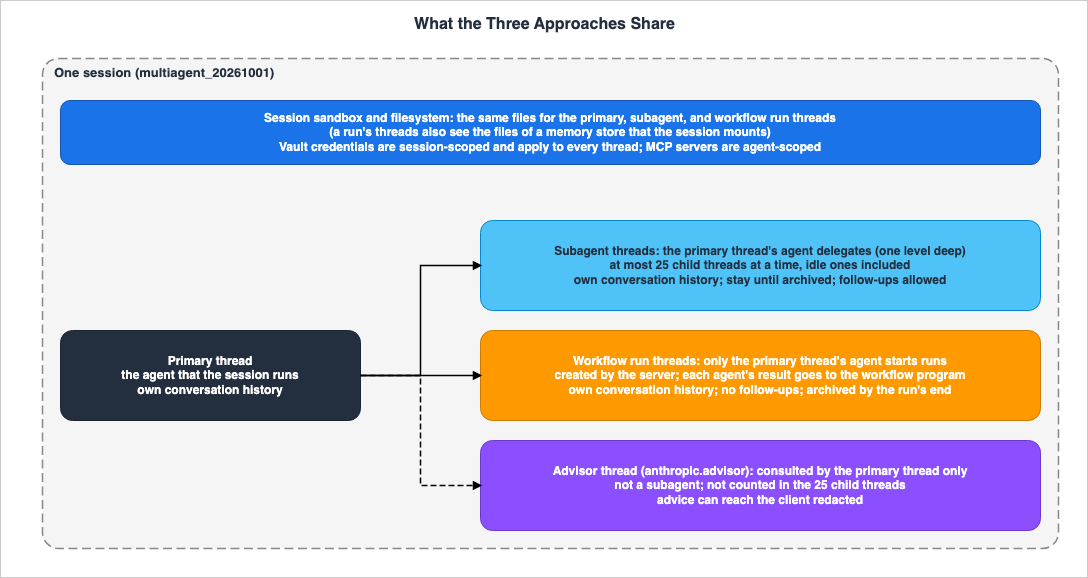
3.1 A Single Configuration Block
The multiagent page describes how the session agent delegates tasks to other agents as follows:With subagents, it delegates tasks itself and reads what each subagent reports. With dynamic workflows, it writes a workflow: a program that runs many agents in the background and combines their results. It can also consult an advisor model for guidance while it does the work itself.You decide which approaches the agent can use, and the agent decides when to use them. These three approaches are grouped in the
multiagent block in the agent's definition. The multiagent_20261001 type allows all three approaches to be used simultaneously, and each can be enabled or disabled individually. Regarding the default values when nothing is specified, the multiagent page states:By default, subagents and workflows are both enabled.The default setting for the advisor is "Disabled" in the configuration table on this page. The following is the minimal definition, creating an agent that has subagents and dynamic workflows enabled, but with the advisor disabled.
{
  "multiagent": { "type": "multiagent_20261001" }
}
A session copies this setting when it is created. Therefore, even if the agent is modified later, an existing session does not change.
3.2 What Is Shared
Regarding subagents, the multiagent page states:All agents share the same sandbox, filesystem, and vault credentials, but each agent runs in its own session thread, a context-isolated event stream with its own conversation history.Regarding a run's threads, the workflow runs page states:
A run's threads work in the session's sandbox, so every thread works with the same files. That includes the files of a memory store the session mounts.So both the subagent threads and the run's threads read and write to the same files in the same sandbox. Files written by one thread are visible to other threads (Inference). The rules governing outbound communication also apply simultaneously to each thread. This aspect is further discussed in Section 5.7 of Network Egress in Claude Managed Agents. The general principles for selecting isolation units are addressed in Agent Sandboxing and Blast-Radius Isolation on AWS.
3.3 What Is Kept Separate
Conversation histories are separated by thread. The workflow runs page also states that each run thread has its own conversation history.MCP servers and credentials have different scopes. The multiagent page states that MCP servers are agent-scoped, while vault credentials are session-scoped. The
vault_ids provided when creating a session apply to all threads. Therefore, the credentials for every MCP server that any agent uses go in the session's vault. To limit the MCP servers that an agent can use, list only the servers it needs in the agent's definition. However, inline agents do not have definitions, so this method cannot be used to restrict them. Inline agents use the MCP servers and tools of the session agent.Models are also determined differently depending on the approach. Predefined agents use the model, system prompt, tools, MCP servers, and skills defined within their own configuration. Inline agents use the model, tools, MCP servers, and skills of the agent that defines them. Inline agents defined within a workflow use the model of the session agent. The workflow runs page says that they get all of the session agent's tools, MCP servers, and skills, but that the API does not guarantee this. To use a different model for some of the agents within a run, create those agents and list them in
workflows.predefined_agents.3.4 Comparison Table by Approach
The following table summarizes, for each approach, the text in Chapters 3 through 6.| Item | Subagents | Dynamic Workflows | Advisor |
|---|---|---|---|
| Default | Enabled (Stated) | Enabled (Stated) | Disabled (Stated) |
| Who Starts It | Delegated by the session agent. Delegation is limited to one level. | Only the primary thread's agent can start a run. Runs are not nested. | Only the primary thread can consult the advisor. Subagents cannot consult it. |
| Thread | Uses its own session thread. Remains until archived. | The server creates the threads and archives them by the end of the run. | A new thread named anthropic.advisor is created for each consultation and terminates automatically upon completion of the consultation. |
| Shared Resources | Sandbox, filesystem, and vault credentials. | The same files within the session's sandbox, including files from mounted memory stores. | For each consultation, the advisor receives the primary thread's conversation so far. |
| Distinct Resources | Conversation history | Conversation history | Consultation tokens are counted towards the advisor's thread usage. |
| Destination of Results | The session agent reads the reports from each subagent. | Each agent's results are passed to the workflow program. When the run ends, the session agent gets a turn to read the results. | The advice is delivered to the primary thread. The advisor model's policy determines whether the client can read it. |
| Follow-up Messages | Can be sent. | Cannot be sent. | The way to message a subagent does not reach it. |
| Concurrent Limit | Up to 25 child threads (including idle threads). | 64 threads at once in one run (the documentation does not guarantee this number), and 1,000 agents over the run's life. The run lifetime defaults to 24 hours, and the default number of open runs is 10. | Not counted towards the 25. |
| Budget | Shares the session's budget. | Shares the session's budget. | The advisor's model cost is factored into the session's budget. |
The values in this table reflect the data as of November 9, 2026.
3.5 Boundaries with Other "Multiple Agents"
In the three approaches discussed in this article, the Managed Agents server runs the agents and the models. Programmatic Tool Calling is a mechanism where model-written code calls tools, and it is not a mechanism for starting agents. The subagent functionality within Claude Code's CLI operates on the user's terminal or in the user's infrastructure. This article does not explain these two again; the published articles in Section 1.2 cover them.4. Designing with Subagents
This chapter outlines the limitations when delegating to subagents, and discusses thread management.4.1 When to Use
The table of approaches on the multiagent page describes scenarios where subagents are used as follows:The agent should follow up with a subagent after it reports, or it needs specialists that you list, with their own system prompts and tools.The subagent's thread remains. The session agent can send follow-up messages to a subagent it called earlier, and that subagent retains the information from its previous interactions. This suits work where the agent reads a report and then asks the same subagent to continue.
4.2 One Level and 25
The delegation limit is only one level. If you list an agent with themultiagent setting as a subagent, the creation and update requests will fail with a 400 validation error.Regarding the maximum number of child threads per session, the session threads page states:
A session can have at most 25 child threads at a time. Idle threads count until you archive them, and the primary thread doesn't count.Advisor consultation threads and run threads are not counted against this limit. When a thread is archived, one slot becomes available. If the subagent's thread, after completing its task, is not archived, it will continue to occupy a slot. What happens when the limit of 25 is reached was not found in the sources in Section 1.3 (No statement found). The search terms were
25, child-thread limit, and thread limit.4.3 Listing Agents
Thesubagents.predefined_agents list can accommodate up to 20 different agents. This limit applies to each list individually; similarly, up to 20 agents can also be listed in workflows.predefined_agents. These two lists are separate, and adding an agent to one list does not automatically add it to the other. The session agent can call multiple copies of each subagent within the session's thread limit.The agents listed in a list are fixed to the version that existed when the list-owning agent was created, or at the time the list was sent in an update. In updates that do not include the list, the fixed version remains unchanged. Even if the referenced agent is updated later, the fixed version will not change. To delegate to a new version, update the list to point to that new version.
By including
{"type": "self"}, the agent can delegate tasks to its own copy.4.4 Turning Off Inline Agents
Inline agents are enabled by default under bothsubagents and workflows. To allow only the agents that you list, set that setting's inline_agents to {"type": "disabled"}. When inline agents are disabled, that setting must include one or more agents in predefined_agents. If the list is empty, the request will fail with a 400 error.5. Designing with an Advisor
This chapter describes the conditions for using an advisor, and how to handle the results from advice.5.1 Only the Primary Thread Consults
The advisor is a model that the primary thread consults during its work. The agent in the primary thread continues the actual work. The multiagent page describes the advisor as follows:The advisor is not a subagent. The agent's list_agents tool doesn't show it, and send_to_agent, which sends a subagent a follow-up message, can't reach it. Only the session's primary thread can consult it; subagents can't.No statement was found on how to let subagents or a run's agents use the advisor's judgment (No statement found). Put the work that needs the advisor's judgment on the agent of the primary thread.
5.2 Two Fields
To enable theadvisor, configure it in the following format. This form has only two fields: type and model.{
"multiagent": {
"type": "multiagent_20261001",
"advisor": { "type": "enabled", "model": "claude-opus-5-5" }
}
}This example writes only
advisor. The multiagent page states that in this case, subagents and workflows keep their defaults, so both are enabled. For an agent that consults the advisor and does all the work itself, set both of these to {"type": "disabled"}.The
advisor cannot be included in the predefined_agents for subagents or workflows. When the advisor is enabled, the name anthropic.advisor will be reserved.5.3 Combination Conditions
There are conditions for combining the advisor model and the agent model. The multiagent page states:The advisor model must meet a minimum capability level, and the agent's own model must not be more capable than its advisor; models of equal capability can pair.The combination is verified when an agent is saved, a session is created, or a consultation is initiated. An invalid pairing gets a 400 validation error at saving and at creation. If the combination is no longer valid when initiating a consultation, only that consultation will fail, and the session will continue. The correct combinations are specified in the "Model Compatibility" section of the advisor tool page. The conditions on the advisor tool page state that the advisor must have a capability of Claude Sonnet 4.6 or higher and must also have a capability equivalent to or greater than the executor. This article does not reproduce the model-specific table, as it has changed with model releases before. The release notes dated September 28, 2026, state, as one of the ways code written for Claude Sonnet 5 can break on Claude Sonnet 5.5, that the Messages API advisor tool rejects Claude Opus 4.8, Claude Opus 4.7, and Claude Sonnet 5 as advisors. That release note does not say whether the same applies to the advisor in Managed Agents.
5.4 Whether the Client Can Read the Advice
The advisor model's policy determines whether the client can read the advice. If the model returns plaintext results, advice will be received as readable text. If the model returns redacted results, the client gets the[{"type": "redacted"}] placeholder on every client surface, and the agent will read the full text of advice on the server side. The advisor in the multiagent page's example is the newest Opus model available to you, and it returns redacted results. As of November 11, 2026, the advisor tool page lists Claude Fable 5.2, Claude Mythos 5.2, Claude Sonnet 5.5, Claude Fable 5.1, Claude Mythos 5.1, Claude Opus 5.5, Claude Opus 5, Claude Fable 5, Claude Mythos 5, and Claude Haiku 5.5 as advisors that return encrypted (redacted) results. The multiagent page states:A model's policy can change with no change to the API, so handle both text and redacted blocks.To ensure advice is logged and readable for human review, it is necessary to select an advisor that returns plaintext results (Inference). Furthermore, the code should be designed to handle both types of results, in case the policy changes. The advisor's reasoning is not exposed through any of the models.
5.5 When Consultation Fails
The multiagent page states that even when a consultation fails, the agent's turn does not fail.A failed or interrupted consultation never fails the agent's turn: the agent continues after a generic notice that the consultation failed.If a session-level
user.interrupt is sent during a consultation, the advisor thread will terminate without delivering advice. A user.interrupt with the advisor thread's session_thread_id abandons only that consultation.The advice is delivered to the primary thread via the
agent.thread_message_received event. The arrival of the advice is not necessarily before the advisor thread's idle and termination events. The meaning of each event is described in the dictionary article (Claude Managed Agents Events and Stop Reasons).The advisor of Managed Agents has no
max_uses, max_tokens, or caching fields, which the advisor tool in the Messages API has. The advice is delivered as thread events, rather than as advisor_tool_result blocks.5.6 Budget and Input Volume
Consultations are billed based on the unit price of the advisor model, and they also count against the session budget at the list price of the advisor model. For each consultation, the advisor receives the previous conversation from the primary thread. Consequently, consultations later in longer sessions tend to require a greater number of input tokens.6. Designing with Dynamic Workflows
This chapter outlines where the results go and the limits when a run executes with dynamic workflows.6.1 Results Go to the Program
A workflow is a program written by the agent. The server runs it in the background, and the session agent either continues its work or ends the turn. The workflow runs page describes where the results go as follows:An agent's result goes to the program, not to the agent that the session runs. The program determines which agents run next, and it writes their prompts.When the run ends, the session agent gets a turn to read what the run did. This turn comes later if the budget has been reached or if the primary thread is waiting for the client. It may not occur after an interrupt, and it will not occur after archiving or termination.
The session agent cannot send messages directly to the run's thread. Unlike a subagent, it cannot read a report and then request a follow-up from the same recipient within a run.
6.2 When the Run Begins
There are no API calls to initiate a run. Instead, the user defines a task viauser.message, and the agent determines whether and when to start the run. The user influences that decision by writing when to use a run in the message or in the agent's system prompt. There is no approval process required before a run can begin. To see the plan first, the workflow runs page says to tell the agent to describe the run and wait for approval. However, the multiagent page says that nothing enforces such an instruction.Only the agent on the primary thread can start a run. Agents within a run's thread cannot initiate their own runs, and runs cannot be nested within each other. Permission policies apply to the tools the run's agents call, but do not apply to the act of starting the run itself.
6.3 Failed Agents
When an agent fails, the server usually runs that agent once more, on a new thread. If it fails again, the program either handles the failure or terminates the run. If the program handles the failure, the run can still endcompleted. Therefore, the workflow runs page says to have the session agent report what failed.A run may create multiple threads for the same task. The workflow runs page says to make the tools that the agents call safe to call twice.
6.4 Limits
The table below outlines four limits for the workflow runs page:| Limit | Value | Scope | What Happens When the Limit is Reached |
|---|---|---|---|
| Number of threads running concurrently within a single run | 64 | Per run | The run will not create new threads until one completes. The documentation states that this number is not guaranteed. |
| Number of agents launched during a run's lifetime | 1,000 | Per run | The server will not launch additional agents, and the run will end with a thread_limit_error. Failed agents may be run again on new threads, so a run can have more than 1,000 threads. |
| Run lifetime | Default: 24 hours, or the lifetime the agent sets | Per run | The run will end with a timeout_error. No event says what lifetime the agent set. |
| Number of runs that can be open concurrently within a session | Default: 10 | Per session | The server will not start new runs. An error workflow_run.error with error.type set to max_workflow_runs_error will be received. Idle runs are also counted. |
The values in the table reflect the documentation's values as of November 9, 2026. Regarding the value of 64, the workflow runs page states:
The API doesn't guarantee this number.The limits apply within different scopes. 64 refers to the number of concurrent threads, while 1,000 refers to the number of agents launched during a single run's lifetime. 10 refers to the number of runs open concurrently within a session. The workflow runs page states that there is no limit to the number of runs a session can initiate throughout its lifetime. A run's lifetime keeps passing during a pause. Runs that stay paused at the budget may end with a
timeout_error. Time spent waiting for the client is also counted towards the lifetime.Threads for a run are not counted against the limit of 25 described in Section 4.2. The server also has other workflow limits and rules not listed in this table. The meaning of each error type is described in the dictionary article (Claude Managed Agents Events and Stop Reasons).
6.5 completed Is Not a Pass
Regarding the completed status in the results for a run, the workflow runs page states:The workflow finished running. The result doesn't say whether the work passed.Even if a thread's task fails, or if a thread cannot be created, the run may still end with a
completed status. To identify failed tasks, you need to examine the events for each thread in the run. Determining whether a task was successful is not based on the completed status itself, but rather on confirmation from the user's side (Inference).6.6 Deciding That the Work Is Done
While a run is open, an idle session alone does not indicate that the work is done. The workflow runs page says that the work is done when two conditions are met: every run you have seen created has itsworkflow_run.status_ended, and after that, a session.status_idle with the stop_reason end_turn arrives that your own request did not cause. Check again, because the agent may start a new run based on the results.6.7 Rate Limits
The work performed by a run is counted against the organization's existing rate limits. Model requests from the run's threads count toward the Messages API rate limits for the model that each thread uses, along with your other traffic. Runs that work many agents at once use room within those limits (Inference).7. Budgets and Stopping
This chapter outlines how to set a session budget, what stops and what continues when the budget is reached, the procedure for resuming, and the order in which to stop activities. Figure 2 illustrates the process when the budget is reached.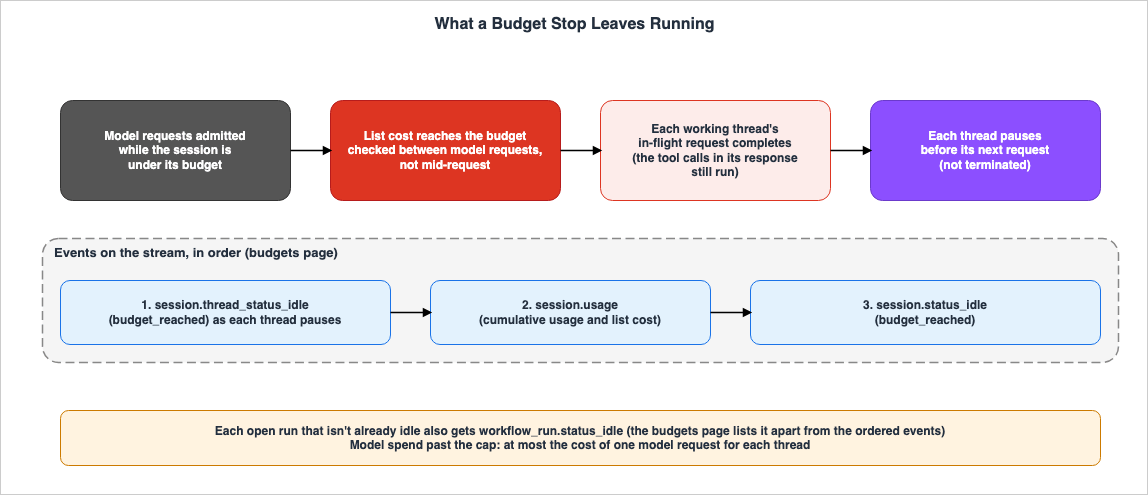
7.1 Only at Creation, and One for All Threads
The budgets page describes when a budget can be attached as follows:A budget can only be attached when the session is created.Requests to add a budget to a session that initially had none will result in a 400 error. Removing a budget is one-way.
Removing a session's budget is one-way: a session whose budget has been removed cannot be given a new one.Therefore, in sessions where you want to maintain a budget limit, modify the amount without removing the budget. The budget amount must be a whole number representing cents in US dollars (USD), expressed as a string.
Even in sessions with multiple agents running, there is only one budget.
A multiagent session has a single budget shared across all of its threads; there are no per-thread caps.Consumption for each thread is calculated based on the list price of the model it is using. Advisor consultations are also counted against the same budget. The budgets page states that there are no per-thread caps (Stated as not supported).
The system cannot measure consumption for models without a list price. If any of the following – a model used by the session agent, an agent listed in either of the
predefined_agents, or the advisor – utilizes a model without a list price, creating a budget-enabled session will result in a 400 error.7.2 Enforced Between Requests
The budgets page and release notes refer to a budget as a "hard cap." However, the budgets page describes where the budget takes effect as follows:The cap is enforced between model requests, not mid-request.The request that carries the total past the cap was accepted while the session was still within the budget, and it runs to completion. Therefore, the list cost for a stopped session may be equal to or slightly above the budget amount. The workflow runs page describes a run as follows:
Each thread completes the model request it already started, so a run can pass the budget by one request for each working thread.The tool calls in the response for that request also run, and their web searches and running time are also included in the list cost. The budgets page describes how budgets are handled as follows:
Treat the budget as a bound on new work rather than an exact stopping point, and size the cap with that margin in mind.The budgets page describes the tolerance for exceeding the limit as follows:
Model spend past the cap is at most the cost of one model request for each thread.The more concurrent threads are running, the larger the upper bound of the overage (Inference). For example, if all 64 threads of a single run (a number that the documentation does not guarantee) are active, that run alone could potentially exceed the limit by the equivalent of up to 64 requests. If the primary thread, subagents, or threads from other runs are also active, that amount is added as well (Inference). Set the budget amount with this margin in mind.
7.3 What Stops and What Continues at the Budget
When a budget is reached, each thread stops before processing the next request. The session does not end but instead enters an idle state, retaining its history and sandbox. The budgets page describes the sequence of events as follows:- A
session.thread_status_idlewith thestop_reasonbudget_reached, as each thread pauses session.usagedisplays the session's total usage and list cost.session.status_idlereportsbudget_reachedas the reason for stopping.
If any runs are still active, each remaining run that is not already idle will also receive a
workflow_run.status_idle notification. The budgets page lists this information separately from the previous three lines and does not indicate its position in the sequence.Threads that exceed the limit with the final request and complete their turn as a result will report
end_turn in their session.thread_status_idle. Nevertheless, the session will still report budget_reached. The budgets page says to treat the session-level stop_reason as the signal that the session stopped at its budget. If a tool call on a thread is waiting for an answer, the session will report requires_action.While the session is at its budget, it accepts only these four events, which settle work already in progress:
user.tool_confirmationuser.tool_resultuser.custom_tool_resultuser.interrupt
Events that initiate new tasks, such as
user.message, will result in a 400 error. While the results of events that are being processed are recorded, no new model requests are initiated. The meaning of each value and the subsequent actions are described in the dictionary article (Claude Managed Agents Events and Stop Reasons).7.4 Resuming
When an update that changes or removes the budget is accepted, any work that the budget paused will automatically resume. Each run that the budget paused will receive aworkflow_run.status_running event. However, if the session's usage includes a model with no list price, only an update that removes the budget resumes the work (changing the budget is rejected).The new budget amount must be strictly greater than the previously used list cost. When a job is paused, the actual cost often exceeds the budget slightly. Therefore, the budgets page says to base the new amount on the reported
usage.list_cost rather than the original budget amount. Since reported values are rounded, it is necessary to set the new budget amount at least one cent higher than the reported value.Runs that an interrupt paused will not resume even if the budget is changed. This also applies to an interrupt sent while the session is already paused at its budget. To continue such a run, you must send a
user.message requesting the run to continue after changing or removing the budget.7.5 Stopping Order
For sessions with a run in progress, the workflow runs page describes whatuser.interrupt does as follows:It stops the agent's turn. It ends no run.After an interrupt, the runs may either pause or continue running, and their events may not show which. There is no way to terminate a run by sending an event.
Ending runs: No event you send ends a run; archiving the session can.To stop a run, send a
user.message instructing the agent to stop it. A stopped run will end with a status of stopped. From the text of the sources, the stopping sequence can be put together as follows (Inference):- Use
user.interruptto stop the agent's turn. - If any tool calls in the run's thread are waiting for a response, respond to them one by one. For calls requesting confirmation, respond with a denial. For custom tool calls, send a result indicating
is_erroris true. - If the session is paused at its budget, either modify or remove the budget.
- Send a
user.messageinstructing the agent to stop the run. - Wait for each run to reach
workflow_run.status_ended. - Once the session becomes idle, archive or delete as needed.
While in the
requires_action idle state, user.message will return a 400 status, so step 2 must precede step 4. Similarly, while in the budget_reached idle state, user.message will also return a 400 status, so step 3 must precede step 4. A paused run will not end on its own until the lifetime threshold is reached.8. Migrating from the coordinator Type
This chapter describes what returns to its default and what becomes enabled when migrating agents from thecoordinator type to the multiagent_20261001 type.8.1 What the coordinator Type Can Do
The coordinator type can also delegate tasks to the subagents that you list and consult an advisor. However, coordinator type agents cannot initiate a run or define subagents themselves. The multiagent page states that the API accepts both types. No statement was found on plans to deprecate the coordinator type (No statement found); the search terms were deprecat, retire, and sunset.The release notes from August 7, 2026, stated that the advisor is configured as an entry with the
{"type": "advisor"} in the multiagent roster. Currently, the multiagent page describes the advisor as the advisor setting of the multiagent_20261001 type, and it is not a list entry.8.2 When Migrating, What You Leave Out Takes Its Default
To migrate, send the entiremultiagent block, with the multiagent_20261001 type, in a single update. Specify the available agents in subagents.predefined_agents. The entries can remain in their current format. If an advisor is present, include the advisor model.This update replaces the entire
multiagent block. The multiagent page states the following about the items you leave out:The update replaces the whole multiagent block, so send the list of agents and the advisor again, as the example does. What you leave out takes its default:For example, if you fail to send the list of subagents, the list will become empty, and you will lose the configured subagents. If you fail to send the advisor, the advisor will be disabled.
The other trap is on the side of what becomes enabled. For the case where you only send the list of subagents and the advisor, as in the multiagent page's example, the same page states:
That block leaves out workflows and subagents.inline_agents, so both take their default and are enabled. The moved agent can also start workflow runs and define subagents itself.If you only want the system to perform actions equivalent to the
coordinator type, you can disable both workflows and subagents.inline_agents in the same update by setting them to {"type": "disabled"}. If the agent only has an advisor and no subagents, set subagents to {"type": "disabled"}.8.3 After Migrating, a Setting You Leave Out Keeps Its Stored Value
Updates after the agent has themultiagent_20261001 type behave the opposite way. The multiagent page describes the following:Once the agent has the multiagent_20261001 type, a setting that a later update leaves out keeps its stored value.The update rules are as follows:
| Sending Method | Migration Update (from coordinator type) | Update After Migration |
|---|---|---|
| Leaving out a setting | Takes its default. workflows and subagents.inline_agents are enabled, subagents.predefined_agents is empty, and advisor is disabled. | Keeps its stored value. |
Sending null | No statement found for the migration update. | Becomes the default value, and all items within it also become the default values. |
Sending a list of predefined_agents | Becomes the sent list. | Replaces the saved list. |
Sending a setting with a different type | No statement found for the migration update. | Replaces the saved setting, and any unwritten items revert to their default values. |
To disable
workflows, send {"type": "disabled"}. Sending null gives the default, which is enabled. The same applies to subagents. If you send null intending to disable it, it will actually enable it (Inference).8.4 Existing Sessions Do Not Change
Agent updates will not affect existing sessions. To use the newmultiagent block, create a new session after applying the update.8.5 Updates While a Run Is Open
While a run is open, requests to update the session's agent will result in a 400 error. Theerror.details.error_code will be workflow_run_open. This also applies to paused runs. Updates to the underlying agent are accepted, and the session will maintain its own copy. Requests that include other fields, such as budget, along with the update will be rejected entirely.Session archiving and deletion are handled differently. The workflow runs page states:
Might return 400 while a run is open, whatever the session's status. The error's error.details.error_code can be "workflow_run_open". Might also succeed.The session operations page also indicates that when a run is active, attempts to archive or delete may either result in a 400 error or succeed. If archiving is successful, each open run will end with
stopped. If deletion is successful, no events will be received reporting the end of the runs. Before archiving or deleting, end the runs according to the order described in Section 7.5.9. Cloud Platforms and Values to Recheck
This chapter outlines the differences for each cloud platform and the values to recheck after the date of review.9.1 Availability Displays and Text
The following table details the availability and descriptions for each page as of November 11, 2026.| Feature | Status Display on the Page | Release Notes Text | Platform Display |
|---|---|---|---|
| Claude Managed Agents | Beta | Released in beta on April 8, 2026 | Lists Claude API, Claude Platform on AWS, and Claude Models on Google Cloud (Anthropic managed). |
| Multiagent Orchestration | Beta | Released in beta on May 6, 2026. Available on Claude Platform on AWS as of May 29, 2026. | Lists Claude API, Claude Platform on AWS, and Claude Models on Google Cloud (Anthropic managed). |
| Dynamic Workflows | Beta (at the top and in the field at the bottom of the page) | Released in beta on October 9, 2026. | Lists Claude API, Claude Platform on AWS, and Claude Models on Google Cloud (Anthropic managed). The field at the bottom of the page lists each of the three with a status of Beta. |
| Session Budget | Beta | Released on August 7, 2026. | Lists Claude API, Claude Platform on AWS, and Claude Models on Google Cloud (Anthropic managed). |
| Advisor (Managed Agents) | Beta (within the multiagent page) | Released on August 7, 2026. Initially presented as roster entries. | Follows the display on the multiagent page. |
| Dreams | Research Preview | Not covered in this article. | Lists Claude API only. |
The overview page states that access to Managed Agents is enabled by default for all API accounts. The same page also notes that MCP tunnels and the dreams feature are available within a limited research preview, and require an application to use.
As of November 11, 2026, both the page display and the release notes describe dynamic workflows as beta. The field at the bottom of the workflow runs page showed "Available" on November 9, 2026, and shows Beta on November 11, 2026. The release notes state that it was released as a beta version. The entirety of Managed Agents is also in beta, and any requests require the
managed-agents-2026-04-01 beta header. This article does not refer to dynamic workflows as generally available (GA). Dreams is a separate feature that organizes agent memory and is on a different axis from the three approaches discussed in this article.9.2 Claude Platform on AWS
The Claude Platform on AWS page lists multiagent orchestration as one of the options available within Managed Agents. It does not mention "dynamic workflows." Furthermore, the description of "dynamic workflows" in the release notes from October 9, 2026, also does not reference Claude Platform on AWS. Conversely, on November 11, 2026, the display on the workflow runs page lists Claude Platform on AWS for dynamic workflows with a status of Beta (the display on November 9, 2026, showed "Available"). The display on the dreams page only lists the Claude API, so the display is written separately for each feature. This article presents how these three sources describe it side by side. This article has not tested whether dynamic workflows work on Claude Platform on AWS.The Claude Platform on AWS page outlines three differences from first-party Managed Agents. Two aspects relate to the design of multiple agents:
A session can run autonomously, without any user events, for up to 6 hours. After 6 hours, the session requires reauthentication before it continues.To reauthenticate, send any user-role event to the session. The same page also states that first-party Managed Agents do not have this time restriction. While run lifetime defaults to 24 hours, Claude Platform on AWS may first require reauthentication after 6 hours if the design involves waiting for a long run without user events (Inference). However, no statement was found that directly links the 6-hour limitation to the run lifetime (No statement found). The search terms were
6 hours, lifetime, and workflow.Another difference is that sessions running on a self-hosted environment cannot be associated with a memory store and will be rejected during creation. While, as described in Section 3.2, a run's threads share files from a mounted memory store, a self-hosted environment within Claude Platform on AWS does not allow the attachment of a memory store. The third difference concerns authentication for workers of self-hosted sandboxes, which this article will not address.
9.3 Values to Recheck
After the date of review, recheck the following values:| Value | Value as of November 9, 2026 | Source |
|---|---|---|
Default for multiagent_20261001 | subagents and workflows are enabled, advisor is disabled | Multiagent page |
| Maximum number of child threads | 25 concurrently, including idle threads | Multiagent page, Session threads page |
Maximum number of predefined_agents | 20 per list | Multiagent page |
| Threads working at once in one run | 64 (not guaranteed) | Workflow runs page |
| Total number of agents per run | 1,000 | Workflow runs page |
| Run lifetime | Default: 24 hours | Workflow runs page |
| Concurrent number of runs that can be opened | Default: 10 | Workflow runs page |
| Advisor models that return redacted results | 10 models from Section 5.4 (as of November 11, 2026) | Advisor tool page |
| Autonomous session re-authentication | 6 hours (Claude Platform on AWS) | Claude Platform on AWS page |
| Display of feature status and availability | Table in Section 9.1 | Each page, release notes |
10. Where the Sources Disagree and What They Do Not Say
This chapter summarizes instances where the provided materials contain discrepancies or omissions.10.1 Where the Sources Disagree
- Status of dynamic workflows: on November 9, 2026, the field at the bottom of the workflow runs page showed Available, and the release notes from October 9, 2026, said beta (Sources disagree). On November 11, 2026, the field on the page shows Beta, so the two now agree. This article does not refer to dynamic workflows as "GA."
- Budget terminology: The budgets page and the release notes use the term "hard cap," while the same budgets page states that requests exceeding the limit will continue to run and says to treat the budget as a bound on new work. This article does not consider these as discrepancies, but instead lists both descriptions in Section 7.2.
10.2 What the Documentation Does Not List
- The list of Managed Agents on the Claude Platform on AWS page mentions multiagent orchestration but does not list dynamic workflows by name (Documentation does not list). The display on the workflow runs page lists Claude Platform on AWS for dynamic workflows with a status of Beta (as of November 11, 2026; see Section 9.2).
- This article does not copy the model pairings from the table on the advisor tool page; it describes only the conditions (see Section 5.3).
10.3 Items with No Statement Found
- What happens when the number of child threads reaches 25 (Section 4.2)
- How to let subagents or a run's agents use the advisor's judgment (Section 5.1)
- Planned deprecation of the
coordinatortype (Section 8.1) - Behavior when sending settings with a
nullvalue versus a differenttypeduring migration updates (Section 8.3) - The 6-hour limitation for Claude Platform on AWS and its relationship to run lifetime (Section 9.2)
The fact that an item is not found does not necessarily mean that the item does not exist.
10.4 Important Notes When Reading
- The values presented in this article are as of November 9, 2026. Managed Agents is in beta, and the values may change.
- This article was not tested in a real environment. The behavior at the limits is what the documentation states.
- Sentences marked Inference are not text from the sources.
11. Failure Modes
This chapter gathers common failures identified from the materials presented in Chapters 3 through 9.- Leaving out
workflowswhen migrating from thecoordinatortype: In migration updates, omittingworkflowsandsubagents.inline_agentswill result in default values being applied. Simply migrating allows agents to start runs and enables them to define subagents themselves (Section 8.2). - Not sending the list of subagents in the migration update: The list will become empty, and you will lose the subagents that were previously included. If you do not send the advisor, the advisor will be disabled (Section 8.2).
- Sending
nullto turn offworkflows: Sendingnullgives the default, which is enabled. To disable, send{"type": "disabled"}(Section 8.3). - Treating the budget as a limit that stops at exactly its amount: Requests that threads have already started will continue to run. The more threads are active, the larger the possible overage (Section 7.2).
- Removing the budget and planning to attach it again later: Removing the budget is a one-way operation; it cannot be reapplied to that session (Section 7.1).
- Assuming the budget can be split for each thread: The budget is shared across all threads; there is no per-thread limit (Section 7.1).
- Assuming that
user.interruptstops a run:user.interruptstops the agent's turn, but does not end the run (Section 7.5). - Assuming that a run an interrupt paused resumes when the budget changes: A run that an interrupt paused will not continue unless explicitly requested via
user.message(Section 7.4). - Reading a run's
completedas a pass:completeddoes not indicate whether the work passed (Section 6.5). - Reading idle as the end of the work: While a run is open, idle alone does not signify the end (Section 6.6).
- Assuming that subagents and a run's agents can use the advisor: Only the primary thread can consult the advisor (Section 5.1).
- Assuming the advice can be read in the logs: For models that return redacted results, only the placeholder will be delivered to the client (Section 5.4).
- Leaving the threads of finished subagents unarchived: Idle threads also count towards the limit of 25 (Section 4.2).
- Building a run's tools on the assumption that they are called only once: A run may create multiple threads for the same task (Section 6.3).
- Writing "not possible" when no statement is found: That no statement was found does not show that the matter does not exist (Section 10.3).
12. Frequently Asked Questions about the Three Approaches in Claude Managed Agents
This chapter answers the reader assumptions in Section 1.1 with the text of Chapters 3 to 9.Q1. Is "advisor" a type of "subagent"?
No, it is not a type of subagent. The multiagent page states that the advisor is not a subagent. It does not appear in thelist_agents tool, and it also does not receive messages via send_to_agent. Only the primary thread can consult it; subagents cannot (see Section 5.1).Q2. If you need to run processes in parallel, which option would you choose: subagents or dynamic workflows?
If you need to follow up with the same recipient after reviewing a report, you should use subagents. Subagent threads remain available, allowing you to follow up and send messages. If you need to run a task that splits into many pieces in parallel, you should use dynamic workflows. The results of a run go to the program, and you cannot send follow-ups to a run's threads. A session can have at most 25 child threads at a time, and a run's threads do not count towards that limit (see Section 3.4 and Chapters 4 and 6). Stopping also differs: auser.interrupt with a subagent thread's session_thread_id stops that thread (session threads page), but an interrupt ends no run; to stop a run, send a user.message instructing the agent to stop it (see Section 7.5).Q3. Will the budget be strictly limited to that exact amount?
Not always. The budget functions between model requests, and any requests already initiated by individual threads will continue to completion. The budgets page explains that the budget should be considered as a limit for new work, and the amount should be determined with consideration for potential variations (see Section 7.2).Q4. If you send a user.interrupt, will the run also stop?
No, it will not. An interrupt stops the agent's turn, but it does not end the run. To stop the run, you must send a user.message instructing the agent to stop (see Section 7.5).Q5. Does moving from the coordinator type change the available functionality?
It can change. If you move the configuration without specifying workflows and subagents.inline_agents, both will become enabled, allowing the agent to start runs and enabling it to define subagents independently. To ensure they remain the same, set both to {"type": "disabled"} in the same update (see Section 8.2).Q6. What should you do if a session reaches its budget limit?
To continue a session that has reached its budget, send an update that either changes or removes the budget. Upon acceptance, any work that the budget paused will automatically resume. If the session's usage includes a model with no list price, only an update that removes the budget resumes it. The new budget amount must be greater than the list cost already used. For a run that an interrupt paused, also send auser.message asking the agent to continue it (see Section 7.4).Q7. Can dynamic workflows be utilized on the Claude Platform on AWS?
On November 11, 2026, the display on the workflow runs page lists the Claude Platform on AWS for dynamic workflows with a status of Beta. The Claude Platform on AWS page lists "multiagent orchestration" but does not mention "dynamic workflows." The release notes from October 9, 2026, do not reference the Claude Platform on AWS. This article has not tested this feature. On the Claude Platform on AWS, autonomous sessions without user events have a 6-hour reauthentication process (see Section 9.2).Q8. Can the advisor's advice be read from the logs?
It depends on the advisor's model. If the model returns plaintext results, it can be read. However, if the model returns redacted results, only the placeholder will be available. The model's behavior can change without altering the API, so handle both types (see Section 5.4).13. Summary
Before running multiple agents in a single session with Claude Managed Agents, ensure the following:- In the agent's
multiagentblock, you have determined which components –subagents,workflows, oradvisor– to enable. If nothing is specified, the system assumes thatsubagentsandworkflowsare enabled. - The design of your tools and files accounts for the fact that both subagent and run threads share files in the same sandbox.
- There is a process for archiving subagent threads once they have completed their tasks. Idle threads are also counted and limited to 25.
- If using the
advisor, be aware that only the primary thread can request advice, and that information received from it may be redacted. - Do not solely rely on the
completedstatus to determine the outcome of a run; instead, verify failures through thread events. - The tools that a run's agents call are safe to call twice.
- Allocate a budget at the session's creation, and determine the amount with sufficient headroom to accommodate the number of active threads. Change the amount instead of removing the budget.
- Your procedure for stopping a run is written in this order: interrupt, answer the calls waiting for an answer, modify the budget if the session is paused at it, and send a
user.message(an inference from the documentation; see Section 7.5). - When migrating from the
coordinatortype, decide whether to enable or disableworkflowsandsubagents.inline_agents, and send these changes in a single update. - If using Claude Platform on AWS, verify the 6-hour reauthentication process and how each source describes dynamic workflows.
- There is a process for re-evaluating limits, default values, and states after the date of review.
14. References
- Multiagent orchestration - Claude Platform Docs
- Workflow runs - Claude Platform Docs
- Session threads - Claude Platform Docs
- Session budgets - Claude Platform Docs
- Session operations - Claude Platform Docs
- Claude Managed Agents overview - Claude Platform Docs
- Dreams - Claude Platform Docs
- Advisor tool - Claude Platform Docs
- Claude Platform on AWS - Claude Platform Docs
- Claude Platform release notes - Claude Platform Docs
- Managed Agent Runtimes - What Claude Managed Agents, the OpenAI Agents API, Amazon Bedrock, and GKE Agent Substrate Each Run for You, and What Stays With You
- Network Egress in Claude Managed Agents - allowed_hosts, the Package Manager and MCP Switches, and the Two Rules That Stop web_fetch
- Where the Orchestration Program Runs - Programmatic Tool Calling in the Claude and OpenAI APIs, and Code Mode in Agent Harnesses
- Claude Code Subagents and Multi-Agent Orchestration Guide - Delegation, Parallel Fan-Out, and Custom Agent Definitions
- Agent Reliability Engineering Design Guide - Retries, Loop Detection, Timeout Budgets, and Human Escalation for AI Agents
- Agent Sandboxing and Blast-Radius Isolation on AWS - Choosing the Unit of Each Containment Boundary and What Each One Does Not Stop
- Claude Managed Agents Events and Stop Reasons - What Each Means, and Where the Documentation Says What to Do Next
References:
Tech Blog with curated related content
Written by Hidekazu Konishi