Where a Web Search Domain Filter Is Enforced - Who Can Override It and What Comes Back in Amazon Bedrock, AgentCore Gateway, and Claude's Web Tools
First Published:
Last Updated:
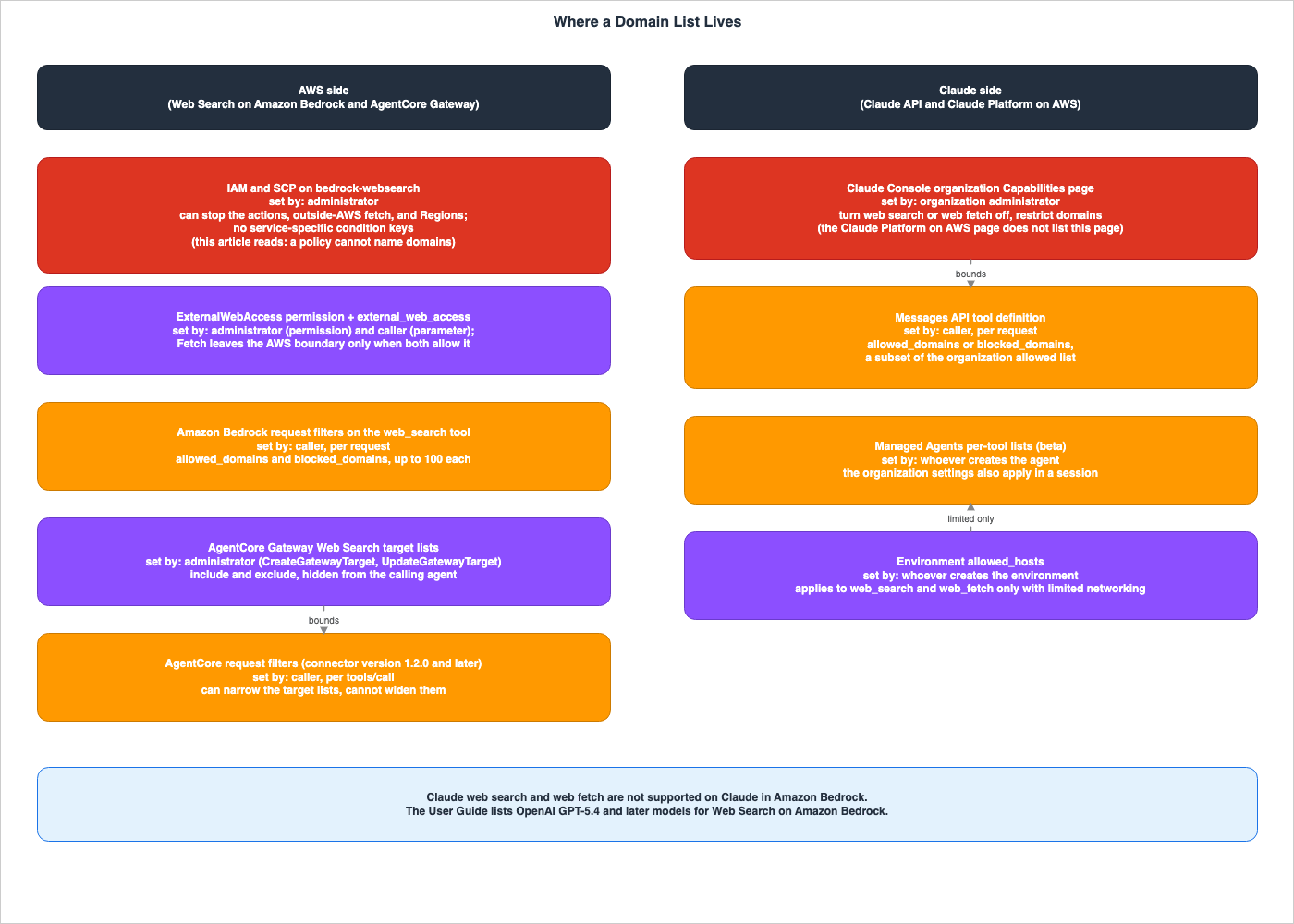
This article categorizes the layers that decide what a web search can reach into seven layers; five of them hold a domain or host list. On the AWS side, these include IAM and SCP, the setting for fetching from the web outside the AWS boundary, the
filters within Amazon Bedrock requests, and the web search target list within AgentCore Gateway. For Claude, these include the organization's Capabilities page in the Claude Console, the allowed_domains and blocked_domains within tool definitions, and the per-tool lists and environment allowed_hosts within Claude Managed Agents. The article presents this information in tables detailing the layers, the matching rules, and the responses returned when a domain is not allowed.The layers where administrators can enforce the lists and callers cannot override them are the target list within AgentCore Gateway and the organization settings in the Claude Console. Both of these have their own specific conditions. IAM and SCP do not appear to offer a means to specify domains as a condition. This article reads this from the documentation's statement that Web Search has no IAM condition keys.
This article is not an introduction to the web search functionality, nor is it a step-by-step configuration guide. It does not cover pricing. The information presented was verified as of October 31, 2026. Between October 30, 2026, and October 31, 2026 (UTC), 19 calls were observed within a demonstration configuration.
Related articles on this site:
- Network Egress in Claude Managed Agents - allowed_hosts, the Package Manager and MCP Switches, and the Two Rules That Stop web_fetch
- Amazon Bedrock Inference Endpoints and API Keys - What bedrock-runtime and bedrock-mantle Each Accept, Which IAM Action Each Call Checks, and What CloudTrail Records
- Managed Agent Runtimes - What Claude Managed Agents, the OpenAI Agents API, Amazon Bedrock, and GKE Agent Substrate Each Run for You, and What Stays With You
- AWS Organization Guardrails - Service Control Policies, Resource Control Policies, and Data Perimeter Design
- Amazon Bedrock Security and Governance - IAM Condition Keys, SCP Design, PrivateLink, and Multi-Account Guardrail Enforcement
- What a Domain Rule Matches in AWS Network Firewall - SNI, the Host Header, and Whether the Resolver Returned the Destination IP
Table of Contents
- 1. Scope and Assumptions
- 2. How to Read the Tables
- 3. Which Products and Models Are Compatible?
- 4. AWS Layers
- 5. Claude Layers
- 6. Matching Rules for the Same Allowed-Domain List
- 7. What the Caller Receives When a Domain Is Not Allowed
- 8. What This Setup Showed
- 9. Dates of the Materials and the Period When Organizational Settings Began to Apply to Managed Agents
- 10. Discrepancies and Omissions in the Documents
- 11. Failure Modes
- 12. Frequently Asked Questions About Web Search Domain Filtering
- 13. Summary
- 14. References
1. Scope and Assumptions
This section will first define the intended audience, the scope of this article, the source materials consulted, and how to distinguish between different entities that may share the same name. The following nine points will outline the conclusions.- According to the UG's statement of supported models, only OpenAI GPT-5.4 and later models can use Web Search on Amazon Bedrock, and this functionality is limited to the
bedrock-mantleendpoint's Responses API. Both pages related to Anthropic's Amazon Bedrock list Claude's web search and web fetch capabilities as unsupported features. - IAM and SCP policies can restrict the Web Search operation itself, as well as data retrieval outside of AWS and within specific Regions. There are no IAM condition keys for Web Search. This article reads that there is no way to specify which domains are permitted through IAM conditions.
- The
filterssection in Amazon Bedrock requests is a list that the caller writes for each request. No statement was found that describes a mechanism for administrators to enforce this list. - The Web Search target lists configured on the AgentCore Gateway are set by administrators and cannot be seen or widened by the calling agent. However, the target-side include list and the request-side lists are available in connector version 1.2.0 and later.
- On the "Capabilities" page in the Claude Console for an organization, administrators can disable web search and web fetch and restrict domains. The
allowed_domainswithin a request must be a subset of the organization's permitted list. However, the table on the Claude Platform on AWS page that lists the Claude Console pages does not include the "Capabilities" page. - In Claude Managed Agents, organizational settings also apply to sessions. The environment's
allowed_hostssetting only applies to web tools when the network is configured aslimited. - Although the name
allowed_domainsis the same, the documented matching rules differ across layers. There are differences in how paths and wildcards are handled, whether two lists can be specified simultaneously, and the maximum number of entries. Every list with that name includes subdomains, and only the Managed Agents restrictions page states how case is handled. - What comes back when a domain is not allowed also varies by layer. This may include an HTTP 400 error, an error result within an HTTP 200 response, the silent omission of results, or, in some cases, the session continuing and only the error result being returned.
- According to the copies of the Managed Agents restrictions page saved on October 8, 2026, and October 10, 2026, organizational settings do not apply to sessions. However, the page on October 31, 2026, states that they do. No statement was found on the date when the text was replaced.
1.1 Intended Audience
This article is intended for developers, security professionals, and platform specialists who are building agent or generative AI applications using both AWS and Claude. It targets readers who want to refine the sources from which web searches are retrieved to align with their internal standards, as well as those who believe they have already done so.Specifically, this article addresses readers who believe any of the following to be true:
- Web search domains can be permitted or denied through SCP or IAM policies.
- Web Search on Amazon Bedrock is compatible with Claude models.
- Organizational settings within Claude Console apply across all Claude offerings and products.
- Errors will be returned if a search query hits a domain that has been excluded, allowing users to identify such instances.
It's important to note that the validity of each of these assumptions depends on which layer of which product holds the list, which platform the call is sent to, and which tool version or connector version is used.
1.2 What This Article Covers and What It Does Not
This article will cover the following:- For each product, which models and entry points support web search.
- The location of lists for each layer, who can set them, and who can override them.
- The matching rules on each layer.
- What the caller receives when a domain is not allowed by a list.
- The timing when organizational settings began to take effect with Claude Managed Agents, along with relevant document dates.
- Discrepancies and omissions in the documentation.
This article will not cover the following. It will also not include any information regarding pricing.
- Details of the three outbound pathways for Claude Managed Agents (Sandbox, Web Tools, MCP), as well as the details of
allowed_hostsmatching. Covered in the earlier article Network Egress in Claude Managed Agents. This article covers Managed Agents only as one of the layers: a few table rows and what comes back when a domain is not allowed. - Comparison of agent runtimes. Covered in the earlier article Managed Agent Runtimes.
- Differences between
bedrock-runtimeandbedrock-mantle. Covered in the earlier article Amazon Bedrock Inference Endpoints and API Keys. - General design principles for SCP and RCP. Covered in the earlier article AWS Organization Guardrails.
- Methods for restricting domains in the network layer. Covered in the earlier article What a Domain Rule Matches in AWS Network Firewall.
- The underlying infrastructure for providing agents with a browser (Amazon Bedrock AgentCore Browser), and controlling outbound traffic through proxies. Covered in the article What AgentCore Browser Keeps and Where Its Traffic Goes.
- Web Grounding for Amazon Nova. As described in Section 3.4, the Web Grounding page does not include an option to specify domains.
- Methods for getting around the lists. This article only quotes the caution on Anthropic's page.
- Evaluation of search result quality and index size.
- List of supported regions. Support varies based on product updates and information on the respective pages, so check the pages listed in References.
- Determining when to route requests to an alternative destination is covered in the related article, Model Fallback in Amazon Bedrock AgentCore Gateway.
- The article on Claude Structured Outputs on Amazon Bedrock addresses where the output format is guaranteed.
1.3 Verification Date and Reviewed Materials
The information was verified on October 31, 2026. The materials reviewed are as follows. In this document, the names of these materials will be abbreviated as follows.- Amazon Bedrock User Guide (hereinafter referred to as UG): The Web Search page (hereinafter, the UG Web Search page), the Identity and Access Management for Web Search page (hereinafter, the UG IAM page), the Monitor Web Search page (hereinafter, the UG monitoring page), the Inference Endpoints Supported by Amazon Bedrock page (hereinafter, the UG endpoint page), and the OpenAI model cards.
- Service Authorization Reference: The Amazon Bedrock Web Search page (hereinafter referred to as the bedrock-websearch authorization page), and the Amazon Bedrock Agentcore page (hereinafter referred to as the AgentCore authorization page).
- Amazon Bedrock AgentCore Developer Guide (hereinafter referred to as DG): The Web Search Tool page (hereinafter, the DG Web Search Tool page), the Define the Gateway Target Configuration page (hereinafter, the DG target configuration page), the Connector Versions page (hereinafter, the DG versions page), and the Release Notes (hereinafter, the DG release notes).
- Announcements for What's New: 7 items related to Web Search (from June 16, 2026, to October 23, 2026).
- AWS Machine Learning Blog: Domain and publish date filters for Web Search on AgentCore (August 19, 2026, hereinafter referred to as the ML Blog article).
- AWS Machine Learning Blog: Introducing Web Search on Amazon Bedrock for foundation model grounding (August 4, 2026; cited only in Sections 4.2 and 10.4, as the ML Blog article introducing Web Search on Amazon Bedrock).
- Amazon Nova 2 User Guide: The Web Grounding page.
- Claude Platform Docs (Anthropic documentation): The Server Tools page (hereinafter, Anthropic's server tools page), the Web Search Tool page (hereinafter, Anthropic's web search page), the Web Fetch Tool page (hereinafter, Anthropic's web fetch page), the Restrict Web Search and Web Fetch Domains page (hereinafter, the Managed Agents restrictions page), the Secure Your Managed Agents Deployment page, the Cloud Environment Setup page, the Claude Platform on AWS page, the IAM Actions for Claude Platform on AWS page, the Claude in Amazon Bedrock (Opus 4.7 and later) page, the Claude on Amazon Bedrock (Opus 4.6 and earlier) page, and the Claude Platform Release Notes (hereinafter, Anthropic's release notes).
- The Managed Agents restrictions page, as archived on the Internet Archive's Wayback Machine (October 8, 2026, and October 10, 2026).
This article references specific passages from various documents. Three different sources within AWS (UG, Service Authorization Reference, and DG) and three different sources within Anthropic (the "Tools" page, the "Managed Agents" page, and the release notes) cover the same subject matter. Consequently, the scope of information presented varies depending on the specific page being referenced.
1.4 Distinctions Despite Similar Spellings
This article will differentiate between similar terms as follows:- Four "Web Search" tools: "Web Search" on Amazon Bedrock is an integrated tool within Amazon Bedrock's Responses API. The "Web Search" tool in AgentCore is an integrated connector that connects to the AgentCore Gateway as an MCP target. Claude's
web_searchis a tool that runs on Anthropic's servers. Amazon Nova's "Web Grounding" is a feature of the Amazon Nova models and falls outside the scope of this article. This article will treat these four as distinct entities. - Three instances of
allowed_domains: This refers to an item in the "filters" of the "web_search" tool in Amazon Bedrock, an item in the tool definition within Claude's Messages API, and an item for each tool within a Claude Managed Agents toolset. While the names are the same, the matching rules differ (see Section 6). allowed_hosts: This refers to a setting in the network configuration of Claude Managed Agents, and the matching rules for this differ from those used for domain lists.- "Include" and "Exclude": These are the names used for the lists within AgentCore's "Web Search" tool. There are lists on the target side and a
domainFilterlist on the request side. - Target: In this article, "target" refers to the target for Web Search in the AgentCore Gateway. This is distinct from the inference target discussed in the related article, "Model Fallback in Amazon Bedrock AgentCore Gateway," which refers to a different target in the same gateway.
- Organization: The "organization" in the Claude Console (a unit within Anthropic's account) and an "organization" within AWS Organizations are different entities. This article will refer to the former as "Claude Console organization" and the latter as "AWS Organizations."
- Administrator and Caller: In this article, an "administrator" refers to someone who manages AWS accounts (IAM), targets in the AgentCore Gateway, and settings in the Claude Console organization. A "caller" refers to the application, agent, or code that sends requests.
1.5 Assumptions About the Pages
The UG endpoint page recommendsbedrock-runtime for new applications, while bedrock-mantle should be used when features unique to that environment are required. Web search is listed as an example of such a feature.For most new applications, use the bedrock-runtime endpoint. Use bedrock-mantle when you specifically need capabilities
that are currently available only there, such as server-side and pre-configured tools (including web search),Claude Managed Agents are a beta feature according to Anthropic's documentation. The Availability table on the Managed Agents restrictions page indicates their status as Beta, and requests require a beta header, specifically
managed-agents-2026-04-01.2. How to Read the Tables
This section defines the columns in the tables from Section 3 through Section 10, as well as how to describe the status of the materials. The terminology used for the columns and status descriptions is consistent across three articles in the same series. This article adds a column specifying who is authorized to make changes.2.1 Table Columns
The table for each layer in this article begins with aLayer column, followed by subsequent columns. In some tables, instead of Layer, the first column may represent rules or specific scenarios.What It Decides: What this layer determines.Who Can Override: Who can modify the layer's settings, and whether the caller can loosen them in a request.What the Caller Receives: What the caller receives as a result of this layer's decision.Where It Is Written: The source of the statement in this row: which page of which document.No Statement Found: Instances where, despite searching the materials referenced in Section 1.3, using different search terms and material categories, no relevant statement was found. Use—when nothing is found.
A non-empty entry in the
No Statement Found column does not necessarily indicate that the matter is nonexistent or will not occur.2.2 Four States
The condition of the information is described using the following four terms:- No statement was found: In the text, this is written as
no statement was found, accompanied by the scope of the search. - The documentation does not list: This indicates that the item is not included in a list or table. In the text, this is written as
the documentation does not list. - The sources disagree: In the text, this is written as
the sources disagree, and both statements, along with their sources, are presented. This article does not definitively identify either source as incorrect. - Inference: The text states, in the same sentence, that this is this article's reading and not a statement in any document.
2.3 Terms for the Layers
This article refers to "layers" using the following seven terms:- "IAM Layer" refers to AWS IAM policies and AWS Organizations Service Control Policies (SCPs).
- "External Web Layer" refers to the configuration within Amazon Bedrock that determines whether Web Search can access the internet outside of AWS. This includes the
bedrock-websearch:ExternalWebAccesspermission and theexternal_web_accessrequest value. - "Amazon Bedrock Request Filters" refers to the lists that the caller specifies for each request.
- "AgentCore Target Lists" refers to both the lists that administrators configure for AgentCore Gateway's Web Search targets, and the lists that the caller specifies in
tools/callrequests. - "Claude Console Organization Capabilities" refers to the settings that administrators configure for an organization, including enabling or disabling web search and web fetch, and defining domain restrictions.
- "Tool Definitions" refers to the
allowed_domainsandblocked_domainslists that the caller specifies in the Tools section of Messages API requests. - "Managed Agents Per-Tool Lists" refers to both the lists specified within an agent's toolset for
web_searchandweb_fetch, and the environment'sallowed_hosts.
2.4 AWS Documentation and Anthropic Documentation, HTTP Status Codes and Content
Similar to the article "Claude Structured Outputs on Amazon Bedrock," this article describes the values of AWS products using language from AWS documentation, and describes the values of Anthropic products using language from Anthropic documentation. It avoids combining documentation from the two providers into a single sentence.This article details what the caller receives, separating it into HTTP status codes and the content of the response. An HTTP 400 status code indicates that the request itself was not accepted and that there is no output from the model. Even within an HTTP 200 response, there may be errors related to tool results, empty results, or failures in search queries. An HTTP status code of 200 does not necessarily mean that the search was performed as listed.
3. Which Products and Models Are Compatible?
This section outlines, for each product, which entry points and models are supported. In summary, there are four key points:- According to the UG, the Web Search feature on Amazon Bedrock is only available with OpenAI GPT-5.4 and later models, and only through the
bedrock-mantleResponses API. - The Web Search Tool for AgentCore is accessed as an MCP tool on AgentCore Gateway and is called from an MCP client.
- Claude's web search and web fetch features are available through the Claude API, the Claude Platform on AWS, and other platforms. Anthropic's two Amazon Bedrock pages list them as not supported.
- Amazon Nova's Web Grounding feature does not have an option to specify domains.
3.1 Web Search on Amazon Bedrock
The UG Web Search page lists the supported models and endpoints as follows:Amazon Bedrock supports Web Search for OpenAI GPT-5.4 and later models in the commercial US Regions,
served through the bedrock-mantle endpoint using the Responses API.A note on the same page indicates that these cannot be used with the
bedrock-runtime Responses API.Web Search is a server-side tool, so it isn't available when you call the Responses API on the bedrock-runtime endpoint.The UG OpenAI model card does not specifically mention Web Search, but simply includes a row for
Server-side tool calling in the table of bedrock-mantle features. This article states the supported models using the sentence from the UG Web Search page, and does not open a model list. The What's New announcement from August 4, 2026, lists GPT-5.4, GPT-5.5, and GPT-5.6 Sol, Terra, and Luna as the models at general availability.None of the text on the UG Web Search page lists Claude models as supported models.
3.2 AgentCore Web Search Tool
The DG Web Search Tool page describes the Web Search Tool as a built-in connector that you connect to the AgentCore Gateway. Agents can discover the tool using MCP'stools/list and invoke it using tools/call.It is available as a managed connector that you connect to your AgentCore Gateway.
Agents discover it with a standard tools/list call and invoke it like any other Model Context Protocol tool.The same page also states that the tool is compatible with Strands Agents, LangChain, LangGraph, CrewAI, and any other client that supports MCP. The page does not specify which model powers the agent making the calls. The What's New announcement on June 16, 2026, marked the general availability of AgentCore's Web Search functionality.
The DG Web Search Tool page also includes a section describing how to connect to this gateway as a custom connector from within a Claude application. This pathway uses JWT for authorization of incoming requests to the gateway, rather than IAM. This pathway is addressed briefly, in a single sentence within Section 4.4, as one use of the AgentCore target lists.
3.3 Claude's Web Search and Web Fetch
Anthropic's web search page lists Claude API, Claude Platform on AWS, and others as providers for the Messages API's web search functionality. The same applies to Anthropic's web fetch page. For Managed Agents, both web search and web fetch are provided through Claude API and Claude Platform on AWS.Anthropic has two Amazon Bedrock pages. The "Claude in Amazon Bedrock" page (for Opus 4.7 and later) describes the integration with the Messages API, while the "Claude on Amazon Bedrock" page (for Opus 4.6 and earlier) details integration with InvokeModel and Converse. Both pages include a list of "Features not supported," which includes the entry:
Server-side tools (code execution, web search, web fetch, advisor)Claude Managed Agents are also listed in the same list. Therefore, Claude's web search, web fetch, and Managed Agents are not available in Claude in Amazon Bedrock. For applications calling Claude through Amazon Bedrock that require web search, in the scope of this article, the application will need to either incorporate its own search tools or call MCP tools such as the AgentCore Web Search Tool. This is this article's reading.
3.4 Amazon Nova's Web Grounding
The Web Grounding page in the Amazon Nova 2 User Guide describes the functionality that requests thenova_grounding feature as a systemTool. This page does not include any options for allowing or blocking specific domains. Currently, the documentation does not list these options, and the term domain appearing on the page refers only to the name of an item in the results. This article does not cover Web Grounding.3.5 Product and Model Table
| Product | Entry Point | Models | Where It Is Written | No Statement Found |
|---|---|---|---|---|
| Web Search on Amazon Bedrock | bedrock-mantle Responses API's web_search tool | OpenAI GPT-5.4 and later (as mentioned in the UG). Not available in bedrock-runtime Responses API. | UG Web Search page, What's New (August 4, 2026) | Section of the model card that specifically mentions Web Search. |
| AgentCore Web Search Tool | AgentCore Gateway MCP target's tools/call. The target's connectorId is web-search. | The page's conditions for use do not include the model of the calling agent. | DG Web Search Tool page | — |
| Claude's Web Search and Web Fetch | Messages API tool definition, Managed Agents toolset | Compatible models listed on Anthropic's pages for each tool. | Anthropic's web search page, Anthropic's web fetch page | — |
| Claude in Amazon Bedrock | — | Claude's Web Search, Web Fetch, and Managed Agents are not supported. | Features not supported on Anthropic's two Amazon Bedrock pages | — |
| Amazon Nova Web Grounding | bedrock-runtime Converse's systemTool | Amazon Nova | Nova 2 User Guide's Web Grounding page | An option to specify domains (out of scope) |
4. AWS Layers
This section outlines the four layers within AWS, from top to bottom. To begin with, there are five key points:- The IAM layer can stop only the Web Search operations themselves, data retrieval outside of AWS, and access to specific Regions. This article reads that there is no way to specify domains within IAM conditions.
- The external web layer only retrieves data from the external web when both the
external_web_accessvalue and thebedrock-websearch:ExternalWebAccesspermission are in place. - The
filterswithin Amazon Bedrock requests are lists defined by the caller, with a maximum of 100 allowed and blocked entries each. - The lists on an AgentCore target are defined by the administrator and cannot be seen or widened by the caller.
- The IAM permissions associated with the gateway's control plane determine who can modify the AgentCore target lists. This is this article's reading.
4.1 IAM Layer - Operations and Regions Can Be Stopped, and No Condition Key Names a Domain
The UG IAM page defines three IAM actions for Web Search:bedrock-websearch:InvokeSearch, bedrock-websearch:InvokeFetch, and bedrock-websearch:ExternalWebAccess. The bedrock-websearch authorization page specifies the condition keys as follows:Amazon Bedrock Web Search has no service-specific condition keys that can be used in the Condition element of
policy statements.The table of condition keys for the UG IAM page only includes the AWS global condition key
aws:RequestedRegion. The same page lists three scopes at which administrators can turn off Web Search:Organizational Scope:
A Service Control Policy (SCP) that denies all bedrock-websearch actions across an AWS Organization.Account Scope:
A standard IAM deny on the bedrock-websearch actions.Region Scope:
A deny that uses the aws:RequestedRegion condition key.Because there are no condition keys and the listed resource types (
* or the tool's ARN; Section 10.1) do not identify domains, there is no way to specify which domains are permitted in the IAM policy. This is this article's reading, combining statements from two documents.The UG IAM page also states that IAM permissions do not alter what the model can see, and that permissions are evaluated when the model attempts to make a call.
IAM permissions don't change what the model sees, and each permission is evaluated only when the model
actually attempts that call.
When a call is denied, the model can continue with the information it already has or obtained from another tool call.
The model response is not guaranteed to disclose the denial.
The same page further clarifies that Fetch is not limited to the URLs specified in the request.
Fetch is not limited to URLs you supply, so if you intend to constrain the model to specific sources,
restricting InvokeSearch alone does not achieve that.
Therefore, even if only
InvokeSearch is blocked, there are still ways for the model to retrieve URLs it knows or URLs it generates using Fetch.4.2 External Web Layer - Two Defaults
The UG Web Search page describes two operations: Search and Fetch. Search always retrieves data from Amazon Bedrock's web index. Fetch, ifexternal_web_access is set to false, only uses Amazon Bedrock's cache. If true, and the necessary permissions are granted, it retrieves data from the external web when it is not found in the cache.This layer has two default settings. One is the default value for requests. The UG Web Search page describes this as follows:
The external_web_access parameter defaults to trueThe other default concerns permissions. The same page states that the AWS managed policy
AmazonBedrockFullAccess does not grant the bedrock-websearch:ExternalWebAccess permission. The UG IAM page also states that none of the general managed policies to which the basic Web Search actions were added grants the ExternalWebAccess permission.The data retention section of the same UG Web Search page states that, by default, data does not leave the AWS boundary.
By default, Web Search retrieves content entirely from Amazon's Web index and data does not leave the AWS boundary.This article reads this sentence as the result of combining the default request value (
true) with the default permissions (no ExternalWebAccess). This is this article's reading. If the request value is omitted and ExternalWebAccess is not granted, Fetch will not access either the external web or the cache, according to the UG Web Search page. On whether Fetch reaches the cache, the ML Blog article introducing Web Search on Amazon Bedrock states the opposite; Section 10.4 covers this. The UG Web Search page describes what the caller will receive in that scenario as follows:The caller's Responses API request can still return HTTP 200: the model can continue using Search observations
and return url_citation annotations. The model response is not guaranteed to disclose the Fetch failure,
and the presence of a citation does not mean the cited page was fetched.This rejection will only be recorded in CloudTrail's data events. The UG monitoring page states that data events are not recorded by default, and even if they are recorded, the search query, URLs, and the search results themselves will not be output to CloudTrail.
By design, CloudTrail does not expose the query text, the URLs, or the raw search results from Web Search.The UG Web Search page notes that setting
external_web_access to true poses a risk of data exposure.Note that setting external_web_access to true introduces data exfiltration risk.4.3 Amazon Bedrock Request Filters
The October 23, 2026, What's New announcement announced domain filtering for Web Search on Amazon Bedrock. The UG Web Search page describes the list limits and how subdomains are handled as follows:On the web_search tool, use the filters parameter to set up to 100 allowed_domains and up to 100 blocked_domains.Omit the http:// or https:// prefix when you list a domain, and note that each entry also matches its subdomainsThe same page specifies that the filters apply to the "results."
Domain filtering restricts Web Search results to a set of domains you specify.The
filters represent values that the caller writes in the request to the tool. No mechanism was found in the documentation that allows administrators to enforce specific values for filters. This is the no statement was found state, and the search covered the UG Web Search page, the UG IAM page, the bedrock-websearch authorization page, and seven What's New announcements. Combined with the absence of IAM condition keys, this indicates that the filtering layer within Amazon Bedrock requests is one that the caller controls. This is this article's reading.The UG Web Search page does not specify whether the filtering also applies to the URL passed to Fetch. As described in Section 4.1, Fetch is not limited to the URL specified in the request. The documentation does not clarify whether domains excluded from the list will be removed from the results or if an error will occur. Furthermore, the documentation does not state whether both lists can be included in the same request. What this article's setup showed is described in Section 8.
4.4 AgentCore Target Lists - The Administrator's Lists and the Caller's Lists
The DG Web Search Tool page describes filtering in two layers: the lists that the administrator writes on the target, and the lists that the calling agent writes in atools/call request. The target lists are not visible to the calling agent.Both lists are hidden from the calling agent and applied to every request that flows through the target.These two lists are combined as follows:
A domain is dropped from results if it appears on either the target-level exclude list or the request-level
exclude list.
Request-level filters cannot override the target-level exclude list or expand results beyond the target-level
include list.When both include lists are set, only domains present in both remain. If there are no common domains, the system does not return an error; instead, the result will be zero.
If the two share no domains, no results are returned.An article on the ML Blog states that the system silently removes domains on the request side that are outside the administrator's list.
The domain d.com is outside the admin domain list and is silently dropped.The same article also states that when filtering is active, the system also excludes results whose domains cannot be verified.
Results that can't be verified against your filter criteria are excluded rather than returned unfilteredThis layer includes version-specific criteria. On the DG versions page, the request-side list was added in version 1.2.0 (July 20, 2026). On the DG target configuration page, the target's include list requires version 1.2.0 or later, while the exclude list has been in place since an earlier version. The DG release notes state that version 1.2.0 increased the maximum number of entries in the list.
Both target-level lists now support up to 100 domains, expanded from the previous limit of 20 on the exclude list.The DG versions page indicates that if a target is created without specifying a version, it will default to the current version. As of October 31, 2026, the default version is 1.3.0. Conversely, if a target is updated without specifying a version, the version will not change.
Target gets the connector's current default version.Target keeps its current version (sticky).The same page states that if a request passes an administrator-side configuration key that the target's version does not recognize, a
ValidationException will be returned during creation or update. Combined with the fact that the include list was added in version 1.2.0, this suggests that updates attempting to add an include list to a target version prior to 1.2.0 will fail. This is this article's reading. No statement was found on what happens when a caller provides a list to a target version prior to 1.2.0.The APIs for modifying the target list are
CreateGatewayTarget and UpdateGatewayTarget. The AgentCore authorization page describes UpdateGatewayTarget as follows:Grants permission to update an existing gateway targetTherefore, to prevent the caller from modifying the administrator list, you must ensure that the caller's IAM role does not have permissions to create or update the target. This is this article's reading. The gateway's service role requires the
bedrock-agentcore:InvokeGateway and bedrock-agentcore:InvokeWebSearch permissions, as specified on the DG target configuration page. In its Knowledge Bases section, the same page says that bedrock-agentcore:InvokeGateway belongs to the caller, not to the role the Gateway assumes. This is the state the sources disagree.Even when calling from the Claude application through the custom connector path described in Section 3.2, the gateway's target lists apply to the request. This is this article's reading. The basis for this lies in the configuration on the DG Web Search Tool page, while the Claude-side documentation does not address this particular point.
4.5 AWS Layer Table
| Layer | What It Decides | Who Can Override | What the Caller Receives | Where It Is Written | No Statement Found |
|---|---|---|---|---|---|
| IAM Layer | Whether to allow the three Web Search actions, and the Region. | Administrators (IAM and SCP). Cannot be overridden within the request itself. | The model can skip denied calls and continue. The response may not explicitly indicate rejection. | UG IAM page, bedrock-websearch authorization page | A condition key that can name a domain (there are no condition keys) |
| External Web Layer | Whether Fetch requests are made outside of AWS boundaries. | Administrators (the permission), and the caller (via external_web_access). External requests are only made when both are enabled. | If Fetch fails due to lack of permissions, the request can still return an HTTP 200 status. Rejection is only logged in CloudTrail data events. | UG Web Search page, UG monitoring page | — |
Amazon Bedrock Request filters | Which domains to filter the results to. | Caller. No statement was found on a mechanism for administrators to enforce it. | See the observations in Section 8. | UG Web Search page, What's New (October 23, 2026) | Handling of excluded domains, simultaneous specifications, paths, wildcards, and case, how it affects Fetch. |
| AgentCore Target Lists | The include and exclude lists for every search through the target. | Administrators (IAM for target creation and updates). The caller can only narrow the scope. | Excluded results are dropped. If there are no common domains, the result is 0. | DG Web Search Tool page, DG target configuration page, DG versions page, ML Blog article | What a malformed request-side list returns. Behavior when passing the caller's list to targets prior to version 1.2.0. |
5. Claude Layers
This section describes the three layers associated with Claude. The following five points summarize the key aspects:- On the "Capabilities" page in the Claude Console for an organization, administrators can disable web search and web fetch, and can also restrict specific domains. If these features are disabled, attempting to include a tool in a Messages API request will result in an HTTP 400 error.
- The
allowed_domainsspecified in a request must be a subset of the domains permitted for the organization. Requests containing domains not on this list, or domains that the organization has blocked, will also result in an HTTP 400 error. - Anthropic added the organizational settings for web fetch on October 20, 2026, as noted in its release notes.
- The table of available pages in the Claude Console, as shown on the "Claude Platform on AWS" page, does not include the "Capabilities" page.
- In Claude Managed Agents, only what passes both the organization-level settings and the per-tool lists reaches the agent. In a
limitedenvironment, theallowed_hostssetting also applies.
5.1 Claude Console Organization Capabilities
Anthropic's web search page describes the organization settings as follows:Web search is enabled for your organization unless an administrator has disabled it in the Claude Console,
where they can also restrict which domains it searches.The same page states that when the tool is turned off, a request that includes it fails with a request error, rather than an error in the search results.
If it's disabled, a Messages API request that includes the tool fails with a 400 invalid_request_error
that says web search is not enabled, rather than an error code inside a search result.
Anthropic's web fetch page also indicates that requests that include web fetch while it is turned off result in a 400
invalid_request_error, and that, with web fetch on, admins can set permitted or blocked domains on the same Capabilities page. Anthropic's release notes, dated October 20, 2026, announce the option to disable web fetch as a new feature.Organization admins can now turn off web fetch for their organization on the Capabilities page of the Claude Console.With web fetch on, admins can also set allowed or blocked domains for web fetch on the same page.Therefore, the organizational layer for web fetch, as it applies to the Messages API, also became available on October 20, 2026. No statement was found on when the organizational settings for web search were first introduced. The search covered Anthropic's complete release notes, Anthropic's web search page, and Anthropic's server tools page.
5.2 Claude Platform on AWS and Organizational Settings
The Claude Platform on AWS page lists the pages accessible in the Claude Console in a table. This table includes sections for Usage, Cost, Rate Limits, Logs, Workspaces, Files, Agents, Sessions, and Environments, among others. The Capabilities page is not listed in this table; this is the statethe documentation does not list. This article does not state whether the Capabilities page is available or unavailable within Claude Platform on AWS. Furthermore, the page detailing IAM actions for Claude Platform on AWS did not contain any descriptions of IAM condition keys that specify tools or domains.The availability table on the Managed Agents restrictions page lists only the Claude API as a destination for domain restrictions in the Messages API. The banner at the top of the same page lists Claude Platform on AWS as Available among the cloud platforms for web domain restrictions, without dividing them by API. In contrast, Anthropic's web search page lists Claude Platform on AWS as a destination for web search in the Messages API, and says that the domain lists go on that tool. These two tables appear to count different aspects (the domain restriction feature versus tools). Whether organization layers are applied within Claude Platform on AWS cannot be determined from either table. This is this article's reading.
5.3 Tool Definitions: allowed_domains and blocked_domains
Anthropic's server tools page states that server tools that interact with the web accept allowed_domains and blocked_domains. The rules for matching are outlined in Section 6. Information regarding their relationship to organization layers can be found in the notes on the same page.Request-level domain restrictions work together with any organization-level domain restrictions configured in
the Claude Console.
Request-level allowed_domains must be a subset of the organization-level allowed list; entries outside it cause the API
to return a validation error. A request-level allowed list that includes a domain your organization blocks is rejected
with a 400 error that names the conflicting entries.In essence, the caller can only narrow down the organization list. Requests that do not align with the organization list will be rejected at the time of the request. However, the name of this 400 error type could not be found in the documentation. This is the
no statement was found state, and the search covered Anthropic's server tools page, Anthropic's web search page, and Anthropic's web fetch page. A 400 error due to formatting issues is described as invalid_request_error on the same page.Similarly, a statement indicating that if the request does not include
allowed_domains, results from the Messages API's web search that fall outside the organizational restrictions will be excluded could not be found in the documentation. This is the no statement was found state, and the search covered the same three pages, as well as the release notes. Information regarding Managed Agents can be found in Section 5.4.Anthropic's server tools page also includes the following note regarding the Unicode representation of domain names.
Use ASCII-only domain names in allow and block lists, and audit existing entries for non-ASCII characters.5.4 Claude Managed Agents: Per-Tool Lists and allowed_hosts
In Claude Managed Agents, the web_search and web_fetch items in the agent's toolset (agent_toolset_20260401) each have a dedicated list. The Managed Agents restrictions page indicates that organizational settings also apply to sessions.Your organization's web search settings on the Capabilities page of the Claude Console also apply to
web_search in a session.
If an administrator disables web search, web_search calls return an error result to the agent, and the session
continues.If the organization restricts domains, the agent will only receive search results that both the organization's restrictions and the tool's list permit. For web fetch, only URLs that pass through both the organization's list and the tool's list will be retrieved, and this also applies to the URLs reached through redirects.
The environment's
allowed_hosts setting only applies to web tools when the network is configured as limited.unrestricted networking and self-hosted environments do not limit them.In a
limited environment, if a tool's allowed_domains list includes items outside of the allowed_hosts list, session creation and updates will result in a 400 error. The tool list and allowed_hosts have different matching rules (see Section 6). In multiple agent sessions, the lists applicable to each thread are all active simultaneously. allowed_domains will only include hosts covered by all lists, while blocked_domains are combined.Details regarding the three external pathways in Managed Agents, the specifics of
allowed_hosts matching, and the rules for disabling web fetch are covered in the earlier article Network Egress in Claude Managed Agents.5.5 Claude Layer Table
| Layer | What It Decides | Who Can Override | What the Caller Receives | Where It Is Written | No Statement Found |
|---|---|---|---|---|---|
| Claude Console Organization Capabilities | Enabling or disabling web search and web fetch, and restricting organization domains. | Organization administrator. Requests can only narrow the scope. | A Messages API request that includes a turned-off tool returns a 400 invalid_request_error. In Managed Agents, an error result is returned, and the session continues. | Anthropic's web search page, Anthropic's web fetch page, the Managed Agents restrictions page, Anthropic's release notes (October 20, 2026). | The Claude Platform on AWS page's Console table does not list the Capabilities page. The start date for the organization's web search settings is not specified. |
| Tool Definitions | allowed_domains or blocked_domains on a per-request basis. | Caller. Limited to a subset of the organization's allowed list. | Specifying both lists simultaneously, incorrect format, or discrepancies with the organization's list will return a 400 error. A web fetch URL that is not allowed returns url_not_allowed inside an HTTP 200 response. | Anthropic's server tools page, Anthropic's web search page, Anthropic's web fetch page. | The 400 error type for discrepancies with the organization's list. The explicit statement that search results outside of the organization's restrictions are omitted from the Messages API. |
Managed Agents Per-Tool Lists and allowed_hosts | Per-tool lists, allowed_hosts for the limited environment, overlap in multiple agent lists. | The person creating agents and environments. The organization settings also apply. | Web search results are omitted, and web fetch returns is_error: true with a url_not_allowed. The session continues. | the Managed Agents restrictions page, Anthropic's Cloud environment setup page. | — |
6. Matching Rules for the Same Allowed-Domain List
This section outlines how lists with the sameallowed_domains name are matched within each layer. In conclusion, there are four key points:- The ability to include subdomains is common to Amazon Bedrock, AgentCore, and Claude. Only entries in
allowed_hoststhat do not begin with*.will match a single host. - Only the web search lists for Claude (within Messages API and Managed Agents) allow paths to be specified in the documentation. Paths specified in the web fetch lists for Messages API will not match any URL. For Amazon Bedrock and AgentCore, the handling of paths is not described in the documentation.
- Wildcards can only be used in the path in the Messages API lists. Managed Agents lists do not accept the format
*.example.com. Inallowed_hosts, wildcards are only permitted at the beginning (*.). - Only AgentCore allows two lists to be specified in the same request in the documentation. Claude will return a 400 error. Amazon Bedrock is not described in the documentation.
6.1 Amazon Bedrock Request filters
The rules for the UG Web Search page are limited to three, as described in Section 4.3. These are: do not specify a scheme, each entry also matches its subdomains, and limit the number of allowed and blocked items to 100 each. Information regarding paths, wildcards, case sensitivity, specifying two lists simultaneously, and how to handle cases exceeding 100 items was not found. This is the no statement was found state, and the search covered the UG Web Search page, the What's New announcement from October 23, 2026, and AWS documentation.Regarding specifying two lists simultaneously, the UG and What's New documentation word it differently. UG uses "and" to combine the allowed and blocked lists, while What's New uses "or."
up to 100 allowed_domains to limit results to trusted sources, or up to 100 blocked_domains to exclude sources
you don't want
Neither document explicitly states whether two lists can be included in the same request. This article will not use these two documents as a basis for determining whether simultaneous specification is permitted.
6.2 AgentCore Target Lists
The input schema for the DG Web Search Tool page describes thedomainFilter as Root domain matches subdomains. There are four lists (target include and exclude, request include and exclude), and according to the ML Blog article, each list can hold up to 100 entries. The "include" lists are combined using the intersection, while the "exclude" lists are combined using the union. Information regarding the handling of paths, wildcards, and case sensitivity was not found in the documentation.6.3 Claude Tool Definitions
Anthropic's server tools page specifies the following rules:- Do not include schemes.
- Subdomains are automatically included.
example.comcoversdocs.example.com. - Specifying a particular subdomain limits the tool to that subdomain only.
- Paths can only be used with web search and match everything after the path.
- Web fetch matches only by domain; items including paths will not match the web fetch URL.
allowed_domainsandblocked_domainscannot both be used in the same request.- Wildcards (
*) cannot be used within a domain but can be used within a path. - Any formatting errors will result in an
invalid_request_error(status code 400) at the time of the request.
The rules for web fetch paths, as described on the page, are:
Web fetch matches on the domain only: an entry that includes a path never matches a web fetch URL.The page does not specify a limit on the number of items. Anthropic's web search page's error list includes an error message that appears when a request is too large, particularly when dealing with very long domain lists.
request_too_large: The search request is too large, typically because of a long domain filter listThe Managed Agents restrictions page states that the Messages API accepts Unicode items.
The Messages API accepts Unicode entries, though it recommends against them.6.4 Managed Agents Per-Tool Lists
The Managed Agents restrictions page says that Managed Agents uses the same field names as the Messages API, with four key differences. These differences are: a maximum of 64 items, the inability to specify paths for web fetch, the requirement that items use only ASCII characters, and the absence ofmax_uses, citations, and cache_control in the toolset. The remaining rules are as follows:- The list can contain between 1 and 64 items, with each item being between 1 and 255 characters long.
- An empty list is not permitted. To indicate no restrictions, either omit the field or send
null. - The same domain cannot be listed twice in the same list.
www.example.comandexample.comare considered distinct domains. - Hostnames are compared in a case-insensitive manner.
- The system does not accept schemes, ports, wildcards, IP addresses, top-level domain names only, single-label names, or names like
localhostand.local. - Domains that Anthropic's crawler is not permitted to access cannot be included in the
allowed_domainslist. - The web search provider matches the path specified in the web search item, not as a strict hostname rule, but as a URL pattern.
Hostnames are compared without regard to case.The search provider matches path suffixes as URL patterns rather than as strict host rules.6.5 Environment's allowed_hosts
The Managed Agents restrictions page describes the difference between a tool's list and the allowed_hosts as follows:a tool's entry covers its subdomains, but an allowed_hosts entry matches one exact host unless it starts with *.For example, if a tool entry is
docs.example.com and allowed_hosts is ["example.com"], then it does not fall in the allowed list. However, it would fall in the allowed list if allowed_hosts is ["docs.example.com"] or ["*.example.com"].6.6 Matching Rules Table
| Rule | Amazon Bedrock Request Filters | AgentCore Target and Request Lists | Claude Tool Definition | Managed Agents Per-Tool Lists | allowed_hosts |
|---|---|---|---|---|---|
| Scheme | Omit | The documentation examples are domains only | Omit | Not accepted | Omit |
| Subdomain | Included | Included (as part of the input schema description) | Included | Included | Only if it starts with *. (otherwise, only one host is allowed) |
| Narrowing down by specific subdomain | No statement found | No statement found | Narrowed down | Narrowed down | Only one host |
| Path | No statement found | No statement found | Allowed for web search; for web fetch, an entry with a path never matches | Allowed for web search (using URL patterns); not accepted for web fetch | Omit |
| Wildcard | No statement found | No statement found | Only within the path. Using it within the domain results in a 400 error. | Not accepted in a domain (*.example.com); no statement found for a web_search path suffix | Only at the beginning (*.) |
| Simultaneous specification of two lists | No statement found (UG uses "and," What's New uses "or") | Accepted. "Include" uses the intersection; "exclude" uses the union. | 400 | Only one list per entry (400) | — |
| Quantity | Up to 100 each | Up to 100 for each of the four lists (the exclude list was limited to 20 before version 1.2.0) | No statement found. Long lists result in a request_too_large error. | 1-64 | Covered by the earlier article |
| Case sensitivity | No statement found | No statement found | No statement found | Case-insensitive | Covered by the earlier article |
| Non-ASCII characters | No statement found | No statement found | Accepted (not recommended) | Not accepted. Use the xn-- format. | Covered by the earlier article |
| Overlap with other layers | — | Only within the target lists | Subset of the organization's allowed list | Organization settings, limited allowed_hosts, lists for multiple agents | Only in the limited environment |
A cell that says "No statement found" is in the
no statement was found state. Values observed in Section 8 have not been included in this table, which only contains information directly from the documentation.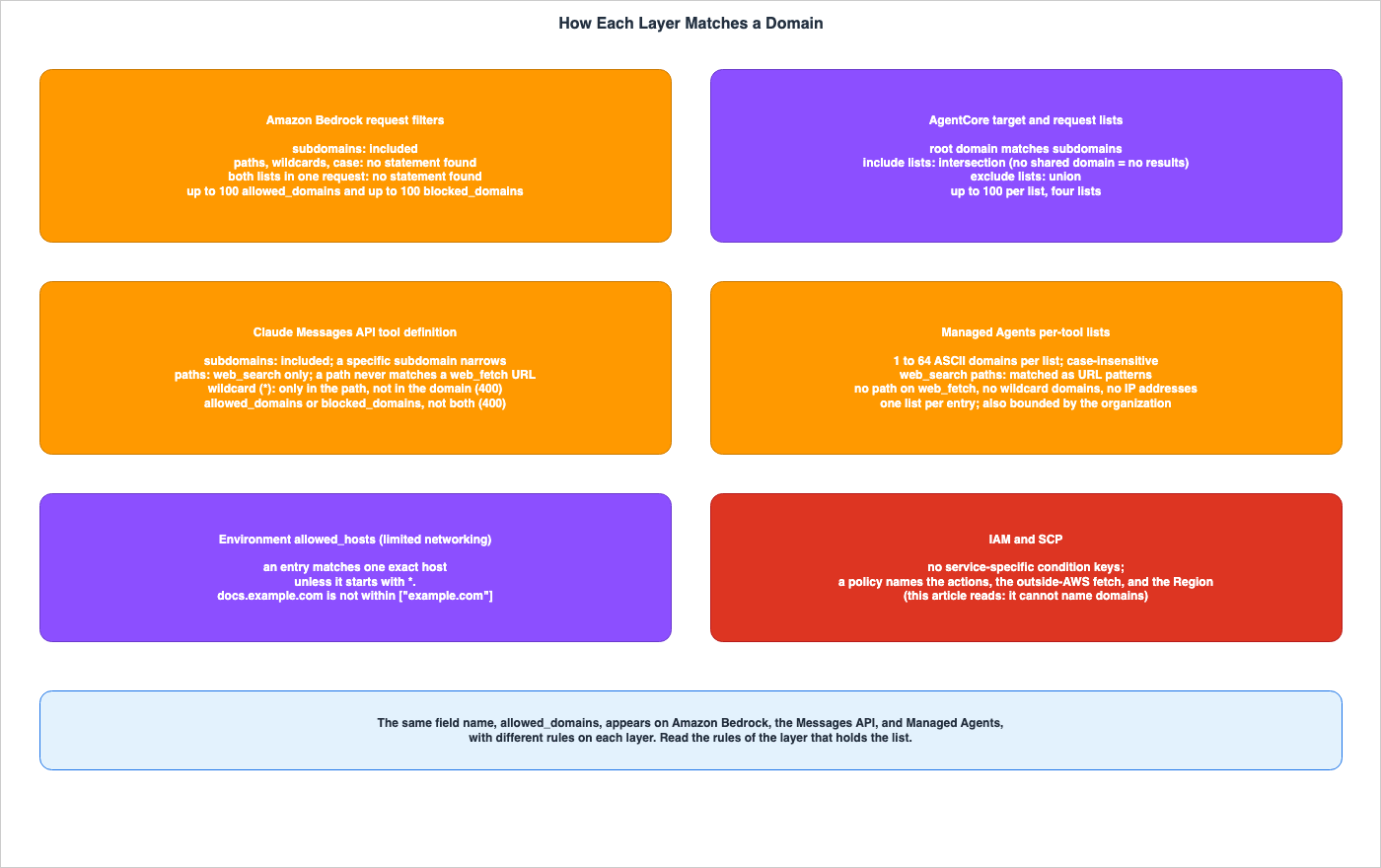
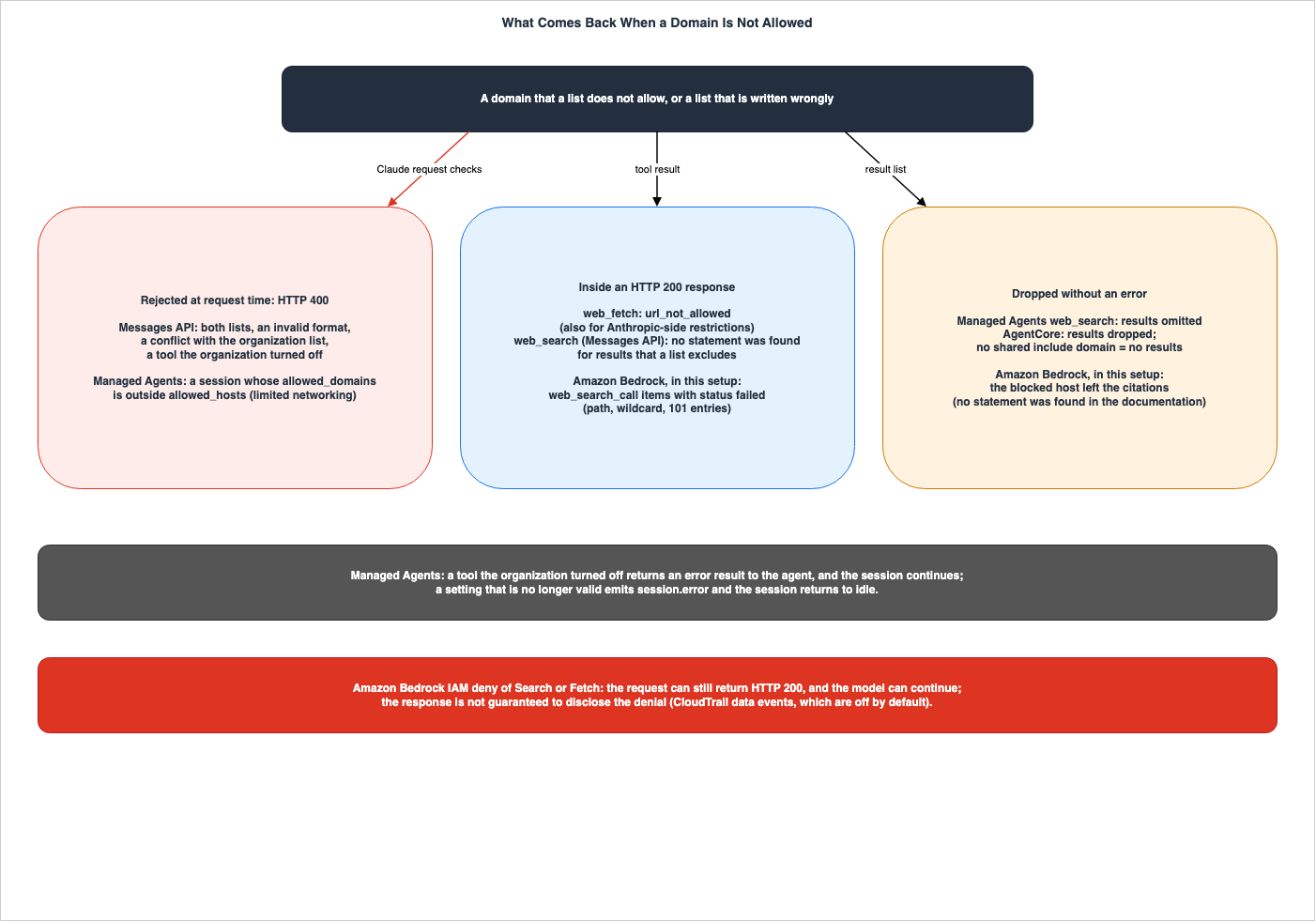
7. What the Caller Receives When a Domain Is Not Allowed
This section outlines what the caller receives when a domain is not allowed by a list, or when a list is written in a form that is not accepted. To begin with, there are four primary outcomes:- HTTP 400 at request time is returned for errors in Claude-side requests and for conflicts between the request and the organization's settings. In the
limitedenvironment for Managed Agents, both session creation and updates also return a 400 error. - A web fetch URL that is not allowed is returned as
url_not_allowedwithin an HTTP 200 response on the Messages API, and as anagent.tool_resultevent withis_error: trueon Managed Agents. - Web search results that are not allowed are omitted, rather than returned as an error, in both Managed Agents and AgentCore.
- If an Amazon Bedrock IAM rejection occurs, the model can continue, and the request can still return an HTTP 200 response. The response itself does not necessarily indicate a rejection.
7.1 HTTP 400 - Request Rejected
In Claude's Messages API, a 400 error is returned immediately upon receiving a request if: two lists are specified simultaneously, the request format is incorrect, an item is outside the organization's allowed list, the allowed list contains domains blocked by the organization, or the request involves a tool that the organization has disabled. In these cases, the error is returned without any model output.For Managed Agents, a 400 error, specifically the
invalid_request_error, is returned if there are format errors or limits are exceeded during agent creation and updates, or when creating and updating sessions that involve tools. The Managed Agents restrictions page provides examples of error messages.Only one of allowed_domains or blocked_domains may be set.In a
limited environment, if a tool's allowed_domains includes items outside of the allowed_hosts, session creation and updates will result in a 400 error.7.2 Error Results Inside HTTP 200 Responses
Anthropic's web fetch page states that web fetch errors can be returned within an HTTP 200 response.When the web fetch tool encounters an error, the Claude API returns a 200 (success) response with the error represented
in the response body. Claude receives the error result and continues the turn.URLs that fall outside the allowed domain list will result in a
url_not_allowed error. The same documentation indicates that this error can be returned not only due to domain restrictions, but also due to limitations on Anthropic's side.url_not_allowed: URL blocked by domain filtering rules (including your organization's settings) or by Anthropic-side
restrictions, such as private addresses, robots.txt, and URLs that appear to contain a credential you did not provideTherefore, when you receive a
url_not_allowed error, it is impossible to determine solely from the error code whether it is due to your own list or due to limitations on Anthropic's side. This is this article's reading.Web search errors can also be returned within an HTTP 200 response. Anthropic's web search page states that successful searches that yield no matching results will return an empty list, rather than an error.
A search that succeeds but matches no results returns an empty content list, not an error.7.3 Omitted from the Results
The Managed Agents restrictions page states that the results returned by web search and web fetch differ.web_search omits results that its domain list does not allow.
A web_fetch call for a URL that its domain list does not allow returns an error result to the agent.When web fetch encounters an error, it generates an
agent.tool_result event with is_error: true. The event's content includes an error code indicating url_not_allowed. If there is no common domain across multiple agents, the tool stays available, but all calls fail, and the error message includes no domain is permitted.In AgentCore, as described in Section 4.4, results outside the lists are dropped, and if there is no common domain, the result count will be zero. An article on the ML Blog refers to this as
silently dropped.If a previously accepted Managed Agents configuration is invalid when the tool is initially initialized, the session will generate a
session.error event and return to an idle state without attempting a retry.7.4 HTTP 200 Can Still Come Back, and the Model Can Continue
In the Amazon Bedrock IAM layer, if a Search or Fetch call is rejected, the model can continue operating using the information it already has. As described in Sections 4.1 and 4.2, the response does not necessarily disclose the denial, and even if a citation is provided, it does not guarantee that the corresponding page was successfully fetched. While rejections are recorded in CloudTrail data events, these data events are not enabled by default.The handling of domains that fall outside the
filters specified in an Amazon Bedrock request was not found in the documentation. What this article's setup showed is described in Section 8.7.5 Table of What Comes Back When a Domain Is Not Allowed
| Case | Layer | HTTP | What the Caller Receives | Where It Is Written | No Statement Found |
|---|---|---|---|---|---|
| Simultaneous specification of two lists, incorrect format | Tool definition | 400 | invalid_request_error, no model output | Anthropic's server tools page, Anthropic's web search page | — |
| Conflict with the organization list | Tool definition and organization Capabilities | 400 | A validation error; when the allowed list includes a domain the organization blocks, the error names the conflicting entries | Anthropic's server tools page | Error type name |
| Organization has disabled the tool | Organization Capabilities | 400 (Messages API) | invalid_request_error. Message reads web search is not enabled and similar. | Anthropic's web search page, Anthropic's web fetch page | — |
| Organization has disabled the tool | Organization Capabilities and Managed Agents | Session event | Error result. Session continues. | Managed Agents restrictions page | — |
| Web fetch URL outside the lists | Tool definition, Managed Agents | 200 (Messages API), session event (Managed Agents) | url_not_allowed. Managed Agents returns is_error: true. | Anthropic's web fetch page, Managed Agents restrictions page | Clues to differentiate between the caller's list and Anthropic's restrictions. |
| Web search result outside the lists | Managed Agents | Session event | Result is omitted. | Managed Agents restrictions page | — |
| Web search result outside the lists | Tool definition (Messages API) | Within the 200 response | No statement was found for results that a list excludes; a search that matches nothing returns an empty list. | Anthropic's web search page | Explicit statement that results are omitted due to organization restrictions. |
limited environment, allowed_domains entry outside allowed_hosts | Managed Agents | 400 | Failure to create and update session | Managed Agents restrictions page | — |
| Accepted configuration later becomes invalid | Managed Agents | — | session.error, reverts to idle | Managed Agents restrictions page | — |
| Result outside the AgentCore target lists | AgentCore target lists | No statement found | Result is dropped. Returns 0 if no common domain. | DG Web Search Tool page, ML Blog article | What a malformed request-side list returns. |
| IAM rejection | IAM layer, external web layer | 200 | Model can continue. Response may not explicitly indicate rejection. | UG IAM page, UG Web Search page, UG monitoring page | — |
Domain outside the Amazon Bedrock request filters | Amazon Bedrock request filters | No statement found | No statement found (see Section 8). | UG Web Search page | Handling of domains outside the lists and of forms that are not accepted. |
8. What This Setup Showed
This section separates the values in the documents from the values observed in a demonstration configuration that ran from October 30, 2026, to October 31, 2026 (UTC). The values presented here are records of what was observed within this configuration and do not constitute a performance comparison or a substitute for specifications. Account IDs, API keys, and request IDs have been anonymized.8.1 Setup
The Region is us-east-1. No AWS resources were created. The organization settings in the Claude Console have not been read or modified. Claude Managed Agents and AgentCore Gateway are not being used.Regarding Amazon Bedrock, the
openai.gpt-5.6-luna model was called using the Responses API on bedrock-mantle. A short-term Amazon Bedrock API key, generated from AWS credentials, was passed to the OpenAI Python SDK (version 3.41.0). For the web_search tool, external_web_access: false was set for all calls. The prompts were all the same, consisting of a single English sentence, and asked about Amazon Bedrock's announcements this month, with citations.Regarding Claude, the
claude-haiku-5-5 model was called using the Messages API in the Claude API. The Anthropic Python SDK (version 2.3.0) was used, and the tools used were the basic versions, web_search_20250305 and web_fetch_20250910. The URL used for the web fetch tool was https://docs.python.org/3/library/json.html.The retry count for both SDKs was set to 0. The calls were made 15 times between October 30, 2026, at 23:59 UTC and October 31, 2026, at 00:03 UTC, and then an additional 4 times between 00:11 UTC and 00:12 UTC. The latter four calls were to retrieve the state of the
web_search_call item, which had not been recorded during the initial 15 calls.8.2 Amazon Bedrock Request Filters
The following table illustrates how different configurations of thefilters parameter affect the HTTP status, response status, the status of web_search_call items, and the hosts of the url_citation citations. The item statuses were recorded in the second set of four calls.| Case | Filters Sent | HTTP | Response Status | web_search_call Items | Citation Hosts |
|---|---|---|---|---|---|
| Baseline | None | 200 | completed | All completed | aws.amazon.com only |
| Allowed Only | allowed_domains: ["aws.amazon.com"] | 200 | completed | No records | aws.amazon.com only |
| Blocked Only | blocked_domains: ["aws.amazon.com"] | 200 | completed | No records | www.aboutamazon.com, openai.com, www.daily-aws.com |
| Both Allowed and Blocked | Allowed: aws.amazon.com, Blocked: docs.aws.amazon.com | 200 | completed | No records | aws.amazon.com only |
| Path Included | allowed_domains: ["aws.amazon.com/blogs"] | 200 | completed | All failed | None |
| Wildcard | allowed_domains: ["*.amazon.com"] | 200 | completed | All failed | None |
| Uppercase | allowed_domains: ["AWS.AMAZON.COM"] | 200 | completed | No records | aws.amazon.com only |
| 101 Items | 101 items in allowed_domains | 200 | completed | All failed | None |
The following observations were made with these configurations.
- The
aws.amazon.comdomain listed in the block list disappeared from the citations and was replaced by citations of other hosts. The HTTP status was 200, and no errors were returned. In this configuration, the blocked domain was excluded from the results rather than generating an error.
- Requests with two lists were accepted with an HTTP status of 200, rather than returning a 400 error. However,
docs.aws.amazon.comwas not cited even in the baseline request, so it is not possible to determine from this log whether the block list was effective.
- Items entered in uppercase returned citations only of
aws.amazon.com, just as items entered in lowercase did.
- Items with paths, wildcard items, and a list of 101 items all returned HTTP 200 status codes, not 400. The
statuswascompleted, but eachweb_search_callitem hadstatus: failed, and there was no reason provided in the item. The number of citations was 0, and the model's response indicated that the search had failed.
- It is not possible to determine from this log whether the failures were due to the format of the items being rejected, or whether there were simply no matching results. The entries in the 101-entry list are domains that do not exist.
In essence, in this configuration, errors in the
filters within Amazon Bedrock requests were not rejected at the time of the request. The only clues for the caller to detect this were the status of the web_search_call items and the number of citations. This is an observation and this article's reading, not a statement in the documentation.8.3 Claude Tool Definitions
| Case | Tool and List | HTTP | What the Caller Received |
|---|---|---|---|
| Simultaneous Specification | web search, allow docs.python.org, block pypi.org | 400 | invalid_request_error |
| Wildcard | web search, allow *.python.org | 400 | invalid_request_error |
| Allow Only | web search, allow docs.python.org | 200 | Search results: 10, all hosts are docs.python.org |
| Path Included | web fetch, allow docs.python.org/3 | 200 | web_fetch_tool_result_error, url_not_allowed |
| Blocked | web fetch, block docs.python.org | 200 | web_fetch_tool_result_error, url_not_allowed |
| Uppercase | web fetch, allow DOCS.PYTHON.ORG | 200 | Retrieved successfully |
| Parent Domain | web fetch, allow python.org | 200 | Retrieved URL for docs.python.org |
The two error messages that resulted in a 400 status code were:
tools.0.web_search_20250305: Only one of `allowed_domains` and `blocked_domains` can be provided.Invalid domain format: '*.python.org' in allowed_domains contains '*'. Wildcards, whitespace, and line breaks are
not supported; provide a plain hostname like 'example.com'.The observations made with this configuration were as follows:
- Simultaneous specifications and wildcards resulted in a 400 status code and were returned within 0.5 seconds, consistent with the rules on Anthropic's server tools page.
- Items with a path included were accepted, did not match the web fetch URL, and resulted in a 200 status code with the
url_not_allowederror, consistent with the text on Anthropic's server tools page. - Items using uppercase characters were also successfully retrieved. This is an observation specific to this configuration. The only document that says case is not distinguished is the Managed Agents restrictions page.
- For the parent domain item, it was possible to retrieve URLs for subdomains.
8.4 What Was Not Tried
This article's demonstration does not include testing the following:- Configuration of organizational Capabilities in the Claude Console. This is because these settings apply to other organizational usage.
- Claude Managed Agents, and the environment's
allowed_hosts. - The Web Search target for AgentCore Gateway.
- Permissions related to
external_web_access: trueandbedrock-websearch:ExternalWebAccess. - Logging of data events in CloudTrail.
- Fields containing characters outside of the ASCII character set.
9. Dates of the Materials and the Period When Organizational Settings Began to Apply to Managed Agents
This section lists the dates of the materials referenced in this article and details when organizational settings began to take effect for Claude Managed Agents, categorized by the dates of the materials. To summarize, there are three key findings:- According to Anthropic's release notes from October 20, 2026, Managed Agents began following the "Allow web search" setting on October 6, 2026, and began adhering to web search domain restrictions on October 14, 2026.
- Regarding web fetch, the same section announced the organization's web fetch setting itself as a new feature and stated that Managed Agents'
web_fetchnow follows its domain restrictions. However, the start date is not specified. - The Managed Agents restrictions page indicated, in versions saved on October 8, 2026, and October 10, 2026, that organizational settings were not being applied to sessions. No statement was found on the date when this text was replaced.
9.1 Table of Document Dates
| Date | Source | What It States |
|---|---|---|
| June 16, 2026 | What's New | General availability of AgentCore Web Search. |
| July 20, 2026 | DG versions page | Connector version 1.2.0 (request list and date filtering). |
| August 4, 2026 | What's New | General availability of Web Search on Amazon Bedrock (using OpenAI GPT models). |
| August 19, 2026 | What's New, ML Blog Article | Domain and date filtering for AgentCore Web Search. |
| August 19, 2026 | What's New | External Web Access for Web Search on Amazon Bedrock. |
| August 19, 2026 | Anthropic's release notes | Per-tool lists for web_search and web_fetch within Managed Agents. |
| September 2, 2026 | What's New | AWS GovCloud (US-West) availability for Web Search on Amazon Bedrock. |
| October 6, 2026 | Anthropic's release notes (section dated October 20, 2026) | The date Managed Agents sessions began to follow the "Allow web search" setting. |
| October 7, 2026 | Anthropic's release notes | The allowed_hosts setting for the limited environment now applies to both web_search and web_fetch. |
| October 8, 2026, October 10, 2026 | Wayback Machine - Managed Agents restrictions page | Organization settings do not apply to Managed Agents sessions. |
| October 14, 2026 | Anthropic's release notes (section dated October 20, 2026) | The date Managed Agents sessions began to follow the organization's web search domain restrictions. |
| October 15, 2026 | What's New | Addition of Regions for AgentCore Web Search. |
| October 19, 2026 | DG versions page | Connector version 1.3.0 (default version). |
| October 20, 2026 | Anthropic's release notes | Addition of organization web fetch settings; Managed Agents web_fetch now follows organization restrictions. |
| October 23, 2026 | What's New | Domain filtering and user location for Web Search on Amazon Bedrock. |
| October 31, 2026 | Managed Agents restrictions page | Organization settings now apply to sessions. |
9.2 The Managed Agents Restrictions Page - Two Points in Time
The Managed Agents restrictions page, as archived by the Wayback Machine on October 10, 2026, stated the following. The copy saved on October 8, 2026, has the same text.Organization-level web search and web fetch settings in the Claude Console apply to the Messages API.
They do not apply to Managed Agents sessions.On October 31, 2026, the same page states, as described in Section 5.4, that both the organization's web search settings and its web fetch settings apply to the session. Anthropic's release notes, dated October 20, 2026, stated the following regarding web search:
the Allow web search setting since October 6, and its web search domain restrictions since October 14.Regarding web fetch, the same section stated:
In Claude Managed Agents, the web_fetch tool now follows your organization's web fetch domain restrictions set on the
Capabilities page of the Claude Console.
The two dates archived by the Wayback Machine (October 8, 2026, and October 10, 2026) fall between the dates mentioned in Anthropic's release notes (October 6, 2026, and October 14, 2026). No statement was found on the date when the page's text was replaced, or on whether the page's text and the product's behavior matched before then. These two are the only Wayback Machine copies from 2026. This article does not specify the date of the change. Materials and articles stating that the organization's settings do not apply to Managed Agents sessions are consistent with the content of the pages from October 8, 2026, and October 10, 2026. Before assuming an error, verify the dates on which the information was written.
Anthropic's "Secure your Managed Agents deployment" page also stated, as of October 31, 2026, that the organization's settings also applied to the session.
These settings also apply in a session.10. Discrepancies and Omissions in the Documents
This section will list instances where the documents contain conflicting information and items that were not included within them.10.1 Access Levels and Resource Types
The UG IAM page lists the access levels for three actions asRead / Write, and indicates that all three correspond to the * resource type. The bedrock-websearch authorization page lists three access levels as Read, and specifies that the resource types for InvokeFetch and InvokeSearch are tool. There is no mention of the resource type for ExternalWebAccess. This is the state the sources disagree. When writing IAM policies, it is recommended to review both pages together.10.2 How Both Lists in One Request Are Worded
As described in Section 6.1, UG lists permitted and blocked items usingand, while What's New uses or. Neither explicitly indicates whether simultaneous specification is allowed. In the configuration described in Section 8.2, while simultaneous specification was accepted with an HTTP 200 response, it was not possible to determine whether the blocking functionality was effective.10.3 The Date of Connector Version 1.2.0
The DG versions page states the date of version 1.2.0 as July 20, 2026. The What's New section and an ML Blog article announced the domain and date restrictions on August 19, 2026. This article infers that the date listed on the DG versions page is the release date, while the announcement date signifies the date of public disclosure.10.4 Two Defaults in the External Web Layer
As stated in Section 4.2, the UG Web Search page states a default oftrue for external_web_access, and the data retention section specifies that, by default, data does not leave the AWS boundary. This article reads this not as a discrepancy, but as the result of combining the default request value with the default permissions. This is this article's reading.Whether Fetch reaches the cache, however, is stated in opposite ways by two documents when an identity without the
ExternalWebAccess permission sends a request that leaves external_web_access at true. The UG Web Search page states that the authorization check fails before the cache is read.As a result, a request that leaves external_web_access at true from an identity that does not hold
ExternalWebAccess fails the backend authorization check for each Fetch attempt before the cache is read.The ML Blog article introducing Web Search on Amazon Bedrock (August 4, 2026) states that the model answers using Search and cached Fetch.
If a request leaves external_web_access at true from an identity that does not hold ExternalWebAccess,
the authorization check returns a 403 AccessDenied, but the request itself does not fail: the model
grounds its answer in Search and cached Fetch, and reports that it could not obtain external web access.
This is the state
the sources disagree. Both documents agree that the request itself does not fail. Section 4.2 of this article follows the UG text.10.5 The Claude Platform on AWS Tables
As mentioned in Section 5.2, the table of Claude Console pages on the Claude Platform on AWS page does not include a "Capabilities" page. The Availability table on the Managed Agents restrictions page lists only the Claude API for domain restrictions in the Messages API. This is the statethe documentation does not list.10.6 Items Not Found in the Documentation
The following items were not found in the documentation. The search included relevant pages in the documentation referenced in Section 1.3, as well as searches within AWS documentation.- Can two lists be specified simultaneously in the
filterssection of an Amazon Bedrock request? - When a domain is excluded in the
filterssection of an Amazon Bedrock request, is it removed from the results, or does an error occur? - How are paths, wildcards, and case sensitivity handled in the
filterssection of an Amazon Bedrock request, and how are more than 100 items handled? - Does the
filterssection of an Amazon Bedrock request filter the URL passed to the Fetch function? - Is there a mechanism for administrators to enforce the
filterssection of an Amazon Bedrock request? - What are the specific quotas for Web Search on Amazon Bedrock?
- Can Web Search on Amazon Bedrock be used with the Chat Completions API? (Note: The UG Web Search page only documents the Responses API.)
- What is returned to the caller when there is an error in the format of the list on the request side, or when the limit is exceeded, for AgentCore requests?
- What happens when a list is passed to the target of AgentCore versions prior to 1.2.0?
- Does the organization's Capabilities in Claude Console apply to the Claude Platform on AWS?
- Is there explicit documentation stating that search results outside of the organization's limits are excluded when using the Web Search feature in Claude's Messages API?
- What is the name of the 400 error type returned when the organization list and the request list do not match?
- When did the organization settings for Web Search become available in Claude Console?
- On what date was the text on the Managed Agents restrictions page updated?
11. Failure Modes
This section lists potential failures, based on the provided documentation and observations from this article. Each entry will present the symptom first, followed by the potential cause and how to verify it.- SCP denials do not narrow the domains: Web Search has no IAM condition keys, and SCP can only block operations and Regions. To specify the domain, use the
filtersin Amazon Bedrock requests, or, for a list that administrators enforce, the AgentCore target lists. - Denying only
InvokeSearchdoes not narrow the sources: Fetch is not limited to the URLs specified in the request. As the UG IAM page states, denyingInvokeSearchalone does not restrict the sources. - When a request is made without
external_web_access, Fetch silently fails. The default istrue, andAmazonBedrockFullAccessdoes not includeExternalWebAccess. To keep retrieval in the AWS boundary, explicitly set it tofalse. Rejections are only logged in CloudTrail data events. - Expecting Web Search on Amazon Bedrock to work with Claude models: the UG Web Search page names OpenAI GPT-5.4 and later as the supported models and names no Claude model. Separately, Anthropic's two Amazon Bedrock pages list Claude's own web search and web fetch tools as not supported; those pages do not describe Web Search on Amazon Bedrock.
- The
web_searchtool sent to theResponsesAPI forbedrock-runtimeis not functional. Web Search only works with theResponsesAPI inbedrock-mantle. - The request-side list in AgentCore is not effective. The target may be fixed to a version prior to 1.2.0. Verify the
source.versionin the response fromGetGatewayTarget. Version changes are not applied in updates without a specified version. - It is unclear whether the organization's Capabilities page is reliable within Claude Platform on AWS. The table of Claude Console pages on the Claude Platform on AWS page does not list the Capabilities page. Narrow the lists in the request's tool definitions and verify whether the organization layer is effective by consulting Anthropic's documentation.
- The
allowed_hostssetting in the environment for Managed Agents is not affecting the Web tools.allowed_hostsonly affects Web tools inlimitedenvironments; it does not affectunrestrictedor self-hosted environments. - With some layers, a domain that a list excludes returns no error, and users may not realize that results have been reduced. Managed Agents' web search and AgentCore silently omit excluded results. Even with Amazon Bedrock, in this configuration, blocked domains did not return an error and were simply removed from the citations.
- Users may not notice errors in the way
filtersare configured in Amazon Bedrock. In this configuration, paths, wildcards, and lists of 101 items did not return a 400 error; instead, theweb_search_callitems in the HTTP 200 response came back asfailed. Check thestatusin the response, as well as thestatusof individual items and the number of citations. - The cause of
url_not_allowedmay not be due to your own list. As described in Anthropic's web fetch page, this code may also be returned due to restrictions on Anthropic's side, such as private addresses,robots.txt, or URLs containing credentials. - Organization settings are read as not applying to Managed Agents, based on the earlier page text. While pages dated October 8, 2026, and October 10, 2026, stated that they do not apply, a page dated October 31, 2026, states that they do apply. Always verify the dates of the documentation.
12. Frequently Asked Questions About Web Search Domain Filtering
Q1. Can you permit or deny web search domains using SCP or IAM policies?
The documentation does not specify any condition keys for this purpose. The bedrock-websearch authorization page states that there are no service-specific IAM condition keys for the Web Search service within Amazon Bedrock. Furthermore, the listed resource types (* or the tool's ARN) do not identify domains, meaning there is no way to specify domains within IAM policies. This is this article's reading. With SCP and IAM, it is possible to restrict the Web Search operation itself, prevent data retrieval outside of AWS, and control access based on the aws:RequestedRegion condition key.Q2. Is Web Search on Amazon Bedrock compatible with Claude models?
The UG Web Search page lists supported models as OpenAI GPT-5.4 and later, and does not mention Claude. Anthropic's two Amazon Bedrock pages list Claude's web search and web fetch capabilities as unsupported features. Claude's web search and web fetch functionality is available through the Claude API and the Claude Platform on AWS, among other options.Q3. In which layers are the lists of domains that administrators can enforce and that callers cannot remove?
Based on the documentation, there are two such lists: the target list for AgentCore Gateway's Web Search, and the organization's Capabilities within Claude Console. The target list for AgentCore is not visible to the caller, and the request-side list can only narrow it. However, both the target include list and the list used by the caller are available from connector version 1.2.0 onwards. For the Claude organization settings, the Claude Platform on AWS page's table of Console pages does not list the Capabilities page.Q4. Can you include both allowed_domains and blocked_domains in the same request for Amazon Bedrock?
No statement was found on whether this is possible. The UG joins the two with and, while What's New uses or. In the testing conducted for this article, requests containing both specifications were accepted with an HTTP 200 status, but it was not possible to determine whether the blocked domain list was effectively applied. When used together in the tool definition, Claude returns a 400 status.Q5. If a domain falls outside the allowed list, is an error returned?
The behavior varies depending on the layer. Claude's web fetch returns aurl_not_allowed response in the HTTP 200 response. Managed Agents' web search and AgentCore simply exclude results from domains that are not on the list. No statement was found on how Amazon Bedrock handles domains outside the request filters. In this article's setup, blocked domains were removed from the citations, and no error was returned.Q6. Can you specify a path within Claude's allowed_domains?
Paths can be included in the list for web searches, matching everything after the path. However, web fetch only validates domains, and items including paths will not match the web fetch URL. In Managed Agents, specifying a path in a web fetch item is not accepted. In this article's setup, a Messages API web fetch entry with a path produced url_not_allowed inside an HTTP 200 response.Q7. Can the list in the request expand the organization's restrictions?
No, it cannot. As indicated on Anthropic's server tools page, theallowed_domains in the request must be a subset of the organization's permitted list. Requests that include items outside of this list, or domains that the organization blocks, will result in a 400 error. Similarly, in AgentCore, the list provided in the request cannot relax the target list.Q8. Does the allowed_hosts setting in the Managed Agents environment also apply to web tools?
It only works in environments configured with a limited network setting. It does not apply to unrestricted environments or self-hosted environments. In limited environments, if the tool's allowed_domains has entries outside allowed_hosts, session creation and updates will result in a 400 error. Specific details are covered in the earlier article Network Egress in Claude Managed Agents.Q9. When do organizational settings take effect for Managed Agents sessions?
According to Anthropic's release notes from October 20, 2026, Managed Agent sessions began to follow the "Allow web search" setting on October 6, 2026, and began to adhere to web search domain restrictions on October 14, 2026. Regarding web fetching, the same section announced a new organizational setting for web fetching, but does not specify the date when sessions began to follow it. The Managed Agents restrictions page indicated that the organization settings did not apply in archived versions from October 8, 2026, and October 10, 2026.Q10. If IAM rejects a fetch request, will the caller be notified?
There are instances where the caller cannot detect this based solely on the response. As the UG Web Search page states, requests to the Responses API may return an HTTP 200 status, and the model's response does not necessarily indicate a Fetch failure. Even if a citation is provided, it does not guarantee that the page was successfully fetched. While the rejection will be logged in CloudTrail as a data event, these data events are not recorded by default.13. Summary
- There are seven layers that decide what a web search can reach, and five of them hold a domain or host list (the IAM layer and the external web layer hold none). On the AWS side, these are the IAM layer, the external web layer, the Amazon Bedrock request
filters, and the target list within AgentCore. On the Claude side, these are the organization's Capabilities, tool definitions, and the Managed Agents per-tool lists withallowed_hosts.
- Web Search does not have an IAM condition key, and this article reads that there is no way to specify domains within IAM or SCP. The only restrictions are on the operation itself, retrieval outside of AWS boundaries, and within a specific AWS Region.
- The layers that administrators can enforce and that callers cannot override are the target list within AgentCore and the organization's Capabilities in the Claude Console. Note that the former's include list is available in connector version 1.2.0 and later, while the Capabilities page is not listed in the Console table on the Claude Platform on AWS page.
- Web Search on Amazon Bedrock uses the Responses API feature within
bedrock-mantlefor OpenAI GPT-5.4 and later versions. Anthropic's two Amazon Bedrock pages list Claude's web search and web fetch as not supported.
- Even when using the same
allowed_domainsname, the documented rules for paths, wildcards, simultaneous specifications, and quantity differ between layers; every list with that name includes subdomains.
- What comes back when a domain is not allowed also varies. This can include a 400 error at the request time, a
url_not_allowedwithin an HTTP 200 response, silent omission from the results, or a continued session that returns only the error result. In this article's setup, errors in Amazon Bedrock'sfiltersdid not result in a 400 error; instead, theweb_search_callitems came back asfailed.
- The Managed Agents restrictions page, in the copies saved on October 8, 2026, and October 10, 2026, stated that organization settings do not apply. On October 31, 2026, the page states that they do apply. It is important to verify the dates of the documentation.
14. References
- Amazon Bedrock User Guide: Web Search
- Amazon Bedrock User Guide: Identity and access management for Web Search
- Amazon Bedrock User Guide: Monitor Web Search
- Amazon Bedrock User Guide: Inference endpoints supported by Amazon Bedrock
- Amazon Bedrock User Guide: OpenAI model cards
- Amazon Bedrock User Guide: OpenAI GPT-5.6 Luna model card
- Service Authorization Reference: Actions, resources, and condition keys for Amazon Bedrock Web Search
- Service Authorization Reference: Actions, resources, and condition keys for Amazon Bedrock Agentcore
- Amazon Bedrock AgentCore Developer Guide: Web Search Tool
- Amazon Bedrock AgentCore Developer Guide: Define the gateway target configuration
- Amazon Bedrock AgentCore Developer Guide: Connector versions
- Amazon Bedrock AgentCore Developer Guide: Release notes for Amazon Bedrock AgentCore
- Amazon Nova 2 User Guide: Web Grounding
- What's New: Announcing Web Search on Amazon Bedrock AgentCore for Agentic Web Retrieval
- What's New: Amazon Bedrock launches Web Search for OpenAI GPT models
- What's New: Web Search in Amazon Bedrock AgentCore adds domain and published date filtering, expands to Europe and Asia Pacific
- What's New: Launching External Web Access for Web Search on Amazon Bedrock
- What's New: Web Search on Amazon Bedrock is now available in AWS GovCloud (US-West)
- What's New: Web Search on Amazon Bedrock AgentCore expands to AWS GovCloud and 3 Regions
- What's New: Web Search on Amazon Bedrock now supports domain filtering and user location controls
- AWS Machine Learning Blog: Domain and publish date filters for Web Search on AgentCore
- AWS Machine Learning Blog: Introducing Web Search on Amazon Bedrock for foundation model grounding
- Claude Platform Docs: Server tools
- Claude Platform Docs: Web search tool
- Claude Platform Docs: Web fetch tool
- Claude Platform Docs: Restrict web search and web fetch domains
- Claude Platform Docs: Secure your Managed Agents deployment
- Claude Platform Docs: Cloud environment setup
- Claude Platform Docs: Claude Platform on AWS
- Claude Platform Docs: IAM actions for Claude Platform on AWS
- Claude Platform Docs: Claude in Amazon Bedrock (Opus 4.7 and later)
- Claude Platform Docs: Claude on Amazon Bedrock (Opus 4.6 and earlier)
- Claude Platform Docs: Claude Platform release notes
- Internet Archive Wayback Machine: Restrict web search and web fetch domains, captured on 2026-10-08
- Internet Archive Wayback Machine: Restrict web search and web fetch domains, captured on 2026-10-10
References:
Tech Blog with curated related content
Written by Hidekazu Konishi