Privilege Mode on AgentCore Runtime Instances - What Changes Inside the Instance, What the Boundary Keeps, and the Update That Resets It
First Published:
Last Updated:
When someone says that a container build needs privileges, those making the decision need to understand what that would allow. This article details what changes inside the instance when privilege mode is enabled, and what boundaries, permissions, and encryption remain unchanged, using the text of the primary sources. It also outlines the paths through which the mode can be changed, who controls those paths, and how changes can be detected.
To state the conclusion first, privilege mode does not alter the security boundary. The unit of isolation remains the EC2 instance, and a privileged agent gets no additional access to AgentCore, to other sessions, or to other accounts. However, a privileged agent can read every file and credential on the instance, stop the components that collect AgentCore logs and metrics, and modify the instance's network configuration. In essence, the external boundary remains unchanged, but the records and restrictions inside the instance become unreliable. The mode is determined during
CreateAgentRuntime and UpdateAgentRuntime operations; omitting the operatingSystemConfiguration in an update request will revert to the STANDARD mode. As of the verification date, no IAM condition key was found that restricts only the mode.This article is based on documentation reviewed on November 26, 2026 (Japan Standard Time). It has not been tested on actual instances. Pricing information is not included. This article was written prior to AWS re:Invent 2026 (November 30 – December 4, 2026) and does not include any information that will be presented at that event.
Related articles on this site:
- Agent Sandboxing and Blast-Radius Isolation on AWS - Choosing the Unit of Each Containment Boundary and What Each One Does Not Stop
- Threat Modeling Generative AI Applications on AWS - STRIDE for RAG, Agents, and Tool Use
- OWASP Top 10 for Agentic Applications Mapped to AWS Controls - What Each Control Mitigates and What Residual Risk Remains
- iam:PassRole Is Checked by the Service - What the Resource, PassedToService, the Trust Policy, and Service-Linked Roles Each Decide
- Stopping an AI Agent on AWS - What Each Control Stops, What Keeps Running, and Who Can Undo It
- Security for Agentic AI on AWS by Category - 30 Best Practices, What the Guide Names, and Where Each One Lands on AWS
Table of Contents
- 1. Scope and Assumptions
- 2. Two Modes
- 3. What Remains Unchanged
- 4. What Changes Inside the Instance
- 5. Sessions and Modes
- 6. The Paths That Change the Mode
- 7. Who Controls the Mode and How to Notice a Change
- 8. What the Sources Do Not State
- 9. Frequently Asked Questions About Privilege Mode on AgentCore Runtime Instances
- 10. Summary
- 11. References
1. Scope and Assumptions
This chapter first defines the intended audience, the scope of this article, the materials read, and the terminology used. The key conclusions are as follows:- The agent operates in one of two modes:
STANDARDandPRIVILEGED. The default mode isSTANDARD. InPRIVILEGEDmode, the agent runs as root on the Linux instance (Chapter 2). PRIVILEGEDmode does not modify security boundaries, network namespaces, access to AgentCore, other sessions, and other accounts, or encryption at rest and in transit (Chapter 3).- Agents running in
PRIVILEGEDmode have access to the instance's files, credentials, processes, resource limits, and network configurations. Information regarding the instance's logs, metrics, and status may be incomplete. AgentCore does not isolate credentials between agents, even when running inSTANDARDmode, on the same instance (Chapter 4). - A session's mode is determined by the first agent that initiates it and remains unchanged throughout the session's duration. In sessions where a
PRIVILEGEDagent is running, only that agent is active (Chapter 5). UpdateAgentRuntimereplaces the stored capacity provider configuration. If theoperatingSystemConfigurationis omitted from the update request, the agent runtime reverts toSTANDARDmode (Chapter 6).- Setting the mode uses the same IAM actions as other agent runtime configurations. No condition key that restricts only the mode was found as of the verification date. The ways to notice a change are CloudTrail records and
GetAgentRuntime(Chapter 7).
1.1 Intended Audience
This article is intended for the following audience:- Engineers working on platforms that run coding agents and builds on AgentCore Runtime Instances, as well as security engineers.
- Individuals who need to determine what is allowed when a container build requires privileges, who is authorized to configure those privileges, and how to detect when they are in effect.
- Users who already have a
PRIVILEGEDagent runtime and want to understand the implications of updating its configuration.
1.2 Scope and Exclusions
This article covers the following topics:- Definition of the two modes and where to configure them.
- What privilege mode does not change, and what it changes inside the instance.
- The relationship between sessions and modes.
- The paths through which modes change (creation, update, omission), and how to verify the current mode.
- IAM actions, condition keys, CloudTrail, Service Control Policies (SCPs), service-linked roles, and AWS Security Hub CSPM related to mode selection.
This article does not cover:
- An introduction to Instances, and how to choose between it and the serverless microVM compute type. The how it works page of the developer guide covers these.
- The complete list of condition keys for AgentCore.
- How to stop a session. This is covered in the related article, "Stopping an AI Agent on AWS."
- The steps involved in building containers and using Dockerfiles.
- Procedures for exploiting privileges. This article stops at showing, in the text of the user guide, what a privileged agent can do.
- Pricing and a list of available AWS Regions.
1.3 Verification Date and Materials Read
This article was written after reviewing the following materials on November 26, 2026 (Japan Standard Time). Throughout this text, the English short names in parentheses are used.- The "Configure the privilege mode for Runtime Instances" page in the Amazon Bedrock AgentCore Developer Guide (privilege mode page). The HTTP
Last-Modifieddate was November 26, 2026, 00:00:07 GMT. - The "Security model and permissions for Runtime Instances" page in the same guide (security page). The
Last-Modifieddate was November 26, 2026, 00:00:08 GMT. - In the same guide, the "Instances" page (how it works page), the "Runtime Instances and capacity providers" page, the "Run virtual machines in agents on Runtime Instances" page (nested virtualization page), and the "Release notes" page (release notes). The
Last-Modifieddates ranged from November 26, 2026, 00:00:05 GMT to 00:00:11 GMT. - The pages for
UpdateAgentRuntime,CreateAgentRuntime, andGetAgentRuntimein the AgentCore Control Plane API Reference, as well as the pages for the typesCapacityProviderConfiguration,OperatingSystemConfiguration, andLinuxOperatingSystemConfiguration. TheLast-Modifieddates ranged from November 25, 2026, 21:08:27 GMT to 21:09:22 GMT. - The "Amazon Bedrock AgentCore" page in the Service Authorization Reference (SAR). The
Last-Modifieddate was November 26, 2026, 01:36:02 GMT. - The "AWS::BedrockAgentCore::Runtime" page and the "CapacityProviderConfiguration" page in the AWS CloudFormation Template Reference (CloudFormation property page). The
Last-Modifieddate for the latter was November 26, 2026, 00:10:18 GMT. - The "Security Hub CSPM controls for Amazon Bedrock AgentCore" page in the AWS Security Hub User Guide (Security Hub CSPM page).
- "AgentCore runtime instances now support privileged mode" in AWS What's New (What's New). The post date is November 18, 2026, 07:00 UTC. The general availability of Instances was announced in What's New on August 6, 2026.
- The "Amazon Bedrock AgentCore in AWS GovCloud (US)" page in the AWS GovCloud (US) User Guide (GovCloud page).
All the materials were reviewed both as the original text obtained with curl and through searching AWS documentation. Many pages in the developer guide showed nearly the same timestamp for
Last-Modified, suggesting the time the guide was assembled. However, this does not indicate that the content of those pages was updated at that specific time (Inference). This article compared a copy of the version with a Last-Modified timestamp of November 25, 2026, at 22:09 GMT, with the content of the pages as they appeared on the verification date, and confirmed that the text of the privilege mode page, the security page, and the how it works page was identical.1.4 Terminology
This article uses the following terms consistently:- Privilege mode: The operating system privileges of an agent, set on the agent runtime. IAM permissions are referred to as "permissions" and are not referred to as "privileges."
STANDARDandPRIVILEGED: The two possible values for privilege mode. This article presents these values in code format. What's New uses the plain words standard mode and privileged mode, but this article usesSTANDARDmode andPRIVILEGEDmode to align with the user guide.- Privileged agent: An agent that operates in
PRIVILEGEDmode. - Security boundary and isolation unit: Terms used in the user guide. Section 3.2 clarifies the relationship between these two terms.
- Agent runtime: The resource that
CreateAgentRuntimecreates. Privilege mode is set on it. - Capacity provider: The configuration that Instances uses to launch EC2 instances. It holds the operating system, instance types, network, storage, and roles.
- Code agent and container agent: Terms used on the privilege mode page. The security page says that agents run either in containers or, for directly deployed agents, as processes on the instance.
1.5 Terms for the State of the Sources
This article uses four terms to describe the state of the sources. These terms, including their English spellings, are also used in the table cells.- Stated: A source contains a statement regarding the matter.
- No statement found: Despite searching the sources from Section 1.3 using various search terms and source types, no relevant statement could be found. This does not indicate that the matter is nonexistent or did not occur.
- Sources disagree: The statements from two different sources regarding the same matter are inconsistent.
- Inference: This represents an inference made by this article, and is not a statement found in any of the sources. This article indicates an inference in the same sentence.
The verification date for this article is November 26, 2026 (Japan Standard Time). The list of condition keys, CloudFormation properties, and Security Hub CSPM controls reflect the state as of the verification date. This article uses the full year when referencing dates.
2. Two Modes
This chapter describes two possible values for the privilege mode, and indicates where this setting can be configured.2.1 Configuration Location
The privilege mode is configured in the agent runtime'scapacityProviderConfiguration under the operatingSystemConfiguration. The privilege mode page indicates that this field holds one member for each operating system; for Linux, the value is entered under linux.privilegeMode (Stated). The OperatingSystemConfiguration type page describes this as a UNION, and as of the verification date, it only lists linux as a member (Stated). The how it works page states that Instances runs Linux on both x86_64 and arm64 (Stated).The configuration is placed on the agent runtime, not the capacity provider. Multiple agent runtimes in different modes can use a single capacity provider (Inference). The how it works page describes a capacity provider as a reusable template that multiple agent runtimes can use (Stated).
2.2 STANDARD and PRIVILEGED
The privilege mode page lists examples of actions that privileged agents can perform, such as building container images, running containers, installing system packages, and modifying kernel settings (Stated). The same page defines two values as follows (Stated):STANDARD | PRIVILEGED | |
|---|---|---|
| Root access | Not root | Root |
| Linux capabilities | None | All |
| Code agent | Runs with a dedicated, non-privileged user | Runs as user ID 0 |
| Container agent | Runs within a user namespace. The container's root user corresponds to a non-privileged user on the instance. | Runs with the same privileges as a container started with docker run --privileged. The container's root user corresponds to the instance's root user. |
| Seccomp | Filtered | Unfiltered |
/proc and /sys | Masked | Not addressed by the definition |
| Devices | Restricted | Access to all devices |
| Default | Default | Not default |
The definition of
STANDARD on the privilege mode page is as follows:Your agent runs without elevated privileges. On Linux, the agent doesn’t run as root and has no Linux capabilities. A code agent runs as a dedicated, unprivileged user. A container agent runs in a user namespace. Root inside the container maps to an unprivileged user on the instance. A container agent also runs with a seccomp filter, masked /proc and /sys paths, and restricted device access. This is the default.The definition of
PRIVILEGED on the privilege mode page is as follows:Your agent runs with elevated privileges on its instance. On Linux, the agent runs as root. A code agent runs as user ID 0. A container agent runs with the same privileges as a container started with docker run --privileged. These privileges include all Linux capabilities, no seccomp filter, and access to all devices. Root inside the container is root on the instance.The table marks the
/proc and /sys row as not addressed by the definition because the PRIVILEGED definition does not address these two items. The privilege mode page states that if the operatingSystemConfiguration or privilegeMode is omitted, the agent will run in STANDARD mode (Stated). What's New states that agents not using privilege mode will remain in their default standard mode, so existing agents will not be changed (Stated).If the only purpose is to run virtual machines, privilege mode might not be needed. The nested virtualization page states that when nested virtualization is enabled on the capacity provider, AgentCore passes
/dev/kvm to the container's agent in a way that allows it to be read and written (Stated). With the STANDARD configuration, the container can use this device without requiring privileged access, while still adhering to other limitations (Stated). Nested virtualization requires the OS type LINUX_X86_64 and supported instance type families (Stated).2.3 Commands Also Run with the Same Privileges
The privilege mode page states that commands sent to a session viaInvokeAgentRuntimeCommand and InvokeAgentRuntimeCommandShell operate with the same privileges as the agent (Stated). In a PRIVILEGED agent runtime, the principals that can send shell commands to a session are able to execute commands as the instance's root user (Inference). Therefore, decisions about who is permitted to use these two actions should be made with the same level of consideration as decisions regarding privilege mode (Inference).3. What Remains Unchanged
This chapter describes what remains unchanged, referencing the content of the security page. It should be read in conjunction with Chapter 4, which details elements that do change. Figure 1 presents a combined view of the content from both chapters.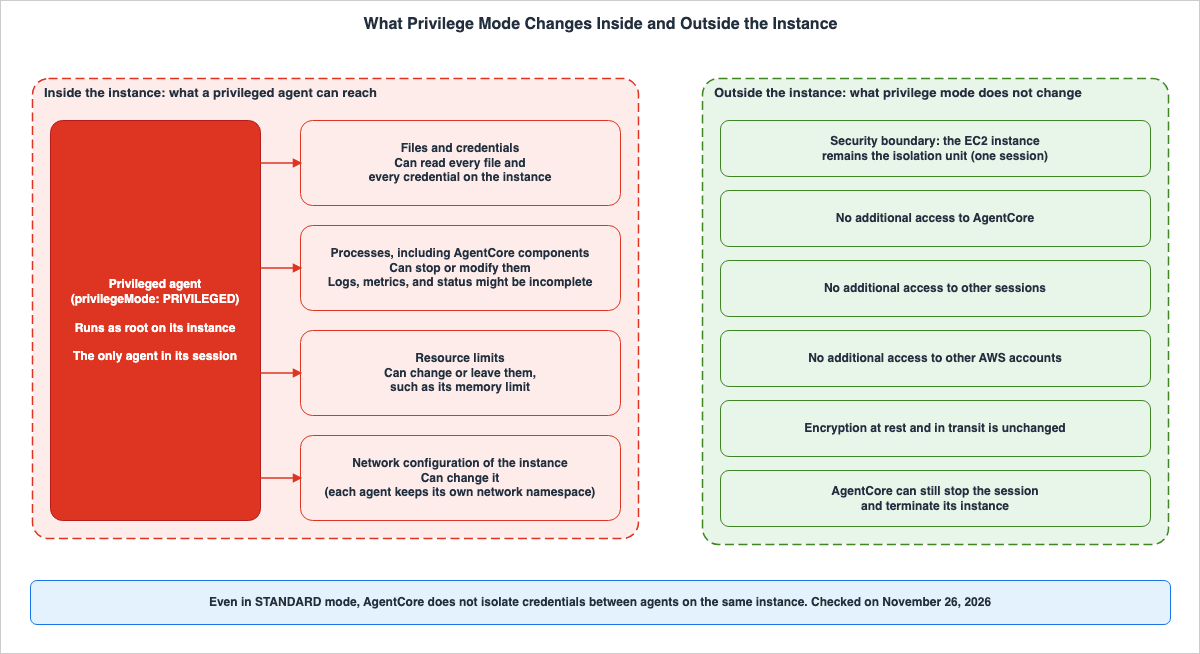
3.1 The Isolation Unit Remains the Instance
The security page states that privilege mode does not change the security boundary (Stated).The privilege mode doesn’t change the security boundary. The Amazon EC2 instance remains the isolation unit, and one instance serves one session in your account. A session that runs a privileged agent runs only that agent, so a privileged agent doesn’t share its instance with other agents.This passage conveys two points. First, one instance serves only one session in the account. Second, privileged agents do not share instances with other agents. The second point is explained in Chapter 5.
3.2 Two Ways of Saying It: Sessions and Instances
The Security Model section of the security page refers to the isolation unit as the session (Stated). On the same page, the Privilege mode section refers to the isolation unit as the EC2 instance (Stated).The session is the isolation unit — A session, identified by the combination of capacity provider and session ID, maps to one EC2 instance (1:1).Since sessions and EC2 instances are one-to-one, these two terms refer to the same unit. This article does not consider the difference in terminology in the user guide to be a discrepancy. This article uses "instance" when referring to boundaries and "session" when referring to session IDs or modes.
The same section states that agents on the same instance are not isolated from each other (Stated). The related article, Agent Sandboxing and Blast-Radius Isolation on AWS, addresses this point in Section 11.3. Privilege mode does not refine or broaden this unit of isolation.
3.3 Network Namespace
The privilege mode page states that, in either mode, each agent has its own network namespace (Stated).In both modes, each agent keeps its own network namespace.However, as described in Chapter 4, privileged agents can modify the network configuration of the instance. That each agent has its own network namespace is a sentence on the privilege mode page, and that a privileged agent can change the network configuration of the instance is a sentence on the security page. This article does not quote only one of them.
3.4 AgentCore, Other Sessions, and Other Accounts
The security page states that the privileges of a privileged agent are limited to that instance (Stated).A privileged agent has elevated privileges on its own instance only. It gets no additional access to AgentCore, to other sessions, or to other AWS accounts.The word "additional" in this sentence indicates that no new access is being added. The agent's execution role already grants certain permissions, and the existing execution role determines these permissions, separately from privilege mode (Inference). The security page recommends limiting the execution role to the minimum necessary permissions for that agent (Stated).
3.5 Encryption
The security page states that privilege mode does not alter how AgentCore encrypts data when it is saved or transmitted (Stated).The privilege mode doesn’t change how AgentCore encrypts your data at rest or in transit.3.6 AgentCore Can Stop the Session
The security page states that AgentCore can stop the session and terminate its instance, regardless of what is running on it (Stated).AgentCore can still stop the session and terminate its instance, regardless of what runs on it.Even if privileged agents stop components of AgentCore, a means to stop the session remains (Inference). The complete process for stopping a session is covered in the related article, "Stopping an AI Agent on AWS."
4. What Changes Inside the Instance
This chapter describes what privileged agents can do within an instance, as indicated by the text on the security page. The boundary sentences in Chapter 3 and the sentences in this chapter are in the same section of the same page.4.1 The Four Items the User Guide Lists
The security page states that, under the shared responsibility model, actions taken on an instance by privileged agents are the user's responsibility (Stated). It then lists four things that a privileged agent can do (Stated).Read every file and every credential on the instance.
Stop or modify any process on the instance, including the AgentCore components that manage the session and collect its logs and metrics. Logs, metrics, and status from that instance might then be incomplete.
Change or leave its resource limits, such as its memory limit.
Change the network configuration of the instance.In this article's words, the four points are as follows:
- Ability to read: Access to all files and all credentials on the instance.
- Ability to stop: The ability to stop all processes on the instance, including components of AgentCore that manage sessions, collect logs, and gather metrics.
- Ability to change: Resource limits for the agent, such as the memory limit.
- Ability to modify: The instance's network configuration.
This article does not describe how to do these things. What the design side needs is to know which of them can happen and to build records and permissions on that assumption.
4.2 Records That Might Be Incomplete
The second item states that the logs, metrics, and status from that instance might be incomplete (Stated). In a session of a privileged agent, records collected inside the instance cannot be relied on as evidence of what the agent did (Inference).The security page describes the instance's logs, metrics, and status. It states that the instance's activity can be audited through the user's CloudTrail and VPC Flow Logs (Stated). Since CloudTrail records control plane calls and VPC Flow Logs record network traffic, both of which operate outside the instance, these are considered outside the scope of the second item (Inference). However, the security page does not mention the impact privileged agents may have on these records (No statement found).
4.3 AgentCore Does Not Isolate Credentials Even in STANDARD
If you read every credential in the first item as something that privilege mode newly opens, you misplace the difference. The Security Model section of the security page states that even inSTANDARD mode, AgentCore does not isolate credentials between agents on the same instance (Stated).AgentCore doesn’t isolate credentials between agents on the same instance. As a result, any code on the instance, including other agents, can read every agent’s execution role credentials.In
STANDARD sessions, agents that share the session can read each other's execution role credentials (Stated). As mentioned in Chapter 5, privileged agent sessions do not contain other agents. Therefore, the difference that privilege mode adds is not the credentials of other agents but the rest of the instance: files, AgentCore components, resource limits, and the network configuration (Inference).The security page states that AgentCore uses instance profiles, which are associated with the instance, to collect system logs, and that these profiles do not grant permissions to the agent's code (Stated). The security page does not list what every credential includes (No statement found). The security page recommends limiting execution roles and infrastructure roles to the minimum necessary permissions (Stated). For a capacity provider that runs privileged agents, this article recommends also checking that the permissions of the instance profile do not exceed what log collection requires (Inference).
4.4 Reading the Boundary Sentences and the Inside Sentences Together
The statements in Chapters 3 and 4, when considered in isolation, can lead to incorrect conclusions.- If you only consider the statements in Section 3.1 on the boundary, it appears that nothing changes even in privilege mode. In reality, the records and restrictions inside the instance become unreliable.
- If you only consider the four items in Section 4.1, it suggests that privilege mode weakens session isolation. In reality, the isolation unit remains the instance, and the privileges are limited to that instance.
The key takeaway is that privilege mode does not alter the external boundary of the session, but instead renders the internal records and restrictions unreliable. The security page recommends using privilege mode only when necessary, keeping
STANDARD as the default, and limiting the principals that can configure PRIVILEGED (Stated).5. Sessions and Modes
This chapter explains how session modes are determined and how long they last.5.1 Decided by the First Agent
The privilege mode page states that the session mode is determined by the first agent that initiates activity within that session, and this mode persists until the session ends (Stated).A session that runs a privileged agent runs only that agent. A session gets its privilege mode from the first agent that runs in it, and keeps that mode for its whole lifetime. You can’t co-locate other agents with a privileged agent, even after the privileged agent stops. To run collaborating agents in one session, use STANDARD mode for all of them.In Instances, if a second agent runtime using the same capacity provider is called with the same session ID, both agents will run on the same instance (how it works page, Stated). This is not possible in a privileged agent session. If you need multiple agents to operate collaboratively within a single session, configure all of them to use
STANDARD mode (Stated).Privileged agents can continue to use their own session. The privilege mode page states that after the session stops, you can resume it with the same session ID (Stated).
5.2 Three ValidationException Scenarios
The privilege mode page states that AgentCore identifies an agent by the endpoint of its agent runtime (Stated). It further states that the following three requests fail with aValidationException (Stated).- Invoking a
STANDARDagent runtime using the session ID of a privileged agent's session. - Invoking a
PRIVILEGEDagent runtime using the session ID of a session initiated by aSTANDARDagent. - Invoking a
PRIVILEGEDagent runtime using the session ID of a session initiated by a different privileged agent. This also applies when invoking the same agent runtime through a different endpoint.
The error messages, in the order listed above, are:
This session is a privileged session. Standard agents cannot run in it.
This session was started in standard mode. A privileged agent must start in a new session.
This session is already used by a different privileged agent. A session can host only one privileged agent.
In every case, the privilege mode page directs you to invoke the agent with a new session ID (Stated). The third scenario illustrates that even when referring to the same agent runtime, it will be treated as a different privileged agent if accessed through a different endpoint.
5.3 Sessions After Mode Change
The privilege mode page states that the session keeps the mode it was created with (Stated). The security page states that even after the agent runtime is changed toSTANDARD, sessions initiated by privileged agents remain privileged, and AgentCore will not run other agents within those sessions (Stated).A session that a privileged agent started stays privileged for its whole lifetime. AgentCore doesn’t run other agents in that session, even after you change the agent runtime to STANDARD. To run the agent without elevated privileges, use a new session.Even if the agent runtime is reverted to
STANDARD, existing sessions initiated by privileged agents will remain privileged (Stated). If you need to immediately remove these privileges, simply updating the agent runtime will not be sufficient; you will need to stop those sessions and invoke the agent with a new session ID (Inference). The privilege mode page states that a stopped session can be resumed with the same session ID (Stated).5.4 Running Container Engines
The privilege mode page states that the privileged container agent can run container engines like containerd or Docker, build images, and run containers (Stated). It lists two considerations for that case (Stated):- Storage: The data for the container engine should be stored in volumes, rather than on the agent's container root filesystem. Container engines cannot store image layers on the root file system of a container. The example on the privilege mode page mounts a capacity provider volume to
/mnt/containersand places the engine's data directory beneath it. - Resources: The containers launched by the agent must operate inside the agent's resource limits, and their memory usage will be counted against the agent's total memory allocation.
6. The Paths That Change the Mode
This chapter describes how the agent runtime's mode changes, specifying which requests trigger these changes and how. Figure 2 illustrates the flow of mode transitions triggered by updates.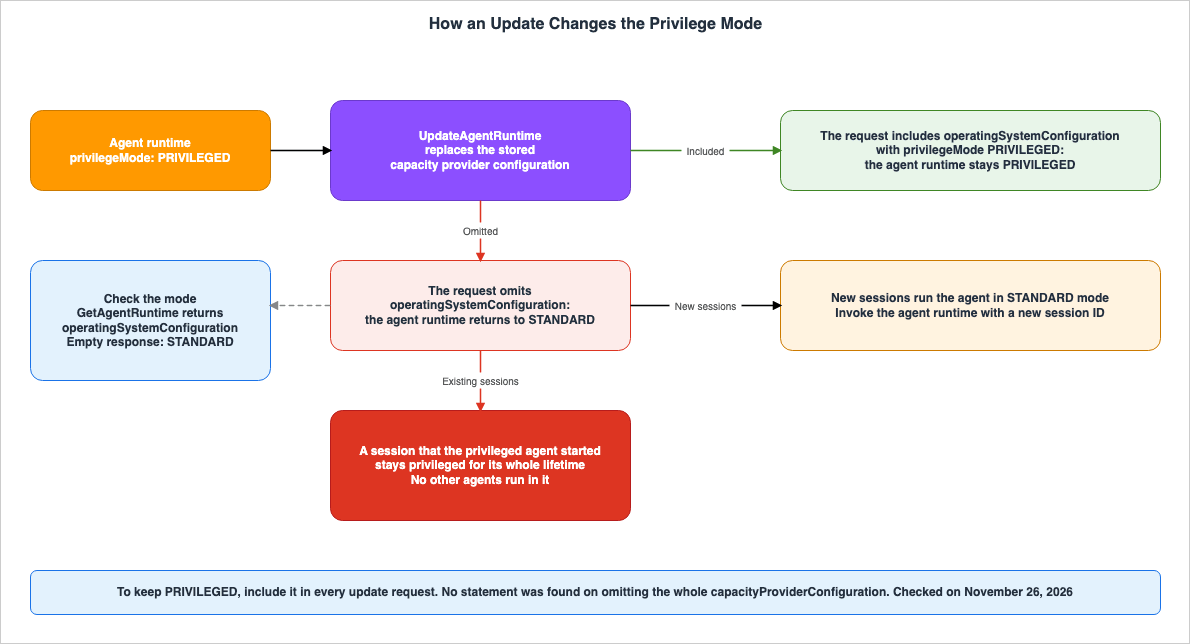
6.1 Creation
The privilege mode page provides an example, stating that in theCreateAgentRuntime request, the capacityProviderConfiguration should include PRIVILEGED in the operatingSystemConfiguration's linux.privilegeMode (Stated). Below is the value for the --capacity-provider-configuration in this example. This article changed the Region to us-east-1.{
"capacityProviderArn": "arn:aws:bedrock-agentcore:us-east-1:111122223333:capacity-provider/my_capacity_provider-a1b2c3d4e5",
"operatingSystemConfiguration": {
"linux": {
"privilegeMode": "PRIVILEGED"
}
}
}The privilege mode page also states that after the agent runtime reaches the
READY state, new agent sessions will operate with elevated privileges (Stated). If the value is incorrect, a ValidationException will occur, and the page will guide users to specify either STANDARD or PRIVILEGED for the linux setting (Stated).6.2 An Update Replaces the Configuration
The privilege mode page states thatUpdateAgentRuntime replaces the stored capacity provider configuration, and that the agent runtime returns to STANDARD if the update request omits operatingSystemConfiguration (Stated).To change the privilege mode of an existing agent runtime, call UpdateAgentRuntime with the new privilegeMode. UpdateAgentRuntime replaces the stored capacity provider configuration. If you omit operatingSystemConfiguration from the update, the agent runtime returns to STANDARD mode. To keep the current privilege mode, include it in every update request.This behavior is clearly documented in the user guide. Even updates that do not intend to change the mode will cause the agent runtime to revert to
STANDARD if the capacityProviderConfiguration does not include an operatingSystemConfiguration (Stated). To keep PRIVILEGED, include the mode in every update (Stated).When the agent runtime returns to
STANDARD, as described in Section 5.3, existing privileged sessions remain privileged, while new sessions begin in STANDARD mode. Agents that depend on privileges, such as builds, might fail in the new sessions (Inference). Conversely, an update that includes PRIVILEGED makes an agent runtime that was in STANDARD mode privileged (Stated).6.3 Sources Differ by Page
Some pages state this behavior and some do not.| Page | What it states | Status |
|---|---|---|
| privilege mode page | UpdateAgentRuntime replaces the stored configuration. Omitting operatingSystemConfiguration returns the agent runtime to STANDARD. Include the mode in every update. | Stated |
LinuxOperatingSystemConfiguration type page | If privilegeMode is omitted, the agent operates in STANDARD mode. | Stated |
UpdateAgentRuntime page | Describes capacityProviderConfiguration only as the updated configuration. Does not state that it replaces the stored configuration, or what applies when it is omitted. | No statement found |
CapacityProviderConfiguration type page | States that operatingSystemConfiguration is not required. Does not state what applies when it is omitted. | No statement found |
The sentence on the type page is the following:
The privilege mode of the agents. If you omit this field, the agents run in STANDARD privilege mode.The page for
UpdateAgentRuntime also states that capacityProviderConfiguration itself is not required (Stated). What happens to the mode when an update omits the whole capacityProviderConfiguration is not documented in any of the materials in Section 1.3 (No statement found). This article does not describe the behavior in such cases. As the privilege mode page recommends, include the capacity provider configuration, with the mode, in every update.6.4 Verification Method
The privilege mode page states thatGetAgentRuntime returns the privilege mode in capacityProviderConfiguration.operatingSystemConfiguration (Stated). The following is the example on the privilege mode page, with the Region changed to us-east-1.aws bedrock-agentcore-control get-agent-runtime \
--agent-runtime-id "my_privileged_agent-a1b2c3d4e5" \
--query 'capacityProviderConfiguration.operatingSystemConfiguration' \
--region us-east-1The privilege mode page states that if the response is empty, the agent runtime runs in
STANDARD mode (Stated). Checking this value after an update shows whether the mode is what you intended (Inference).6.5 CloudFormation
As of the verification date, theCapacityProviderConfiguration properties listed on the CloudFormation property page only include CapacityProviderArn (Stated). The properties related to OperatingSystemConfiguration and PrivilegeMode are not listed (Stated). As of the verification date, no way was found to specify the privilege mode in an AWS::BedrockAgentCore::Runtime template (No statement found).The behavior of the privilege mode when updating an agent runtime via CloudFormation is not documented in the materials in Section 1.3 (No statement found). This article does not describe this behavior. If you are using the privilege mode with an agent runtime managed through CloudFormation, check the mode with
GetAgentRuntime after each update (Inference).7. Who Controls the Mode and How to Notice a Change
This chapter shows the permissions that decide the mode and the ways to notice a change in the mode.7.1 The Same IAM Actions
The security page states that setting the privilege mode uses the same IAM actions as the rest of the agent runtime configuration (Stated).Setting the privilege mode uses the same IAM actions as the rest of the agent runtime configuration: bedrock-agentcore:CreateAgentRuntime and bedrock-agentcore:UpdateAgentRuntime. Any principal that can call these actions can configure an agent runtime to run its agents with elevated privileges. Grant these actions only to principals that you trust with that decision.Setting the mode uses these two actions (Stated). Any principal that can call these two actions can configure the agent runtime to run its agents with elevated privileges (Stated). Restricting who can decide the mode therefore amounts to restricting who can change the agent runtime configuration (Inference).
In the Actions table of the SAR,
UpdateAgentRuntime takes the runtime resource (Stated). For UpdateAgentRuntime, you can restrict which agent runtimes can be updated by resource ARN and tags (Inference). The CreateAgentRuntime row lists no resource type (Stated).7.2 Permissions Required Together
The table outlining SAR API operations lists the API operations and maps them to the corresponding IAM actions that the operation authorizes (Stated). This table indicates that theCreateAgentRuntime operation requires the following IAM actions: bedrock-agentcore:CreateAgentRuntime, bedrock-agentcore:CreateAgentRuntimeEndpoint, bedrock-agentcore:PassCapacityProvider, bedrock-agentcore:TagResource, and iam:PassRole (Stated). For the UpdateAgentRuntime operation, it lists bedrock-agentcore:PassCapacityProvider, bedrock-agentcore:UpdateAgentRuntime, and iam:PassRole (Stated). In the iam:PassRole row, the value of iam:PassedToService is bedrock-agentcore.amazonaws.com (Stated).The
iam:PassRole permission allows you to pass an execution role to the agent runtime. The related article, "iam:PassRole Is Checked by the Service," covers how iam:PassRole is evaluated.PassCapacityProvider is the permission to pass a capacity provider to a runtime resource; it takes the capacity-provider resource and supports the aws:ResourceTag/${TagKey} condition key (SAR, Stated). This lets you restrict which capacity providers can be passed (Inference). However, this restricts which capacity provider an agent runtime runs on, not the mode of that agent runtime (Inference).7.3 The Condition Key That Was Not Found
As of the verification date, the Amazon Bedrock AgentCore section of the SAR contained zero occurrences ofprivilegeMode. This article searched three times for a condition key that restricts the privilege mode, in the SAR's list of condition keys and through AWS documentation search, changing the search terms each time. None was found (No statement found).The table of Actions in the SAR lists the following condition keys for
CreateAgentRuntime and UpdateAgentRuntime related to AgentCore: bedrock-agentcore:RuntimeAuthorizerType, bedrock-agentcore:securityGroups, and bedrock-agentcore:subnets (Stated). None of these keys represent a mechanism for specifying privilege mode.This article does not state that a condition key for privilege mode does not exist. Rather, it notes that no such key was found as of the verification date. If a condition key were to be added, it could potentially be used to filter by mode. The controls described in Section 7.1 are based on the SAR as it existed on the verification date.
7.4 Noticing with CloudTrail
The security page notes that CloudTrail records all calls toCreateAgentRuntime and UpdateAgentRuntime, and recommends verifying these events for agent runtimes configured with privilegeMode set to PRIVILEGED (Stated).Monitor privilege mode changes — CloudTrail records every CreateAgentRuntime and UpdateAgentRuntime call. Review these events for agent runtimes with privilegeMode set to PRIVILEGED.The security page names the calls that set
PRIVILEGED. As described in Section 6.2, updates without the operatingSystemConfiguration parameter will revert the agent runtime to STANDARD. To detect transitions away from PRIVILEGED, also review UpdateAgentRuntime events that do not include operatingSystemConfiguration (Inference). The security page does not state which fields of the request a CloudTrail event records, or how (No statement found). This article recommends verifying the format of the logs before defining detection criteria.You can also check the mode of the agent runtime periodically with
GetAgentRuntime (Inference). If the response in Section 6.4 is empty, the mode is STANDARD.7.5 SCP and Service-Linked Roles
The security page notes that because Instances operate within accounts, AWS Organizations SCPs, permissions boundaries, and VPC controls govern the actions performed within those accounts (Stated). An exception to this applies to the service-linked role used by AgentCore for deleting and cleaning up resources; this role is not subject to SCP restrictions (Stated).The exception is the AgentCore service-linked role used to delete and clean up resources, which is not restricted by SCPs — consistent with how AWS treats service-linked roles generally.Using SCPs, it is possible to restrict the
CreateAgentRuntime and UpdateAgentRuntime actions to specific principals (Inference). However, as noted in Section 7.3, no mode condition keys were found as of the verification date. Therefore, for principals other than the allowed ones, this SCP would prevent not only mode configuration but also all creation and updates of agent runtimes (Inference).7.6 Security Hub CSPM
As of the verification date, the Security Hub CSPM page lists seven AgentCore controls, ranging from BedrockAgentCore.1 to BedrockAgentCore.7. None of them checks the privilege mode (Stated). BedrockAgentCore.1, in particular, is a control that checks whether the agent runtime is using the VPC network mode, and it does not produce findings for agent runtimes that utilize a capacity provider (Stated).The control doesn't produce findings for runtimes that are backed by a capacity provider.As of the verification date, the Security Hub CSPM controls do not detect agent runtimes operating in a privileged state (Inference). The methods for detecting such runtimes are outlined in Section 7.4, utilizing CloudTrail and
GetAgentRuntime.8. What the Sources Do Not State
This chapter summarizes the places where the text says No statement found, and the places that might change after the verification date.| Item | Status | Handling in this Article |
|---|---|---|
What happens to the mode when an update omits the whole capacityProviderConfiguration | No statement found | Not described. Include the mode in every update (Section 6.3). |
| Whether privilege mode can be specified in CloudFormation | No statement found (the property page lists only CapacityProviderArn) | Shows the properties as of the verification date (Section 6.5). |
| What happens to the mode when CloudFormation updates the agent runtime | No statement found | Not described. Check the mode with GetAgentRuntime after each update (Section 6.5). |
| A condition key that restricts the privilege mode | No statement found (the SAR and three searches) | Does not state that it does not exist (Section 7.3). |
| How a CloudTrail event records the fields of the request | No statement found | Check the record format before writing detection conditions (Section 7.4). |
| What every credential includes | No statement found | Focus on minimizing the execution and infrastructure roles, and also verify the permissions of the instance profile (Section 4.3). |
| Whether privilege mode can be used on Instances in AWS GovCloud (US-West) | No statement found | Not described (Q7 in Chapter 9). |
9. Frequently Asked Questions About Privilege Mode on AgentCore Runtime Instances
This chapter answers the questions of the readers in Section 1.1 with the text of Chapters 2 through 8.Q1. Does privilege mode weaken session isolation?
No, it does not. The security page states that privilege mode does not alter the security boundary, and EC2 instances remain the unit of isolation. A privileged agent gets no additional access to AgentCore, to other sessions, or to other accounts. However, inside the instance, it can read every file and credential, stop components of AgentCore, and modify the network configuration. Logs, metrics, and status related to that instance may be incomplete (see Chapters 3 and 4).Q2. In STANDARD mode, can agents on the same instance read each other's credentials?
Yes, they can. The security page states that AgentCore does not isolate credentials between agents on the same instance, and that any code on the instance can read the credentials associated with the execution role of all agents. Agents with different levels of trust should be run in separate sessions (see Section 4.3).Q3. After updating the agent runtime, builds started failing. What should I check?
Verify thecapacityProviderConfiguration.operatingSystemConfiguration with GetAgentRuntime. UpdateAgentRuntime replaces the stored capacity provider configuration, and if operatingSystemConfiguration is omitted, the agent runtime returns to STANDARD. If the response is empty, it is considered STANDARD. To maintain the PRIVILEGED mode, you must specify the mode during each update (see Sections 6.2 and 6.4).Q4. Can a condition key prohibit only privilege mode?
As of November 26, 2026, no condition key that restricts the privilege mode was found. The security page indicates that theCreateAgentRuntime and UpdateAgentRuntime actions are used to configure the mode, and that principals that can call these actions can decide the mode. Control is exercised by granting access to these two actions and through monitoring via CloudTrail (see Sections 7.1 through 7.4).Q5. If the agent runtime returns to STANDARD, do running privileged sessions also lose their privileges?
No. The security page states that a session that a privileged agent started stays privileged even after the agent runtime is changed toSTANDARD. To remove the privileges now, you need to stop that session and invoke the agent with a new session ID (Inference; see Section 5.3).Q6. Does running virtual machines in an agent require privilege mode?
Not always. The nested virtualization page states that when nested virtualization is enabled on the capacity provider, AgentCore passes/dev/kvm to the container's agent. With the STANDARD configuration, the container can use this device without requiring privilege mode, while still maintaining other limitations. Nested virtualization has OS and instance type requirements. If your sole purpose is to use KVM, check this page before choosing privilege mode (see Section 2.2).Q7. Can privilege mode be used in AWS GovCloud (US-West)?
It could not be confirmed. What's New states that privilege mode is available in all AWS Regions where Instances are available. The release notes indicate that Instances became available in AWS GovCloud (US-West) in November 2026. The GovCloud page does not mention privilege mode. This article does not state that privilege mode is available in GovCloud (Chapter 8).10. Summary
Before and after granting privilege mode to agents within AgentCore Runtime Instances, ensure the following:- You have verified that the reason for granting privileges is one of the following: container build, system package installation, or kernel configuration. If the sole purpose is KVM, you have previously investigated nested virtualization (Section 2.2).
- You understand that granting privilege mode does not alter security boundaries and that the records and restrictions inside the instance become unreliable (Chapters 3 and 4).
- In sessions of privileged agents, you do not rely on the logs, metrics, and status collected inside the instance as evidence (Section 4.2).
- You have segmented sessions based on trust levels, assuming that AgentCore does not isolate the credentials of agents on the same instance, even in
STANDARDmode (Section 4.3). - All collaborating agents are configured to operate in
STANDARDmode. After changing a mode, you are using new session IDs (Chapter 5). - You understand that even if the agent runtime is reverted to
STANDARDmode, existing privileged sessions will remain privileged (Section 5.3). - You are configuring capacity provider settings, including
operatingSystemConfiguration, with each update. After an update, you are verifying the mode usingGetAgentRuntime(Sections 6.2 and 6.4). - You have only granted
CreateAgentRuntimeandUpdateAgentRuntimeto principals authorized to make mode decisions. The decision-making process for whom to grant access toInvokeAgentRuntimeCommandandInvokeAgentRuntimeCommandShellis given equal consideration (Sections 2.3 and 7.1). - You are using CloudTrail to monitor both calls configured with
PRIVILEGEDand updates that do not includeoperatingSystemConfiguration(Section 7.4). - You have verified that the SAR condition keys, CloudFormation properties, and Security Hub CSPM controls have not changed since the verification date of November 26, 2026, by re-examining the relevant pages (Section 1.5 and Chapter 8).
11. References
- Configure the privilege mode for Runtime Instances - Amazon Bedrock AgentCore
- Security model and permissions for Runtime Instances - Amazon Bedrock AgentCore
- Instances - Amazon Bedrock AgentCore
- Runtime Instances and capacity providers - Amazon Bedrock AgentCore
- Run virtual machines in agents on Runtime Instances - Amazon Bedrock AgentCore
- Release notes for Amazon Bedrock AgentCore - Amazon Bedrock AgentCore
- UpdateAgentRuntime - Amazon Bedrock AgentCore Control Plane
- CreateAgentRuntime - Amazon Bedrock AgentCore Control Plane
- GetAgentRuntime - Amazon Bedrock AgentCore Control Plane
- CapacityProviderConfiguration - Amazon Bedrock AgentCore Control Plane
- OperatingSystemConfiguration - Amazon Bedrock AgentCore Control Plane
- LinuxOperatingSystemConfiguration - Amazon Bedrock AgentCore Control Plane
- Actions, resources, and condition keys for Amazon Bedrock Agentcore - Service Authorization Reference
- AWS::BedrockAgentCore::Runtime - AWS CloudFormation
- AWS::BedrockAgentCore::Runtime CapacityProviderConfiguration - AWS CloudFormation
- Security Hub CSPM controls for Amazon Bedrock AgentCore - AWS Security Hub
- AgentCore runtime instances now support privileged mode - AWS What's New
- AgentCore runtime instances are now generally available - AWS What's New
- Amazon Bedrock AgentCore in AWS GovCloud (US) - AWS GovCloud (US)
- Agent Sandboxing and Blast-Radius Isolation on AWS - Choosing the Unit of Each Containment Boundary and What Each One Does Not Stop
- Threat Modeling Generative AI Applications on AWS - STRIDE for RAG, Agents, and Tool Use
- OWASP Top 10 for Agentic Applications Mapped to AWS Controls - What Each Control Mitigates and What Residual Risk Remains
- iam:PassRole Is Checked by the Service - What the Resource, PassedToService, the Trust Policy, and Service-Linked Roles Each Decide
- Stopping an AI Agent on AWS - What Each Control Stops, What Keeps Running, and Who Can Undo It
- Security for Agentic AI on AWS by Category - 30 Best Practices, What the Guide Names, and Where Each One Lands on AWS
References:
Tech Blog with curated related content
Written by Hidekazu Konishi