When Expired Data Is Actually Deleted on AWS - DynamoDB TTL, S3 Lifecycle Expiration, and CloudWatch Logs Retention
First Published:
Last Updated:
The DynamoDB developer guide describes expired items as follows:
Items with valid, expired TTL attributes might be deleted by the system at any time, typically within a few days after their expiration.The Amazon S3 user guide describes objects that have reached the expiration date set by lifecycle rules as follows:
Even though the expiration rule has been satisfied on January 1, Amazon S3 might not actually delete these objects until days or even weeks later.The Amazon CloudWatch Logs API reference describes log events that have reached their retention period as follows:
CloudWatch Logs doesn't immediately delete log events when they reach their retention setting. It typically takes up to 72 hours after that before log events are deleted, but in rare situations might take longer.This article calls this interim period the window. Whether data can be read during the window, whether the expiry can be removed, and where deletion is recorded all vary by service. Of the three services discussed in this article, only DynamoDB explicitly mentions reading data during the window, based on the materials this article reviewed. Regarding S3 and CloudWatch Logs, no statement was found, in the range this article read, that says whether data can or cannot be read during this period. For S3, the closest statement found is quoted in Section 4.5.
This article covers TTL in DynamoDB, lifecycle expiration in S3 (split into three rows), and retention periods in CloudWatch Logs. It presents this information in tables with the same columns, correlating the unit of expiration, the language used in the documentation regarding the length and guarantees of the window, what is visible during the window, whether the expiry can be removed, and where deletion is recorded. Where the documentation does not say something, the article states that, along with the range searched. This article does not recommend which service to use or how many days the expiry should be. Pricing information is also not included. The information is based on each service's documentation, API references, "What's New" sections, and official AWS articles on AWS re:Post, as verified on October 15, 2026. This article did not create actual tables, buckets, or log groups to measure deletion times.
Related articles on this site:
- Amazon S3 Metadata Tables - Who Writes the Journal, Live Inventory, and Annotation Tables, How Current Each One Is, and What You Can Answer Without Listing a Bucket
- Object Lock, Legal Holds, and Event Holds in Amazon S3 - Who Can Shorten a Retention Period, What a Hold Adds, and When the Retention Clock Starts
- Amazon DynamoDB Single Table Design Complete Guide - Access-Pattern-Driven Data Modeling Patterns
- Event-Driven Serverless Architecture on AWS - Building Resilient Workflows with API Gateway, Lambda, EventBridge, Step Functions, and DynamoDB
- AWS Backup Data Protection and Governance - Backup Plans, Vault Lock, and Cross-Account Copy Design
- Centralized Logging and Audit Architecture on AWS - Multi-Account Log Aggregation, Detection, and Query with CloudTrail, Config, Security Hub, and OpenSearch
- Where AWS Publishes Which Features Exist in Which Region - Capabilities by Region, SSM Public Parameters, and the CloudFormation Registry
- Dependency Cooldowns by Package Manager - Defaults Since Which Version, What Update Bots Do Not Wait For, and the Publish Times CodeArtifact Returns
Table of Contents
- 1. Expiry and Deletion Are Two Different Moments
- 2. How to Read the Tables — Who Sets It, What the Source Says, and Where It Shows
- 3. DynamoDB Time to Live
- 4. S3 Lifecycle Expiration
- 5. CloudWatch Logs Retention
- 6. The Three Services Side by Side
- 7. Failure Modes
- 8. Frequently Asked Questions About Deleting Expired Data
- 9. Summary
- 10. References
1. Expiry and Deletion Are Two Different Moments
This section splits the assumption that data disappears when its expiry arrives into the questions the documents answer. It then defines the scope of this article, the date of verification and the documents reviewed, and the terminology used throughout this article.1.1 Defining the Questions
Regarding the system for deleting old data based on expiration dates, the design assumptions can be broken down into at least five key questions:- What unit is used to determine the expiration date? Is it based on individual items, combinations of objects and rules, or log groups? From what time is the count initiated, and how frequently is the expiration date checked?
- How long a period between expiry and deletion does the documentation state? How strongly is that length stated (e.g., using terms like
typically,might,up to, ordoesn't guarantee)? - What is visible during the window? After the expiration date, will the data still be accessible for reading or listing?
- Can the expiration date be extended, or can deletion be stopped? Is it possible to extend the expiration date or cancel a scheduled deletion during the window? Can data that has been deleted be recovered?
- Where is the deletion process recorded? Where can users verify that the deletion has been completed?
This article presents tables that answer these five questions for each service, in a single row per service, with three rows for S3 (Section 6).
1.2 What This Article Covers, and What It Does Not
This article focuses on the deletion of data based on expiration for the following three services:- DynamoDB TTL (Time To Live): A mechanism within DynamoDB that deletes items when the timestamp specified in their attributes has passed.
- S3 Lifecycle Expiration: A mechanism within S3 that deletes objects based on the
ExpirationandNoncurrentVersionExpirationactions defined in lifecycle rules. This article focuses on general-purpose S3 buckets; it does not cover directory buckets. - CloudWatch Logs Retention Period: A mechanism within CloudWatch Logs that deletes log events after the number of days specified in the log group has passed.
Section 6.4 provides a brief comparison, listing the retention and deletion mechanisms for AWS Backup, Amazon Kinesis Data Streams, and Amazon SQS.
The following topics are covered in separate articles on this site. This article mentions each with a single sentence and a link.
- How S3 Object Lock Works: Object Lock, Legal Holds, and Event Holds in Amazon S3 covers this. The article's Section 2.2 discusses the fact that versions under hold will not be deleted even when the lifecycle expiration date is reached. This article only extracts text related to how the lifecycle page describes Object Lock (Section 4.4).
- How to Verify S3 Metadata in the Journal Table and S3 Inventory: Amazon S3 Metadata Tables covers this. The article discusses how to view items deleted by lifecycle in the journal table, and also mentions the
Lifecycle Expiration Datefield in S3 Inventory. This article lists it as one of the places where a deletion is recorded. - Using TTL in a Single Table Design for DynamoDB: Amazon DynamoDB Single Table Design Complete Guide covers this.
- Designing for TTL to Delete Temporary States: Event-Driven Serverless Architecture on AWS Section 8.3 covers this.
- Designing for Retention of Backups: AWS Backup Data Protection and Governance covers this. This article quotes AWS Backup's statement on deletion as one line of comparison (Section 6.4).
- Designing for Log Aggregation and Storage: Centralized Logging and Audit Architecture on AWS covers this.
This article does not cover lifecycle transition actions for S3. It also does not describe how to retrieve data scheduled for deletion. It does not recommend which services to use, nor does it specify what expiration dates should be set. Pricing information is also not included.
1.3 The Verification Date and the Sources Read
This article was verified on October 15, 2026, except for the deletion protection pages in Section 5.7, which were checked on October 16, 2026. The materials consulted are as follows:- DynamoDB: Chapters on TTL in the developer guide ("Using time to live (TTL) in DynamoDB," "Enable time to live (TTL) in DynamoDB," "Computing time to live (TTL) in DynamoDB," "Working with expired items and time to live (TTL)," and "DynamoDB Streams and Time to Live"). "How DynamoDB global tables work." "DynamoDB Metrics and dimensions." "Logging DynamoDB operations by using AWS CloudTrail." API references for
UpdateTimeToLiveandRecord. - S3: Chapters on lifecycle management in the user guide ("Managing the lifecycle of objects," "Expiring objects," "Lifecycle configuration elements," "Setting an S3 Lifecycle configuration on a bucket," "Configuring S3 Lifecycle event notifications," "How S3 Lifecycle interacts with other bucket configurations," and "Troubleshooting Amazon S3 Lifecycle issues"). "Event notification types and destinations." "Working with delete markers." "Amazon S3 CloudTrail events." API references for
LifecycleExpiration,NoncurrentVersionExpiration,GetObject,HeadObject. - CloudWatch Logs: API references for
PutRetentionPolicy,DeleteRetentionPolicy,LogGroup,DescribeLogGroups,GetLogEvents,FilterLogEvents,StartQuery,GetQueryResults. User guide sections "Working with log groups and log streams," "Protecting log groups from deletion," "Analyzing log data with CloudWatch Logs Insights," and "Logging CloudWatch Logs API and console operations in AWS CloudTrail." - Announcements: Two entries in "What's New" (Announcement regarding S3 lifecycle and replication on April 9, 2026; Announcement regarding CloudWatch Logs deletion protection on November 26, 2025).
- AWS re:Post (Official AWS Articles): Four articles: "Confirm that the lifecycle rule on my Amazon S3 bucket is working," "Determine the cause of deleted logs in Amazon CloudWatch," "Restore or prevent deletion of logs or log groups in CloudWatch," and "Resolve empty log issues in CloudWatch."
- Comparisons: Documentation and API references for AWS Backup, Kinesis Data Streams, SQS, AWS Secrets Manager, and AWS KMS.
No announcement of a change in DynamoDB's TTL behavior was found in the DynamoDB announcements listed in "What's New" (a total of 177 items). The only TTL-related announcements found were two: the initial release on February 27, 2017, and the addition of deletion metrics on June 6, 2017. Articles on the AWS Database Blog and AWS Security Blog also mention a timeframe of
within a few days (Section 3.2).1.4 Distinct Terms with the Same Spelling
This article discusses numerous terms that share the same spelling but refer to different concepts. This article uses the following distinctions:- expiration / expiry / retention / TTL / lifecycle: In DynamoDB, the term for expiration is TTL (Time to Live). For S3, it refers to the expiration date of lifecycle rules (the
ExpirationandNoncurrentVersionExpirationactions). For CloudWatch Logs, it refers to the retention period. This article uses the term "expiration" only when referring to all three collectively. Expiration: This term refers to an action within S3 lifecycle configurations. It also appears in the HTTP response headerx-amz-expirationand in theExpirationheader used by re:Post, both indicating a planned expiration time (see Section 4.5).- delete / delete marker / marked for deletion / permanently delete: When versioning is enabled in an S3 bucket, the
Expirationaction on the current version creates a delete marker; it does not delete the object's data (see Section 4.3). In CloudWatch Logs,marked for deletiondescribes the state of a log event that has reached its retention period (see Section 5.3). This article uses the term "permanent deletion" to describe the point at which data can no longer be retrieved. - current version / noncurrent version: These terms refer to versions of objects stored in S3. They are not related to package versions.
- Window: In this article, "window" refers to the period between the expiration date and the actual point at which data is deleted. It is distinct from the time it takes for a source to reflect actual service availability (Where AWS Publishes Which Features Exist in Which Region), or the time between a package's release and its installation (Dependency Cooldowns by Package Manager).
2. How to Read the Tables — Who Sets It, What the Source Says, and Where It Shows
This section defines the columns and terminology used in the tables presented in this article. The tables in Section 6 use the same columns for who sets each service's window, how the documentation describes the window, what is visible during the window, where the deletion is recorded, and which documents provide the supporting evidence.2.1 Window Columns
The table in Section 6.1 has the following five columns:Who Sets It: Who determines the expiration date and the point of deletion (see Section 2.2).Stated Window: How the material describes the period between the expiration date and the deletion date, written verbatim or as a verbatim summary. It is important to accurately reflect the material's level of certainty (e.g.,typically,might,up to,doesn't guarantee).During the Window: What the user sees and what they can do during the period between the expiration date and the deletion date.Where It Shows: The location where the deletion is visible to the user. In this article, this column specifies where the deletion is recorded.Cited From: The name and date of the source material that supports the information in that row.
2.2 Values of Who Sets It
The Who Sets It column contains the following values. Because different parties set the expiration date and the deletion date, a single cell lists both.You (your configuration): The user sets the expiration date for an item's attributes, lifecycle rules, or log group retention period.AWS (the deletion process): The service's deletion process determines when data that has reached its expiration date will actually be deleted.The source does not say.: The documentation does not specify who makes the determination.
2.3 How to Write Stated Window and During the Window
The Stated Window column describes what the material says about the period between expiration and deletion, using the original wording or a verbatim summary of that wording. The guarantee words are kept in their original spelling. Do not rewrite typically within a few days into a statement that data is always deleted within a few days. Do not rewrite up to 72 hours into a statement that data is always deleted in 72 hours. If the information is not stated in the material, write The source does not say.The
During the Window column should describe what the user can see or access within that timeframe. This could include seeing the content in a reading result, seeing it in a list, receiving a response indicating the scheduled expiration, or being counted in the stored size.2.4 How to Write Where It Shows
The Where It Shows column should specify the locations where deletions are visible to users. This could include stream records, metrics, event notifications, server access logs, AWS CloudTrail, and so on. If the documentation states that data is not recorded in a particular location, write that information verbatim as well.2.5 This Article's Columns — Expiry Unit, Can You Undo It, What Stops It
Section 6.2 uses the following three columns:Expiry Unit: The unit used to determine the expiration date, and the starting point for the calculation, as well as the frequency with which it is assessed.Can You Undo It: Whether the expiration date can be removed, whether a deletion can be canceled, or whether it can be restored after it has been removed.What Stops It: The conditions that prevent deletion even after the expiration date has passed, and the conditions under which the documentation says deletion is not stopped.
2.6 How to Write Dates and Verification Dates
The date for "What's New" is written using the date (UTC) from the announcement'spostDateTime. For documents, API references, and re:Post articles, the format is the page name and verification date (October 15, 2026).2.7 When the Source Does Not Say, and When Sources Disagree
In the table cells, include only the information (or a summary of it) from the source. If the source does not address a particular point, writeThe source does not say. Before writing this, search the full text of the source document, the link it provides, and related pages from the same provider (such as API references, troubleshooting guides, and official AWS articles on re:Post). If the source only provides general information and does not specifically address the topic of a particular row, do not write The source does not say. Instead, include the general information and a note that the source does not name the row's subject.When the sources disagree, present both descriptions, each with its corresponding source, without favoring either one. Within the scope of this article, the sources disagree on one fact: the length of DynamoDB's window (Section 3.2). There are instances where the two sources describe the same content or similar content using different phrasing. In such cases, cite each source individually (see Sections 3.1, 4.2, 4.5, and 5.4).
3. DynamoDB Time to Live
This section outlines DynamoDB's TTL feature, detailing how expiration is determined, the concept of time windows, what is visible within those windows, how to remove an expiry, and where deletion records are stored, all based on the developer guide and API reference documentation.3.1 Expiration Is Determined by the Number Attribute for Each Item
The TTL expiration is determined for each item. To enable TTL, you must specify a single attribute in the table that will hold the expiration time. The value of that attribute is the item's expiration time. The TTL chapter of the developer guide describes the acceptable format for these values as follows:The timestamp must be stored as a Number data type in Unix epoch time format at the seconds granularity. Items with a TTL attribute that is not a Number type are ignored by the TTL process.The "Computing time to live (TTL) in DynamoDB" page in the same chapter lists the acceptable range of values that are treated as expiration times as follows:
To be considered for expiry and deletion, the TTL can't be more than five years in the past.The same page also states,
There is no minimum TTL duration.Enabling or disabling TTL does not take effect immediately. The "Enable time to live (TTL) in DynamoDB" page states the following:
It takes approximately one hour to enable TTL across all partitions.Regarding disabling TTL, the same page states,
TTL will continue to process deletions for approximately 30 minutes after it is disabled. The UpdateTimeToLive API reference describes the changes made when enabling and disabling TTL as follows. The statement that deletions will continue for approximately 30 minutes after disabling is a separate timeframe.It can take up to one hour for the change to fully process.The TTL chapter this article read does not specify how frequently or in what order items that have exceeded their expiration time are evaluated.
3.2 The Window — Items Can Be Deleted at Any Time but Typically Within a Few Days of Expiry
The developer guide's TTL chapter describes the point at which expired items are deleted in two sentences. The first, in the opening paragraph, stateswithin a few days of their expiration time. The second sentence reads:Items with valid, expired TTL attributes might be deleted by the system at any time, typically within a few days after their expiration.This sentence does not provide a guaranteed timeframe. It includes the phrases
at any time and typically. The table in this article describes the window using this phrasing (Section 6.1). An article on the AWS Database Blog states it cannot guarantee when an item will be deleted, while an article on the AWS Security Blog states TTL deletes items on a best effort basis, and deletion might take longer in some cases. Both of these refer to the window as within a few days. In contrast, the UpdateTimeToLive API reference states DynamoDB deletes expired items on a best-effort basis to ensure availability of throughput for other data operations. and, in an Important note, DynamoDB typically deletes expired items within two days of expiration. The developer guide's a few days and the API reference's two days disagree. This article does not favor either.3.3 Expired Items Still Appear in Read and Write Results During the Window
Items that have passed their expiration date but have not yet been removed will appear in the read results unless filtered. The page discussing working with expired items and time to live (TTL) states the following:Expired items that are pending deletion can be filtered from read and write operations. This is useful in scenarios when expired data is no longer valid and should not be used. If they are not filtered, they’ll continue to show in read and write operations until they are deleted by the background process.The same page lists filter expressions as a method for excluding expired items when using
Scan and Query. These filter expressions exclude items where the TTL attribute's timestamp is less than or equal to the current time. Excluding expired items from the results is achieved through the user's filter expression, rather than DynamoDB's deletion process.Of the three services discussed in this article, only DynamoDB's TTL explicitly states that expired items will appear in the read results. The handling of S3 and CloudWatch Logs is described in Sections 4.5 and 5.3.
3.4 Before Deletion, an Update Can Remove the Expiry
Even items that have reached their expiration date can be updated until they are deleted. The TTL chapter states the following:You can still update the expired items that are pending deletion, including changing or removing their TTL attributes. If you update an item's TTL attribute to a timestamp in the future (or remove the TTL attribute) before the item is deleted, the item is no longer considered expired and the TTL process does not delete it.The same paragraph recommends that, when updating expired items, you use a condition expression to make sure the item has not since been deleted.
The TTL chapter that this article reviewed does not describe a method for restoring items that have been deleted.
3.5 Deletions Are Reflected in Streams and Metrics, but Not in CloudTrail
If DynamoDB Streams is enabled on the table, items deleted by TTL are recorded in Streams. The TTL chapter states:After deletion, items go into DynamoDB Streams as service deletions instead of user deletes, and are removed from local secondary indexes and global secondary indexes just like other delete operations.The DynamoDB Streams and Time to Live page illustrates the
userIdentity values for records of deletions caused by TTL, using a table. For Records[<index>].userIdentity.type, the value is "Service", and for Records[<index>].userIdentity.principalId, the value is "dynamodb.amazonaws.com". The API reference for Record also shows these two values. An example record from the same page has the following format:"userIdentity": {
"type": "Service",
"principalId": "dynamodb.amazonaws.com"
}In global tables, this identification is only available for the Region where the deletion occurred. The page "Working with expired items and time to live (TTL)" states:
TTL deletions can be identified in DynamoDB Streams, but only in the Region where the deletion occurred. TTL deletions that are replicated to global table regions are not identifiable in DynamoDB streams in the regions the deletion is replicated to.The number of deleted items is available in the CloudWatch metric
TimeToLiveDeletedItemCount. The "DynamoDB Metrics and dimensions" page describes this metric as The number of items deleted by Time to Live (TTL) during the specified time period. A "What's New" announcement from June 6, 2017, announced the addition of a CloudWatch metric to track the number of items deleted by TTL, although the announcement did not specify the metric's name.TTL deletions do not appear in AWS CloudTrail. On the page "Logging DynamoDB operations by using AWS CloudTrail," after the list of DynamoDB operations that can be recorded as data events, the page places the following note:
DynamoDB Time to Live data plane actions are not logged by CloudTrailOn the same page, in the list of operations recorded in CloudTrail, the
UpdateTimeToLive and DescribeTimeToLive operations related to TTL configuration are present. Operations that modify TTL settings and deletions caused by TTL are logged to different locations.4. S3 Lifecycle Expiration
This section outlines the expiration process for S3 lifecycle rules, detailing how expiration dates are determined, the relevant time windows, the two types of expiration, the conditions that stop it, the visibility within those time windows, cancellation procedures, and where deletion records are stored. This information is presented in conjunction with the user guide, API reference, and re:Post documentation.4.1 Expiration Is Calculated by Adding Days and Rounding Up to the Next Midnight UTC
The combination of the rule and the object determines the expiration date for lifecycle rules. When a rule specifies the number of days using theDays parameter, S3 calculates the expiration time as follows. The Lifecycle configuration elements page states the following regarding the current version:Amazon S3 calculates the time by adding the number of days specified in the rule to the object creation time and rounding up the resulting time to the next day at midnight UTC.Regarding noncurrent versions, the same page states that the starting point for adding the specified number of days is the time when the object's next version was created. In both cases, the expiration is rounded up to the next day at 00:00 UTC.
Regarding the frequency of evaluation, an official AWS article on AWS re:Post (Confirm that the lifecycle rule on my Amazon S3 bucket is working, updated December 10, 2025) states,
Amazon S3 lifecycle rules run only once each day. For rules that target objects based on tags, the "Expiring objects" page states, S3 Lifecycle evaluates objects against tag-based filters daily.The "Troubleshooting Amazon S3 Lifecycle issues" page provides examples of rounding. For instance, it describes an object created on January 1 at 17:05 Pacific Daylight Time (00:05 UTC on January 2) that is subject to a rule expiring after one day.
The object becomes one day old at 00:05 UTC on January 3, which makes it eligible for expiration when S3 Lifecycle evaluates objects at 00:00 UTC on January 4.4.2 The Window — Possibly Days or Even Weeks Later, with No Completion Time Guaranteed
The page describing how to set an S3 Lifecycle configuration on a bucket states:For example, suppose that a set of objects is expired by a lifecycle rule on January 1. Even though the expiration rule has been satisfied on January 1, Amazon S3 might not actually delete these objects until days or even weeks later. This delay occurs because S3 Lifecycle queues objects for transitions or expirations asynchronously. S3 Lifecycle doesn't guarantee a completion time for transition or expiration actions.The page detailing "Expiring objects" also states:
There may be a delay between the expiration date and the date at which Amazon S3 removes an object.There is also a delay before the rules themselves are fully applied. The same page describing how to set an S3 Lifecycle configuration on a bucket states:
Expect a delay of a few minutes before the configuration fully takes effect. This same delay may occur when deleting a lifecycle configuration. The "Expiring objects" page indicates that it may take up to 15 minutes for changes to the rules to propagate (Section 4.4). The few minutes and the up to 15 minutes are stated in different sentences on different pages.The same page also provides AWS recommendations regarding data that must be deleted by a specific deadline.
We don't recommend relying on S3 Lifecycle alone for deletions that must complete by a fixed deadline, such as a regulatory or contractual data-retention requirement.Following that statement, the same page recommends using the
Lifecycle Expiration Date field in S3 Inventory reports to identify objects that have passed their expiration date but have not yet been deleted, and to delete those objects that should have been removed by the deadline. This is an AWS recommendation, and not a recommendation from this article. The S3 Inventory fields are discussed in Section 6 of Amazon S3 Metadata Tables.4.3 Two Kinds of Expiration, and the Result for the Current Version Depends on the Versioning State
S3 lifecycle configurations have two actions:Expiration and NoncurrentVersionExpiration. The result of the Expiration action differs based on whether versioning is enabled on the bucket. The "Expiring objects" page lists three states for the Expiration action as follows:Nonversioned bucket – Amazon S3 queues the object for removal and removes it asynchronously, permanently removing the object.
Versioning-enabled bucket – If the current object version is not a delete marker, Amazon S3 adds a delete marker with a unique version ID. This makes the current version noncurrent, and the delete marker the current version.
Versioning-suspended bucket – Amazon S3 creates a delete marker with null as the version ID. This delete marker replaces any object version with a null version ID in the version hierarchy, which effectively deletes the object.In other words, even if you configure
Expiration on a bucket with versioning enabled, the object's data will not be deleted. Instead, the current version becomes a noncurrent version, and a delete marker becomes the current version. The same page states, Object expiration applies only to an object's current version (it has no impact on noncurrent object versions).The action responsible for permanently deleting noncurrent versions is
NoncurrentVersionExpiration. The same page explains:You can use the NoncurrentVersionExpiration action element to direct Amazon S3 to permanently delete noncurrent versions of objects. These deleted objects can't be recovered.With
NoncurrentVersionExpiration, you can specify both the number of days after an object becomes noncurrent (NoncurrentDays) and the number of noncurrent versions to retain (NewerNoncurrentVersions). The "Lifecycle configuration elements" page indicates that this number range is between 1 and 100. If both values are specified, deletion occurs when both the number of days and the number of versions have been exceeded.There is also the
ExpiredObjectDeleteMarker option for the Expiration action. The API reference for LifecycleExpiration describes this as Indicates whether Amazon S3 will remove a delete marker with no noncurrent versions. This element is used to delete a delete marker when all noncurrent versions have been removed, leaving only the delete marker. The "Lifecycle configuration elements" page states that when the current version is the only version and is also a delete marker, under the Expiration action, Amazon S3 removes the expired object delete marker.The table in this article divides
Expiration into two rows: one for buckets without versioning and one for the current version of buckets with versioning enabled. NoncurrentVersionExpiration is presented in a third row (Section 6.1). For buckets with versioning suspended, the Expiration action creates a delete marker with a null version ID, as described in the quote above. The table has no row for this case; the quotation in this section is the only place it appears.An example of a lifecycle configuration is as follows. The bucket name and prefix are fictitious.
{
  "Rules": [
    {
      "ID": "expire-current-then-noncurrent",
      "Filter": { "Prefix": "example-prefix/" },
      "Status": "Enabled",
      "Expiration": { "Days": 30 },
      "NoncurrentVersionExpiration": {
        "NoncurrentDays": 7,
        "NewerNoncurrentVersions": 2
      }
    }
  ]
}
In buckets with versioning enabled, this rule's
Expiration adds a delete marker to the current version after 30 days from its creation. The NoncurrentVersionExpiration setting permanently deletes versions that have exceeded both the number of days since they became noncurrent (7) and the number of noncurrent versions to retain (2). Both actions occur after the rounding described in Section 4.1 and after the window specified in Section 4.2.4.4 Conditions That Stop It, and Conditions That Do Not
The documentation outlines several conditions under which expiration actions are not performed. The "Expiring objects" page lists the following three conditions for versioned buckets:- If there is one or more versions, and the delete marker is the current version, S3 takes no action.
- S3 takes no action on noncurrent versions of objects that have the S3 Object Lock configuration applied. The page states,
Amazon S3 doesn't take any action on noncurrent versions of objects that have the S3 Object Lock configuration applied. - For objects with a Pending or Failed replication status, Amazon S3 takes no action on either the current or noncurrent versions of the object. The page states,
For objects with a Pending or Failed replication status, Amazon S3 doesn't take any action on current or non-current versions of objects.
The replication conditions were announced on April 9, 2026, with the "What's New" update (Amazon S3 Lifecycle pauses actions on objects that are unable to replicate). The "How S3 Lifecycle interacts with other bucket configurations" page explains this, stating,
This ensures that Lifecycle does not act on objects until they have successfully replicated to their destination bucket.Regarding current versions protected by Object Lock, the "Troubleshooting Amazon S3 Lifecycle issues" page provides a separate statement.
For S3 objects that are protected by Object Lock, current versions are not permanently deleted. Instead, a delete marker is added to the objects, making them noncurrent. Noncurrent versions are then preserved and are not permanently expired.The statement on the "Expiring objects" page refers to noncurrent versions, while the statement on the "Troubleshooting" page refers to current versions. This article quotes the statements from the two pages separately. The mechanisms of Object Lock retention periods and legal holds are covered in Object Lock, Legal Holds, and Event Holds in Amazon S3.
Regarding rules for targeting objects based on tags, if a tag is removed, the scheduled expiration will not proceed. The "Expiring objects" page states this as follows.
At execution time, Amazon S3 re-evaluates the object's current tags. If the triggering tag is no longer present when the action executes, the expiration does not proceed.The same page instructs users to remove the tag if they want to stop an expiration before it executes, explaining that
tag updates take effect faster than rule policy changes, which can take up to 15 minutes to propagate. The 15-minute timeframe refers to the time it takes for rule changes to propagate, in contrast to the faster updates applied through tags. This text appears within a section describing rules that target objects based on tags.Conversely, a bucket policy does not stop it. The "Expiring objects" page states:
You can't use a bucket policy to prevent deletions or transitions by an S3 Lifecycle rule. For example, even if your bucket policy denies all actions for all principals, your S3 Lifecycle configuration still functions as normal.The "Troubleshooting Amazon S3 Lifecycle issues" page explains that lifecycle actions, instead of using the
DeleteObject operation, are performed through internal S3 endpoints. To prevent these actions, you need to edit, delete, or disable the rule.4.5 What Is Visible During the Window — The Scheduled Expiration and What Remains Are Stated; Whether GET Returns Data Is Not
Objects that have passed their expiration date may still appear in the list of results. The "Troubleshooting Amazon S3 Lifecycle issues" page uses, as a section title, a question from a user who observed this situation.I ran a list operation on my bucket and saw objects that I thought were expired or transitioned by a lifecycle rule.This section does not directly state that objects will appear in the list, but instead explains that expiration and transition are asynchronous operations, and that there may be a delay between when an object becomes eligible and when the action is actually performed. Later, the same page lists features for tracking lifecycle progress and then states,
S3 Inventory shows what remains. The page also notes that the Lifecycle Expiration Date field in the S3 Inventory report can be used to locate objects that have passed their expiration date but have not yet been deleted.The scheduled expiration of the current version is provided in the responses from
HeadObject and GetObject. The "Expiring objects" page states:To find when the current version of an object is scheduled to expire, use the HeadObject or GetObject API operation.The API reference for
GetObject and HeadObject indicates that the response header x-amz-expiration contains a pair of values: expiry-date and rule-id. The documents describe this date in different words. The "Expiring objects" page describes it as a header that returns the date and time at which the current version is no longer cacheable. An official AWS re:Post article ("Confirm that the lifecycle rule on my Amazon S3 bucket is working") describes expiry-date as the date on which S3 places the object in the deletion queue and asynchronously deletes it. The same article specifies that this header is only returned by the current version.Note: Only current version objects return the Expires response header for HEAD or GET requests. Previous versions and delete markers don't return the response header.When a request using
GetObject is sent to an object whose expiration date has passed and the object has not yet been deleted, the documentation this article reviewed does not specify whether the object's data will be returned. The search covered the "Expiring objects," "Setting an S3 Lifecycle configuration on a bucket," "Lifecycle configuration elements," "Troubleshooting Amazon S3 Lifecycle issues," and "Working with delete markers" pages, as well as the API references for GetObject and HeadObject, and two official AWS re:Post articles (as of October 15, 2026). Within this range, the closest statement is on the "Lifecycle configuration elements" page, which states under the Expiration action element: Amazon S3 makes all expired objects unavailable. However, this page does not specify from which point in the window this applies, nor what GetObject returns during the window. This article does not write that the data is returned, nor that it is not.In a bucket with versioning enabled, after the
Expiration action adds a delete marker, the object's current version is the delete marker. Regarding GET requests for delete markers, the "Working with delete markers" page states, as a general rule applicable beyond lifecycle configurations:If you issue a GET request for a delete marker, the GET request doesn't retrieve anything because a delete marker has no data.The same page also states that GET requests without a version ID will return a 404 (Not Found) error. This page does not specifically mention delete markers created by lifecycle configurations. Noncurrent versions remain until the
NoncurrentVersionExpiration is applied (Section 4.3).4.6 Cancellation Is Possible Only Before Execution
Disabling or deleting lifecycle rules will reverse any scheduled deletions. The page describing how to set an S3 Lifecycle configuration on a bucket states:When you disable or delete lifecycle rules, Amazon S3 stops scheduling new objects for deletion or transition after a small delay. Any objects that were already scheduled are unscheduled and are not deleted or transitioned.The same page also says that before updating, disabling, or deleting rules, you should verify, using operations like
ListObjectsV2, ListObjectVersions, and ListMultipartUploads, or through S3 Inventory, whether the objects in question have already completed their transitions or expiration periods. Furthermore, it states that when creating or modifying rules, objects that already meet the conditions may be processed immediately. The time it takes for changes to lifecycle rules to propagate is described in Sections 4.2 and 4.4.Expiration actions that have already run cannot be undone. The "Troubleshooting Amazon S3 Lifecycle issues" page states:
The only way to recover objects that are expired by S3 Lifecycle is through versioning, which must be in place before the objects become eligible for expiration. You cannot undo the expiration operations that are performed by lifecycle rules. If objects are permanently deleted by the S3 Lifecycle rules that are in place, you cannot recover these objects.The same section also says that if versioning is enabled and noncurrent versions remain, previous versions can be restored. A note in the same section states,
If the S3 bucket is protected by AWS Backup or S3 Replication, you might also be able to use these features to recover your expired objects. Expiration in a bucket without versioning, and NoncurrentVersionExpiration, are permanent deletions (see Section 4.3).4.7 Deletion Records Are Visible in Event Notifications and Access Logs, but Not in CloudTrail Object-Level Logs
S3 event notifications can report lifecycle expirations. The "Event notification types and destinations" page lists two event types (s3:LifecycleExpiration:Delete and s3:LifecycleExpiration:DeleteMarkerCreated), as well as s3:LifecycleExpiration:* which refers to both, and states:The s3:LifecycleExpiration:Delete event type notifies you when an object in an unversioned bucket is deleted. It also notifies you when an object version is permanently deleted by an S3 Lifecycle configuration. The s3:LifecycleExpiration:DeleteMarkerCreated event type notifies you when S3 Lifecycle creates a delete marker when a current version of an object in versioned bucket is deleted.If server access logs are enabled, lifecycle operations will be logged. The "How S3 Lifecycle interacts with other bucket configurations" page includes a table that lists operation names, describing
S3.EXPIRE.OBJECT as Amazon S3 permanently deletes the object because of the lifecycle Expiration action. and S3.CREATE.DELETEMARKER as Amazon S3 logically deletes the current version by adding a delete marker in a versioning-enabled bucket. This table includes a row specifically mentioning the Expiration action, but does not have a row specifically mentioning NoncurrentVersionExpiration. The same page describes how server access log records are delivered as follows:Amazon S3 server access log records are delivered on a best-effort basis and can't be used for a complete accounting of all Amazon S3 requests.The S3 Metadata journal table also records objects deleted by lifecycle rules. The "Troubleshooting Amazon S3 Lifecycle issues" page states that the requester in journal table rows is
s3.amazonaws.com, and that the journal table only records changes made after the metadata configuration was created. Information on querying the journal table is available at Amazon S3 Metadata Tables. The Troubleshooting page also differentiates between event notifications, server access logs, and the journal table, stating that they show lifecycle actions as they complete, while S3 Inventory shows what remains.The timestamp when a lifecycle rule creates a delete marker is not the actual time of the action, but rather the beginning of that day in UTC. The "Setting an S3 Lifecycle configuration on a bucket" page states:
When S3 Lifecycle creates a delete marker or transitions an object, the timestamp is set to midnight UTC on the day the action occurred, regardless of the actual time the action was taken.Lifecycle actions do not appear in AWS CloudTrail object-level logs. The page "How S3 Lifecycle interacts with other bucket configurations" states:
Amazon S3 Lifecycle actions aren't captured by AWS CloudTrail object level logging. CloudTrail captures API requests made to external Amazon S3 endpoints, whereas S3 Lifecycle actions are performed by using internal Amazon S3 endpoints.The "Amazon S3 CloudTrail events" page lists operations related to lifecycle configurations (such as
PutBucketLifecycle and DeleteBucketLifecycle) among the operations that CloudTrail records. Similar to DynamoDB, operations that modify the configuration and those that result in deletion due to expiration are logged to different locations.4.8 What AWS Says When Data Must Be Deleted by a Fixed Deadline
Regarding situations where data must be deleted by a specific deadline, the S3 user guide states that, as mentioned in Section 4.2, relying solely on lifecycle policies is not recommended when deletion must complete by a particular date, such as for regulatory or contractual retention requirements. This recommendation and the statement that the window length is not guaranteed are in the same section of the same page. This article only references this recommendation as it appears in the S3 user guide and does not extend it to other services. In the range this article read, no similar statement was found in the documentation for DynamoDB and CloudWatch Logs.5. CloudWatch Logs Retention
This section details the CloudWatch Logs retention period, covering topics such as expiration date determination, the window, what is visible during the window, how changes to the retention period are handled, actions taken after deletion, and where deletion records are stored. This information is presented with references to the API documentation, user guide, and re:Post articles.5.1 The Retention Period Is Specified in Days per Log Group, from 22 Values
Retention periods are determined on a per-log group basis. The "Working with log groups and log streams" page states that, by default, there is no retention period.By default, log data is stored in CloudWatch Logs indefinitely. However, you can configure how long to store log data in a log group. Any data older than the current retention setting is deleted.The retention period is configured using the
retentionInDays parameter in the PutRetentionPolicy API. The API reference lists 22 possible values.Possible values are: 1, 3, 5, 7, 14, 30, 60, 90, 120, 150, 180, 365, 400, 545, 731, 1096, 1827, 2192, 2557, 2922, 3288, and 3653.The same page also states that when you do not want to set a retention period for log events within a log group, you can use the
DeleteRetentionPolicy API. The documentation consulted does not specify how frequently log events are checked against the expiration date.5.2 The Window — Typically Up to 72 Hours, and in Rare Situations Longer
ThePutRetentionPolicy API reference describes the period before deletion as follows:CloudWatch Logs doesn't immediately delete log events when they reach their retention setting. It typically takes up to 72 hours after that before log events are deleted, but in rare situations might take longer.The "Working with log groups and log streams" page also contains similar wording. The words
typically and up to accompany the 72 hours, followed by in rare situations might take longer. The table in Section 6.1 uses this phrasing. This article does not write that data is always deleted in 72 hours.5.3 During the Window, Log Events Are Marked for Deletion and Not Counted in storedBytes
Log events that have reached their retention period are marked for deletion. The PutRetentionPolicy API reference states, When log events reach their retention setting they are marked for deletion. Another sentence in the same paragraph clarifies that these marked log events are excluded from the calculation of a log group's stored size.These log events marked for deletion are also not included when you use an API to retrieve the storedBytes value to see how many bytes a log group is storing.The documentation reviewed did not contain any statements regarding whether log events marked for deletion appear in the results of
GetLogEvents, FilterLogEvents, or CloudWatch Logs Insights queries (specifically, StartQuery and GetQueryResults). The review encompassed the following resources: the API references for PutRetentionPolicy, DeleteRetentionPolicy, LogGroup, and DescribeLogGroups; the API documentation for GetLogEvents, FilterLogEvents, StartQuery, and GetQueryResults; the user guide sections "Working with log groups and log streams" and "Analyzing log data with CloudWatch Logs Insights"; four official AWS articles from re:Post; and searches in the AWS Knowledge MCP Server (covering both the reference and troubleshooting topics). This review was conducted as of October 15, 2026. This article does not write that they can be read, nor that they cannot. The exclusion of marked events from the storedBytes count is not presented as a statement about their visibility or retrievability.5.4 Changing the Retention Period — After Lengthening, Up to 72 Hours After the New Retention Date
When you extend the retention period for a log group, the handling of existing log events changes. ThePutRetentionPolicy API reference states:To illustrate, imagine that you change a log group to have a longer retention setting when it contains log events that are past the expiration date, but haven't been deleted. Those log events will take up to 72 hours to be deleted after the new retention date is reached.The same paragraph describes the steps to ensure log data is completely deleted, as follows:
To make sure that log data is deleted permanently, keep a log group at its lower retention setting until 72 hours after the previous retention period ends. Alternatively, wait to change the retention setting until you confirm that the earlier log events are deleted.The "Working with log groups and log streams" page describes the same procedure, but uses different wording:
To make sure that log data is deleted permanently, keep a log group at its lower retention setting until 72 hours has passed after the end of the previous retention period, or you have confirmed that the older log events are deleted.Both pages describe the same procedure, although using different phrasing. The content is consistent. This article cites each page separately.
These passages address when log events that have not yet been deleted will be deleted after the retention period has been extended. Whether those log events can still be read after the extension is not documented in the materials referenced in this article, as described in Section 5.3.
5.5 Once Deleted, Logs Cannot Be Recovered
Once logs are deleted after the retention period, they cannot be recovered. An official AWS article on re:Post ("Restore or prevent deletion of logs or log groups in CloudWatch," updated April 23, 2026) states:Note: You can't recover logs that you deleted or expired through the retention policy. AWS can't recover the logs either.Another official AWS article on re:Post ("Resolve empty log issues in CloudWatch") also states
Logs that are deleted after their retention period expires are permanently deleted and can't be recovered.5.6 Where It Shows — Retention Setting Changes Appear in CloudTrail; No Record of the Deletion Itself Was Found
AWS CloudTrail logs record changes to retention period settings. The "Logging CloudWatch Logs API and console operations in AWS CloudTrail" page lists operations logged in CloudTrail, includingPutRetentionPolicy and DeleteRetentionPolicy. An AWS official article (Determine the cause of deleted logs in Amazon CloudWatch, updated January 18, 2024) describes how to use CloudTrail event history to find these two operations as a method for investigating the cause of deleted logs.To query the PutRetentionPolicy and DeleteRetentionPolicy APIs to view event history in AWS CloudTrail, complete the following steps:However, in the range this article read, no statement was found on where users can verify that logs have been deleted due to reaching their retention period. The search covered the pages in Section 5.3 and the CloudTrail chapter (as of October 15, 2026). The
Where It Shows column in the table describes the logging of changes to settings separately from the logging of deletions due to the retention period (see Section 6.1).5.7 Whether Log Deletion Protection Also Stops Retention Deletion Is Not Stated
The announcement on November 26, 2025, "Amazon CloudWatch now supports deletion protection for logs," introduced deletion protection for log groups. This feature prevents accidental deletion of log groups. The "Working with log groups and log streams" page also places deletion protection in a separate section, distinct from the retention period section, describing it as a setting that safeguards log groups from deletion. TheLogGroup API reference states deletion protection blocks all deletion operations until it is explicitly disabled. The "Protecting log groups from deletion" page describes the steps to enable deletion protection and the error returned when you try to delete a log group with deletion protection enabled. Neither page states whether this protection also stops the deletion of log events by the retention period (checked October 16, 2026). This article does not consider deletion protection as a setting that prevents log events from being deleted based on the retention period.6. The Three Services Side by Side
This section consolidates the content from Sections 3 through 5 into three tables and two figures. S3 is divided into three rows (as described in Section 4.3). It then lists, for comparison, statements about retention and deletion from other services.6.1 The Window — Who Sets It, What the Source Says, and Where It Shows
| Service | Who Sets It | Stated Window | During the Window | Where It Shows | Cited From |
|---|---|---|---|---|---|
| DynamoDB TTL | You (your configuration) for the expiry; AWS (the deletion process) for the deletion | Developer guide: might be deleted by the system at any time, typically within a few days after their expiration; API reference: typically deletes expired items within two days of expiration (the sources disagree) | Expired items continue to show in read and write operations until deleted; they can still be updated | DynamoDB Streams as service deletions (userIdentity identifiable only in the Region where the deletion occurred); TimeToLiveDeletedItemCount; Time to Live data plane actions are not logged by CloudTrail | DynamoDB Developer Guide, TTL chapter and CloudTrail page; UpdateTimeToLive API Reference (checked 2026-10-15) |
S3 Expiration, unversioned bucket | You (your configuration) for the expiry; AWS (the deletion process) for the deletion | might not actually delete these objects until days or even weeks later; doesn't guarantee a completion time | The troubleshooting page answers a question about seeing such objects in list results with the lifecycle delay; HeadObject and GetObject return x-amz-expiration; the Lifecycle configuration elements page says S3 makes all expired objects unavailable, without saying from which point in the window; whether GetObject returns the object data: The source does not say. | s3:LifecycleExpiration:Delete; server access log S3.EXPIRE.OBJECT (best-effort); S3 Metadata journal table; not captured by CloudTrail object level logging | Amazon S3 User Guide, lifecycle chapter (checked 2026-10-15) |
S3 Expiration, versioning-enabled bucket (current version) | You (your configuration) for the expiry; AWS (the deletion process) for the delete marker | Same lifecycle delay statement; doesn't guarantee a completion time | Same as the unversioned row until the delete marker is added; the previous version then stays as a noncurrent version | s3:LifecycleExpiration:DeleteMarkerCreated; server access log S3.CREATE.DELETEMARKER (best-effort); not captured by CloudTrail object level logging | Amazon S3 User Guide, lifecycle chapter (checked 2026-10-15) |
S3 NoncurrentVersionExpiration | You (your configuration) for the expiry; AWS (the deletion process) for the deletion | Same lifecycle delay statement; doesn't guarantee a completion time | Noncurrent versions do not return the expiration header; whether a version can still be read: The source does not say. | s3:LifecycleExpiration:Delete (also for permanently deleted object versions); the server access log table names no operation for this action; not captured by CloudTrail object level logging | Amazon S3 User Guide, lifecycle chapter; AWS re:Post (checked 2026-10-15) |
| CloudWatch Logs retention | You (your configuration) for the expiry; AWS (the deletion process) for the deletion | typically takes up to 72 hours; in rare situations might take longer | Marked for deletion; not included in storedBytes; whether reads return them: The source does not say. | Retention changes (PutRetentionPolicy, DeleteRetentionPolicy) are logged by CloudTrail; for the deletion itself: The source does not say. | CloudWatch Logs API Reference and User Guide; AWS re:Post (checked 2026-10-15) |
The
Stated Window cells of the three S3 rows come from the same section of the "Setting an S3 Lifecycle configuration on a bucket" page. That section states that no completion time is guaranteed for expiration actions as a whole. days or even weeks later is written as an example about objects expired by a lifecycle rule.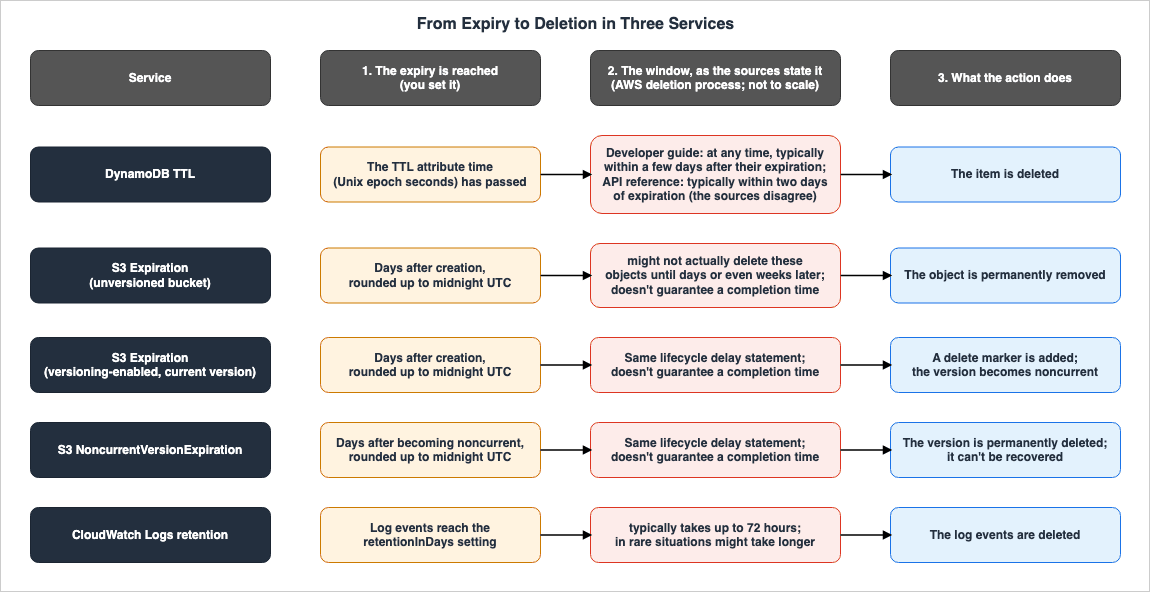
6.2 Expiry Unit, Undoing It, and What Stops It
| Service | Expiry Unit | Can You Undo It | What Stops It | Cited From |
|---|---|---|---|---|
| DynamoDB TTL | Per item: a Number attribute in Unix epoch seconds; not considered if more than five years in the past; no minimum TTL duration | Before deletion, update the TTL attribute to a future time or remove it; the item is no longer considered expired | A TTL attribute that is not a Number type is ignored; after TTL is disabled, deletions continue for approximately 30 minutes; a TTL attribute name that does not match the name used in reads and writes leaves expired items undeleted; TTL is not supported for MRSC global tables | DynamoDB Developer Guide, TTL chapter and How DynamoDB global tables work (checked 2026-10-15) |
S3 Expiration, unversioned bucket | Per rule and object: days added to the object creation time, rounded up to the next midnight UTC, or a date in the rule (midnight UTC); rules run once each day | Disabling or deleting the rule unschedules objects already scheduled; after the expiration runs, the lifecycle rule cannot undo it; the troubleshooting page notes that AWS Backup or S3 Replication might allow recovery | Pending or Failed replication status; for tag-based rules, removing the triggering tag; a bucket policy does not stop it | Amazon S3 User Guide, lifecycle chapter; AWS re:Post (checked 2026-10-15) |
S3 Expiration, versioning-enabled bucket (current version) | Same as above | Disabling or deleting the rule unschedules objects already scheduled; afterward, the previous version can be restored while it remains | A delete marker that is already the current version; Pending or Failed replication status; Object Lock on the current version leaves a delete marker and preserves the noncurrent version | Amazon S3 User Guide, lifecycle chapter and troubleshooting page (checked 2026-10-15) |
S3 NoncurrentVersionExpiration | Per rule and version: days after the version becomes noncurrent, rounded up to the next midnight UTC; optionally NewerNoncurrentVersions from 1 to 100, which requires a Filter element | Disabling or deleting the rule unschedules versions already scheduled; deleted versions can't be recovered; the troubleshooting page notes that AWS Backup or S3 Replication might allow recovery | Object Lock applied to the noncurrent version; Pending or Failed replication status | Amazon S3 User Guide, lifecycle chapter (checked 2026-10-15) |
| CloudWatch Logs retention | Per log group: retentionInDays, one of 22 values; no expiry by default | Lengthening retention before deletion moves deletion to up to 72 hours after the new retention date; after deletion, logs can't be recovered | DeleteRetentionPolicy makes log events not expire; deletion protection is described for deleting log groups; whether it stops retention deletion: The source does not say. | CloudWatch Logs API Reference and User Guide; AWS re:Post (checked 2026-10-15; the deletion protection page checked 2026-10-16) |
6.3 Where Deletions Show Up
| Where | DynamoDB TTL | S3 Lifecycle expiration | CloudWatch Logs retention |
|---|---|---|---|
| Change stream | DynamoDB Streams, service deletions with userIdentity (Region where the deletion occurred only) | — | — |
| Metrics | TimeToLiveDeletedItemCount | S3 Storage Lens dashboards for daily changes in object counts and bytes, including delete marker object count | — |
| Event notifications | — | s3:LifecycleExpiration:Delete, s3:LifecycleExpiration:DeleteMarkerCreated | — |
| Access logs | — | Server access logs, best-effort (S3.EXPIRE.OBJECT, S3.CREATE.DELETEMARKER) | — |
| Change journal | — | S3 Metadata journal table (requester s3.amazonaws.com) | — |
| What remains | Read results until deletion (filter expressions can exclude them) | S3 Inventory Lifecycle Expiration Date | Marked for deletion; not included in storedBytes; whether reads return them: The source does not say. |
| AWS CloudTrail, the deletion | Time to Live data plane actions are not logged by CloudTrail | Not captured by CloudTrail object level logging | The source does not say. |
| AWS CloudTrail, the setting | UpdateTimeToLive | PutBucketLifecycle, DeleteBucketLifecycle | PutRetentionPolicy, DeleteRetentionPolicy |
— indicates that the materials reviewed for this article do not list that kind of record destination for the service. This does not mean that the service lacks that functionality. The source does not say. means that the materials reviewed for this article do not address that particular item. The line regarding S3 metrics refers to text from the "Troubleshooting Amazon S3 Lifecycle issues" page. This page recommends using the S3 Storage Lens dashboard, rather than CloudWatch metrics, to monitor daily changes in storage due to lifecycle actions, and it mentions metrics such as the number of delete markers. This is not a metric of the number of items deleted.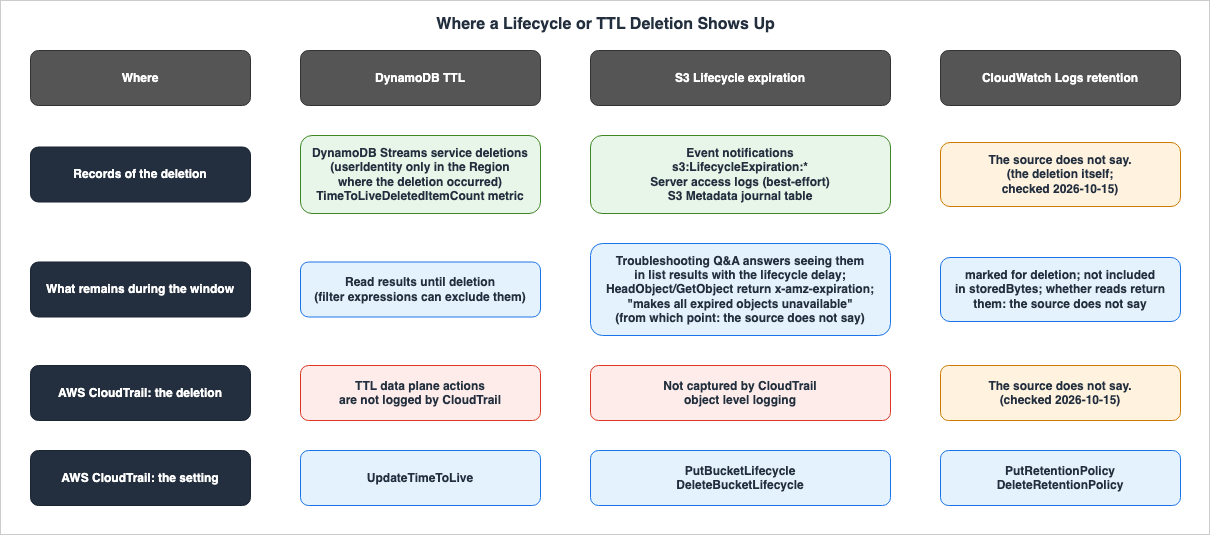
6.4 Comparison — What Other Services Say About Retention and Deletion
Here are three examples from the documentation of other services, illustrating different ways to specify timeframes. While outside the scope of this article, they are included to demonstrate these variations. Each example uses a different timeframe.The AWS Backup "Backup deletion" page describes the deletion of recovery points after their expiration as follows:
AWS Backup randomizes its deletions within 8 hours following recovery point expiration to maintain performance.The Kinesis Data Streams "Change the data retention period" page describes how data is handled when the retention period is shortened, stating:
Kinesis Data Streams almost immediately makes records older than the new retention period inaccessible upon decreasing the retention period.The SQS API reference for
SetQueueAttributes describes how messages are handled when the message retention period is changed, stating:Changes made to the MessageRetentionPeriod attribute can take up to 15 minutes and will impact existing messages in the queue potentially causing them to be expired and deleted if the MessageRetentionPeriod is reduced below the age of existing messages.The AWS Backup specification of
within 8 hours refers to the timeframe within which deletion occurs after a recovery point's expiration. The Kinesis Data Streams specification of almost immediately refers to the time before older records become inaccessible when the retention period is shortened. The SQS specification of up to 15 minutes refers to the time it takes for the MessageRetentionPeriod change to take effect; it does not refer to the time it takes for expired messages to be deleted.6.5 A Different Type — Deletions That Users Schedule
Deletion of secrets in AWS Secrets Manager and deletion of keys in AWS KMS are types where users schedule a deletion and the resource is removed after a waiting period. This is different from the three types described in this article, which have a defined expiration date. The behavior during the waiting period is detailed in each API reference. The Secrets ManagerDeleteSecret documentation states When a secret is scheduled for deletion, you cannot retrieve the secret value. and also There is no guarantee of a specific time after the recovery window for the permanent delete to occur. The KMS ScheduleKeyDeletion documentation states Before the waiting period ends, you can use CancelKeyDeletion to cancel the deletion of the KMS key. This article does not cover these two types. How these two and other deletions that users schedule on AWS behave during and after the waiting period is covered in Deletions You Schedule on AWS.7. Failure Modes
This section lists common errors in reading deletion based on expiration dates, alongside the descriptions found in the materials this article reviewed.- Reading that data is deleted when its expiration date arrives: The documentation for all three services states that there is a period between the expiration date and the actual deletion of data. DynamoDB says
typically within a few days(the API reference sayswithin two days), S3 saysmight not actually delete these objects until days or even weeks later, and CloudWatch Logs saystypically takes up to 72 hours; none of them guarantees an upper limit (Section 6.1). - Reading the window length as an upper limit: Lengths with
typically,might, orup toare not guaranteed upper limits. The CloudWatch Logs documentation continuesin rare situations might take longer, while the S3 documentation states,doesn't guarantee a completion time(Sections 4.2 and 5.2). - Reading that data past its expiration date cannot be read: The DynamoDB documentation states that expired items continue to show in read and write operations until they are deleted (Section 3.3). The S3 documentation states that S3 makes expired objects
unavailable, but it does not specify from which point in the window this applies or whatGetObjectreturns (Section 4.5). The CloudWatch Logs documentation, in the range this article read, does not explicitly state whether data is accessible or inaccessible after the expiration date (Section 5.3). - Reading that deletions are recorded in CloudTrail: The S3 documentation indicates that lifecycle actions are not logged at the object level in CloudTrail (Section 4.7). The DynamoDB documentation states that TTL data plane operations are not recorded in CloudTrail (Section 3.5). While the CloudWatch Logs documentation states that changes to retention settings are logged in CloudTrail, it does not specify where records of deletions triggered by expiration are stored (Section 5.6).
- Reading that
Expirationin a versioning-enabled bucket deletes the data:Expirationon the current version only adds a delete marker; noncurrent versions remain. It isNoncurrentVersionExpirationthat permanently deletes noncurrent versions (Section 4.3). - Reading that a bucket policy can stop lifecycle deletions: The S3 documentation states that bucket policies cannot prevent lifecycle-based deletions (Section 4.4).
- Reading that lengthening the retention period makes expired logs readable: The CloudWatch Logs documentation describes when log events that have not yet been deleted are deleted after the retention period is extended. It does not state whether the logs will be accessible (Section 5.4).
- Reading that deletions stop the moment TTL is disabled: The DynamoDB documentation states that even after TTL is disabled, deletions continue for approximately 30 minutes (Section 3.1).
- Reading that the Streams of every Region in a global table can identify TTL deletions: The documentation indicates that Streams can only identify deletions that occur in the Region where the deletion took place (Section 3.5).
- Reading that server access logs count every lifecycle deletion: The S3 documentation states that server access log recording is "best-effort" and can't be used to count all requests (Section 4.7).
- Reading that log deletion protection also stops retention deletions: The sources describe deletion protection as a setting that prevents the deletion of log groups, and do not say that it also stops retention deletion (Section 5.7).
8. Frequently Asked Questions About Deleting Expired Data
This article addresses common questions that arise when establishing data retention requirements, downstream processing procedures, and investigation protocols.Q1. When does DynamoDB TTL delete expired items?
The developer guide states that itemsmight be deleted by the system at any time, typically within a few days after their expiration. The UpdateTimeToLive API reference instead states DynamoDB typically deletes expired items within two days of expiration. The sources disagree, and there is no guaranteed timeframe. Until they are deleted, the items appear in read results unless filtered (see Sections 3.2 and 3.3).Q2. Can expired DynamoDB items be excluded from read results?
Yes. The developer guide describes how to exclude items with TTL attribute values that are equal to or earlier than the current time using filter expressions in bothScan and Query operations. This exclusion is achieved through the user's filter expression, and does not represent DynamoDB's deletion process (see Section 3.3).Q3. Are objects deleted as soon as they reach their S3 Lifecycle expiration?
Not necessarily. The S3 user guide states that objects reaching their expiration date might not be deleted untildays or even weeks later, and it does not guarantee a completion time. The expiration time itself is the result of adding the number of days and rounding up to the next midnight UTC. (See Sections 4.1 and 4.2.)Q4. Can S3 objects that are past their expiration date but not yet deleted be retrieved using GET?
Based on the documents reviewed for this article, it's not possible to determine the answer. The troubleshooting page answers a question about seeing such objects in a list with the lifecycle delay. The documents also state that theHeadObject and GetObject operations return the scheduled expiration of the current version in the x-amz-expiration header, and that S3 Inventory indicates which objects remain. However, the documents do not contain any information specifying whether GetObject will return data for such objects. The closest statement, that S3 makes expired objects unavailable, does not specify from which point in the window it applies (Section 4.5).Q5. What is required to completely delete data in a bucket with versioning enabled?
The current version'sExpiration feature only applies a delete marker. To completely remove noncurrent versions, you need to use the NoncurrentVersionExpiration action. When only the delete marker remains, the "Lifecycle configuration elements" page says that S3 removes it under the Expiration action, and ExpiredObjectDeleteMarker can also direct S3 to remove it (see Section 4.3).Q6. Once a log event reaches its retention period in CloudWatch Logs, is it still possible to read it?
Based on the documentation reviewed for this article, it is not possible to determine the answer. The documentation states that once a log event is marked for deletion, it is no longer included in thestoredBytes calculation. However, the read API documentation and the CloudWatch Logs Insights pages do not contain any information regarding the ability to access these log events (see Section 5.3).Q7. Are deletions based on expiration recorded in AWS CloudTrail?
In the documentation this article reviewed, none of the three services says that such deletions are recorded. Specifically, S3 indicates that lifecycle actions are not logged at the object level in CloudTrail. DynamoDB states that TTL (Time to Live) data plane operations are not recorded in CloudTrail. While CloudWatch Logs mentions that changes to retention period settings are logged in CloudTrail, it does not specify where deletions based on expiration are recorded. The logging behavior varies depending on the service (see Section 6.3).Q8. What should be done with data that absolutely must be deleted by the established deadline?
This article does not offer recommendations. The S3 user guide states that it does not recommend relying solely on S3 Lifecycle when you need to ensure data is deleted by a specific deadline. Instead, it advises using S3 Inventory and itsLifecycle Expiration Date to identify and delete remaining objects. This information is found in the AWS documentation for S3 (Sections 4.2 and 4.8).Q9. When was the information in this article verified?
The verification date is October 15, 2026 (October 16, 2026, for the deletion protection pages in Section 5.7). The window duration, the value ofretentionInDays, and the stopping conditions may change with document updates. The conditions for S3 lifecycle replication were announced on April 9, 2026 (Section 4.4).9. Summary
- Expiration and deletion occur at different times: The documentation for all three services indicates a window of time between the expiration and deletion processes, but none guarantee an upper limit for that window (Sections 1.1 and 6.1).
- The way the window is described varies by service: DynamoDB's TTL states that items
might be deleted by the system at any time, typically within a few days after their expiration(the API reference sayswithin two days). S3 Lifecycle:might not actually delete these objects until days or even weeks lateranddoesn't guarantee a completion time. CloudWatch Logs states that deletiontypically takes up to 72 hoursandin rare situations might take longer(Sections 3.2, 4.2, and 5.2). - Of the three services, only DynamoDB explicitly states that data can be read during the window: In the range this article read, S3 documentation answers the question about list results, states the scheduled expiration, and says S3 makes expired objects
unavailable, but it does not say from which point in the window this applies, or whether GET returns data during the window. CloudWatch Logs mentionsmarked for deletionandstoredBytes, but does not address the possibility of reading data (Sections 3.3, 4.5, and 5.3). - S3 has two types of expiration, and the result for the current version depends on the versioning state: For buckets with versioning enabled, the
Expirationsetting applies a delete marker.NoncurrentVersionExpirationpermanently deletes noncurrent versions, and once deleted, they cannot be recovered (Section 4.3); a note that AWS Backup or S3 Replication might allow recovery is quoted in Section 4.6. - The methods for overriding the expiration date differ by service: With DynamoDB, it's possible to prevent deletion by updating the item before it is deleted. For S3, it involves disabling or deleting the rule. For CloudWatch Logs, lengthening the retention period moves the deletion of log events not yet deleted to after the new retention date. Regarding items that have already been deleted, S3 documentation states that if versioning is enabled, previous versions can be restored while noncurrent versions remain. However, permanently deleted objects cannot be recovered, although a note on the same page says AWS Backup or S3 Replication might allow recovery. CloudWatch Logs' re:Post article states that logs deleted by retention policies cannot be recovered. The DynamoDB TTL chapter does not mention any methods for recovering deleted items (Sections 3.4, 4.6, 5.4, and 5.5).
- The location where deletion events are recorded varies by service, and none of the services mention CloudTrail as a destination for recording deletions triggered by expiration: DynamoDB records deletion events through Streams and the
TimeToLiveDeletedItemCount. S3 uses event notifications, server access logs (best-effort), and the S3 Metadata journal table. For CloudWatch Logs, no statement was found, in the range this article read, on where deletions triggered by expiration are recorded (Section 6.3). - Regarding situations where data must be reliably deleted by a fixed deadline, the S3 user guide states an AWS recommendation: The documentation suggests not relying solely on lifecycle policies and instead using S3 Inventory to identify remaining objects and deleting them. This is a recommendation from AWS, not one from this article (Section 4.8).
10. References
- Using time to live (TTL) in DynamoDB - Amazon DynamoDB
- Enable time to live (TTL) in DynamoDB - Amazon DynamoDB
- Computing time to live (TTL) in DynamoDB - Amazon DynamoDB
- Working with expired items and time to live (TTL) - Amazon DynamoDB
- DynamoDB Streams and Time to Live - Amazon DynamoDB
- DynamoDB Metrics and dimensions - Amazon DynamoDB
- Logging DynamoDB operations by using AWS CloudTrail - Amazon DynamoDB
- UpdateTimeToLive - Amazon DynamoDB API Reference
- Record - Amazon DynamoDB API Reference
- How DynamoDB global tables work - Amazon DynamoDB
- Managing the lifecycle of objects - Amazon Simple Storage Service
- Expiring objects - Amazon Simple Storage Service
- Lifecycle configuration elements - Amazon Simple Storage Service
- Setting an S3 Lifecycle configuration on a bucket - Amazon Simple Storage Service
- Configuring S3 Lifecycle event notifications - Amazon Simple Storage Service
- How S3 Lifecycle interacts with other bucket configurations - Amazon Simple Storage Service
- Troubleshooting Amazon S3 Lifecycle issues - Amazon Simple Storage Service
- Event notification types and destinations - Amazon Simple Storage Service
- Working with delete markers - Amazon Simple Storage Service
- Amazon S3 CloudTrail events - Amazon Simple Storage Service
- LifecycleExpiration - Amazon S3 API Reference
- NoncurrentVersionExpiration - Amazon S3 API Reference
- GetObject - Amazon S3 API Reference
- HeadObject - Amazon S3 API Reference
- Amazon S3 Lifecycle pauses actions on objects that are unable to replicate - What's New
- Confirm that the lifecycle rule on my Amazon S3 bucket is working - AWS re:Post
- PutRetentionPolicy - Amazon CloudWatch Logs API Reference
- DeleteRetentionPolicy - Amazon CloudWatch Logs API Reference
- GetLogEvents - Amazon CloudWatch Logs API Reference
- FilterLogEvents - Amazon CloudWatch Logs API Reference
- LogGroup - Amazon CloudWatch Logs API Reference
- DescribeLogGroups - Amazon CloudWatch Logs API Reference
- StartQuery - Amazon CloudWatch Logs API Reference
- GetQueryResults - Amazon CloudWatch Logs API Reference
- Protecting log groups from deletion - Amazon CloudWatch Logs
- Working with log groups and log streams - Amazon CloudWatch Logs
- Analyzing log data with CloudWatch Logs Insights - Amazon CloudWatch Logs
- Logging CloudWatch Logs API and console operations in AWS CloudTrail - Amazon CloudWatch Logs
- Amazon CloudWatch now supports deletion protection for logs - What's New
- Determine the cause of deleted logs in Amazon CloudWatch - AWS re:Post
- Restore or prevent deletion of logs or log groups in CloudWatch - AWS re:Post
- Resolve empty log issues in CloudWatch - AWS re:Post
- Implement Time to Live in Amazon Neptune, Part 1: Property Graph - AWS Database Blog
- Detecting and remediating inactive user accounts with Amazon Cognito - AWS Security Blog
- Backup deletion - AWS Backup
- Change the data retention period - Amazon Kinesis Data Streams
- SetQueueAttributes - Amazon Simple Queue Service API Reference
- DeleteSecret - AWS Secrets Manager API Reference
- ScheduleKeyDeletion - AWS Key Management Service API Reference
References:
Tech Blog with curated related content
Written by Hidekazu Konishi