Dependency Cooldowns by Package Manager - Defaults Since Which Version, What Update Bots Do Not Wait For, and the Publish Times CodeArtifact Returns
First Published:
Last Updated:
The pnpm settings page describes the default value for
minimumReleaseAge as follows:Default: 1440 (since v11), 0 (before v11)The Dependabot options reference explains the behavior when the
cooldown setting is not configured:Apply a default cooldown period of 3 days to version updates, even when cooldown is not configured.When using AWS CodeArtifact as an internal registry, the "Gating packages on version age" page of the CodeArtifact user guide explains where the publish time used for waiting comes from:
CodeArtifact preserves these original upstream timestamps when it caches packages from external connections.The same page continues by stating that this time can be read within a CI/CD pipeline, allowing you to reject recently released versions. The tool or pipeline that reads the time decides whether to wait.
This article provides a table that correlates the name of the setting, the unit of measurement for the value, the default value (and from which versions it applies), the scope of its effect (direct or transitive dependencies), exception specifications, and how it handles cases where the registry doesn't return a publish time, as well as how it handles security updates, for 10 different tools. Furthermore, it lists which information CodeArtifact provides for each format and what the CodeArtifact page says not to use. This article does not recommend how long to wait or which tool to use. The information presented is based on the official documentation, release pages, CHANGELOGs, and source code of each tool, as well as AWS documentation, all verified as of October 15, 2026. For this article, the behavior of the tools was not tested directly.
Related articles on this site:
- Install-Time Scripts by Package Manager - npm, pnpm, Yarn, Bun, Deno, pip, and uv: What Runs When You Install a Dependency, Since Which Version, and Where the Approval Is Recorded
- Software Supply Chain Security on AWS - Signing, Attestation, and Admission Control
- Trusted Publishing Beyond npm and PyPI - RubyGems, NuGet.org, crates.io, pub.dev, JSR, and Open VSX: Exchanged or Used Directly, What Trust Is Bound To, and What Each Registry Rejects
- Publishing npm and PyPI Packages Without Long-Lived Tokens - Trusted Publishing, Staged Publishing, and What Trusted Publishing Does Not Assert
- Where AWS Publishes Which Features Exist in Which Region - Capabilities by Region, SSM Public Parameters, and the CloudFormation Registry
- When Expired Data Is Actually Deleted on AWS - DynamoDB TTL, S3 Lifecycle Expiration, and CloudWatch Logs Retention
Table of Contents
- 1. Who Decides Whether to Wait?
- 2. How to Read the Tables — Who Sets It, What the Source Says, and Where It Shows
- 3. Package Manager Settings
- 4. When the Registry Does Not Return a Publish Time
- 5. Update Bot Settings
- 6. The Same Tools in the Window Columns
- 7. The Publish Times AWS CodeArtifact Returns
- 8. What Was Not in a Stable Release on the Check Date
- 9. Failure Modes
- 10. Frequently Asked Questions About Dependency Cooldowns
- 11. Summary
- 12. References
1. Who Decides Whether to Wait?
This section clarifies where the decision to wait for a new version is made. It then defines the scope of this article, the check date, the consulted materials, and the terminology used within this article.1.1 Three Places Where Waiting Happens
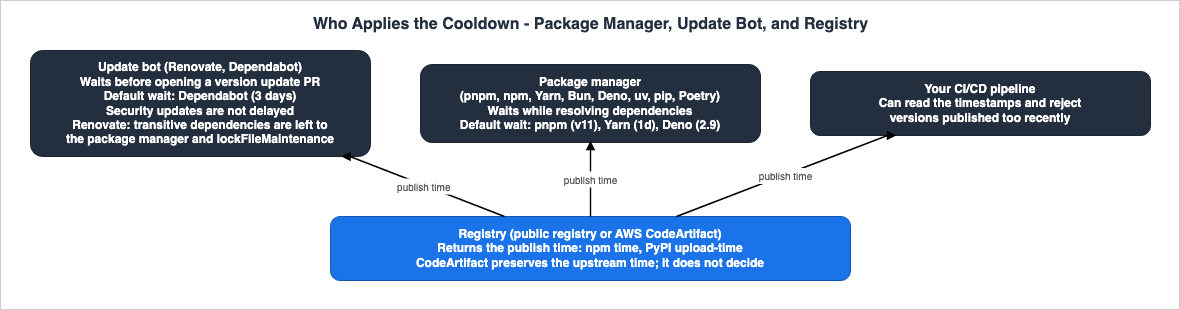
Deciding whether to wait for a new version involves at least three perspectives:- Package Manager: When resolving dependencies, package managers exclude versions that have been published only recently. Examples include pnpm's
minimumReleaseAge, npm'smin-release-age, and uv'sexclude-newer. Whether this applies to transitive dependencies is described differently in each tool's documentation (see Section 3.2). - Update Bots: When creating pull requests (PRs) to update dependencies to newer versions, these bots avoid creating PRs for versions that have been published only recently. Examples include Renovate's
minimumReleaseAgeand Dependabot'scooldown. Renovate's documentation states that it does not handle transitive dependencies (see Section 5.2). - Registry: The registry provides the publish time for each version. npm's registry provides this information in the
timefield of the packument, while PyPI provides it in theupload-timefield for each distribution file. CodeArtifact stores and returns the upstream publish time for packages ingested from external connections (Section 7). How tools that read this time handle cases where the registry does not provide it is determined by those tools themselves (Section 4).
This article will discuss these three perspectives separately.
1.2 What This Article Covers and What It Does Not
This article focuses on selecting versions based on the time since publication for the following 10 tools:- JavaScript package managers: pnpm, npm, Yarn, Bun, Deno
- Python package managers: uv, pip, Poetry
- Update bots: Renovate, Dependabot
On the AWS side, this article covers the publish time returned by CodeArtifact (Section 7). Section 8 describes the status of Composer, Cargo, NuGet, Go, Maven, and Gradle on the check date, one paragraph each.
The following topics are covered in other articles on this site. This article mentions them with a single sentence and a link.
- Scripts that run during installation and their approval process: Covered in Install-Time Scripts by Package Manager. Sections 1.4 and 4.7 of that article only name the settings that select dependencies by the time since publication, and state that they are not covered. This article covers those settings.
- Trusted Publishing (for publishers): Covered in Trusted Publishing Beyond npm and PyPI and Publishing npm and PyPI Packages Without Long-Lived Tokens.
- CodeArtifact package origin control: Addressed in Section 4.2 of Software Supply Chain Security on AWS. This article will only focus on publish time (Section 7.7).
This article does not cover the general management of lockfiles. It will not discuss the names or methods of past incidents, or procedures for disabling waiting periods. It will not provide recommendations on how long to wait or which tools to use. Pricing information will also not be included.
1.3 The Check Date and the Sources Read
The statements in this article were checked on October 15, 2026. The materials consulted are as follows:- pnpm: Settings documentation on dependency resolution, the
pnpm auditpage, the pnpm 10.16 and pnpm 11.0 release blog posts, the GitHub release pages (v10.16.0andv11.0.0), and the publication dates of versions in the npm registry. - npm: The npm Docs configuration page (for versions 11 and 12), the npm CLI CHANGELOG (for the
latestandrelease/v11branches). - Yarn: The
.yarnrc.ymlsettings reference, the source code forplugin-npm(tagged with4.18.1), the GitHub release pages (4.10.0and4.15.0), and Pull Request #7250. - Bun: The
bun installpage, thebunfig.tomlpage, and the Bun v1.3 blog post. - Deno: The
deno.jsonreference, the JSON schema for configuration files, the GitHub release pages (v2.9.0), and the Deno blog post from October 9, 2026. - uv: The Settings page, the Resolution page, and the CHANGELOG.
- pip: The
pip installpage and the Release notes. - Poetry: The Configuration page and the CHANGELOG.
- Renovate: The Configuration Options page, the Minimum Release Age page, and the JSON schema for settings.
- Dependabot: The Dependabot options reference, and three entries from the GitHub Changelog (July 1, 2025, July 29, 2025, and July 14, 2026).
- AWS CodeArtifact: The user guide pages on "Gating packages on version age," "Requesting packages from external connections," and "Editing package origin controls."
- Status on the check date: The Composer settings page, the CHANGELOG, the list of releases, and the Pull Requests. Also, the Cargo nightly documentation, Pull Request #17335, the Rust stable channel, and searches for issues on GitHub for NuGet, Go, Maven, and Gradle. Finally, the NuGet
nuget.configreference and the release notes.
Version numbers and release dates were determined by checking the GitHub release page, the CHANGELOG headings, and the release dates in the npm and PyPI registries. The list of releases on GitHub includes pre-releases, which have not been counted as stable releases.
1.4 Distinct Terms with the Same Spelling
This article discusses terms that share the same spelling but refer to different concepts. This article uses the following terminology:- cooldown: In this article, "cooldown" refers to the practice of not selecting a new version of a package until a certain period has passed since its release. This is distinct from the "cooldown" associated with scaling services like Auto Scaling. Various tools use different terms for the same concept, including "release age," "minimum age," "age gate," and "quarantine." This article refers to the length of this waiting period as a "window." It is distinct from the time it takes for Regional availability to appear in sources (Where AWS Publishes Which Features Exist in Which Region) and from the time before expired data is deleted (When Expired Data Is Actually Deleted on AWS).
- publish time / upload time / release timestamp: The npm registry returns the publish time for each version in the
timefield. PyPI returns the upload time for each distribution file in theupload-timefield. uv and Poetry compare against the upload time of the distribution file rather than the publish time (see Sections 3.8 and 3.10). This article uses "publish time" only when referring to the term collectively. - registry: In this article, "registry" refers to a package registry, such as the npm registry, PyPI, or CodeArtifact repositories.
- version: In this article, "version" refers to a package version. This is distinct from the versioning of objects in Amazon S3.
- security update: A "security update," as described in the documentation for update bots, refers to an update created by the bot based on vulnerability information. Dependabot distinguishes these from version updates (see Section 5.3).
2. How to Read the Tables — Who Sets It, What the Source Says, and Where It Shows
This section defines the columns and terminology used in the table presented in this article.2.1 Window Columns
The table in Section 6 has the following five columns:Who Sets It: Who determines the length of the window (see Section 2.2).Stated Window: How the material describes the length of the window. Written verbatim or as a verbatim summary.During the Window: What users see and what happens while a new version is inside the window.Where It Shows: The location where users can see that a version has been removed due to the window. In this article, this refers to resolution results, status checks, logs, and lock files.Cited From: The name and date of the material that provides the basis for that row.
2.2 The Values of Who Sets It
The Who Sets It column contains one of the following. For tools with default values, list both the tool's default and the user's configuration.The tool's default: The tool's default value determines the window, even if the user doesn't make any changes.You (your configuration): The user determines the window through configuration files, command-line flags, or environment variables.The source does not say.: The documentation does not specify who determines the window.
2.3 Columns in This Article
The tables in Sections 3 and 5 use the following columns:Setting: The name of the setting and where it is configured.Unit: The unit of the value. This may be minutes, days, seconds, a string representing a duration, or a date and time, and varies depending on the tool.Default: The value used when the user does not specify a setting. In this article,Defaultrefers to a column defined within this article and is independent of columns with the same name in other articles. If the default value varies across versions, the column states from which version.Since: The version in which this setting or default value was introduced.Applies To: The scope in which the setting is effective. This indicates whether it is a direct dependency, a transitive dependency, or the path through which the dependency is obtained.Exemptions: Specifications for exceptions where the setting should not be applied.No Publish Time: How the tool handles cases where the registry does not return a publish time (see Section 4).
2.4 How Dates and Check Dates Are Written
Release dates are taken from the GitHub release pages, the CHANGELOG headings, and the publish dates in the npm and PyPI registries. GitHub Changelog dates are the dates of the posts. Documentation is cited by page name and check date (October 15, 2026).2.5 When the Source Does Not Say, and When the Sources Disagree
Write only the information (or a summary of it) from the source in the table cells. If the source does not provide information for a particular cell, writeThe source does not say. Before writing this, search the full text of the source document, as well as other related materials from the same source (CHANGELOG, release notes, source code, and related pages). If the source only describes general principles and does not specifically address the topic of the row, do not write The source does not say. Instead, write the general principle and a note indicating that there is no specific mention.When a piece of information comes from two different sources, and only one source provides a value, list both sources along with their respective values, without favoring either. This applies to Yarn's default values (see Section 3.5). Similarly, if the sources provide different values, list both values along with their sources, without favoring either. This applies to Bun's default values (see Section 3.6). Differences in how tools handle missing publish times are not a disagreement between sources, but rather reflect differences in the tools' specifications (see Section 4).
3. Package Manager Settings
This section details the configuration of eight package managers, presented in two tables and with individual sections for each tool.3.1 Setting Names, Units, and Default Values
| Tool | Setting | Unit | Default | Since | Cited From |
|---|---|---|---|---|---|
| pnpm | minimumReleaseAge in pnpm-workspace.yaml | Minutes (number) | 1440 since v11; 0 before v11 | v10.16.0 | pnpm Settings, Dependency Resolution (checked 2026-10-15) |
| npm | min-release-age in .npmrc or as a flag | Days (number) | null | 11.10.0 | npm Docs, config (v11 and v12); npm CLI CHANGELOG (checked 2026-10-15) |
| Yarn | npmMinimalAgeGate in .yarnrc.yml | Duration; the source declares the unit as minutes; the reference example is "1w" | 1d in the source at 4.18.1 and in the 4.15.0 release note; the reference page states no default | 4.10.0 | Yarn .yarnrc.yml reference; plugin-npm source at 4.18.1; GitHub releases (checked 2026-10-15) |
| Bun | install.minimumReleaseAge in bunfig.toml, or --minimum-release-age | Seconds (number); a number with a unit such as 3d is also accepted | null (disabled) on the bunfig.toml page; 259200 in the default-values block of the bun install page (the sources disagree) | Bun 1.3 | Bun docs, bun install and bunfig.toml; Bun v1.3 blog (checked 2026-10-15) |
| Deno | minimumDependencyAge in deno.json | Minutes (number), an ISO-8601 duration, or an absolute cutoff date or timestamp | 24 hours since Deno 2.9, even when the field is unset | Default since v2.9.0 | Deno deno.json reference; config file schema (checked 2026-10-15) |
| uv | exclude-newer | An RFC 3339 timestamp, a friendly duration, or an ISO 8601 duration | None | Durations since 0.9.17 | uv Settings and Resolution; uv CHANGELOG (checked 2026-10-15) |
| pip | --uploaded-prior-to | An ISO 8601 datetime, or a duration in days such as P3D | The page states no default | 26.0 (datetime); 26.1 (duration) | pip install; pip Release notes (checked 2026-10-15) |
| Poetry | solver.min-release-age | Days (int) | 0 | 2.4.0 | Poetry Configuration; Poetry CHANGELOG (checked 2026-10-15) |
The units are divided into four categories. pnpm accepts values in minutes, while npm and Poetry accept values in days, and Bun accepts values in seconds (it also accepts values with units). Yarn, uv, pip, and Deno accept string representations of durations or dates and times. The same day is represented as
1440 in pnpm, 1 in npm and Poetry, and 86400 in Bun.By default, pnpm (from version 11), Yarn (as specified in the source and the release notes for version
4.15.0), and Deno (from version 2.9) wait. npm, uv, and Poetry default to a "no wait" value (null, None, or 0). Bun's default value differs between two pages (see Section 3.6). The pip documentation does not specify a default value for this option.3.2 Scope and Exceptions
| Tool | Applies To | Exemptions | Cited From |
|---|---|---|---|
| pnpm | All dependencies, including transitive ones; not a config dependency pinned with version+integrity | minimumReleaseAgeExclude: package names (v10.16.0), patterns (v10.17.0), exact versions (v10.19.0) | pnpm Settings, Dependency Resolution (checked 2026-10-15) |
| npm | The tree npm builds; an exempt package's own dependencies still follow the release-age policy unless they also match a pattern | min-release-age-exclude: package names or minimatch patterns (11.17.0); also exempt from before | npm Docs, config; npm CLI CHANGELOG (checked 2026-10-15) |
| Yarn | General rule only: a package version newer than the gate is not considered for installation; direct or transitive dependencies are not named | npmPreapprovedPackages: package descriptors or name glob patterns | Yarn .yarnrc.yml reference (checked 2026-10-15) |
| Bun | Direct and transitive dependencies, during new resolution; packages already in bun.lock remain unchanged | minimumReleaseAgeExcludes: a package name, or a name with exact versions | Bun docs, bun install (checked 2026-10-15) |
| Deno | General rule only: npm or JSR package versions published more recently than the configured age are not installed; direct or transitive dependencies are not named | The object form with an exclude list of npm: or jsr: entries | Deno deno.json reference; config file schema (checked 2026-10-15) |
| uv | Packages read from a registry, not Git dependencies; compared with the upload time of each distribution file | exclude-newer-package with false; exclude-newer = false for an index; an index with its own exclude-newer value | uv Resolution and Settings (checked 2026-10-15) |
| pip | Packages uploaded prior to the given value; only effective with indexes that provide upload-time metadata | The option description names no exemption | pip install (checked 2026-10-15) |
| Poetry | Versions considered by the solver; a version is ignored when any of its distribution files is newer than the window | solver.min-release-age-exclude (packages); solver.min-release-age-exclude-source (sources) | Poetry Configuration (checked 2026-10-15) |
The materials this article reviewed explicitly state that pnpm and Bun handle transitive dependencies. While npm doesn't use the term "transitive," it notes in the exclusions section that dependencies of excluded packages, unless they match a specific pattern, will still follow the release-age policy. The documentation for Yarn and Deno only mentions a general rule about excluding versions, without specifically addressing whether they handle direct or transitive dependencies.
3.3 pnpm — One Day by Default Since v11, but the Built-In Default Can Break the Window
pnpm introducedminimumReleaseAge in version v10.16.0 (September 12, 2025) and changed the default value to 1440 minutes in version v11.0.0 (April 28, 2026). The settings page describes this as follows:minimumReleaseAge defines the minimum number of minutes that must pass after a version is published before pnpm will install it. This applies to all dependencies, including transitive ones.The pnpm 11.0 blog post describes the change to the default value as follows:
Newly published packages won't be resolved until they're at least 1 day old. To opt out, set minimumReleaseAge: 0 in pnpm-workspace.yaml.Another setting,
minimumReleaseAgeStrict, also plays a role in how the default value is handled. If no version in the requested range satisfies the window, false will fall back to a version that doesn't satisfy the window and continue the installation, while true will cause the resolution to fail. The default value for this setting depends on whether the user has explicitly set minimumReleaseAge. The settings page describes the built-in default as follows:The built-in default of minimumReleaseAge (1440 minutes) is non-strict for backward compatibility.In other words, a pnpm 11 installation without any custom settings will wait one day, but if no version in the range exceeds that one-day mark, it will install a version that hasn't reached that threshold. If the user explicitly sets
minimumReleaseAge, the default value for minimumReleaseAgeStrict becomes true, and in that case, the resolution will fail.Section 4.7 of this site's Install-Time Scripts by Package Manager also notes that pnpm 11.0.0 introduced a one-day default for
minimumReleaseAge. As of the check date, the npm latest tag and the GitHub Latest label point to pnpm 12.11.2; under the next-12 tag, 12.12.0 through 12.14.0 were published between October 10 and October 15, 2026. pnpm 12.0.0 was released on August 26, 2026. The default value described on the settings page remains 1440 (since v11).Regarding
pnpm audit --fix, the pnpm audit page states that if minimumReleaseAge is configured, it will add the minimum fixed version of each advisory to minimumReleaseAgeExclude, allowing those fixes to be installed without waiting for the window (Section 5.4).3.4 npm — Waiting by Days and Failing if No Version Satisfies the Window
npm introducedmin-release-age in version 11.10.0 (February 11, 2026). The configuration page describes it as follows:If set, npm will build the npm tree such that only versions that were available more than the given number of days ago will be installed. If there are no versions available for the current set of dependencies, the command will error.Unlike pnpm's built-in default, npm will report an error if no version satisfies the window.
min-release-age complements the existing before setting, which accepts an absolute date and time. The configuration page explains how both settings work together as follows:when both apply, before wins within a single source and across sources the standard precedence rules apply.The exclusion setting
min-release-age-exclude was added in version 11.17.0 (June 11, 2026) on the release/v11 branch of the npm CLI CHANGELOG. The configuration page describes the scope of this exclusion as follows:Only the named package is exempt; its own dependencies still follow the release-age policy unless they also match a pattern.npm audit fix also follows the window. If the fixed version is still inside the window, npm will leave the package at its vulnerable version, issue a warning, and exit with a non-zero exit code (see Section 5.4).3.5 Yarn — Default Values: Found in Source and Release Notes, Not in Reference Pages
Yarn introducednpmMinimalAgeGate and npmPreapprovedPackages in version 4.10.0 (September 18, 2025). The release notes state this in a single line:feat: implement npmMinimalAgeGate and npmPreapprovedPackages config options by @bienzaaron in #6901Regarding default values, the documentation reviewed for this article identifies two sources. The release notes for version
4.15.0 (May 19, 2026) state Makes npmMinimalAgeGate: 1d the default by @arcanis in #7135. The plugin-npm source at the 4.18.1 tag declares a default value of 1d for npmMinimalAgeGate. In contrast, the reference pages for .yarnrc.yml describe npmMinimalAgeGate and provide an example using "1w", but do not explicitly state the default value. This article will therefore refer to the default value as defined in the source code and release notes.The reference pages describe the meaning of the setting as follows:
Minimum age of a package version according to the publish date on the npm registry to be considered for installation.As of the check date, the latest stable version of Yarn is
4.18.1 (September 24, 2026).3.6 Bun — Seconds, and a Default Value That Differs Between Two Pages
Bun introducedminimumReleaseAge in the Bun 1.3 blog (released as Bun 1.3.0 on October 10, 2025). The default values are different between the two pages. The bunfig.toml page specifies install.minimumReleaseAge as Default null (disabled). The bun install page specifies minimumReleaseAge = 259200 # seconds in the block listing the default values for bunfig.toml. This article does not side with either value. The values are specified in seconds, and the bun install page indicates that it accepts values with units.A number is in seconds. The flag and minimumReleaseAge also take a number with a unit: 90m, 12 hours, 3d, 2 weeks.Regarding its scope, the
bun install page states:Bun filters all dependencies (direct and transitive) to meet the age requirement when resolving themThe same page describes a stability check: when releases come in quick succession just outside the window, Bun also skips those versions and selects an older one. This check examines up to seven days' worth of releases after the window. An exact version request still respects the window but bypasses this check. As of the check date, the latest stable version of Bun is 1.4.3.
3.7 Deno — 24 Hours by Default Since 2.9, and an Announced End of Runtime Development
Deno introduced the default window in versionv2.9.0 (June 25, 2026). The deno.json reference states:Since Deno 2.9 a 24-hour minimum applies by default even when this field is unset; set an explicit value to widen or narrow the window, or 0 to turn it off.The JSON schema for configuration files includes
(Unstable) at the beginning of the description for the minimumDependencyAge value. The same reference also states that this same control is available through the CLI flag --minimum-dependency-age and the .npmrc setting min-release-age.The Deno row needs a status note. On October 9, 2026, the Deno blog announced that the Deno team is joining Cloudflare, stating the following about the Deno runtime:
We will support the Deno runtime for another year with monthly releases containing bug fixes and security updates. After that year we will end our development of the Deno runtime.The same announcement also confirmed that Deno will remain an open-source project. The Deno rows in this article reflect the sources as of the check date (October 15, 2026).
Concerning the default 24-hour window, the
deno.json reference specifically addresses versions of packages from npm and JSR. The description for Pull Request #35458, which introduced this default, states that resolving npm package versions will skip versions released within the last 24 hours. Whether this default 24-hour window applies to JSR packages cannot be determined from the materials reviewed for this article.3.8 uv — Compares the Upload Time of Each Distribution File and Writes the Timestamp to the Lock File
uv usesexclude-newer to exclude distribution files uploaded after a specified date and time from consideration. Starting with version 0.9.17 (December 9, 2025), it gained the ability to accept relative time periods in addition to specific dates. The Resolution page describes how these periods are handled.When a duration is used for resolution, a timestamp is calculated relative to the current time. When using a uv.lock file, the timestamp is included in the lockfile.The comparison is not made against the publish date of a version, but rather against the upload time of each individual distribution file. The Settings page describes
exclude-newer as follows:The date is compared against the upload time of each individual distribution artifactExceptions can be made by setting
exclude-newer-package to false for each package, or by setting exclude-newer = false for each index. The ability to set exclude-newer on an index-by-index basis was added in version 0.11.5 (April 8, 2026). exclude-newer only applies to packages read from the registry and does not affect Git dependencies. As of the check date, the latest version of uv is 0.13.1 (October 14, 2026).3.9 pip — Only Datetimes in 26.0, Durations in Days Since 26.1
pip added the--uploaded-prior-to option in 26.0 (January 30, 2026). Version 26.0 only accepted datetimes; support for durations in days, such as P3D, was added in version 26.1 (April 26, 2026). The pip install page is written as follows:Only consider packages uploaded prior to the given value. Accepts an ISO 8601 datetime (e.g., '2023-01-01T00:00:00Z', uses local timezone if none specified) or a duration in days (e.g., 'P3D' for packages uploaded at least 3 days ago). Only effective when using indexes that provide upload-time metadata.In the pages read for this article, no package-specific exceptions were found on the pip page. As of the check date, the latest version of pip was
26.2.1.3.10 Poetry — Days, and a Version Is Dropped if Any Distribution File Is Newer
Poetry introducedsolver.min-release-age in version 2.4.0 (May 3, 2026). The default value is 0. The configuration page states:When set, any package version where at least one distribution file was uploaded more recently than the specified number of days ago will be ignored by the solver.Exceptions can be specified in the
solver.min-release-age-exclude list (for package names) and the solver.min-release-age-exclude-source list (for sources). As of the check date, the latest version of Poetry is 2.5.1.4. When the Registry Does Not Return a Publish Time
This section outlines how each tool handles situations where the registry fails to return the publish time. This handling determines how the cooldown settings take effect, particularly when internal registries or mirrors are unable to provide the time.4.1 Tool-Specific Handling
| Tool | No Publish Time | Cited From |
|---|---|---|
| pnpm | Skips the check when minimumReleaseAgeIgnoreMissingTime is true (the default, added in v11.0.0); fails resolution when it is false | pnpm Settings, Dependency Resolution (checked 2026-10-15) |
| npm | The docs do not say; in the source, min-release-age is converted to before (npm CLI, release/v11), and npm-pick-manifest lets a version without a time pass the before check | npm Docs, config; npm CLI and npm-pick-manifest sources (checked 2026-10-15) |
| Yarn | The reference page does not say; in the source at 4.18.1, a version without a publish time is treated as quarantined | Yarn .yarnrc.yml reference; plugin-npm source at 4.18.1 (checked 2026-10-15) |
| Bun | Passes the age check; a time value that Date.parse cannot read is blocked | Bun docs, bun install (checked 2026-10-15) |
| Deno | The reference does not say; in the npm resolution source at v2.9.0, a version without a time passes | Deno deno.json reference; libs/npm/resolution/common.rs at v2.9.0 (checked 2026-10-15) |
| uv | Treated as unavailable unless opted out for the package or the index, or the index has its own exclude-newer value | uv Resolution (checked 2026-10-15) |
| pip | General rule only: only effective with indexes that provide upload-time metadata; a file without an upload time is not named | pip install (checked 2026-10-15) |
| Poetry | Not filtered out by this setting | Poetry Configuration (checked 2026-10-15) |
| Renovate | Since Renovate 42, treated as not yet past the minimum release age (timestamp-required, the default); timestamp-optional treats it as stable | Renovate Minimum Release Age; Configuration Options (checked 2026-10-15) |
| Dependabot | The source does not say. | Dependabot options reference; GitHub Changelog (checked 2026-10-15) |
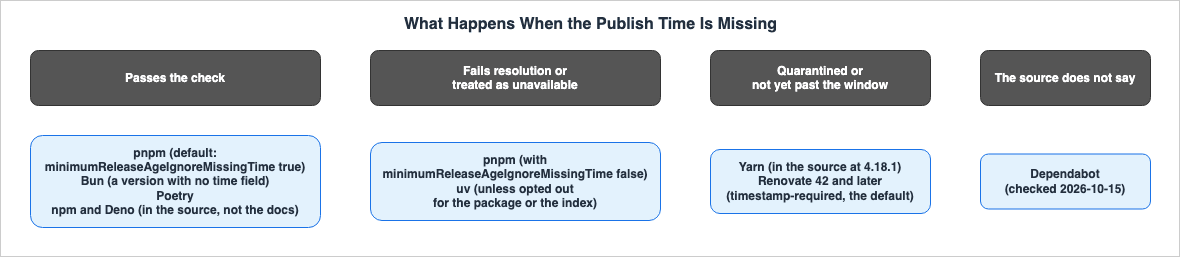
The handling of packages falls into four main categories, depending on the tool.
- Passes the check: This is the default behavior for pnpm, Bun, and Poetry. npm and Deno also pass versions without timestamps, based on their source code behavior rather than documentation. These timestamp-free versions are not subject to window-based filtering.
- Failing to resolve or excluding from candidates: pnpm, when
minimumReleaseAgeIgnoreMissingTimeis set tofalse, will fail to resolve packages. uv treats these packages as unavailable. - Quarantines: the Yarn source at
4.18.1treats timestamp-free versions as quarantined. - Treats it as not yet past the window: This is the default behavior from Renovate 42 onwards.
The documentation for npm and Deno does not specify how to handle versions without timestamps. This article read the handling of both from their source code (see Section 4.5). The documentation for Dependabot, in the pages read for this article, does not address how to handle versions without timestamps.
4.2 Missing Values and Unreadable Values Can Be Handled Differently
The documentation forbun install differentiates between versions that lack a timestamp and those with an unreadable timestamp.Bun treats versions without a time field as passing the age check (the npm registry should always provide timestamps)Bun blocks a version whose time value is not a date string that Date.parse can read, because its age is unknownIf a timestamp is absent, the version passes. If the timestamp is unreadable, the version is blocked. Even in the same tool, the handling of missing values and invalid values is opposite.
4.3 uv Specifies Exceptions at Two Levels: Package and Index
The uv Resolution page describes how uv handles cases where timestamps are unavailable.If the field is not present for a given distribution, the distribution will be treated as unavailable unless the package is opted out via --exclude-newer-package <package>=false, or the index is configured with its own exclude-newer value, or the index is opted out via [[tool.uv.index]] exclude-newer = false.The same page notes that PyPI returns
upload-time for all packages. For internal indexes that do not return timestamps, it outlines a method to set exclude-newer = false for each index.4.4 Yarn's Handling Is in the Source Code, Not in the Reference
Yarn's.yarnrc.yml reference does not address how it handles situations where a timestamp is unavailable. In the source code tagged with version 4.18.1, when npmMinimalAgeGate is enabled, if the publish timestamp of a version is undefined, that version is treated as quarantined. A GitHub Pull Request (#7250) proposes a change to handle this differently when dealing with registries that do not return timestamp information (such as GitHub Packages). As of the check date, this Pull Request is still open. This article describes Yarn's behavior based on the source code in version 4.18.1, rather than relying on the reference documentation.4.5 npm and Deno: The Handling Is in the Source Code, Not in the Documentation
The npm config pages and the Denodeno.json reference do not describe how dependencies are handled when timestamps are unavailable. However, examining the source code reveals the following:- npm: In the
release/v11branch of the npm CLI, the configuration definition calculates thebeforedate based on the number of days specified inmin-release-age. Thenpm-pick-manifestsource on itsmainbranch, which selects versions, lets a version pass thebeforecheck if the packument lacks atimevalue or if the timestamp for that version is missing. - Deno: In the
v2.9.0tag, thelibs/npm/resolution/common.rsfile includes a check in theminimumDependencyAgedetermination that lets a version pass if it lacks a timestamp. This is part of the npm package resolution code, and this article does not verify how JSR packages are handled.
In both cases, the source code, not a documented specification, determines the behavior, and it may vary depending on the version. This article describes the behavior based on the source code as it was observed on the branches and tags examined during the verification process.
4.6 Renovate Changed the Handling in Renovate 42
The page describing Renovate's Minimum Release Age includes the following:In Renovate 42, the absence of a release timestamp will be treated as if the release is not yet past the timestamp, which provides a safer default.The phrase
which provides a safer default is the Renovate documentation's own assessment. The same page states that prior to Renovate 42, dependencies without timestamps were treated as having passed the minimum release age. The default value for minimumReleaseAgeBehaviour is timestamp-required; setting it to timestamp-optional treats versions without timestamps as stable. The setting name Behaviour is spelled in British English and is Renovate's official identifier. According to the npm registry, Renovate 42.0.0 was released on November 6, 2025.5. Update Bot Settings
This section details the configuration for both Renovate and Dependabot, presenting the settings alongside those for the package manager. It also outlines how security updates and transitive dependencies are handled.5.1 Two Update Bots
| Bot | Setting | Unit | Default | Security Updates | Transitive Dependencies | Exemptions | Cited From |
|---|---|---|---|---|---|---|---|
| Renovate | minimumReleaseAge (previously stabilityDays) | A duration string such as 3 days | null; when set, minimumReleaseAgeBuffer adds 30 minutes by default | Bypass any minimumReleaseAge checks | Not managed by Renovate itself; left to package managers and lockFileMaintenance; for npm and Poetry, the window is passed to the package manager at lock file generation (Section 5.5) | A package rule with minimumReleaseAge set to null | Renovate Configuration Options; Minimum Release Age; JSON schema (checked 2026-10-15) |
| Dependabot | cooldown with default-days, semver-major-days, semver-minor-days, semver-patch-days, include, exclude | Days | 3 days, even when cooldown is not configured (since 2026-07-14 on github.com; GHES 3.23) | Not applied; only for version updates | The source does not say. | exclude (up to 150 items; takes precedence over include) | Dependabot options reference; GitHub Changelog (checked 2026-10-15) |
5.2 Renovate — No Wait by Default, and No Handling of Transitive Dependencies
Renovate'sminimumReleaseAge has a default value of null in the settings JSON schema. This means it does not wait unless the user explicitly configures it. It was previously named stabilityDays. The Configuration Options page states that from Renovate 42.19.5, minimumReleaseAge=0 days is treated the same as minimumReleaseAge=null.Regarding updates inside the window, the Minimum Release Age page explains that Renovate applies a
pending status check to the update's branch and changes it to passing once the window is passed. In the settings JSON schema, the default value for internalChecksFilter is strict. The same page states that when internalChecksFilter=strict, Renovate creates no branches or pull requests for updates that do not meet the window requirements.Concerning transitive dependencies, the Minimum Release Age page states:
Renovate does not currently manage any transitive dependencies - instead leaving that to package managers and lockFileMaintenance.The update types table on the same page lists
lockFileMaintenance as being outside the scope of minimumReleaseAge, explaining that this is because the necessary changes are left to the package manager.5.3 Dependabot — Three Days by Default Since July 14, 2026, and No Wait for Security Updates
Dependabot'scooldown feature became generally available in the GitHub Changelog post of July 1, 2025 (excluding NuGet at that time). The post of July 14, 2026, describes the default wait as follows:Dependabot now waits until a new release has been available on its registry for at least three days before opening a version update pull request.The same post states that this default applies to all supported ecosystems on github.com and will take effect in GitHub Enterprise Server (GHES) 3.23. The Dependabot options reference clarifies that
cooldown only applies to version updates and is not used for security updates.The cooldown option is only available for version updates, not security updates.Regarding exception specifications, the same reference indicates that the
exclude list always takes precedence over the include list. Dependencies listed in both lists will be excluded from the cooldown and updated immediately. SemVer-specific day counts, such as semver-major-days, are only applicable to packages managed by package managers that support SemVer.The compatibility table in the same reference lists package managers that support
cooldown, including the following: Bun, Cargo, Composer, Deno, Gomod (Go Modules), Gradle, Maven, NPM and Yarn, NuGet, Pip, and UV. No setting of the same kind was found in Go, Gradle, Maven, and NuGet themselves (see Section 8), but Dependabot can still apply the waiting period to them. In the pages read for this article, no statement was found on whether Dependabot's cooldown applies to transitive dependencies.5.4 Who Does Not Wait for Security Updates
Handling security updates doesn't have one single solution.- Renovate: The "Minimum Release Age" page states
Security updates bypass any minimumReleaseAge checks, and so will be raised as soon as Renovate detects them. - Dependabot:
cooldownonly applies to version updates; it doesn't affect security updates (see Section 5.3), even with the default 3-day setting. - npm:
npm audit fixfollows the window. If a corrected version is inside the window, npm will leave the vulnerable version in place, issue a warning, and exit with a non-zero exit code. This warning was added in11.18.0(June 29, 2026), according to the CHANGELOG. The configuration page explains that to install the fix, you must either add the package tomin-release-age-excludeor relax themin-release-ageorbeforesettings. - pnpm: When
minimumReleaseAgeis set,pnpm audit --fixwill add the minimum patched version of each advisory to theminimumReleaseAgeExcludelist.
5.5 Renovate's Documentation Says to Set It in Both the Update Bot and the Package Manager
The Renovate documentation for "Minimum Release Age" advises that when a package manager has its own cooldown setting, both should be set.We recommend specifying minimum release age in both your Renovate and package manager configuration.This is a recommendation from the Renovate documentation, and not a suggestion from this article. The same page explains that when Renovate delegates lock file updates to the package manager, there is a risk of introducing transitive dependencies that Renovate is not aware of.
The same page describes two scenarios where Renovate passes the window to the package manager. For npm, it passes the
--before=<date> flag when generating the lock file. If the project's .npmrc file already contains a before or min-release-age setting, Renovate will use the older of the two dates. If the existing lock file contains versions published after that date, and npm fails with an ETARGET error, Renovate will retry without the --before flag, and log a warning. For Poetry, it passes the POETRY_SOLVER_MIN_RELEASE_AGE environment variable when running poetry update --lock.The "Configuration Options" page sets the default value for
minimumReleaseAgeBuffer to 30 minutes, and explains the reasoning as follows: If related packages are published a few minutes after the core package, Renovate may propose the core package while the related package is still inside the package manager's window, potentially causing the lock file update to fail. The buffer extends Renovate's window beyond the package manager's window to avoid this issue.6. The Same Tools in the Window Columns
This section consolidates the content of Sections 3 through 5 into a single table, using the window columns described in Section 2.1.| Tool | Who Sets It | Stated Window | During the Window | Where It Shows | Cited From |
|---|---|---|---|---|---|
| pnpm | The tool's default (since v11); You (your configuration) | 1440 minutes by default since v11 | Newly published packages are not resolved; if no version in the requested range satisfies the window, the built-in default falls back to a version that does not satisfy it and strict mode fails resolution | The source does not say. | pnpm Settings, Dependency Resolution (checked 2026-10-15) |
| npm | You (your configuration) | only versions that were available more than the given number of days ago | Only versions available more than that many days ago are installed; if none, the command errors | npm audit fix warns that the fix was blocked and exits with a non-zero code | npm Docs, config (checked 2026-10-15) |
| Yarn | The tool's default (since 4.15.0); You (your configuration) | 1d in the source and the release note | A newer version is not considered for installation | The source does not say. | Yarn reference, source, and releases (checked 2026-10-15) |
| Bun | The tool's default (the two Bun pages disagree); You (your configuration) | published more recently than the specified threshold (in seconds) | Filtered out during new resolution; a stability check can skip versions published close together just outside the gate | The source does not say. | Bun docs, bun install (checked 2026-10-15) |
| Deno | The tool's default (since Deno 2.9); You (your configuration) | 24 hours by default since Deno 2.9 | Not installed | The documentation does not say; the v2.9.0 resolution source has an error message saying a newer matching version was not used | Deno deno.json reference; libs/npm/resolution/common.rs at v2.9.0 (checked 2026-10-15) |
| uv | You (your configuration) | A duration resolved to a timestamp relative to the current time | Newer distributions are treated as if they do not exist | The timestamp is included in uv.lock | uv Resolution (checked 2026-10-15) |
| pip | You (your configuration) | an ISO 8601 datetime or a duration in days | Only packages uploaded prior to the value are considered | The source does not say. | pip install (checked 2026-10-15) |
| Poetry | You (your configuration) | Minimum age of a package release in days | Versions with a newer distribution file are ignored by the solver | The source does not say. | Poetry Configuration (checked 2026-10-15) |
| Renovate | You (your configuration) | The duration you set, plus minimumReleaseAgeBuffer (30 minutes by default) | A pending status check; with internalChecksFilter set to strict (the default), no branch or PR | Status check renovate/stability-days; the Dependency Dashboard | Renovate Configuration Options; Minimum Release Age (checked 2026-10-15) |
| Dependabot | The tool's default (since 2026-07-14); You (your configuration) | 3 days by default | Dependabot skips updating the version for that dependency | The source does not say. | Dependabot options reference; GitHub Changelog (checked 2026-10-15) |
The uv Resolution page also states that messages for unsatisfiable resolutions do not mention the distributions excluded by the window. Newer distribution files are treated as if they do not exist.
7. The Publish Times AWS CodeArtifact Returns
This section outlines what the "Gating packages on version age" page in the AWS CodeArtifact user guide states, and what it does not.7.1 What the Page Says — It Preserves and Returns Timestamps, and the Pipeline Decides
The page opens as follows:When a package version is published to a public registry, the registry records the publish timestamp. CodeArtifact preserves these original upstream timestamps when it caches packages from external connections. You can read these timestamps in your CI/CD pipeline and reject versions that were published too recently.The page's CI/CD example reads
package-lock.json and, for each dependency, queries CodeArtifact to obtain the publish timestamp. It is a Python script that exits with a non-zero exit code if a version is still inside the window. This script, or a tool that reads the timestamps, determines whether to wait.In the pages read for this article, no statement was found that describes a CodeArtifact repository setting to halt version ingestion or distribution based on the time elapsed since publication. The pages searched were "Gating packages on version age," "Requesting packages from external connections," and "Editing package origin controls."
7.2 Fields by Format
| Format | Where to Read | Key Field | Notes | Cited From |
|---|---|---|---|---|
| npm | The packument response (GET /<package>) | time["<version>"] | The original npmjs.org publish timestamp | CodeArtifact User Guide, Gating packages on version age (checked 2026-10-15) |
| Maven | The HTTP response header on an artifact download | Last-Modified | Do not use <lastUpdated> in maven-metadata.xml; it reflects the cache refresh | Same page |
| NuGet | The V3 registration index | catalogEntry.published | The original nuget.org publish timestamp | Same page |
| Cargo | The V1 API versions response | created_at | The sparse index has no publish timestamp; cargo build and cargo update do not call the V1 API | Same page |
| PyPI | The PEP 691 JSON Simple API | upload-time | Requires the Accept: application/vnd.pypi.simple.v1+json header; may be absent for legacy records | Same page |
Regarding Cargo, because
cargo build and cargo update do not call the V1 API, the page says to query the V1 API in a separate step in the pipeline. Cargo's own waiting configuration is not yet stable (see Section 8.2).7.3 Do Not Use publishedTime to Determine Age
The same page describes the publishedTime field returned by the CodeArtifact API as follows:Do not use the publishedTime field returned by aws codeartifact describe-package-version for age gating.The page explains that this field is populated at ingestion time. It notes that in records where the original upstream publish time was not captured, the field is silently replaced with the record's last updated time, and the response does not indicate which value is being provided. The page directs readers to the per-format fields described in Section 7.2.
7.4 Records Ingested Before upload-time Capture Began May Lack upload-time
Regarding the PyPI section, the same page states:For distribution files ingested before per-artifact upload-time capture was introduced (legacy records), the upload-time field may be absent from entries in files[].The page continues, stating that versions lacking
upload-time should be treated as unverified, and that the decision to allow or reject them is left to the user's discretion. How the tool handles these instances when the timestamp is missing is a tool-specific matter, as outlined in Section 4.1.7.5 The Tools the Page Says Work Without Modification
Regarding the section on npm, the same page states:These include the Yarn 4 npmMinimalAgeGate option, the Renovate minimumReleaseAge setting, and the pnpm minimumReleaseAge setting, all of which work with CodeArtifact without modification.This passage refers to tools that read the
time field within an npm package (packument). It is not a statement in the PyPI or Maven sections. The page lists three tools by name: Yarn, Renovate, and pnpm. It does not name npm itself, Bun, or Deno among them. The absence of a listing does not necessarily mean that these tools do not function. The page also notes that, in addition to the tools specifically mentioned, there are many other package managers and security tools that can read the time field. In the PyPI section, the example of a tool that reads upload-time is uv.7.6 External Connections Can Delay New Versions
The "Requesting packages from external connections" page for CodeArtifact, under the sections for npm, Python, NuGet, and Maven, states the following:For npm, Python, and Nuget packages, there may be a delay of up to 30 minutes from when a new package version is published to npmjs.com, pypi.org, or nuget.org and when it is available for installation from a CodeArtifact repository.For Maven packages, there may be a delay of up to 3 hours from when a new package version is published to a public repository and when it is available for installation from a CodeArtifact repository.This delay is due to CodeArtifact's caching of package metadata, which is specific to each region, and is not a cooldown setting. The page's wording is
may be a delay of up to. The Maven section also states, For infrequently used packages, the cache will not have the latest version until a version of the package is requested from a CodeArtifact repository.7.7 Origin Control Is a Different Thing
CodeArtifact's origin control settings determine, for each package, whether to allow ingestion from upstream sources and direct publication, or to restrict those actions. This is not based on the time elapsed since publication. Origin control is discussed in Section 4.2 of the Software Supply Chain Security on AWS.8. What Was Not in a Stable Release on the Check Date
This section describes the status, on the check date (October 15, 2026), of the tools that are not rows in the tables.8.1 Composer
The Composer configuration page (available at getcomposer.org/06-config) includes apolicy setting where you can specify a cooldown period. The default for the period is null, and the page states Defaults to null (no cooldown period). The same page notes that if a Composer repository does not return a published-time value, commands will result in an error. However, if you set require-published-time to false for that repository, you can switch to the time field within each package's composer.json entry. For versions without a publication date, the page states Composer cannot tell how old such a version is and lets it through.However, the information on this page was not yet included in a stable release as of the check date. A GitHub Pull Request (#12692,
Add cooldown policy config to filter newly released packages) was merged on October 1, 2026, with a milestone of 2.11. The latest stable version on the check date was 2.10.3 (released on August 27, 2026), and neither the configuration page for the 2.10.3 tag nor the CHANGELOG mentions cooldown.8.2 Cargo
The nightly documentation for Cargo detailsregistry.global-min-publish-age and the registries.<name>.min-publish-age setting for each registry. The default value is "0", and the page states MSRV: Respected as of 1.100+. Pull Request #17335 (Stabilize min-publish-age) was merged on August 28, 2026. On the check date, the latest stable channel version of Rust was 1.99.1 (a point release published on October 15, 2026), and this setting had not yet been incorporated into the stable release.8.3 NuGet, Go, Maven, Gradle
- NuGet: On GitHub's NuGet/Home, more than ten implementation issues whose titles start with
cooldown:were opened on August 7, 2026, and some had been closed by the check date. In the pages read for this article, neither thenuget.configreference nor the NuGet release notes mentioncooldown. Dependabot'scooldownfeature also applies to NuGet (see Section 5.3). - Go: A proposal to introduce a cooldown period for dependencies in Go tools (golang/go #76485) is labeled
Proposal-Hold. Dependabot'scooldownfeature also applies to Go modules (see Section 5.3). - Maven and Gradle: In a search of GitHub issues on apache/maven using
cooldown,minimum release age,release age, anddependency cooldown, as well as on gradle/gradle usingcooldownandminimum release age, no relevant settings were found. However, the gradle/gradle repository still has an open issue requesting a setting to delay dependency updates (#37586,Consider a setting for delaying dependency updates). Dependabot'scooldownfeature also applies to both Gradle and Maven (see Section 5.3).
9. Failure Modes
This section outlines common errors in reading dependency cooldowns, comparing them with the descriptions in the sources read for this article.- Reading that nothing waits by default: By default, without any configuration, pnpm (from version 11, 1440 minutes), Yarn (using the value from the source and the
4.15.0release notes,1d), Deno (from version 2.9, 24 hours), and Dependabot (3 days on github.com from July 14, 2026; on GHES from 3.23) will wait. (See Sections 3.1 and 5.1) - Reading that a default wait never installs a version inside the window: pnpm's built-in default is not strict, and if no version in the requested range satisfies the window, it will fall back to a version that does not. (See Section 3.3)
- Reading that the same number means the same wait in every tool: pnpm uses minutes, npm and Poetry use days, and Bun uses seconds. (See Section 3.1)
- Reading that Renovate itself checks transitive dependencies against the window: Renovate's documentation states that it does not currently manage transitive dependencies, leaving them to package managers and
lockFileMaintenance. For npm and Poetry, Renovate passes the window to the package manager when generating the lock file; if npm fails withETARGET, Renovate retries without--before. (See Sections 5.2 and 5.5) - Reading that security updates also wait for the window: Renovate and Dependabot do not wait for security updates. However,
npm audit fixwill follow the window, and if a fixed version is still inside the window, it will leave the vulnerable version in place. (See Section 5.4) - Reading that every tool stops when the registry returns no timestamp: pnpm's default, Bun, and Poetry will accept versions without timestamps. The source code for npm and Deno also accepts versions without timestamps. Tools that stop include uv, pnpm with
minimumReleaseAgeIgnoreMissingTimeset tofalse, the source code for Yarn4.18.1, and Renovate 42's default settings. (See Section 4.1) - Reading that CodeArtifact waits for new versions: CodeArtifact's documentation states that it stores and returns the upstream publish timestamp, and that this timestamp can be read by the pipeline and used to reject versions. The responsibility for making the determination lies with the tool that reads the timestamp. (See Section 7.1)
- Reading CodeArtifact's
publishedTimeas the publish timestamp: The documentation states thatpublishedTimeshould not be used to determine age. (See Section 7.3) - Reading that tools not named on the CodeArtifact page do not work with CodeArtifact: The page lists Yarn, Renovate, and pnpm (in the npm section) as tools that work with CodeArtifact without modification. The absence of a name does not necessarily mean that a tool will not work. (See Section 7.5)
- Reading that a version on a public registry can be installed from CodeArtifact right away: External connection caches may have delays of up to 30 minutes for npm, Python, and NuGet, and up to 3 hours for Maven. (See Section 7.6)
- Reading that the Composer and Cargo settings work in stable releases: As of the check date, neither setting is in a stable release. (See Sections 8.1 and 8.2)
10. Frequently Asked Questions About Dependency Cooldowns
This article answers common questions that may arise when configuring dependency settings.Q1. Which tool waits for a new version without requiring any configuration?
As of the check date (October 15, 2026), among the 10 tools discussed in this article, pnpm (from version 11, 1440 minutes), Yarn (1d, the value in the source and in the 4.15.0 release note), Deno (24 hours from version 2.9), and Dependabot (3 days on github.com from July 14, 2026; on GHES from 3.23; only for version updates) are tools that wait for a new release without requiring any configuration. The default values for npm, uv, Poetry, and Renovate are set to a non-waiting value (null, None, 0). Bun's default value differs between two pages. The pip documentation does not specify a default value (see Sections 3.1, 3.6, and 5.1).Q2. How would you record the same day using each tool?
pnpm uses1440, npm and Poetry use 1 (representing a single day), and Bun uses 86400 (representing seconds). Bun also accepts values with units, such as 1d. Yarn's example uses "1w", while Renovate's example uses a string representing a duration, such as 3 days. uv accepts both durations like 24 hours and ISO 8601 durations like PT24H. pip accepts durations in terms of days, such as P3D, while Deno accepts both the number of minutes and ISO 8601 durations (see Section 3.1).Q3. If you configure Renovate or Dependabot, will transitive dependencies also wait?
Renovate's documentation states that it does not handle transitive dependencies. Dependabot's documentation does not specify whether itscooldown feature applies to transitive dependencies. Renovate's documentation recommends configuring settings on the package manager side as well, and states that Renovate passes the window to npm with --before and to Poetry with an environment variable (Sections 5.2 and 5.5).Q4. Will security updates be delayed by the window?
Security updates from Renovate and Dependabot do not wait for the window.npm audit fix follows the window; if a corrected version is inside the window, it leaves the vulnerable version and exits with a non-zero exit code. With pnpm, if minimumReleaseAge is configured, pnpm audit --fix will add the patched versions to the exemptions (see Section 5.4).Q5. What happens if the internal registry doesn't return the publish time?
The behavior varies depending on the tool. pnpm's default, Bun, and Poetry pass versions that don't include the time. uv treats them as unavailable. The Yarn source at4.18.1 treats them as quarantined. Renovate 42 treats them as not yet past the window. npm and Deno, although not documented, also pass versions that don't include the time in their source. Dependabot's documentation doesn't specify how it handles such versions (see Section 4.1).Q6. If CodeArtifact is introduced, will the existing cooldown settings still be effective?
CodeArtifact stores and returns the upstream publish time for packages ingested from external connections. The npm section of the page states that the configurationsnpmMinimalAgeGate in Yarn, minimumReleaseAge in Renovate, and minimumReleaseAge in pnpm will function without modification. Regarding PyPI, it notes that records ingested before upload-time capture began may lack this upload-time value. The specific tool's implementation determines how these cases are handled (see Sections 7.4 and 7.5).Q7. Does CodeArtifact have a setting to hold back versions until a certain time has passed since they were published?
In the pages read for this article, no statement describing such a setting was found. The "Gating packages on version age" page describes a method for reading the publish time and rejecting packages within a CI/CD pipeline (see Section 7.1).Q8. When was the information in this article verified?
The information in this article was verified on October 15, 2026. The versions of each tool and their default settings change frequently, often multiple times per month. Composer'scooldown is at milestone 2.11, Cargo's nightly documentation specifies settings from version 1.100 and above, and Yarn's Pull Request #7250 is still open (see Sections 4.4, 8.1, and 8.2).11. Summary
- Decisions on whether to wait fall into three categories: Package managers wait when resolving dependencies, update bots wait when creating pull requests, and registries return publish times without making any decisions on whether to wait (Section 1.1).
- Certain tools wait by default: As of the check date, pnpm (from version 11), Yarn (as stated in the source code and release notes for version
4.15.0), Deno (from version 2.9), and Dependabot (on github.com from July 14, 2026; on GHES from 3.23) wait without any configuration. pnpm's built-in default is not strict (Sections 3.1, 3.3, and 5.3). - The units of time used vary by tool: pnpm uses minutes, npm and Poetry use days, and Bun uses seconds. Yarn, uv, pip, Deno, and Renovate accept string representations of time periods, while uv, pip, and Deno also accept specific date and time values (Sections 3.1 and 5.1).
- Update bots do not wait for security updates, and Renovate does not handle transitive dependencies: Renovate leaves transitive dependencies to package managers and
lockFileMaintenance(passing the window to npm and Poetry when it generates lock files), and neither Renovate nor Dependabot makes security updates wait for the window. Conversely,npm audit fixadheres to the window. (Sections 5.2 and 5.4). - How tools handle situations where a publish time is unavailable varies: Some tools pass the version, others stop it, some quarantine it, and others treat it as if the window has not yet passed. The handling of npm, Yarn, and Deno is found in their source code, not their documentation, while Dependabot's documentation does not explicitly state how it handles such cases (Section 4.1).
- CodeArtifact returns timestamps, and the decision on whether to wait is made by the client: The documentation states that CodeArtifact returns upstream publish times for each format and advises against using
publishedTimeto determine age. External connections may also experience delays of up to 30 minutes to 3 hours (Section 7). - The Composer and Cargo settings were not in a stable release on the check date (Section 8).
12. References
- Dependency Resolution - pnpm
- pnpm audit - pnpm
- pnpm 10.16 - pnpm
- pnpm 11.0 - pnpm
- Release v10.16.0 - pnpm/pnpm - GitHub
- Release v11.0.0 - pnpm/pnpm - GitHub
- config - npm Docs (v11)
- config - npm Docs (v12)
- npm CLI CHANGELOG (latest)
- npm CLI CHANGELOG (release/v11)
- npm CLI config definitions (release/v11) - npm/cli - GitHub
- npm-pick-manifest - npm/npm-pick-manifest - GitHub
- Settings (.yarnrc.yml) - Yarn
- plugin-npm sources at @yarnpkg/cli/4.18.1 - yarnpkg/berry - GitHub
- Release @yarnpkg/cli/4.10.0 - yarnpkg/berry - GitHub
- Release @yarnpkg/cli/4.15.0 - yarnpkg/berry - GitHub
- Pull Request #7250 - yarnpkg/berry - GitHub
- bun install - Bun
- bunfig.toml - Bun
- Bun v1.3 - Bun Blog
- deno.json reference - Deno
- Deno config file schema - denoland/deno - GitHub
- Release v2.9.0 - denoland/deno - GitHub
- Pull Request #35458 - denoland/deno - GitHub
- libs/npm/resolution/common.rs at v2.9.0 - denoland/deno - GitHub
- Deno is joining Cloudflare - Deno Blog
- Settings - uv
- Resolution - uv
- uv CHANGELOG 0.9.x - astral-sh/uv - GitHub
- uv CHANGELOG 0.11.x - astral-sh/uv - GitHub
- pip install - pip documentation
- Changelog - pip documentation
- Configuration - Poetry
- Poetry CHANGELOG - python-poetry/poetry - GitHub
- Configuration Options - Renovate Docs
- Minimum Release Age - Renovate Docs
- renovate-schema.json - Renovate Docs
- Dependabot options reference - GitHub Docs
- Dependabot supports configuration of a minimum package age - GitHub Changelog
- Dependabot: Expanded cooldown and package manager support - GitHub Changelog
- Dependabot version updates introduce default package cooldown - GitHub Changelog
- Gating packages on version age - AWS CodeArtifact
- Requesting packages from external connections - AWS CodeArtifact
- Editing package origin controls - AWS CodeArtifact
- Config - Composer
- Pull Request #12692 - composer/composer - GitHub
- Composer CHANGELOG - composer/composer - GitHub
- Releases - composer/composer - GitHub
- Configuration - The Cargo Book (nightly)
- Pull Request #17335 - rust-lang/cargo - GitHub
- Announcing Rust 1.99.1 - Rust Blog
- proposal: cmd/go: support dependency cooldown in Go tooling - golang/go #76485 - GitHub
- Consider a setting for delaying dependency updates - gradle/gradle #37586 - GitHub
- nuget.config reference - Microsoft Learn
References:
Tech Blog with curated related content
Written by Hidekazu Konishi