Safe Foundation Model Rollout Strategies on AWS - Canary Traffic Shifting, Evaluation Gates, and Automated Rollback
First Published:
Last Updated:
This article builds one named reference architecture for that machinery on AWS — the FM Rollout Pipeline — and walks a single model update through it end to end: candidate selection, an offline evaluation gate, a canary that shifts a small slice of traffic to the new model, online monitoring of that slice, and finally either promotion to 100% or an automatic rollback. It covers two concrete traffic-shifting mechanisms (an AWS AppConfig gradual deployment with alarm-linked rollback, and an AWS Step Functions canary control loop), how to choose canary metrics for LLM workloads, how to promote model IDs across environments with the AWS CDK, and the failure modes — false positives, split behavior during a shift, and rollbacks that cannot complete — that separate a rollout that looks safe from one that is.
Model-to-model behavioral differences (which prompts break, how token accounting changes, what to re-test) are the subject of the companion piece Anthropic Claude Model Migration Guide; this article is the AWS implementation half of the same problem. The motivation for rolling models at all — deprecation calendars and lifecycle pressure — is covered in AI Model Deprecation and Lifecycle Calendar. The broader evaluation and observability platform that a rollout plugs into is LLMOps Observability and Evaluation Architecture on AWS. Terminology is defined in the Amazon Bedrock Glossary.
1. Introduction: A Model Update Is a Deployment, Not a Setting
The core claim of this article is simple: swapping the foundation model behind a production feature is a behavioral change with a blast radius, and you should never do it as an unguarded, all-at-once edit.Three properties of foundation-model workloads make an ungated swap risky:
- The output distribution changes, not just the output. A newer model may be better on average yet worse on a specific slice of your traffic — a document type, a language, an edge-case prompt pattern. Aggregate offline scores can look green while a real subpopulation regresses.
- The failure is often silent. A model that starts refusing more often, truncating structured output, or emitting subtly wrong JSON does not throw a stack trace. Your application returns HTTP 200 with a degraded answer. The signal lives in quality and behavior metrics, not in exception counts alone.
- Rollback has to be instant and safe. Because the failure is behavioral, you want to revert to the known-good model the moment the signal turns, without redeploying code and without stranding in-flight sessions on the model you just abandoned.
The response is to borrow the deployment safety toolkit that AWS already provides for application changes — canary traffic shifting, alarm-based automatic rollback, and staged promotion across environments — and apply it to the model dimension. That toolkit is mostly managed: AppConfig runs the gradual rollout and the rollback; CloudWatch holds the alarms and metrics; Step Functions orchestrates the control loop; the CDK expresses it all as code. You are assembling managed primitives, not building a deployment controller from scratch.
Scope. This article stays on the AWS mechanics of rolling a model safely. It does not cover which prompts break between two specific models or how to rewrite them — that is the migration guide's job, and prompt regression as a versioned artifact is covered in this series' Prompt Lifecycle Management on AWS. It does not deep-dive the evaluation job internals (delegated to Amazon Bedrock Model Evaluation Practical Guide), nor the full surface of AppConfig as a configuration service (delegated to Dynamic Model Routing and Configuration Management for Generative AI with AWS AppConfig), nor the full monitoring stack (delegated to LLMOps Observability and Evaluation Architecture on AWS). And per this site's policy, there are no price figures here — cost enters only as a qualitative trade-off, with a pointer to the official pricing pages.
2. The Reference Architecture at a Glance
The FM Rollout Pipeline is a five-stage path that a single model update travels. Each stage is a gate: the update only advances if the previous stage was clean.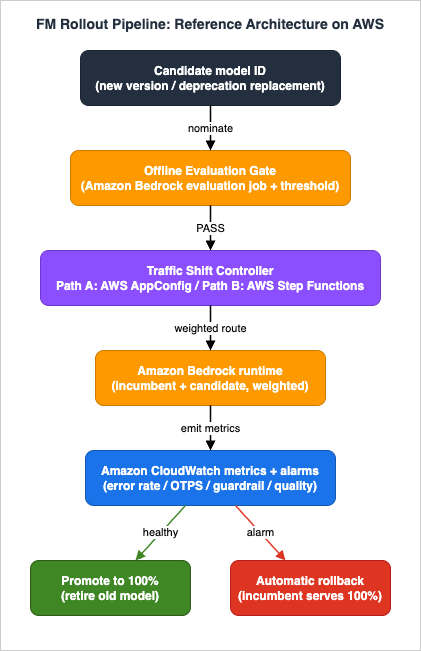
- Candidate selection. A new model ID (a new provider version, or a replacement for a deprecating model) is nominated. In Amazon Bedrock this is a foundation-model ID or, more commonly for production, a cross-region inference profile ID.
- Offline evaluation gate. Before any live traffic touches the candidate, an Amazon Bedrock evaluation job scores it against a curated dataset. A threshold check turns the scores into a pass/fail signal. Fail here and the candidate never reaches production. (Section 3; details in No.11.)
- Traffic shift (canary). A small, growing slice of live traffic is routed to the candidate. Two mechanisms are presented: Path A uses an AppConfig feature flag with a gradual deployment strategy and CloudWatch-alarm-linked automatic rollback (Section 5); Path B uses a Step Functions state machine as an explicit canary control loop — shift, wait, evaluate, then increase or roll back (Section 6).
- Online verification. While the canary is live, CloudWatch metrics compare the candidate against the incumbent on error rate, latency, guardrail intervention rate, and a quality sample. Alarms encode the abort conditions. (Section 4.)
- Promote or roll back. If the candidate stays healthy through the bake window, it is promoted to 100% and the old model is retired from the routing config. If any alarm fires, the pipeline reverts to the incumbent. (Sections 5, 6, 9.)
The recurring AWS services and their roles:
* You can sort the table by clicking on the column name.
| Service | Role in the pipeline | Primary AWS reference |
|---|---|---|
| Amazon Bedrock (runtime) | Serves both the incumbent and candidate models during the shift | AWS/Bedrock metrics namespace |
| Amazon Bedrock (evaluation jobs) | Offline quality gate before any traffic shift | CreateEvaluationJob API |
| AWS AppConfig | Holds the active-model feature flag; runs the gradual deployment and alarm rollback (Path A) | Deployment strategies |
| AWS Step Functions | Explicit canary control loop: shift → wait → evaluate → decide (Path B) | Service integration patterns |
| Amazon EventBridge / Scheduler | Triggers the pipeline on a schedule or on an event | EventBridge Scheduler → Step Functions |
| Amazon CloudWatch | Canary metrics, metric-math derived signals, and the alarms that drive rollback | Bedrock runtime metrics |
| AWS CDK | Infrastructure as code; environment-specific model IDs and deployment strategies | aws_bedrock, aws_appconfig |
A design decision runs through the whole architecture: the application never hardcodes the model ID. It reads the active model from a configuration source — an AppConfig feature flag, or a value the Step Functions loop writes — so that changing which model serves traffic is a control-plane action, never a code deploy. That indirection is what makes both instant rollback and gradual shifting possible.
3. Offline Evaluation Gates
The cheapest place to catch a bad candidate is before it ever serves a request. The offline gate runs the candidate against a fixed dataset, scores it, and compares the scores to a threshold. Only a passing candidate is allowed to enter the traffic-shift stage.3.1 What the gate is made of
On AWS the managed primitive for this is an Amazon Bedrock evaluation job. You create one with theCreateEvaluationJob API (aws bedrock create-evaluation-job). Bedrock Evaluations supports two automatic modes relevant to a rollout gate:- Programmatic (built-in metrics). The job scores model outputs with deterministic algorithms on metrics such as
Builtin.Accuracy,Builtin.Robustness, andBuiltin.Toxicityfor a given task type, using a curated or bring-your-own prompt dataset. No evaluator model is involved. - LLM-as-a-judge. An evaluator model — declared in
evaluatorModelConfig— scores the candidate's outputs on judge metrics such asBuiltin.Correctness,Builtin.Completeness, andBuiltin.Faithfulness, or against custom criteria. You can define a custom metric (for example, a "Comprehensiveness" rubric) using a prompt template with{{prompt}},{{prediction}}, and optional{{ground_truth}}variables.
A minimal automatic evaluation job is created like this:
aws bedrock create-evaluation-job \
  --job-name "rollout-gate-candidate-001" \
  --role-arn "arn:aws:iam::ACCOUNT_ID:role/BedrockEvaluationRole" \
  --evaluation-config '{
    "automated": {
      "datasetMetricConfigs": [
        {
          "taskType": "QuestionAndAnswer",
          "dataset": { "name": "rollout-golden-set", "datasetLocation": { "s3Uri": "s3://my-eval-bucket/datasets/golden.jsonl" } },
          "metricNames": ["Builtin.Accuracy", "Builtin.Robustness"]
        }
      ]
    }
  }' \
  --inference-config '{
    "models": [
      { "bedrockModel": { "modelIdentifier": "CANDIDATE_MODEL_ID", "inferenceParams": "{\"inferenceConfig\":{\"maxTokens\":1024}}" } }
    ]
  }' \
  --output-data-config '{ "s3Uri": "s3://my-eval-bucket/results/candidate-001/" }'
3.2 Turning scores into a pass/fail decision
An evaluation job produces scores; a gate produces a boolean. Wrap the job in a small orchestration that:- Starts the evaluation job for the candidate model ID.
- Waits for the job to reach a terminal status.
- Reads the aggregated metrics from the output S3 location.
- Compares each metric against a configured threshold (and, for a migration, against the incumbent model's baseline scores on the same dataset).
- Emits
PASSorFAIL.
A robust gate compares the candidate not only to an absolute floor but to the model it would replace. "The candidate scores 0.86 on correctness" is far less actionable than "the candidate scores 0.86 versus the incumbent's 0.88 on the identical golden set" — a small absolute number can still be a regression. Run the incumbent through the same dataset (or reuse a stored baseline) so the gate can express relative deltas, and set a tolerance band rather than a single point (for example, "correctness must not drop by more than 2 points, and no per-category score may drop by more than 5 points"). Per-category thresholds are what catch the "better on average, worse on a slice" failure mode.
The gate is the first
Choice in the pipeline. In the Step Functions implementation (Section 6) it is a task that starts the job via the AWS SDK integration, followed by a Wait + GetEvaluationJob polling loop that holds the state machine until the job reaches a terminal status, and then a Choice state that branches on the computed pass/fail. Only the PASS branch proceeds to the traffic shift.What the offline gate cannot tell you. A dataset is a sample, not production. The gate catches gross regressions cheaply, but it cannot see your real traffic mix, real latency under real concurrency, or interactions with your guardrails and tools. That is exactly why the offline gate is necessary but not sufficient, and why the pipeline still shifts traffic gradually and watches online metrics. The gate lowers the probability that the canary stage ever has to trigger a rollback; it does not remove the need for one.
4. Choosing Canary Metrics for LLM Workloads
Once the candidate is serving a slice of live traffic, the canary succeeds or fails on the metrics you chose to watch. Pick the wrong signals and you either promote a regression or roll back a healthy model. For LLM workloads, four families of signal matter, and only some of them are available as standard metrics.4.1 Error rate and throttling
Amazon Bedrock publishes runtime metrics to theAWS/Bedrock CloudWatch namespace, dimensioned by ModelId. The directly usable error and volume signals are:* You can sort the table by clicking on the column name.
| Metric | Unit | What it tells you |
|---|---|---|
Invocations | Count | Successful requests to Converse, ConverseStream, InvokeModel, InvokeModelWithResponseStream |
InvocationClientErrors | Count | Client-side errors (4xx-class) — often a sign the request shape no longer matches the model |
InvocationServerErrors | Count | AWS server-side errors |
InvocationThrottles | Count | Throttled requests (do not count as Invocations or errors) |
InvocationLatency | Milliseconds | Time from request sent to last token received |
TimeToFirstToken | Milliseconds | Time to first token, for streaming operations |
OutputTokenCount | Count | Tokens in the output |
Because these are dimensioned by model ID, you can build a canary error-rate alarm that watches only the candidate model: an alarm on
InvocationServerErrors (or InvocationClientErrors) for ModelId = CANDIDATE_MODEL_ID crossing a threshold within the bake window aborts the rollout. Watch InvocationClientErrors in particular during a migration — a spike there frequently means the new model rejects a request parameter the old one accepted (a removed sampling parameter, a changed thinking-config shape), which is precisely the kind of silent break Section 9 discusses.4.2 Latency, and separating "slower service" from "longer answers"
RawInvocationLatency is a blunt canary signal for LLMs because a newer model may legitimately produce longer answers, inflating end-to-end latency without any service-side regression. To distinguish the two, Bedrock's documentation defines an output-tokens-per-second (OTPS) signal built from a CloudWatch metric-math expression over three published metrics:OTPS = OutputTokenCount / (InvocationLatency - TimeToFirstToken) * 1000ConverseStream / InvokeModelWithResponseStream), because the TimeToFirstToken metric is published only for streaming API operations. Expressed as metric math with m1 = InvocationLatency, m2 = OutputTokenCount, m3 = TimeToFirstToken, all at the p50 statistic over a 5-minute period:m2 / (m1 - m3) * 1000InvocationLatency with steady OTPS just means the candidate is writing more tokens. Alarm on OTPS (and on TimeToFirstToken for the perceived responsiveness of streaming UIs), not on raw latency alone. For latency and throughput engineering beyond the canary, this series' Amazon Bedrock Inference Throughput and Latency Optimization goes deep.4.3 Guardrail intervention rate
If your workload runs Amazon Bedrock Guardrails, the rate at which the guardrail intervenes is a behavioral canary signal that a code error rate will never surface. A new model can shift the intervention rate in either direction: intervening far more often (over-blocking legitimate traffic, a user-visible regression) or far less often (a safety regression). Emit an intervention counter as a custom CloudWatch metric, keyed by model ID, from the application or from guardrail invocation logging, and include it in the canary comparison. A large swing in either direction during the bake window is an abort condition. The guardrail mechanics themselves are covered in this series' Amazon Bedrock Guardrails Implementation Deep Dive.4.4 Quality sampling
Error rate, latency, and intervention rate are all necessary but none of them measures whether the answers are good. The only way to see quality online is to sample. Two patterns compose well:- Asynchronous LLM-as-a-judge on a sample. Log a small, randomized fraction of candidate-served request/response pairs and score them out-of-band with an evaluator model (the same judge you used in the offline gate, for continuity). Publish the rolling judge score as a custom CloudWatch metric and alarm on a drop. This is an online echo of the offline gate, run against real traffic instead of a dataset.
- Implicit user signals. Thumbs-down rate, retry rate, escalation-to-human rate, and conversation-abandonment rate are cheap proxies for quality that your application already has. A jump in any of them, keyed to the model dimension, is a canary abort signal.
The table below summarizes the canary signal set. The rule of thumb: pick at least one signal from each family, alarm on all of them, and make any single alarm sufficient to trigger rollback (default-deny on the model's health).
* You can sort the table by clicking on the column name.
| Signal family | Metric source | Example canary alarm condition |
|---|---|---|
| Error / throttle | AWS/Bedrock native, by ModelId | InvocationServerErrors or InvocationClientErrors for the candidate exceeds threshold |
| Latency / throughput | AWS/Bedrock native + metric math | OTPS drops below floor, or TimeToFirstToken p90 exceeds budget |
| Guardrail intervention | Custom metric | Intervention rate deviates from incumbent by more than tolerance |
| Quality | Custom metric (async judge + implicit signals) | Rolling judge score drops, or thumbs-down / retry rate rises |
5. Rollout Path A: AppConfig Gradual Deployment with Alarm Rollback
The first traffic-shifting mechanism uses AWS AppConfig as the routing control plane. AppConfig is a managed configuration service that deploys configuration data — including feature flags — to your application progressively, monitors CloudWatch alarms during the rollout, and automatically rolls the configuration back if an alarm fires. That is exactly the shape of a canary with automated rollback, with AWS operating the rollout controller. Full coverage of AppConfig as a service is delegated to Dynamic Model Routing and Configuration Management for Generative AI with AWS AppConfig; this section covers the rollout-specific mechanics.5.1 The model-selection flag
Model the "which model serves traffic" decision as an AppConfig configuration. AppConfig supports two profile types: feature flags (stored in the AppConfig hosted store, with typed attributes and constraints) and free-form configurations (hosted, or backed by S3, SSM Parameter Store, and others). Either works. A feature flag with attributes is convenient because you can carry the active model ID plus a rollout weight:{
"version": "1",
"flags": {
"activeModel": {
"name": "activeModel",
"attributes": {
"primaryModelId": { "constraints": { "type": "string", "required": true } },
"candidateModelId": { "constraints": { "type": "string", "required": false } },
"candidateWeight": { "constraints": { "type": "number", "required": false } }
}
}
},
"values": {
"activeModel": {
"enabled": true,
"primaryModelId": "model-id-of-the-incumbent",
"candidateModelId": "model-id-of-the-candidate",
"candidateWeight": 0
}
}
}
GetLatestConfiguration API), reads primaryModelId, and uses candidateModelId/candidateWeight to route a fraction of requests to the candidate. The key architectural point: the model ID lives in configuration, not in code, so a rollout is a configuration deployment.5.2 Deployment strategies: how the shift is shaped
An AppConfig deployment strategy defines how a configuration change rolls out. Two settings shape the curve, plus a bake time:- Deployment type (growth type):
Linear(deploy in equal increments of the growth factor across the duration) orExponential(G*(2^N)— 2%, 4%, 8%, … of targets). - Growth factor (step percentage): the percentage of targets to receive the new configuration during each interval.
- Deployment duration: the total time over which the growth plays out.
- Final bake time: after the configuration reaches 100% of targets, AppConfig continues to monitor CloudWatch alarms for this many minutes before declaring the deployment complete. If an alarm triggers during the deployment or the bake time, AppConfig rolls the configuration back.
AWS ships predefined strategies so you do not have to hand-tune these:
* You can sort the table by clicking on the column name.
| Predefined strategy | Shape | Monitor / bake |
|---|---|---|
AppConfig.Linear20PercentEvery6Minutes | 20% of targets every 6 minutes (30-minute rollout) | Monitors CloudWatch alarms for 30 minutes — AWS-recommended for production |
AppConfig.Canary10Percent20Minutes | Exponential, 10% growth over 20 minutes | Monitors alarms for 10 minutes — AWS-recommended, canary-shaped |
AppConfig.AllAtOnce | 100% immediately | Monitors alarms for 10 minutes (quick) |
AppConfig.Linear50PercentEvery30Seconds | 50% every 30 seconds (1-minute rollout) | Monitors alarms for 1 minute — testing/demonstration only |
For a model rollout,
AppConfig.Canary10Percent20Minutes or AppConfig.Linear20PercentEvery6Minutes map directly onto "shift a small slice, bake, expand." You can also define a custom strategy when you want a longer bake window than the predefined ones provide — model regressions can take longer to surface than an application bug, so a longer bake time is often warranted.5.3 Wiring the alarm-linked automatic rollback
The rollback is not something you script; it is a property of the AppConfig environment. You configure CloudWatch alarms on the AppConfig environment, and AppConfig monitors them for the duration of every deployment plus the bake time. If any monitored alarm goes intoALARM, AppConfig automatically rolls the configuration back to the previous version. For this to work you must grant AppConfig an IAM role that permits it to read the alarms and perform the rollback.The canary metrics from Section 4 are the alarms you attach: a candidate error-rate alarm, an OTPS-floor alarm, a guardrail-intervention-deviation alarm, a quality-drop alarm. Because AppConfig watches these throughout the gradual deployment, a regression that appears at the 10% step triggers a rollback before the change ever reaches the remaining 90% of traffic.
5.4 Expressing Path A in the CDK
The AppConfig deployment strategy and environment are ordinary CDK resources. The L1 constructaws-cdk-lib.aws_appconfig.CfnDeploymentStrategy exposes the strategy settings directly, including finalBakeTimeInMinutes:import * as appconfig from 'aws-cdk-lib/aws-appconfig';
const strategy = new appconfig.CfnDeploymentStrategy(this, 'ModelCanaryStrategy', {
name: 'model-canary-10pct-long-bake',
deploymentDurationInMinutes: 20,
growthFactor: 10,
growthType: 'EXPONENTIAL', // 'LINEAR' | 'EXPONENTIAL'
finalBakeTimeInMinutes: 30, // longer bake than the predefined canary
replicateTo: 'NONE',
});
monitors), grant the rollback role, and reference this strategy when you start a deployment of the activeModel configuration. The alarm ARNs are the same CloudWatch alarms you defined for the metrics in Section 4.5.5 What Path A optimizes for, and its one caveat
Path A is the lower-operational-overhead option: AWS runs the rollout controller and the rollback loop; you supply a flag, a strategy, and alarms. It is ideal when your application already polls AppConfig and when "shift the config to a growing fraction of application hosts, bake, roll back on alarm" is the semantics you want.The caveat to state honestly: AppConfig's percentage is a percentage of deployment targets (the hosts or agents polling the configuration), not a percentage of individual requests. As the deployment progresses, a growing fraction of your application instances receives the new
activeModel value. If your fleet is large and requests are evenly distributed, target-percentage approximates request-percentage well. If you need precise per-request weighting, encode a weight in the flag (the candidateWeight attribute above) and have the application perform weighted routing per request — the deployment then rolls out the weight progressively. AppConfig also supports entity-based gradual deployments (with a recent AppConfig Agent), which guarantee that once a user or segment receives a configuration version they keep receiving that same version for the rest of the deployment — a useful property for session consistency, discussed in Section 8.6. Rollout Path B: Step Functions Canary Control Loop
When you want an explicit, auditable control loop — shift a precise weight, wait a defined bake, read specific metrics, decide, and repeat — model the canary as an AWS Step Functions state machine. Path B trades AppConfig's managed simplicity for full control over the loop's logic and for a first-class execution history you can inspect per rollout.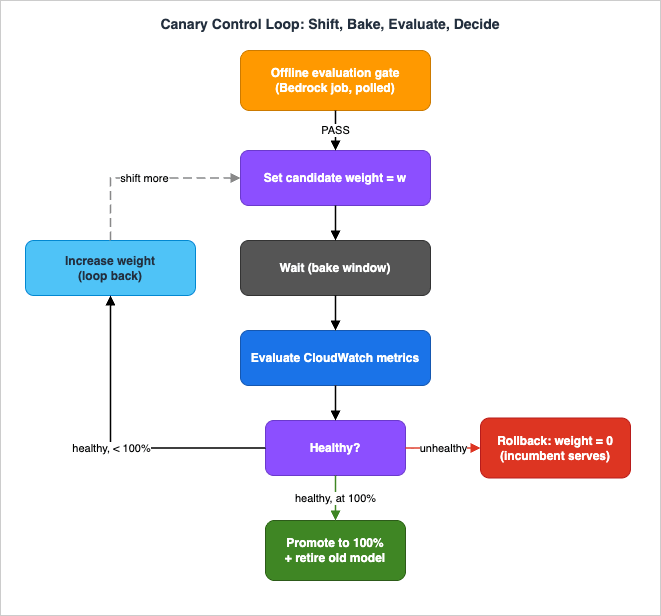
6.1 The loop as an ASL state machine
The state machine encodes the canary loop directly. Its skeleton, in Amazon States Language:StartEvaluation— aTaskthat starts the Bedrock evaluation job through the AWS SDK integration (arn:aws:states:::aws-sdk:bedrock:createEvaluationJob). Bedrock's optimized Step Functions integration does not cover evaluation jobs, and AWS SDK integrations do not support the.sync(RUN_JOB) pattern, so the state machine waits for completion with a polling loop: aWaitstate, aGetEvaluationJobcall, and aChoicethat re-enters the wait until the job reaches a terminal status (Section 3).EvaluationGate— aChoicestate that branches on the computed pass/fail.FAILroutes to a terminalNotifyFailure;PASSproceeds.SetWeight— aTaskthat writes the current candidate weight to the routing configuration (an AppConfig deployment, an SSM parameter, or a DynamoDB item the application reads).BakeWait— aWaitstate that pauses for the bake window (long enough for metrics to accumulate at the current weight).GetMetrics— aTaskthat reads the canary metrics for the candidate model from CloudWatch (GetMetricData), computing the derived signals (error rate, OTPS, intervention deviation, quality score).HealthCheck— aChoicestate. If any signal is out of bounds, route toRollback. Otherwise, route toPromoteif the weight is already at 100%, or toIncreaseWeight(which loops back toSetWeight).Rollback— aTaskthat sets the candidate weight to 0, restoring 100% incumbent, then a terminalNotifyRollback.Promote— aTaskthat pins the candidate as the new primary and retires the old model ID from the config, then a terminalSucceed.
Expressed as ASL (abridged), the wait-and-decide core looks like:
{
  "SetWeight": {
    "Type": "Task",
    "Resource": "arn:aws:states:::aws-sdk:appconfig:startDeployment",
    "Parameters": { "candidateWeight.$": "$.weight" },
    "Next": "BakeWait"
  },
  "BakeWait": {
    "Type": "Wait",
    "SecondsPath": "$.bakeSeconds",
    "Next": "GetMetrics"
  },
  "GetMetrics": {
    "Type": "Task",
    "Resource": "arn:aws:states:::lambda:invoke",
    "Parameters": { "FunctionName": "evaluate-canary-metrics", "Payload.$": "$" },
    "ResultPath": "$.health",
    "Next": "HealthCheck"
  },
  "HealthCheck": {
    "Type": "Choice",
    "Choices": [
      { "Variable": "$.health.healthy", "BooleanEquals": false, "Next": "Rollback" },
      { "Variable": "$.weight", "NumericGreaterThanEquals": 100, "Next": "Promote" }
    ],
    "Default": "IncreaseWeight"
  }
}
IncreaseWeight bumps $.weight (for example along a 5% → 25% → 50% → 100% schedule) and transitions back to SetWeight, closing the loop.6.2 Two ways to read the canary decision
TheGetMetrics/HealthCheck pair can be built two ways, and the choice matters for who owns the abort logic:- Poll-and-decide (shown above). A
Waitbakes, then a Lambda task pullsGetMetricDataand computes health. Simple, fully visible in the execution history, and the decision logic lives in your Lambda. Good default. - Alarm-driven callback. Use the callback pattern: a
Taskwith the.waitForTaskTokenintegration pattern pauses the state machine and passes a task token ($$.Task.Token) into a downstream process. A CloudWatch alarm → EventBridge rule → resumer Lambda callsSendTaskSuccess(healthy, proceed) orSendTaskFailure(alarm fired, roll back). This makes the state machine react to the same alarms that Path A uses, rather than polling. Callback tasks must receive the token back from a principal in the same AWS account, and you should configure a heartbeat/timeout so a lost token cannot pause the rollout indefinitely.
Both are legitimate; the poll-and-decide loop is easier to reason about, while the callback pattern reuses your existing alarm topology and avoids busy-polling.
6.3 Triggering the pipeline
A rollout does not have to be a manualStartExecution. Amazon EventBridge Scheduler can start the state machine on a cadence (a nightly or weekly check for newer model versions), and an EventBridge rule can start it in response to an event — for example, a deprecation notice landing in your inbox as an event, or a new evaluation dataset being published. For direct model calls inside the workflow (for instance, a smoke-test invocation of the candidate before shifting any real traffic), Step Functions offers the optimized BedrockInvokeModel integration, so the state machine can call Bedrock without a Lambda in between.6.4 Path A versus Path B
* You can sort the table by clicking on the column name.| Dimension | Path A: AppConfig | Path B: Step Functions |
|---|---|---|
| Who runs the loop | AWS (managed rollout + rollback) | You (explicit ASL state machine) |
| Rollback trigger | CloudWatch alarm monitored by AppConfig | Choice on metrics, or alarm → SendTaskFailure |
| Traffic-shift unit | Percentage of deployment targets (or a weight you encode) | Any weight you write to the routing config |
| Per-rollout audit trail | AppConfig deployment events | Full Step Functions execution history |
| Operational overhead | Lower | Higher, but more control |
| Best when | The app already polls AppConfig; standard canary shape fits | You need custom loop logic, precise weighting, or an auditable per-rollout record |
The two paths are not mutually exclusive. A common composition is Path B for orchestration (evaluation gate, decision logic, promotion/retirement) with the actual traffic shift executed through an AppConfig deployment — the Step Functions
SetWeight task starts an AppConfig deployment, and AppConfig's own alarm rollback acts as a second safety net beneath the state machine's explicit checks.7. Environment Promotion with CDK
A model that passed in staging still has to reach production, and it should travel the same pipeline in each environment rather than being hand-edited per stage. The CDK expresses the pipeline once and parameterizes the model IDs and rollout aggressiveness per environment.7.1 Environment-specific model IDs
Reference Bedrock foundation models in the CDK withaws-cdk-lib.aws_bedrock.FoundationModel.fromFoundationModelId(scope, id, foundationModelId), which constructs a reference to a base model given a FoundationModelIdentifier (the class exposes constants, and you can pass an identifier for models not yet enumerated). Note that FoundationModel exposes only modelId and modelArn — it has no grant*() helper methods — so you grant bedrock:InvokeModel with an explicit IAM policy statement scoped to modelArn, or use the handle to derive an environment variable for the application:import * as bedrock from 'aws-cdk-lib/aws-bedrock';
import * as iam from 'aws-cdk-lib/aws-iam';
interface RolloutStageProps {
primaryModelId: string; // current production model for this environment
candidateModelId?: string; // model under evaluation, if a rollout is in progress
}
// Grant the app role invoke permission on the model it may serve
const primaryModel = bedrock.FoundationModel.fromFoundationModelId(
this, 'PrimaryModel',
new bedrock.FoundationModelIdentifier(props.primaryModelId),
);
appRole.addToPolicy(new iam.PolicyStatement({
actions: ['bedrock:InvokeModel'],
resources: [primaryModel.modelArn],
}));
aws-cdk-lib.aws_bedrock.CfnApplicationInferenceProfile; you pass its ARN to the application the same way you would a model ID. Keep the concrete model identifiers out of the article-as-code and in per-environment context (cdk.json context, SSM parameters, or stack props), and consult the official model-IDs page for the exact strings — they change as model generations ship, and hardcoding a specific generation is what a rollout exists to avoid.7.2 One pipeline, staged environments
Instantiate the same rollout construct per environment, tightening safety as you approach production:// dev: fast, permissive — this is where you learn the pipeline behaves
new RolloutStage(app, 'Dev', {
primaryModelId: ctx.dev.primary,
candidateModelId: ctx.dev.candidate,
strategy: 'AppConfig.Linear50PercentEvery30Seconds', // testing shape
});
// prod: slow, long bake, strict alarms
new RolloutStage(app, 'Prod', {
primaryModelId: ctx.prod.primary,
candidateModelId: ctx.prod.candidate,
strategy: 'model-canary-10pct-long-bake', // custom, long bake
});
7.3 Idempotency and least privilege as code
Two cross-cutting properties belong in the IaC:- Idempotency. Starting the same rollout twice (a retriggered schedule, a retried execution) must not create two competing canaries. Give each rollout a deterministic client token or execution name derived from the candidate model ID plus a rollout identifier, so a duplicate start is a no-op rather than a second shift.
- Least privilege. The application role needs
bedrock:InvokeModelon exactly the models it may serve during the rollout (primary and candidate) — grant both, and no more, so a misconfigured flag cannot invoke an unapproved model. The AppConfig rollback role needs only the CloudWatch-alarm-read and rollback permissions. The Step Functions role needsbedrock:CreateEvaluationJob,cloudwatch:GetMetricData, and the specific config-write action (appconfig:StartDeployment,ssm:PutParameter, ordynamodb:UpdateItem) — scoped to the specific resources.
8. Session Consistency and Prompt Compatibility
Two cross-cutting concerns decide whether a correctly wired rollout still behaves correctly during the shift: what happens to in-flight multi-turn sessions, and whether your prompts survive the model change at all.8.1 Keeping a session on one model
During a shift, some requests go to the candidate and some to the incumbent. For a stateless, single-shot request this is fine. For a multi-turn conversation, it is not: if turn 3 of a session lands on a different model than turns 1–2, you can get a visible discontinuity — a tone change, a format change, or a model that re-derives context the previous model had already established. The conversation "splits" across two models mid-flight.The fix is sticky routing: pin a session to whichever model served its first turn, for the life of the session. Implementation options, cheapest first:
- Deterministic hashing. Route on a stable session key (conversation ID) hashed into the weight band. The same session always hashes to the same side of the split, so it stays on one model without any stored state.
- Explicit pin. Store the chosen model ID in the session/conversation record on the first turn and read it on every subsequent turn. More storage, but exact.
- Entity-based deployment. AppConfig's entity-based gradual deployments provide this at the config layer: once a user or segment receives a configuration version, they keep receiving that same version for the rest of the deployment, regardless of which compute resource serves the request. That is sticky routing without you building it.
Whatever the mechanism, decide the model once per session and carry the decision forward.
8.2 Prompt compatibility and regression
A model swap can break prompts even when nothing about your infrastructure is wrong. Newer models change defaults and reject old parameters: a request that set a sampling parameter or a fixed thinking-token budget on the old model can return a 400 on the new one; a prompt that relied on assistant-message prefilling to force a format may no longer be accepted; instruction-following becomes more literal, so an aggressively worded system prompt that was tuned to overcome an older model's reluctance can now over-trigger. These are exactly theInvocationClientErrors spikes and quality-score drops your canary is built to catch — but catching them at 10% traffic is a poor substitute for not shipping them.Two practices reduce the risk before the rollout starts:
- Treat prompts as versioned artifacts tied to the model they were tuned for, and re-validate the prompt set against the candidate as part of the offline gate. The versioning mechanics — Amazon Bedrock Prompt Management, prompt-as-code, and CI validation — are the subject of this series' Prompt Lifecycle Management on AWS.
- Consult the model-specific migration guidance for the parameter and behavioral changes between the incumbent and candidate. The concrete list of what changes between Claude generations — removed parameters, prefill behavior, tokenizer and token-accounting shifts, prompt-tuning adjustments — is enumerated in Anthropic Claude Model Migration Guide. This article's pipeline is how you ship those changes safely; that guide is how you make them.
The division of labor is worth stating plainly: prompt compatibility is a model-behavior problem solved by the migration guide and prompt lifecycle management; this article guarantees that whatever prompt/model pairing you ship is shipped behind a gate, a canary, and a rollback.
9. Failure Modes
A rollout pipeline is only as trustworthy as its behavior when things go wrong. Four failure modes deserve explicit design.9.1 Canary false positives and false negatives
The canary's decision is a statistical inference from a limited sample, so both error directions occur:- False positive (roll back a healthy model). A transient throttle spike, a noisy few minutes, or an alarm threshold set too tight can abort a perfectly good rollout. Mitigations: alarm on sustained conditions (M-of-N datapoints, not a single spike), size the bake window so the candidate serves enough traffic for the metric to be meaningful before you judge it, and use the OTPS signal (Section 4.2) so a legitimately-longer-answer model is not mistaken for a slow one. A false positive is the cheaper error — you stay on the known-good model — so tune toward catching real regressions, but do not make the pipeline so twitchy that no rollout ever completes.
- False negative (promote a regressed model). The offline gate's dataset missed the regression, and the online signals did not move enough during the bake window to trip an alarm. Mitigations: include quality sampling (Section 4.4), not just error rate; keep per-category thresholds in the offline gate; and hold the ability to roll back after promotion (Section 9.3) for regressions that only appear at full scale.
9.2 Split behavior during the shift
Covered mechanically in Section 8.1, but it is also a failure mode to monitor: during the shift, verify that sticky routing is actually holding. A bug in the hashing or pin logic shows up as sessions bouncing between models — detectable if you tag each response with the model that served it and alarm on within-session model changes. Treat a rise in mid-session model switches as its own abort condition, independent of quality metrics, because it degrades the experience even when both models are individually healthy.9.3 Rollback that cannot complete
The most dangerous assumption in any rollout is that rollback always works. Ways it can fail, and how to keep it available:- The incumbent is gone. If the rollout retired or deprovisioned the old model (or its provisioned throughput, or its cross-region profile) before the bake window closed, there is nothing to roll back to. Rule: never decommission the incumbent until the candidate is promoted and has soaked at 100%. Retirement is the last step of the pipeline, not a step during it.
- The rollback path shares the failure. If the same broken config change that shifted traffic also broke the routing layer, an automatic rollback may re-apply the broken artifact. Keep the last-known-good configuration versioned and immutable, and make rollback a revert to that specific version — which is exactly AppConfig's model (it rolls back to the previous configuration version), and what the Step Functions
Rollbackstate should write (weight = 0, restoring the untouched primary). - Rollback races in-flight requests. Setting the weight to 0 stops new candidate traffic; requests already in flight on the candidate still complete. That is usually fine, but if the candidate is erroring hard, add request-level fallback (retry on the primary) so in-flight failures do not reach users. General inference resilience patterns — retries with backoff and jitter, circuit breakers, stream recovery — are covered in this series' LLM Inference Resilience Patterns on AWS.
9.4 Residue after the cutover
A completed rollout leaves things behind that, if not cleaned up, become the next incident. After promotion, retire the old model ID from the routing configuration, remove now-dead feature-flag attributes, release any provisioned throughput or inference profile bound only to the retired model, and archive (do not delete in-flight) the rollout's evaluation artifacts for auditability. Leaving a stalecandidateModelId in the flag is how a future operator accidentally re-triggers a shift to a model nobody meant to serve. Make cleanup the explicit final state of the pipeline, not a manual afterthought.10. End-to-End Walkthrough
To make the pieces concrete, here is a single model update — replacing a soon-to-be-deprecated model with its newer successor in production — traced through the pipeline. The path is the same whether the trigger is a deprecation notice or a routine "is there a better model now?" check.- Trigger. An EventBridge Scheduler rule fires the rollout state machine on its weekly cadence (or an operator starts it manually after seeing a deprecation date on the lifecycle calendar). Input:
candidateModelId, target environment, rollout schedule. - Offline gate. The state machine's
StartEvaluationtask launches a Bedrock evaluation job (polled to completion withWait+GetEvaluationJob) that runs the candidate against the golden dataset and scoresBuiltin.Correctness,Builtin.Completeness, and a custom LLM-as-a-judge rubric.EvaluationGatecompares the scores to the incumbent's stored baseline. Suppose the candidate is within tolerance on every category —PASS. (Had it regressed, the pipeline would notify and stop here, with zero production impact.) - First canary step.
SetWeightwritescandidateWeight = 5. Depending on the chosen mechanism, this either starts an AppConfig deployment of theactiveModelflag (Path A) or updates the routing parameter the application reads (Path B). Sticky routing pins each conversation to one model. 5% of new sessions now serve the candidate; the rest stay on the incumbent. - Bake and observe.
BakeWaitpauses. During the bake, CloudWatch collectsInvocations,InvocationClientErrors,InvocationLatency,TimeToFirstToken, andOutputTokenCountfor the candidate model ID, plus the custom guardrail-intervention and async-judge-quality metrics. The dashboard shows candidate and incumbent side by side. - Health check.
GetMetricscomputes the derived signals: candidate error rate near incumbent, OTPS within floor, guardrail intervention within tolerance, rolling judge score steady.HealthCheckseeshealthy = trueand weight below 100, so it routes toIncreaseWeight. - Expand. The loop repeats at 25%, then 50%, then 100%, baking and checking at each step. At any step, an out-of-bounds signal (say, a jump in
InvocationClientErrorsbecause the candidate rejects a parameter the incumbent accepted — a Section 8.2 compatibility break) sendsHealthChecktoRollback, which sets the weight to 0. The incumbent, never decommissioned, immediately serves 100% again, and the pipeline notifies with the failing metric attached. - Promote. The candidate reaches 100% and soaks through the final bake window with all signals healthy.
Promotepins the candidate as the newprimaryModelId. - Retire and clean up. Only now does the pipeline retire the old model ID from the configuration, clear the
candidateModelId/candidateWeightattributes, release the retired model's provisioned throughput, and archive the rollout's evaluation and metric artifacts. The pipeline reaches its terminalSucceedstate. Production is now serving the new model, and the whole rollout is a single, inspectable execution history.
Under Path A, steps 3–7 collapse into a single AppConfig gradual deployment whose alarm monitoring performs the health checks and rollback automatically; under Path B, they are the explicit loop above. Either way, the invariant holds: no more than a small, bounded slice of traffic is ever exposed to an unproven model, and reverting to the known-good model is always one control-plane action away.
11. Frequently Asked Questions
Is a foundation-model swap really different from a normal config change?Mechanically it is a config change — you change a model ID. Behaviorally it changes the output of every request: quality, latency, refusal and guardrail-intervention rates, tool-calling reliability, and how your prompts land. Those shifts are frequently silent (HTTP 200 with a degraded answer). Treating it as a plain setting is what makes it risky; treating it as a deployment — with a gate, a canary, and a rollback — is the point of this pipeline.
Should I use Path A (AppConfig) or Path B (Step Functions)?
Start with Path A if your application already polls AppConfig and a standard canary shape (shift, bake, alarm-rollback) fits — AWS runs the rollout controller for you. Choose Path B when you need custom loop logic, precise per-request weighting, or an auditable per-rollout execution record. They compose: a common design uses Step Functions for orchestration and decision logic while executing the actual shift through an AppConfig deployment, so AppConfig's alarm rollback is a second safety net beneath the state machine's checks.
What is the single most important canary metric for an LLM rollout?
There isn't one — that's the trap. Error rate alone misses quality regressions; latency alone misreads a legitimately more verbose model as "slow." Watch at least one signal from each family: error/throttle (native
AWS/Bedrock metrics by model ID), latency/throughput (OTPS via metric math, not raw latency), guardrail intervention rate (custom metric), and quality (async LLM-as-a-judge sampling plus implicit signals like thumbs-down and retry rate). Make any single alarm sufficient to trigger rollback.How do I keep a multi-turn conversation from splitting across two models mid-rollout?
Pin each session to whichever model served its first turn (sticky routing): deterministic hashing on the conversation ID, an explicit stored model pin per session, or AppConfig's entity-based gradual deployments, which keep a user or segment on one configuration version for the whole deployment. Decide the model once per session and carry it forward; alarm on within-session model changes to catch bugs in the pinning logic.
Why keep an offline evaluation gate if I'm going to shift traffic gradually anyway?
The gate is cheap and catches gross regressions before any user is exposed; the canary is expensive (it uses real traffic) and catches what a dataset can't — real mix, real concurrency, real guardrail and tool interactions. They are complementary: the gate lowers the probability that the canary ever has to roll back, and the canary covers what the gate's sample necessarily misses. Neither replaces the other.
Can the rollback itself fail, and how do I prevent that?
Yes, in three ways: the incumbent was decommissioned too early (never retire the old model until the candidate is promoted and soaked at 100%), the rollback re-applies the same broken artifact (roll back to a versioned, immutable last-known-good configuration — AppConfig does this natively), and in-flight requests race the weight change (add request-level fallback to the primary). Rollback being always-available is a property you design in, not one you assume.
Does this pipeline tell me how to fix prompts that break on the new model?
No — that is deliberately out of scope. This pipeline guarantees that whatever prompt/model pairing you ship travels behind a gate, a canary, and a rollback. Which prompts break and how to rewrite them is model-behavior work covered in the Anthropic Claude Model Migration Guide, and managing prompts as versioned artifacts is covered in Prompt Lifecycle Management on AWS.
12. Summary
A foundation-model update is a behavioral deployment, and it earns the same safety machinery as a code deploy. The FM Rollout Pipeline assembles that machinery from managed AWS primitives: an offline evaluation gate (Amazon Bedrock evaluation jobs plus a threshold check) that stops gross regressions before any user sees them; a gradual traffic shift implemented either as an AppConfig gradual deployment with alarm-linked automatic rollback (Path A) or a Step Functions canary control loop of shift → wait → evaluate → decide (Path B); online verification on canary metrics chosen for LLM workloads — error rate by model ID, throughput via OTPS metric math rather than raw latency, guardrail intervention rate, and sampled quality; and a promote-or-rollback decision with a clean retirement of the old model only after the new one has soaked at 100%.The design decisions that make it safe are few and load-bearing: the model ID lives in configuration, never in code, so shifting and reverting are control-plane actions; the canary exposes only a small, bounded slice of traffic to an unproven model; any single health signal is enough to abort; sessions are pinned to one model to prevent mid-flight splits; and the incumbent is never decommissioned while it is still the rollback target. Express the whole thing in the CDK so the pipeline that protected staging is the identical pipeline protecting production, and the model-behavior questions — which prompts break, what parameters changed — are handled by the migration and prompt-lifecycle guides this article delegates to. Ship model updates the way you ship code: gated, canaried, and reversible.
13. References
- AWS AppConfig - Working with deployment strategies (Linear / Exponential, growth factor, bake time)
- AWS AppConfig - Using predefined deployment strategies
- AWS AppConfig - Setting up AWS AppConfig (configure permissions for automatic rollback)
- AWS AppConfig - Creating feature flags and free-form configuration data
- Amazon Bedrock - Monitor runtime metrics using CloudWatch (AWS/Bedrock namespace)
- Amazon Bedrock - Diagnose InvocationLatency increases using output tokens per second (OTPS)
- Amazon Bedrock - Starting an automatic model evaluation job (CreateEvaluationJob)
- Amazon Bedrock - Create a model evaluation job using built-in metrics
- AWS Step Functions - Service integration patterns (RUN_JOB, WAIT_FOR_TASK_TOKEN)
- AWS Step Functions - Using EventBridge Scheduler to start a state machine execution
- AWS CDK - aws_bedrock.FoundationModel.fromFoundationModelId
- AWS CDK - aws_appconfig.CfnDeploymentStrategy
- Amazon Bedrock - Supported foundation models
- Amazon Bedrock Pricing (official)
- Anthropic Claude Model Migration Guide - model-to-model behavioral and API changes (companion article)
- AI Model Deprecation and Lifecycle Calendar - the motivation for model rollouts
- LLMOps Observability and Evaluation Architecture on AWS - the platform a rollout plugs into
- Amazon Bedrock Glossary - terminology reference
References:
Tech Blog with curated related content
Written by Hidekazu Konishi